What is marketing automation? How it works, examples, and where AI agents fit
A current guide for founders and small B2B marketing teams: how automations run, which tools do what, what to automate first and what to keep human, what it costs, and how to tell whether it is working.
42 min readWritten by Ampere
Short answer
What is marketing automation?
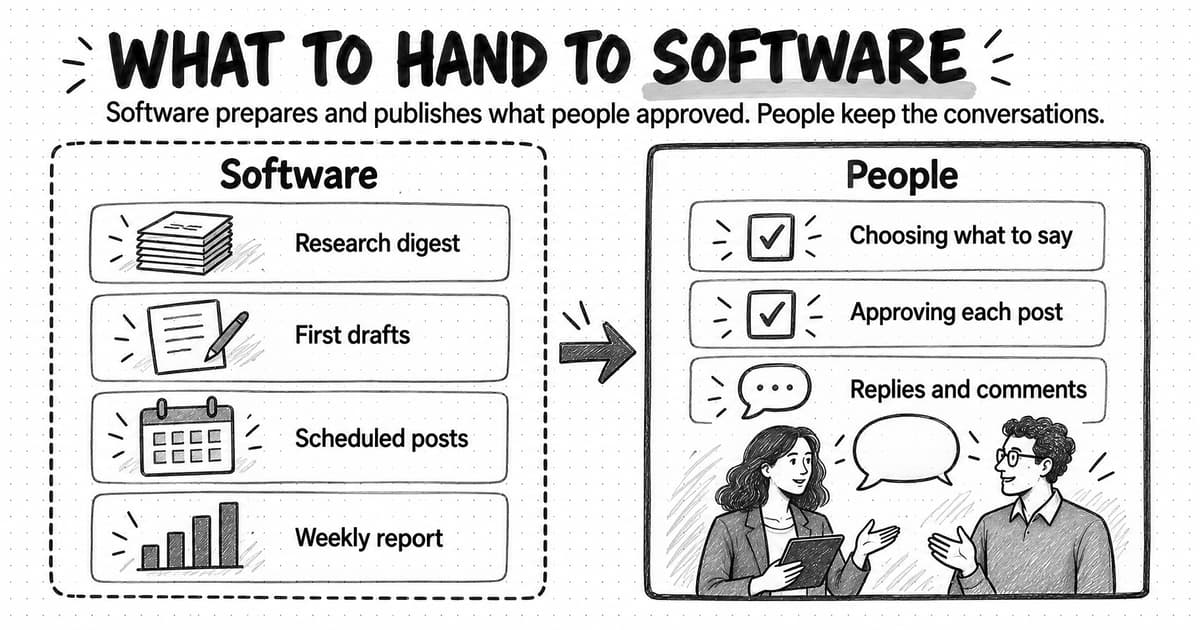
Marketing automation is the use of software to carry out repeatable marketing work, such as sending lifecycle emails, routing leads, cleaning records, and preparing reports, from saved rules that start on a schedule or after a defined event. Rules handle predictable steps; AI agents now handle steps that need reading or writing, and people still review anything public or irreversible.
Summary
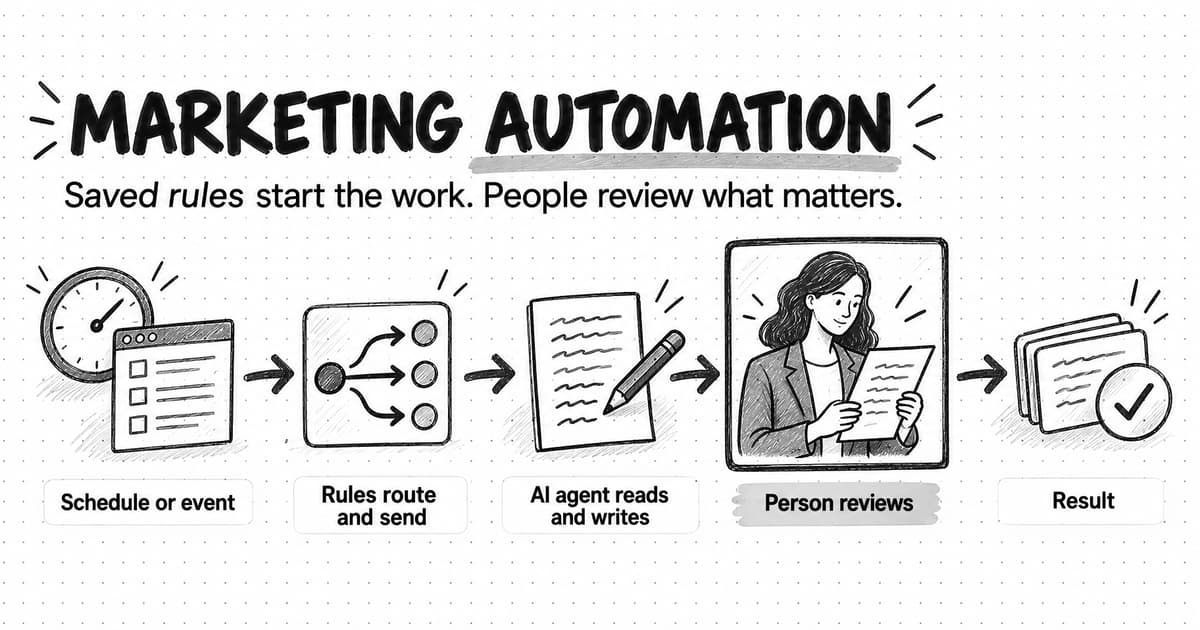
Marketing automation is a practice, not one product. Work counts as automated when a schedule or event starts it, its steps are saved in advance, and the output lands where someone can use it. Every automation has the same five parts: a trigger, conditions that run on data, actions, a review step for consequential output, and measurement.
The work splits into eight types: lifecycle email, lead scoring and routing, CRM hygiene, social, ads, reporting, content operations, and competitor monitoring. Each fits a different tool category, from marketing automation platforms and CRMs to integration tools, schedulers, and AI marketing agents, so compare categories by job before comparing vendors.
Rules suit routing, sending, and updating because they are cheap and predictable; AI agents suit researching and drafting because the steps depend on what they find, at higher cost and with output that needs review. A worked example of seven automations at a fictional four-person software company shows the division, with a person checking anything public.
Choose what to automate first by scoring frequency, effort saved, judgment needed, risk, and data readiness, and fix weak data before automating on it. Keep strategy, real conversations, sensitive moments, and final approval of public claims human, and guard against bad data, over-automation, spam rules, brand drift, and silent failure.
Start with one pilot written up in a one-page specification with an owner, review step, failure plan, baseline, and review date. Measure operational health, engagement, and business outcome rather than email opens, which privacy features can inflate, and retire any automation you would not build again today.
Contents
- What marketing automation means today
- How marketing automation works: trigger, conditions, actions, review, and measurement
- The main types of marketing automation
- The marketing automation tool landscape by category
- Rules-based automation versus AI-agent automation
- Seven marketing automations a small B2B team actually runs
- How to decide what to automate first
- What should not be automated
- The benefits of marketing automation, and what the evidence supports
- Costs, data requirements, and how marketing automation fails
- How to start: your first workflow, a pilot, and governance
- How to measure marketing automation
- Marketing automation glossary
- Decision table: which kind of automation fits the job
- Where Ampere fits in marketing automation
- Sources and further reading
- Frequently Asked Questions
A founder at a small software company signs up for a free trial of her own product to see what new users experience. Nothing arrives. No welcome email, no tip on day two, no nudge when the trial is about to end. Meanwhile her one marketer spends Monday mornings copying numbers from four dashboards into a slide, and a demo request that came in on Friday afternoon sits untouched until Tuesday because nobody saw the notification.
None of these problems needs more people. Each one is a piece of work that happens the same way every time, or that should happen whenever a specific thing occurs: a trial starts, a form is submitted, a week ends. Software can watch for those moments and carry out the agreed steps. That is the idea behind marketing automation.
Marketing automation is the use of software to carry out repeatable marketing work, such as sending emails, routing leads, updating records, and preparing reports, from saved rules that start the work on a schedule or when a defined event happens, instead of waiting for a person to do each step by hand. The rules decide when the work starts and what it does; people decide what the rules should be, review what matters, and judge whether the results are worth it.
For a long time the term meant one kind of product, the marketing automation platform, which sends email sequences and scores leads. Today the same work is spread across CRMs, integration tools, social schedulers, and AI marketing agents that can research and draft as part of an automated run, so a team can automate the same task in three different places.
This guide is for founders and marketing teams of one to five people at B2B software and AI companies. It explains how an automation works, the main types and tool categories, and how rules-based automation differs from AI-agent automation. It then walks through seven automations a small team actually runs, a method for choosing what to automate first, what to keep human, costs and failure modes, a first pilot, and measurement, and closes with a glossary and a decision table.
What marketing automation means today
Vendors define marketing automation in similar ways. IBM calls it the use of software and technology to manage routine marketing processes and tasks across channels. Salesforce's marketing automation guide describes technology that manages marketing processes and multichannel campaigns automatically. Both definitions are accurate, and both are written by companies that sell marketing automation platforms, so they naturally center the platform.
A more useful definition for a small team centers the work instead of the product. Any piece of marketing work becomes automated when three things are true. First, something other than a person starts it: a clock, a form submission, a change in a record, a new post on a competitor's site. Second, the steps it follows are saved in advance, either as fixed rules or as instructions an AI agent follows. Third, the output lands somewhere useful without someone having to remember to move it: an inbox, a CRM record, a team chat channel, a review queue.
By that test, a welcome email series is marketing automation. So is a rule that assigns every demo request to a salesperson within a minute, a weekly job that pulls campaign numbers into a report, and a watch that alerts you when a competitor changes its pricing page. A content calendar is not automation by itself, and neither is asking an AI chatbot to draft a post. The chatbot helps with the task, but someone still has to start it every time.
Automation is also not a strategy. It carries out decisions faster, including bad ones, and its rules can only encode what you already know about who should get which message and why. When people say "we need marketing automation," they usually mean one of several jobs, and the right tool depends on which one.
How marketing automation works: trigger, conditions, actions, review, and measurement
Every marketing automation, from a two-email welcome sequence to a weekly AI competitor brief, has the same five parts. Naming them makes an automation easier to design, explain, and debug.
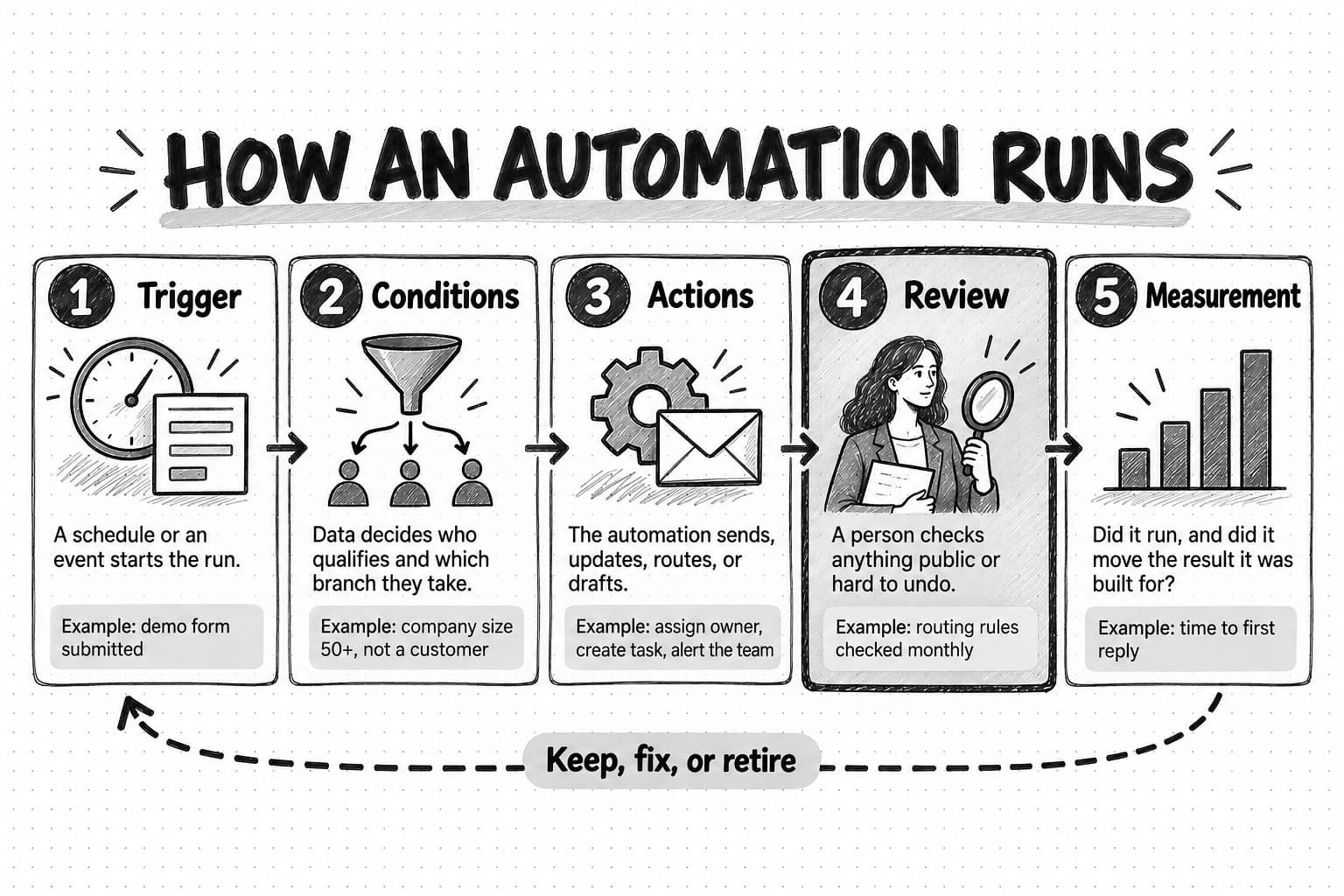
Open the five-parts diagram at full size (opens in a new tab).
The trigger starts the work
A trigger is the rule that starts a run. Time-based triggers start work on a schedule, such as every Monday at 9 a.m. or three days after signup. Event-based triggers start work when something happens: a demo form is submitted, a trial is about to expire, a monitored web page changes.
The trigger decides how often the automation runs and on what, and a trigger that fires on activity rather than meaning creates noise. "Whenever a contact opens an email" fires constantly and tells you little. "When a contact from a company that fits our customer profile visits the pricing page twice in a week" fires rarely and usually means something. For the detailed differences between scheduled and event-triggered automation, including lookback windows and duplicate protection, see how to automate marketing with AI agents.
Conditions and data decide who and what qualifies
Conditions filter the trigger: is this contact subscribed, is the company in a region we sell to, has this person already received the message? Conditions run on data, which is why data quality matters so much. A condition that excludes current customers works only if the CRM knows who the customers are.
Conditions are also where most branching happens. A trial welcome sequence might send one email to people who connected their data source on day one and a different email to people who did not. Each branch is a condition, and each condition is a small assumption about your buyers that you should be able to explain.
Actions do the work
Actions are what the automation does once the trigger fires and the conditions pass: send an email, create a task, update a field, post to a team channel, or start an AI agent on a research brief. A fixed action does the same thing every time; an action that calls an AI model or agent drafts, classifies, or summarizes, so its output changes with the input.
Actions differ in how easily you can undo them. An internal field can be changed back in a minute; an email to 4,000 people cannot be unsent. The less reversible the action, the more it needs a check before it runs.
Review keeps people in charge of consequential steps
Review is the point where a person checks the output before it goes further. Many automations need no review: a lead-routing rule that assigns an owner is easier to correct afterward than to approve each time. Others need it every time: anything that speaks publicly in your brand's name, makes a claim about a competitor, spends money, or contacts a large list. AI-generated outputs in particular need review, because a model can produce fluent text that is wrong, off-brand, or based on a misread source.
A good design states where review happens, who does it, and what happens if nobody does. "Drafts wait in the review queue and expire after five days" is a decision. "Someone will look at it" is not. The guide to content approval workflows covers how to set up sign-off without slowing the team down, and human-in-the-loop AI explains where human checkpoints belong when AI does part of the work.
Measurement tells you whether to keep it
Measurement asks whether the automation is running as designed and whether it produces the result it was built for, such as higher trial activation or more meetings booked. An automation that runs perfectly and changes nothing is a candidate for deletion. A later section covers measurement in detail.
The main types of marketing automation
Marketing automation covers several distinct jobs, and being vague about which one you mean leads to buying a large platform for a problem a simple rule could handle. These are the eight types most relevant to a lean B2B team.
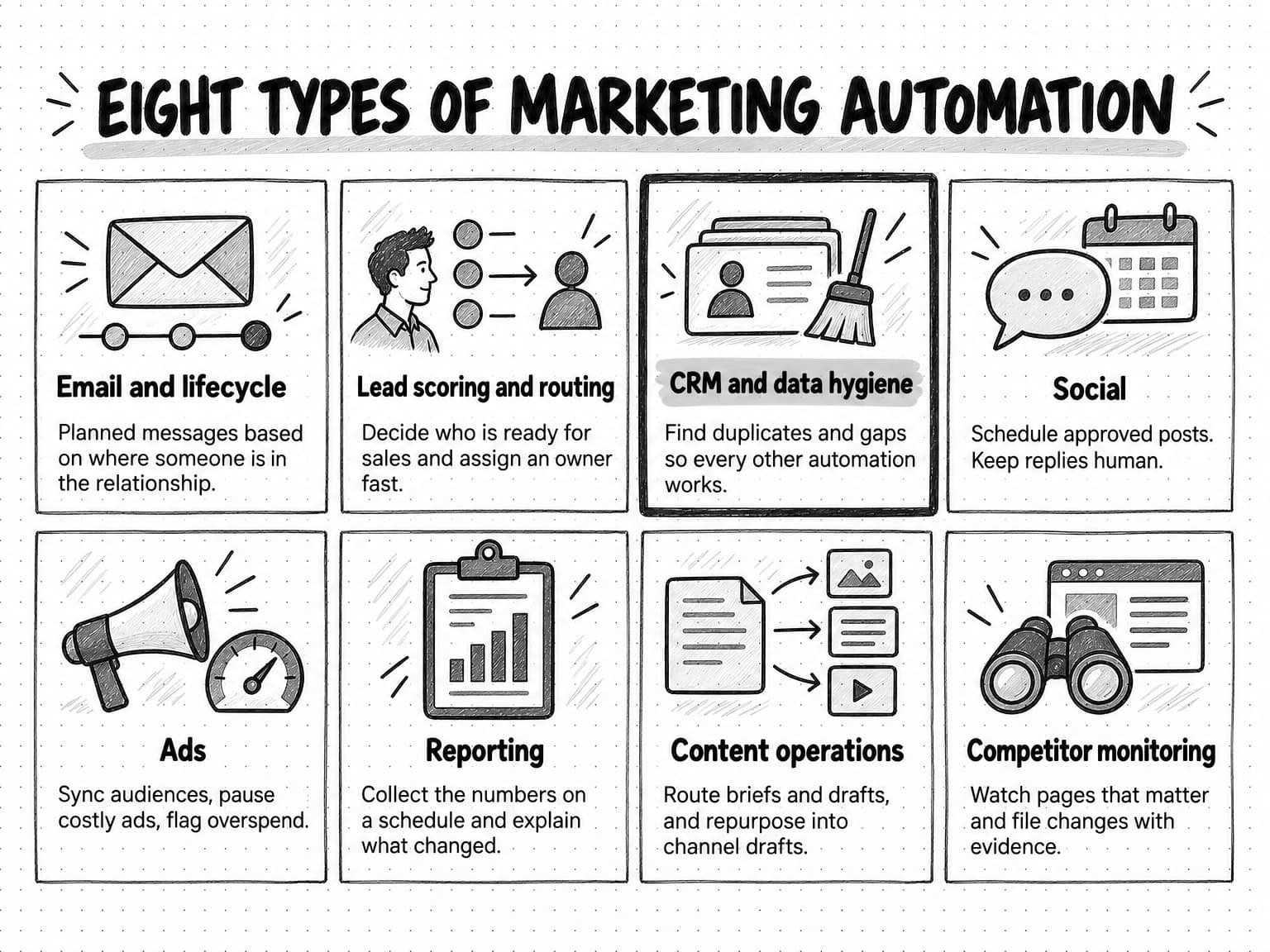
Open the eight types of marketing automation at full size (opens in a new tab).
Email and lifecycle automation
Email and lifecycle automation sends a planned series of messages based on where someone is in their relationship with you: a new subscriber, a trial user, a new customer, a customer approaching renewal, an account that has gone quiet. A drip campaign sends a fixed sequence on a timetable. A lifecycle program reacts to behavior, so a trial user who invites a teammate receives a different message from one who has not logged in since signup. This is the oldest and most common form of marketing automation, and for a product-led software company it is often the most valuable. Our guide to drip campaigns covers how to plan and write lifecycle sequences, and B2B newsletter strategy covers the recurring editorial email that sits beside them.
Lead scoring, nurture, and routing
Lead management automation decides which contacts are ready for a sales conversation and makes sure the right person follows up. Lead scoring adds points for fit (company size, industry, role) and for behavior (pricing page visits, demo requests, webinar attendance), and subtracts points for signals such as a personal email address or a competitor's domain. When a score crosses a threshold, the contact becomes a marketing-qualified lead and the automation notifies or assigns a salesperson. Nurture is the email track for contacts who are interested but not ready. Routing assigns each new lead to an owner by territory, segment, or rotation. For a small team with few leads, routing and fast alerts usually matter more than a sophisticated score.
CRM and data hygiene
Data automation keeps records usable. It merges duplicates, standardizes fields such as country and job title, fills gaps from enrichment sources, flags records with no owner, and moves contacts between lifecycle stages when their behavior changes. It is unglamorous work, and every other type of automation depends on it. A lead score built on half-empty records misjudges leads; a nurture track that cannot tell customers from prospects sends upgrade offers to people who already pay.
Social media automation
Social automation covers scheduling approved posts, repurposing long content into channel-sized drafts, collecting mentions, and reporting on performance. The scheduling part is well served by dedicated tools. The engagement part, replying to comments and starting conversations, is where automation most often damages a brand, and some platforms prohibit it outright. LinkedIn, for example, prohibits bots and browser extensions that automate activity on its site and says accounts using them can be restricted. The guide to social media automation covers what to automate and what to keep human on each network.
Advertising automation
Ad automation includes the bidding rules built into ad platforms, audience syncs that send CRM segments to ad networks for targeting or exclusion, rules that pause an ad when cost per lead passes a limit, and spend alerts. Because the platforms already automate bidding, the marketer's work is mostly keeping audiences current and catching problems early.
Reporting and analytics
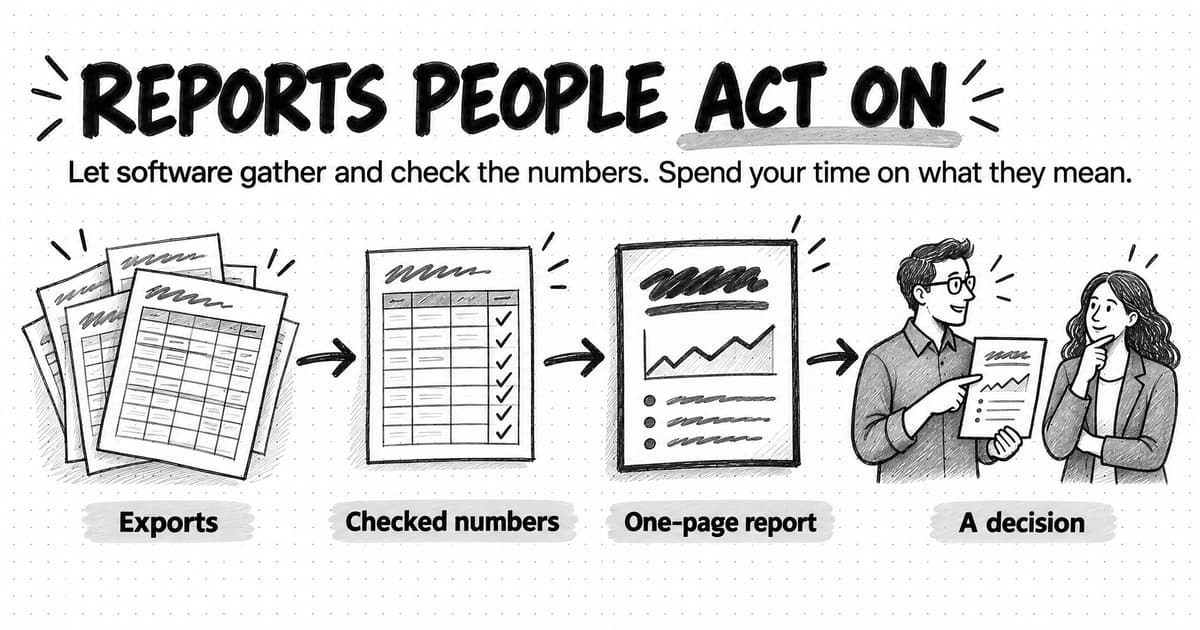
Reporting automation collects numbers from several sources on a schedule and assembles them into a report or dashboard. The rules-based version pulls the same metrics into the same template every week. The AI-assisted version can also write the commentary: what changed, what probably caused it, and what to look at next. The risk is a report nobody reads. The guide to automating marketing reporting covers how to build a report people act on.
Content operations
Content automation handles the repeatable parts of producing and distributing content: creating a brief when a topic is approved, routing drafts for review, turning one webinar into posts and an email, and reminding owners when a piece is due for a refresh. AI agents have expanded this category the most, because rules could never draft or repurpose. The guides to content operations and repurposing content across channels go deeper.
Competitive and market monitoring
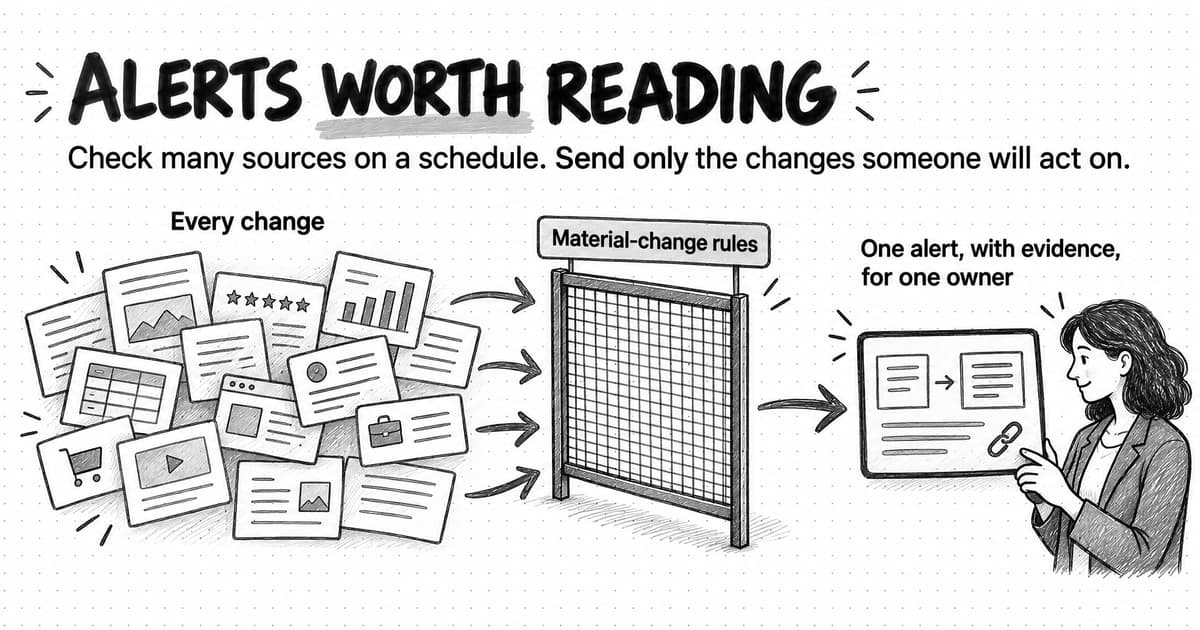
Monitoring automation watches sources you care about, such as competitors' pricing pages, product changelogs, review profiles, ad libraries, and search results, and tells you when something meaningful changes. A simple version is a page-change alert. A more useful version files the change with evidence, explains what changed, and prepares a follow-up such as a draft battlecard update for review. The guide to automating competitor monitoring covers what to watch and how to keep alerts worth reading.
The marketing automation tool landscape by category
"What are the top marketing automation tools?" rarely has a useful answer, because the tools do different jobs. This guide does not rank vendors; compare these categories before you compare brands.
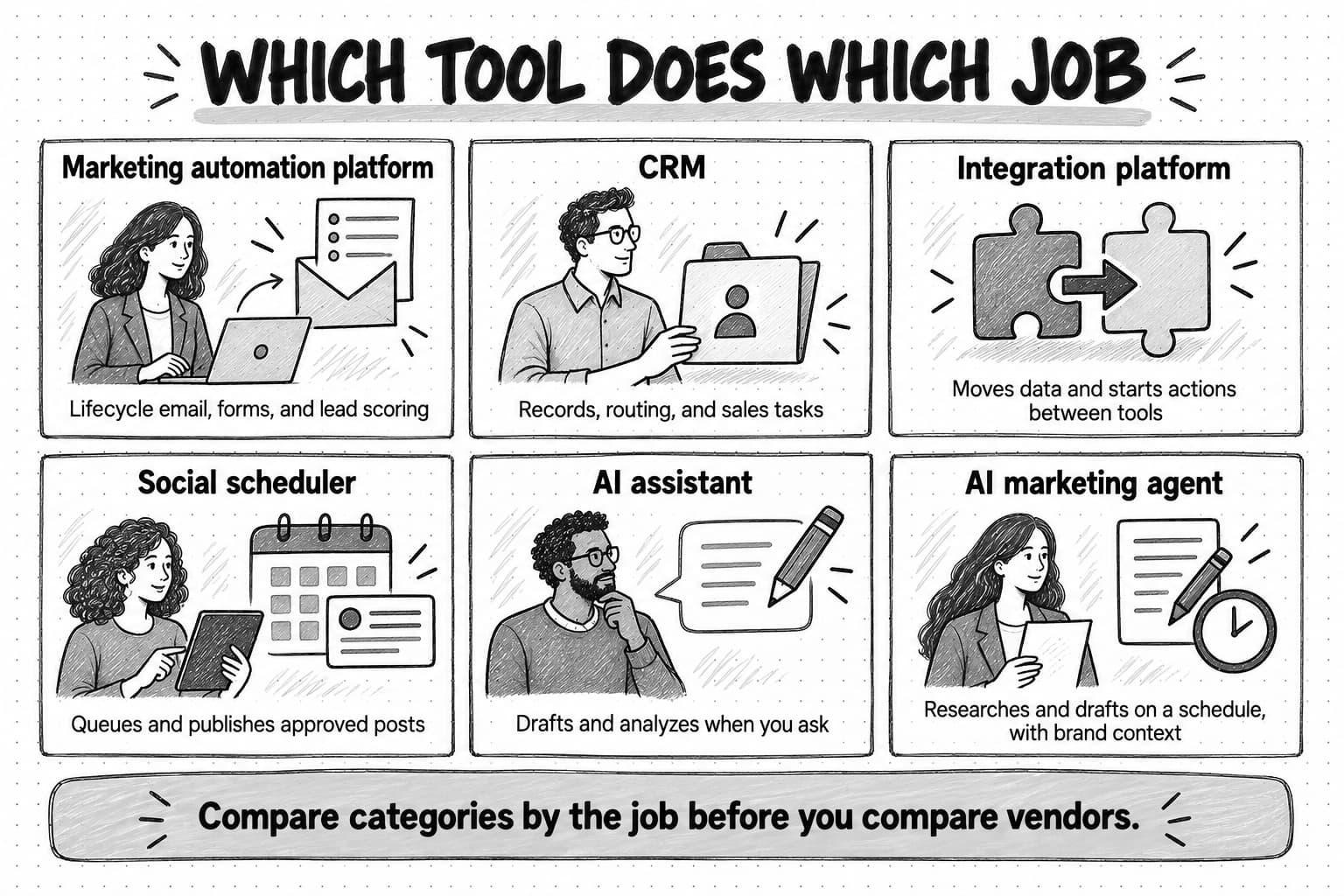
Marketing automation platforms (MAPs) are built around contacts, email, forms, landing pages, segmentation, and lead scoring, and are the natural home for lifecycle email and nurture. Many now bundle a CRM and AI writing features, and most price by marketing contacts and tier.
CRMs hold every company, contact, and deal, with workflow rules for assigning owners, creating tasks, and moving deals between stages. Lead routing and data hygiene usually belong here, because that is where the records are. The difference from a MAP is emphasis: a CRM manages relationships and the sales pipeline, while a MAP manages marketing communication to many contacts at once.
Integration platforms (iPaaS) watch for an event in one tool, such as a new form submission or a new customer in the billing system, and take actions in others. They are often the fastest way to automate a handoff between two tools you already own.
Social schedulers queue and publish approved posts across networks, often with a shared calendar, approval steps, and reporting. They automate distribution; they do not decide what to say.
AI assistants are general chat tools that draft and analyze when someone asks. Some can run saved tasks on a schedule, but they usually lack your brand context unless you supply it each time.
AI marketing agents research, draft, and package marketing deliverables with saved brand context, on a schedule or after a monitored change. They cover work that needs judgment each run, such as explaining what a competitor's new page means or drafting a week of posts in your brand's voice. See what an AI marketing agent is for the category in depth.
| Category | Best at | Usually not built for |
|---|---|---|
| Marketing automation platform | Lifecycle email, forms, segmentation, lead scoring, nurture | Research, judgment-heavy drafting, cross-tool handoffs |
| CRM | Contact and deal records, routing, sales tasks, pipeline stages | Large-scale marketing email, content production |
| Integration platform (iPaaS) | Moving data and triggering actions between tools | Deciding what a message should say |
| Social scheduler | Queuing, approving, and publishing posts | Choosing topics, writing in brand voice |
| AI assistant | Drafting and analysis on request | Running unattended with current brand context |
| AI marketing agent | Research, drafting, and packaging on a schedule or after a change, with brand context | Sending bulk email, holding the contact database, replacing a CRM |
Most small teams end up with three or four of these, with a clear owner for each job. The guide to building an AI marketing stack covers how the pieces fit.
Rules-based automation versus AI-agent automation
For most of its history, marketing automation meant rules: if this happens and these conditions are true, do exactly that. AI agents add a second kind, where the automation receives a goal and decides some of the steps itself. The two suit different work, and most useful setups combine them.
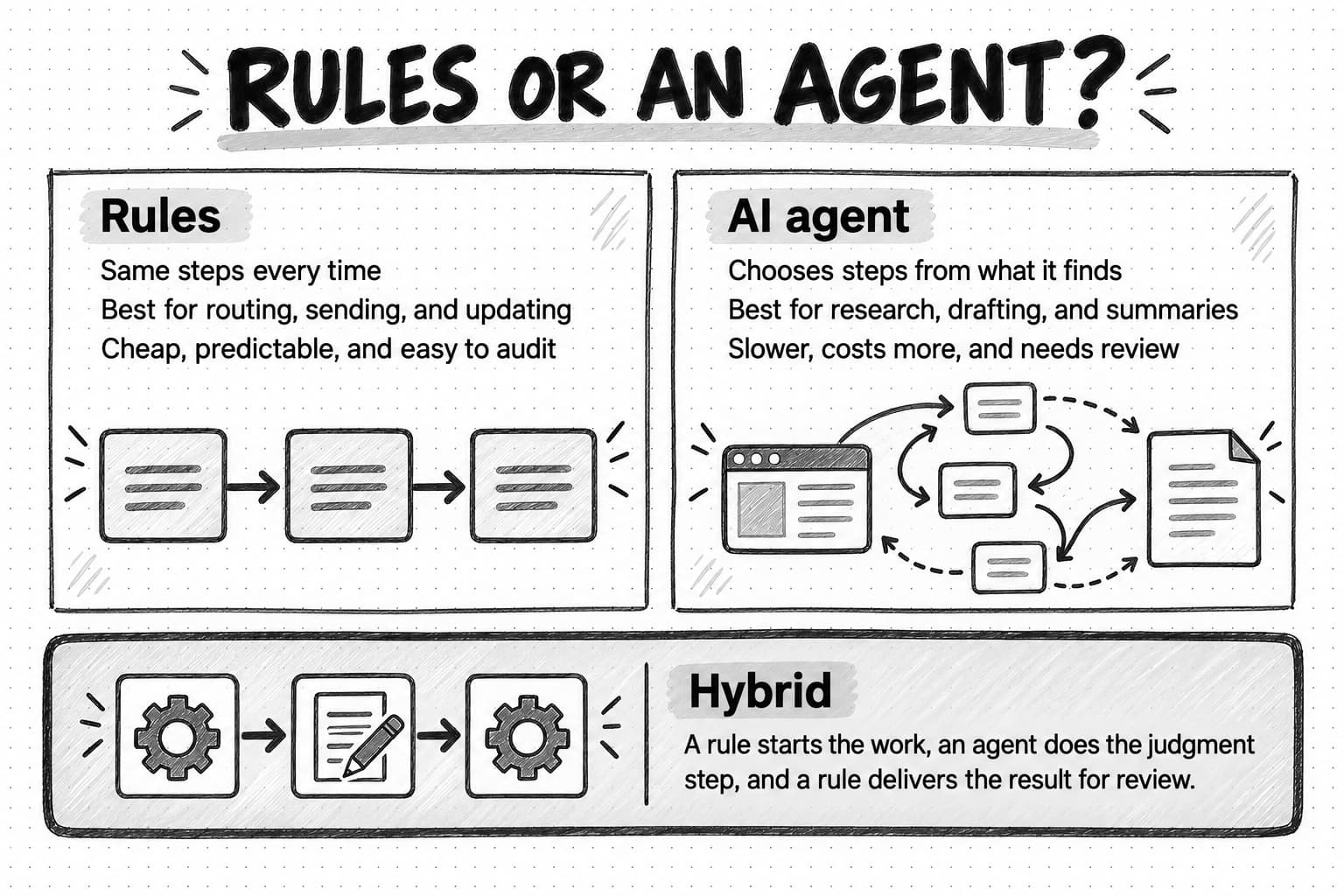
Rules-based automation follows a route fixed in advance: every demo request goes through the same routing logic, and every new trial gets the same day-one email. It is predictable, cheap per run, and easy to audit, because you can read the rule to see why something happened. It cannot handle cases the builder did not anticipate, or work that needs reading or writing something new each time.
AI-agent automation gives an agent a goal, context, tools, and limits, and lets it choose the steps. In a weekly competitor brief, the agent decides which pages to check, notices a competitor's new comparison page, reads it, and explains what changed; no fixed rule could do that, because the steps depend on what it finds. Each run is slower, costs more, and varies more, so the output needs review.
Anthropic's engineering guide to building effective agents, published in December 2024, draws the same line between workflows that follow predefined code paths and agents that direct their own process and tool use. It recommends the simplest solution that works, adding complexity only when it demonstrably improves outcomes, because agentic systems often trade latency and cost for better task performance.
The practical rule: use rules for routing and moving things, and agents for reading and writing things. A hybrid often works best. A rule notices that a lead from a target account booked a demo, an agent prepares a one-page account brief from public sources, and a rule attaches it to the CRM record for the salesperson to review. The guide to agentic workflows covers this pattern, and how to automate marketing with AI agents covers scheduled and event-triggered agent runs in detail.
| Question | Rules-based automation | AI-agent automation |
|---|---|---|
| Who decides the steps? | The builder, in advance | The agent, within its instructions and limits |
| Best for | Routing, sending, updating, moving data | Researching, interpreting, drafting, summarizing |
| Cost per run | Very low | Higher, varies with the work |
| Output | Identical each time | Varies; needs review |
| How it fails | Breaks on cases nobody anticipated | Can be fluent and wrong, or drift from the brand |
| How to audit | Read the rule | Read the output, its sources, and its reasoning |
Seven marketing automations a small B2B team actually runs
The examples below follow Ledgerlight, a fictional four-person B2B company that sells invoice reconciliation software to finance teams: a founder who leads sales, a marketer, a product marketer who also writes, and a part-time designer. It has a free trial and a demo request form. None of these automations is exotic, and together they cover most of what a team this size needs.
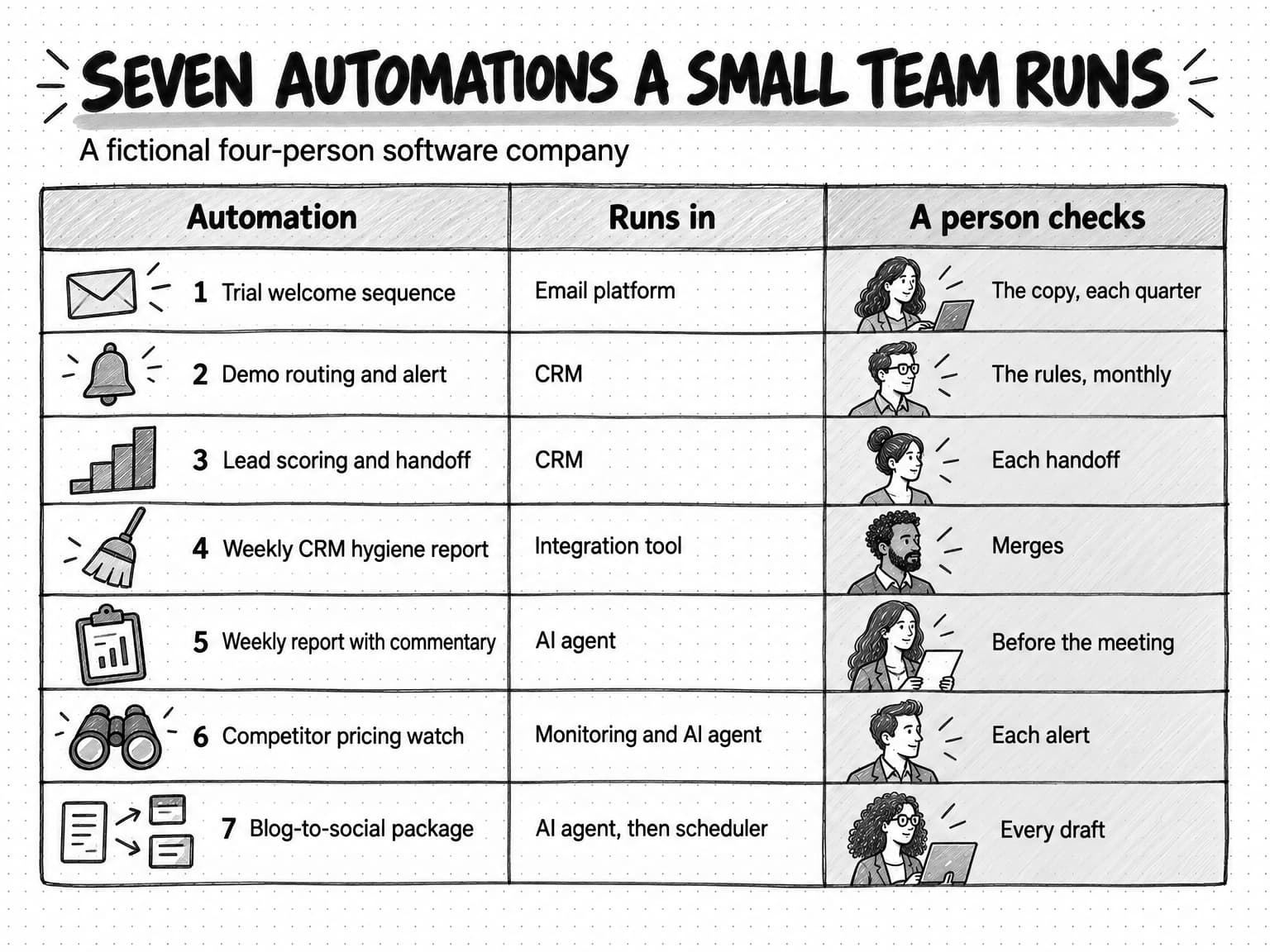
Open the seven worked examples at full size (opens in a new tab).
1. Trial welcome and activation sequence
Trigger: a new trial account is created. Conditions: the user has a work email domain and is not already a customer. Actions: the email platform sends a welcome email at once, a setup tip on day two, and a short case-led email on day five. On day three, a branch checks whether the user has connected an accounting system; users who have not get a one-step guide instead of the case email. Review: the copy is reviewed when it is written and each quarter after, not on every send. Measurement: the share of trials that connect an accounting system within seven days, compared with the quarter before the sequence launched.
For a product-led company this is often the highest-value automation, because it reaches every new user while they decide whether the product is worth their time. Ledgerlight's marketer drafts the sequence with an AI agent from the onboarding steps and saved brand voice, edits it, and loads it into the email platform, which does the sending.
2. Demo request routing and speed-to-lead alert
Trigger: someone submits the demo request form. Conditions: the company has more than 50 employees, based on the form field or enrichment. Actions: the CRM creates or updates the contact and company, assigns the founder as owner, creates a task due within one business hour, and posts the request in the team's sales channel with the company name and the page the visitor came from. Smaller companies receive an email pointing them to the self-serve trial. Review: none per request; the founder reviews the routing rules monthly. Measurement: median time from form submission to first reply, and the share of demo requests that become meetings.
3. Lead scoring and sales handoff
Trigger: any change to a contact's activity or properties. Conditions and scoring: points for fit (finance or operations role, company size in range, target industry) and for intent (two pricing page visits in a week, webinar attendance, a comparison page visit); points removed for a personal email address or a student domain. Actions: when a contact crosses the threshold, the CRM marks them as a marketing-qualified lead and notifies the founder with the reasons for the score. Review: the founder marks each handoff as useful or not; the marketer reviews the scoring every month against which leads became opportunities. Measurement: the share of scored leads that became opportunities, compared with leads that never crossed the threshold.
Ledgerlight's first model weighted email opens heavily, which made inactive contacts look engaged because some email clients load images automatically. The team switched to pricing page visits and form activity; the measurement section explains why opens mislead.
4. Weekly CRM hygiene report
Trigger: every Monday at 7 a.m. Conditions: records created or changed in the last seven days. Actions: an integration tool lists likely duplicates, contacts with no company, companies with no owner, and deals with no next step, and posts the list to the team channel. Safe fixes, such as standardizing country names, are applied automatically; merges are left for a person. Review: the marketer spends fifteen minutes on the list each Monday. Measurement: the count of open data problems over time, which should fall and stay low.
This automation protects every other one on the list. It finds problems automatically and leaves merges to a person, because a wrong merge is hard to undo.
5. Weekly marketing report with written commentary
Trigger: every Monday at 8 a.m. Actions: an AI agent collects the week's numbers that the team tracks (trial signups, activation rate, demo requests, meetings booked, top pages, and spend by channel), compares them with the previous four weeks, and writes a one-page summary: what moved, the likely reasons, what is unexplained, and two questions worth discussing. The summary goes to the team's project for review before the Monday meeting. Review: the founder reads it before the meeting and corrects any explanation that does not match what the team knows. Measurement: whether the report is read, and whether it leads to decisions; the team counts how often an item from the report becomes an action in the meeting. Ledgerlight already had a dashboard with these numbers that nobody opened; the written commentary is what made the report useful.
6. Competitor pricing and messaging watch
Trigger: a daily check of three competitors' pricing pages, homepages, and changelogs. Conditions: a meaningful change, such as a new plan, a price change, a new headline, or a feature announcement, rather than a changed date or a rotated testimonial. Actions: the change is filed as an alert with the before-and-after text and a link to the source; for pricing changes, an agent drafts a short note on what changed and suggests edits to Ledgerlight's internal battlecard. Review: the product marketer reads each alert and decides whether to update the battlecard or brief the founder. Measurement: the share of alerts that led to an action; if most alerts are ignored, the conditions are too loose.
7. Blog-to-social repurposing package
Trigger: a blog post is approved for publication. Actions: an AI agent drafts a social package from the post, two LinkedIn posts in the founder's voice, one in the company's voice, and a newsletter blurb, using the brand's saved voice. The drafts land in a review queue, and approved ones go into the social scheduler. Review: every draft, every time, because these posts speak publicly for the company. Measurement: time from approval to the first social post, and engagement on the repurposed posts compared with posts written from scratch.
Across the seven, rules handle anything that routes, sends, or updates; agents handle anything that reads or writes; and every output that speaks publicly or names a competitor passes through a person. That division is a reasonable default for any small team.
How to decide what to automate first
Each automation adds something to maintain, monitor, and eventually retire, so a small team should add them one at a time. Score candidates on the same five criteria and start with work that scores well on all of them.
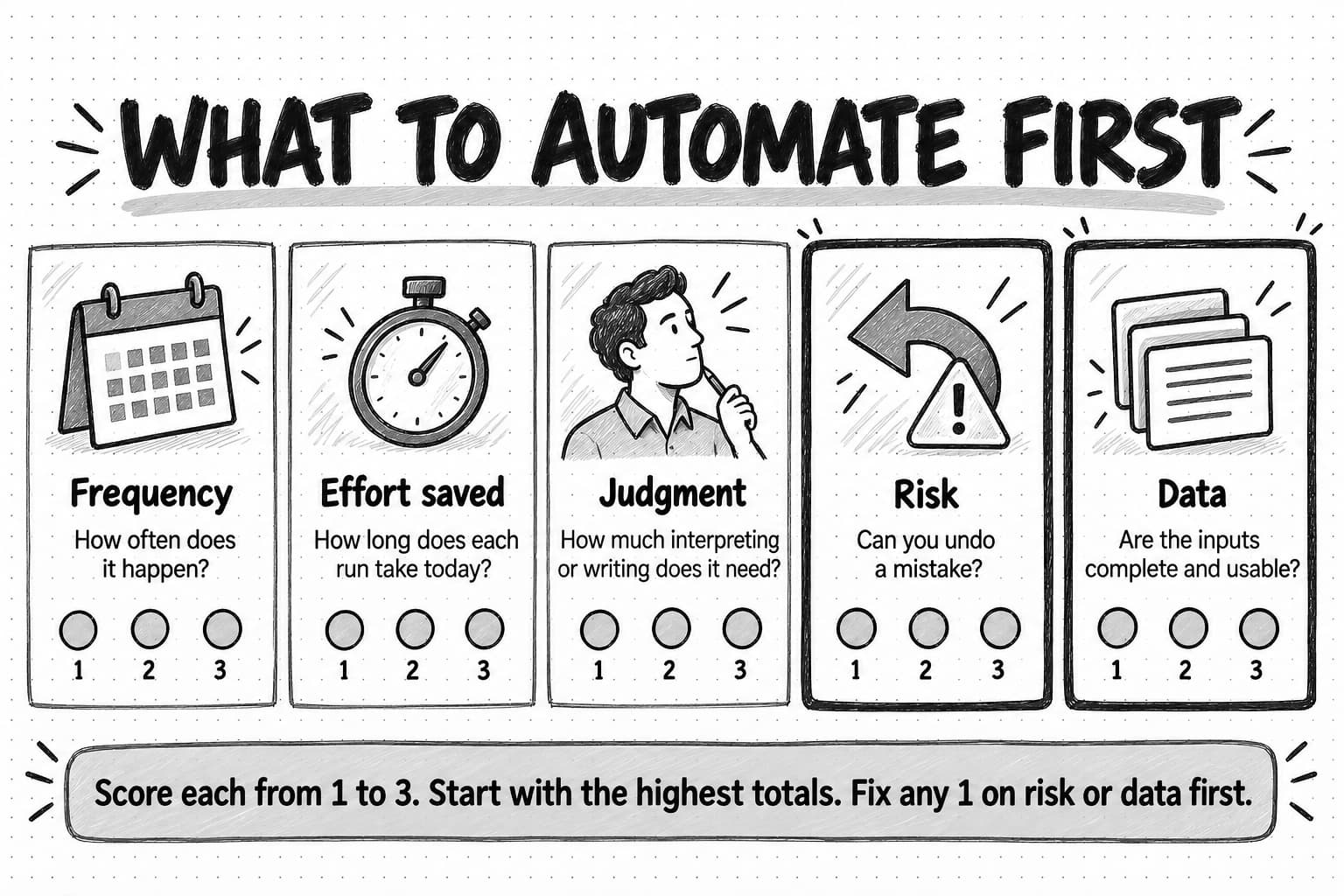
Frequency. A task done daily or weekly repays the setup effort quickly; a task done twice a year rarely does.
Effort saved. Count the time each run takes today, including remembering, finding inputs, and switching context, then multiply by frequency. Thirty minutes every Monday is about 26 hours a year.
Judgment needed. Low-judgment work suits rules, and medium-judgment work suits an AI agent with review. Work that depends on one situation's specifics, such as a reply to an upset customer, may not suit automation at all.
Risk and reversibility. A mistake in an internal report costs a correction; a wrong email to the whole list costs trust. Start where mistakes are cheap and reversible, and put review in front of anything irreversible.
Data availability. A lead score needs reliable fit data, a weekly report needs access to the numbers, and a lifecycle email needs product usage events. If the inputs are missing or messy, fixing them is the first project.
Score each candidate from 1 to 3 on each criterion, where 3 is the most favorable for automation: high frequency, high effort saved, low judgment, low risk, good data. Add the scores. Anything scoring 13 to 15 is a strong first candidate. Anything with a 1 on risk or data should wait until that weakness is fixed, whatever its total.
| Candidate | Frequency | Effort saved | Judgment (3 = low) | Risk (3 = low) | Data ready | Total |
|---|---|---|---|---|---|---|
| Demo request routing and alert | 3 | 2 | 3 | 3 | 3 | 14 |
| Weekly marketing report | 3 | 3 | 2 | 3 | 2 | 13 |
| Trial welcome sequence | 3 | 3 | 3 | 2 | 2 | 13 |
| Competitor pricing watch | 3 | 2 | 2 | 3 | 3 | 13 |
| Lead scoring | 3 | 2 | 2 | 2 | 1 | 10 |
| Automated replies to social comments | 3 | 2 | 1 | 1 | 2 | 9 |
The scores are Ledgerlight's, for illustration. Lead scoring waited because the team's fit data was incomplete, so CRM hygiene came first. Automated social replies never made the list: they need judgment every time, and mistakes happen in public.
What should not be automated
Some marketing work loses its value when it is automated, and some carries enough risk that a person should do it every time. One test: what would the recipient think if they knew how the message was produced? If the honest answer is "that is why it felt hollow," keep it human.
Positioning, strategy, and priorities. Automation can gather evidence for these decisions and draft options, but choosing who you serve and what you stand for is the job of the people accountable for the result.
Replies to people in real conversations. Comment replies, direct messages, responses to complaints, and sales conversations depend on context the automation cannot see. An automated reply that misreads the tone of a complaint does more damage than a slow human reply.
Anything that claims to be personal when it is not. A "quick question" email from the founder sent to thousands of contacts spends trust the recipient withdraws once they notice. Personalization from real data, such as the recipient's plan or the feature they used, is fine.
Sensitive moments. Responses to a security incident, a pricing change, layoffs, or an outage need human judgment and approval, even when a template exists.
Final approval of public claims. Statistics, customer results, competitor comparisons, and anything with legal exposure need a person's check before publication. An AI agent can prepare the draft and its sources to speed the check, but it should not be the last reader.
Actions you cannot undo at scale. Bulk sends, deletions, budget changes above a limit, and publishing should sit behind a clear approval step. The guide to AI guardrails for marketing teams covers how to set those limits when AI is involved.
The benefits of marketing automation, and what the evidence supports
The benefits of marketing automation are real but easy to overstate. When a page quotes a large percentage gain, check who was surveyed and whether the study compares companies that automate with companies that do not, because that comparison cannot separate the effect of automation from the effect of being a better-run company. The benefits below follow from how automation works, and you can check each one in your own data.
Consistency. Every new trial user receives the welcome sequence, and every demo request reaches an owner, including on Friday afternoons and during holidays. For a small team, this is often the largest benefit: the work happens whether or not anyone remembers.
Speed. Routing, alerts, and confirmations happen in seconds instead of waiting for someone to check an inbox. Whether speed raises conversion in your market is worth measuring.
Time returned to the team. Hours spent copying numbers and moving records can go to work that needs judgment. Count the hours the task took before, minus the hours spent maintaining the automation after.
Relevance at scale. Branching on real behavior lets a small team send each person the message that fits their situation.
Better records. Automations that maintain data and log activity leave a cleaner history for reporting and later decisions.
IBM's guide notes that automation especially helps small businesses with few marketing staff. The flip side is that a small team also has less capacity to maintain a complicated setup.
Costs, data requirements, and how marketing automation fails
Marketing automation has three kinds of cost: the software, the setup, and the upkeep. Software prices vary by category, contacts, and seats. As one public example, HubSpot's Marketing Hub pricing page, checked on October 17, 2026, listed a free tier, a Starter tier from $7 per seat per month with limited automation, a Professional tier from $800 per month with a one-time $3,000 onboarding fee, and an Enterprise tier from $3,600 per month with a $7,000 onboarding fee, with marketing contacts included at each tier. Prices change and other vendors price differently, but the example shows how sharply costs can rise at the step from basic sending to multi-step workflows.
Setup can cost more than the license: someone has to map the process, clean the data, write the content, build the rules, and test edge cases. Upkeep is the cost teams forget. Rules go stale when the product, pricing, or team changes, and an automation nobody owns keeps running after it stops being right.
The data an automation needs
Every automation depends on a small set of data being present and accurate: who a contact is, which company they belong to, whether they are a customer, whether they have agreed to receive marketing, and what they have done recently. Before building anything that branches on data, check those fields for the records the automation will touch. If a quarter of contacts have no company, a rule that routes by company size will misroute a quarter of leads.
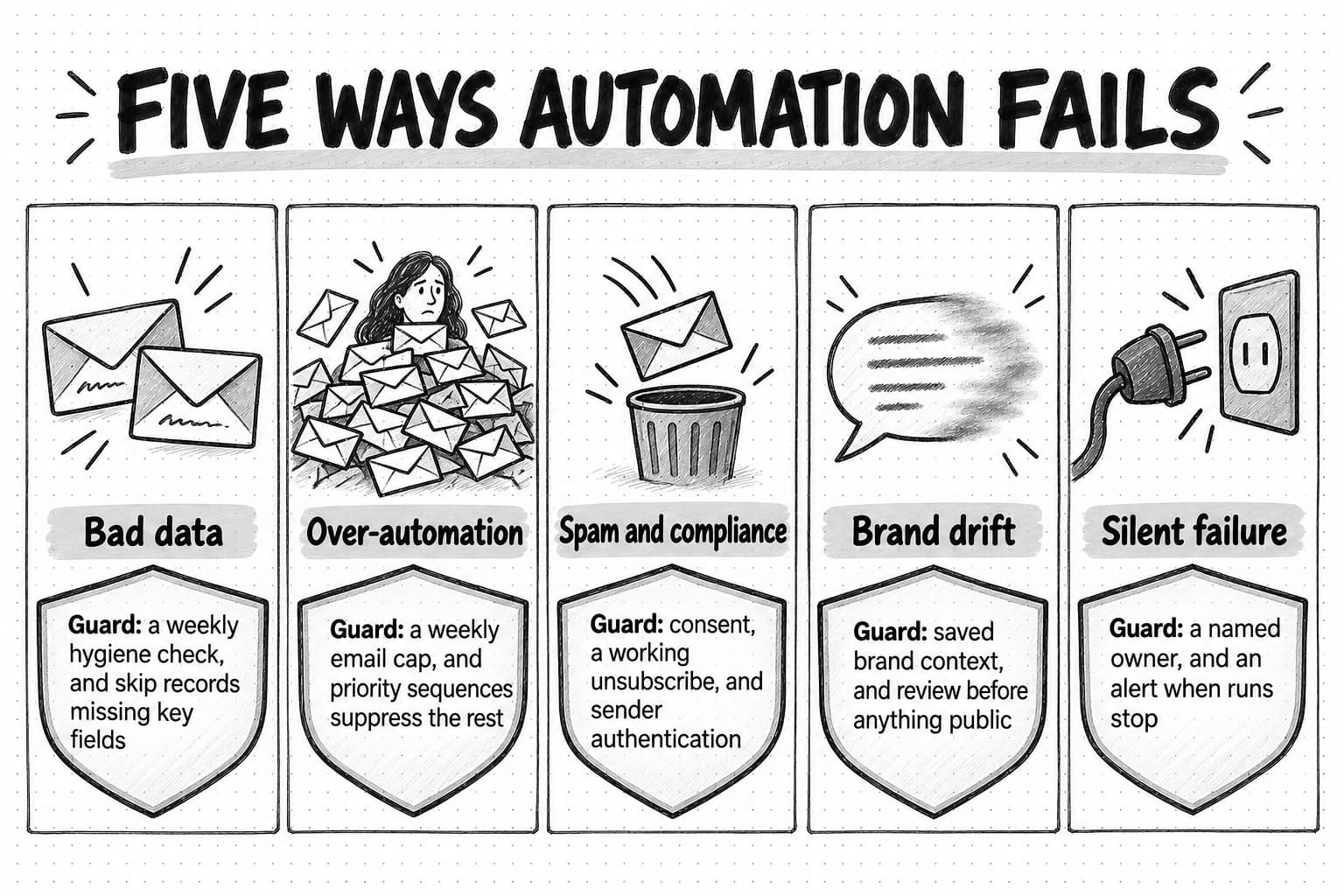
Bad data
Many failures come from the data an automation acts on rather than the automation itself. Duplicates receive the same email twice. Missing lifecycle stages send prospect emails to customers. Stale job titles route leads to the wrong person. The defense is a hygiene routine, like Ledgerlight's weekly report, and a rule that automations skip or flag records with missing key fields instead of guessing.
Over-automation
Sequences accumulate. A new trial user who also downloaded an ebook and registered for a webinar can end up in three tracks, each sending on its own schedule. The defenses are a limit on how many marketing emails one contact receives per week, a rule that higher-priority sequences suppress lower-priority ones, and a periodic review of everything that is running.
Spam and compliance
The rules on commercial email apply whether a person or a workflow pressed send. In the United States, the FTC's CAN-SPAM compliance guide requires honest headers and subject lines, identification of the message as an advertisement, a valid physical postal address, a clear way to opt out, and honoring opt-outs within 10 business days. It makes no exception for business-to-business email, and the guide states that each separate email in violation can be subject to penalties of up to $53,088. In the UK, the ICO's guidance on electronic mail marketing explains that marketing email to individuals generally needs specific consent, with a limited "soft opt-in" for existing customers, while emails to corporate subscribers such as limited companies are treated differently; it still recommends keeping a do-not-email list of businesses that object. This is not legal advice; check the rules for each country you send to.
Mailbox providers set their own requirements on top of the law. Google's email sender guidelines require senders of more than 5,000 messages a day to Gmail accounts, from February 1, 2024, to authenticate their mail with SPF, DKIM, and DMARC, to support one-click unsubscribe in marketing messages, and to keep the spam rate reported in Postmaster Tools below 0.30%, with a recommended target below 0.10%. An automation that keeps emailing people who never engage pushes that rate up and can send the rest of your email, including product emails, to spam.
Brand drift
Automated content drifts from the brand over time. Old templates describe a product that has changed, and AI drafts written without current brand context slide toward generic phrasing and claims the company cannot support. The defenses are saved, reviewed brand context that every automated draft uses, review before anything public goes out, and a scheduled check of every live template against current positioning. The guide to defining your brand voice covers the context worth saving.
Silent failure
An automation can stop working without anyone noticing: a connection expires, a form field is renamed, a list is deleted, a source page moves. Weeks later someone asks why demo requests stopped arriving. Every automation needs an owner and a basic health check, such as an alert when runs fail or when a normally busy automation has not run for a set period.
How to start: your first workflow, a pilot, and governance
A small team needs one automation that works before it needs a program. This sequence gets the first one running in about a month.
- Pick one candidate with the scoring method above. Choose something frequent, low-risk, and supported by data you already have. Demo routing, a trial welcome sequence, or a weekly report are typical first choices.
- Write the process down as it runs today. List the trigger, every step, who does it, the inputs, and the output. Note the decisions a person makes along the way; those become conditions or review points.
- Fix the data the automation needs. Check the fields it will read for the records it will touch. Clean, fill, or exclude what is missing.
- Write a one-page specification. Use the template below. It forces the decisions about review, failure, and ownership that are easy to skip.
- Build it in the tool that already holds the data. Routing belongs in the CRM, sequences in the email platform, cross-tool handoffs in an integration tool, and research or drafting in an AI agent. Avoid buying a new platform for the first automation.
- Test on a small group. Run it on internal addresses or a small segment for a week or two. Look for wrong branches, duplicate sends, and edge cases such as missing fields.
- Launch with a baseline and a review date. Record the measure you expect to move before launch, and put a review on the calendar for 30 days later.
- Review, then decide. Keep it, fix it, or switch it off. Only then start the second automation.
Use a specification like this for every automation, including the small ones:
Name:            Demo request routing and alert
Owner:           Founder (backup: marketer)
Goal:            Every qualified demo request gets a human reply within one business hour
Trigger:         Demo request form submitted
Conditions:      Company size 50+; not an existing customer; not a duplicate in the last 30 days
Actions:         Create/update contact and company; assign owner; create task due in 1 business hour; post to sales channel
Review:          None per request; routing rules reviewed monthly
Irreversible?:   No
Data needed:     Company size (form field or enrichment), customer flag, owner list
If it fails:     Alert to owner if no run in 3 business days; form also emails the shared inbox as a fallback
Measure:         Median time to first reply; share of requests that become meetings
Baseline:        Median 19 business hours (last quarter)
Review date:     30 days after launch, then quarterly
Retire when:     Replaced by a scheduling tool on the demo page
The baseline value in the template is illustrative. Replace it with your own before launch.
Governance for a small team
For a team of five, governance comes down to four habits. Keep a single list of every live automation with its owner, purpose, and review date. Require an approval step for anything that sends to more than a set number of people, publishes, spends money, or contacts anyone outside your existing relationships. Review the whole list every quarter and switch off anything nobody can justify. And when someone leaves, reassign their automations before their accounts are closed, because connections tied to a departed person's login can stop working without warning. The guide to marketing operations covers how a lean team owns this work.
What a marketing automation specialist does
In larger companies, a marketing automation specialist owns this work full time: building email programs and workflows, managing the platform and its CRM connection, keeping data clean, setting up lead scoring with sales, keeping sends within consent rules, and reporting on results. In a team of one to five, the marketer most comfortable with systems usually shares these duties, and naming an owner for each automation does the same job.
How to measure marketing automation
Measure each automation at three levels, and measure the whole set once a quarter.
Operational health. Track runs, failures, skips, and time since the last run. This catches silent failures and broken connections, but it does not tell you whether the automation is worth keeping.
Engagement with the output. For email, measure clicks, replies, and unsubscribes. For internal outputs such as reports and alerts, count how many were read and acted on.
Business outcome. Check whether the metric the automation was built to move actually moved, such as trial activation or meetings booked, against the baseline recorded before launch. Where you can, hold out a small group that does not receive the automation, so you can tell its effect apart from seasonal changes or a new campaign.
Be careful with email open rates. Apple's Mail Privacy Protection downloads remote content in the background by default, whether or not the recipient opens the message, and routes it through relays that hide the recipient's IP address. Because the content, including any tracking image, can load without the message being opened, a recorded open from those recipients does not prove anyone read the email. Use clicks, replies, and downstream actions as engagement measures, and keep opens out of lead scores.
Once a quarter, list every live automation with its owner, measure, and result, and ask of each one whether you would build it again today. Retire the ones that no longer move anything. For a method to connect marketing activity to revenue, including what attribution cannot see, the guide to content marketing ROI is a useful companion, and measuring AI ROI in marketing covers automations that involve AI.
Marketing automation glossary
| Workflow | A saved sequence of steps that runs when its trigger fires. In marketing automation tools, the word usually means the rule set behind an automation. |
|---|---|
| Trigger | The schedule or event that starts a run, such as a form submission, a date, or a change on a monitored page. |
| Condition | A rule that decides whether a record or event qualifies, and which branch it follows. |
| Drip campaign | A fixed sequence of emails sent on a timetable after a starting event, such as a signup. |
| Nurture | Ongoing, usually email-based communication with contacts who are interested but not ready to buy. |
| Lead scoring | Adding and subtracting points for fit and behavior to decide when a contact is ready for a sales conversation. |
| MQL | Marketing-qualified lead: a contact whose score or actions meet the agreed threshold for a sales handoff. |
| Lifecycle stage | A label for where a contact is in the relationship, such as subscriber, lead, opportunity, or customer. |
| MAP | Marketing automation platform: software built around contacts, email, forms, segmentation, and lead scoring. |
| CRM | Customer relationship management software that holds company, contact, and deal records and the sales activity around them. |
| iPaaS | Integration platform as a service: a tool that connects apps and moves data or triggers actions between them. |
| Agentic workflow | A workflow in which an AI agent decides some of the steps toward a goal, usually inside fixed start and end points set by rules. |
| Human in the loop | A design in which a person reviews or approves an automated output before it goes further. |
| Suppression | A rule that stops a contact from receiving a message, for example because they unsubscribed, are a customer, or are already in a higher-priority sequence. |
Decision table: which kind of automation fits the job
Use this table when you know the job and need to decide where it belongs.
| If the job is to… | Use | Why | Keep a person on |
|---|---|---|---|
| Send a planned email series based on signup or behavior | Email or marketing automation platform | Built for consent, sending, branching, and unsubscribes | The copy, before launch and each quarter |
| Assign leads and alert the owner fast | CRM workflow rules | The records and owners already live there | Monthly review of the rules |
| Move data or start actions between two tools | Integration platform | Connects tools that do not talk to each other | Failures and expired connections |
| Keep records clean | CRM rules plus a scheduled report | Safe fixes can run alone; merges need a person | Merges and deletions |
| Publish approved posts on a calendar | Social scheduler | Handles queuing, approvals, and timing | Every post's content and every reply |
| Draft content in your brand voice on a cadence | AI marketing agent with saved brand context | Writing needs judgment each run | Review before anything is published |
| Write commentary on a recurring report | AI agent on a schedule | Explaining changes needs interpretation | Correcting explanations before the meeting |
| Notice and explain competitor changes | Monitoring with AI follow-up | Change detection plus interpretation | Deciding what to do about it |
| Decide positioning, pricing, or strategy | People, with automated research | Accountability for the choice | All of it |
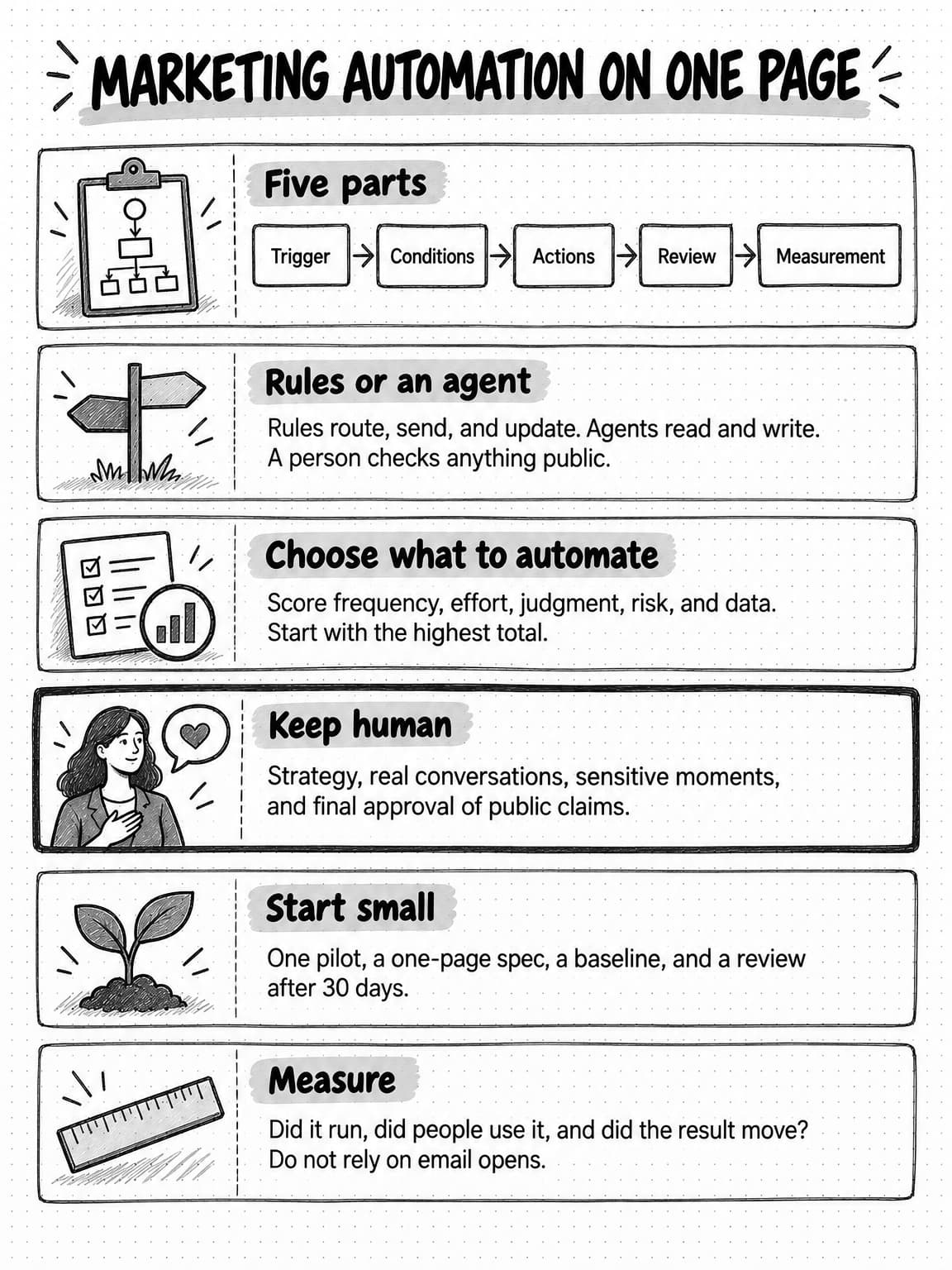
Open or save the one-page marketing automation reference at full size (opens in a new tab).
Where Ampere fits in marketing automation
Ampere is an AI marketing agent, in the last row of the tool landscape above. It is not a marketing automation platform, a CRM, an email sender, or a social scheduler. It does not send your marketing email, hold your contacts, score leads, or publish posts on a schedule. It does the reading and writing work those tools cannot do: research, drafting, and packaging with your saved brand context, on demand or on a cadence.
For recurring work, Scheduled Tasks run a saved prompt or a supported AI Tool hourly, daily, weekly, monthly, or manually, and return each result to a Project for review. Members of your Organization can receive an email when a run finishes. The weekly report with written commentary from the worked examples is the kind of job a scheduled task suits. Monitoring checks supported public sources, such as competitor pages, reviews, and search results, every hour, day, or week, files an alert with evidence excerpts and source links when something changes, and can prepare a follow-up draft for review when you configure one. Coverage depends on the source and can be partial, so treat alerts as a strong prompt to look, not a guarantee that nothing was missed.
Brand memory keeps saved, reviewable knowledge about your brand, audience, products, competitors, and voice, so a recurring output, such as a weekly social package or a lifecycle email sequence, starts from the same context every time instead of drifting. Ampere can draft lifecycle email sequences, newsletters, and channel-specific social packages for LinkedIn, X, Instagram, TikTok, and YouTube, which your team then reviews and loads into your email platform or scheduler. Where Connectors are enabled for an approved third-party account, a Connector action that needs approval, such as publishing a post, stops at an approval checkpoint in the session so a person can review the exact action before it happens.
Sources and further reading
- IBM, What is marketing automation?, IBM Think. Definition and the note on small businesses with few marketing staff. Undated; accessed October 17, 2026.
- Salesforce, What is marketing automation?. Vendor definition and overview. Undated; accessed October 17, 2026.
- Erik S. and Barry Zhang, Building effective agents, Anthropic, December 19, 2024. Workflows versus agents and the advice to add complexity only when it improves outcomes.
- Federal Trade Commission, CAN-SPAM Act: A compliance guide for business. Requirements for commercial email, the 10-business-day opt-out rule, the B2B position, and the per-email penalty. Accessed October 17, 2026.
- Information Commissioner's Office, Electronic mail marketing. UK consent rules, the soft opt-in, and corporate subscribers. Accessed October 17, 2026.
- Google, Email sender guidelines, Google Workspace Admin Help. Requirements for bulk senders from February 1, 2024. Accessed October 17, 2026.
- Apple, Mail Privacy Protection & Privacy, dated December 12, 2025. Background loading of remote content and IP address relays.
- LinkedIn, Prohibited software and extensions, LinkedIn Help. Bots, extensions, and automation tools on LinkedIn. Accessed October 17, 2026.
- HubSpot, Marketing Hub pricing. Public tier prices and onboarding fees, checked October 17, 2026; prices change.
Frequently Asked Questions
What are examples of marketing automation?
Common examples of marketing automation are a welcome email sequence for new trial users, a rule that assigns each demo request to a salesperson and alerts them, lead scoring that hands qualified contacts to sales, a weekly report that collects campaign numbers, a weekly check for duplicate or incomplete CRM records, an alert when a competitor changes its pricing page, and turning each approved blog post into a set of social drafts for review.
What are the main types of marketing automation tools?
The main types of marketing automation tools are marketing automation platforms for email, forms, and lead scoring; CRMs for records, routing, and sales tasks; integration platforms that connect other tools; social schedulers for publishing approved posts; AI assistants for drafting on request; and AI marketing agents that research and draft on a schedule with brand context. Compare categories by the job before comparing vendors.
What is the difference between CRM and marketing automation?
The difference between CRM and marketing automation is emphasis. A CRM holds company, contact, and deal records and manages the sales pipeline and the activity around each relationship. Marketing automation sends planned communication to many contacts at once and decides when contacts are ready for sales. They overlap heavily, and most small teams connect the two so marketing and sales see the same records.
How much does marketing automation cost?
Marketing automation costs range from free tiers with basic sending to platforms costing several thousand dollars a month, usually priced by contacts and tier. As one example, HubSpot's Marketing Hub listed a Professional tier from $800 a month plus a $3,000 onboarding fee on October 17, 2026. Setup and maintenance can cost more than the license, so budget the team's time as well.
What does a marketing automation specialist do?
A marketing automation specialist builds and maintains email programs and workflows, manages the marketing automation platform and its connection to the CRM, keeps contact data clean, sets up lead scoring with sales, makes sure sends follow consent rules, and reports on results. In a team of one to five people, these duties are usually shared, and naming an owner for each automation covers the same ground.
How is AI changing marketing automation?
AI is changing marketing automation by adding work that rules could not do: researching, interpreting, drafting, and summarizing as part of an automated run. Rules still handle routing, sending, and updating records cheaply and predictably. AI agents handle steps that need judgment, such as writing report commentary or explaining a competitor's change, at higher cost and with outputs that need human review.
Is marketing automation worth it for a small business?
Marketing automation is usually worth it for a small business when it starts with frequent, low-risk work supported by clean data, such as lead routing, a trial welcome sequence, or a weekly report. The main benefits are consistency, speed, and time returned to a small team. It is not worth it when it adds tools nobody maintains or automates a process that is still changing.
How do you implement marketing automation for a small business?
To implement marketing automation for a small business, pick one candidate by scoring frequency, effort saved, judgment needed, risk, and data readiness. Write down the current process, fix the data it needs, and write a one-page specification with an owner, review step, and failure plan. Build it in the tool that already holds the data, test on a small group, and review results after 30 days.
What is a marketing automation workflow?
A marketing automation workflow is a saved set of steps that runs when its trigger fires: a trigger such as a form submission or a schedule, conditions that decide who qualifies, actions such as sending an email or creating a task, an optional review step, and a measure of whether it worked. In most tools, the workflow is the rule set behind each automation.