Social media automation: what to automate, what to keep human, and how to set it up
A practical guide for founders and small B2B marketing teams posting on LinkedIn and X: the eight layers of social work and what each can safely hand to software, the platform rules on automation and AI content, approval gates, a weekly workflow, and a template you can copy.
41 min readWritten by Ampere
Short answer
What is social media automation?
Social media automation is the use of software, including AI, to handle repeatable parts of social media work: researching topics, drafting posts, publishing approved posts on schedule, collecting mentions, and reporting results. People keep the judgment, the approvals, and the conversations. Replies, comments, and relationships should stay human, and LinkedIn and X restrict automated engagement.
Summary
Social media is eight kinds of work, not one: planning, research, creation, review, publishing, engagement, listening, and reporting. Safe automation either prepares work for a person to review or carries out a decision a person already made. Nothing automated should speak for the company in a live conversation.
Platform rules draw part of the line. LinkedIn's User Agreement prohibits bots that comment, like, share, connect, or message, and LinkedIn may limit posts from automation tools. X allows automated posts through its official interface but bans automated likes and limits automated replies. Meta, TikTok, and YouTube require labels on realistic AI video and audio.
AI drafts sound generic when the model has nothing specific to work from. Draft from real sources such as customer conversations and product changes, give the AI a written voice, have it list every claim with a source, and approve each post close to when it goes out, with a named person able to pause the queue.
Company pages can carry the most automation; founder and employee accounts the least, because readers assume a real person is behind them. A weekly routine with a copyable template automates the research digest, first drafts, publishing, and report, and keeps people on choices, approvals, and replies. A fictional three-person team shows where the time saving comes from.
Measure the routine and the results separately: consistency, time, and first-pass approval for the first; conversations with the right people and influence on pipeline for the second. The common failures are automated engagement, generic AI posts, posting into a crisis, copying one post everywhere, and tools that operate an account through the browser.
Contents
- What is social media automation?
- The eight layers of social media work
- What should stay human on social media
- What LinkedIn, X, Meta, TikTok, and YouTube say about automation and AI content
- How to use AI to draft social posts that sound like you
- Approval gates before anything posts
- Company pages, founder accounts, and employee accounts
- A weekly social media automation workflow for a small team
- Worked example: a three-person team sets up social automation (fictional)
- How to measure social media automation
- Common social media automation mistakes
- Social media automation tools by category
- How Ampere helps with social media work
- Sources and further reading
- Frequently Asked Questions
A founder of a small B2B software company decides, again, that the company needs to post on LinkedIn every week. For three weeks it works. Then a customer escalation lands on a Tuesday, the week's post never gets written, and the page goes silent for a month. The founder loads a scheduling tool with a dozen posts written in one long Sunday, and the page goes quiet in a different way: the posts go out on time, but nobody answers the comments, two posts mention a webinar that already happened, and one lands on the morning of an outage.
Both versions of the problem come from treating social media as one job when it is several. Deciding what to say needs judgment about the market. A first draft needs the company's voice and facts. Getting a post out at 8:30 on a Tuesday needs only a reliable clock. Replying to a prospect's sharp question in the comments needs a person who knows the product. Software is good at some of these jobs and bad at others, and the platforms forbid automating a few of them.
Social media automation is the use of software, including AI, to carry out repeatable parts of social media work, such as researching topics, drafting posts, scheduling and publishing approved content, collecting mentions, and reporting results, while people keep the judgment, the conversations, and the final say on what goes out in the company's name. Done well, it gives a small team consistency without making the account sound like a machine. Done badly, it produces generic posts, unanswered comments, and, on LinkedIn and X, activity that gets accounts limited or suspended.
This guide is for a founder or small B2B marketing team posting mainly on LinkedIn and X. It breaks social work into eight layers, shows what can be automated safely in each and what should stay human, and summarizes what LinkedIn, X, Meta, TikTok, and YouTube say about automation and AI-made content as of October 2026. Then it covers drafting, approvals, account types, a weekly workflow with a template, a worked example, measurement, mistakes, and tools.
What is social media automation?
The phrase covers very different things, and confusing them is where most bad decisions start. At one end is a scheduling feature: a person writes a post and tells LinkedIn to publish it on Thursday morning. At the other is a bot that logs in to an account, follows hundreds of strangers, and leaves generic comments to get attention. Both get called social media automation, but the first is a built-in platform feature and the second breaks the platform's rules.
A useful way to sort them is by what the software does on its own. Some automation only prepares work for a person, such as a research digest, draft posts, or a report. Some carries out a decision a person already made, such as publishing an approved post on schedule. And some decides and acts in public with no person in between: replying, messaging, following, reposting. The first kind is low risk, the second is safe when the approval is real and the post is still right when it goes out, and the third is where brand damage and platform penalties concentrate.
Several neighboring terms are worth separating, because tool vendors use them loosely.
| Social media scheduling | Writing a post now and publishing it at a chosen time later, either with a platform's own scheduler or through a tool connected to the platform's official interface. |
|---|---|
| Social media management tool | Software that combines scheduling, a shared calendar, approvals, a combined inbox for comments and messages, and reporting across several networks. |
| Social listening | Collecting and analyzing public posts that mention a brand, competitor, product category, or topic, to understand what people say and spot conversations worth joining. |
| Employee advocacy | A program in which employees share or write posts about their company, often supported by a tool that suggests content for them to post from their own accounts. |
| AI social media automation | Using AI models to research, draft, adapt, or summarize social content. Drafting is the common use; AI that posts or replies on its own is a separate, riskier decision. |
| Engagement automation | Software that likes, comments, follows, connects, or messages on an account's behalf. LinkedIn prohibits it, and X allows only narrow, opt-in forms. |
The broader discipline is covered in our guide to what marketing automation is and where AI agents fit; this guide stays with social media.
The eight layers of social media work
Most social media advice treats posting as the whole job. A steady social presence actually rests on eight kinds of work, and each has a different answer to the question "can software do this?"
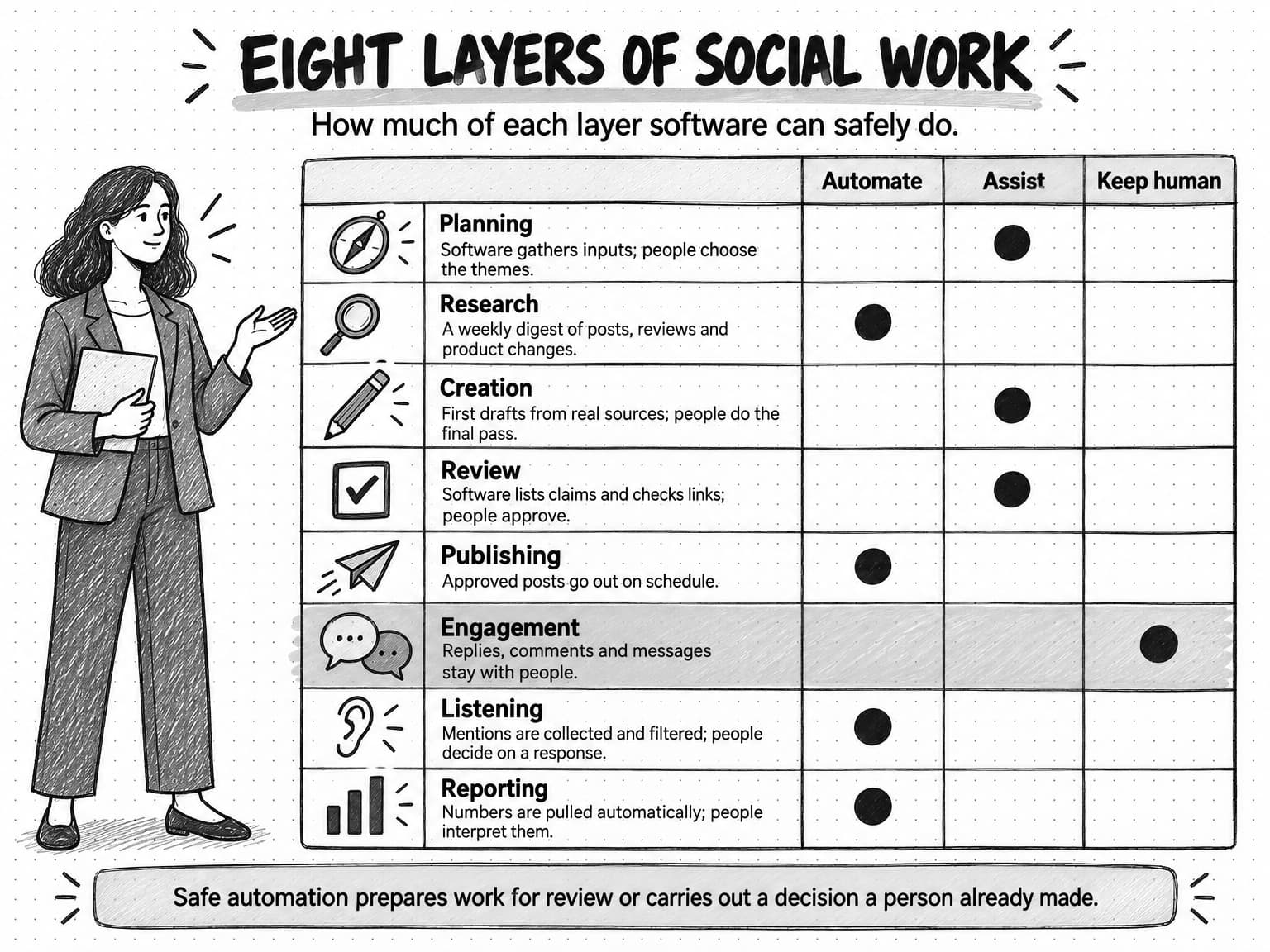
View the eight layers table at full size (opens in a new tab).
1. Planning
Planning decides what the company will talk about this month and why: themes, launches and events worth covering, and the goal behind them. Software can assemble the inputs, such as last month's results, the roadmap, and the events calendar, and draft a calendar for review. Choosing the themes is a positioning decision for the people accountable for the result. Our guide to content pillars covers how to choose the recurring themes a calendar runs on.
2. Research
Research finds the raw material for posts: what buyers are asking, what competitors and peers publish, which industry news deserves a reaction, and which product updates are ready to share. It is one of the best places to automate. A weekly job can collect posts from a list of accounts, summarize community threads, pull new reviews, and list product changes, handing a person a short digest instead of an afternoon of scrolling. The person still decides which findings deserve a post.
3. Creation
Creation turns a topic into a post, carousel, image, or short video for each network. AI drafts quickly, and a good draft saves real time. The risk is generic output: posts any company could have written, unchecked claims, and a voice that sounds like nobody. Drafting works when the AI starts from the company's real material and voice, as a later section explains. The final pass on a post in a person's name belongs to that person.
4. Review and approval
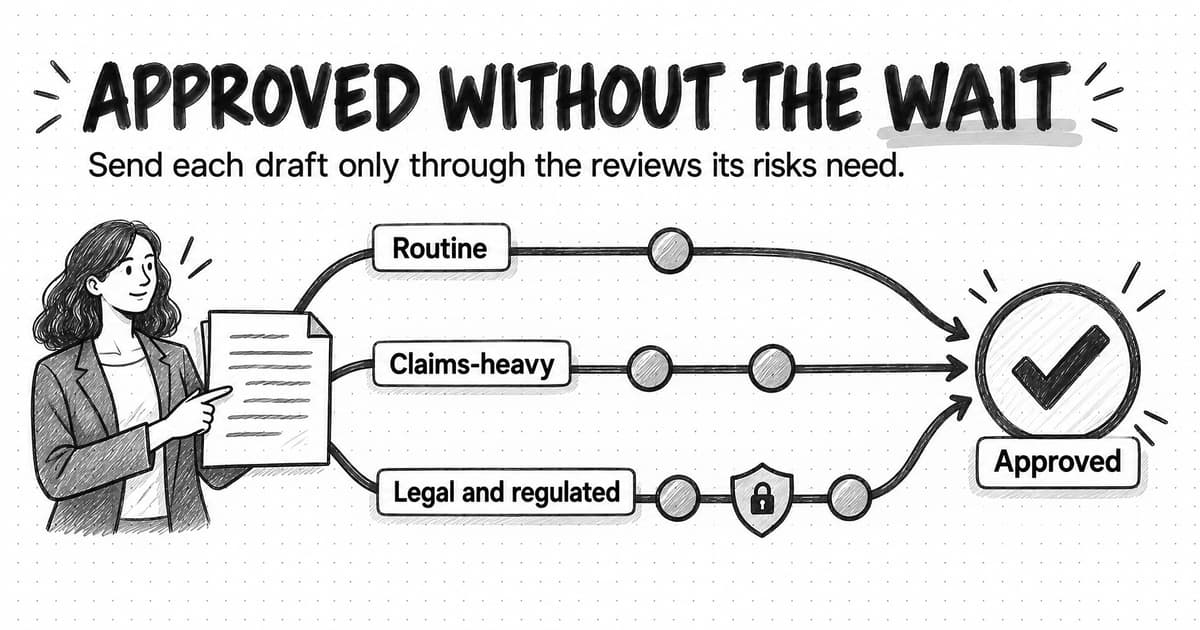
Review checks whether the facts are right, the voice fits, the link works, and the timing still makes sense. Software can prepare it by listing each claim with its source, checking links, and routing the draft to the right reviewer. The decision to approve stays with a person. Our guide to content approval workflows explains how to size reviews to risk so a routine post does not wait a week for sign-off.
5. Scheduling and publishing
Publishing an approved post at the planned time is the most mature and safest form of social automation. LinkedIn's help page on posting says you can "schedule it in advance and manage your scheduled posts from the post composer," and most management tools publish through the platforms' official programming interfaces. What stays human is the check before a post goes live: has anything happened since approval that makes it wrong or out of date?
6. Engagement
Engagement is the replies, comments, reactions, and messages around posts. For a B2B company it holds most of the relationship value, and it should be automated least. Software can help a person engage, with a daily list of comments awaiting an answer or posts from target accounts worth reading, but it should not do the engaging. LinkedIn's User Agreement forbids using bots to "create, comment on, like, share, or re-share posts," and X's rules forbid automated likes and restrict automated replies to people who have opted in.
7. Listening and monitoring
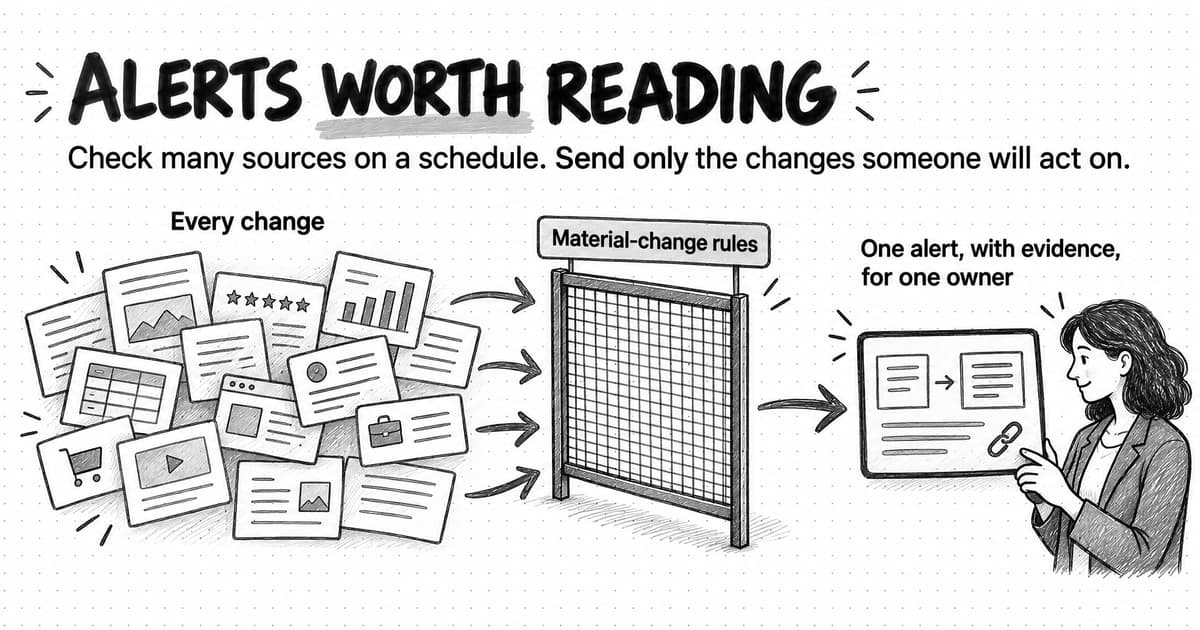
Listening watches public conversation for mentions of the brand, competitors, and relevant topics. The work is mostly collecting and filtering, so it suits automation. The output should be a short list of items that need attention, with sources, such as a complaint, a competitor's launch, or a prospect asking for recommendations, not a dashboard nobody opens. Our guide to automating competitor monitoring covers how to set thresholds so alerts are worth reading.
8. Reporting
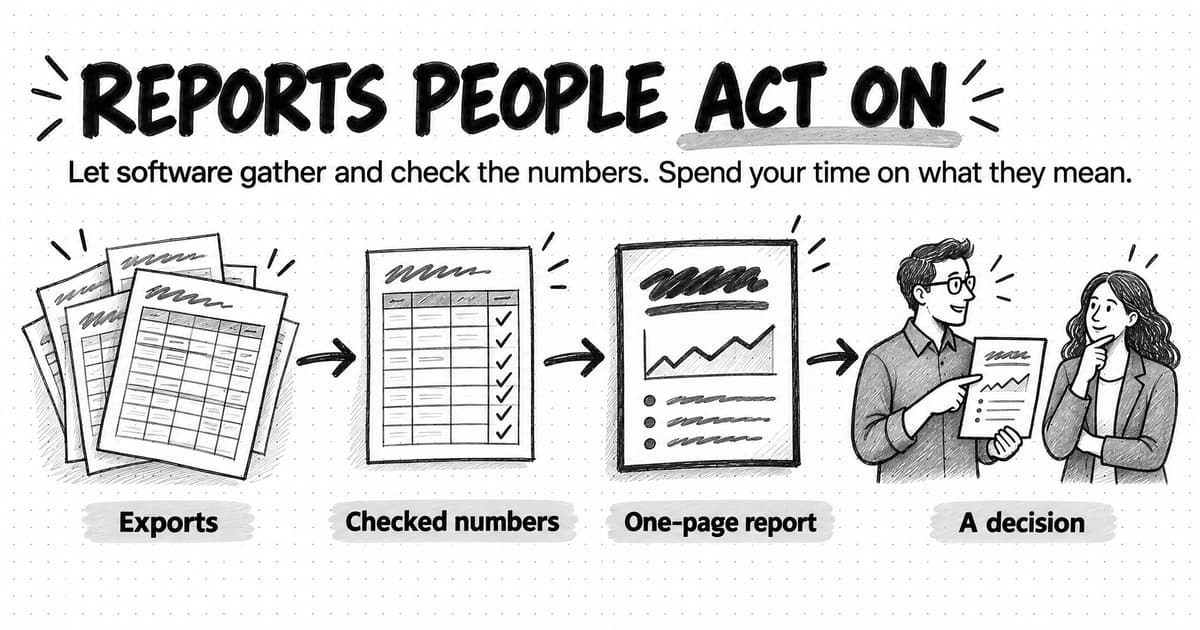
Reporting tells the team what worked. Pulling and combining numbers from each network is tedious work software does well. Interpreting them, and noticing that a post with modest reach started three sales conversations, still needs a person. Our guide to automating marketing reporting covers how to build reports people read and act on.
The table pulls the eight layers together. "Automate" means software can do the work with a person checking the output; "assist" means software prepares and a person does the work; "keep human" means a person does it.
| Layer | Automate | Assist | Keep human |
|---|---|---|---|
| Planning | Gathering last month's results, launches, and events | Drafting a calendar for review | Choosing themes and goals |
| Research | Weekly digests of competitor posts, communities, reviews, and product changes | Suggesting topics from the digest | Deciding which findings deserve a post |
| Creation | Resizing, captions, alt-text drafts, format variants | First drafts from real source material | Final pass on posts in a person's name; opinions and stories |
| Review | Link checks, claim lists with sources, banned-word flags, routing | Summarizing what changed between versions | The approval decision |
| Publishing | Posting approved content at the scheduled time | Pausing the queue when something happens | The check that a post is still right before it goes out |
| Engagement | Nothing that posts, likes, follows, or messages on its own | A daily list of comments to answer; reply drafts for a person to edit | Replies, comments, messages, relationships |
| Listening | Collecting mentions and filtering by threshold | Summarizing what changed and why it may matter | Deciding whether and how to respond |
| Reporting | Pulling and combining numbers; a weekly summary | Drafting commentary for review | Interpreting results and deciding what to change |
Read down the "automate" column and a pattern appears: the safe automation is either preparation that a person reviews or execution of a decision a person already made. Nothing in that column speaks for the company in a live conversation.
What should stay human on social media
Some social work loses its value once automated, because its value is that a real person did it. Other work carries enough risk that a person should do it every time. Together they mark the edge of what to automate.
A simple test helps: if the person on the other side found out how this was produced, would they mind? A reader does not care whether a post was scheduled on Monday. A prospect whose real question got a reply from a bot cares a great deal, and so does a customer whose complaint got a cheerful template.
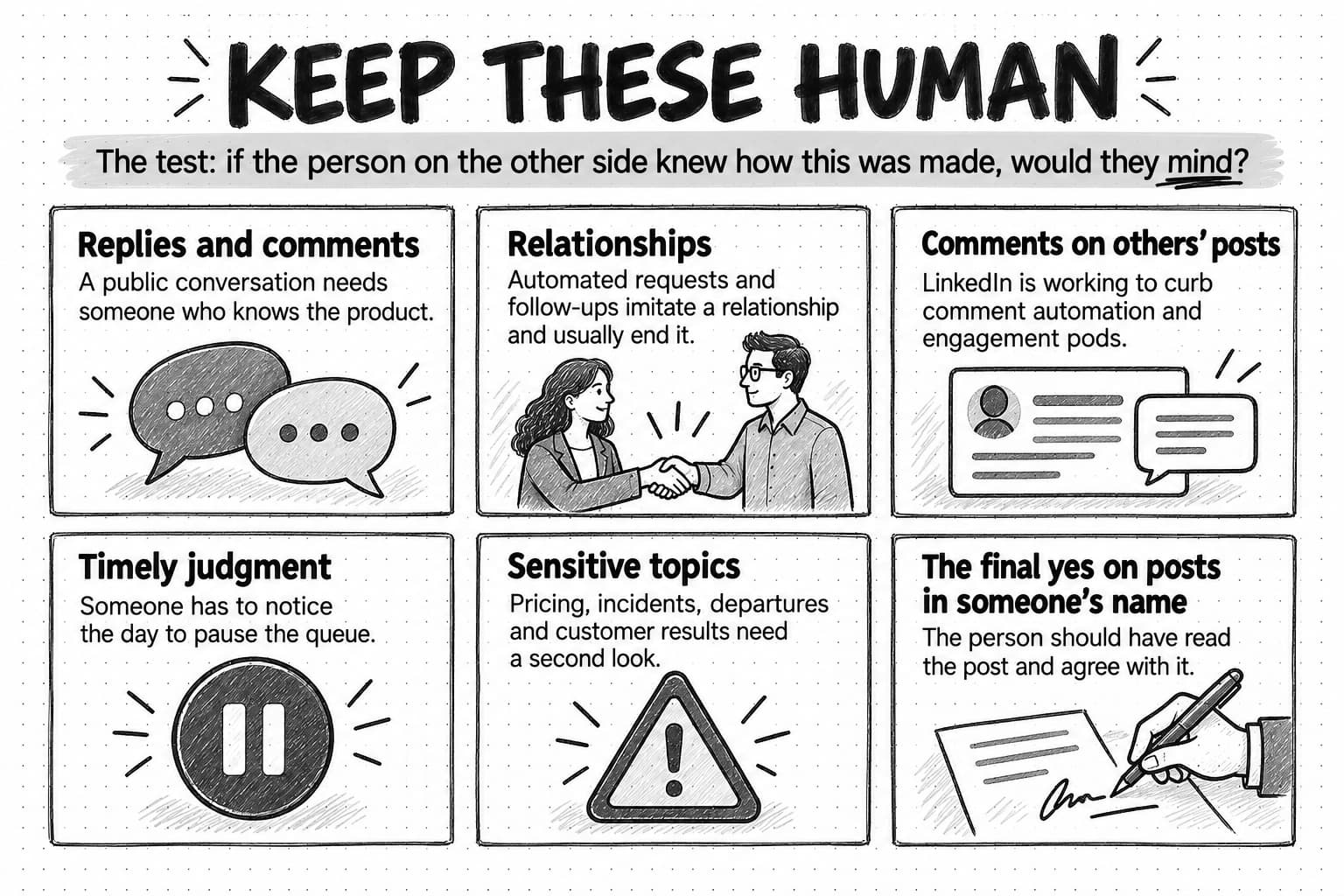
Replies and comments. A reply is a small public conversation. It needs someone who knows the product and can tell a curious prospect from a frustrated customer, and an automated reply that misreads the tone does more damage than a slow human one. Drafting help is fine if the person posting has read the comment and edited the words.
Relationships. For most B2B companies the commercial value of social media comes from relationships: a prospect who has read the founder's posts for six months, a peer who shares the company's research. People build these through attention over time. Automated connection requests and follow-up messages imitate the start of a relationship and usually end it.
Comments on other people's posts. Thoughtful comments on buyers' and peers' posts are among the most useful things a founder or marketer can do on LinkedIn, and exactly what LinkedIn is working to keep human. Its March 2026 feed announcement said LinkedIn is working "to make engagement pods ineffective and curb comment automation or third party tools that create fake conversations." Our guide to LinkedIn content strategy for B2B covers how to build a commenting routine.
Timely judgment. Scheduled posts assume Thursday will look like Monday. Usually it does. When there is an outage, a security incident, layoffs, or major news, a cheerful scheduled post becomes the most visible thing the company says that day. Software can make pausing easy, but a person has to notice that today is the day to pause.
Sensitive topics. Posts about pricing changes, incidents, departures, legal disputes, politics, or a customer's name or results need a person's judgment and usually a second reviewer. An incident-update template is useful preparation, but a person reads it before it goes out.
The final yes on posts in someone's name. A post on a founder's or employee's account is read as that person's view. Ghostwriting and AI drafting are acceptable when the person has read, agreed with, and edited the post. Publishing words in someone's name that they have not seen is the fastest way to make a personal account sound like a company bot.
What LinkedIn, X, Meta, TikTok, and YouTube say about automation and AI content
Platform rules decide part of the answer for you. They also change, so treat this section as a summary of the rules published as of October 2026 and check the current versions before building on them. None of it is legal advice.
LinkedIn draws the line most sharply. Section 8.2 of its User Agreement, effective November 3, 2025, lists what members agree not to do, including using "bots or other unauthorized automated methods to access the Services, add or download contacts, send or redirect messages, create, comment on, like, share, or re-share posts, or otherwise drive inauthentic engagement."
LinkedIn's help page on prohibited software and extensions is blunter about the consequences. It says LinkedIn does not permit "browser extensions that scrape, modify the appearance of, or automate activity on LinkedIn's website," and that people who use them "risk having their accounts restricted or shut down." Its help page on posting and sharing updates adds a quieter penalty: "If we detect excessive post creation that indicates inauthentic activity, or the use of an automation tool, we may limit the visibility of those posts."
That does not make every scheduling tool a risk. LinkedIn runs an official interface for posting, the Community Management API, through which vetted partners create and manage posts for company pages and profiles. The practical line is between tools that use LinkedIn's approved interface to publish what you wrote, and tools that drive your account through a browser to act like you.
LinkedIn's Professional Community Policies also cover coordinated engagement: "Don't do things to artificially increase engagement with your content. Respond authentically to others' content and don't agree with others ahead of time to like or re-share each other's content." An engagement pod, a group that agrees to like and comment on each other's posts, fits that description whether or not any software is involved.
LinkedIn does not ban AI-written posts. Its User Agreement asks members to "review and edit" content from LinkedIn's own generative AI features before sharing it, and holds members responsible for what they share. It shows Content Credentials on images and videos carrying C2PA provenance data, an industry standard that can record whether AI made or edited the media. The Professional Community Policies separately prohibit sharing "synthetic or manipulated media that depicts a person saying something they did not say or doing something they did not do without clearly disclosing the fake or altered nature of the material."
X
X's Automation rules, updated April 2026, allow more than LinkedIn's. Automated posts are permitted, including posts that cross-post outside information such as an RSS feed and posts "for entertainment, informational, or novelty purposes," provided they follow the other rules and run through X's official interface. Non-API automation, "such as scripting the X website," may result in permanent suspension, the rules say.
Several restrictions matter for a marketing account:
- No automated likes. "You may not like posts or hide replies in an automated manner."
- No unsolicited automated replies or mentions. Replies triggered by keyword searches alone are not allowed. Automated replies are permitted only to people who opted in, for example by replying to the account's post, with one automated reply per interaction and a clear way to opt out. Brands running auto-response campaigns must request approval from X.
- AI reply bots need written approval. X allows AI-generated automated replies, but "the deployment or operation of any AI reply bot requires prior written and explicit approval" from X.
- No duplicate posting. Accounts may not post "duplicative or substantially similar posts on one account or over multiple accounts you operate."
- No automated posting about trending topics, and no automated following or unfollowing "in a bulk, aggressive, or indiscriminate manner."
The rules also put responsibility on the account holder: "You are ultimately responsible for the actions taken with your account, or by applications associated with your account."
Meta, TikTok, and YouTube: labels for realistic AI media
For a B2B team that posts mainly on LinkedIn and X, the other networks matter most when you use AI-generated video or audio. Each has a labeling rule for realistic AI media.
- Meta (Facebook, Instagram, Threads). Meta's help page on identifying AI content says Meta "may require an AI label when content has photorealistic video or realistic-sounding audio that was digitally created, modified or altered, including with AI." Its examples include "a reel narrated with a realistic AI-generated voiceover." The requirement does not apply to still images, though images may be labeled automatically, and Meta says there may be penalties for content shared without a required label. Ads follow separate rules.
- TikTok. TikTok's help page on AI-generated content says it requires creators "to label all AI-generated content that contains realistic images, audio, and video," offers a creator label for that purpose, and may label content automatically when it carries Content Credentials.
- YouTube. YouTube's help page on disclosing GenAI content requires creators to disclose realistic AI-generated or altered content, including content that "makes a real person appear to say or do something they didn't do" or "generates a realistic scene that didn't actually occur," through an AI use setting at upload. Creators who consistently fail to disclose may face labels applied for them or penalties.
What the rules mean in practice
Put the platforms side by side and five working rules come out of them.
- Publish through official channels. Use the platform's scheduler or a tool that connects through its approved interface, never extensions or scripts that operate your account as if they were you.
- Never automate engagement on LinkedIn. No automated comments, likes, connection requests, messages, or pods. On X, automate replies only for opt-in campaigns that follow X's rules, and get X's approval before running AI replies.
- Write each post for its network and account. Identical text on several accounts runs into X's duplicate rule and LinkedIn's push against recycled content.
- Label realistic AI video and audio. If a person in a video is an AI avatar or a voice is synthetic, use the platform's AI label or disclose it plainly.
- Own the output. The account holder is responsible for whatever an app or AI tool posts, so approval is not a formality.
| Platform | Scheduled posting | Engagement automation | AI content |
|---|---|---|---|
| Native scheduler; approved partners through LinkedIn's API | Prohibited: bots that comment, like, share, connect, or message; no pods | Members responsible for AI content; Content Credentials shown; disclose manipulated media of people | |
| X | Allowed through the API; no non-API scripting | No automated likes; replies only to opt-in users; AI reply bots need X's written approval | Covered by the general rules; no duplicate or trending-topic automation |
| Facebook, Instagram, Threads | Allowed through Meta's tools and approved partners | Covered by Meta's own policies | Label required for realistic AI video and audio |
| TikTok | Allowed through TikTok's tools and approved partners | Covered by TikTok's own policies | Label required for realistic AI images, audio, and video |
| YouTube | Allowed through YouTube Studio and the API | Covered by YouTube's own policies | Disclosure required for realistic AI or altered content |
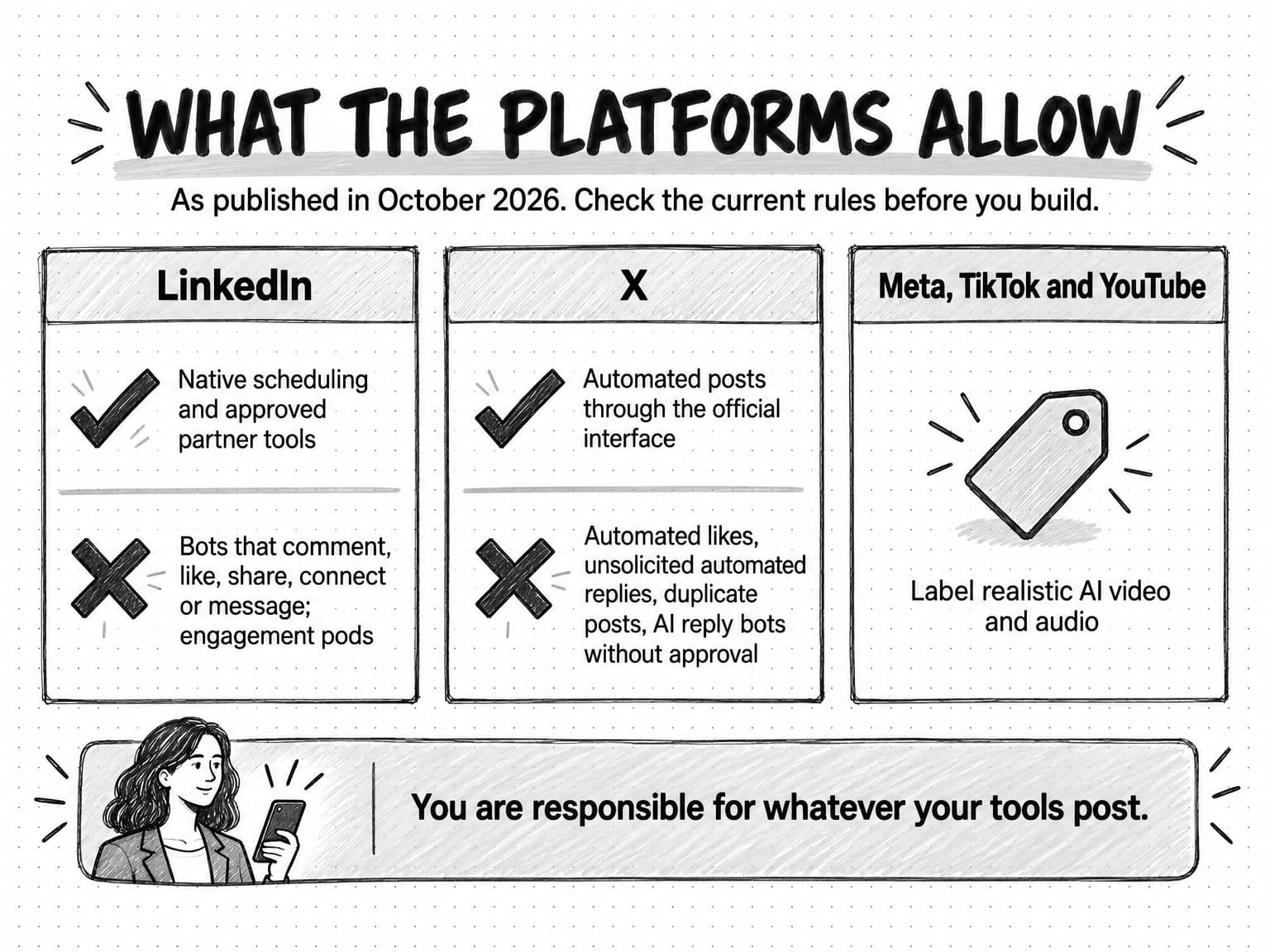
View the platform rules summary at full size (opens in a new tab).
How to use AI to draft social posts that sound like you
AI drafting is the part of social media automation most teams try first, and the part most often done badly. The typical failure is easy to recognize: a one-line hook, three tidy lessons, a closing question asking readers what they think, and nothing a reader could not find elsewhere. LinkedIn's March 2026 feed announcement said it is "reducing recycled and click‑driven posts," so generic posts are increasingly unlikely to be shown at all.
A model writes generic posts when it has nothing specific to work from. Prompt wording matters less than the material behind it, so the job of whoever sets up the workflow is to supply specifics.
Start from a real source. The best social posts come from something the company knows: a customer conversation, a support ticket that keeps recurring, a product decision and the reasoning behind it, a number from your own data, an argument the founder made on a sales call. Ask the AI to draft from that source, not from a topic. "Write a post about onboarding" produces filler. "Draft a LinkedIn post from these notes on why we removed the setup wizard, quoting the two customer comments that changed our mind" produces something only your company could have written. Our guide to repurposing content across channels covers how to turn one source into several posts without losing the point.
Give it the voice in writing. A voice description that says "professional but friendly" tells a model nothing. A useful one names the words the company uses and avoids, shows two or three real posts the team is proud of, and explains choices such as whether the company uses humor, how long its sentences run, and how it handles claims about competitors. Our guide to defining your brand voice walks through building one with examples. For a founder's account, the voice is the founder's own: their phrases, their opinions, and the topics they are willing to argue about.
Keep the context saved and reused. People stop pasting the voice guide and product facts into every request, so tools that save and reuse that context produce more consistent drafts. Whatever the tool, keep one reviewed source of approved facts and update it when they change.
Ask for a claims list with every draft. Have the AI list every factual claim in the draft with the source it came from. A reviewer can check five claims in two minutes; finding an invented statistic buried in a polished post takes much longer. Our guide to preventing AI hallucinations in marketing content covers source checks in more depth.
Draft per network. A post that works on LinkedIn will usually need rewriting for X: shorter, often split into a thread, with a different opening. Ask for each version separately rather than truncating one.
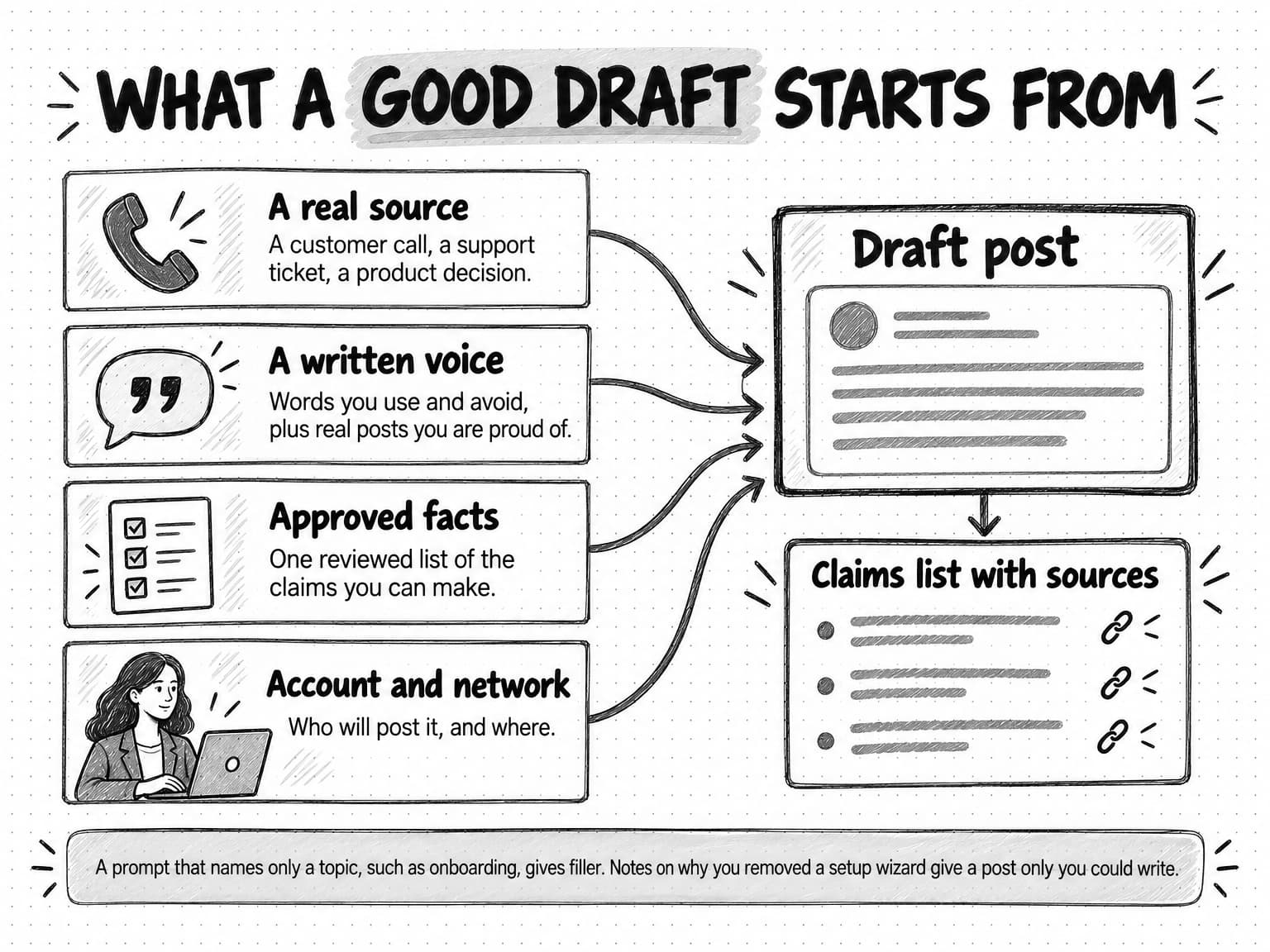
A drafting brief for a weekly batch needs the source material, account, network, and goal for each post, the voice notes, the claims allowed, and anything to avoid this week. The template later in this guide includes one.
Approval gates before anything posts
Approval is what makes automated publishing safe: without it, a scheduling tool publishes mistakes on a timer. It does not need to be heavy. Most posts are routine, drawing on approved messaging with no new claims and no customer named, and one editor can approve them. Posts with statistics, customer names or results, competitor comparisons, pricing, or anything about an incident get a second reviewer. Posts on a founder's or employee's account need that person's approval regardless of tier, because the words will be read as theirs. The content approval workflow guide sets out risk tiers, reviewer checklists, and deadlines in detail.
Two approval points matter specifically for automated social posting.
Approve the exact post, close to when it goes out. A post approved on Monday and published on Friday has had four days for things to change: a link breaks, the webinar fills up, a customer asks not to be named, news makes the tone wrong. A two-minute look at the morning's scheduled posts by a named person catches most of this.
When software publishes, approve the action as well as the content. If an AI agent or automation can publish to an account, the approval should show the exact account, text, media, visibility, and time, and it should lapse if any of those change, because a post approved in a document can still go to the wrong account. The approval guide covers this second kind of approval, and the guide to human-in-the-loop AI covers where review points belong in AI-assisted work generally.
Finally, every queue needs a pause. Decide who can pause all scheduled posts and when: a sensible default is any incident, any announcement that changes the context of planned posts, and major news that makes promotional posts look out of touch. Write it into the team's marketing SOP for social posting so nobody has to decide under pressure.
Company pages, founder accounts, and employee accounts
B2B social media usually runs on three kinds of account, and the right amount of automation differs for each.
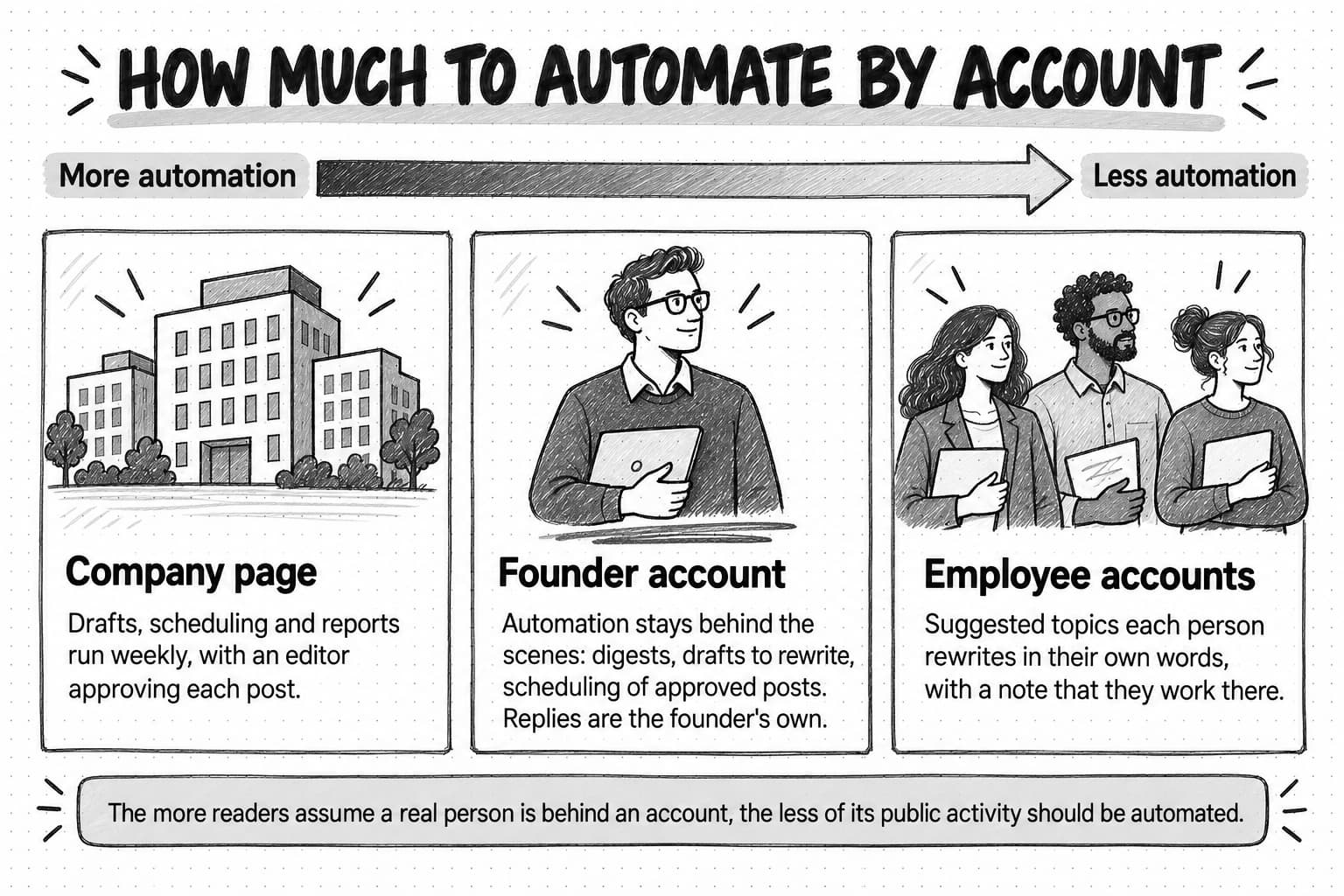
The company page speaks for the company: product updates, events, research, customer stories, hiring. Readers do not expect it to be one person, so more of its work can be automated than on any other account. Drafting, scheduling, and reporting can run as a weekly routine with an editor approving each post. Comments still need a person, but it can be whoever owns the page.
The founder's account is often the most valuable channel an early B2B company has, because buyers trust people more than logos. That trust depends on the posts sounding like the founder and the replies coming from the founder, so automation stays behind the scenes: research digests, ideas from the week's calls, first drafts to rewrite, scheduling of approved posts, and reports. Our guide to founder-led marketing covers what founders should post and how to fit it into a busy week.
Employee accounts extend reach, but they belong to the employees. Two rules keep an employee program from becoming a liability. First, an employee posts only what they have read and chosen to share, in their own words where possible, never text pushed out in their name. Ten employees posting the same paragraph at the same minute reads as coordinated, and on X runs into the rule against substantially similar posts across accounts; suggested topics or drafts each person rewrites work better. Second, employees who post about their company's products should say they work there. The FTC's Endorsement Guides FAQ says employees should disclose their relationship to the company when they promote its products, and that "listing your employer on your profile page isn't enough." Rules differ by country; check what applies to you.
A weekly social media automation workflow for a small team
Here is a weekly routine for a team of one to three people posting on a company page and one or two personal accounts on LinkedIn, with X as a second network. It assumes three to five posts a week across accounts. The days are a suggestion; the order matters more than the calendar.
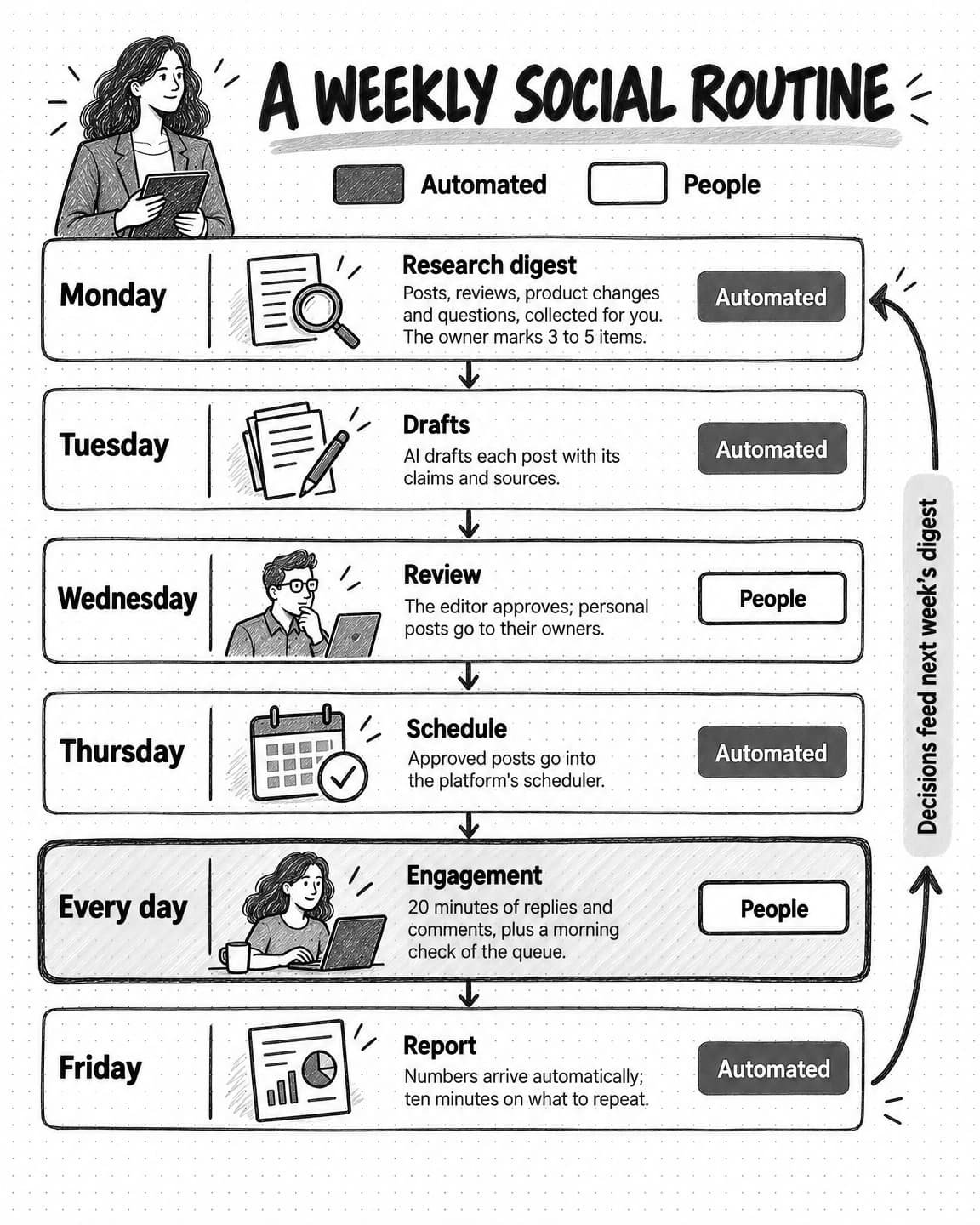
View the weekly social routine at full size (opens in a new tab).
Monday: the research digest runs automatically. A scheduled job gathers the week's material into one short document: last week's product changes, new reviews, notable posts from competitors and peers, community threads, questions from sales and support notes, and upcoming events. The person who owns social reads it and marks three to five items worth a post.
Tuesday: drafts arrive for each account. From the marked items, AI drafts a post for each slot: account, network, format, copy, claims with sources, and alt text for images. For personal accounts the draft is a starting point the owner rewrites. This step can also run on a schedule from the digest and saved voice notes.
Wednesday: review and approval. The editor checks claims, fixes what sounds generic, and approves or sends back, in one sitting. Posts with customer names, statistics, or competitors go to a second reviewer, and personal-account posts to the person named.
Thursday: approved posts go into the queue. Approved posts are scheduled through the platform's own scheduler or an approved tool, at times that suit the audience. The person scheduling checks links, images, tags, and the account one last time.
Every day: twenty minutes of engagement, done by people. Each account owner answers comments, reads posts from buyers and peers, and comments where they have something to add. Software can list comments awaiting a reply but posts nothing. Each morning someone checks the day's queue and pauses it if the news makes a post wrong.
Friday: the weekly report arrives. A scheduled report pulls the numbers for the week's posts, compares them with recent weeks, and lists the posts that started conversations, with the comments. The team spends ten minutes on what to repeat and what to drop, and adds the decisions to next week's research brief.
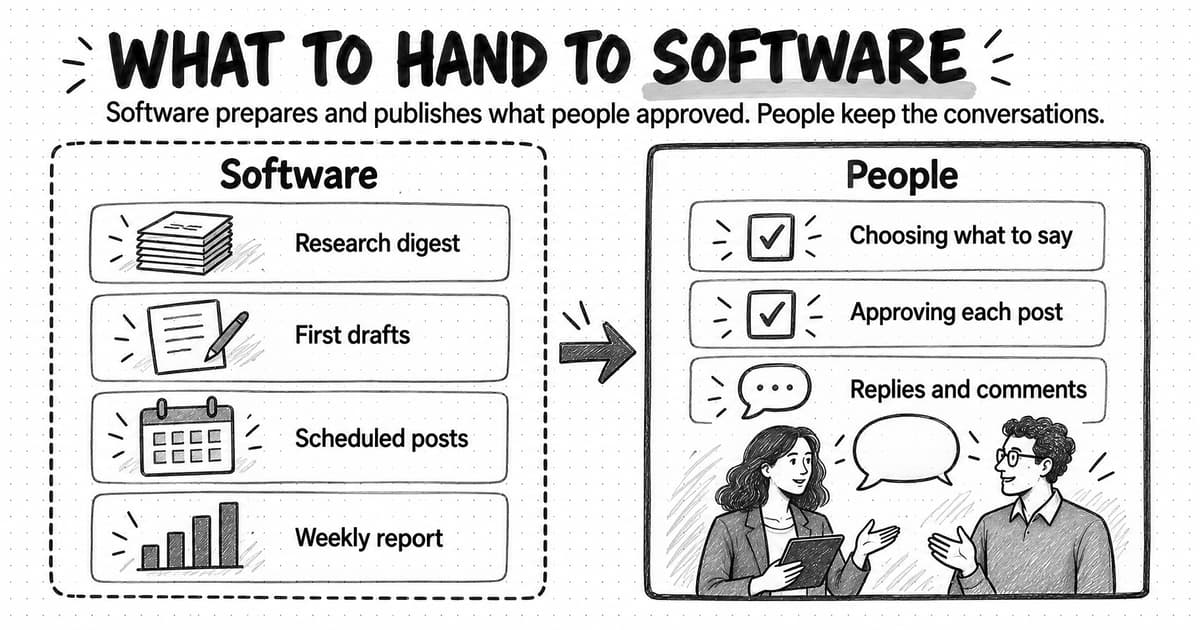
The routine automates the parts that are pure preparation or pure execution and keeps people on the choices, the approval, and the conversations. For a small team, most of the time saved comes from the digest and the drafts rather than the scheduling.
A copyable weekly social media workflow template
Copy this into a shared document or your task tool and fill in the brackets. It doubles as the brief for any person or AI helping with the work.
WEEKLY SOCIAL MEDIA WORKFLOW

Accounts and owners
- Company page (LinkedIn): owner [name], approver [name]
- Founder (LinkedIn, X): owner and approver [founder name]
- Other personal accounts: [names]; each approves their own posts

Goals this quarter
- [e.g., start conversations with operations leads at mid-size manufacturers]
- [e.g., fill the webinar on (date)]

Posting plan
- Company page: [n] posts a week, formats [text / image / carousel / video]
- Founder: [n] posts a week; founder rewrites every draft
- X: [n] posts a week, written for X, not copied from LinkedIn

MONDAY: research digest (automated, scheduled)
Sources to collect:
- Product changes shipped last week: [changelog or release notes]
- New reviews: [review sites]
- Posts from these accounts: [competitors, peers, customers]
- Communities: [forums, subreddits, Slack groups]
- Sales and support questions: [where notes live]
- Upcoming events and launches: [calendar]
Output: one-page digest with links. Owner marks 3 to 5 items by [time].

TUESDAY: drafts (AI-assisted)
For each marked item, draft:
- Account, network, format, suggested day
- Post copy written for that network and that account's voice
- Every factual claim with its source
- Alt text for any image
Voice notes: [link to voice guide; founder's phrases and topics]
Allowed claims: [link to approved facts]
Avoid this week: [topics, words, sensitive subjects]

WEDNESDAY: review and approval
- Routine posts: editor approves
- Statistics, customer names or results, competitors, pricing: second reviewer [name]
- Personal-account posts: the account owner approves
- Approval deadline: [day, time]

THURSDAY: schedule approved posts
- Tool: [platform scheduler or approved tool]
- Check links, media, tags, account, and time before scheduling

DAILY: engagement (people only)
- Each account owner: 20 minutes answering comments and commenting on others' posts
- Nothing automated likes, comments, connects, or messages
- Morning check of the day's queue; pause if anything makes a post wrong

PAUSE RULE
- Who can pause all scheduled posts: [names]
- Pause for: incidents, announcements that change context, major news

FRIDAY: weekly report (automated, then reviewed)
- Numbers per post: impressions, engagement, comments, profile visits, link clicks
- Posts that started conversations, with the comments
- Ten-minute review: what to repeat, what to drop, input for next Monday
Worked example: a three-person team sets up social automation (fictional)
Fernwell is a fictional company invented for this example. It sells maintenance scheduling software to facilities managers at mid-size manufacturers. Its marketing team is the founder, one marketer, and a contract designer who works two days a month. The company posts on its LinkedIn page and the founder's LinkedIn account, and has an X account it rarely uses.
Where they started. A scheduling tool held six weeks of company-page posts written in one sitting, mostly generic maintenance tips. The founder posted about twice a month, when inspired. A browser extension sent templated connection requests to facilities managers, and comments on the company page sat unanswered for days because nobody owned them.
What they changed first. They removed the extension, which LinkedIn's rules prohibit, and deleted the queued generic posts. Then they wrote down a plan: three company-page posts a week, two from the founder, and one post a week written for X.
The research digest. A Monday digest now collects last week's product changes, new reviews of Fernwell and two competitors, posts from twenty facilities and manufacturing accounts, threads from two maintenance communities, and questions from the founder's sales-call notes. The most useful item in the first month was a recurring sales question: how to justify planned maintenance to a finance team that only sees the cost. It became the founder's best post of the quarter and a company-page carousel.
Drafting. The marketer wrote a one-page voice guide for the company page and, with the founder, a half-page of the founder's phrases and opinions. Drafts start from the digest items and arrive on Tuesday with their claims listed. The founder rewrites the first and last paragraphs of every draft for his account; he said the drafts saved him the blank page, not the writing.
Approval and publishing. The marketer approves company-page posts, and any post with a customer name or a number also goes to the founder. Approved posts go into LinkedIn's native scheduler. In the second month, a supplier Fernwell integrates with had a public outage on a Thursday morning; the marketer paused the day's post, which happened to be about integration reliability, and moved it a week.
Engagement. The founder spends twenty minutes each morning answering comments and commenting on posts from facilities managers he would like to meet. The marketer answers comments on the company page within a working day. Nothing posts or messages automatically.
After a quarter. Every number here is illustrative. The company page published on schedule every week. Impressions rose modestly; comments from people in the target audience rose more, and three demo requests mentioned the founder's posts in the "how did you hear about us?" field. The marketer estimated the routine took about four hours a week of her time, down from a day, mostly because the digest replaced scrolling and the drafts replaced blank pages. Next quarter, a customer success manager joins as a third voice, posting in her own words twice a month.
What the example shows is where the automation went. Fernwell automated research, first drafts, publishing, and the report, and removed automation from engagement entirely. The founder's account worked because he still wrote and replied as himself.
How to measure social media automation
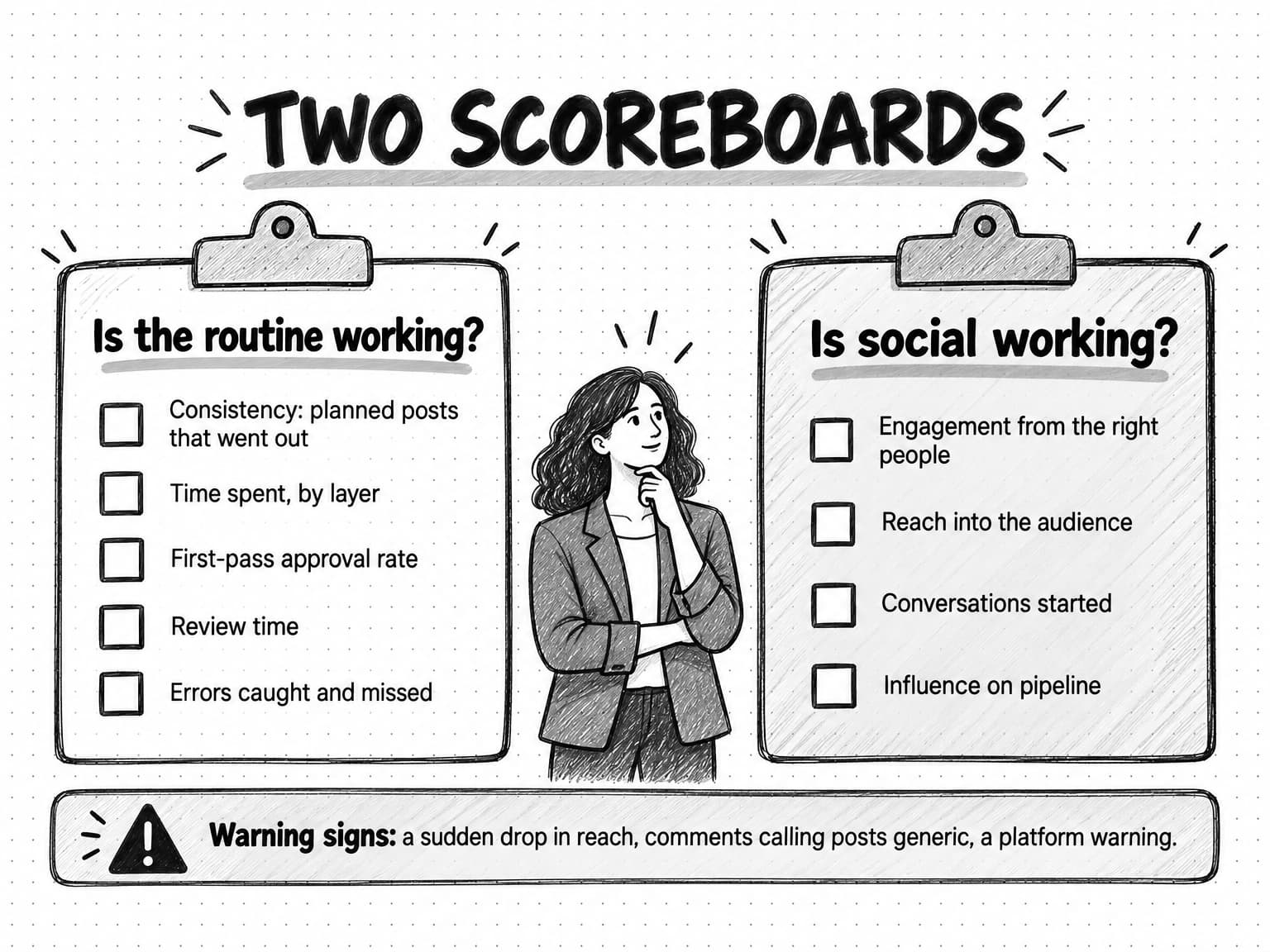
Measuring automation means asking two separate questions: is the routine working, and is the social presence working? A routine can run perfectly while the posts achieve nothing, so track both and keep them apart.
Is the routine working? These are operational measures, and automation should improve them:
- Consistency: the share of planned posts that went out in the planned week.
- Time spent: hours per week the team spends on social, by layer. Most of the saving should show up in research, drafting, and reporting.
- First-pass approval rate: the share of drafts approved with only light edits. A low rate means drafts are too generic or the source material is thin.
- Review time: how long drafts wait for approval. If it grows, the approval step is the bottleneck.
- Errors caught and missed: wrong links, outdated posts, and mistakes that reached the feed.
Is the social presence working? These are outcome measures, and they depend on what the posts say:
- Engagement from the right people. Comments and conversations from people in your target audience matter more than total reactions, so read the comments themselves.
- Reach into the audience. Impressions, followers, and profile visits, read as trends over several weeks rather than week by week.
- Conversations started. Replies, direct messages, connection requests from prospects, and mentions on sales calls.
- Influence on pipeline. Self-reported attribution ("how did you hear about us?") and notes on CRM opportunities show influence that click-based reports miss, because most social influence on B2B buying does not come with a click. Our guide to measuring content marketing ROI covers how to measure what attribution cannot see.
Watch for signs that automation is hurting. A sudden drop in reach, comments saying a post felt generic, fewer replies, or a platform warning all deserve attention. If reach falls after you connect a new tool, check whether it does anything that looks like automated activity.
Common social media automation mistakes
Most automation failures on social media look efficient at the time.
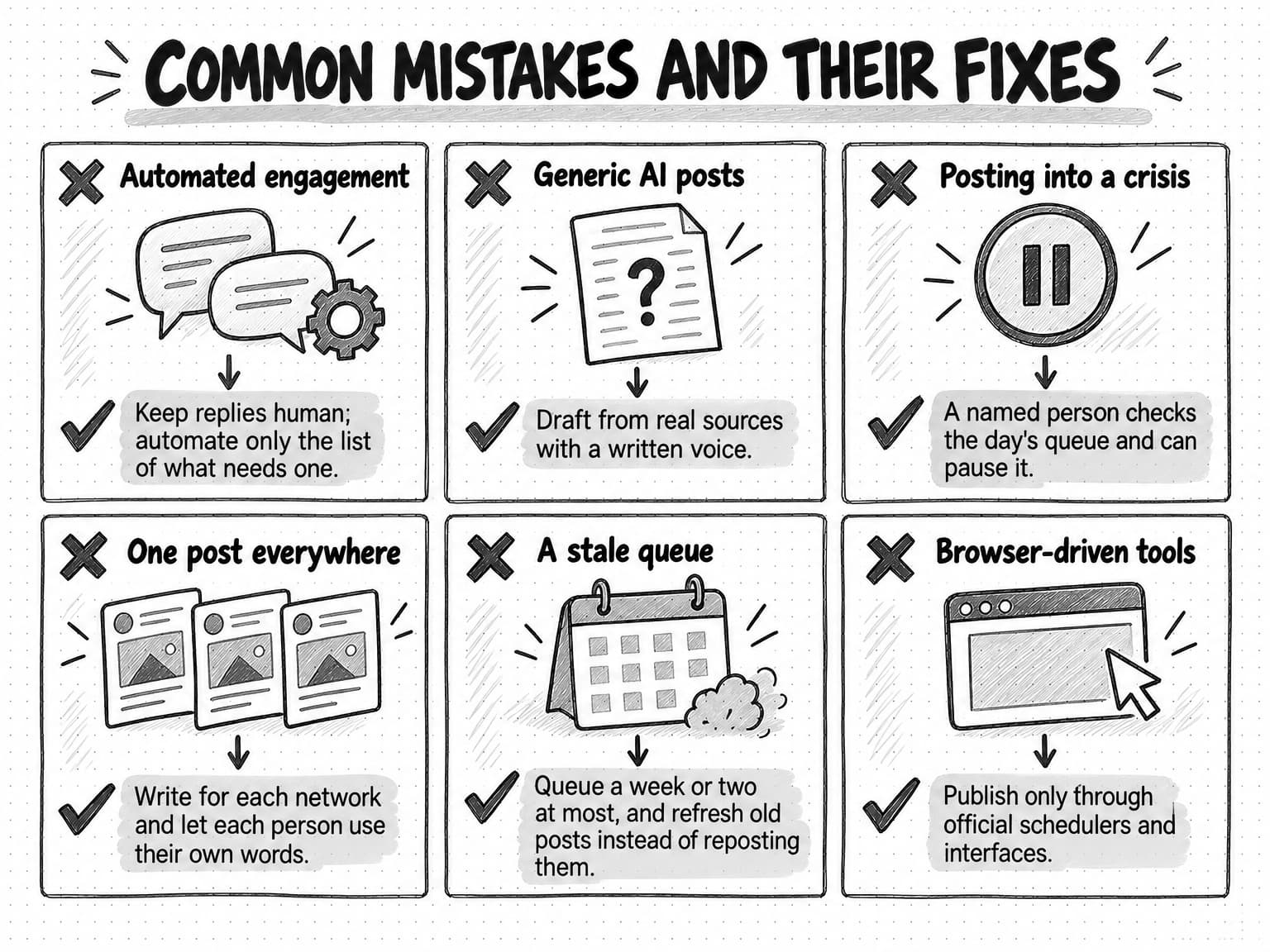
Automating engagement. Comment bots, auto-likers, connection-request tools, automated direct messages, and engagement pods are the shortest route to a restricted account on LinkedIn. They also make the numbers meaningless, because the engagement you count no longer comes from real readers. The fix is to keep all engagement human and automate only the list of what needs a reply.
Posting generic AI content. A feed of posts that any company could have written trains readers to scroll past the account. The fix is better inputs: drafts from real sources, a written voice, and an editor who cuts what sounds like filler. Our guide to AI slop describes the patterns to look for.
Posting into a crisis. A cheerful scheduled post on the morning of an outage, a layoff, or a major news event is the most common way automated publishing embarrasses a company. The fix is a named person who checks the day's queue and a pause rule everyone knows.
Copying one post everywhere. The same text on LinkedIn, X, and Instagram, or on ten employee accounts at once, reads as automation and runs into X's rule against duplicate posts. The fix is to write for each network and let each person use their own words.
Letting the queue go stale. A month of queued posts will contain some that no longer fit: a changed feature, a past event, an updated number. Tools that repost old content on a loop make it worse, and LinkedIn says it is reducing recycled posts in the feed. The fix is a queue of a week or two at most, a pre-publication check, and refreshing a good old post with new material instead of reposting it.
Using tools that act through the browser. Extensions and scripts that operate an account as if they were the user break LinkedIn's rules and X's rule against non-API automation, even when the activity itself is harmless. The fix is to publish only through the platform's scheduler or tools that connect through its official interface.
Measuring output instead of outcomes. A routine that publishes every post on time can still achieve nothing. Report conversations and pipeline influence alongside the posting record.
View the mistakes and fixes reference at full size (opens in a new tab).
Social media automation tools by category
Most social media automation tools combine several functions, so choose by the job rather than the product list. These are the main categories.
| Category | What it does | Use it for | Watch out for |
|---|---|---|---|
| Native platform schedulers | Schedules posts inside LinkedIn, Meta Business Suite, YouTube Studio, and similar | A single network, small volume, no extra cost | No shared calendar, approvals, or cross-network reporting |
| Social media management tools | Scheduling, calendar, approvals, shared inbox, and reporting across networks | Teams posting on several networks with more than one person involved | Check that publishing uses each network's official interface, and that approval steps are real |
| Workflow automation tools | Connects apps with triggers and actions, such as posting when a blog article publishes | Moving approved content between systems | Easy to build automation that posts without review; keep a human approval step |
| AI writing tools and general AI assistants | Draft posts, captions, and variants from prompts | First drafts and adaptations | Generic output without your source material and voice; claims need checking |
| AI marketing agents | Research, draft multi-format content packages, and run recurring work from saved brand context | Research digests, draft batches, carousels, images, and video, with review | Confirm what the agent can publish on its own; keep approval before anything goes out |
| Social listening tools | Collect and analyze public mentions of brands, competitors, and topics | Monitoring mentions and finding conversations to join | Coverage varies by network and is never complete |
| Employee advocacy tools | Suggest content for employees to share from their own accounts | Organizing an employee program | Pushing identical posts; missing disclosure of the employment relationship |
| Analytics and reporting tools | Pull and combine performance data | Weekly and monthly reports | Totals without interpretation; reach mistaken for results |
Engagement automation tools, which like, comment, connect, follow, or message on your behalf, are left off on purpose: LinkedIn prohibits them, X restricts most of what they do, and the account holder carries the risk.
When you evaluate any tool, ask four questions. How does it publish, through the platform's official interface or by operating your account? What can it do without a person approving? Where does it get its facts and voice from? And can you pause everything it has queued with one action?
How Ampere helps with social media work
Ampere is an AI marketing agent. On social media it takes on the research and drafting layers of the workflow above, plus the recurring preparation around them, while your team keeps approval, publishing, and the conversations. Ampere is not a social media scheduler and does not post to your accounts.
For research, Ampere can analyze public social posts on networks including LinkedIn, X, Instagram, TikTok, and YouTube, search the web, and turn public review and company data into structured summaries. It can also audit one LinkedIn company page from up to about 70 of its recent public posts, covering cadence, format mix, copy, topics, audience coverage, and engagement, and deliver a prioritized report with a recommended topic list. Engagement figures are public counts and can be partial.
For creation, Ampere creates channel-specific social packages for LinkedIn, X, Facebook, Instagram, TikTok, and YouTube: text posts, polls where supported, newsletters, carousels, image posts, short videos, captions, and hooks. LinkedIn text post, poll, and newsletter packages include review notes and claim checks, so the reviewer starts with the claims listed. Drafts start from Brand memory, saved and reviewable knowledge about your brand, audience, products, competitors, voice, and visual identity.
On paid plans, a scheduled task can run the Monday research digest or prepare a weekly batch of draft posts and return each result to a Project for review, with optional run-update emails to members of your Organization. Monitoring can check supported public sources, such as competitor pages or reviews, every hour, day, or week and file an in-app alert with evidence when something changes. It depends on provider data and may miss changes.
Your team keeps what this guide argues should stay human: choosing what to say, approving and publishing each post, and every reply. AI drafts can be inaccurate or incomplete, so a person checks each one.
Owners who have never had a paid plan can start on the Free Plan, with no card, in the countries where it is available. Ampere sets up Brand memory, then completes up to four Free tasks: a LinkedIn content audit, a LinkedIn image post, a LinkedIn carousel, and a LinkedIn text post.
Sources and further reading
- LinkedIn, User Agreement, effective November 3, 2025, accessed October 17, 2026. Section 8.2 on bots and automated engagement; generative AI features.
- LinkedIn Help, Prohibited software and extensions, accessed October 17, 2026.
- LinkedIn Help, Post and share updates, accessed October 17, 2026. Scheduling and limits on posts from automation tools.
- LinkedIn, Professional Community Policies, accessed October 17, 2026. Artificial engagement and manipulated media.
- LinkedIn Corporate Communications Team, How LinkedIn is improving the Feed to show more relevant, authentic professional content, LinkedIn Pressroom, March 12, 2026.
- LinkedIn Help, Content credentials, accessed October 17, 2026.
- LinkedIn, Community Management API overview, Microsoft Learn, accessed October 17, 2026.
- X Help Center, Automation rules, updated April 2026, accessed October 17, 2026.
- Meta Help Center, How to identify AI content on Meta products, accessed October 17, 2026.
- TikTok Support, About AI-generated content, accessed October 17, 2026.
- YouTube Help, Disclosing use of GenAI content, accessed October 17, 2026.
- Federal Trade Commission, FTC's Endorsement Guides: What People Are Asking, accessed October 17, 2026. Employee disclosure.
Frequently Asked Questions
What are the benefits of social media automation?
The main benefits of social media automation are consistency and time. Automated research digests, AI first drafts, scheduled publishing of approved posts, and automated reports remove the preparation work that makes small teams fall silent for weeks. The time saved is best spent on what automation should not do: choosing what to say, approving posts, and replying to comments and messages.
What are the disadvantages of social media automation?
The disadvantages of social media automation come from automating the wrong layers. Automated comments, likes, connection requests, and messages break LinkedIn's rules and can get accounts restricted. AI drafts without real source material produce generic posts that readers and feeds pass over. Scheduled posts can go out during an incident or after their facts change. Each risk has a fix: keep engagement human, draft from real sources, and check the day's queue before posts go live.
Can ChatGPT automate social media posts?
ChatGPT and similar AI assistants can draft social media posts, adapt them for each network, and suggest captions and hooks, but drafting is only one layer of the work. Publishing on a schedule needs a platform scheduler or a tool connected to the platform's official interface. Drafts are strongest when the assistant works from real material, such as customer notes or product changes, and a written voice guide, and a person should check the claims and approve each post.
How do you automate social media posts?
To automate social media posts, separate the layers. Automate research with a weekly digest, use AI to draft posts from the marked items, have a person review and approve each draft, then schedule approved posts through the platform's own scheduler or a tool that uses its official interface. Keep replies and comments human, check the day's queue each morning, and review a weekly report. The guide's copyable weekly template sets out each step.
Are social media automation bots allowed?
Social media automation bots that engage on an account's behalf are largely not allowed. LinkedIn's User Agreement prohibits bots that comment, like, share, connect, or send messages, and its help pages say accounts using such tools risk restriction. X allows automated posts through its official interface but forbids automated likes, restricts automated replies to people who opted in, and requires X's written approval for AI reply bots. Scheduling approved posts through official tools is allowed on every major network.
What is AI social media automation?
AI social media automation is the use of AI models in social media work, most often to research topics, draft and adapt posts, write captions and alt text, summarize mentions, and draft report commentary. It differs from older rule-based automation, which only scheduled and moved content. The safest use of AI is preparing work for a person to approve. AI that posts, replies, or messages on its own is a separate and riskier decision, and some platforms restrict it.
What is the 5:3:2 rule for social media posts?
The 5:3:2 rule for social media posts is an informal content-mix heuristic: out of every ten posts, five share other people's content, three are your own content, and two are personal or behind-the-scenes posts. It is a rule of thumb rather than a standard, and fits few B2B accounts exactly. Its useful point is that an account posting only promotion reads like an ad. Choose your own mix from what your audience engages with and what your team can produce well.
What is the best tool to automate social media?
The best tool to automate social media depends on which layer of the work you want help with. Native schedulers suit one network and low volume; social media management tools add approvals, a shared inbox, and reporting across networks; AI writing tools and AI marketing agents help with research and drafts; social listening tools collect mentions. Whatever you choose, check that it publishes through the platform's official interface and that nothing goes out without approval.