B2B newsletter strategy: how to start an email or LinkedIn newsletter buyers read
A practical guide for founders and B2B SaaS marketers who want to replace a fading product-update email with a newsletter people look forward to: what it is for, which format to choose, how to write each issue, where it should live, and how to tell whether it is working.
41 min readWritten by Ampere
Short answer
How do you build a B2B newsletter strategy?
Build a B2B newsletter strategy by deciding who the newsletter is for and what it promises them, then choosing a format and frequency your team can keep for a year. Write every issue to be useful even to a reader who never buys, keep promotion to a small, clearly marked part, and judge it by replies, clicks, list growth, and influenced pipeline rather than opens.
Summary
A B2B newsletter earns its place by keeping a company useful to buyers during the long stretch before they talk to sales. Buyers in 6sense's 2025 survey made first contact 61% of the way through their process and usually chose from a shortlist formed on day one, so a newsletter's job is to be read and trusted before that shortlist forms, not to announce features.
Strategy starts with positioning: one specific reader, one promise of what each issue gives them, a name that says it, and a frequency you can sustain. Formats such as curated picks, original essays, data, how-to issues, digests, and founder letters each trade effort against the trust they build, so choose one main format and hold it.
Each issue should follow a repeatable template: a subject line that says what is inside, one main piece, a short supporting section, one call to action, and a compliant footer. The guide includes a copyable issue template, 28 issue ideas by type, and lessons from seven public newsletters.
Email and LinkedIn newsletters do different jobs. A LinkedIn newsletter notifies subscribers on the platform and is easy to start from an existing following, but the audience stays on LinkedIn; an email list is yours to keep and to measure. Many B2B teams use LinkedIn for reach and email as the record.
Measure a newsletter by what readers do, because Apple Mail Privacy Protection makes opens unreliable: replies, clicks on the main piece, net list growth, unsubscribes per issue, and pipeline that buyers or your records connect to it. A 90-day launch plan and a fictional worked example show how a small team replaces a monthly product email with a newsletter worth reading.
Contents
- What a B2B newsletter is for
- Newsletter formats and their tradeoffs
- Position the newsletter: reader, promise, name, and frequency
- Email newsletter or LinkedIn newsletter?
- The anatomy of a good B2B newsletter issue
- Subject lines and preview text that say what is inside
- B2B newsletter examples worth studying
- Newsletter ideas: 28 B2B issue ideas by type
- Sourcing ideas without burning out
- Growing subscribers ethically
- Deliverability basics for a newsletter
- How to measure a newsletter now that opens mislead
- A production workflow with AI drafting and human review
- How to start a newsletter: a 90-day launch plan
- Worked example: replacing a product-update email (fictional)
- Common B2B newsletter mistakes
- Drafting newsletter issues with Ampere
- Sources and further reading
- Frequently Asked Questions
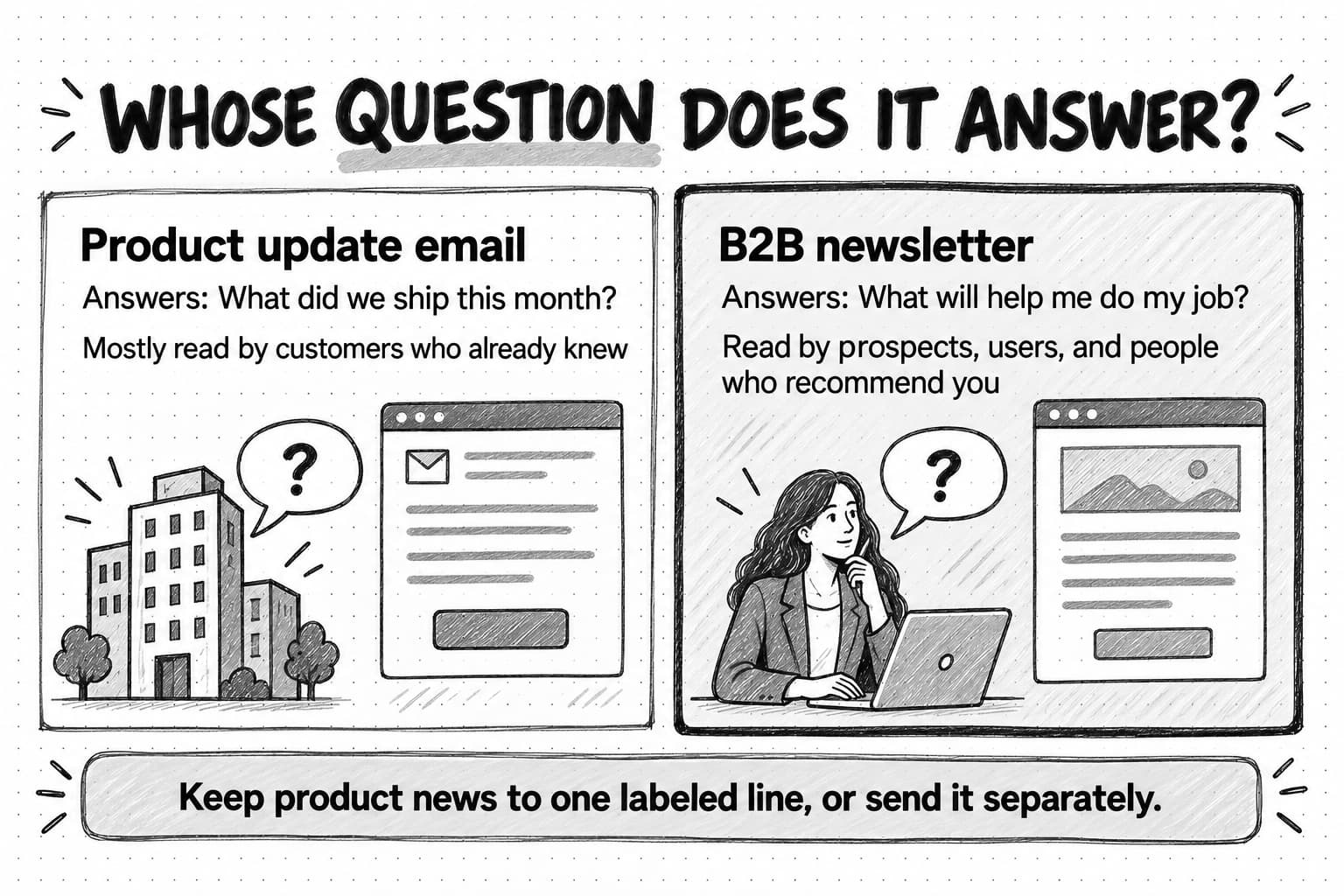
Many software companies have the same email in their sent folder. It goes out once a month, it is called something like "Product updates: October," and it lists the five things the product team shipped, each with a screenshot and a "Learn more" button. Two years ago people opened it. Now the open rate drifts down a little every quarter, nobody replies, and the marketer who sends it suspects that the people reading it are mostly customers who already knew about the features.
The email is not failing because it is sent by email or because people dislike newsletters. It is failing because it is written for the company. It answers the question "what did we do this month?" when the reader's question is "what will help me do my job?" A prospect who is two months away from a buying decision has no reason to read about a new export button. The same prospect might read every issue of a newsletter that explains how teams like theirs solve the problem the product addresses, because that is useful whether or not they ever buy.
A B2B newsletter is a recurring email or LinkedIn publication that a business sends to people who chose to receive it, with new, useful content in each edition, written to build trust with the people who might buy, use, or recommend the company's product. A B2B newsletter strategy is the set of decisions that makes it work: who the newsletter is for, what it promises them, what format each issue takes, how often it goes out, where it lives, how ideas and drafts get produced, and how you will know whether it is helping the business.
This guide is for a founder or small marketing team at a B2B SaaS or AI company that wants to turn a fading product email into a newsletter buyers read, or start one from nothing. It covers what a newsletter is for, formats, positioning, email versus LinkedIn, the anatomy of an issue, examples and ideas, subscriber growth, measurement, and AI-assisted production, and ends with a 90-day launch plan and a fictional worked example.
What a B2B newsletter is for
B2B buying is slow, involves several people, and happens mostly out of a vendor's sight. In 6sense's 2025 Buyer Experience Report, a survey of nearly 4,000 B2B buyers, buyers made first contact with a vendor on average 61% of the way through their buying process. They filled about four spots on a shortlist on the first day of their search, and 95% chose a vendor from that day-one shortlist. These are self-reported survey figures, but they describe a pattern most B2B marketers recognize: by the time a buyer fills in a demo form, the decision is well under way.
A newsletter is one of the few channels that reaches people during that long, quiet stretch, on a schedule, with their permission. Someone who subscribes in March because an issue helped them fix a reporting problem is still hearing from you in September, when their team starts looking for software. If the issues have been useful, your company is already a name they trust. Our guide to the B2B buyer journey explains why so much of the work happens before the first sales conversation.
That gives a B2B newsletter three jobs, in order of importance:
- Be useful enough that people keep reading. Every other benefit depends on this one.
- Build trust in the company's judgment. Each issue shows how your team thinks about the reader's problem, which over months becomes a reason to believe your product handles it well.
- Be in mind when the need arrives. When a subscriber's situation changes, the newsletter is a familiar, low-pressure way to take the next step: reply to a person, read a case study, or try the product.
A newsletter is not a promotional blast, a feature changelog, or a channel for every announcement. Customers need release notes, and a launch deserves its own email. But when those arrive under the newsletter's name, subscribers learn that it is about the company rather than about them, and they stop reading. Keep product news to a small, labeled part of each issue, and send big announcements separately.
How a newsletter differs from other recurring email
Teams often blur several kinds of email together, and each needs a different plan:
| What it is | How it differs from a newsletter | |
|---|---|---|
| Newsletter | A recurring publication with new editorial content in each edition, sent to all subscribers at the same time | Its value is the content; readers subscribe for it |
| Product update or release notes | A summary of what the product team shipped | Written for existing users; useful, but about the company |
| Drip or lifecycle sequence | A planned series that starts separately for each person when they meet a condition, such as starting a trial | Written once and sent on each person's own timeline |
| Promotional email | A one-off message about an offer, event, or launch | Asks for an action now; a newsletter earns attention over time |
| Blog digest | An automatic email listing recent blog posts | Repackages existing pages; rarely gives a reason to open by itself |
Our guide to drip campaigns covers onboarding, nurture, and win-back sequences, with detail on consent law and mailbox-provider rules. Many B2B companies run both: people who finish a nurture sequence without buying move onto the newsletter, which keeps the relationship going without more sales pressure.
Are newsletters still worth starting?
Search results and AI assistants increasingly answer simple questions without sending anyone to a website; our guide to zero-click content distribution covers that shift. A newsletter is one of the oldest answers to it: instead of waiting for people to find your pages, you deliver the work to people who asked for it. An email list is also a relationship you keep when a platform changes how it ranks posts.
It is a long-term commitment, though. A newsletter pays back over quarters, not weeks, and only if you keep publishing. If your team cannot commit to at least a monthly issue for a year, a quarterly research note may fit better than a newsletter abandoned after four issues.
Newsletter formats and their tradeoffs
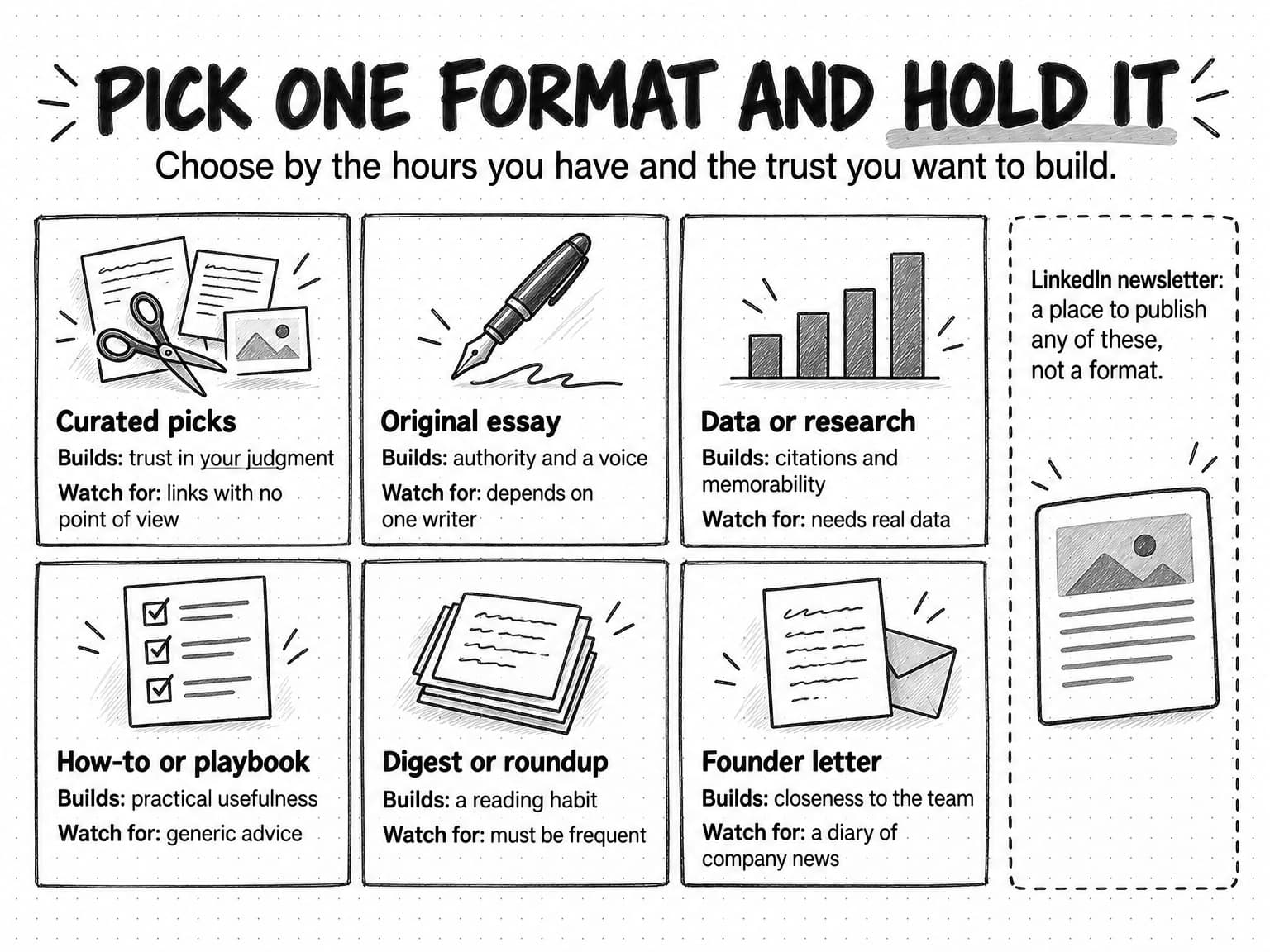
Most strong newsletters pick one main format and hold it, so readers know what they will get. The format decides how much work each issue takes and what kind of trust it builds.
| Format | What the reader gets | Effort per issue | What it builds | Main risk |
|---|---|---|---|---|
| Curated picks with commentary | A handful of links others wrote, each with your view on why it matters | Low to medium | Trust in your judgment and taste | Becomes a link list with no point of view |
| Original essay | One argument or explanation, written by someone with expertise | High | Authority and a recognizable voice | Depends on one writer; hard to sustain |
| Data or research | Numbers the reader cannot get elsewhere, from your product, a survey, or careful analysis | High | Citations, links, and memorability | Needs real data and careful method |
| How-to or playbook | Steps, templates, or a worked example for one task | Medium | Practical usefulness; issues get saved and shared | Drifts into generic advice |
| Digest or roundup | Short items across a field: news, releases, events, jobs | Medium, every time | Habit; people read it to stay current | Needs frequent issues to stay timely |
| Founder or leader letter | A personal note on what the company is learning, building, or seeing in the market | Low to medium | Closeness to the people behind the company | Self-centered when it lacks substance |
| LinkedIn newsletter | Any of the above, published as articles on LinkedIn with subscriber notifications | Same as the format chosen | Reach inside the network you already have | The audience stays on LinkedIn |
The LinkedIn newsletter is a place to publish rather than a style of content; it is in the table because many teams first meet the choice as "LinkedIn newsletter or email newsletter?", which a later section answers.
Curated picks are the easiest format to start and the easiest to do badly. Ten links with one-line summaries give readers nothing a search would not. The value is the editor's view: why this piece matters, what it gets wrong, what a reader in your field should do about it. Three links with a real paragraph each usually beat ten without.
Original essays build the strongest reputation when the writer has expertise readers cannot find elsewhere, and they fail most often, because they depend on one person's time. Block the writer's hours and keep a few essays in reserve. Our guide to thought leadership explains what separates a real point of view from one that only sounds like it.
Data and research issues are the most likely to be cited and forwarded, because they give people a number to repeat. They need real data: aggregated product data you are permitted to use, a survey you ran properly, or public data analyzed with care. Our guide to original research content covers how a small team produces research it can defend.
How-to issues teach one task per issue and suit B2B well, because the reader's job is the subject. Ground each one in your team's experience or a real customer situation, or it becomes advice that could appear in any newsletter.
Digests suit fields that change quickly, such as regulation or a platform's policies, and must be frequent and timely, which means weekly at minimum. Founder letters work when the founder has something to share, such as a decision and its reasoning or a pattern seen across customer conversations, and fail when they become a diary of company news. Our guide to founder-led marketing covers how founders find material.
Many good newsletters combine a main format with one or two small, fixed sections, such as an essay followed by three curated links. That works as long as the main format stays the same issue after issue.
Position the newsletter: reader, promise, name, and frequency
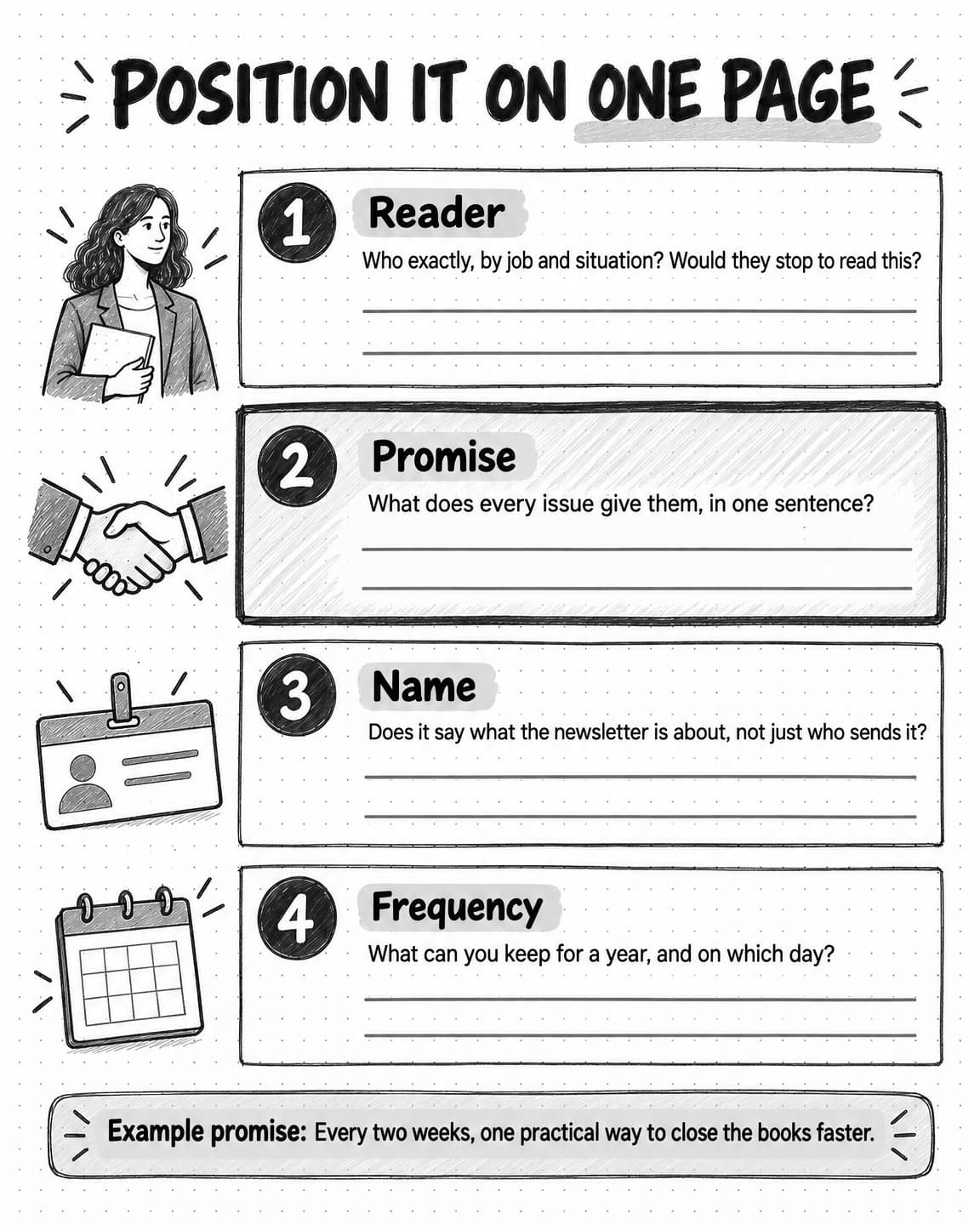
A newsletter needs positioning as much as a product does. Without it, every issue becomes a negotiation about what to include, and the newsletter turns into a container for whatever the company wants to say that month. Write four decisions on one page before the first issue.
The reader
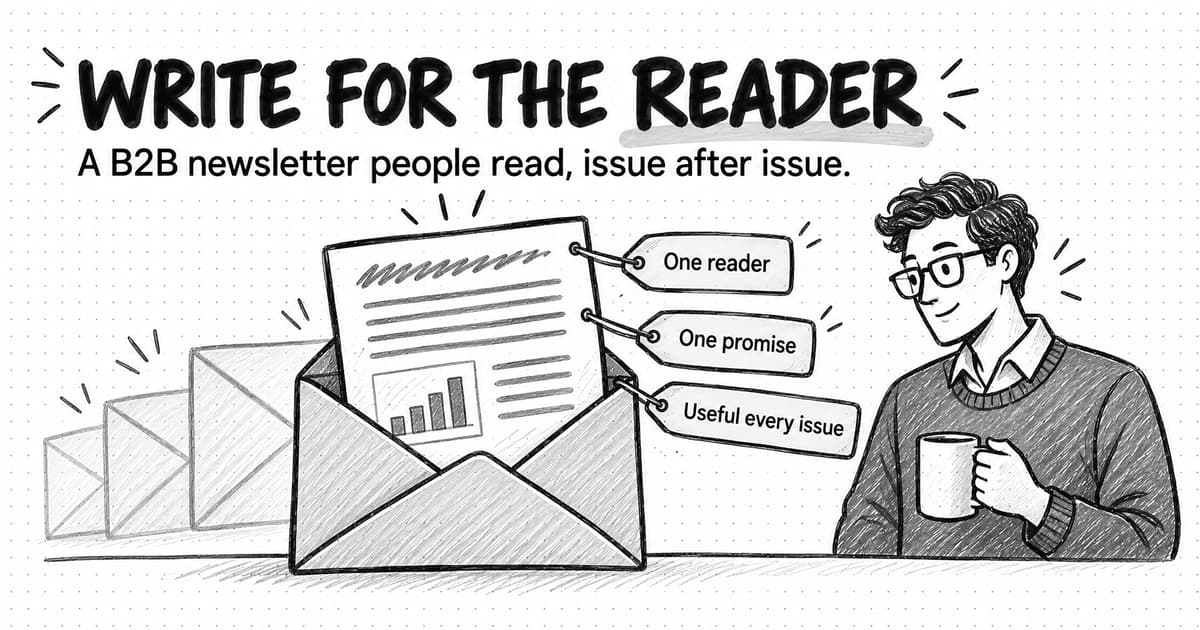
Name one reader by job and situation, not demographics. "Marketing leaders" is too broad. "Heads of marketing at B2B software companies with 20 to 200 employees who run content and demand generation with a team of two or three" is a person you can picture and test every idea against: would this person stop to read this?
The reader is usually close to your buyer but not always identical. A company selling to finance leaders might write for the controllers who feel the problem day to day, because they read more, share more, and often bring the product to their boss. Our guides to defining a target audience and ideal customer profiles and buyer personas cover how to describe that reader with evidence.
The promise
The promise is one sentence that says what each issue gives the reader, and it is the most important line in the strategy, because it decides what goes in and what stays out. Compare:
- Weak: "News, tips, and updates from our team."
- Better: "Every two weeks, one practical way to close the books faster, from people who run month-end close for a living."
The second tells a reader why to subscribe and tells the writer what to leave out. A product update that does not help someone close the books faster does not belong in the main slot.
The name
A good name says what the newsletter is about: "The Close," "Pipeline Notes," or "The Pricing Desk." "[Company] Newsletter" says only who is sending it. Keep it short enough for a subject line and check that nobody in your field already uses it.
The frequency
Choose the frequency you can keep for a year. Readers forgive a modest schedule far more easily than an erratic one. Weekly suits digests and short formats, every two weeks suits how-to issues and curation, and monthly suits essays and research. If unsure, start monthly with finished issues in reserve, and fix the send day so the newsletter becomes part of readers' routines.
Email newsletter or LinkedIn newsletter?
For many B2B teams, the most practical early question is where the newsletter should live. The answer depends on what you have already and what you need the newsletter to do.
How LinkedIn newsletters work
LinkedIn lets people and company Pages publish a newsletter as a series of articles. According to LinkedIn's help center, all members have the ability to create a newsletter, though the create option appears only for accounts that have access to the feature. To publish as a company Page, you must be a super admin or content admin of that Page, and the Page must meet LinkedIn's access criteria. During setup you choose how often you plan to publish, and you can create up to five newsletters as yourself or as a Page.
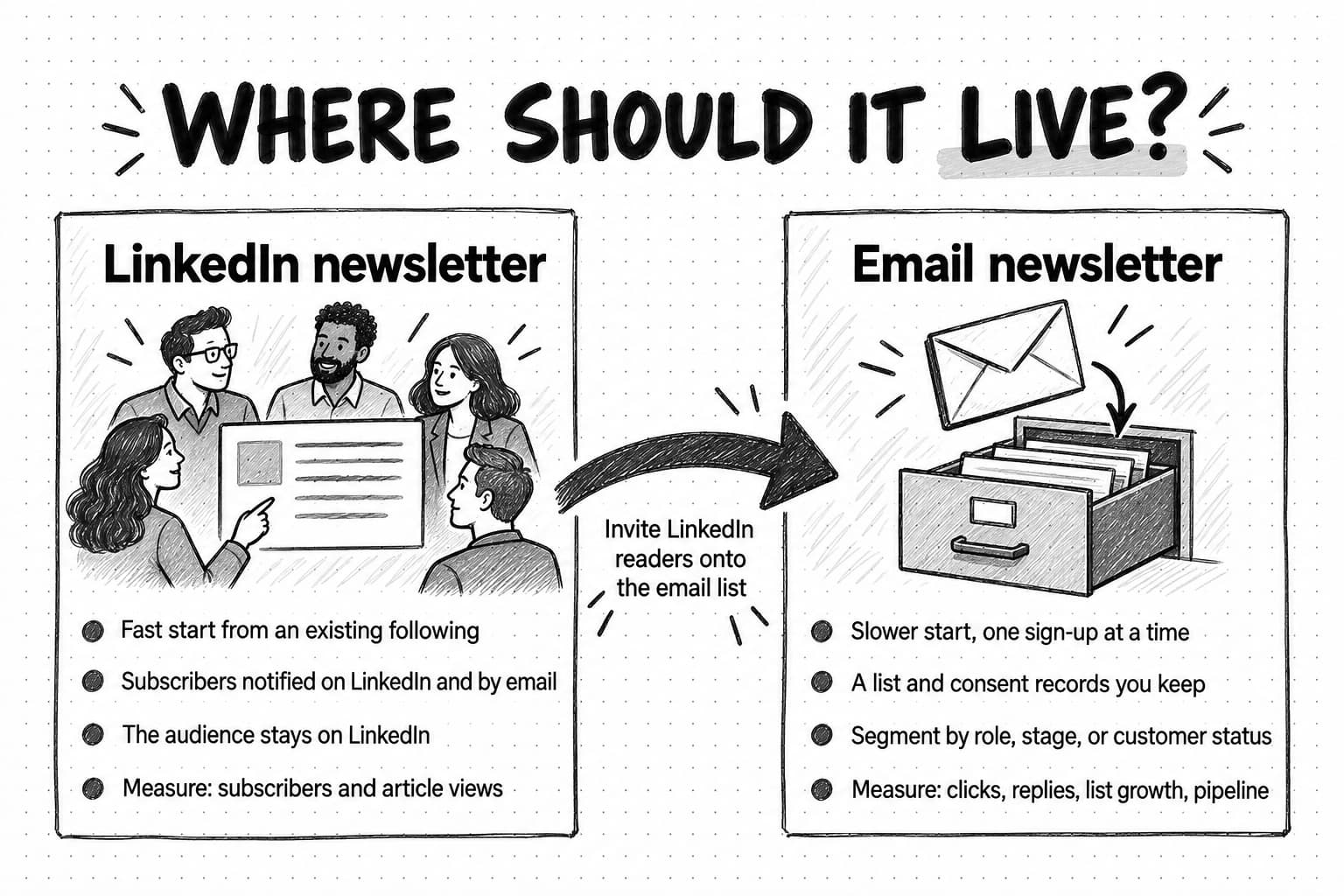
The distribution is the main attraction. When you publish the first edition, LinkedIn invites your connections or followers to subscribe, and people who later follow you or the Page are invited automatically. After each edition, LinkedIn says subscribers receive push, in-app, and email notifications. A founder or Page with an engaged following can start with an audience on day one.
The tradeoff is ownership. The subscribers are LinkedIn members following your newsletter inside LinkedIn. The analytics LinkedIn describes for newsletter authors are total subscribers and article views, and the help pages we checked on October 17, 2026 describe no way to export subscribers' email addresses. You cannot segment that audience by role, connect a subscriber to a deal in your CRM, or take it elsewhere, and if LinkedIn changes how it notifies subscribers, your reach changes with it.
How email newsletters work
An email newsletter goes from your sending platform to people who subscribed through your forms, content offers, and events. That is slower to start, but the list is yours: you hold the consent records, can segment it, can see which subscribers are customers or open deals, and keep it if you change platforms. You also take on the sender's responsibilities described later.
Choosing, or using both
| Question | LinkedIn newsletter | Email newsletter |
|---|---|---|
| How fast can it reach people? | Fast, if the profile or Page already has an engaged following | Slow at first; the list grows one sign-up at a time |
| Who owns the audience? | LinkedIn; subscribers stay on the platform | You, with consent records you keep |
| What can you measure? | Subscribers and article views, plus reactions and comments | Clicks, replies, unsubscribes, list growth, and links to CRM records |
| Can you segment readers? | No | Yes, by role, stage, customer status, or interest |
| What does it cost to run? | Time only | Time plus a sending platform |
| Best for | A founder or team member with a following; testing a format; reach | The long-term relationship and connecting reading to pipeline |
Many B2B teams use both with different jobs. A common arrangement publishes the main piece as a LinkedIn newsletter edition for reach, sends a fuller email issue with extra sections, and invites LinkedIn readers onto the email list. Our guide to LinkedIn content strategy for B2B explains why posts from people usually reach further than posts from company Pages, which matters when you decide whose name the LinkedIn newsletter carries.
If you must choose one, choose by your current assets. A founder with an engaged LinkedIn following and no list learns fastest with a LinkedIn newsletter and should add email once the format works. A company with a few thousand opted-in contacts and steady website visits should usually start with email.
The anatomy of a good B2B newsletter issue
Readers learn a newsletter's shape after two or three issues. A consistent structure makes each issue faster to read and to produce, because the writer fills known slots. A good B2B issue usually has five parts.
- Subject line and preview text. These decide whether the issue gets read; the next section covers them.
- A short opening. One to three sentences from a named person: why this topic, why now. Skip the "Happy Friday!" warm-up.
- One main piece. The essay, how-to, data point, or curated picks. It is why the reader subscribed, so it gets most of the length and most of the writer's time.
- A short supporting section. Two or three fixed extras that fit the promise: a link with a sentence of commentary, a reader question answered, a template.
- One call to action and a footer. One next step, such as "reply and tell me how your team handles this," then who you are, why the reader gets this, a postal address, and an unsubscribe link.
Product news that helps with the issue's problem can take one labeled line in the supporting section ("From us: …"). Anything else belongs in release notes or a separate announcement.
Plain text or designed?
A designed template with columns and buttons suits digests with many short items. A plain-looking email reads like a note from a person and suits essays, founder letters, and newsletters whose call to action is a reply. Either way, check it on a phone, give images alt text, and make sure the point survives if images are blocked.
A copyable newsletter issue template
NEWSLETTER: [name]   ISSUE: [number]   SEND DATE: [date]
READER: [the one reader, from the positioning page]
PROMISE CHECK: Does the main piece keep the promise? [yes / rewrite]

SUBJECT LINE: [what the reader gets, in plain words, under ~60 characters]
PREVIEW TEXT: [one sentence that adds to the subject line, not repeats it]
FROM NAME: [a person, e.g. "Dana at Ledgerwick"]

OPENING (1-3 sentences): Why this topic, why now.

MAIN PIECE (most of the issue):
  Point: [the one idea or task, in a sentence]
  Evidence or example: [data, customer situation, worked example, source]
  What the reader can do with it this week: [the practical step]

SUPPORTING SECTION (2-3 short items):
  - [related link + one sentence on why it matters]
  - [reader question answered, template, or event]
  - [optional, labeled: "From us:" one line of relevant product news]

CALL TO ACTION (one): [reply prompt, or one link]

FOOTER: who we are | why you get this | postal address | unsubscribe

REVIEW: facts checked by [name] | voice checked by [name] | links tested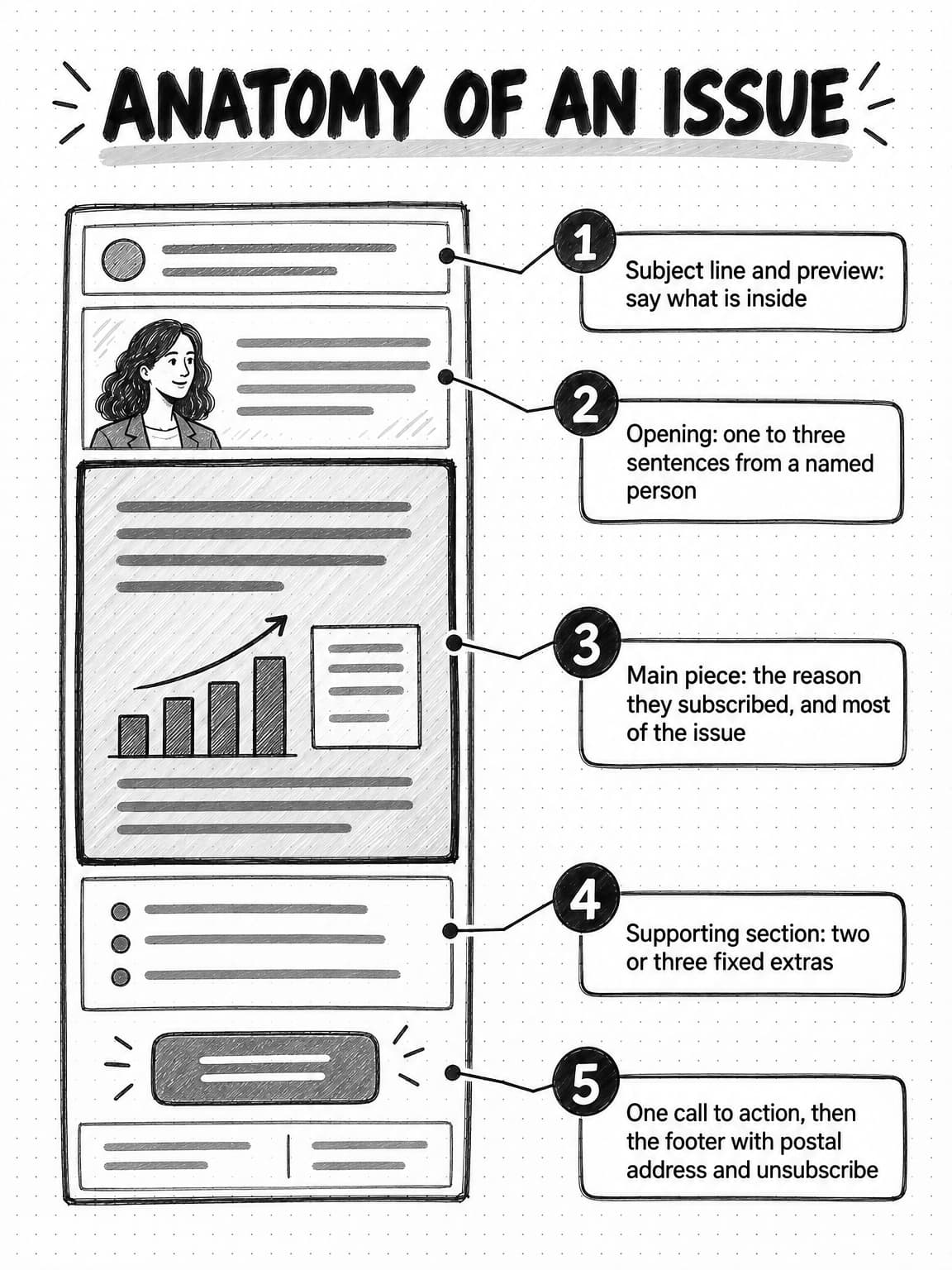
Subject lines and preview text that say what is inside
The sender name, subject line, and preview text are all a subscriber sees before deciding to read or delete. The best newsletter subject line usually says plainly what the reader gets. Clever wordplay works occasionally, but across dozens of issues it teaches readers that the subject line tells them nothing. Some before-and-after examples for a fictional finance newsletter:
| Weak | Stronger | Why |
|---|---|---|
| The Close: October edition | The three reconciliations that delay month-end most | Names the content instead of the date |
| You won't believe this | What 40 finance teams told us about approval delays | Specific and true, with no trick (only if you surveyed them) |
| Big news inside! | How to cut invoice approval from 9 days to 3 | Says what the reader can do; the numbers must come from a real example |
| Quick question | Is your close calendar built backward? | A real question the issue answers |
Write the preview text as a second line that adds information: "A checklist your team can use this week, plus one reader's fix for late accruals." Left blank, many email clients fill it with the first text in the email, often "View in browser."
Keep the sender name consistent and, where it fits, make it a person: "Dana at Ledgerwick" rather than "Ledgerwick Marketing." Never use a fake "Re:" prefix or false urgency; the Federal Trade Commission's CAN-SPAM compliance guide requires a commercial email's subject line to reflect what the message contains.
B2B newsletter examples worth studying
Newsletters people pay attention to show how format, promise, and structure fit together. The examples below were checked on their public sign-up or about pages on October 17, 2026. Audience figures are what each publisher states on its own page, not independent measurements, and several are run by individual writers rather than companies. Study them for structure, not size: a company newsletter for a narrow B2B audience does not need a six-figure list.
Ahrefs' Digest (company newsletter, weekly). The SEO software company's free weekly newsletter mixes industry news, reading recommendations, recent Ahrefs blog posts, and occasional surveys and giveaways; the page says it is read by 284K SEOs and marketers. The lesson: your own content can sit in the newsletter without dominating it, beside other people's work readers value.
MKT1 Newsletter (B2B marketing, twice a month). Emily Kramer's MKT1 Newsletter, published by MKT1, covers B2B startup marketing through long-form guides, frameworks, and tactical deep dives, and states about 85,000 subscribers. Free readers get the issues; paid subscribers also get templates and an archive. The lesson: a practitioner's how-to format can build a strong reputation at a modest frequency.
Growth Unhinged (data and research, weekly). Kyle Poyar's Growth Unhinged covers pricing, go-to-market, and product-led growth with what the page calls data-rich reports, deep dives, and case studies, every Wednesday morning. The lesson: data gives readers something to cite, and a fixed day builds a routine.
Benedict's Newsletter (curated commentary, weekly). Benedict Evans frames his weekly newsletter around what happened in tech that mattered and what it meant. Paying subscribers get the full issue on Sunday with an exclusive column; free subscribers get the main commentary two days later. The lesson: curation is valuable when every item carries the editor's interpretation.
Marketing Examples (fixed format, weekly). Harry Dry's Marketing Examples arrives on Mondays with three short examples, two copywriting tips, and one favourite tweet. The lesson: a countable structure tells readers exactly what they get.
Lenny's Newsletter (advice column). Lenny Rachitsky's newsletter calls itself a deeply researched advice column on product, growth, and careers. The lesson: issues built on readers' questions stay tied to their real problems.
James Clear's 3-2-1 (a format from outside B2B). The 3-2-1 newsletter sends three short ideas, two quotes from others, and one question for the reader every Thursday. Its numbered structure has become the newsletter's identity and is widely borrowed.
All seven share a promise you could state in one sentence, the same structure every issue, and a person whose judgment readers trust. A company newsletter can borrow all three, with a founder or head of marketing as that person.
Newsletter ideas: 28 B2B issue ideas by type
The hardest part of a newsletter is not the first issue. It is the twelfth, when the obvious topics are used up. A bank of ideas sorted by type makes it easier to keep the mix varied. Adapt these to your reader and promise; every idea below assumes you have the experience, data, or permission it needs.
Teach a task
- A step-by-step guide to a weekly task, with the mistakes that slow it down.
- A template or checklist your team uses internally, cleaned up for readers.
- A teardown of one public example, such as a pricing page or report, with what you would change.
- "How we do X": your team's process for a shared task, including what failed.
- Five terms the reader's boss uses, explained.
Bring evidence
- One chart from aggregated product data you may share, with what it does and does not show.
- A short survey of your readers, published back to them.
- A long public report summarized into the three findings that matter to your reader.
- A benchmark question answered honestly, including why simple benchmarks mislead.
- A public dataset compared over time, such as job postings or pricing pages in your category.
Take a position
- An argument against a common practice, with the cases where it is right.
- A prediction you are willing to be checked on later.
- A response to a widely shared article: where you agree and where you do not.
- A decision your company made, the options considered, and why.
Curate with a view
- Three pieces worth reading this month, each with a paragraph of commentary.
- The best answer you have seen to a question your readers ask often.
- A reading path for someone new to the role, in order.
- Little-known tools or methods, with notes on when each is worth the trouble.
Learn from the field
- A customer story told as a problem and a fix, with permission and real details.
- A reader question answered at length.
- An interview with a practitioner on one specific problem.
- The questions buyers asked most in a month of sales and support calls, with your answers.
- A reader's anonymized situation and the steps you would take.
Look behind the scenes
- A founder's lesson from building the company that applies to the reader's job.
- How your team produced a report, ran an event, or rebuilt a process.
- An honest postmortem of a mistake.
Connect to the product, carefully
- A workflow explained first, with the product shown as one way to run it.
- A labeled roundup of product changes that solve problems readers raised.
Read the list as a menu, not a calendar: a how-to newsletter might draw mostly from the first and fifth groups, with an evidence issue each quarter. Our guide to content pillars explains how to choose the three to five themes a publication returns to.
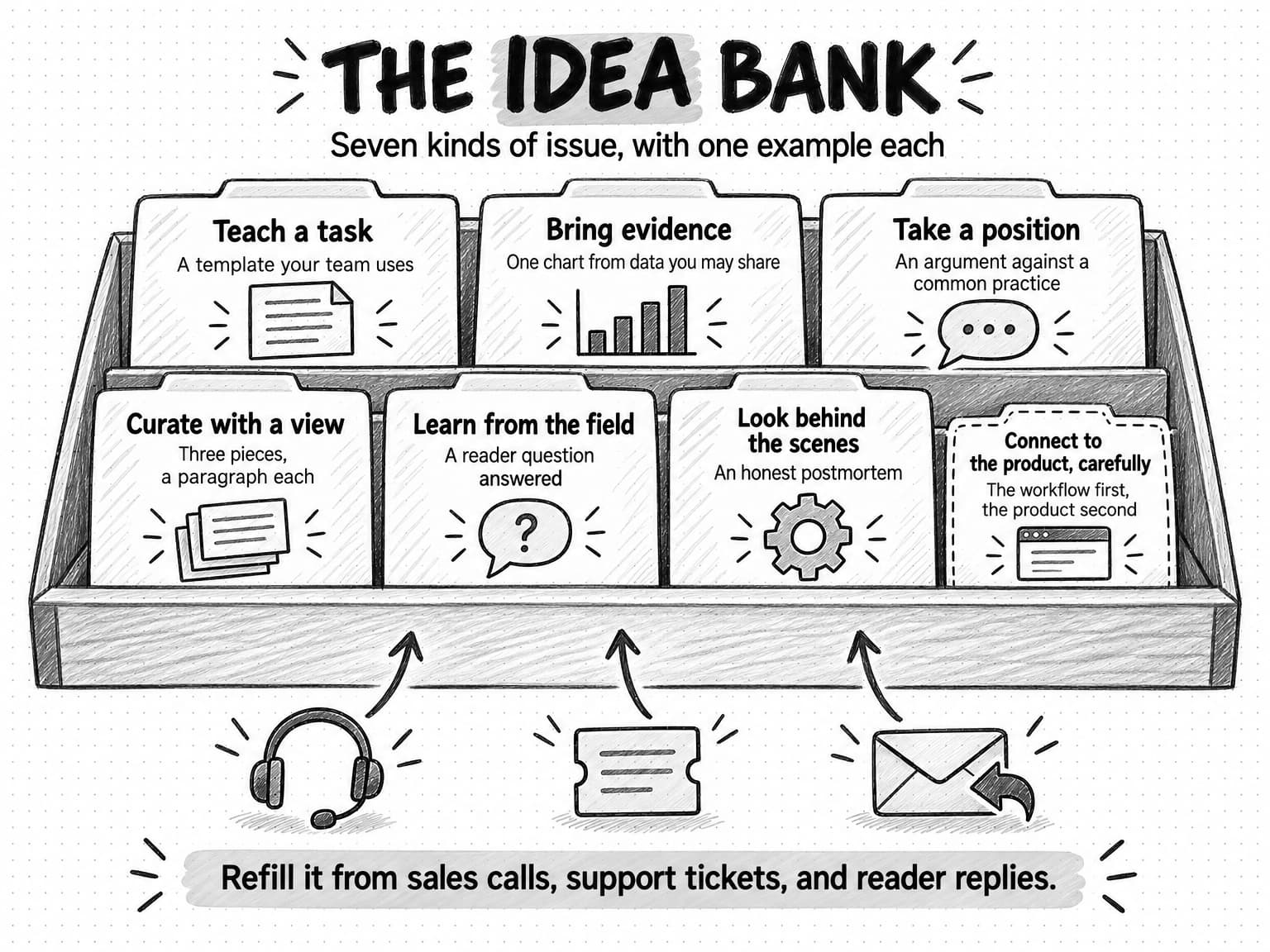
View the newsletter idea bank at full size (opens in a new tab).
Sourcing ideas without burning out
Most company newsletters die from exhaustion, not lack of readers. One person writes every issue, the backlog runs dry, a busy month causes a missed issue, then two, and the newsletter quietly stops. A few habits prevent that.
Keep an idea file fed by sources that refill themselves. Sales calls, support tickets, onboarding questions, reviews, community threads, and replies to earlier issues produce new questions every week. Ask the people who handle those conversations to drop good questions into a shared document. A question three customers asked last month beats anything brainstormed in a meeting.
Reuse your own work deliberately. A webinar, long guide, or research report can feed several issues, each developing one idea with a new example or practical step. Our guide to repurposing content across channels explains how to change the format without losing the point.
Write ahead. Launch with two or three finished issues in reserve and keep at least one afterward, so a hectic week does not break the schedule.
Share the writing. A rota of contributors, such as a product manager, a customer success lead, and an invited customer, spreads the load. Keep one editor responsible for the promise, voice, and schedule, so it still reads like one publication.
Let the format help. A fixed structure means the writer never starts from a blank page, and some formats, such as answering one reader question per issue, generate their own topics once readers reply.
Growing subscribers ethically
A newsletter grows when people meet it somewhere and subscribe, and when subscribers forward it. Both depend on issues worth reading, so push growth only after a few issues prove the format. The most reliable B2B sign-up sources are usually:
- Your website. A short form on the blog and at the end of popular articles, with the promise written out and a link to a recent issue.
- Content offers. A downloadable template or report with a separate, unticked option to also receive the newsletter. Do not add downloaders silently.
- LinkedIn. Posts that share one idea from an issue and invite people to subscribe for the rest, usually from a founder's or team member's profile.
- Events and webinars. A sign-up option at registration, again as a separate choice.
- Partners and peers. Recommendation swaps or guest pieces with newsletters that serve the same reader.
- Forwarding. A line inviting readers to forward the issue, with a subscribe link for colleagues who receive it.
Some sources look like growth but damage the newsletter. Bought, rented, or scraped lists, and adding every lead or trial user without asking, bring in people who did not choose to hear from you. They complain, ignore the newsletter, and hurt deliverability for everything your domain sends, and in some markets they break the law.
Consent basics for a B2B newsletter
This is general information, not legal advice; the drip campaigns guide covers the rules in more depth. In the United States, the FTC's CAN-SPAM guide states that "the law makes no exception for business-to-business email." Commercial messages need accurate sender information, a valid postal address, a clear way to opt out, and opt-outs honored within 10 business days. The FTC's primary-purpose test treats an email as commercial when a reader would likely see it as promoting a product or service, so a newsletter that features your product should follow the rules.
In the United Kingdom, the Information Commissioner's Office guidance on electronic mail marketing says you generally need individuals' specific consent, with a "soft opt-in" exception for existing customers. You can email corporate subscribers without consent, but sole traders and some partnerships count as individuals. EU countries apply similar consent rules to individuals.
For a newsletter, that means a clear, separate opt-in, a record of where and when each subscriber joined, no bought or scraped lists, and every unsubscribe honored. A confirmed opt-in, where new subscribers click a link to confirm, is not required everywhere, but it keeps mistyped and fake addresses off the list.
Deliverability basics for a newsletter
A newsletter in the spam folder is a newsletter nobody reads. Google's email sender guidelines ask every sender to Gmail accounts to set up SPF or DKIM authentication and keep the spam rate in Google's Postmaster Tools below 0.3%. Senders of 5,000 or more messages a day must also set up DMARC, and their marketing and subscribed messages must support one-click unsubscribe plus a visible unsubscribe link. Yahoo and Outlook.com apply similar rules, covered in the drip campaigns guide. A young newsletter may send far fewer, but meeting the bulk-sender rules from the start costs little.
Beyond authentication, deliverability comes down to sending email people want:
- Remove addresses that bounce, and let your platform suppress them.
- Sunset long-inactive subscribers. If someone has not clicked anything in six months or more, ask whether they still want the newsletter and remove them if they do not answer.
- Make unsubscribing easy. A hidden unsubscribe link turns a quiet departure into a spam complaint, and complaints count against your whole domain.
How to measure a newsletter now that opens mislead
The open rate was once the first number newsletter teams checked; it is now the least trustworthy. With Apple's Mail Privacy Protection turned on, Mail downloads remote content privately in the background when a message arrives instead of when it is viewed, and Apple says senders cannot learn when or how many times the person views it. Because the tracking pixel that counts an open loads whether or not anyone reads the email, many Apple Mail readers count as opens regardless. Security scanners that load images or test links add noise to clicks as well as opens.
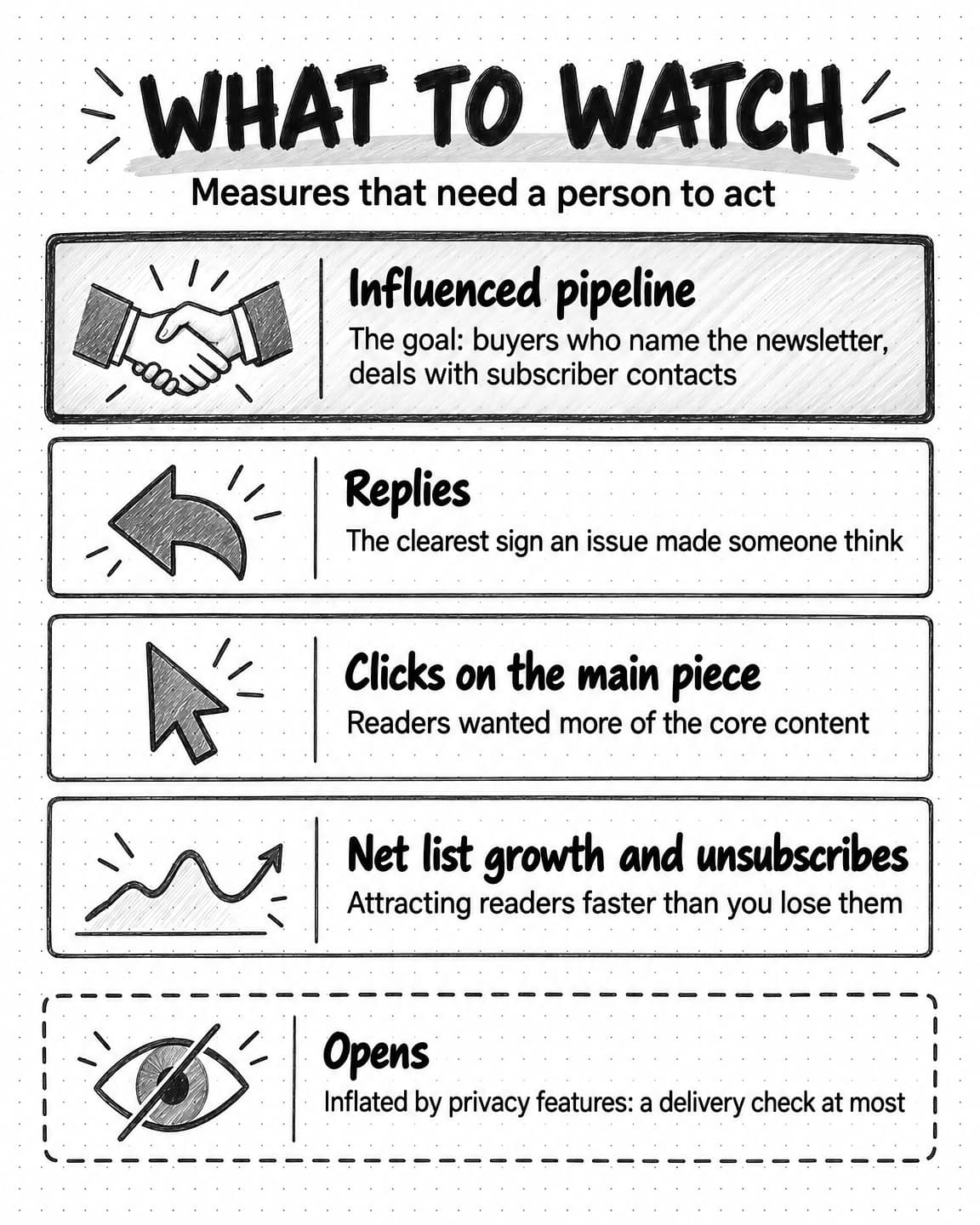
Opens can still warn you of a delivery problem, such as a sudden collapse that suggests mail is going to spam. Do not use them to judge topics, subject lines, or success. Use measures that need a person to act.
| Measure | What it tells you | How to read it |
|---|---|---|
| Replies | Whether the issue made someone think or act | The clearest signal of value; read every one and log themes |
| Clicks on the main piece | Whether readers wanted more of the core content | Compare issue to issue; check the share of unique clickers, not total clicks |
| Net list growth | Whether the newsletter is attracting people faster than it loses them | New subscribers minus unsubscribes and removals, per month |
| Unsubscribes per issue | Whether a particular issue missed the promise | A spike on one issue is a lesson about that issue |
| Forwards and new sign-ups from forwards | Whether readers recommend it | Track the sign-up source on the forward link |
| Influenced pipeline | Whether the newsletter helps the business | Self-reported attribution and CRM records, explained below |
Influenced pipeline is the measure the business cares about and the hardest to see. A subscriber who reads for eight months and then books a demo by searching your company name shows up as branded search, not a newsletter conversion. Two methods help. Ask: add an open "How did you hear about us?" field to demo forms and ask the question in early sales calls. And connect your email platform to your CRM, so you can see which opportunities include contacts who subscribed before the opportunity opened. Neither proves cause, but together they show whether the newsletter is part of how buyers arrive. Our guide to measuring content marketing ROI covers self-reported attribution and its limits.
Review the numbers monthly and the strategy quarterly: does the newsletter still keep its promise, which issues earned replies and why, and is the frequency still sustainable?
A production workflow with AI drafting and human review
AI writing tools and AI agents can do a large share of newsletter production: researching a topic, summarizing a long report, drafting from an outline, suggesting subject lines, and adapting a piece for LinkedIn. Used well, they let a small team publish on schedule. Used carelessly, they produce the interchangeable newsletter readers ignore, because a model asked to "write a B2B newsletter about invoice approvals" writes the average of every such newsletter online.
The difference is the inputs and the review:
- Write a short brief. The reader, the point of this issue, the evidence it rests on, and the action the reader can take. The brief is a human decision, because it decides whether the issue keeps the promise. Our guide to writing a content brief covers what a useful brief contains.
- Gather the source material. The customer conversation, data, report, or expert notes. A draft is only as specific as its sources.
- Draft with AI. Give the model or agent the brief, sources, issue template, voice guidelines, and two past issues you liked, and ask for a draft that fills the template's slots.
- Check every fact. A model can state a figure that appears nowhere in the sources with complete confidence. Our guide to preventing AI hallucinations in marketing covers how to review for this.
- Edit for voice and substance. Cut filler and add the experience only your team has. Our guide to defining your brand voice helps here.
- Approve and send. A named person approves each issue; our guide to content approval workflows covers how to keep that review quick.
This usually sits inside a wider content routine, which our guide to content operations covers, and our guide to AI content creation explains how to brief AI tools so drafts start closer to what you need.
How to start a newsletter: a 90-day launch plan
This illustrative plan suits a team of one to three launching a monthly or twice-monthly email newsletter, with an optional LinkedIn edition. Stretch or compress it to fit your hours.
Weeks 1 and 2: decide
- Write the positioning page: reader, promise, name, frequency, and send day.
- Choose the main format and the fixed sections.
- Audit what you have: existing contacts who opted in to marketing email, your LinkedIn following, website traffic to the blog. Decide whether to start with email, LinkedIn, or both.
- If you are replacing a product-update email, decide where product news will go from now on, such as release notes for customers and a one-line "From us" slot in the newsletter.
Weeks 3 and 4: set up and write ahead
- Set up the sending platform, authenticate your domain, and confirm the unsubscribe link and one-click unsubscribe header work.
- Build the issue template and test it on a phone.
- Add sign-up forms with the promise and a sample issue.
- Fill the idea file with twelve ideas from sales and support.
- Write and approve the first three issues.
Weeks 5 to 8: launch and listen
- Tell existing opted-in contacts what is changing and why, with an easy way to leave.
- Send issue one, ending with a specific reply question.
- Publish the main piece on LinkedIn, with an invitation to the email list.
- Read every reply and log themes in the idea file.
- Send issue two on schedule, even if issue one was quiet.
Weeks 9 to 13: grow and review
- Add sign-up options to content offers, webinars, and partner swaps.
- Add the "How did you hear about us?" field to demo and sign-up forms.
- Hold the first quarterly review: replies, clicks on the main piece, net list growth, unsubscribes per issue, and any opportunities with subscriber contacts. Decide what to keep, change, or drop.
- Make sure at least one finished issue is in reserve before the next quarter starts.
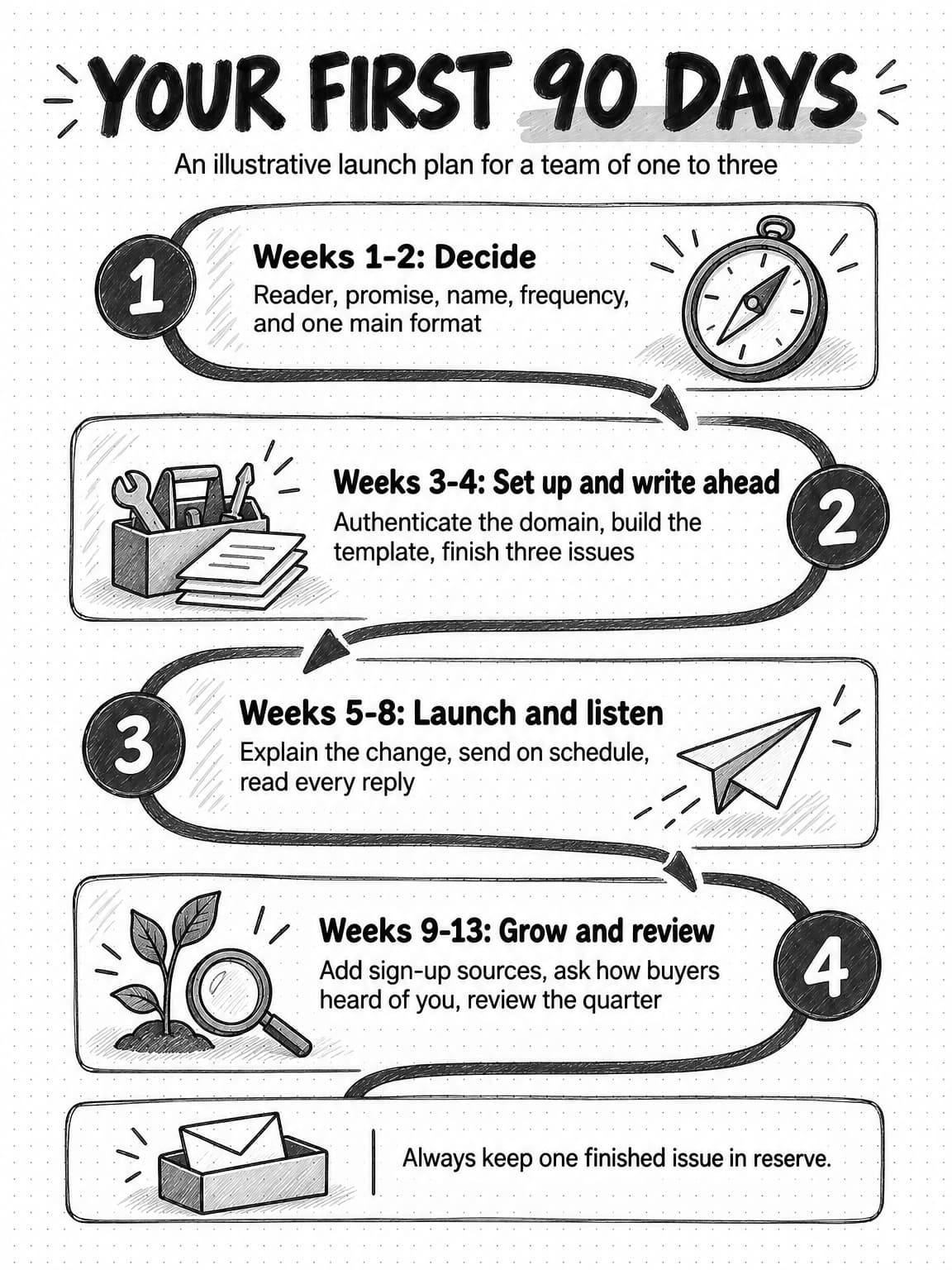
View the 90-day newsletter launch plan at full size (opens in a new tab).
Worked example: replacing a product-update email (fictional)
Ledgerwick is a fictional company that sells invoice-approval software to mid-sized finance teams. Its three-person marketing team sends a monthly "Ledgerwick Product News" email to about 6,000 contacts: customers, trial users, webinar attendees, and guide downloaders. The open rate has fallen for six quarters, and the head of marketing, Dana, notices something more telling: in a year, the email has received four replies, all support questions.
Positioning. Dana talks to three sales reps and reads a month of support tickets. The people who bring Ledgerwick into a deal are usually accounts payable managers and controllers, and their recurring pain is month-end close. She writes the positioning page:
- Reader: accounts payable managers and controllers at companies with 100 to 1,000 employees who run month-end close with a small team.
- Promise: "Every two weeks, one practical way to close the books faster, from people who run month-end close for a living."
- Name: "The Close."
- Frequency: every other Tuesday morning.
Format. A how-to main piece, written by Dana or the customer success lead, a former controller, plus a fixed section with one reader question answered and one link worth reading. Product news moves to a quarterly release email for customers, with an occasional "From us" line when a change solves a problem readers raised.
Email and LinkedIn. The customer success lead has a strong following among controllers, so each main piece also runs as a LinkedIn newsletter edition under her name, ending with an invitation to subscribe to The Close by email.
Consent. Customers and webinar attendees who opted in to marketing email stay on the list. Trial users who never opted in are not moved over; the last email of the trial sequence invites them instead. Everyone on the list gets a short note explaining the change, with a one-click way to leave.
The first three issues. One: "The three reconciliations that delay month-end most," drawn from support tickets, ending with "Which one costs your team the most time? Reply and tell me." Two: the close checklist the customer success lead used as a controller. Three: answers to the best replies from issue one, with permission.
What Dana measures at day 90. Replies and their themes, unique clicks on each main piece, net list growth by source, unsubscribes per issue, and opportunities that include a subscriber, plus a new "How did you hear about us?" field on the demo form. She ignores opens and treats the quarter as a baseline, not a verdict, because a newsletter's effect on pipeline takes longer than 90 days to show.
The moves that matter in any version: a reader drawn from real conversations, a promise narrow enough to say no to things, product news out of the main slot, consent respected during the change, and measures that need a person to act.
Common B2B newsletter mistakes
Writing about the company instead of the reader. The failure this guide began with. Test every main piece against the promise.
Launching without a buffer, or at an ambitious frequency. A weekly newsletter that slips to monthly after six weeks looks worse than a monthly one that never misses.
Adding people who did not subscribe. It produces complaints, weak engagement, and possible legal trouble.
Judging success by opens. Replies, clicks, list growth, and influenced pipeline tell you more.
Leaving a LinkedIn audience stranded. Without an invitation onto an email list, you build an audience you cannot reach elsewhere or connect to pipeline.
Publishing AI drafts unedited. Generic drafts are easy to spot, and an unchecked error reaches every subscriber at once.
Never asking readers anything. A question at the end of an issue is the cheapest research a marketing team can run, and replies are the best source of future issues.
Drafting newsletter issues with Ampere
Ampere is an AI marketing agent that can take on much of the research and drafting behind a newsletter while your team keeps the promise, the review, and the sending. You describe the work in plain English; Ampere does it in its own session workspace and brings the results back for review.
Ampere can draft newsletter editions, and for LinkedIn newsletters it can produce structured packages with format-specific drafts, review notes, claim checks, follow-up ideas, and saved Markdown files. Because it works from your saved Brand memory, which can hold your positioning, products, audience, competitors, and voice, issue twelve starts from the same understanding of your reader as issue one. Give it your positioning page, this guide's issue template, a brief, and source material such as call notes or a report, and ask for a draft that fills each slot.
Ampere can also research around an issue: search the web, summarize long public reports, gather what customers say in public reviews, and look at competitors' public positioning, and saved trend snapshot and recent news reports can feed a curated section. For a regular schedule, a scheduled task can rerun a saved prompt on a cadence, such as a draft of next week's issue every Thursday, and return the result to a Project for review, with an optional email to chosen Organization members when the run finishes.
Ampere does not send email to your subscribers or publish to LinkedIn on its own. Your email platform holds your list, consent records, and sending, and you decide what goes out and where. Your team reviews every draft, checks every fact, adds the experience only you have, and approves each issue, because AI output can be inaccurate or incomplete.
Sources and further reading
- 6sense, 2025 Buyer Experience Report. Survey of nearly 4,000 B2B buyers on first contact and day-one shortlists.
- LinkedIn Help, LinkedIn Newsletters, Create a newsletter on LinkedIn as a Page, and Analytics and tools on LinkedIn, accessed October 17, 2026. Who can create newsletters, subscriber invitations and notifications, limits, and newsletter analytics.
- Federal Trade Commission, CAN-SPAM Act: A Compliance Guide for Business. Requirements for commercial email and the primary-purpose test.
- Information Commissioner's Office, Electronic mail marketing, guidance under PECR. Consent, soft opt-in, and corporate subscribers.
- Google Workspace Admin Help, Email sender guidelines. Requirements for all senders and for bulk senders.
- Apple, Protect email privacy in Mail on Mac, Mail User Guide. How Mail Privacy Protection loads remote content.
- Newsletter pages checked October 17, 2026: Ahrefs' Digest, MKT1 Newsletter, Growth Unhinged, Benedict's Newsletter, Marketing Examples, Lenny's Newsletter, and 3-2-1. Formats, frequencies, and publisher-stated audience sizes.
Frequently Asked Questions
What are some good examples of B2B newsletters?
Good B2B newsletter examples include Ahrefs' Digest, a weekly company newsletter mixing industry news, reading picks, and the company's own posts; the MKT1 Newsletter on B2B startup marketing; Growth Unhinged, built on data and case studies; and Benedict's Newsletter, which curates technology news with commentary. Each has a one-sentence promise, a consistent structure, and a trusted person behind it, which matters more than list size.
What are the 5 elements of an effective newsletter?
An effective newsletter issue has five elements: a subject line and preview text that say what is inside, a short opening from a named person, one main piece that keeps the newsletter's promise, a short fixed supporting section, and one call to action followed by a compliant footer. Keeping the same five slots in every issue makes the newsletter faster to read and to produce.
Are newsletters still relevant in 2026?
Newsletters are still relevant for B2B companies because they reach buyers on a schedule, with permission, during the long stretch before a sales conversation, and an email list does not depend on a platform's ranking choices. They pay back over quarters, not weeks, and only when each issue is useful to a reader who may never buy, so a newsletter needs a promise and a schedule the team can keep.
Are LinkedIn newsletters worth it for B2B companies?
LinkedIn newsletters are worth it for B2B companies when a founder, team member, or Page already has an engaged following, because LinkedIn invites followers to subscribe and notifies subscribers of each edition. The audience stays on LinkedIn, though, with analytics limited mainly to subscribers and article views, so many teams use a LinkedIn newsletter for reach and invite readers onto an email list they own.
What is the difference between a LinkedIn newsletter and an email newsletter?
A LinkedIn newsletter is a series of LinkedIn articles whose subscribers are notified on LinkedIn and by email, while an email newsletter is sent from your own platform to a list you build and keep. LinkedIn is faster to start from an existing following; email gives you consent records, segmentation, detailed measurement, and the ability to connect readers to your CRM.
How do you start a newsletter step by step?
To start a newsletter, first write down the reader, the promise, the name, and a frequency you can keep for a year. Then choose one main format, build a repeatable issue template, set up and authenticate a sending platform, add sign-up forms, write two or three issues in reserve, and launch. Ask readers a question in each issue and review replies, clicks, and list growth after the first quarter.
What are good topics for a B2B newsletter?
Good B2B newsletter topics teach a task the reader does often, share evidence they cannot get elsewhere, take a clear position on a debate in their field, curate a few pieces with real commentary, or tell a customer story as a problem and its fix. The best source of topics is your own sales calls, support tickets, and reader replies, because they show the questions buyers actually have.
What is the 3-2-1 newsletter format?
The 3-2-1 newsletter format comes from James Clear's weekly 3-2-1 newsletter, in which each issue contains three short ideas from the author, two quotes from other people, and one question for the reader. B2B newsletters borrow the idea of a fixed, numbered structure, such as three examples, two tips, and one link, because it tells readers exactly what they will get and makes each issue quick to read.
What is a good open rate for a B2B newsletter?
There is no reliable open-rate benchmark for a B2B newsletter, because Apple Mail Privacy Protection loads tracking pixels whether or not anyone reads the email, and security scanners add more false opens. Use opens only to spot a sudden delivery problem. Judge the newsletter instead by replies, unique clicks on the main piece, net list growth, unsubscribes per issue, and pipeline that buyers or your CRM records connect to it.