How to automate marketing with AI agents in 2026
A practical guide to moving AI marketing work beyond chat, with scheduled tasks, change-based triggers, repeatable workflows, and 20 examples you can adapt.
27 min readWritten by Ampere
Short answer
How do you automate marketing with AI agents?
Marketing automation with AI agents needs a defined trigger, reliable inputs, an executable task, a usable output, and clear review and failure handling. Use schedules for work whose value comes from a cadence, and events for work that should start after a meaningful change. Begin with one narrow operation you can judge before extending its permissions or scope.
Summary
Automating marketing with AI involves two separate choices: who decides the next step, and what starts the run. An agent chooses its own actions and suits open-ended jobs; a workflow follows steps defined in advance; a hybrid puts an agent inside a controlled workflow. Any of them becomes automation only when a schedule or event starts it.
An automation needs nine decisions settled before it runs unattended: the trigger, instructions, current context, tools and access, screening conditions, a record of earlier runs, guardrails, a destination, and an owner. The run record stops a monitor from reporting the same change every hour, and the owner notices when the automation goes stale.
Schedules and event triggers need different specifications. A schedule suits briefs and reports and needs a named timezone and a bounded lookback window; an event trigger suits work where speed changes a response's value and needs a narrow condition and protection against acting twice. The guide gives ten examples of each, and most of the scheduled ones end in drafts or decision material.
Understand a process before automating it. If it is still unclear, run it interactively with an agent first and turn your corrections into the automation's instructions and checks. For a known process, the guide's five-step method maps the steps, defines each step's inputs and outputs, uses a model only where judgment helps, then adds the trigger and tests awkward cases.
Start with one frequent, narrow, reversible operation and the guide's ten-step checklist. Automate preparation before action, grant only the access the operation needs, show sources and gaps with each output, and approve each consequential action on its own terms: approval to prepare a campaign does not cover launching it.
Contents
- AI agents, AI workflows, and marketing automation are different things
- What turns an AI task into automation?
- Scheduled AI agent automation
- Event-triggered AI agent automation
- When should you use an agent, a workflow, or both?
- How current AI agent clients support automation
- How to automate marketing with an AI workflow
- A safe way to put AI marketing automation into production
- Common mistakes in AI marketing automation
- Start with one piece of work you already know
- Sources and further reading
- Frequently Asked Questions
Imagine asking an AI agent to review your competitors, draft next week's posts, and prepare a short report. The result may save you hours. But if you have to open the chat and ask again next Monday, you have delegated a task, not automated it.
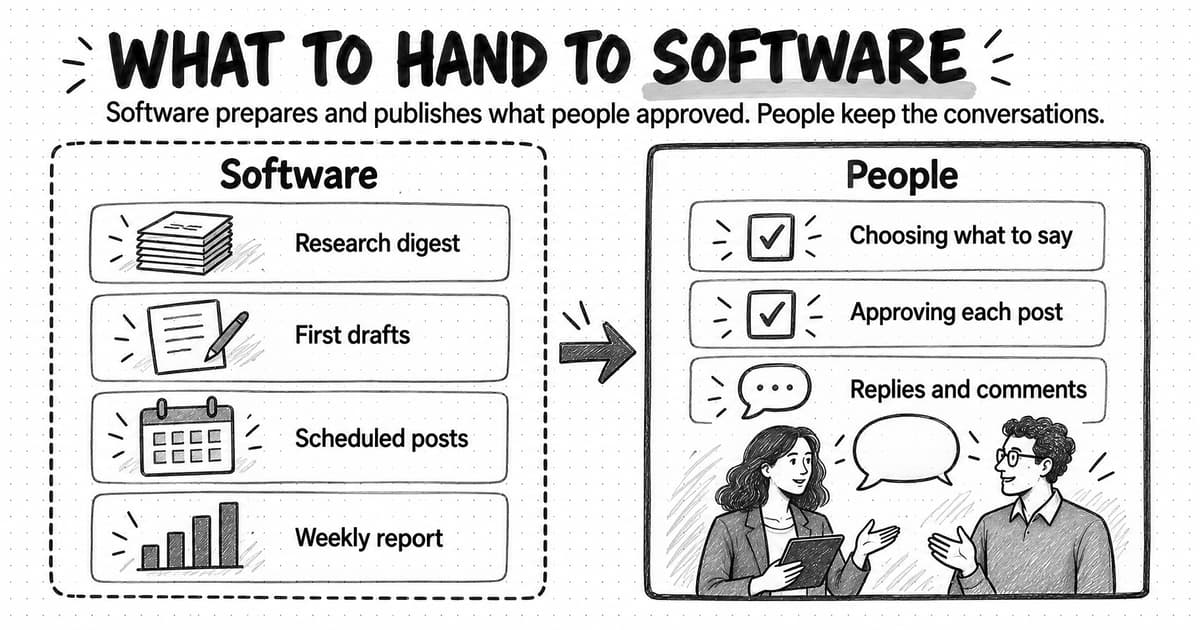
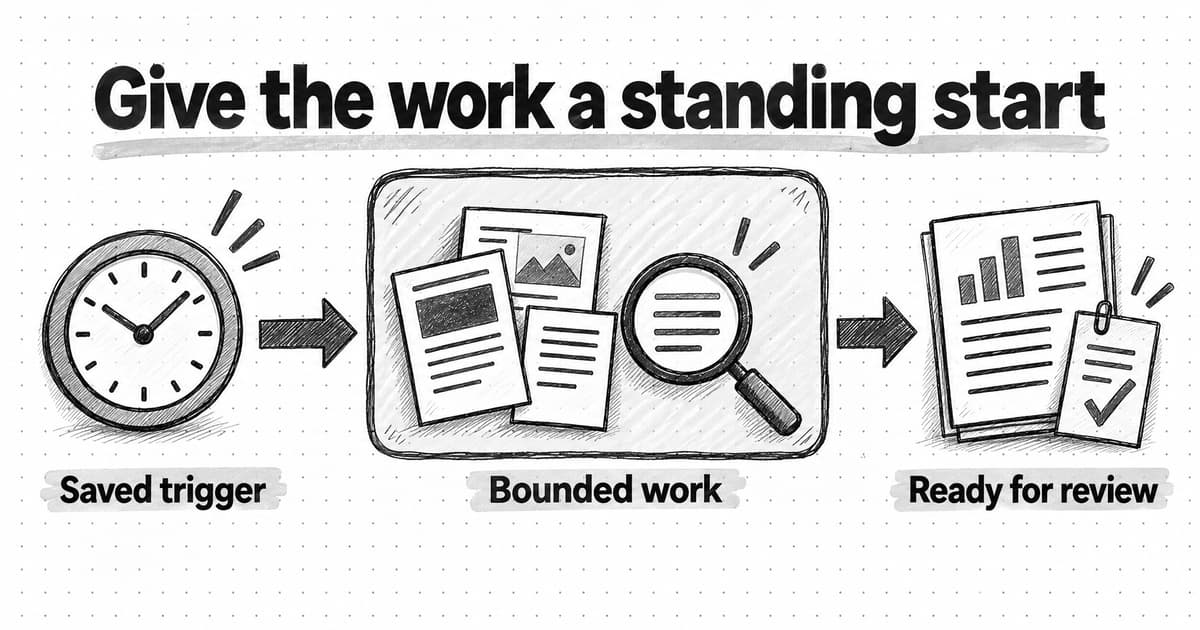
Marketing automation starts when the work has a standing way to begin. A clock can start it every Monday at 9:00 a.m. A meaningful event can start it when a competitor changes a pricing page, a new lead arrives, or a campaign crosses a threshold. The work then runs from saved instructions, context, tools, and boundaries without waiting for you to type the first message.
An AI agent is especially useful when the route from trigger to result cannot be fully mapped in advance. It can decide which sources to inspect, adapt when information is missing, and choose the next useful action. An AI workflow is better when the route should stay fixed: receive an input, run known steps, check the output, and send it to a defined destination. Both can automate marketing. In practice, the strongest systems often use a workflow to control the route and an agent to handle the judgment-heavy step inside it.
This guide will help you choose among those patterns, design scheduled and event-triggered automations, and avoid the failure mode that matters most: unattended work that is confidently wrong, duplicated, or sent somewhere it should never have gone.
AI agents, AI workflows, and marketing automation are different things
The terms overlap so often that teams end up debating labels instead of designing the work. A simpler way to separate them is to ask two questions: who chooses the next step, and what starts the run?
An AI agent uses a model to interpret a goal and choose actions as it works. It might search several sources, notice that one is stale, find another, compare the evidence, and decide when the report is complete. If you want the full plain-English explanation of prompts, context, memory, tools, and the agentic loop, read How do AI agents work? A marketer's guide.
An AI workflow follows a route defined in advance. One step may call an AI model to classify feedback or draft copy, but the workflow still determines what happens before and after that call. Anthropic makes the same architectural distinction in its guide to building effective agents: workflows use predefined code paths, while agents direct their own process and tool use.
Marketing automation describes neither of those decision models. It describes an operating condition: software starts and carries out marketing work from a saved rule instead of waiting for a person to initiate every run.
| Approach | Who decides the route? | Best fit | Example |
|---|---|---|---|
| AI agent | The model chooses the next useful action within its tools and boundaries | Open-ended work where the required steps depend on what the system finds | Investigate a competitor launch and prepare an evidence-backed response brief |
| AI workflow | The builder defines the steps, branches, and destinations | Stable processes where consistency and predictable handoffs matter | Take an approved webinar transcript, summarize it, create three channel drafts, and route them for review |
| Hybrid | A workflow controls the process; an agent handles one or more judgment-heavy stages | Repeatable operations that still require research, interpretation, or creative decisions | When a qualified lead arrives, enrich the company, let an agent prepare an account brief, then save it to the CRM for review |
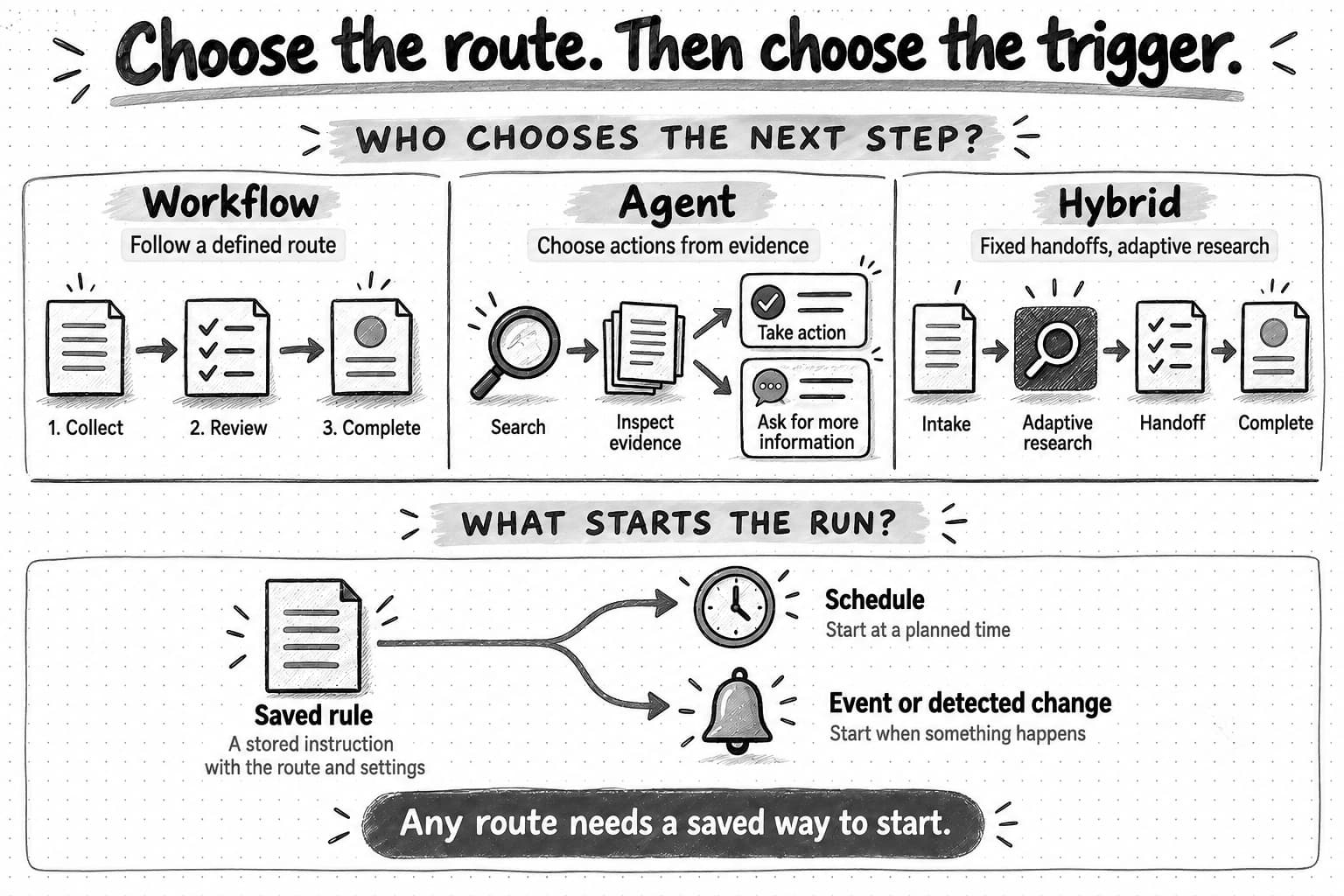
Open the route-and-trigger guide at full size (opens in a new tab).
This distinction has a practical consequence. A workflow is not outdated because it is deterministic, and an agent is not better merely because it is flexible. Predictability is a feature when the job is “put every approved lead into the right list.” Flexibility is a feature when the job is “work out why high-intent leads stopped converting.” Use only as much autonomy as the work needs.
What turns an AI task into automation?
A recurring prompt alone is not an operating system. Before an agent or workflow can run usefully without you, it needs a small set of decisions to be made in advance.
| Trigger | The schedule or event that starts the work |
|---|---|
| Instructions | The goal, scope, method, and definition of done |
| Context | The current brand, audience, campaign, and source material the work depends on |
| Tools and access | The sources the system may read and the actions it may take |
| Conditions | The rules that decide whether an event deserves a run |
| State | What the system remembers about earlier runs, alerts, and outputs |
| Guardrails | Budgets, approval points, exclusions, and stopping conditions |
| Destination | Where the result, evidence, and failure notice should go |
| Owner | The person responsible for reviewing quality and maintaining the automation |
The trigger deserves special attention because it changes the kind of automation you are building. Time-based work asks, “What should happen at this hour or on this date?” Event-based work asks, “What happened, and does it meet the condition for action?”
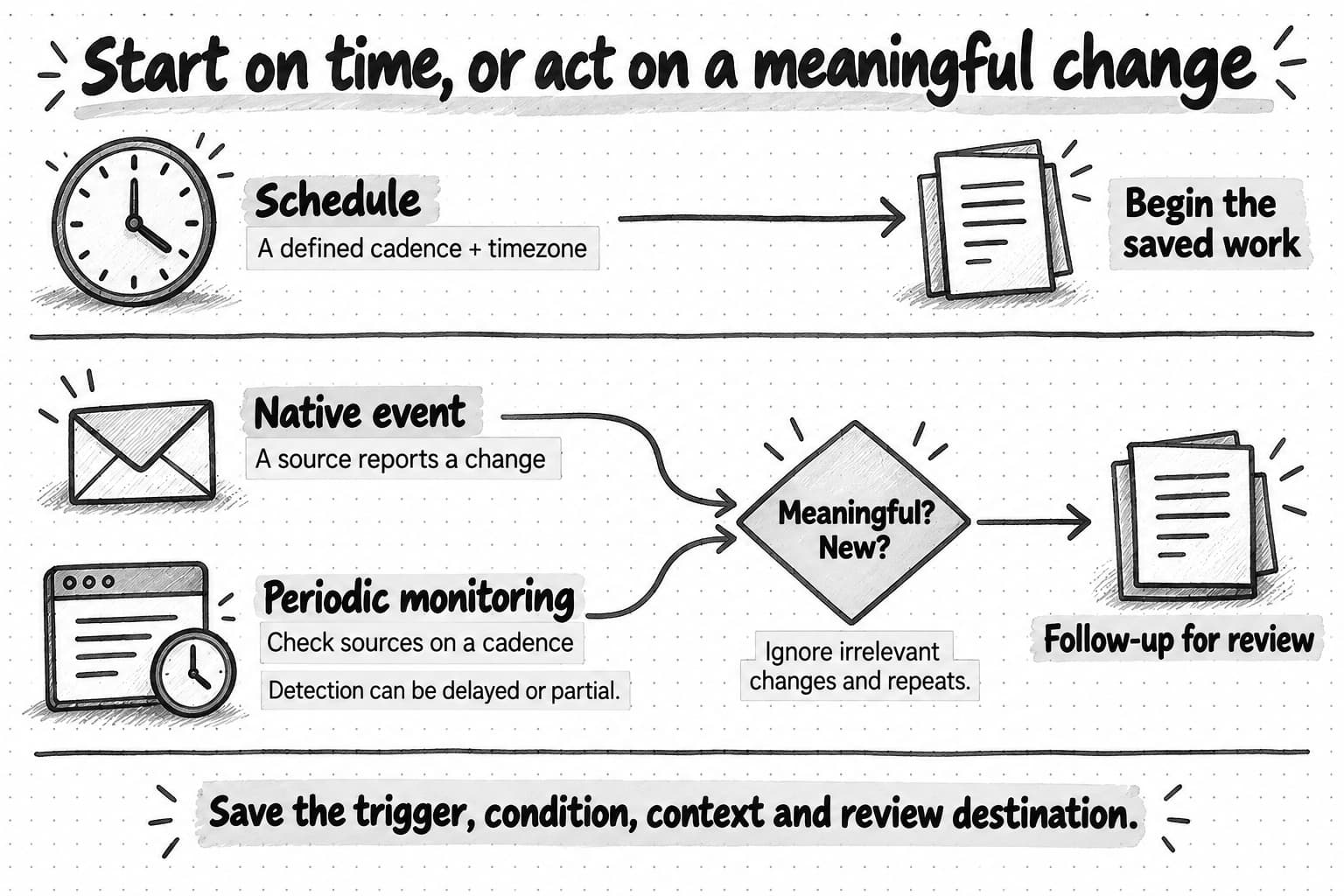
Open the automation trigger guide at full size (opens in a new tab).
The remaining parts are what make the run dependable. Context keeps a weekly content batch attached to the current campaign instead of last quarter's message. State prevents a monitor from reporting the same change every hour. A destination gives someone a place to review both the work and the evidence behind it. An owner notices when a once-useful automation has become stale.
Scheduled AI agent automation
Scheduled automation runs at a defined time or cadence: hourly, every weekday, each Monday, on the first of the month, or at another interval the product supports. It is the right default when the value of the work depends on regularity rather than on one specific event.
A scheduled agent needs five things:
- A cadence and timezone. “Every Monday morning” is incomplete when teammates or customers span regions. Name the time and the timezone, and decide what should happen around daylight-saving changes or a missing calendar date.
- A bounded lookback window. A weekly brief should normally examine the last seven days or everything since the previous successful run. Without a window, the agent may repeat old findings or gradually expand its research.
- Current sources and context. Name the project, files, dashboards, sites, or connected tools it can use. Decide whether each run should use a saved snapshot or the newest available material.
- A stable output contract. Specify the sections, evidence, length, file type, and destination. The fifth run should be as reviewable as the first.
- Failure and approval rules. Decide what happens when a source is unavailable, data arrives late, credits run out, or a proposed action would publish, send, spend, or delete.
Scheduling is a good fit for briefs, batches, reviews, and reports. It is a poor fit for work that only matters when a rare change occurs; checking every hour to produce 23 “nothing happened” reports creates noise and cost.
10 scheduled marketing automation examples
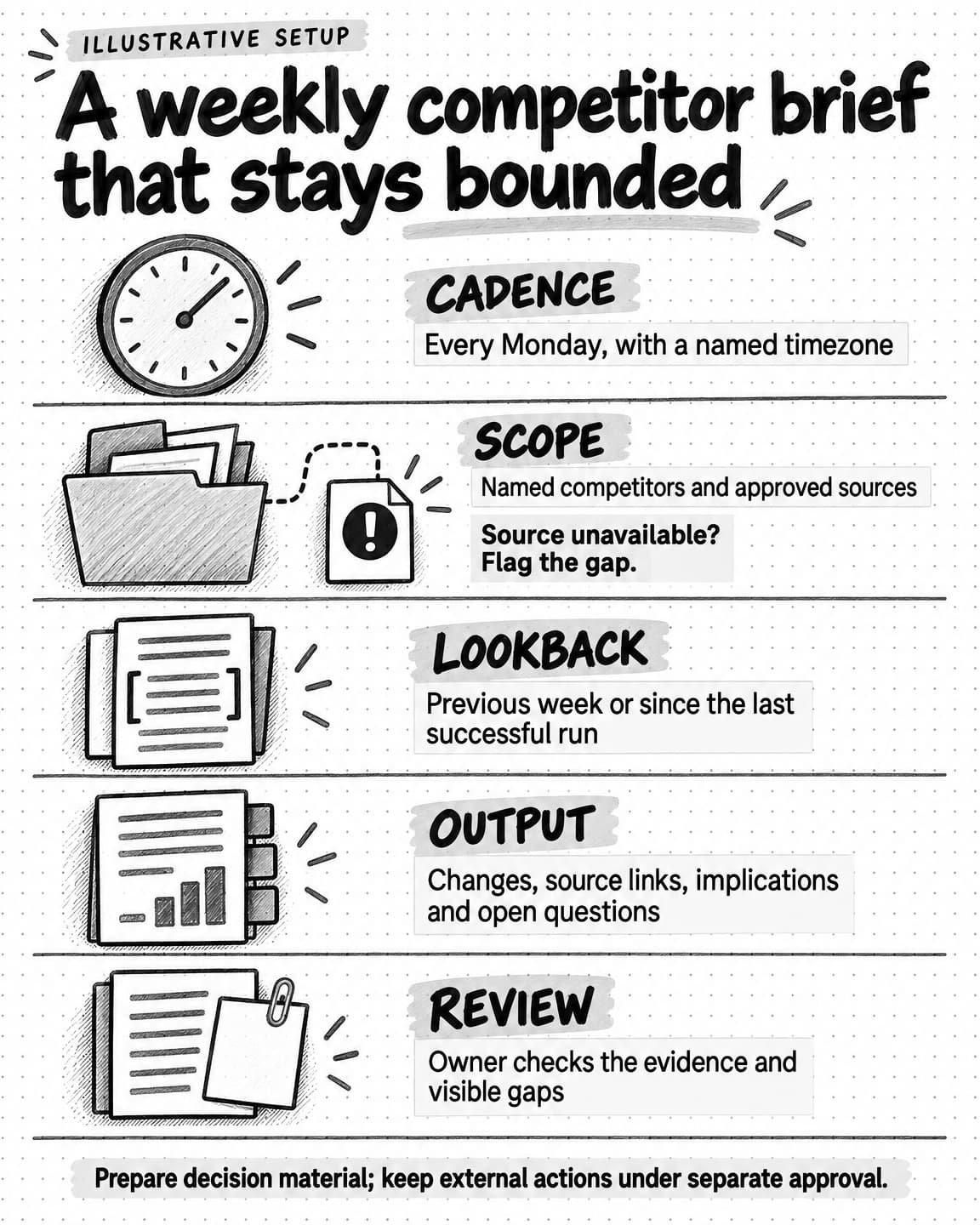
Open the weekly competitor brief setup at full size (opens in a new tab).
These examples draw from the recurring jobs marketers already run and the kinds of starter tasks available in Ampere. Treat them as briefs to adapt, not one-click promises.
- Weekly competitor moves brief. Every Monday, review named competitors' sites, changelogs, content, and public campaigns. Report only evidence-backed changes from the previous week, explain why they may matter, and separate observations from suggested responses.
- Morning market brief. Each weekday, summarize the few category developments relevant to current priorities. Include source links, ignore stories already covered, and finish with no more than three decisions worth considering.
- Weekly editorial plan. On Thursday afternoon, use the campaign calendar, audience questions, available evidence, and production capacity to propose next week's content. Return a prioritized plan for review rather than a posting queue.
- Newsletter plan and draft. On a weekly cadence, turn approved topics and source material into one focused newsletter outline and draft. Flag any claim that lacks a current source.
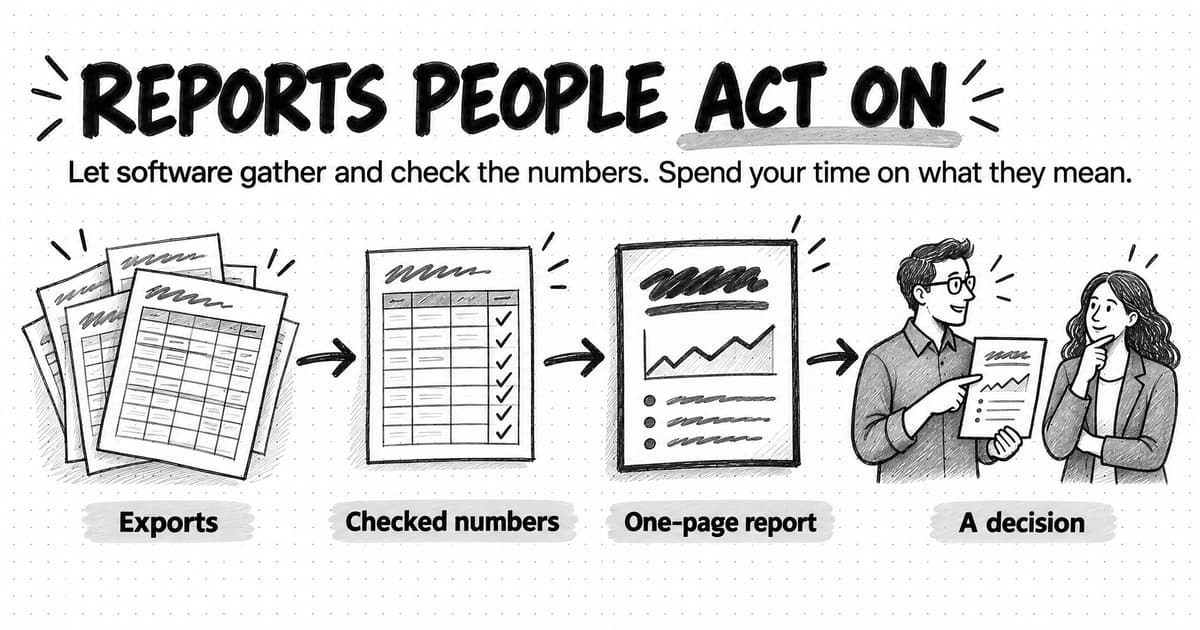
- Monthly performance recap. After the reporting period closes, gather the selected exports, compare them with the stated goals, explain material changes, and package the result for leadership review. If data is late, label the gap instead of filling it with an estimate.
- Weekly AI-search visibility review. Run a consistent set of category questions, record which sources and brands appear, compare with the prior run, and identify changes worth investigating without treating a single response as a market-share metric.
- Content decay brief. Every month, inspect priority pages for stale product claims, broken sources, declining performance, or outdated examples. Recommend which pages to refresh first and why.
- Review-language digest. Each month, analyze newly supplied customer or competitor reviews for recurring objections, desired outcomes, and wording shifts. Keep the excerpts attached so a marketer can judge whether the theme is real.
- Ad creative refresh concepts. Every two weeks, review current campaign evidence and approved brand material, then propose a small set of distinct concepts for the next creative cycle. Draft for review; do not launch or change budgets.
- Brand consistency review. At month end, compare newly produced assets with current voice, positioning, claims, and visual guidance. Return the specific mismatches and recommended corrections, not a generic brand score.
Notice that most of these outputs are decision material or drafts. That is deliberate. Unattended research and preparation are usually safer starting points than unattended publishing, budget changes, or customer communication.
Event-triggered AI agent automation
Event-triggered automation begins when the system receives or detects a relevant change. A native event might be a new form submission, a CRM stage change, an email, or a published content item. In software, these events are often delivered through a webhook or a product's own trigger system.
Some products also monitor for change by checking a source on a cadence. From the marketer's point of view, the follow-up work begins because something changed. Underneath, it is polling rather than an instant native event. The distinction matters: a monitor that checks hourly, daily, or weekly should not be described as real-time.
Every event-triggered automation needs:
- An event source. Which app, page, feed, dataset, or monitor reports the change?
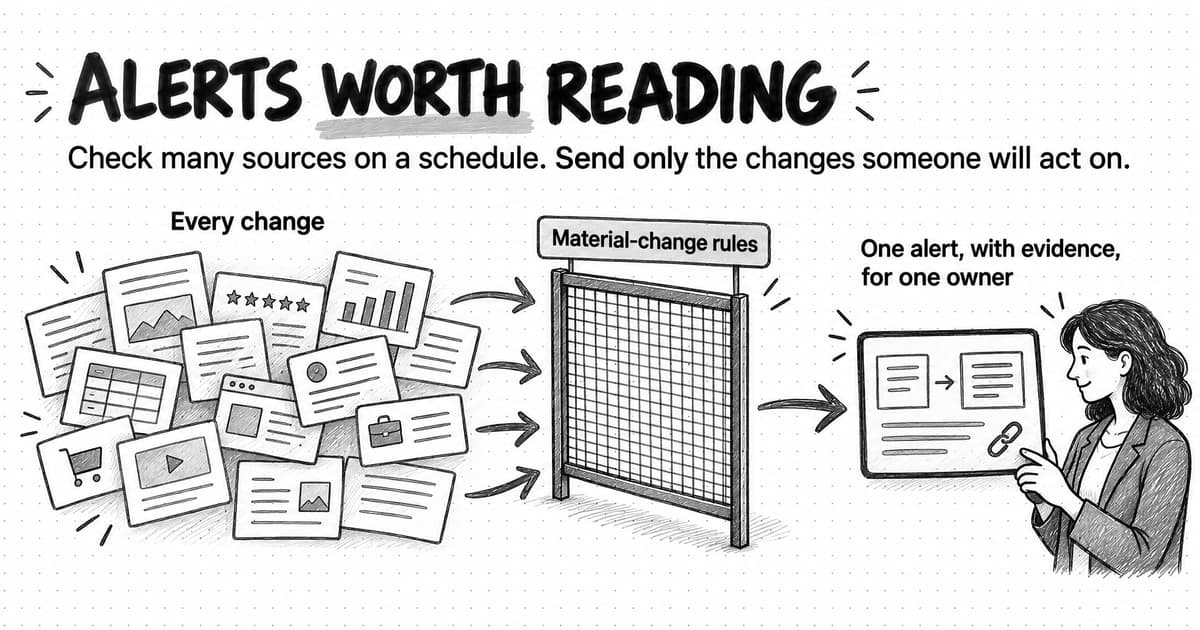
- A narrow condition. What makes the event meaningful enough to act on? “Any page changed” is noise. “The published price or package limits changed” is useful.
- The relevant payload. Give the agent the changed record, before-and-after evidence, or a reliable link. Do not make it rediscover the event from scratch if the source already supplied it.
- Duplicate protection. Event systems may deliver the same notification more than once. The automation should recognize an event it has already processed and avoid creating a second report, message, or update.
- A consequence-matched response. A new public mention may justify a draft. A budget change, customer email, or deletion may require explicit approval for the exact action.
That duplicate protection is not theoretical plumbing. AWS's guidance on idempotency in event-driven systems explains why consumers should be able to process a repeated event without repeating its effect. For a marketing team, this is the difference between one useful lead brief and three identical CRM notes—or one approved message and an embarrassing duplicate send.
10 event-triggered marketing automation examples
- Competitor pricing change. When a monitored pricing page shows a material change to price, packaging, or limits, capture the before-and-after evidence and ask an agent to draft a response brief. Ignore layout changes that do not alter the offer.
- Competitor launch. When a named competitor publishes a release or changelog entry, gather the primary announcement and supporting product page, then prepare a battlecard update with verified claims and open questions.
- Credible brand mention. When a new public mention comes from an allowed source, classify its relevance, preserve the link and context, and draft a response only when a response is warranted.
- Review threshold crossed. When a rating moves beyond a defined threshold, compile the new reviews that contributed to the change and prepare a short diagnosis. Do not infer a trend from the aggregate number alone.
- Recurring complaint appears. When several new feedback items express the same issue within a defined period, group the evidence and prepare a message-risk brief for marketing and product.
- Qualified lead arrives. When a form submission meets explicit fit criteria, gather permitted company context and prepare an account brief for a salesperson. Keep outreach as a separate approved action.
- Campaign guardrail is breached. When spend, pacing, or a quality metric crosses an agreed threshold, pause for the action your team defined: alert an owner, prepare a diagnosis, or request approval for a bounded change. Do not let the agent improvise the financial threshold.
- New customer feedback lands. When a supported feedback source receives a new response, classify it against maintained themes, attach the quotation, and update the research summary without overwriting the raw evidence.
- Product update is published. When an approved release note becomes public, trigger a workflow that gathers the source, asks an agent for channel-native drafts, checks required claims, and routes the package for review.
- Event details change. When a watched agenda, speaker list, or sponsor page changes, update the internal event brief and draft any necessary attendee-facing correction for approval.
Event automation is most useful when speed changes the value of the response. If nothing needs to happen until Friday's planning meeting, a scheduled digest may be cheaper and calmer than ten separate alerts.
When should you use an agent, a workflow, or both?
Use a workflow when you can draw the correct route before the run begins. Use an agent when the system must inspect the situation and decide what to do next. Use a hybrid when the operating process should be fixed but one part of the work needs judgment.
| Situation | Better starting point | Why |
|---|---|---|
| The same input always passes through the same transformations and approvals | Workflow | The known route is easier to test, observe, and maintain |
| The work depends on research, ambiguity, or incomplete information | Agent | The next useful step depends on what the system finds |
| The process is stable but the content varies | Hybrid | The workflow controls handoffs while the agent interprets or creates |
| A mistake would cause a consequential external action | Workflow with explicit approval | Deterministic gates should control sending, spending, publishing, and deletion |
| You are still discovering the correct process | Interactive agent first | Repeated supervised runs reveal which steps are stable enough to automate |
The last row is easy to skip. If you cannot yet explain how a good marketer handles the task, automation will make that uncertainty run faster. Work with an agent interactively first. Watch where it asks questions, which sources it needs, and what you correct. Those observations become the instructions, conditions, and checks for the automated version.
Automate a task after you understand its judgment, not merely because you have repeated its clicks.
How current AI agent clients support automation
The client landscape changed quickly in 2026, so comparisons need dates and primary sources. As of September 2026, the three products below all support work that can run while you are away, but their trigger models differ.
| Client | Schedule-based work | Event or change-based work | Useful distinction |
|---|---|---|---|
| Claude Cowork | Yes | No general Cowork event-trigger system is documented | Scheduled tasks run remotely and can use Cowork tools, skills, connected tools, and installed plugins |
| ChatGPT Work | Yes | Yes, for supported connected-app events and monitoring | Scheduled Tasks can run once, repeat on a cadence, respond to supported events, or monitor changes |
| Ampere | Yes | Yes, through Monitoring checks and optional Ampere follow-up work | Scheduled Tasks handle recurring prompt or eligible AI Tool work; Monitoring checks supported public sources hourly, daily, or weekly and can prepare follow-up work for review |
Claude Cowork
Claude Cowork scheduled tasks save a prompt and run it on a recurring cadence or on demand. Anthropic says remote tasks can use connected tools, skills, and installed plugins, and each run produces its own Cowork session for review. Its safety guidance recommends starting with low-risk work, avoiding sensitive or difficult-to-reverse scheduled actions, and reviewing past runs.
The current Cowork documentation describes scheduling, not a general event-trigger builder. Other Claude surfaces may have different proactive features, so treat this as a product-and-date-specific distinction rather than a claim about everything Anthropic offers.
ChatGPT Work
OpenAI's ChatGPT Work announcement says Scheduled Tasks can run once, on a schedule, when an event occurs, or as a monitor. The Work help documentation gives supported event examples including new Gmail messages, new Slack channel messages, and GitHub pull request activity, with plan, app, connected-access, and workspace-control requirements.
That makes ChatGPT Work a valid option for both trigger families where the required event is supported. Check the current eligibility and trigger list before designing an operation around it.
Ampere
Meet Ampere—your AI marketing agent. Ampere separates the two patterns into product surfaces designed around marketing work.
Scheduled Tasks put supported recurring prompt work or eligible AI Tool runs on a cadence. A saved prompt task can carry its Project context and attachments, and each result returns for review. Current creation paths support practical recurring cadences; Scheduled Tasks are not a social scheduler and do not imply autonomous publishing or outbound campaign sends.
Monitoring checks supported public sources hourly, daily, or weekly and files the available evidence when a meaningful change is detected. A monitor can be alert-only or include instructions for Ampere to prepare follow-up work for review. Because checks run on a cadence and provider coverage can be partial, Monitoring does not promise instant or exhaustive detection.
The split is useful when the same marketing operation contains both rhythms. A weekly scheduled task can prepare the broad competitor brief. Monitoring can surface a material pricing change between briefs and ask Ampere to prepare a focused response draft.
How to automate marketing with an AI workflow
You do not need an autonomous agent for every automation. If the process is known, a workflow gives you a clearer route to test and fewer decisions to leave open.
Step 1: Map the process before choosing the builder
Write the current process in ordinary language. Name the input, each transformation, every decision, the reviewer, and the final destination. Remove steps that exist only because two old systems do not communicate; automating accidental complexity preserves it.
A content-repurposing workflow might be:
- Receive one approved source article.
- Extract the core argument, supported claims, and required links.
- Ask an AI model to draft channel-specific versions from that evidence.
- Check length, required links, and banned claims.
- Send the drafts to the content owner for review.
The AI step adds interpretation and writing. It does not decide the workflow's destination or grant itself permission to publish.
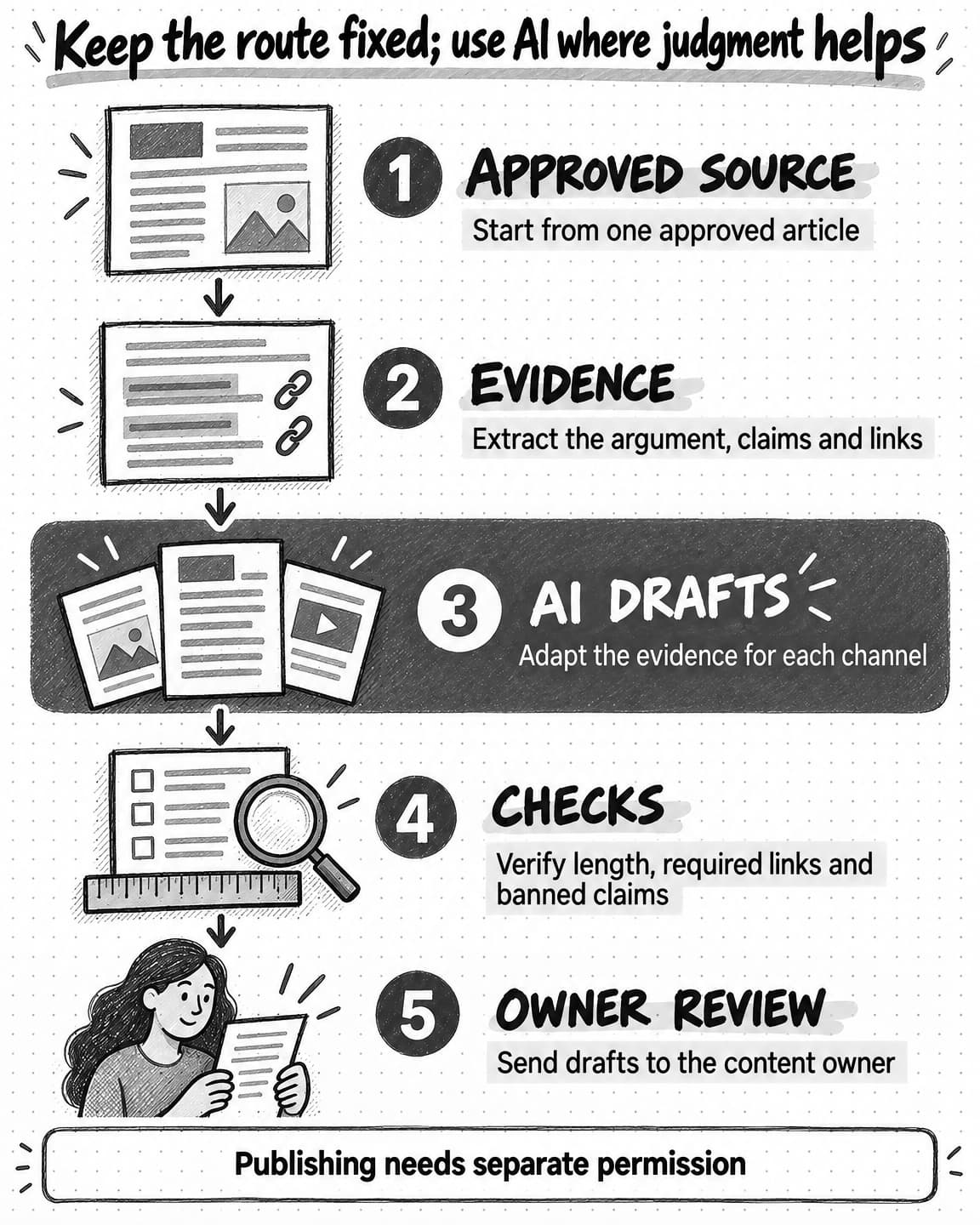
Open the content-repurposing workflow at full size (opens in a new tab).
Step 2: Define inputs and outputs for every step
For each node, specify what it accepts, what it returns, and what should happen when the result is incomplete. Structured fields are easier to validate than a paragraph that contains the title, source link, audience, approval status, and draft all mixed together.
Keep raw evidence beside normalized fields. If a model labels a review as “pricing concern,” retain the original review text and source so a person can inspect the classification.
Step 3: Put AI only where judgment helps
Use ordinary software for exact operations such as checking whether a field exists, comparing a number with an approved threshold, formatting a date, or looking up a known record. Use a model for work such as interpreting open-text feedback, synthesizing several sources, adapting a message to a channel, or deciding which evidence is relevant.
This division lowers cost and makes failures easier to diagnose. It also keeps a model from “reasoning” about a rule your team has already settled.
Step 4: Add the schedule or event trigger
Attach a schedule when regularity creates the value. Attach an event when a particular change creates the value. If you are using an event, add a condition that screens out irrelevant or duplicate inputs before an expensive model run begins.
Step 5: Test the awkward cases
Run the workflow with a missing field, an unavailable source, an empty result, a repeated event, a long document, conflicting evidence, and an output that fails review. Confirm that it stops or degrades in the way you intended.
Then watch several real runs before increasing its authority. A workflow that reliably prepares drafts is not automatically ready to send them.
A safe way to put AI marketing automation into production
Start with one operation that is frequent enough to matter, narrow enough to evaluate, and reversible when it goes wrong. A weekly brief is a better first candidate than “manage our marketing.”
- Write the acceptance test. Define what a useful result contains and which errors make it unusable.
- Run it interactively. Complete the task with the agent while you are present. Record the sources, questions, corrections, and approvals it needed.
- Automate preparation first. Let the system research, analyze, and draft. Keep publishing, sending, spending, deleting, and customer-record changes behind explicit controls.
- Use the minimum access. Connect only the sources and actions the operation needs. Read access is enough for many research automations.
- Keep evidence with the output. A result should show its source links, date range, material assumptions, and gaps. Fluency is not proof.
- Make repeats safe. Give events durable identities, prevent duplicate effects, and define whether a failed scheduled run retries or waits for attention.
- Set cost and stopping limits. Bound the sources, lookback period, model/tool spend, number of attempts, and maximum output size.
- Route failures to a person. “No report” should not look like “nothing changed.” Make partial results and unavailable sources visible.
- Review the first runs closely. Inspect what the automation did, not just whether it finished. Open the source, the output, and any external change.
- Maintain or retire it. Assign an owner, review the instructions and permissions on a cadence, and pause automations whose context or purpose has gone stale.
OpenAI's guide to human intervention in agent systems describes approvals at the exact tool action rather than as a vague blanket permission. That is a sound standard for marketing too: approval to prepare a campaign is not approval to launch it, and approval of yesterday's copy is not approval of a materially changed payload today.
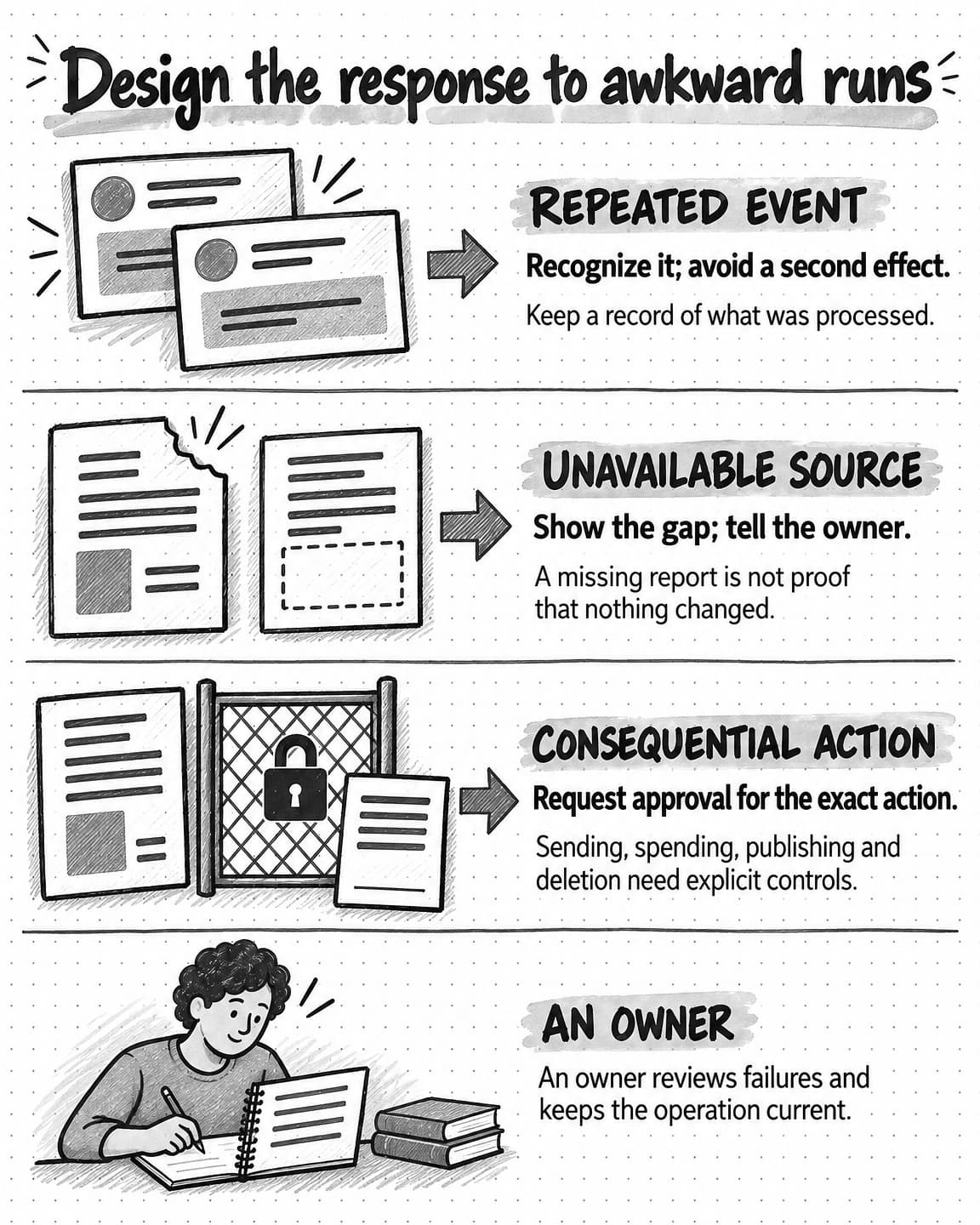
Open the awkward-run response guide at full size (opens in a new tab).
Common mistakes in AI marketing automation
Automating an unclear process
If reviewers disagree about what good work looks like, the agent will inherit that disagreement. Define the decision, evidence, and rejection criteria before increasing autonomy.
Triggering on activity instead of meaning
“Run whenever the page changes” reacts to cookie banners, timestamps, and layout edits. Define the business change you care about and require evidence that it occurred.
Giving every event to an expensive agent
Filter obvious non-events with ordinary rules. Reserve agent judgment for ambiguous inputs that survive the first check.
Sending polished work without its evidence
An agent can produce a convincing explanation from the wrong period or source. Keep the links, excerpts, filters, and dates attached to the result.
Measuring runs instead of outcomes
“The automation completed 40 times” says little about whether anyone used the output. Track review acceptance, corrections, time to decision, duplicated or missed events, and downstream results appropriate to the job. Our guide to measuring AI ROI shows how to turn those measures into an ROI range.
Never revisiting the saved context
The prompt can remain perfectly written while the product, audience, offer, or brand guidance changes underneath it. Review the context and permissions, not just the schedule.
Start with one piece of work you already know
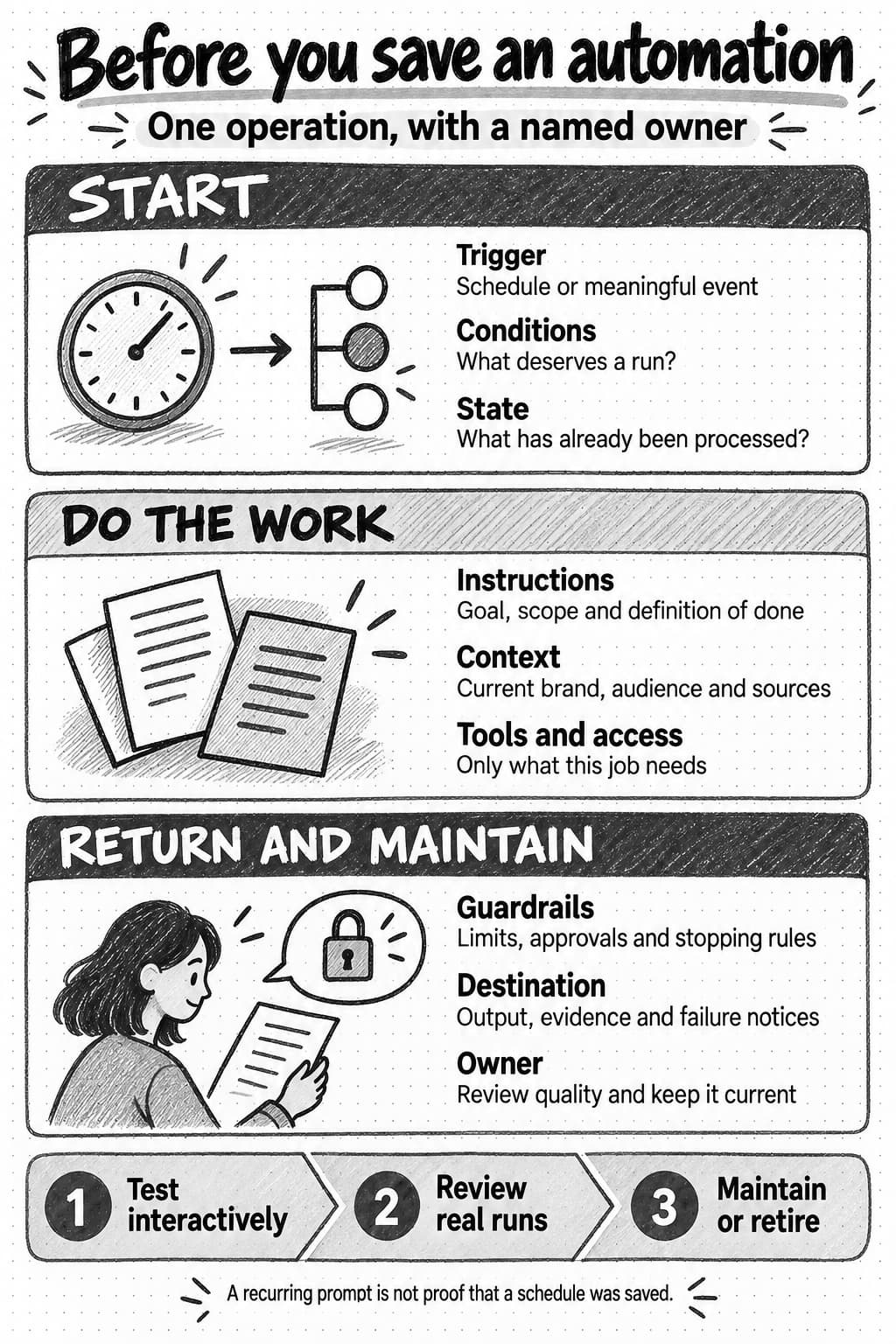
Open and save the automation setup reference at full size (opens in a new tab).
Choose a marketing task you have completed enough times to recognize a good result. Decide whether its value comes from a regular cadence or a meaningful event. Then ask whether the route is fixed, adaptive, or a combination of both.
If the task is a weekly brief, save the sources, lookback window, output shape, and review destination. If it is a competitor change, define the exact change that deserves attention, preserve the before-and-after evidence, and make duplicate events harmless. Give the agent only the access and authority that version of the job requires.
The useful leap in 2026 is not from manual work to an agent that runs everything. It is from isolated chat requests to maintained operations: the right trigger, enough context, a dependable route, visible evidence, and human judgment where the consequence calls for it.
Sources and further reading
- Anthropic, Building effective agents.
- Anthropic Help Center, Schedule recurring tasks in Claude Cowork.
- Anthropic Help Center, Use Claude Cowork safely.
- OpenAI, ChatGPT is now a partner for your most ambitious work.
- OpenAI Help Center, ChatGPT Work and Codex.
- OpenAI Agents SDK, Human-in-the-loop.
- AWS, Idempotency in event-driven architecture.
- Amplitude Explore, What is marketing automation?.
Frequently Asked Questions
What is AI marketing automation?
AI marketing automation is marketing work that an AI agent, an AI workflow, or a mix of both carries out from a saved rule, with no one starting each run by hand. A schedule can start it, such as every Monday at 9:00 a.m., or a meaningful event can, such as a competitor changing a pricing page or a new lead arriving. The work then runs on saved instructions, context, tools, and boundaries.
How can AI agents be used in marketing?
AI agents can be used in marketing to research, analyze, and draft on a schedule or after a meaningful change. On a schedule, an agent can prepare a weekly editorial plan, a newsletter draft, a monthly performance recap, or a content decay review. After an event, it can prepare an account brief when a qualified lead arrives, or channel drafts when a release note is published. The guide gives ten scheduled and ten event-triggered examples to adapt.
What is the difference between an AI agent and an AI workflow?
An AI agent uses a model to choose its next action as it works, whereas an AI workflow follows a route its builder defined in advance, even when one step calls a model to draft or classify. Use a workflow when you can draw the correct route before the run begins, and an agent when the next useful step depends on what the system finds. A hybrid keeps the handoffs fixed and gives an agent the research, interpretation, or creative stage inside them.
What is the difference between an AI agent and marketing automation?
Marketing automation describes what starts the run, and an AI agent describes who decides the next step. An agent chooses actions within its tools and boundaries, yet if someone has to open a chat and ask for the same report every Monday, the task has been delegated, not automated. Automation begins when software starts the work from a saved schedule or event and carries it out without a person typing the first message.
Which AI agent is best for marketing automation?
The best AI agent for marketing automation is the one whose triggers match the work. As of September 2026, Claude Cowork's documentation covers scheduled tasks but no general event-trigger system. ChatGPT Work can run tasks on a schedule, on supported connected-app events, or as monitors. Ampere pairs Scheduled Tasks with Monitoring, which checks supported public sources hourly, daily, or weekly. Trigger lists and eligibility requirements change, so check each product's current documentation before designing an operation around it.
What marketing tasks can AI agents automate end to end?
Preparation is usually the safest marketing work for AI agents to automate end to end: research, analysis, and drafting that finish in a brief, report, or set of drafts for review. Publishing, sending, spending, deleting, and customer-record changes should wait for explicit approval of the exact action, because approval to prepare a campaign does not cover launching it. A good first candidate is frequent, narrow, and reversible, such as a weekly brief whose first real runs you review closely.
How do you build an AI marketing workflow?
An AI marketing workflow takes five steps to build: map the current process, define what each step accepts and returns, use a model only where judgment helps, add a schedule or event trigger, and test the awkward cases. Ordinary software handles exact checks such as comparing a number with a threshold, and the model interprets open-text feedback or adapts a message to a channel. Those include a missing field, an unavailable source, a repeated event, and conflicting evidence; in each, confirm the workflow stops or degrades as you intended.
Can AI agents automate market research?
Yes, AI agents can automate recurring market research, and read access is often all they need. A scheduled agent can prepare a weekly competitor brief or a morning market brief from named sources and a bounded lookback window such as the last seven days, and a monitor can flag a material change to a competitor's pricing page between briefs. Each result should show its source links, date range, and gaps so a reviewer can judge what the run covered.
What are the risks and costs of using AI agents in marketing?
The main risk of using AI agents in marketing is unattended work that is confidently wrong, duplicated, or sent somewhere it should never have gone. Websites, emails, and documents an agent reads can contain instructions written by someone else, so limit its access and authority. Costs climb when a frequent check mostly reports that nothing happened, or when every event goes to an expensive agent. Filter non-events with ordinary rules first, and cap sources, spend, attempts, and output size.
How do you measure whether AI marketing automation is working?
Measure AI marketing automation by what happens to its output: how often reviewers accept it, how much they correct, how quickly a decision follows, how many events were duplicated or missed, and the downstream results that suit the job. A run count says little on its own, since an automation can complete 40 times without anyone using the result. In the first runs, open the sources and outputs, and make failures visible so “no report” never looks like “nothing changed.”