Competitor monitoring: how to automate tracking and get alerts worth reading
A practical guide for founders and product marketers who did a competitor analysis once and now need to keep it current: which signals to watch, where the evidence comes from, how often to check, how to set alert rules that cut noise, who acts on each alert, and how to tell whether the program is working.
42 min readWritten by Ampere
Short answer
How do you automate competitor monitoring?
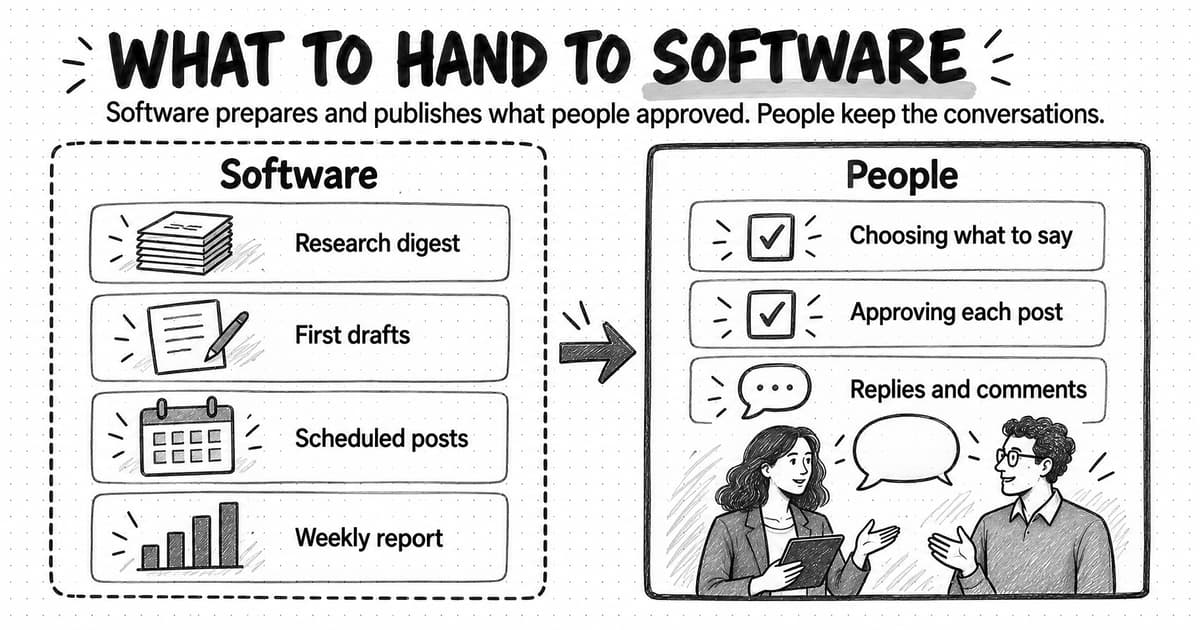
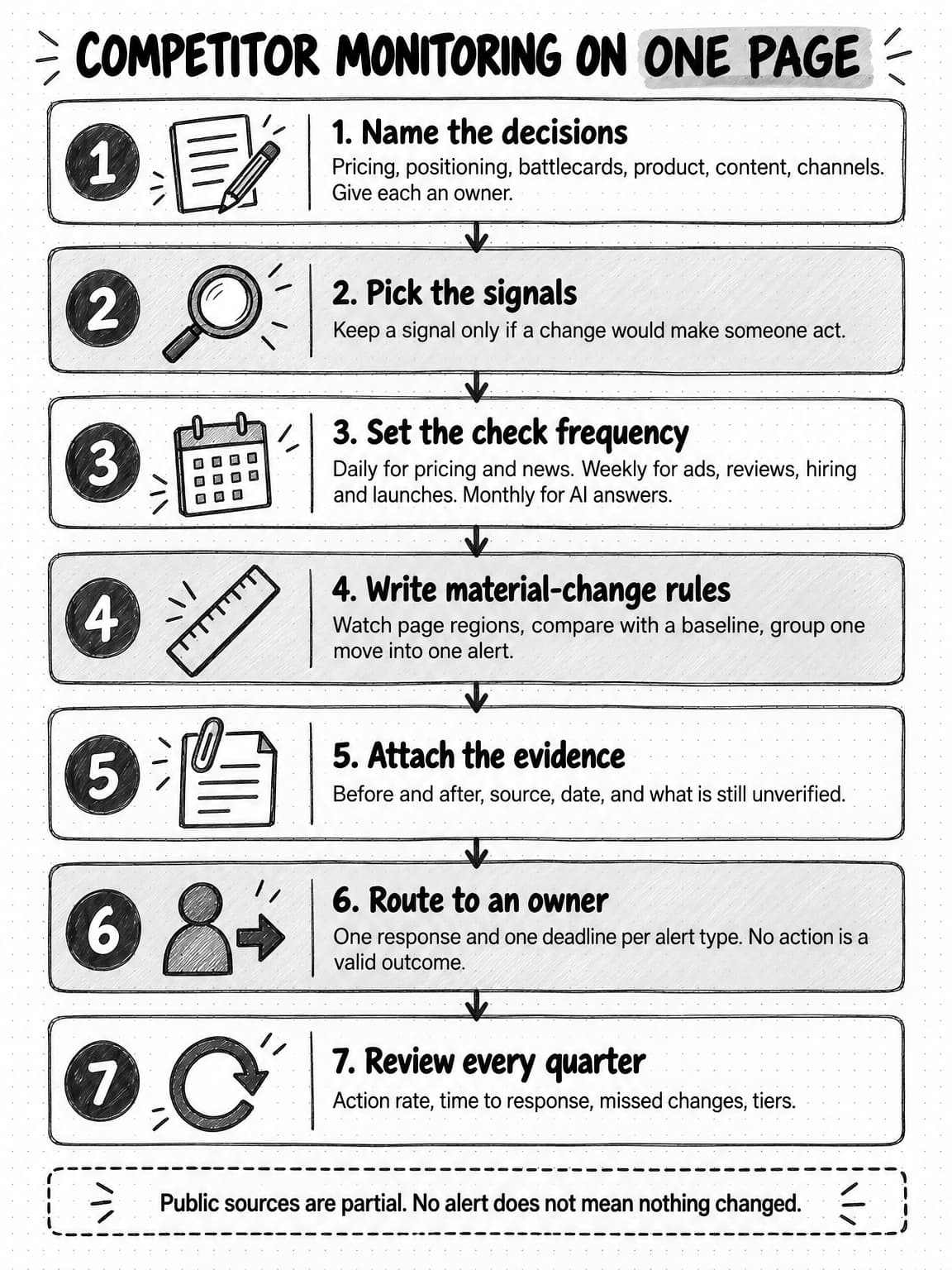
Automate competitor monitoring by naming the decisions it should protect, choosing the few signals that could change them, and scheduling a check for each signal at a frequency that matches how fast it changes. Define in advance what counts as a material change, attach the evidence to every alert, send each alert type to a named owner, and review the rules every quarter.
Summary
Competitor monitoring is the ongoing, rules-based watch on what competitors change in public, kept separate from a one-off competitor analysis and from a full competitive intelligence program. Its value comes from filtering, not collecting: a tool that reports every pixel change produces alerts nobody reads, while a program built around a few named decisions produces alerts someone acts on.
The useful signals are pricing and packaging, homepage positioning, product launches and changelogs, ads in public ad libraries, reviews, hiring, content and search, AI-answer visibility, social, partnerships, and funding or leadership news. Each one informs a different decision, comes from a different source, and changes at a different speed, so each needs its own check frequency.
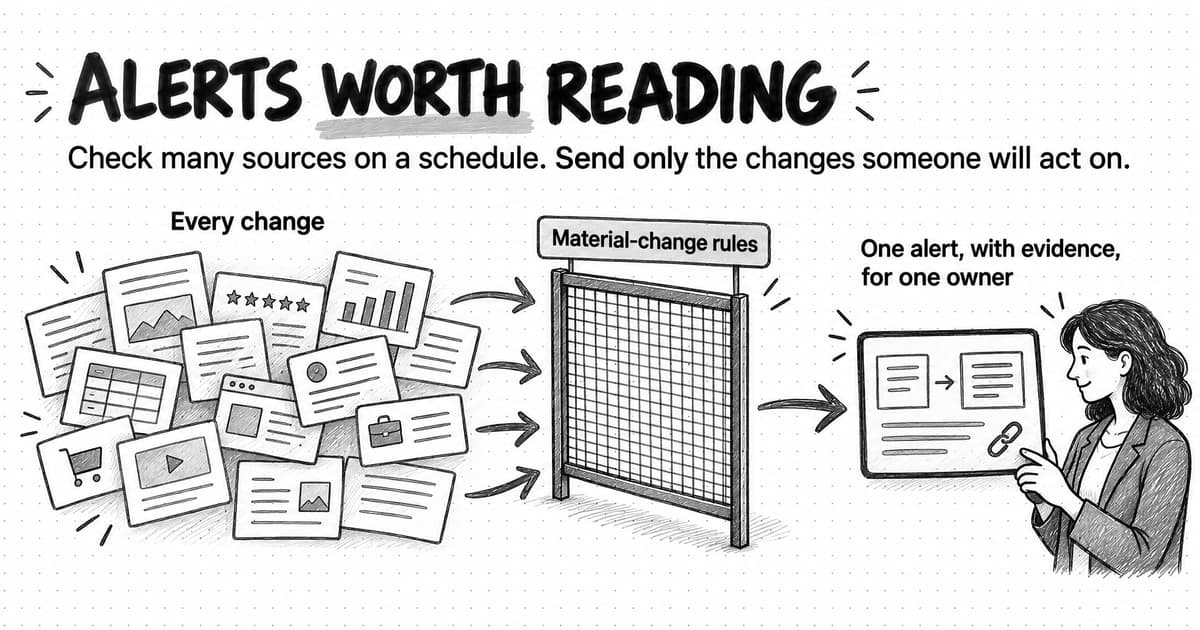
Alerts become worth reading when every signal has a written definition of a material change, every check compares against a stable baseline, related changes are grouped, and only urgent changes interrupt anyone. Everything else waits for a weekly digest. Every alert should carry what changed, the before and after, the source link, the capture date, and a note on what is still unverified.
Routing turns alerts into action: a named owner for each alert type, a stated response such as a battlecard update or a pricing review, and a deadline. The guide includes a monitoring plan template by competitor tier and a worked example in which a fictional software company cuts its alerts from dozens a week to a handful while catching the two changes that mattered.
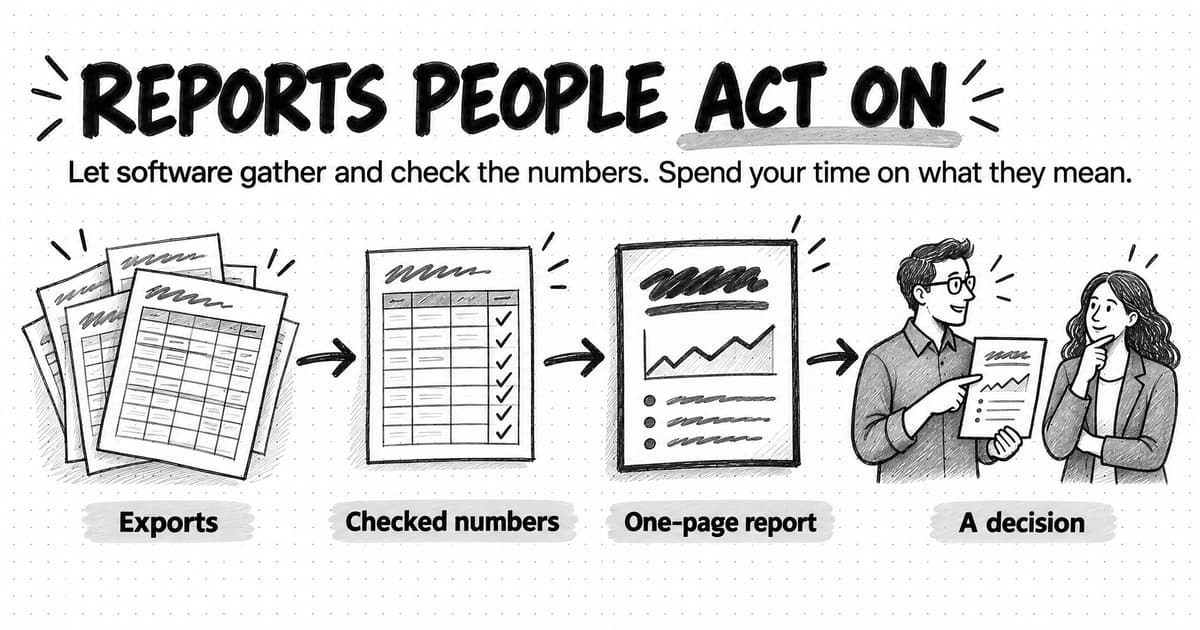
Measure the program by what it changes, not by how much it collects: the share of alerts someone acted on, the time from a competitor's change to your response, and notes on competitive deals. Public sources are partial, so absence of an alert is not proof that nothing happened, and every automated alert still needs a person to check the evidence before it shapes a decision.
Contents
- What competitor monitoring is, and how it differs from analysis and competitive intelligence
- Start with the decisions monitoring should protect
- What to watch: the competitor signals that matter and why
- Website change monitoring: how to watch competitor pages without drowning in diffs
- Review monitoring: reading competitor reviews as a signal
- Where the evidence comes from, and the lines not to cross
- How often to check each signal
- Designing alert thresholds that cut noise
- Evidence and verification: what every alert should carry
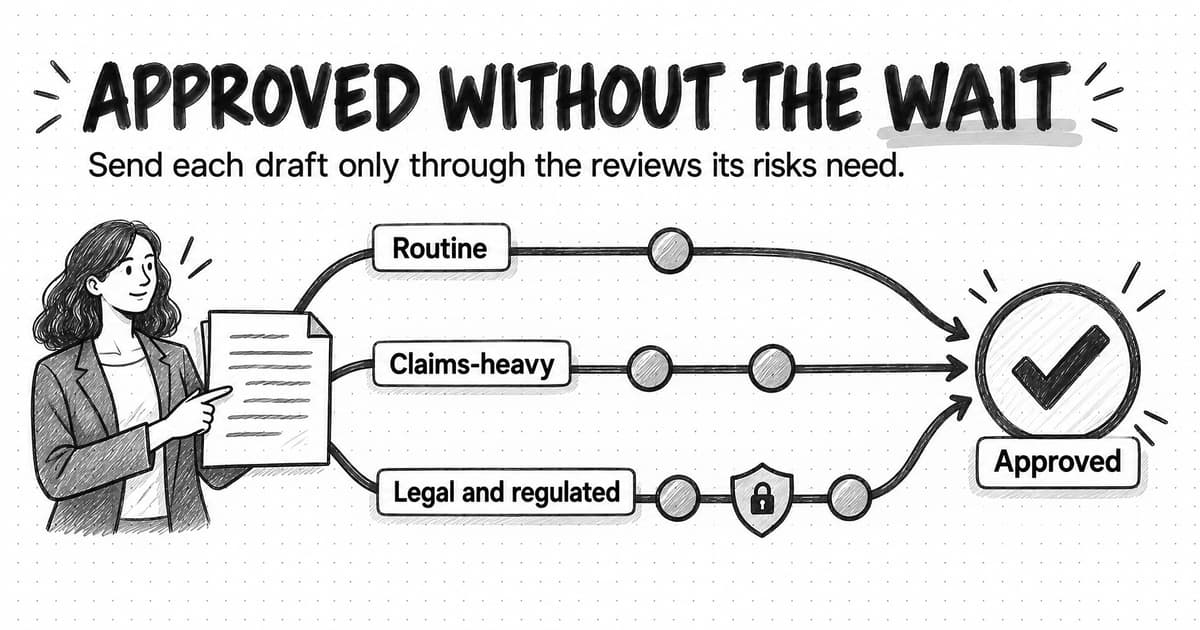
- Triage and routing: who acts on each alert
- A competitor monitoring plan template, by competitor tier
- Worked example: a small team rebuilds its monitoring (fictional)
- How to measure whether competitor monitoring is working
- Common competitor monitoring mistakes
- How to automate competitor monitoring with Ampere
- Sources and further reading
- Frequently Asked Questions
The first competitor analysis usually goes well. Someone spends a week on it, collects pricing pages and screenshots, reads reviews, lists positioning claims, and presents a tidy comparison. It shapes the homepage, a battlecard, and a few campaign decisions. Then the quarter moves on. Three months later a salesperson loses a deal to a competitor that quietly launched a cheaper plan in the spring, and the battlecard still lists the old price.
Nothing in the analysis was wrong; the market kept moving after it was done. Some teams try to redo the analysis every quarter and find nobody has the week to spare. Others sign up for a tool that emails them whenever a competitor's website changes, and within a month they delete the alerts unread, because a changed footer link and a changed price arrive with the same urgency.
Competitor monitoring is the ongoing, rules-based tracking of public changes competitors make, such as their prices, positioning, products, ads, reviews, and hiring, filtered so that only changes that could affect one of your decisions reach the person who owns that decision. The second half of that definition is what separates a useful program from a noisy one. Automation makes the checking cheap. It does not decide what matters, and a program that skips that step automates the noise along with the signal.
This guide is for a founder or product marketer who has done a competitor analysis and now needs to keep it current without drowning in alerts. It covers which signals to watch and why, where the evidence comes from and which lines not to cross, how often to check, how to write alert rules that cut noise, what every alert should carry, and who acts on it. It ends with a plan template by competitor tier, a fictional worked example, and a way to measure the program.
What competitor monitoring is, and how it differs from analysis and competitive intelligence
Three terms get used interchangeably, and the confusion causes real problems because each one answers a different question and needs a different amount of work.
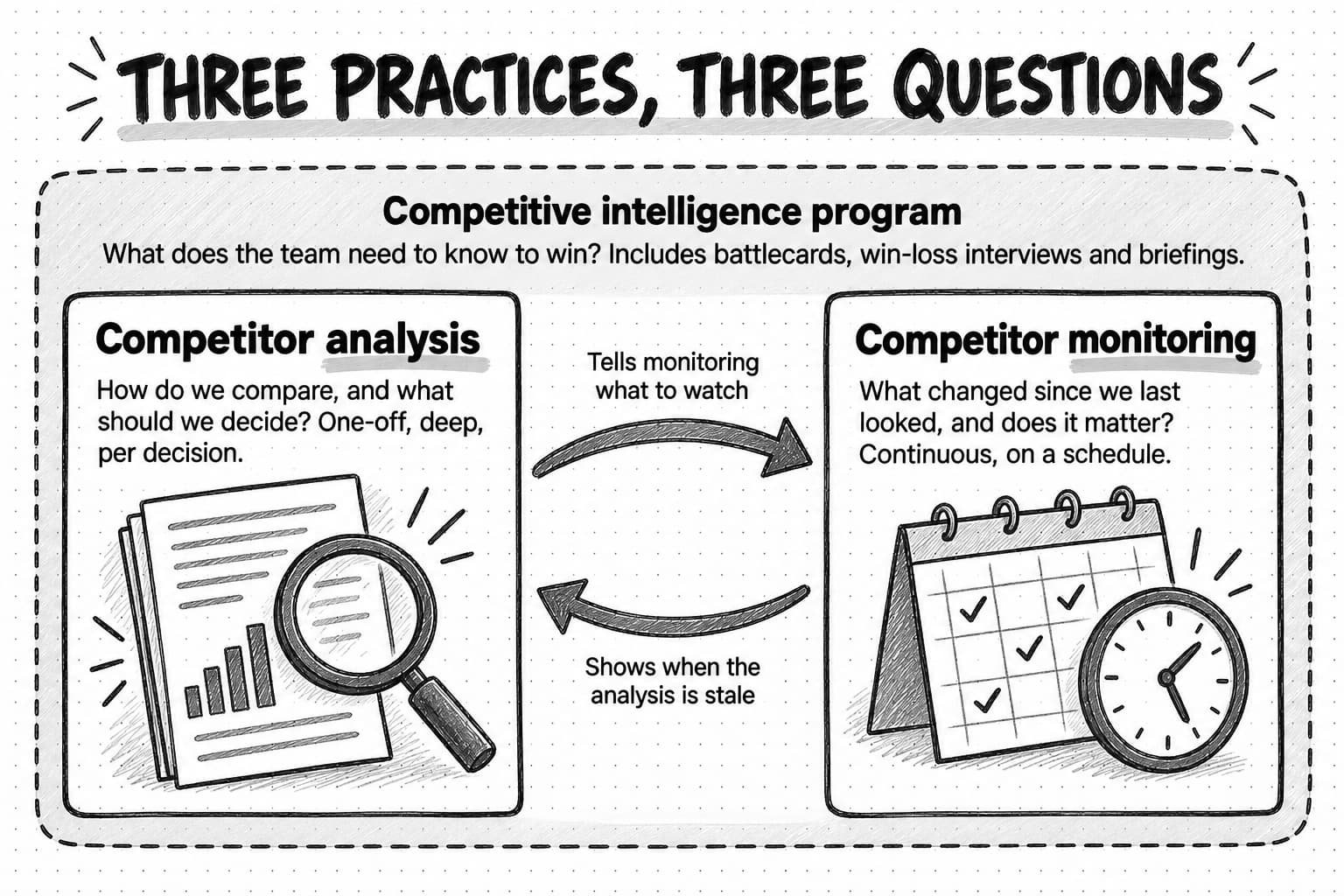
A competitor analysis is a one-off structured comparison made to inform one decision: what the homepage should lead with, how to price a new plan, whether to enter a segment. It has a start and an end. It goes deep on a few alternatives and finishes with a recommendation. Our guide to conducting a competitor analysis covers the method.
Competitor monitoring keeps that picture current. It runs on a schedule, checks a defined set of sources for each competitor, compares what it finds with what was there before, and reports the differences that cross a threshold. It does not try to explain the whole market each time. Its job is narrower: notice what changed, show the evidence, and get it to the right person quickly enough to matter.
Competitive intelligence is the broader practice that uses both. A competitive intelligence program includes monitoring and analysis, plus win-loss interviews, sales enablement, battlecards, research on customer perception, and briefings for leadership. Larger companies staff it with dedicated people. A small team usually runs a light version: one person owns it part time, monitoring feeds it, and analysis happens when monitoring raises a question worth answering.
| Practice | Question it answers | Cadence | Typical output |
|---|---|---|---|
| Competitor analysis | How do we compare, and what should we decide? | One-off, per decision | A comparison and a recommendation |
| Competitor monitoring | What changed since we last looked, and does it matter? | Continuous, on a schedule | Alerts and digests with evidence |
| Competitive intelligence program | What does the team need to know to win? | Ongoing, with periodic reviews | Battlecards, briefings, win-loss insights, analyses |
The relationship runs both ways. Monitoring tells you when an analysis has gone stale; an analysis tells monitoring what to watch, because the criteria that mattered in the comparison are the ones worth checking. If you have done the analysis, you already have most of a monitoring plan: the competitors, the criteria, and the sources.
Start with the decisions monitoring should protect
The most common mistake in competitor monitoring is starting with the tool. A team signs up, adds five competitor domains, ticks every signal type, and lets the software decide what an alert is. The result is a stream of changes with no connection to anything the team will do.
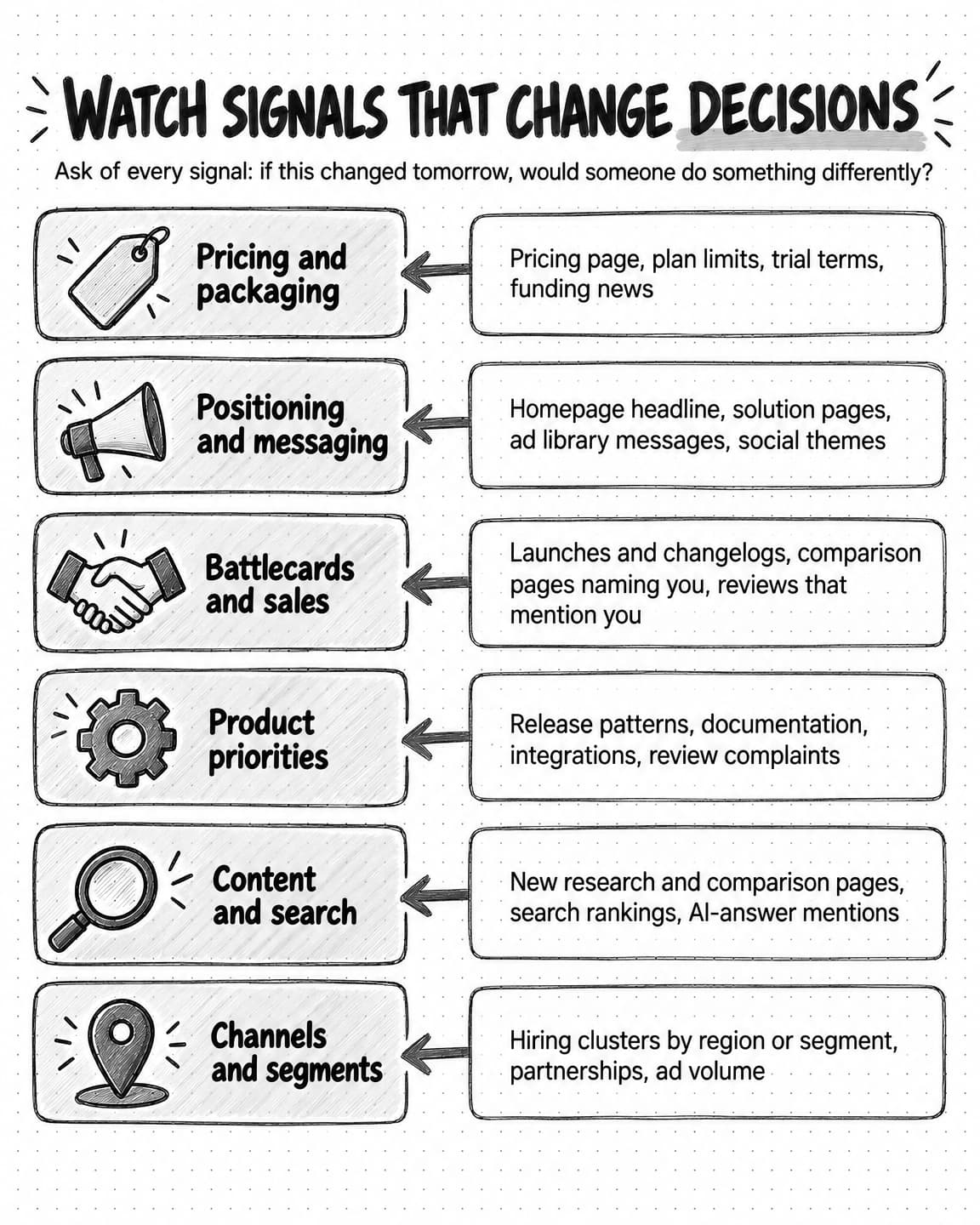
Start instead with a short list of decisions that a competitor's move could change. For most B2B software companies the list looks something like this:
- Pricing and packaging: whether your plans, prices, trial terms, or discounts still make sense against what buyers see elsewhere.
- Positioning and messaging: whether your homepage, ads, and sales pitch still say something different from the alternatives.
- Sales enablement: whether battlecards, objection handling, and comparison pages are accurate this week.
- Product priorities: whether a competitor's launch changes what buyers will expect from you.
- Content and search: whether competitors are taking ground in search results, AI answers, or the topics your buyers read about.
- Channel and campaign choices: whether a competitor's ad spend, event presence, or partnership changes where you should show up.
Write each decision next to its owner: pricing may belong to the founder, positioning and battlecards to product marketing, content to the content lead. On a team of three, one person may own all of them. What matters is knowing whose desk each alert type lands on before you build anything.
Then apply a simple test to every signal you consider watching: if this changed tomorrow, would someone on the team do something differently? If a competitor's new blog post would not change any content plan, do not alert on blog posts. If a competitor's price change would trigger a pricing review, alert on it quickly. The test removes most of the noise before a single check runs.
The test also sharpens the signal. A rewritten careers page changes nothing on its own, but six new enterprise sales roles in a region you sell into suggest a competitor moving into your territory. So the signal worth watching is "new sales or product roles in our segments or regions," not "careers page changed." Writing signals at that level of specificity is most of the work.
What to watch: the competitor signals that matter and why
The signals below cover what most B2B software and services companies can learn from public sources. You will not need all of them. Pick the ones connected to decisions on your list, and expect each to come from a different source and change at a different speed.
Pricing and packaging
Pricing pages are the highest-value page to watch for most teams, because a change there can move deals within days. Watch the listed prices, plan names, the features in each plan, usage limits, the free trial or free plan terms, annual discounts, and whether a "contact sales" tier appears or disappears. Removing public prices is itself a signal: it often means a shift toward larger deals and negotiated contracts.
Record prices with their billing terms. A competitor that moves from $49 per month billed monthly to $49 per month billed annually has raised its effective monthly price, even though the number on the page did not change. Reading the fine print is what makes a price alert accurate.
Homepage and positioning
The homepage headline, subheadline, main call to action, and named customer segments tell you who the competitor is trying to win and what it wants buyers to believe. A change from "for small teams" to "for growing companies," or a new industry page, can signal a shift in target market months before any announcement. Watch the homepage and main solution pages, and ignore cosmetic edits such as image swaps.
Product launches, changelogs, and documentation
Changelogs, release notes, documentation, and integration directories show what a competitor is building. A single launch rarely matters; five releases about reporting in two months tell you where the competitor is investing. Documentation is often more precise than marketing pages: new setup instructions confirm a capability exists, while a launch post may describe something still in limited release.
Ads in public ad libraries
The major ad platforms publish searchable libraries of the ads advertisers run, and these are among the most useful sources in competitor monitoring because they show what a competitor is paying to say. The Meta Ad Library "contains all active ads that are shown across Meta technologies," and anyone can search it. The LinkedIn Ad Library lets anyone, with or without a LinkedIn account, search ads by advertiser, payer, keyword, country, and date, covering ads created on or after June 1, 2023. Google's Ads Transparency Center is a searchable repository of advertisers and the ads they have served across Search, Display, Gmail, and YouTube.
Watch for new messages, new offers, new audiences named in the copy, and jumps in volume. Volume is a rough proxy: the libraries do not show spend or results for most ads, so many ads might mean a big campaign or a team testing small variations.
Reviews
Review sites such as G2, Capterra, TrustRadius, app marketplaces, and Google reviews show what customers praise and complain about, in their own words. They are the closest thing to a public record of how a competitor's product performs after the sale. Reviews get their own section below, because monitoring them well takes more than counting stars.
Hiring
Job postings are one of the clearest public signals of a competitor's plans, because companies hire before they launch. Watch for sales roles by region or segment, product roles in a new area, partnership roles, and leadership hires. A single posting is a hint and a cluster is a signal; postings also stay up after roles are filled, so check the posting date.
Content and search
A competitor's blog, webinars, and research reports show which topics it wants to own, and search results show whether that content is working. Watch for new research in your core topics, comparison pages that name you, and changes in who ranks for the few search terms closest to a purchase. One new "alternatives to" page naming your company matters more than twenty routine posts.
AI-answer visibility
Buyers now ask AI assistants which tools solve a problem, and the answers name a few companies. Run a fixed set of buying questions on a schedule in the assistants your buyers use, and record which companies are named, how they are described, and which pages are cited. Our guide to measuring AI search visibility explains how to build that question set and why results vary from run to run.
Social
A competitor's company page, its founders' and executives' posts, and its community channels show messaging before it reaches the website, and they show which messages get a response. Watch for repeated themes, new claims, launch teasers, and posts that attract unusual engagement. It is the noisiest signal on this list, so it suits a weekly digest of themes.
Partnerships and integrations
New integration listings, marketplace appearances, co-marketing announcements, and partner programs show how a competitor plans to reach buyers. An integration with a platform your customers rely on can remove one of your advantages overnight.
Funding, leadership, and news
Funding rounds, acquisitions, leadership changes, layoffs, and press coverage change what a competitor can afford to do. News alerts are easy to set up and easy to over-trust: a press release states what the company wants said, so treat it as a claim and look for evidence on the product, pricing, and hiring pages.
Open the signal-to-decision map at full size (opens in a new tab).
Website change monitoring: how to watch competitor pages without drowning in diffs
Website change monitoring is the automated checking of specific web pages for changes, usually by capturing each page on a schedule and comparing the new capture with the previous one. It is the backbone of most competitor monitoring, because pricing, positioning, product, and partnership signals all live on competitor websites.
It is also where most of the noise comes from. Two captures of a modern website differ almost every time: rotating testimonials, a new cookie banner, a changed footer date, a personalized greeting. A tool that alerts on every difference teaches the team to ignore alerts within a week.
Four practices make website change monitoring usable.
Watch pages, not domains. List the specific pages that carry your signals: the pricing page, the homepage, two or three solution pages, the changelog, the integrations directory, the careers page. A competitor's whole site may have thousands of pages, and most of them will never matter to a decision.
Watch regions of a page, not the whole page. On a pricing page, the prices, plan names, and feature lists matter; the navigation, footer, and testimonial carousel do not. Many tools let you select a region or exclude elements. If yours does not, compare the extracted text rather than the visual page, which removes most image and layout noise.
Compare meaning, not characters. "Starts at $49" becoming "From $49" is a wording edit; "$49" becoming "$59" is a price change. A good rule compares the facts on the page, such as prices, plan names, and headline claims. Given the before and after text, an AI model can describe what changed in plain language and say whether it touches a price, a claim, or a feature. Treat that description as a draft to check.
Keep the history. When an alert says a price changed, the first question is always "from what?" Keep every capture with its date so you can show the before and after. The Internet Archive's Wayback Machine can help with older history: you can browse archived captures of a page by date, and its Save Page Now feature saves a specific page once on request, though it does not add the page to future crawls. Your own dated captures are more reliable for pages you check on a schedule.
Review monitoring: reading competitor reviews as a signal
Review monitoring is the ongoing tracking of new customer reviews on public review sites and marketplaces, for your own company and for competitors. For competitor monitoring, the value is not the star rating, which moves slowly and hides most of what reviewers say. It is the content: which problems reviewers keep raising, which features they praise, which competitors they say they switched from, and how those themes change over time.
Set up review monitoring around themes rather than individual reviews. For each competitor, keep a short list of recurring complaints and praises, such as "slow support," "reporting is limited," or "easy setup," and count how often each appears in new reviews each month. An alert is worth sending when a theme changes direction, for example when complaints about support double in a month after a competitor's layoffs, or when a new complaint appears several times after a launch. A single angry review is an anecdote; a shift in themes is a signal.
Watch three specific things alongside the themes:
- Switching language. Reviews that say "we moved from" or "we replaced" name the alternatives buyers actually compare, which keeps your competitor list honest.
- Your name in competitor reviews. When reviewers compare a competitor with you, they tell you what buyers see as the difference.
- Responses from the competitor. How a vendor responds to criticism, and whether it promises fixes, can preview its roadmap.
Reviews need careful reading as evidence. They come from self-selected customers, some sites invite reviews in campaigns that produce bursts, and some reviews are not genuine. In August 2024 the U.S. Federal Trade Commission announced a final rule banning fake reviews and testimonials, including AI-generated ones, and banning payment for reviews of a particular sentiment. Treat a sudden burst of five-star reviews, or a cluster of reviews with similar wording, as something to note rather than a change in customer opinion. Our guide to voice-of-customer research covers how to turn review language into messaging once a theme holds up.
Where the evidence comes from, and the lines not to cross
Most of what a small team needs comes from public sources anyone can see:
| Signal | Main public sources |
|---|---|
| Pricing, positioning, product, partnerships | The competitor's website, changelog, documentation, and integration directories; marketplace listings |
| Ads | Meta Ad Library, LinkedIn Ad Library, Google Ads Transparency Center |
| Reviews | Review sites, app marketplaces, Google reviews |
| Hiring | The competitor's careers page and the job boards it posts to |
| Content and search | The competitor's blog and resource library; search results for your key terms |
| AI-answer visibility | Answers from the AI assistants your buyers use, for a fixed set of questions |
| Social | Company pages, executives' public posts, public community channels |
| Funding, leadership, news | Press releases, news coverage, company announcements; news alerts such as Google Alerts, which let you choose how often you get notifications, the types of sites included, the language, the region, and how many results you want |
The ad libraries exist partly because of regulation. In the European Union, Article 39 of the Digital Services Act requires very large online platforms and search engines to keep a searchable public repository of the ads they show, for the whole time an ad runs and until one year after it was last shown, including the ad's content, who it was presented for, who paid, the period it ran, and the main targeting parameters. That is why ads shown in the EU often carry more detail than ads shown elsewhere. LinkedIn's library, for example, shows the advertiser, ad format, and creative for ads served on LinkedIn, and adds impressions, targeting, and run dates for ads targeted to the EU.
Two limits apply to every source. Coverage is partial: a library may not show every ad, and a careers page will not list roles filled through recruiters. And an absence is not evidence. If you find no ads for a competitor this week, record "no ads found in the sources checked on this date," not "the competitor stopped advertising."
The lines not to cross
Competitor monitoring, as this guide describes it, uses public information gathered openly. The ethical and legal boundary is about how you get information, not how carefully you read what is public. Under U.S. trade secret law, 18 U.S.C. § 1839 defines "improper means" to include "theft, bribery, misrepresentation, breach or inducement of a breach of a duty to maintain secrecy," and says it does not include reverse engineering, independent derivation, or other lawful means of acquisition. In practice, a few rules keep a marketing team well clear of trouble:
- Do not misrepresent who you are. Posing as a prospect to get a competitor's sales deck, pricing quote, or demo under a false identity is the classic line, and it is not worth crossing. If you sign up for a competitor's free trial, do it as yourself.
- Do not ask for confidential information. New hires from a competitor, partners who work with both of you, and customers who switched should never be asked for internal documents, roadmaps, or contract terms they owe a duty to protect.
- Do not get into private areas. Customer-only portals, password-protected pages, and leaked files are off limits, however they reach you.
- Keep your own company's rules. If your legal team or company policy sets stricter standards, they win.
None of this limits what you can do with public pages, ad libraries, reviews, job postings, and news, where nearly all useful monitoring happens. For a specific case, ask your own counsel; this guide is not legal advice.
How often to check each signal
Check frequency should match two things: how fast a signal changes, and how quickly you could act on a change. Checking pricing pages every hour does not help if your pricing review happens once a month. Checking ads once a quarter misses whole campaigns. The frequency is a design choice for each signal, not one setting for the whole program.
A reasonable starting point for a small B2B team:
| Signal | Suggested check | Why |
|---|---|---|
| Pricing and packaging pages | Daily | Changes are rare but affect live deals; a day's delay is acceptable |
| Homepage and key solution pages | Daily or weekly | Positioning changes slowly, but you want to see a new headline before buyers mention it |
| Changelogs and product updates | Weekly | Launches matter as a pattern; a weekly summary shows the pattern |
| Ad libraries | Weekly | Campaigns run for weeks; weekly checks catch new messages and offers |
| Reviews | Weekly, with a monthly theme summary | Single reviews are noisy; themes need a month of data |
| Hiring | Weekly | Postings stay up for weeks; clusters show up over a month |
| Content and search rankings | Weekly or monthly | Rankings move slowly and fluctuate day to day |
| AI-answer visibility | Weekly or monthly | Answers vary between runs; trends need repeated samples |
| Social | Weekly digest | High volume, low urgency per post |
| Funding, leadership, news | Daily | Rare, but a funding round or acquisition can change plans quickly |
Check faster during a launch window when you expect a response, for a competitor known to change prices often, or in a head-to-head deal cycle where a battlecard must be right this week. Check slower for competitors who rarely meet you in deals; the tier system later in this guide applies that idea to the whole plan.
Remember that frequency of checking and frequency of alerting are separate. You might check a pricing page daily but send a price alert only when a price changes, and send nothing at all on the other days. The next section is about that second setting.
Designing alert thresholds that cut noise
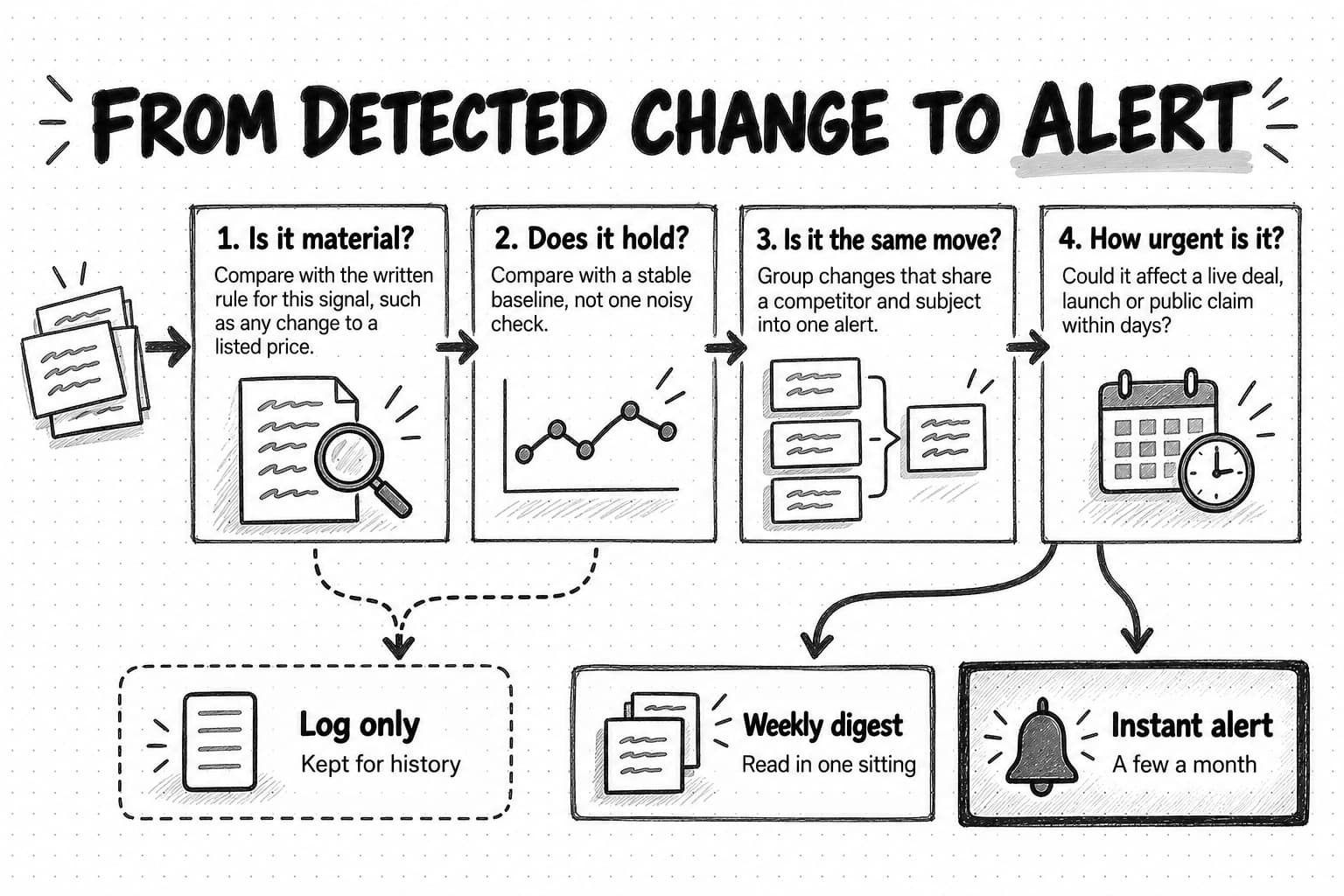
An alert threshold is the rule that decides whether a detected change becomes an alert, goes into a digest, or is logged silently. Thresholds decide whether people read the program or mute it, and they take four steps to set up.
Define a material change for each signal
Write one or two sentences for each signal saying what counts as a material change, meaning a change someone would act on. Be concrete enough that two people would agree on whether a change qualifies.
| Signal | Material change (alert) | Not material (log or digest) |
|---|---|---|
| Pricing page | Any change to a listed price, billing term, plan name, plan limit, trial or free plan terms, or the appearance or removal of a "contact sales" tier | Wording edits around prices, button text, layout, images |
| Homepage | A new main headline or subheadline, a new target segment named, a new main call to action | New logos, rotated testimonials, image swaps |
| Changelog | A launch in an area named on your battlecard, or three or more launches in one area within a month | Bug fixes, minor improvements |
| Ads | A new offer, a new claim about you or your category, a message aimed at your segment, or a large jump in active ads | New variations of an existing message |
| Reviews | A theme that doubles in a month, a new recurring complaint after a launch, reviewers naming your company | Single reviews, small rating movements |
| Hiring | Three or more new roles in one function, region, or segment within a month; a senior leadership hire | Single postings, reposted roles |
| AI answers | A competitor newly named or dropped for one of your core buying questions, or an inaccurate description of your company | Wording changes in answers that name the same companies |
The definitions will be imperfect at first, but they make the rules visible, so a useless alert leads to a changed rule instead of a quietly ignored inbox.
Compare against a stable baseline
Comparing with the previous capture works for pages that rarely change. For signals that fluctuate, such as search rankings, AI answers, and review counts, compare with a baseline taken over several checks. A competitor moving from position four to position six for one search term overnight is normal movement. A competitor that held position three for two months and now sits at position eight across five checks has lost ground.
AI answers need this treatment most, because the same question can produce different answers on consecutive runs. Sample each question several times per check and alert only when a pattern holds, such as a competitor named in most runs this month after being named in few runs last month.
Group, deduplicate, and digest
One competitor move often shows up in several places at once: a new plan appears on the pricing page, in a launch post, in three ads, and in the founder's social post. Sending a separate alert for each is how alert fatigue starts. Group changes that share a competitor and a subject within a short window into one alert, and list every place it appeared as evidence. The grouping also makes the alert more convincing, because the same change confirmed by several sources is less likely to be an experiment or an error.
Deduplicate across competitors as well. If three competitors all add "AI" to their headlines in the same month, that is one market-level observation for the digest, not three urgent alerts.
Choose instant alerts or digests
Only a small share of changes should interrupt anyone. Reserve instant alerts for changes that could affect a live deal, a launch, or a public claim within days: a competitor's price change, a new comparison page naming you, an ad that makes a claim about your product, a major funding round or acquisition. Everything else belongs in a weekly digest, ordered by importance, which the owner reads in one sitting.
A useful rule of thumb is that a monitoring program for a handful of competitors should produce a few instant alerts a month and one digest a week. If instant alerts arrive every day, the thresholds are too loose or the program is watching too much. If nothing arrives for months, check that the monitors are still running and still capturing the right part of each page; a page that moved or a source that changed its format looks the same as a quiet market.
Evidence and verification: what every alert should carry
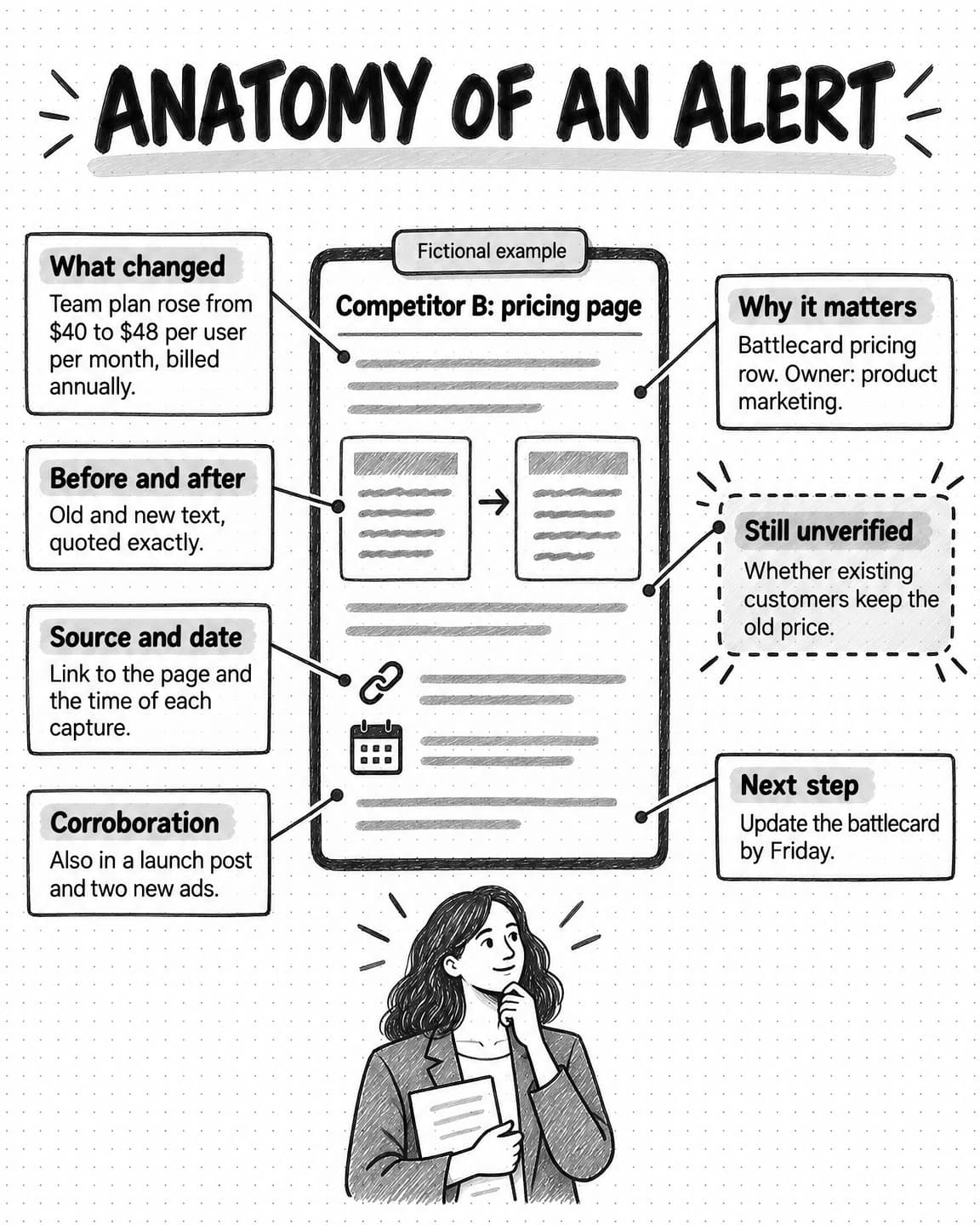
An alert that says "Competitor X changed its pricing page" creates work: someone has to open the page, find the change, and work out what it used to say. An alert that carries its own evidence lets the reader decide in a minute.
Every alert, instant or in a digest, should include these parts:
| Competitor and signal | Who changed what, for example: Competitor B, pricing page |
|---|---|
| What changed | One plain-language sentence, for example: the Team plan rose from $40 to $48 per user per month, billed annually |
| Before and after | The exact old and new text or values, quoted |
| Source and capture date | A link to the page or ad and the date and time of each capture |
| Corroboration | Other places the same change appears, such as a launch post or ads |
| Why it may matter | The decision it touches and the owner, for example: battlecard pricing row, owned by product marketing |
| Still unverified | What the alert cannot establish, for example: whether existing customers keep the old price |
| Suggested next step | The response the rule calls for, such as updating the battlecard by Friday |
The "still unverified" line does a lot of work. Automated checks capture what is visible, which is not always what is true. A new price on a page may apply only to new customers. A launch post may describe a feature in limited preview. A review burst may come from a review campaign. Writing down what the alert cannot establish keeps the reader from treating a capture as a conclusion.
Verification should be proportionate to the decision. An alert going into a weekly digest needs only its evidence. An alert that will change a price, a public comparison page, or a sales claim needs a person to open the source, confirm the change is live, check it from another region or a logged-out browser if relevant, and look for corroboration. If an AI model summarized the change, compare its summary with the before and after text before passing it on. Our guide to preventing AI hallucinations in marketing content explains why a fluent summary still needs a source check.
Open the alert anatomy at full size (opens in a new tab).
Triage and routing: who acts on each alert
An alert pays off only when it leads to an action, which takes a named owner for each alert type, an agreed response, and a deadline. Without them, alerts pile up in a shared channel where everyone assumes someone else read them.
Build a routing table from the decisions list you wrote at the start:
| Alert type | Owner | Typical response | Timing |
|---|---|---|---|
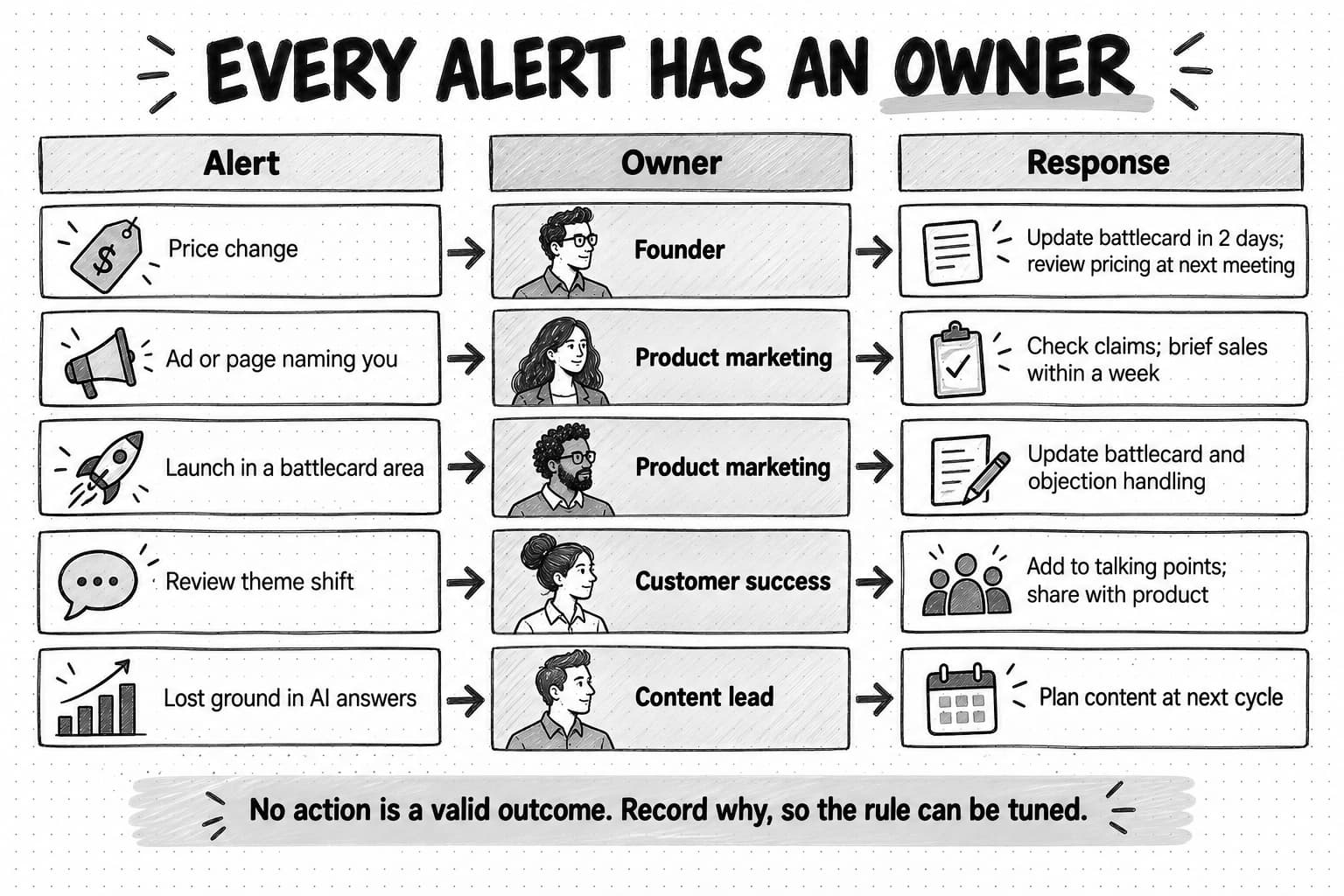
| Price or packaging change | Founder or pricing owner | Review your pricing position; update the battlecard pricing row | Battlecard within two working days; pricing review at the next scheduled meeting |
| New positioning or headline | Product marketing | Check whether your differentiation still holds; adjust messaging if it no longer stands out | Within two weeks |
| Comparison page or ad naming you | Product marketing | Check claims for accuracy; prepare a response for sales; update your own comparison page | Within one week |
| Launch in a battlecard area | Product marketing with product | Update the battlecard and objection handling; share with sales | Within one week |
| Review theme shift | Product marketing or customer success | Add to messaging and sales talking points; share with product | Next monthly review |
| Hiring cluster or leadership change | Founder | Note in the monthly brief; adjust sales focus if it signals a segment move | Next monthly review |
| Lost or gained ground in AI answers or search | Content lead | Review the pages behind the answers; plan content | Next content planning cycle |
Most alerts end in one of a few responses: update a battlecard or comparison page, brief sales, change messaging, add a question to the next analysis or win-loss interview, or record the change and do nothing. Recording "no action, because" is a legitimate outcome; it shows the alert was read and makes the rule easier to tune.
Salespeople need short, accurate answers to "what changed and what do I say," not raw alerts. A good pattern is a weekly note to sales listing only the changes that affect live deals, each with its evidence link and a suggested response. Our guide to what product marketing does covers battlecards and enablement.
When the response requires drafting, such as an updated battlecard section or a response to a comparison page, the alert can start that work automatically, but a person should review the draft before it reaches sales or the public. Our guide to content approval workflows explains how to keep that review quick.
A competitor monitoring plan template, by competitor tier
Sort competitors into tiers by how often you meet them in deals and how directly they compete, then give each tier a different depth of monitoring:
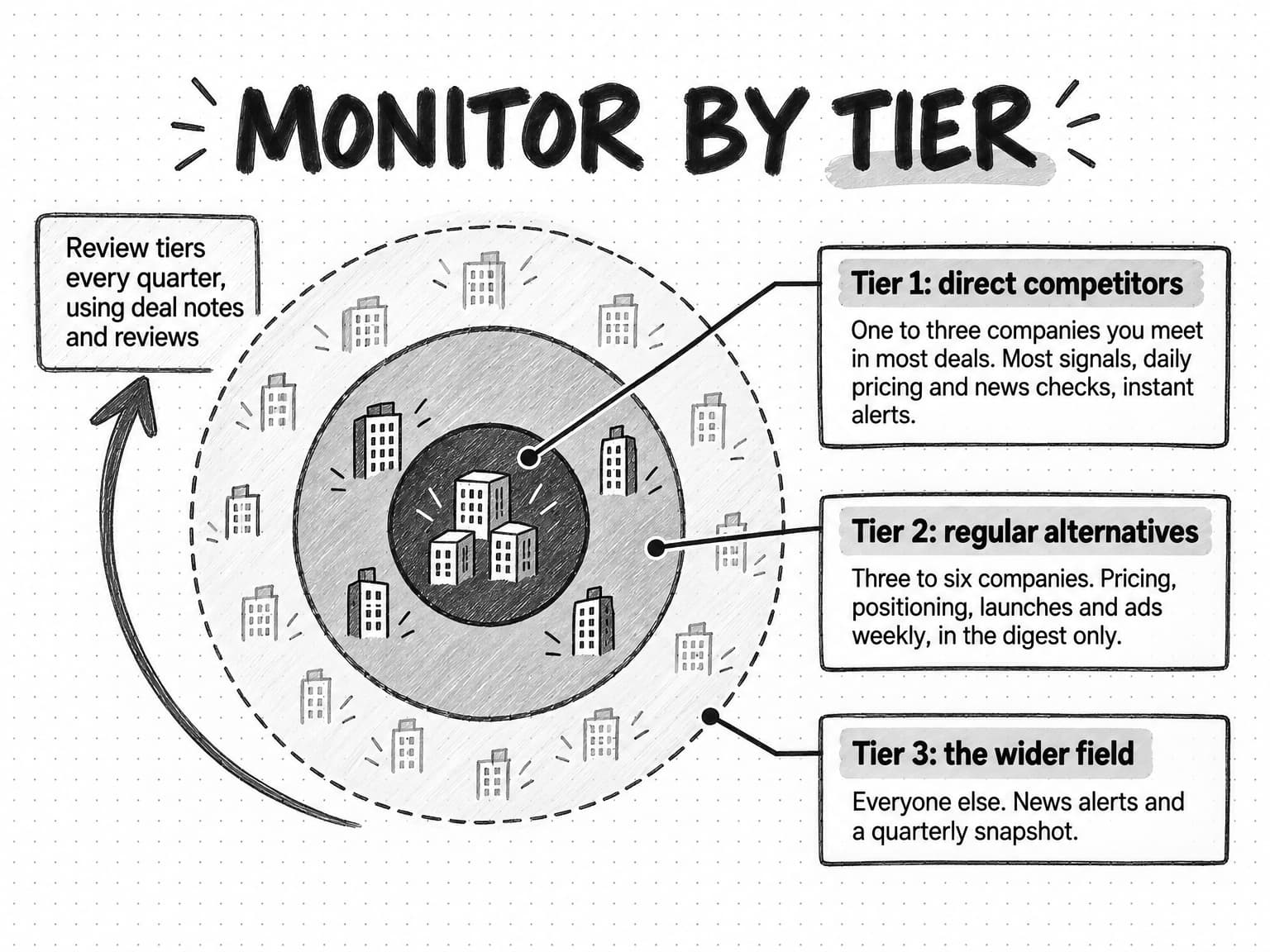
- Tier 1, direct competitors (one to three companies): the alternatives you meet in most competitive deals. Watch most signals, check pricing and news daily, and send instant alerts for material changes.
- Tier 2, regular alternatives (three to six companies): competitors you meet sometimes, adjacent tools buyers use instead of you, and the most visible new entrants. Watch pricing, positioning, launches, and ads weekly; include them in the digest only.
- Tier 3, the wider field (any number): occasional competitors, large platforms with a feature that overlaps yours, and companies to keep an eye on. Track news and a quarterly snapshot of positioning and pricing.
Review the tiers every quarter. A Tier 3 company that starts appearing in deals moves up. A Tier 1 company that stops appearing moves down. Your sales notes, lost-deal reasons, and review-site switching language are the best evidence for these moves.
Here is a plan template you can copy and fill in for each competitor:
COMPETITOR: [name]                       TIER: [1 / 2 / 3]
WHY WE WATCH: [where we meet them: deals, segment, channel]
DECISIONS AT STAKE: [pricing / positioning / battlecard / product / content / channels]
OWNER: [name]                            LAST TIER REVIEW: [date]

SIGNALS AND SOURCES
- Pricing:      [pricing page URL]       check: [daily]   alert: [any price, plan, limit, trial change]
- Positioning:  [homepage, solution URLs] check: [weekly] alert: [new headline, segment, main CTA]
- Product:      [changelog, docs URLs]   check: [weekly]  alert: [launch in battlecard area]
- Ads:          [ad library searches]    check: [weekly]  alert: [new offer or claim about us]
- Reviews:      [review site pages]      check: [weekly]  alert: [theme doubles; our name appears]
- Hiring:       [careers page]           check: [weekly]  alert: [3+ roles in one area per month]
- AI answers:   [question set]           check: [monthly] alert: [named or dropped on core question]
- News:         [news alert terms]       check: [daily]   alert: [funding, acquisition, leadership]

ROUTING
- Instant alerts go to: [owner, channel]
- Weekly digest goes to: [names], read on: [day]
- Sales note: [channel, day], covers changes affecting live deals only

CURRENT BASELINE (update after each material change)
- Price points and billing terms: [ ]
- Main headline and segment: [ ]
- Battlecard last updated: [date]
- Known gaps in our sources: [ ]
The baseline section is easy to skip and important to keep. It records what the competitor looked like the last time someone checked properly, so every alert has a reference point and anyone new to the program can see the current picture in one place.
Worked example: a small team rebuilds its monitoring (fictional)
The company in this example is fictional. Corvo sells invoice approval software to construction subcontractors. Its marketing team is two people: Dana, who runs product marketing and supports the four-person sales team, and a content marketer. After a competitor analysis in January, Dana set up a website change tool on five competitor domains with every option switched on.
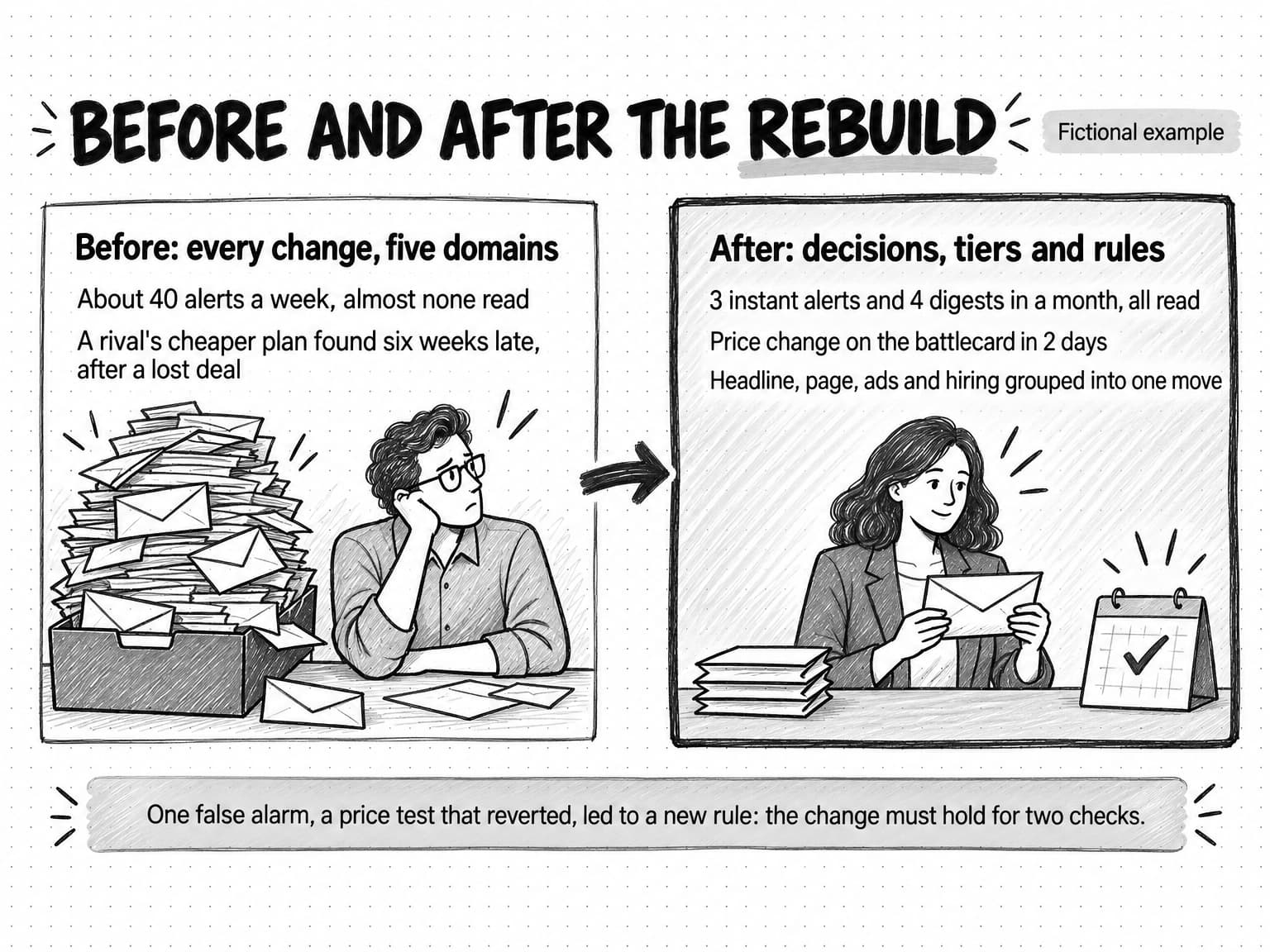
By March the tool was sending around forty alerts a week. Most were rotated testimonials, blog posts, cookie banners, and footer changes. Dana had stopped opening them. In April, a salesperson lost a deal and learned from the buyer that Bramble, Corvo's closest competitor, had added a cheaper starter plan six weeks earlier. The alert had been sent. It was buried in the stream.
Dana rebuilt the program in an afternoon, starting from decisions rather than the tool. She listed three decisions monitoring needed to protect: Corvo's pricing position against Bramble and Tessel, the accuracy of the two battlecards sales used, and Corvo's positioning as the tool built for subcontractors rather than general contractors. Then she sorted competitors into tiers. Bramble and Tessel became Tier 1, because sales met them in most competitive deals. Quarry Pay and two accounting platforms with approval features became Tier 2. A handful of others became Tier 3.
For the two Tier 1 competitors she watched only specific pages: the plan section of the pricing page, the homepage headline, the solution page for subcontractors, the changelog, and the careers page. She added weekly checks of their ads in the Meta, LinkedIn, and Google libraries and of the two review sites construction buyers used, plus a daily news alert. Any price, plan, or trial change, and any new headline or page naming subcontractors, was an instant alert; everything else went to a Monday digest, along with all Tier 2 competitors.
The first month produced three instant alerts and four digests. Two of the instant alerts mattered.
The first came in the second week. Tessel's pricing page changed: the Pro plan, previously $35 per user per month, now showed $35 per user per month billed annually, with a monthly option at $42. The alert carried the before and after text, the capture dates, and a note that it could not establish whether existing customers kept the old terms. Dana confirmed the change was live, updated the battlecard pricing row the next day, and sent sales a two-line note: Tessel's effective monthly price rose for buyers who want monthly billing, and here is how Corvo's month-to-month plan compares.
The second came in the fourth week. Bramble's homepage headline changed from a general claim about faster approvals to a line aimed at subcontractors, and its new solution page used language close to Corvo's own. The same week's digest showed six new Bramble ads on LinkedIn with the subcontractor message and two new sales roles in a region where Corvo was strong. Grouped together, the evidence pointed to one move: Bramble was targeting Corvo's segment. Dana took it to the founder, who scheduled a positioning review for the following week and asked for a short analysis of how Bramble's subcontractor claims compared with what its product documentation showed.
The third instant alert, a Tessel price change that reverted the next day, turned out to be a test. Dana changed the rule so that pricing changes needed to persist across two daily checks before alerting, unless they also appeared in an announcement.
Alerts went from around forty a week, almost none read, to three instant alerts and four digests in a month, all read. Tessel's change reached the battlecard in two days, against roughly six weeks for Bramble's starter plan in the spring. And grouping a headline, a page, ads, and job postings into one observation turned four small changes into a decision the founder could act on.
How to measure whether competitor monitoring is working
Counting alerts, competitors, or sources measures activity, and more of each usually means more noise. Measure what the program changes instead.
Action rate. The share of alerts, instant and digest items, that led to an action or a recorded decision not to act. If most alerts produce nothing, tighten the thresholds or drop the signals that never matter. Recording a reason with every "no action" makes this measurable without much effort.
Time to response. The time from a competitor's change to your response, such as an updated battlecard, a sales note, or a messaging change. Measure it from the capture date to the date the response shipped. This is the clearest measure of whether the program protects anything, and it is the one most likely to improve once routing is in place.
Missed changes. Material competitor changes you learned about some other way, usually from a salesperson or a customer. Every miss is worth a short review: was the source not watched, was the threshold wrong, or was the alert sent and ignored? Each answer has a different fix.
Deal notes. Ask sales to record which competitors appeared in each deal and whether the battlecard was current and useful. These notes will not prove that monitoring improved the win rate, because too much else changes at once, but they show whether sales feels prepared and whether your tiers match the deals you see.
Freshness. The date each battlecard, comparison page, and competitor baseline was last confirmed. A program that works keeps these dates recent.
There is some outside evidence that the problem is common. Crayon, which sells competitive intelligence software, reported in its 2025 State of Competitive Intelligence that sellers face competitors in 68% of deals and that fewer than a third of compete programs engage with sales daily or weekly. That is a vendor survey of product marketers, competitive intelligence professionals, and sales enablement leaders, with no published methodology on the page, so read it as a sign of a common gap rather than a benchmark. The gap it points to, between watching competitors and getting the findings to the people in the deals, is the one routing and measurement are meant to close.
Review the program every quarter in under an hour: the action rate by signal, time to response, the misses, and the tiers. Drop a signal that produced nothing, tighten a rule that produced noise, and move competitors between tiers.
Common competitor monitoring mistakes
Monitoring everything. Watching every page and every signal for every competitor feels thorough and produces a stream nobody reads. Start with the decisions, watch the few signals connected to them, and add more only when a missed change shows a gap.
Alert fatigue. When routine changes arrive with the same urgency as important ones, people stop reading all of them, and the important alert gets lost with the rest. Material-change rules, grouping, and digests are the fix. If people have muted the channel, the program is not working, whatever the dashboard says.
No owner. Alerts sent to a shared channel or a general inbox are read by everyone in theory and no one in practice. Every alert type needs a named person, and that person needs time in their week to deal with it.
Treating captures as conclusions. A changed page, an ad, a review, or an AI summary is evidence of something, not proof of a strategy. Keep the "still unverified" line, check before acting on anything public or price-related, and record absences as gaps in the sources checked.
Reacting to every move. Visible moves tempt a team to respond to all of them, but most competitor changes need no response from you. The decisions list keeps the focus on changes that affect your buyers.
Never reviewing the rules. The competitors that matter, the pages they use, and the signals that predict their moves all change. A program set up once and never reviewed slowly fills with dead monitors and stale thresholds. The quarterly review is what keeps it useful.
Open and save the competitor monitoring reference (opens in a new tab).
How to automate competitor monitoring with Ampere
Ampere is an AI marketing agent, and Ampere Platform includes Monitoring and Scheduled Tasks, which fit the program this guide describes. Ampere checks and drafts; your team keeps the decisions.
Monitoring lets you set up watches on supported public sources, including competitors, reviews, search, campaigns, partners, and market signals, with checks every hour, day, or week. When a monitor finds a change, it files an alert in the Monitoring inbox with the evidence it found, such as source excerpts and links, so the reader can see what changed and where. A shared library of 34 monitor templates across six marketer jobs gives you editable starting points; choosing a template opens the new monitor form with suggestions to edit, and nothing is created until you confirm. A monitor can be alert-only, or it can have an explicit follow-up action, in which case Ampere prepares follow-up work, such as a draft battlecard update or a short summary for sales, for your review. Monitoring depends on the availability of each source, so checks can return partial evidence, and it does not promise to catch every change. That makes the verification and missed-change practices above part of using it well.
Scheduled Tasks put recurring research on a cadence and return each result to a Project for review, with optional run-update emails to members of your Organization. A weekly competitor moves brief, for example, can research what your competitors changed in public and report it with sources for you to review. The same approach works for a monthly review-theme summary, a monthly AI-answer check on your core buying questions, or a quarterly refresh of a competitor's positioning.
Research on demand covers the analysis that monitoring triggers. Ampere can identify competitors, build evidence-backed competitive analyses and battlecards, research a competitor's public ads from the Meta, Google, and LinkedIn ad libraries, and pull public review and social data. Your competitors and market research can be saved to Brand memory, so later monitoring follow-ups and drafts start from the same picture of your market. Public data from ad, review, and social sources is useful but can be partial or incomplete, so treat every report as a starting point to check.
In this workflow Ampere does not publish or send anything on your behalf; your team reviews every alert and draft and decides what to do.
Sources and further reading
- Meta, About the Meta Ad Library, Meta Business Help Center, fetched October 17, 2026. Active ads across Meta technologies and search options.
- LinkedIn, Ad Library, fetched October 17, 2026. Search fields, access without an account, ads created on or after June 1, 2023, and extra details for ads targeted to the EU.
- Google, Ads transparency, Google Ads policy help, fetched October 17, 2026. What the Ads Transparency Center shows.
- Google, Create an alert, Google Search Help, fetched October 17, 2026. Alert options for frequency, sources, language, region, and results.
- Internet Archive, Using the Wayback Machine, fetched October 17, 2026. Browsing captures by date and Save Page Now.
- European Union, Regulation (EU) 2022/2065, the Digital Services Act, Article 39, additional online advertising transparency.
- U.S. Federal Trade Commission, Federal Trade Commission announces final rule banning fake reviews and testimonials, press release, August 14, 2024.
- Legal Information Institute, 18 U.S. Code § 1839, Definitions, Cornell Law School. The definition of improper means in U.S. trade secret law.
- Crayon, 2025 State of Competitive Intelligence, vendor survey, fetched October 17, 2026.
Frequently Asked Questions
What does competitor monitoring mean?
Competitor monitoring means tracking the public changes competitors make, such as prices, positioning, product launches, ads, reviews, and hiring, on a regular schedule. Each check compares what is there now with what was there before, and changes that cross a defined threshold are reported to the person who owns the related decision. It differs from a one-off competitor analysis, which compares alternatives once to support a single decision.
How do you monitor competitor activity?
You monitor competitor activity by listing the decisions a competitor's move could change, choosing the signals connected to them, and checking each signal's public source on a schedule. Pricing and news suit daily checks; ads, reviews, hiring, and launches suit weekly checks. Define what counts as a material change, attach evidence to every alert, and route each alert type to a named owner.
What is the difference between competitor monitoring and competitive intelligence?
Competitor monitoring is the ongoing tracking of what competitors change in public. Competitive intelligence is the broader practice that uses monitoring alongside competitor analysis, win-loss interviews, battlecards, sales enablement, and leadership briefings. Monitoring answers what changed since you last looked; competitive intelligence answers what the team needs to know to win, and it includes deciding what to do about the changes.
What should you track when monitoring competitors?
When monitoring competitors, track the signals connected to decisions you might change: pricing and packaging, homepage positioning, product launches and changelogs, ads in public ad libraries, reviews, hiring, content and search rankings, AI-answer visibility, social posts, partnerships, and funding or leadership news. Most small teams watch a subset of these closely for their one to three direct competitors and a lighter set for everyone else.
How often should you check on competitors?
How often you check on competitors should depend on how fast each signal changes and how quickly you could act. A practical starting point is daily for pricing pages and news, weekly for ads, reviews, hiring, and changelogs, and weekly or monthly for search rankings and AI answers. Check frequency and alert frequency are separate settings: check daily, but alert only when something material changes.
How do you avoid alert fatigue in competitor monitoring?
You avoid alert fatigue in competitor monitoring by writing a material-change rule for each signal, watching specific page regions rather than whole sites, grouping related changes into one alert, and sending only urgent changes as instant alerts. Everything else goes into a weekly digest. A few instant alerts a month and one digest a week is a reasonable target for a small set of competitors.
What are the best tools for competitor monitoring?
The best tools for competitor monitoring are the ones that cover your chosen signals and let you control thresholds. Free sources include the Meta Ad Library, LinkedIn Ad Library, Google Ads Transparency Center, Google Alerts, review sites, and the Wayback Machine. Website change monitors, review monitors, and AI agents with scheduled checks add automation. Judge any tool by whether its alerts carry evidence and whether your team acts on them.
Can AI automate competitor monitoring?
AI can automate much of competitor monitoring: running scheduled checks, comparing captures, describing what changed in plain language, grouping related changes, and drafting follow-up work such as battlecard updates. It cannot decide which decisions matter to your company, and its summaries can be wrong or incomplete. Treat AI-generated alerts as drafts with evidence attached, and have a person check the source before acting on anything public or price-related.
Is it legal to monitor competitors?
Monitoring competitors through public sources such as websites, ad libraries, reviews, job postings, and news is a normal and lawful business practice. The legal and ethical lines concern how information is obtained: U.S. trade secret law treats theft, bribery, and misrepresentation as improper means. Do not pose as a buyer under a false identity, ask anyone for confidential information, or access private areas. Ask your own counsel about specific cases.