Marketing workflows: how to map, standardize, and automate recurring marketing work
A practical guide for founders and small marketing teams whose recurring work lives in people's heads and chat threads: the parts of a workflow, how to map and measure one, where automation and AI agents fit, six fully mapped examples, and a template you can copy.
42 min readWritten by Ampere
Short answer
What is a marketing workflow?
A marketing workflow is the repeatable sequence of steps, owners, handoffs, and review points that takes one kind of recurring marketing work, such as a blog article or a monthly competitor brief, from the event that starts it to an agreed definition of done. Design one by mapping how the work really happens today, measuring where it waits, and only then deciding what to standardize or automate.
Summary
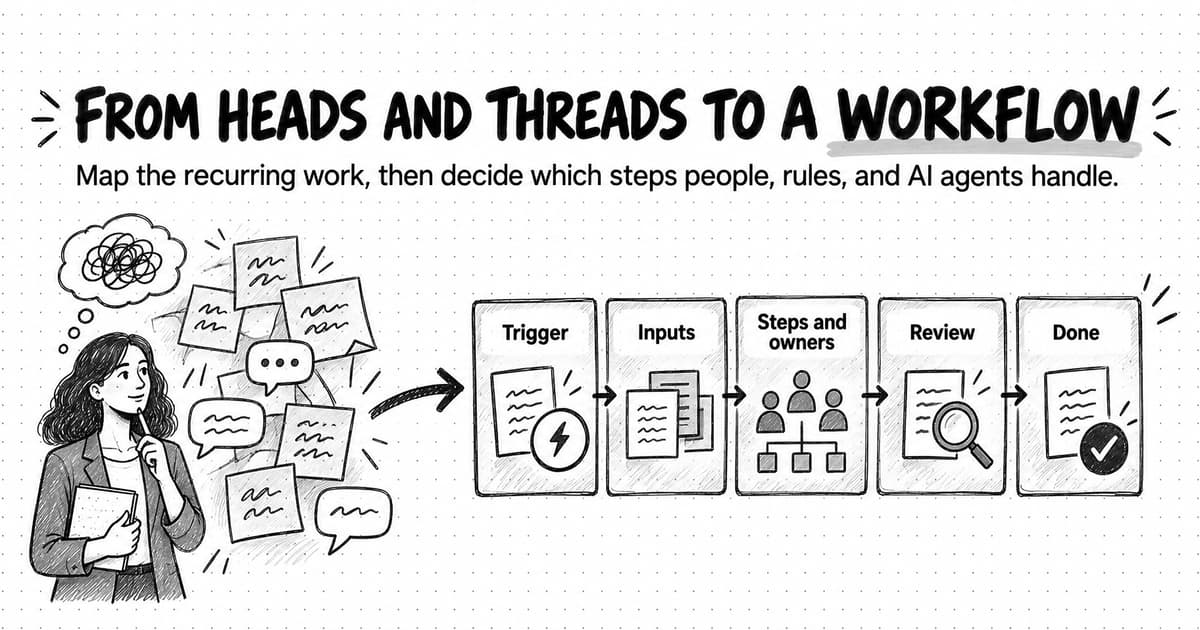
A marketing workflow makes recurring work visible so a team can improve it. Work such as blog articles or weekly social posts already follows a pattern, but when that pattern lives in people's heads and chat threads nobody can measure it, hand it to a new hire, or decide which steps software should take over. Mapping the workflow comes before automating any of it.
A complete workflow names nine parts: trigger, inputs, steps, owners, handoffs, review points, outputs, definition of done, and timing. Owners, review points, and the definition of done are often missing from informal workflows, and a missing part is usually where work stalls or gets redone. A workflow differs from a process, an SOP, an automation rule, and an agentic workflow, which attach to its steps.
Map the current workflow from evidence, not memory: collect the trail from recent instances, interview each person, and draw a swimlane map that marks every wait and loop back, with one accountable owner per step. Then measure cycle time, wait time, revision rounds, throughput, and on-time rate, and fix the slowest step first, because the workflow moves only as fast as its bottleneck.
Each mapped step gets one of four treatments: standardize it with a template, automate it with a rule, hand it to an AI agent with a person reviewing, or keep it human. Judgment, input predictability, and the cost of a mistake decide which. Automating a step whose inputs or review standards are unclear produces more rework faster, so fix those first.
Six fully mapped examples (blog article, product launch, webinar, weekly social posts, monthly competitor brief, and customer case study) show the trigger, owners, timing, review points, and treatment for every step, and a copyable template covers any other workflow. Give each map one owner and a review date, change one thing at a time, and measure the next few cycles to see whether the change helped.
Contents
- What is a marketing workflow?
- Workflow, process, SOP, automation, and agentic workflow: how the terms differ
- The anatomy of a marketing workflow
- How to map a marketing workflow, step by step
- How to measure a marketing workflow
- How to find the bottleneck in a marketing workflow
- Which steps to standardize, automate, hand to an AI agent, or keep human
- Six marketing workflow examples, fully mapped
- A worked example: mapping a blog workflow at a five-person startup
- A copyable workflow-mapping template
- How to document marketing workflows and manage changes to them
- Common marketing workflow failure modes
- Running recurring workflow steps with Ampere
- Sources and further reading
- Frequently Asked Questions
Every small marketing team has work that happens again and again without anyone having written it down. The blog article that needs a brief, a draft, a review from the one engineer who understands the feature, and a sign-off from the founder. The weekly LinkedIn posts that go out on time when one person remembers and slip when she is on holiday. The launch that starts with a ship date and ends, somehow, with a landing page, an email, a sales deck, and three people who each thought someone else was writing the announcement.
That work already follows a pattern. It starts the same way, it passes through the same hands, and it gets stuck in the same places. The pattern just lives in people's heads and in old Slack threads, so nobody can see it, measure it, or hand it to a new hire, an automation rule, or an AI agent. When the person who knows it is busy, the work waits. Small teams feel this most: in a Content Marketing Institute and MarketingProfs survey of 1,015 B2B marketers, published in October 2025, 39% named resource constraints of time, people, or budget among their top three content marketing challenges, and 21% chose collaboration across departments.
A marketing workflow is the repeatable sequence of steps, owners, handoffs, and review points that takes one kind of recurring marketing work from the event that starts it to an agreed definition of done. Writing that sequence down is what turns "how we do blog posts" from folklore into something a team can inspect and improve. Once the workflow is visible, you can see that a draft spends four days waiting for a reviewer and two hours being written, and you can fix the four days instead of pushing the writer to type faster.
This guide separates a workflow from the terms people mix it up with, breaks it into its parts, and shows how to map, measure, and unblock one. Then it covers the decision most teams want to jump to first: which steps to standardize, automate with rules, hand to an AI agent, or keep with a person. Six fully mapped examples and a copyable template follow.
What is a marketing workflow?
A marketing workflow describes how one recurring piece of marketing work gets done. "Recurring" is the important word. A one-off project, such as a website rebuild, needs a project plan. Work that comes back every week, every month, or every time a certain event happens needs a workflow, because the same decisions and handoffs repeat, and every repetition is a chance either to reuse what the team learned last time or to rediscover it.
The term has three common meanings, and the search results for "marketing workflow" mix all three, which is one reason the topic feels vague.
The first is the team workflow: the human sequence described above, often drawn as a flowchart or a board with columns. Content Marketing Institute's guide to documenting a content marketing workflow uses the word this way, with stages that run from requests and ideas through prioritization, creation, publication and promotion, and storage.
The second is the automation workflow inside a marketing automation or CRM product. In HubSpot, for example, workflows are built from enrollment triggers, "a set of criteria that automatically enroll records in a workflow," and actions that run on the enrolled records. A "lead nurturing workflow" or "welcome email workflow" in this sense is software following rules: when a contact fills in a form, wait two days, send this email, then update this field.
The third is the agentic workflow, where an AI model or agent carries out some of the steps. Anthropic's engineering team, in Building effective agents (December 2024), draws a useful line inside this category: workflows are "systems where LLMs and tools are orchestrated through predefined code paths," while agents "dynamically direct their own processes and tool usage." Our guide to agentic workflows covers those patterns in depth.
These meanings are layers of the same thing. The team workflow is the foundation; automation and agentic workflows hand some of its steps to software. Until you have mapped the team workflow, you cannot sensibly choose which steps to hand over, because you do not know what the steps are, which depend on judgment, or where the delay sits.
Workflow, process, SOP, automation, and agentic workflow: how the terms differ
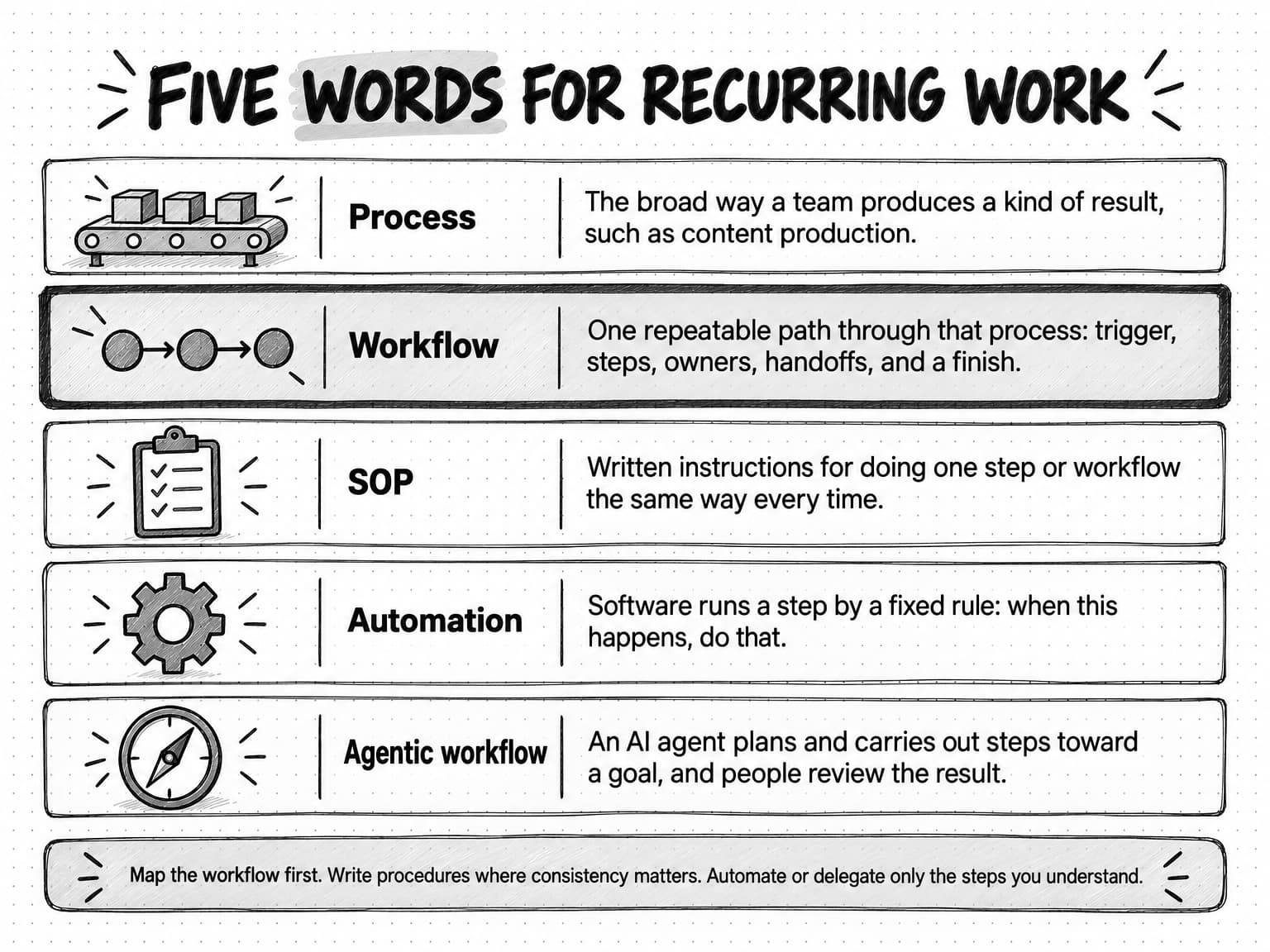
People use these five words interchangeably, and the confusion has a cost. A team asks for "a content process" and gets a long procedures document nobody reads, when it needed a one-page map of who does what. Or it buys automation software for a workflow that was never defined, and automates the confusion.
| Term | What it describes | Typical form | Example |
|---|---|---|---|
| Process | The broad way a team produces a kind of result | A short description or a high-level diagram | Content production |
| Workflow | One repeatable path through that process, with a trigger, steps, owners, handoffs, review points, and a finish | A map, swimlane diagram, or board | How a blog article goes from approved topic to promoted post |
| SOP (standard operating procedure) | Written instructions for doing one step or one workflow the same way each time | A checklist or step-by-step document | How to prepare an article for upload, including image sizes and metadata |
| Automation | Software that runs a step by a fixed rule | A rule in a marketing automation, CRM, or project tool | When a request form is submitted, create the tasks and notify the owner |
| Agentic workflow | Steps carried out by an AI agent that plans and uses tools toward a goal, with people reviewing | A brief or saved prompt, tools, and review points | An AI agent researches competitors and drafts the monthly brief for the owner to check |
A process can contain several workflows: blog articles, case studies, and newsletters are separate workflows inside content production, and our guide to content operations covers how a small team runs that whole engine. A workflow is concrete enough to draw, with a beginning you can point to and an end you can check; if you cannot say what starts it, you are still describing a process.
An SOP is the instruction layer. The workflow says the marketer prepares the article for upload on day ten; the SOP says exactly how, so two people produce the same result. Write one where mistakes are easy to make and where someone new, or an AI agent, must do the step without asking. Our guide to marketing SOPs explains how to write procedures that both people and AI agents can follow.
Automation suits steps where the trigger and action are predictable and no judgment is needed; our pillar guide to marketing automation explains where it stops being useful. An agentic workflow hands varied work, such as research, drafting, or analysis, to an AI agent that decides how to approach it within its limits, and the workflow names where a person reviews the result.
The anatomy of a marketing workflow
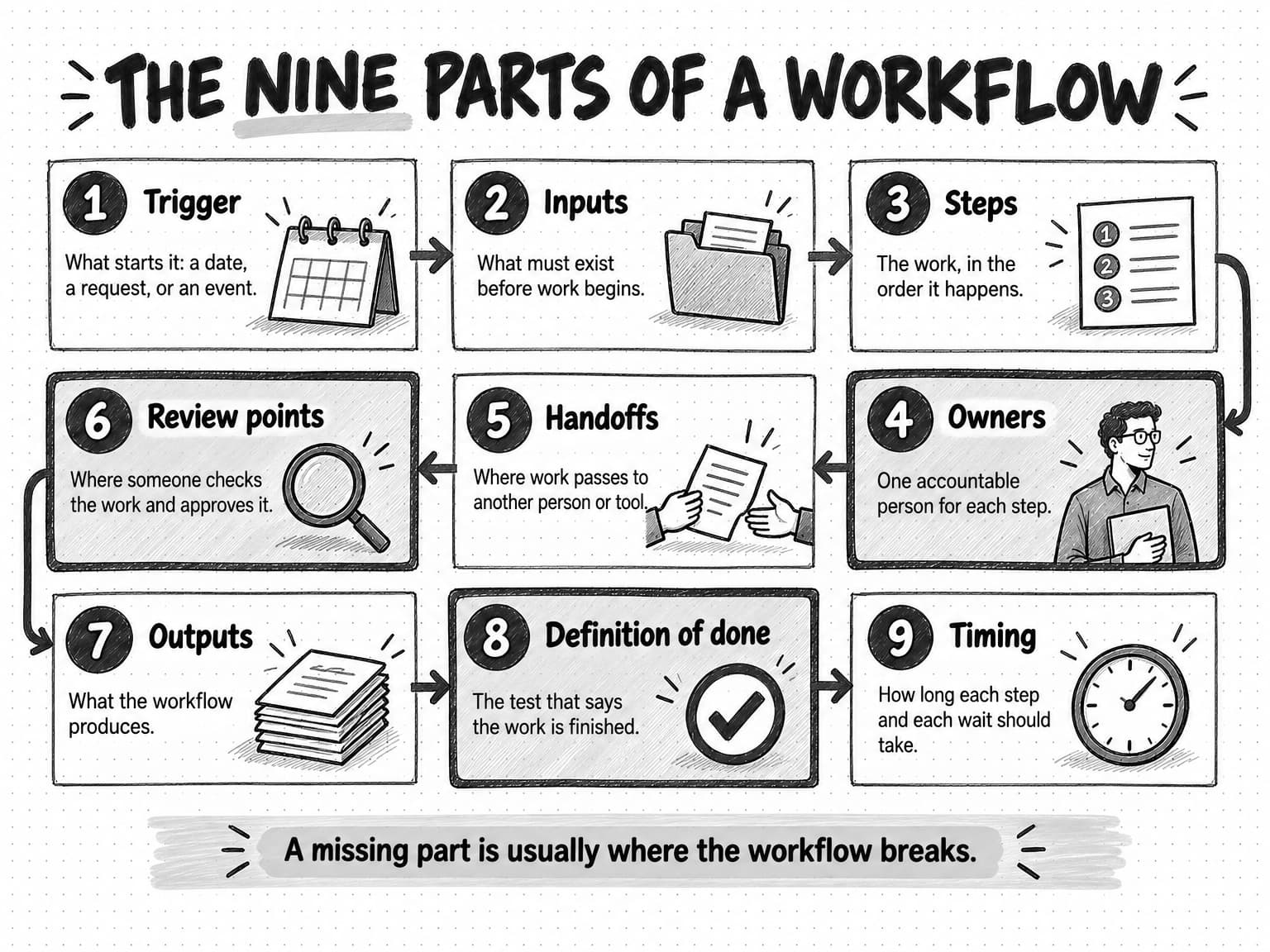
Every workflow that works in practice has the same nine parts, whether it is drawn on a whiteboard or kept in a project tool. Naming them gives you a checklist for mapping a workflow and a diagnosis tool for a broken one: when a workflow keeps going wrong, one of these parts is usually missing or vague.
1. Trigger. The trigger is what starts the workflow. There are three kinds. A date trigger starts the work on a calendar: every Monday, the first working day of the month, six weeks before a conference. A request trigger starts it when someone asks: sales requests a one-pager, a product manager requests launch support. An event trigger starts it when something happens: a customer agrees to a case study, a competitor changes its pricing page, a feature ships. Many workflows fail before they begin: if nobody knows the case study workflow starts when a customer says yes, the yes sits in a sales rep's inbox for three weeks.
2. Inputs. Inputs are what must exist before the first step can start without guesswork: an approved brief, the product facts, the customer's contact details, brand guidelines, last month's results. Missing inputs cause rework: the person doing the step fills the gap with a guess, and the reviewer later rejects the guess. Our guide to writing a content brief covers the most important input for content workflows.
3. Steps. Steps are the units of work, in the order they happen. A good step has a clear output: "draft the article" produces a draft; "work on the article" produces nothing anyone can check. If a step routinely takes a week, it probably contains several steps and a wait.
4. Owners. Every step needs one person who is accountable for it being done. Several people can help, but one name answers the question "where is this?" The RACI convention used in project management is a common way to make this explicit: for each step, mark who is Responsible for doing the work, who is Accountable for the result, who is Consulted before or during the step, and who is Informed afterward. The usual rule is exactly one Accountable person per step; two accountable people usually means none.
5. Handoffs. A handoff is the point where work passes from one person or tool to another: the writer sends the draft to the subject expert, the designer sends visuals back to the marketer, a form submission becomes a task in a project tool. Handoffs are where work gets lost, because the receiver has to notice, have time, and understand the request. Fewer handoffs usually means a faster workflow, and a clear one says what is passed, what to do, and by when.
6. Review points. A review point is where someone checks the work against a standard and either approves it or sends it back. Typical review points in marketing are a brief approval before drafting, an expert accuracy check, an editorial or brand review, legal or compliance review where it applies, and a final sign-off. Each review point should say who reviews, what they check, and what standard they check against. "The founder looks at it" is not a review point; "the founder confirms the positioning claims match the messaging framework" is. Our guide to content approval workflows goes deep on designing reviews that protect quality without adding days.
7. Outputs. Outputs are what the workflow produces. For a blog workflow, the output is not only the published article; it might also include the social posts, the newsletter blurb, the internal announcement to sales, and the updated content inventory. Listing every output stops the article going live while its promotion never happens.
8. Definition of done. The definition of done is the test that says the workflow is finished. "Published" is weak, because publishing is rarely the end of the job. "Published, linked from two related articles, shared in the newsletter, and logged in the content inventory" is a definition someone can check.
9. Timing. Timing sets how long each step and each wait should take, and when the whole workflow should finish relative to its trigger. A launch workflow might work backward from the ship date: positioning approved four weeks before, assets drafted three weeks before, final review one week before. Timing turns a list of steps into something you can measure, because you can see when a step is late.
How to map a marketing workflow, step by step
Mapping a workflow means writing down how one recurring piece of work really happens today, then using that picture to decide what to change. The first half of that sentence is where teams often go wrong. They gather in a room, draw the workflow as it should work, and call it done. The drawing looks tidy, and it hides every wait, workaround, and loop back that makes the real work slow. Map the current state first. The improved version comes after, once you know what is broken.
This method borrows from value-stream mapping, a lean practice the Lean Enterprise Institute describes as starting with a current state map and then drawing a future state map, "a target image" of how work should flow. You do not need the full lean toolkit for a marketing team. You need the habit of mapping what is true before mapping what you want.
1. Choose one workflow and set its boundaries
Pick one recurring piece of work, not "marketing." The best first choice is something that happens often enough to matter, causes visible frustration, and involves at least two people: blog articles, weekly social posts, and sales collateral requests are common candidates. Then set the boundaries by naming the trigger and the definition of done. "From the moment a topic is approved on the content calendar to the moment the article is published and promoted" is a boundary. Without it, the map grows until it describes the whole department.
2. Gather the evidence trail from recent instances
Before you interview anyone, collect the traces the last three to five instances of the work left behind: the Slack or Teams threads, email chains, document version history, comments, tickets, and calendar invites. Version history and comment timestamps are especially useful, because they show when work actually moved, not when people remember it moving. Lay the instances side by side. Where they agree, you have found the real workflow. Where they differ, you have found either a legitimate variant or an inconsistency worth fixing.
3. Interview each person who touches the work
Talk to every person who does a step, separately and briefly, and ask them to walk through the last time they did their part, not how it normally goes. Useful questions are: What did you need before you could start, and did you have it? How did you know it was your turn? What did you hand on, and to whom? What made you wait, or redo something? What do you do that nobody asked for but that would break things if you stopped? The last question uncovers invisible steps, such as the marketer who quietly fixes image sizes before every upload. If you can, also follow the next instance in real time; interviews tell you what people think happens, and watching tells you what does.
4. Draw a swimlane map
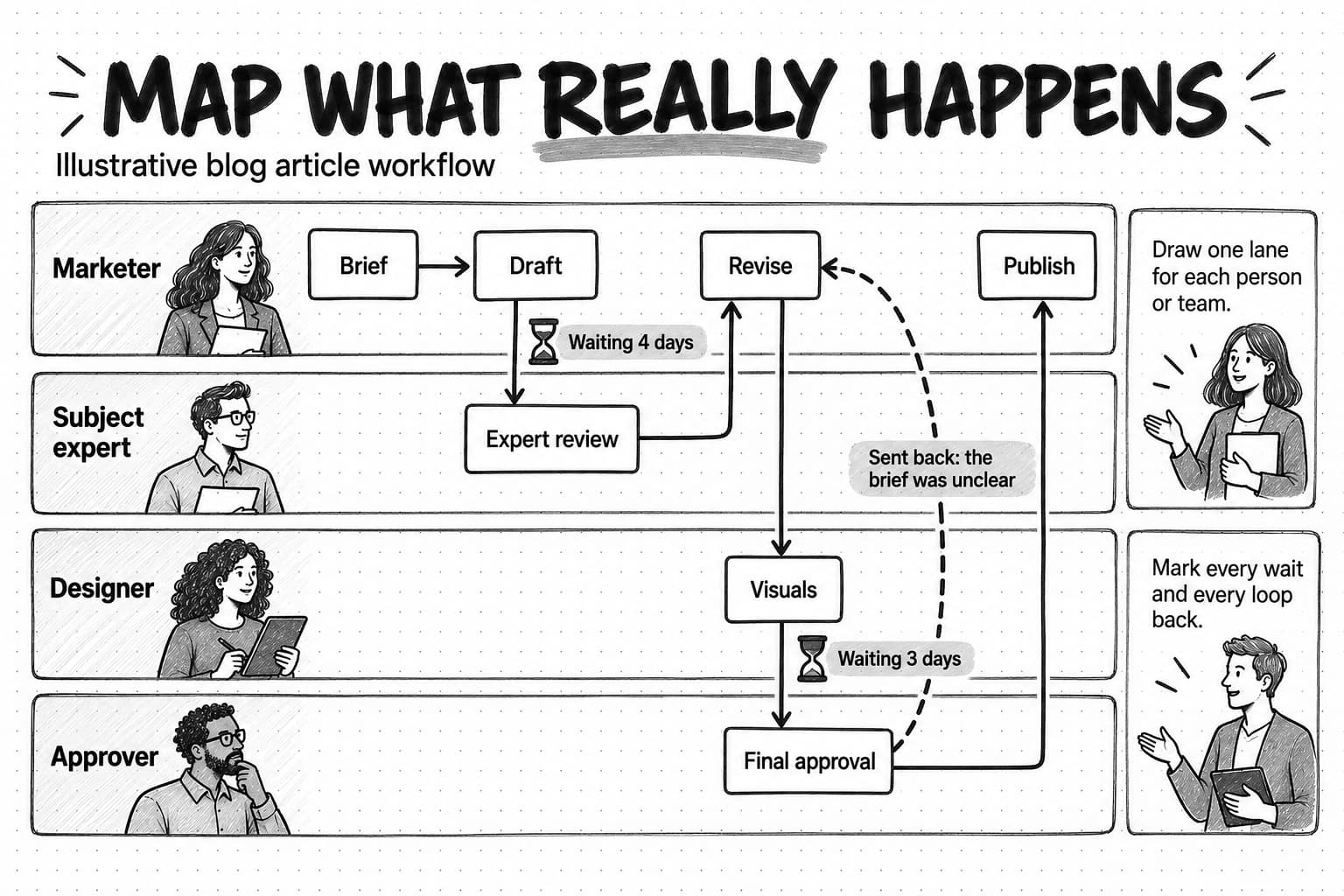
A swimlane diagram is a flowchart split into horizontal lanes, one for each person, team, or tool. Each step sits in the lane of whoever does it, in time order from left to right, and arrows show the work moving between lanes. Swimlanes are the right format for marketing workflows because they make handoffs visible: every time an arrow crosses from one lane to another, someone has to notice and act.
The tool does not matter; the conventions do. Mark three things on the map that a tidy flowchart leaves out. Mark every wait, with how long it lasted in the instances you studied. Mark every loop back, where work returned to an earlier step, with the reason it went back. Mark every review point with who reviewed and what they checked.
5. Add a RACI table for the steps
Under the map, list each step with its Responsible, Accountable, Consulted, and Informed people. This is where hidden problems surface quickly. A step with no Accountable person is a step that waits. A step with three Consulted people is a step that collects conflicting feedback. A final approver who is never Informed about the brief will predictably reject drafts for reasons the writer could not have known.
6. Find the wait states and rework loops
Now read the map for delay. In many marketing workflows, the time work spends waiting for someone is far longer than the time anyone spends working on it. Common wait states are queues for a reviewer, for a subject expert, for design, or for a decision nobody owns. Common rework loops are drafts rejected because the brief was unclear, visuals redone because the copy changed late, and final approvals that reopen decisions made weeks earlier. Each one is a candidate for change, and the next two sections show how to measure them and choose which to fix first.
7. Check the map with the people in it
Show the finished map to everyone who appears on it and ask whether it matches what they do. People correct details you missed, and they start to see their own step as part of a whole, which makes later changes easier to agree on. Then, and only then, draw the future-state version: the same workflow with the waits shortened, the loops removed, the inputs fixed, and the review points clarified.
How to measure a marketing workflow
A mapped workflow tells you where work could be slow. Measurement tells you where it is slow, by how much, and whether a change helped. You need only a handful of measures, and you can collect most of them by hand from timestamps for the first few cycles before deciding whether any tool should track them.
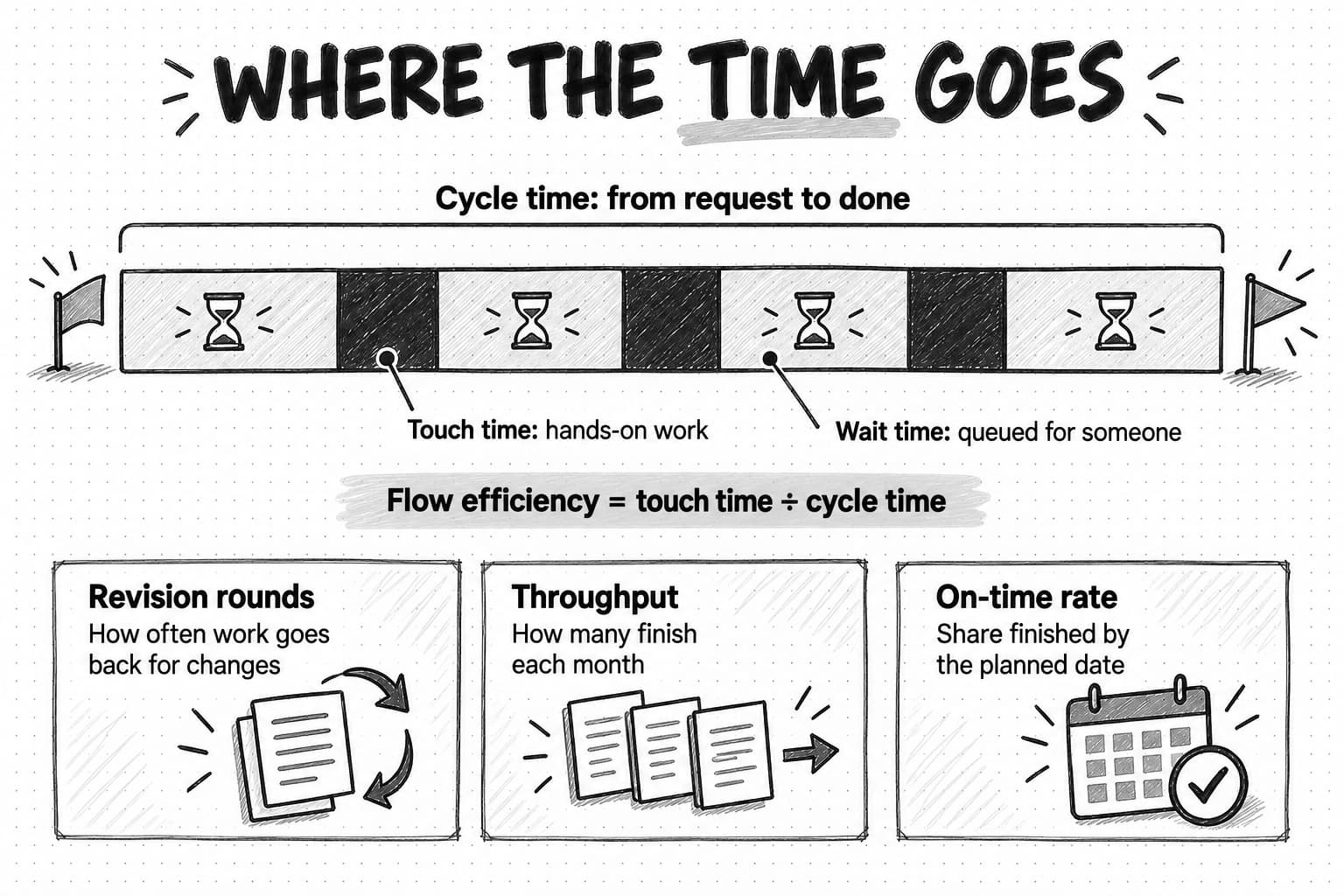
| Cycle time | Elapsed time from the trigger to the definition of done. The headline measure of how long the workflow takes. |
|---|---|
| Touch time | Time someone actively spends working on the item, summed across all steps. |
| Wait time | Time the item spends queued for a person, a decision, or an input. Cycle time minus touch time. |
| Flow efficiency | Touch time divided by cycle time. A low figure means most of the cycle is waiting. |
| Revision rounds | How many times work goes back to an earlier step for changes, counted per item and per review point. |
| Throughput | How many items the workflow finishes in a period, such as articles per month. |
| On-time rate | The share of items finished by their planned date. |
Cycle time is the measure people feel: when the founder asks why case studies take two months, she is asking about cycle time. Measure it from the trigger on your map, not from when someone started working, because the time before work starts is part of the delay.
Touch time and wait time split cycle time into work and waiting. Ask each owner roughly how long their step took to do, then compare the total with the elapsed time. An article that took three weeks from approval to publication might contain two days of actual work, which means it spent most of its life in queues. Speeding up the writing would save hours; shortening the queue at the reviewer would save days. Flow efficiency turns that comparison into one ratio you can track as you change the workflow.
Revision rounds count rework. Track them per review point, because the location matters more than the total. Many revision rounds at the first review point usually mean the inputs or the brief are weak. Many at the final sign-off usually mean the approver was not involved early enough, or the approver is reopening decisions that should have been settled before drafting.
Throughput counts finished items per period, and it is linked to cycle time. Little's Law, a result from queueing theory that John Little revisited on its 50th anniversary in Operations Research in 2011, states that the average number of items in a system equals the rate at which they arrive multiplied by the average time each spends in it. In workflow terms, at a steady throughput, the more items in progress at once, the longer each one takes: a team with twelve half-finished articles will see longer cycle times than a team with four publishing the same number per month. Limiting work in progress is one of the cheapest ways to shorten cycle time.
On-time rate tells you whether the timing on your map is realistic. A low rate means either the plan is wrong or a bottleneck is being ignored.
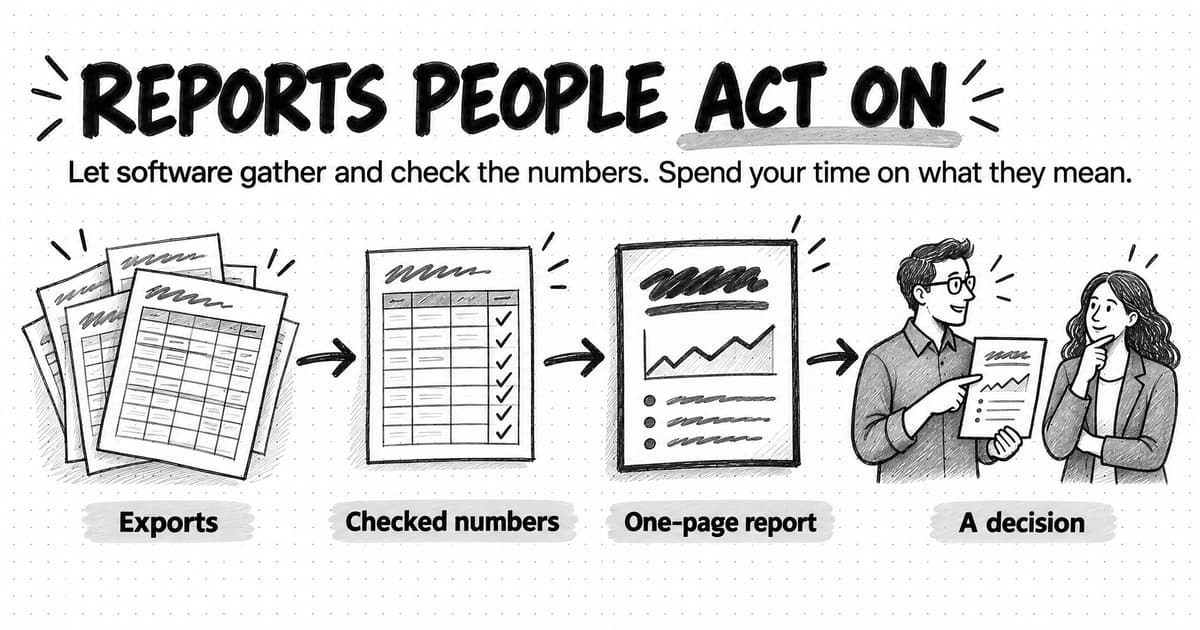
Keep measurement light. A spreadsheet with one row per item and columns for the trigger date, each step's finish date, revision rounds, and the done date is enough; after five to ten items the pattern shows. Build a dashboard only once you know which numbers you will act on; our guide to automating marketing reporting covers reporting that people read once you do.
How to find the bottleneck in a marketing workflow
A bottleneck is the step with the least capacity relative to the work arriving at it. The whole workflow can finish work only as fast as that step allows, so improving any other step does little. If the founder can review two articles a week, the team will publish about two articles a week, however many it drafts. The extra drafts pile up in front of the founder and grow stale.
The Theory of Constraints, developed by Eliyahu Goldratt, gives a simple sequence for dealing with a bottleneck that adapts well to marketing. The Theory of Constraints Institute lists the five focusing steps as: identify the system's constraint, exploit it, subordinate everything else to it, elevate it, and prevent inertia from becoming the constraint. In marketing terms:
- Find the step where work piles up. Look at your map and measurements for the step with the longest queue in front of it. Common marketing bottlenecks are a founder or executive who approves everything, a single subject expert who reviews every technical piece, one designer serving the whole team, and a legal or compliance review with no agreed turnaround.
- Send the bottleneck only work that is ready. Every hour the bottleneck spends on incomplete work is lost. If the founder is the constraint, do not send her drafts with open questions or missing visuals; batch reviews into a fixed slot; give her a short summary of what to check and what has already been checked.
- Pace the other steps to the bottleneck. Stop drafting more articles than the reviewer can handle. Extra drafts do not increase output; they increase work in progress, which by Little's Law lengthens cycle time, and they go stale while they wait.
- Add capacity or change the step. Once the bottleneck is protected and paced, change it. Delegate part of the review: an editor checks style and accuracy, and the founder checks only positioning claims. Add a second qualified reviewer. Replace a synchronous review meeting with written comments. Or remove the review point entirely for low-risk work.
- Look again, because the bottleneck moves. Once the founder's review is fast, the subject expert may become the slowest step. Re-measure after each change rather than assuming the first fix solved the problem.
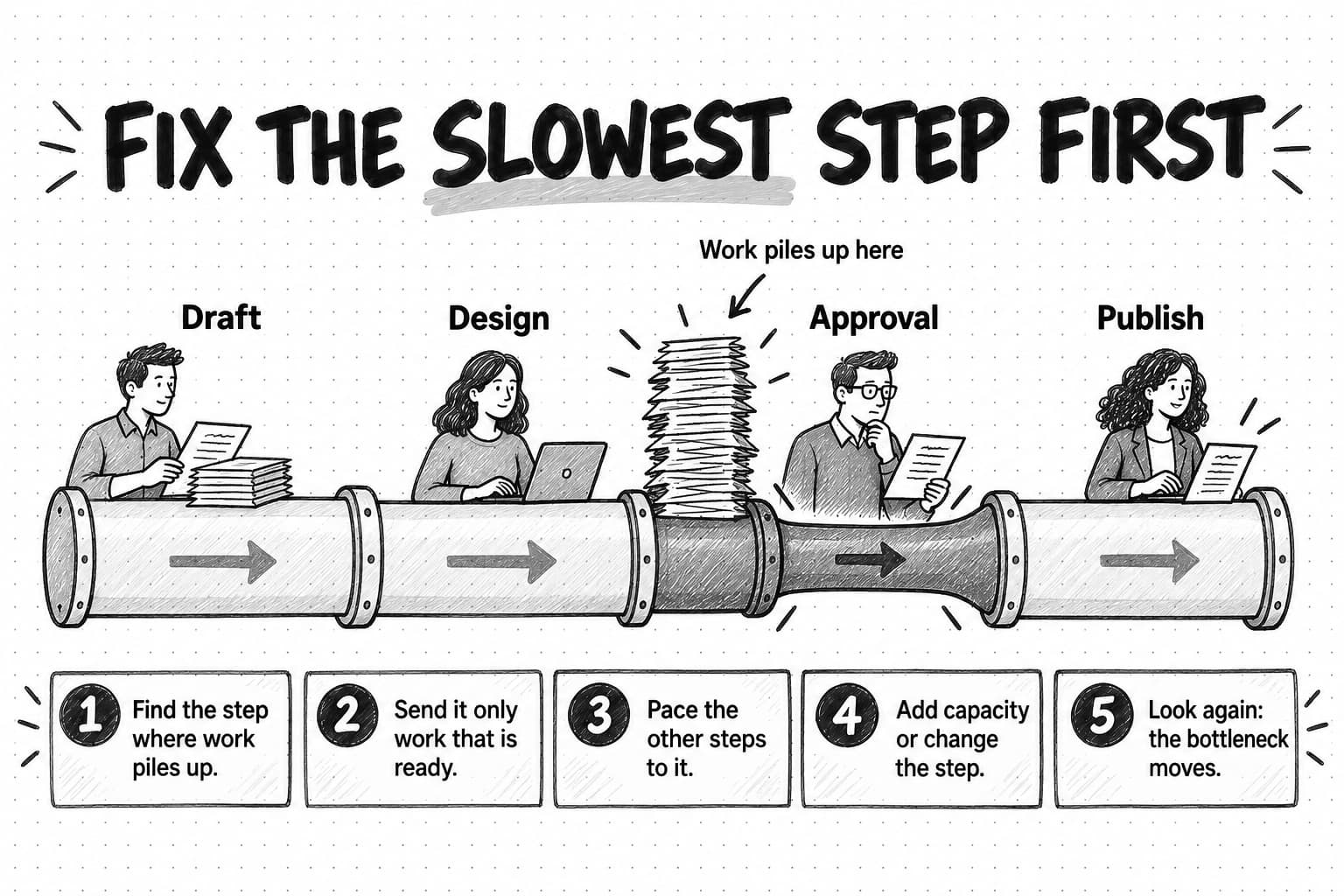
"The founder is the bottleneck" is a common, accurate finding that can land badly, so present it as a capacity problem with options. And do not automate in front of a bottleneck: if an AI agent drafts ten social posts a day and one person can review four, you have built a longer queue, not a faster workflow.
Which steps to standardize, automate, hand to an AI agent, or keep human
Once a workflow is mapped and measured, each step can be given one of four treatments. Teams often want to begin here, but the decision depends on information only the map provides: what each step needs as input, how much judgment it involves, what happens downstream if it goes wrong, and whether it sits on the bottleneck.
Standardize a step when a person should keep doing it, the same way every time, with a template, checklist, or SOP. It is the cheapest treatment and often the most effective, because many rework loops come from inconsistent inputs rather than slow work.
Automate with rules when the trigger is predictable, the action is predictable, and no judgment is involved. Creating a set of tasks when a request form is submitted, notifying the reviewer when a draft moves to the review column, moving a contact into a nurture sequence when they download a guide, and posting a reminder every Monday are good rule-based automations. Each saves a little time and removes the risk of forgetting.
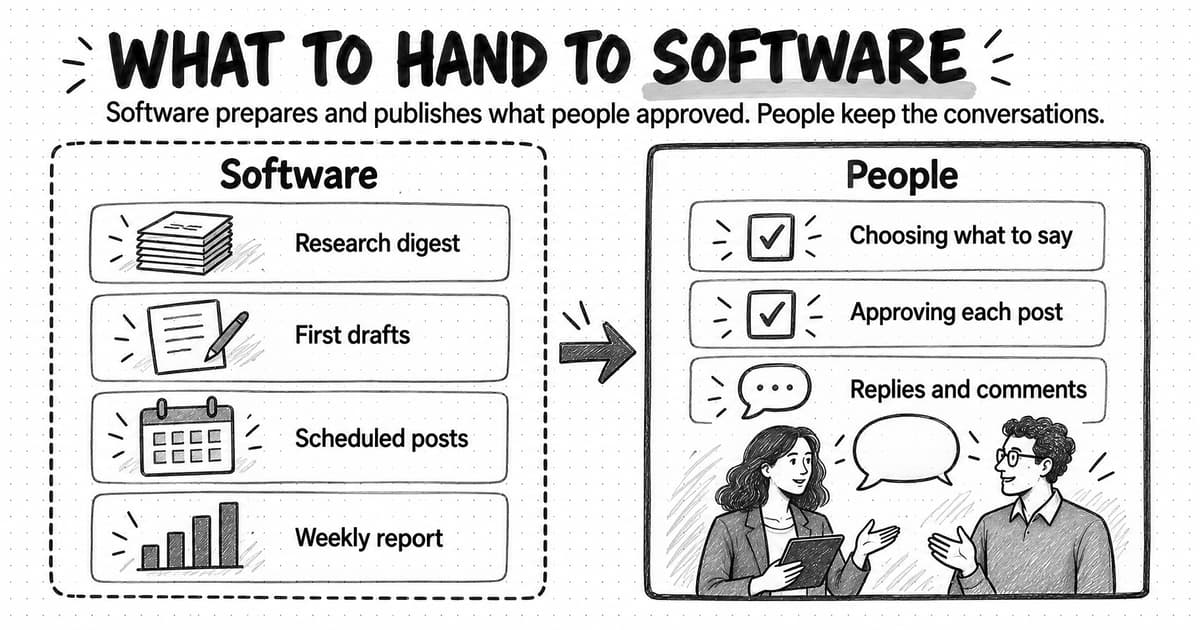
Hand to an AI agent when the step involves varied research, drafting, summarizing, or analysis that would be hard to express as fixed rules, and when a person will review the output before it matters. Researching what competitors changed this month, drafting the week's social posts from product updates, and turning a webinar transcript into a recap are typical agent steps. The agent does work a rule could not, and the review point catches what it gets wrong. Our guides to automating marketing with AI agents and human-in-the-loop review cover how to set up both halves.
Keep human the steps that depend on judgment, accountability, or relationships: deciding positioning, choosing which customer story to tell, interviewing a customer, negotiating approval of a quote, and final sign-off on anything public. An AI agent can prepare for these steps, but a person should take them.
Three questions decide most cases:
| Question | If the answer is... | Lean toward |
|---|---|---|
| Does the step need judgment about meaning, taste, strategy, or relationships? | No, it follows a fixed pattern | Standardize or automate with rules |
| Some judgment, but the output can be checked before use | Hand to an AI agent with a review point | |
| Yes, and the judgment is the point of the step | Keep human | |
| Are the step's inputs predictable? | Always the same fields or formats | Automate with rules |
| Varied, such as web pages, transcripts, or notes | Hand to an AI agent, or keep human | |
| What does a mistake cost? | Little, and it is easy to fix | Automate or delegate with light review |
| A public error, a broken promise, or a legal problem | Keep a person accountable and review before anything goes out |
Two more checks follow. Automating upstream of the bottleneck lengthens its queue, while taking work off the bottleneck shortens the whole cycle. And an agent asked to draft posts "in our voice" without a written voice guide or examples will guess, so the review becomes a rewrite.
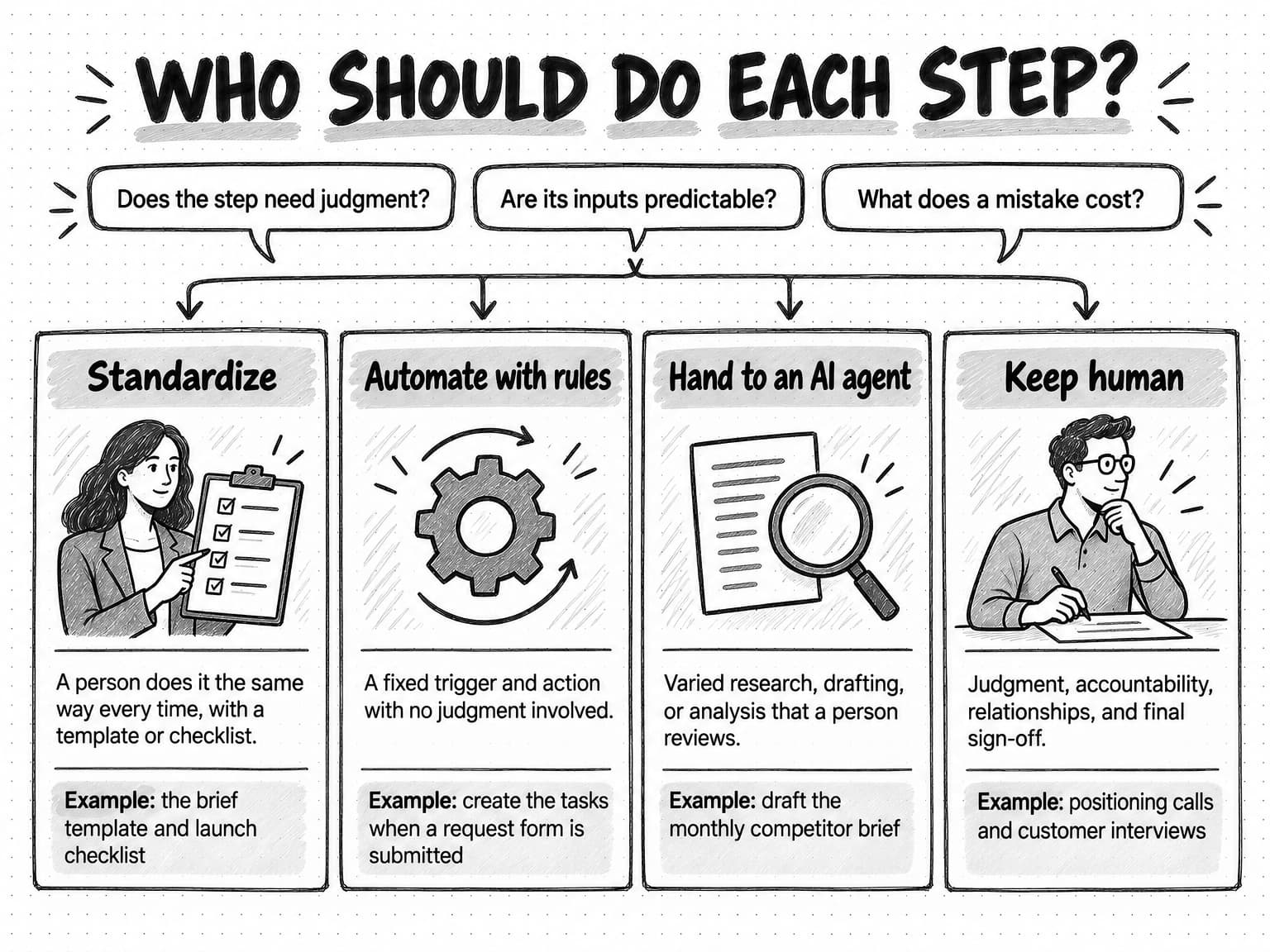
Six marketing workflow examples, fully mapped
The examples below are complete, illustrative maps of six workflows that many small B2B marketing teams run. Each lists the trigger, inputs, steps with owners and timing, review points, outputs, definition of done, and a suggested treatment for each step. Role names are generic; on a small team one person may hold several roles. Timings are planning starting points to adjust after you measure your own cycles, not benchmarks.
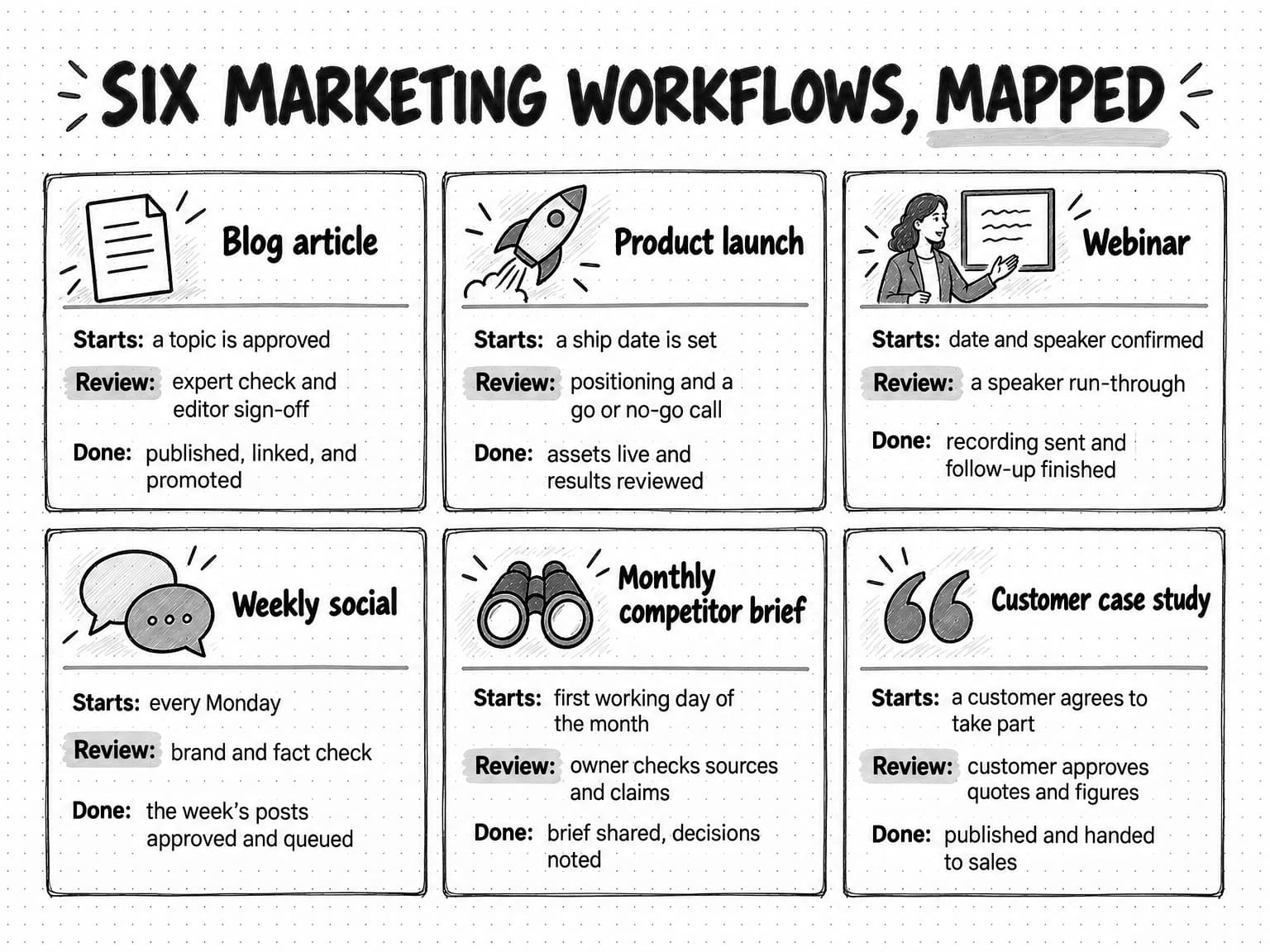
Example 1: blog article production
Trigger: a topic is approved on the content calendar. Inputs: an approved brief with the reader, the question the article answers, the angle, sources, and the definition of done; access to a subject expert; brand voice guidance. Definition of done: published, linked from at least two related pages, promoted in the newsletter and on social, and logged in the content inventory.
| Step | Owner | Timing from trigger | Review or handoff | Treatment |
|---|---|---|---|---|
| Write and approve the brief | Marketer; approver signs off | Days 1–2 | Approver confirms angle and claims before drafting | Standardize with a brief template |
| Research sources and outline | Marketer | Days 2–3 | None | Hand to an AI agent for source gathering; marketer checks |
| Draft | Writer | Days 3–5 | Handoff to subject expert with specific questions | Agent drafts from the brief, or writer drafts |
| Expert accuracy review | Subject expert | Days 6–7, with a two-day turnaround agreed | Expert checks technical claims only | Keep human |
| Revise and edit | Writer, editor | Days 7–8 | Editor checks structure, voice, and sources | Keep human; agent can propose edits |
| Visuals | Designer | Days 7–9, in parallel with editing | Handoff back to marketer | Standardize sizes and styles; agent can draft visuals for review |
| Final sign-off | Approver | Day 9 | Approver checks positioning and public claims only | Keep human |
| Prepare and publish | Marketer | Day 10 | None | Standardize with an upload checklist |
| Promote and log | Marketer | Days 10–12 | None | Agent drafts social posts and newsletter blurb; rules create reminders |
The key design choice is the brief approval at the start, which moves a common reason for final-stage rejection, a disagreement about the angle, to the cheapest point to fix it. Limiting the expert review to technical claims with an agreed turnaround keeps the expert from becoming the bottleneck. Our guide to repurposing content across channels covers the promotion step in more depth.
Example 2: product launch
Trigger: a ship date is set for a feature or product. Inputs: what the feature does and for whom, the launch tier (major, minor, or quiet), the messaging framework, and the date. Definition of done: every planned asset is live on launch day, sales and support have what they need, and results are reviewed two weeks after launch.
| Step | Owner | Timing | Review or handoff | Treatment |
|---|---|---|---|---|
| Decide the launch tier and scope | Product marketer with product lead | 6 weeks before | Founder or head of marketing approves tier | Keep human |
| Positioning and key messages | Product marketer | 5 weeks before | Approver signs off messages before any asset work | Keep human; agent researches competitor positioning |
| Asset plan and owners | Product marketer | 5 weeks before | Each asset owner confirms dates | Standardize with a launch checklist |
| Draft assets: page copy, email, social, sales one-pager, help article | Asset owners | 4–2 weeks before | Handoffs to design and product for accuracy | Agent drafts first versions from the approved messages; owners revise |
| Visuals and demo video | Designer | 3–1 weeks before | Product checks the product is shown accurately | Keep human, with agent drafts where useful |
| Final review and go or no-go | Approver, product lead | 1 week before | Go or no-go decision on the date and claims | Keep human |
| Enablement for sales and support | Product marketer | 1 week before | Sales lead confirms readiness | Standardize |
| Launch day: publish and send | Asset owners | Launch day | Final check that the feature is live first | Rules post reminders; people publish |
| Results review | Product marketer | 2 weeks after | Shared with the team | Agent compiles results from the sources you provide; person interprets |
Launches go wrong in two predictable places: assets drafted before positioning is settled get rewritten when the messages change, and the ship date moves without anyone telling marketing. The positioning sign-off fixes the first. A named handoff fixes the second: the product lead tells the product marketer about any date change, and the plan works backward from the current date.
Example 3: webinar
Trigger: a webinar date and speaker are confirmed. Inputs: the topic and the audience it is for, the speaker's availability, the registration and streaming tools, and the promotion channels. Definition of done: the recording and follow-up have been sent to registrants and attendees, the recording is published, and the content has been repurposed into at least one article and a set of social posts.
| Step | Owner | Timing | Review or handoff | Treatment |
|---|---|---|---|---|
| Agree title, abstract, and outline with the speaker | Marketer, speaker | 5 weeks before | Speaker approves | Keep human; agent drafts title and abstract options |
| Registration page and confirmation emails | Marketer | 4 weeks before | Test registration end to end | Standardize; rules send confirmations |
| Promotion plan and assets | Marketer | 4–1 weeks before | Brand review of assets | Agent drafts posts and emails; marketer reviews |
| Slides | Speaker, designer | 3–1 weeks before | Marketer checks against outline | Keep human |
| Run-through | Speaker, marketer | 3–5 days before | Technical and content check | Keep human |
| Reminder emails | Marketing automation | 1 day and 1 hour before | None | Automate with rules |
| Live session | Speaker, host | Day 0 | Host collects questions | Keep human |
| Recording, recap, and follow-up | Marketer | Days 1–2 after | Speaker reviews the recap | Agent drafts recap and follow-up from the transcript; marketer reviews |
| Repurpose into article and posts | Marketer | Weeks 1–2 after | Editorial review | Agent drafts; editor reviews |
Teams often drop the webinar's long tail. Putting follow-up and repurposing in the definition of done keeps the recording and transcript from going to waste.
Example 4: weekly social posts
Trigger: every Monday morning. Inputs: this week's product updates, upcoming events, recent content, the content pillars, brand voice guidance, and last week's results. Definition of done: the week's posts are written, approved, and queued in the scheduling tool by Wednesday.
| Step | Owner | Timing | Review or handoff | Treatment |
|---|---|---|---|---|
| Gather this week's inputs | Marketer | Monday | None | Rules post a reminder; agent can summarize recent updates you point it to |
| Draft posts for the week | Marketer | Monday–Tuesday | None | Hand to an AI agent with the inputs and voice guidance |
| Review for brand, facts, and timing | Marketer or editor | Tuesday | Check every claim and date; edit for voice | Keep human |
| Founder or expert approval where posts speak for them | Founder | Wednesday | Founder approves posts in their name | Keep human |
| Queue posts | Marketer | Wednesday | None | Standardize; scheduling tool publishes |
| Review last week's results | Marketer | Monday, next cycle | Notes feed the next draft | Agent compiles from exports you provide; person decides |
The weekly cadence and predictable format make drafting easy to delegate; the review step keeps the posts from becoming generic or wrong. Our guide to social media automation covers which parts of social to automate and which to keep human.
Example 5: monthly competitor brief
Trigger: the first working day of each month. Inputs: the list of competitors to cover, the sources to check (websites, pricing pages, release notes, ad libraries, review sites), last month's brief, and the decisions the brief is meant to inform. Definition of done: the brief is shared with the people who use it, and each notable change has a recorded decision, even if the decision is "no action."
| Step | Owner | Timing | Review or handoff | Treatment |
|---|---|---|---|---|
| Collect changes since last month | Analyst or marketer | Days 1–2 | None | Hand to an AI agent on a schedule; monitoring can flag changes during the month |
| Draft the brief: what changed, evidence, possible implications | Analyst or marketer | Days 2–3 | None | Hand to an AI agent |
| Verify sources and claims | Brief owner | Day 3 | Owner checks every claim against its source | Keep human |
| Add recommendations | Brief owner | Day 4 | Discuss with head of marketing or founder | Keep human |
| Share and record decisions | Brief owner | Day 5 | Readers record decisions | Standardize the decision log |
Collecting public changes across many sources is slow and varied but easy to check, which makes it a clear agent step. The human step that matters is verification, because public data is incomplete and an overconfident brief can drive a wrong decision. Our guides to competitor analysis and automating competitor monitoring cover the research method and the alerting side.
Example 6: customer case study
Trigger: a customer agrees to take part. Inputs: the account history, the outcome the customer achieved and any figures they are willing to share, the customer contact and a sales or success owner, and the customer's approval process. Definition of done: the case study is approved by the customer in writing, published, and in the hands of sales with a short summary of when to use it.
| Step | Owner | Timing | Review or handoff | Treatment |
|---|---|---|---|---|
| Confirm participation and approval process | Account owner | Week 1 | Handoff to marketer with contact and context | Keep human |
| Prepare interview questions | Marketer | Week 1 | Account owner checks for sensitive topics | Agent drafts questions from account notes; marketer edits |
| Interview the customer | Marketer | Week 2 | None | Keep human |
| Draft the story | Writer | Weeks 2–3 | Handoff to account owner | Agent drafts from the transcript; writer revises |
| Internal review | Account owner, editor | Week 3 | Accuracy and tone | Keep human |
| Customer review and approval of quotes and figures | Customer, via account owner | Weeks 3–5 | Written approval | Keep human |
| Design and publish | Designer, marketer | Week 6 | Final check against the approved text | Standardize the layout |
| Hand to sales | Marketer | Week 6 | Sales lead confirms | Agent drafts the sales summary; marketer reviews |
Customer approval is usually the bottleneck, and it is outside your control. Name the customer's approver at the start, send the draft with a clear request and a date, and keep the account owner accountable for the follow-up. Our guide to writing a B2B case study covers the story itself.
A worked example: mapping a blog workflow at a five-person startup
This example is fictional. Northvane, a five-person B2B software startup, publishes one blog article a month and wants to publish two. The founder assumes the team needs another writer. Before hiring, the marketing lead maps the workflow.
She pulls the comment history and timestamps from the last four articles and interviews the writer, the engineer who reviews technical content, the part-time designer, and the founder. Across the four articles, the average cycle from approved topic to publication was 24 days. The writer estimated she spent about three days on each article, including revisions. Most of the remaining time was waiting: roughly six days for the engineer's review, five for the founder's final approval, and four for visuals, which only started after the founder approved the text.
The revision count told the rest of the story. Three of the four articles went back to the writer after the founder's final review, each time because the founder disagreed with the angle. The angle had never been agreed before drafting, because the workflow had no brief approval.
The marketing lead makes four changes. The founder approves a one-page brief, including the angle, before drafting starts. The engineer agrees to a two-day turnaround and checks technical claims only, against a short list of questions the writer attaches. The designer starts visuals from the approved brief, in parallel with drafting, rather than waiting for final text. And the founder's final review is limited to positioning and public claims, in a fixed 30-minute slot on Thursdays.
Over the next three articles, cycle time falls because the waits shrink and the loop back from final review mostly disappears, while touch time barely changes. The team reaches two articles a month without a new hire, and the bottleneck moves to the engineer's review. The constraint was waiting and rework, not writing capacity; a second writer would have added drafts to the same queues.
A copyable workflow-mapping template
Copy this template into a document or spreadsheet for each workflow you map. Fill in the current state first, from evidence and interviews, then copy it again for the future state.
WORKFLOW MAP

Name:
Purpose (what result, for whom):
Map owner:                         Last reviewed:        Next review:
Current state or future state:

1. TRIGGER
   Type (date / request / event):
   Exactly what starts it:

2. INPUTS (must exist before step 1 starts)
   -
   -

3. STEPS
   #  | Step | Output | Responsible | Accountable | Consulted | Informed | Target time | Treatment*
   1  |      |        |             |             |           |          |             |
   2  |      |        |             |             |           |          |             |
   3  |      |        |             |             |           |          |             |

   *Treatment: standardize / automate with rules / AI agent + review / keep human

4. HANDOFFS
   From -> To | What is passed | How the receiver is told | Expected response time

5. REVIEW POINTS
   Step | Reviewer | What they check | Standard they check against | Max turnaround

6. OUTPUTS
   -
   -

7. DEFINITION OF DONE (all must be true)
   -
   -

8. TIMING
   Target cycle time (trigger to done):
   Key dates relative to the trigger:

9. MEASURES (record per item)
   Trigger date | Done date | Cycle time | Touch time | Wait time | Revision rounds (by review point) | On time? (Y/N)

10. KNOWN WAITS, LOOPS, AND BOTTLENECK
   Longest wait:
   Most common loop back and its cause:
   Current bottleneck:

11. CHANGES TO TRY NEXT
   Change | Expected effect | How we will know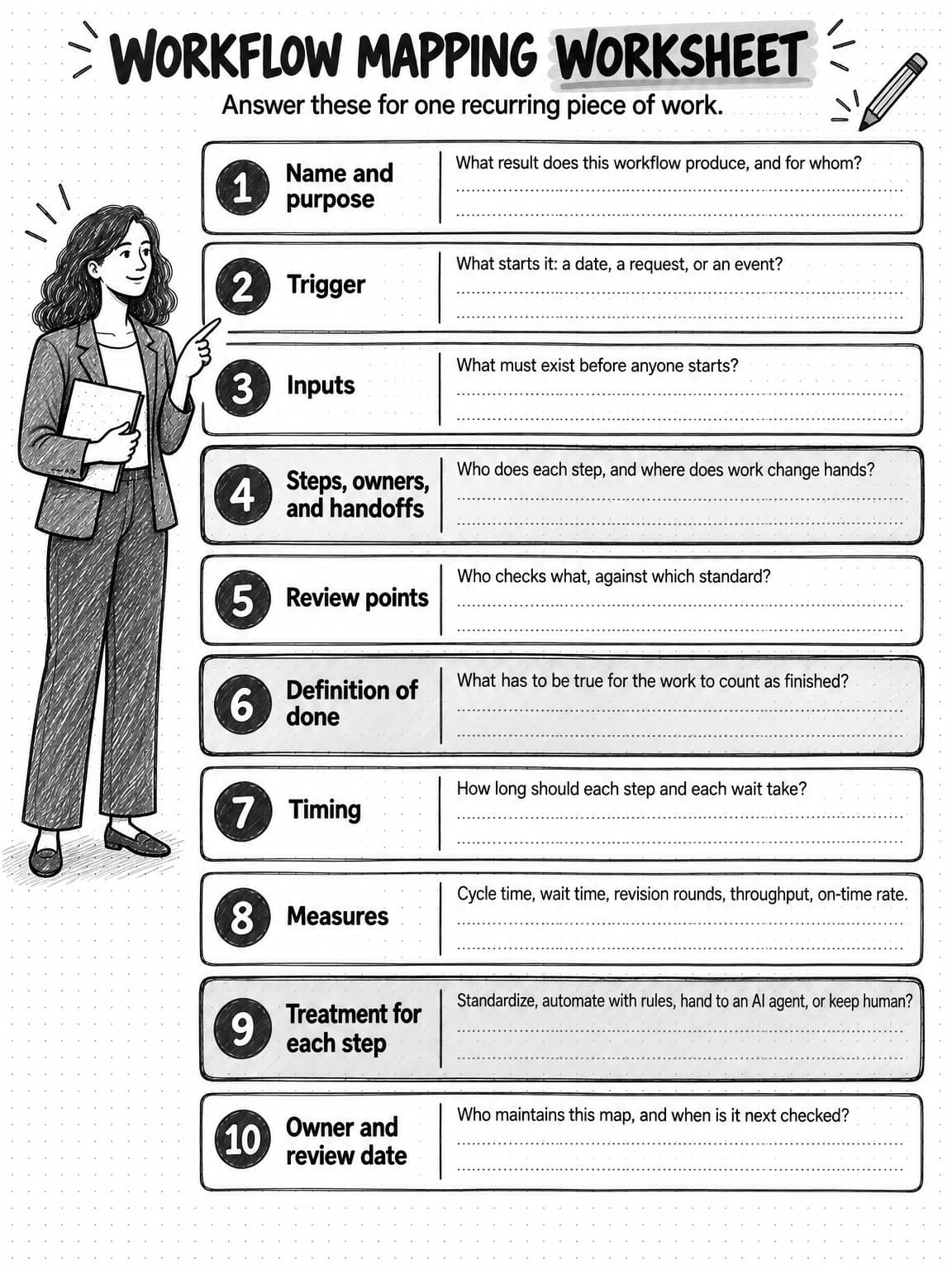
Open the workflow mapping worksheet at full size (opens in a new tab) to save or print it.
How to document marketing workflows and manage changes to them
A workflow map that lives in one person's drive is only a little better than one that lives in their head. Documentation should make the workflow easy to find, easy to follow, and easy to change.
Keep one home for workflows, and keep each map short. Store every map in one shared place, such as a wiki page or a project template, and link each step to its SOPs, templates, and checklists. The map should fit on one or two pages; a map that holds every instruction becomes too long to read, and people stop checking it.
Give each workflow an owner and a review date. The owner keeps the map current and is the person to ask when a step stops working. Review dates stop maps from going stale; quarterly is reasonable for most marketing workflows, and sooner after a team change, a new tool, or a bottleneck fix.
Change one thing at a time and measure it. Change the step you believe is the constraint, then compare the next few cycles with the baseline. Changing five things at once hides which helped.
Pilot before you roll out. Run the new version on one or two items and adjust. A short pilot surfaces problems a meeting misses, such as a reviewer who cannot meet a two-day turnaround at month-end. Note on the map why each step exists, so later changes can be judged against the reason.
Retire the old path explicitly. Update the map and remove old templates, or the team will run both versions.
When AI agents or automation rules carry some steps, document them the same way as human steps: what triggers them, what inputs they use, what they produce, who reviews their output, and who owns the step when it goes wrong. An automated step with no owner fails silently.
Common marketing workflow failure modes
Most workflow problems trace back to one of the nine parts being missing or vague.
Mapping the ideal instead of the real. A workflow drawn from how work should go hides the waits and loops you need to fix.
No single owner per step. Steps owned by "the team" or by two people wait, because each assumes the other has them.
Approval at the end only. If the approver first sees the work at final review, every disagreement about angle or claims becomes a rewrite. Move that decision to a brief approval at the start.
Too many reviewers. Each reviewer adds a wait and a chance of conflicting feedback. Give each review point one reviewer and one standard.
Vague definitions of done. "Published" lets promotion, internal enablement, and logging quietly disappear. List every output and make the definition of done checkable.
Too much work in progress. Starting more items than the bottleneck can finish lengthens every cycle and lets drafts go stale.
Unreviewed AI output. An agent step without a named reviewer eventually puts an error, an invented fact, or an off-brand line in front of customers.
Tool-first thinking. Buying a project management or automation tool does not create a workflow. Map the work first, then choose a tool that fits it; a shared document and a simple board are often enough for a small team.
Running recurring workflow steps with Ampere
Ampere is an AI marketing agent, not a project management or workflow automation platform: it does not assign tasks to people or track the status of human steps. It fits the steps this guide marks "hand to an AI agent": research, drafting, and analysis that a person reviews before anything goes out.
You brief Ampere in plain English; it works in its own session workspace, with a browser, files, and internet access, and returns the result for review. In the examples above, that can mean researching competitors and drafting the monthly competitor brief, drafting blog article packages from an approved brief, drafting the week's LinkedIn, X, or Instagram posts, turning a webinar recording or product update into a recap and follow-up content, drafting newsletter editions and lifecycle email sequences, or building a report or deck from material you provide.
Brand memory supplies an input that agent steps often lack. It holds saved, reviewable knowledge about your brand, products, audience, competitors, voice, and visual identity, so drafts start from the same understanding of who you are instead of a generic guess. Projects hold the context and outputs for a piece of work, such as a project brief, uploaded files, and generated files, so each cycle of a recurring workflow can build on the last.
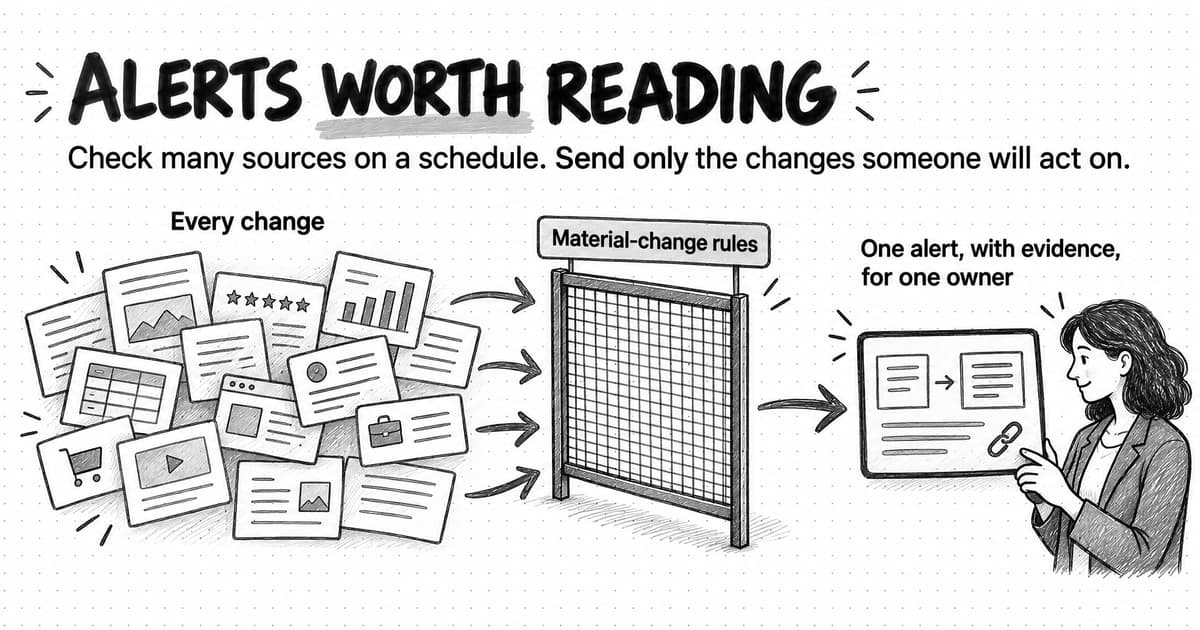
For steps that recur on a date, a scheduled task can run a saved prompt hourly, daily, weekly, or monthly, or run it manually when you choose. Each run returns its result to a Project for review, and you can choose Organization members to receive a run-update email. For steps that start on an event, Monitoring watches can check public sources hourly, daily, or weekly and file an in-app alert with evidence when something you track changes, with optional follow-up work for you to review. Monitoring depends on what public sources show, so it can miss changes or return partial evidence; treat alerts as prompts for your verification step, not as complete coverage.
Ampere does not publish to your website, run your social scheduling, or send marketing email. When Connectors are enabled for approved third-party accounts, Connector actions that need your approval stop at an approval checkpoint that shows the details before anything runs. That keeps the "keep human" steps, such as final sign-off and publishing, with your team.
Sources and further reading
- Erik Schluntz and Barry Zhang, Building effective agents, Anthropic, December 19, 2024.
- HubSpot Knowledge Base, Create workflows.
- Raechel Duplain, How to document your content marketing workflow, Content Marketing Institute, updated September 22, 2021.
- Lean Enterprise Institute, Understanding the fundamentals of value-stream mapping, The Lean Post, August 25, 2022.
- John D. C. Little, Little's Law as viewed on its 50th anniversary, Operations Research 59(3), 536–549, 2011.
- Theory of Constraints Institute, The five focusing steps.
- Content Marketing Institute and MarketingProfs, B2B content and marketing trends: insights for 2026, October 8, 2025.
- US Environmental Protection Agency, Guidance for preparing standard operating procedures (EPA QA/G-6), March 2001.
Frequently Asked Questions
What is an example of a marketing workflow?
An example of a marketing workflow is blog article production. It starts when a topic is approved, moves through a brief approval, research, drafting, an expert accuracy check, editing, visuals, final sign-off, publishing, and promotion, and finishes when the article is published, linked, promoted, and logged. Each step has one owner, a target time, and a defined handoff to the next person.
How do you create a marketing workflow?
To create a marketing workflow, pick one recurring piece of work, name its trigger and definition of done, and collect the evidence trail from the last few times it happened. Interview everyone involved, draw a swimlane map with every wait and loop back marked, add owners for each step, then measure a few cycles before deciding what to standardize, automate, or change.
What is the difference between a marketing workflow and a marketing process?
A marketing process is the broad way a team produces a kind of result, such as content production or product launches. A marketing workflow is one concrete, repeatable path through that process, with a trigger, steps, owners, handoffs, review points, and a definition of done. One process usually contains several workflows, such as separate workflows for blog articles, case studies, and newsletters.
What is a marketing automation workflow?
A marketing automation workflow is a set of rules inside a marketing automation or CRM tool that enrolls contacts or records when they meet a trigger, then runs actions such as sending an email, waiting, updating a field, or notifying a salesperson. It automates predictable steps with no judgment involved. It is one way to carry out some steps of a broader team workflow, not a replacement for mapping it.
What are the steps of a workflow?
The steps of a workflow are the units of work it contains, in the order they happen, each with one owner and a clear output. A complete workflow also names what surrounds the steps: the trigger that starts it, the inputs needed before step one, the handoffs between people or tools, the review points, the outputs, the definition of done, and the timing for each step and wait.
What is the best way to visualize a marketing workflow?
The best way to visualize most marketing workflows is a swimlane diagram, with one horizontal lane for each person, team, or tool and steps placed in time order. Swimlanes show every handoff as an arrow crossing lanes. Add marks for waits and loops back, and pair the diagram with a RACI table so each step has one accountable owner.
How do you measure a marketing workflow?
Measure a marketing workflow with cycle time from trigger to done, touch time spent working, wait time spent queued, flow efficiency as touch time divided by cycle time, revision rounds at each review point, throughput per month, and on-time rate. A spreadsheet with one row per item and the date each step finished is enough for a small team.
Which marketing workflow steps should you automate?
Automate marketing workflow steps with predictable triggers and actions and no judgment, such as creating tasks from a request form or sending reminders. Hand varied research, drafting, and analysis to an AI agent with a person reviewing the output. Keep positioning decisions, customer interviews, and final sign-off with people. Fix unclear inputs and review standards before automating anything.
How often should you review a marketing workflow?
Review a marketing workflow about once a quarter, and sooner after a team change, a new tool, a missed deadline pattern, or a bottleneck fix. Each workflow should have one named owner who keeps the map current, a next review date written on it, and a short note explaining why each step exists, so changes can be judged against their original reason.