Drip campaigns: how to plan lifecycle email sequences that don't read like automation
A practical guide for founders and B2B SaaS marketers to onboarding, nurture, and win-back sequences: which ones to build, the rules each needs, how to write emails people answer, and how to measure them now that opens mean little.
42 min readWritten by Ampere
Short answer
What is a drip campaign?
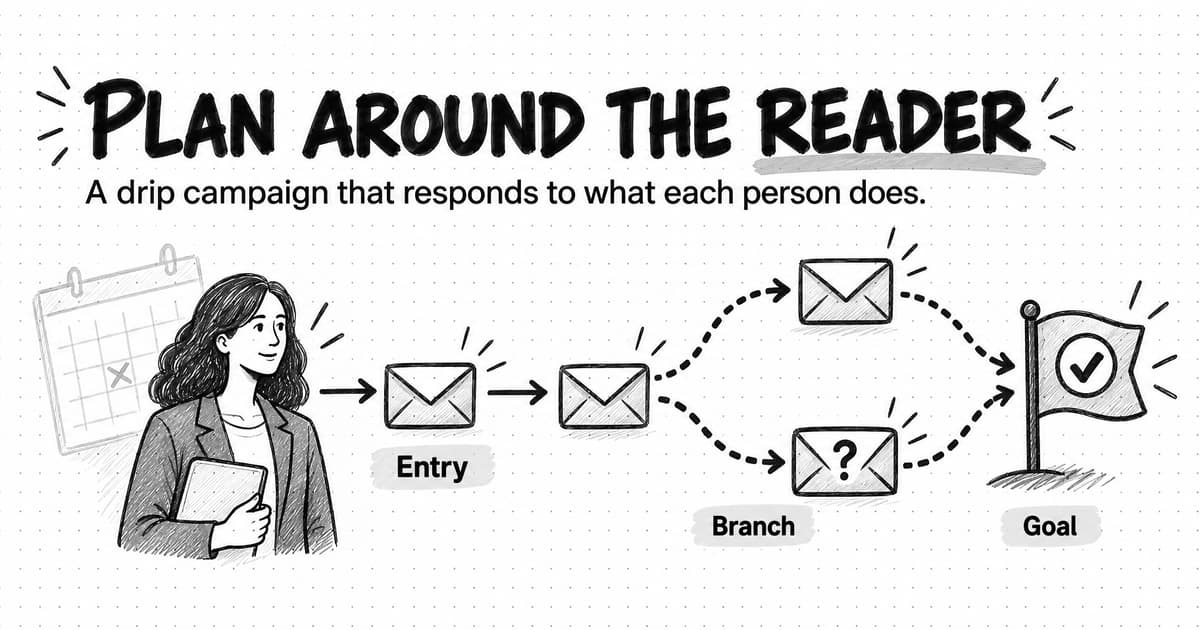
A drip campaign is a planned series of emails that a sending platform delivers automatically to each person who meets an entry condition, spaced over days or weeks, until they reach the goal or meet an exit rule. Welcome, trial onboarding, nurture, and win-back sequences are common examples. The best ones branch on what each person does.
Summary
A drip campaign works when it is planned around the reader rather than the calendar. Each sequence needs a goal written as a measurable event, an entry trigger, conditions that change the path, exits that remove people once they reach the goal, and suppression rules that keep customers, open deals, and unsubscribed contacts out.
Most B2B SaaS companies need a handful of sequences: welcome, trial onboarding, lead nurture, post-demo follow-up, customer onboarding, feature adoption, and win-back. Build first the one where most people stall today, list the obstacles readers hit in order, give each obstacle one email, and branch only where the next email would be wrong for many readers.
Each email should do one job with one call to action, come from someone who reads replies, and use real data about what the person did instead of merge tags. A before-and-after rewrite and three fully written sequences for a fictional company show the method, and a copyable planning template captures the rules before anything is built.
Consent and sender rules are part of the design. CAN-SPAM covers business email, European and UK law restrict marketing to individuals without consent, and Gmail and Yahoo require authentication, one-click unsubscribe, and low spam rates from bulk senders. Unsubscribes should end every sequence, not just the current one.
Measure the goal, not opens. Apple Mail Privacy Protection loads tracking pixels whether or not anyone reads the email, so judge sequences by activation, meetings, or conversion per entry cohort, with replies, clicks, unsubscribes, and complaints as support. AI can draft sequences quickly, but people must own the rules, check every fact, and audit live sequences each quarter.
Contents
- What is a drip campaign?
- Drip campaigns vs. nurture, lifecycle marketing, triggered email, and newsletters
- The drip campaigns a B2B SaaS company actually needs
- Entry, conditions, exits, and suppression: the rules each sequence needs
- Start from the buyer's job and stage, not the calendar
- How many emails, how far apart, and when to branch
- How to write a drip email that doesn't read like automation
- Lead scoring and when nurture should hand off to sales
- Consent, compliance, and the sender rules that decide deliverability
- How to measure a drip campaign now that opens mean little
- How to test a drip campaign
- How to maintain and audit live sequences
- Worked example: three drip sequences for a fictional company
- A copyable drip campaign planning template
- Common drip campaign mistakes
- Drafting drip sequences with AI, and what still needs a person
- Planning and drafting drip sequences with Ampere
- Sources and further reading
- Frequently Asked Questions
Many software companies send the same kind of welcome sequence. A new trial user gets an email the moment they sign up, then "Day 3: did you know you can export to CSV?", then "Day 7: 5 tips from power users", then a discount on day 13. Every message goes to every user in the same order, whether they set up the product in their first hour or never logged in again. The person who already invited three teammates hears about inviting teammates. The person who got stuck on the first screen hears about exports. Neither replies, and the open rate in the dashboard looks fine, so nobody touches the sequence for two years.
The problem is not that the emails are automated. It is that they were planned around the calendar instead of around the person reading them. A good sequence starts from a question: what is this person trying to do right now, and what would help them do it? Timing, branching, and copy all follow from the answer. Planned that way, an automated email reads like a note from someone who noticed where you are, because someone did: they noticed in advance and wrote the rule.
A drip campaign is a planned series of emails that a sending platform delivers automatically to each person who meets an entry condition, spaced over time, until that person reaches the sequence's goal, meets an exit condition, or runs out of messages. Drip campaigns are the most common building block of lifecycle email: the welcome series, the trial onboarding sequence, the nurture track after a webinar, the win-back series for accounts that have gone quiet. They run in an email service provider or marketing automation platform, not in your inbox.
This guide is for founders and B2B SaaS marketers who need those sequences and want them to work. It covers which sequences to build, the rules each needs, timing and branching, writing, the handoff to sales, consent and deliverability, and measurement now that open rates mean little. It ends with three written example sequences for a fictional company and a planning template you can copy.
What is a drip campaign?
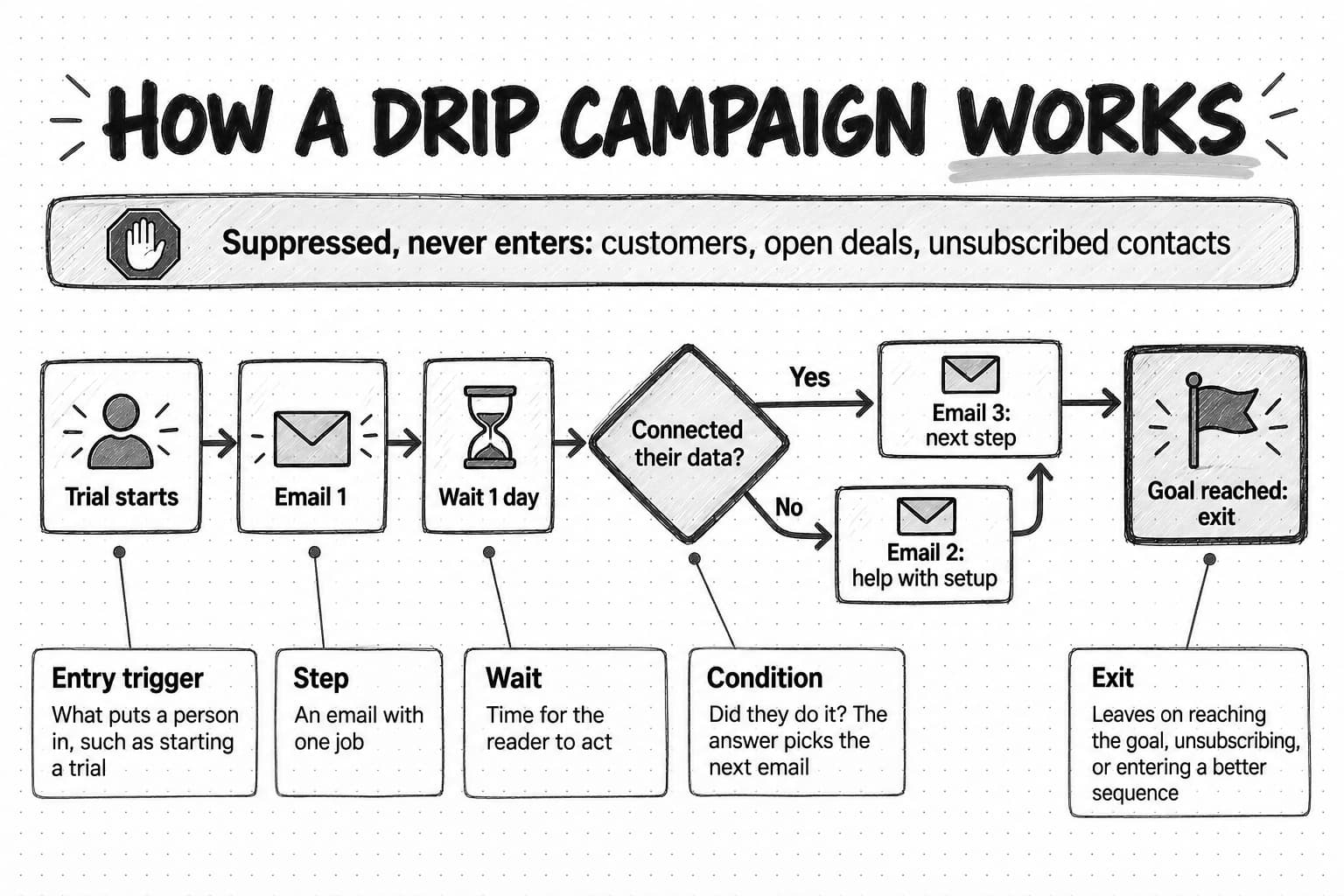
A drip campaign has five parts, and every one of them is a decision someone has to make on purpose.
The entry trigger is the event or condition that puts a person into the sequence: starting a trial, registering for a webinar, downloading a guide, becoming a paying customer, or going 30 days without logging in. A trigger can be an action the person takes or a state they reach, such as a lifecycle stage changing in your CRM.
The steps are the emails themselves, each with a job to do. A step can also be an internal action, such as notifying a salesperson.
The waits are the delays between steps: two days, a week, or "until Tuesday at 9 a.m. in the recipient's time zone." Waits are what make a drip campaign a drip rather than a burst. The name comes from that pacing: a little at a time, over weeks, instead of everything at once.
The conditions are the checks that change what happens next. Has the person connected their data yet? Did they click the case study? Are they on the free plan or a paid one? Conditions turn one straight line of emails into branches that respond to what people do.
The exits are the rules that take a person out: they reached the goal (activated, booked a meeting, upgraded), they entered a more relevant sequence, they unsubscribed, or they did something that makes the remaining emails wrong. A sequence without good exits keeps sending onboarding tips to someone who has been a customer for a month.
Two supporting pieces sit around those five. Suppression rules keep certain people from entering at all: current customers out of a prospect nurture, anyone in an open sales opportunity out of automated promotions, competitors and internal staff out of everything. A goal is the one outcome the sequence exists to produce, written as a measurable event. The goal decides which emails belong in the sequence and becomes the first exit rule.
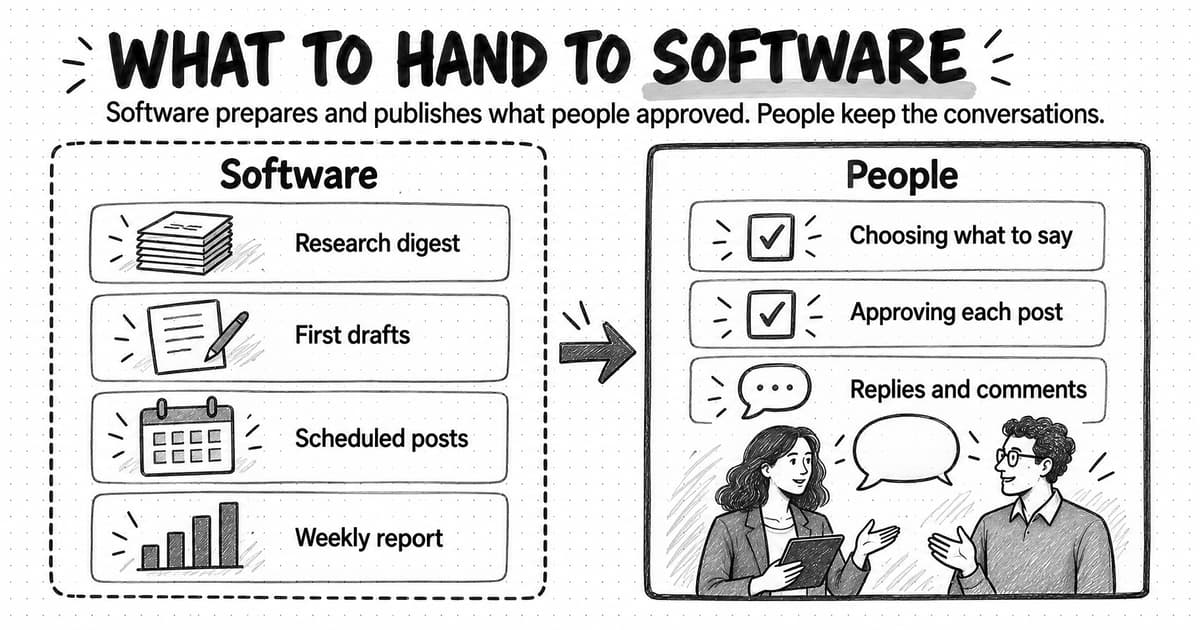
Software does the sending. Drip campaigns run inside an email service provider (ESP) such as Mailchimp or Klaviyo, a marketing automation platform such as HubSpot or Marketo, or a product-messaging tool such as Customer.io or Braze that reads events from your app. The platform holds the contacts, consent records, rules, and schedule; the planning, writing, and judgment are still yours. Our guide to what marketing automation is and how it works explains where these platforms sit among the other kinds of marketing automation.
Drip campaigns vs. nurture, lifecycle marketing, triggered email, and newsletters
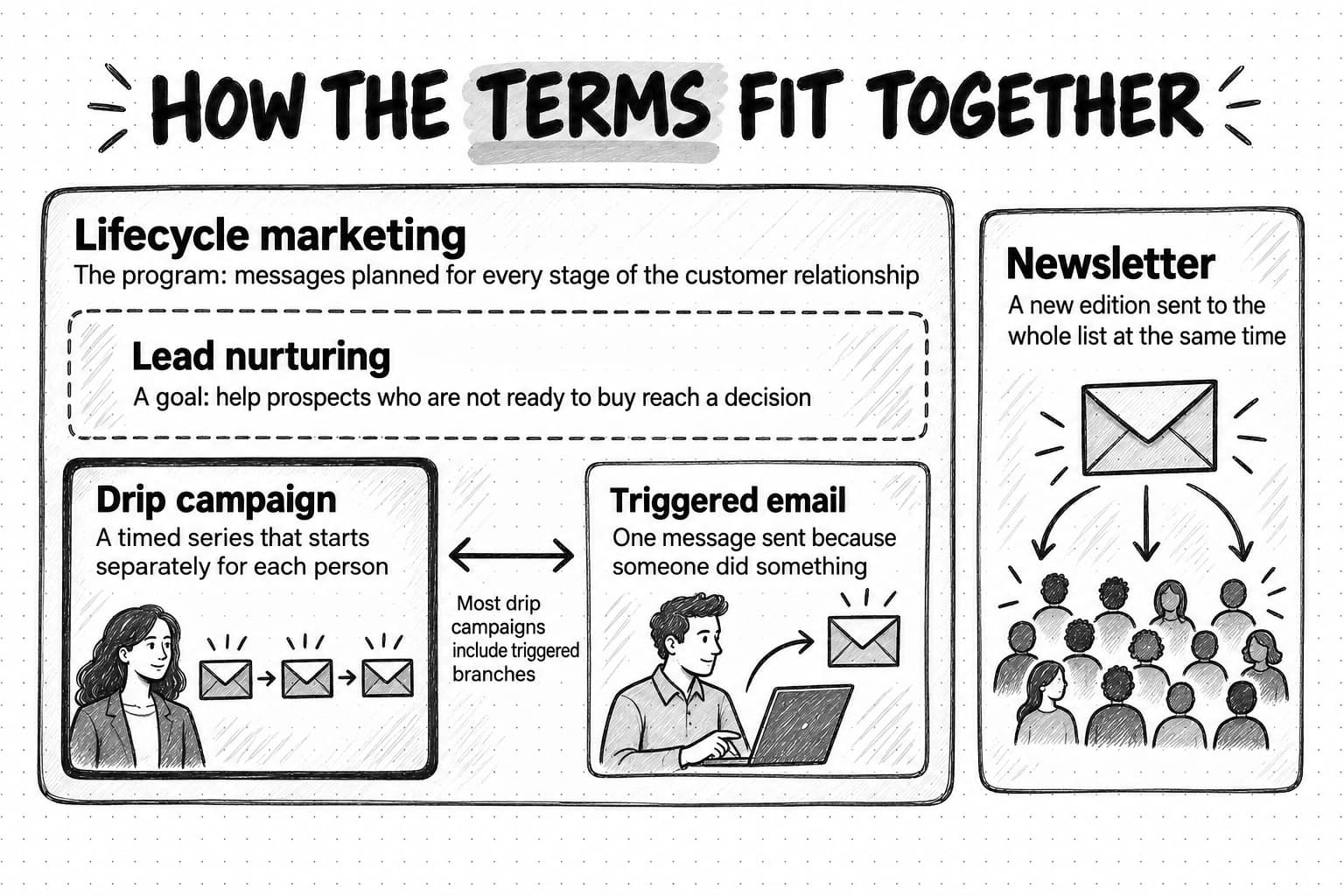
Vendor glossaries often treat these terms as synonyms. They overlap, but each names something different.
| Term | What it means | How it relates to a drip campaign |
|---|---|---|
| Drip campaign | A timed series of emails sent automatically after an entry trigger, with optional branches and exits | The unit this guide is about |
| Triggered (behavioral) email | A single email sent because someone did something, such as abandoning a setup step or hitting a usage limit | A triggered email is one message; a drip campaign is a series. Many good drip campaigns include triggered branches |
| Email sequence | A general word for any ordered set of emails, automated or sent by hand | Sales teams often say "sequence" for one-to-one outreach run from a sales tool; marketers usually mean a drip campaign |
| Lead nurturing | The practice of helping prospects who are not ready to buy move toward a decision, through email and other channels | Nurture is a goal. Drip campaigns are one of the main ways to pursue it |
| Lifecycle marketing | Planning communication around each stage of the customer relationship, from first contact through onboarding, adoption, renewal, and win-back | Lifecycle marketing is the program. It contains several drip campaigns, triggered emails, in-app messages, and human touches |
| Newsletter | A recurring editorial email sent to a whole list on a schedule, with new content each edition | A newsletter goes to everyone at the same time; a drip campaign starts separately for each person and sends the same planned messages to everyone who enters |
The newsletter distinction matters most in practice. A newsletter is a broadcast written each edition and sent to the whole list at once. A drip campaign is written once and delivered to each person on their own timeline, so someone who signed up today gets email one while someone who signed up last Tuesday gets email three. Our guide to B2B newsletter strategy covers the recurring editorial side; this guide covers the sequences.
The line between drip and triggered campaigns has blurred. Early drip campaigns were purely time-based: email one on day zero, email two on day three, no matter what. Modern platforms let any step wait for or branch on a behavior. The practical design is a mix: a time-based spine for people who do nothing, and behavioral branches for people who act.
The drip campaigns a B2B SaaS company actually needs
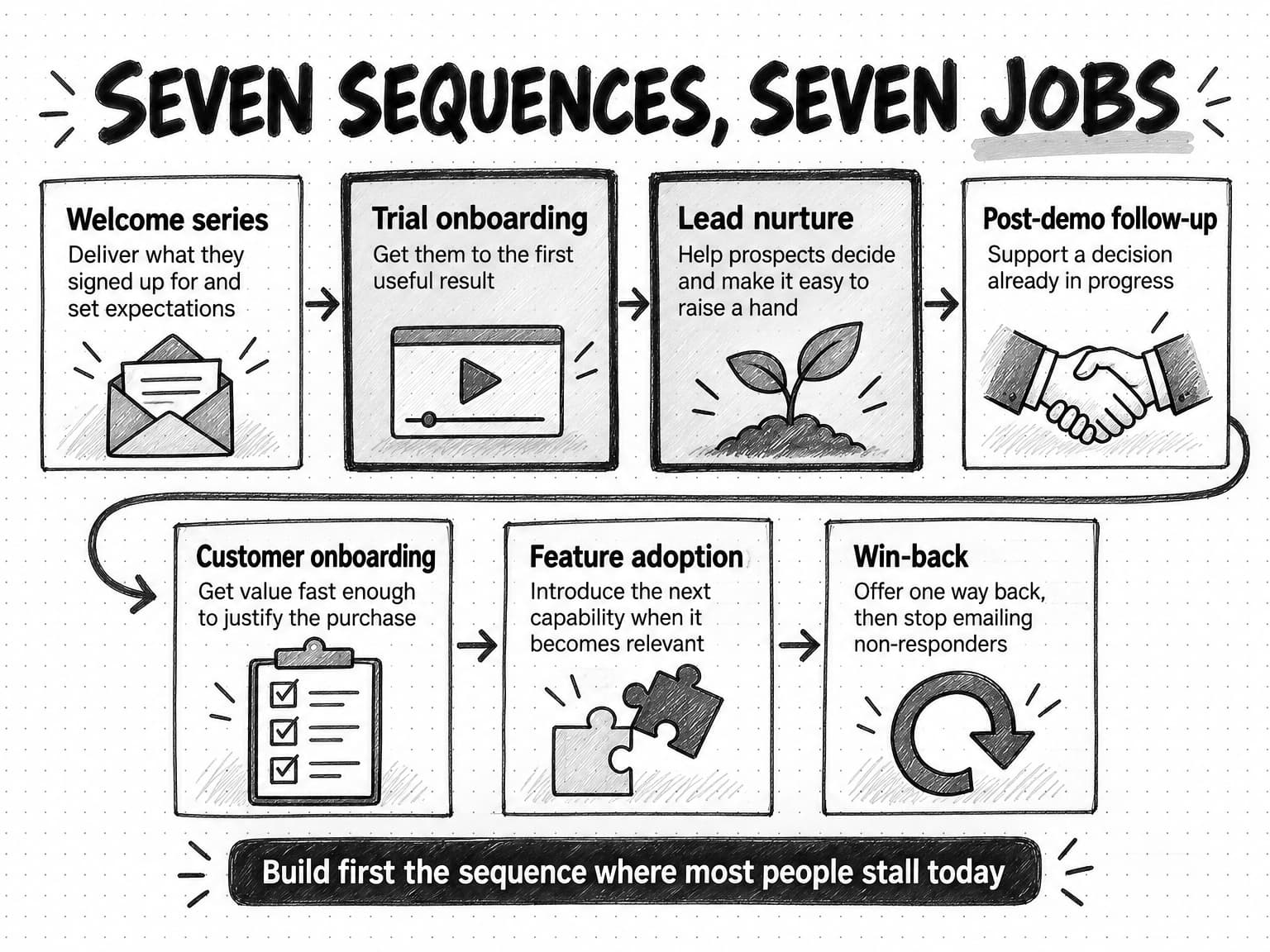
A software company needs a few sequences, each matched to a moment where a person has a clear job to do and email can help. Most B2B SaaS and AI companies end up with some version of these seven.
Welcome series. For new subscribers and downloaders. The job is to deliver what they signed up for and set expectations about what you will send.
Trial onboarding and activation. For new trial users or new free accounts. The job is to get the person to the moment the product first proves useful to them, often called the activation event. This is often the most valuable sequence a product-led company runs, because a trial user who never sees the product work on their own data has little reason to pay for it. It should branch heavily on product behavior, which means your product has to send events to the sending platform.
Lead nurture by stage. For prospects who have shown interest but are not ready to talk to sales: someone who downloaded a guide, attended a webinar, or visited the pricing page and left. The job is to help them understand the problem and the options well enough to decide, and to give them an easy way to raise a hand. Split nurture by what the person engaged with and where they are in buying, not one long track for every lead.
Post-demo or post-meeting follow-up. For prospects who have talked to someone. The job is to support a decision already in progress: recap the discussion, answer objections, give the champion material to share, and keep the next step visible. It is often better sent by the salesperson, with marketing supplying the materials.
Customer onboarding. For new paying customers. The job is different from trial onboarding: the customer has decided to buy, and now needs to get value fast enough to justify the decision to whoever approved it.
Expansion and feature adoption. For existing customers who use part of the product. The job is to introduce the next capability that fits how they already work, at the moment it becomes relevant: when they hit a usage limit, add a team, or repeat a manual task a feature would handle. Sent as a monthly upsell blast to every account, it erodes trust.
Win-back and re-engagement. For trial users who did not convert, customers who stopped using the product, or subscribers who have not opened or clicked in months. The job is to find out whether there is still a reason to stay in touch, offer one useful way back, and remove people who do not respond.
Event and webinar sequences sit beside these seven: confirmation, reminders, the recording and follow-up resources afterward, and a short nurture for attendees and no-shows separately.
You do not need all of these on day one. A product-led company with a free trial should build trial onboarding first, because that is where future customers either see value or leave. A sales-led company with long cycles should build lead nurture and post-demo follow-up first. Build the sequence for the moment where the most people stall today.
Entry, conditions, exits, and suppression: the rules each sequence needs
Most problems with live drip campaigns are rule problems, not copy problems: the wrong people entered, nobody left when they should have, or two sequences hit the same person on the same day. Write the rules before the copy.
| Sequence | Entry trigger | Key conditions | Exit when | Suppress |
|---|---|---|---|---|
| Welcome | Subscribes, downloads, or creates a free account | Source of signup, stated interest | Series completes, or person starts a trial | Existing customers, open opportunities |
| Trial onboarding | Trial starts | Setup steps completed, activation event reached, team size, plan | Activates (move to adoption track), converts to paid, or trial ends | Anyone already paying, internal test accounts |
| Lead nurture | Engages with a resource or event; not sales-ready | Topic engaged with, role, company fit, recent activity | Books a meeting, becomes sales-qualified, enters an open opportunity, or completes track | Customers, open opportunities, competitors, people sales asked to exclude |
| Post-demo follow-up | Meeting held | Objections raised, stakeholders involved, deal stage | Deal won, lost, or moves stage | Anyone the account owner removes |
| Customer onboarding | Becomes a paying customer | Setup progress, seats used, plan | Onboarding milestones complete | Customers in a managed onboarding with a person |
| Expansion and adoption | A usage signal fires (limit reached, new team added, repeated manual task) | Plan, feature already in use, recent support issues | Adopts the feature, or declines | Accounts with open billing or support escalations, accounts in renewal talks |
| Win-back | Trial expired unconverted, or no login for a set period | Reason for leaving if known, last activity | Returns and is active again, or completes series (then suppress if no engagement) | Accounts with unpaid invoices, people who unsubscribed |
Three habits prevent most rule failures.
Write the goal as an exit. If the trial onboarding sequence exists to get people to activation, then reaching activation should take them out of it immediately and into whatever comes next.
Decide priority between sequences. A trial user who also registers for a webinar now qualifies for two sequences. Decide in advance which one wins, or set a frequency cap such as no more than one automated marketing email per person per day.
Keep sales and support in the loop through suppression. People in an open sales opportunity should usually leave marketing nurture, because an automated "still thinking about it?" email in the middle of a negotiation does damage. These suppressions need fields that sales and support keep up to date. Our guide to marketing operations covers lifecycle stages, routing, and the data those rules depend on.
Start from the buyer's job and stage, not the calendar
Plan the content from the reader's side. Before outlining any emails, write down three things.
The first is who enters and what they were doing. Someone who downloaded a pricing comparison is in a different frame of mind from someone who downloaded a beginner's guide. Start the sequence from what the trigger says they want, not from what you want to tell them.
The second is the job they are trying to get done. For a trial user, the job is rarely "learn about your features." It is closer to "find out whether this will fix the thing that made me sign up, without spending a week on it." Name the job in plain words, as the reader would say it.
The third is the obstacles between them and that job. Setup takes too long. They need data from a colleague. They are not sure the product handles their case. Their manager will ask about price and security. Each obstacle is a candidate for one email, and the ones that stop the most people deserve the earliest slots.
Stage matters too. A prospect still working out what the problem is needs explanation and evidence; a prospect choosing between vendors needs comparisons, proof, and pricing clarity; a buyer seeking approval needs material for other people in the buying group. Our guide to the B2B buyer journey explains these stages and why buyers loop back between them.
That ordered list of obstacles, not a content calendar, is the outline of the sequence.
How many emails, how far apart, and when to branch
There is no research-backed number of emails that applies across companies. The useful answer is that a sequence should be as long as the list of obstacles it addresses, and no longer. Planned that way, sequences tend to be short. As a rough guide rather than a benchmark, a welcome series is often two or three emails, a 14-day trial onboarding sequence four to six plus branches, and a nurture track five or six over several weeks.
Timing and spacing
Space emails according to how long the reader needs between steps, not according to a habit of "every three days."
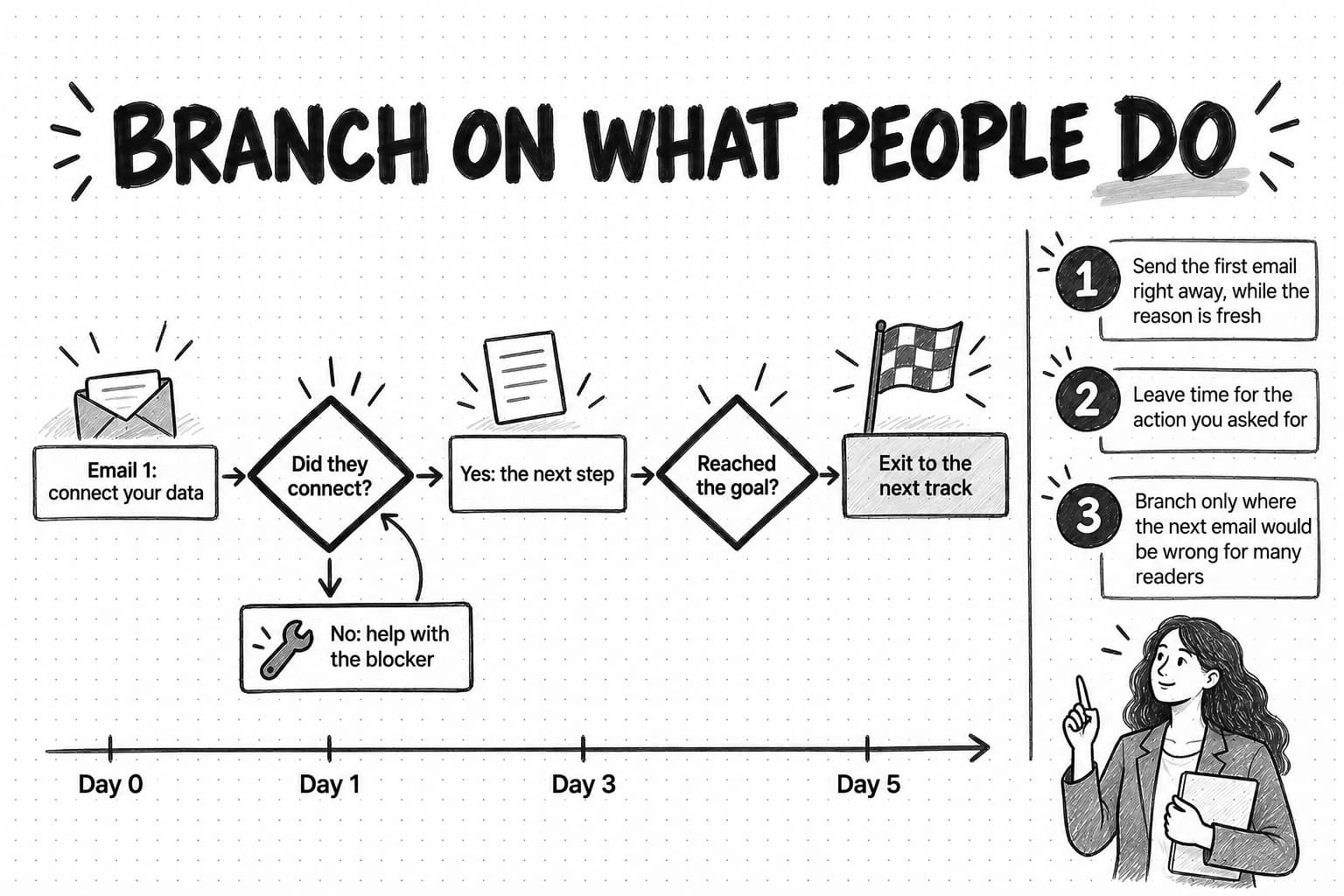
Front-load while the reason is fresh. Right after someone signs up or downloads something, they still remember why. The first email in almost every sequence should go out immediately or within minutes of the trigger, and in trial onboarding the second can follow within a day. Later emails can spread out.
Leave time for the action you asked for. If an email asks someone to connect their data, give them a couple of days to do it before you send the next one, and make the next one depend on whether they did.
Match the clock of the decision. A 14-day trial forces a two-week clock. A B2B purchase that takes a quarter does not, so a nurture track might send weekly or every other week instead. Win-back can wait longer still.
Branching on behavior
Branches are where a drip campaign stops reading like automation. Each branch answers a question about what the person did, and sends a different message depending on the answer.
The simplest and most valuable branch is did they do the thing yet? If the person completed the step an email asked for, skip ahead or move them to the next stage. If not, send help with that step: a shorter path, a video, an offer of a call, or an honest "most people get stuck here because."
Other useful branches split on fit (company size or role, so a solo founder and a 200-person team get different examples), on interest (which resource or feature they engaged with), and on engagement (whether they have interacted with any email at all, so you can slow down or stop for people who never do).
Keep branches few and deliberate. Every branch adds paths you must write, test, and maintain. Branch where the next email would be wrong for a large share of people, and nowhere else.
How to write a drip email that doesn't read like automation
A drip email reaches one person at a moment you chose in advance, so the writing has to supply the context.
Give each email one job
Each email should have one purpose and one action: connect your help desk, read this comparison, book 20 minutes. When an email asks for three things, readers often do none, and you cannot tell which part failed.
Write the job at the top of your draft before anything else, as a sentence: "This email gets people who have not connected their data to do it, by showing it takes four minutes and offering help." Then check the finished email against that sentence.
Write subject lines that say what is inside
The most reliable subject line says specifically what the email gives the reader. "Your first report takes 4 minutes" beats "Getting started with Fernway." "The question your CFO will ask about pricing" beats "Quick question." Across a sequence, curiosity subject lines train people to expect a trick. Avoid false urgency and fake "Re:" prefixes; the FTC's CAN-SPAM guidance prohibits deceptive subject lines.
Treat the preview text as a second subject line that completes the thought, instead of letting the platform fill it with "View this email in your browser."
Choose plain text or designed on purpose
A plain-text-style email (simple layout, no banner, a person as sender) looks like a message from a colleague and suits onboarding help, follow-up, and win-back, where the goal is a reply or one action. A designed email (brand header, images, several sections) suits announcements and content roundups, where the reader expects a publication. Many teams use the designed template for everything because the platform offers it first; for any email whose goal is a reply or one click, test the plain version.
Make the call to action one clear next step
One email, one primary link or button, written as what happens when the reader clicks: "Connect your help desk," "See the three-vendor comparison," "Pick a time." A reply is often the best call to action in B2B, because it opens a conversation and tells you something no click can, but only if a person reads the replies.
Personalize with real data, not merge-tag theater
Inserting a first name and a company name is not personalization. Most readers have seen "I noticed your company is growing fast!" many times. Real personalization uses something the reader did or told you, and changes what the email says, not just its greeting.
Good inputs are the step they completed or skipped, what they engaged with, the use case they chose at signup, and their plan and team size. "You connected Zendesk yesterday but have not tagged any conversations yet; here is the fastest way to get your first trend report" is personal because it is about what this person did. Give every data field a fallback so the email still reads naturally when it is blank.
Send from someone who answers
Use a sender name and address a reader could reply to and reach a person: a founder, a customer success lead, the account's salesperson. The email should not claim "I was just looking at your account" when nobody was. A "reply to this email" request from a no-reply address makes automation obvious, and Microsoft's Outlook guidance for high-volume senders asks for a From or Reply-To address that can receive replies.
A before-and-after example
Here is a typical day-three onboarding email and a rewrite. Fernway is an invented customer-feedback analytics tool for support teams, with a 14-day trial whose activation event is a first trend report from real support conversations.
Subject: Day 3: Did you know?

Hi Sam,

Did you know Fernway can export any report to CSV, PDF, or Google Sheets?
Our power users love exporting reports to share with their teams.

Plus, check out these other great features:
- Custom dashboards
- Slack alerts
- Sentiment scoring

Log in now to explore everything Fernway can do!

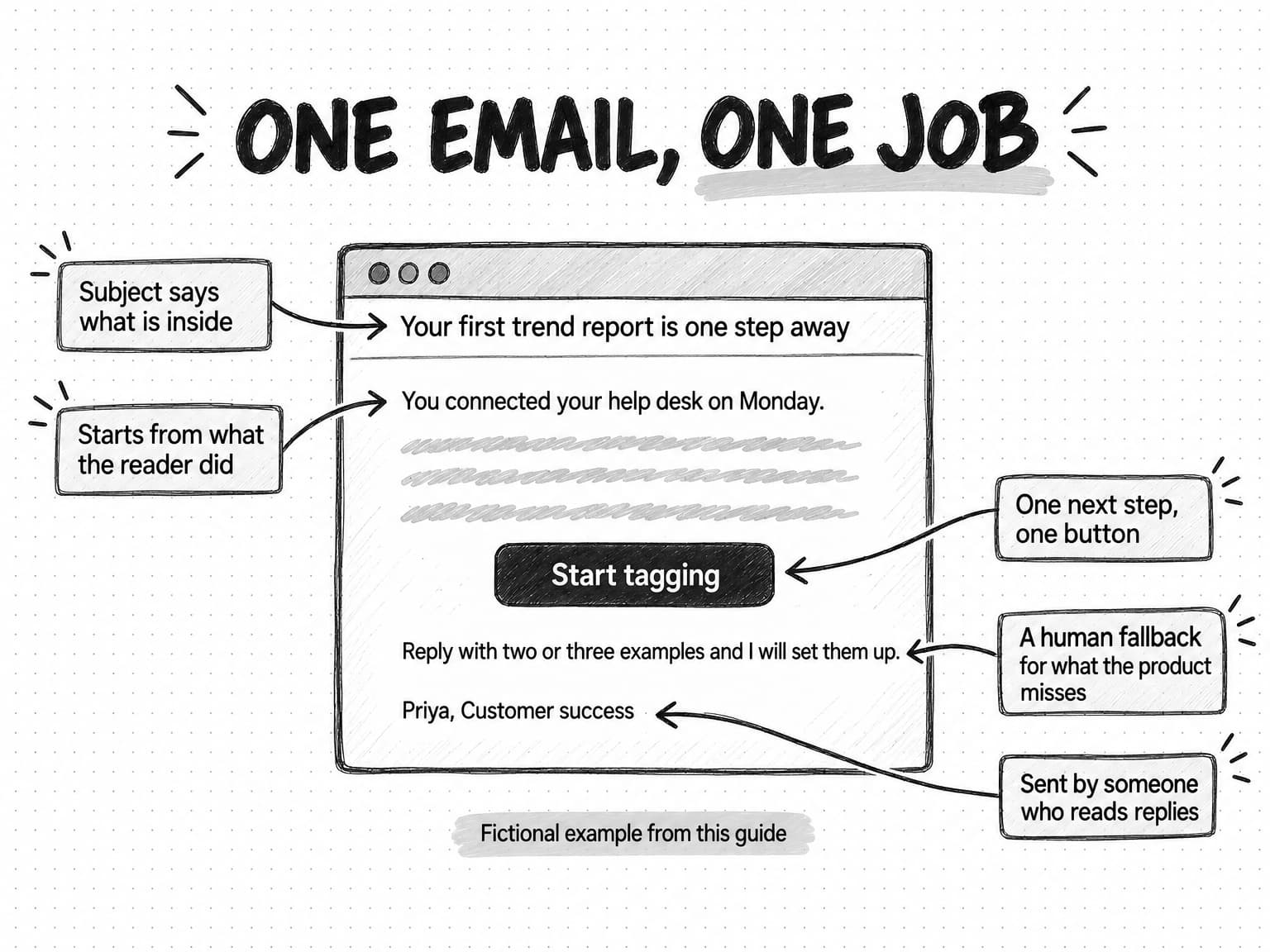
The Fernway TeamSubject: Your first trend report is one step away
Preview: You connected your help desk. Tagging 50 conversations finishes the setup.
Hi Sam,
You connected your Zendesk account on Monday, so Fernway can already see
your recent conversations. The last step before your first trend report
is tagging about 50 of them, which takes most teams 10 to 15 minutes.
The quickest way is the bulk-tag screen: Fernway suggests a tag for each
conversation and you accept or change it.
Start tagging: [link]
If your conversations need tags we do not suggest, reply with two or
three examples and I will set them up for you.
Priya
Customer success, FernwayThe rewrite is about what Sam has already done. It names one step, says how long it takes, removes the main obstacle (not knowing where to start), offers a human fallback, and comes from someone who will read the reply. It only makes sense for people who connected a help desk and have not tagged conversations, which is why it belongs in a branch rather than a fixed day-three slot.
Lead scoring and when nurture should hand off to sales
In a sales-led or hybrid company, nurture also decides when someone is ready to talk to a person, usually through lead scoring and a handoff rule.
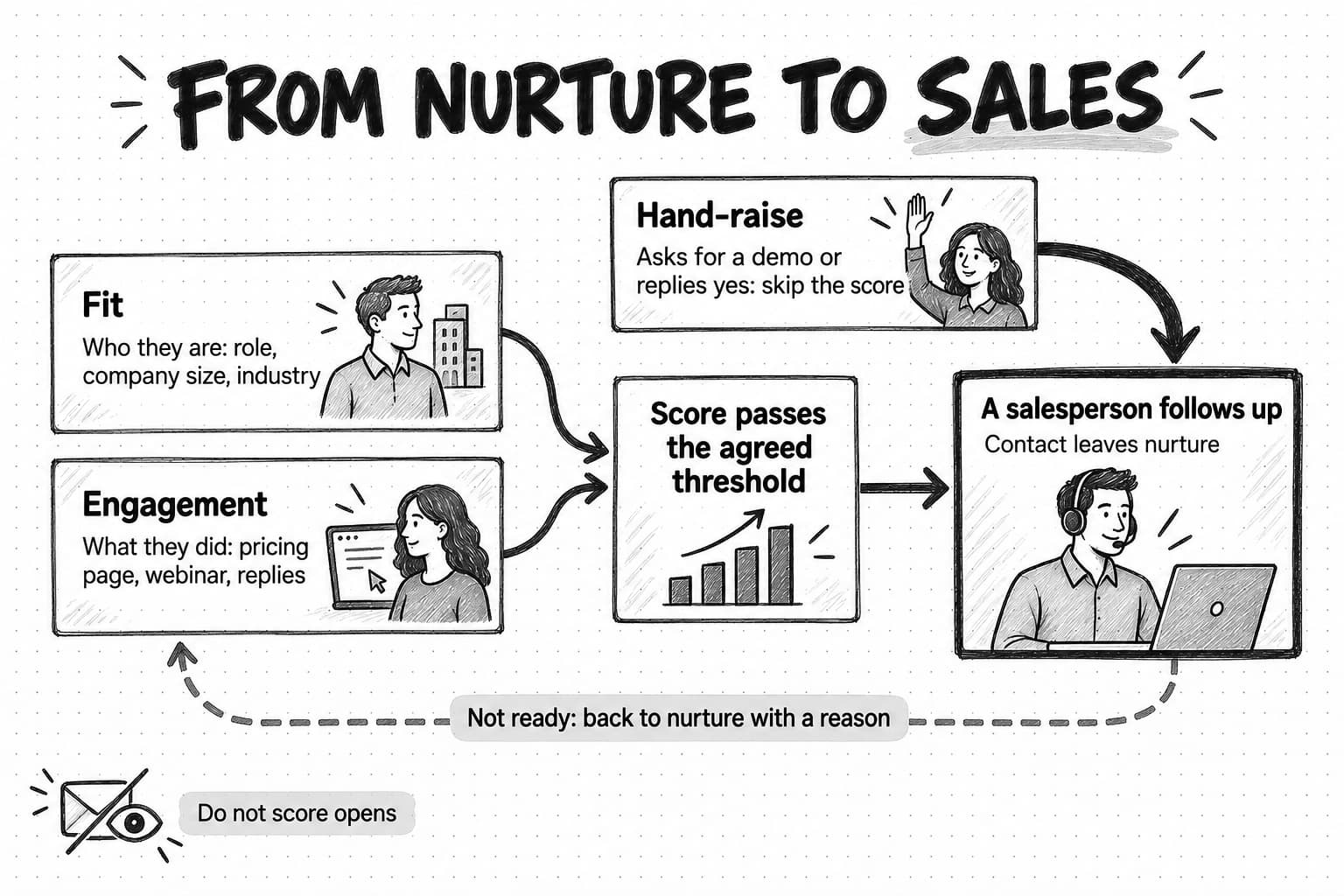
Lead scoring assigns points to a contact based on two kinds of evidence. Fit describes who they are: role, seniority, company size, industry, and region, compared with your ideal customer profile. Engagement describes what they have done: visited the pricing page, attended a webinar, read a comparison page, clicked several nurture emails, invited a colleague in a trial. High engagement with poor fit, such as a student researching the category, is not a sales lead however many emails they click.
Keep a first scoring model simple enough to explain in one sentence to a salesperson. A practical start is a short list of fit criteria that must be met, plus a handful of high-intent actions that count heavily (pricing page visits, demo-page visits, replies, a product-qualified signal such as inviting teammates), and a decay rule so old activity counts for less. Do not score opens; as the measurement section explains, they are unreliable.
The most important signal is not a score at all. It is a hand-raise: someone requests a demo, replies "yes, let's talk," or asks a pricing question. A hand-raise should go straight to a person, skipping any remaining nurture steps.
Write the handoff as an agreement with sales, not a marketing setting:
- The threshold. What fit and behavior make a contact sales-ready, in plain language.
- The route. Who gets the lead, and how fast they agree to follow up.
- The exit. The contact leaves marketing nurture when the handoff happens, so they do not get "still interested?" emails while a salesperson is talking to them.
- The return path. When sales decides a lead is not ready, it goes back into an appropriate nurture track with a reason recorded, instead of disappearing or restarting the same sequence from the top.
Review the agreement after a month or two of real handoffs. Our guides to the ideal customer profile and buyer personas and to marketing operations cover the fit criteria and the lifecycle stages this agreement depends on.
Consent, compliance, and the sender rules that decide deliverability
A drip campaign is commercial email, covered by marketing law where your recipients live and by the rules large mailbox providers apply before delivering it. This is general information, not legal advice; check the rules for your markets with counsel.
CAN-SPAM in the United States
The Federal Trade Commission's CAN-SPAM compliance guide lists the main requirements for commercial email. Among them: header information must not be false or misleading, subject lines must not be deceptive, the message must be identified as an advertisement, it must include a valid physical postal address, it must tell recipients how to opt out of future marketing email, and opt-outs must be honored within 10 business days. The guide also states that "the law makes no exception for business-to-business email," and that each separate email in violation can bring penalties of up to $53,088, a figure the FTC updated for inflation in January 2024.
CAN-SPAM does not require prior consent, but mailbox providers and good practice effectively do.
GDPR, ePrivacy, and PECR in Europe and the UK
In the European Union, the General Data Protection Regulation gives people the right to object at any time to processing of their personal data for direct marketing, including profiling related to it (Article 21(2)), and once they object, the data "shall no longer be processed for such purposes" (Article 21(3)). Where you rely on consent, people can withdraw it at any time (Article 7(3)). Separate national ePrivacy rules decide whether you need consent before emailing at all; for individuals, you generally do.
In the UK, the Information Commissioner's Office guidance on electronic mail marketing under the Privacy and Electronic Communications Regulations (PECR) says you can email individuals only if they have specifically consented, unless the "soft opt-in" applies: they bought or negotiated to buy a similar product or service from you and were given a simple way to opt out when you collected their details and in every message since. You can email corporate bodies without consent, but sole traders and some partnerships count as individuals, and you must not conceal your identity or omit a valid opt-out address.
In practice: record how and when each contact consented where the sending platform can read it, keep bought or scraped lists out of sequences, and treat an unsubscribe or objection as final across every sequence.
Gmail, Yahoo, and Outlook sender requirements
Since February 2024, Google's email sender guidelines require anyone sending 5,000 or more messages a day to Gmail accounts to authenticate their domain with SPF, DKIM, and DMARC, keep the spam rate reported in Postmaster Tools below 0.30%, and support one-click unsubscribe in marketing and subscribed messages along with a clearly visible unsubscribe link in the body. Google recommends staying below a 0.10% spam rate and, in its sender guidelines FAQ, recommends honoring unsubscribe requests within 48 hours. The FAQ says one-click unsubscribe is required only for marketing and promotional messages, not transactional ones such as password resets, and that from November 2025 Gmail began ramping up enforcement, including temporary and permanent rejection of non-compliant mail.
Yahoo's sender best practices set similar requirements for bulk senders: SPF, DKIM, and a DMARC policy of at least p=none, a one-click unsubscribe header (the POST method defined in RFC 8058 is highly recommended), unsubscribes honored within two days, and a spam rate below 0.3%. Microsoft announced in April 2025 that Outlook.com would require SPF, DKIM, and DMARC from senders of more than 5,000 emails a day, and later updated the post to say non-compliant messages would be rejected.
A young company may send far fewer than 5,000 messages a day, but the same practices protect deliverability at any volume. The sending platform handles most mechanics; your job is to authenticate your domain, confirm one-click unsubscribe headers on marketing sequences, and watch complaint rates.
| Consent | Record source and timestamp for every contact; no bought or scraped lists in sequences |
|---|---|
| Identity | Accurate sender name, From address, and subject; a valid postal address in the footer |
| Authentication | SPF, DKIM, and DMARC set up for the sending domain |
| Unsubscribe | One-click unsubscribe header plus a visible link in every marketing email; honored across all sequences within two days |
| Complaints | Spam rate checked in Google Postmaster Tools; aim below 0.10% and never reach 0.30% |
| Suppression | Unsubscribed, objected, bounced, and unresponsive contacts kept out of every sequence |
How to measure a drip campaign now that opens mean little
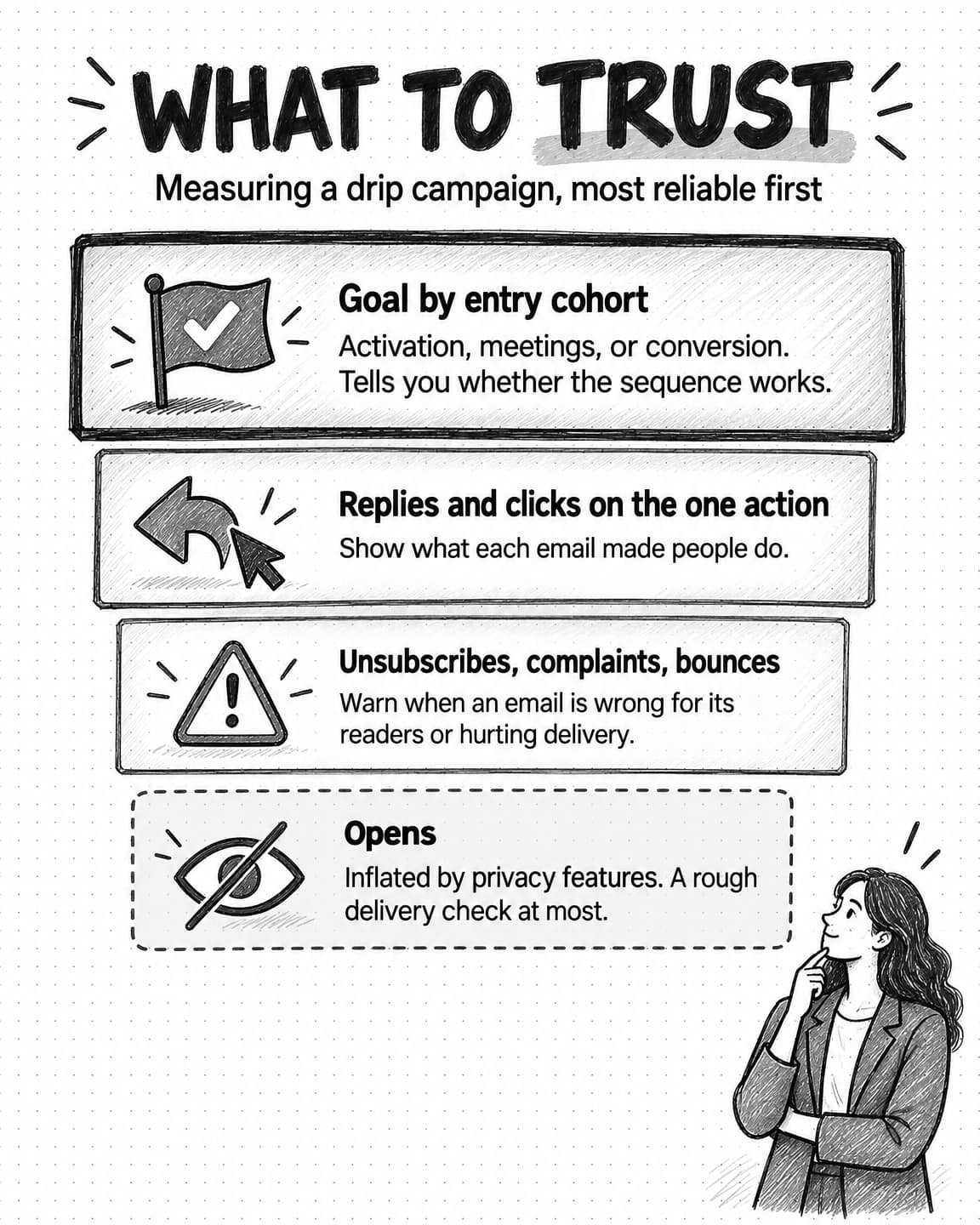
The open rate used to be the first number teams checked. It is now the least reliable. In June 2021 Apple announced Mail Privacy Protection, saying it "stops senders from using invisible pixels to collect information about the user." Apple's Mail user guide explains that with the setting on, remote content "is privately downloaded in the background when you receive a message," and senders cannot learn "when and how many times you view it." Because the tracking pixel loads whether or not anyone reads the email, Apple Mail users with the setting on can be counted as opening messages they never opened. Security scanners that load images or click links add more noise.
So measure a drip campaign from the outcome backward.
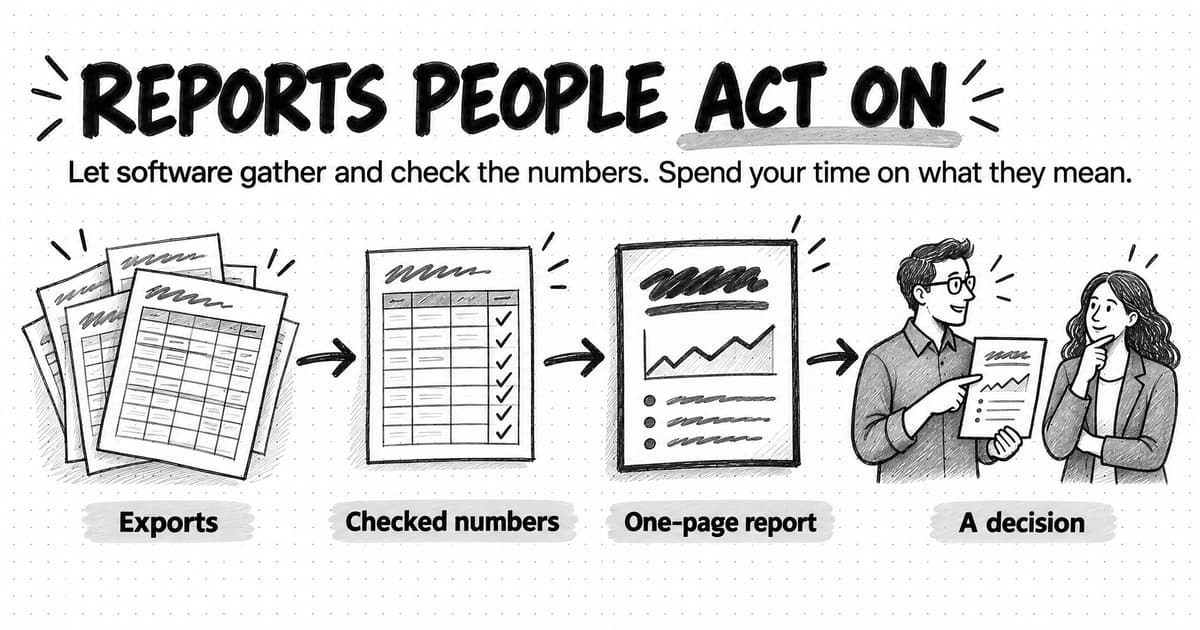
Primary metric: the sequence's goal. For trial onboarding, the share of people who reach the activation event within the trial, and the share who convert to paid. For nurture, meetings booked or sales-qualified contacts, and later the pipeline they create. For win-back, the share who return and stay active. Compare against people who did not receive the sequence or against its previous version. This is the number that tells you whether the sequence works.
Supporting metrics: replies and clicks on the one action. Replies are hard to fake and full of information. Clicks beat opens, though scanners inflate them too, so look at what people did after clicking.
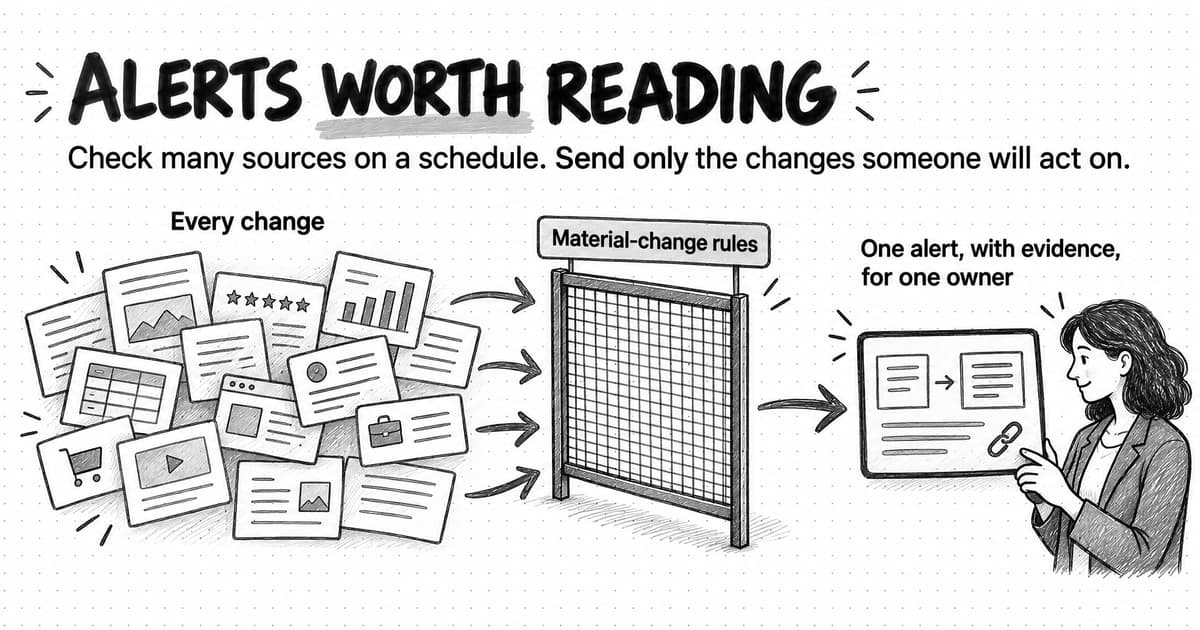
Health metrics: unsubscribes, spam complaints, and bounces, per email. A spike in unsubscribes on one email tells you that email is wrong for the people receiving it. Complaints matter most, because they affect deliverability for everything your domain sends.
Diagnostic metrics: where people leave. At each step, compare how many people reach the goal, drop off, or simply continue. If most people reach the last email without acting, the plan is wrong, not just the copy.
Treat open rates as a rough signal of deliverability at most: a sudden collapse can mean mail is going to spam. Do not use opens to judge subject lines, score leads, or decide which version of an email won.
How to test a drip campaign
Testing a sequence is harder than testing a single email, because effects take weeks to show and each person sees only one path.
Test against the goal, not the open rate. Privacy features distort opens, so judge tests on clicks on the call to action, replies, or, better, the sequence goal.
Test big differences first. Test structural questions: whether a branch on setup progress helps, whether plain text beats a designed email, whether four emails do as well as seven. Button colors can wait.
Hold out a control group when you can. The cleanest test of whether a sequence works at all is to randomly hold out a small share of entrants who receive nothing, or only the minimum required messages, and compare goal rates.
Give tests enough people and time. Small companies rarely have the volume to detect small differences, so test only large changes, read results as direction rather than proof, and write down what you expected beforehand.
Change one thing per test. If you rewrite the copy, change the timing, and add a branch at once, you will not know which change mattered.
How to maintain and audit live sequences
Drip campaigns decay quietly. A feature is renamed, a recording retired, a salesperson leaves and their name stays on the follow-ups. Because only recipients see these emails, problems can last for years.
Give every sequence an owner and a review date, and audit each live sequence at least once a quarter.
- Send yourself every path. Use a test contact to receive each branch, and read the emails as a new customer would.
- Check every link and screenshot. Broken links, old screenshots, and retired resources are common faults.
- Check every fact. Prices, plan names, feature names, integration lists, time estimates, and any statistics. A wrong price in an automated email is a promise someone will hold you to.
- Check the rules. Do the entry triggers still fire? Do exits still work after product or CRM changes? Are new customers still being suppressed from prospect nurture?
- Check the people. Is the sender still at the company? Does someone read replies?
- Read the numbers by step. Look for emails with unusual unsubscribes or complaints, and for steps where most people stall.
- Retire what no longer earns its place. Shorter sequences are easier to keep accurate.
Record what you changed, why, and when, so you can find the cause when results shift. Our guide to marketing workflows covers documenting a recurring process so it survives a change of owner.
Worked example: three drip sequences for a fictional company
The examples below use Fernway, the invented product from the before-and-after example. Fernway sells to support teams at software companies, offers a 14-day free trial, and has a sales team for accounts with more than 20 support agents. Activation means a first trend report, which requires connecting a help desk and tagging about 50 conversations. The company, people, timings, and copy are made up to show the method; none of it reports measured results.
Sequence 1: trial onboarding and activation
Goal: first trend report within the trial. Entry: trial starts. Exit: activation (move to the adoption track), conversion, or trial end (move to win-back). Suppress: paying customers, internal accounts. Branches: setup progress; team size above or below 20 agents.
Email 1, immediately. Subject: "Your Fernway trial: the one thing to do first."
Hi Sam,
Thanks for starting a Fernway trial. Your first trend report starts with one step: connecting your help desk so Fernway can read recent conversations. It takes about four minutes and needs admin access to Zendesk, Intercom, or Freshdesk.
Connect your help desk: [link]
If you are not the help desk admin, forward this email to whoever is. The link works for them too.
Priya, customer success at Fernway
Email 2, day 1, only if the help desk is not connected. Subject: "Stuck on connecting your help desk?" It names the three usual blockers (admin rights, an unlisted help desk, security review) and gives one fix for each: a short note to forward to the admin, a request to reply with the help desk's name, and a link to the data-handling summary.
Email 3, day 3, for people who connected but have not tagged. The "after" email shown earlier.
Email 4, day 5, for people who activated. Sam has left onboarding for the adoption track, which starts by pointing to the two report views teams use first.
Email 5, day 9, for people who have not activated. Smaller teams get an offer of a 15-minute setup call; teams of 20 or more get the offer from their account executive and are flagged for sales.
Email 6, day 12, for everyone still in the trial. Subject: "Your trial ends Friday: here is what happens to your data."
Hi Sam,
Your Fernway trial ends on Friday. If you choose a plan, your connected help desk, tags, and reports carry over as they are. If you do not, we keep your workspace for 30 days in case you come back, then delete it.
Plans and pricing: [link]
If something stopped you from getting value in the trial, I would like to know. A one-line reply is plenty.
Priya
The end-of-trial email states facts and consequences instead of manufacturing urgency, and its reply request doubles as research for the win-back sequence.
Sequence 2: post-webinar nurture
Goal: a sales meeting booked or a trial started. Entry: registered for the webinar "Finding the support trends your dashboard misses." Exit: books a meeting, starts a trial, enters an open opportunity, or completes the track. Suppress: customers, open opportunities. Branch: attended or not.
- Two hours after the webinar. Attendees get the recording, slides, and the one-page tagging framework from the session. No-shows get the recording with a note on which 12 minutes cover the framework.
- Day 3: "The tagging mistake that hides your biggest trend." A short teaching email that expands one point from the session (tagging by product area hides issues that cut across areas) and asks for nothing.
- Day 8: "How a 12-person support team would find its top issue in a week." A walkthrough of the method on sample data, labeled as an example, ending with a soft trial invitation.
- Day 15: "What to show your head of support." A one-page summary of the approach, pricing at their team size, and how data is handled. This email serves the buying group, not only the reader.
- Day 22, only for contacts that fit sales-led accounts. A short plain-text note from the account executive:
Hi Dana,
You came to our webinar on support trends last month, and your team looks like the size where the tagging framework starts to matter. If it would help, I can spend 20 minutes running it on a sample of your conversations so you can see what it finds. No slides.
Pick a time: [link], or reply and tell me it is not a priority right now, which is a fine answer.
Marco, Fernway
Contacts outside the sales-led fit get a trial invitation instead, and everyone who completes the track without acting moves to the monthly newsletter rather than another sequence.
Sequence 3: trial win-back
Goal: a returning user who activates. Entry: trial ended without conversion. Exit: starts a new trial or converts. Suppress: anyone who unsubscribed or asked not to be contacted, and people who activated but declined on price (sales handles them). Branch: the reason they give.
- Day 3 after the trial: "Did Fernway miss something you needed?" Two sentences from Priya with four one-click answers (no time, missing integration, not the right fit, price) that record the reason in a contact field.
- Day 21, by reason. "No time" gets an offer to set up the workspace together on a call. "Missing integration" gets news only if that integration now exists, and skips the email otherwise. "Not the right fit" gets nothing further and moves to the newsletter.
- Day 45: "Your Fernway workspace is being deleted next week." The fact, the date, and one reactivation link. Afterward, anyone who did not engage with the series is suppressed from marketing sequences.
The same pattern runs through all three: one job per email, branches only where the next email would otherwise be wrong for many readers, a written exit for the goal, and people who do not respond are eventually left alone.
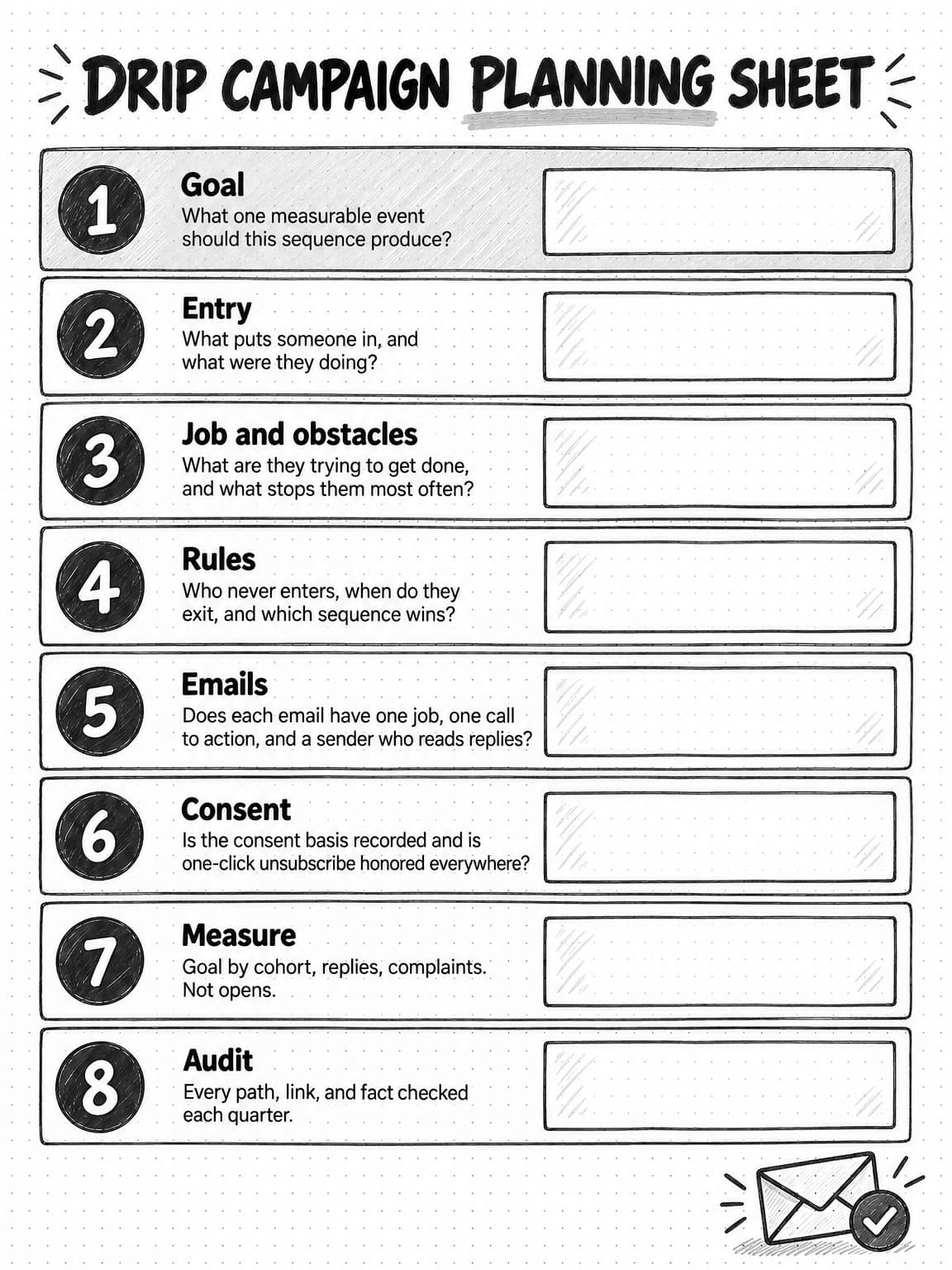
Open the full-size drip campaign planning sheet (opens in a new tab) to save or print it.
A copyable drip campaign planning template
Fill in one copy of this template per sequence before building anything in your sending platform. Keeping it in a shared document gives sales, support, and whoever audits the sequence later one place to read the rules.
SEQUENCE NAME:
OWNER:                          REVIEW DATE:

GOAL (one measurable event):
ENTRY TRIGGER:
WHO ENTERS AND WHAT THEY WERE DOING:
THE JOB THEY ARE TRYING TO GET DONE (in their words):

OBSTACLES, MOST COMMON FIRST:
1.
2.
3.

SUPPRESS (never enters):
EXIT WHEN (goal first):
PRIORITY vs. OTHER SEQUENCES / FREQUENCY CAP:

BRANCHES (only where the next email would be wrong for many people):
- Condition:          If yes ->          If no ->

EMAILS
#  | Send when (wait or event) | For whom (branch) | Job of this email | One CTA | Sender
1  |                           |                   |                   |         |
2  |                           |                   |                   |         |
3  |                           |                   |                   |         |

DATA EACH EMAIL USES (and fallback if missing):
HANDOFF TO SALES (threshold, route, follow-up time, return path):

CONSENT BASIS AND REGIONS:
UNSUBSCRIBE: one-click header + visible link, honored across all sequences

MEASUREMENT
Primary (goal rate by entry cohort):
Supporting (replies, CTA clicks):
Health (unsubscribes, complaints, bounces per email):
Comparison (holdout, previous version, or prior cohorts):

TEST PATHS WALKED WITH A TEST CONTACT (date, who):
CHANGE LOG:
Common drip campaign mistakes
Most failing sequences show at least one of these faults:
- Calendar instead of obstacles. "Day 3, day 7, day 14" is a schedule, not a plan.
- No exit on the goal. People who already did the thing keep being told to do it.
- One track for every lead. A single nurture for all interests and fits is wrong for most readers.
- Judging by opens. Privacy features inflate them; measure the goal, replies, and clicks on the one action.
- Merge tags posing as personal. A first name in a template is not personalization, and fake observations damage trust.
- Sequences that collide. A contact in three sequences and an open deal hears four voices in one week.
- Never auditing or pruning. Old sequences describe old products and prices, and mailing people who never engage raises complaints for your whole list.
Drafting drip sequences with AI, and what still needs a person
AI writing tools and AI agents are good at sequence work that follows a clear plan: drafting emails from a planning document, writing subject-line variants, adapting a sequence for another audience, and checking a draft against its stated job. Given the template above, a capable model can draft a five-email sequence with branches in minutes.
The quality of that draft depends almost entirely on the inputs. Asked to "write a SaaS onboarding sequence," a model produces the generic "Day 3: did you know?" emails this guide began with, because most onboarding emails on the internet look like that. Given the goal, the activation event, the obstacles, the product facts, the brand's voice, and the data each email can use, it gets much closer to the "after" example. Our guides to AI content creation and briefing an AI marketing agent cover how to give it that context.
Some work still needs a person.
The plan and the rules. Which sequences to build, the goal, who enters, who is suppressed, and when people go to sales are business decisions.
Facts and promises. A drafting model can state a feature you do not have, or a time estimate nobody measured, with complete confidence, and an automated email repeats it to every new user. Someone who knows the truth must check every claim. Our guide to preventing AI hallucinations in marketing covers how to review for this.
Human offers and consent. If an email offers a call or a reply from a named person, that person has to agree to it. Decisions about who you may email belong to people accountable for them.
Approval before anything goes live. Review every AI-drafted sequence against the plan and the facts, as you would a new colleague's draft, before building it in the sending platform. Our guide to human-in-the-loop AI covers how to place those review points.
Planning and drafting drip sequences with Ampere
Ampere is an AI marketing agent that can take on much of the research and drafting behind a lifecycle email program while your team keeps the plan, the review, and the sending. You describe the work in plain English; Ampere does it in its own session workspace and brings the results back for review.
Ampere can draft lifecycle email sequences, promotional emails, and newsletter editions. Because it works from your saved Brand memory, which can hold your products and offers, positioning, audience, competitors, and voice, a trial onboarding sequence and a post-webinar nurture track can start from the same understanding of who you sell to and how you sound. Give it a completed planning template, your activation event and setup steps, and source material such as help articles or a webinar transcript, and ask for a draft with each email's job, timing, branch, and call to action written out.
It can also research around a sequence, such as competitors' public positioning or what customers say in public reviews, and draft the content an email links to, such as a guide or a one-page summary for a buying group. For recurring work, a scheduled task can rerun a saved prompt on a cadence, such as a monthly draft of the content an expansion sequence features, and return the results to a Project for review.
Ampere does not send email to your customers or run sequences. Your email service provider or marketing automation platform holds your contacts, consent records, and rules, and that is where the sequence is built and runs. Your team reviews every draft, checks every fact and promise, and decides what goes live, because AI output can be inaccurate or incomplete.
Sources and further reading
- Federal Trade Commission, CAN-SPAM Act: A Compliance Guide for Business. Commercial email requirements, opt-out timing, and penalties.
- Regulation (EU) 2016/679, General Data Protection Regulation, EUR-Lex. Articles 7(3) and 21(2)–(3).
- Information Commissioner's Office, Electronic mail marketing, guide to PECR.
- Google Workspace Admin Help, Email sender guidelines. Bulk sender requirements.
- Google Workspace Admin Help, Email sender guidelines FAQ. Unsubscribe timing and enforcement dates.
- Yahoo Sender Hub, Sender best practices
- Microsoft Defender for Office 365 blog, Strengthening email ecosystem: Outlook's new requirements for high-volume senders, April 2, 2025, updated April 30, 2025.
- John Levine and Tobias Herkula, RFC 8058: Signaling One-Click Functionality for List Email Headers, IETF, January 2017.
- Apple Newsroom, Apple advances its privacy leadership with iOS 15, iPadOS 15, macOS Monterey, and watchOS 8, June 7, 2021.
- Apple, Protect email privacy in Mail on Mac, Mail User Guide.
Frequently Asked Questions
What is the difference between a drip campaign and a nurture campaign?
A drip campaign is a mechanism: a timed series of automated emails sent to each person who meets an entry condition. A nurture campaign is a goal: helping prospects who are not ready to buy move toward a decision. Most nurture campaigns use drip campaigns, but drip campaigns also serve trial onboarding, customer onboarding, and win-back.
How many emails should be in a drip campaign?
A drip campaign should have one email for each obstacle worth addressing between the reader and the sequence's goal, and no more. No research-backed number fits every company. As a rough guide, a welcome series is often two or three emails, trial onboarding four to six plus branches, and a nurture track five or six over several weeks.
How do you start a drip campaign?
Start a drip campaign by choosing one moment where many people stall, such as trial users who never activate. Write the goal as a measurable event, then the entry trigger, exits, and suppressions. List the obstacles people hit, give each one email with one job, add branches only where needed, and test every path with a test contact.
What is an example of a drip campaign?
A common example of a drip campaign is trial onboarding for a software product. The first email arrives at signup and asks for one setup step. People who complete it get the next step, people who do not get help with it, and anyone who reaches the activation event leaves the sequence. A final email explains what happens when the trial ends.
Why is it called a drip campaign?
A drip campaign is named for its pacing: messages are released a little at a time over days or weeks, like water from a drip, rather than all at once. Each person receives the series on their own timeline from the moment they enter, which separates a drip campaign from a broadcast sent to a whole list on one day.
What is the difference between a drip campaign and a newsletter?
A drip campaign sends emails written once to each person on their own schedule, starting when that person meets an entry condition, so two subscribers can be at different emails on the same day. A newsletter is written fresh for each edition and sent to the whole list at the same time. Many B2B companies run both.
What is the difference between a drip campaign and a triggered email campaign?
A triggered email is a single message sent because someone did something, such as skipping a setup step. A traditional drip campaign is a series sent on a fixed timetable. Most modern drip campaigns combine them: a time-based sequence for people who do nothing, with triggered branches that change the next email for people who act.
What is an example of lifecycle email marketing?
An example of lifecycle email marketing is a software company running a welcome series for subscribers, trial onboarding for trial users, nurture for webinar attendees, adoption emails for customers, and win-back for lapsed accounts. Each is a separate sequence with its own goal, triggers, and exits, planned around one stage of the customer relationship.
What is lead nurturing in email marketing?
Lead nurturing in email marketing is a sequence of emails that helps prospects who are not ready to talk to sales understand their problem and options well enough to decide. Good nurture splits leads by interest and fit, offers an easy way to raise a hand, and sends sales-ready contacts to a person instead of more automated email.
What are drip campaign best practices?
The most useful drip campaign best practices are to plan around the reader's obstacles rather than a calendar, give each email one job, exit people when they reach the goal, personalize with what the person did, send from someone who reads replies, support one-click unsubscribe, measure outcomes instead of opens, and audit live sequences every quarter.