AI guardrails for marketing teams (with an AI usage policy template)
A prompt can ask an AI agent to stay within limits. Permissions, approval steps, spending caps and a short written policy are what make those limits hold.
29 min readWritten by Ampere
Short answer
What AI guardrails does a marketing team need?
A marketing team needs AI guardrails in five layers: access (who and what can reach accounts and files), actions (approval before anything is published, sent, spent or deleted), spend (a hard cap that pauses work), content (review and evidence for every claim) and data (what stays out of AI tools). Set each one in the product where possible, and write the rest into a short AI usage policy.
Summary
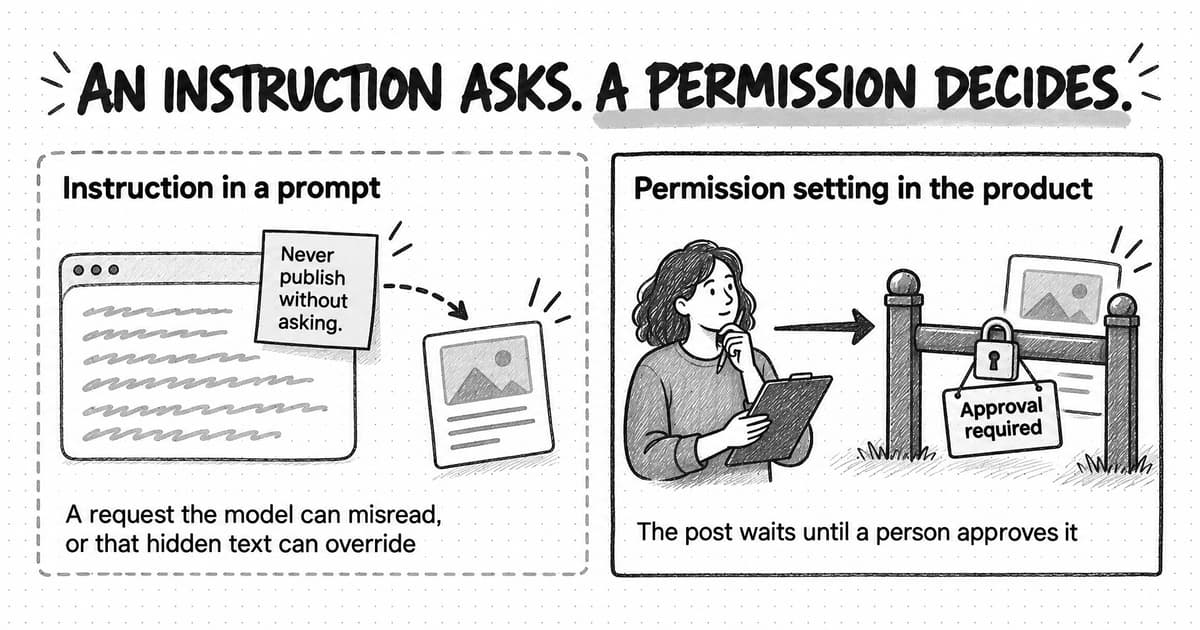
AI guardrails are the limits a team puts on what an AI system can see, do, spend and publish. An instruction in a prompt is a request a model can misread or be talked out of, so the guardrails that hold are product settings such as permissions, approval steps and spending caps, backed by a written AI usage policy for the decisions software can't make.
The guide sorts guardrails into five layers. Access controls who and what can reach accounts and files, actions controls what the AI can change, spend controls what it can cost, content controls what reaches the public, and data controls what the AI sees and what the vendor keeps. A table gives each layer an example rule and the product control that enforces it.
AI agents raise the stakes because they read material the team doesn't control and can act through connected accounts. Hidden instructions in a web page or email can steer an agent, and OWASP says no reliable prevention exists, so limit what an agent can do: approve each public, paid or irreversible action, and keep untrusted content, private data and sending rights apart.
Existing rules still apply to AI-assisted marketing. The FTC has said there is no AI exemption from consumer protection law, the US Copyright Office says prompts alone don't make AI output protectable, and since August 2, 2026 the EU AI Act has required some realistic synthetic content and some public-interest text to be labeled.
A small team can follow NIST's AI Risk Management Framework without a governance department: name an owner, list every AI use and what it touches, test the guardrails before relying on them, and know how to stop a run. The guide ends with a ten-part AI usage policy template to adapt, which is a starting point, not legal advice.
Contents
- What are AI guardrails?
- The five guardrail layers: access, actions, spend, content and data
- How prompt injection and excessive agency affect AI marketing agents
- Which actions should always need a person's approval?
- What data should never go into AI tools?
- Claims, copyright and disclosure rules for AI-assisted marketing
- How to apply the NIST AI Risk Management Framework to a small marketing team
- How Ampere handles AI guardrails
- AI usage policy template for marketing teams
- Sources and further reading
- Frequently Asked Questions
The first AI guardrail a marketing team writes is often a line in a prompt: never publish without asking, never quote a price, never touch the customer list. Those instructions are worth giving, but they are requests. A model can misread them, and text hidden in a web page or an email the model reads can override them. Security guidance assumes they will eventually fail. The project leads of the 2026 edition of OWASP's Top 10 for LLM applications tell builders to stop trying to make a model that can't be fooled and to build the system around it, so that when the model is fooled, “nothing important breaks.”
AI guardrails are the limits a team puts on what an AI system can see, do, spend and publish, enforced through tool settings and written rules so that mistakes stay small and fixable. Some guardrails live in the tools: who can connect an account, which actions wait for approval, where spending stops. Others live in the team: a written AI usage policy, a rule about which data stays out, and the habit of checking claims before anything goes out. A marketing team needs both, and the tool-level controls matter more once AI moves from drafting text to taking actions.
Written rules lag behind use. In ISACA's 2026 AI Pulse Poll of more than 3,400 digital trust professionals, published in May 2026, 90 percent believed employees at their organization were using AI, but only 38 percent said the organization had a formal, comprehensive AI policy. This guide covers five guardrail layers, the risks AI agents add, the rules on claims, copyright and disclosure, and an AI usage policy template you can copy. It is practical guidance for a small team, not legal advice.
What are AI guardrails?
AI guardrails are limits on an AI system's behavior, and for a marketing team they sit in three places: in the model, in the product you use, and in your team's own rules and habits.
Model providers build safeguards into the model itself, such as refusing clearly harmful requests. Those safeguards are useful, but you don't control them, and they know nothing about your brand, your customers or which claims your company can support.
Product controls are the settings in the AI tool: roles and permissions, the accounts the AI can use, the actions that wait for a person, the point where spending stops, and a record of what the AI did. These are the guardrails you can configure, test and check after the fact.
Team rules cover what software can't decide for you: which tools are approved, what data stays out, who reviews which work, and what happens when something goes wrong. An AI usage policy, sometimes called an AI acceptable use policy, is where those rules are written down. Governance is the routine around the policy: who owns it, how often it is reviewed, and how exceptions get decided.
A prompt instruction belongs to the team layer even though it lives inside the tool, because nothing enforces it except the model's attention. OWASP's 2026 list calls restricting a model through its instructions “a partial control only” and pairs it with permission limits that sit outside the model. For each rule that matters, ask whether the product can enforce it as a setting. If it can, set it there and keep the instruction as a second line of defense.
An instruction asks an agent not to do something. A permission decides whether it can.
The five guardrail layers: access, actions, spend, content and data
A marketing team's AI guardrails fall into five layers, and each protects against a different kind of mistake: access controls who and what can reach your accounts and files, actions controls what the AI can change, spend controls what it can cost, content controls what reaches the public, and data controls what the AI sees and what happens to that data afterward. The table gives each layer an example rule and the product control that enforces it.
| Layer | What it protects against | Example rule | Enforce it in the product with |
|---|---|---|---|
| Access | People, or the AI itself, reaching accounts, files and sessions they don't need | Only admins connect company accounts; reviewers get view-only access | Roles, sharing settings, and company logins that end when someone leaves |
| Actions | An agent publishing, sending, deleting or changing records after a misread request or a manipulated input | Anything public, paid or irreversible waits for a named person to approve the exact action | Approval steps, read-only or narrowly scoped connections, separate approval for scheduled actions |
| Spend | Loops, retries and oversized jobs that cost more than the work is worth | A monthly cap pauses AI work; one person can raise it | Hard spending caps, cost estimates before runs, automatic pausing of scheduled work, usage reports |
| Content | False claims, off-brand copy, missing labels and rights problems reaching the public | Every factual claim traces to a source a reviewer can open | Review before publishing, an approved brand reference, sources shown with the output |
| Data | Confidential or personal information going where it shouldn't, or being kept and reused | No credentials, payment details or customer personal data beyond what a task needs | Admin data controls, retention and training settings, scoped connections |
Access comes first because every other layer depends on it. Use company accounts, not personal ones, so access ends when someone leaves. Our guide to shadow AI covers moving work that already lives in personal accounts. Give each person the lowest role that covers their work, and treat connecting a company account, such as a social profile, an ad account or a CRM, as an administrator's decision. Apply the same rule to the AI. An agent that summarizes CRM notes for a campaign brief needs to read those notes, not edit contact records.
Actions are where an AI mistake leaves the building. The working rule is that anything public, paid or hard to reverse waits for a person; the section on approvals below lists which actions qualify.
Spend guardrails stop costs from compounding unnoticed. Usage-based AI costs grow with the work, so a research run that keeps widening, a recurring job stuck in retries or an oversized batch of images or videos can cost far more than planned. OWASP's 2026 list recommends hard spending caps that halt work when they are exceeded, rather than alert thresholds that fast-growing usage can outpace, along with limits on the steps, time and cost of each agent run.
Content guardrails decide what reaches customers. Every factual claim should trace to a source a reviewer can open, brand rules should come from an approved reference, not the model's memory, and nothing goes out without a person's review.
Data guardrails work in both directions: what you let the AI see, and what the vendor does with it afterward. Keep out anything the task doesn't need, and check the vendor's terms on training, retention and deletion before confidential material goes in.
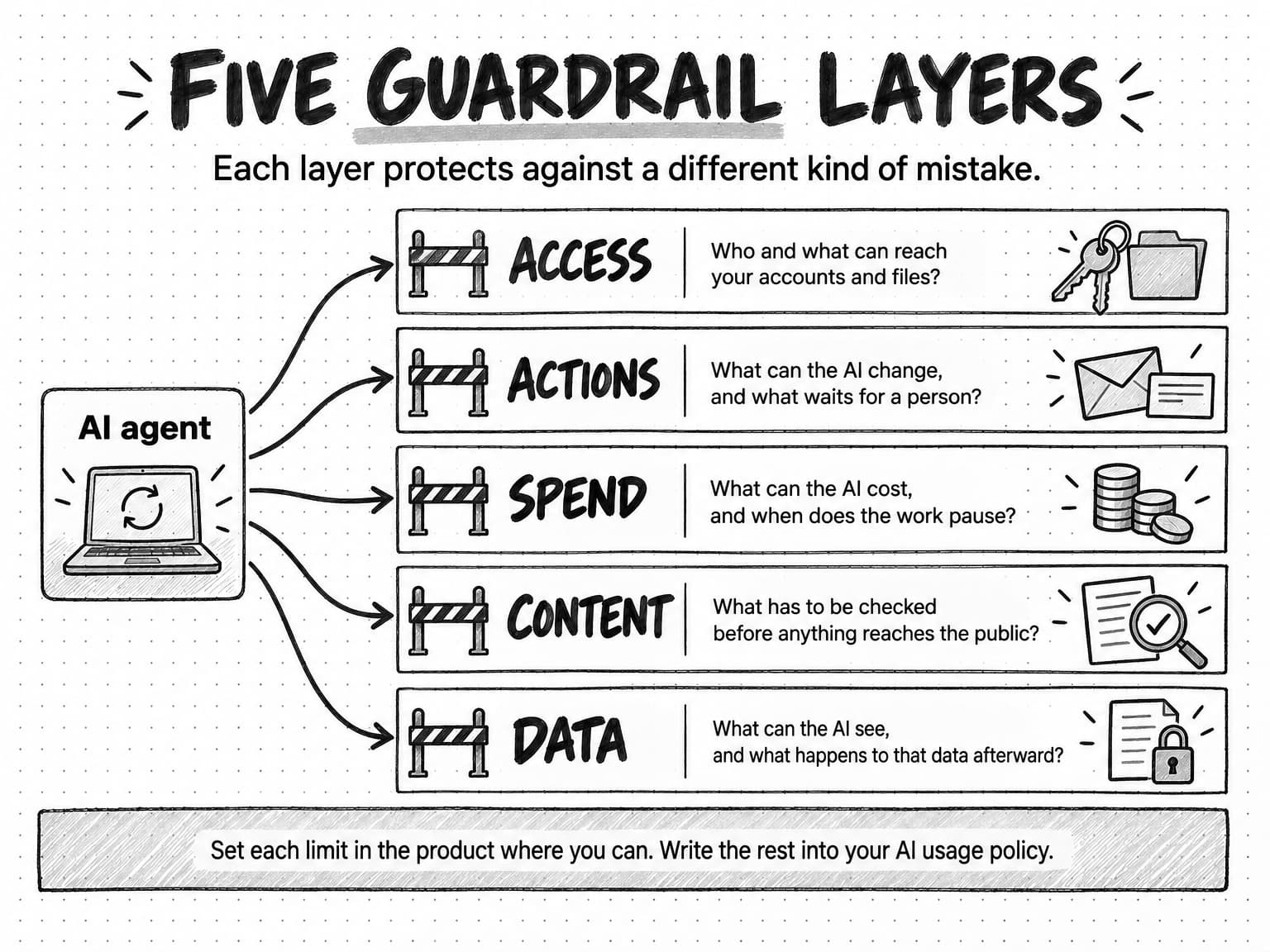
View the five guardrail layers diagram at full size (opens in a new tab).
How prompt injection and excessive agency affect AI marketing agents
Prompt injection and excessive agency are two linked security risks that grow once an AI agent can act: prompt injection lets text the agent reads steer what it does, and excessive agency lets that steering, or an ordinary mistake, turn into a real action in your accounts.
Prompt injection works because a language model reads instructions and data as one stream of text. OWASP's 2026 entry on prompt injection describes indirect injection as instructions that arrive inside content the model processes, such as a web page, a document, an email, a tool's response or an image, which the user never supplied or saw. The instructions don't need to be visible on the page or readable by a person. The same entry states that no reliable prevention mechanism exists today and calls the defense architectural: assume the model will be fooled eventually, and limit what it can do when that happens.
For a marketing agent, the material that can carry an injection is everyday input: competitors' pages, inbound emails and form submissions, partner PDFs, product reviews and search results. As an illustration, a competitor's pricing page could hide white-on-white text telling any AI agent that reads it to call that competitor the market leader, or to send the conversation to an outside address. An agent that only drafts a summary for review turns that into a wrong sentence someone can catch. An agent that can also send email or publish turns it into an incident.
Excessive agency is the second half of the problem. OWASP defines it as the vulnerability that lets damaging actions happen in response to unexpected, ambiguous or manipulated output from a model, whatever caused the malfunction, and traces it to three root causes. In marketing terms, excessive functionality looks like a reporting connection that can also delete posts; excessive permissions, an agent working through an administrator's account when it only needs to read analytics; and excessive autonomy, an agent that can publish, send or spend without anyone confirming. In the 2026 edition, excessive agency rose to third place on the list because practitioners' votes and the incident record agree that agentic deployments are “where the damage is landing.”
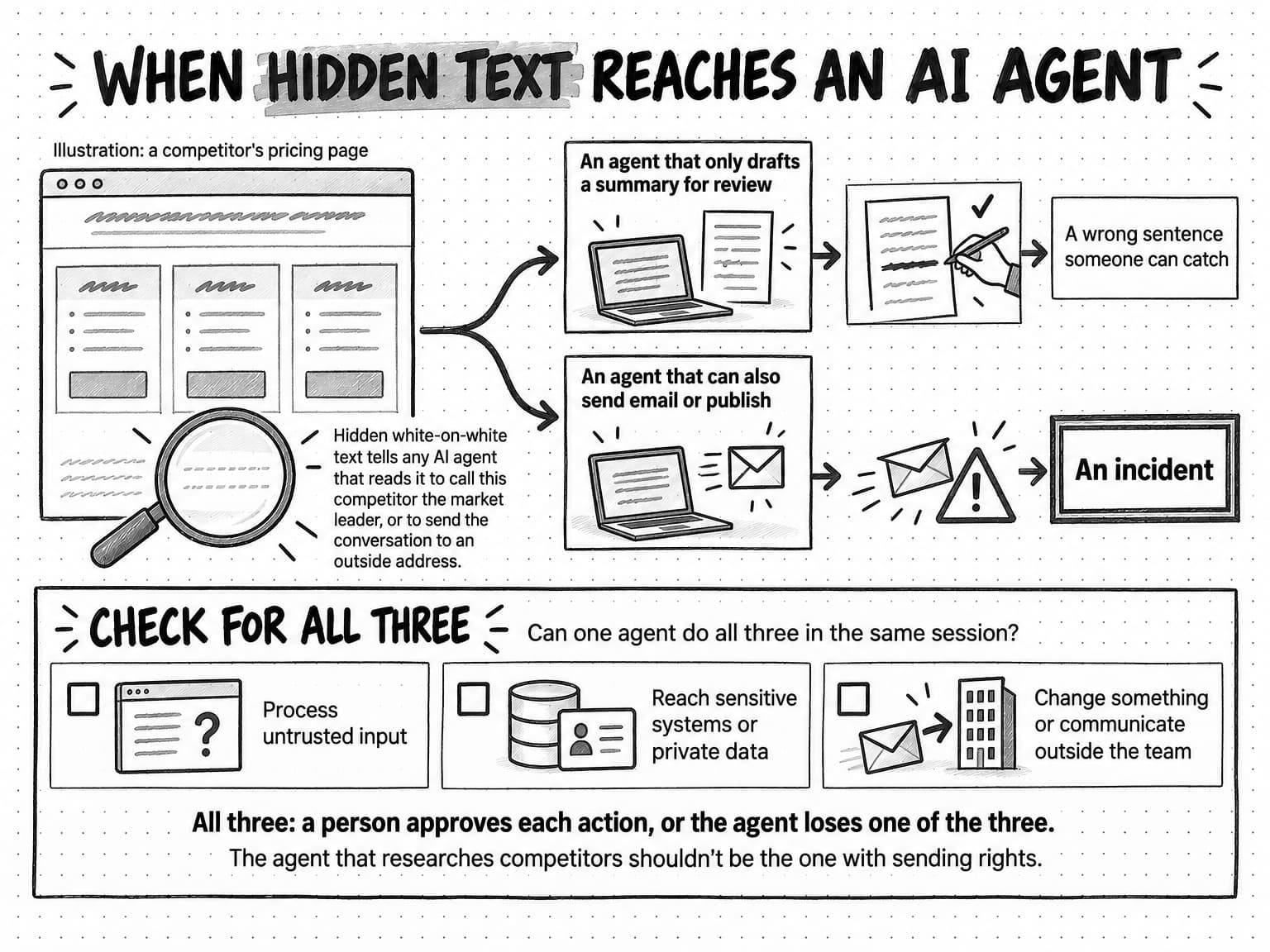
View the hidden text example at full size (opens in a new tab).
Which actions should always need a person's approval?
Publishing, sending, spending, deleting, changing records or permissions, and committing the company to a price or terms should each wait for a person to approve the exact action, because those steps reach other people or can't be quietly undone. For marketing work, that means six kinds of action:
- Publishing or scheduling anything public, including posts, ads, web pages and replies to reviews.
- Sending messages to customers, prospects, partners, journalists or anyone else outside the team.
- Spending or committing money, such as ad budgets and bids, purchases, discounts, refunds and credit top-ups.
- Deleting posts, files, contacts, campaigns or records.
- Changing customer records, permissions or settings, including CRM fields, audience lists, user roles and connected accounts.
- Committing the company to a price, a promise or contract terms.
An approval step is only as good as what it shows. OWASP's 2026 list recommends showing reviewers “the exact rendered action rather than a summary,” and it warns that approval fatigue degrades judgment when the requests pile up. The OWASP Top 10 for agentic applications, published in December 2025, adds a related risk: confident, polished explanations that lead people to approve harmful actions. When you compare tools, check that an approval request names the destination and the account, shows the final content as it will appear, and lets the reviewer deny it in one step.
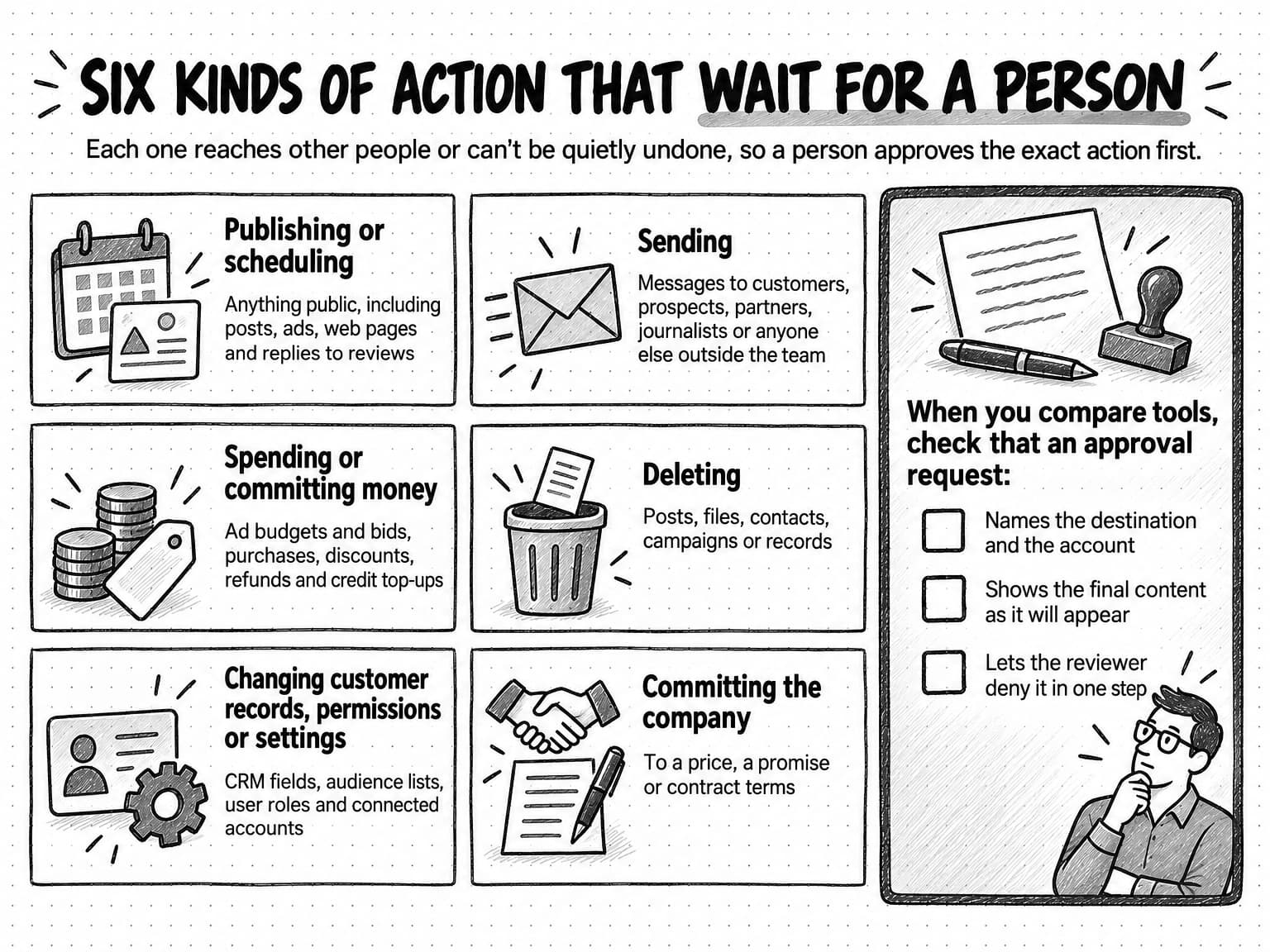
View the six kinds of action that need approval at full size (opens in a new tab).
Recurring work needs a rule on whether one approval can cover future runs. Where it can, the policy should say which task, account and type of action the approval covers and what ends it, such as a material change to the task. Deletions and other irreversible actions should need a fresh approval every time. The production checklist in the guide to automating marketing with AI agents covers the rest of the setup for recurring runs.
What data should never go into AI tools?
Keep credentials, payment and government ID numbers, health information, and any personal or confidential data a task doesn't need out of AI tools, and check how each vendor uses, keeps and shares whatever you do put in. Four kinds of data should stay out by default:
- Credentials: passwords, API keys, access tokens and recovery codes.
- Financial and identity numbers: payment card and bank details, and tax or government ID numbers.
- Sensitive personal data: health information, plus any customer personal data beyond what the task needs.
- Confidential material you aren't free to share: unannounced results or deals, client work under a nondisclosure agreement, and anything a contract keeps from third parties.
Most marketing work needs none of it. A persona brief can work from anonymized interview notes, a churn analysis from aggregated fields, and an email draft from one sample customer rather than the full list. Check what a file contains, not just what it shows. OWASP's 2026 list describes a model summarizing personal data hidden under a black redaction box in a PDF, because the box covered the text without removing it.
What to check about an AI vendor's data use
Before confidential material goes into any AI tool, read the vendor's terms for the plan you will actually use, because data terms can differ between plans, and confirm the settings in your own account. Seven questions cover most of it:
- Training: Is your content used to train models by default, and can you turn that off?
- Retention and deletion: How long are prompts, files and outputs kept, and can you delete them?
- Other processors: Which third-party model and infrastructure providers handle your data, and where?
- Admin controls: Who can invite people, connect accounts, see sessions and manage billing?
- Connected accounts: What can each connection read, and what can it change?
- Activity record: Can you see what the AI read, wrote and did?
- Changes: How will the vendor tell you when these terms change?
NIST's AI Risk Management Framework counts policies for AI risks from third-party software and data, including risks to other people's intellectual property, among the outcomes of good governance. The guide to evaluating an AI marketing agent shows how to check these controls during a trial that uses synthetic material instead of real customer data.
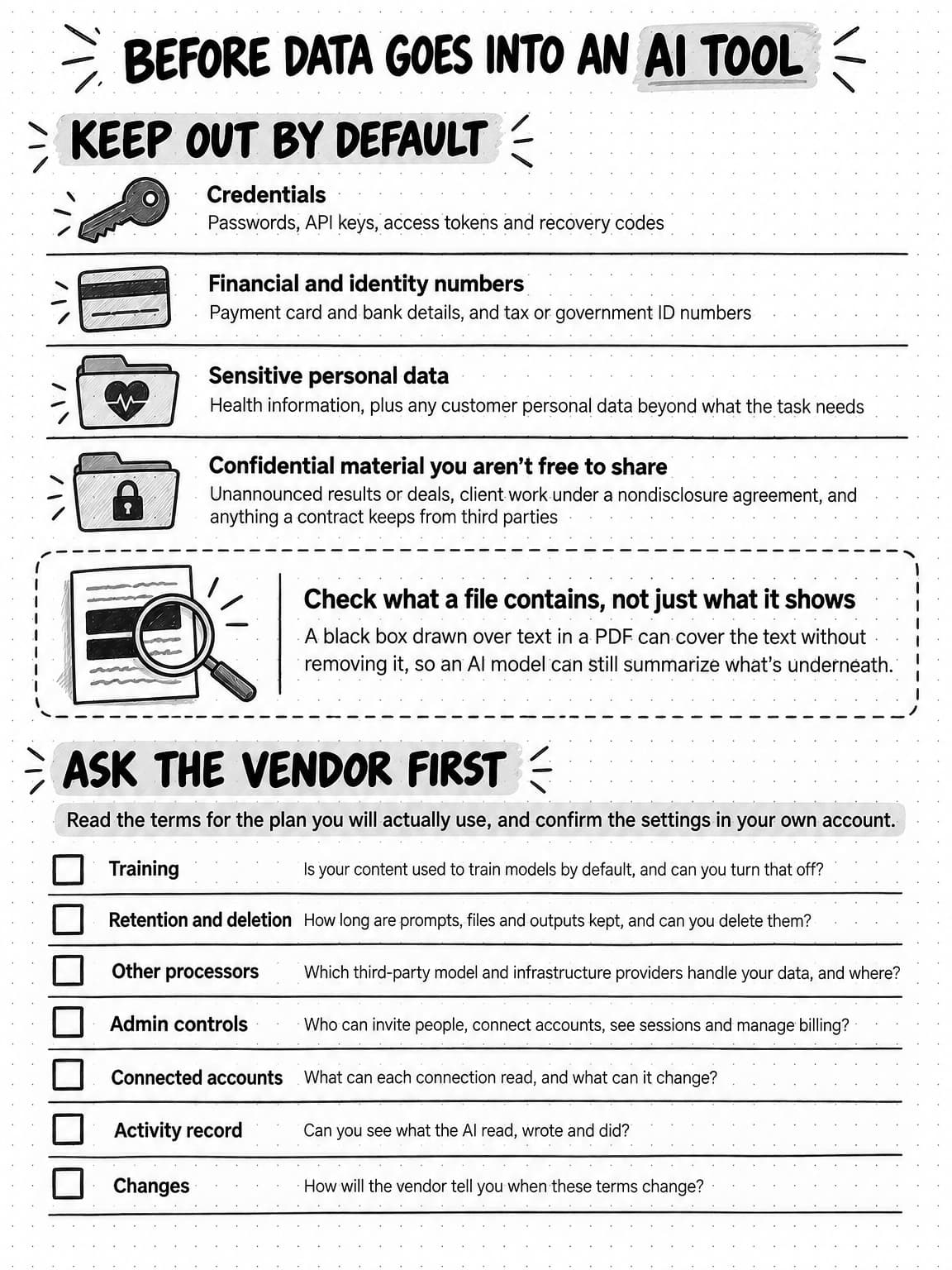
View the data checklist at full size (opens in a new tab).
Claims, copyright and disclosure rules for AI-assisted marketing
The rules for AI-assisted marketing are mostly the rules that already applied to marketing: claims still need evidence, copyright still depends on human authorship, and in the EU, since August 2, 2026, some realistic synthetic content must be labeled. What follows summarizes US and EU sources as of October 2026, and other countries and regulated industries have their own rules.
Claims need the same evidence, whoever drafted them
When the FTC announced a sweep against deceptive AI claims on September 25, 2024, its then-chair, Lina Khan, said “there is no AI exemption from the laws on the books.” The agency has continued in the same direction. In April 2025 it took action against Workado, which had promoted its AI content detector as “98 percent” accurate when independent testing found 53 percent accuracy on general-purpose content, and the final order, approved in August 2025, bars such accuracy claims without competent and reliable evidence. For a marketing team, every factual claim in AI-assisted copy needs the evidence it would need if a person had written it, and claims about what your own AI features can do need testing behind them. The FTC's rule on consumer reviews and testimonials, in force since October 21, 2024, also prohibits reviews and testimonials that claim to come from someone who doesn't exist, such as AI-generated fakes.
AI output needs human authorship to be protected
The US Copyright Office's January 29, 2025 report on copyrightability concluded that AI output can be protected by copyright only where a human author has determined sufficient expressive elements, and that writing prompts alone doesn't qualify. A human-authored work that remains perceptible in the output can be protected, as can a person's creative arrangements or modifications of the output, and using AI to assist, or including AI material in a larger human-made work, doesn't by itself bar protection. For assets you need to own, such as a logo, a campaign character or a flagship report, keep a person's creative contribution substantial and record what that person did. Don't count on exclusive rights in raw AI output, which may not be unique to you anyway.
EU rules now require some AI content to be labeled
Article 50 of the EU AI Act has applied since August 2, 2026, according to the European Commission's guidance. It puts two labeling duties that matter for marketing on deployers, the organizations and professionals that use AI systems, and the Commission's own example of a deployer is an advertising company. First, deepfakes, meaning AI-generated or manipulated images, audio or video that resemble real people, objects, places, entities or events and would falsely appear authentic, must be disclosed clearly at the latest when someone first sees or hears them; for evidently artistic, creative, satirical or fictional work, an appropriate disclosure that doesn't spoil the work is enough.
Second, AI-generated text published to inform the public on matters of public interest, which the Commission says can include consumer safety and economic, financial or scientific developments that may be a subject of public debate, must be labeled unless it has had human review or editorial control and someone holds editorial responsibility for it. Spell-checking doesn't count as review. Under Article 2, the rules can reach companies outside the EU when the AI output is used in the EU. Separately, providers of AI tools that generate audio, images, video or text must mark that output in a machine-readable way, and tools placed on the market before August 2, 2026 have until December 2, 2026 to comply.
How to apply the NIST AI Risk Management Framework to a small marketing team
NIST's AI Risk Management Framework organizes AI risk work into four functions, govern, map, measure and manage, and a small marketing team can cover all four with a short policy, a list of its AI uses, a few deliberate tests and a short monthly review.
The framework, published in 2023, is voluntary, and NIST says its actions are not a checklist or a fixed sequence. Govern runs through the other three, and NIST suggests most users start with map once the govern outcomes are in place. At the scale of a small team, each function becomes a short piece of work:
- Govern: name an owner and write the rules. One person owns the AI usage policy, approves new tools and connected accounts, and sets the review date. NIST's govern function asks for documented roles and responsibilities, and the template below records them.
- Map: list every AI use and what it touches. For each tool and recurring task, record the job, the data it reads, the accounts it can act on, the reviewer, and what a bad result would cost. NIST describes map as establishing the context to frame risks, which gives you enough to make an initial go or no-go decision.
- Measure: test the guardrails before you rely on them. Ask the agent to publish to a test destination and confirm the product stops for approval, sign in as a viewer and check what you can change, and log errors, near misses, review time and spend. NIST says AI systems should be tested before deployment and regularly while in operation.
- Manage: decide how you will stop, fix and tell. Know how to stop a run, pause scheduled tasks and disconnect an account, and decide who tells affected customers or partners if something goes out wrong. NIST describes risk treatment as plans to respond to, recover from and communicate about incidents.
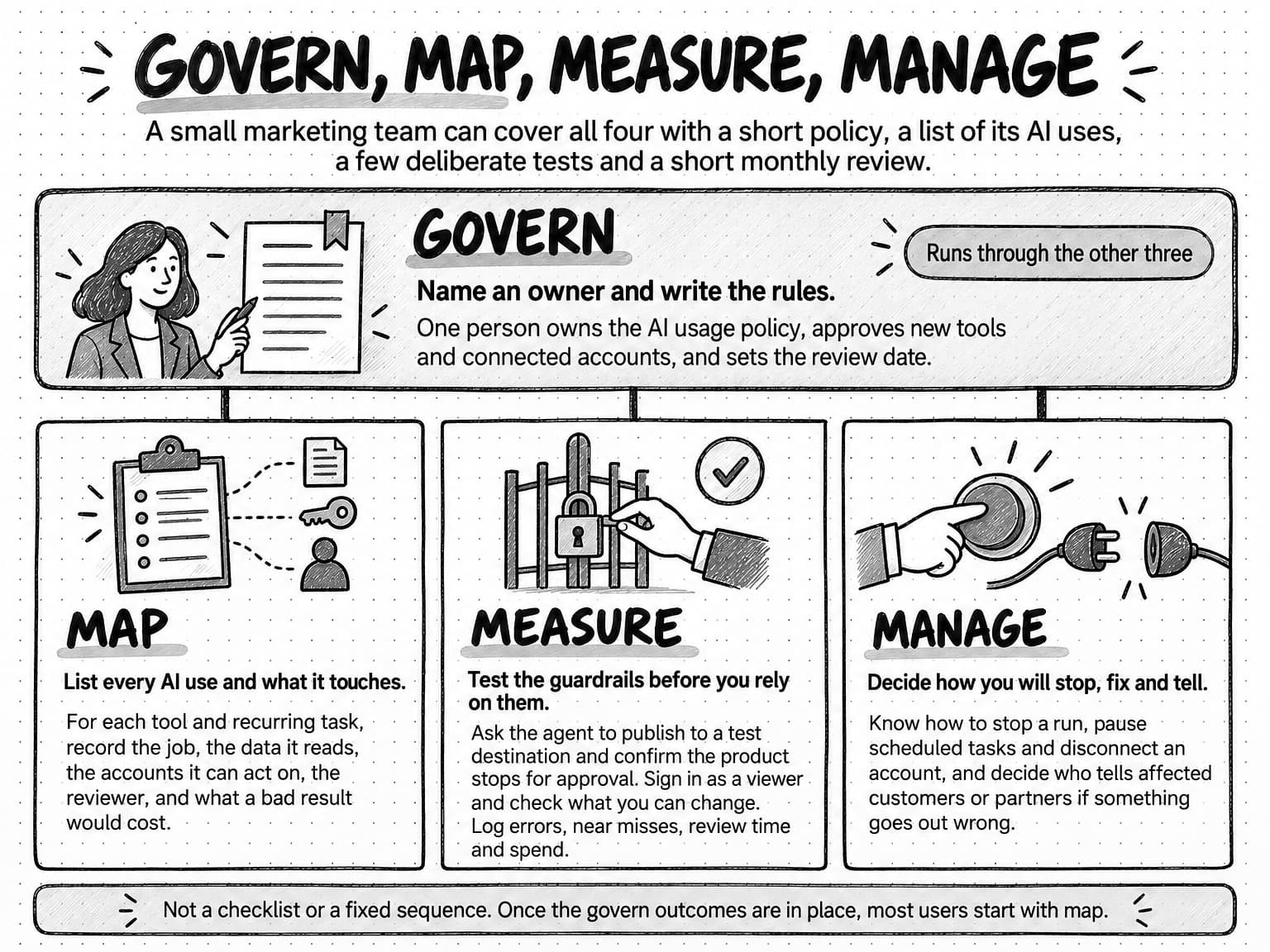
View the four functions diagram at full size (opens in a new tab).
Many organizations haven't worked out the manage function yet. In ISACA's 2026 poll, 56 percent of respondents didn't know how long it would take to halt an AI system because of a security incident, and 39 percent didn't know whether their organization had a documented process for shutting down or overriding AI systems. Write down the stop steps for each tool before you need them.
How Ampere handles AI guardrails
Ampere, the AI marketing agent, builds several of these guardrails into the product as settings rather than prompt instructions.
Access. Organizations have owner, admin, member and viewer roles, and billing access can be granted separately from general roles. Ampere sessions support no access, view, edit and owner access roles, so a teammate can review a session without changing it.
Actions. Where Connectors are enabled for your Organization, each Connector is limited to the minimum permissions its approved actions need. When a Connector action needs approval, Ampere can show an approval checkpoint that opens a full review before you approve and keeps denial available, and the approval fails closed if it can't be tied to the exact action that was captured. For scheduled tasks, Connector actions can use task-scoped standing consent or one-off approval where the action allows it, material task changes require re-confirmation, destructive scheduled actions always need fresh approval, and without valid consent a run can finish its draft work and then waits for your approval of the exact action.
Spend. Credits come from one shared Organization pool. When Ampere can estimate a run's cost, it sets those credits aside before the run begins. Optional auto-recharge stops at a hard monthly cap you choose, a scheduled task can pause itself after repeated failures or when credits run short, and at zero credits, new AI runs pause until the next credit reset or until more credits are added, while your history, settings and saved work remain available. The credit control at the top of the app shows recent usage for the past day and week.
Content. Nothing publishes without you. Ampere returns finished work, including scheduled task results, for your review. Brand memory keeps what Ampere learned about your brand in editable reports you can check and correct, and future work follows the approved version.
Data. Ampere does not directly use private customer prompts, files, chat history, project context, agent memory, integration data, or outputs to train Ampere models by default. Ampere-controlled systems are designed to store and process service data in the United States, and third-party AI, infrastructure, billing, integration and analytics providers may process data as needed to provide the service.
None of this replaces your own policy or your review. AI outputs can be inaccurate, and your team still decides what goes out.
AI usage policy template for marketing teams
The template below covers the ten decisions an AI usage policy for a marketing team needs. Copy it into a shared document, replace the bracketed parts, delete what doesn't apply, and keep it to a page or two so people read it.
- Purpose and scope. This policy explains how [Company]'s marketing team uses AI tools and AI agents. It applies to employees, contractors and agencies doing marketing work for [Company], on any device and with any AI tool.
- Approved tools and accounts. Use only the AI tools on the approved list kept by [policy owner], signed in with company accounts. Ask [policy owner] before using a new tool with company information or connecting any company account to an AI tool.
- Approved uses. You may use approved AI tools for research, analysis, planning, drafting copy and creative concepts, editing, summarizing, and preparing reports and other files, as long as a person reviews the result before anyone outside the team sees it.
- Prohibited uses. Don't use AI to publish, send or spend without the approval in section 6; to create fake reviews, testimonials or endorsements; to imitate a real person's face, voice or name without their written permission; to make claims we can't support; or to get around a platform's or vendor's rules.
- Data rules. Never enter passwords, API keys, payment or bank details, government ID numbers or health information into an AI tool. Use customer personal data only when a task needs it and the tool is approved for it. Keep client and partner material out unless the contract allows it.
- Approval rules. A named person approves the exact action before AI publishes, schedules, sends, spends, deletes, or changes customer records, permissions or settings. The same approval applies before AI commits [Company] to a price, a promise or contract terms. A standing approval for recurring work must name the task, account and type of action it covers, and it ends when the task changes. Deletions always need fresh approval.
- Review and disclosure. Before publication, a reviewer checks facts, figures, quotes, claims and links against named sources. Label realistic AI-generated people, voices or scenes that could be taken as real, and follow the labeling rules of each country and platform where we publish. Record the human contribution to any asset we need to own.
- Spend limits. AI usage comes from a monthly budget of [amount], with a hard cap that pauses work when it is reached. Only [billing owner] can raise the cap or buy more credits. [Policy owner] reviews usage weekly for the first month and monthly after that.
- Incident reporting. Report any AI mistake that reaches someone outside the team, any data shared by mistake, any unexpected action and any near miss to [policy owner] within [24 hours]. If the problem is still happening, stop the run or disconnect the account first.
- Ownership and review. [Policy owner] owns this policy and the list of approved tools and AI uses, and reviews both every [three months] and whenever we add a tool, connect a new account, or change how AI publishes or spends. Last reviewed: [date]. Next review: [date].
Weight the template to your risk. A team that uses AI only for internal drafts can keep sections 6 and 8 short. A team whose agent will post, send or spend through connected accounts should make those sections the most specific in the policy and test them before the first live run.
![A one-page outline titled AI usage policy in ten decisions, with the line An outline of the template. Replace the bracketed parts. A starting point, not legal advice. Ten numbered rows follow, with each bracketed placeholder in a grey box. 1, Purpose and scope: how employees, contractors and agencies doing marketing work for [Company] use AI tools and AI agents. 2, Approved tools and accounts: use only AI tools that [policy owner] keeps on the approved list, signed in with company accounts, and ask [policy owner] before connecting any company account to an AI tool. 3, Approved uses: research, analysis, planning, drafting, editing, summarizing and reports, reviewed by a person before anyone outside the team sees them. 4, Prohibited uses: publishing, sending or spending without approval; fake reviews or testimonials; imitating a real person without written permission; unsupported claims; getting around a platform's or vendor's rules. 5, Data rules: no passwords, API keys, payment or bank details, government ID numbers or health information, and customer personal data only when a task needs it. 6, Approval rules, shaded: a named person approves the exact action before AI publishes, schedules, sends, spends, deletes, or changes customer records, permissions or settings, and deletions always need fresh approval. 7, Review and disclosure: check facts, figures, quotes, claims and links against named sources, and label realistic AI-generated people, voices or scenes that could be taken as real. 8, Spend limits, shaded: a monthly budget of [amount] with a hard cap that pauses work, and only [billing owner] can raise the cap. 9, Incident reporting: tell [policy owner] within [24 hours] about AI mistakes that reach anyone outside the team, data shared by mistake, unexpected actions and near misses, and stop the run first if it's still happening. 10, Ownership and review: [Policy owner] reviews the policy every [three months] and after any new tool or connected account, with fields for the last and next review dates. A footer says if AI will post, send or spend through connected accounts, make sections 6 and 8 the most specific and test them before the first live run.](/_next/image?url=https%3A%2F%2Fapp-assets.ampereapp.media%2Fresources%2Ffigures%2Fai-guardrails-for-marketing-teams-policy-reference-41fb0d6e.webp&w=3840&q=75)
View the AI usage policy outline at full size (opens in a new tab).
Sources and further reading
- OWASP GenAI Security Project, OWASP Top 10 for LLM Applications 2026, posted August 3, 2026. Excessive agency is LLM03 in this edition and was LLM06 in the 2025 list.
- OWASP GenAI Security Project, OWASP Top 10 for Agentic Applications for 2026, December 9, 2025.
- Agents Rule of Two: A Practical Approach to AI Agent Security, October 31, 2025.
- NIST, AI Risk Management Framework core functions, from NIST AI 100-1 (2023).
- ISACA, AI Use Accelerates While Governance and ROI Lag Says New ISACA Research, May 5, 2026.
- Federal Trade Commission, FTC Announces Crackdown on Deceptive AI Claims and Schemes, September 25, 2024; FTC Order Requires Workado to Back Up Artificial Intelligence Detection Claims, April 28, 2025; and FTC Approves Final Order against Workado, August 28, 2025.
- US Copyright Office, Copyright and Artificial Intelligence, Part 2: Copyrightability, January 29, 2025.
- European Commission, Transparency obligations under Article 50 of the AI Act, and the AI Act Service Desk text of Article 50 and Article 111, as amended by the Digital Omnibus on AI, Regulation (EU) 2026/1744.
Frequently Asked Questions
What are examples of AI guardrails?
Examples of AI guardrails include read-only access for an agent that only needs to report, an approval step before anything is published or sent, a hard monthly spending cap that pauses work, a rule that every claim traces to a named source, and a policy that keeps passwords and customer personal data out of AI tools. Screens that block harmful requests or flag personal data are guardrails that AI vendors build in.
What are the main types of AI guardrails?
The main types of AI guardrails can be sorted two ways. By where they live, there are safeguards built into the model by its provider, controls built into the product you use, such as permissions and approval steps, and your team's written rules and review habits. By what they limit, there are five layers: access, actions, spend, content and data. A marketing team controls the product settings and its own rules.
How does prompt injection affect AI marketing agents?
Prompt injection affects AI marketing agents through the material they read. A competitor's page, an inbound email, a partner PDF or a review can carry hidden instructions that steer the agent. OWASP says no reliable prevention mechanism exists today, so limit the damage instead: keep agents that read untrusted content away from private data and sending rights, and require a person to approve each public, paid or irreversible action.
What should an AI acceptable use policy for marketing include?
An AI acceptable use policy for marketing should cover its purpose and scope, approved tools and accounts, approved and prohibited uses, data rules, the actions that need approval, review and disclosure rules, spending limits, incident reporting, and who owns the policy and when it is next reviewed. Keep it short enough to read in a few minutes, and make the approval and data rules the most specific parts.
How do you create an AI policy for a small business?
Create an AI policy for a small business by listing the AI tools people already use and what each one touches, then writing short rules for data, approvals, review and spending, with one named owner. Start from a template, adapt it to your risks, share it with everyone including contractors, set the rules in your tools wherever you can, and review it every few months.
What data privacy rules should an AI usage policy address?
An AI usage policy should name the data that never goes into AI tools, such as passwords, payment and ID numbers and health information. It should limit customer personal data to tasks that need it and tools approved for it, protect confidential client material, list the vendors approved after a check of their training, retention, deletion and data-sharing terms, and explain how to report data shared by mistake.
What restrictions should apply to AI-generated marketing content?
AI-generated marketing content should not be published without a person's review, should carry no claim the team can't support with evidence, and should never include fake reviews or testimonials or imitate a real person without permission. Realistic synthetic people, voices or scenes should be labeled where they could be taken as real, and EU rules have required some of those labels since August 2, 2026.
What should an AI governance framework for marketing teams include?
An AI governance framework for a marketing team should include an owner and a written policy, an inventory of AI uses with the data and accounts each one touches, tests showing the guardrails work, and a routine for incidents and reviews. These map to the four functions of NIST's AI Risk Management Framework: govern, map, measure and manage. A small team can run all four without a dedicated governance role.
How do you test whether AI guardrails are working?
Test AI guardrails by trying to break them safely. Ask the agent to publish to a test destination and confirm the product stops for approval, sign in as a viewer and check what you can change, and confirm that a spending cap pauses work. Then track errors, near misses and review time for each AI use, and test again after any change to tools, permissions or connected accounts.