How to build an AI marketing stack (without paying twice for the same job)
A stack map by marketing job with keep, consolidate, or cut calls, a stack audit worksheet to copy, a buying order for lean teams, and a cost model that counts the time behind every subscription.
43 min readWritten by Ampere
Short answer
What AI tools does a marketing team need?
A marketing team needs AI tools that cover each recurring job once, not a separate tool for every feature. For most small teams, that means one primary AI system for research and production that works from shared brand context, the AI already built into the CRM, email platform, and other systems the team pays for, and a few specialists that win a side-by-side test on a recurring job.
Summary
Much of what an AI marketing stack costs never appears on an invoice. An invoice shows each tool's price but not that two tools do the same job, and none of the time spent keeping several copies of the brand current, moving files between tools, and fixing drafts from tools that don't know the brand. A review that compares prices alone misses those costs, so build and audit the stack by job instead.
An AI marketing stack is the AI layer of the martech stack: standalone AI tools plus the AI features inside systems the team already runs. Of its seven layers, production and research holds most standalone AI tools, so that's where they overlap most, and they're easy to replace because they make files that move between tools. An AI marketing agent can consolidate those jobs, but the CRM, channels, analytics, and specialists' craft tools stay.
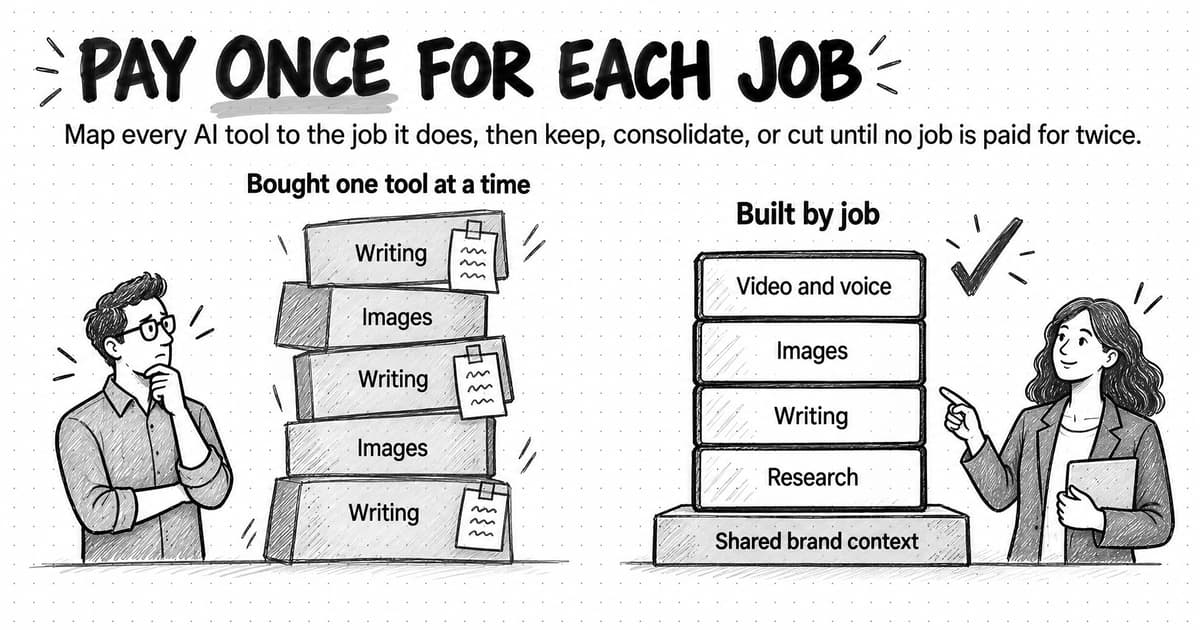
The right number of AI tools follows from the team's recurring jobs. A tool earns its place when it does a recurring job nothing else does acceptably, has a named owner, and has a renewal date someone acts on. Overlap takes six forms: three show up on invoices and three are paid in the team's time, where review and rework can be the largest cost and the hardest to see.
A stack map by job gives each marketing job a usual keep, consolidate, or cut call and the evidence that would change it. A buying order starts with written brand context, because every tool reads it, and ends with automation, once a job works by hand. A copyable stack audit worksheet records each tool's job, owner, cost, overlaps, context, review minutes, and exit cost, so each call rests on evidence.
A worked example with illustrative numbers follows one fictional three-person team through an audit. Before it, nearly two-thirds of the team's monthly stack cost is time, and the saving after consolidating depends most on review time: if review time rises by half, the smaller stack costs more than the old one. Log review minutes for two weeks before and after any move, and keep the stack lean with owners and renewal checks.
Contents
- What an AI marketing stack is, and how it fits inside a martech stack
- The seven layers of an AI marketing stack
- How many AI tools does a marketing team need?
- Six ways marketing teams pay twice for the same job
- Scattered brand context: the cost that never appears on an invoice
- What one AI marketing agent can consolidate, and what stays separate
- The stack map by job: keep, consolidate, or cut
- Who owns what: access, accounts, and approvals across the stack
- A buying order for a lean marketing team
- How to run an AI stack audit, with a copyable worksheet
- The total cost of an AI marketing stack: a worked example
- Common mistakes when consolidating AI marketing tools
- How Ampere fits into an AI marketing stack
- How to keep an AI marketing stack lean after the audit
- Sources and further reading
- Frequently Asked Questions
Open a small marketing team's card statement and the AI tools are easy to find. A general-purpose assistant shows up two or three times, on different people's personal plans. There's a writing tool bought for a launch, an image generator, a video tool used twice last quarter, a transcription app, and an SEO data tool that added AI features this year. The email platform and the CRM now come with AI assistants too, priced into the next renewal. Each purchase made sense on the day someone made it. Together, the tools draft the same kinds of copy several times over, and each holds its own version of the brand: a positioning statement pasted into one chat, a voice profile saved in another tool, custom instructions only one person can see.
That collection is the team's AI marketing stack, whether or not anyone planned it. An AI marketing stack is the set of AI tools a marketing team uses to research, create, analyze, and coordinate its work, together with the AI features built into the systems it already runs, such as the CRM, the email platform, and the website. Some tools in a typical stack earn their place. Others repeat a job another tool already does, and a few are paid for by people who no longer use them.
The subscriptions are the visible part of what a stack costs, and often not the largest part. An invoice shows what each tool costs but not that two tools do the same job, and it shows none of the time the stack takes: keeping copies of the brand context current, moving files between tools, and fixing output from tools that don't know the brand. A review that compares prices alone misses those costs, so it can cancel tools and leave the larger costs where they were.
This guide shows how to decide what stays. After explaining how a stack's layers fit together and where AI tools overlap, it gives you a stack map by job with a keep, consolidate, or cut call for each, a buying order for a lean team, a stack audit worksheet you can copy, and a worked example of total cost that counts setup, context upkeep, and review time alongside the subscriptions.
What an AI marketing stack is, and how it fits inside a martech stack
A martech stack, short for marketing technology stack, is all the software a marketing team uses to plan, run, and measure its marketing: the website and its content management system, the CRM, the email platform, analytics, ad accounts, social tools, project management, and the connections between them. The AI marketing stack is its AI layer: standalone AI tools, such as general-purpose assistants, AI writing tools, image and video generators, and AI marketing agents, plus the AI features the rest of the martech stack now comes with.
The AI layer grows differently. A CRM or an email platform is usually chosen once, by someone accountable for it, and replaced only through a migration project. AI tools are often bought by individuals, monthly, on a card, for one job, with nobody approving the purchase or assigned to remember it. That makes them easy to try and easy to accumulate without anyone deciding what each one is for.
Martech stacks already had a version of this problem. In a Gartner survey of 405 marketing leaders in May and June 2023, respondents reported that their organizations used 33% of their martech stack's capabilities on average, down from 42% in 2022 and 58% in 2020. Gartner's commentary said marketers tend to acquire new technology without a systematic approach to adopting it, and that, combined with multi-year contracts, under-used or abandoned tools can leave a stack unwieldy over time. The figures are respondents' own estimates, but they describe a familiar pattern: tools bought faster than teams put them to work.
The market also changes quickly. The 2025 marketing technology landscape compiled by Scott Brinker and Frans Riemersma counted 15,384 solutions, 9% more than a year earlier, after removing 1,211 that had been acquired or shut down since the previous edition. Named products go stale fast, so this guide describes tools by category and bases every decision on jobs, owners, and costs. The churn is also a reason to know what it would cost to leave each tool you keep.
The seven layers of an AI marketing stack
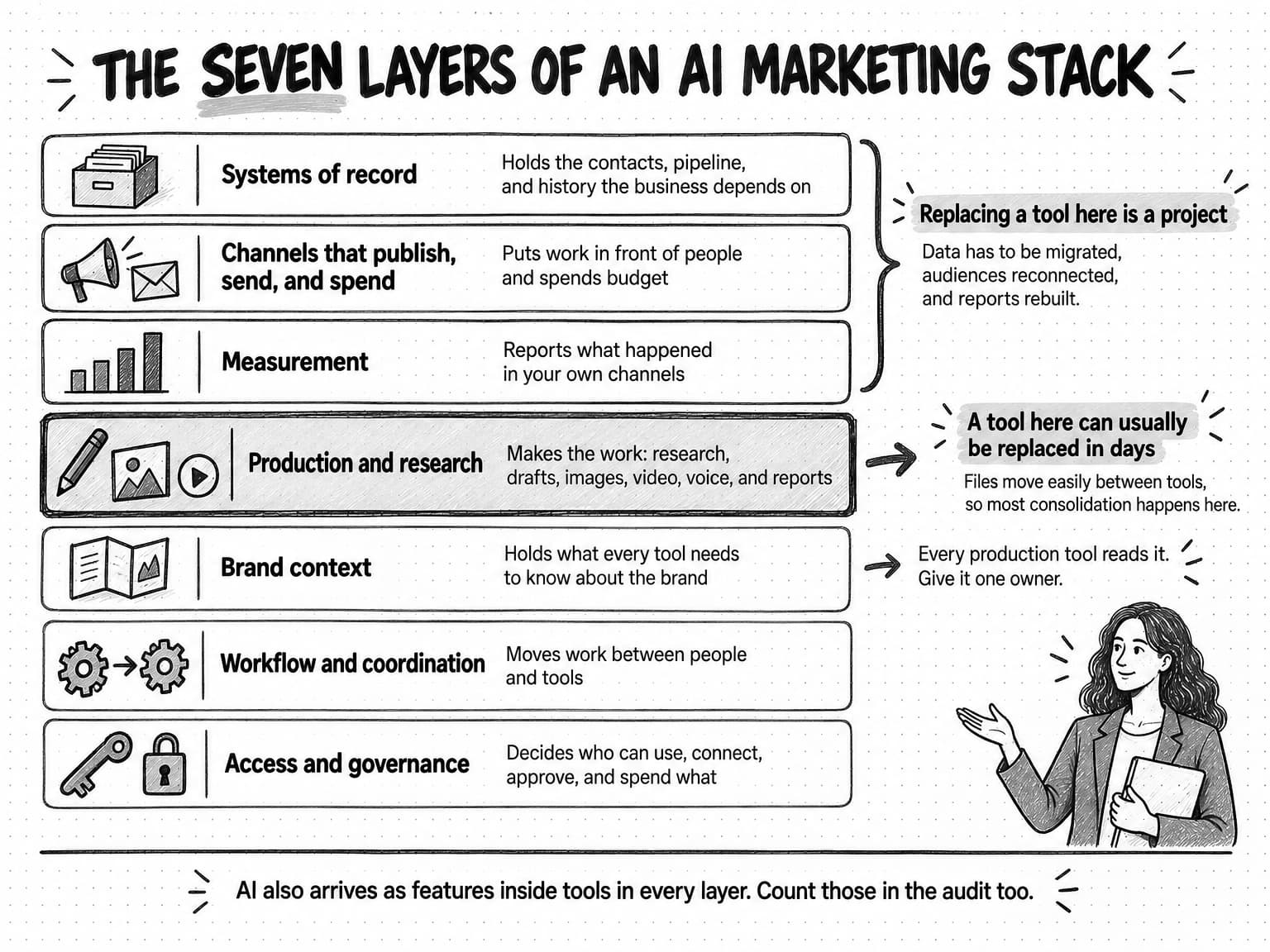
Sorting tools into layers shows where AI tools can overlap and where they can't replace anything, because each layer does a different kind of job and costs a different amount to change.
| Layer | What it does | Typical tools | How AI shows up |
|---|---|---|---|
| Systems of record | Holds the contacts, pipeline, and history the business depends on | CRM, the email platform's contact database, a customer data platform | Features inside the system, such as summaries; the data stays put |
| Channels that publish, send, and spend | Puts work in front of people and spends budget | Website, social scheduler, email sending, ad platforms | Features inside each channel, such as suggested copy; approvals belong here |
| Measurement | Reports what happened in your own channels | Web analytics, ad reporting, CRM reports | Summaries of your own data |
| Production and research | Makes the work: research, drafts, images, video, voice, and reports | General-purpose assistants, AI writing tools, image and video generators, voice tools, research and SEO data tools, AI marketing agents | Most standalone AI tools sit here, and this is where they overlap most |
| Brand context | Holds what every tool needs to know: positioning, audience, products, proof, voice, and competitors | Brand guidelines, shared documents, saved instructions, agent memory | Every production tool reads it, and many stacks keep several copies |
| Workflow and coordination | Moves work between people and tools, on a schedule or a trigger | Project management, automation tools, scheduled AI tasks | AI can run recurring preparation; people set priorities |
| Access and governance | Decides who can use, connect, approve, and spend what | Company accounts, single sign-on, admin roles, spending caps, an AI usage policy | Each AI tool adds accounts, connections, and spending to manage |
The first three layers hold records, reach audiences, and report results, so replacing a tool in any of them is a project: data has to be migrated, audiences reconnected, and reports rebuilt. Production tools turn inputs into files, and files move easily between tools, so a production tool can usually be replaced in days. That's why most consolidation happens in the production layer, and why an AI tool rarely replaces anything in the first three.
View the seven layers of an AI marketing stack at full size (opens in a new tab).
AI also arrives as features added to tools in every other layer. An audit that covers only standalone AI subscriptions will miss the assistant inside the email platform, which may already do a job one of those subscriptions was bought for.
Brand context gets its own layer even though it's rarely a product you buy. Every production tool depends on it, and in a stack assembled one tool at a time, nobody owns the copies each tool keeps. An AI marketing agent is a production tool that keeps its own brand context: it takes a goal, plans the steps, uses tools, and works from what it knows about the brand. That combination lets one agent take over several production jobs at once, but it's still a production tool, so it doesn't replace the layers that hold records or reach audiences.
How many AI tools does a marketing team need?
There's no correct number of AI tools, and a target count is the wrong way to decide. Count recurring jobs instead, and give each job one tool unless a test shows it needs two. A tool earns its place when it meets three conditions: it does a recurring job no other tool in the stack does acceptably, it has a named owner, and it has a renewal date someone will act on. A tool that fails the first condition is an overlap. One that fails the second or third is a subscription that renews by default.
For a small team, those conditions usually produce a stack in three parts. The first is one primary AI system for production and research that reads shared brand context, so drafts, images, briefs, and research come from one place with one version of the brand. The second is the AI built into the systems of record and channels the team already pays for, used for jobs that happen inside them, such as summarizing CRM notes or suggesting an email subject line. The third is a few specialist tools, each kept because it does a recurring job the primary system can't match in a side-by-side test, such as a design tool a designer works in all day or a data source nothing else can reach.
Bigger teams with more channels and specialized roles can justify more specialists, but the rule stays the same. Two quick checks show whether a stack has drifted. If it has more AI tools than distinct recurring jobs, either two tools share a job or one does no recurring job at all. If people paste the same brand brief into more than one tool each week, the stack keeps more copies of the brand than it needs.
A stack that skips those checks ends up with AI tool sprawl: AI tools added for individual jobs or people without anyone deciding what each one is for, so the stack grows faster than it's used. Sprawl rarely comes from one bad purchase. It builds up from reasonable ones, which is why the remedy is a recurring review rather than a one-time cleanup.
Six ways marketing teams pay twice for the same job
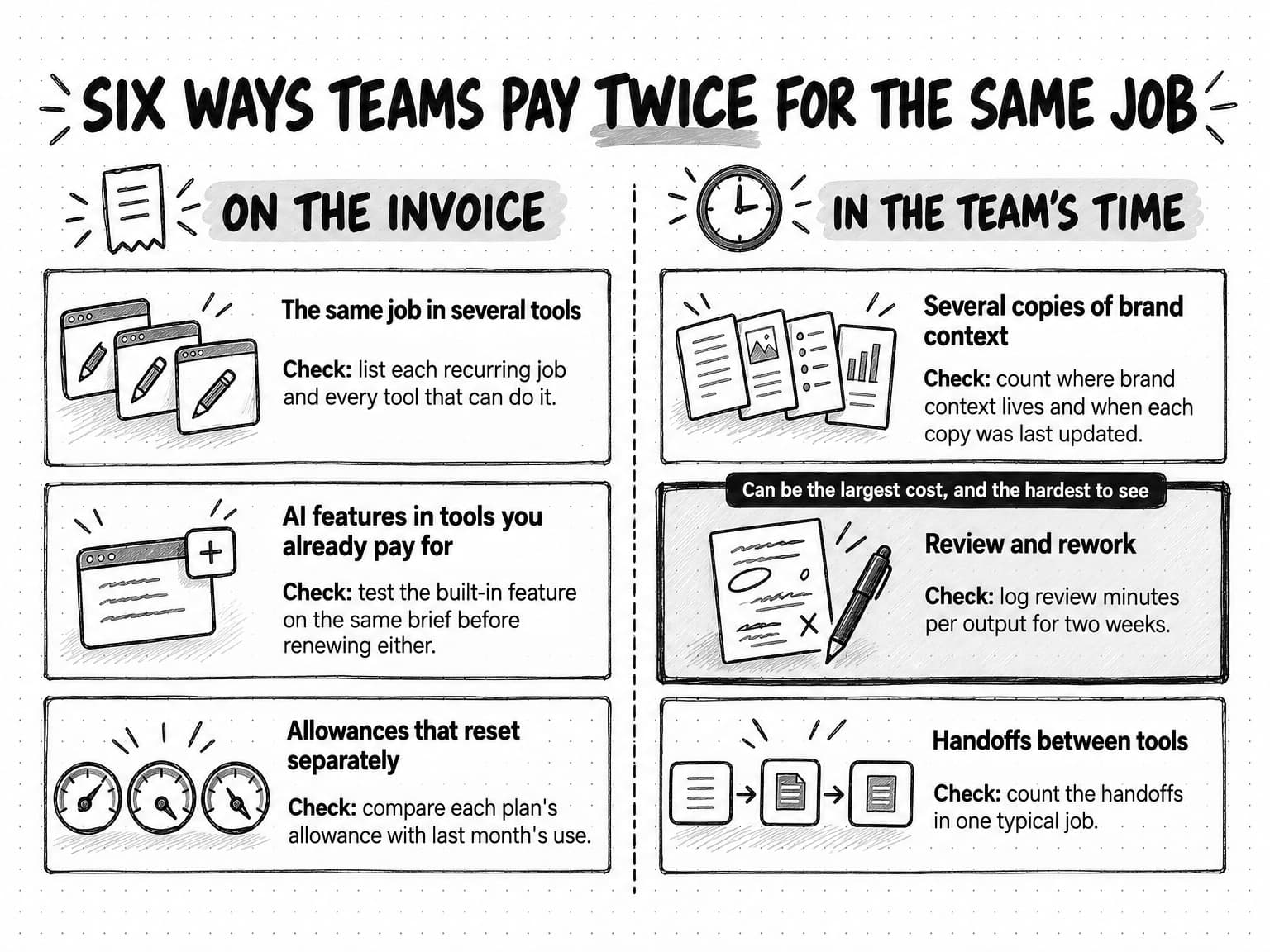
Overlap is easiest to find when you list jobs rather than tools. Each overlap below shows up as a different kind of cost: the first three appear on invoices, and the last three are paid in the team's time.
| Overlap | How it shows up | What it costs | How to check |
|---|---|---|---|
| The same job in several tools | Three tools can draft a LinkedIn post, and two can make a product image | Duplicate subscriptions and inconsistent output | List each recurring job and every tool that can do it |
| AI features in tools you already pay for | The CRM, email platform, and design tool add AI writing, sometimes as paid add-ons | A second charge for a job another tool already covers | Test the built-in feature on the same brief before renewing either |
| Allowances that reset separately | Each tool has its own seats, credits, or limits, and unused allowance expires | Paying for heavy use of every tool at once | Compare each plan's allowance with last month's use |
| Several copies of brand context | Positioning pasted into several assistants, a voice profile in a writing tool, instructions in personal accounts | Upkeep time, drift, and off-brand drafts | Count where brand context lives and when each copy was last updated |
| Review and rework | Drafts from tools that don't know the brand need more fixing | People's time, sometimes the largest line | Log review minutes per output for two weeks |
| Handoffs between tools | Exporting, reformatting, and re-uploading files between tools | Coordination time and version mistakes | Count the handoffs in one typical job |
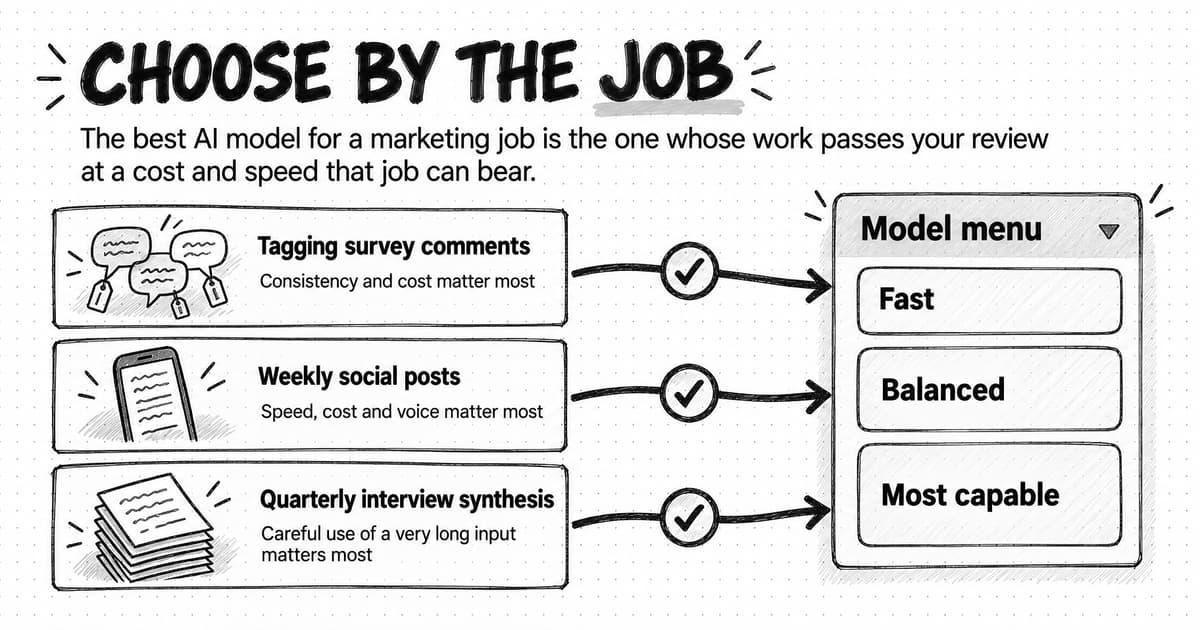
The same job in several tools is the plainest overlap, and it usually survives because each tool does something slightly different that seemed important when it was bought. A common case is a second or third general-purpose assistant kept to reach a different AI model. If your primary system lets you choose the model for each task, those subscriptions are overlaps; our guide to choosing an AI model by task covers which model a job needs.
AI added to tools the team already pays for is easy to miss, because it often arrives in an update or a renewal, with no separate purchase for anyone to approve, and it doesn't always meet expectations. In a Gartner survey of 413 martech leaders conducted from June to August 2025, 81% said their organizations were piloting or had fully implemented AI agents, and among those with agents in pilots or production, 45% said the AI agent capabilities their existing vendors offered didn't meet their company's expectations of promised business performance. A built-in feature may be the cheapest way to do a job inside that system, or a weaker copy of a tool you already have. Test it on the same brief before paying for it as an add-on or cancelling the tool it could replace.
Separate allowances add up unnoticed because each plan looks reasonable on its own. A seat-priced tool charges for every seat whether or not its holder uses it that month, and on many credit-priced plans, whatever isn't used by the end of the month expires. Across five or six tools, each plan has to cover that tool's busy months, so the team pays for peak use everywhere at once, although few months are busy for every job. Pooled usage with a hard cap reduces that slack, because a quiet month for one job offsets a busy month for another.
Review and rework can be the largest of the six, and it's the hardest to see. A draft from a tool that doesn't know the product, the audience, or the claims the company can support takes longer to fix, and some of the fixing falls on whoever receives the work. When AI output looks finished but leaves the real work to the person who receives it, researchers call it workslop, and our guide to AI slop explains how it moves effort onto colleagues.
Handoffs cost time in small pieces. A post made across separate tools might involve copying a research summary into a writing tool, pasting the draft into an image tool, downloading and resizing the image, and sending a final version around for approval. Each step takes a minute or two and is a chance to use the wrong version, so count the handoffs in one typical job and multiply by how often it runs.
View the six ways teams pay twice at full size (opens in a new tab).
The fourth overlap, several copies of brand context, feeds the review cost and grows with every tool the team adds, so it gets the next section to itself.
Scattered brand context: the cost that never appears on an invoice
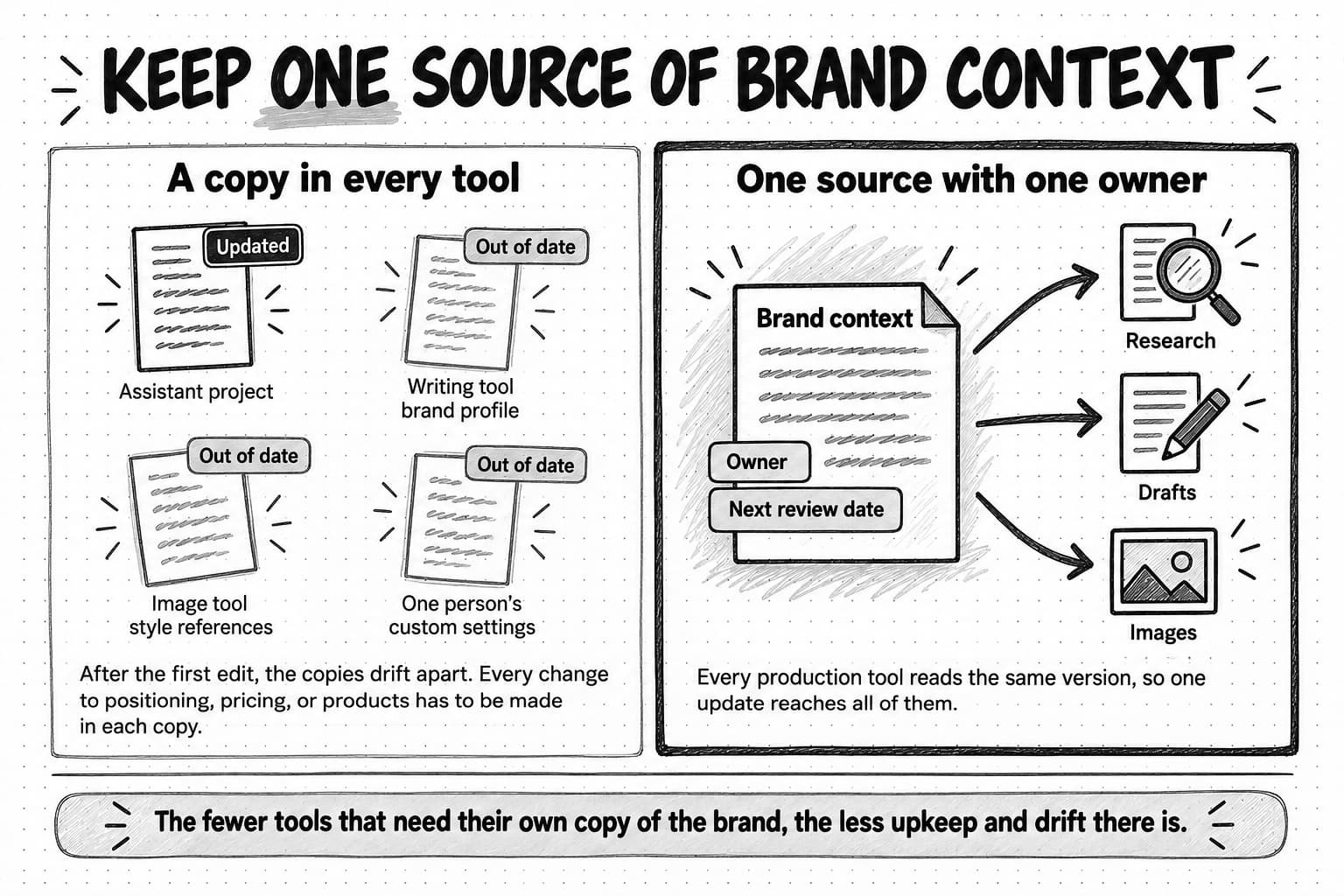
Every AI production tool needs the same inputs to do useful work: who the company sells to, what it sells, what it can claim and prove, how it sounds, and who it competes with. In a stack bought one tool at a time, each tool gets its own copy. The positioning statement is pasted into one assistant's project, the voice guidelines live in a writing tool's brand profile, the image tool keeps its own style references, and the most useful instructions sit in one person's custom settings.
Copies drift. As our guide to context engineering puts it, a positioning statement pasted into five people's AI chats becomes five versions after the first edit. Upkeep grows with the number of copies multiplied by the number of changes: if positioning, pricing, and product details change a few times a quarter and live in six places, someone has to update all six each time, and the copies nobody remembers are where off-brand drafts come from.
Copies in personal accounts carry an extra cost. The rest of the team can't see or correct them, and they leave when their owners do. Our guide to AI agent memory compares the places saved knowledge can live and how to keep it current. For a stack decision, the rule is simpler: the fewer tools that need their own copy of the brand, the less upkeep and drift there is.
Scattered tools also cost attention. In a 2022 study published in Harvard Business Review, researchers tracked 137 people on 20 teams at three Fortune 500 companies for up to five weeks. The average person switched between apps and websites about 1,200 times a day and spent just under four hours a week reorienting afterward, about 9% of their working time. The teams did mid- and back-office work such as finance, HR, and supply chain, the data predates today's AI tools, and two of the authors worked for the company whose software took the measurements. Read it as evidence that small switches add up, not as a figure for your team.
The remedy is one source of brand context with one owner, kept where every production tool can read it or held by the primary system itself. That's why the buying order below starts by writing the context down.
View the brand context comparison at full size (opens in a new tab).
What one AI marketing agent can consolidate, and what stays separate
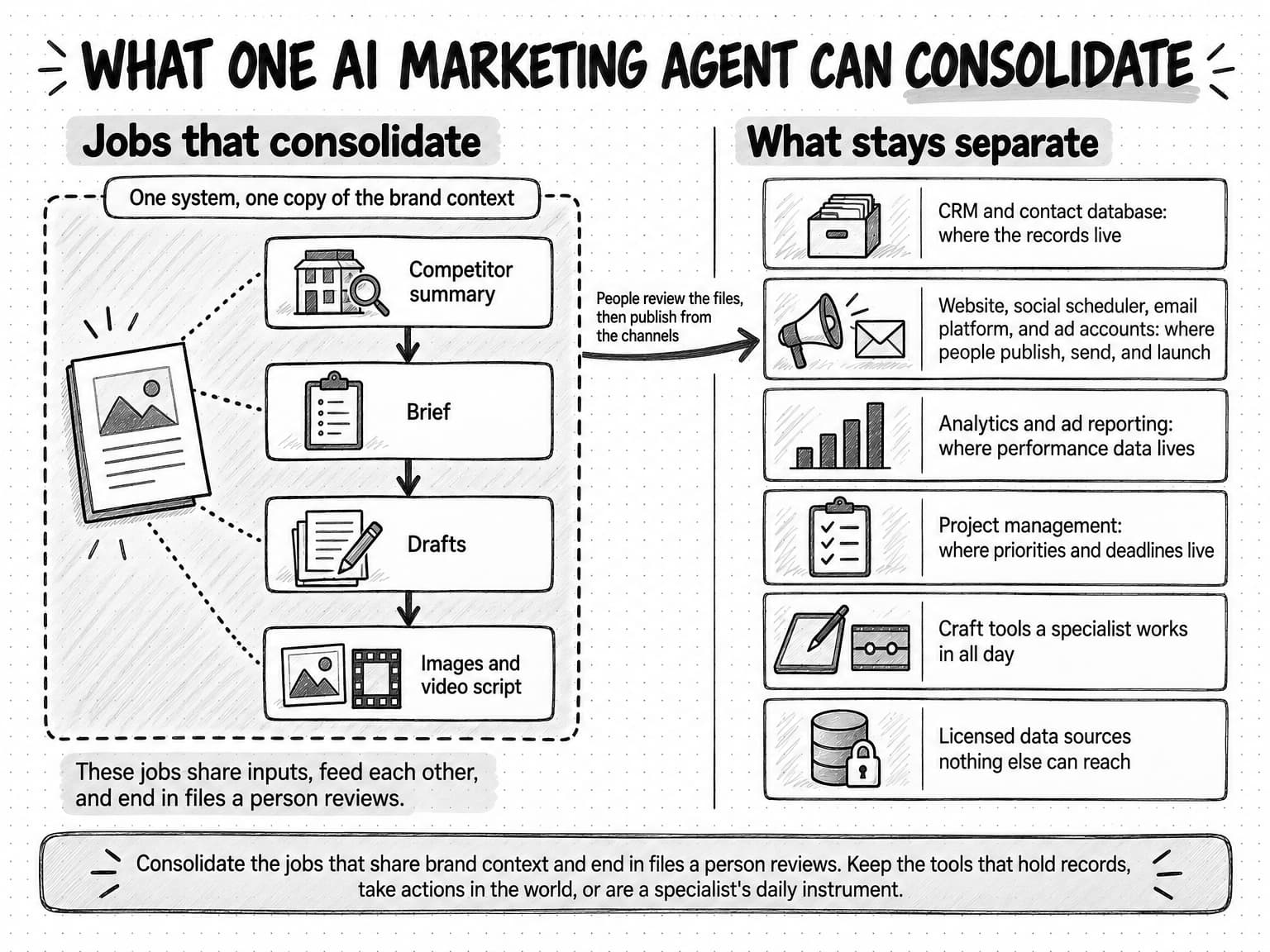
An AI marketing agent can take over several production and research jobs at once because those jobs share inputs and feed each other. A competitor summary feeds a brief, the brief feeds the drafts, and the drafts feed the images and the video script. When one system runs that chain from one copy of the brand context, the team stops paying for a separate tool at each step, keeps one version of the brand, and loses most of the handoffs in between.
The jobs that consolidate well end in a file someone reviews:
- Research: market, competitor, and customer research briefs, with their sources
- Writing: social posts, newsletters, emails, landing-page copy, articles, and versions repurposed for other channels
- Images and design assets: generated images, edited product shots, and social graphics
- Video and voice: short videos for ads and social, voiceovers, and talking-avatar clips
- Recurring preparation: weekly competitor digests, content audits, and monthly summaries someone reads before deciding
Other parts of the stack stay, because an agent produces work for them rather than replacing them:
- The CRM and the email platform's contact database, which hold the records and history the business depends on
- The channels that publish, send, and spend: the website, the social scheduler, the email sending platform, and the ad accounts, where account permissions sit, approvals belong, and people publish and launch
- Analytics and ad reporting, which hold the data on how your own channels perform
- Project management, which holds the team's priorities and deadlines
- Hands-on craft tools, such as the design or video editor a specialist works in all day
- Licensed or proprietary data sources that nothing else can reach
The dividing line is what a tool holds and what it does. Consolidate the jobs that share brand context and end in files a person reviews. Keep the tools that hold records, take actions in the world, or are a specialist's daily instrument. An agent and a marketing automation platform work together for the same reason: the platform runs the sequences that send email and update records, and the agent produces what goes into them.
View what one AI marketing agent can consolidate at full size (opens in a new tab).
The term "AI marketing platform" covers both sides of that line, so check which kind a vendor means. Some products sold under the name are established marketing suites, a CRM or an email and automation system with AI features added, and they belong in the systems-of-record and channel layers. Others are built around an AI agent that produces work across many tools, the kind our guide to agentic marketing calls an agentic marketing platform, and they belong in the production and research layer. The first kind can replace another suite, the second can replace production tools, and neither replaces the other.
The stack map by job: keep, consolidate, or cut
The stack map applies the layers to the jobs a marketing team does every month, with the usual call for a small team and the evidence that would change it. Treat the usual call as a starting point, because the right call depends on what your team uses, how often, and what each tool can reach. The map and the audit use four calls:
| Keep | The tool does a recurring job that nothing else in the stack does acceptably, it has a named owner, and someone uses it in every billing cycle. |
|---|---|
| Consolidate | Another tool you are keeping does the job acceptably on the same brief. Move the job and its context, then cancel at the next renewal. |
| Cut | Nobody used the tool in the last 30 days, or its job is fully covered elsewhere. Export anything worth keeping and cancel now. |
| Keep until renewal | The tool should go, but leaving before the contract ends costs more than staying. Plan the move for the renewal and set a reminder before the notice period starts. |
| Job | Typical tools today | Usual call for a small team | What changes the call |
|---|---|---|---|
| Research: market, competitor, and customer | General-purpose assistants with web search, research tools, review and social listening tools | Consolidate into the primary AI system, if its research shows sources you can check | Keep a specialist whose data the team uses every week and nothing else can reach |
| Writing: posts, emails, pages, and articles | AI writing tools, general-purpose assistants, AI in the website builder and email platform | Consolidate into the primary system that holds brand context | Keep a second tool only if it wins a same-brief test on a recurring job |
| Images and design | Image generators, design tools with AI features | Consolidate image generation; keep the design tool your designer uses daily | Cut standalone generators that duplicate the primary system |
| Video and voice | Video and avatar video generators, voice tools, video editors | Consolidate generation for short ads and social clips; keep the editor | Keep a specialist for long-form editing or a format the primary system can't make |
| Distribution: publishing, scheduling, and sending | Website, social scheduler, email platform, ad platforms | Keep | These are channels; AI tools prepare work for them but don't replace them |
| Analytics of your own channels | Web analytics, ad reporting, CRM reports | Keep, and try the built-in AI summaries first | Add a reporting tool only for a recurring question the built-in reports can't answer |
| Workflow and recurring work | Project management, automation tools, scheduled AI tasks | Keep project management; move recurring preparation into the primary system's schedules | Keep an automation tool for event-driven flows between systems of record |
| Meeting notes and transcription | Transcription apps, note-takers in video-call tools | Cut standalone apps that the call tool's built-in notes already cover | Keep one whose transcripts feed a recurring content job |
| General-purpose assistants | Personal and team plans | Consolidate onto company accounts; keep a seat that is used daily for work beyond marketing | Cut personal plans used for company work |
| SEO and search data | Keyword and backlink databases, rank trackers, AI search visibility trackers | Keep if the data itself is the job, and skip its AI writing features | Cut when nobody opens the data in a typical week |
In the general-purpose assistant row, the same assistant can appear several times on different people's personal plans, with company context added in each one. Moving those subscriptions onto company accounts, or folding their jobs into the primary system, recovers the money and the context together.
Who owns what: access, accounts, and approvals across the stack
A lean stack needs rules about who can do what, or it starts growing again as soon as the audit ends. Six rules cover most of the risk for a small team:
- Put every tool that holds company work or brand context on a company account, not a personal one, so access ends when someone leaves and the context stays with the company.
- Give each tool one owner, who decides on seats, renewals, and what the tool is for.
- Let only owners and admins connect company accounts, such as social profiles, the email platform, ad accounts, and the CRM, to an AI tool, and check what each connection lets the tool read or do.
- Keep approvals where the action happens. Publishing, sending, and spending should need a person's approval in the channel itself, and an AI tool that can act in a channel directly needs its own approval step before each action.
- Put a hard monthly cap on every usage-priced tool, rather than relying on an alert after the money is spent.
- When someone leaves, remove their seats, transfer what they own, and review the accounts they connected.
These rules apply to the stack as a whole. Our guide to AI guardrails for marketing teams covers the fuller system: guardrails for access, actions, spend, content, and data, the actions that should always need a person's approval, and an AI usage policy you can copy.
A buying order for a lean marketing team
Whether you're starting from nothing or rebuilding after an audit, buy in an order where each step makes the next easier to judge: context first, because every tool reads it, and automation last, because automating a job that doesn't work yet only produces poor work faster.
1. Write the brand context down in one place
Before buying anything, write down what every tool will need: the audience, the products and offers, the positioning, the proof points and claims the company can support, the voice, and the main competitors. Give the document an owner and a date for its next review. A tool tested against written context can be judged on its output. One tested against whatever each person pastes in can't, because the input changes every time.
2. Choose one primary AI system for production and research
Pick one system to handle most production and research, on company accounts, working from that shared context. For most small teams the choice is between a general-purpose assistant the team configures and maintains itself and an AI marketing agent that comes with marketing methods and tools built in. Our comparison of general-purpose AI assistants and AI marketing agents covers that decision, including what each costs beyond the subscription. Either way, the test is whether it can do the team's most frequent jobs from the shared context, with sources you can check, on accounts the company controls.
3. Turn on the AI already inside your systems of record and channels
Next, try the AI features in the tools you already pay for, on jobs that happen inside them, such as summarizing CRM notes, suggesting subject lines in the email platform, or drafting image descriptions in the website builder. Test them before paying for any add-on, and keep them to in-tool jobs rather than letting them become a second production system with its own copy of the brand.
4. Make sure research comes with sources
Research feeds the decisions that follow it, so a confident wrong answer spreads into the brief, the drafts, and the plan. Whatever does your research should show its sources so a reviewer can check the claims. If the primary system can't, that's the first real gap, and a research tool that shows its sources is a better second purchase than another writing tool. Even with sources, no tool covers all public data, so research output is a starting point for a person to check.
5. Add specialists only after a same-brief test
Before buying a specialist, run the same brief through it and through the primary system, using your own work. Our guide to evaluating an AI marketing agent shows how to run a scored trial on real assignments, recording setup time and keeping a tool's working time separate from the time people spend reviewing. Buy the specialist only if it wins on a job that recurs often enough to justify another subscription, another owner, and another copy of the context.
6. Add automation and monitoring last
Put work on a schedule only after it runs well by hand, and start with one job. Our collection of AI agent examples for marketing includes a test for choosing which job to move first, and our guide to automating marketing with AI agents covers schedules, triggers, and putting automated work into production safely. Start monitoring the same way, with the few sources that would change a decision, such as a main competitor's pricing page.
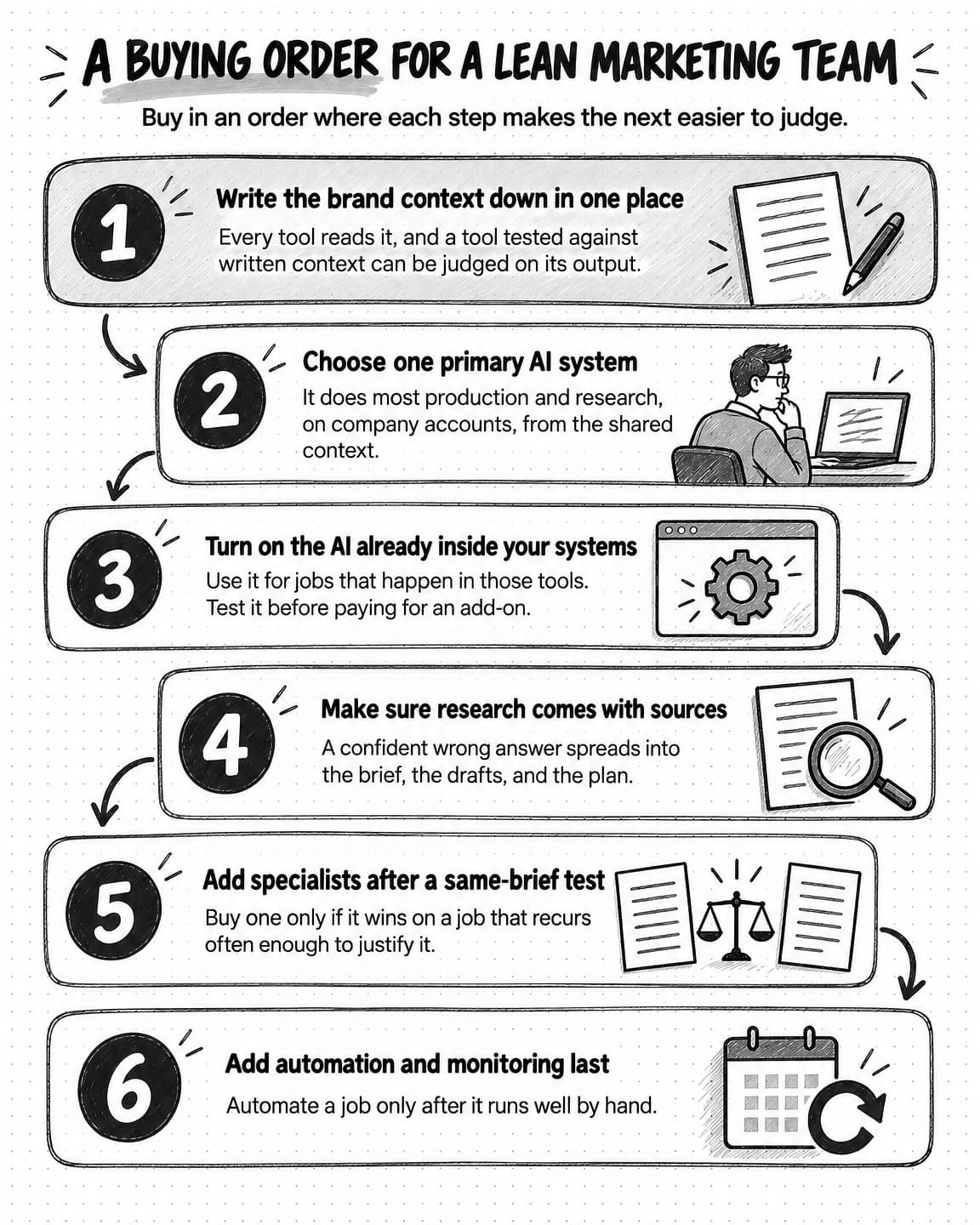
View the buying order at full size (opens in a new tab).
How to run an AI stack audit, with a copyable worksheet
An audit applies the stack map to your own tools. Collecting the facts takes a few hours for a small team and logging review time takes two weeks, so start 30 to 60 days before the next large renewal.
- Find every tool. Check card statements and expense reports for the last 12 months, apps connected to company accounts, browser extensions, free accounts used for work, and AI features switched on inside existing tools, and ask each person what they use. Some tools will have been adopted without approval; our guide to shadow AI covers how to find them and bring them into the open without blame.
- Record each tool as one row in the worksheet below, and group the rows by job so overlapping tools sit together.
- Log review time for two weeks. For each reviewed output, note the tool it came from and the minutes spent fixing it, as you go rather than from memory.
- Make a call for each row: keep, consolidate, cut, or keep until renewal.
- Test before cancelling by running two or three recent briefs through the tool that will take the job over.
- Export, then cancel. Save brand profiles, templates, saved instructions, and generated assets, and check how long the tool keeps your data after you leave.
- Assign an owner and a renewal date to every tool you keep, with a reminder 30 days before each renewal.
The stack audit worksheet has one row per tool and these columns:
| Column | What to record | Why it matters |
|---|---|---|
| Job | The recurring job, in the stack map's terms | Shows the overlaps |
| Tool category | The kind of tool, such as image generator or CRM | Stays useful when products change |
| Owner | One named person | Tools without an owner renew by default |
| Account type | Company or personal, and who holds admin rights | Personal accounts leave with the person |
| Seats paid and used | Paid seats, and how many people used the tool in the last 30 days | Unused seats are the quickest saving |
| Billing model | Seat, usage, credits, or flat fee; monthly or annual | When you can leave, and how far spending can run |
| Monthly cost | The average of the last three months, with add-ons and top-ups | The visible cost |
| Renewal date and notice | The next renewal and the notice cancelling requires | When a decision can take effect |
| Overlaps with | Other tools that do the same job | The candidates for consolidation |
| Where its context lives | Brand profiles, saved instructions, files, or memory inside the tool | Upkeep, and what to export |
| Data it can reach | Connected accounts, uploaded files, and permissions | Access risk, and what to disconnect |
| Review minutes per output | Average minutes spent fixing each output, from the two-week log | Often the largest hidden cost |
| Exit cost | Exports, migrations, retraining, contract penalties | Whether to leave now or at renewal |
| Call | Keep, consolidate, cut, or keep until renewal | The decision |
Copy the header row into a spreadsheet to start your own. The four example rows come from the fictional team in the worked example that follows, and every figure in them is illustrative.
Job,Tool category,Owner,Account type,Seats paid / used,Billing model,Monthly cost,Renewal date and notice,Overlaps with,Where its context lives,Data it can reach,Review minutes per output,Exit cost,Call
Writing,AI writing tool,Content marketer,Company; content marketer is admin,3 / 1,Per seat; annual,$150,March 1; 30 days,General-purpose assistant; email platform AI,Brand voice profile in the tool,Uploaded brand guidelines,22,Export voice profile and templates,Consolidate
Images and design,Image generator,Designer,Personal,1 / 1,Credits; monthly,$40,Monthly; none,General-purpose assistant,Style references in the tool,Uploaded product photos,15,None,Consolidate
Meeting notes,Transcription app,Marketing lead,Personal,1 / 1,Per seat; monthly,$30,Monthly; none,Notes built into the video-call tool,None,Call recordings,5,Export transcripts,Cut
SEO and search data,SEO data tool,Content marketer,Company,1 / 1,Per seat; monthly,$140,Monthly; none,None,Saved keyword lists,Website analytics connection,0,Saved lists and reports,Keep
Read the finished worksheet by job. In the example, the writing tool has three paid seats, one regular user, and two overlapping tools, so its job moves to the primary system. The contract is annual, so the cancellation takes effect at the March 1 renewal, and the notice has to go in 30 days before. The transcription app duplicates notes the video-call tool already takes, so it goes now. The SEO data tool overlaps with nothing and is opened every week, so it stays.
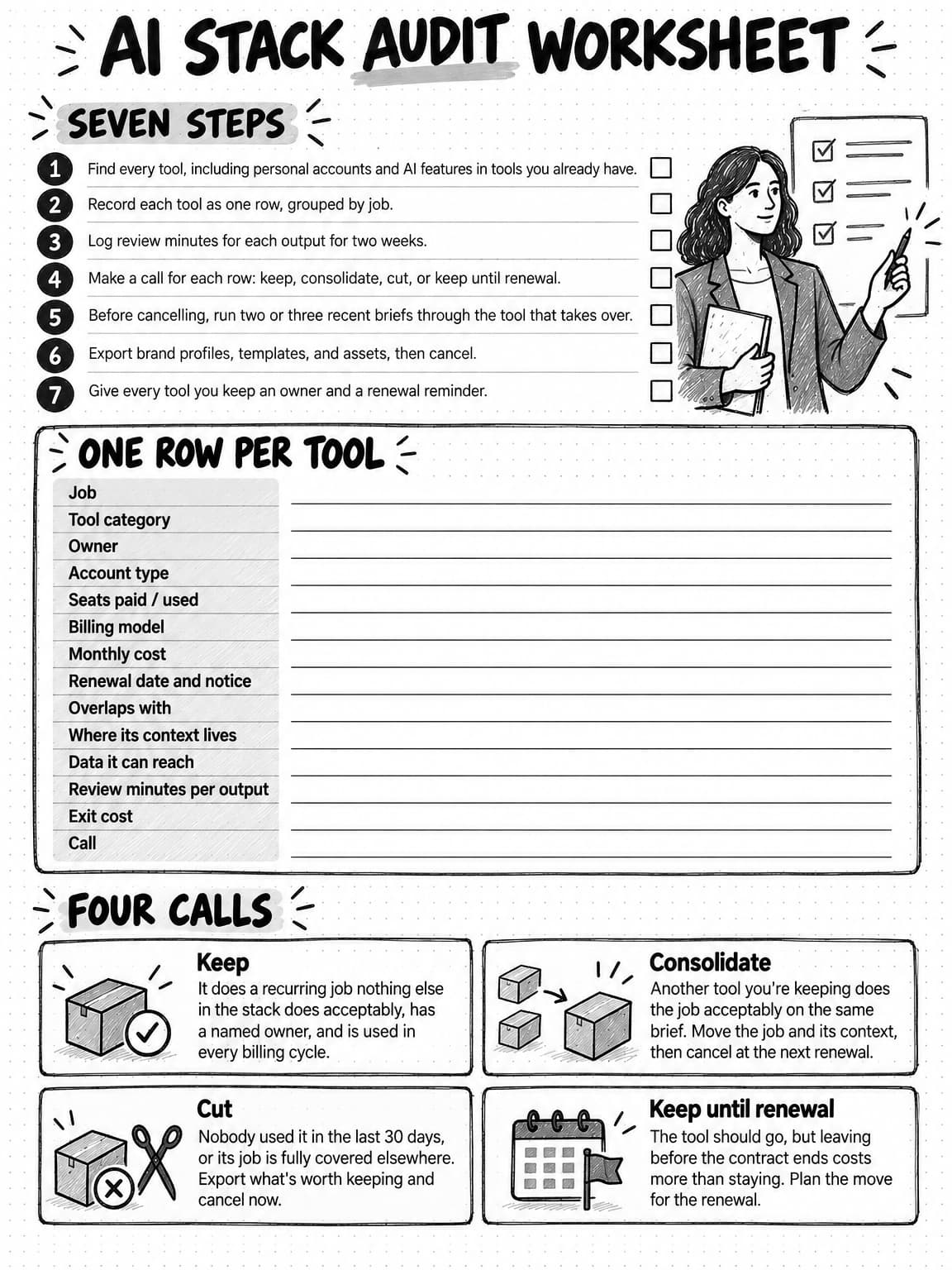
View and save the AI stack audit worksheet at full size (opens in a new tab).
The total cost of an AI marketing stack: a worked example
Total cost of ownership is the full cost of having a tool over a period: what you pay for it plus the work it takes to set up, maintain, and use. For an AI marketing stack, the work can cost more than the subscriptions. A monthly version of the model has six lines:
Monthly total cost =
    subscriptions
  + usage charges beyond plan allowances
  + setup time (one-time hours, spread over the months you'll use the setup)
  + context upkeep time
  + review and rework time
  + coordination and handoff time
Price the time lines at a loaded hourly cost, meaning salary plus benefits and overhead, divided by working hours. This guide uses an illustrative $60 an hour, the same figure as our guide to AI tokens and credits, which also explains how to estimate the usage line for usage- and credit-priced tools. Use your own team's figure. The example below also spreads setup over an illustrative 12 months; use the period you expect to keep the new setup.
The team in the example
Kilnworth is a fictional company that sells production-planning software to small manufacturers. Its marketing team has three people: a marketing lead, a content marketer, and a designer who also edits video. Together they produce about 40 reviewed outputs a month, including posts, emails, images, short videos, and research briefs. Every figure in the example, including that output count, is illustrative, chosen to show how the model works, not taken from a real team or any product's price list.
Before the audit: nine AI subscriptions
| Tool category | Monthly cost (illustrative) | Call after the audit |
|---|---|---|
| General-purpose assistant, three personal plans | $60 | Consolidate; one company seat stays for work beyond marketing |
| AI writing tool, three seats, one regular user | $150 | Consolidate into the primary AI system |
| Image generator | $40 | Consolidate |
| Video generator | $100 | Consolidate |
| Voice and text-to-speech tool | $30 | Consolidate |
| Research tool with web sources | $40 | Consolidate |
| Transcription app | $30 | Cut; the video-call tool's built-in notes cover the job |
| SEO and search data tool | $140 | Keep; the content marketer uses the data every week |
| AI add-on in the email platform | $50 | Cut after a same-brief test; drafts come from the primary system |
| Total | $640 |
The CRM, the email platform's base plan, the social scheduler, the website, and the ad accounts cost the same before and after the audit, so the comparison leaves them out.
The full monthly comparison
| Cost line | Before | After | How the illustrative figure was set |
|---|---|---|---|
| Subscriptions | $640 | $515 | After: a primary AI system at $350, the SEO data tool at $140, and one company seat on a general-purpose assistant at $25 |
| Usage beyond plan allowances | $60 | $50 | Before: image and video top-ups. After: usage charges on the primary system |
| Setup, spread over 12 months | $0 | $100 | The current tools' setup is already spent. The move takes 20 hours: writing the context down, testing, exporting, and training |
| Context upkeep | $120 | $60 | Two hours a month keeping six copies of the brand context current, then one hour for one copy |
| Review and rework | $800 | $600 | 40 outputs at 20 minutes each, then at 15 minutes each, an assumption to measure |
| Coordination and handoffs | $360 | $180 | Six hours a month moving files between tools and fixing versions, then three |
| Total per month | $1,980 | $1,505 |
In this illustration, the stack costs $475 a month less after the audit, and only $135 of that comes from subscriptions and usage; the rest is time. Before the audit, time accounts for $1,280 of the $1,980 total, nearly two-thirds, so a comparison of prices alone would have seen $700 a month and missed most of the cost. The $350 line for the primary AI system is illustrative and isn't any particular product's price.
What happens if review time doesn't fall
The review line carries the most weight and the most uncertainty. Consolidation is expected to cut review time, because every output comes from the same brand context, but that's an assumption until you measure it. Three versions of the after column, using the same illustrative figures, show how much depends on it:
| Review time after the move | Review and rework line | Total after | Change from before |
|---|---|---|---|
| Falls to 15 minutes per output | $600 | $1,505 | $475 a month less |
| Stays at 20 minutes per output | $800 | $1,705 | $275 a month less |
| Rises to 30 minutes per output | $1,200 | $2,105 | $125 a month more |
If review time stays flat, the move still saves money, mostly from subscriptions and coordination. If the primary system does some jobs worse and review time rises by half, the consolidated stack costs $125 a month more than the old one in the first year, and still $25 more once the setup hours are paid off.
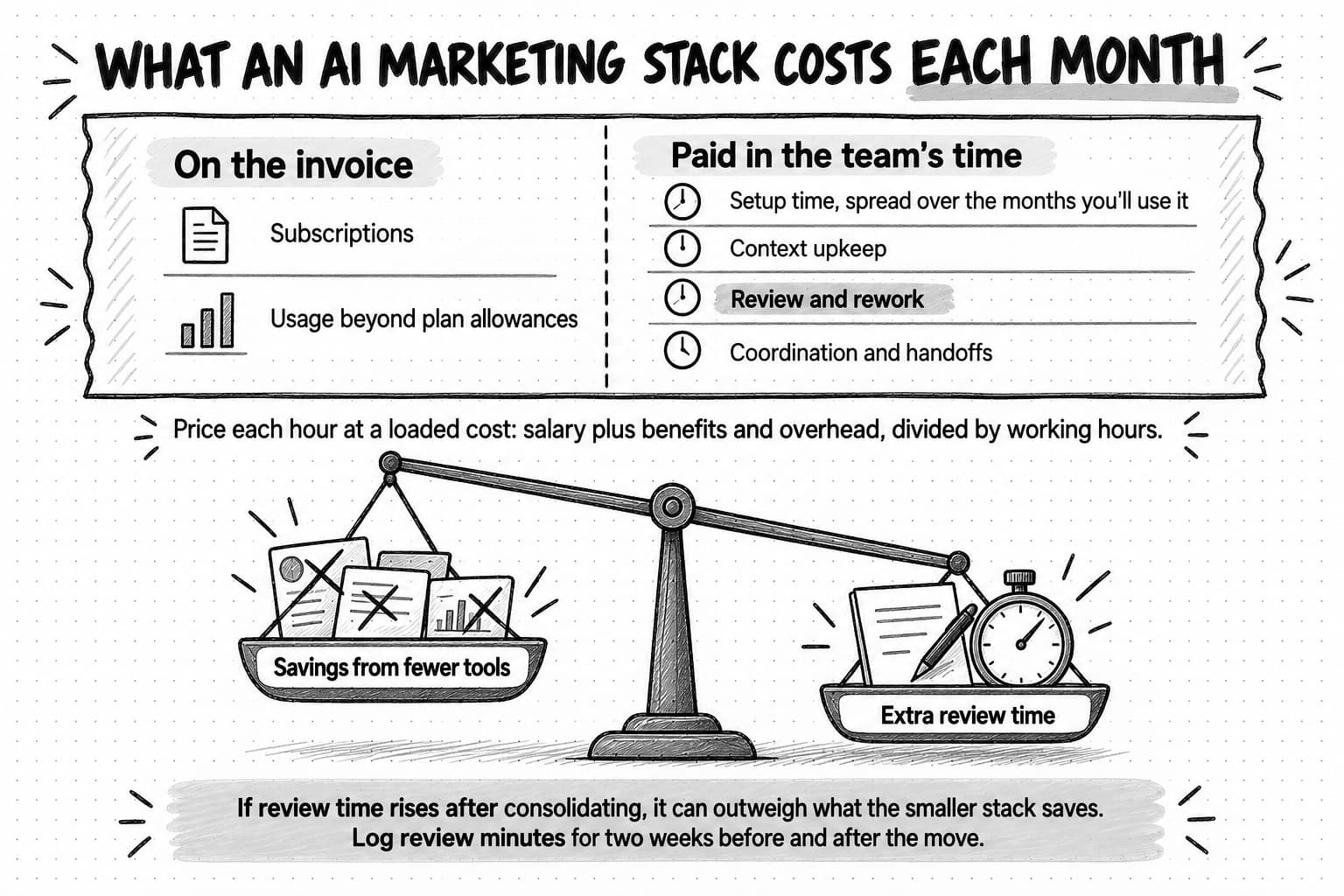
View the monthly cost lines at full size (opens in a new tab).
How much a small team should spend on AI tools
A budget for AI tools is easier to set from the jobs than from a benchmark. Price each recurring job at its total monthly cost using the six lines above, and compare it with the alternatives: the team's own hours, freelance or agency time, or dropping the job. Set each usage-priced tool's hard cap from the budget you agree, so a busy month can't push the bill past it. Whether the spending pays for itself is a separate question. This model counts costs only, and our guide to measuring the ROI of AI in marketing covers the return side.
Common mistakes when consolidating AI marketing tools
- Cutting by price instead of by job. A tool's price says nothing about whether another tool already does its job. Cut overlaps and unused seats first, whatever they cost, and keep an expensive tool that does a job nothing else can.
- Consolidating into a tool that can't reach the data a job needs. A research job that depends on a licensed dataset or a connected analytics account can't move to a tool without that access, however well the tool writes.
- Cancelling before the same-brief test. A tool that looks redundant on paper may do a job nobody listed, such as the designer's quick resizing or a monthly report only one person runs.
- Moving the tools but not the context. Brand profiles, templates, and saved instructions live inside tools. Export them, and fold whatever is still true into the shared context.
- Letting the stack regrow. Without an owner for each tool and a simple way to request new ones, subscriptions return one reasonable purchase at a time.
- Counting hours saved instead of total cost. Time one person saves can reappear as time another person spends reviewing, so compare total cost before and after, using measured review time.
How Ampere fits into an AI marketing stack
Ampere is an AI marketing agent, so in the stack map it sits in the production and research layer and holds its own brand context. It researches, creates, and packages marketing work from plain-English requests, using Brand memory and 200+ AI tools & skills across text, image, video, audio, voice, research, ads and reviews, web extraction, and social and creator data. Each session gets its own session workspace, where you can inspect the files and previews Ampere produces. For the jobs in the map that end in a file, one system can take the place of several separate subscriptions. That's a claim about consolidation, not a claim that each of Ampere's tools beats every specialist, so run the same-brief test on any job you'd move.
Brand memory covers the context layer. Ampere saves what it learns about a brand, such as its positioning, audience, voice, products, competitors, and visual identity, as editable briefs with their sources visible. You review and correct what it learned, and later work follows the version you've approved.
On paid plans, the whole team works from one shared Organization credit pool, with as many teammates as it needs, and auto-recharge has a hard monthly cap. Ampere and its catalog can route work to many AI model families through one platform and one bill. Most work, including Projects, uploaded files, and scheduled tasks, belongs to the Organization rather than to one person's account, with owner, admin, member, and viewer roles and separate billing admin access. Scheduled Tasks put supported recurring work, such as research, reports, and content batches, on a cadence and return each result for review. Monitoring checks supported public sources hourly, daily, or weekly and files the available evidence of what changed, which can be partial.
Ampere is not a CRM, a social scheduler, an outbound email marketing sender, or a general marketing automation platform, and it doesn't launch or change ad campaigns, so those systems and your ad accounts stay in your stack. It produces the drafts, assets, and research they use, and your team publishes, sends, and launches from them. AI output can be inaccurate or incomplete, and public-data coverage is never complete, so people review the work before it goes out. Ampere does not directly use private customer prompts, files, chat history, project context, agent memory, integration data, or outputs to train Ampere models by default.
Paid plans start at $100/month, and every paid plan unlocks the full product. Eligible accounts in supported regions that have never had a paid plan can start on the Free Plan with no card: Ampere sets up Brand memory, then completes up to four Free tasks for the brand. Your own prompts and follow-up questions, 200+ AI tools & skills, Scheduled Tasks, and Monitoring come with paid plans.
How to keep an AI marketing stack lean after the audit
A stack stays lean when adding a tool takes a decision and renewing one takes a check. Four habits keep both in place:
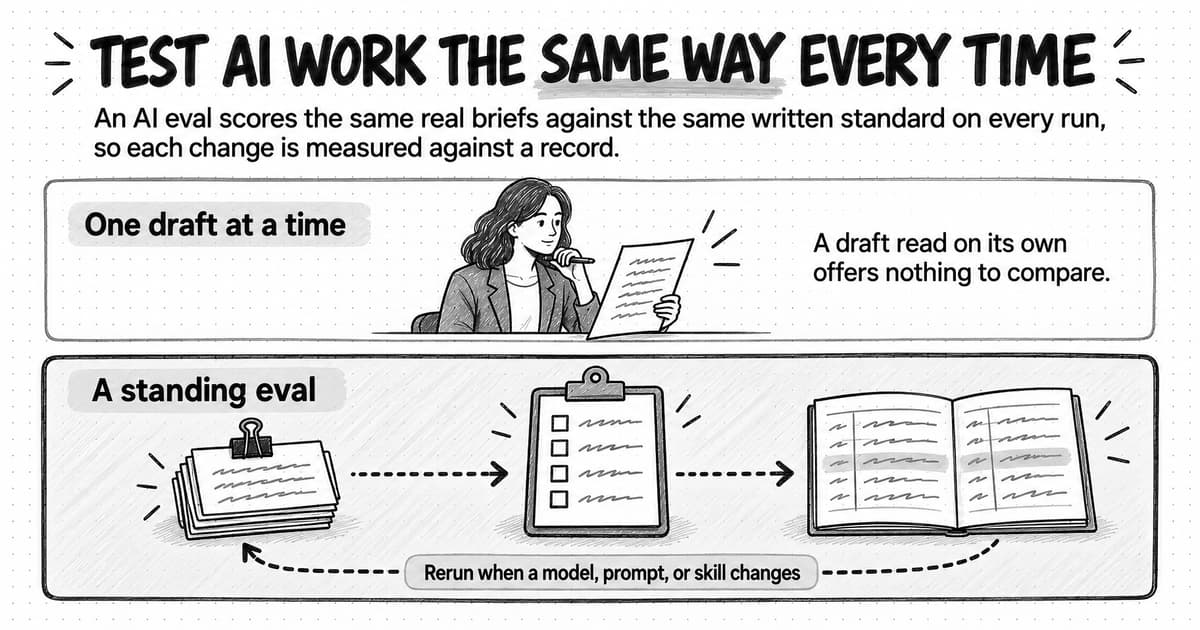
- Keep a renewal calendar from the worksheet, with an owner for each date. Thirty days before a renewal, run two or three recent briefs through the tool and through the alternative you'd use without it, and decide then. Save those briefs so the same test can run again; our guide to AI evals explains how a small set of saved tests becomes a repeatable check.
- Ask for a short written request before anyone buys a new tool, naming the job, the tools it overlaps with, the owner, the cost and billing model, where its context will live, the data it will reach, the test it must pass, and the date you'll decide whether to keep it.
- Review the worksheet once a quarter. Update costs, seats, and review minutes, and check that every tool still has an owner.
- Treat new AI features in tools you already have as candidates for the next audit. Test each one against the tool that does the job now, without assuming either that it replaces that tool or that it doesn't.
The right stack also changes as a team's use of AI matures. Our guide to AI-native marketing teams describes five stages from first pilot to daily practice. Run the audit again when most of the team's recurring work moves up a stage, because the jobs, owners, and review time the worksheet records change with it.
Sources and further reading
- Gartner, Gartner Survey Finds 63% of Marketing Leaders Plan to Invest in Generative AI in the Next 24 Months, press release, August 23, 2023. Survey of 405 marketing leaders, including martech utilization from 2020 to 2023.
- Gartner, Gartner Survey Finds 45% of Martech Leaders Say Existing Vendor-Offered AI Agents Fail to Meet Their Expectations of Promised Business Performance, press release, October 29, 2025. Survey of 413 martech leaders conducted from June to August 2025.
- Scott Brinker, 2025 Marketing Technology Landscape Supergraphic, chiefmartec, May 6, 2025. The landscape, compiled with Frans Riemersma, counts 15,384 solutions in 49 categories.
- Rohan Narayana Murty, Sandeep Dadlani, and Rajath B. Das, How Much Time and Energy Do We Waste Toggling Between Applications?, Harvard Business Review, August 29, 2022. A study of 137 people on 20 teams at three Fortune 500 companies, measured with software from the company two of the authors worked for.
Frequently Asked Questions
What is a martech stack?
A martech stack, short for marketing technology stack, is all the software a marketing team uses to plan, run, and measure its marketing. It usually includes the website and its content management system, the CRM, the email platform, analytics, ad accounts, social tools, project management, and the connections between them. It now also includes AI tools, such as general-purpose assistants, image and video generators, and AI marketing agents, plus the AI features built into the other systems.
What is an example of a marketing technology stack?
A small B2B team's marketing technology stack might include a website with a content management system, a CRM, an email platform, web analytics, ad accounts, a social scheduler, and a project management tool. Its AI layer might be one primary AI system for research and production that reads shared brand context, the AI features inside the CRM and email platform, and one specialist, such as an SEO data tool the team opens every week.
Is a CRM part of a martech stack?
Yes, a CRM is part of most martech stacks, usually as the main system of record. It holds the contacts, pipeline, and history the business depends on, which is why replacing it is a migration project rather than a quick switch. In an AI marketing stack, the CRM stays where it is. AI features inside it can help with jobs that happen there, such as summarizing notes, but no AI production tool replaces the records it holds.
What is an AI stack?
An AI stack is a set of technologies used together for AI work, and the term has two common meanings. Engineers use it for the models, data pipelines, and hosting a company needs to build AI into its own products. In marketing, an AI stack usually means an AI marketing stack: the AI tools a team uses to research, create, analyze, and coordinate its work, together with the AI features built into the systems it already runs.
How is AI used for marketing?
In most marketing teams, AI is used in two places. Standalone AI tools research markets and competitors, draft posts, emails, and pages, generate images, video, and voiceovers, and prepare recurring reports, all as work a person reviews. AI features inside existing systems help with jobs that happen there, such as summarizing CRM notes, suggesting email subject lines, or answering questions about analytics data. Publishing, sending, and spending happen in the channels themselves, which is where a person's approval belongs.
What are the key components of an AI marketing stack?
An AI marketing stack has seven layers. Systems of record hold contacts and history; channels publish, send, and spend; measurement reports results; production and research make the work; brand context holds what every tool needs to know; workflow moves work between people and tools; and access and governance decide who can use, connect, approve, and spend what. Most standalone AI tools sit in the production layer, which is where they overlap and where consolidation usually happens.
What is an AI marketing platform?
An AI marketing platform is a marketing product that uses AI across many jobs, and vendors use the term for two different kinds. Some are established marketing suites, such as a CRM or an email and automation system with AI features added, and they belong with the systems of record and channels. Others are built around an AI agent that produces work across many tools and belong in the production and research layer. The first kind can replace another suite, and the second can replace production tools.
How do you build an AI marketing stack?
Build an AI marketing stack in an order where each step makes the next easier to judge. Write the brand context down in one place first, then choose one primary AI system for production and research. Turn on the AI already inside the CRM, email platform, and other systems, make sure research comes with sources, add specialists only after they win a same-brief test, and add automation and monitoring last, once a job works well by hand.
What are the best practices for managing an AI marketing stack?
Manage an AI marketing stack by job and by owner. Keep every tool that holds company work on a company account, give each tool one owner and a renewal date, let only admins connect company accounts, keep approvals in the channels where work goes live, and cap spending on usage-priced tools. Before each renewal, run two or three recent briefs through the tool and its alternative, and review the stack audit worksheet once a quarter.