What is content operations? How to build a content engine a small team can run
For founders and content leads at B2B SaaS and AI companies: the parts of a content operation, the lifecycle from intake to retirement, capacity math, quality gates, metrics, and a 60-day setup plan with templates.
42 min readWritten by Ampere
Short answer
What is content operations?
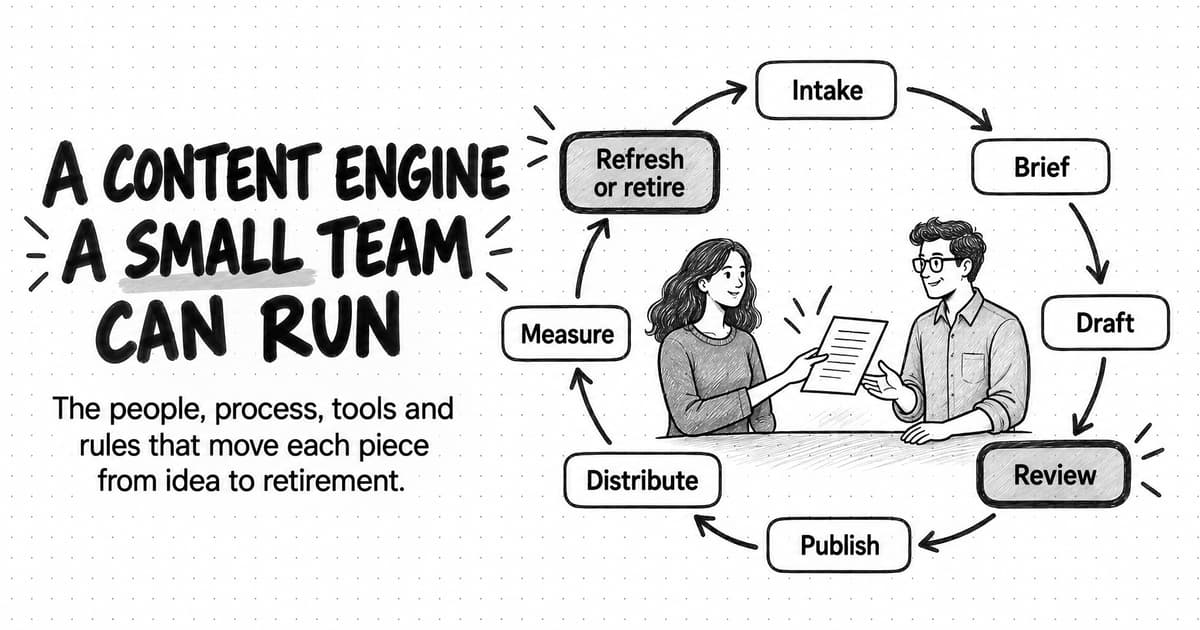
Content operations, or ContentOps, is the system of people, processes, tools, rules and measures that moves each piece of content from request to publication, then through distribution, measurement, refresh and retirement. Content strategy decides what to make and why; content operations decides how the work gets done. For a small team it means written roles, a lifecycle with exit checks, one calendar, quality gates and a few metrics.
Summary
Content operations is the production system that turns a content strategy into published, maintained work. Almost every B2B team in CMI's 2026 survey had a strategy, yet only 13% of them reported significantly improved results. The gap is usually operational: unclear owners, stalled reviews, duplicate topics and pieces never updated.
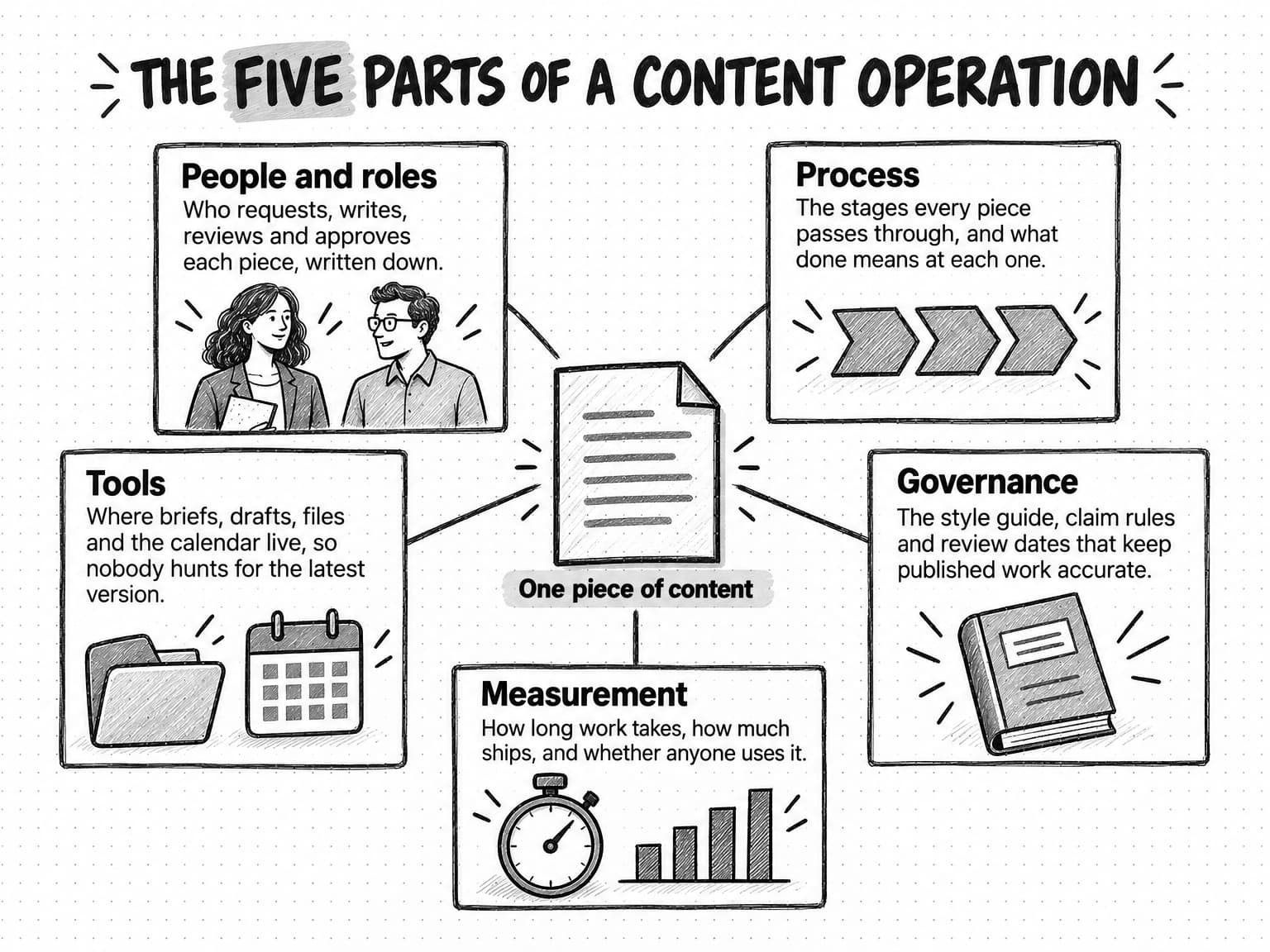
A content operation has five parts: people and roles, process, tools, governance and measurement. The process is a lifecycle of nine stages from intake to refresh or retirement, each with a written exit criterion, and a RACI chart names one accountable person per activity so the approver approves rather than rewrites.
A content team's output is set by its slowest stage, often founder review, not by its total hours. Little's Law shows why limiting work in progress shortens each piece's wait at the same output, and an editorial calendar run as a board, with limits and an owner and next action on every card, shows bottlenecks early.
Quality comes from three short gates, before drafting, before review and before publishing, plus a governance page small enough to keep. AI can help at every stage but shortens drafting far more than checking, so review capacity has to grow with it. Cycle time, throughput, review wait, revision rounds, refresh coverage and sales use show whether the system works.
A team of one to three people can set up content operations in about 60 days: see the work, define the flow, add the gates, then measure and adjust. A fictional worked example shows that narrowing the approver's review scope and booking review time can matter more than new software or another writer.
Contents
- What is content operations?
- Content operations vs content strategy, content marketing and related terms
- Why small teams need content operations
- The five parts of a content operation
- The content lifecycle from intake to retirement
- Capacity planning and throughput math for a content team
- Run the editorial calendar as an operating tool
- Content inventory and asset management
- Quality gates: facts, brand voice and AI slop
- Content governance a small team can keep
- Where AI agents fit in content operations
- Content operations metrics
- A content operations maturity model
- A 60-day content operations setup plan for a team of one to three
- Worked example: a two-person team sets up content operations (fictional)
- Copyable content operations templates
- How Ampere fits into a small content operation
- Sources and further reading
- Frequently Asked Questions
Picture the content folder at a twenty-person software company. It holds fourteen drafts. Three are waiting for the founder, one of them since the spring. Two were written for a launch that moved. One is a near-duplicate of a guide published last year, because the person who wrote it did not know the first one existed. The content calendar says four pieces should go out this month, and the team will publish one, late, after a scramble on Friday afternoon. Nobody is lazy and nobody lacks ideas. The trouble is that nobody can say, at any given moment, where each piece is, who has to act next, and what "finished" means.
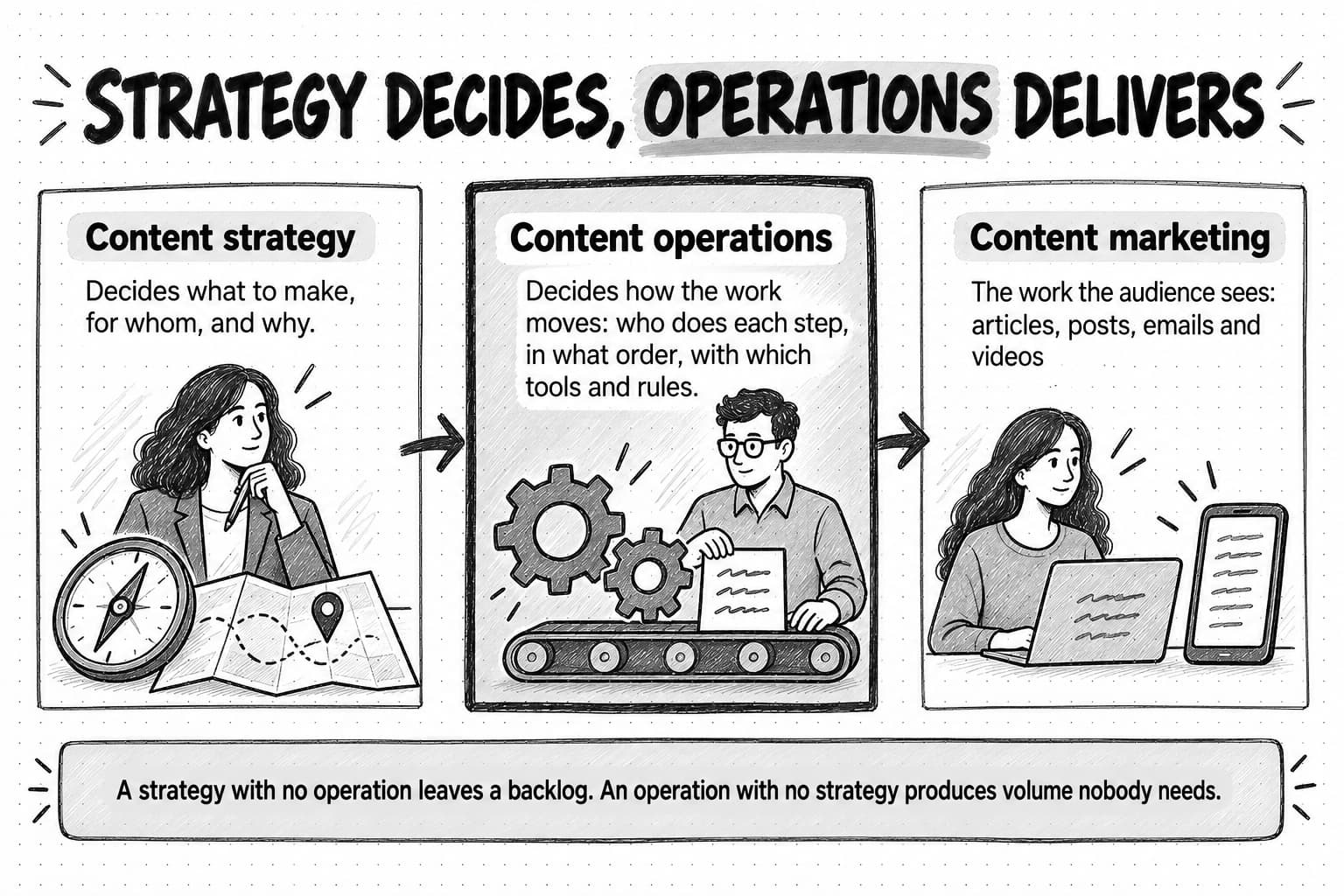
That gap is what content operations is for. A content strategy decides what to make and why; content operations makes the strategy happen week after week.
Content operations (often shortened to ContentOps) is the set of people, processes, tools, rules and measures an organization uses to move each piece of content from request to publication and on through distribution, measurement, refresh and retirement. When it works, a small team publishes on schedule without heroics, finds any asset quickly, updates old pieces before they go stale, and knows how long a guide takes to make. When it is missing, every piece is a one-off project and output depends on whoever has a free afternoon.
In larger organizations, content operations can mean a dedicated team, a content management system and a digital asset library. A team of one to three people needs none of that. It needs a written lifecycle, clear owners, one calendar that reflects reality, a few quality checks, and a handful of numbers. This guide explains those parts, then covers capacity math, the editorial calendar, quality gates, where AI agents fit, metrics, and a 60-day setup plan with templates and a fictional worked example.
What is content operations?
Content operations covers everything that happens to a piece of content apart from the creative act of deciding what it should say: taking in requests, choosing which to work on, writing the brief, getting the draft written, routing it through review, publishing it, distributing it, checking how it performs, keeping it accurate, and eventually merging or removing it. It also includes the conditions that make those steps go smoothly, such as written roles, templates, style rules, one place to find files, and a calendar people trust.
To see the scope, ask what a new writer would need to know on their first day. Where do requests come from? Who approves a claim about a competitor? How do you know whether a piece is "done"? If the answers live only in one person's head, work still gets done, but there is no operating system for it. Building content operations means writing those answers down and keeping them current.
Content operations is also different from a content workflow. A content workflow is one path through the system, such as the steps a blog post takes from brief to publication. Content operations is the whole system around many workflows: the roles shared across them, the calendar they all feed, the rules they all follow, and the measures that show which one is slowing down. Our guide to marketing workflows explains how to map a single workflow step by step.
Content operations vs content strategy, content marketing and related terms
Several terms overlap with content operations. Each answers a different question and usually has a different owner.
| Term | The question it answers | Typical output | Owner in a small team |
|---|---|---|---|
| Content marketing | How do we earn attention and trust with useful content? | Articles, guides, newsletters, posts, videos | The whole marketing function |
| Content strategy | What should we make, for whom, and why? | Audience, themes, point of view, priorities, goals | Head of marketing or founder |
| Content operations | How does the work move from request to retirement? | Roles, lifecycle, calendar, templates, rules, metrics | Content lead |
| Content workflow | What are the steps for one type of piece? | A mapped sequence with owners and handoffs | Content lead, with the people in it |
| Content governance | Which rules keep published content accurate and consistent? | Style guide, claim rules, approval rights, review dates | Content lead, with legal or product as needed |
| Editorial calendar | What is being made, by whom, and when is it due? | A dated list or board of pieces and their status | Content lead |
| Marketing operations | How does the whole marketing function run? | Systems, data, campaign processes, reporting | Marketing ops or head of marketing |
Content strategy and content operations depend on each other. A strategy with no operation behind it leaves a backlog of themes everyone agrees on and pieces that never ship. An operation with no strategy produces pieces that are on time and on brand but do not help a buyer decide anything. Our guide to building a content marketing strategy for B2B SaaS and AI companies covers the strategy side in depth, and our guide to content pillars covers how to turn a strategy into the themes a calendar runs on.
Marketing operations is the broader discipline that owns the marketing technology stack, data and campaign processes; in a team of three, the same person often does both. Our guide to marketing operations covers the wider function.
Why small teams need content operations
Small teams often treat content operations as overhead for later. In practice, the smaller the team, the more each operational gap costs, because there is no slack to absorb it: one stalled review can stop a third of the month's output.
Survey data shows the same gap at a larger scale. In the Content Marketing Institute and MarketingProfs survey for B2B Content and Marketing Trends: Insights for 2026, published in October 2025 from a survey of 1,015 B2B marketers fielded between June and August 2025, 97% of respondents said their organization has a content strategy. Only 13% of those said their strategy's results had improved significantly, and 39% put resource constraints of time, people and budget among their top three content challenges. Having a strategy was close to universal; turning it into results was not, and that is the gap content operations works on.
Content Science reported in the 2025 edition of its long-running content operations study that 45% of organizations aspire to operate at the highest level of content operations maturity, but only 9% do. The latest round drew on more than 100 professionals and leaders, so treat it as a directional signal rather than a benchmark for a small team. The symptoms of the gap are easy to recognize, and each points to a missing part of the operation:
| Symptom | Likely missing part | First fix |
|---|---|---|
| Drafts wait weeks for review | Review capacity and a named reviewer per piece | Book fixed review hours; limit drafts in review |
| Pieces ship late or not at all | A calendar that reflects real capacity | Plan to the hours you have; limit work in progress |
| The same topic gets written twice | A content inventory | List what exists before approving new work |
| Sales never uses what marketing makes | Intake from sales and a distribution step | Add sales requests to intake; tell sales when pieces ship |
| Old pieces carry wrong prices or screenshots | Review dates and an owner per published piece | Give every live piece an owner and a review date |
| Every draft needs a structural rewrite | A brief stage with agreed angle and evidence | Require an approved brief before drafting starts |
| AI drafts read generic and need heavy edits | Quality gates and brand context | Add claim and voice checks; give AI the brief and the brand voice |
You do not need to fix all of these at once; the 60-day plan near the end of this guide adds the fixes in a sensible order.
The five parts of a content operation
Most definitions of content operations describe it as people, process and technology. For a marketing team it helps to add two more parts, governance and measurement, because those are the ones small teams most often skip and most often regret skipping.
People and roles
In a small team the roles are rarely separate jobs; one person might be strategist, editor and publisher in the same week. That is fine as long as the role for each piece is clear. The usual failure is unclear ownership: a draft each of two people thinks the other is reviewing, or a claim nobody is sure they may approve.
A RACI chart is the standard tool for writing this down. It names, for each activity, who is Responsible for doing it, who is Accountable for the outcome (one person only), who must be Consulted, and who should be Informed. Here is a starting version for a content team of two or three people plus a founder:
| Activity | Content lead | Writer (staff, freelance or AI-assisted) | Subject expert | Approver (founder or head of marketing) | Sales or customer success |
|---|---|---|---|---|---|
| Intake and prioritization | A, R | I | C | C | C |
| Brief | A, R | C | C | I | I |
| Draft | A | R | C | I | I |
| Subject-matter review | A | I | R | I | I |
| Final approval | R | I | I | A | I |
| Publish | A, R | I | I | I | I |
| Distribution | A, R | C | C | I | R (sales sends) |
| Measurement and reporting | A, R | I | I | I | C |
| Refresh or retirement | A, R | R | C | I | C |
Two rules make the chart useful. Name exactly one accountable person per activity, because if two people are accountable, nobody is. And let the approver approve rather than rewrite: when the founder's review becomes a second drafting pass, the founder becomes the bottleneck for everything. Agreeing what the approver checks (claims, positioning, anything legally sensitive) and what they leave to the editor keeps review short.
Process
The second part is the lifecycle: the stages every piece passes through and the condition that ends each stage. The next section covers the lifecycle in detail. The important idea here is the exit criterion, a short, checkable statement of what must be true before a piece moves to the next stage. "Draft complete against the brief" is an exit criterion. "Draft looks good" is not, because two people can disagree about it.
Tools
The third part is where the work lives. A small team needs four places, which can be four tabs in one tool or four separate tools:
- The calendar or board, where every piece in progress appears with its stage, owner and due date.
- The working folder, with one predictable structure for briefs, drafts, source files and final assets.
- The inventory, a list of everything published, with owners and review dates.
- The rules, meaning the style guide, templates and checklists, in a place people actually open.
The specific software matters less than having one of each and only one. A project management tool, a shared spreadsheet, a document folder and a page of rules is a complete stack for most teams under five people. Large organizations add a content management system with workflow features and a digital asset management system because of their volume and headcount. Buying those early tends to add configuration work without fixing the underlying problems of ownership and capacity.
Governance and measurement
The fourth part is governance, the rules that keep published content accurate and consistent: voice, claims and sources, approval rights, review cycles and retirement. It is the part most often written once and then ignored, so a later section describes a version small enough to keep. The fifth part is measurement, which covers operational measures such as how long pieces take and how many ship, and outcome measures such as whether pieces are read, used by sales and connected to pipeline. This guide focuses on the operational ones, because content operations controls them directly; our guide to content marketing ROI covers outcomes.
The content lifecycle from intake to retirement
The lifecycle is the backbone of a content operation. Writing it down makes every piece follow the same path, so nothing skips review or ships without an owner, and it gives you the stage names the calendar, metrics and handoffs depend on. Here is a nine-stage lifecycle that suits most B2B content teams. Adjust the names to your team's language, but keep the exit criteria explicit.
| Stage | What happens | Exit criterion | Typical owner |
|---|---|---|---|
| 1. Intake | A request or idea is logged with its source | Request has a reader, a goal and a source | Content lead |
| 2. Prioritize | The request is scored against the strategy and capacity | Given a calendar slot, or returned to the backlog with a reason | Content lead, with approver |
| 3. Brief | Angle, evidence, structure and reviewer are agreed | Brief approved by the content lead and, for big pieces, the approver | Content lead |
| 4. Produce | The piece is drafted, designed or recorded | Draft complete against the brief, with sources linked | Writer |
| 5. Review | Facts, voice, claims and approvals are checked | Required reviewers have signed off; changes are resolved | Content lead, subject expert, approver |
| 6. Publish | The piece goes live with links, metadata and tracking | Live, checked on the page, with an owner and a review date | Content lead |
| 7. Distribute | The piece is shared on planned channels and with sales | Channel versions posted or scheduled; sales told where it is | Content lead, sales |
| 8. Measure | Results are checked against the goal in the brief | Results recorded at about 30 and 90 days | Content lead |
| 9. Refresh or retire | The piece is updated, merged or removed when it is due | Review date reached and a decision recorded | Content lead, writer |
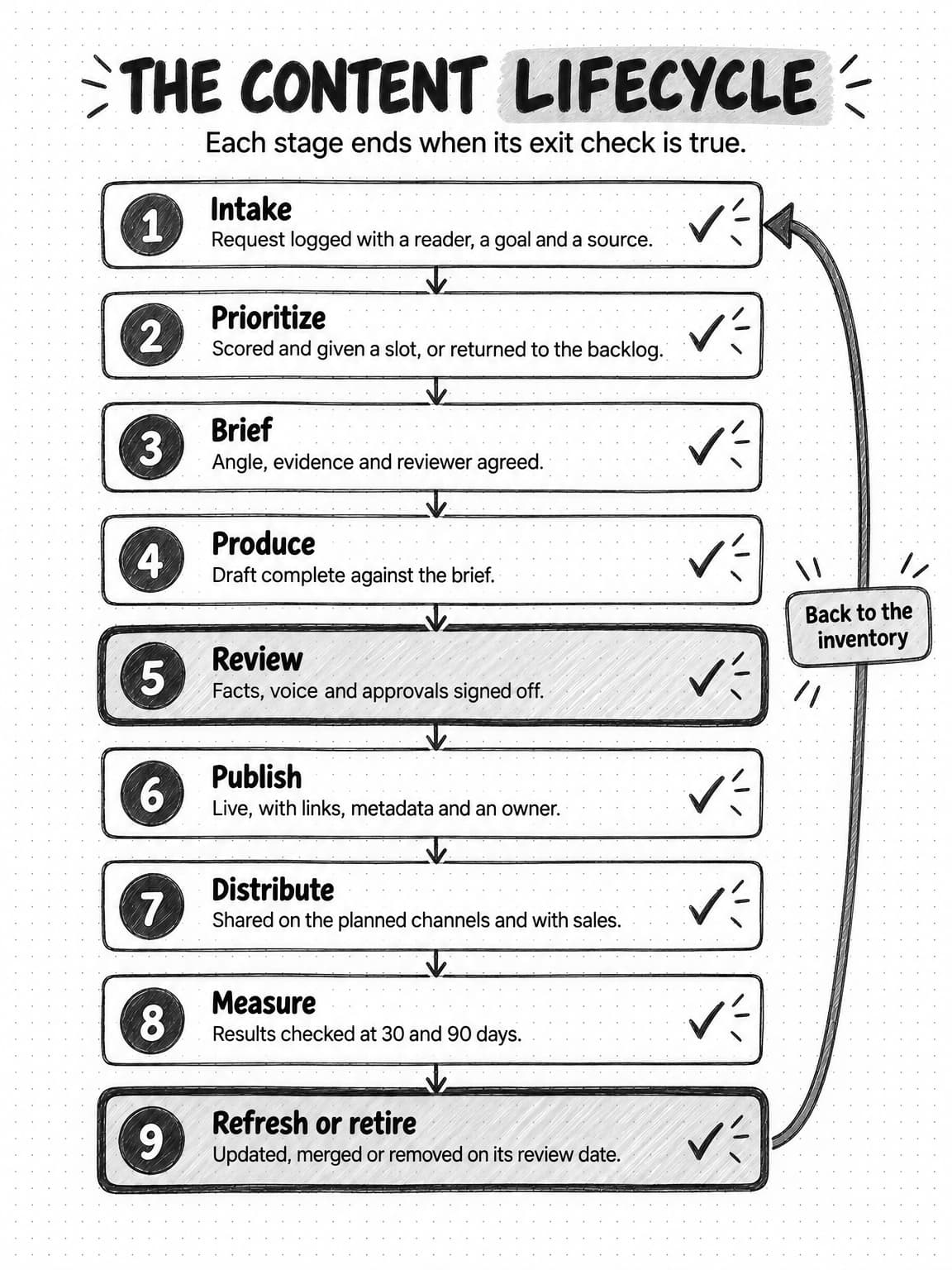
View the content lifecycle at full size (opens in a new tab).
Intake and prioritization
Without a defined intake, requests arrive in chat messages, hallway conversations and meeting asides, and the loudest one wins. With one, every idea, from the founder, sales, support, search research or the team itself, lands in the same backlog with the same few fields, and prioritization becomes a comparison instead of a negotiation. A good intake form is short enough that people use it: who the piece is for, what they are trying to decide or do, where the idea came from, what evidence exists, which goal it supports, and whether there is a deadline. The templates section below includes one.
Prioritization then asks whether the piece fits the strategy and whether there is capacity for it. A simple scoring scheme helps: score each request from one to three on fit with a content pillar, value to buyers or sales, strength of the available evidence, and effort (lower effort scores higher), then compare totals. The scores are an aid to judgment, not a formula; their job is to make the reasons for a decision visible. A low-scoring request goes back to the backlog with a note, and the person who asked is told why.
Brief
The brief is the cheapest place to catch problems. A draft written without an agreed angle often needs a structural rewrite after review, which costs far more than an hour spent agreeing the brief first. The brief stage turns a vague request into a piece of work with a reader, an angle, the evidence it will rest on, a structure, a named reviewer and a due date. It is also where the writer's inputs get collected, so production can start the moment a writer is free instead of stalling while someone chases source material. Our guide to writing a content brief includes a template and a completed example.
Review and approval
Review is where most small content teams lose the most time, and the next section explains why with capacity math. It needs named reviewers per piece, set at the brief stage, a defined scope for each, and a time limit. A subject expert checks accuracy, the approver checks positioning and risky claims, and the editor checks voice, structure and the quality checklist. Reviewers who know their scope can review in minutes rather than hours. Our guide to content approval workflows covers sign-off rules and review tiers in depth.
Publishing, distribution and measurement
Publishing is more than pressing a button. Its exit criterion should include a check of the live page (links, images, title and description, tracking) and an inventory row with an owner and a review date. Distribution is often planned in the brief and forgotten when the piece ships, so give it its own exit criterion: channel versions posted or scheduled, and sales or customer success told where the piece is and when to use it. Our guide to repurposing content across channels covers the channel work itself.
Measurement as a lifecycle stage means a scheduled check, not a dashboard someone might open. Record results at about 30 days, to catch problems such as a page that is not indexed or a link never shared, and again at about 90 days for a fairer picture. Judge each piece against the goal in its brief: a piece written for sales conversations should be judged on whether sales used it, not on page views.
Refresh, merge or retire
Every published piece gets a review date when it ships. When the date arrives, the owner decides whether to keep it, update it, merge it into a stronger piece, or retire it. Pieces that mention prices, product features, screenshots, statistics or competitors need shorter review cycles than pieces about durable ideas. Our guide to content audits explains how to make those decisions and what Google's documentation says about redirects and removals.
Updating should mean real change. Google's guidance on helpful, reliable, people-first content, last updated October 5, 2026, asks site owners whether they are "changing the date of pages to make them seem fresh when the content has not substantially changed." A refresh that only bumps the date fails that test; one that corrects a price, replaces an outdated example and adds a new section passes it.
Capacity planning and throughput math for a content team
Most content plans fail on capacity rather than ideas. Our guide to content pillars covers how to size a content calendar to the hours you have, including timing each format from start to finish. This section adds the other half of the math: how work flows through the stages, and why starting more pieces usually makes each one slower.
Find the bottleneck stage
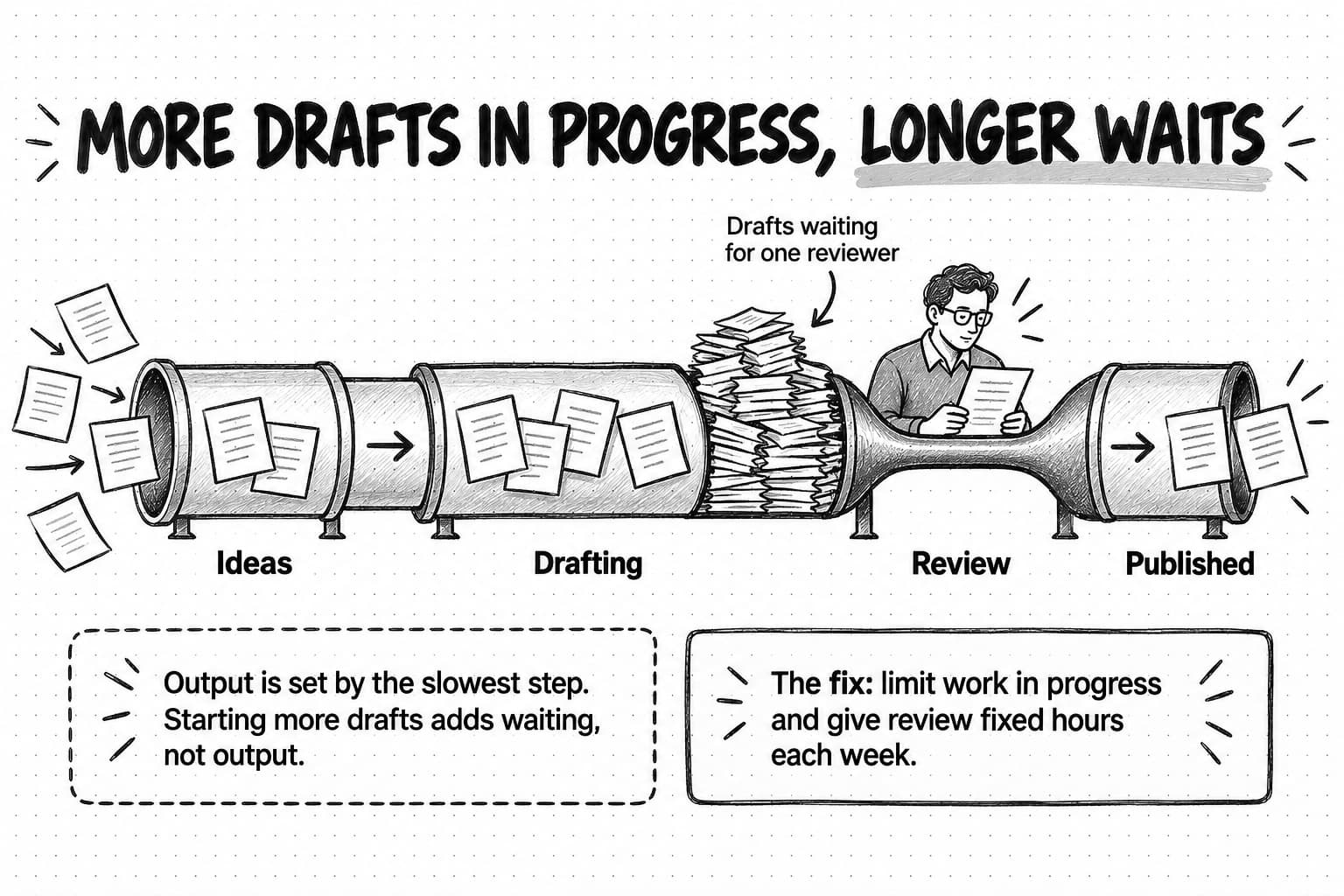
A content team's output is limited by its slowest stage, not by the total hours it has. If the writer can produce three drafts a week but the founder can review only one, the team publishes one piece a week, however many drafts pile up. The extra drafts add waiting, and waiting has costs: drafts go stale, the writer loses context, and the launch a piece was written for may move before review comes.
To find your bottleneck, estimate how many pieces each stage can handle per week at current staffing: the hours really available for that stage divided by the time it takes per piece. For a small B2B team the bottleneck is usually review by a busy founder or subject expert, the brief when only one person can decide angles, or design when a freelancer handles visuals part-time.
Here is an illustrative calculation for a fictional team. The content lead has about 25 hours a week for content, a freelance writer about 10, and the founder about 2 hours a week for review.
| Stage | Hours available per week | Hours per piece (illustrative) | Pieces per week |
|---|---|---|---|
| Brief (content lead) | 4 | 1 | 4 |
| Drafting (freelancer plus content lead) | 10 + 8 | 6 | 3 |
| Editing (content lead) | 5 | 1.5 | 3.3 |
| Founder review | 2 | 1.5 | 1.3 |
| Publish and distribute (content lead) | 4 | 1.5 | 2.7 |
The founder's review limits the team to roughly one piece a week, so a second freelance writer would change nothing about output. The fixes that help act on review itself: narrowing what the founder checks so a review takes 45 minutes instead of 90, delegating lower-risk pieces to the content lead or a subject expert, or booking a fixed weekly review slot so the two hours actually happen.
Limit work in progress
The second piece of math explains why teams with many drafts in progress feel busy and still ship slowly. Little's Law, a result from queueing theory that John Little revisited on its 50th anniversary in Operations Research in 2011, says that in a stable system the average number of items in progress equals the average rate at which items finish multiplied by the average time each item spends in the system. Rearranged for a content team:
Average cycle time = Pieces in progress ÷ Pieces finished per week

12 pieces in progress ÷ 1.5 finished per week = 8 weeks per piece
 4 pieces in progress ÷ 1.5 finished per week = about 2.7 weeks per piece
Both teams publish the same number of pieces, but one gets each piece out in under three weeks and the other takes two months. Little's Law describes long-run averages in a reasonably stable system, so treat it as a planning guide rather than a precise prediction; the direction is reliable all the same.
The practical rule is to set work-in-progress limits for the stages that pile up: for example, no more than three pieces in drafting and two in review at once. When a stage is full, the team helps finish what is there instead of starting something new. Our guide to marketing workflows applies the same logic to any marketing process.
Plan for the work calendars forget
Capacity plans usually count drafting hours and forget briefs, reviews, revisions, publishing checks, distribution, refreshes and the request that arrives on Tuesday. In Orbit Media's 2026 blogging survey of 1,042 content marketers, respondents reported an average of 3 hours and 20 minutes to write a blog post of about 1,300 words. That is self-reported writing time alone; research, review and distribution for a researched B2B guide can take as long again. Time your own pieces from brief to distribution for a month before trusting any estimate, including the illustrative ones above.
Refresh work needs its own line in the plan. A team that publishes forty pieces a year with twelve-month review dates will have forty reviews due next year on top of new work, and unplanned refreshes do not happen.
Run the editorial calendar as an operating tool
Many teams treat the editorial calendar as a publishing schedule, a list of dates and titles. That kind of calendar answers "what goes out on Thursday?" but not "why is Thursday's piece not ready?" An operating calendar answers both: it shows every piece in progress with its stage, owner, next action and any blocker, so the team sees problems while there is still time to fix them. Our guide to content pillars covers the planning side of the calendar, including themes, content mix and a weekly review agenda; this section covers the operating side.
The fields every piece needs
Each row or card on the calendar should carry the same fields. If a field is empty, that is information: a piece with no reviewer will stall at review, and a piece with no next action is not really in progress.
Title and format   : What the piece is, in plain words (guide, article, newsletter, video, ...)
Pillar             : Which content pillar it belongs to
Reader and goal    : Who it is for and what they should be able to do
Stage              : Backlog / Briefed / Drafting / In review / Scheduled / Published
Owner              : One person accountable for the piece reaching the next stage
Writer, reviewers  : Who produces it, and who checks what
Next action        : The single next thing that has to happen, and who does it
Due date           : When it must be published, and why (launch, event, none)
Links              : Brief and working draft
Distribution plan  : Channels and the sales handoff
Review date        : When the published piece must be checked again
Blocked?           : Yes or no, and by what
Stages as columns, with limits
A board view, with one column per lifecycle stage, makes the flow visible in a way a dated list does not. Five pieces sitting in review with nothing in drafting tells you exactly where to spend the afternoon. Put work-in-progress limits in the column headings, such as "Drafting (limit 3)", so the rule is visible every time someone looks. Most project tools show the same items as a board and as a calendar; use the board to run the work and the calendar to communicate dates.
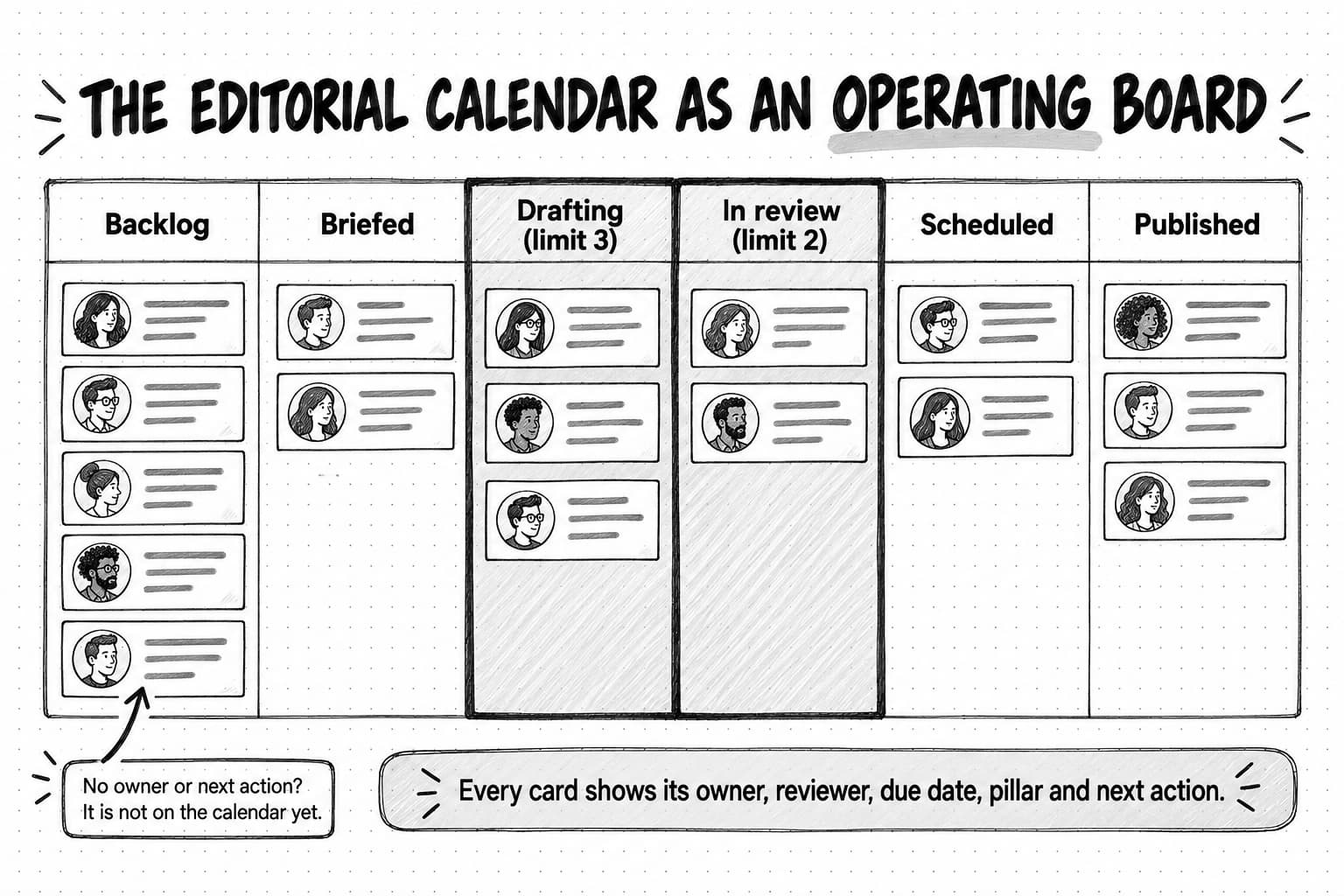
Rules that keep the calendar honest
A calendar stays useful only when it matches reality. Four rules help:
- Nothing is in progress without an owner and a next action. If you cannot name both, the piece goes back to the backlog.
- Dates come from capacity, not hope. Set due dates from the bottleneck stage, and change them openly when a piece slips.
- Move the card when the stage ends. A calendar updated only at the weekly meeting is always a week out of date.
- Record every slip with a reason. "Waiting on founder review" and "missing customer quote" are different problems, and a month of reasons shows which part of the operation to fix next.
Content inventory and asset management
A content inventory is a list of everything you have published, with enough detail to find, reuse and maintain each piece. Nielsen Norman Group's Content Inventory and Auditing 101 defines an inventory as "a list of every piece of digital content you currently have, captured at either the page or asset level," and an audit as the step that "examines, assesses, and evaluates the quality of the content listed in the inventory." For content operations, the inventory is a working tool rather than a one-off project: intake checks it for existing topics, refresh dates live in it, and sales uses it to find the right case study. A useful inventory for a small team has these columns, adapted from the attributes NN/g recommends:
| Column | Why operations needs it |
|---|---|
| Title and URL | To find the piece and link to it |
| Format | To find assets of one kind, such as every case study |
| Pillar and topic | To check for duplicates at intake and spot gaps |
| Buyer stage or use | To help sales find the right piece for a conversation |
| Owner | So someone is responsible for accuracy |
| Last reviewed and next review dates | To know what is current and schedule refreshes |
| Source files location | To update the piece without starting over |
| Reuse rights | To know whether quotes, images and customer names can be reused |
| Status | Live, needs update, merged, retired |
Start with the pieces that matter most, such as top pages by traffic, every case study and every comparison page, and add each new piece at the publish stage so the inventory grows without a separate project.
Asset management is the same idea for the files behind the content: images, video, source documents, customer approvals and brand assets. A small team does not need a digital asset management system, but it does need one folder structure everyone follows and a naming convention that makes the final version obvious, such as YYYY-MM_format_short-title_final. Record reuse rights too: a customer who agreed to be quoted in one case study has not necessarily agreed to appear in an ad.
Quality gates: facts, brand voice and AI slop
A quality gate is a short check a piece must pass before it moves to the next stage. Gates spread quality work across the lifecycle instead of saving it for one long edit at the end, where small teams run out of time. Three are enough for most teams.
The brief gate, before drafting. Is the reader clear? Is the angle agreed? Is the evidence identified, and is it strong enough for the claims the piece will make? Is a reviewer named? A piece that fails here goes back for a better brief, which costs an hour instead of a rewrite.
The draft gate, before review. The writer or editor checks the draft against a written checklist before anyone else reads it. Does every factual claim have a source, and every statistic its date and sample? Does the piece match the brand voice? Could any company in the category have written it? Catching these before review keeps the reviewer's time for judgment.
The release gate, before publishing. Are the required approvals recorded? Do links work? Are the title, description and image text set? Does the piece have an owner and a review date in the inventory?
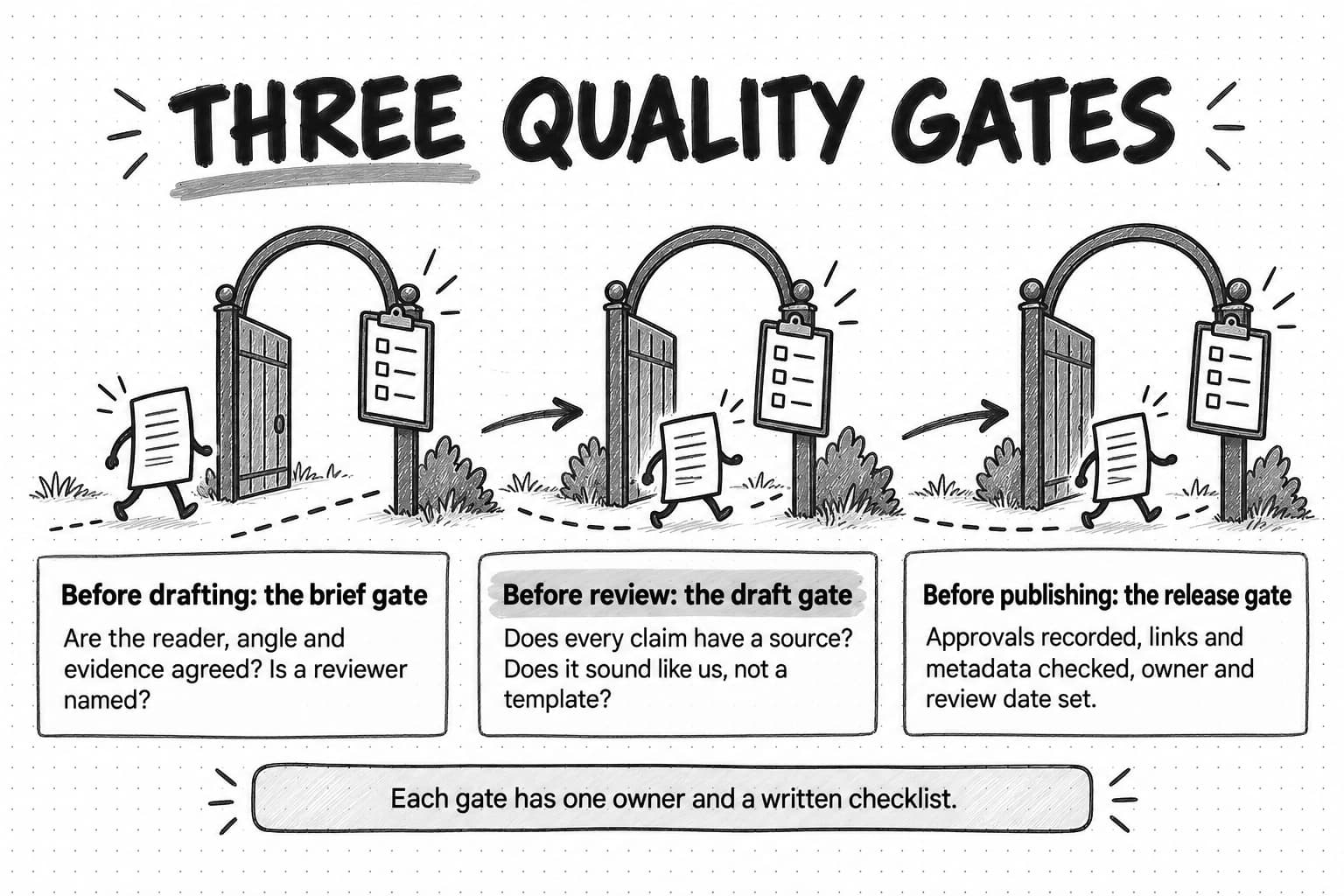
The draft gate matters more now that much first-draft writing involves AI. In the CMI 2026 survey, among marketers using AI for content creation, 87% reported improved productivity, but only 58% reported improved content quality and 12% said quality had decreased. Orbit Media's 2026 survey found that 92.4% of respondents use AI for blogging, and that those with "a more formal approach with human oversight" in editing were much more likely to report strong results. Both are self-reported surveys, so they show association rather than cause, but they point the same way: faster drafting makes review more important.
Google's guidance on using generative AI content, last updated October 1, 2026, is direct about the fact check: "It is critical to manually factcheck and review all AI-generated content for accuracy and trustworthiness before publishing." The same page warns that using generative AI tools "to generate many pages without adding value for users" may violate Google's spam policy on scaled content abuse.
AI slop, fluent and generic content that adds nothing a reader could not get elsewhere, is the quality failure most specific to AI-assisted production. Our guide to AI slop describes its signals, and our guide to AI content creation covers how to edit an AI draft. For operations, the practical steps are to put specific slop checks in the draft gate checklist and to give whoever drafts, person or AI, the inputs that prevent generic output: an approved brief, real source material, the brand voice and examples of the team's best work.
Content governance a small team can keep
Most small teams write a long style guide once, and nobody reads it again. A version small enough to keep fits on two or three pages and has five parts:
- Voice and style. How the brand sounds, with a few examples of sentences that fit and sentences that do not, plus the house rules people actually get wrong, such as product names and capitalization. Our guides to defining a brand voice and brand guidelines cover how to write these.
- Claims and sources. Which claims need a source, what counts as an acceptable one, and which claims need the approver's sign-off: competitor comparisons, customer results, pricing, security, and anything regulated in your industry.
- Approval rights. Who may approve which kinds of pieces, taken from the RACI chart. A low-risk social post adapted from a published guide may need only the content lead; a comparison page needs the approver.
- Review cycles. How long each kind of piece can go without review, set by how fast its facts change: for example, comparison pages quarterly, tutorials when the product changes, and evergreen guides yearly.
- Retirement rules. When a piece should be merged, redirected or removed, and who decides.
Keep governance where work happens: a checklist linked from the brief template gets used, and a policy document in a shared drive does not. When a review uncovers a repeated problem, add one line to the relevant checklist rather than writing a new policy.
Where AI agents fit in content operations
AI tools and AI agents can help at every stage of the lifecycle. An AI agent differs from a chat assistant in that it can carry out multi-step work, such as researching sources, drafting several formats and organizing files, then bring the results back for review. That suits the research-heavy and adaptation-heavy parts of content operations. It does not change who is accountable for what gets published.
| Stage | Where AI can help | What stays with people |
|---|---|---|
| Intake | Summarize sales call notes and support tickets into candidate topics; check the inventory for existing pieces | Which requests are worth making |
| Prioritize | Pull search questions, competitor coverage and existing performance for each candidate | The priority call and the trade-offs |
| Brief | Research sources, competitors and the questions buyers ask; draft an outline for review | The angle, the point of view and which claims to make |
| Produce | Draft from the brief and source material; adapt one piece into channel versions; create first-pass visuals | The expertise, examples and opinions only your team has |
| Review | Flag unsourced claims, inconsistent numbers and off-voice sentences against the checklist | Final sign-off on accuracy, positioning and risk |
| Publish | Draft titles, descriptions and image alt text | Checking the live page |
| Distribute | Draft social posts, newsletter copy and sales notes from the published piece | Where, when and to whom to send it |
| Measure | Pull results into a summary; list pieces past their review date | Interpreting results and deciding what to change |
| Refresh or retire | Compare a published piece with current product facts and sources; draft updates | Keep, update, merge or cut |
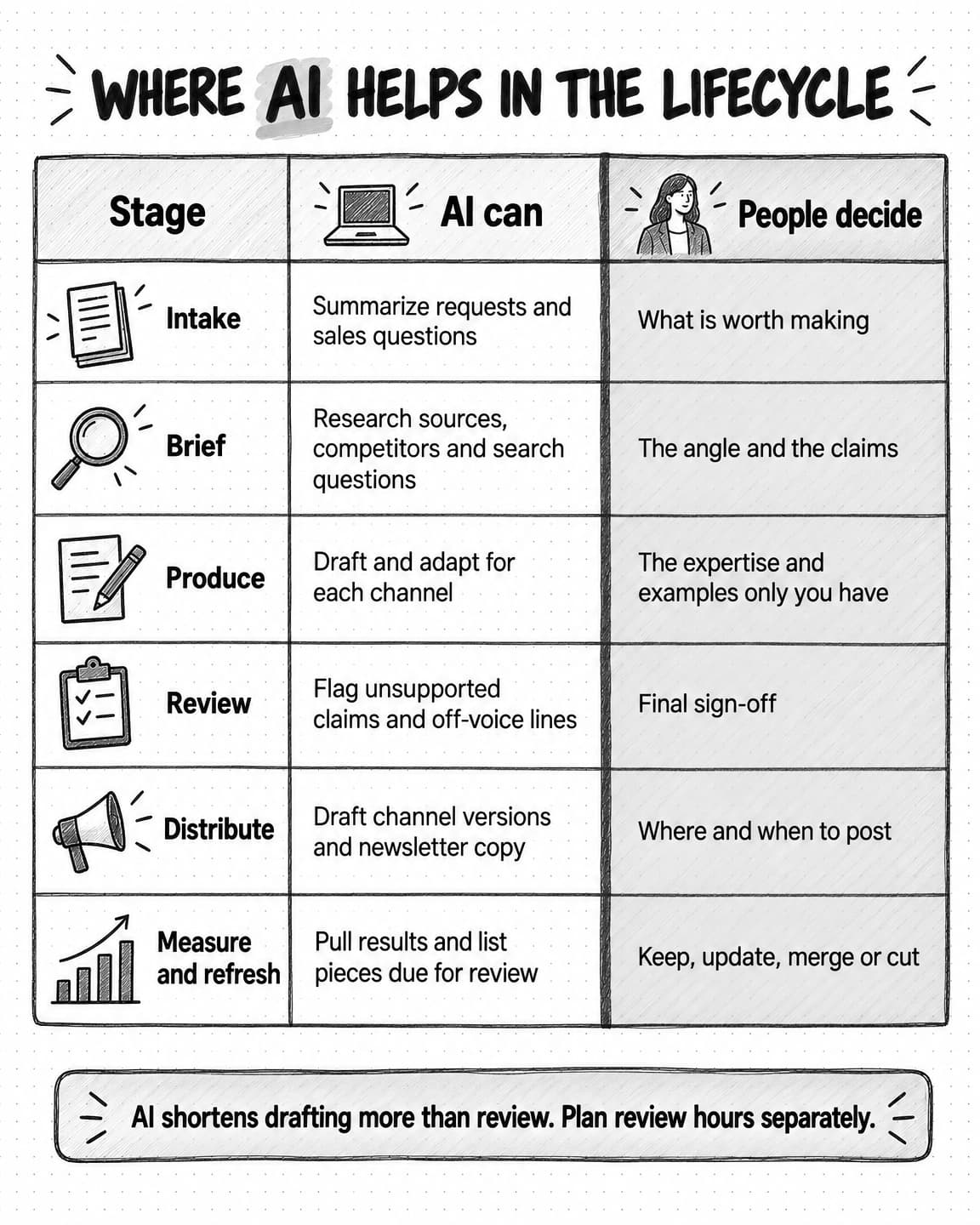
View where AI helps in the content lifecycle at full size (opens in a new tab).
Three operational effects follow. The bottleneck moves toward review, because AI shortens drafting much more than checking: a team that doubles its drafting speed without adding review capacity mostly grows its review queue, so recalculate the capacity table after a month of real use. Inputs matter more, because an AI draft can only be as specific as the brief, sources and brand context it receives. And recurring steps become easier to automate, such as a weekly digest of sales questions for intake, a monthly list of pieces past their review date, or a quarterly check of competitor pages your comparison content depends on, with results coming back to the team for review. Our guide to automating marketing with AI agents covers how to choose which recurring work to hand to an agent, and our guide to human-in-the-loop AI covers where to place review checkpoints.
Content Science's 2025 study is a useful reality check here: 86% of organizations reported using AI in at least some areas of content operations, but only 29% reported moderate or fast progress in scaling that use. Adding AI to a disorganized operation tends to produce disorganized output faster. Teams with a written lifecycle, clear owners and quality gates have somewhere to put AI.
Content operations metrics
Operational metrics tell you whether the content system is healthy, separately from whether individual pieces perform. A content lead can improve them directly, and they explain outcome numbers: a team whose pieces take ten weeks to ship will struggle to respond to a launch, however good its writing. Track a small set monthly, and keep each definition fixed so the trend means something.
| Metric | Definition | How to collect it | What it tells you |
|---|---|---|---|
| Cycle time | Days from brief approved to published | Dates on calendar cards when stages change | How long the system takes once work starts |
| Throughput | Pieces published per week or month, by format | Count of cards reaching Published | Real capacity, for planning |
| Work in progress | Pieces between Briefed and Published at a point in time | Count cards in those columns each week | Whether the team is starting more than it finishes |
| On-time rate | Share of pieces published on or before the planned date | Planned date versus publish date | Whether plans match capacity |
| Review wait | Days a piece spends waiting in review | Dates entering and leaving review | Whether review is the bottleneck |
| Revision rounds | Times a draft returns from review, split into structural and line edits | A counter on the card | Brief quality and reviewer alignment |
| Refresh coverage | Share of pieces past their review date that were reviewed | Inventory review dates | Whether the library is staying accurate |
| Sales use | Pieces sales or customer success shared in a period | CRM links, shared-content reports or a monthly ask | Whether content is useful in buying conversations |
A few notes on using them well:
- Read cycle time and throughput together. Faster cycle times with falling throughput can mean the team is only finishing easy pieces.
- Watch structural revisions. A rising share of drafts sent back for structural rewrites usually points to weak briefs or reviewers who disagree about the angle.
- Ask sales directly. A two-question monthly message ("Which pieces did you send this month? What did you need that did not exist?") gives a usable signal and feeds intake.
- Keep the metrics off individual scorecards. Rewarding throughput alone invites thin pieces; the numbers exist to find problems in the system.
Outcome metrics, such as search visibility, engaged readers, newsletter sign-ups, influenced pipeline and AI answer citations, sit alongside these. Our guides to content marketing ROI and automating marketing reporting cover how to measure and report them.
Month:

Throughput (published):          guides __  articles __  newsletters __  other __
Median cycle time (days):        __   (last month: __)
Median review wait (days):       __   (last month: __)
Work in progress (end of month): __   (limit: __)
On-time rate:                    __%
Structural revision rounds:      __ of __ drafts
Refresh coverage:                __ of __ due pieces reviewed
Sales use:                       __ pieces shared; top request that did not exist: ________

Biggest slip reason this month:  ________________________________
One change we will make:         ________________________________
A content operations maturity model
A maturity model helps a team choose its next step without trying to jump to an enterprise setup. Content Science uses a five-level model in its research; the four levels below are this guide's working model for small teams, not an industry standard.
| Level | What it looks like | Typical signs | Next step |
|---|---|---|---|
| 1. Ad hoc | Every piece is a one-off project; the process lives in one person's head | Requests in chat; no calendar or a calendar nobody trusts; review whenever someone has time | Write the lifecycle and put every piece in progress on one board |
| 2. Repeatable | The team follows the same steps most of the time | A shared calendar; a brief template; named reviewers on most pieces | Add exit criteria, intake and a basic inventory |
| 3. Managed | Stages, owners, gates and rules are written and followed | Work-in-progress limits; three quality gates; review dates on published pieces | Start tracking cycle time, throughput and refresh coverage |
| 4. Measured and improving | The team uses its own numbers to change how it works | Monthly scorecard; changes made from slip reasons; refreshes planned as work | Revisit the bottleneck each quarter and automate recurring steps |
Most small teams can move from level 1 to level 3 in about two months by following the plan in the next section. Level 4 takes longer because it needs a few months of data before the numbers mean much.
A 60-day content operations setup plan for a team of one to three
This plan assumes a content lead with part of their week for operations work, perhaps a writer or freelancer, and a founder or head of marketing who approves important pieces. It adds one rule at a time, because a team that adopts ten new rules on Monday usually follows none of them a month later. If one symptom costs you far more than the others, start with the phase that addresses it.
Weeks 1–2: see the work
- List every piece in progress, wherever it lives, with its state and who it is waiting on. This often turns out to be the most useful hour of the plan.
- Start the inventory with top pages, case studies and comparison pages.
- Time your last five pieces from request to publish, using document history, and note where each one waited.
- Find the bottleneck with the capacity table from earlier in this guide.
Weeks 3–4: define the flow
- Write the lifecycle with your stage names and exit criteria. Keep it to one page.
- Fill in the RACI chart and agree what the approver checks and leaves to the editor.
- Move to one board with stages as columns, every piece on it with an owner and a next action.
- Book a recurring review slot in the approver's calendar.
Weeks 5–6: add the gates
- Add an intake form and route all requests through it, including the founder's.
- Require an approved brief before drafting, using a brief template.
- Write the draft gate checklist, including claim, source and voice checks.
- Write the short governance page: voice, claims, approval rights, review cycles and retirement rules.
Weeks 7–8: measure and adjust
- Set work-in-progress limits on drafting and review, based on the bottleneck.
- Start the monthly scorecard with cycle time, throughput, review wait, revision rounds and refresh coverage.
- Book the first refresh for pieces past their review date, as planned work.
- Hold a retrospective on what slowed pieces most, and choose one change to make next.
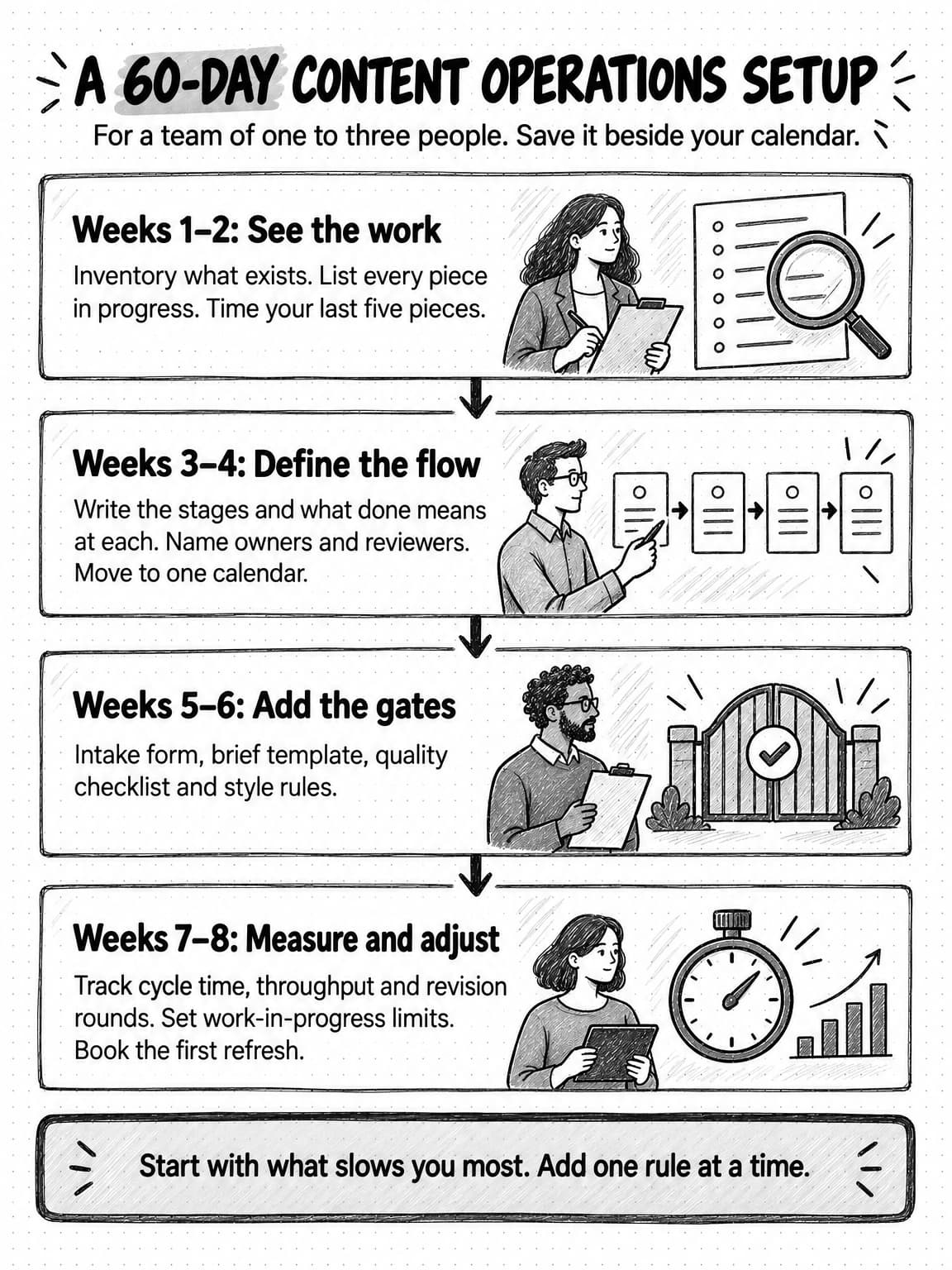
View the 60-day content operations setup plan at full size (opens in a new tab).
Worked example: a two-person team sets up content operations (fictional)
Larkfield is a fictional B2B SaaS company that sells scheduling software to field service businesses. Its content team is one content lead, Priya, with about 25 hours a week for content, and a freelance writer with about 10 hours a week. The founder approves every guide and comparison page. The numbers in this example are illustrative, chosen to show the method, not results from a real team.
Weeks 1–2. Priya lists everything in progress and finds eleven pieces: four drafts waiting for the founder, three half-written drafts, two briefs and two ideas promised to sales. The last five published pieces took a median of about seven weeks from request to publish, roughly four of them waiting for review, and the capacity table confirms the founder's two review hours a week as the bottleneck. The inventory, started with the top 30 pages and all six case studies, turns up two guides on nearly the same topic.
Weeks 3–4. Priya writes a seven-stage lifecycle, merging prioritize into intake and measurement into refresh for now, and a RACI chart. The founder agrees to review only competitor claims, customer results and pricing, leaving style and structure to Priya, and to keep a 90-minute review slot every Tuesday. All eleven pieces go on one board, and three move back to the backlog because nobody can name a next action for them.
Weeks 5–6. Sales requests now go through the intake form. One of the first, for a page explaining how Larkfield handles technicians in multiple time zones, scores high on value to sales and is briefed the same week. Priya writes the draft gate checklist after noticing that two drafts quoted the same industry statistic without a source.
Weeks 7–8. Priya sets limits of three pieces in drafting and two in review. The two near-duplicate guides are merged and the weaker URL redirected. By the end of the period the board holds six pieces in progress instead of eleven, and pieces briefed under the new process move through review in about a week. Throughput has not changed much yet; it will take another month or two of data to tell whether lower work in progress has raised output or only shortened waits.
Larkfield did not buy new software, hire a second writer or write a governance manual. Its biggest improvement came from narrowing the founder's review scope and booking the time, a change that cost nothing.
Copyable content operations templates
Rename the fields to match your team's language and cut anything you will not use.
Requested by and date      :
Who is the piece for?      : (role, company type, situation)
What should they be able to decide or do after reading?
Where did the idea come from? : (sales call, support ticket, search research, founder, customer, other)
What evidence or source material exists? : (links, data, customer, expert)
Which goal or pillar does it support?
Is there a deadline, and why? : (launch, event, campaign, none)
Does something similar already exist? : (check the inventory; link it)[ ] The draft answers the reader's question from the brief in the opening section.
[ ] Every statistic names its source, date and sample, and links to the source.
[ ] Every claim about a competitor, customer result or price has evidence and needs approver sign-off.
[ ] Examples are specific to us or clearly labeled as hypothetical.
[ ] The draft sounds like our voice guide, not a generic template.
[ ] No padded introduction, stock phrases or conclusion that repeats the body.
[ ] Links work and point to the best available source.
[ ] The piece adds something a reader could not get from the top search results.How Ampere fits into a small content operation
Ampere is an AI marketing agent. In a content operation it can take on research, drafting and recurring checks at several lifecycle stages, so a small team spends more of its time on decisions, expertise and review. You describe the work in plain English, and Ampere does it in its own session workspace, with a browser, files and internet access, then brings the results back for review.
At the intake and brief stages, Ampere can research competitors, search questions and AI-search visibility gaps, and turn findings into structured summaries for choosing and shaping topics. It can save evidence-backed reports to Brand memory, including brand voice, audience, competitors, search landscape and a content inventory built from public evidence, so later briefs and drafts start from the same picture of your brand and market. Check those reports against your own records, because public data coverage is never complete.
At the production and distribution stages, Ampere drafts content packages from your brief and Brand memory: source-grounded blog article packages, newsletter editions, lifecycle email sequences, LinkedIn and other social packages, carousels, images, short videos, reports and decks. Projects keep a brief, source files, generated files and reusable assets together, so a campaign's pieces draw on the same context.
For recurring lifecycle steps, Scheduled Tasks run saved prompts or AI Tools hourly, daily, weekly, monthly or manually, and return each result to a Project for review, with optional run-update emails to members of your Organization. A weekly digest of new search questions for intake fits this pattern. Monitoring can check sources you care about, such as competitor pages your comparison content depends on, hourly, daily or weekly, and file in-app alerts with evidence when something changes.
Ampere is not a content management system, a digital asset library or a project management tool, and it does not publish to your website. Your team keeps the calendar, owns the inventory, reviews every draft, checks every claim, and decides what goes live. AI output can be inaccurate or incomplete, which is why the quality gates in this guide still apply to anything Ampere drafts. See Scheduled Tasks, Monitoring and Brand memory for more on each.
Sources and further reading
- Robert Rose, B2B Content and Marketing Trends: Insights for 2026, Content Marketing Institute and MarketingProfs, October 8, 2025. Survey of 1,015 B2B marketers fielded June 24 to August 14, 2025; sponsored by Storyblok. Content strategy results, content challenges, and AI productivity and quality findings.
- Andy Crestodina, Blogging statistics 2026, Orbit Media, September 8, 2026. Annual survey of 1,042 content marketers; self-reported writing time, AI use, and editing approaches.
- Content Science, Content Operations Study: What Makes Content Operations Successful in the Age of AI?, October 2025. More than 100 participants in the latest round; maturity aspirations and AI scaling.
- John D. C. Little, Little's Law as viewed on its 50th anniversary, Operations Research 59(3), 536–549, 2011.
- Anna Kaley, Content Inventory and Auditing 101, Nielsen Norman Group, September 27, 2020. Inventory and audit definitions and recommended inventory attributes.
- Google Search Central, Google Search's guidance on using generative AI content on your website, last updated October 1, 2026. Fact-checking AI content and scaled content abuse.
- Google Search Central, Creating helpful, reliable, people-first content, last updated October 5, 2026. Self-assessment questions, including date changes made only to seem fresh.
Frequently Asked Questions
What is the difference between content operations and content strategy?
Content strategy decides what content to make, for whom, and why. Content operations decides how that content gets made and maintained: who does each step, in what order, with which tools and rules, and how the team measures the system. A strategy without operations leaves a backlog of unshipped ideas; operations without strategy produce volume that does not help buyers decide anything.
What does a content operations manager do?
A content operations manager runs the system that moves content from request to retirement: managing intake and prioritization, maintaining the editorial calendar and content inventory, defining workflows and approval rights, keeping templates and style rules current, removing bottlenecks such as slow reviews, and reporting metrics like cycle time and throughput. In a small team, the content lead usually does this alongside writing and editing.
What is a content workflow?
A content workflow is the sequence of steps one type of content follows from idea to publication, with an owner for each step and a handoff between them. A blog workflow, for example, might run from brief to draft, edit, subject-matter review, approval and publishing. Content operations is the wider system around many workflows, including the shared roles, calendar, rules and metrics that every workflow relies on.
What are the main steps in a content workflow?
The main steps in a content workflow are intake, prioritization, briefing, production, review and approval, publishing, distribution, measurement, and refresh or retirement. Small teams often merge some of these, such as intake with prioritization, but each step should have a written exit criterion, a short statement of what must be true before the piece moves on, so nobody has to guess whether a draft is ready for the next person.
What is an example of content operations?
An example of content operations is a two-person team that routes every request through a short intake form, requires an approved brief before drafting, tracks every piece on a board with limits on drafting and review, books a weekly review slot with the founder, and gives each published piece an owner and a review date. None of that needs special software.
What is AI content operations?
AI content operations means using AI tools and AI agents inside the content lifecycle, for tasks such as summarizing requests, researching sources and competitors, drafting from a brief, adapting pieces for each channel, flagging unsupported claims, and listing pieces due for review. People still decide what to make, which claims to publish, and what goes live. Because AI shortens drafting far more than checking, teams that add AI usually need to add review capacity too.
What should a content workflow template include?
A content workflow template should include the stages a piece passes through, the exit criterion for each stage, the owner and reviewers for each step, the intake questions, the brief fields, the quality checklist used before review, and the publishing checks. It should also record an owner and review date for the published piece, so the workflow continues into measurement and refresh.