B2B video marketing strategy: which videos to make and how to make them without a studio
A practical plan for a marketing team of one to five: the B2B videos worth making first, where each one belongs, how to produce them with a laptop and a phone, where AI video and AI avatars fit, and how to tell whether any of it helped a sale.
41 min readWritten by Ampere
Short answer
How do you build a B2B video marketing strategy?
Build a B2B video marketing strategy by starting from the questions buyers ask before they buy, then choosing a small set of videos that answer them: a product demo, an explainer, customer stories, and expert or founder videos. Give each video one job and one main channel, produce it with a repeatable lean process, and measure whether it shows up in real deals, not just views.
Summary
A B2B video marketing strategy is a set of decisions about which buyer questions video should answer, which videos to make, where each one is watched, and how the team produces and measures them. Small teams that skip those decisions tend to record whatever is easiest, and the result often collects a few hundred views without ever coming up in a sales conversation.
Video earns its cost in B2B when moving pictures carry something text cannot: a product working, a real customer explaining a result, or an expert whose face and voice build trust. Choose video types by buying stage, from short clips and expert videos that create interest to demos, customer stories, and sales and onboarding videos that help people decide and succeed.
Each channel has a different job. LinkedIn reaches buyers in the feed, YouTube makes videos findable and holds longer recordings, the website answers people already evaluating, and sales email puts the right video in front of one buying group. Platform specifications, such as LinkedIn's 15-minute limit and YouTube's three-minute Shorts, shape the edit.
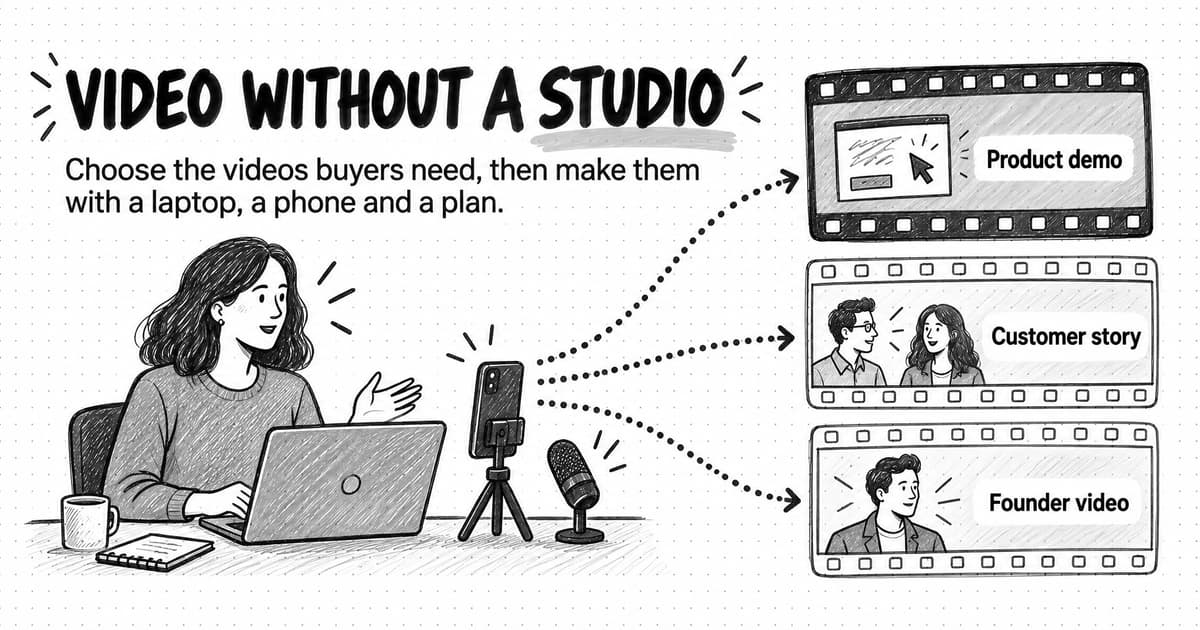
A team without a studio can run a lean production system: brief and script first, record with a laptop, phone, and a decent microphone, edit for pace, caption everything, and cut one long recording into many clips. AI tools help with scripts, captions, and cleanup, and AI avatar video suits explainers that change often, as long as it is labeled and never poses as a customer.
Measure video at four levels: attention, retention, engagement from the right people, and influence on deals through sales usage, self-reported attribution, and pipeline records. The guide includes a copyable brief and script template, a 90-day plan, and a worked example of a fictional three-person team choosing its first five videos.
Contents
- What a B2B video marketing strategy decides
- Why video matters in B2B buying, and what the evidence shows
- Which videos to make: B2B video types by buying stage
- How to choose your first B2B videos
- Where to publish B2B videos: LinkedIn, YouTube, your website, and sales email
- How long should a B2B video be?
- A lean production system for a team without a studio
- A copyable B2B video brief and script template
- Turn one recording into a month of video
- AI video and AI avatar video: where they help and where they don't
- Accessibility: captions, transcripts, and descriptions
- Distribution: getting B2B videos in front of buyers
- How to measure B2B video marketing
- A 90-day B2B video plan for a small team
- Worked example: a three-person team chooses its first five videos (fictional)
- Common B2B video mistakes
- How Ampere helps with B2B video work
- Sources and further reading
- Frequently Asked Questions
Most small B2B marketing teams have had the same conversation. Someone points out that buyers watch video, that LinkedIn keeps promoting it, and that a competitor has started posting short clips of its founder. The team agrees it should do more video. Then it hits the practical questions: what should the first video be, who appears in it, does it need a studio, and where does it go once it exists?
Usually the answer is whatever is easiest. Someone records a product walkthrough on a laptop, the team posts it to LinkedIn, it collects a few hundred views, and nobody can say whether anyone who might buy watched it. A few months later the effort fades, because the work felt expensive and the result felt invisible.
The difficulty in that story is a missing plan, not a missing studio. The walkthrough might have been the right video, but it was made without a clear viewer, a question to answer, or a place in the buying process. A sales rep could have sent it to a prospect who asked how approvals work, and customer success could have used it in onboarding. Instead it was posted once and forgotten.
A B2B video marketing strategy is a plan for which videos a business-to-business company makes, which buyer questions each one answers, where each one is watched, and how the team produces and measures them with the time and budget it actually has. It covers far more than social clips: product demos, explainers, customer stories, expert and founder videos, webinar recordings, videos that sales teams send to one account, and the onboarding videos that help new customers succeed.
This guide is for a founder or a marketing team of one to five people at a B2B SaaS or AI company. It covers which videos to make at each buying stage, how to pick the first few, where to publish them, how to produce them without a studio, where AI video fits, and how to measure the results, with a copyable brief and script template, a 90-day plan, and a fictional worked example.
What a B2B video marketing strategy decides
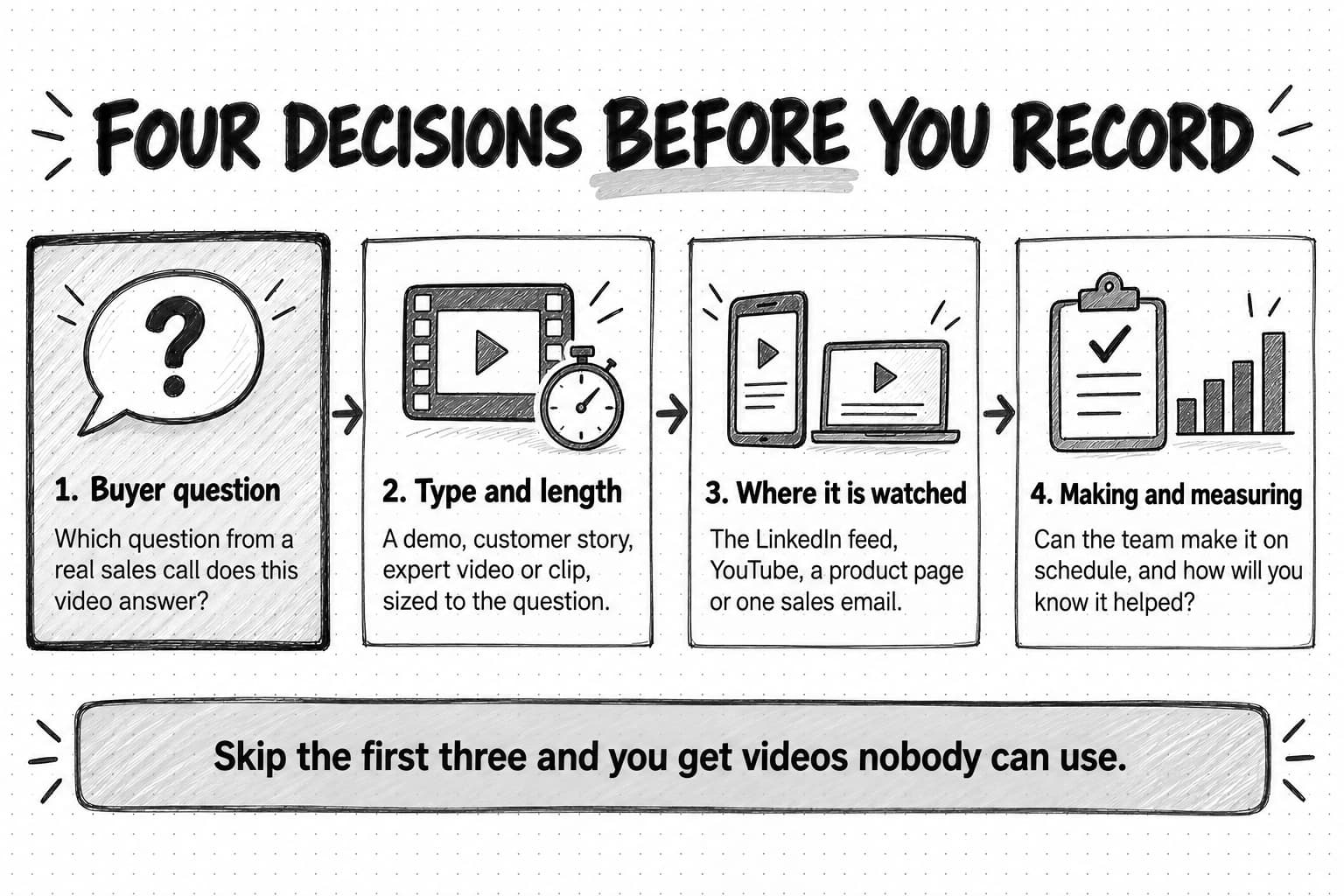
A video strategy is easy to confuse with a production plan, which lists the videos to record next month, or an advertising plan, which decides what to spend promoting them. Both depend on four decisions a strategy makes first.
The first decision is the buyer question each video answers. B2B buyers arrive with specific questions: what does this product do, how does it work with the tools we already have, will it work for a company like ours, what does it take to set up, and who else has done this successfully? A video that answers one of those questions has a reason to exist. A video that answers none of them, such as a general brand video with stock footage and a voice-over about innovation, is hard to use anywhere.
The second decision is the type and length of video that fits the question. A question about how a feature works calls for a screen-recorded demo of a few minutes. A question about whether the product works for a similar company calls for a customer story. A question about how the team thinks about the problem calls for an expert or founder video, which might be a 60-second clip or a 30-minute conversation.
The third decision is where the video will be watched. A clip made for the LinkedIn feed has to work without sound in the first seconds. A demo on a product page can assume the viewer chose to press play. A video sent in a sales email can be specific to one prospect. The same recording can serve several places, but each one changes the edit, the length, and the first frame.
The fourth decision is how the team will make and measure the work. A strategy that requires a weekly two-person shoot will fail on a team with one marketer. A strategy that measures only views will look good or bad for reasons unrelated to sales.
Why video matters in B2B buying, and what the evidence shows
Video is now normal for B2B marketing teams. Read the surveys that track it with their methods in mind, because most video statistics come from companies that sell video production or hosting.
Wyzowl, a company that makes animated explainer videos, has run an annual survey for twelve years. Its State of Video Marketing 2026 report surveyed 266 respondents in late 2025, a mix of marketing professionals and consumers. In it, 91% of businesses said they use video as a marketing tool, and 82% of video marketers said video gave them a good return on investment, down from 93% the year before. It also found that 63% of video marketers had used AI tools to help create or edit marketing videos, up from 51%. The sample is small and mixes business and consumer audiences, so treat these figures as a sign of what marketers believe, not as measured outcomes.
Wistia, a video hosting company, combines a survey with platform data. Its 2026 State of Video Report, published April 22, 2026, surveyed more than 900 professionals and analyzed more than 13 million videos and 79 million hours of viewing on its platform. In that survey, 81% of teams said they share videos on LinkedIn and 76% on YouTube, which makes LinkedIn the most common B2B video channel in its sample. Wistia also reported that on-demand webinars keep getting plays for up to 12 months after the live event, and that 57% of teams spend more time creating videos than promoting them.
LinkedIn's own figures point the same way. A LinkedIn Marketing Solutions blog post from May 1, 2025, B2B video marketing in 2025, reported that video viewing on the platform was up 36% year over year, without describing how it was measured. LinkedIn's Build your brand with video page says video is growing at 1.6 times the rate of other content formats on the platform.
None of this shows that any particular video will work. Widespread use tells you the format is accepted, not that buyers want more of it from you. The more useful question is why video helps in B2B at all.
B2B products are often hard to understand from text; a workflow tool or an integration is easier to grasp when you watch it work. Purchases involve several people, and a two-minute demo is easier to forward to a finance approver or an IT reviewer than a deck that needs a presenter. And buyers want to know who is behind a product: a founder or engineer explaining a problem on camera gives them a person to judge.
Those three reasons, showing, sharing, and trust, are the test for every video in a plan. If a video does not show something text cannot, give the buying group something worth passing around, or let buyers judge the people behind the product, it is probably better as a written post.
Which videos to make: B2B video types by buying stage
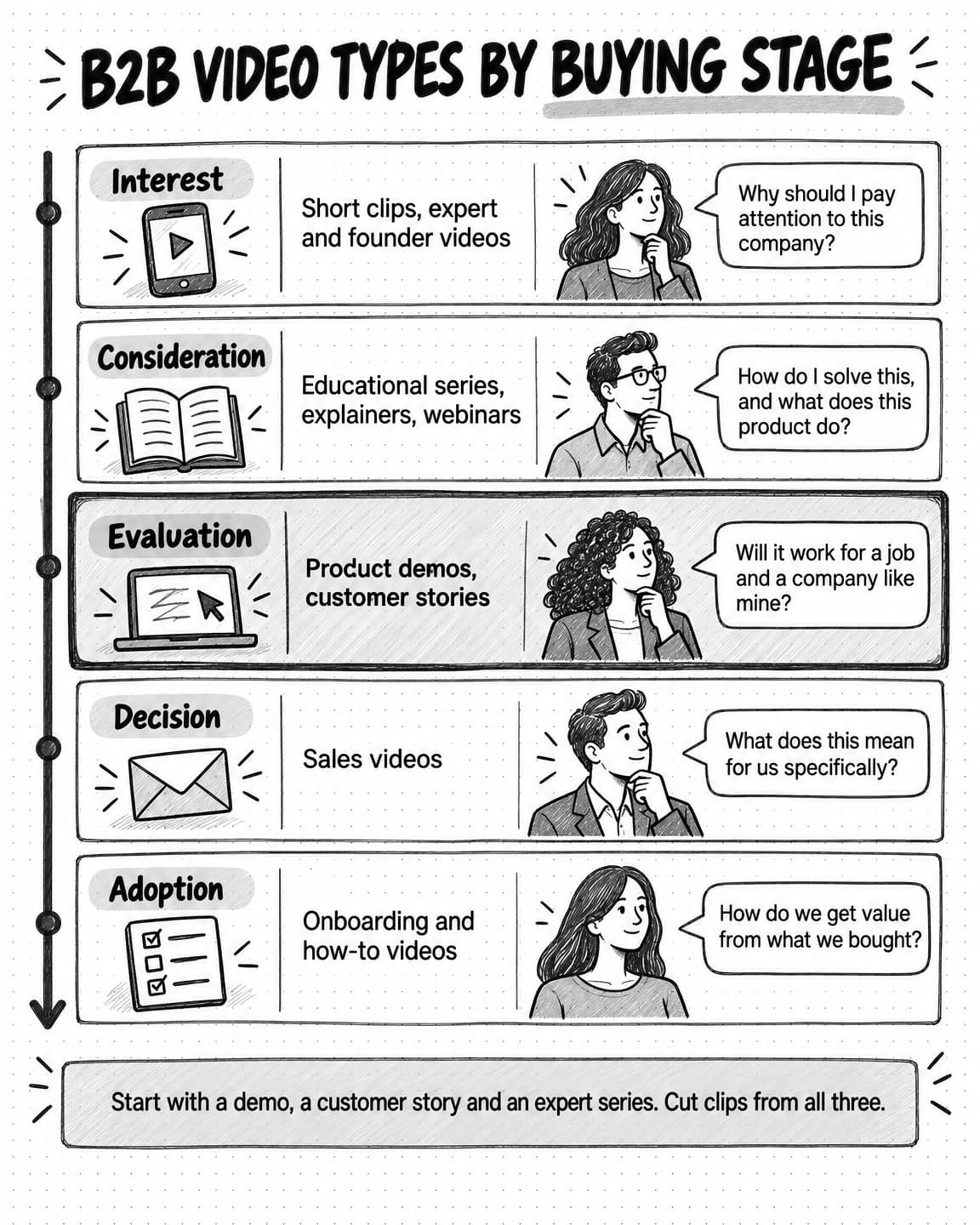
A plan works better when each video type is matched to the buying stage where it helps and the question it answers. The table gives a starting map; lengths are typical ranges, not rules.
| Video type | Buyer question it answers | Main stage | Typical length | Where it is watched |
|---|---|---|---|---|
| Short clip | Why should I pay attention to this company? | Interest | 15 to 90 seconds | LinkedIn feed, YouTube Shorts |
| Expert or founder video | How do these people think about my problem? | Interest and consideration | 1 to 30 minutes | LinkedIn, YouTube, newsletter |
| Educational series | How do I solve this problem, even without buying anything? | Consideration | 3 to 15 minutes per episode | YouTube, website |
| Explainer | What does this product do, in plain terms? | Consideration | 60 to 120 seconds | Homepage, product pages, ads |
| Product demo | How does it work for the job I care about? | Evaluation | 2 to 10 minutes | Product pages, sales email, YouTube |
| Customer story | Has a company like mine succeeded with this? | Evaluation and decision | 1 to 4 minutes | Case-study pages, sales email |
| Webinar or event recording | Can I learn this in depth from people who know it? | Consideration and evaluation | 30 to 60 minutes | Website, YouTube, email |
| Sales video | What does this mean for my company specifically? | Decision | 1 to 3 minutes | Sales email, direct messages |
| Onboarding and how-to video | How do I get value from what I bought? | Adoption and expansion | 1 to 5 minutes | Help center, in-app, email |
Short clips
Short clips are vertical or square feed videos of up to about 90 seconds. In B2B they work best as cut-downs from longer material: one sharp answer from a founder interview, one moment from a demo, one surprising number from a webinar. A clip's job is to make the right person stop scrolling and want the longer source, and its first two seconds and on-screen text do most of that work, because many people watch feeds with the sound off.
Expert and founder videos
Here someone from the company explains how they think about the buyer's problem, in anything from a 60-second opinion to a 30-minute recorded conversation. These videos build trust because viewers judge the person's knowledge directly; a founder who explains clearly why approval workflows break gives a buyer a reason to remember the company months before a purchase. Our guides to founder-led marketing and thought leadership cover how to choose what the founder or experts should say and when to share the role with others.
Educational series
An educational series teaches the buyer's job, not your product: how to run a vendor security review, or how to set up an approval matrix. A consistent format and schedule give viewers a reason to come back, and on YouTube the series becomes a library people find through search for years. Wistia's report found that educational and tutorial videos had the highest engagement rates among the video types it tracked, with viewers of those under five minutes watching about halfway through on average.
Explainers
An explainer says what the product does and for whom, in 60 to 120 seconds, as animation, a narrated screen recording, or a person on camera with product shots. It belongs on the homepage and key product pages, where visitors ask, "What is this?" Explainers age quickly when the product changes, which makes them good candidates for formats that are cheap to update, including AI avatar video.
Product demos
A product demo shows the product doing a job the buyer recognizes, not a tour of every menu: "How a finance team approves an invoice" is easier to follow than "Overview of the dashboard." Demos are among the most reused B2B videos, on product pages, in sales emails, in support answers, and as clips. If a team makes only one video this quarter, a task-based demo is often the right one.
Customer stories
A customer story is a real customer explaining the problem, what they did, and what changed. It answers the question buyers most want answered by someone other than the vendor: has a company like mine made this work? Wistia reported that 47% of companies in its 2026 survey planned to make customer testimonial videos this year, up from 17% in 2023. A customer story should be specific, approved by the customer, and honest about the result; our guide to writing a B2B case study covers the interview and approval process, and the guide to user-generated content covers permissions and the rules for testimonials.
Webinar and event recordings
A webinar comes with an outline, an audience, and questions from real buyers. Afterward it becomes an on-demand video and a source of clips, quotes, and articles; Wistia's finding that on-demand webinars keep getting plays for up to a year is a reason to plan the recording as an asset.
Sales videos
Sales videos are short videos a rep records for one prospect or buying group, such as a two-minute screen recording of how the product handles the prospect's exact workflow, sent after the first call. They are the most targeted videos a company makes, and the viewer already has a reason to watch.
Onboarding and how-to videos
Onboarding videos help new customers reach value. They are rarely counted as marketing, but they affect renewal and answer a late-stage prospect question: what does setup involve? A short how-to library gives sales a credible answer.
How to choose your first B2B videos
A team of one to five cannot make every type at once, and it should not try. The first videos should be the ones that answer frequent questions in sales and buying conversations, show something text cannot, and can be reused in several places.
Start with evidence of what buyers ask. Read notes from the last twenty sales calls, demo requests, and support tickets, and list the questions that recur, such as "Does it integrate with our accounting system?" Those questions are the plan's raw material, and they come with distribution built in: the team can send the video the next time someone asks.
Then score each candidate on four questions:
- How often do buyers ask this? A question that comes up in most deals is worth more than a question one prospect raised once.
- Does it need to be shown? If a paragraph and a screenshot would answer it equally well, write the paragraph. Video earns its cost when movement, a face, or a voice carries the point.
- How many places can it be used? A demo of the core workflow can go on the product page, into sales emails, into onboarding, and into three social clips. A one-off announcement has one use.
- What does it cost to make and keep current? A screen recording with voice-over can be redone in an afternoon when the product changes. A customer story needs scheduling, an interview, editing, and the customer's approval.
| Candidate video | Asked often | Needs showing | Places to use it | Effort to make and update |
|---|---|---|---|---|
| Demo of the core workflow | High | High | Product page, sales email, onboarding, clips | Low to medium |
| Customer story with one customer | High | Medium | Case-study page, sales email, clips | High |
| Founder explaining the problem | Medium | Medium | LinkedIn, YouTube, newsletter, clips | Low |
| Homepage explainer | High | Medium | Homepage, ads | Medium, and it ages quickly |
| Brand video about the company mission | Low | Low | Homepage, careers | High |
For most B2B SaaS teams the first quarter looks similar: a task-based demo of the core workflow, a founder or expert series built from recorded conversations, one customer story, and clips cut from all three. An explainer comes next if homepage visitors ask "What is this?" A polished brand video usually comes last, if at all.
Where to publish B2B videos: LinkedIn, YouTube, your website, and sales email
Each channel has a different job and different technical limits. Give each video a main channel and decide which other places get an adapted version.
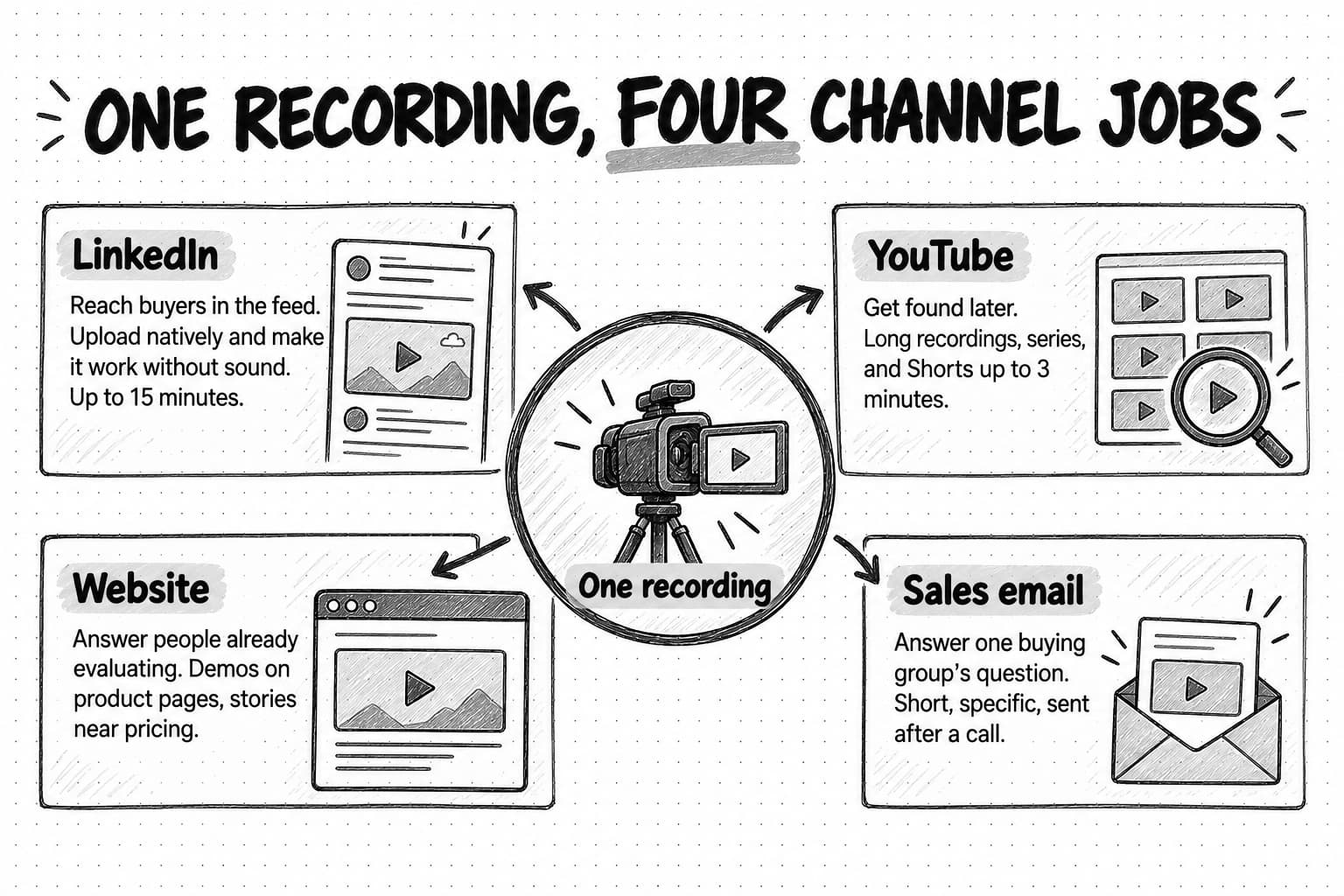
On LinkedIn, buyers meet a company's video in the feed without searching for it. Upload video natively rather than posting a link, and make it understandable in the first seconds without sound. LinkedIn's help page on sharing videos lists the current limits for organic posts: videos from 3 seconds to 15 minutes on desktop, up to 5 GB, in aspect ratios from 1:2.4 to 2.4:1. You can add auto-generated captions, which LinkedIn supports in 10 languages, review them before posting, or upload your own caption file, and you can upload a custom thumbnail.
For paid promotion, LinkedIn's video ad specifications allow videos from 3 seconds to 30 minutes, up to 500 MB, in MP4 format, in 16:9, 1:1, 4:5, or 9:16, with captions supplied as an SRT file. LinkedIn recommends uploading videos of 15 to 30 seconds so they qualify for every placement. Its ad formats include video ads, event ads, connected TV ads, and Thought Leader Ads, which let a company promote a post from an employee's or founder's own profile.
LinkedIn's feed is built around people as much as pages, so plan which account posts each video, not just whether it goes on LinkedIn. A founder clip belongs on the founder's profile; a product demo might go on the company page and be shared by the sales team. Our guide to LinkedIn content strategy for B2B explains how the company page, the founder, and employees divide that work.
YouTube
YouTube is a search engine, so videos keep being found long after posting, and a library for long recordings, series, and playlists. Educational series, webinar recordings, detailed demos, and customer stories belong there, even if many views come from links on your site and in emails. Wyzowl's 2026 survey found that 82% of video marketers use YouTube, more than any other channel, and 69% said it was effective for them, also the highest of any channel.
YouTube also carries short video. According to YouTube Help, square or vertical videos of up to three minutes uploaded on or after October 15, 2024 are classified as Shorts. For long videos, the title and thumbnail decide whether someone clicks. YouTube's custom thumbnail guidance recommends 3840 by 2160 pixels for videos, with a minimum width of 640 pixels, and a 9:16 aspect ratio for Shorts thumbnails. A good B2B thumbnail names the problem in a few words and shows a face or the product.
Your website
On the website, video answers people who are already evaluating, so explainers and demos belong on the homepage and product pages. Wistia's platform data found that videos on homepages, video galleries, and product pages had the highest play rates of the page types it measured, with viewers getting about halfway through on average, while videos on event pages had the highest engagement rate, which Wistia attributes to viewers there having already chosen to come. Put customer stories on case-study pages and near pricing, and give each video a nearby call to action.
Sales email and direct messages
In sales email, a two-minute demo of the workflow a prospect asked about, or a customer story from their industry, can move a deal without another meeting. Link a thumbnail image to a hosted page rather than attaching the file, and say in the first sentence why the viewer should watch. The video is a reply to a question, not a broadcast.
How long should a B2B video be?
A B2B video should be as long as its job needs, and the available data helps set expectations. Wyzowl asked marketers which length they found most effective, and 71% chose between 30 seconds and two minutes. That is a measure of marketers' opinions, and it fits the explainers and social videos most respondents make.
Wistia's platform data adds two findings that point in different directions, and both are useful. The shorter a video, the higher its engagement rate, which Wistia defines as how much of a video people watch on average. But longer videos produced more clicks on calls to action: in Wistia's data, videos between 30 and 60 minutes had the highest click-through rates, followed by videos over 60 minutes. Wistia notes that a 10-minute video with a lower engagement rate still collects more total watch time than a one-minute video with a higher one.
Read together, the data suggests a simple rule. Use short videos to earn attention from people who did not come looking for you, and use long videos for people who already want depth, such as webinar attendees and buyers researching a purchase. In both, put the main point early: YouTube's audience retention report shows what percentage of viewers are still watching after the first 30 seconds, and viewers who leave before the point never hear it.
A lean production system for a team without a studio
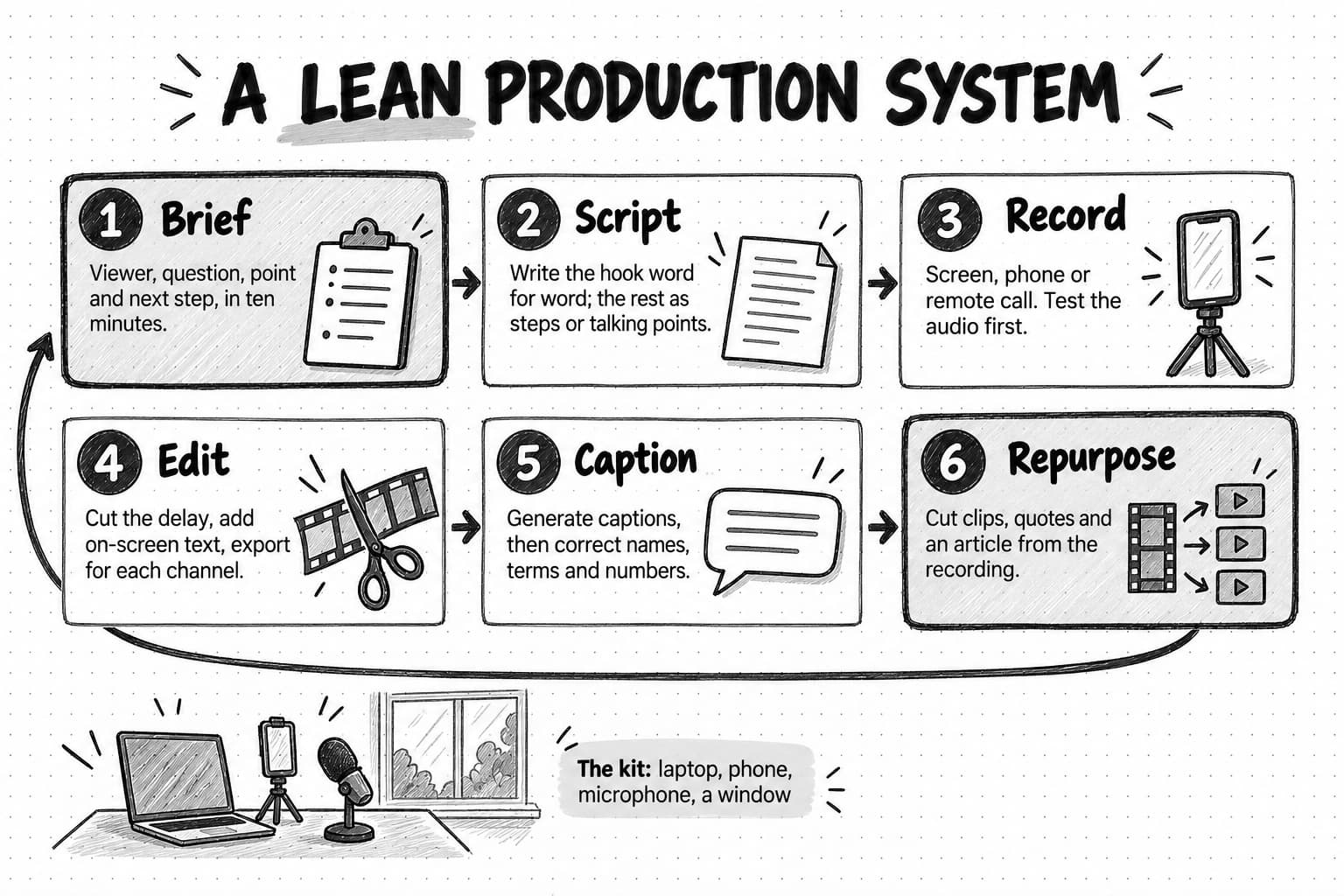
Wistia reported that company size and resources topped the list of barriers to making more video for the third year in a row, followed by cost. A lean system reduces both by making production repeatable: the same brief, the same setup, the same editing steps, and the same repurposing routine every time.
Brief and script before you record
Most weak B2B videos were weak before anyone pressed record, because nobody decided the viewer, the question, or the next step. A ten-minute brief fixes that; a template is in the next section.
Scripts vary by format. A demo needs a step list with the exact clicks. A founder video needs three or four talking points, because reading aloud usually sounds stiff. A short clip needs its first line written exactly. A customer story needs interview questions, not a script; the customer's own words are the point.
A useful default structure for short B2B videos has five parts: a hook that names the viewer's problem, the problem stated in the buyer's words, the answer shown on screen, one piece of proof, and one next step. Longer videos repeat the middle three for each section.
Record with what you have
A team can make good B2B video with three setups:
- Screen recording with voice-over. For demos, how-to videos, and many explainers. Close notifications, use a demo account with realistic sample data, make text readable on a phone, and record one task at a time.
- Talking head on a laptop camera or phone. For founder and expert videos and sales videos. Put the camera at eye level, face a window or a soft light, and keep the background simple and uncluttered. A phone's rear camera often looks better than a laptop's built-in one.
- Remote two-person conversation. For customer stories, expert interviews, and series. Many remote recording tools save each person's video and audio as separate tracks, which makes editing easier. Send the guest a short guide to lighting and microphone placement.
Sound deserves more attention than picture. A slightly soft image is easy to watch through; echoing or muffled audio is not. A simple external microphone, a quiet room with soft furnishings, and a test recording before every session do more for quality than a better camera.
Edit for pace and clarity
Editing has three jobs: remove anything that delays the point, make the point easy to follow, and prepare a version for each channel. Cut pauses and setup talk, add on-screen text for key terms and numbers, zoom in on the part of the screen that matters, and add chapters to long YouTube videos. Then export cut-downs in each channel's aspect ratio; Wistia found that 76% of teams adjust aspect ratio for the platform.
Caption everything
Captions are a fixed step, covered in the accessibility section: generate them, then correct names, product terms, and numbers before anything is published.
Design the first frame and the thumbnail
Many viewers decide from the first frame or thumbnail whether to watch. Give the first frame a short line of on-screen text that says what the video is about, and make thumbnails that name the problem and stay legible at small sizes. AI image tools can speed up drafts, but check that the image does not promise something the video does not deliver.
Keep a weekly rhythm
For many teams of one or two, one main recording a week plus the clips cut from it is a sustainable start. Wistia reported that 76% of companies make at least one video a month. Choose a rhythm you can keep for a quarter, not one that looks impressive for two weeks.
A copyable B2B video brief and script template
Copy this template for each video. Write the hook word for word and use bullet points for the rest.
VIDEO BRIEF
Working title:
Video type: (demo, explainer, customer story, expert or founder video, clip, sales, onboarding)
Viewer: (role, company type, and what they are trying to do)
Buyer question this answers: (in the buyer's own words, from a sales call, ticket, or comment)
Stage: (interest, consideration, evaluation, decision, adoption)
Single point the viewer should leave with:
Proof: (product on screen, customer result with approval, data with its source)
Main channel: (LinkedIn, YouTube, website page, sales email, help center)
Other versions: (clip lengths and aspect ratios)
Target length:
Next step for the viewer: (one call to action)
Speaker or presenter: (person, or AI avatar with disclosure and consent noted)
Owner, reviewer, and publish date:
How we will know it helped: (sales sends, demo requests, retention, comments from target accounts)

SCRIPT
Hook, first 3 seconds, written word for word:
On-screen text for the first frame:
The problem, in the buyer's words:
The answer, shown on screen (steps or talking points):
  1.
  2.
  3.
Proof moment:
Next step, said and shown:

PRODUCTION CHECKLIST
[ ] Sample data only; no real customer data on screen
[ ] Captions corrected (names, product terms, numbers)
[ ] Claims checked; customer approval on file if a customer appears
[ ] AI-generated content labeled where the platform requires it
For a customer story, replace the script with five or six interview questions that lead from the problem to the result, and write the single point after the interview, once you know what the customer said.
Turn one recording into a month of video
Repurposing is where a small team gets most of its volume. One 40-minute recorded conversation, such as a webinar or a founder interview with a customer, can supply a month of material: the full recording on YouTube and the website, four to eight short clips for LinkedIn and Shorts, a few quote graphics, a newsletter section, and an article. Wistia found that more than half of companies repurpose videos into social clips, and that LinkedIn is the top platform for those clips, used by 67% of teams.
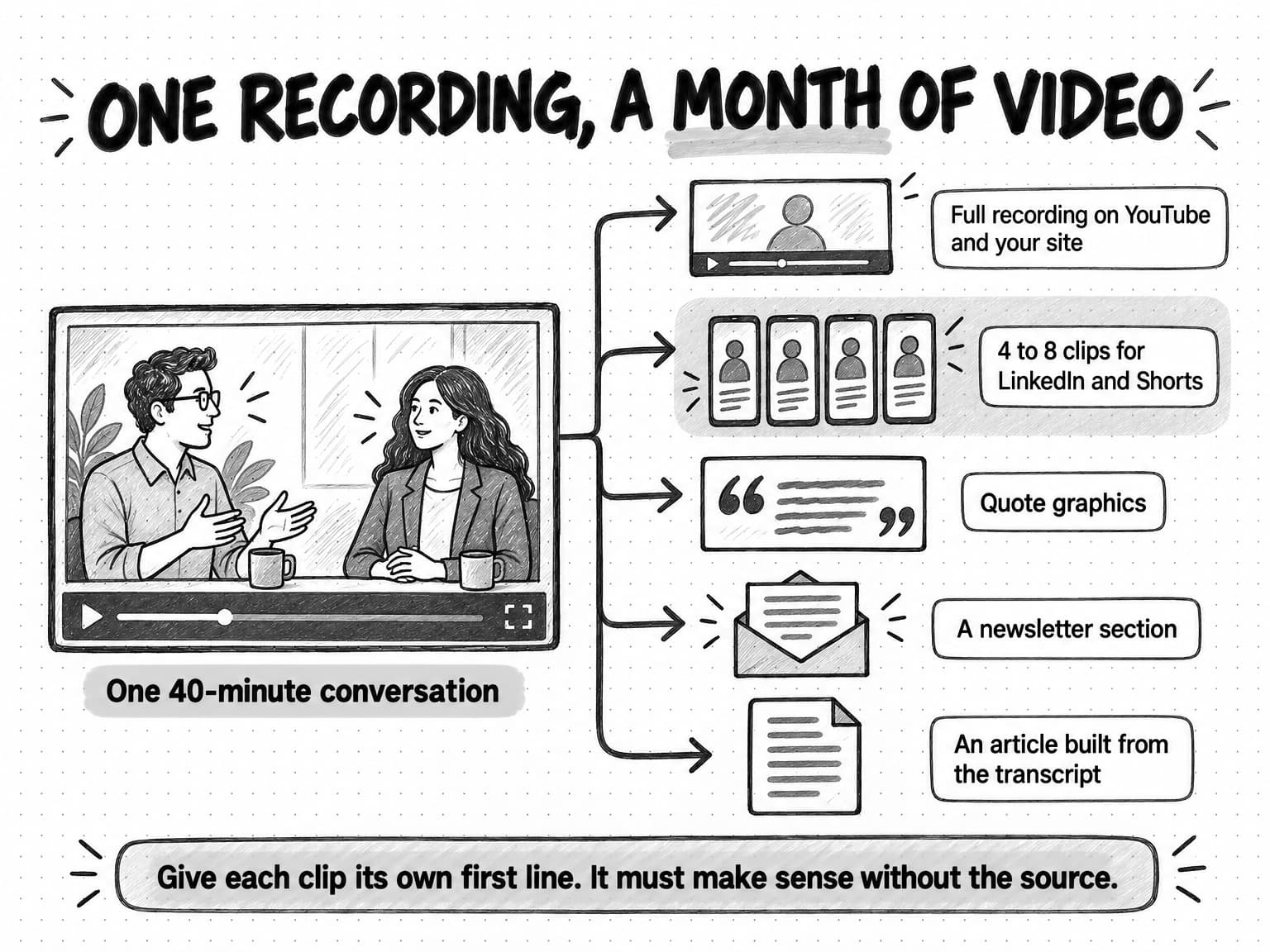
Plan repurposing before recording. Structure the conversation around three or four questions that could each stand alone as a clip, and ask the speaker to restate the question in each answer so a clip makes sense on its own. Afterward, mark the strongest 30 to 90 seconds in each section of the transcript and give each clip its own first line and on-screen text.
A clip that starts mid-sentence, or relies on a slide shown earlier, wastes the viewer's time. Our guide to repurposing content across channels works through a full example of turning one webinar into an article passage, a LinkedIn post, a carousel, and a short video script, including how to keep the argument intact as the format changes.
AI video and AI avatar video: where they help and where they don't
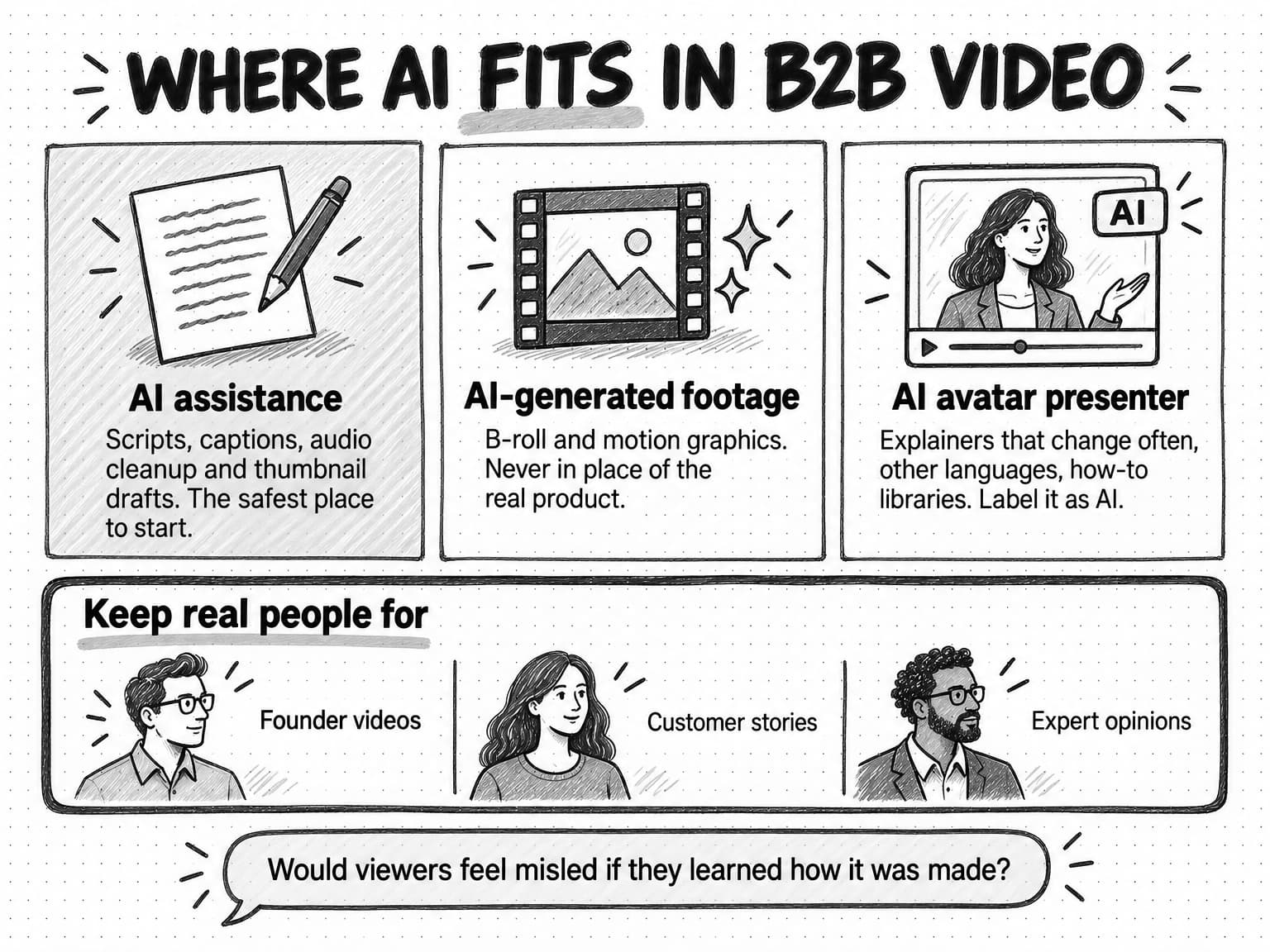
AI now touches almost every step of video production. Separate three uses, because each carries a different risk.
The first is AI assistance in production: drafting scripts, generating captions, cleaning up audio, suggesting cuts, translating subtitles, and drafting thumbnails. These change how fast the team works, not what the viewer sees as real, and they are the safest place to start. YouTube's disclosure guidance treats production assistance such as AI help with an outline, script, thumbnail, title, or captions as not requiring disclosure.
The second is AI-generated footage: B-roll, motion graphics, and short text-to-video or image-to-video clips. These can fill an opening scene or a visual metaphor but should never stand in for the product; a generated clip of a dashboard that does not exist misleads as surely as a doctored screenshot.
The third is AI avatar video: a synthetic presenter, built from a stock avatar or a real person's recorded likeness, reading a script on camera. It has the most potential for small teams and the most ways to go wrong.
When an AI avatar fits a B2B video plan
AI avatar video earns a place where the presenter's identity is not the point and the script changes often. Good fits include:
- Explainers and feature announcements that change with the product. When an approval flow changes, the team edits the script and regenerates the video instead of booking a reshoot.
- Localization. The same approved explainer can be produced in several languages without hiring presenters for each.
- How-to and onboarding libraries. A consistent presenter across dozens of short help videos is easier to maintain with an avatar than with a busy product manager.
- Ad variants for testing. Several versions of a short ad with different hooks can be produced from one script set, as long as each is labeled as an ad and makes only claims the company can substantiate.
AI avatar video fits poorly where the human is the point. A founder video works because viewers judge the founder, and a customer story must be the customer. If the viewer would feel misled on learning the presenter was synthetic, use a real person.
The quality bar for AI avatar video
Avatar video that looks almost right can do more harm than a plain screen recording. Check that lip movement matches the audio, that product names are pronounced correctly, that hands and background do not glitch, and that the pacing sounds like explanation rather than reading. Keep the product on screen for most of the running time. If the avatar is based on a real person, such as a founder or an employee, get written consent that covers which channels, which uses, how long, and what happens if they leave.
Disclosure and the rules that apply
Label AI avatar video as AI-generated, both in the video or its description and with the platform's own label. YouTube requires creators to disclose realistic content that makes a real person appear to say or do something they did not, or that generates a realistic scene that did not happen, and adds a label for viewers when they do. LinkedIn shows a Content Credentials icon on images and videos that carry C2PA provenance data, which can include whether AI was used, though LinkedIn says it cannot yet identify and label all AI-generated content. Never present an avatar as a customer or an independent reviewer: the U.S. Federal Trade Commission's 2024 rule on fake reviews and testimonials prohibits testimonials that misrepresent who gave them or their experience, and names AI-generated fake reviews.
Our guide to user-generated content covers the ethics and rules of AI-made UGC-style and avatar video in more depth, including consent, likeness rights, platform AI labels, and the EU AI Act's transparency rules.
Accessibility: captions, transcripts, and descriptions
Accessible video reaches more of your audience, and for many organizations it is a requirement. The Web Content Accessibility Guidelines (WCAG) set the common standard. Success Criterion 1.2.2, Captions (Prerecorded), at Level A, requires captions for all prerecorded audio in synchronized media. The W3C explains that captions include not only dialogue but who is speaking and meaningful non-speech sounds. Success Criterion 1.2.5, Audio Description (Prerecorded), at Level AA, requires audio description for prerecorded video, so that people who cannot see the screen get the visual information the soundtrack leaves out.
For B2B video, that translates into four practical habits:
- Caption every video, and correct the captions. Automatic captions are a starting point, not a finished product. YouTube's automatic captioning help says they "might misrepresent the spoken content due to mispronunciations, accents, dialects, or background noise" and recommends reviewing them. Product names, people's names, and numbers are where automatic captions most often go wrong, and where an error does the most damage.
- Say what you show. In demos, narrate the action: "I'm opening the approvals tab and choosing the invoice from Acme," not "I click here, then here." Describing the screen as you go reduces the need for separate audio description and makes the video easier for every viewer to follow.
- Publish a transcript for longer videos. It serves people who prefer to read, gives search engines and AI assistants text to work with, and supplies material for articles.
- Use closed captions where the platform supports them, and burned-in captions for feed clips, which stay visible when viewers watch without sound.
W3C's guide to captions and subtitles is a plain-language reference for a first captioning process.
Distribution: getting B2B videos in front of buyers
Wistia's finding that 57% of teams spend more time creating videos than promoting them suggests many teams underinvest in the half of the work that decides whether anyone watches. Plan distribution in the brief.
Post from people, not only from the company page. A founder's clip on the founder's profile and a customer story shared by the customer reach people a company page does not.
Write the post, not just the video. A native LinkedIn video still needs a first line that says who it is for and why they should watch. The post and the first frame should make the same promise.
Put videos where questions are asked. Add demos to the product pages and help articles for the same task, and give sales a short library organized by buyer question.
Reuse on a schedule. Post a strong demo or customer story again, cut new clips, and feature it in a newsletter months later. Most of your audience missed it the first time.
Promote selectively. Pay to promote videos that already work organically or answer a high-value question for a defined audience. Thought Leader Ads keep a founder's voice while extending its reach.
For a fuller treatment of reaching buyers on the platforms where they spend time, without depending on clicks to your site, see our guide to zero-click content distribution.
How to measure B2B video marketing
B2B video is hard to measure for the same reasons as all B2B content: the buyers are a small part of the audience, the cycle is long, and platforms count views, not deals. Measure at four levels, from the easiest to count to the most important.
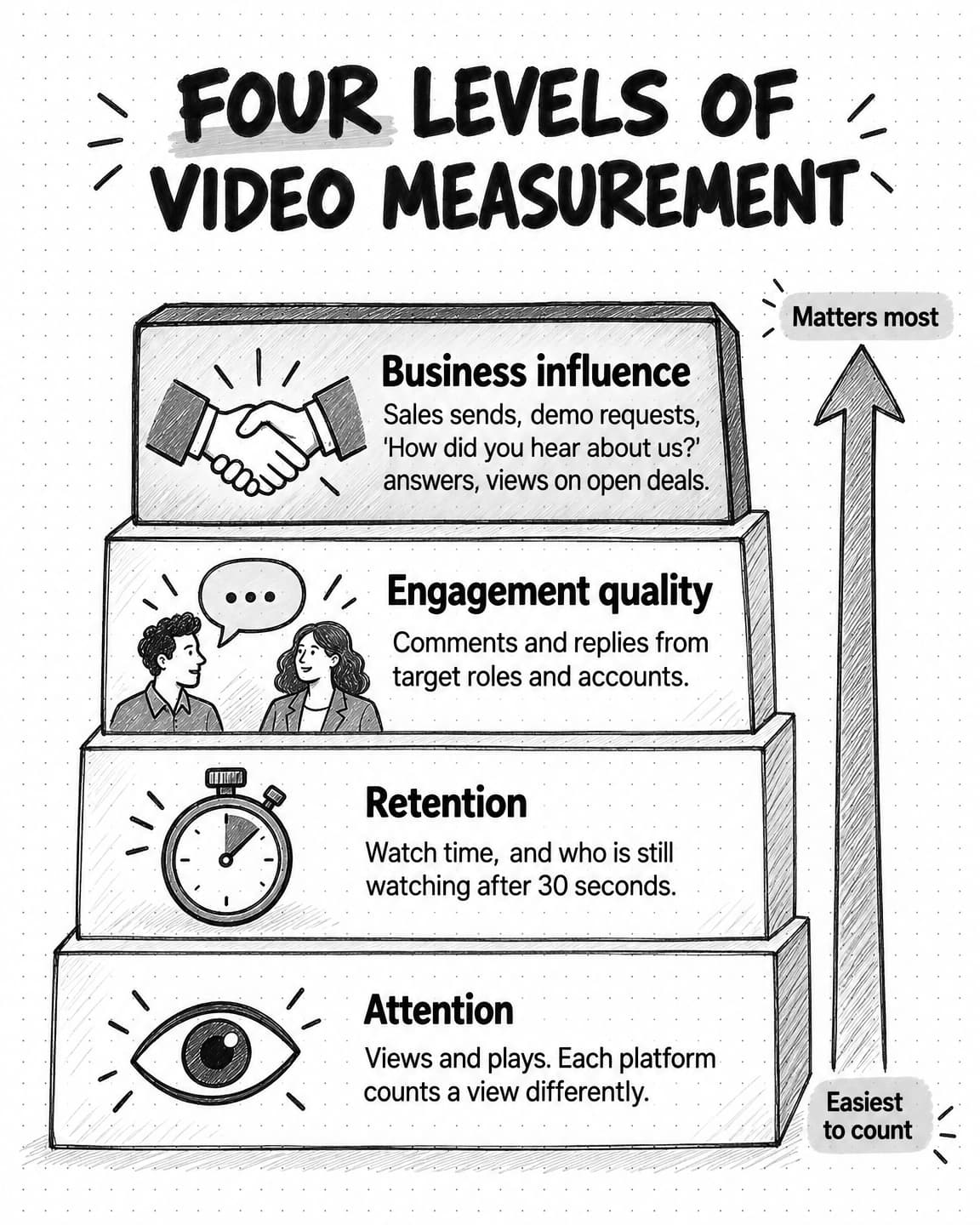
Attention is whether people saw and started the video: views, plays, and play rate on the website. Platforms define a view differently, so do not compare views across platforms as if they were the same unit. LinkedIn's developer documentation for its video analytics counts a video view as a play of at least 3 seconds and says the Watch Time shown in LinkedIn's interface counts only time from those plays.
Retention is whether people kept watching: average watch time, the share of viewers still watching at key points, and where they leave. YouTube's audience retention report shows the percentage still watching after the first 30 seconds and highlights moments where viewers rewatch or drop off. A steep early drop usually means the first frame promised something the video did not deliver.
Engagement quality is whether the right people responded: comments from people in your target roles and companies, shares by prospects, replies to a sales video, and questions that show someone watched closely. Ten comments from operations leaders at target accounts are worth more than a thousand reactions from people who will never buy.
Business influence is whether video helped deals: how often sales sends each video, demo requests and trial starts from pages with video, answers to "How did you hear about us?" that mention a video, and videos watched by contacts on open opportunities when your video host connects to your customer relationship management (CRM) system. Wistia reported that fewer than half of marketers connect their video platform to their CRM or email marketing tool, which leaves most teams unable to see this level.
| Attention | Views, plays, and website play rate. Useful for comparing videos on the same platform, never across platforms. |
|---|---|
| Retention | Average watch time, viewers still watching after 30 seconds, and drop-off points. The best signal of whether the edit works. |
| Engagement quality | Comments, shares, and replies from target roles and accounts. Read them by hand; counts alone hide who responded. |
| Business influence | Sales sends, demo requests from video pages, self-reported attribution, and video views by contacts on open deals. |
Two habits help. Write in each brief how you will know the video helped: a clip is judged on retention and engagement from the right people, a demo on how often sales sends it. And add a free-text "How did you hear about us?" field to demo and signup forms, which captures the founder video someone watched months before searching your name. Our guide to measuring content marketing ROI explains self-reported attribution and influence reporting in more depth.
A 90-day B2B video plan for a small team
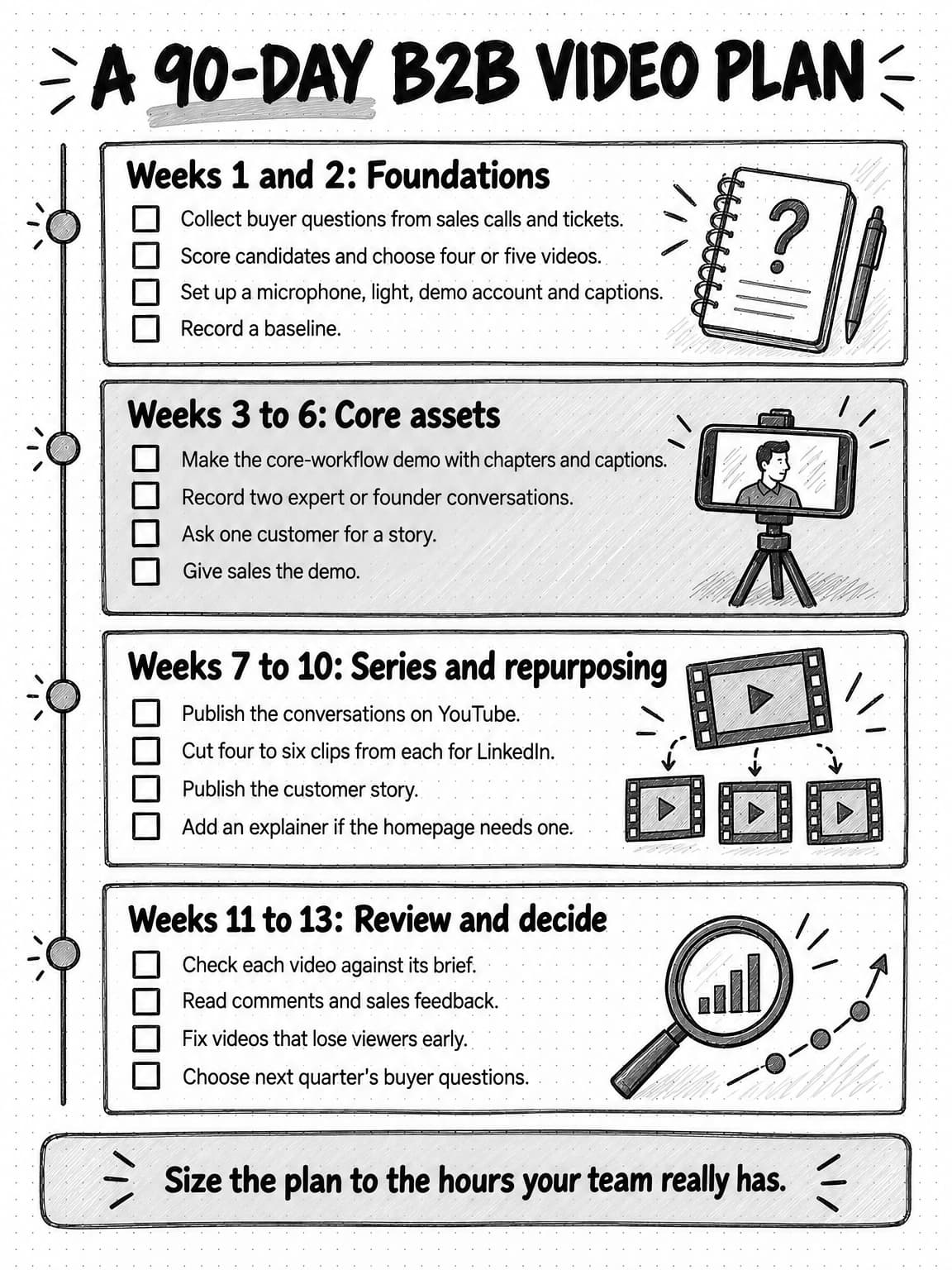
The plan below assumes a team of one to three marketers with a few hours a week for video and no outside production help. Adjust the scope to your hours, not the other way round.
Open the full-size 90-day B2B video plan (opens in a new tab)
Weeks 1 and 2: foundations. Collect buyer questions, score candidate videos, and choose the first four or five. Set up a microphone, a light or a window, a clean demo account, and a captioning tool. Record a baseline: current views, how often sales sends video, and how demo-form respondents heard about you.
Weeks 3 to 6: core assets. Produce the core-workflow demo with chapters and captions. Record two founder or expert conversations built around standalone questions. Ask a customer for a story and plan their approval step. Give sales the demo and a line on when to send it.
Weeks 7 to 10: series and repurposing. Publish the conversations on YouTube and cut four to six clips from each for LinkedIn. Publish the customer story. Make the explainer if the homepage needs one, choosing its format by how often the product changes.
Weeks 11 to 13: review and decide. Review each video against the measure in its brief, read comments and sales feedback by hand, fix the opening of any video with a steep early drop, and choose next quarter's buyer questions.
Worked example: a three-person team chooses its first five videos (fictional)
Northpike is an invented company that sells approval workflow software to finance teams at mid-sized businesses. Its marketing team is a head of marketing, a content marketer, and a part-time designer. The founder, a former finance controller, can give an hour a week on camera.
The buyer questions. Notes from the last twenty sales calls show three questions in most calls: how approvals work when the approver is away, whether Northpike connects to the accounting systems prospects use, and how long setup takes. A fourth, how other finance teams justified the purchase to their chief financial officer, comes up in late-stage deals.
The first five videos. The team scores its candidates and chooses five:
- A four-minute task-based demo: "How an invoice gets approved when the approver is on holiday," recorded as a screen video with the founder's voice-over and published on the approvals product page and on YouTube with chapters.
- A two-minute integration demo showing an approved invoice appearing in the accounting system, for sales to send when the question comes up.
- A recorded 30-minute conversation between the founder and a friendly finance director about why month-end close takes longer than it should, published on YouTube and cut into six clips for the founder's LinkedIn profile.
- A three-minute customer story with a controller at an existing customer, focused on how she made the case to her CFO, with her written approval before publication.
- A 90-second homepage explainer. Because the product's interface changes every few months, the team makes it with an AI avatar presenter and screen recordings, labels it as AI-generated, and plans to regenerate it after each major release.
The script for the first clip. The team writes the brief for the first founder clip in ten minutes. The viewer is a finance manager at a mid-sized company. The question is why month-end close keeps slipping. The single point is that most delays come from approvals waiting on one person. The hook, written word for word, is: "If your month-end close keeps slipping, check how many invoices are waiting on one person." The founder then explains, in about 45 seconds, how to find those invoices in any system, and the clip ends by pointing to the full conversation on YouTube. Northpike is mentioned only in the post copy, because the clip's job is to show that the founder understands the problem.
What the team measures. Sales sends and second calls for the demos, retention and comments from finance roles for the clips, and late-stage sales usage for the customer story, plus a "How did you hear about us?" field on the demo form.
What the team decides at 90 days. The approvals demo is the video sales sends most, so the team plans two more task-based demos. The founder clips draw thoughtful comments from finance managers, so the series continues every two weeks. The explainer is regenerated once after a release, in an afternoon. A planned brand video is dropped, because no buyer question called for it.
Common B2B video mistakes
Making a brand video first. It is expensive, ages quickly, and answers few buyer questions.
Touring the product instead of doing a task. Organize demos around one job the buyer recognizes.
Burying the point. Logos and "Hi, I'm..." openings delay the reason to watch. State the problem in the first three seconds.
Ignoring sound-off viewing, or publishing uncorrected captions. Caption everything, and check names and numbers in automatic captions.
Using AI avatars where people are the point. An avatar can present an explainer, not a founder's view or a customer's experience.
Posting once and moving on. Reuse strong videos in sales emails, newsletters, help articles, and new clips.
Measuring only views. Views measure attention, not influence.
Planning more than the team can make. A schedule that collapses in week three teaches the team that video does not work.
How Ampere helps with B2B video work
Ampere is an AI marketing agent that can take on much of the planning, scripting, and drafting in a plan like this, so a small team can spend its time recording real people, approving claims, and deciding what to publish. You describe the work in plain English, and Ampere does it in its own session workspace and brings the results back for review.
Ampere can generate marketing video script packages for product demos, paid social, and founder or UGC-style ads, and draft LinkedIn, YouTube, Instagram, and TikTok packages with short videos, Stories, Reels, Shorts, thumbnails, captions, and hooks. Because Brand memory carries your products, audience, competitors, and voice, a demo script and a thumbnail start from the same understanding of who the video is for.
It can also create short videos, image-to-video and text-to-video clips, screen demo recordings, voiceovers, talking-avatar and UGC-style avatar videos, and reusable AI avatars and custom voices. Label avatar video as AI-generated, never present it as a customer, and base it on a real person's likeness only with their consent.
For repurposing, Ampere can turn recordings, YouTube videos, and product updates into other formats, create timestamped transcripts of public YouTube videos, and answer focused questions about a public or uploaded video. Generated transcripts and answers can be wrong, so check them against the recording before quoting. Scheduled tasks can rerun research or drafting on a cadence and return results to a Project.
Ampere drafts and produces video assets; it does not publish videos, post to your channels, or launch ad campaigns. Your team reviews every script and video and decides what goes live.
Sources and further reading
- Wyzowl, Video Marketing Statistics 2026, State of Video Marketing 2026. Survey of 266 respondents, late 2025.
- Wistia, State of Video Report: Video Marketing Statistics for 2026, April 22, 2026.
- LinkedIn Marketing Solutions, B2B video marketing in 2025: the top trends, May 1, 2025.
- LinkedIn Marketing Solutions, Build your brand with video on LinkedIn.
- LinkedIn Help, Share videos on LinkedIn.
- LinkedIn Help, Video ads advertising specifications.
- LinkedIn Help, Content credentials.
- Microsoft Learn, LinkedIn Video Analytics API.
- YouTube Help, Understand three-minute YouTube Shorts.
- YouTube Help, Add custom thumbnails on YouTube.
- YouTube Help, Measure key moments for audience retention.
- YouTube Help, Disclosing use of GenAI content.
- YouTube Help, Use automatic captioning.
- W3C, Understanding Success Criterion 1.2.2: Captions (Prerecorded), WCAG 2.2.
- W3C, Understanding Success Criterion 1.2.5: Audio Description (Prerecorded), WCAG 2.2.
- W3C Web Accessibility Initiative, Captions/Subtitles.
- Federal Trade Commission, Federal Trade Commission announces final rule banning fake reviews and testimonials, August 14, 2024.
Frequently Asked Questions
What is B2B video marketing?
B2B video marketing is the use of video by a business-to-business company to help other businesses understand, evaluate, buy, and succeed with its product. It includes social clips, expert and founder videos, explainers, demos, customer stories, webinar recordings, sales videos, and onboarding videos. It differs from consumer video mainly because several people take part in a purchase and the cycle is long.
What are examples of B2B video marketing?
Examples of B2B video marketing include a four-minute demo showing how a finance team approves an invoice, a customer story in which a controller explains how she justified a purchase, a founder's 45-second LinkedIn clip on why month-end close slips, a recorded webinar on YouTube, and a two-minute video a sales rep records to answer one prospect's integration question.
What types of videos work best for B2B marketing?
The types of videos that work best for B2B marketing are the ones that answer frequent buyer questions and show something text cannot. For most small B2B SaaS teams that means task-based product demos, customer stories, and expert or founder videos first, with short clips cut from them. Explainers, webinars, sales videos, and onboarding videos follow as the plan grows.
Which platforms are best for B2B video marketing?
LinkedIn and YouTube are the main platforms for B2B video marketing, with different jobs. LinkedIn reaches buyers in the feed, especially through founders' and employees' profiles. YouTube makes videos searchable and holds long recordings and series. The company website answers people already evaluating, and sales email delivers the right video to one buying group.
What are the best practices for effective B2B video content?
Effective B2B video content answers one buyer question, states the problem in the first few seconds, and shows the product or the person rather than describing them. Keep feed clips short and put depth in longer videos for people who want it. Caption everything and correct the captions, design the first frame and thumbnail to name the problem, and give every video one clear next step.
How do you measure the ROI of B2B video marketing?
Measure the ROI of B2B video marketing at four levels: attention, such as views; retention, such as watch time and drop-off; engagement from target roles and accounts; and business influence. Influence shows up in how often sales sends a video, demo requests from video pages, self-reported attribution on forms, and video views by contacts on open deals.
What should a video script template include?
A video script template should include a brief and a script. The brief names the viewer, the buyer question, the single point, the proof, the channel, the length, and the next step. The script includes a word-for-word hook for the first three seconds, the problem in the buyer's words, the answer as steps or talking points, a proof moment, and the call to action.
What should a B2B video marketing plan include?
A B2B video marketing plan should include the buyer questions video will answer, the first four or five videos chosen by how often buyers ask, whether the answer needs showing, reuse, and effort, a main channel for each video, a repeatable production process, a publishing rhythm the team can sustain, and a measure for each video. A 90-day plan with a review at the end is a practical start.
What is short-form video marketing?
Short-form video marketing is the use of short vertical or square videos, usually under 90 seconds, in feeds such as LinkedIn, YouTube Shorts, Instagram Reels, and TikTok. In B2B it works best when clips are cut from longer material, such as a founder interview, a demo, or a webinar, so each clip earns attention and points the right viewer to the deeper source.