LinkedIn content strategy for B2B: why the company page is the smallest part
A plan that gives the company page, the founder and the team each a job, with what each format is for, what LinkedIn says its feed rewards, what posting-time studies found, and how to measure the result.
44 min readWritten by Ampere
Short answer
What is a good LinkedIn content strategy for B2B?
A good B2B LinkedIn content strategy gives three kinds of account a job: the company page holds the official record and teaching material, the founder carries the point of view, and the team shares expertise from their work. All three post on the same three to five buyer problems, mostly to teach, at a cadence they can sustain, and are judged by whether the right people respond.
Summary
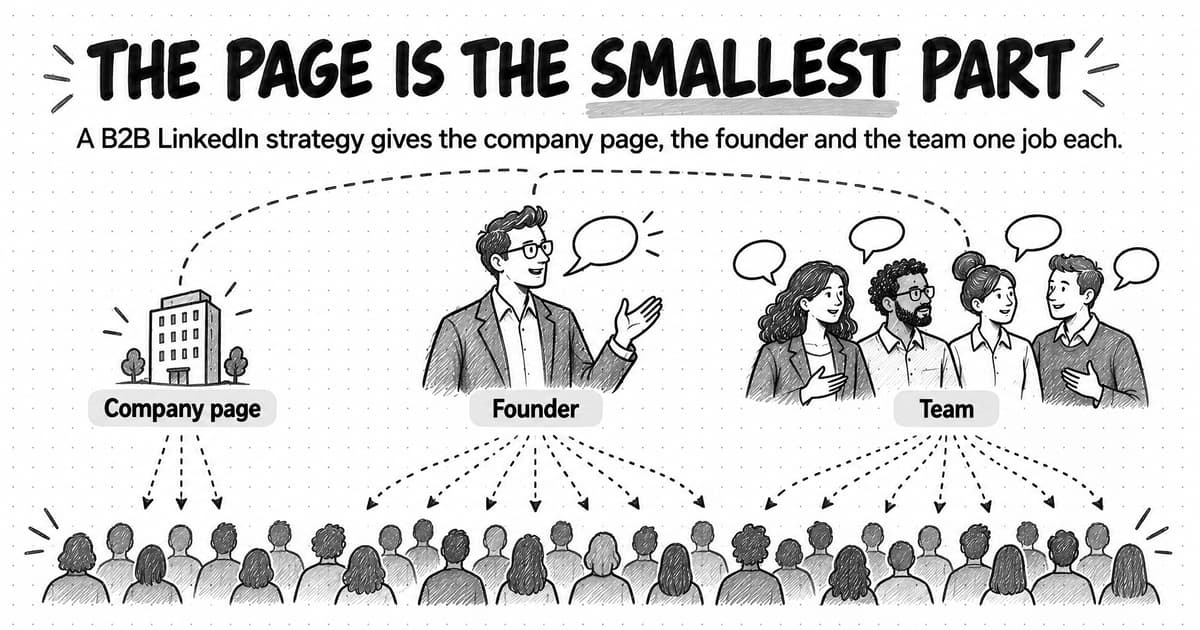
A company page is the smallest part of a B2B LinkedIn content strategy. Pages mostly reach their followers, and LinkedIn's feed weighs relationships between people, so the founder and team usually reach far more buyers. The page still holds the official record, teaching material people save, and the newsletter.
Give the page, the founder, and the team one shared set of three to five subjects grounded in buyer problems, then let each speak from its own position. Keep self-promotion a small share of every account's posts; the 4-1-1 rule is a rough guide, and on LinkedIn the useful posts should mostly be your own teaching.
Choose the format from what the reader needs to do: text for an argument, images for something visual, documents for a sequence worth saving, polls for a real question, newsletters for a series, video for what must be shown. In Socialinsider's 2025 page benchmark, documents had the highest engagement rate and link posts the lowest.
LinkedIn says its feed matches posts by professional subject and relationship, reads time spent as well as reactions, and is reducing engagement bait, recycled posts, engagement pods, and automated comments. Posting more often was linked to more impressions per post in Buffer's 2025 study, and timing studies disagree, so test two windows on your own audience.
Measure by the question each number answers: seen, useful, right people, conversations, and pipeline. Read the comments rather than only counting them, compare each account with its own trend, and ask buyers how they heard about you, because much of LinkedIn's influence never shows up as a click.
Contents
- Why a company page alone rarely reaches buyers
- The three-account system: a job for the page, the founder and the team
- How to choose topics the three accounts can share
- LinkedIn post formats and what each one is for
- What the LinkedIn feed rewards, according to LinkedIn
- How often to post on LinkedIn: what the evidence says
- The best time to post on LinkedIn, and why studies disagree
- How to write a LinkedIn post people read to the end
- How to get employees posting without making it awkward
- Comments and conversations: the work between posts
- How to measure LinkedIn content
- How to audit your LinkedIn company page
- Worked example: one company's first 90 days with three accounts
- A one-page LinkedIn content strategy template
- How LinkedIn content work happens in Ampere
- Sources and further reading
- Frequently Asked Questions
Open the analytics for a small B2B company page and the pattern is often the same. The page posts three times a week: a blog link, a webinar announcement, a photo from a trade show, a hiring post. Each one reaches a few hundred people, most of the reactions come from employees, and almost nobody comments. Meanwhile the founder's occasional post about a mistake the company made last year draws a long thread of comments, some of them from the kind of people the company would like to sell to.
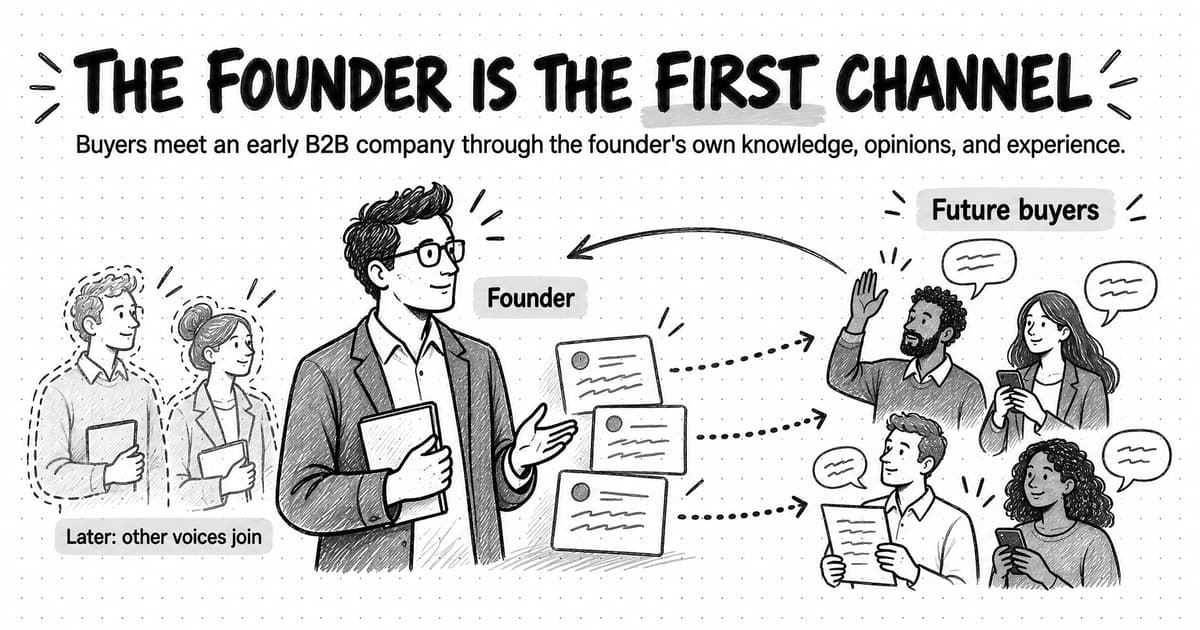
That gap is not bad luck, and posting more from the page rarely closes it. LinkedIn is built around people. A company page reaches the members who chose to follow it, which for a small company is often a short list of employees, customers, and friends of the business. The founder and the team are connected to many more of the buyers the company wants, and their posts arrive as one professional talking to others.
A LinkedIn content strategy for B2B is a plan for what a company and its people publish on LinkedIn, who publishes it, in which formats, how often, and how the results are judged. The phrase "and its people" carries the argument of this guide. The company page matters, but as one part of a system with three kinds of account: the page, the founder, and the team. Each has a different job, and the strategy works when the jobs fit together around the same few subjects.
This guide sets out that system, then the practical decisions: topics, formats, what LinkedIn says its feed rewards, how often and when to post, writing, employee posting, comments, measurement, and auditing. A fictional worked example and a copyable one-page template close it.
Why a company page alone rarely reaches buyers
A company page has a structural disadvantage on LinkedIn: its posts mostly reach its followers, and a page usually has far fewer followers than its people have connections. LinkedIn's Help Center lists the signals its feed uses to decide what each member sees, and several of them are about relationships: "whether the content comes from someone you follow or are connected to," "who you interact with frequently or recently," and "who you follow or are connected to." A post from a page that a member doesn't follow starts with fewer of those signals working for it.
Benchmark data shows what that means in numbers. Socialinsider, a social media analytics company, analyzed 1.3 million posts from 16,645 LinkedIn business pages published between January 2024 and December 2025. For pages with 1,000 to 5,000 followers, a text post averaged about 300 impressions, an image post about 315, and a document post about 525. An impression counts each time a post is shown on screen, so a few hundred impressions means a few hundred people at most, many of whom already know the company. That is the ceiling a small page works under even when its posts are good.
The second disadvantage is attention. A post in the company's voice announcing what the company has done asks for attention without offering much back. A post from the head of customer success explaining why most implementations stall in week three offers something a reader can use, and it comes with a face and a track record the reader can check.
None of this makes the page useless. Buyers check it when they evaluate a vendor, and LinkedIn's undated guidance for Pages says that "Pages with complete information get 30% more weekly views." The page holds the company's claims in their official form, can run a newsletter, and can notify employees about a post. It has a job; it is just the smallest of the three in reach.
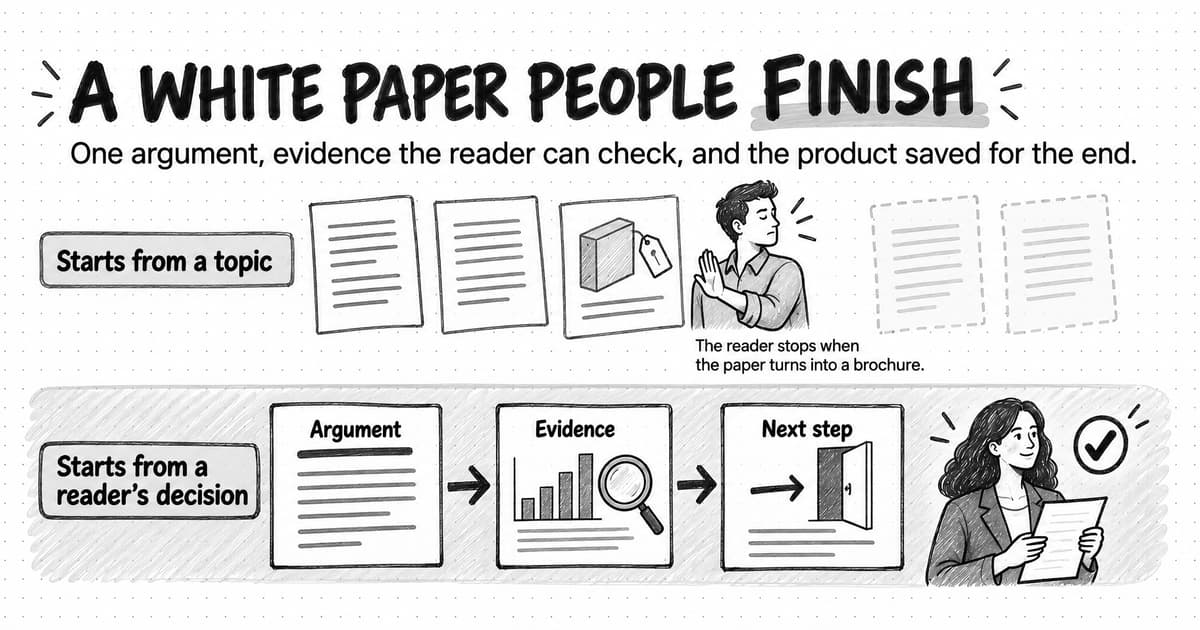
There is also a timing problem more page posts cannot fix. LinkedIn's B2B Institute, drawing on research with the Ehrenberg-Bass Institute, summarizes it as "95% of your potential buyers aren't ready to buy today." The share varies by category, but most people who see your posts will not act this quarter. The job is to be known and trusted when they start looking, which favors steady, useful posting from recognizable people over campaigns of announcements. LinkedIn becomes one of the touchpoints in the B2B buyer journey where buyers find answers long before they talk to sales.
The three-account system: a job for the page, the founder and the team
The three-account system gives each kind of account a job that suits how LinkedIn distributes its posts, then connects the three through shared subjects and a simple routine. The jobs differ because the accounts differ: a page speaks for the company, a founder speaks with the most authority about why the company exists, and team members speak from the specific work they do.
| Account | Its job | What it posts | What success looks like |
|---|---|---|---|
| Company page | Be the company's official record and a useful resource for people already paying attention | Teaching documents and carousels, product news with substance, customer proof, the newsletter, reposts of the team's best posts with a line of context | Followers who match the buyer profile, saves and reposts on teaching posts, newsletter subscribers |
| Founder | Make the company's point of view known in the founder's own words | Opinions and lessons from building the company, observations about the market, what the company is learning, occasional product context | Comments from people in the buyer profile, profile visits, conversations that start in comments or messages |
| Team | Show the expertise behind the product from people who do the work | What they see in implementations, support, sales calls, and product decisions, explained for peers | Replies from peers and buyers, a growing number of people who recognize the team's names |
The page's job is narrower than most companies give it. A page that posts two strong teaching pieces a week, publishes the official version of news, and reposts the team's best work with a sentence of context is doing its job.
The founder's job matters most early on, because a founder's opinions about the problem the company solves are what make the company distinct. Our guide to founder-led marketing covers what founders should post and how to fit it into a week. In this system, the founder posts in their own voice on the same few subjects the page and team cover, and treats comments as part of the work.
The team's job is to make the company's expertise visible in more places than one person can reach. A support lead, a solutions engineer, and a product manager each see a different part of the customer's problem and know a different set of peers. Their posts do not need to mention the product. A post explaining how finance teams usually discover a reconciliation error, by someone who has seen it fifty times, does more than a post announcing a feature for it.
The three accounts work as one system when they share subjects and help each other. The founder makes an argument; a team member adds a specific example from their work; the page publishes the full method as a document carousel and reposts both. Each account keeps its own voice, and a reader who meets the company through any one of them finds the same point of view in the other two.
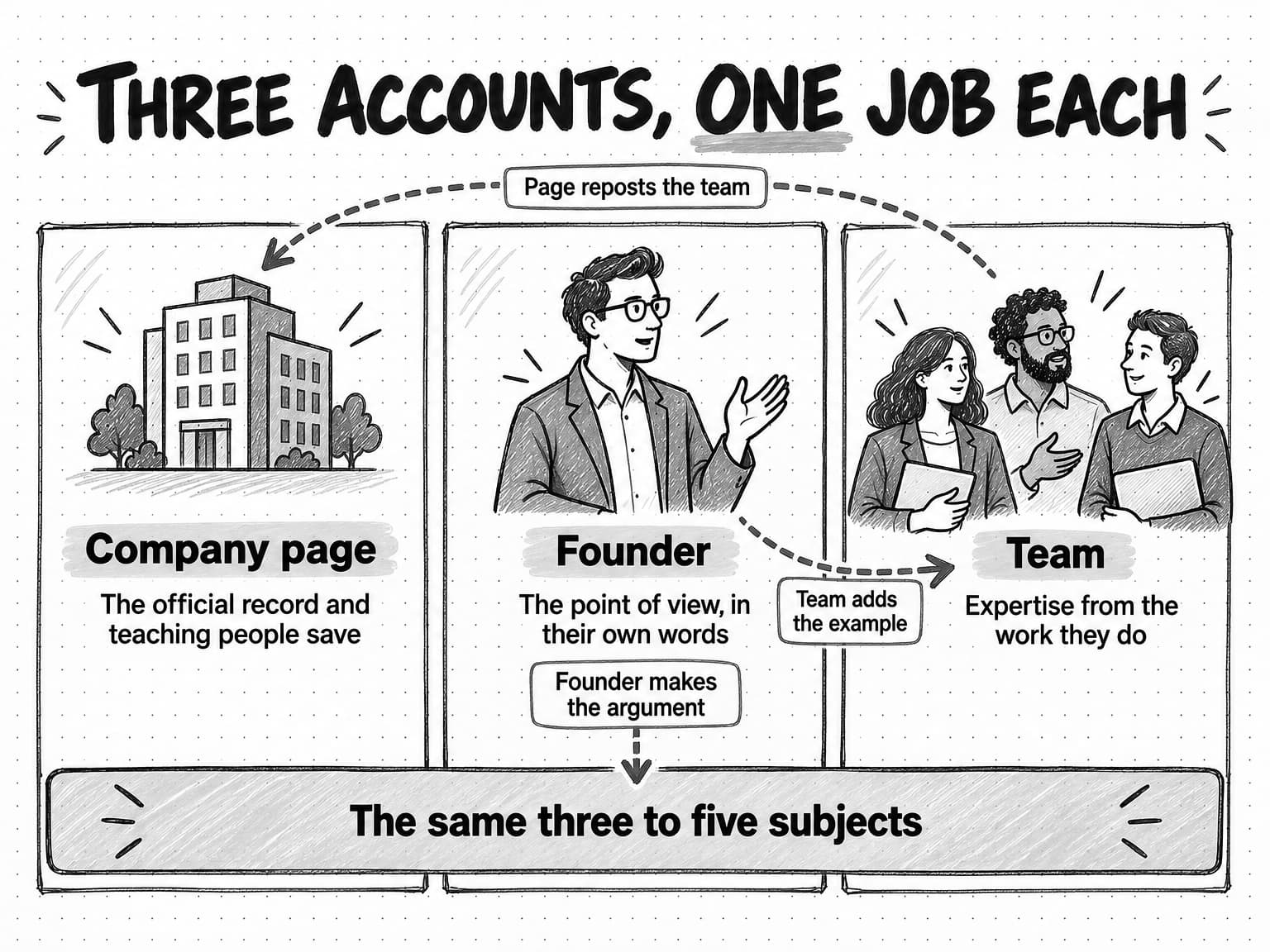
View the three-account diagram at full size (opens in a new tab).
How to choose topics the three accounts can share
The topics come first, because the three accounts can only reinforce each other if they talk about the same things. Most B2B companies do best with three to five recurring subjects, each grounded in a problem the buyer has and the company understands well. A company that sells month-end close software might choose close timelines, reconciliation errors, audit readiness, and how finance teams adopt new tools. Every post, from any account, should be about one of those subjects or should have a clear reason not to be.
Choosing those subjects is the job of content pillars, and our guide to content pillars explains how to pick them and check them against what buyers ask. The broader decisions behind them, such as which buying situations to serve and which point of view the company has earned, belong to the company's content strategy, covered in our guide to building a B2B content marketing strategy. For LinkedIn, two checks are worth adding.
The first is whether each subject gives every account something to say. "Our product roadmap" gives the page material but leaves the team little to add. "Why implementations stall" lets the founder argue about the cause, a customer success lead describe week three, and the page publish a checklist.
The second is the mix of post types within a subject. A useful working split, adapted from the 4-1-1 rule, keeps self-promotion to a small share of what each account publishes. The rule was coined by Andrew Davis of Tippingpoint Labs and Joe Pulizzi, and Contently summarized it in 2012: for every self-serving tweet, post, or update, a brand should share four new pieces of content and one re-share. The ratio is a rule of thumb rather than a research finding, and on LinkedIn the "new pieces" should usually be your own teaching rather than links to other people's articles. The principle still holds: if most of an account's posts ask for attention on the company's behalf, readers learn to skip them.
| Post type | What it does | Rough share of an account's posts |
|---|---|---|
| Teaching | Explains how to do something, why something happens, or what a pattern in the work means | Most of them |
| Point of view | States a position on a contested question in the subject, with the reasons | Regular, especially for the founder |
| Proof | Shows a customer result, a before-and-after, or a piece of evidence, with its source and limits | Occasional |
| Company and product | Announces a launch, an event, a hire, or a milestone, with enough substance to be useful | A small minority |
The shares are deliberately rough; a launch month will carry more product posts. What matters is that a reader who follows any account for a month comes away having learned something.
LinkedIn post formats and what each one is for
Each LinkedIn post format suits a different kind of message, so the format should follow from what the reader needs to do: read a short argument, see something, follow a sequence, answer a question, or come back to a series. Choosing the format first is how pages end up with polls nobody needed.
| Format | What it is for | What to watch |
|---|---|---|
| Text post | A short argument, an observation, a lesson, or a question for peers | The first lines decide whether anyone taps "see more." Keep one idea per post. |
| Image post | Something the reader needs to see: a screenshot, a chart, a photo that carries information, or a diagram | An image that only decorates adds nothing. Write alt text. |
| Document or carousel | A sequence the reader can follow and save: a checklist, a framework, a step-by-step method, a short report | Each page needs one clear point. |
| Poll | A real question the account wants answered, or a quick read of where peers stand before a longer post | A poll asked only for reach teaches nothing and can feel like bait. Report the result. |
| Newsletter | A recurring series on one subject that subscribers are notified about | It needs a schedule you can keep and a subject with enough depth for many editions. |
| Video | Showing a process, a face, or a demonstration that text cannot carry | Add captions and make the first seconds work without sound, in case viewers have it off. |
Text posts are the default for founders and team members. LinkedIn's Help Center says posts can contain up to 3,000 characters, but the feed shows only the opening lines before "see more," so the opening matters more than the length.
Image posts suit content that is visual by nature. LinkedIn's guidance for Pages says images "typically result in a 2x higher comment rate," but it gives no method, so treat it as LinkedIn's view. The safer rule is that an image should carry information: a chart from your own data, a before-and-after screenshot, a whiteboard from a real decision.
Document posts, often called carousels, are PDF, PowerPoint, or Word files shown as swipeable pages, up to 300 pages and 100 MB; the file cannot be changed after posting. They suit teaching content a reader may want to keep. Our guide to repurposing content across channels shows how to turn a longer source into a carousel without losing its evidence.
Polls allow a 140-character question with up to four options on desktop and Android, according to LinkedIn's Polls FAQ, and run for one day to two weeks. A page's admins can see who voted and how. A good poll asks something the account wants to know and leads to a follow-up post that interprets the answer.
Newsletters turn a subject into a series. A page's admins can create a Page newsletter once the page meets LinkedIn's access criteria; followers are invited to subscribe when the first edition is published, and subscribers get a notification and an email for each edition. That delivery beyond the feed is why one newsletter, on the page or the founder's profile, beats several scattered across the team.
Video suits anything that has to be shown. LinkedIn accepts videos of up to 15 minutes and 5 GB and generates auto-captions in ten languages. It takes the most effort of any format, so use it when the moving picture carries the point.
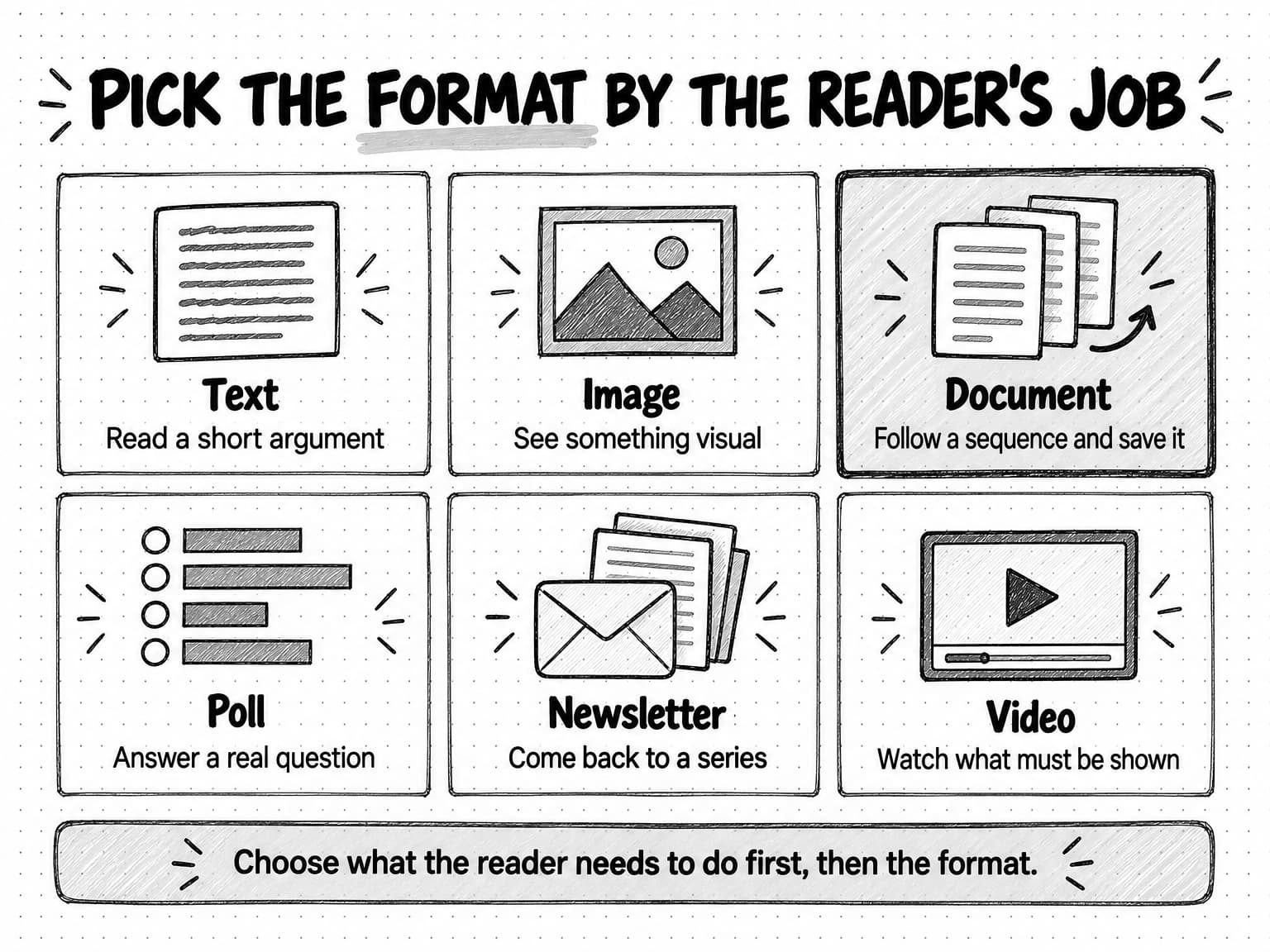
View the format guide at full size (opens in a new tab).
What the format benchmarks show for company pages
For company pages, the clearest dated evidence on formats is the Socialinsider benchmark described earlier, published in March 2026. It calculates engagement rate as engagements divided by impressions, so the figures describe how often people who saw a post interacted with it.
| Post format | Average engagement rate, 2025 posts | Average engagement rate, 2024 posts |
|---|---|---|
| Native document | 7.00% | 6.10% |
| Multi-image | 6.45% | 6.60% |
| Video | 6.00% | 5.60% |
| Single image | 5.30% | 4.85% |
| Text | 4.50% | 4.00% |
| Poll | 4.20% | 4.40% |
| Link | 3.25% | 3.30% |
Two cautions apply. These are averages across all sizes and industries, and engagement rate says nothing about who engaged. A format's average also reflects how pages use it: documents may score well partly because pages save them for their best material. The pattern across both years still holds: posts that send readers to a link earned the lowest rate, and posts that teach in the feed earned the highest.
What the LinkedIn feed rewards, according to LinkedIn
Much of what is written about "the LinkedIn algorithm" is guesswork presented as rules. The reliable starting point is what LinkedIn has said itself, in its Help Center, newsroom, and engineering blog.
LinkedIn's Help Center article on how it optimizes the member experience says its systems weigh three groups of signals. Identity signals describe the reader: location, workplace, skills, and professional background. Content signals describe the post: how often it is viewed or engaged with, "what the post is about and whether it provides knowledge or advice," how recent it is, whether it comes from someone the reader follows or is connected to, its language, "how constructive or professional the conversation is," and who or what is tagged. Activity signals describe the reader's behavior: what they have reacted to, commented on, or shared; who they interact with frequently or recently; "content you spend the most time viewing"; who they follow; and the topics they have shown interest in. The same article says LinkedIn's algorithms "filter out or taper distribution of low-quality and unsafe content."
The time-spent signal has a longer history. In a May 2020 engineering post on dwell time, LinkedIn's feed engineers explained why they measure how long members spend on a post: "Click and viral actions can be rare, especially for passive consumers of the feed." Many members read without reacting, so time spent viewing a post tells the feed something that reactions cannot. For a B2B company, that means a post a buyer reads closely without reacting still registers.
LinkedIn described a rebuilt feed in a March 12, 2026 engineering post by Hristo Danchev. The new system treats each member's history as a sequence, learning from what they read, liked, commented on, and skipped over time, including passive actions such as "click, skip, long-dwell." It also draws on "information you've chosen to share on your own profile," uses "professional signals and engagement patterns, never demographic attributes," and retrieves "content from authors you don't follow, on topics you care about." The last point matters for small accounts: a post on a clearly defined professional subject can reach people outside the author's network who have shown interest in that subject.
The same day, LinkedIn's newsroom published a plainer account of what it wants to show more and less of. It said ranking looks at "signals you choose to share, like your industry, skills, experience, and geography, alongside how you engage with content over time," and that "we want the Feed to be relevant to your interests, not a popularity contest." It also named what it is reducing: repetitive, low-substance posts, engagement bait such as "comment to agree" prompts, "videos that don't match the text," and "recycled and click-driven posts." And it said LinkedIn is working to "make engagement pods ineffective and curb comment automation."
Taken together, LinkedIn describes a feed that matches posts to members by professional subject and relationship and notices whether they stop to read. Posts that teach on a clear subject, from people the reader knows, fit that design; manufactured engagement is what LinkedIn says it is working against.
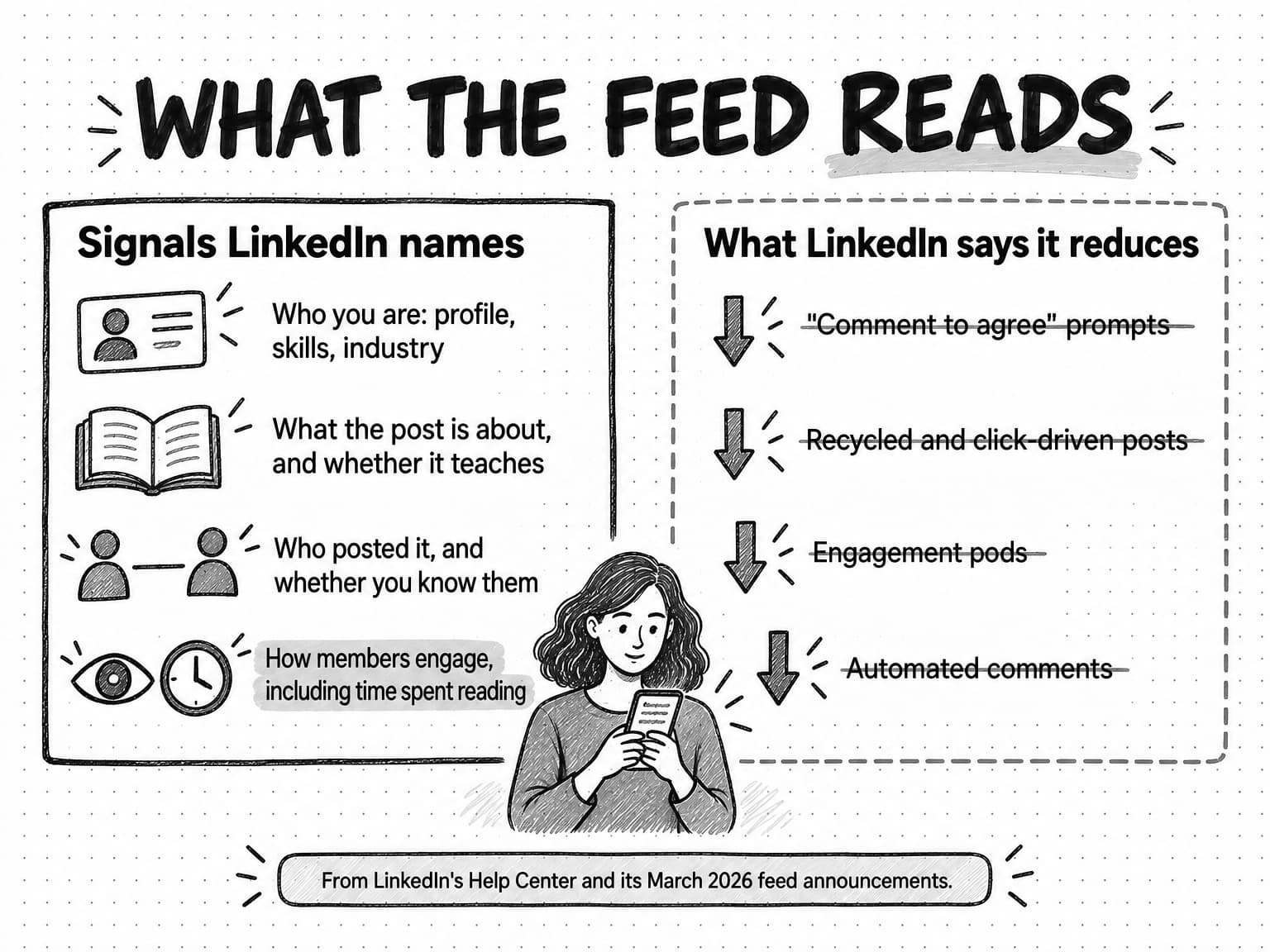
View the feed signals diagram at full size (opens in a new tab).
Should posts include links? LinkedIn's statements cited here don't say it penalizes them, but the benchmark data is consistent. In Socialinsider's analysis, link posts had the lowest average engagement rate of any format in both 2024 and 2025, and the fewest impressions in four of its five page-size groups. Buffer's 2025 report on posting frequency, described below, also says link posts consistently had the lowest median engagement rate. A reasonable reading is that posts which teach in the feed hold attention, while posts that exist to send people elsewhere don't. When the point of a post is to send readers to an article, give them the useful part in the post itself, so the post works even for the many who will not click.
How often to post on LinkedIn: what the evidence says
The best evidence on posting frequency says that posting more often, up to a point a small team can sustain, tends to bring more impressions per post, as long as the quality holds. LinkedIn's own guidance for Pages is simple: "Companies that post weekly see a 2x lift in engagement with their content." LinkedIn does not say when that was measured or against what baseline, so treat it as a floor: a page that posts less than weekly is leaving reach unused.
The most careful independent study is Buffer's analysis of more than 2 million LinkedIn posts from over 94,000 accounts, published in August 2025. Buffer, a social media scheduling company, compared each account's busier weeks with its own quieter weeks, which controls for the fact that large accounts post more and get more impressions anyway. Compared with posting once a week, posting two to five times a week was associated with about 1,182 more impressions per post, six to ten times with about 5,001 more, and eleven or more with about 16,946 more. Buffer's data scientist adds that low-quality content posted often "won't yield great results." Two limits matter for a B2B team: the study shows an association within accounts, not proof that frequency caused the lift, and it does not report company pages and personal profiles separately.
For a B2B company, the practical reading combines that evidence with what a small team can keep up. A cadence that starts strong and stops after five weeks teaches the feed and the audience nothing, so choose a rate each account can sustain for a quarter.
| Account | Starting cadence | When to post more |
|---|---|---|
| Company page | Two or three posts a week, at least one of them a teaching document or image | When you have more substantive material than slots, not to fill a calendar |
| Founder | Two or three posts a week, plus daily time for comments | When posts reliably start conversations with people in the buyer profile |
| Each team member | One post a week to two a month, voluntary | When the person enjoys it and their posts draw replies from peers |
| Newsletter | Monthly or every two weeks | Rarely: a newsletter's value is a schedule subscribers can count on |
A company with a strong founder voice might keep the page at two posts a week and put more effort into the founder's profile, while a company whose founder doesn't want to post might ask two team members to carry that job. What the evidence does not support is the common pattern of a page posting daily while the founder and team stay silent: that concentrates effort on the account with the smallest reach.
The best time to post on LinkedIn, and why studies disagree
Two large 2026 studies of LinkedIn posting times reached different answers, which is the most useful thing to know about posting times. Buffer analyzed more than 4.8 million posts sent through its platform, normalized to local time, and reported on September 9, 2026 that engagement had shifted later in the day, with the strongest window from about 3 p.m. to 8 p.m. on weekdays. Its top slots were Wednesday at 4 p.m. and Friday at 3 p.m. and 4 p.m., and Monday and Tuesday were the weakest weekdays. Sprout Social, another social media management company, analyzed nearly 2 billion engagements across 307,000 profiles on six social networks, LinkedIn among them, between November 27, 2025 and February 27, 2026, and reported in March 2026 that LinkedIn's peak engagement ran from late morning through mid-afternoon: Tuesday from 11 a.m. to 5 p.m., Wednesday from 11 a.m. to 4 p.m., and Thursday at 11 a.m. and from 1 to 5 p.m. Both found weekends weak.
The studies disagree partly because they measure different things. Each draws on its own customers' accounts, which differ by industry and country. Buffer compares how posts performed by the hour they were sent; Sprout describes its engagement data as showing when professionals are most active on the platform, which is not quite the same as when a given post does best. Both sell scheduling software, which gives them good data and a reason to publish timing advice.
What the two agree on is narrower and more useful: weekday business hours in your audience's time zone are a reasonable default, weekends are weaker, and the exact hour matters less than whether your audience is awake and working. LinkedIn's newer feed probably makes timing matter less, too. LinkedIn hasn't said so directly, but a feed that ranks by relevance and retrieves posts on topics members care about can keep a good post in circulation longer than a purely chronological feed would.
The answer that will actually matter for your accounts comes from your own data. Pick two windows that fit the studies' common ground, such as Tuesday to Thursday mornings and Tuesday to Thursday afternoons in your buyers' main time zone. Alternate between them for four to six weeks, keeping the formats and subjects comparable, and compare impressions and comments per post. Judge the results by who engaged, not only how many.
How to write a LinkedIn post people read to the end
A LinkedIn post has to earn attention twice: once in the opening lines, when a reader decides whether to tap "see more," and again in the body, where dwell time and replies come from. The structure that works for most B2B posts is simple: an opening that states a specific claim or situation, one idea developed with a concrete example, and an ending that gives the reader something to think about or answer.
The opening is often called a hook, and the word has collected some bad habits. A useful opening tells the reader what the post is about and why it might matter to them, in their terms. "Most month-end closes slip on the same day: the third business day, when bank reconciliations meet late accruals" is specific, belongs to a subject, and tells a finance lead they will learn something. "I almost quit last week. Here's what happened..." is built to provoke curiosity, and it trains readers to feel tricked when the post turns out to be about a product update.
The body should develop one idea, not three: the situation, the example or evidence, and what you conclude. Short paragraphs help on a phone, but one-line sentences stacked down the screen read as a performance. Three ideas make three posts.
The ending is where engagement bait usually appears. LinkedIn has said it is reducing posts with prompts such as "comment to agree," so endings that ask for reactions, tags, or a keyword in the comments work against the account. A real question is different: "How does your team handle late accruals: hold the close, or book an estimate and true it up?" invites a peer to share their practice, which produces the kind of constructive conversation LinkedIn lists as a content signal.
Three habits make posts more readable without adding any trick:
- Write for one reader. Picture a specific person in the buyer profile, the kind of role a buyer persona describes, and write the post you would send them directly. Posts addressed to "everyone in B2B" are read by no one in particular.
- Keep the evidence and its limits. A claim from your own data should say what the data covers. "In the 40 implementations we ran last year" is more credible than "always," and it survives a skeptical reader.
- Sound like the person posting. A team member's post should sound like that person talking, not like the company's website. Our guide to defining a brand voice explains how a company keeps a consistent voice while different people write in their own.
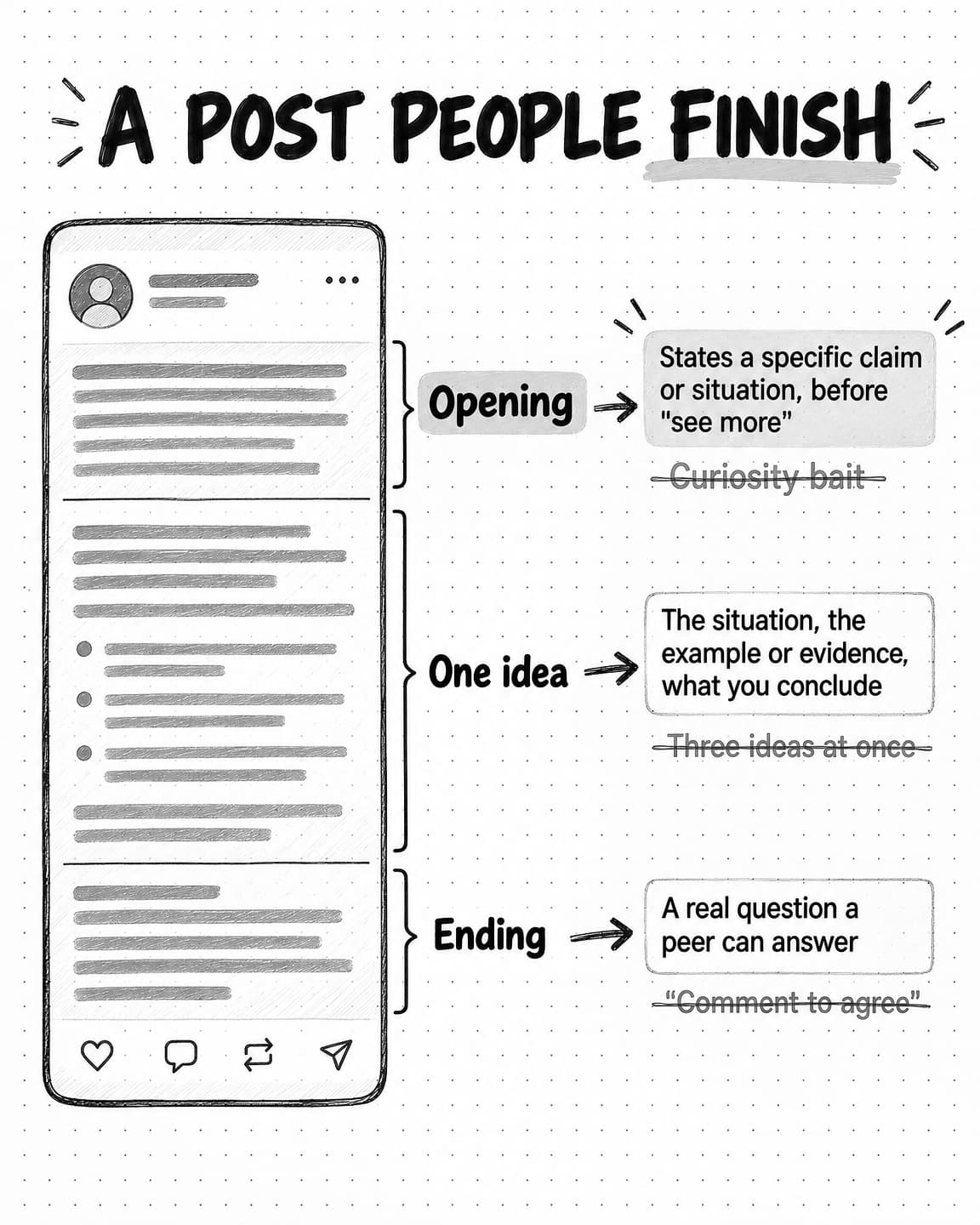
View the post anatomy sketch at full size (opens in a new tab).
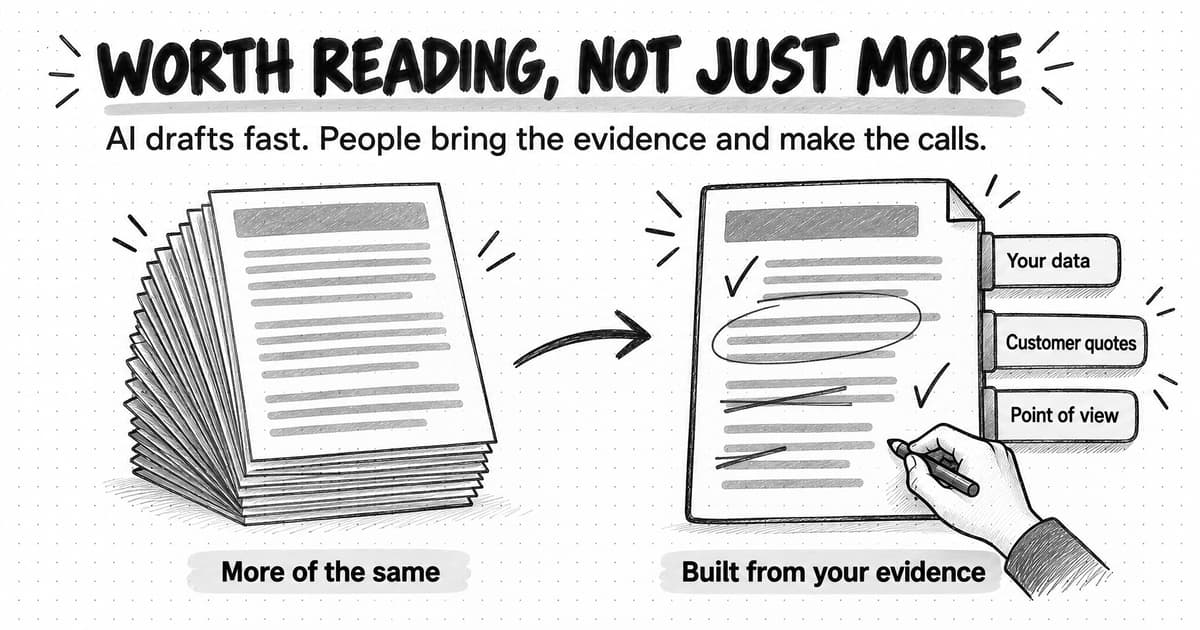
AI writing tools can help draft and edit posts, but they can also strip out the specific detail and judgment that made a post worth reading from that person, until every post sounds the same, a common sign of AI slop. Our guide to AI content creation covers the workflow and the decisions that stay with people.
How to get employees posting without making it awkward
Employee posting goes wrong in a predictable way: the company writes posts, sends them to staff, and asks everyone to publish the same text on the same morning. Readers notice when ten people at one company share identical words, the posts read like advertising in a personal voice, and employees who were uncomfortable stop after a week. The approach that works treats employees as experts with their own voices, invites them rather than assigning them, and gives them material to work from rather than scripts.
Start with volunteers. In most small companies, two or three people are curious about posting and would do it with a little help. Ask the rest for something smaller: follow the page, and comment when a colleague posts about something they know well. LinkedIn's Pages guidance also suggests inviting first-degree connections to follow the page, which employees can do in a minute.
Then make posting easy without making it uniform. A monthly prompt list helps: three or four questions tied to the company's subjects, such as "What question do prospects ask that our website doesn't answer?" Each person answers in their own words. Offer editing help, and let people decline. One person posting monthly about what they know is worth more than five reposting a press release.
Agree on a few boundaries in writing. Employees should not share customer names, numbers, or screenshots without permission, should not make commitments about pricing or roadmap, and should say they work at the company when they discuss its product or competitors. Written rules save people from guessing. Where a post needs a product or legal check, say who does it and how fast.
The page has tools to support this, and one has gone away. An admin can use Notify employees on a page post. LinkedIn counts as employees the members who list the page in their work experience, so people who haven't updated their profile won't get the notice. LinkedIn's Help Center allows one notification per day, delivers it to "a critical group of employees" chosen by a relevance model, and lets employees opt out. LinkedIn's Pages guidance recommends using it for important posts "up to one time per week," which is the better habit, because notifications employees learn to ignore stop helping. LinkedIn began retiring the My Company tab and the Employee Advocacy tab in November 2024. Its advice now is to reshare employees' best posts and mentions from the page's Feed tab and to notify employees of the most important posts. A line of context on each reshare tells followers why it is worth their time. Resharing works the other way too: a team member can share the page's teaching document with a sentence on how they use it.
Comments and conversations: the work between posts
Comments are where much of a B2B LinkedIn strategy happens, and most plans leave them out. A thoughtful comment on a peer's or prospect's post puts the commenter in front of that post's readers, starts a relationship that a cold message would not, and shows the commenter's expertise in a setting where it is welcome. LinkedIn's own lists of signals include "who you interact with frequently or recently" and "how constructive or professional the conversation is," which suggests that genuine conversation is part of what the feed uses to connect people.
For the founder and team, a routine helps: fifteen to twenty minutes a day reading posts from buyers and peers, commenting where you have something to add, such as an example from your work, a reasoned disagreement, or a question that moves the discussion on. "Great post!" adds nothing.
Replies on your own posts matter as much. A post whose questions go unanswered tells readers the author is broadcasting. Reply to every substantive comment, especially in the first day, and treat a good question as material for the next post.
LinkedIn has said it is working to "make engagement pods ineffective and curb comment automation," so two common tactics should stay out of the plan. Engagement pods, groups that agree to like and comment on each other's posts, generate activity from people who are not the audience, and automated comments are easy to spot and easy for LinkedIn to discount. Both also distort your measurement, because the comments you count no longer show what real readers think.
How to measure LinkedIn content
Measure LinkedIn content by the question each number answers, not by whatever the dashboard shows first: whether posts are seen, whether the people who saw them found them worth a comment, save, or repost, whether those people are the buyers you want, and whether any of it leads to conversations and revenue. A plan that tracks only impressions can grow every month while reaching the wrong people.
LinkedIn's combined post analytics for members define the basic terms. Impressions are "the number of times your post was displayed on screen," and LinkedIn notes that the number "is an estimate and may not be precise." Members reached counts distinct viewers, without repeat views. Engagements include "reactions, comments, saves, sends, and reposts." Impressions are also split into in-network and out-of-network shares, which shows whether a post traveled beyond the people who already follow or know the author. Page admins see comparable post-level measures in Page analytics.
| Question | Measure | Where to find it | Watch out for |
|---|---|---|---|
| Are the posts being seen? | Impressions and members reached per post, by account | Post and Page analytics | Impressions are estimates; compare trends, not single posts |
| Are they reaching new people? | Out-of-network share of impressions; follower growth | Member post analytics; Page follower analytics | Followers who don't match the buyer profile inflate growth |
| Do readers find them useful? | Comments, saves, sends, and reposts per post, and engagement rate | Post and Page analytics | Reactions from employees and friends look like engagement |
| Are the right people responding? | Share of commenters and new followers who match the buyer profile | Read the comments and follower lists; Page follower demographics | This needs a person's judgment, and samples are small |
| Is it starting conversations? | Profile visits, direct messages, and meeting requests that mention LinkedIn content | Profile analytics; sales notes | People rarely say where they first saw you |
| Is it influencing pipeline? | Self-reported attribution ("How did you hear about us?"), opportunities where LinkedIn content was cited | CRM and the sign-up or demo form | Clicks from LinkedIn undercount its influence, because many buyers read without clicking |
Two habits keep the numbers honest. First, compare each account with itself over time. Socialinsider's 2025 average page engagement rate of 5.20% is context, but a page's own trend over a quarter tells you more. Second, read the comments: whether they came from a peer with a real question or a supportive colleague decides whether the strategy is working.
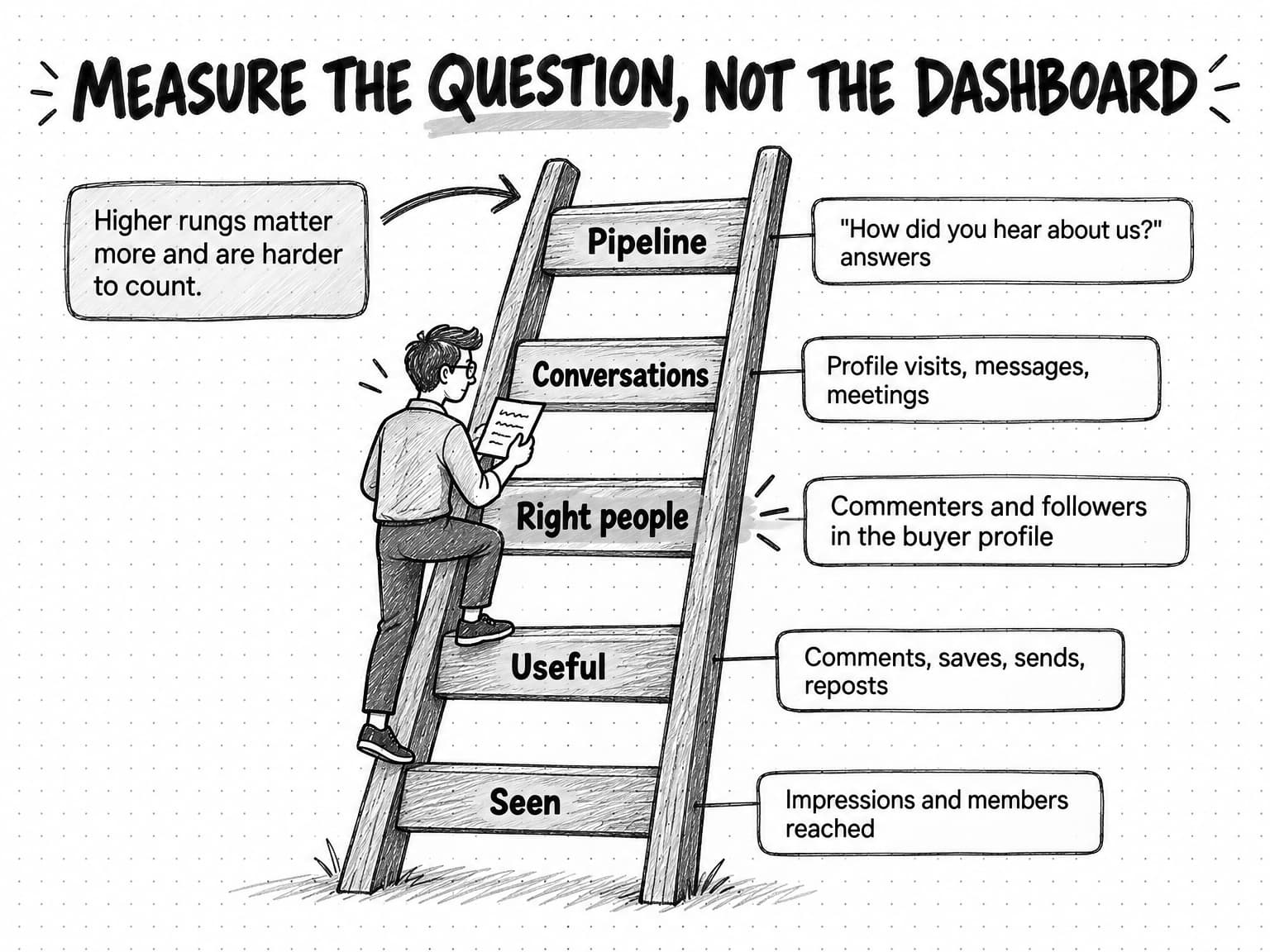
View the measurement ladder at full size (opens in a new tab).
Expect influence the numbers will not show. Many buyers read without reacting or clicking and arrive months later through search or a referral. A free-text "How did you hear about us?" field on the demo form, and a question in first sales calls, recover some of it. Our guide to zero-click content distribution covers how to plan and measure content for buyers who never click through.
How to audit your LinkedIn company page
A company page audit looks at what the page has published recently and asks whether it does the job the three-account system gives it. It is worth doing before you change the plan, because it shows what the page actually posts, which formats and subjects get a response, and where effort is going. Our guide to running a content audit covers auditing a whole content library; for a LinkedIn page, the audit can be smaller and faster.
Collect the last two or three months of posts, or the last 50 to 70 if the page posts often. For each post, record the date, format, subject, whether it teaches, argues, proves, or announces, whether it links out, and its impressions, reactions, comments, and reposts. Then work through these questions:
- Cadence: How often does the page post, and is it steady or bursty? Gaps of several weeks followed by a flurry suggest the page posts when someone remembers.
- Format mix: What share of posts are links, single images, documents, videos, polls, and text? A page that is mostly link posts is using the format with the lowest average engagement.
- Subjects: Do posts cluster around three to five subjects the buyer cares about, or spread across whatever happened that week?
- Post types: What share teach something, and what share announce something? A page that mostly announces gives readers little reason to follow.
- Copy: Do the opening lines state something specific? Does the page sound like a person wrote it?
- Response: Which posts drew comments from people outside the company, and what did those posts have in common?
- Page basics: Is the page complete: logo, cover image, an overview that names the problem the company solves, and a call-to-action button that matches what you want visitors to do?
The audit's output should be short: what the page is doing well, two or three changes in priority order, and a recommended list of subjects. The changes are usually some combination of fewer link posts, more teaching documents, a clearer set of subjects, and a page that reposts the team's best work. Whether the founder and team are posting is a separate, and often more important, question.
Worked example: one company's first 90 days with three accounts
This example is fictional. Tallyfold is an invented 14-person software company that sells month-end close software to finance teams at mid-size companies, and every number below is illustrative, chosen to show how the decisions work rather than to describe a real company or predict a result.
The starting point. Tallyfold's page has about 2,100 followers and posts three times a week. An audit of its last 60 posts finds 38 blog links, 12 single images, six event announcements, and four hiring posts. The median post shows about 250 impressions in Page analytics, and most comments come from employees. The CEO, Dana, a former controller, has 4,800 connections and posts about once a month, usually to share a company announcement. Two customer success leads, a product manager, and an account executive have between 600 and 2,000 connections each and almost never post.
The diagnosis. The page is doing all the work and getting little back, mostly by sending people to the blog. Tallyfold's most valuable knowledge, what close teams get wrong and how to fix it, stays with Dana and the customer success leads.
The subjects. Tallyfold chooses four: close timelines, reconciliation errors, audit readiness, and adopting new finance tools. Each gives every account something to say. Dana can argue that most close delays are process problems rather than staffing problems; a customer success lead can describe what a failed reconciliation looks like on day three; the page can publish a close checklist.
The plan for each account.
| Account | Plan for the first 90 days | First month's examples |
|---|---|---|
| Company page | Two posts a week: one teaching document, one image or text post with product news or customer proof. One poll a month, followed by a post interpreting the result. Repost the team's best posts with a line of context. Notify employees about the most important post each week. | An eight-page "Five-day close checklist" document; a poll asking which close step slips most often |
| Founder (Dana) | Three text posts a week on the four subjects, from Dana's experience as a controller. Fifteen minutes of comments each weekday on posts from finance leaders. A monthly page newsletter, "The Close," written in Dana's voice. | "The third business day is where most closes go to die," with the reasons and an example |
| Team | The two customer success leads agree to post twice a month each, from a monthly prompt list. The product manager posts once a month about a product decision and why. The account executive comments rather than posts. | "Three signs a reconciliation will fail before anyone opens the spreadsheet" |
The first review, at day 30. Tallyfold looks at its numbers by account and reads the comments. In this illustrative case, the close checklist document drew about 900 impressions and 31 saves, far above the page's old median, and Dana's posts drew comments from controllers at companies in Tallyfold's target size range. One customer success lead's post on reconciliation failures was reposted by two finance consultants. The poll drew votes but few comments from outside the company. Tallyfold makes two changes: it reports the poll result in a document post instead of a text post, and it adds a second teaching document each month, because the checklist outperformed everything else the page had published.
The review at day 90. The questions are the ones in the measurement table. Are more of the commenters and new followers finance leaders at mid-size companies? Are prospects mentioning Dana's posts or the checklist in first calls? Has the demo form's "How did you hear about us?" field started to name LinkedIn? Tallyfold judges the plan on those answers, not on total impressions. It keeps what worked, drops the formats that drew only colleagues, and asks the one customer success lead who stopped posting what would make it easier.
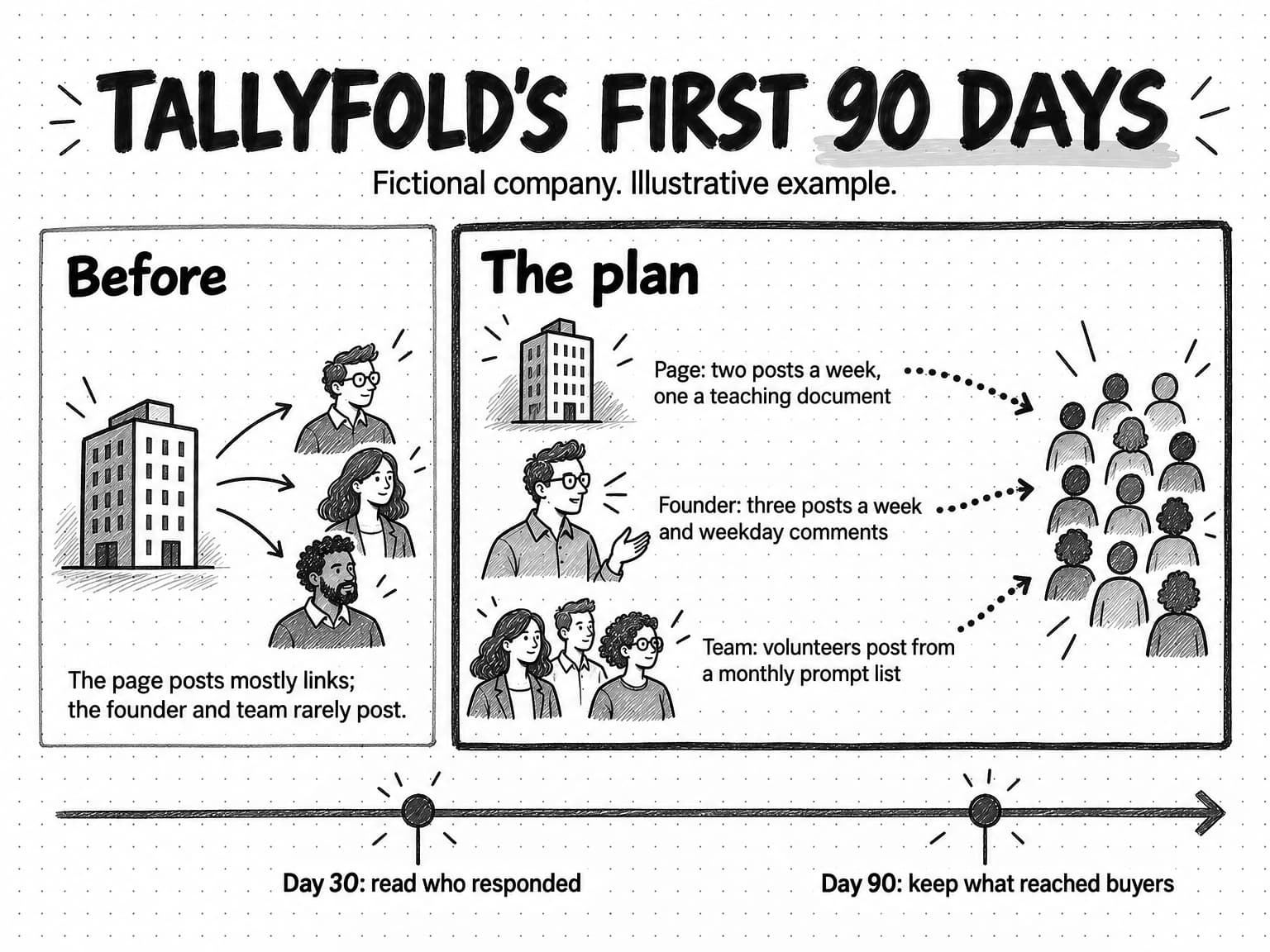
View the Tallyfold plan at full size (opens in a new tab).
A one-page LinkedIn content strategy template
Copy this template and fill it in for your company. Keep it to one page, so the founder, the team, and whoever runs the page can read it in two minutes, and review it after each day-90 review.
LINKEDIN CONTENT STRATEGY: [Company], [Quarter]

1. Buyer we want to reach
   Role, company type, and the problem they are trying to solve:

2. Subjects (three to five)
   For each: the problem it covers, and what the page, founder, and team can each say about it.
   -
   -
   -

3. Accounts and jobs
   Company page: job, owner, cadence, main formats
   Founder: job, cadence, daily comment time
   Team: who has volunteered, cadence, where the monthly prompt list lives

4. Format plan
   Teaching documents per month:
   Text and image posts per week:
   Polls per month, and the follow-up post that reports each one:
   Newsletter: title, schedule, author
   Video: only when something needs to be shown

5. Boundaries for everyone who posts
   What needs permission (customer names, numbers, screenshots):
   What needs a check, and who checks it:
   How people disclose that they work here:

6. Comments
   Who comments, how often, and on whose posts:
   How fast we reply to comments on our own posts:

7. Measurement (reviewed at day 30 and day 90)
   Seen: impressions and members reached per post, by account
   Useful: comments, saves, and reposts per post
   Right people: share of commenters and new followers in the buyer profile
   Conversations: profile visits, messages, and meetings that mention our posts
   Pipeline: "How did you hear about us?" answers and sales notes

8. Experiments this quarter
   Posting-time test: windows and dates
   Format test:
   What we will stop doing: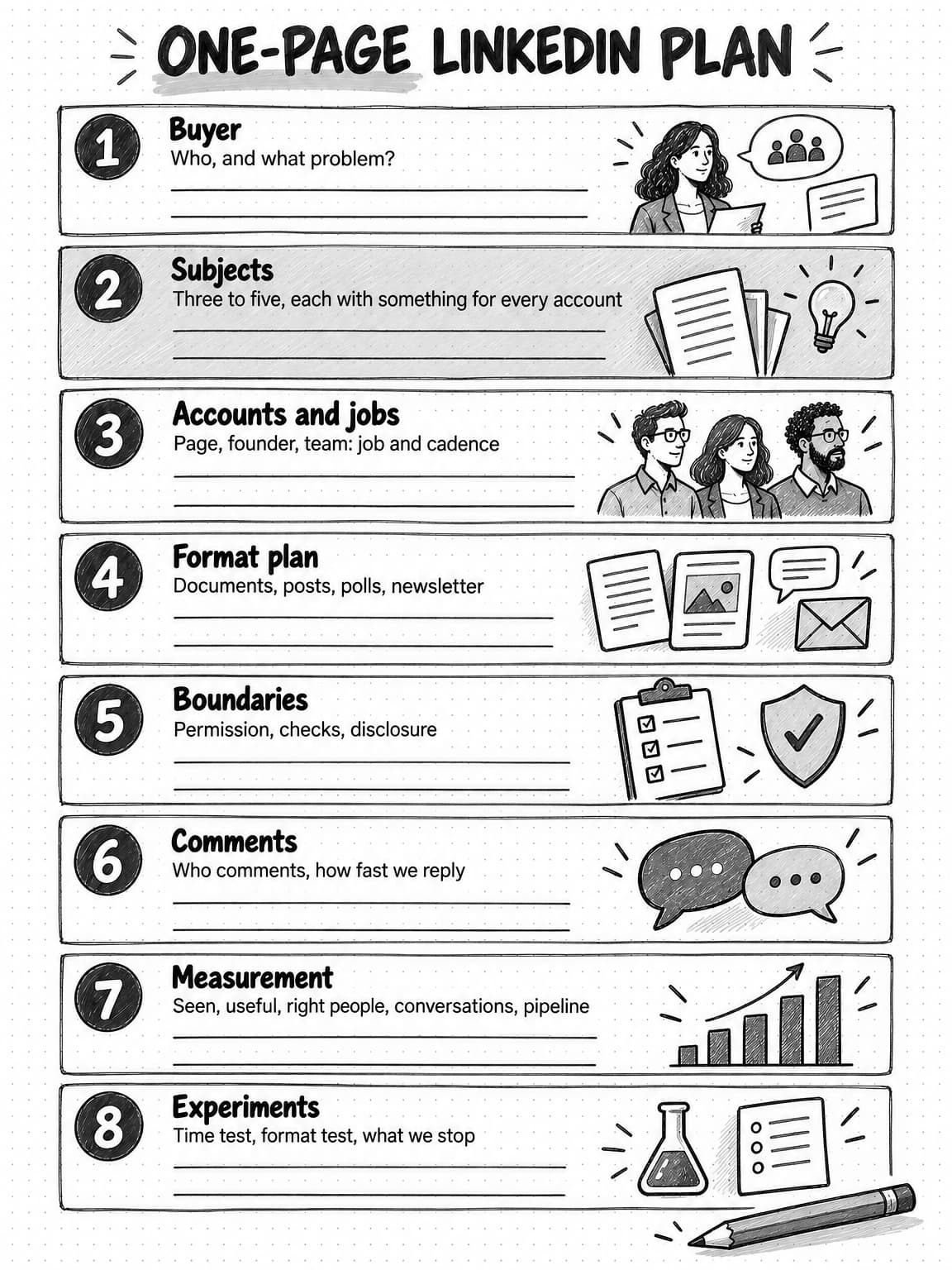
View the one-page plan worksheet at full size (opens in a new tab).
How LinkedIn content work happens in Ampere
Ampere, the AI marketing agent, can do much of the research and drafting in this strategy. It prepares the work; you decide what goes out, and someone at your company publishes it. Ampere does not post to LinkedIn for you.
The audit is a good first job. Ampere can audit one LinkedIn company page from up to about 70 of its recent public posts, covering posting cadence, format mix, copy, topics, audience coverage, and engagement against LinkedIn best practice for the company's industry. It delivers an executive HTML report of opportunities grouped by priority, with a recommended topic list. The audit covers that one page only and does not compare competitors. Because it reads public posts, its engagement figures are public counts, and they can be partial.
For posting, Ampere can produce LinkedIn text post, native poll, and newsletter packages with format-specific drafts, review notes, claim checks, follow-up ideas, and saved Markdown files, so the person who will post starts from a draft whose claims are listed for checking. It can also create LinkedIn image posts and carousels. On paid plans, carousel work starts with content-style and visual-style choices shown as example decks, then produces a 3-to-20-slide PDF and caption for your brand from a named topic, Ampere's researched recommendations, or source material you share, such as an article, a recording, or a deck. Drafts start from your Brand memory, saved and reviewable knowledge about your brand, its audience, market, products, competitors, voice, and visual identity, so posts for the page and for individual people draw on the same subjects and facts.
On paid plans, recurring work can run on a schedule: a scheduled task can prepare a weekly batch of draft posts or a monthly newsletter draft and return each result for review. A person still reads each draft, checks its claims, adjusts it to sound like the person who will post it, and publishes it. AI drafts can be inaccurate or incomplete, and a post in someone's name should always be one they have read and agree with.
Owners who have never had a paid plan can start on the Free Plan with no card, in the countries where it is available. Ampere sets up the Organization's Brand memory, then completes up to four Free tasks for the brand: LinkedIn content audit, LinkedIn image post, LinkedIn carousel (eight slides, for the company page), and LinkedIn text post. Unused Free tasks don't expire, and results stay saved after an upgrade. Your own prompts and follow-up questions, 200+ AI tools & skills, Scheduled Tasks, and Monitoring come with paid plans.
Sources and further reading
- LinkedIn Help, LinkedIn relevance: optimizing the member experience, accessed October 13, 2026.
- Hristo Danchev, Engineering the next generation of LinkedIn's Feed, LinkedIn Engineering, March 12, 2026.
- LinkedIn Corporate Communications Team, How LinkedIn is improving the Feed to show more relevant, authentic professional content, LinkedIn Pressroom, March 12, 2026.
- Siddharth Dangi and colleagues, Understanding dwell time to improve LinkedIn feed ranking, LinkedIn Engineering, May 12, 2020.
- LinkedIn Marketing Solutions, LinkedIn Pages best practices, accessed October 13, 2026.
- LinkedIn B2B Institute, The 95-5 rule, accessed October 13, 2026.
- LinkedIn Help: Post and share updates, Upload and share documents on LinkedIn, LinkedIn Polls: FAQ, LinkedIn Polls, Create a LinkedIn Page newsletter, Share videos on LinkedIn, Use Employee Notifications on LinkedIn Pages, My Company tab and Employee Advocacy tab is no longer available, and Combined post analytics, all accessed October 13, 2026.
- Elena Cucu, LinkedIn organic benchmarks 2026, Socialinsider, March 16, 2026. 1.3 million posts from 16,645 business pages, January 2024 to December 2025; engagement rate is engagements divided by impressions.
- Tamilore Oladipo, How often should you post on LinkedIn? Data from 2 million+ posts, Buffer, August 28, 2025. Within-account comparison; association, not cause.
- Kirsti Lang, The best time to post on LinkedIn in 2026: 4.8 million posts analyzed, Buffer, September 9, 2026.
- Mary Keutelian, Best times to post on LinkedIn in 2026, Sprout Social, March 31, 2026.
- Lexi Lewtan, Should your social media strategy follow the 4-1-1 rule?, Contently, February 17, 2012.
Frequently Asked Questions
How often should a LinkedIn company page post?
A LinkedIn company page should post at least weekly, and two or three times a week is a sustainable starting point for most small B2B teams. LinkedIn says companies that post weekly see a 2x lift in engagement, and Buffer's 2025 study found more impressions per post as accounts posted more often. Frequency only helps when the posts are worth reading, so choose a rate the team can keep for a full quarter and put the extra effort into the founder and team.
What is the best time to post on LinkedIn?
The best time to post on LinkedIn depends on your audience, and large studies disagree. Buffer's 2026 analysis favored weekday late afternoons and evenings, especially Wednesday and Friday, while Sprout Social's found late morning to mid-afternoon from Tuesday to Thursday strongest. Both found weekends weak. Start with weekday business hours in your buyers' main time zone, then alternate two windows for four to six weeks and compare impressions and comments per post.
Should a B2B company post from the LinkedIn company page or from personal profiles?
A B2B company should post from both, with different jobs. Personal profiles of the founder and team usually reach more buyers, because LinkedIn's feed weighs connections and interactions between people, and posts from people read as expertise rather than promotion. The company page holds the official record, the teaching material people save, the newsletter, and reposts of the team's best work. Most companies get more from adding personal profiles than from posting more on the page.
What is the 4-1-1 rule on LinkedIn?
The 4-1-1 rule is a content mix guideline: for every self-promotional post, share four useful pieces of content and one re-share. Andrew Davis and Joe Pulizzi coined it for social media in general, and it has since been applied to LinkedIn. It is a rule of thumb rather than a research finding. On LinkedIn, the useful pieces should usually be the company's own teaching posts, and the principle that matters is keeping self-promotion to a small share.
What is the 95-5 rule on LinkedIn?
The 95-5 rule comes from LinkedIn's B2B Institute and research with the Ehrenberg-Bass Institute. It says that at any one time, about 95% of a company's potential buyers are not ready to buy, and about 5% are in the market. For a LinkedIn content strategy, the implication is to post for the long term: steady, useful posts from recognizable people build familiarity with buyers before they start looking.
Is the LinkedIn golden hour real?
The LinkedIn golden hour, the idea that a post's first hour of engagement decides its reach, does not appear in any LinkedIn statement cited in this guide. LinkedIn says its feed weighs relevance, relationships, recency, and how members engage over time, and its 2026 engineering post says posts gaining traction can reach members within minutes. Early replies probably help a post, and answering comments promptly is good practice anyway, but LinkedIn has published no fixed window.
Do LinkedIn carousels still work for company pages?
LinkedIn carousels, posted as document files, still work well for company pages. In Socialinsider's analysis of 16,645 business pages, native documents had the highest average engagement rate of any format for posts published in 2025, at 7.00%. They suit teaching content readers may save, such as checklists and frameworks. A carousel works when each page makes one clear point that is easy to read on a phone.
Is video content good for LinkedIn company pages?
Video can work well on LinkedIn when something needs to be shown, such as a product walkthrough or a short explanation to camera. Socialinsider found video posts from business pages averaged a 6.00% engagement rate in 2025, above single images and text. Video costs the most effort of any format. Add captions, which LinkedIn can generate automatically, and make sure the first seconds make sense in case a viewer has the sound off.
What should a company avoid posting on LinkedIn?
A company should avoid posts built to manufacture engagement, such as "comment to agree" prompts, coordinated reactions from engagement pods, automated comments, recycled posts, and videos that don't match their text, because LinkedIn has said it is reducing all of these. It should also limit posts that only announce or link out, and never share customer names, numbers, or screenshots without permission. Teaching posts on a few clear subjects hold attention better.