AI content creation: how to make content worth reading, not just more of it
A stage-by-stage workflow that marks the decisions people should keep, a research-based account of what AI does well and badly, an editing pass for AI drafts, and what Google's own guidance says.
43 min readWritten by Ampere
Short answer
How do you use AI for content creation?
To use AI for content creation, gather your evidence first, decide the argument the piece will make, and give both to the AI in a detailed brief. Let it draft from that material, then check every claim against its source, cut what adds nothing, and edit out generic AI-writing patterns. People keep four decisions: the evidence, the point of view, the cut, and the final approval.
Summary
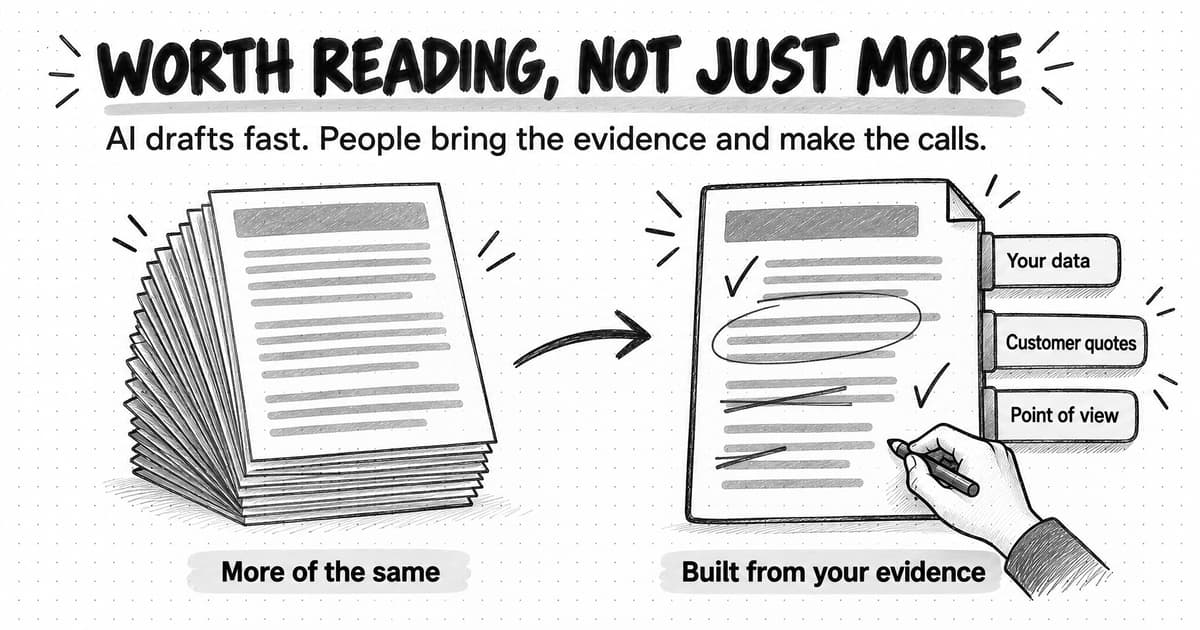
AI content creation works when AI does the production and people make the calls. Fluent drafts are now cheap, so fluency no longer sets a piece apart. What still does is the evidence behind it, the argument it makes, what was cut, and the judgment of the person who approved it, and a model can't supply those unless the team brings them.
Research points to clear strengths and weaknesses. In a 2023 Science experiment, professionals with an AI chatbot took 40% less time on writing tasks and produced work graded 18% higher. A study of 758 consultants found that AI helped on tasks within its abilities but made a correct answer 19 percentage points less likely on one task outside them, and a 2024 study found AI ideas made stories better but more alike.
A ten-stage workflow gives AI a role at every stage, from clustering customer questions to adapting the finished piece, and marks four human calls: the evidence, the point of view, the cut, and the final yes. The order matters: evidence before the argument, the claim check before the edit, and approval only after titles, descriptions, and images are checked.
Generic AI content usually starts from a prompt that names a topic and nothing else. Better drafts come from a brief with a stated point of view, attached evidence, claim boundaries, and what to leave out, followed by a claim check, a substance-first cut, and an edit for AI-writing patterns. Your own data, experience, customer language, and voice keep the result from sounding like everyone else's.
A fictional worked example shows the human calls catching an invented statistic, a false product claim, and a misattributed quote. Google does not penalize content for being made with AI; its guidance, quoted here as of October 2026, targets low-value pages made at scale to manipulate rankings. Measure AI-assisted content with a quality rubric and reader outcomes, not the number of pieces published.
Contents
- What AI changes in content creation, and what it doesn't
- What AI does better than people, and what it does worse
- An AI content creation workflow, stage by stage
- The four decisions that stay with people
- Start with research and evidence, not a prompt
- Write a brief and outline the AI can work from
- How to draft with AI without getting a generic draft
- How to check facts and claims in an AI draft
- How to edit an AI draft: the patterns to remove
- How to use AI for content marketing without sounding like everyone else
- Visuals, formats, and repurposing with AI
- A worked example: one guide from evidence to final yes
- Does Google penalize AI content?
- How to measure content quality, not volume
- How AI content creation works in Ampere
- Sources and further reading
- Frequently Asked Questions
Ask an AI model for a blog post about onboarding emails and you can have 1,200 clean words in under a minute. The headings will be sensible, the advice will be correct, and the post will read much like the one a competitor got from the same request an hour earlier. Nothing in it is wrong. Nothing in it is yours either, and a reader who has seen three posts like it has no reason to finish the fourth.
That is the usual result when AI is used to produce more content. AI content creation is the use of generative AI to research, plan, draft, edit, or format content, with people deciding what the content says and whether it is good enough to publish. The definition puts the decisions with people for a practical reason. AI has made fluent drafts cheap, so fluency no longer distinguishes one piece from another. What still distinguishes a piece is the evidence behind it, the argument it makes, what was cut, and the judgment of the person who signed it off, and a model can't supply those on request.
A team that understands this can use AI for a large share of the work and still publish content people read and forward. The AI gathers sources, proposes outlines, drafts from the team's material, and adapts the finished piece for other channels. People choose the question, bring the evidence, decide the argument, and make the final call. This guide sets out that division as a workflow, explains what research says AI does better and worse than people, follows one fictional piece from start to finish, and quotes Google's own documentation on AI-generated content as of October 2026. If you are still deciding what your content program should cover, start with our guide to building a content marketing strategy for B2B SaaS and AI companies.
What AI changes in content creation, and what it doesn't
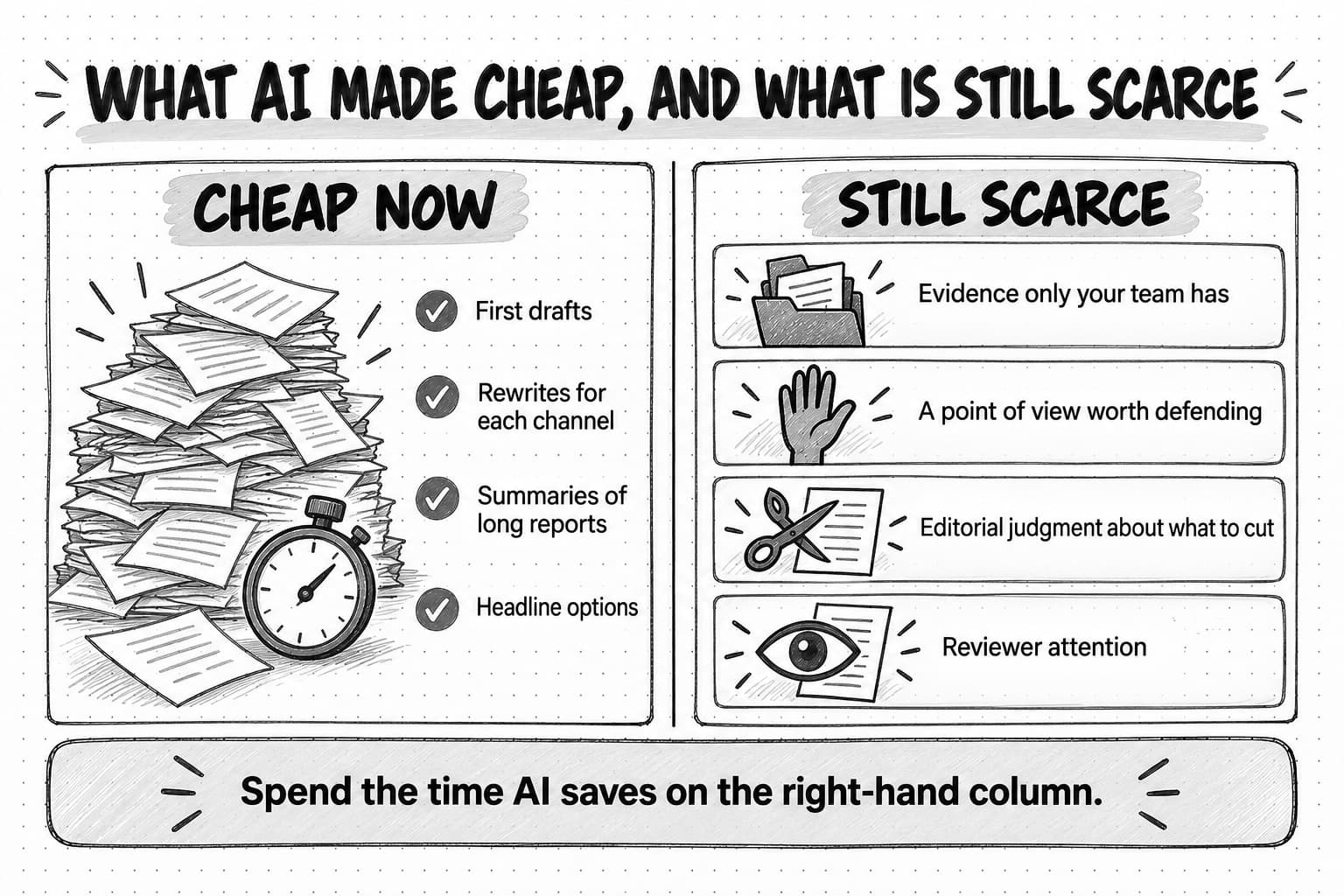
Before generative AI, the draft was the slow, expensive part of content work. A competent 1,500-word article could take a writer most of a day, so teams rationed drafts, and the effort enforced some quality control: a writer who had to produce every sentence noticed when there was nothing to say. AI removes most of that cost. A model can turn an outline into a readable draft in seconds, rewrite it for LinkedIn, summarize a long report, or pull the questions out of a set of sales-call notes. For a small team, that is real capacity.
What AI doesn't change is what makes content worth reading. A reader finishes a piece because it tells them something they didn't know, shows them how to do something, or argues a position they want to test. Each of those depends on inputs the model doesn't have: your customers' questions, your product data, the mistake your team made last quarter, the opinion your founder holds that most of the market disagrees with. A model trained on the public web describes the common knowledge on a topic very well. It can't know what your company knows unless someone gives it that material, and it can't decide which of your opinions is worth publishing.
So the constraints in content work have moved. Drafting time is now plentiful. Evidence, a point of view, editorial judgment, and reviewer attention are what limit the work, and AI can make the last one worse, because a team producing five times as many drafts has five times as much to check. Teams that use AI well spend the saved time on those constraints. Teams that use it badly produce more pieces and end up publishing what everyone else publishes, which our guide to AI slop describes in detail.
What AI does better than people, and what it does worse
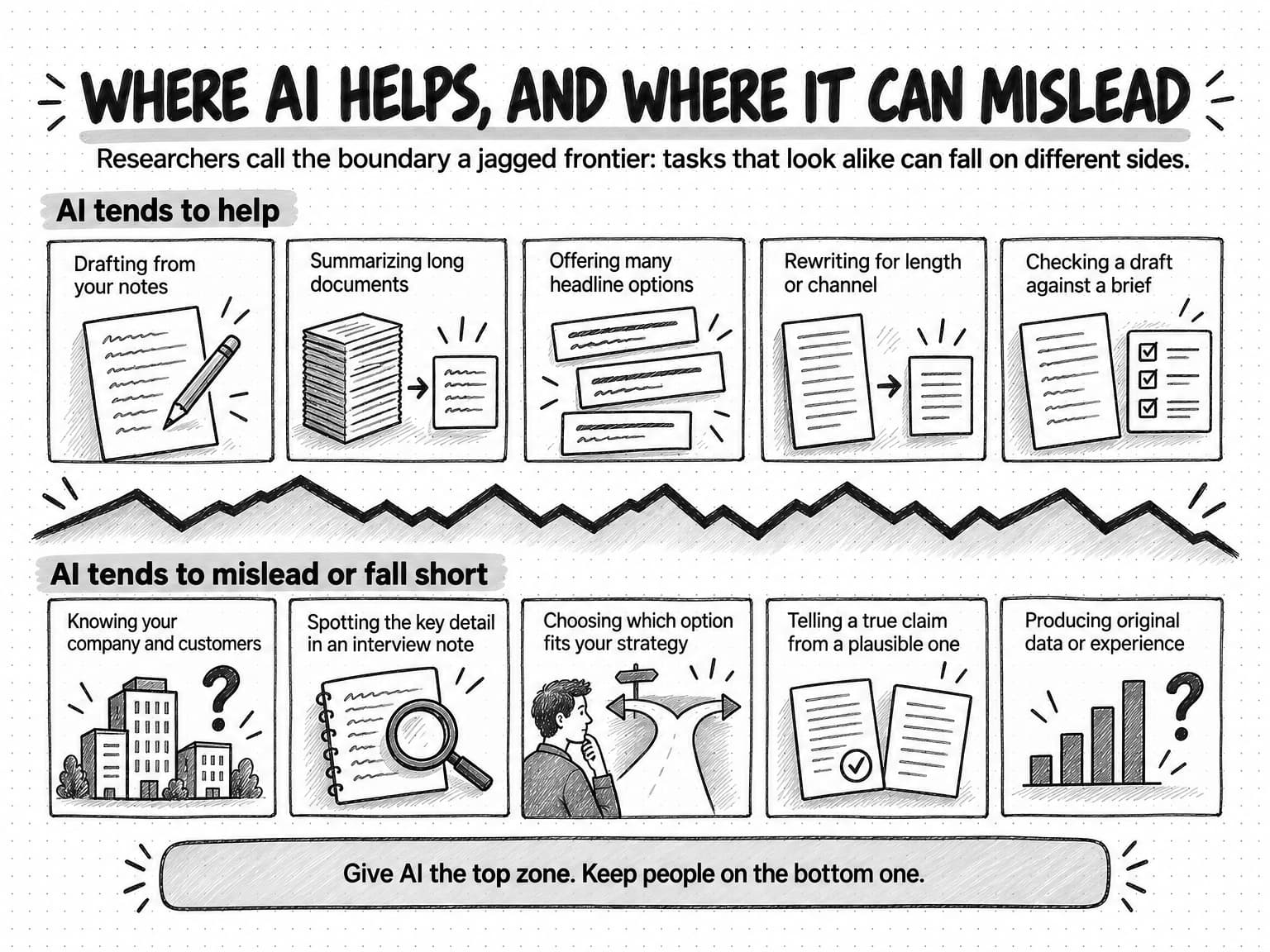
Research on AI-assisted writing is young and mostly uses short tasks under controlled conditions, so read it as evidence of tendencies. Three studies are especially useful for content work, because together they show where AI helps, where it quietly hurts, and why its help can make content more alike.
The first is an experiment by Shakked Noy and Whitney Zhang at MIT, published in Science in July 2023. They gave 453 college-educated professionals, including marketers, consultants, and grant writers, writing tasks from their own occupations, such as press releases, and gave half of them access to an AI chatbot. That group took 40% less time, and evaluators graded their work 18% higher. The earlier working paper adds a telling detail: 68% of participants with access reported submitting the tool's first output without editing it, and the researchers found no evidence that human editing improved the grades. Our reading is that, for a short, generic task judged on general quality, the model's first draft was about as good as an unaided professional could manage in the time, and that is exactly the kind of content that no longer stands out.
The second is a field experiment with 758 consultants at Boston Consulting Group, published as a Harvard Business School working paper by Fabrizio Dell'Acqua and colleagues in September 2023. On 18 realistic tasks the researchers judged to be within the model's capabilities, consultants using an AI model completed 12.2% more tasks, worked 25.1% faster, and produced significantly higher-quality results. On one task designed to fall outside those capabilities, a brand-performance analysis in which the decisive details sat in interview notes rather than in a spreadsheet that looked complete, consultants using AI were 19 percentage points less likely to reach the correct answer. The authors call this a jagged frontier: AI helps a great deal on some tasks and hurts on others that look similar, and users can't easily tell which side of the line they are on.
The third is a study by Anil Doshi and Oliver Hauser, published in Science Advances in July 2024. Writers who could draw on story ideas from a large language model wrote short stories that evaluators judged more creative, better written, and more enjoyable, especially among the less creative writers. But the stories written with AI ideas were more similar to one another than stories written without them. For content marketing, that is the central dilemma: each post improves, and every company in a category drifts toward the same post.
The table below is our summary of where the tools tend to help and where they tend to fall short, drawing on these studies and on how the tools behave in everyday content work.
| AI tends to do well | AI tends to do poorly |
|---|---|
| Turning an outline and source notes into readable prose quickly | Knowing anything about your company, customers, or results that you haven't given it |
| Summarizing long documents and pulling out themes, quotes, and questions | Noticing that the important detail is in an interview note rather than in the tidy data |
| Producing many options for headlines, angles, hooks, and structures | Choosing which option fits your strategy and is worth publishing |
| Rewriting for length, reading level, tone, or channel | Holding a contrarian position when the common view dominates its training data |
| Checking a draft against a brief, a list of rules, or a style guide | Telling an accurate claim from a plausible one without a source to check against |
| Explaining well-documented topics competently | Producing an original argument, first-hand experience, or new data |
A workflow that gives AI the left column and keeps people on the right gets most of the speed without the narrowing. Why the same request produces different output from one run to the next, and how to make brand work more consistent, is covered in our guide to why AI gives different answers to the same question.
An AI content creation workflow, stage by stage
The workflow below takes one piece from the decision to write it to the review after publication. It applies to an article, a newsletter, or a LinkedIn post; shorter formats compress the stages. The third column is the decision a person makes before the work moves on, and the four rows marked as human calls are the ones this guide treats as non-negotiable.
| Stage | What AI can do | The human call | Ready to move on when |
|---|---|---|---|
| 1. Choose the question | List customer questions, cluster search queries, summarize what already ranks or gets cited | Pick one reader, one question, and what the reader should be able to do afterward | You can say in one sentence who the piece is for and what it changes for them |
| 2. Gather the evidence | Search, summarize sources, pull quotes from call notes and tickets, organize a source list | Human call: the evidence. Decide which sources to trust and what your team knows that others don't | Every claim the piece will make has a source you have read, or is marked as opinion |
| 3. Decide the point of view | Test a draft argument against counterexamples, describe the common view so you can see where you differ | Human call: the point of view. Commit to the argument the piece makes | Someone in your market could reasonably disagree with the thesis |
| 4. Write the brief and outline | Draft the outline from the brief and evidence, propose structures, flag gaps | Approve the outline, the claim boundaries, and what to leave out | A writer, person or AI, could draft without guessing |
| 5. Draft | Write the first draft from the brief and sources, in the brand voice | Read early for direction and stop a draft heading the wrong way | A complete draft follows the brief |
| 6. Check claims | List every factual claim with its source, flag unsupported ones | Settle each flagged claim: keep, correct, qualify, replace, or cut | Every number, quote, and product statement traces to a source |
| 7. Edit and cut | Mark AI-writing patterns, suggest tighter versions, check the style guide | Human call: the cut. Decide what to remove and what the piece is really about | Every section earns its place and the piece sounds like your brand |
| 8. Add visuals and formats | Generate images and diagrams, adapt the piece for other channels | Check that every visual is accurate and says something specific | Visuals, alt text, title, and description have been checked like the body |
| 9. Approve and publish | Prepare final files, metadata, and channel versions | Human call: the final yes. A named person approves and publishes | Someone who can answer for the piece has signed it off |
| 10. Measure and learn | Gather performance data, summarize reader replies, compare with earlier pieces | Decide what to change in the next brief, source list, or saved brand context | The lesson is written down where the next piece will use it |
AI appears in every row, including research and review, and the human calls are decisions, not tasks. Choosing the point of view might take ten minutes once the evidence is in front of you. What matters is that a person makes the choice deliberately, before the draft exists, instead of accepting whatever argument the model happened to produce.
The order matters too. Evidence comes before the point of view, because an argument chosen before the research tends to look for support instead of testing itself. The claim check comes before the edit, because there is no point polishing a sentence that will be cut for being false. The final yes comes after visuals and metadata, because the title, description, and images are what readers and search engines see first, and they are the parts most often published unchecked.
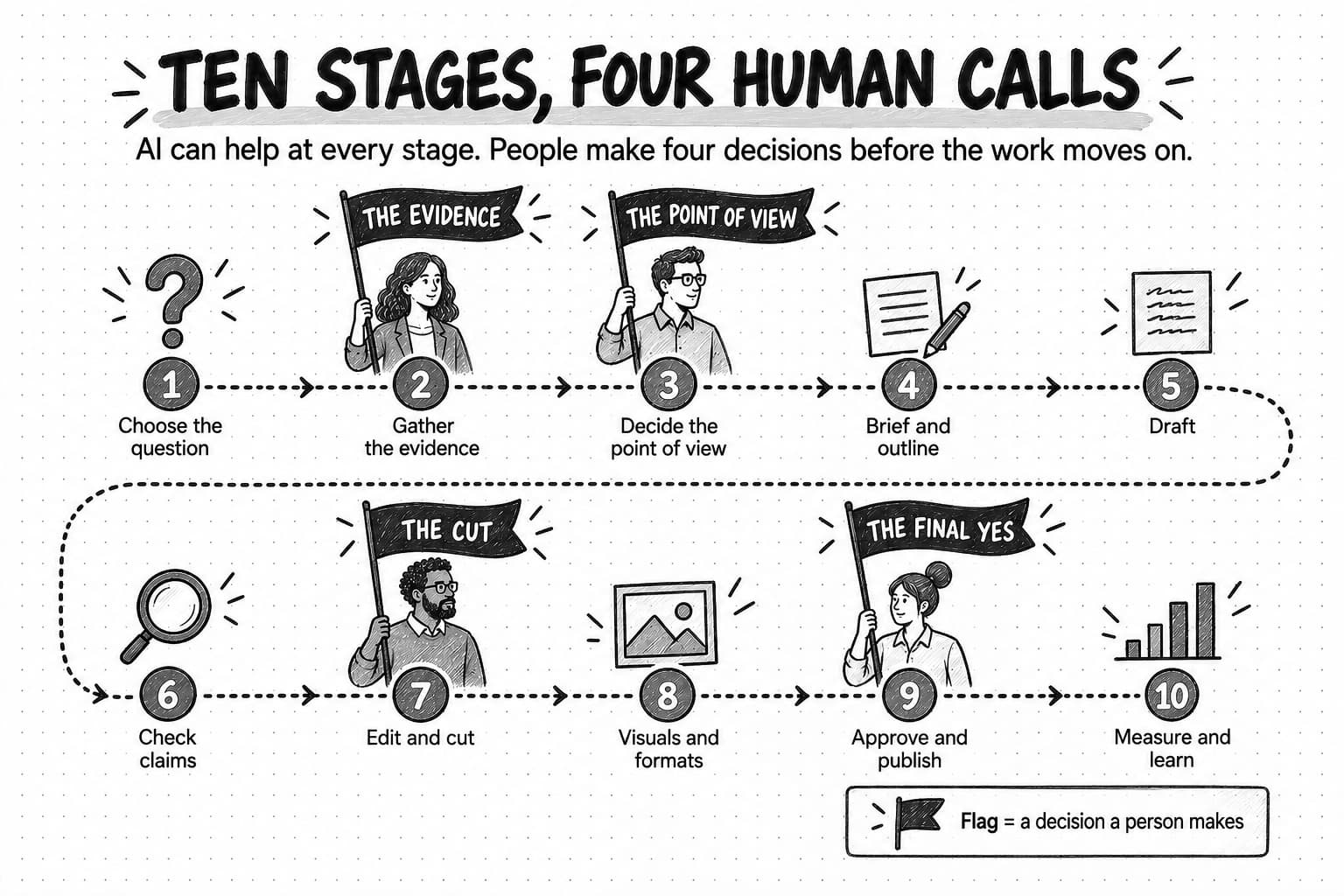
View the ten-stage AI content creation workflow at full size (opens in a new tab).
The four decisions that stay with people
Each human call protects something AI can't provide on its own.
The evidence
The evidence decision sets what the piece is allowed to say. A model can find and summarize sources, but it can't tell you whether a five-year-old statistic still holds, or whether a source's method supports the claim you want to make with it. Nor can it reach material only your team has, such as usage data, support tickets, or the call where a prospect explained why they chose a competitor. That private material is usually what makes a piece worth reading, so choosing the evidence is also choosing whether the piece will contain anything new.
The point of view
The point of view is the argument the piece makes. Without one, a piece surveys a topic from every angle and recommends nothing in particular, which is what models produce by default, because the balanced overview is the most probable answer to most requests. A point of view is a claim someone in your market might dispute, such as "most onboarding sequences send too many emails in the first week." It has to come from the team, because the team will defend it in sales calls and replies long after publication. The strategy guide linked above explains how to choose a point of view the company has earned, and our guide to thought leadership covers content built around one.
The cut
The cut is the decision about what to remove. AI drafts tend to cover every subtopic the request implied, add a section of best practices, and close with a summary. Most of that material is accurate, which is what makes it hard to remove. Cutting is a judgment about what this reader needs, and it is often where a fluent draft becomes a useful one. A model can propose cuts, but deciding that a correct section doesn't belong is an editorial decision someone has to own.
The final yes
The final yes is the approval that sends a piece out under your brand's name. It belongs to a named person who has read the whole piece, including the title, description, image text, and alt text, and who can answer for every claim in it. It is also the call teams most often reduce to a formality when volume rises. Our guide to human-in-the-loop AI explains how to spread review across the work so the final approval stays meaningful.
Start with research and evidence, not a prompt
Most generic AI content starts with a prompt that names a topic and nothing else: "write a blog post about reducing churn." The model has nothing to work from except its training data, so it writes the average of everything it has seen about churn. The fastest way to improve AI content is to reverse the order: gather the material first, then ask the model to write from it.
Useful evidence falls into three groups. The first is material only your company has: customer interviews, sales-call notes, support tickets, product usage data, survey responses, internal experiments, and the experience of the people who do the work. Our guide to voice-of-customer research explains how to collect customer language and keep each excerpt tied to its context, which matters because a quote stripped of its context can support the wrong claim. When your own data is strong enough to stand alone, it can become a piece of original research.
The second group is primary external sources: studies, official documentation, regulations, public filings, and datasets. Use the original rather than a summary, because summaries drop qualifications and sometimes get numbers wrong. The third group is the existing conversation: what already ranks for the question, what AI answers say when people ask it, and what competitors have published. Read it to learn what is already well covered, so the piece can add something.
AI is useful here: a model can summarize a 60-page report, pull every question out of 40 call transcripts, or list the main claims in the top results for a query. The risk is that the model's summary becomes the evidence. A summary can misstate a finding, credit the wrong source, or drop the caveat that changes what a finding means. Treat AI research output as a map of which sources to read, and read the passages you plan to cite yourself.
Then write the evidence down in one place: each source, what it supports, and its date. This list goes into the brief, and the claim check compares the draft against it later. Without it, the draft gets checked against the reviewer's memory, which is how unsupported claims get through.
Write a brief and outline the AI can work from
A brief is the written instruction for one piece of content. A human writer fills the gaps in a thin brief with questions or judgment; a model fills them with the most probable content, which makes a thin brief the main cause of generic output.
Our guide to writing a content brief has a complete template, and our guide to briefing an AI marketing agent covers what matters most when an agent does the work. For AI drafting in particular, four elements make the largest difference.
- The point of view, stated as a sentence. "Reorder points for small parts should be set in weeks of cover, not in units" gives the model an argument to develop. "Write about inventory" gives it a topic to survey.
- The evidence, attached or quoted, with what each source supports. A model that has your three best customer quotes will usually use them. A model told to "include customer examples" will often invent plausible ones.
- Claim boundaries. Say which product capabilities are real, which numbers are approved, what you can't say about competitors, and where an opinion must be labeled as one. A model asked to persuade will overstate unless told where the limits are.
- What to leave out. Name the subtopics the piece won't cover, the advice that is already everywhere, and format habits you don't want, such as a closing summary or a list of generic tips. Naming what to leave out keeps a draft from drifting toward the average.
The outline is where you test the brief before any prose exists. Ask the model for an outline from the brief and evidence, and read it as a sequence of claims: does each section answer a distinct question, in the order the reader needs, and does the argument build? An outline that matches the table of contents of every other article on the topic means the brief didn't carry enough of your own material. Fix that in the brief, where it takes minutes, rather than in the draft, where it takes hours.
How to draft with AI without getting a generic draft
With a good brief and evidence, drafting is where AI saves the most time, and a few habits separate a draft you can edit from one you have to rewrite.
Give the model your material, not just your instructions. Attach the sources, quotes, and data with the brief, and ask the model to say which source each claim comes from. A draft that marks its sources is much faster to check, and the request itself discourages invention.
Show it your voice with examples. Descriptions such as "confident but warm" mean something different to every reader, model included. Two or three approved pieces of your own writing, with a note on what makes them sound like you, work better than any list of adjectives. Our guide to defining your brand voice explains how to write voice guidance people and AI can both follow.
Draft long pieces in sections, and read for direction first. Giving the model the outline and evidence one section at a time usually produces a more specific result, and it lets you redirect early. The first question is whether the draft makes the brief's argument, with the brief's evidence, for the brief's reader. If it doesn't, editing won't fix it; change the inputs and draft again.
Write the parts only you can write. The opening story, if it is a real one, the paragraph stating the company's opinion, and any account of first-hand experience are better written by a person from the start. A model can tidy them afterward. If it writes them, they will be plausible inventions, and a reader who catches one stops trusting the rest.
An AI agent can read your saved brand context and open the sources itself, but the habits still apply, because its draft still depends on what it was given to work from.
How to check facts and claims in an AI draft
AI drafts contain two kinds of factual error. Some claims are invented: a statistic with no source, a quote nobody said, a study that doesn't exist. Others are misgrounded: the source is real, but the draft states it more broadly, attributes it to the wrong organization, or drops the qualification that limited it. Misgrounded claims are harder to catch, because the source exists. Google's guidance on generative AI content explains why the check is needed at all: generative models "don't retrieve facts, but predict a likely sequence of words."
Check first the claims that do the most damage if wrong:
- Numbers. Every statistic, percentage, count, and date: the figure, the denominator, the year, and what was measured.
- Quotes and attributions. Every quotation and every "according to": who said it, in what form, and in what context.
- Product statements. Every claim about what your product or a competitor's does. AI drafts often describe a capability the product almost has, or a planned feature as available.
- Causal claims. Every "because," "leads to," and "increases." A correlation doesn't support a sentence that claims a cause.
- Absolute claims. Every "always," "never," "the only," and "the first." They are rarely true and easy to disprove.
Our guide to preventing AI hallucinations in marketing content sets out a four-step method for this check: spot every claim, sort by risk, find the source, and settle each claim by keeping, correcting, qualifying, replacing, or cutting it. AI does the first step well: a model asked to list every factual claim in a draft, with the source it relied on, produces a checklist in seconds. Settling each claim is the human part, because it means reading the source.
The check also covers the parts of a page people forget. Google's guidance asks publishers to review AI-generated titles, meta descriptions, structured data, and image alt text as well as the body, and those are often written last, in a hurry, by a model.
How to edit an AI draft: the patterns to remove
Once the claims are settled, the edit turns a correct draft into one that reads as if your brand wrote it. Do it in two passes. The first is for substance, and it is where the cut happens: ask of each paragraph what the reader learns from it that they didn't know. Remove paragraphs that restate the heading, summarize the previous section, or give advice that applies to everything, and replace general statements with the example, number, or quote behind them. Our guide to AI slop describes five signals that a piece needs better inputs rather than more editing.
The second pass is for the writing. AI drafts share recognizable habits; people use every one of them, and a single instance is ordinary, but in clusters they make a piece sound generic. The table lists the patterns that matter most in marketing content.
| Pattern | What it looks like | How to fix it |
|---|---|---|
| Leftover assistant text | "Here is a revised version," "I hope this helps," placeholder brackets, notes to the writer | Delete it; it should never reach a reader |
| Unsupported precision | A specific number, award, or study with no source | Find the source or cut the claim; never invent a citation |
| Vague authority | "Experts agree," "studies show," "many marketers find" | Name the source and what it found, or drop the attribution |
| Inflated significance | "A pivotal shift," "a game-changer," "a testament to" | State the fact and its consequence, or stop at the fact |
| Trailing explanation | A sentence ending "highlighting the importance of" or "ensuring a seamless experience" | Say what actually happens as a result, or end the sentence earlier |
| Manufactured contrast | "It's not just a tool, it's a strategy," repeated "rather than" framing | Make the point directly; keep a contrast only when it adds information |
| Reflexive threes | Every list and every string of adjectives comes in three | Keep the items that are distinct; let some lists have two or four |
| Throat-clearing | "Here's the thing," "let's dive in," "it's important to note that" | Delete the phrase and start with the claim |
| Inflated verbs | "Serves as," "boasts," "leverages," "fosters" | Use the plain verb: "is," "has," "uses," or the specific action |
| Mechanical rhythm | Paragraphs of equal length, each ending with a sentence on why it matters | Let length follow the content; cut the repeated implication sentences |
| Formatting autopilot | Bold labels on every bullet, headings like "The real unlock," a summary repeating the article | Use formatting only where it helps the reader scan or compare |
| Overwritten ending | A recap, then a second ending with a broad claim about the future | End when the useful content ends, with a next step if there is one |
One test settles most borderline cases. Delete the phrase in your head and reread the passage. If information disappears, keep it or rewrite it more clearly. If the writer's recognizable voice disappears, keep it. If neither disappears, leave it deleted. The goal is to remove what does no work, not anything that looks as if a model wrote it.
Two cautions keep the second pass from doing damage. First, protect the writer's voice. Plain vocabulary, careful grammar, a favorite phrase, or a habit of using dashes is not evidence of AI writing; it may be how a person writes, or how a non-native speaker writes precisely. Edit habits that cluster or do no work, and leave a consistent personal style alone. Second, don't polish a claim into sounding more certain than its evidence. Removing a hedge can make a sentence read better and make it false.
A model asked to mark each pattern in the table and suggest a fix will find most of them quickly. Review its suggestions one by one, because a model asked to remove patterns sometimes removes meaning with them.
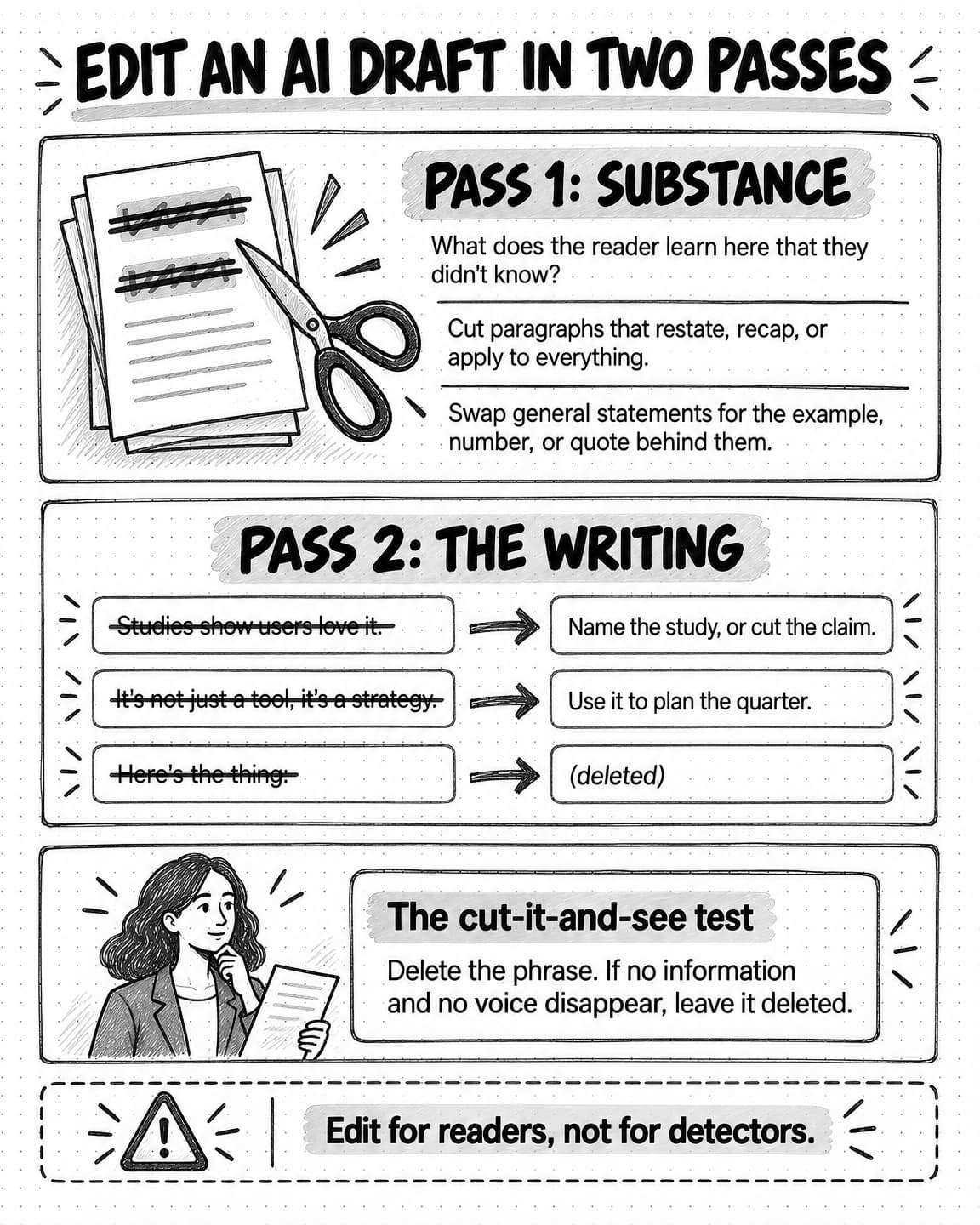
View the two-pass edit for AI drafts at full size (opens in a new tab).
How to use AI for content marketing without sounding like everyone else
The Doshi and Hauser study shows the risk in measurable form: AI help makes individual pieces better and the collection more alike. When five companies in a category use similar models with similar prompts, their content converges on the same angles, structure, and advice. A reader who has seen the same advice three times stops reading, and AI answers have little reason to cite a page that says what twenty others say. Google's guidance on generative AI search puts it directly: "Don't just recycle what others on the internet have already said, or could easily be produced by a generative AI model."
Avoiding this doesn't mean avoiding AI. It means putting into each piece something the model couldn't have produced from its training data. Five ingredients do most of the work.
- Your own evidence. Product data, customer interviews, survey results, support patterns, and experiments. A finding from your own data can't be produced by anyone else, and it gives readers and AI answers a reason to cite you.
- A position someone could disagree with. The common view on most marketing topics is well represented in every model. A piece that argues against part of it, with evidence, stands apart and gives the reader something to test.
- First-hand experience. What happened when your team tried something, including what went wrong. Google uses this kind of account to illustrate what it calls non-commodity content.
- Your customers' language. The words customers use to describe their problem are more specific than any model's paraphrase, and quoting them makes readers feel recognized.
- Your voice, applied consistently. A defined voice, with approved examples the AI drafts from, makes content recognizable even when the topic is common.
Some habits push content toward sameness. One prompt template for every piece produces one structure every time, and asking a model what to write about produces the topics everyone else's model suggests. Choosing themes your company has a real claim to, as our guide to content pillars describes, keeps the subject matter distinctive before any drafting starts.
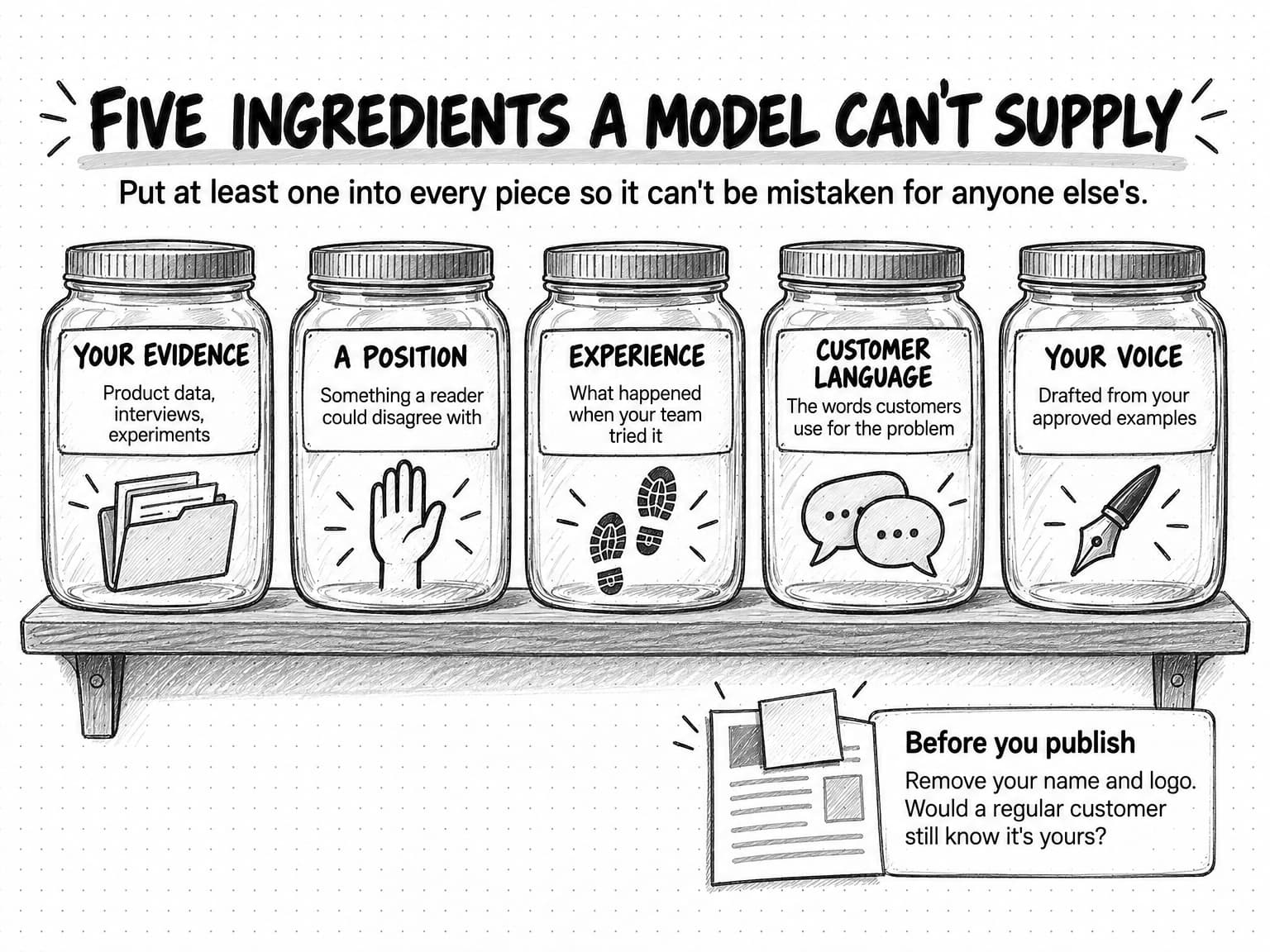
Before publishing, remove your name and logo and ask whether a regular customer would recognize the piece as yours. If not, the fix belongs in the evidence or the brief, not in another round of editing.
Visuals, formats, and repurposing with AI
Most content is more than text, and the rule for text applies to visuals and formats too: each one should say something specific to this piece, in your brand's visual style.
Image generation is good at illustrations, concept diagrams, and variations on a visual style you have defined. It is often unreliable at text inside images, where misspellings and invented words are common, at accurate data visualization, and at depicting real people, products, or places. Build charts and tables from the data itself rather than asking an image model to draw something that looks like a chart. Check every generated image for wrong text, invented details, and anything that misrepresents your product, and write alt text that says what the image shows.
Adaptation is one of AI's strongest uses: a finished guide can become a LinkedIn post that leads with its strongest finding, a carousel that walks through its framework, or a newsletter section. The risk is that each version loses some of the original's point and evidence in compression. Our guide to repurposing content across channels explains how to keep the point intact. Each adapted version needs its own claim check, because a number that was qualified in the article can lose its qualification in a 200-word post.
A worked example: one guide from evidence to final yes
This example is fictional: Tallowbrook is an invented company, and its numbers are illustrative.
Tallowbrook sells inventory software to independent bicycle shops. Its content lead wants a guide on setting reorder points for parts, because customer success keeps hearing the same complaint: shops run out of inner tubes and brake pads every spring while bikes ordered too early sit on the floor.
Stage 1, the question. A model clusters six months of support tickets and search queries about bike shop inventory. Owners rarely ask what a reorder point is; they ask why they keep running out of the same parts. The content lead writes the question down: how should a small bike shop set reorder points so it stops running out of fast-moving parts in spring?
Stage 2, the evidence. The team has an anonymized product export showing when shops ran out of each part category over two years (illustrative: spring stockouts of tubes, pads, and chains ran about three times the winter rate), notes from eight customer-success calls, and an interview with a shop owner who changed her ordering method. The model summarizes the notes and pulls out quotes. Checking the originals, the content lead finds that one quote the summary credited to a shop owner was the customer-success manager's paraphrase. It stays out.
Stage 3, the point of view. The evidence supports an argument most inventory advice doesn't make: set reorder points for fast-moving parts in weeks of cover, adjusted by season, instead of as a fixed minimum count. The standard formula uses average demand, which is the wrong number for a business whose demand for small parts jumps every spring. Some readers will disagree, which is the test the workflow sets.
Stage 4, the brief. The brief states the thesis, attaches the data summary and approved quotes, and sets claim boundaries: the product shows stockout history and suggests reorder points but doesn't reorder automatically, and the data is Tallowbrook customer data, not industry data. It rules out a section on choosing inventory software and any list of generic tips.
Stage 5, the draft. The model drafts section by section. The thesis and worked calculation are solid, but the draft adds "Five best practices for inventory management," which the brief excluded, and says the product keeps "your shelves stocked automatically."
Stage 6, the claim check. The model lists every factual claim with its source. Three don't hold: a statistic that "43% of small retailers" suffer regular stockouts has no source and is cut; the automatic-stocking line is corrected to describe suggested reorder points; and a sentence saying the seasonal pattern "applies to all bike shops" is qualified to Tallowbrook's customers in the regions the data covers.
Stage 7, the edit and the cut. The content lead cuts the best-practices section and a closing summary, about 400 accurate words that added nothing. In the second pass she replaces an opening built on "today's fast-paced retail landscape" with the shop owner's own description of a spring Saturday with no tubes in stock. The head of customer success reads the draft against what he hears on calls and adds one caveat: in warm climates the spring peak is flatter.
Stage 8, visuals and formats. A generated illustration shows a shop wall with empty hooks; the worked calculation is a real table, not an image. The LinkedIn version leads with the stockout finding, and its claim check catches that "Tallowbrook customers" had become "bike shops." The qualification goes back in.
Stage 9, the final yes. The content lead reads the whole page, including the title, description, and alt text, approves it, and publishes it herself.
Stage 10, measurement. A month later, customer success has been sending the guide to shops, several owners have replied with their own spring numbers, and it appears in an AI answer about bike shop inventory. Two lessons go into the brief template: check summarized quotes against the original notes, and state the scope of customer data.
AI did most of the production work here. The human calls took a few hours in all, and each changed the result. Without them, the guide would have contained an invented statistic, a false product claim, a misattributed quote, and a section of generic advice.
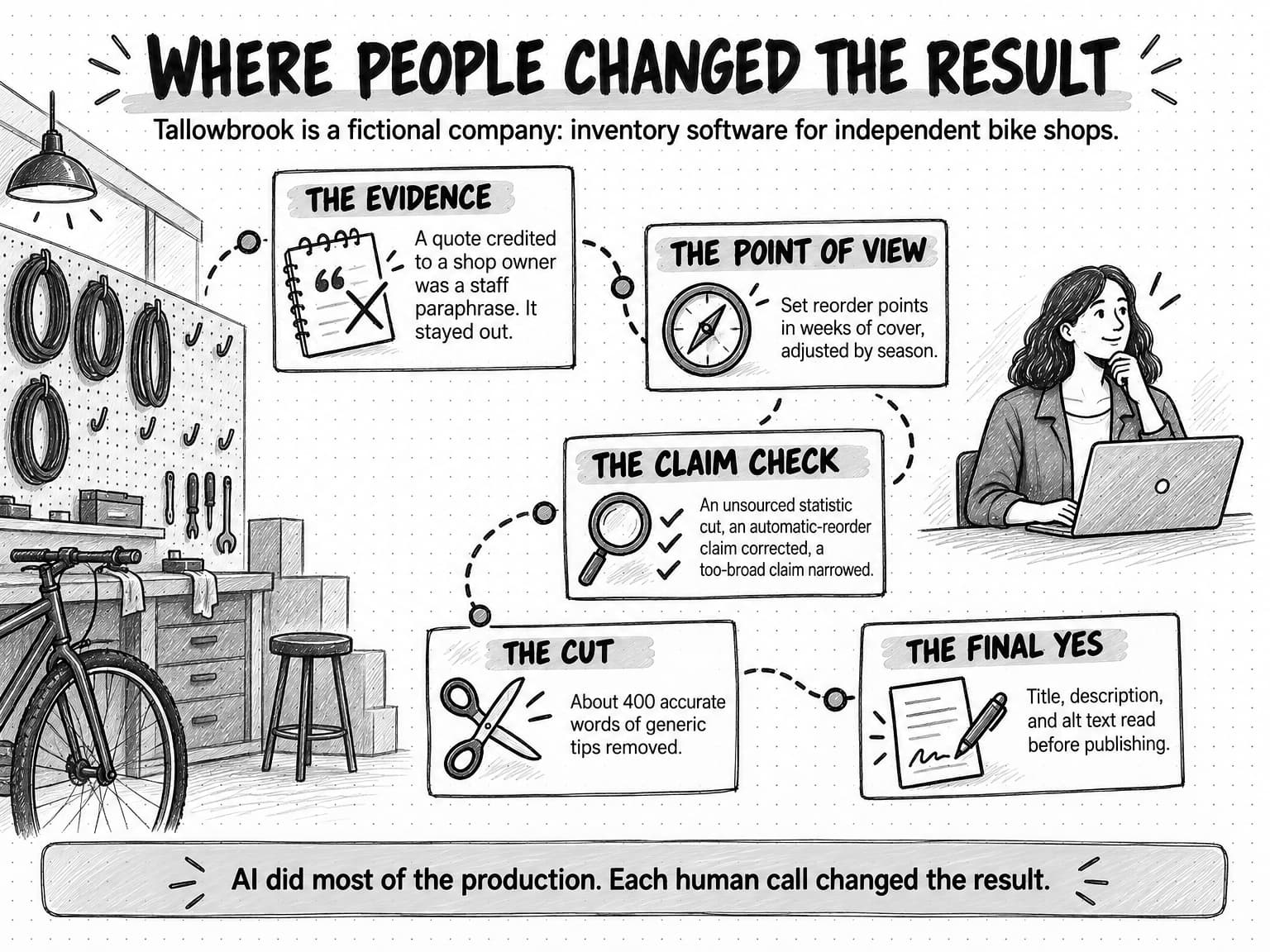
View the Tallowbrook worked example at full size (opens in a new tab).
Does Google penalize AI content?
Google does not penalize content for being made with AI. It acts against content that is low-quality or made mainly to manipulate search rankings, however it was produced. That has been Google's stated position since early 2023. The quotations below come from Google's own pages as of October 13, 2026.
The original statement (February 8, 2023). In a Search Central blog post, Danny Sullivan and Chris Nelson of the Google Search Quality team described Google's "focus on the quality of content, rather than how content is produced," and wrote that "Appropriate use of AI or automation is not against our guidelines." The same post draws the line: "Using automation—including AI—to generate content with the primary purpose of manipulating ranking in search results is a violation of our spam policies." On ranking, it says using AI "doesn't give content any special gains. It's just content. If it is useful, helpful, original, and satisfies aspects of E-E-A-T, it might do well in Search." E-E-A-T is Google's shorthand for expertise, experience, authoritativeness, and trustworthiness.
Scaled content abuse (spam policies, last updated August 28, 2026). Google defines scaled content abuse as "when many pages are generated for the primary purpose of manipulating search rankings and not helping users." The first example listed is "Using generative AI tools or other similar tools to generate many pages without adding value for users." Another, "Stitching or combining content from different web pages without adding value," is, in our reading, a fair description of AI content that only summarizes the top search results.
Generative AI content (last updated October 1, 2026). Google's page on generative AI content says it "can be particularly useful when researching a topic, and to add structure to original content," and asks publishers to "manually factcheck and review all AI-generated content for accuracy and trustworthiness before publishing."
People-first content (last updated October 5, 2026). Google's guide to helpful content asks publishers to consider who created their content, how, and why. The "how" questions include whether the use of AI is "self-evident to visitors through disclosures or in other ways." Google calls "why" "perhaps the most important question," and the answer it wants is "creating content primarily to help people." The same page says Google's quality raters are trained to treat "using generative AI to produce large amounts of text without manual oversight or curation" as work that "represents little to no effort."
Generative AI search (last updated July 10, 2026). Google's guide to its generative AI features says optimizing for them "is optimizing for the search experience, and thus still SEO," and asks for "non-commodity content." Its example of commodity content is "7 Tips for First-Time Homebuyers"; its alternative is "Why We Waived the Inspection & Saved Money: A Look Inside the Sewer Line." It also warns that creating separate content for every variation of a query, including the fan-out queries AI systems generate, "primarily to manipulate rankings or generative AI responses" violates the scaled content abuse policy. Our guide to generative engine optimization covers which tactics for AI answers hold up and which to skip.
Quality rater guidelines (September 11, 2025). The guidelines Google's human raters use say in section 4.6.5 that "Creating an abundance of content with little effort or originality with no editing or manual curation is often the defining attribute of spammy websites." Section 4.6.6 gives the lowest rating to pages whose main content is almost entirely "auto or AI generated," among other sources, "with little to no effort, little to no originality, and little to no added value." Rater assessments don't directly change rankings; Google uses them to evaluate its systems.
On authorship, the 2023 post recommends accurate bylines where readers would reasonably ask "Who wrote this?", and says "Giving AI an author byline is probably not the best way" to show that AI was involved. Google's people-first guide calls fabricated author profiles, such as AI-generated headshots and invented credentials, "a form of deception." On disclosure, Google suggests explaining how content was made where readers might reasonably wonder. Where and how your team discloses AI use is a policy decision, and our guide to AI guardrails for marketing teams includes an AI usage policy template.
For a team following this workflow, Google's guidance describes the same standard from the outside. The practices that carry real risk are the ones the workflow excludes: publishing AI drafts at volume without review, generating a page for every query variation, and inventing authors or experience.
How to measure content quality, not volume
If the team reports pieces published per month, AI will push that number up whether or not the content improves, and a rising output count can hide a falling share of pieces anyone reads. Measure whether the content is good and whether it does its job, and treat volume as a cost.
Quality can be measured before publication with a short rubric that a reviewer applies to every piece:
- Original element. What evidence, experience, or argument does the piece contain that isn't available elsewhere?
- Claim integrity. Does every number, quote, and product statement trace to a source, and how many claims were corrected or cut in review?
- Point of view. Does the piece argue something a reader could disagree with?
- Voice. Would a regular customer recognize it as yours without the logo?
- Reader outcome. Can the reader do or decide something afterward that they couldn't before?
Scoring every piece the same way makes quality trackable: if claim corrections rise after you change models or prompts, you have caught a regression before readers did. Our guide to AI evals explains how to write rubrics two reviewers agree on, keep a set of reference pieces to rerun when something changes, and decide when an AI judge's scores can be trusted.
After publication, measure what the content does. Useful signals include engaged reading time, replies from people in your market, how often sales sends the piece, sign-ups from the page, rankings for its question, and whether AI answers cite it; our guide to measuring AI search visibility explains how to track that last one.
Review the library as well as individual pieces. AI-assisted programs can accumulate many similar pages quickly, and pages competing for the same question weaken each other. A regular content audit decides which pieces to keep, fix, merge, or cut.
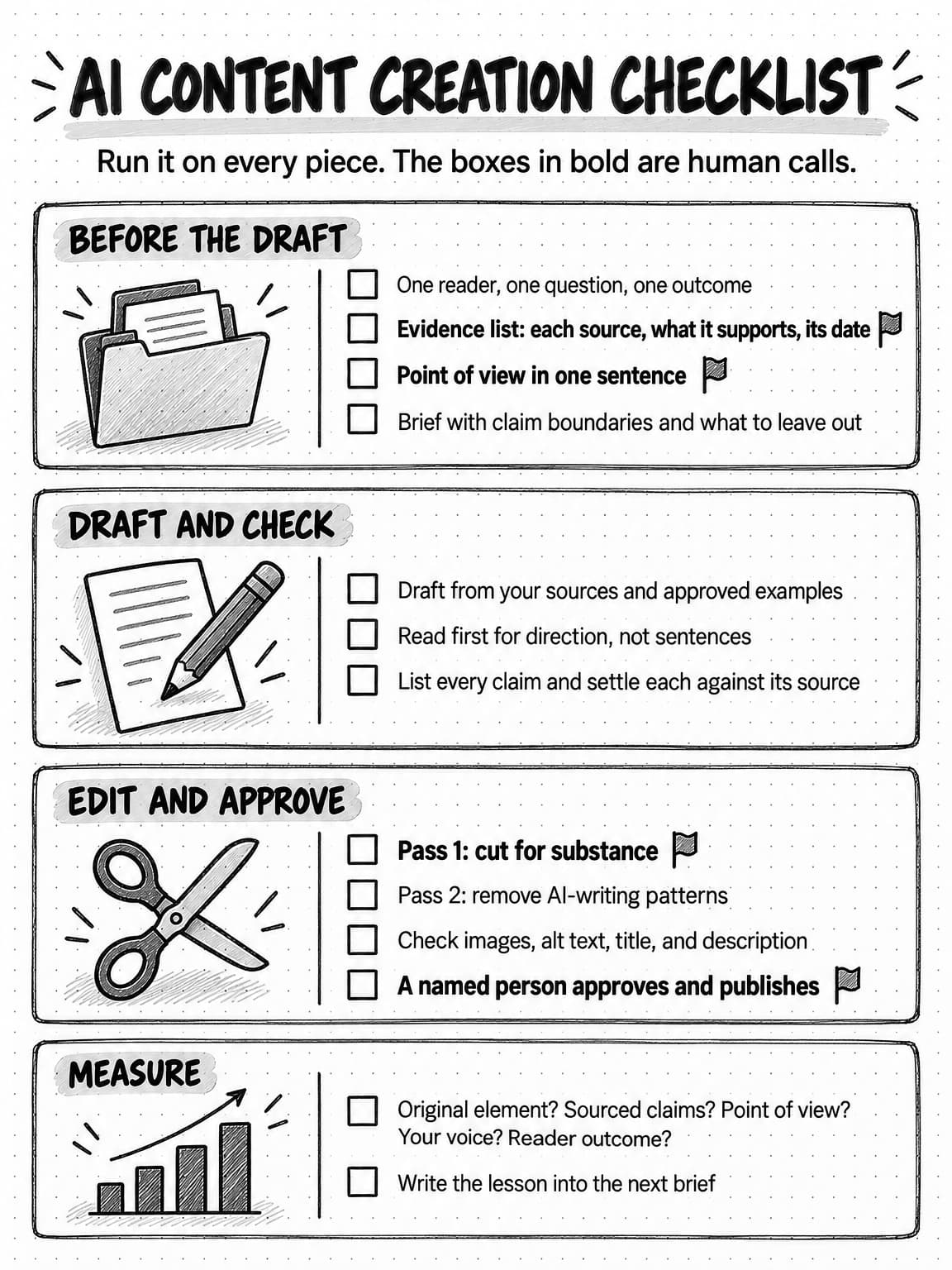
View the AI content creation checklist at full size (opens in a new tab).
How AI content creation works in Ampere
Ampere, the AI marketing agent, follows the division of work in this guide: it does research and production, and you make the calls. The evidence stage starts with Brand memory. Ampere runs 22 Brand memory skills that research your brand's voice, positioning, audience, competitors, products, visual identity, and more, and saves the results as editable briefs with their sources visible. Most briefs refresh every 12 months by default, trend snapshots every 30 days, and recent news every 14 days. You review and correct them, and later work follows the approved versions. For new evidence, Ampere can produce research reports, competitor reports, and comparisons with sources attached.
For drafting, Ampere works from Ampere-maintained marketing skills: skills evaluated against defined task, tool and output expectations. They cover source-grounded blog article packages for your own site or guest posts, newsletters, and LinkedIn text posts, polls, and newsletters; the LinkedIn packages include review notes and claim checks alongside the drafts. From source material such as a recording, a YouTube video, or a product update, Ampere can repurpose content and build LinkedIn carousels of 3 to 20 slides as a PDF with a caption, and it can generate and edit images.
For the edit, a focused AI-writing cleanup skill audits or edits existing writing for observable AI-writing patterns while preserving the writer's meaning and voice. It is an editing aid, not an authorship detector, and it doesn't aim at detector scores.
The work happens in a session workspace where you can see the files, browser pages, and sources behind each draft. Ampere stops to ask when a missing fact blocks the work, and recurring content can run as a scheduled task whose results come back to the Project for review. AI output can still be inaccurate or incomplete, so the claim check and the final yes stay with you. Ampere doesn't publish; you do.
Sources and further reading
- Danny Sullivan and Chris Nelson, Google Search Quality team, Google Search's guidance about AI-generated content, Google Search Central Blog, February 8, 2023. Quality over production method, the spam line, bylines, and disclosures.
- Google Search Central, Spam policies for Google web search, last updated August 28, 2026. The scaled content abuse policy and its examples.
- Google Search Central, Google Search's guidance on using generative AI content on your website, last updated October 1, 2026. Research and structure uses, fact-checking, and metadata review.
- Google Search Central, Creating helpful, reliable, people-first content, last updated October 5, 2026. Who, how, and why, and the rater definition of effort.
- Google Search Central, Optimizing your website for generative AI features on Google Search, last updated July 10, 2026. Non-commodity content and fan-out queries.
- Google, Search Quality Rater Guidelines, General Guidelines, September 11, 2025. Sections 4.6.5 and 4.6.6 on scaled and low-effort content.
- Shakked Noy and Whitney Zhang, Experimental evidence on the productivity effects of generative artificial intelligence, Science, July 14, 2023. The earlier working paper (March 2023) reports how participants used the tool.
- Fabrizio Dell'Acqua and colleagues, Navigating the Jagged Technological Frontier, Harvard Business School Working Paper 24-013, September 22, 2023.
- Weixin Liang and colleagues, GPT detectors are biased against non-native English writers, Patterns, July 2023.
- Anil R. Doshi and Oliver P. Hauser, Generative AI enhances individual creativity but reduces the collective diversity of novel content, Science Advances, July 12, 2024.
Frequently Asked Questions
Does Google penalize AI-written content?
No. Google has said since February 2023 that it judges content by its quality, not by how it was produced, and that appropriate use of AI is not against its guidelines. What it treats as spam is content made mainly to manipulate rankings, such as many AI-generated pages that add nothing for users, which it calls scaled content abuse. Useful, original, accurate AI-assisted content can rank like any other content.
Is AI content bad for SEO?
AI content isn't bad for SEO in itself, but generic AI content usually performs badly. Google's guidance on generative AI search asks for non-commodity content and warns against recycling what others have already said or what a model could easily produce. Content built from your own evidence, with a point of view and checked facts, meets that standard whether or not AI helped draft it. Pages generated in bulk for query variations carry the real risk.
How does AI create new content?
Generative AI creates text by predicting a likely sequence of words, based on patterns learned from its training data and the material in the request. It doesn't look facts up unless it is given sources or a search tool, which is why Google's guidance asks publishers to fact-check AI content before publishing. The more of your own evidence an AI model receives, the more its output reflects your material rather than the average of the web.
What are the benefits of AI content creation?
The main benefits of AI content creation are speed and capacity. AI can summarize sources, draft from an outline, rewrite for different channels, and check a draft against a brief in a fraction of the time those tasks take by hand. In a 2023 study published in Science, professionals with AI access took 40% less time on writing tasks, and their work was graded 18% higher. The benefit holds when teams spend the saved time on evidence, judgment, and review.
What are the challenges of AI content creation?
The main challenges of AI content creation are generic output, factual errors, and review load. Models default to the most common view of a topic, so drafts from thin briefs sound like everyone else's. They also invent or misstate facts, quotes, and product details, and a team producing more drafts has more to check. Research also suggests AI help makes content in a category more alike. Briefs built on your own evidence, a human claim check, and a deliberate edit address these problems.
How do you use AI for content marketing without sounding like everyone else?
To use AI for content marketing without sounding generic, give it material other companies don't have: your product data, customer interviews and language, first-hand experience, and a position someone could disagree with. Draft from approved examples of your own writing so the voice stays yours. Don't ask a model what to write about. Before publishing, check whether a customer would recognize the piece as yours with your name removed.
Should you disclose AI-generated content?
Google suggests disclosing how AI-generated content was made when readers would reasonably wonder how it was created, and its people-first guidance asks whether the use of AI is clear to visitors. It also recommends accurate author bylines and advises against giving AI an author byline. Google calls fabricated author profiles, such as AI-generated headshots or invented credentials, a form of deception. Where and how to disclose AI use is a decision for your team's AI usage policy.
Are AI content detectors reliable?
AI content detectors are not reliable enough to judge who wrote a text, and they say nothing about whether content is accurate or useful. A 2023 study found that widely used detectors consistently misclassified writing by non-native English speakers as AI-generated. A better quality check for AI-assisted content is a rubric that asks whether the piece has an original element, sourced claims, a point of view, a recognizable voice, and a clear outcome for the reader. Edit for readers, not for detector scores.