How to do a content audit: what to keep, fix, merge or cut
A step-by-step method for auditing a B2B company's website and LinkedIn content, with a decision tree for every page and post, a copyable inventory template, and a fictional worked example.
43 min readWritten by Ampere
Short answer
What is a content audit?
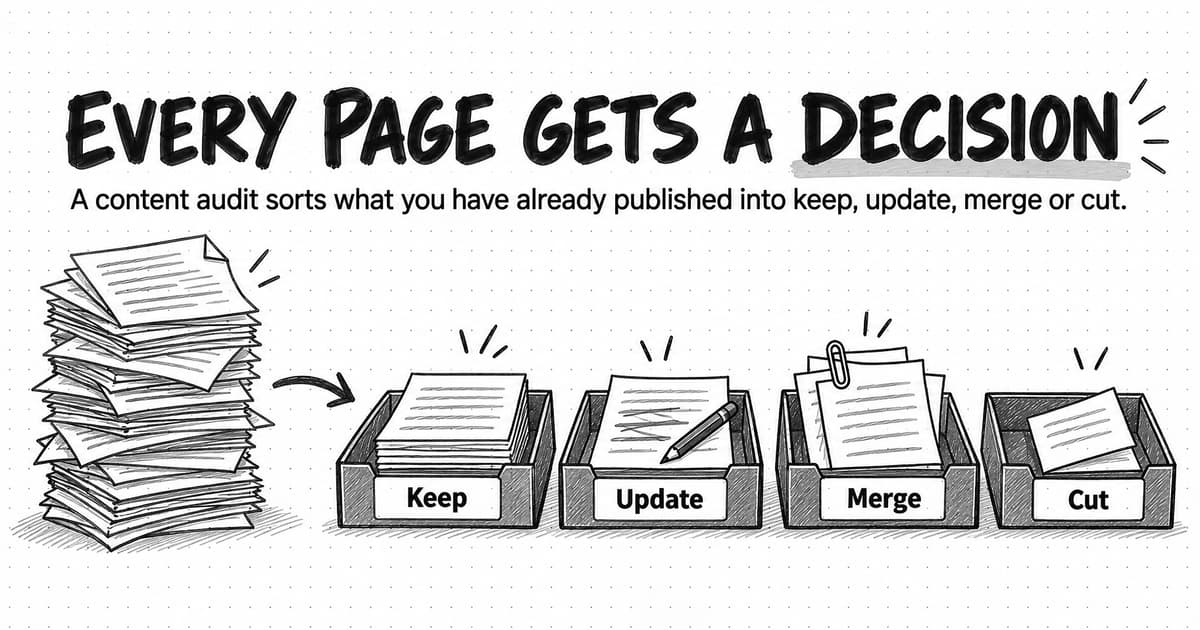
A content audit is a structured review of content you have already published. You list every page or post in an inventory, check how each performs and how good it is, and decide whether to keep it, update it, merge it with a page that covers the same question, or cut it. The decisions, with an owner and a reason for each, are what make the audit useful.
Summary
A content audit is useful only when every page and post ends with a decision. An inventory counts what you have; the audit adds performance data and a quality score, then assigns each piece one of four outcomes, keep, update, merge or cut, with an owner and a reason, so the library changes instead of being described in more detail.
Website and LinkedIn audits use the same method with different meanings. A web page keeps collecting visitors for years, so outcomes apply to the page itself. A LinkedIn post gets most of its attention in its first days, so the decisions mostly apply to what the company page posts next, grouped by format, topic and post type.
Quality and performance are scored separately. Search, engagement, conversion, link and sales-use data show what readers did; a six-part rubric covering accuracy, reader fit, depth, evidence, brand and usability shows whether the page deserves it. A decision tree checks required pages first, accuracy second and performance last, so a popular page is never kept with a wrong claim.
Google's documentation calls deleting content a last resort and says removing lots of old content to seem fresh will not help rankings. Cut pages because they are wrong, duplicated or off-strategy, redirect them permanently to a relevant equivalent when one exists, avoid chains, and change dates only for substantive updates. No refresh or removal guarantees rankings or AI citations.
A fictional worked example follows one software company through 148 blog posts and 70 LinkedIn posts, and a copyable template provides inventory, scoring and redirect tabs. Sequence the work with accuracy fixes first, run a full audit about once a year with quarterly checks of key pages, and let AI help with sorting while people make the final calls.
Contents
- What a content audit is, and what it is not
- When to run a content audit, and how big to make it
- Website and LinkedIn audits side by side
- Build the content inventory
- Choose the metrics to pull
- Score quality as well as performance
- Keep, update, merge or cut: the decision tree
- Redirects, removals and refreshes: what Google's documentation says
- Apply the decisions to LinkedIn posts
- Worked example: a first content audit at a fictional software company
- Turn the findings into a plan
- Copyable content audit template
- How often to audit content
- Content audit tools, by category
- Content audits with Ampere
- Sources and further reading
- Frequently Asked Questions
Scroll to the bottom of the blog archive of a B2B company that has published for five or six years, and you will usually find posts announcing features that were later renamed, three articles that each explain the same basic idea, an event recap from a conference that no longer runs, and a few pages that still bring in readers every week even though their screenshots show an interface the product left behind years ago. Its LinkedIn page tends to tell a similar story: posts about whatever happened that week, a series someone started and abandoned, and two or three posts that drew real questions from buyers and were never followed up.
None of this means the content was a mistake when it was published. It means the library has grown without anyone deciding, piece by piece, what each item is still for. Readers meet the library as it is now, so an outdated page can be someone's first impression of the company, and two overlapping pages split the attention that one good page would have earned.
A content audit is a structured review of content you have already published: you list every piece, judge each one against what it is meant to achieve, and decide whether to keep it, update it, merge it with a page that covers the same ground, or cut it. The list on its own is called a content inventory. The audit is the judgment you add to that list, and the decisions are what make it useful. This guide calls the second outcome “update” rather than “fix”, because it covers both correcting what a page says and helping the right readers find it.
This guide sets out that method for a B2B company's website and LinkedIn company page side by side, from the inventory to a plan, including a decision tree for each outcome and what Google's own documentation says about redirects, removals and refreshes. A fictional worked example and a copyable template follow the method.
What a content audit is, and what it is not
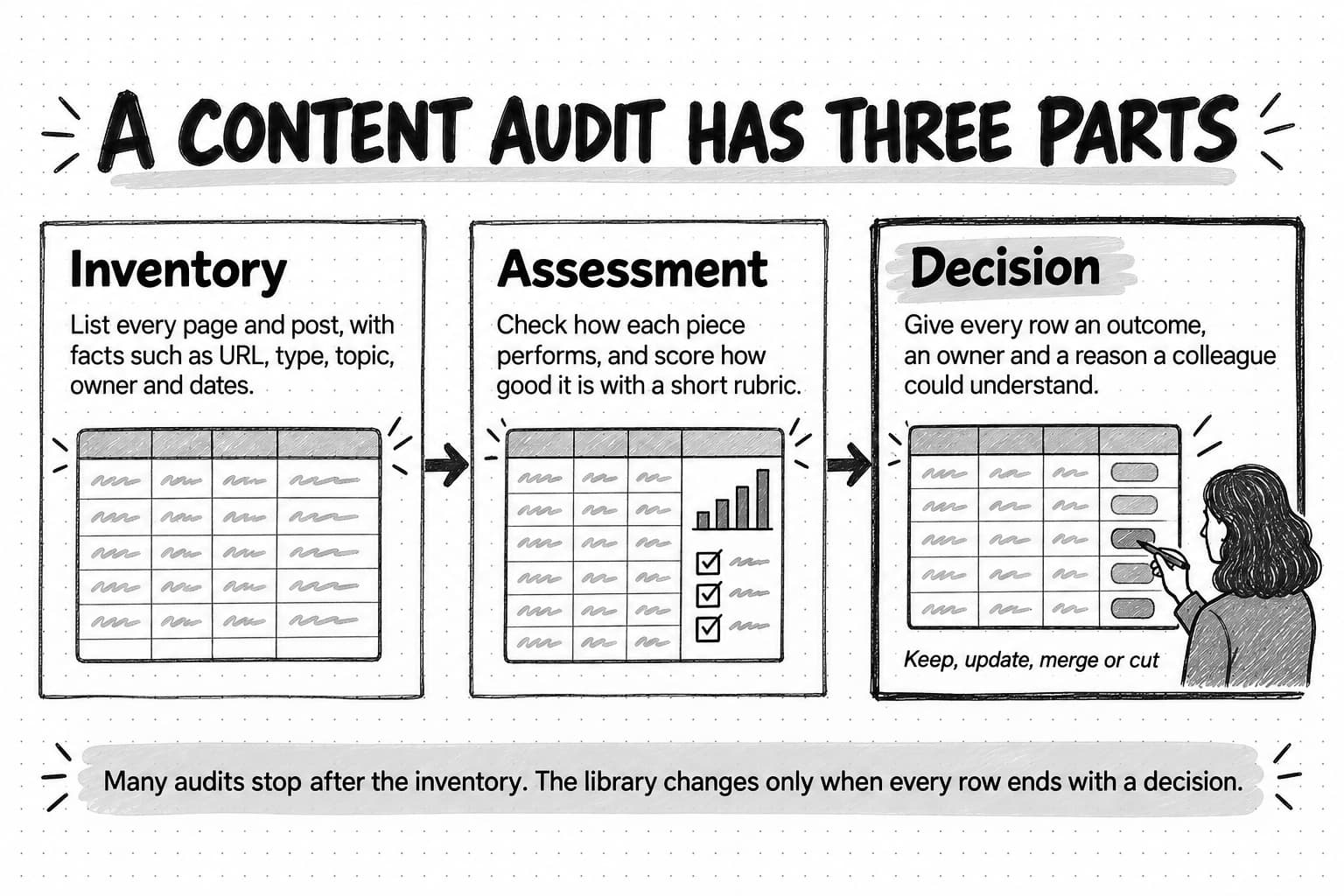
A content audit has three parts, and teams often stop after the first.
The content inventory is the list. Each row is one piece of content, such as a page, a post, a downloadable guide or a video, with facts about it: URL, title, type, topic, owner, and the dates it was published and last changed. Anna Kaley's Content Inventory and Auditing 101 at Nielsen Norman Group describes an inventory as a list of every piece of digital content you have, and notes that it says little about the content's quality. An inventory tells you that you have 214 pages, not whether any of them are good.
The assessment adds judgment: how each piece performs, from analytics and search data, and how good it is, from a short rubric applied by someone who knows the subject and the audience. A page can draw thousands of visits while giving those visitors wrong information, and an accurate, careful guide can sit unread because nobody can find it.
The decision turns the assessment into action. Every row ends with an outcome, an owner and a reason a colleague could understand without asking. Without that last column, the audit is a large spreadsheet that changes nothing.
Two neighboring activities are often confused with it. A content gap analysis looks for what is missing, such as questions buyers ask that no page answers; an audit surfaces some gaps along the way, and you should record them, but its subject is what already exists. A technical SEO audit looks at how search engines crawl and index the site; a content audit borrows some of its data for redirects and removals, but it judges what pages say and whether they should exist. And the audit checks the library against a content strategy: the goal, audience and themes the company has chosen. If yours is not written down, our guide to building a content marketing strategy for B2B SaaS and AI companies explains how to set one, and its section on maintaining the library is where an audit's results feed back in.
Most teams already know which pages embarrass them. What they lack is a shared rule for the pages in the middle, neither clearly good nor clearly bad, which is where most of a library sits.
When to run a content audit, and how big to make it
Some audits are scheduled, and a later section covers how often. Others are triggered because something changed and the library has not caught up:
- Repositioning or a rebrand, which turns every page describing the company the old way into a small contradiction.
- Product changes, such as renamed features, retired plans and new pricing, which make tutorials and screenshots wrong.
- A site migration, the cheapest moment to leave weak pages behind, because every URL has to be mapped anyway.
- A sustained decline in search traffic or sign-ups from content.
- A new owner who needs to know what the library holds before planning what to add.
- Plans to publish much more, especially with AI help. A fourth explainer next to three old ones makes the overlap worse.
Then decide the scope. A full audit covers every public piece, realistic for a few hundred pages and slow beyond a few thousand. A partial audit covers one section, such as the blog or one product line. A sample audit reviews a subset, such as the 100 pages with the most impressions plus a random 50 others, to show what kinds of problems exist before a full pass. The Nielsen Norman Group article recommends starting small, with the most-used content and a time limit; an audit that takes nine months reports on a library that has already changed.
A sensible first audit for a team of one to five marketers covers the blog, the resource library, the landing pages that content links to, and the last three to six months of LinkedIn company page posts. Leave product documentation, help articles and legal pages to their owners unless they are part of the problem.
Website and LinkedIn audits side by side
People searching for a “social media audit” are usually asking the question a content audit asks about the blog: what are we publishing, what works, and what should change? The method is the same for both channels. What differs is what each outcome means, because a web page keeps collecting visitors for years, while a LinkedIn post gets most of its attention in its first days and then sits in the page's history.
| Question | Website audit | LinkedIn company page audit |
|---|---|---|
| What is one row? | One URL: a blog post, resource page, landing page or downloadable asset | One post: text, image, document, video, poll or link post |
| Where does the data come from? | A site crawl, the CMS export, Search Console and web analytics | Page analytics and its export, or public post counts if you are not an admin |
| Which numbers matter most? | Search clicks and impressions, engagement, key events, outside links, use by sales | Impressions, reactions, comments, reposts, clicks, and who commented |
| What does “keep” mean? | Leave the page live and keep linking to it | Keep making posts of this type, subject and format |
| What does “update” mean? | Revise the page on the same URL | Change how future posts of this type are written; edit a post that is wrong |
| What does “merge” mean? | Combine overlapping pages and redirect the extras | Fold scattered one-off posts into one recurring series or format |
| What does “cut” mean? | Remove, redirect, or keep out of search | Stop making this type of post; delete one only if it is wrong or harmful |
| Usual blind spot | Pages that matter to sales but get little search traffic | Founder and employee posts carrying the same ideas |
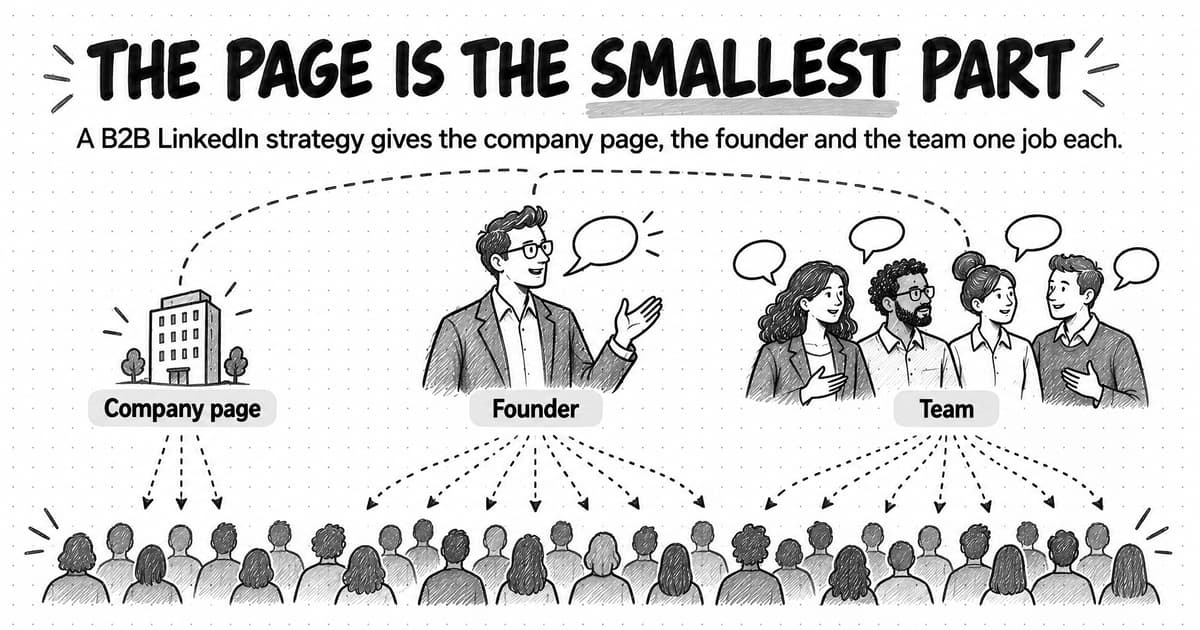
That last row matters in B2B, where founders and employees often post about the same subjects as the company page. An audit of the page can tell you whether its own posts are useful, not whether the company's whole LinkedIn presence works. Our guide to LinkedIn content strategy for B2B explains how the page, the founder and the team divide the work, with a short checklist for the page itself. This guide treats the page as one more part of the library, audited with the same inventory, scoring and decisions as the website.
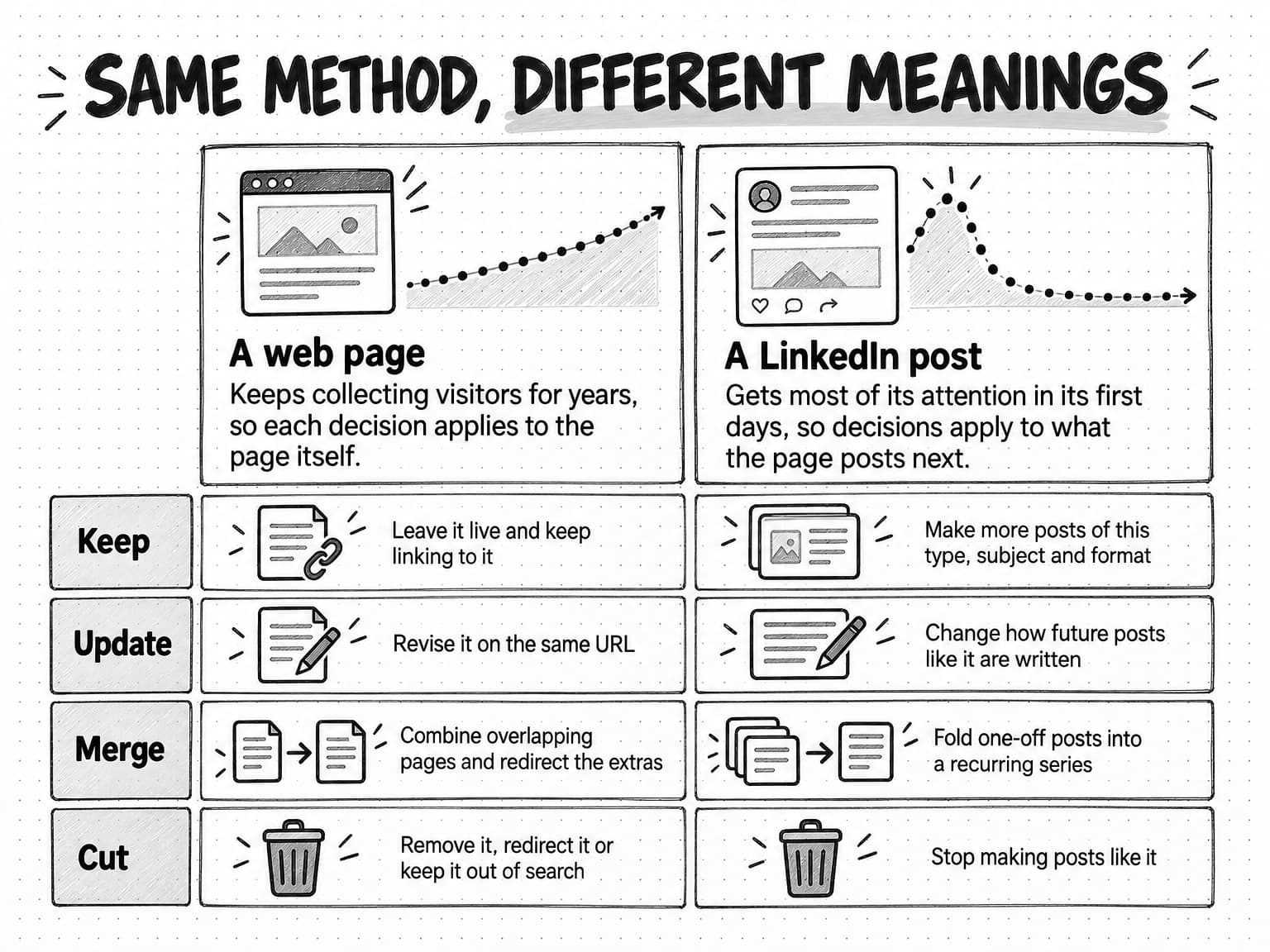
View the website and LinkedIn comparison at full size (opens in a new tab).
Run both audits in the same pass, with the same topic labels. A LinkedIn post that drew buyers' questions is evidence that a subject deserves a full page, and a blog post that keeps earning search traffic is a candidate for a teaching post; two spreadsheets with different vocabularies hide those connections.
Build the content inventory
The inventory is the slowest part of a first audit and the fastest part of every audit after it, because once the sheet exists you only add and update rows.
Collect every URL from more than one source
No single source lists everything. A site crawler misses orphaned pages nobody links to, the CMS export misses pages built elsewhere, such as landing pages from a separate page builder, and the XML sitemap may be out of date. Search Console and web analytics list pages that people found and visited, including some you forgot.
Combine the lists, remove duplicates, and normalize URLs so that a trailing slash does not create a second row. Then crawl the combined list to record whether each URL returns a page, redirects or returns an error, and keep the redirects and errors in a separate tab.
For LinkedIn, Page admins can export content analytics: LinkedIn's help article on exporting your LinkedIn Page analytics describes choosing the Content tab, selecting a timeframe and downloading an XLS file. If you audit a page you do not administer, you can record only what each post shows publicly.
Record facts first, then judgments
Fill the factual columns before anyone scores anything, because facts can be gathered quickly by anyone, while judgments need someone who knows the subject.
| URL or post link | The full, normalized address: the key every other source joins on |
|---|---|
| Title | The visible title, so reviewers recognize the page without opening it |
| Content type | Blog post, guide, landing page, case study, webinar page or gated asset; for LinkedIn, the post format |
| Primary topic | One label from a short, fixed list of themes |
| Reader and stage | Who it is for and where they are in a buying decision |
| Main question answered | The one question a reader brings to this page, in their words |
| Published and last updated | Both dates, to separate old pages that still work from old pages that have decayed |
| Owner | Who can approve changes; decisions without an owner do not get carried out |
| Status | Live, redirected, error, or kept out of search |
| Internal links in | How many of your pages link to it; orphaned pages are hard to reach |
Use a fixed list of eight to fifteen themes for the topic column, ideally the themes your content plan already runs on, and give each row exactly one. Free-text topics produce 140 labels for 200 pages and hide every pattern. If you have not chosen your themes yet, our guide to content pillars covers how to pick them, and the audit will show how well the existing library covers each one.
The main question column is the one teams skip, and it finds more duplicates than any other. “Three-way matching explained” and “What is three-way matching?” are obviously the same page. “Why invoice approvals stall” and “Five signs your AP process needs automation” may also answer one question for one reader, which you notice only once someone writes that question down for each row.
For LinkedIn, record the post date, format, topic from the same list as the website, whether it links off LinkedIn, and a post type: teaches, argues, proves, announces or celebrates. A count of formats tells you how the page posts. A count of post types tells you what it says, and that usually explains the engagement pattern better.
Choose the metrics to pull
Write down the question before pulling each number. For an audit there are four: Do people find this piece? Do they use it? Does it lead to something the business cares about? Does anyone else rely on it?
Website metrics
Search visibility. Google Search Console's Performance report gives each page's clicks, impressions, click-through rate and average position; Google defines an impression as your site appearing in Search results and a click as a user clicking through to your site from them. Impressions matter as much as clicks in an audit. A page with many impressions and few clicks is often shown for queries it does not fully answer, or shown low in the results, which points to an update rather than a cut. Record the queries each page appears for, too, because they reveal whether the page is found for the question it was written to answer. Search Console keeps data for the last 16 months, so export what you need, and Google's note on Search Console data explains that the report omits some rare queries to protect privacy, so query lists are never complete.
Search Console's Page indexing report also lists pages Google crawled but did not index, duplicates without a chosen canonical, and soft 404s, pages that tell visitors the content is missing without returning a 404 error code. Treat a long list of unindexed posts as a prompt to look at them, not a verdict.
Engagement. In Google Analytics 4, an engaged session is one that lasts longer than 10 seconds, has a key event, or has two or more page or screen views, and engagement rate is the share of sessions that are engaged. Those thresholds are product definitions, not proof that a reader found the page useful, so compare pages with similar pages on your own site.
Business outcomes. Record key events attributed to each page, such as newsletter sign-ups, demo requests, trial starts or template downloads, and note the attribution rule. Long B2B buying cycles mean last-click numbers understate most content, so treat them as a floor.
Links from other sites. A backlink index shows which pages other sites link to. This matters most when deciding how to remove a page, because a page with links from respected sites should usually redirect rather than disappear.
Use by sales and support. Ask which pages sales and customer success send. A pricing explainer used in most deals is valuable at ten search visits a month.
AI answers. If AI assistants matter in your market, check whether your pages are cited for the questions they answer. That takes sampled prompts; our guide to measuring AI search visibility explains how to run a repeatable baseline. For the audit, yes, no or not checked is enough.
LinkedIn metrics
LinkedIn's help article on content analytics for your LinkedIn Page covers post-level impressions, which it calls an estimate that may not be precise, along with clicks, click-through rate, reactions, comments, reposts and engagement rate, the ratio of interactions to impressions. Metrics other than reactions and comments can take 48 hours to appear, so leave the newest posts out.
Record those numbers for each post, then add a column the analytics cannot fill: who commented. Ten comments from colleagues and two from people at companies you sell to are different results. If you work from public counts instead of Page analytics, you see reactions, comments and reposts but not impressions, and the visible counts can be incomplete: enough to compare posts with each other, not to calculate an engagement rate.
Use one window and judge each page against your own library
Pull one window for the whole inventory, usually the last 12 months, and mark anything published in the last three to six months as too new to judge on performance. Judge seasonal pages on their season: a year-end planning guide looks weak in May.
Then turn each number into a band relative to your own library rather than an outside benchmark: for example, the top quarter of pages by clicks, or any page with key events, is high; the middle half is medium; the bottom quarter is low. Relative bands avoid arguments about whether 200 visits a month is good, which depends on the market.
Score quality as well as performance
Performance data shows what readers did. It cannot show whether a page is accurate, whether it says what the company believes now, or whether it would satisfy a reader who found it. Those are judgments, and a short rubric makes them consistent.
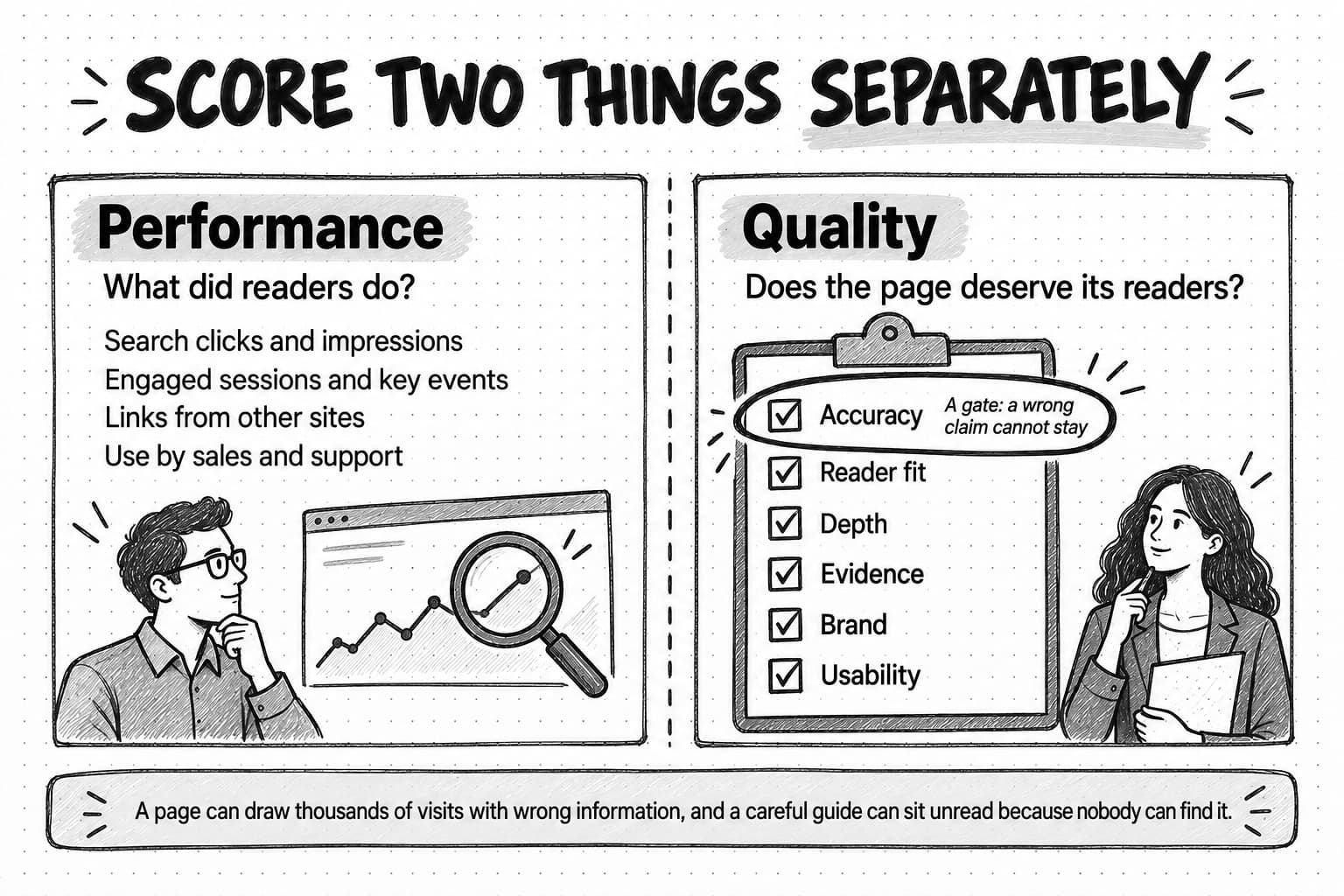
Google's guidance on creating helpful, reliable, people-first content is a good starting point, because its questions describe what a useful page does for any reader. It asks, among other things, whether content provides original information, reporting, research or analysis, whether it gives a substantial, complete or comprehensive description of the topic, and whether it offers substantial value compared with other pages in search results. The rubric below adapts those questions and adds the checks only the company can make. Score each criterion from 1 to 3.
| Criterion | 1: fails | 2: acceptable with fixes | 3: strong |
|---|---|---|---|
| Accuracy and currency | A wrong fact, price, feature name, claim or step | Mostly correct; some dated examples, screenshots or links | Correct and current, dated where it matters |
| Reader and question fit | No clear reader, or misses the question it is found for | Clear reader; the answer is buried or partial | Answers the reader's question early and fully |
| Depth and originality | Repeats what any other page says | Some original example, data or view | Adds something readers cannot easily get elsewhere |
| Evidence | Claims without support | Some sources or examples; gaps in key claims | Key claims supported by sources, data or real examples |
| Brand and positioning | Old positioning or names, or off-voice | Minor wording fixes | Says what the company believes now, in its voice |
| Usability and next step | Hard to scan; missing headings or alt text; dead or irrelevant call to action | Readable; the next step is weak or generic | Easy to scan, accessible, with a next step that fits the reader's stage |
Accuracy works as a gate. A page with a 1 on accuracy cannot be kept as it is, however well it performs, because a wrong price does more harm on a popular page than on an unread one. The decision tree treats it that way.
Reader fit needs the search data beside it. Look at the queries a page appears for, and the search intent behind them, before scoring. A page written for finance directors that mostly appears for students' homework questions is reaching a reader you did not intend. Our guide to the B2B buyer journey explains how to match content to the question a buyer is asking at each stage.
Depth is where generic pages show up. Pages that any company in the category could have published, with no example, data or opinion of the company's own, score 1. Our guide to AI slop describes the signs, which apply to older filler as much as to unedited AI drafts.
Usability includes accessibility. Missing alt text and low-contrast text make a page harder to use for people with disabilities; the W3C's WCAG 2 Overview is the reference standard.
Add the six scores for a total from 6 to 18, but decide from the individual scores, because the total hides which kind of problem a page has.
For LinkedIn posts, a lighter yes-or-no rubric works: Is it accurate? Does the opening say something specific? Does it teach, argue or show proof rather than only announce? Does it sound like the company at its best? Would a buyer find it worth reading without clicking a link? The pattern across 60 posts matters more than any single score.
Two habits keep scoring honest. Have two people score the same 20 pages independently at the start, and where they disagree, rewrite the criterion until they would agree. And score quality before performance is in the sheet where you can, because a reviewer who knows a page gets thousands of visits tends to find reasons it is good.
Keep, update, merge or cut: the decision tree
Work through these questions in order and stop at the first one that decides the row. The order puts the reasons a page must exist first, accuracy second and performance last, so that a popular page is never kept with a wrong claim and a page sales depends on is never cut for low traffic.
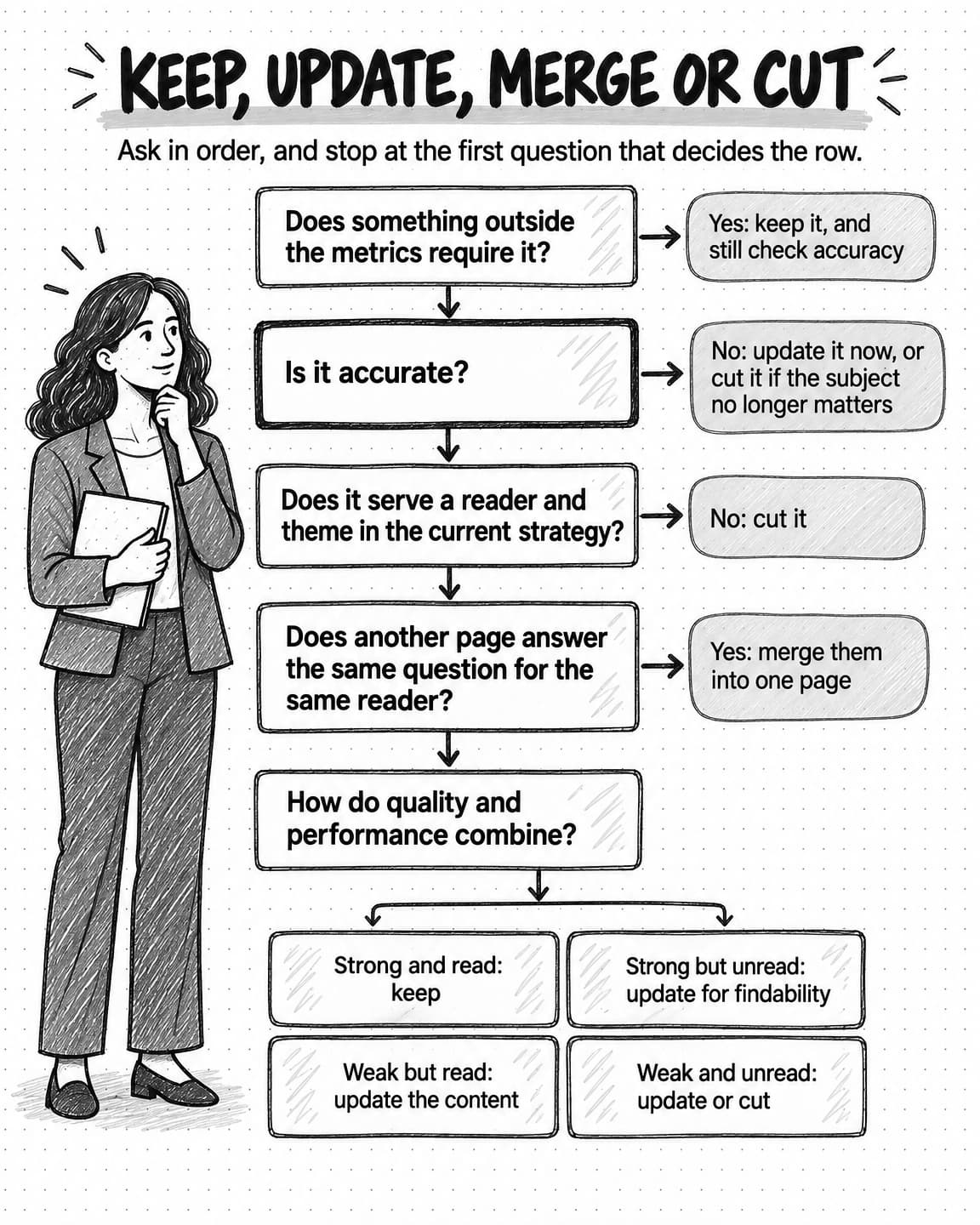
View the content audit decision tree at full size (opens in a new tab).
- Does something outside the audit's metrics require this content? Legal, security and compliance pages, product documentation, pages linked from the product, pages sales sends in deals, partner pages and recruiting pages matter for reasons analytics does not measure. If so, keep it and skip the performance questions, but still check accuracy, because required pages must also be correct.
- Is it accurate? With an accuracy score of 1, the page cannot stay as it is: update it if the subject still matters, or cut it if not. Mark these rows urgent.
- Does it serve a reader and a theme in the current strategy? A page about a market you left, a product you no longer sell, or an event nobody will look for again is a cut. How you cut it depends on its traffic and links, covered below. Our guide to topical authority covers when an off-topic page is better pruned, merged or moved.
- Does another page answer the same question for the same reader? If so, merge the group: one page survives and absorbs the others' useful material, and the rest redirect to it.
- How do quality and performance combine? For every remaining row:
| Quality | High or medium performance | Low performance |
|---|---|---|
| Strong (15 to 18, no score of 1) | Keep. Link to it from newer pages and keep promoting it | Update for findability. Fix the title and description, match the page to the query it should answer, add internal links, and distribute it |
| Weak (14 or less, or any score of 1) | Update the content. Readers are finding it, so keep the URL and the parts that attract them, and fix the weak criteria | Update or cut. Update only if the subject matters and you can make this your best answer; otherwise cut |
The thresholds are a starting point. If almost every row lands on one side after the first 50, adjust them.
The rules for each outcome
Keep means the page stays live and unchanged. Record why it is good, so the next audit does not have to rediscover it.
Update means the page stays on its URL and changes. A content update fixes the weak criteria: correcting facts, replacing examples and screenshots, adding evidence, or rewriting most of the page. A findability update leaves the substance alone and fixes the title, the meta description, links from related pages and how the page is shared. For a substantial rewrite, write a brief first; our guide to writing a content brief explains how, and a brief stops a rewrite from losing the passages that made the page work.
Merge means pages that answer the same question for the same reader become one. Choose the survivor by outside links, search performance for the shared question and the clearest address. Move every useful paragraph, example and data point into it, rewrite it as one coherent piece, point internal links at it, and redirect the other URLs to it.
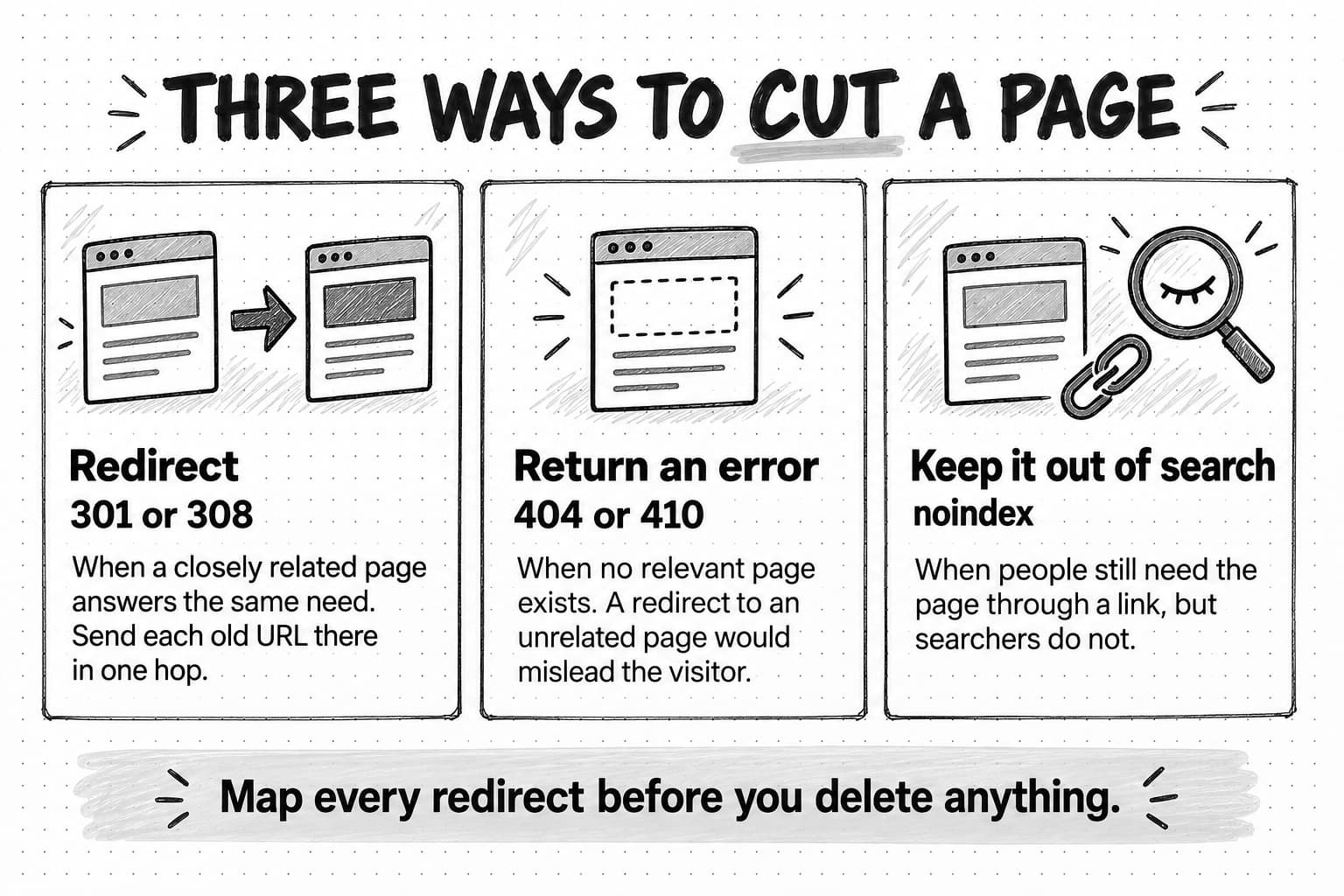
Cut means the content leaves the public library: the page returns an error, redirects to the closest relevant page, or stays live but out of search. It is a legitimate outcome and the hardest to undo, so the next section covers how to do it.
Give every outcome an owner and a size. Roughly, a findability update or a removal is small, a content update is medium, and a merge of three or more pages is large.
Redirects, removals and refreshes: what Google's documentation says
Merging and cutting web pages involves search engines, and two claims are common in audit advice: that removing low-performing pages, known as content pruning, lifts the rest of a site's rankings, and that refreshing old pages earns rankings or citations in AI answers. Google's documentation promises neither, and it is specific about the mechanics. What follows is drawn from Google's own pages as of October 2026.
Removing pages is a last resort
Google's page on core updates advises against quick-fix changes and suggests improving content in meaningful ways first, for example by rewriting or restructuring it. It calls deleting content a last resort, for content that cannot be salvaged, and adds that wanting to delete whole sections of a site likely means those sections were created for search engines first, in which case deleting the unhelpful content can help the good content perform better. It also says there is no guarantee that changes will have a noticeable effect, and that some effects take several months.
Google's helpful content guidance lists, among the signs of search-engine-first content, adding a lot of new content or removing a lot of older content mainly to make the site seem fresh and help its rankings, and answers its own question: “No, it won't”.
So cut content because it is wrong, off-strategy, duplicated or unhelpful to readers, and record the reason. Do not cut an accurate page that serves the few people who need it because its traffic is low and you hope the rest of the site will rise.
Redirect cut and merged pages to a relevant equivalent
Google's documentation on redirects says the 301 and 308 status codes mean a page has permanently moved, and that Google's indexing pipeline uses a permanent redirect as a signal that the target should be canonical, the URL shown in results. Temporary redirects (302, 303 and 307) do not carry that signal. Google advises using a permanent redirect when you are sure it will not be reverted, which describes a finished merge or cut.
Google's guide to site moves, written for migrations but applicable to any batch of redirects, adds three rules:
- Don't redirect many old URLs to one irrelevant page, such as the home page. Google says this can confuse users and might be treated as a soft 404. Redirecting several old pages to one new page that consolidates their content is fine, Google adds.
- Avoid redirect chains. If an old URL already redirects to a page you are now merging into a third, point it straight at the final destination. Google recommends ideally no more than three redirects in a chain and fewer than five, and its documentation on HTTP status codes says its crawlers follow up to 10 redirect hops by default.
- Keep redirects for as long as possible, generally at least a year, and update your own links to the new URLs rather than relying on the redirect.
The practical test is the reader's: would someone who clicked the old link be glad to land on the new page? A redirect from “What is three-way matching?” to a better guide on the same subject passes. A redirect from a 2019 conference recap to the pricing page fails.
Remove pages with no equivalent
When a cut page has no relevant equivalent, let it return an error. Google's HTTP status codes documentation says it treats all 4xx errors except 429 the same way: an indexed URL that returns 404 (not found) or 410 (gone) is removed from the index, and crawling of it gradually slows. Either code works; 410 records that the removal was deliberate, which helps whoever reads your logs later. Then fix your own internal links to removed pages, which have become broken links for readers.
Keep a page out of search when people still need it
Some pages should stay reachable for people who have the link but should not appear in search: an old event page attendees bookmarked, a campaign landing page from a past email. Keep these live with a noindex rule. Google's documentation on blocking indexing with noindex says Google drops such a page from results once it crawls the page and sees the rule, and warns that the page must not also be blocked in robots.txt, or the crawler never sees the rule and the page can still appear.
Refresh a page only when the content changes
A content refresh is a content update to an existing page, on the same URL, to make it accurate and useful again. The common mistake is changing the date without changing the substance, which Google's helpful content guidance lists among the signs of search-engine-first content. Change the visible updated date for substantive changes, such as new information, corrected facts, a rewritten section or new examples, not for a fixed typo.
A refresh has no guaranteed effect on rankings or on AI citations either. Google's page on AI features and your website says there are no additional requirements to appear in AI Overviews or AI Mode beyond the fundamentals of Google Search, and that meeting every requirement still does not guarantee a page will be indexed or shown. Refresh pages because readers deserve correct answers, then compare the same window before and after.
Merge duplicates for readers' sake
Google's documentation on canonicalization says some duplicate content on a site is normal and not a violation of its spam policies, while noting that the same content at many URLs can be a bad user experience, because people may wonder which page is right. That is the reason to merge: a buyer who finds three slightly different explanations of one idea learns less from you, not more. When two near-identical pages must both stay live, Google's guide to specifying a canonical URL explains how to say which to show.
Apply the decisions to LinkedIn posts
On LinkedIn, the four outcomes mostly apply to what the page posts next. An old post that drew little response is not cluttering anything a buyer is likely to see, so deleting it achieves little. What matters is whether the page keeps producing posts like it.
Group the scored posts by format, topic and post type, and decide for each group:
- Keep the groups that drew comments from the people you want to reach, and make more of them. A subject whose teaching posts consistently lead probably deserves a series and a page on your site.
- Update groups with a sound idea and weak execution. The common case is a post that only shares a blog link with a one-line teaser: write it so it carries the article's main point on its own.
- Merge scattered one-off posts, such as occasional product tips, customer quotes and industry observations, into one recurring series that is easier to produce and to recognize.
- Cut groups that draw no response and serve no other purpose, such as generic holiday greetings.
Two cases call for action on an old post itself. Page super admins and content admins can edit a post on a LinkedIn Page, so correct a post with a wrong fact or price. Delete a post only if an edit cannot fix it or it harms someone; LinkedIn's help article on deleting a Page post notes that a deleted post might still appear elsewhere on LinkedIn for people who have its direct link.
The findings run in both directions: strong posts point to pages worth writing, and strong pages are source material for posts. Our guide to repurposing content across channels shows how to adapt one into the other without losing what the evidence supports.
Worked example: a first content audit at a fictional software company
Quillfern is a fictional company, invented for this guide. It has 35 employees and sells accounts-payable automation software to finance teams at mid-sized firms. All figures in this example are illustrative.
Quillfern has blogged since 2019. A new head of content inherits 214 URLs: 148 blog posts, 31 resource pages (nine of them gated guides), 22 landing pages and 13 other pages such as a glossary and event pages. The LinkedIn company page posted 70 times in the last six months. Blog search traffic has fallen for three quarters, and the company has just repositioned from “AP automation for growing companies” to “invoice approval software for finance teams that have outgrown email.”
Scope, inventory and scoring
She scopes the audit to the blog, the resource pages, the landing pages the blog links to and the 70 LinkedIn posts, and gives herself six weeks. Combining the crawl with the CMS export and search data turns up four forgotten campaign landing pages, still collecting a few form fills a month. Writing the main question for every blog post takes two afternoons and proves the most useful step.
She and a product marketer first score the same 20 posts. They disagree most on positioning: he scores any page using the old positioning as a 1, she had given those a 2. They adopt his reading, rewrite the criterion, and add performance data only after scoring.
What the decisions look like
| Page | What the audit found | Outcome and reason |
|---|---|---|
| “How to automate three-way matching” (2021) | A top-ten page by clicks. Accuracy 1: describes a feature since rebuilt, with old screenshots | Update the content, urgent. Keep the URL and structure; rewrite the steps and screenshots |
| “What is three-way matching?”, “Three-way matching explained” and “3-way match: a beginner's guide” | Same question, same reader. The first has the most outside links; the third has the best example | Merge. The first survives and takes the third's example; the other two redirect to it |
| “Invoice approval workflow template” | High performance, quality 17, sign-ups attributed to it every month | Keep. Link to it from the merged three-way matching guide |
| “AP automation ROI calculator” landing page | Little search traffic; sales sends it in most late-stage deals | Keep (required by sales). Fix its positioning language |
| “Five signs you've outgrown email approvals” | Quality 16, low performance; impressions for “invoice approval process”, which the title does not match | Update for findability. Retitle around that question, add links from three related posts, share it on LinkedIn |
| “Quillfern at the 2020 Finance Ops Summit” | No clicks in 12 months, no outside links, the event no longer runs | Cut. Return 410; no relevant page to redirect to |
| “The future of finance teams in 2020” | Off-strategy forecast with one trade-publication link; no similar Quillfern page | Cut. Return 410; a redirect to a product page would mislead whoever follows the link |
| Spring 2023 webinar registration page | Customers still use the recording link in old emails | Cut from search. Keep it live with the recording, add noindex, drop it from navigation |
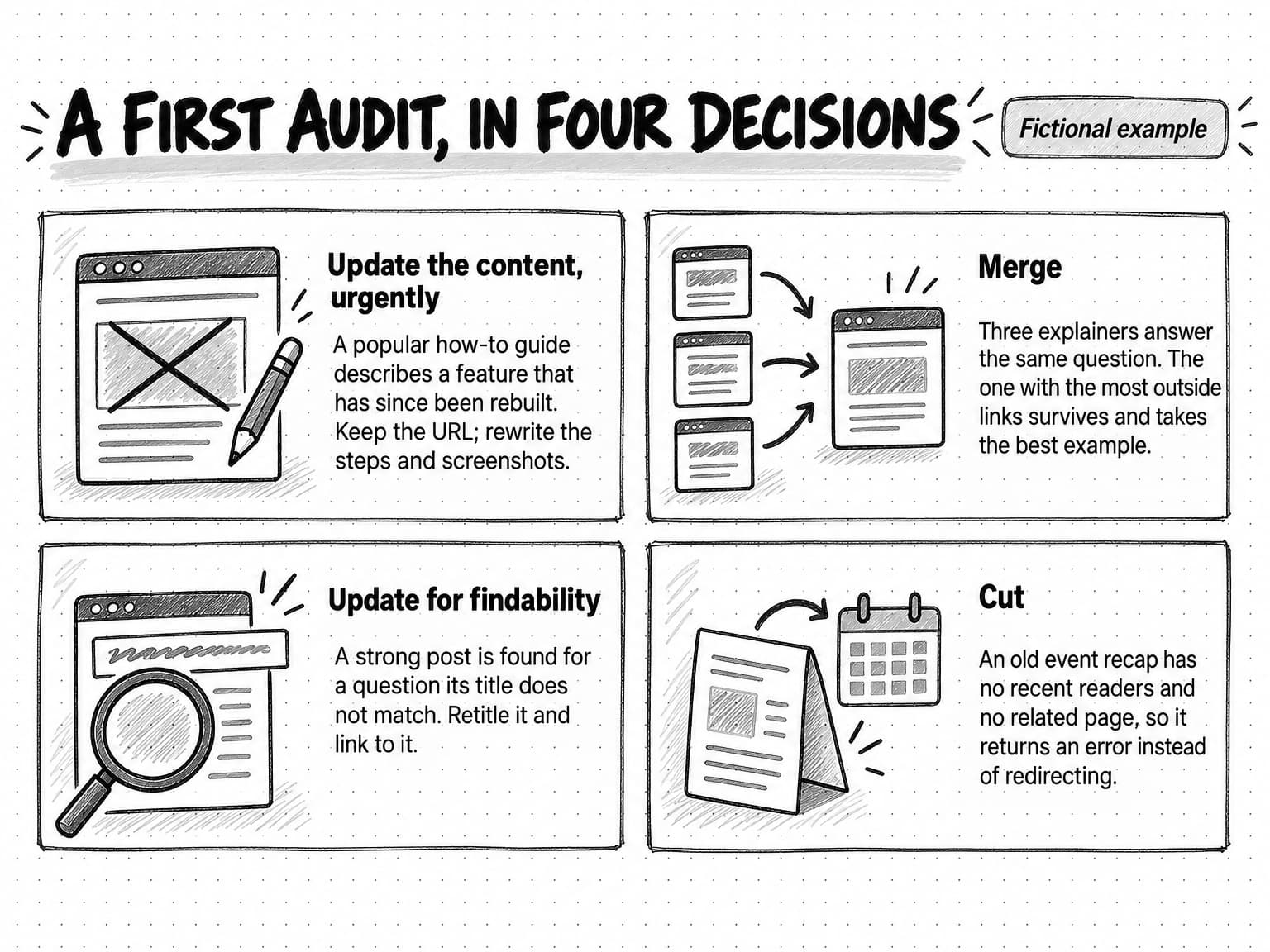
Across the 148 blog posts:
| Outcome | Blog posts | What happens next |
|---|---|---|
| Keep | 41 | Linked from newer pages; noted as examples of good pages |
| Update | 38 | 11 urgent accuracy fixes, 17 content updates, 10 findability updates |
| Merge | 27 | Combined into 9 surviving pages; 18 URLs redirect |
| Cut | 42 | 29 return 410, 9 redirect to a closely related page, 4 stay live with noindex |
The 42 cuts are mostly event recaps, company news from before 2021 and short posts written for keywords that no longer match what Quillfern sells. Each has a reason in the sheet, and none was cut only for low traffic.
The LinkedIn side
The 70 posts break down into 46 link posts, 12 single-image posts, 7 document posts and 5 videos. By post type, 31 announce something, 22 promote a blog post with a one-line teaser, and 17 teach something. The seven document posts, short walkthroughs of common approval problems, drew the most comments, mostly from finance managers at other companies; the blog-promotion posts drew few comments of any kind.
So the page keeps the teaching document posts as a fortnightly series, rewrites blog promotions to carry each article's main point, merges customer quotes, product tips and industry news into one weekly post, and stops the generic announcements. An admin edits two old posts that quote an outdated price. The finance managers' questions in the comments become the main questions for two new guides in the content plan.
Her one-page summary for leadership does not promise that the cuts will raise search traffic. It says every remaining page will be accurate and on-message, that readers will find one answer to each question instead of three, and that she will compare search and sign-up numbers for the same window in six months.
Turn the findings into a plan
Findings become useful once they are sequenced, owned and scheduled. A sequence that works for most teams:
- Accuracy fixes first. A page with an accuracy score of 1 and real traffic or sales use is a live problem; fix or remove it within two weeks.
- Merges and cuts in batches. Review the redirect map with whoever manages the site and apply it 20 to 50 URLs at a time, so problems are easy to trace. After each batch, crawl the changed URLs to confirm that each redirects once, to the right place, and that removed pages return the intended code. Update internal links.
- High-value content updates. Pages with strong performance and weak quality already have readers, so they come next, each with a brief.
- Findability updates. Strong pages with low performance get new titles, internal links and distribution. These are often the quickest gains, because the hard work of writing a good page is done.
- Gaps into the content plan. Unanswered questions and thin themes become candidates for new content, ranked alongside everything else the team planned.
Put the plan on the same calendar as new content, with an owner and a size for every item, or new content will always win. When you write to fill the gaps, apply the same rubric to the drafts; if your team drafts with AI, our guide to AI content creation covers a workflow that keeps the result worth reading. When a gap is a question that AI answers now resolve on the results page, our guide to zero-click content distribution covers how to reach buyers who may never click.
Report the audit on one page: scope, outcome totals, urgent fixes, what the audit says about the strategy (such as over-covered or missing themes), the plan's order and owners, and how you will judge the result. Be honest about that last point. Search and conversion changes after an audit are associations, not proof that the audit caused them, because rankings, demand and competitors move at the same time.
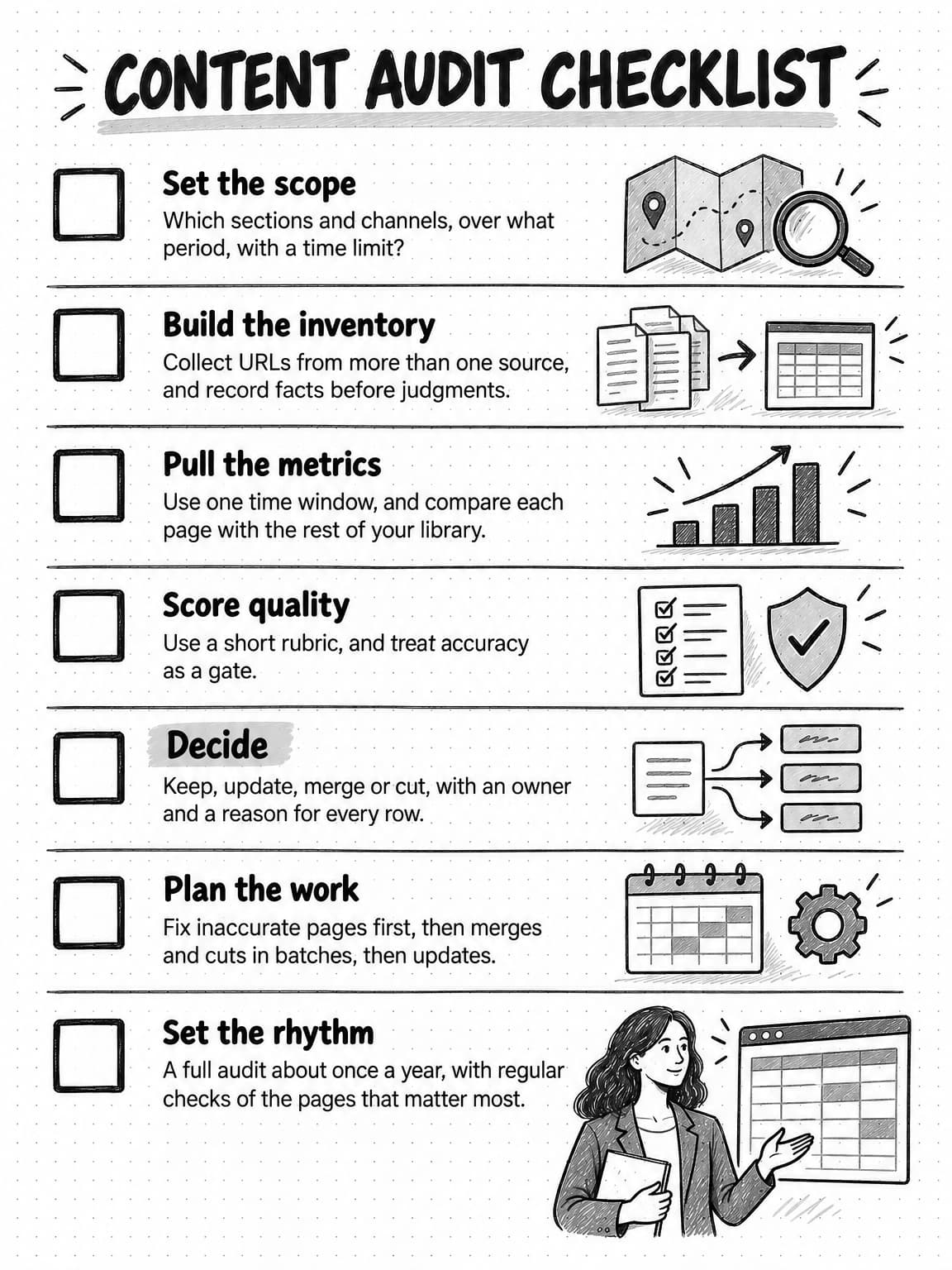
View the content audit checklist at full size (opens in a new tab).
Copyable content audit template
The template has three tabs: the inventory, the scoring and decision log, and the redirect map. Copy each header row into its own spreadsheet tab. The example rows are fictional.
url,title,content_type,primary_topic,reader_and_stage,main_question,published,last_updated,owner,status,internal_links_in,gated
https://example.com/blog/three-way-matching,What is three-way matching?,blog post,Invoice matching,AP manager; learning,What is three-way matching and when do I need it?,2020-03-11,2022-06-02,Content lead,live,14,nourl,clicks_12m,impressions_12m,engaged_sessions_12m,key_events_12m,links_from_other_sites,sales_or_support_use,cited_in_ai_answers,performance_band,accuracy,reader_fit,depth,evidence,brand,usability,quality_total,required_for,duplicate_of,outcome,action,reason,owner,size,due
https://example.com/blog/three-way-matching,2140,61800,1290,18,23,no,not checked,high,2,3,2,2,2,2,13,,,merge (survivor),Absorb the worked example from the beginner's guide and rewrite as one piece,Most outside links of three overlapping pages,Content lead,large,2026-12-15old_url,outcome,new_url_or_status,reason,checked_no_chain,applied_on
https://example.com/blog/three-way-matching-explained,merge,https://example.com/blog/three-way-matching,Same question and reader as the survivor,yes,
https://example.com/blog/finance-ops-summit-2020,cut,410,Event recap with no relevant equivalent page,yes,For LinkedIn, use one tab with these columns:
post_link,post_date,format,primary_topic,post_type,links_off_linkedin,impressions,reactions,comments,reposts,clicks,engagement_rate,buyer_comments,accurate,specific_opening,teaches_argues_or_proves,on_voice,worth_reading_without_clicking,group_decision,notesFill the inventory before scoring, and use dropdowns for topics, types and outcomes so labels stay consistent. Write each reason in plain words: “same question and reader as the survivor” is a reason, while “low quality” is not. Leave cited_in_ai_answers as “not checked” unless you ran a repeatable set of prompts, and note the date. Keep the sheet, so the next audit starts from it.
How often to audit content
There is no standard interval; the right rhythm depends on how fast your product, pricing and market change. One that suits most B2B software companies:
- A full audit once a year, or sooner if one of the triggers above happens.
- A quarterly accuracy and positioning check of the pages that matter most: the top pages by clicks and key events, and the pages sales relies on.
- An immediate check of pages with time-sensitive claims when those facts change. Keep a list of pages that mention prices, plan and feature names, integrations, dated statistics, and model or platform details, and update them together. For AI products, review the list monthly.
- A quarterly review of the LinkedIn company page, covering the posts since the last review.
A company with thousands of pages usually runs a rolling audit instead, reviewing one section or theme a month so the whole library is covered each year.
Content audit tools, by category
A spreadsheet and the free data from your own accounts are enough for a first audit. Each category below saves time on one part of the work, and most teams need only the first four.
| Tool category | What it does in an audit | What it misses |
|---|---|---|
| Site crawler | Lists linked URLs with titles, status codes and redirects | Orphaned pages; quality |
| CMS export and sitemap | Lists what the site holds, with dates | Pages built outside the CMS |
| Search console | Clicks, impressions, queries and indexing status | What visitors did next |
| Web analytics | Engaged sessions and key events per page | Fair credit in long buying cycles |
| Backlink index | Links from other sites to each page | What a link is worth to you |
| Social platform analytics | Post-level reach and engagement for pages you administer | Whether commenters are buyers |
| AI assistant or agent | Drafts labels and main questions, groups likely duplicates, classifies public posts | The final call on accuracy or cuts |
Can AI do a content audit or a social media audit?
AI can do much of the labor in either. Given an inventory, a model can draft a topic label and main question for each page, group pages that seem to answer the same question and flag mentions of old product names or prices. An AI agent with web access can collect a company page's recent public posts, classify their formats and subjects and describe the patterns. That turns weeks of sorting into a review task.
The judgments stay with people. Whether a claim is accurate, whether a page reflects the current positioning, which of three overlapping pages has the example worth keeping, and whether to cut a page all depend on knowledge of the product, the customers and the strategy that a model lacks unless someone supplies it, and that it can still misread when they do. An AI working from what a LinkedIn page shows publicly also sees reaction and comment counts that can be incomplete, and none of the impression data in Page analytics. Treat an AI audit as a well-organized first draft, check the claims it relies on, and make the cut decisions yourself.
Content audits with Ampere
Ampere, the AI marketing agent, can do audit work in a session and returns the results as reports for your review. You decide what changes on your site and your LinkedIn page, and you make those changes.
The LinkedIn content audit covers one LinkedIn company page from up to about 70 of its recent public posts. It reviews posting cadence, format mix, copy, topics, audience coverage and engagement against LinkedIn best practice for the company's industry, and delivers an executive report of opportunities grouped by priority, with a recommended topic list. It covers that one page only and does not compare it with competitors. Its engagement figures are public counts gathered by a data provider and can be partial. The LinkedIn content audit is one of the Free tasks on Ampere's Free Plan, available with no card to eligible accounts in supported regions that have never had a paid plan, and it runs the same audit as paid plans.
For the website, Ampere can search the web, extract page content, crawl websites and map a site's structure, which covers much of the inventory work, and it can draft SEO and CRO audits. A content inventory report is one of the brand and market reports Ampere can save to Brand memory, where you can view and edit it and later work can draw on it.
Ampere's output can be inaccurate or incomplete, and public data never covers everything, so review its findings with the rubric and decision tree above, and keep the accuracy, positioning and cut decisions with the people who own the content.
Sources and further reading
- Anna Kaley, Content Inventory and Auditing 101, Nielsen Norman Group, September 27, 2020. Inventory and audit definitions, inventory attributes, and starting small.
- Google Search Central, Google Search's core updates, last updated December 10, 2025. Deleting content as a last resort, and no guarantee that changes affect results.
- Google Search Central, Creating helpful, reliable, people-first content, last updated October 5, 2026. Quality questions, and changing dates or content volume to seem fresh.
- Google Search Central, Redirects and Google Search, last updated April 14, 2026, and Site moves and migrations, last updated August 20, 2026. Permanent redirects, irrelevant redirects, chains and how long to keep redirects.
- Google Crawling Infrastructure, How HTTP status codes affect Google's crawlers, last updated February 4, 2026. 404 and 410 responses and redirect hops.
- Google Search Central, Block Search indexing with noindex, last updated December 10, 2025.
- Google Search Central, What is URL canonicalization and How to specify a canonical URL.
- Google Search Central, AI features and your website, last updated December 10, 2025.
- Google Search Console Help, Performance report (Search results), About Search Console data and Page indexing report.
- Google Analytics Help, Engagement rate and bounce rate and Queries report, the source for Search Console's 16-month data window.
- LinkedIn Help, Content analytics for your LinkedIn Page, Export your LinkedIn Page analytics report, Edit a post on your LinkedIn Page and Delete a post on your LinkedIn Page.
- W3C Web Accessibility Initiative, WCAG 2 Overview.
Frequently Asked Questions
How do you conduct a content audit step by step?
Conduct a content audit in six steps. Set the scope, build an inventory of every page or post, pull performance data for one time window, score each piece's quality with a short rubric, decide whether to keep, update, merge or cut it, and turn those decisions into a sequenced plan with owners. Fix inaccurate pages first, then handle merges and cuts.
What is the difference between a content inventory and a content audit?
A content inventory is a list of everything you have published, with facts such as URL, title, type, topic, owner and dates. A content audit adds judgment to that list: how each piece performs, how good it is, and what to do with it. The inventory tells you how much content exists; the audit tells you which of it still works.
What should a content audit checklist include?
A content audit checklist should cover the inventory facts for each piece, its search and engagement numbers, key events, links from other sites and use by sales, and a quality score for accuracy, reader fit, depth, evidence, brand and usability. It should end with an outcome, a reason, an owner and a size for every row, plus a redirect map for anything merged or cut.
What should a content audit template include?
A content audit template needs three tabs. The inventory holds the facts about each page. The scoring and decision log holds performance data, quality scores, the outcome, the reason and the owner. The redirect map lists every merged or cut URL with its destination or status code. A LinkedIn audit uses one tab per post with format, post type and engagement columns.
How do you do a social media audit?
Do a social media audit by exporting or collecting recent posts from each account, usually the last three to six months, and recording each post's format, topic, post type and engagement. Group the posts and decide which kinds to keep making, change, combine into a series or stop. Read the comments, because who responded matters more than how many.
Can AI do a social media audit?
AI can do much of a social media audit's labor: collecting public posts, classifying their formats and topics, and summarizing patterns. It cannot see private analytics unless you give it the export, public engagement counts can be incomplete, and judgments about accuracy, positioning and strategy still need a person who knows the company. Treat an AI audit as a first draft to review.
What is content pruning in SEO?
Content pruning means removing, merging or redirecting pages to improve a website. Google's documentation calls deleting content a last resort and says removing lots of older content mainly to make a site seem fresh will not help its rankings. Prune pages that are wrong, duplicated, off-strategy or unhelpful to readers, and redirect them to a relevant equivalent when one exists.
What tools do you need for a content audit?
A content audit needs a site crawler, a CMS export or sitemap, search console data, web analytics and a spreadsheet. A backlink index helps when deciding how to remove pages, and social platform analytics cover LinkedIn and other channels. AI assistants or agents can speed up labeling and grouping, but people should make the final decisions.