Partial or noisy public data
Learn why public-data results can be partial or noisy and what to check before relying on them.
Last reviewed June 2026
Public-data AI Tools can help with search, web, social, ads, review, creator, and market research. Those results are useful starting points, but public sources and provider access can change quickly.
Use this article when a public-data result looks sparse, noisy, incomplete, missing fields, or different from what you expected.
Read the caveats first
Before you treat a result as complete, read the AI Tool page's caveats. Caveats explain what the tool focuses on, what can change, and how to interpret missing or sparse records.
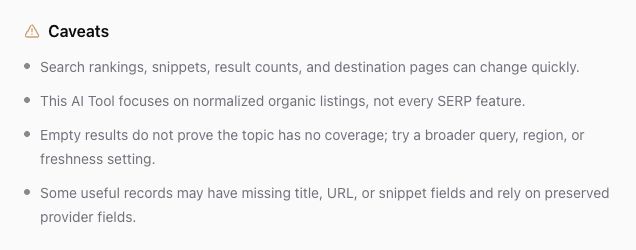
If an AI Tool says results can vary, treat the output as a snapshot of what was available to that tool at run time. It is not proof that every relevant page, post, review, ad, or source exists in the result.
What partial or noisy results can mean
Partial or noisy results do not always mean the run failed. They can happen when:
- The source page changed, moved, disappeared, or limited access.
- A platform returned fewer records than expected.
- The query was too narrow, too broad, misspelled, or aimed at the wrong region.
- Some records were useful but missing optional fields such as title, URL, snippet, rating, author, date, or media.
- A public source mixed relevant and irrelevant results for the same keyword or brand name.
- The AI Tool normalizes messy public data and omits unsafe or unusable fields.
Use the result to decide what to inspect next, not as the final answer.
Improve the next run
If the result is too sparse, broaden the query or remove filters that may be excluding useful records. If the result is too noisy, narrow the query with a more specific company name, product, region, platform, time range, or phrase.
Try one change at a time:
- Use the exact brand, product, domain, creator handle, store name, or location.
- Add a country, platform, or freshness setting when the AI Tool supports it.
- Remove extra keywords that may overconstrain the search.
- Use a different public-data AI Tool when you need a different source type.
- Rerun only after you know what you want to change; new AI Tool runs can spend credits.
If an empty result appears, broaden or adjust the query before concluding that no coverage exists.
Verify important findings
Open important source links and confirm the fact yourself before you use it in customer-facing work. Pay extra attention to dates, counts, claims, pricing, reviews, ad status, screenshots, and anything that could affect a public campaign or business decision.
If the output includes caveats, missing fields, or source notes, keep those caveats with your analysis. Do not turn a partial result into a confident claim.
When to contact support
Contact support when the same AI Tool repeatedly returns an error, the output is missing a file that should have been created, or the result looks structurally broken rather than simply sparse or noisy.
Include the AI Tool name, run time, inputs you used, what you expected, what you received, and whether changing the query improved the result. Do not include passwords, private tokens, billing details, or unrelated customer data in the support message.
Where to go next
For a broader guide to public-data tools, read How public-data AI Tools work and their limits. For general AI-output review, read AI outputs may be inaccurate. To find a previous run and compare inputs, read Find AI Tool run history.
Was this article helpful?
Related articles
Learn where to review past AI Tool runs, filter by status, sort results, and open execution details.
Learn what public-data AI Tools can return, why results vary, and how to review caveats before you act.
Understand why Ampere outputs can need review, what to check before using them, and how to improve the next run.