Manage privacy and data choices
Learn how to update account privacy choices for analytics, advertising measurement, sale or sharing, and product telemetry.
Last verified 15 days ago
Use privacy choices to control optional account-level tracking preferences in Ampere. These settings are separate from the work you intentionally create, upload, run, or share inside your Organization.
Essential security, authentication, billing, service-operation, and reliability logs are not controlled by these switches.
Open privacy settings
- Sign in to Ampere.
- Open the avatar menu.
- Select Profile.
- In the settings rail, under Account, select Privacy.
The page shows switches for optional privacy and tracking preferences.
Review an updated marketing measurement choice
If Ampere asks you to review an earlier choice, the prompt says We’ve updated our privacy choices and explains that Ampere has added new ways to measure marketing results. Your existing choices stay unchanged until you review and confirm them.
On the Account Privacy page, select Review choices, review or adjust the settings, and then select Confirm choices. Until you confirm a current choice, the newly added measurement stays off.
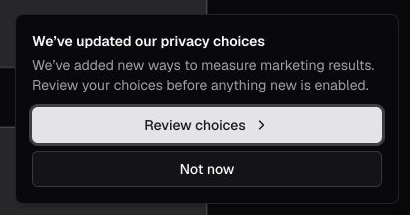
Selecting Not now closes the reminder for that browser tab without changing your saved choice. The reminder can appear again in a new tab or browser session.
Ampere asks for consent again when the measurement purpose, information used, sharing, or consequences change in a meaningful way. Adding another provider for the same already disclosed purpose does not by itself require a provider-named prompt. Ampere updates this information page before a new provider receives data.
Choose privacy preferences
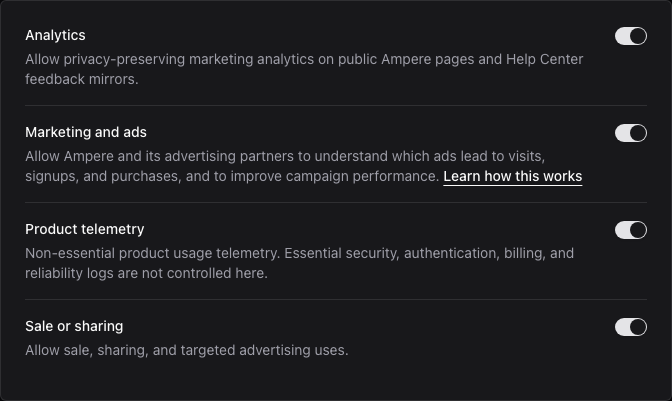
Use the available switches to adjust:
- Analytics: allows privacy-preserving marketing analytics on public Ampere pages and Help Center feedback mirrors. Analytics must also be on before advertising measurement can run.
- Marketing and ads: allows Ampere and its advertising partners to understand which ads lead to visits, signups, and purchases, and to improve campaign performance.
- Product telemetry: allows non-essential product usage telemetry.
- Sale or sharing: allows sale, sharing, and targeted advertising uses. When this is off, the sale or sharing opt-out applies and Marketing and ads stays off.
When an updated choice requires review, changes remain a draft until you select Confirm choices. After that review is complete, later changes save automatically when you use a switch. If your browser sends a Do Not Track or Global Privacy Control signal, Ampere treats non-essential tracking as off even when a saved choice would otherwise allow it. Global Privacy Control also applies the sale or sharing opt-out.
How advertising measurement works
When you allow both Analytics and Marketing and ads and do not use the sale or sharing opt-out, Ampere can measure visits and confirmed funnel outcomes through a browser tag, a server connection, or both. Browser and server copies of the same outcome use the same event identifier so the advertising provider can recognize a duplicate rather than count two conversions.
Ampere may normalize an email address or stable account identifier and convert it to a SHA-256 hash immediately before sending an allowed conversion for matching. Hashing reduces exposure of the original value, but a hashed identifier is not anonymous and Ampere treats it as personal information. Ampere does not store these matching hashes in its analytics delivery record.
Advertising providers and information they may receive
Which provider receives information depends on the measurement integrations that are active and the choices you make. A listed provider receives nothing from Ampere's optional measurement integration while that integration is inactive.
| Provider | Information it may receive for advertising measurement |
|---|---|
| Consented page and conversion events, campaign and supported Google click references, limited browser or analytics identifiers, and connection or device details that accompany a request. | |
| OpenAI | Consented page and conversion events; for each event, the address of a public, sign-in, or sign-up page, with campaign tags and other added details removed: the page where the event happens or, for an event sent through Ampere's server connection, such as a checkout or payment, the public page where your visit began or the home page; OpenAI ad-click or browser references; recent connection and browser details; normalized SHA-256 hashes of an email address or stable Ampere account identifier when available for a confirmed conversion; and SHA-256 hashes of contact details, such as a name or email address, that OpenAI's browser tag recognizes in a form you fill in on a page where it runs, such as the sign-up form. |
| Meta | When Meta measurement is active, consented public page views and the standard conversion events CompleteRegistration, InitiateCheckout, Purchase, and Subscribe; supported Meta click and browser references; a query-free public source page for website events; recent connection and browser details when eligible; and normalized SHA-256 hashes of an email address and stable Ampere account identifier. |
| When LinkedIn measurement is active: through LinkedIn's Insight Tag on Ampere's public marketing pages, the pages you visit, how long you stay, the links and buttons you click, your IP address and browser and device details, and LinkedIn's cookies and ad-click references; through Ampere's server connection, signup, Free Plan, and full paid plan outcomes with a normalized SHA-256 hash of an email address and, when available, LinkedIn's ad-click reference. The paragraphs after this table give the details. |
Ampere loads OpenAI's browser tag only on the home page, Pricing, product pages, demos, the blog, resources, and sign-in and sign-up pages, and only while Analytics and Marketing and ads are allowed and the sale or sharing opt-out is not in use. It doesn't load on the Help Center, checkout, billing, or other app pages, the AI Tools catalog, or individual AI Tool pages, and it stops when you move from a page with the tag to one of those pages. Checkouts and payments reach OpenAI only through Ampere's server connection. The tag can keep OpenAI's ad-click reference in the __oppref cookie and a browser reference in the __obref cookie. OpenAI sets how long the cookies its tag writes last. When an OpenAI ad link opens the AI Tools catalog or an AI Tool page under the same conditions, Ampere keeps the link's ad-click reference in __oppref itself for no more than 30 days, without loading the tag, so a later signup or checkout can still be matched.
Meta website events cover signup, checkout, a payment-confirmed paid introduction, and a direct or early full-plan start. A genuinely automatic full-plan start is sent only through the server connection as a system-generated Subscribe event and does not include a website address, IP address, or browser user agent. Purchase and Subscribe use the exact confirmed US-dollar amount, including a truthful zero amount when a fully discounted payment is confirmed. Failed payments, cancellations, credit exhaustion, and account activity are not sent as Meta conversion events.
For Meta, a valid fbclid from an ad link can be held briefly in the current page's memory before consent and removed from the visible address. It is not written to a cookie or sent until your choices permit measurement. After consent, Ampere may use it to create _fbc, Meta's first-party click reference. Meta's browser tag may create _fbp, a first-party browser reference. Each reference keeps its own original capture time and can be retained by Ampere for no more than 90 days; updating one does not extend the other.
For website conversions, Ampere may use a recent trusted IP address and browser user agent for matching. It keeps this transport information for no more than seven days and copies it to a later conversion only while the original capture is no more than 24 hours old. Browser and server copies of a Meta website conversion stop being eligible after 48 hours so delayed retries do not create an unmatched duplicate. A server-only automatic Subscribe event may remain eligible for up to seven days.
LinkedIn conversions are sent only through Ampere's server connection, and only for these outcomes: account signup, Free Plan approval after the account check, the first Free task result saved for a Free Plan Organization, and the start of a full paid plan with the exact confirmed US-dollar amount, including a truthful zero amount when a fully discounted payment is confirmed. Each conversion carries a normalized SHA-256 hash of an email address and, when the visit came from a LinkedIn ad link and Ampere still keeps it, li_fat_id, LinkedIn's ad-click reference. The server connection sends LinkedIn no page views, website addresses, IP addresses, browser user agents, or stable Ampere account identifiers. The listed outcomes are not limited to people who arrive from a LinkedIn ad. Without a LinkedIn click reference, the email hash is the only matching identifier Ampere sends. Free Plan approval and the first Free task result are measured for the Organization owner, using the owner's privacy choices and email hash, even when a teammate starts the task. Ampere sends no LinkedIn conversion more than seven days after the outcome, and it does not send checkout starts, paid introduction starts, cancellations, failed payments, or other account activity to LinkedIn.
Ampere also loads LinkedIn's Insight Tag, but only on these public pages: the home page, Pricing, product pages, demos, the blog, and resources. It doesn't load anywhere else, including the Help Center, sign-in, sign-up, checkout, and app pages, the AI Tools catalog, and individual AI Tool pages. When you open any other page from a page with the tag, that page loads fresh, so the tag doesn't follow you. The tag loads only while Analytics and Marketing and ads are allowed and the sale or sharing opt-out is not in use. Before it loads, Ampere removes campaign tags and Google and LinkedIn ad-click references from the page address; other details in the address, such as another ad platform's click reference, can remain. The tag then tells LinkedIn the address of each of those pages you visit, the website you came from (the site only, not the page), how long you stay, and the links and buttons you click, with their labels and link addresses, but not what you type into a form. Like any web request, it also gives LinkedIn your IP address and browser and device details. LinkedIn uses this information to report how LinkedIn ads perform, to give Ampere aggregate reports on visitors' professional characteristics, such as job function and industry, drawn from LinkedIn member profiles, and to let Ampere show LinkedIn ads to people who visited its pages, which is a form of targeted advertising. Ampere does not create LinkedIn conversions from the tag; they come only from the server connection described above.
The Insight Tag can store LinkedIn cookies on Ampere's site, such as li_giant, li_adsId, oribili_user_guid, and ln_or, and keep li_adsId in your browser's storage. When a visit comes from a LinkedIn ad link, Ampere keeps that link's li_fat_id in LinkedIn's first-party li_fat_id cookie for no more than 30 days. Ampere writes that cookie only when the tag loads under the conditions above; until then, it holds the value only in the current page's memory and does not send it to LinkedIn. LinkedIn sets how long its other cookies last. LinkedIn can also recognize cookies it has set on its own websites, for example when you are signed in to LinkedIn in the same browser.
Ampere keeps a li_fat_id from a LinkedIn ad link in the signed first-party acquisition cookie only while Analytics and Marketing and ads are allowed and the sale or sharing opt-out is not in use. After signup, Ampere keeps it as an account-linked click reference for no more than 37 days from capture.
Ampere never shares prompts, generated content, files, payment-card or bank details, private page addresses, session content, dates of birth, postal addresses, private Organization or Workspace content, or an Organization identifier for advertising measurement. When you arrive from another page, advertising tags see only the website you came from, not the page. Ampere does not intentionally send raw email addresses, names, or phone numbers through these measurement integrations.
Retention and provider terms
The signed first-party acquisition cookie can be kept for up to 30 days. OpenAI transport details such as recent IP address and browser user agent are kept by Ampere for no more than seven days, and OpenAI click or browser references for no more than 37 days after Ampere last receives them. Meta references are kept independently for no more than 90 days, and Meta transport details for no more than seven days. LinkedIn click references are kept for no more than 37 days from capture, and the li_fat_id cookie for the Insight Tag for no more than 30 days. Matching hashes are created only when an allowed event is sent and are not stored in Ampere's analytics delivery record. Terminal delivery records are generally kept for 90 days for delivery, support, and coverage review, unless a longer period is required for security, legal, or dispute purposes.
Advertising providers may keep information they receive under their own rules. Review Meta's Privacy Policy and Meta Business Tools Terms for Meta's terms and data practices. Review LinkedIn's Privacy Policy for LinkedIn's data practices.
Withdraw advertising measurement
Turn off Marketing and ads to stop future advertising measurement while keeping permitted Analytics measurement. You can also turn off Sale or sharing, which keeps advertising measurement off.
Ampere removes supported advertising click and browser references that it controls, clears supported browser-visible advertising cookies and browser storage including _fbc, _fbp, __oppref, __obref, and the LinkedIn cookies and storage listed above, reloads a page that was running LinkedIn's Insight Tag so the tag stops (as that page closes, the tag can send LinkedIn one last time-on-page signal without the page address), cancels measurement waiting in the current page, deletes actor-linked measurement context, and suppresses eligible provider deliveries that have not been sent. Deleting your Ampere account also removes actor-linked measurement context and delivery records. These actions cannot retroactively recall an event that an advertising provider already accepted; provider retention then follows that provider's terms.
Turning off Analytics stops future browser analytics and advertising measurement. It does not turn off the essential account and service technologies listed above.
What these settings do not change
Privacy choices do not delete existing work, remove you from an Organization, stop required account operations, or change what teammates can access inside a shared Organization.
They also do not replace the privacy and security decisions you make before submitting data to Ampere, AI Tools, Projects, Connectors, or uploaded files. Avoid adding credentials, private tokens, payment card details, or regulated data you are not authorized to process.
If settings do not load or save
If the page cannot load your privacy choices, use Retry. If a save does not complete, Ampere restores the previous choice and shows an error message.
Try refreshing the page if a control appears out of sync. If the problem continues, contact support with the account email address and the setting you were trying to change.
Where to go next
For a broader explanation of how Ampere handles account, Organization, AI, and Project data, read Privacy and data handling basics. For legal policy language, use the Privacy Policy.
Was this article helpful?
Related articles
Learn how Terms and Privacy consent works during signup and what to do if the verification email does not arrive.
Understand what kinds of data Ampere handles, how AI processing works, and which controls to use before sharing sensitive work.