Manage cookies and website tracking choices
Learn how Ampere respects browser privacy signals and how to update website tracking choices.
Last verified about 1 month ago
Ampere lets you choose how non-essential cookies and similar technologies are used on public pages. Your choices cover analytics, product telemetry, and marketing measurement. Browser privacy signals such as Global Privacy Control or Do Not Track can also force non-essential tracking off.
These choices are about website tracking preferences. They do not replace account deletion, data export, or team access controls.
Use the privacy choices banner
When Ampere needs a public tracking preference, it shows a Privacy choices banner. You can choose:
- Allow all: allow analytics, marketing and ads, product telemetry, and sale or sharing uses when browser signals permit them.
- Allow essential: keep non-essential tracking off.
- Customize: open the detailed preference dialog.
If your browser privacy signal is active, Allow all may be unavailable and non-essential tracking stays off.
Review an earlier marketing choice
If Ampere materially changes the purpose of Marketing and ads, the information used, how information is shared, or what allowing the choice means, your existing choices stay unchanged and nothing new is enabled until you review them.
The reminder says We’ve updated our privacy choices and We’ve added new ways to measure marketing results. Review your choices before anything new is enabled. Select Review choices to open the dialog and review the settings. Select Not now to dismiss the reminder for this session. Not now does not change your choices or record consent, and the reminder may appear again in a later session.
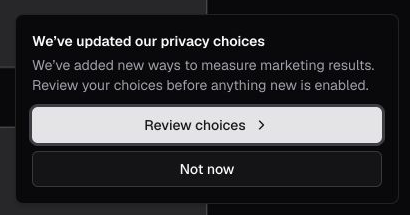
Adding another provider within the marketing-measurement purpose already described does not automatically cause another prompt. Ampere updates the detailed disclosure before a new provider receives information. Use Learn how this works to review the current providers, the information each may receive, identifier normalization and hashing, browser identifiers and advertising references, retention periods, withdrawal behavior, and information Ampere never shares.
Meta advertising reference cookies
When Meta measurement is active and your current choices permit marketing measurement, Ampere may use two Meta first-party cookies:
_fbcis a Meta click reference. After consent, Ampere may create it from a validfbclidon a Meta ad link. Before consent, that link value can be held only in the current page's memory and removed from the visible address; it is not stored in a cookie or sent._fbpis a Meta browser reference created by Meta's browser tag after consent. Ampere does not invent this value.
These are non-essential advertising cookies. Ampere keeps each reference from its own original capture time for no more than 90 days. Refreshing one reference does not extend the other. Turning off Marketing and ads, turning on Sale or sharing, or turning off Analytics stops future Meta measurement and makes Ampere clear supported _fbc and _fbp cookies and references it controls. An advertising provider may separately retain information it already received under its own terms.
Customize categories
The dialog includes controls for:
- Analytics: privacy-preserving marketing analytics on public pages and Help Center feedback mirrors.
- Marketing and ads: Allow Ampere and its advertising partners to understand which ads lead to visits, signups, and purchases, and to improve campaign performance. Learn how this works.
- Product telemetry: non-essential product usage telemetry.
- Sale or sharing: sale, sharing, and targeted advertising uses.
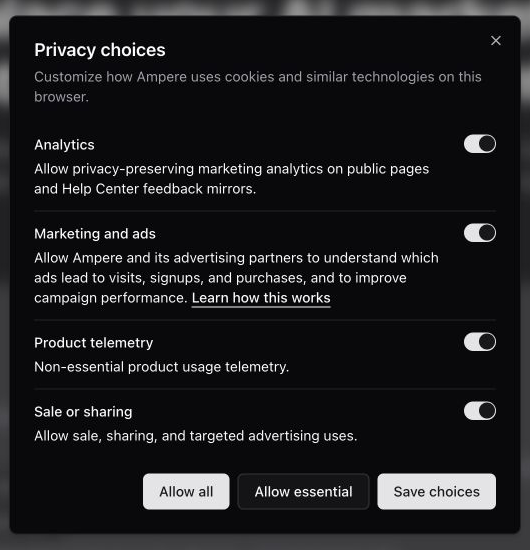
Marketing measurement starts only after you save a current choice with Analytics and Marketing and ads allowed and Sale or sharing permitted. Saving a current choice does not change what essential authentication, security, billing, service-operation, or reliability technologies Ampere uses.
How browser signals affect choices
If Global Privacy Control is active, sale or sharing stays opted out. If Do Not Track or Global Privacy Control is active, non-essential tracking stays off even if a previous saved choice allowed it. This prevents marketing measurement as well as other non-essential tracking.
Ampere reads those browser signals in the browser and resolves your saved preference against them.
Change or withdraw your choice later
Use the tracking preferences footer button or privacy choices entry point on public pages to reopen the dialog. If you are signed in, you can also open Settings, select Privacy, and update your account-level choices. Saving a new choice notifies other open Ampere tabs.
Turning off Analytics stops future browser analytics and marketing measurement. Turning off only Marketing and ads keeps permitted analytics running but stops future marketing measurement. Ampere also removes supported advertising click and browser references and browser-visible advertising cookies that it can clear.
Changing your choice does not retroactively delete events already sent to analytics or advertising providers.
Public choices are stored for this browser. If you use another browser, device, profile, or private browsing session, you may need to set the preference there too.
If the banner keeps appearing
Check whether your browser clears cookies, blocks storage, or runs in private mode. If storage is unavailable, Ampere may not be able to remember the preference between visits.
If you selected Not now on the privacy choices reminder, it may return in a later browser session. Save a current choice to complete the review.
Was this article helpful?
Related articles
Learn how to update account privacy choices for analytics, advertising measurement, sale or sharing, and product telemetry.
Understand what kinds of data Ampere handles, how AI processing works, and which controls to use before sharing sensitive work.