How public-data AI Tools work and their limits
Learn what public-data AI Tools can return, why results vary, and how to review caveats before you act.
Last reviewed June 2026
Use public-data AI Tools when you need a structured starting point for web, search, social, ads, review, or creator research. They can help collect source links, normalize fields, summarize visible records, and prepare data for a marketing workflow.
They are not a guarantee that every relevant public source exists in the result. Public sources and provider access change over time, so treat each run as research input that still needs review.
What public-data AI Tools can do
Public-data AI Tools can fetch or analyze information that is publicly available to the tool's provider at run time. Depending on the AI Tool, that may include search results, public pages, social posts, ads, reviews, creator information, comments, or transcripts.
Each AI Tool page explains what inputs it accepts, what output it can return, and which caveats matter. Review those details before you run the tool, especially when the work depends on a specific platform, region, freshness window, or source type.
What can vary
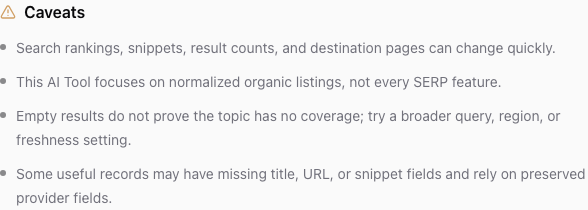
Results can be partial, noisy, rate-limited, unavailable, or incomplete. A provider may return useful records with missing fields, blank values, different field shapes, or source-specific notes. Ampere normalizes that data into a stable output where possible, but the original public source and provider response still shape what the run can return.
Search rankings, snippets, result counts, destination pages, social posts, review pages, and ad libraries can change quickly. A result that appears today may move, update, disappear, or return different metadata in a later run.
Before you rely on a result
- Read the AI Tool's overview, input guidance, expected output, and caveats.
- Use the most specific inputs that match your research question without over-narrowing the search.
- Treat empty results as a signal to broaden or adjust the query, not proof that no coverage exists.
- Open important source links and verify the facts before using them in customer-facing work.
- Save or export the output you want to preserve, because source pages and provider results can change.
When to run again
Run the AI Tool again when the source landscape may have changed, when you need a different region or freshness setting, or when the first run returns too little useful coverage. New AI Tool runs can spend credits. Reviewing an AI Tool page, reading caveats, or opening saved run history does not spend credits.
Use the result as evidence to inspect, not as the final word. For decisions that depend on completeness, compliance, legal claims, or exact counts, verify against the original sources and any internal review process your team uses.
Was this article helpful?
Related articles
Learn where to review past AI Tool runs, filter by status, sort results, and open execution details.
Save AI Tools you use often, filter the catalog to favorites, and remove a favorite when your workflow changes.
Learn how to search, filter, sort, and choose AI Tools from the authenticated Ampere catalog.