How do deep research agents work? AI market research you can check
How a deep research agent turns one question into a cited report, where each step of its work can mislead you, and a brief template, a five-step source check and a desk-or-customer test for checking AI market research before you act on it.
41 min readWritten by Ampere
Short answer
How does deep research AI work?
Deep research AI works by running a loop: it turns your question into a research plan, searches the web many times, reads the pages it finds, reflects on what is still missing, and then writes a report with citations to its sources. A run takes minutes and covers far more sources than a quick answer, but each step can introduce errors, so check the sources behind any finding you act on.
Summary
A deep research report looks finished, but a well-supported sentence and a poorly supported one look the same on the page. The agent plans, searches, reads, reflects, writes, and cites, and each step has a typical failure, so knowing the loop tells a marketer where to look for mistakes and which part of the brief would have prevented them.
Plans drift to the wrong segment or time window, search favors pages written to rank, reading takes the wrong passage, reflection stops early or only confirms, writing drops qualifications, and citations often fail to support their sentences. One audit of deep research systems, run in 2025, found citation accuracy ranging from 40% to 80% across systems and one-sided answers on debate questions, so a report is a set of leads with sources attached.
Deep research agents are good at the volume work of desk research: covering many public sources quickly, finding obscure ones, and building a first competitor table. They cannot say why buyers choose or switch, who decides, or whether a message is believed. A decision table sends each kind of question to desk research or to customer conversations, and the report's gaps become the interview questions.
A research brief names the decision, a narrowed question, sources to include and exclude, a time window, the output, and confidence levels, and the guide includes a copyable template. The five-step source check opens each citation, checks its date and scope, identifies who produced it, traces repeated figures to one original, and looks for what is missing, then keeps, qualifies, cuts, or turns each finding into a question for customers.
A fictional worked example follows one software company from brief to check: three market-size citations trace to one press release, a survey figure covers the wrong segment and year, a competitor price is out of date, and the switching reasons become interview questions. Public data never covers a market completely and AI output can be inaccurate, so a finding should reach a decision only after its sources pass the check.
Contents
- What a deep research agent is
- How deep research agents work: the research loop
- What the providers' documentation says about deep research modes
- What deep research agents do well
- Where the research loop goes wrong, step by step
- What the evidence says about citation accuracy
- Which questions desk research can answer, and which need customers
- How to brief a deep research agent
- A research brief template you can copy
- How to check a research report: the five-step source check
- Worked example: one brief, one run, one check
- Five research jobs for marketers, and how to run each
- Common mistakes in AI market research
- How research works in Ampere
- Sources and further reading
- Frequently Asked Questions
Ask an AI assistant's deep research mode how small accounting firms choose practice-management software, and a few minutes later you get a report that looks finished. It has an executive summary, a market size, a table of competitors with prices, a list of the reasons firms switch, and several dozen citations. It reads like something an analyst spent a week on, and it is tempting to paste the market size into a planning deck and the switching reasons into a campaign brief.
Some of that report will be right, and some will not. A market size may come from a report seller's press release that three of the other citations simply repeat. A competitor's price may come from a review site that copied it two years ago. The reasons firms switch may be drawn from vendor blog posts written to sell switching. Nothing in the formatting tells you which parts are which, because a well-supported sentence and a poorly supported one look the same on the page.
A deep research agent is an AI agent that takes a research question, plans how to answer it, runs many web searches, reads the pages it finds, decides what to look for next, and writes a report with citations to its sources. A run takes several minutes, and what comes back is a long document with sources, not a chat reply. The same mechanism produces both the report's strengths and its errors: it can cover more public sources than a person would read in an afternoon, and each step in its process has its own way of going wrong.
This guide explains how deep research agents work, step by step, and what the providers' own documentation says their deep research modes do. It sets out where each step misleads, with the published evidence on citation accuracy, and what the agents do well. Then it gives you a research brief template, a five-step source check, a test for when desk research is enough and when to talk to customers, and a fictional worked example that follows one brief from the run to the check.
What a deep research agent is
A deep research agent is a kind of AI agent built for one job: answering a question that needs many sources. In a 2025 survey of the field, Yuxuan Huang and colleagues describe deep research agents as "a new category of autonomous AI systems" that combine "dynamic reasoning," "adaptive long-horizon planning," "multi-hop information retrieval," "iterative tool use," and "the generation of structured analytical reports." In plainer words, the agent plans, searches, follows what it finds to further searches, and writes up the result.
Three related things are easy to confuse with it.
- A chat answer comes from what the model learned in training, sometimes topped up with one quick search. It arrives in seconds and rarely shows where each statement came from.
- AI search, such as an AI-generated answer at the top of a search results page or an answer engine, usually runs a few searches and writes a short answer with links. It is quick and useful for a single fact, but it typically draws on a handful of pages.
- A deep research agent runs dozens of searches in sequence, reads far more pages, changes its plan as it learns, and writes a long report. It is slower and uses much more computation.
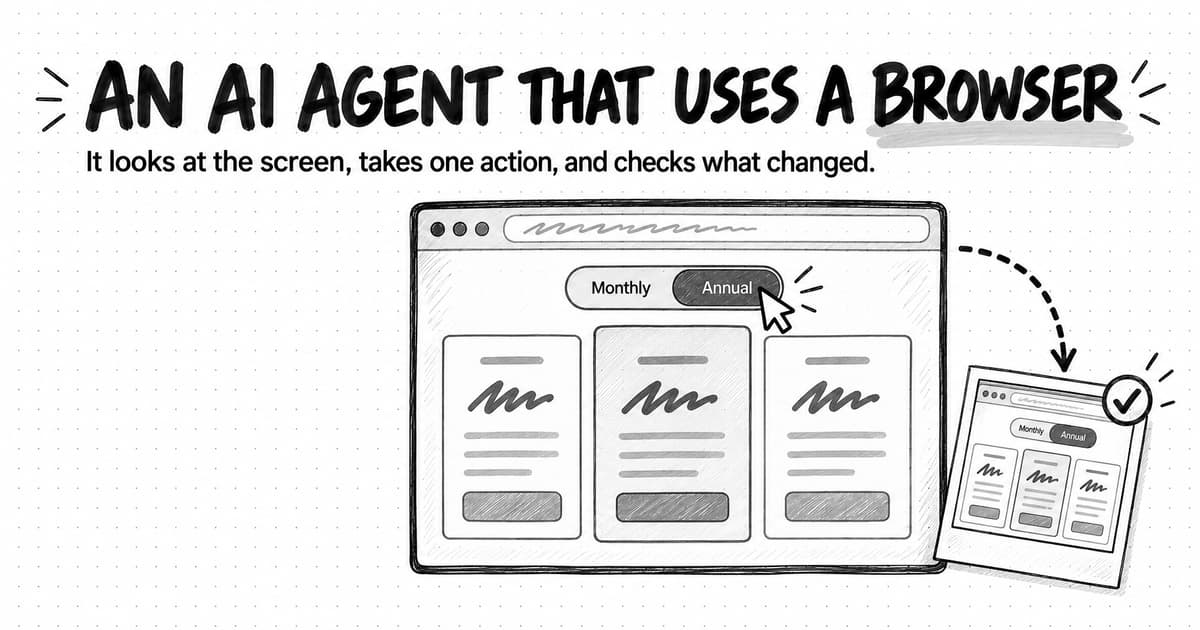
A deep research agent is also different from a computer-use agent, which operates a browser by clicking and typing. Most deep research runs use search and page-reading tools instead of a visible screen, although some products combine the two. The research loop below applies either way.
Several AI assistants offer a deep research mode under that name or a similar one, and AI marketing agents can run the same kind of research as one part of a larger job. The product matters less than the mechanism, because the mechanism decides where to look for mistakes.
How deep research agents work: the research loop
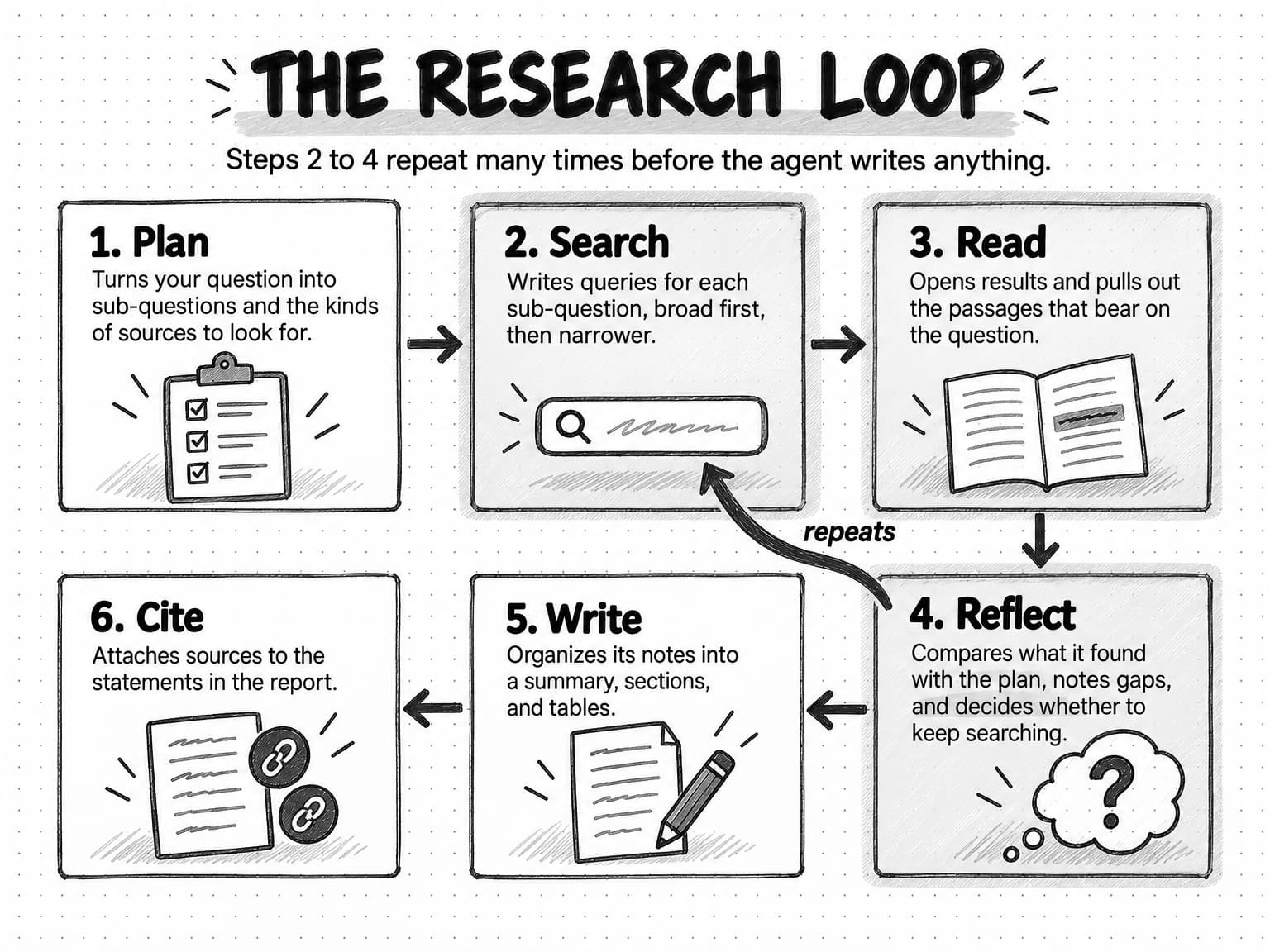
Every deep research agent runs a version of the same loop. Google's documentation for its Deep Research agent sums it up as "Plan -> Search -> Read -> Iterate -> Output." This guide splits the last part in two, because writing the report and citing its sources fail in different ways, and calls the iterate step reflect, since that is the moment the agent judges its own progress. The result is six steps: plan, search, read, reflect, write, and cite.
- Plan. The agent turns your question into a research plan: the sub-questions to answer, the kinds of sources to look for, and sometimes the structure of the report. Some products show you the plan and let you edit it before the run starts. Others ask clarifying questions first.
- Search. The agent writes search queries for each sub-question and runs them, usually through a web search tool. Anthropic's engineers, describing their own research system, say good search "should mirror expert human research: explore the landscape before drilling into specifics," starting with short, broad queries and then narrowing.
- Read. The agent opens promising results and extracts the passages that bear on the question: a price from a pricing page, a figure from a report, a complaint from a review.
- Reflect. The agent compares what it has found with what the plan needs. It notes gaps and contradictions, writes new queries, and decides whether to keep searching or stop. This is the step that makes the work iterative, a pattern our guide to agentic workflows calls reflection.
- Write. The agent organizes its notes into a report: a summary, sections that follow the plan, tables, and conclusions.
- Cite. The agent attaches sources to the statements in the report. In some systems a separate step does this after writing. Anthropic's system passes its findings to a citation agent that identifies "specific locations for citations" in the documents it read.
The loop repeats steps two to four many times before writing begins. It is the same choose, act, and inspect cycle that every AI agent runs, which our guide to how AI agents work explains in general terms. What makes research different is the volume: the agent may read more pages in ten minutes than you would read in a day, and it has to decide on its own which of them to trust.
Some systems divide the work among several agents. Anthropic describes a lead agent that "analyzes it, develops a strategy, and spawns subagents to explore different aspects simultaneously," and then combines what the subagents bring back. A single agent working through the loop alone is just as common. For the person reading the report, the six steps are the same either way.
View the research loop at full size (opens in a new tab).
What the providers' documentation says about deep research modes
Several AI providers document a deep research mode. The descriptions below come from each provider's own published documentation, read on October 13 and 14, 2026, and appear in alphabetical order. They describe how each provider says its mode works; they are not a comparison or a ranking. Features, limits, and names change often, so check the current documentation before you rely on any detail.
Anthropic. Anthropic's help center article on Research in Claude says Claude "operates agentically, conducting multiple searches that build on each other," that "it explores different angles of your question automatically," and that it "delivers thorough answers in minutes, complete with easy-to-check citations." Research runs across the web and, when they are connected, sources such as Gmail, Google Calendar, and Google Docs. Anthropic's engineering post on its multi-agent research system, from June 2025, explains how that system is built and how it failed in early testing, which the next section draws on.
Google. Google's overview of Deep Research in Gemini says it "transforms your prompt into a personalized multi-point research plan" that you can refine, then can "automatically browse hundreds of websites" and even a user's Gmail, Drive, and Chat, before producing multi-page reports "in minutes." It "shows its thoughts as it reasons over information gathered iteratively." The page's own caution is two words: "Check responses." Google's developer documentation for the Deep Research agent gives the cycle quoted earlier, says users can plan collaboratively with the agent, and says tasks "can take several minutes to complete."
OpenAI. OpenAI's help center article on deep research in ChatGPT describes five stages: you describe the outcome you need, choose websites or files if needed, review and modify a proposed research plan, follow the run and interrupt it to refine the focus, and receive "a structured report with citations or source links so you can verify the information." You can restrict research to sites you name, and before it starts ChatGPT "may ask clarifying questions to confirm your goals." The launch post from February 2025 says a run "may take anywhere from 5 to 30 minutes" and lists limitations in OpenAI's own words: the model "can sometimes hallucinate facts in responses or make incorrect inferences," "may struggle with distinguishing authoritative information from rumors," and "currently shows weakness in confidence calibration." OpenAI's developer guide adds that its deep research models are "agentic and conduct multi-step research," reach "information on the public internet via the web search tool" by default, and can be connected to private data, which "introduces security risks," including prompt injection: instructions hidden in content the model reads that lead it to "take actions the developer never intended."
Perplexity. Perplexity's February 2025 announcement of Deep Research says it "performs dozens of searches, reads hundreds of sources, and reasons through the material," that it "iteratively searches, reads documents, and reasons about what to do next," and that it completes "most research tasks in under 3 minutes," with the report exportable as a PDF or document.
Read together, these descriptions match the six-step loop: a plan, many searches, reading, iteration, and a cited report, produced in minutes. None of the documentation presents the reports as free of errors, and the citations each one mentions are there so you can check the work.
What deep research agents do well
Deep research agents are good at the parts of desk research that are slow for people because of volume, not judgment.
- Covering ground quickly. An agent can run dozens of searches and read many pages while you do something else. For a first look at an unfamiliar category, that coverage is hard to match by hand.
- Finding sources you would not have found. Because it writes many queries in different phrasings, an agent can surface a niche forum thread, an industry association's survey, or a regulator's report that a person would not think to search for.
- Collecting comparable facts. Asked for the same fields on every competitor (plans, listed prices, target customers, main claims), an agent can build a first table faster than a person copying from tabs, as our competitor analysis guide describes.
- Organizing a messy topic. A report gives structure to a subject you are new to: the main players, the recurring arguments, the vocabulary buyers use, and the questions still open.
- Showing its work. Unlike a chat answer, a deep research report links its statements to sources, so you can check them. That only helps if someone does.
These strengths share a limit. Everything the agent finds is public, written down, and findable through search. That covers a great deal of what marketers need to know about competitors and categories. It leaves out most of what they need to know about their own customers, which a later section returns to.
Where the research loop goes wrong, step by step
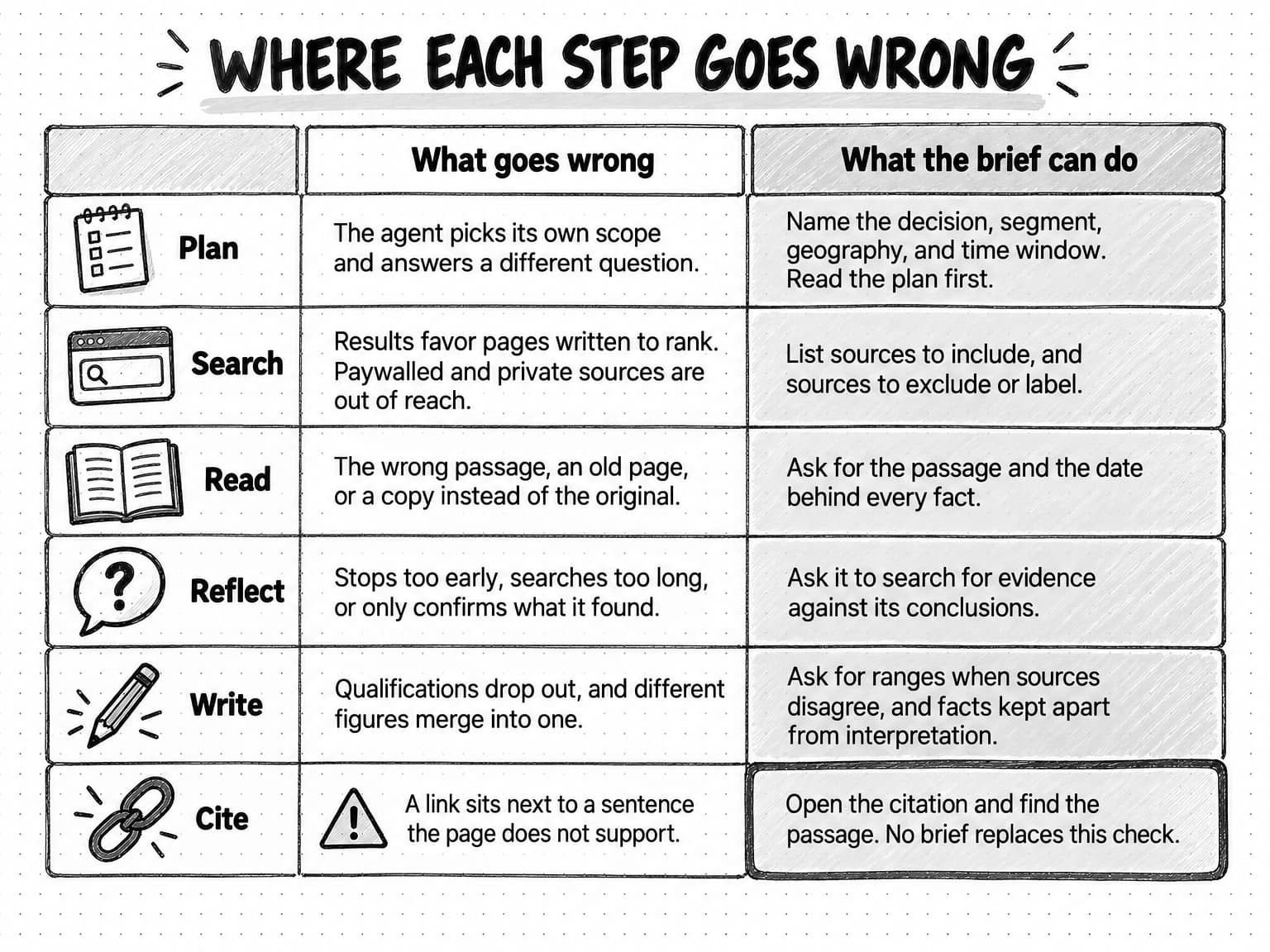
Each step of the loop has a failure that is typical of it. Knowing which step produced a mistake tells you where to look for the next one, and which part of the brief would have prevented it.
Plan: the agent answers a different question
The first failure happens before any search runs. A short question leaves the agent to choose the scope, and its choice may not be yours. Ask about "the market for practice-management software," and the agent may research software for medical practices, global vendors, and enterprise buyers when you sell to small accounting firms in one country. Ask "why do customers switch?" without a time window, and it may weigh a 2019 article the same as one from last month.
The providers' own design choices show how much the plan matters. OpenAI's documentation describes clarifying questions and a proposed plan you can modify before research begins, and Google presents its plan for the user to refine. These steps address the same risk: a vague question can produce a confident answer to the wrong version of it. The cure is a brief that states the decision, the segment, the geography, and the time window, and a habit of reading the plan before the run starts.
Search: the results decide what the agent can know
An agent can only read what its searches return. Search results favor pages written to rank, and those are not always the most reliable pages on a subject. In a study presented at the European Conference on Information Retrieval in 2024, Janek Bevendorff and colleagues monitored Google, Bing, and DuckDuckGo for a year on 7,392 product review queries. They found that "only a small portion of product reviews on the web uses affiliate marketing, but the majority of all search results do," and that all three engines had significant problems with highly optimized affiliate content.
Research agents inherit that problem. Anthropic's engineers reported that their early agents "consistently chose SEO-optimized content farms over authoritative but less highly-ranked sources," and found that "adding source quality heuristics to our prompts helped resolve this issue." For a marketer, the consequence is predictable: a report on any commercial category draws heavily on vendor blogs, affiliate "best tools" lists, and press releases, because those are what search returns for commercial questions.
Search also misses things entirely. Reports behind a paywall or a sign-in, analyst research sold to clients, private community discussions, sales-call notes, and anything never written down are out of reach. The agent may not mention what it could not see, so a report can look complete while missing the sources that matter most.
Read: the right page, the wrong passage
Reading fails in quieter ways. The agent may take a figure from the wrong row of a table, read a monthly price as annual, miss that a page describes a discontinued plan, or treat a vendor's claim about itself as an established fact. It may read a cached or syndicated copy of a page instead of the original. When the Tow Center for Digital Journalism tested eight AI search tools in 2025, it found that some of them "directed us to syndicated versions of articles on platforms like Yahoo News or AOL", not to the original publisher.
Some reading problems come from the format. Charts, scanned PDFs, and screenshots need the model to read an image, which brings its own errors; our guide to multimodal AI explains what a model receives from a chart or a PDF and where that reading fails. Pages can also contain text written for AI agents, such as hidden instructions, which is why OpenAI's developer guide warns about prompt injection. The computer-use guide covers that risk in more depth.
Reflect: stopping too early or searching too long
At the reflect step the agent judges whether it knows enough. It can stop too soon, after finding one source that seems to answer a sub-question, or keep going long after the useful sources are exhausted. Anthropic described both extremes in its early system: agents "spawning 50 subagents for simple queries" and "scouring the web endlessly for nonexistent sources."
Reflection also tends to confirm what the agent has already found. An agent that finds three pages agreeing that a problem is common has little reason to search for the page that disagrees, unless the brief tells it to. That is one reason the reports lean one way, as the evidence below shows. More work does help on hard questions. Anthropic reported that on BrowseComp, a benchmark of hard-to-find information, "token usage by itself explains 80% of the variance" in its system's performance, where token usage is a rough measure of how much reading and reasoning the agent did. But more work costs more, and it does not fix a skewed set of sources.
Write: the summary says more than the sources
Writing is where qualifications get lost. A source that says "some small firms in our 2023 survey reported" becomes "small firms report," and a projection becomes a fact. In a 2025 study in Royal Society Open Science, Uwe Peters and Benjamin Chin-Yee compared 4,900 summaries written by 10 large language models with the scientific texts they summarized. Most models "produced broader generalizations of scientific results" than the originals, even when explicitly prompted for accuracy, and the models' summaries were "nearly five times more likely to contain broad generalizations" than summaries written by people. In their tests, a prompt that asked for accuracy made broad generalizations about twice as likely as a simple prompt did.
Writing also merges. Two sources that describe different segments, years, or definitions become one sentence, and the report states a single figure where the sources gave a range. A table of competitors may mix prices captured on different dates. The prose reads smoothly because the merging has removed the differences you needed to see.
Cite: a link next to a sentence is not support
The last step is where most readers place their trust, and it is less reliable than it looks. A citation can point to a page that does not contain the claim, that contains a different figure, or that supports only part of the sentence. A sentence can have no citation at all and still sit in a paragraph full of them. Our guide to preventing AI hallucinations calls this a misgrounded claim: a genuine source cited for something it does not say, which survives any check that stops at the link.
View where each step goes wrong at full size (opens in a new tab).
What the evidence says about citation accuracy
Independent audits of AI search tools and deep research agents measure how often the citations support what the text says. Their methods differ, and the systems they tested have changed since, so treat the figures as evidence of a pattern rather than as the error rate of any tool you use today. For how these systems pick their sources in the first place, see how AI search engines choose which sources to cite.
| Study | What it tested | What it found |
|---|---|---|
| Nelson Liu, Tianyi Zhang, and Percy Liang, Findings of EMNLP 2023 | Four generative search engines, with people judging whether citations supported the sentences they were attached to | On average, "a mere 51.5% of generated sentences are fully supported by citations and only 74.5% of citations support their associated sentence." |
| Tow Center for Digital Journalism, Columbia Journalism Review, March 2025 | Eight AI search tools, 1,600 queries asking for the headline, publisher, date, and URL of a quoted news article | Collectively, the tools "provided incorrect answers to more than 60 percent of queries"; most presented wrong answers "with alarming confidence," and some pointed to syndicated copies instead of the original. |
| Pranav Narayanan Venkit and colleagues (DeepTRACE), ICLR 2026, first posted as a preprint in September 2025 | The web search and deep research modes of several public AI systems, tested on 303 debate and expert questions and scored statement by statement by a language model judge whose agreement with human raters was validated; the preprint reports results as of August 27, 2025 | Across systems, deep research modes reduced overconfidence and could cite thoroughly, but remained "highly one-sided" on debate questions and still had large shares of unsupported statements, with "citation accuracy ranging from 40–80% across systems." |
The studies point the same way. In all three, an answer that came with a source was no guarantee that the source was the right one or that it supported the text. The Tow Center found that wrong answers rarely came with any sign of doubt, so they read with the same confidence as right ones. DeepTRACE found that on questions where reasonable sources disagree, deep research reports tended to present one side, and that many statements in AI research answers were not supported by any of the sources the answer listed.
These figures do not make deep research useless, but they change what the report is: a set of leads with sources attached, which someone still has to check. Outputs from any of these systems may be inaccurate, and the public sources they search never cover a market completely.
Which questions desk research can answer, and which need customers
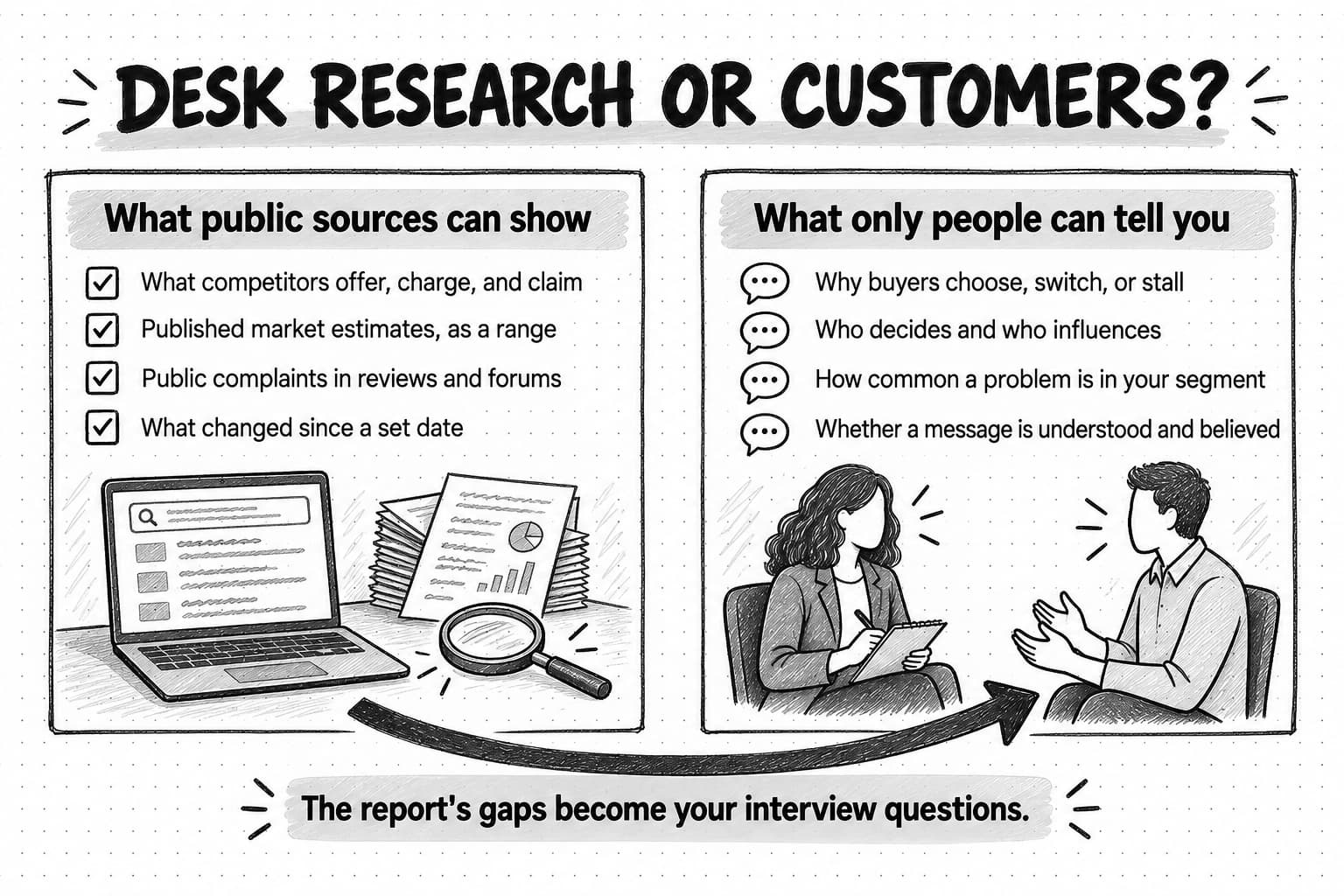
A deep research agent does desk research, also called secondary research: it finds and combines information that already exists. Primary research collects new evidence from people, by interviewing customers, surveying a segment, watching how people use a product, or testing a message. Our guide to market research explains both and how to choose a method. The short rule for AI market research is that an agent can tell you what has been published, and only people can tell you what they did, why they did it, and what they would do next.
Use this table to decide where a question belongs before you brief the agent.
| Question | What desk research by an agent can give you | When to talk to customers or prospects |
|---|---|---|
| What do competitors offer, charge, and claim? | Current public pages, listed prices, positioning, launches, with dates | When the price you need is quote-only, or you need to know what buyers actually pay |
| How big is the market? | Published estimates, each with its own method and definition, which you can show as a range | When you need the number of reachable buyers in your segment, which usually comes from your own data or a survey |
| What do people complain about in public? | Themes from reviews, forums, and social posts, with links | When you need to know how common a complaint is in your segment, because public reviews over-represent strong opinions |
| Why do buyers choose, switch, or stall? | Hypotheses from reviews, case studies, and vendor content | Almost always: interviews and win-loss conversations are the evidence |
| Who decides and who influences the purchase? | Job titles mentioned in public content, usually vague | Almost always, because buying roles are rarely written down in public |
| Will this message be understood and believed? | Examples of how others phrase similar claims | Always: test the message with real people |
| What changed this month? | New pages, announcements, reviews, and news since a set date | When a change needs explaining, such as why a competitor dropped a plan |
The pattern is that desk research covers what is visible, and customers cover motive, frequency, and behavior. A good research plan uses both: the agent maps what is public quickly, and the gaps it finds become the questions for interviews. Our guide to voice-of-customer research explains how to turn customer conversations into evidence you can use.
How to brief a deep research agent
A research brief limits the failures that start at the plan step and makes the later steps easier to check. Our guide to briefing an AI marketing agent covers briefs in general. A research brief needs six things in particular.
The decision. Say what you will decide with the answer: whether to build a campaign for a segment, how to price a new plan, which competitor to position against. The decision tells the agent which findings matter and which are trivia, and it tells you later whether the report answered what you needed.
The question, narrowed. Name the segment, the geography, and the type of buyer. "How do accounting firms in the United States with 5 to 50 staff choose practice-management software?" is a question an agent can answer. "Tell me about the accounting software market" is a topic.
Sources to include and exclude. Point the agent to the sources you trust: competitors' own pricing and product pages, official statistics, named industry associations, review sites, specific forums. Say which to leave out or label: affiliate "best tools" lists, undated pages, press releases from report sellers, AI-generated summaries. If a source type is allowed but weak, ask the agent to label it rather than exclude it.
The time window. Give a date range for the evidence ("published or updated since January 2025") and ask for the publication date or the date checked next to every source. Markets that involve software and AI change quickly, and an undated source cannot be judged.
The output. Describe the report you want: its sections, any tables and their columns, the maximum length, and where facts and interpretation go. A table with one row per competitor and a "source and date" column is easier to check than prose.
Confidence levels. Ask the agent to rate each finding and define what the ratings mean, so the labels are consistent. One workable scale:
| High | Supported by at least two independent sources, at least one of them primary (the company's own page, an official statistic, the original study), dated inside the time window |
|---|---|
| Medium | Supported by one primary source, or by several secondary sources that may share an origin |
| Low | Supported by a single secondary source, an undated page, or the agent's own inference |
| Not found | Searched for and not found in the sources checked; record the searches and the date |
Two more instructions help in almost every brief. Ask the agent to search for evidence against its main conclusions, because reflection tends to confirm. And ask it to end with a list of what it could not find or could not read, with the questions that only customers could answer. That list is where the customer research starts.
A research brief template you can copy
Fill in the brackets, delete the lines that do not apply, and paste the brief into the agent. Keep a copy with the report, so whoever checks it knows what was asked.
RESEARCH BRIEF

Decision this research supports:
[What we will decide, by when, and who decides]

Research question:
[One question, naming the segment, geography, and buyer]

Sub-questions (the plan should cover these):
1. [ ]
2. [ ]
3. [ ]

What we already know (attached or linked):
[Our own data, past research, customer notes, earlier reports]

Scope:
- Segment: [company size, industry, role]
- Geography: [countries or regions]
- Time window: [evidence published or updated since DATE]

Sources to include:
[Competitors' own pricing and product pages, official statistics, named
associations, review sites, specific forums]

Sources to exclude or label:
[Affiliate "best of" lists, undated pages, report-seller press releases,
AI-generated summaries; label vendor content about itself as a claim]

Method:
- Show the research plan before searching, and wait for approval.
- Search for evidence against the main conclusions as well as for them.
- Use the original source when a figure is repeated across pages.

Output:
- Summary of no more than [N] words, answering the research question.
- Sections that follow the sub-questions.
- A table with one row per [competitor/finding], with columns:
  [field], [field], source link, source date.
- Keep facts and interpretation in separate, labeled paragraphs.

Evidence rules:
- Cite every factual statement with a link and the passage it relies on.
- Give the publication date or the date checked for every source.
- Show figures as a range when sources disagree, with each source.

Confidence levels (rate every finding):
- High: two or more independent sources, one primary, inside the window.
- Medium: one primary source, or several secondary sources.
- Low: one secondary source, an undated page, or inference.
- Not found: searched for and not found; list the searches.

End with:
- Sources the agent could not open or read.
- Questions the public sources could not answer, which we should ask
  customers.

Boundaries:
- Research only. Do not sign in, fill in forms, contact anyone, or buy
  anything.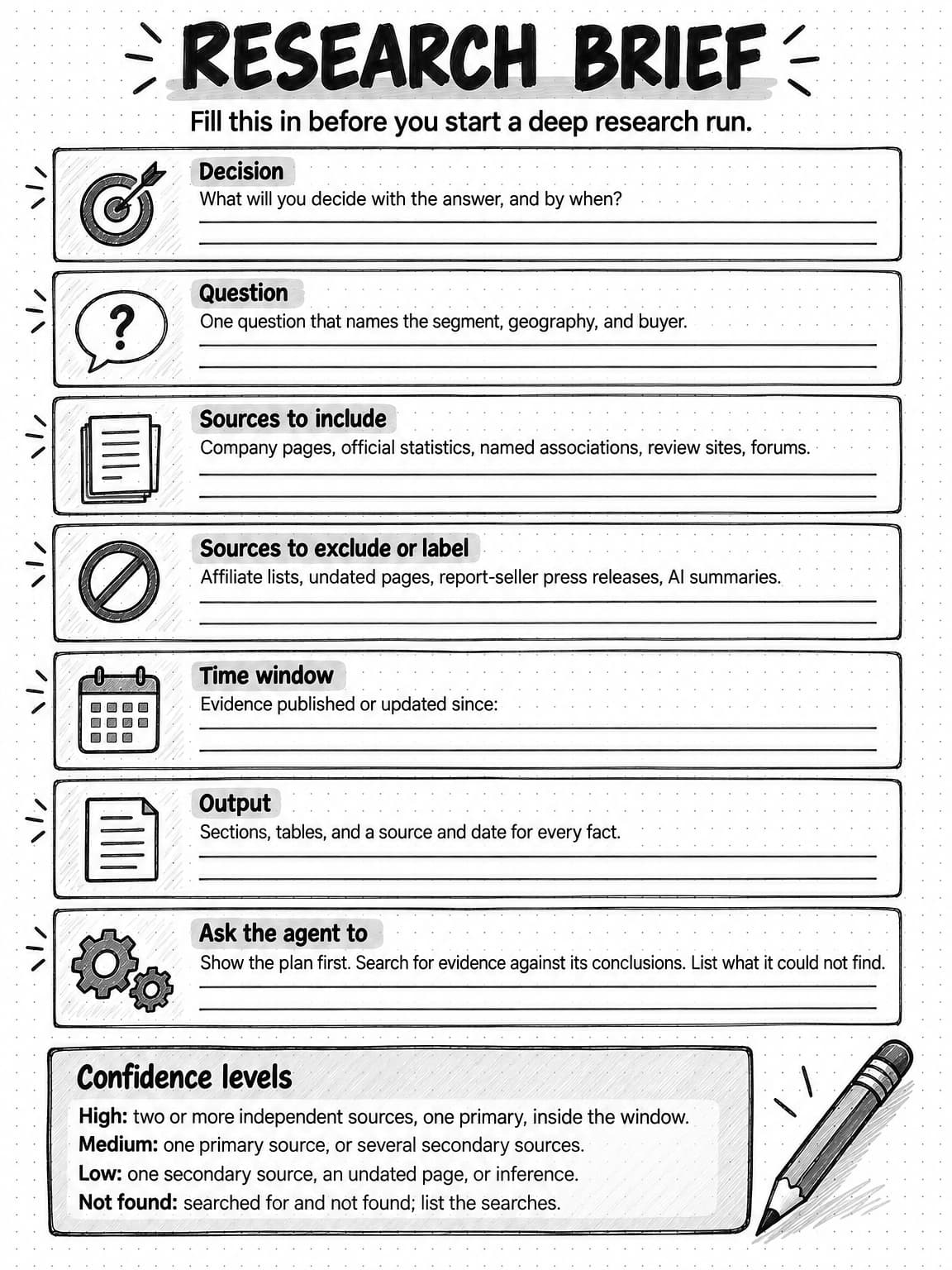
View and save the research brief worksheet at full size (opens in a new tab).
How to check a research report: the five-step source check
A finished report is a draft of evidence, and checking it is a different job from reading it. The five steps below test the sources behind the report. Run them on every finding you will use in a decision, starting with the ones the decision depends on most. For any sentence that later goes into customer-facing copy, also run the claim-by-claim check from the hallucination guide.
1. Open the citation and find the passage
Open the cited page and find the passage the statement relies on. Check that it says what the report says: the same figure, the same unit, the same scope. If the page does not contain the claim, or contains a different version of it, the citation fails, however authoritative the site. Expect this to happen. The audits above found that a large share of citations do not fully support their sentences.
2. Check the date and the scope
Note when the source was published or last updated, and compare it with your time window. Then compare its scope with your question: the country, the company size, the industry, the type of respondent. A survey of solo practitioners does not describe firms with 50 staff, and a global figure does not describe one country. The credibility questions in the market research guide go into who a source covers and what a number measures.
3. Identify who produced the source and how
Ask what kind of source it is and why it exists. A company's own pricing page is the primary source for its listed price, but its claims about results are claims. A vendor's survey may be designed to show that the problem its product solves is urgent. A market-size press release from a report seller usually summarizes a report you cannot read, so its method is hidden. Label each finding with its source type, and treat a hidden method as a reason for lower confidence.
4. Trace repeated figures to the original and count independent sources
When several citations give the same figure, check whether they are independent or all repeat one original. Five articles quoting the same press release are one source, not five. Follow the chain back to the first publication, and cite that instead. Syndicated copies and summaries change figures and drop dates as they spread, which is how a projection becomes a fact. Count only independent sources when you assign confidence.
5. Look for what is missing
Read the report for what it leaves out. Search yourself for evidence against its main conclusions, using different words from the agent's queries. Check whether whole source types are absent: a competitor scan with no customer reviews, a market overview with no official statistics, a debate with only one side cited. Note the sources the agent could not reach, such as paywalled reports or sign-in-only communities. Record absences as "not found in the sources checked on this date," as our competitor analysis guide advises, not as facts about the market.
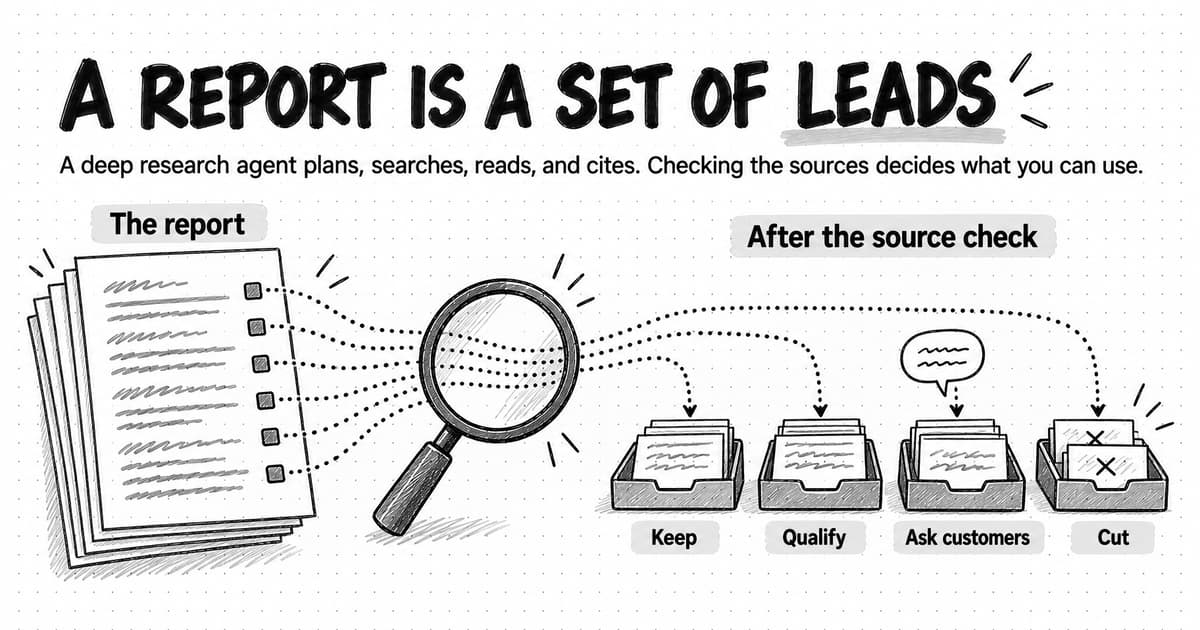
After the five steps, each finding ends in one of four states: keep it as written, qualify it with its date, scope, or source type, ask customers, by moving it to the list of interview questions, or cut it. Write the outcome next to the finding, so the next person to use the report knows what was checked.
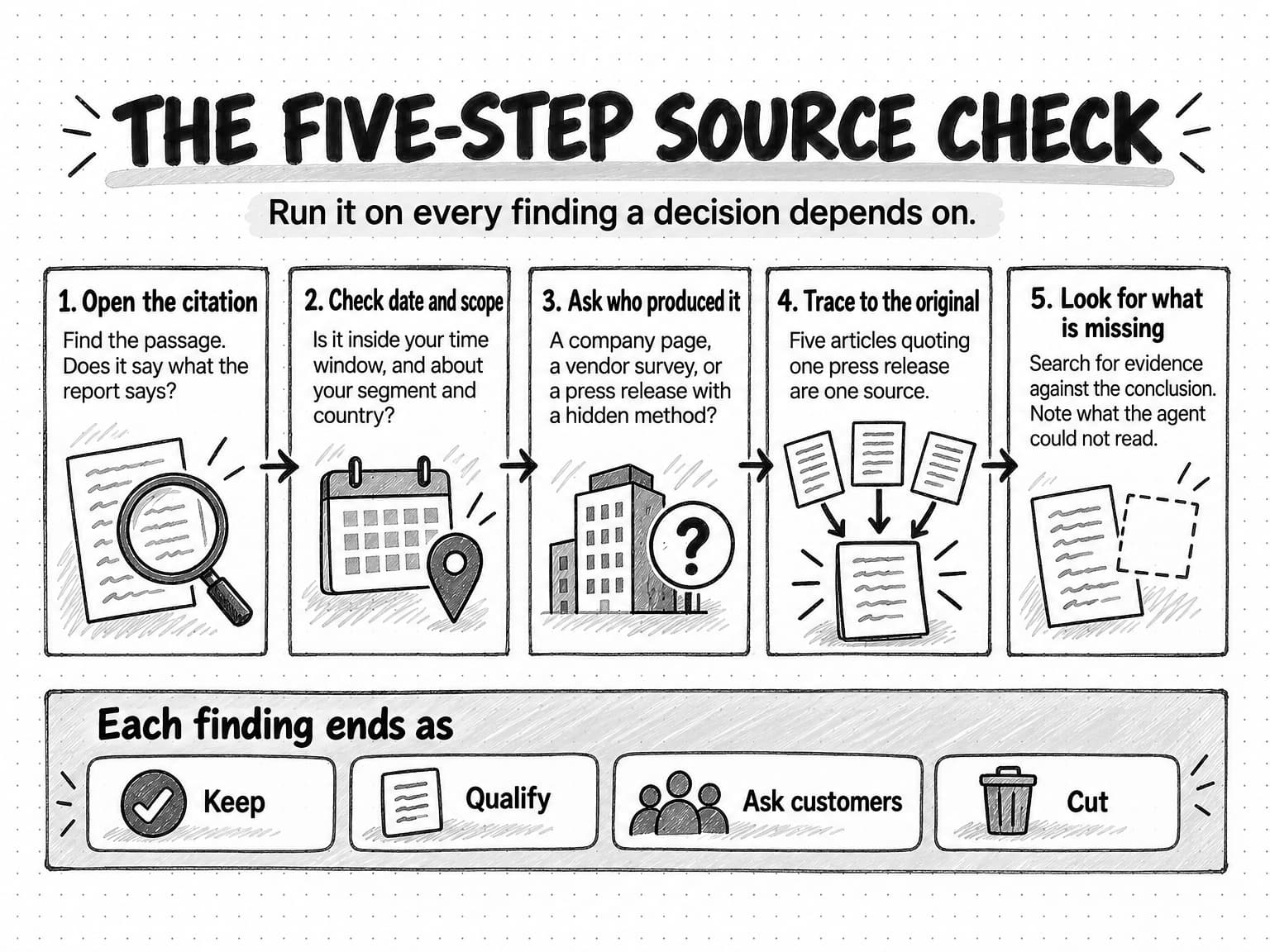
View the five-step source check at full size (opens in a new tab).
Worked example: one brief, one run, one check
The example below is fictional. The company, its competitors, the report, and every figure in it are invented and illustrative, chosen to show the method; none describes a real market.
The company and the decision. Quillbeck (fictional) sells practice-management software to accounting firms in the United States. Most of its customers are solo practitioners and firms with fewer than five staff. The marketing lead wants to decide whether next quarter's main campaign should target firms with 5 to 50 staff, and she needs to know what those firms use today, what competitors charge them, and why they switch.
The brief. She fills in the template. The decision is the campaign segment, to be made in three weeks. The research question is how US accounting firms with 5 to 50 staff choose and switch practice-management software. The time window is evidence published or updated since January 2025. She includes competitors' own pricing pages, two review sites, a named professional association, and two practitioner forums, and asks the agent to label vendor blogs and report-seller press releases. She asks for a competitor table with a source and date for each price, the confidence scale, a search for evidence against the main conclusions, and a closing list of questions for customers.
The plan. The agent proposes five sub-questions. One of them covers "enterprise accounting platforms," which is not her segment, so she removes it before the run starts. That edit takes a minute and prevents a whole section of irrelevant research.
The run. Twelve minutes later, the report has 38 citations and these headline findings:
- The US market for accounting practice-management software is worth $1.4 billion and growing 11% a year (rated medium, three citations).
- 62% of firm owners say scheduling and deadline tracking is their biggest operational problem (rated high, two citations).
- Competitor B charges $49 per user per month (rated high, one citation).
- Firms of this size switch mainly because of weak reporting and client-portal problems (rated medium, review excerpts and vendor articles).
- No public source found describes who makes the buying decision in firms of this size (not found).
The check. She runs the five steps on the findings the campaign decision depends on.
| Finding | What the check found | Outcome |
|---|---|---|
| 1. Market size | All three citations trace to one report seller's press release; the method is not public | Qualify: one undisclosed estimate, not three sources. Keep out of the deck |
| 2. "62% of firm owners" | The original survey was run by a scheduling vendor in 2022 and covered solo practitioners | Cut for this segment: wrong date and wrong scope |
| 3. Competitor B's price | The figure came from a review site; Competitor B's own pricing page now lists per-firm tiers, checked today | Correct from the primary source, with the date checked |
| 4. Reasons for switching | Supported by 14 review excerpts across two sites and two vendor articles; the search for counter-evidence found forum posts naming data migration as the main reason firms stay | Ask customers: a hypothesis, not a finding |
| 5. Who decides | Not found in the sources checked | Ask customers |
What she does with it. The report did its job, though not the one its formatting suggested. It gave her a current competitor table once one price was corrected, a short list of switching hypotheses, and two questions public sources could not answer. She books eight interviews with firms in the segment, asks about switching triggers and who signs off, and treats the market size as a single estimate she will not quote. The interviews, not the report, decide the campaign.
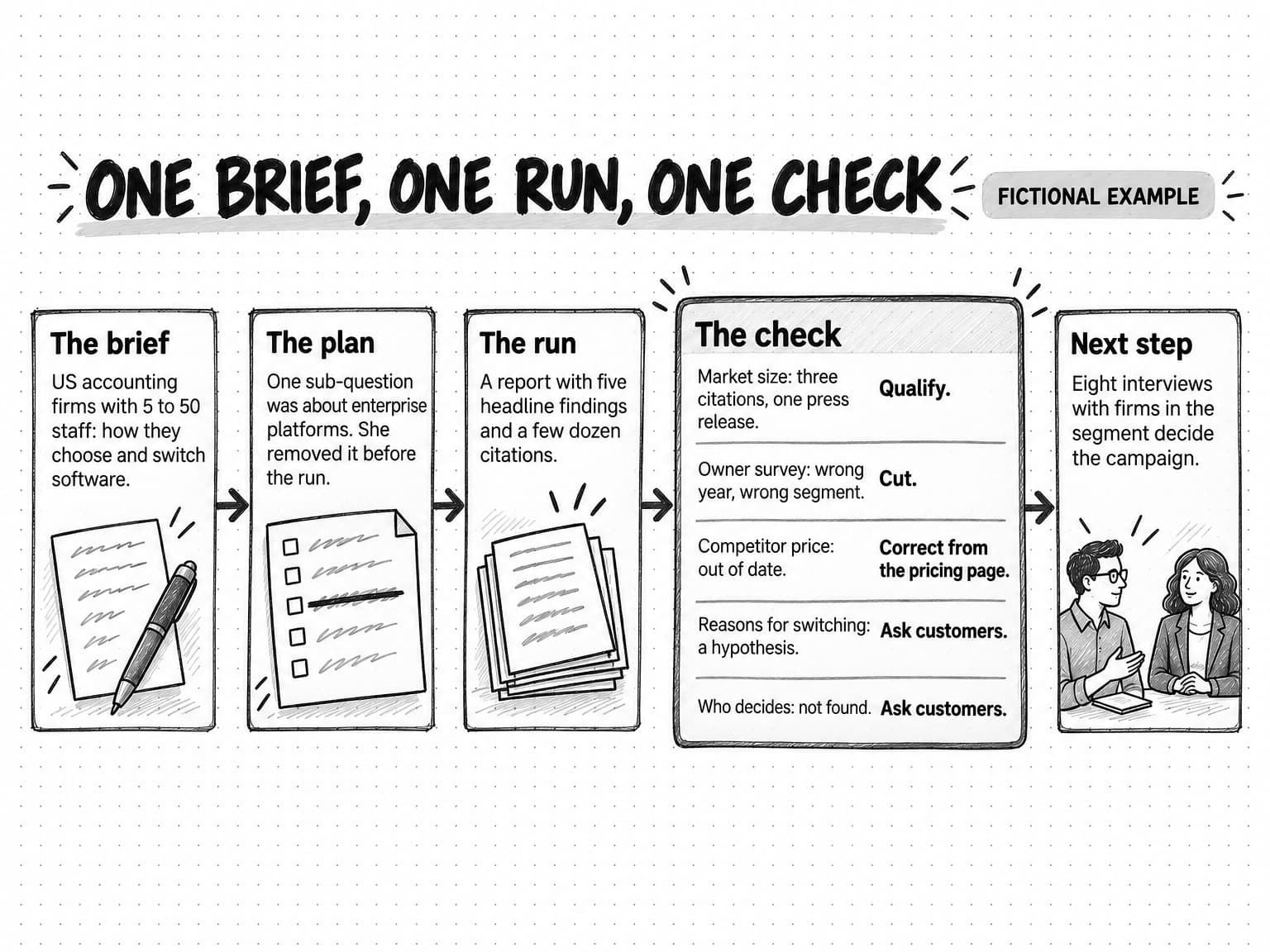
View the worked example at full size (opens in a new tab).
Five research jobs for marketers, and how to run each
Most marketing research with a deep research agent falls into a few recurring jobs. Each needs a slightly different brief and a different check.
A competitor snapshot before positioning work. Brief the agent with the named competitors, the fields to compare (plans, listed prices, target customers, main claims, recent launches), and a source and date for each cell. Check prices and claims against each competitor's own pages, and label marketing claims as claims. The competitor analysis guide covers turning the table into decisions.
A category scan when you enter an unfamiliar market. Brief it for the main players, the vocabulary buyers use, the recurring arguments, and the open questions, with a time window. Expect the most vendor and affiliate content here, so lean on steps 3 and 4 of the check, and use the report to plan interviews rather than to decide.
Desk research before customer interviews. Ask the agent what is already public about your segment's problems and what remains unknown, then write the interview guide from the gaps. This keeps interview time for questions only customers can answer.
Background research for a piece of content. For an article, a report, or a white paper, the agent can gather published studies and statistics on a topic. Trace every figure you quote to its original (step 4) before it reaches a draft. If the piece needs evidence nobody else has, run your own study instead; our guide to original research content explains why that evidence is worth more.
A recurring check on what changed. For a market you already understand, brief the agent for what is new since a date (launches, price changes, notable reviews, news), and run it on a schedule. The check is lighter, because you know the sources, but the time window matters more.
A rerun of the same brief can return a different report, with different sources and different emphasis. That variation has causes, which our guide to why AI gives different answers explains. For research, the practical consequence is that no single run is the full picture: compare a recurring report with the previous one and check what changed.
Common mistakes in AI market research
Many mistakes with AI market research happen after the run, in how the report is used.
- Treating the report as the evidence. The report is a set of leads with sources attached. The evidence is the sources, and only the ones that pass the check.
- Asking a topic instead of a question. "Research the CRM market" gives the agent the plan step, and with it the scope. A decision and a narrowed question keep the research on your problem.
- Counting citations instead of sources. Forty citations that trace to six originals are six sources. Confidence comes from independent support.
- Quoting a market size without its method. A market-size figure from a press release is an estimate whose method you cannot see. Show it as one estimate, or as a range with each source, and say where it came from.
- Skipping the plan. Reading the plan takes a minute and catches the wrong segment, geography, or time window before the run spends its effort.
- Accepting one side of a contested question. The audits found reports often present one side of a debate. Ask for counter-evidence in the brief, and look for it yourself in step 5.
- Using the report to answer "why". Public sources give hypotheses about motive. Interviews give evidence.
- Pasting findings straight into customer-facing copy. Anything that reaches customers needs the claim check as well as the source check.
How research works in Ampere
Ampere, the AI marketing agent, can run research as part of a marketing job, and the same loop and checks apply to its reports.
In a session, Ampere can search the web, extract page content, crawl websites, and map a site's structure, and it can pull public ad, review, social, creator, and company data for market research and content planning. Its outputs include research reports, cited answer summaries, and competitor lists, and it can build evidence-backed competitive analyses, competitor battlecards, and one-axis competitor comparisons. You can watch the work in the session workspace, where the Workspace shows the files and browser pages Ampere is working in, so you can see what it is reading. When a missing fact would block the work, Ampere can ask for it before continuing, and you can brief it with the research template above.
Research that should last can be saved. Ampere can save evidence-backed brand and market reports to Brand memory, including competitors, category landscape, search landscape, pricing, voice of customer, and trend snapshot reports, so later work starts from them. Saved reports have default refresh cadences, 12 months for most reports, 30 days for trend snapshots, and 14 days for recent news, and a report past its cadence is refreshed before later work presents it as ready, so that work does not lean on research that has gone stale. You can view and edit the saved reports.
For research that repeats, a scheduled task can put a recurring brief on a cadence, with each result landing in the Project for review. Monitoring checks supported public sources hourly, daily, or weekly and files what changed with evidence excerpts and source links.
The limits in this guide apply to Ampere too. Public web, social, ad, and review data come from providers and can be partial, unavailable, noisy, or incomplete, and no public source covers a market completely. AI output can be inaccurate or incomplete, so check the sources your decision depends on, and talk to customers about what public sources cannot show.
Sources and further reading
- Anthropic, How we built our multi-agent research system, Anthropic Engineering, June 13, 2025. The lead agent and subagents, the citation step, early failures (too many subagents, endless searching, content farms), and token use.
- Anthropic, Use research on Claude, Claude Help Center, read October 14, 2026.
- OpenAI, Deep research in ChatGPT, OpenAI Help Center, read October 14, 2026. The five stages of a run, the editable research plan, site restrictions, clarifying questions, and citations.
- OpenAI, Introducing deep research, February 2025, with dated updates through February 2026, read October 14, 2026. Run times and the limitations OpenAI lists.
- OpenAI, Deep research guide, OpenAI developer documentation, read October 13, 2026. Multi-step research, default web access, private data sources, and prompt-injection risk.
- Google, Gemini Deep Research overview, read October 13, 2026, and Gemini Deep Research agent documentation, Google AI for Developers, read October 13, 2026.
- Perplexity, Introducing Perplexity Deep Research, February 14, 2025.
- Yuxuan Huang and colleagues, Deep Research Agents: A Systematic Examination and Roadmap, arXiv, June 2025 (revised September 2025).
- Nelson F. Liu, Tianyi Zhang, and Percy Liang, Evaluating Verifiability in Generative Search Engines, Findings of EMNLP 2023.
- Klaudia Jaźwińska and Aisvarya Chandrasekar, AI Search Has a Citation Problem, Columbia Journalism Review, Tow Center for Digital Journalism, March 6, 2025.
- Pranav Narayanan Venkit and colleagues, DeepTRACE: Auditing Deep Research AI Systems for Tracking Reliability Across Citations and Evidence, ICLR 2026 (poster); first posted as an arXiv preprint in September 2025.
- Uwe Peters and Benjamin Chin-Yee, Generalization bias in large language model summarization of scientific research, Royal Society Open Science, April 2025.
- Janek Bevendorff, Matti Wiegmann, Martin Potthast, and Benno Stein, Is Google Getting Worse? A Longitudinal Investigation of SEO Spam in Search Engines, ECIR 2024.
Frequently Asked Questions
What is deep research in AI?
Deep research in AI is a mode or agent that answers a question needing many sources by planning the work, running dozens of web searches, reading the pages it finds, deciding what to search next, and writing a long report with citations. It takes several minutes, and the result is a long cited document. Several AI assistants offer a deep research mode, and AI marketing agents can run the same kind of research inside a larger job.
Can AI do market research?
AI can do much of the desk research in a market research project: finding public sources, collecting competitor facts, summarizing reports, and organizing what has been published into a first report with citations. It cannot create evidence about your customers. Why buyers choose or switch, who decides, and whether a message works come from interviews, surveys, and tests with real people. A good plan uses an AI research agent to map what is public and turns its gaps into questions for customers.
What are the benefits of AI in market research?
The benefits of AI in market research are speed and coverage: a research agent can run dozens of searches, find sources a person would miss, build a first competitor table, and organize an unfamiliar category in minutes. The limit is accuracy. Independent audits found that many citations in AI research answers do not fully support their sentences, and reports often present one side of a contested question. The benefit holds only when someone checks the sources behind the findings a decision depends on.
How do you write a prompt for AI market research?
A prompt for AI market research works best as a short research brief. State the decision the research supports, narrow the question to a segment, geography, and buyer, name the sources to include and the ones to exclude or label, set a time window, and describe the output, including a source and date for every fact. Ask the agent to rate each finding by confidence, search for evidence against its conclusions, and list what it could not find.
What is the difference between deep research and web search?
The difference between deep research and web search in an AI assistant is depth and time. Web search runs a few searches and writes a short answer with links in seconds, which suits a single fact. Deep research plans the work, runs dozens of searches in sequence, reads many more pages, changes direction as it learns, and writes a long cited report over several minutes. Both can cite pages that do not support the text, so both need checking.
What is the difference between deep research and a browser agent?
The difference between deep research and a browser agent is the job and the tools. A deep research agent answers a question by searching, reading, and writing a cited report, usually through search and page-reading tools. A browser agent operates web pages the way a person does, clicking, typing, and downloading, to complete a task such as collecting data from a site. Some products combine the two, using a browser when a page needs it.
How long does deep research take?
A deep research run usually takes from a few minutes to tens of minutes, depending on the product and the question. Providers' documentation describes runs of "several minutes," "under 3 minutes" for most tasks, and up to "tens of minutes." The time goes into running many searches, reading the pages, and deciding what to search next. Checking the finished report properly can take longer than the run, so plan time for the check as well.
Is AI replacing market researchers?
AI can take on much of the desk research in market research, but not the parts of the job that need people. A research agent can gather and organize public sources quickly, which leaves more time for the work it cannot do: designing studies, interviewing customers, judging which sources to trust, and deciding what the evidence means. AI also needs that judgment, because its reports can cite sources that do not support them and miss whatever is not public.
Where can I find free market research?
Free market research comes from official statistics, industry associations, public company filings, competitors' own websites and pricing pages, review sites, forums, and studies published by universities and research groups. A deep research agent can search these quickly, but check each source's date, scope, and method before using it. Press releases that summarize paid reports are free to read but usually hide the method, so treat their figures as single estimates.