What is multimodal AI? What marketers can do when AI can see, watch and listen
What multimodal AI can read and make, how reliable each is, and which marketing jobs to hand it, with the documented failure modes, a worked launch review, a question template and the consent and disclosure questions that faces and voices raise.
43 min readWritten by Ampere
Short answer
What is multimodal AI?
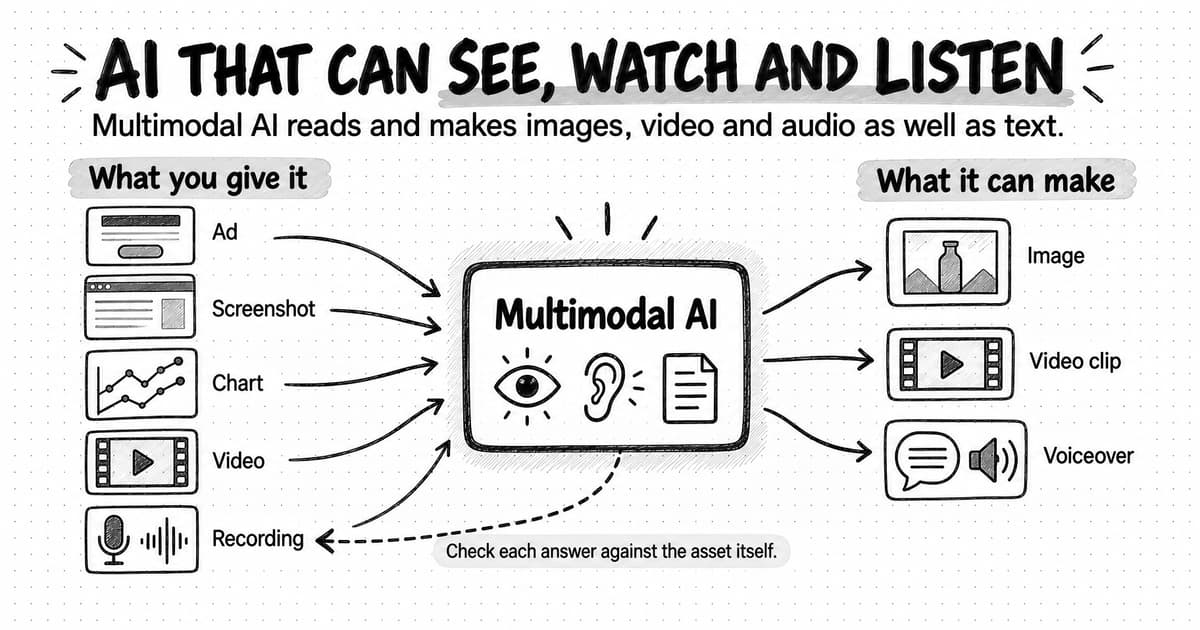
Multimodal AI is AI that can take in or produce more than one kind of data, such as text, images, audio and video. It can describe a photo, read a screenshot or chart, answer questions about a video, transcribe a recording, or make images, video and speech from a prompt. Check its readings of small print, charts and fast-moving video against the source.
Summary
Multimodal AI is useful for marketing when it answers a focused question about an asset and a person checks the answer against that asset. A model often receives less than a person sees: large images are scaled down to fit size limits and video is read as sampled frames, so preparing the input, for example by sending a long page in readable sections, decides how much detail survives.
Current models do best at describing what is plainly visible or audible and at reading large, clear text. They are weakest at the precise detail marketing claims depend on, such as small print, exact counts, values read off a chart, brief moments in video and the exact words someone said. When making assets, their documented weak points include legible text in images, consistent brand elements, realistic motion and the pronunciation of names.
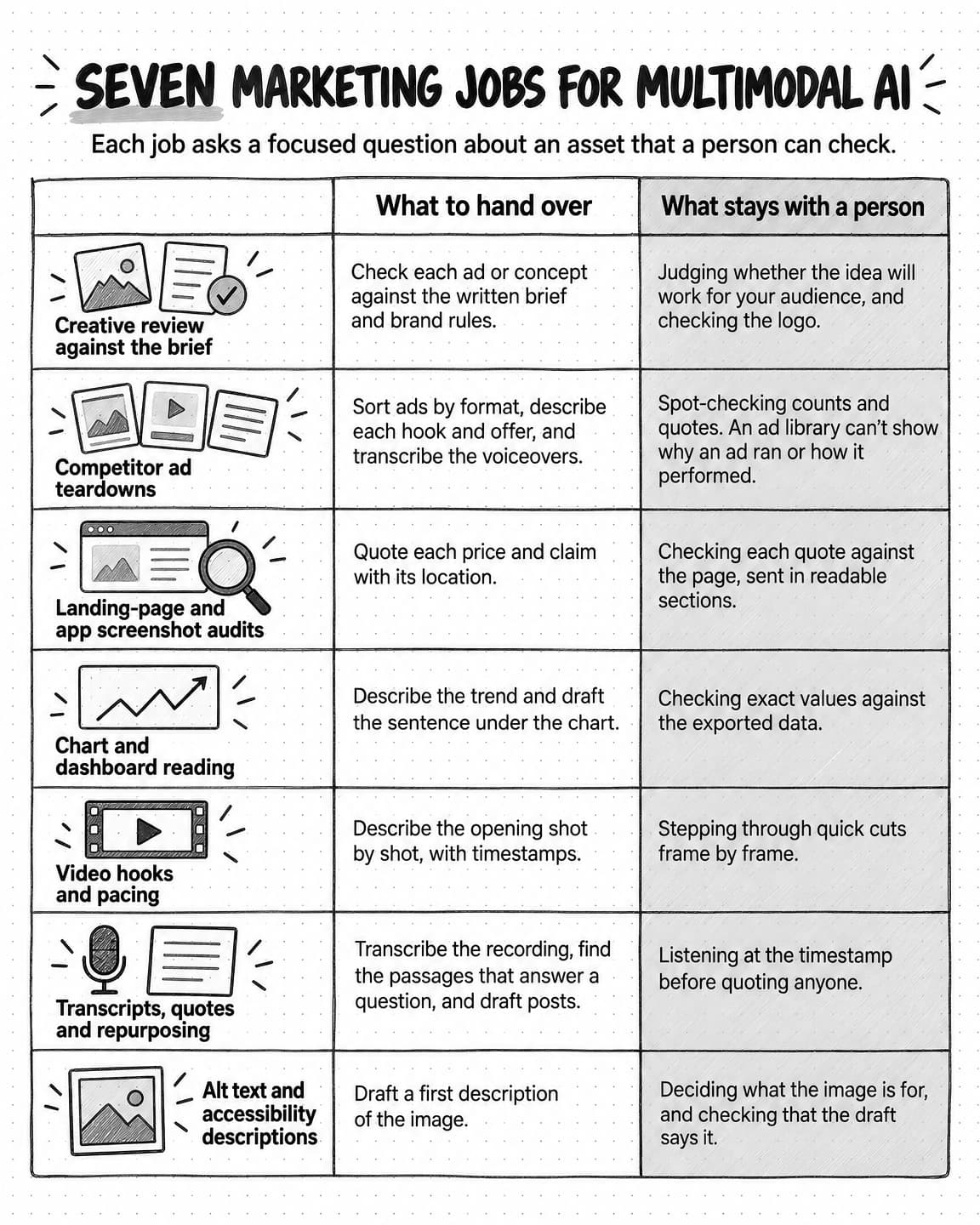
Seven marketing jobs suit multimodal AI because each asks a focused question a person can check: creative review against a brief, competitor ad teardowns, landing-page screenshot audits, chart and dashboard reading, video hook reviews, transcripts for quotes and repurposing, and alt text drafts. An agent can chain these steps, which saves handoffs but lets an early misreading, such as a misheard word, carry into the finished work.
In a worked review of a fictional software launch, the model caught an unapproved claim, a missing call to action and, once the landing page was resent in sections, a footnote that contradicted the brief. It missed an outdated logo and a price card shown for under half a second, and misread which chart line belonged to which quarter. Each miss was cheap to catch because every answer named a place to look.
Ask for observations with locations before judgments, as the copyable question template does, then check each answer against the image, page, timestamp or recording as deeply as its destination requires. Faces and voices raise legal questions too: Tennessee's ELVIS Act gives people a property right in their voice and likeness, and New York requires advertisers to disclose synthetic performers they know are in an ad.
Contents
- What multimodal AI means
- Three ways an AI system can read an image
- What a model receives from a screenshot, a PDF, a video or a recording
- What multimodal AI can read, and how reliably
- What multimodal AI can make: images, video and voice
- How multimodal agents differ from multimodal models
- Seven marketing jobs for multimodal AI
- Where multimodal AI goes wrong
- Worked example: a fictional launch review with multimodal AI
- How to ask about an image, a video or a recording
- How to check multimodal output before you use it
- Rights, consent and disclosure for faces, voices and realistic scenes
- How multimodal work happens in Ampere
- Sources and further reading
- Frequently Asked Questions
A launch review folder is mostly not text. It might hold three static ads, a 20-second product video, a full-page screenshot of the landing page, a dashboard from the last campaign, and the recording of the customer webinar the campaign quotes. A few years ago, an AI model could help with the copy in that folder and little else. Many current models can look at the ads, watch the video, read the screenshot and the chart, and listen to the recording, then answer questions about all of them in one conversation. Some can also make the images, video clips and voiceovers a campaign needs.
Multimodal AI is AI that can take in or produce more than one kind of data, such as text, images, audio and video. The word comes from modality, a kind of information or a way of perceiving it. For a marketer, the practical meaning is that you can hand the model the asset itself instead of describing it in words, and ask it to make assets that aren't text.
What the model receives is often different from what you see, though. A long screenshot may be shrunk until its small print is a few pixels tall. A video may be read as one still frame per second, which can skip a shot that lasts half a second. A transcript can contain words nobody said. These limits decide which jobs suit the technology. The useful jobs ask a focused question about an asset and check the answer against it. The risky ones take a model's reading of small print, a chart or a fast cut on trust.
This guide explains how models read images, documents, video and audio, and how reliable each kind of input and output is. It then covers seven marketing jobs, the documented failure modes, a worked review of a fictional product launch, a question template, how to check the answers, and the consent and disclosure questions that faces and voices raise. Model and platform details are as of October 2026.
What multimodal AI means
In their survey of multimodal machine learning, published in IEEE Transactions on Pattern Analysis and Machine Intelligence in 2019, Tadas Baltrušaitis, Chaitanya Ahuja and Louis-Philippe Morency define a modality as "the way in which something happens or is experienced" and call a research problem multimodal "when it includes multiple such modalities." They focus on three: natural language, written or spoken; visual signals, such as images and video; and vocal signals, which carry sounds and features of speech such as tone and rhythm.
In AI products, the word usually refers to the kinds of data a model handles: text, images, audio and video, plus formats that combine them, such as a PDF with charts or a video with a soundtrack. A model is multimodal when it accepts more than one kind as input, produces more than one kind as output, or turns one kind into another. A model that answers questions about a photo works across images and text, and one that turns a script into a voiceover works across text and audio.
Several names describe overlapping groups of these models. A vision language model, or VLM, takes images and text and usually answers in text, and much of the research cited in this guide uses the term. Multimodal large language model and large multimodal model describe a language model extended to other kinds of input. OpenAI's 2024 system card for one of its models describes an "omni model" that accepts any combination of text, audio, image and video as input. The labels matter less than two practical questions: which kinds of data a model accepts, and whether it reads them itself or hands them to another tool.
Multimodal AI is also different from generative AI, although many models are both. Generative AI makes new content, such as text, images, audio or video, from a prompt, as our guide to agentic AI and generative AI explains. Multimodal describes which kinds of data a model works with. A model that reads a dashboard screenshot and writes a summary is multimodal and generates text. An image generator is generative and crosses from text to images. A text-only chatbot is generative but not multimodal.
Three ways an AI system can read an image
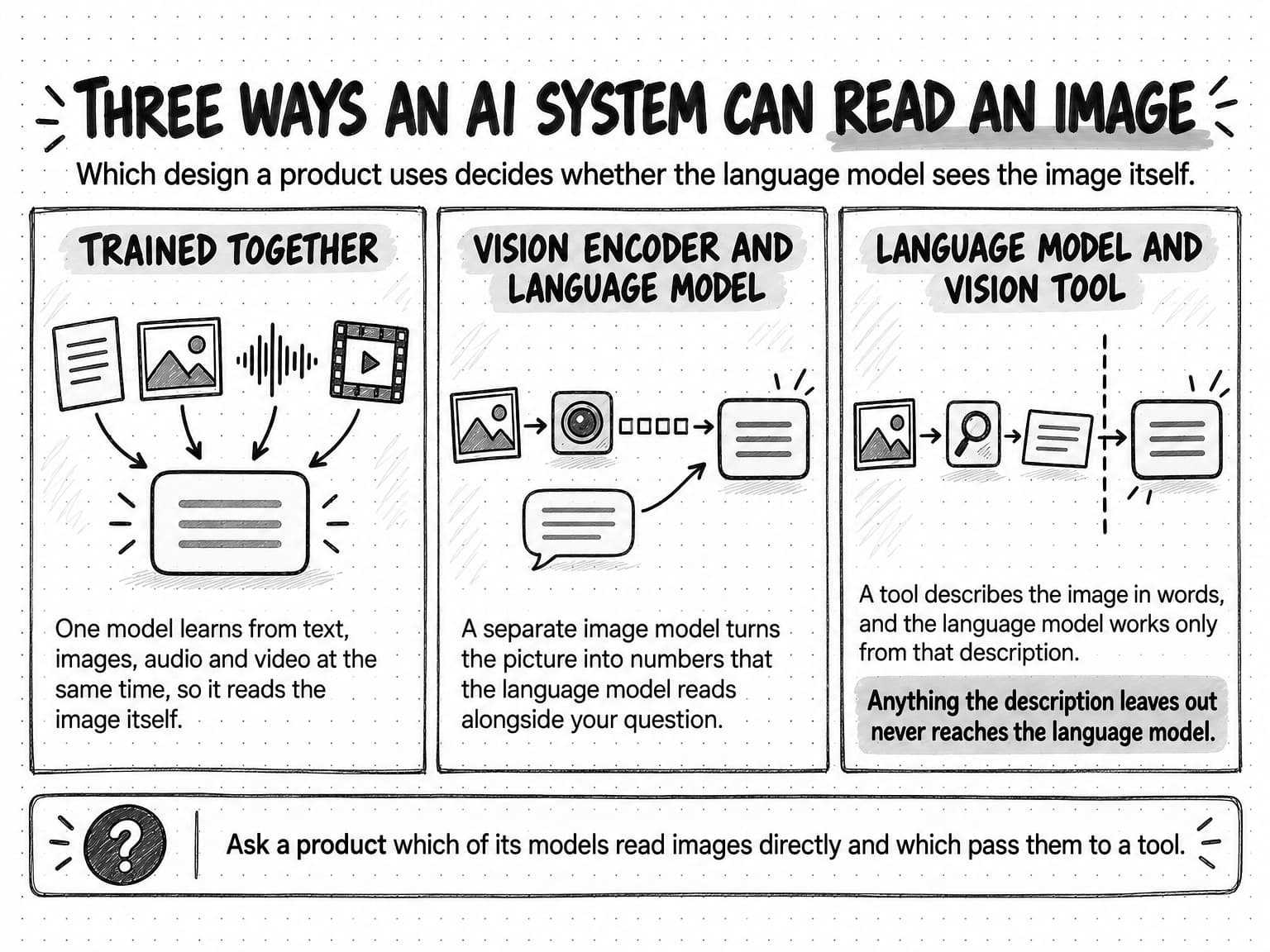
Language models work with tokens, the small units of text they read and write. To use an image, a video or a recording, a system has to turn it into something a language model can process. There are three common designs, and knowing which one a product uses explains some of what it gets right and wrong.
Trained on several kinds of data together
Some models are trained on text, images, audio and video at the same time, so one network handles all of them. In a December 2023 technical report, Google described training a family of models "jointly across image, audio, video, and text data." OpenAI's 2024 system card describes a model "trained end-to-end across text, vision, and audio," so that one neural network processes every input and output, and the model can produce text, audio and images as well as read them.
A vision encoder connected to a language model
A second design attaches a separate image model, called a vision encoder, to an existing language model. The encoder turns an image into a sequence of numbers that the language model reads alongside the text of your question. LLaVA, a research model presented at NeurIPS 2023, is described by its authors as "an end-to-end trained large multimodal model that connects a vision encoder and LLM."
A language model that calls vision tools
The third design keeps the language model text-only and gives it tools. When an image arrives, the system sends it to a separate model that describes it, reads its text or locates objects, and the language model works from the text that comes back. MM-REACT, a 2023 research system, connects a chat-based language model to "a pool of vision experts" and represents images to the language model in text, as descriptions, coordinates and file names.
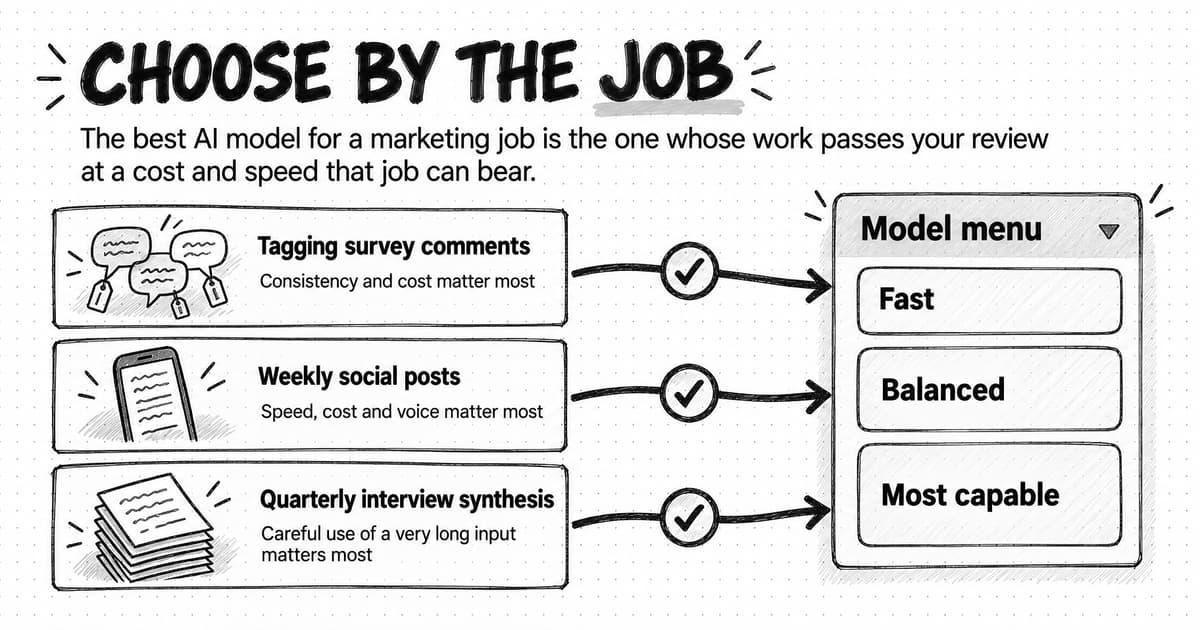
Products still use this design. Some agent products offer models that don't accept images directly, and when you upload an image while using one of them, the agent passes it to an image-reading tool and reasons about the tool's answer. The language model never sees the image itself, so a detail missing from the tool's description is missing from everything that follows. When a product offers several models, ask which ones read images directly and which go through a tool, one of the questions our guide to choosing an AI model by task helps you work through.
View the three ways an AI system can read an image at full size (opens in a new tab).
What a model receives from a screenshot, a PDF, a video or a recording
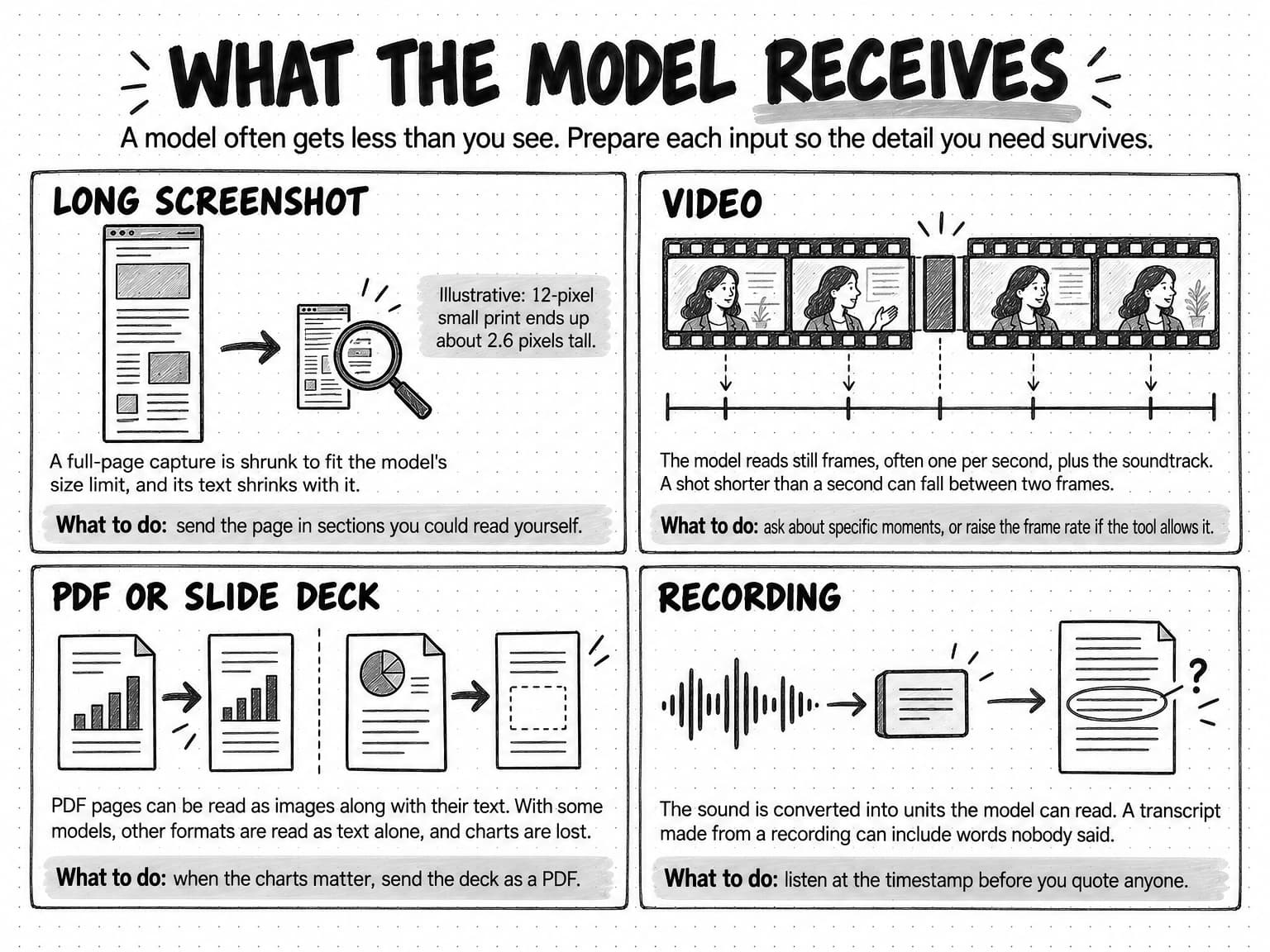
Images are cut into small squares before the model reads them. Anthropic's documentation, as of October 2026, says its models view images "in patches instead of pixels," each a 28-by-28-pixel block counted as one visual token, and OpenAI's guide describes 32-by-32-pixel patches for some of its models. Models also have a maximum image size. On Anthropic's standard tier, a larger image is scaled down until its long edge is at most 1,568 pixels and it fits within 1,568 visual tokens; newer models on its high-resolution tier allow a long edge of 2,576 pixels. OpenAI's guide says images "may be resized before analysis" and that the model "doesn't process original file names or metadata."
Resizing hits long screenshots hardest. A full-page capture of a landing page is tall and narrow, and shrinking its long edge to fit the limit shrinks the text by the same proportion. The table applies Anthropic's published limits to one illustrative page.
| The capture | 1,440 × 7,200 pixels, with 16-pixel body text and 12-pixel small print |
|---|---|
| Sent whole, standard tier | Scaled to about 314 × 1,568 pixels. Body text becomes about 3.5 pixels tall and small print about 2.6. |
| Sent whole, high-resolution tier | Scaled to about 515 × 2,576 pixels. Body text becomes about 5.7 pixels tall and small print about 4.3. |
| Sent as five square sections, standard tier | Each 1,440-pixel section is scaled to about 1,092 × 1,092 pixels. Body text stays about 12 pixels tall and small print about 9. |
Anthropic's guidance warns that resizing "might, for example, make text less legible" and suggests cropping or resizing images before sending them. Whichever model you use, send the part of the page you are asking about, at a size where you could read it yourself.
Documents are read either as page images or as plain text, and the difference decides whether charts survive. Anthropic's documentation says each PDF page is converted into an image and its text is extracted and provided alongside it, so the model can read the words and see the charts. Google's documentation says its models read PDFs "using native vision," count each page as 258 tokens, scale large pages down to at most 3,072 by 3,072 pixels, and accept files of up to 1,000 pages or 50 MB. Other document types, such as plain text, Markdown or HTML files, are "extracted as pure text," so charts, diagrams and formatting are lost. With those models, when the charts in a deck or report matter, send it as a PDF.
Video is read as a series of still frames plus the soundtrack. Google's video documentation, updated October 13, 2026, says its models sample video at one frame per second by default and "may miss details in videos with rapid motion or quick scene changes." The audio track is processed as well, you can ask about a moment by its timestamp in minutes and seconds (MM:SS), developers can set a custom frame rate, and YouTube links work only for public videos. A shot that lasts less than a second can fall between two sampled frames and never reach the model.
Audio is converted into tokens directly. Google's audio documentation, updated September 23, 2026, counts 32 tokens per second of audio and accepts up to 9.5 hours in one request. It lists transcription and translation, telling speakers apart, detecting emotion in speech and music, and recognizing non-speech sounds such as birdsong or sirens. Every image, page, frame and second of audio is counted in tokens, which is why a long video or a large deck costs more to analyze than a page of text, as our guide to AI tokens and credits explains.
View what the model receives at full size (opens in a new tab).
What multimodal AI can read, and how reliably
The table summarizes what current models can do with each kind of input, where they slip, and the check that catches the slip. "Current models" means the general-purpose models the leading providers document as of October 2026; a specific product can do better or worse, and the section on where multimodal AI goes wrong gives the evidence behind each limit.
| Input | What current models can do | Where they slip | Check before you rely on it |
|---|---|---|---|
| Text | Read, summarize, compare and draft | State false details with confidence | Check each claim against its source |
| Photos and ad images | Describe the scene, read short text, compare an image with a brief | Approximate counts and positions; may report common objects that aren't there; mistakes with low-quality, rotated or very small images | Compare the description with the image, especially counts and objects |
| Screenshots of pages and apps | Read headings, buttons, prices and layout; notice a missing element | Large captures are shrunk, so small print can become unreadable; file names and metadata are ignored | Crop to the section you are asking about |
| Charts and dashboards | Describe a trend, read labeled values | Confuse series that differ only by color or line style; questions that depend on visual reasoning are much harder for them than questions answered by reasoning in text | Compare values with the source data |
| PDFs and slide decks | Read text, tables and charts page by page | Some formats are read as text only, losing charts; page and size limits apply | Confirm figures on the page itself |
| Video | Describe scenes, read on-screen text, answer questions with timestamps, use the soundtrack | Often sampled at one frame per second by default, so quick cuts and brief text can be missed | Open the recording at the timestamp |
| Speech and other audio | Transcribe, translate, summarize, tell speakers apart, describe non-speech sounds | Error rates differ between speakers; a transcript can include phrases nobody said | Listen at the quoted moment before quoting |
Two patterns run down the table. Models do best at describing what is plainly visible or audible and at reading large, clear text, so a question like "what does the headline say" or "what happens in the opening scene" is the kind they handle well. They are weakest at precise detail: counts, small print, values read off a chart, the moment something appears on screen, and someone's exact words. Marketing claims often depend on exactly that kind of detail, so it is the part to check.
What multimodal AI can make: images, video and voice
On the output side, multimodal AI makes images, video clips and speech from text prompts, reference images and recordings. The documented limits differ from the reading limits, and they matter for a similar reason: the parts that break are often the parts a brand cares about most, such as legible text, a consistent product and the right pronunciation of a name.
| Output | What it can do | Documented limits | Check before you use it |
|---|---|---|---|
| Images | Make and edit images from prompts and reference images, such as product shots, backgrounds and ad variations | Text placement and clarity; keeping recurring characters or brand elements consistent across images; placing elements precisely in a structured layout | Spelling, logo, product details and layout, at the size the image will run |
| Video | Make short clips from a text prompt or a still image, some with sound | Physical plausibility: how things move, fall or pour can look real and still be wrong | Watch at full speed, then step through the frames where the product or text appears |
| Voice | Read a script aloud, make a custom voice, produce dialogue | Brand names, acronyms and unfamiliar words can be mispronounced | Listen to the whole file and check every name |
The image limits come from OpenAI's image-generation guide, which says, as of October 2026, that its model "can still struggle with precise text placement and clarity," may struggle "to maintain visual consistency for recurring characters or brand elements across multiple generations," and may have difficulty placing elements precisely "in structured or layout-sensitive compositions." Some providers mark what their models make. Google's image-generation documentation says all images its models generate "include a SynthID watermark," a digital mark that Google's SynthID tool embeds in AI-generated content.
Generated video raises a different problem. In a 2025 study, Saman Motamed and colleagues tested six video-generation models on whether their clips followed physical principles such as fluid dynamics and optics, and concluded that "physical understanding is severely limited, and unrelated to visual realism." A clip can look convincing and still show a product pouring, folding or moving in a way it can't, so check motion as well as appearance.
Synthetic voices can mispronounce brand names, acronyms and unfamiliar words, and some speech services let you spell out how a word should sound. Microsoft's speech documentation, for example, describes using phonemes, which write out the sounds of a word, and a custom lexicon, a list of words with their pronunciations, "to improve pronunciation." Keep a list of the names your voice tool gets wrong and the spellings that fix them.
AI avatar videos combine all three outputs: a portrait, a voice and a script become a talking presenter. The checks for images, video and voice all apply, and so do the consent questions later in this guide, because an avatar can reproduce a real person's face and voice.
How multimodal agents differ from multimodal models
A multimodal model answers one request: you send an image and a question, and it sends back an answer. An AI agent works toward a goal over many steps and chooses tools as it goes, as our guide to how AI agents work explains. A multimodal agent is an agent whose steps can involve images, video and audio. Asked to turn a webinar into launch posts, it might transcribe the recording, find the moments worth quoting, draft the posts, generate an image for each one, and look at each image to check it against the brief.
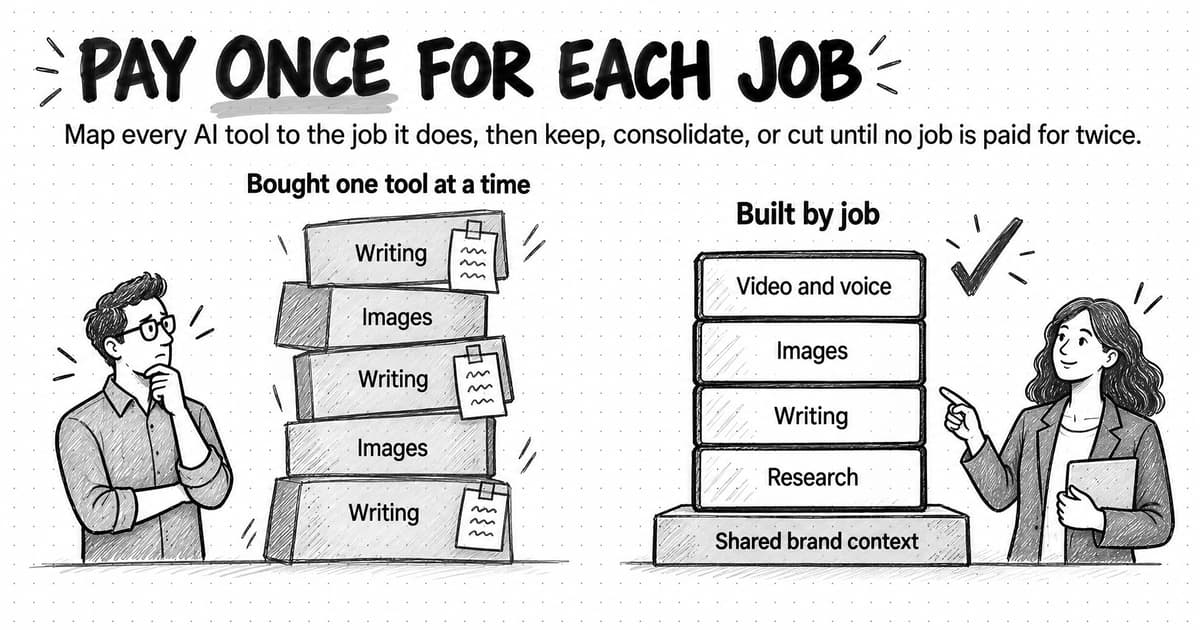
Each of those steps can use a different model or tool, chosen for the kind of data: a speech-recognition model for the transcript, a language model to choose the moments, an image model for the visuals and a vision model to review them. The agent carries the work from step to step, so nobody has to paste a transcript from one tool into another. The cost of that convenience is that an early misreading carries forward. A misheard word in the transcript can become a quote in a post, and a misread number in a dashboard can become a claim in a report. Check the steps where the agent reads media as well as the finished work. An AI marketing agent also brings your brand and product context to those steps, so its review of a generated image can compare it with your brand rules and the brief.
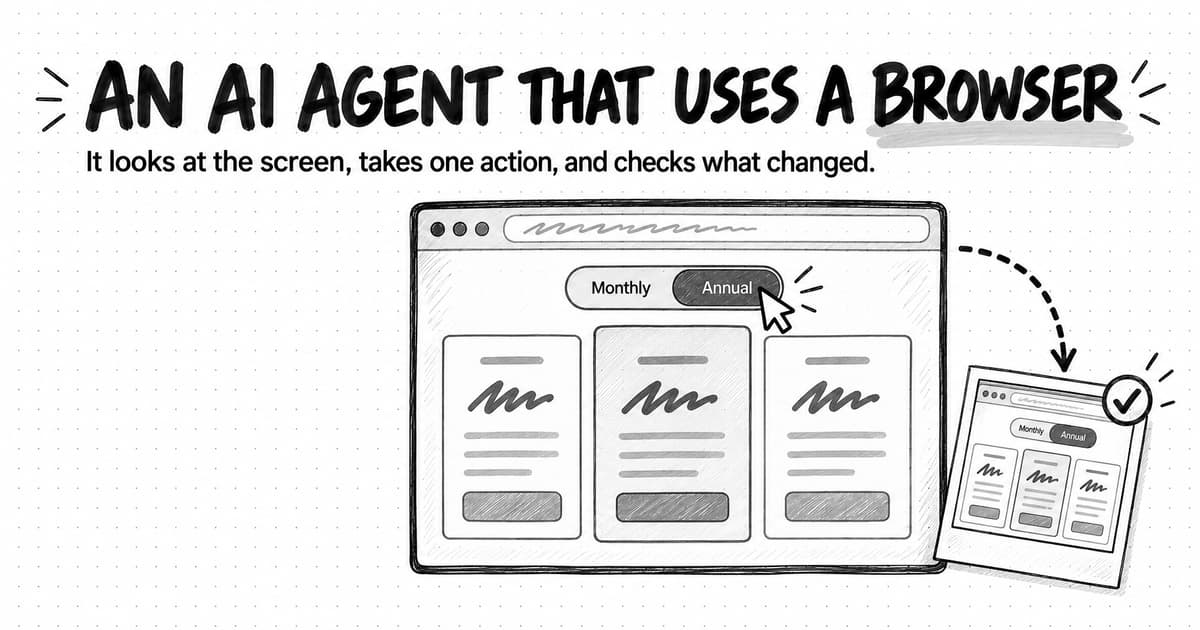
One kind of agent uses vision to act. A computer-use agent looks at screenshots of a screen, decides where to click or what to type, and looks again to see what changed. Everything in this guide about how models read screenshots applies to it, and our guide to computer-use agents explains how those agents operate a browser and which marketing jobs need one.
Seven marketing jobs for multimodal AI
The jobs below suit multimodal AI because each one asks a focused question about an asset a person can check, and each note says where a person still has to look.
View the seven marketing jobs table at full size (opens in a new tab).
Creative review against the brief
Give the model the ad or concept board together with the brief and your brand rules as text, and ask it to check one against the other. Is the call to action there? Does the headline make a claim the brief doesn't support? Is the product shown the one being launched? Does the image follow the imagery rules? The model can only check against what it is given, so write the standard down; imagery rules that say what pictures are for before how they look, as our guide to brand guidelines recommends, give it something specific to check. A model can't tell you whether the idea will move your audience, so keep that judgment with the team, using questions like the six in our guide to writing a creative brief. Check logos yourself; the failure modes below explain why a model can describe last year's logo as if it were this year's.
Competitor ad teardowns
Ad libraries let you collect a competitor's current creative, and a multimodal model can sort a set of ads by format, describe each hook and offer, transcribe the voiceover in video ads and note each call to action. The result is a table to review in place of notes taken ad by ad. What an ad library can't tell you, and a model can't infer, is why an ad ran or how it performed; as our guide to competitor analysis puts it, a library shows which creative was available to run. Spot-check the table against the ads, especially counts and quoted text.
Landing-page and app screenshot audits
A screenshot lets a model review a page as a visitor sees it: whether the main message and the call to action appear on the first screen, whether the headline matches the ad that sends people there, and whether prices and claims agree across pages. Send the page in sections at a readable size, for the reasons in the resizing table, and ask the model to quote each price and claim with its location so you can check them. For an audit across many pages or screen widths, an agent that can open the browser itself saves the capture work.
Chart and dashboard reading
A model can describe what a chart shows and draft the sentence that goes under it, which helps when a dashboard screenshot is all you have. It is weakest at exact values and at telling apart series that differ only by color or line style. When the numbers matter, give the model the exported data instead of the picture, or ask it to list every value it read so you can compare the list with the source.
Video hooks and pacing
The opening seconds are the part of a social video every viewer sees, which makes them the part to review most closely. A model can describe the opening shot by shot, transcribe the first line, read on-screen text, and compare the opening with the brief or with a competitor's. Ask about specific timestamps, and remember the default sampling rate: at one frame per second, a model sees about three frames of a three-second opening. If the tool lets you raise the frame rate, do it for hook reviews; if not, step through the opening yourself.
Transcripts, quotes and repurposing
Transcription turns a webinar, podcast or customer call into text that can be searched, quoted and reused, and a model can find the passages that answer a question and draft posts from them. The risk is in the exact wording. Speech recognition makes more errors for some speakers than others and can produce phrases nobody said, so listen to the recording at the timestamp before you quote anyone. Our guide to repurposing content across channels shows how a dropped "not" can reverse a speaker's meaning, and why the editor goes back to the recording.
Alt text and accessibility descriptions
A model can draft a description of an image quickly, which makes it useful for the alt text that ads, posts and web pages need. The draft is a starting point, because good alt text depends on why the image is there. The W3C's images tutorial, updated in April 2026, says the text alternative "needs to be determined by the author, depending on the usage, context, and content of an image." An informative image needs a short description of its essential information, a decorative one needs none, an image of text needs the same words, and a chart needs a complete text version of its data. Tell the model the image's purpose and where it appears, then check that the description says what the image is for.
Where multimodal AI goes wrong
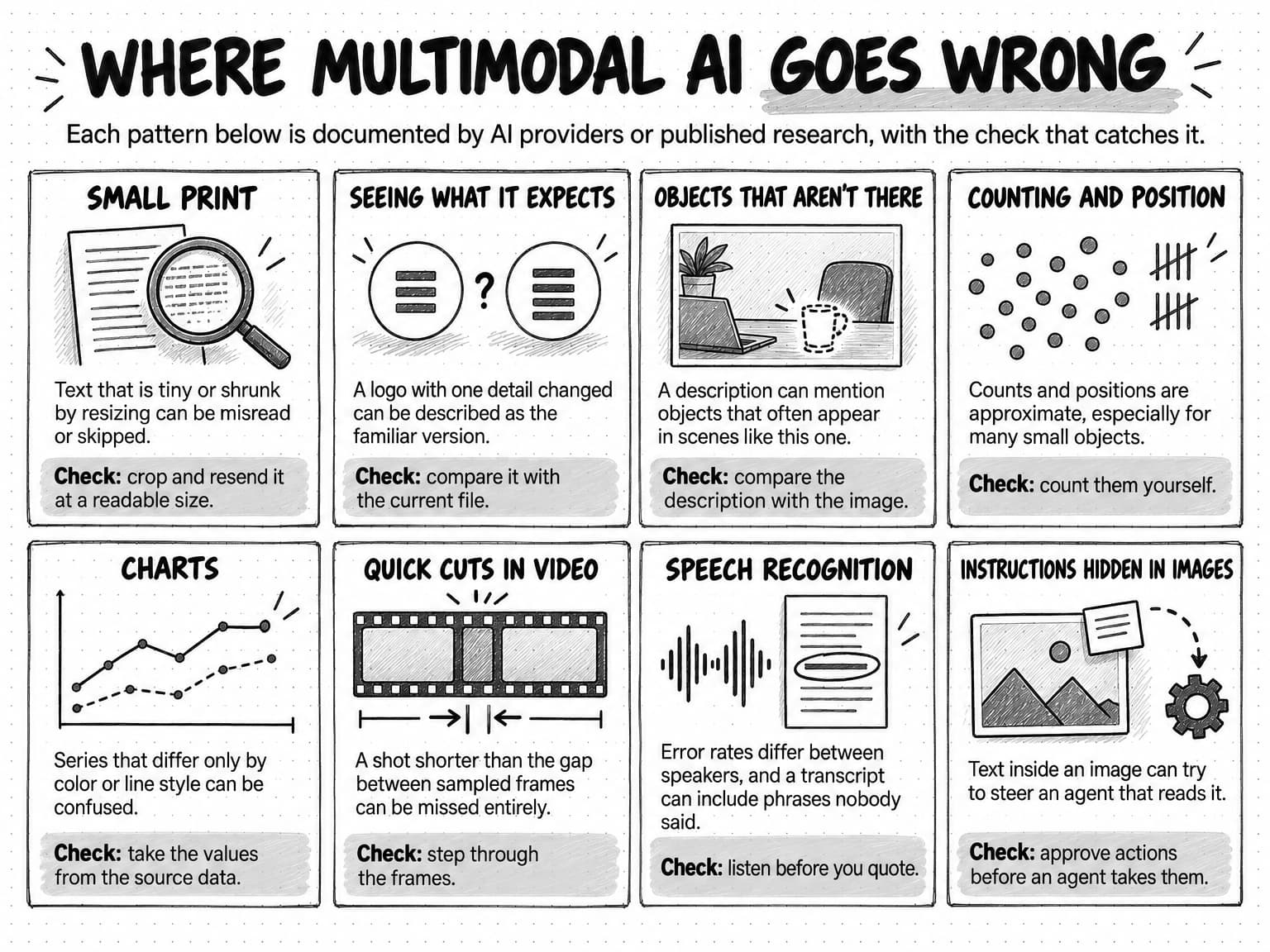
The limits below come from the providers' own documentation as of October 2026 and from published research. The studies date from 2020 to 2025, and newer models may do better on some of them, so read each number as a measurement at its date. The providers' current documentation still lists most of these limits, which suggests the patterns hold even where the numbers have moved.
View the eight failure patterns at full size (opens in a new tab).
Small text and fine print
Both OpenAI and Anthropic warn about small text in their documentation. OpenAI's guide advises users to "enlarge text within the image to improve readability," and Anthropic's documentation says its model "might hallucinate or make mistakes when interpreting low-quality, rotated, or very small images under 200 pixels." In OCRBench v2, a text-reading benchmark published in 2024 and revised in 2025, Ling Fu and colleagues found that most of the large multimodal models they tested scored below 50 out of 100, with weaknesses that included rarely seen text, fine detail and page layout.
Seeing what the model expects to see
Models lean on what they have seen before. In "Vision Language Models are Biased," An Vo and colleagues showed five leading models from three providers images of familiar things with one detail changed, such as a fourth stripe added to a three-stripe logo. The models answered correctly about every unmodified image, but averaged 17.05% accuracy when asked to count the changed detail across seven kinds of subject, and telling them to rely only on the image improved accuracy only marginally. For marketers, the risk sits in logos, packaging and product variants that look almost like a familiar version: the model may report what the item usually looks like.
The same habit produces objects that aren't there. In a 2023 study presented at EMNLP, Yifan Li and colleagues found that vision language models "tend to generate objects that are inconsistent with the target images," and that objects which appear often in the models' training instructions, or often appear alongside the objects actually in the image, are especially likely to be invented. A description of a photo can mention something that would usually be in a scene like it.
Counting and position
Anthropic's documentation says its model "can give approximate counts of objects in an image but might not always be precisely accurate, especially with large numbers of small objects," and that its coordinate outputs are approximate. OpenAI's guide lists approximate counts and difficulty with "precise spatial localization." In BlindTest, a 2024 set of seven tasks that are simple for people, such as judging whether two circles overlap or how many times two lines cross, Pooyan Rahmanzadehgervi and colleagues found that four leading models averaged 58.07% accuracy. Don't publish a model's count of products, people or ads without counting them yourself.
Charts
Charts combine small text, position and color, and they are harder for models than they look. ChartMuseum, a benchmark of 1,162 expert-annotated questions about real charts from 184 sources, presented at NeurIPS 2025 by Liyan Tang and colleagues, found that people answered 93% correctly and the best model tested 63.0%. Every model tested did 35% to 55% worse on the questions that depend mainly on visual reasoning than on those that can be solved almost entirely by reasoning in text. OpenAI's guide adds that its model may struggle with graphs where colors or line styles, such as solid, dashed or dotted lines, vary.
Timing in video
A model that samples one frame per second can't see what happens between frames, and its timestamps are only as precise as its sampling. Short ads with fast cuts, a price shown for a moment and a product that appears in a single shot are the cases to check by eye, at the timestamps the model gives and between them.
Speech recognition errors
Transcripts are less reliable for some voices than for others. In a study published in PNAS in 2020, Allison Koenecke and colleagues tested five leading commercial speech-recognition systems and found an average word error rate of 0.35 for Black speakers and 0.19 for white speakers, roughly one error for every three words compared with one for every five. A 2024 study led by the same researcher found that roughly 1% of transcriptions from a widely used speech-recognition service "contained entire hallucinated phrases or sentences" that did not exist in the audio, that 38% of those invented passages included harms such as inaccurate associations or implied false authority, and that they occurred more often for speakers whose speech included longer pauses.
Rotated, unusual and synthetic images
The providers list a few more limits. OpenAI's guide says its model may misinterpret rotated or upside-down text and images, may not perform as well on text in non-Latin alphabets such as Japanese or Korean, and struggles with panoramic and fisheye images. Anthropic's documentation says its model "cannot determine whether an image is AI-generated," so a general model is not a deepfake detector.
Instructions hidden in images
An image can carry instructions as well as information. The OWASP Gen AI Security Project's 2025 list of the top risks for large language model applications warns that "the rise of multimodal AI, which processes multiple data types simultaneously, introduces unique prompt injection risks," with the example of an attacker who "embeds a malicious prompt within an image that accompanies benign text." The risk matters most when an agent that can take actions reads images you didn't make, such as user uploads or a competitor's pages, so require a person's approval before such an agent acts on what it reads.
Worked example: a fictional launch review with multimodal AI
Larkspan is a fictional company that sells invoicing software to small accounting firms, and the example is illustrative: its results show the failure modes above, not a test. Before launching automatic payment reminders, Larkspan's two-person marketing team wants four assets reviewed: three static LinkedIn ads, a 20-second launch video, a full-page screenshot of the landing page, and a dashboard screenshot from the previous campaign. The brief says the audience is practice owners, the promise is fewer late payments without awkward phone calls, the trial lasts 30 days, the price is $34 a month, and no percentage claims may be used until the product team approves them.
The team asks one focused question per asset, gives the model the brief and the brand rules as text, and asks it to quote what it reads and say where. The table records what happened.
| Asset and question | What the model got right | What it missed or got wrong | How the team caught it |
|---|---|---|---|
| Three ads: "Check each against the brief and list every mismatch with its location." | Flagged "Get paid 2x faster" in ad 2 as a claim the brief doesn't approve, and a missing call to action in ad 3 | Described the logo in ad 1 as "the Larkspan logo" without noticing it was last year's version | A designer compared each logo with the current brand-kit file |
| Video: "Describe each shot and line in the first five seconds, with timestamps." | Described the opening shot, transcribed the first line of voiceover, and read the on-screen headline | Never mentioned a price card on screen for less than half a second at 0:02, still showing the old $29 price, and placed the first line a second early | The editor stepped through the opening frame by frame |
| Landing page, sent whole: "List every price and claim, with its location." | Listed the headline, the three benefit claims and the main price | Missed the footnote under the pricing table, about 2.6 pixels tall after resizing | The team resent the page as five sections, and the second pass found a footnote offering a 14-day trial |
| Dashboard: "What happened to trial signups over the last eight weeks?" | Described a rise in weeks five to seven | Attributed the peak of last quarter's dashed line to this quarter | The team asked for the weekly values it had read and compared them with the exported data |
The model's catches were the ones it handles best: written claims checked against a written standard, a missing element, and, once the page arrived at a readable size, a footnote that contradicted the brief. Its misses were the ones the research predicts: a familiar logo, a frame shorter than the sampling interval, small print and two series told apart by line style. Every miss was cheap to catch, because every answer named an ad, a timestamp, a section of the page or a week on the chart that the team could open and compare.
The team now sends landing pages in sections, attaches the current logo file to every creative review, raises the frame rate for video openings when the tool allows it, and gives the model the exported data for any chart whose numbers will be quoted.
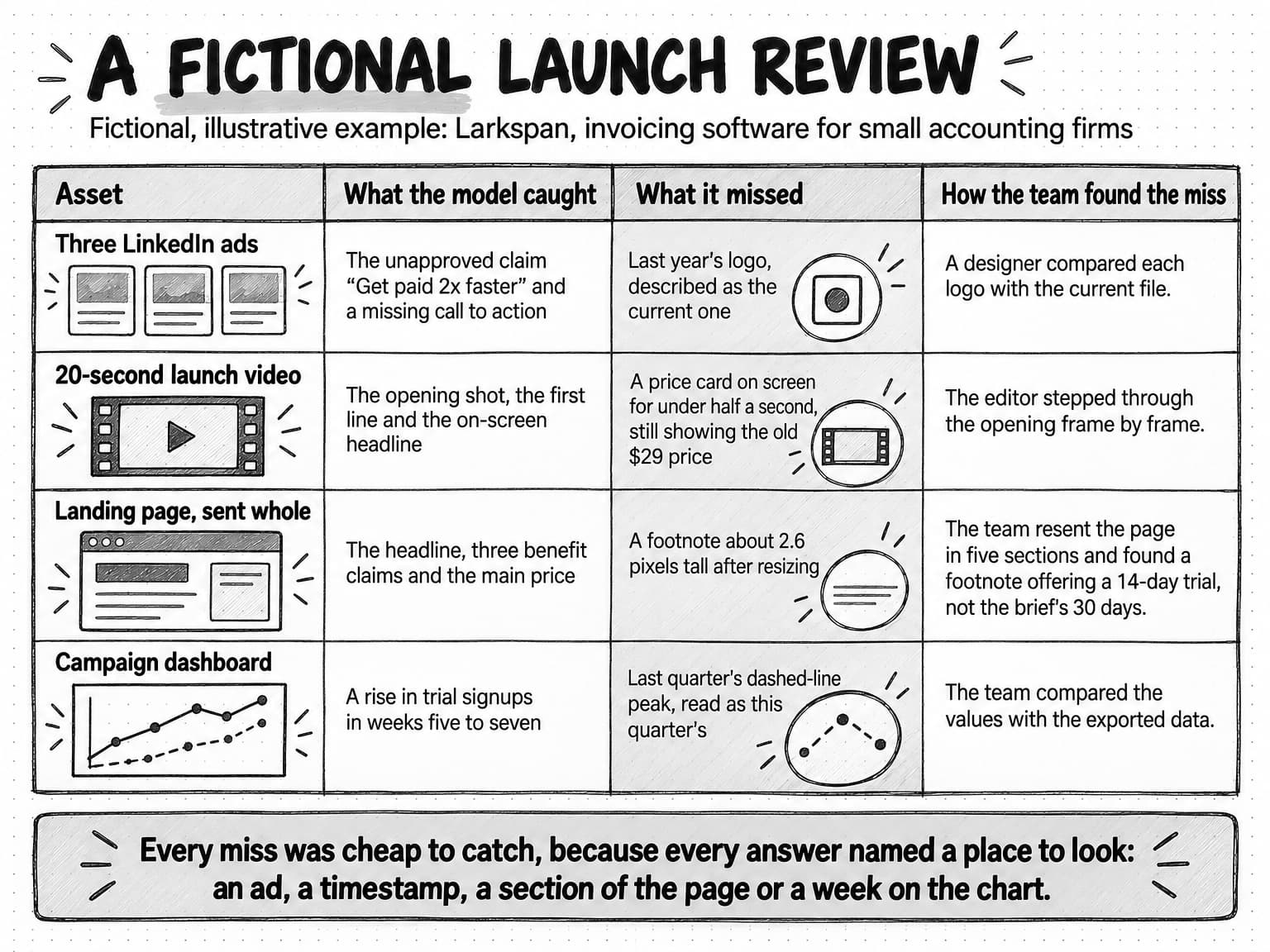
View the fictional launch review at full size (opens in a new tab).
How to ask about an image, a video or a recording
The way you ask decides whether you can check the answer. "Is this ad good?" invites a confident opinion with nothing to verify. "Quote the headline and the call to action, then say whether either makes a claim the brief doesn't approve" produces observations you can compare with the ad in a minute. Six habits make answers checkable:
- Ask one focused question per asset, and say what the asset is for: where it will run, at what size, and for which audience.
- Give the standard as text. Paste the brief, the approved claims and the brand rules, and attach reference files such as the current logo, because the model has no way of knowing which version is current.
- Ask for observations before judgments. Have the model quote every piece of text exactly and describe what it sees or hears, and only then compare that with the standard.
- Ask it to locate everything: the position in the image, the page number or the timestamp.
- Ask what it could not read or was unsure of, and tell it to mark unclear details instead of guessing.
- Prepare the input. Crop to the part you are asking about, keep text large enough to read, turn pages upright, and for video, ask about specific moments or raise the frame rate when the tool allows it.
Ask what the model saw before you ask what it thinks.
The template below puts those habits into one message you can copy and fill in. It works for a single image, a set of ads, a page, a clip or a recording.
Asset: [what it is, where it will run, and at what size]
Audience and goal: [who will see it and what it should make them do]
Standard: [paste the brief, the approved claims and the brand rules; attach reference files such as the current logo]

1. Describe what you see and hear. Quote all text exactly, and give the location of each item: its position, page, or timestamp (MM:SS).
2. Compare the asset with the standard. List each mismatch with its location.
3. List anything you could not read, could not hear, or are unsure of, and say why.

If a count, a line of small print, or a chart value is unclear, say so instead of estimating it.
How to check multimodal output before you use it
Check a multimodal answer against the asset, never against the model's description of it. Open the image at full size, the page in a browser, the video at the timestamp and the recording at the quoted moment, and confirm that each observation you plan to rely on is there. The checks differ by kind of output.
| Text read from an image | Compare it character by character with the original, including prices, dates and small print. |
|---|---|
| Values read from a chart | Take them from the source data whenever it exists, and treat values read off the picture as approximate. |
| Counts | Count them yourself, or leave the number out. |
| Quotes from audio or video | Listen at the timestamp and check the exact words, the qualifiers and the speaker's name. |
| Generated images | Check spelling, the logo, product details and any people at the size and in the place the image will run. |
| Generated video | Watch at full speed, then step through the frames where the product, text or people appear. |
| Voiceovers | Listen to the whole file and check every brand, product and person's name. |
How deep to go depends on where the work is going. Our guide to human-in-the-loop review sets the depth by stakes: a quick read for internal work that is easy to change, a source check for anything customers or the public will see, and full approval for anything that publishes, sends or spends. A competitor teardown for an internal meeting needs spot checks of quoted text. A price in an ad needs the source.
When a multimodal answer becomes a claim in published work, check it the way you would check any claim. The four-step check in our guide to preventing AI hallucinations already looks for claims in image text, chart labels and captions.
For work that runs every week, such as a review of new competitor ads, keep a small set of images and clips whose answers you have checked, and rerun it whenever the model or the tool changes. If the answers drift, you find out from the test set before a wrong reading reaches a report. Our guide to AI evals shows how to build and score that kind of fixed test.
Rights, consent and disclosure for faces, voices and realistic scenes
Multimodal AI raises three questions whenever a person or a realistic scene appears in the work: whose face or voice is this, did they agree to this use, and will viewers think it is real. The rules differ by country, state and platform, and they change often. The examples below are general information as of October 2026, not legal advice, and work that shows or sounds like a real person deserves a check with whoever handles legal review for your marketing.
Faces and voices of real people
Some laws treat a person's voice and likeness as theirs to control. Tennessee's ELVIS Act, which Governor Bill Lee signed on March 21, 2024 and which took effect on July 1, 2024, gives every individual a property right in the use of their name, photograph, voice and likeness. Under it, knowingly using someone's voice or likeness to advertise products or services without their prior consent is grounds for a civil lawsuit. Because laws like this tie the use of a voice or likeness to the person's consent, the checklist at the end of this section starts with permission that names the specific use.
Calls are covered separately. In February 2024, the US Federal Communications Commission ruled that calls made with AI-generated voices are "artificial" under the Telephone Consumer Protection Act, so the consent rules for robocalls apply to them, including prior express written consent before a telemarketing robocall.
Synthetic people in ads
Some rules cover people who don't exist. New York's synthetic performer law was signed on December 11, 2025 and took effect on June 9, 2026, the 180th day after it became law. It requires a business that produces or creates an ad for what it sells, and knows the ad includes a synthetic performer, to "conspicuously disclose" that in the ad. The law defines a synthetic performer as a digitally created figure meant to look like a human performer who isn't recognizable as any real performer. Penalties are $1,000 for a first violation and $5,000 for each later one, and audio-only ads and ads where AI only translates a human performer's words are exempt.
Platform labels
Platforms set their own rules. YouTube requires creators to disclose when they "use AI to meaningfully alter or generate photorealistic content," such as content that makes a real person appear to say or do something they didn't, alters footage of a real event or place, shows a realistic scene that didn't happen, or creates music that is the main focus of the video. Clearly unrealistic content, beauty filters and help with outlines or scripts don't need the label. YouTube can also add a label itself, and creators who repeatedly don't disclose can face penalties such as the removal of their content. Our guide to AI guardrails for marketing teams covers the broader disclosure rules, including the FTC's position on AI claims and the EU AI Act's transparency obligations.
Analyzing photos and recordings of people
Analyzing images of people raises data-protection questions too. Under the EU's General Data Protection Regulation, Recital 51 says photographs are not automatically sensitive data: they count as biometric data only "when processed through a specific technical means allowing the unique identification or authentication of a natural person." Describing the crowd at your event is a different act from identifying who is in it, and two of the major providers document refusals of the second. Anthropic's documentation says its model "cannot be used to name people in images," and OpenAI's system card for its voice-capable model says the model was trained "to refuse to comply with requests to identify someone based on a voice in an audio input." Reusing a customer's photo or video in marketing is a separate question again, and the checklist below applies to it too.
Records of what you generated
A general model can't be relied on to tell you whether an image was generated, and marks such as SynthID exist only in content from the tools that add them. Keep your own record of which assets were generated, with which tool and from which source images, so you can answer the disclosure question when a platform or a law asks it. Before any real person's face or voice goes into AI-made work, the checklist below covers the permission and the record.
Before using a real person's face or voice in AI-made work
- Who appears or is heard: an employee, a customer, a creator, or a paid performer?
- Written permission that names this use: the assets, channels, regions and duration
- Whether a synthetic version (an AI avatar, a custom voice, an altered likeness) is allowed
- How the person can withdraw permission, and what happens to assets already made
- The disclosure each channel or law requires, and where it will appear
- Where the permission and the generation record are stored with the asset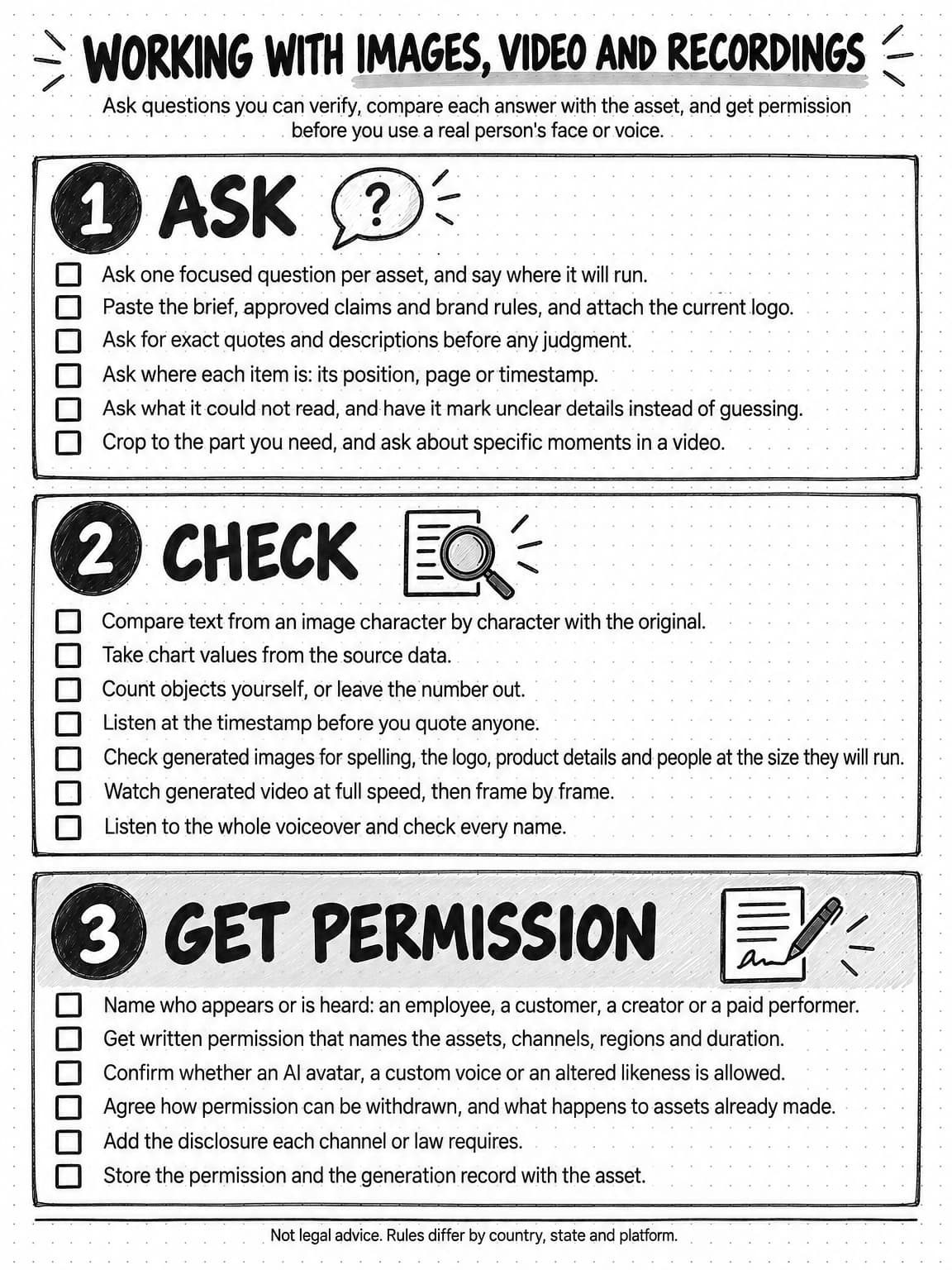
View the reference for working with images, video and recordings at full size (opens in a new tab).
How multimodal work happens in Ampere
Ampere, the AI marketing agent, coordinates 200+ AI tools & skills across research, text, images, video, audio, voice, web extraction, public data, and marketing production. You can attach images to a message, upload files to a Project, or dictate a prompt in English with voice input where it is available and edit it before sending. Ampere works in a session workspace, where you can open the files, previews and results behind each answer.
For reading images, Ampere can use Image Analyzer, which handles text extraction, screenshot and interface critique, chart and diagram reading, and marketing creative review for one to five images at a time. It returns structured observations, extracted text, recommendations and caveats, and its readings need the same checks as any model's. With some of the models you can choose in Ampere, uploaded images aren't passed to the model directly; for those, Ampere can inspect the image privately with Image Analyzer where appropriate and work from its findings, the tool-based design described earlier in this guide.
For video, Video Analyzer answers a focused question about one public YouTube video, a direct link to a video file, or an uploaded video under 90 MB, using what is shown and said, and can point to the moments it describes. It isn't a word-for-word transcript tool, and its answers can be wrong, so check them against the recording before they go into published work. When the spoken words are what you need, YouTube Transcript produces timestamped, speaker-labeled transcripts of public YouTube videos, and speech-to-text tools handle other recordings. YouTube Transcript works from speech recognition, not from the creator's captions, so its wording, speaker labels and timestamps need review before anyone is quoted, and the same goes for any generated transcript.
For competitor research, Ampere can build competitive ad intelligence reports from public Meta, Google and LinkedIn ad-library data, with sampled video transcripts, an analysis of hooks, messages, proof and calls to action across platforms, and galleries of the creative. Public ad-library data is never complete, so the reports describe what was available to see.
For making, Ampere can generate and edit images, including product imagery from reference images, create video from text or images, and produce voiceovers, lip-synced clips and talking-avatar videos. AI avatars and custom voices can be saved and reused in later work. Ampere doesn't establish that you hold the rights to a face, a voice or a source image, so the consent checks above stay with your team. As with everything Ampere drafts, outputs can be inaccurate or incomplete, and nothing publishes without you.
Sources and further reading
- Tadas Baltrušaitis, Chaitanya Ahuja, and Louis-Philippe Morency, Multimodal Machine Learning: A Survey and Taxonomy, IEEE Transactions on Pattern Analysis and Machine Intelligence, 2019 (preprint 2017). The definition of a modality.
- Gemini Team, Google, Gemini: A Family of Highly Capable Multimodal Models, December 2023. A model family trained jointly on image, audio, video and text.
- OpenAI, GPT-4o System Card, October 2024. A model trained end to end across text, vision and audio, and its speaker-identification safeguard.
- Haotian Liu, Chunyuan Li, Qingyang Wu, and Yong Jae Lee, Visual Instruction Tuning, NeurIPS 2023. LLaVA, a vision encoder connected to a language model.
- Zhengyuan Yang and colleagues, MM-REACT: Prompting ChatGPT for Multimodal Reasoning and Action, March 2023. A text-only language model calling vision tools.
- Anthropic, Vision and PDF support, Claude API documentation, accessed October 13, 2026. Patches, resolution limits, image quality guidance and stated limitations.
- OpenAI, Images and vision and Image generation, API documentation, accessed October 13, 2026. Stated limitations of image input and image generation.
- Google, Video understanding (updated October 13, 2026), Audio understanding (updated September 23, 2026), Document understanding (updated October 8, 2026), and Image generation, Gemini API documentation. Frame sampling, audio tokens, PDF handling and SynthID watermarks.
- Google DeepMind, SynthID. Watermarking for AI-generated content.
- Microsoft, Pronunciation with SSML, Azure AI Speech documentation, updated June 2026. Phonemes and custom lexicons for names and unfamiliar words.
- Ling Fu and colleagues, OCRBench v2: An Improved Benchmark for Evaluating Large Multimodal Models on Visual Text Localization and Reasoning, December 2024, revised June 2025.
- An Vo and colleagues, Vision Language Models are Biased, May 2025, revised April 2026.
- Yifan Li and colleagues, Evaluating Object Hallucination in Large Vision-Language Models, EMNLP 2023.
- Pooyan Rahmanzadehgervi, Logan Bolton, Mohammad Reza Taesiri, and Anh Totti Nguyen, Vision language models are blind, July 2024, revised March 2025.
- Liyan Tang and colleagues, ChartMuseum: Testing Visual Reasoning Capabilities of Large Vision-Language Models, NeurIPS 2025 Datasets and Benchmarks Track.
- Saman Motamed and colleagues, Do generative video models understand physical principles?, January 2025.
- Allison Koenecke and colleagues, Racial disparities in automated speech recognition, Proceedings of the National Academy of Sciences, 2020.
- Allison Koenecke, Anna Seo Gyeong Choi, Katelyn X. Mei, Hilke Schellmann, and Mona Sloane, Careless Whisper: Speech-to-Text Hallucination Harms, ACM Conference on Fairness, Accountability, and Transparency (FAccT), 2024.
- OWASP Gen AI Security Project, LLM01:2025 Prompt Injection. Multimodal prompt injection.
- W3C Web Accessibility Initiative, Images Tutorial, updated April 8, 2026. How to choose text alternatives by an image's purpose.
- Tennessee General Assembly, Public Chapter 588, the ELVIS Act (House Bill 2091), approved by the governor March 21, 2024, effective July 1, 2024, and its bill history.
- New York State Senate, S8420A, synthetic performer disclosure in advertisements, signed December 11, 2025 as Chapter 617, effective June 9, 2026.
- Federal Communications Commission, FCC makes AI-generated voices in robocalls illegal, February 8, 2024.
- European Union, General Data Protection Regulation, Regulation (EU) 2016/679, Recital 51. When photographs count as biometric data.
- YouTube Help, Disclosing use of altered or synthetic content, accessed October 13, 2026.
Frequently Asked Questions
How does multimodal AI work?
Multimodal AI works by turning each kind of input into units a model can process. Images are cut into small patches, video is sampled as still frames plus its soundtrack, and audio becomes tokens. Some models are trained on text, images, audio and video together. Others attach a separate image encoder to a language model, and a third design gives a text-only language model a vision tool, so it works from a written description of the image.
What is an example of multimodal AI?
An example of multimodal AI is a model that reads a screenshot of a pricing page and lists every price on it, because it works across an image and text. Others include a transcript made from a webinar recording, an answer about what happens in the first five seconds of a video, an image generated from a written prompt, and a voiceover read from a script. Each one takes in one kind of data and returns another.
What is the difference between generative AI and multimodal AI?
Generative AI and multimodal AI describe different things. Generative describes what a model does: it makes new content, such as text, images or speech, from a prompt. Multimodal describes which kinds of data it works with, such as text, images, audio and video. Many current models are both, like one that reads a chart and writes a summary of it. A text-only chatbot is generative but not multimodal.
What is the difference between an LLM and a multimodal LLM?
A large language model, or LLM, works with text, while a multimodal LLM also accepts other kinds of input, such as images, audio or video, and some can produce images or speech as well. Models that take images and text and answer in text are often called vision language models. Some products pair a text-only LLM with a separate vision tool instead, so the LLM works from a description of the image, not the image itself.
What is a multimodal AI agent?
A multimodal AI agent is software that works toward a goal over several steps, choosing tools as it goes, where those steps can involve images, video and audio as well as text. It might transcribe a recording, pick the quotes worth using, draft posts, generate an image for each and check the images against the brief. Each step can use a different model, so a misheard word early on can carry into the finished work unless someone checks it.
How do marketers use multimodal AI?
Marketers use multimodal AI to check ads and concepts against a brief, sort and summarize competitors' ads, audit landing pages from screenshots, describe dashboards, review the opening seconds of social videos, turn webinars and podcasts into transcripts and quotes, and draft alt text. It can also make images, short video clips and voiceovers. The dependable uses ask a focused question about an asset, and a person checks the answer against the asset itself.
Can AI analyze videos?
Yes, many current AI models can analyze video. They can describe scenes, read on-screen text, use the soundtrack and answer questions with timestamps. Video is read as still frames sampled at intervals, plus its audio, and Google's documentation for its models gives a default of one frame per second, so a shot or caption that lasts less than a second can be missed. Check each answer at its timestamp before you rely on it.
Can AI read screenshots, PDFs and charts accurately?
AI can read screenshots, PDFs and charts well enough to be useful, but not reliably enough to skip checking. Headings, large text and prices usually come through well. Small print suffers when a large image is shrunk to fit a size limit, and charts are harder than they look. In ChartMuseum, a 2025 benchmark, people answered 93% of questions correctly and the best model tested 63%. Crop screenshots to the part you need, and take chart values from the source data.
Which is the best multimodal AI for marketing?
The best multimodal AI for marketing is the one that handles the inputs your work depends on, such as long videos, dense screenshots or call recordings. Check whether a model reads those inputs directly or through a separate tool, then test a few candidates on a small set of your own images, clips and recordings whose answers you already know, and choose by the errors that matter most for your work.