How do AI agents work? A marketer's guide
What happens between your brief and the finished work? A plain-English guide to the parts of an AI agent, with a marketing example to connect them.
27 min readWritten by Ampere
Short answer
How do AI agents work?
An AI agent uses a model to interpret a goal, choose a next action, use available tools, and inspect the result before continuing. Instructions, source material, memory, and permissions shape what it can do. For marketing work, that can mean carrying research through to a finished brief while you check the evidence and approve consequential actions.
Summary
An AI agent chooses its own steps toward a goal, within the tools and boundaries it has been given. In a chat, you steer each step; a predefined workflow follows a fixed sequence. An agent is most useful when the route to a deliverable depends on what it discovers along the way.
An agent works in a loop, so each result it reads can change its next action. In the guide's competitor-messaging example, the agent revises its comparison when a page does not support an expected claim and reports the gap when access fails. A run ends on completion, a request for your input, a time or spending limit, or an unrecoverable error.
The model inside an agent sees only what is available at each step. Its training does not include your latest release notes or today's competitor pricing, and fluent writing is no evidence that a claim was checked. Your prompt works within the product's standing instructions and permissions, and saved memory helps only when it is retrieved.
Tool access shapes what an agent can do, so two agents on the same model can produce very different work. A tool is a defined capability, such as reading a web page; a skill is reusable guidance for a particular job. MCP is an optional standard for connecting outside services, and supporting it neither proves data accurate nor authorizes every action.
Room to act gives an agent more chances to make a mistake, so check its sources, open the delivered files, and send publishing or spending through approval controls. For a first trial, pick a small task you know how to judge. The guide ends with a troubleshooting table and a six-part field guide.
Contents
- What makes an AI agent different from a chatbot?
- How an AI agent works, step by step
- The AI model: interpreting the brief and choosing actions
- User prompts and system prompts: two kinds of instructions
- Context and the context window: what the model can see
- Memory and retrieval: how agents reuse knowledge
- Tools and skills: what the agent can do and how it does it
- What is an MCP server?
- Working environments, schedules, and multiple agents
- Where AI agents need your judgment
- Try an agent on one familiar marketing task
- Frequently Asked Questions
Preparing a campaign brief usually means doing several jobs before you write a word. You read the product notes, study competitors’ messaging, and weigh possible angles against what your customers care about. Each piece of research helps you decide what to investigate next and, eventually, what the campaign should say.
An AI agent can carry out much of that process from a brief you give it. It is software that uses an AI model to interpret a goal, choose actions, and work toward a result. With access to the right sources and tools, it can read your product notes, research competitors, and bring the findings together in a campaign recommendation.
As it works, the agent can adjust its next step to what it finds. If a competitor’s headline makes a claim the product page doesn’t explain, it might look for supporting details before including that claim in the comparison. This ability to act on new information is central to what people mean by agentic AI: the system can pursue a task through a series of actions without needing you to direct every step.
How much of the work it carries out independently is its autonomy. You might let it choose which pages to read while requiring it to bring the proposed campaign angle back for review. You set the objective and the boundaries; the agent works within the access and permissions available to it. Understanding that division helps you decide what to delegate and where your judgment is needed.
This guide explains how that process works, from your first request to the finished deliverable. We’ll connect the parts of an agent—including prompts, context, memory, tools, and MCP—to familiar marketing work. You don’t need to learn to code. The aim is to help you brief an agent, understand what it’s doing, and know what to check before using its work.
What makes an AI agent different from a chatbot?
The useful distinction is how much of the process the software can carry out.
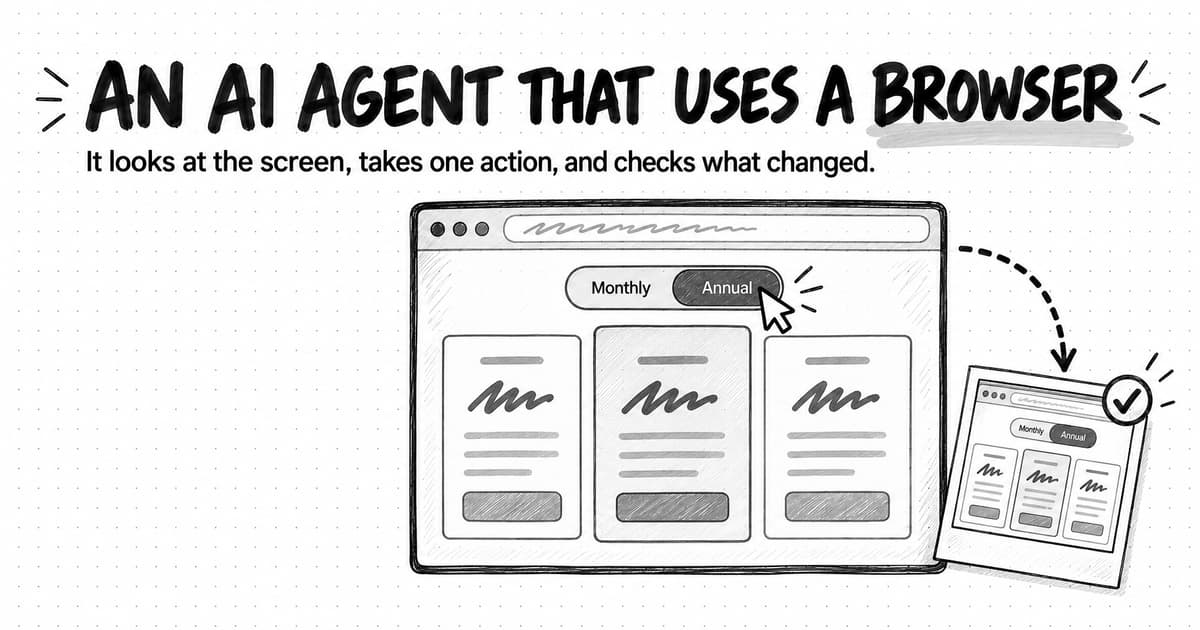
With a simple text chatbot, you might paste in competitor copy and ask for a comparison. You find the sources, bring them into the conversation, and decide when to move on. An agent with browsing tools can find and read the pages itself, notice that a claim needs checking, look for another source, and then continue the comparison.
Chat is an interface, so a product that looks like a chatbot can still contain an agent. Vendors also use “agent” differently. Anthropic's explanation of agentic systems distinguishes predefined workflows from agents that choose their next steps as they work. Ask what the product actually does between receiving a request and returning a result.
| Approach | How the work moves forward | Marketing example |
|---|---|---|
| A simple AI chat | You supply material and steer each next step | Rewrite the headline you pasted in |
| A predefined workflow | Software follows an established sequence, which may include AI steps and branching rules | Turn each approved webinar transcript into a summary, then route it for review |
| An AI agent | The model chooses steps within the tools and boundaries available | Investigate competitors' messaging and prepare a campaign recommendation with sources |
These approaches can work together. A scheduled workflow might start an agent's research every Monday, then route its report to a person. An agent might use a predefined image-production workflow as one of its tools.
For a single headline rewrite, a simple chat may be all you need. Agents become useful when the route to a finished deliverable depends on what they discover along the way.
How an AI agent works, step by step
Imagine you're marketing expense-management software and want to plan a campaign for small finance teams. Here's a hypothetical assignment:
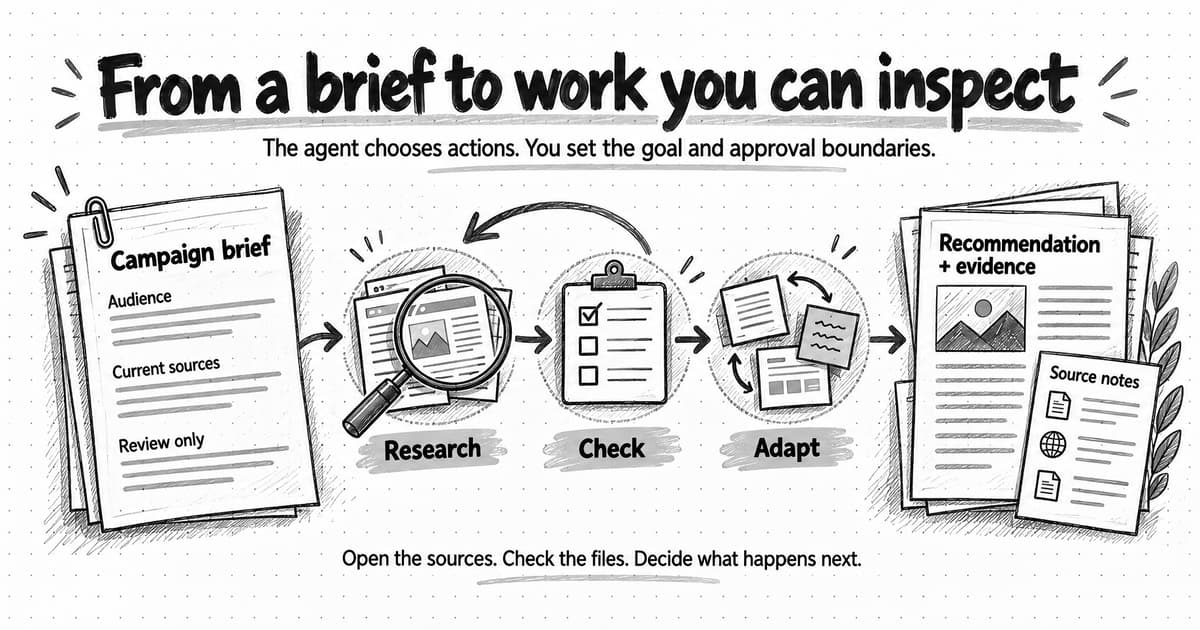
Compare the current messaging on the three competitor websites I've listed. Use our attached product notes and customer interview summary to recommend one campaign angle for small finance teams. Create a short brief with links to the evidence. Flag anything you couldn't verify. Prepare the work for review; don't publish or contact anyone.
An agent equipped for that job might proceed as follows:
- Read the request and available context. It identifies the audience, the requested brief, the source files, and the limits on what it may do.
- Choose a useful next step. It may read your product notes before researching competitors, so it knows which differences matter.
- Use a tool. It asks a browsing tool to open one competitor's product page.
- Inspect the result. The page might contain useful copy, an outdated announcement, or no readable content. Those outcomes call for different next steps.
- Continue or change course. It can follow a relevant link, try another source, compare findings, or ask you for missing information.
- Deliver the work or explain why it stopped. It returns the brief and supporting sources, or identifies what prevented completion.
The repeated cycle of choosing an action, carrying it out, and reading the result is the agentic loop. A loop might happen several times before you see a finished answer. IBM's overview of AI agents describes how planning and tool use let a system work through a larger goal in smaller steps.
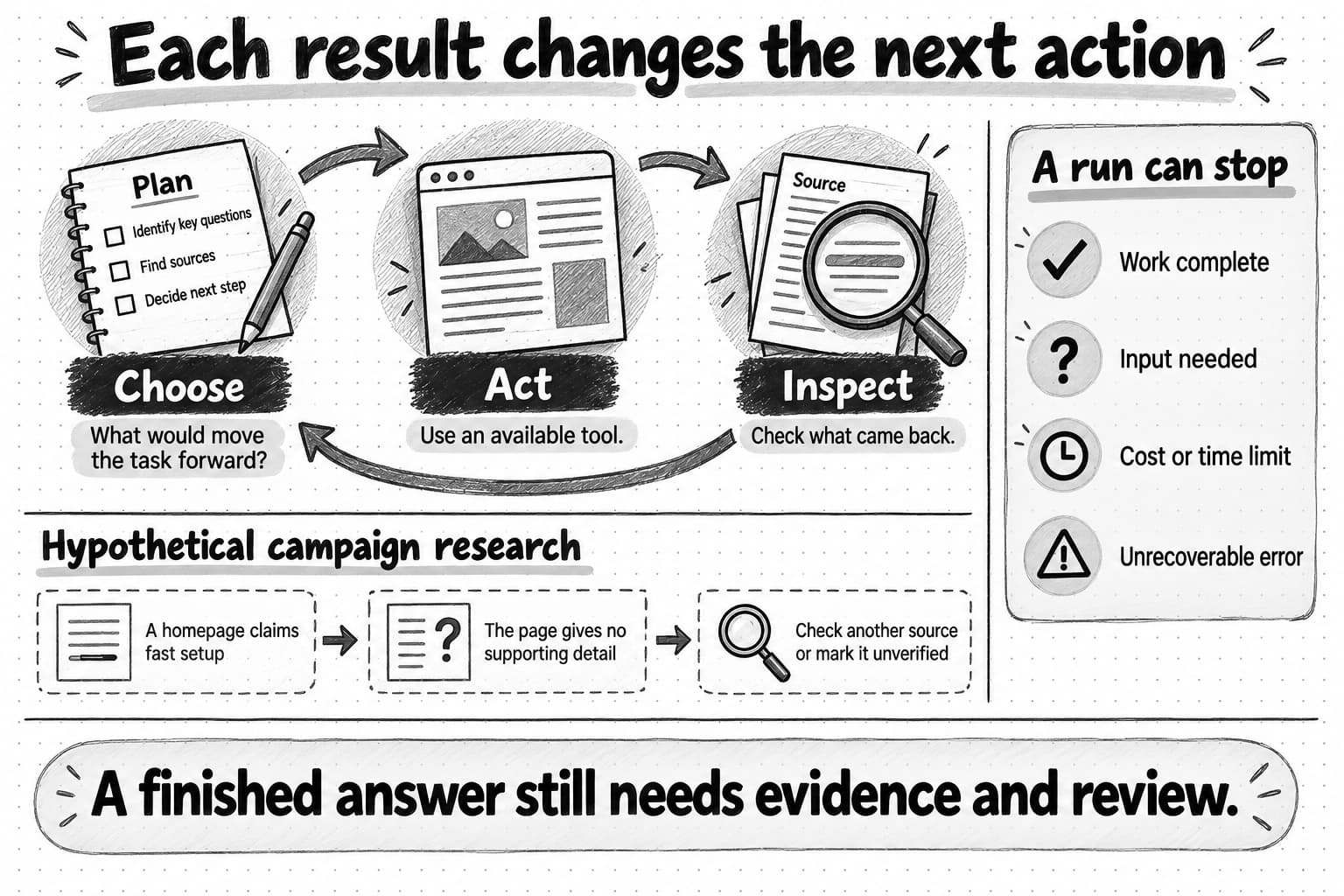
Open the agentic loop example at full size (opens in a new tab).
The agent doesn't necessarily follow a perfect plan written at the beginning. If a competitor's page doesn't support the claim it expected, a useful next action is to revise the comparison. If access fails, it should report the gap instead of quietly treating that competitor as irrelevant.
The loop also needs an end. Completion, a request for your input, a spending or time limit, and an unrecoverable error can all stop a run. Continuing for longer is useful only if it improves the work.
Each additional model request or paid tool can add time and usage cost. For an exploratory brief, agree on a research scope and use the product's spending controls where available. A request to investigate every possible competitor can grow far beyond the comparison you needed.
The AI model: interpreting the brief and choosing actions
The choice of what to do next in the agentic loop often comes from a large language model, or LLM. This is the AI model that interprets the request, produces text, and helps select an action based on the information available. Some models also work with images, audio, or other media; you'll see these described as multimodal.
During training, a language model learns patterns from large amounts of material. When you use it, it generates a response from those learned patterns and the information available in the current request. Text is processed in small units called tokens: a token might be a word, part of a word, or punctuation. IBM's LLM guide explains the training and prediction process in more detail.
For our campaign brief, the model can interpret “small finance teams,” compare messaging, and propose an angle. But its training doesn't automatically contain your latest release notes or today's competitor pricing. It needs supplied information or tools to obtain those facts.
This explains a familiar problem: an answer can sound convincing while being wrong. A hallucination is generated information that is false or unsupported, such as an invented feature or quotation. Fluent writing is not evidence that the model checked the claim.
An agent adds ways to gather evidence and act on it. It does not make the underlying model infallible.
User prompts and system prompts: two kinds of instructions
The model needs instructions to turn its general capabilities toward your particular job. Your user prompt is the request you give the agent. In the example, it names the competitors, the audience, the deliverable, and the approval boundary. Follow-up messages are instructions too: “Focus the comparison on approvals, not receipt scanning” changes the direction of the work.
A system prompt supplies standing instructions about the model's role and behavior. The product provider typically manages it. Some products also support organization rules or custom instructions; these may be supplied through different instruction layers rather than the system prompt itself.
For example, an agent product might have standing guidance to explain missing information, use particular tools, or request approval before certain actions. Your campaign prompt supplies the job-specific direction within that system. Anthropic's prompting guidance shows how system instructions can establish a role while user messages provide the immediate request.
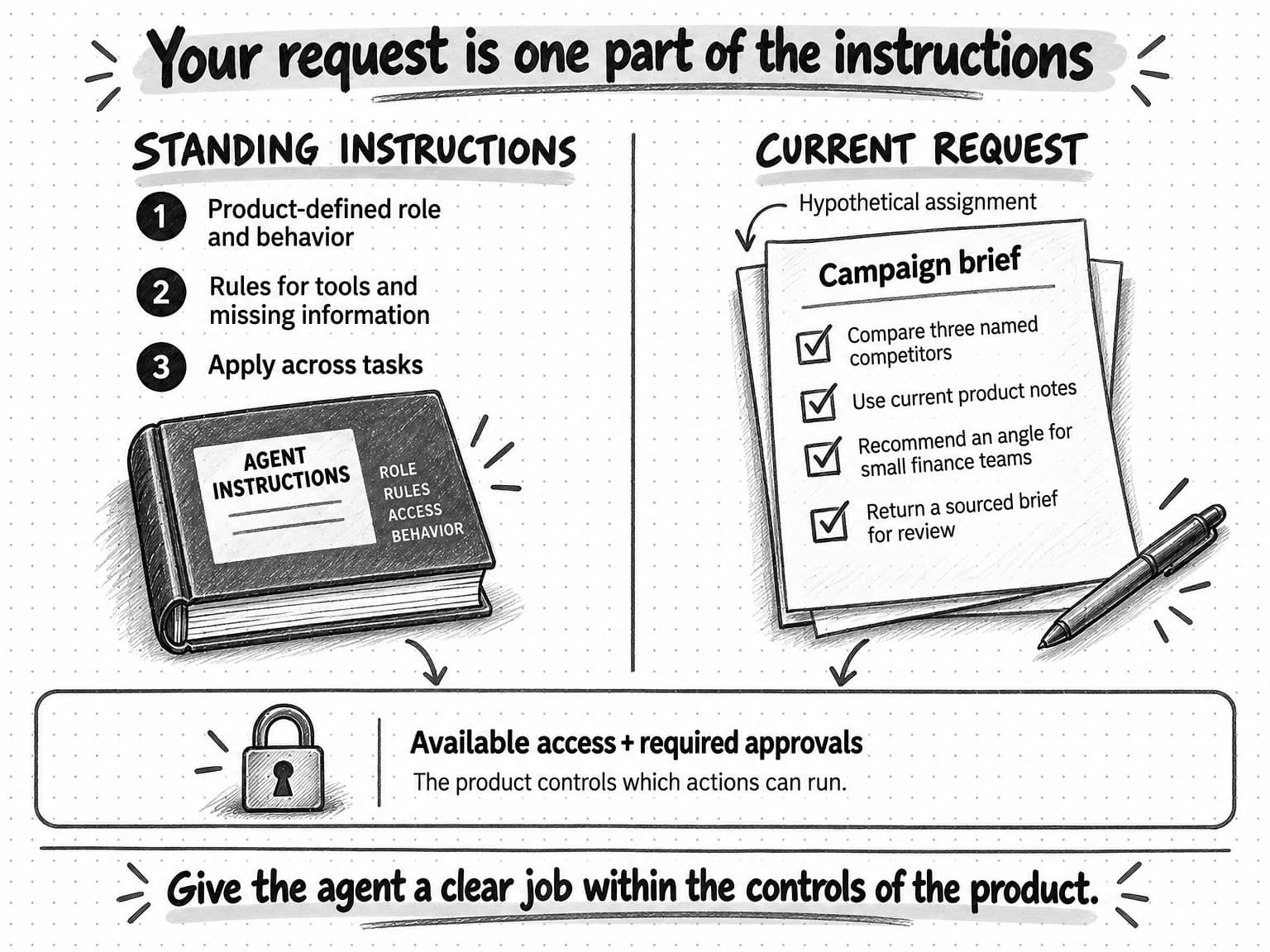
Open the instructions and approval guide at full size (opens in a new tab).
You don't need to see or rewrite the system prompt to brief an agent well. You do need to know that your message isn't its only instruction. A request to publish may encounter a product approval requirement or a permission limit.
For day-to-day work, a useful prompt makes the outcome and evidence clear. “Find a campaign angle” leaves a lot open. “Compare these competitors against our current product notes and recommend an angle for small finance teams” gives the agent a decision it can investigate.
Our guide to briefing an AI marketing agent covers the full brief, including examples and a reusable template.
Context and the context window: what the model can see
Instructions tell the agent what to do; source material gives it something to work with. Both are part of context, the information made available to the model for a particular step. It can include instructions, your messages, document excerpts, relevant saved knowledge, descriptions of available tools, and results from earlier actions.
For the campaign assignment, context might contain your audience description, the current product notes, and copy retrieved from a competitor's website. That gives the model something specific to compare.
The context window is the model's capacity for information in one interaction, measured in tokens. Depending on the model, that allowance accounts for input and generated output in different ways. It is not the same thing as the number of files you can upload or the length of the conversation shown on screen. Claude's context-window documentation explains how conversation and output consume that capacity.
Think of the context window as a desk. Your company may have an entire filing cabinet of research, but the model works with what's on the desk at that moment. A file can exist in the product without its full contents being placed in every model request.
As work continues, the desk fills with more material. Products handle this in different ways: selecting excerpts, removing old tool results, or summarizing earlier conversation. That summarization is often called compaction. It helps a long task continue, but a summary can lose a detail that later becomes important.
A larger window provides more room; it doesn't guarantee that every detail will be used correctly. Anthropic's context-engineering guide recommends carefully selecting relevant information and explains how summarization and saved notes support longer work.
For a marketer, the practical habit is to keep the current brief easy to identify. Mark old examples as references, name the authoritative product document, and restate an important decision if the conversation has changed direction. If a draft reverts to an old audience, check which context guided it before adding more tone instructions.
Memory and retrieval: how agents reuse knowledge
A limited context window doesn’t mean the agent has to start from scratch on every task. A product can keep information outside that window and bring relevant parts back when needed. Memory is information it saves for later use, such as an approved brand description, a preference, or notes from previous work.
A product's memory features vary. Some save selected facts across conversations; others rely on documents you maintain. Don't assume that mentioning a decision once makes it available in every future session. Ask what gets saved, who can edit it, and how to remove outdated material.
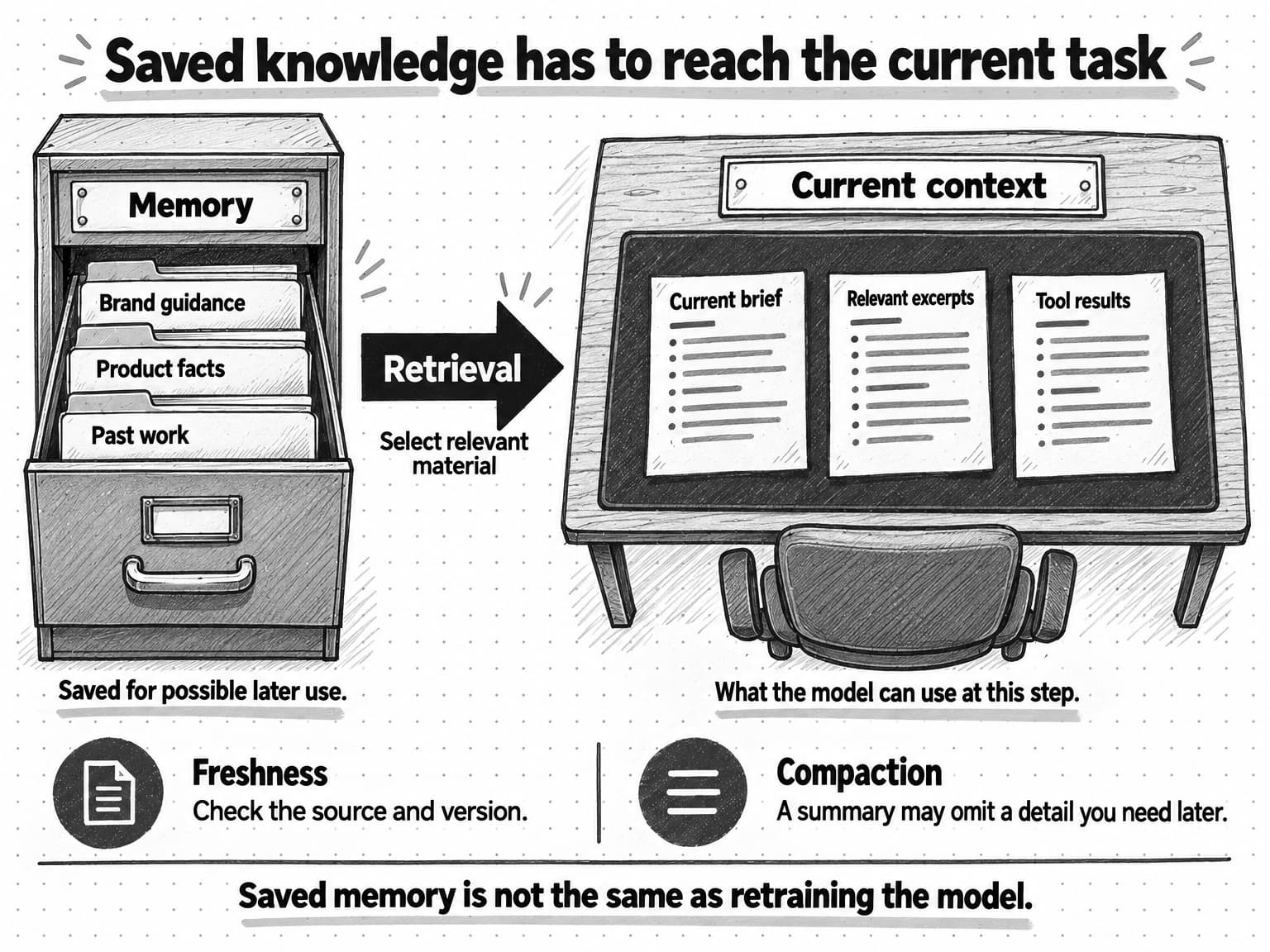
Open the memory and context guide at full size (opens in a new tab).
Retrieval means finding relevant information when it's needed. One common approach, retrieval-augmented generation, or RAG, searches a source collection and supplies useful passages to the model before it answers. IBM's RAG explanation describes how this adds external knowledge without retraining the model.
Back at our expense-management company, retrieval could locate the paragraph about approval limits in a long product guide. The agent can use that paragraph without reading every document in the company's library on every step.
Some retrieval systems use embeddings, numerical representations that help find related meanings rather than exact matching words. A search for “who signs off spending” might find a section titled “Approval policies.” You don't need to manage the mathematics, but you should know that a relevant-looking search result can still be the wrong version or omit a necessary qualification.
Updating saved information and retraining the model are different things. Correcting a brand fact can improve later work if the product saves and retrieves the correction. It doesn't mean the underlying AI model has permanently learned your business. The provider's separate data-use policy determines whether interactions may be used for training.
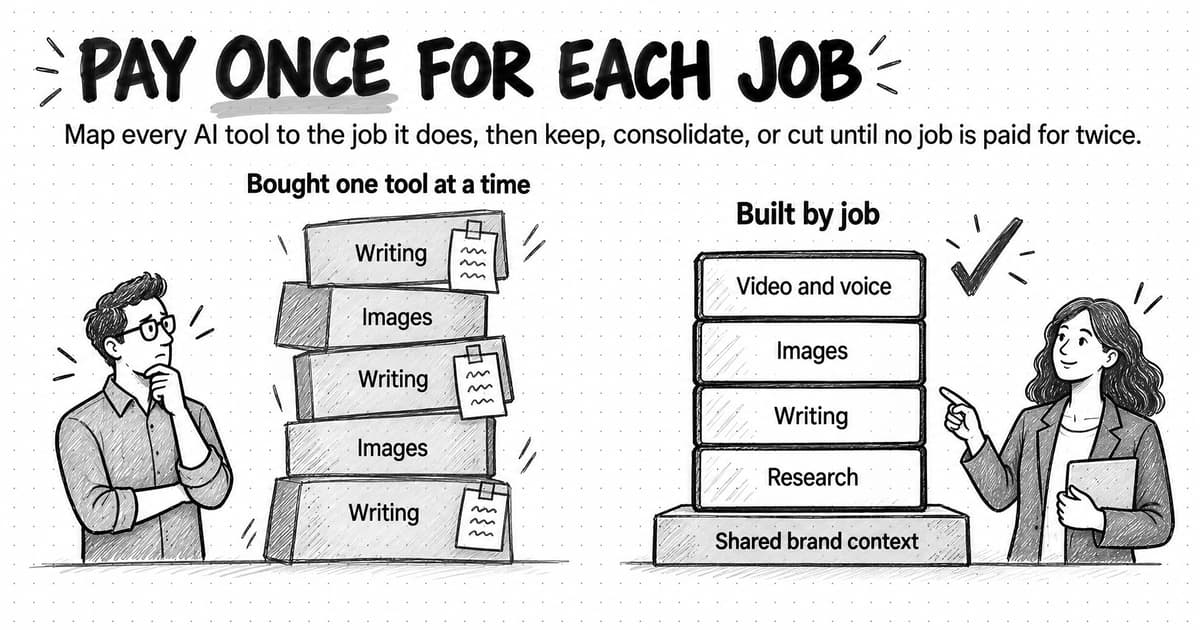
Maintain reusable context as you would a working brand document. If your target customer changes, update the saved guidance as well as the next brief. Our article on brand consistency in AI marketing explains why that shared background matters across deliverables.
Tools and skills: what the agent can do and how it does it
Reading saved knowledge is one action an agent may need to take; researching a new source or creating a file requires other capabilities. A tool gives the agent a defined capability it can call on during the task. Examples include searching the web, reading a spreadsheet, calculating a total, generating an image, or creating a document. A connected service may expose actions such as retrieving campaign data, depending on the product and the permissions you've granted.
When the model chooses a tool, it makes a tool call: a request containing the information that tool needs. For a web reader, that could be a page address. For a report query, it could be an account and date range. The surrounding software runs the request and returns a result for the model to inspect. Anthropic's tool-design guide explains why clear tool descriptions and useful results affect an agent's performance.
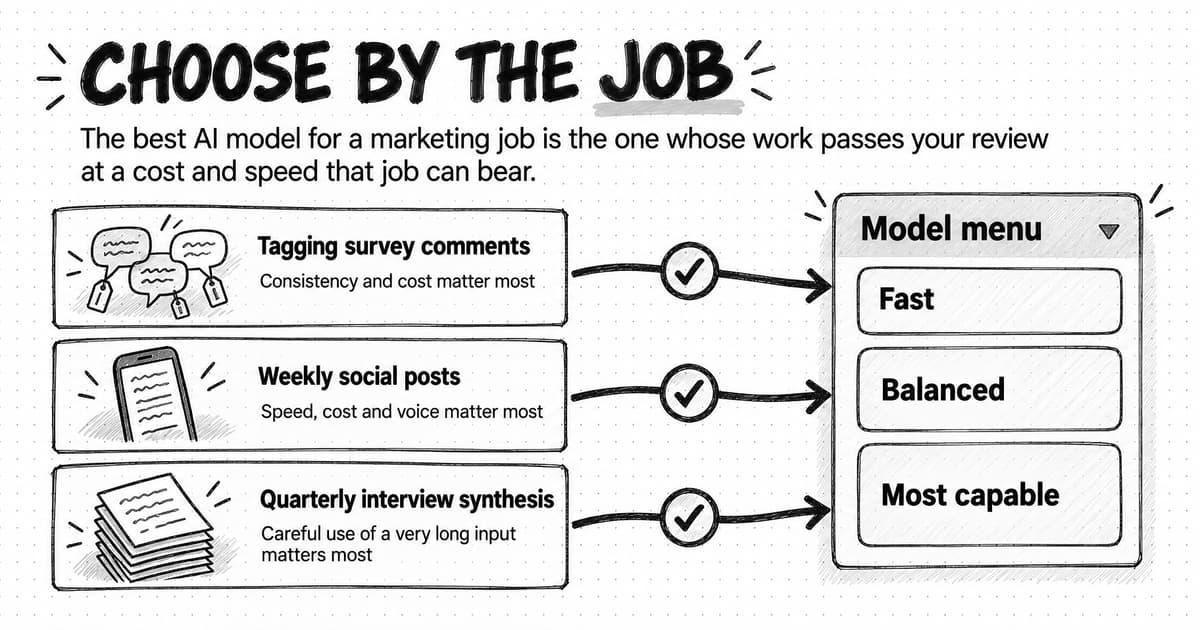
Tool access explains why two agents using the same model can produce very different work. One may have access to your spreadsheet and a calculation tool; another may only see the numbers you've pasted. The first has more ways to check the arithmetic, although it can still select the wrong column or metric.
Access to a spreadsheet tool lets an agent perform calculations, but it doesn’t supply a method for evaluating a campaign. A skill provides reusable guidance for doing a particular kind of job. It can include instructions, examples, templates, or supporting scripts. A campaign-analysis skill might explain how to separate observations from recommendations and check date ranges. A spreadsheet tool supplies an action the agent can use while following that guidance. Anthropic's introduction to Agent Skills describes this packaging of procedural knowledge.
Skills can improve consistency without making every output identical. Their value depends on the quality of the guidance, whether it fits the task, and whether the agent follows it successfully.
What is an MCP server?
Some tools are built into the agent product. Others require a connection to an outside service, such as the analytics product that holds your campaign data. MCP, short for Model Context Protocol, is a shared way for AI applications to make those connections to tools and information. It reduces the need for every AI product and every service to invent a different connection method.
An MCP server is software that makes a set of capabilities available through that standard. Despite the name, it can run on a local computer or remotely. The AI application connects through an MCP client, the part that handles communication with that server. You usually interact with the product's connection screen, not those underlying parts. The MCP architecture overview describes their roles.
For example, a compatible analytics service might make a “retrieve campaign report” tool available through its MCP server. An agent could request the report, receive the data, and use it when writing a campaign analysis. Which accounts and actions are available still depends on the service, the AI product, and your authorization.
MCP servers can provide three kinds of material:
- Tools: actions the application can call, such as requesting a report.
- Resources: information the application can read, such as a document or account description.
- Prompts: reusable interaction templates the application can present for a particular task.
Those MCP prompt templates are distinct from the standing system instructions described earlier. The MCP server guide explains these capabilities; a server need not provide all three.
MCP is optional. An agent can also use built-in tools, operate a browser, or connect through an API, a defined way for one piece of software to request something from another. MCP often sits on top of existing APIs to make capabilities easier for AI applications to discover and use.
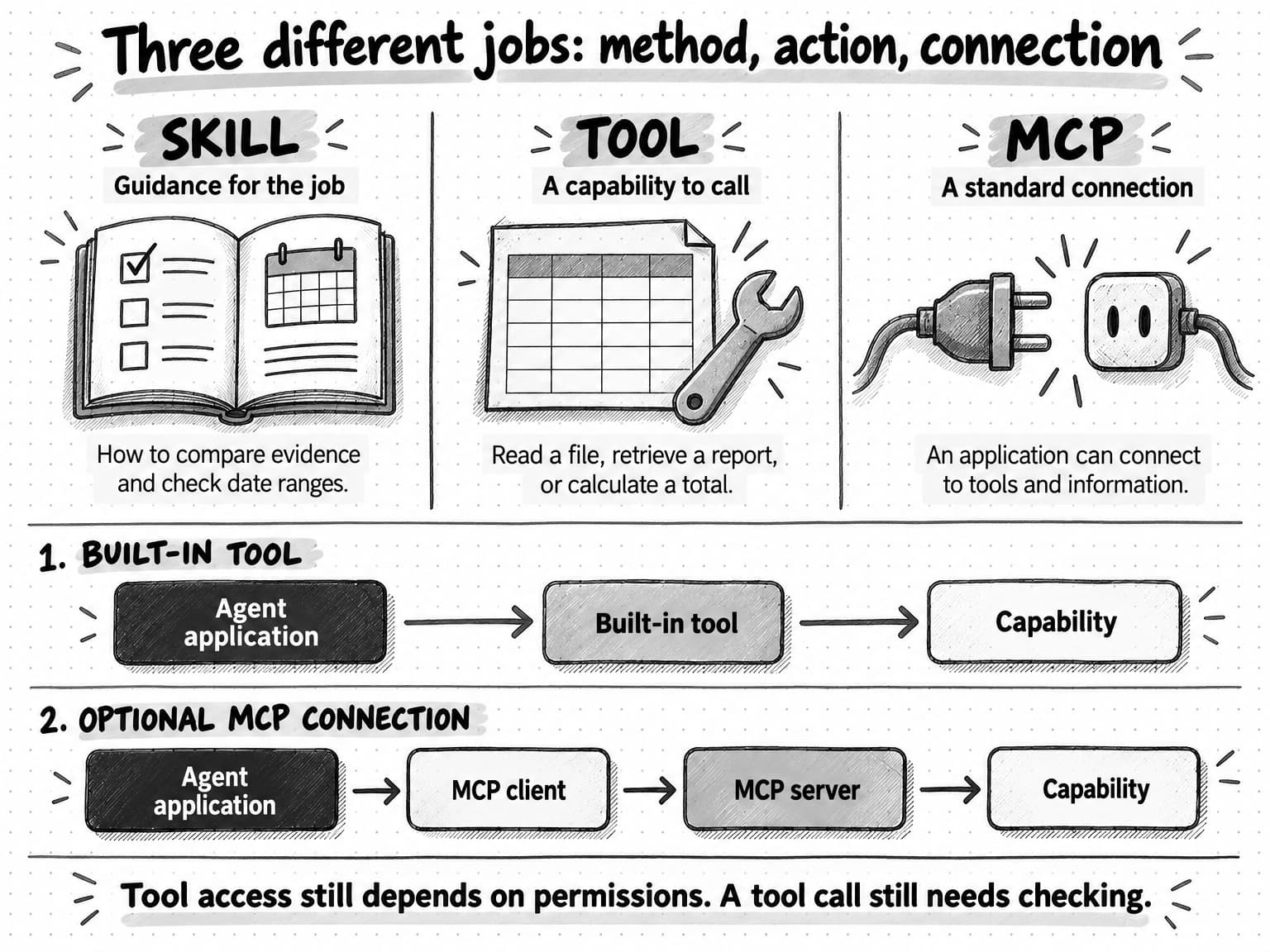
Open the tools, skills, and MCP comparison at full size (opens in a new tab).
For marketers, the useful questions concern access: Which service and account am I connecting? Can the agent only read, or can it also change things? Where do approvals happen? How do I disconnect it? “Supports MCP” answers a compatibility question. It doesn't establish the accuracy of the data or authorize every action.
Working environments, schedules, and multiple agents
For the model, instructions, context, and tools to work together, a surrounding application has to manage the process. It runs tool requests, handles files, manages context, records progress, and enforces controls. Developers may call this an agent harness or runtime. You can think of it as the software that turns the model's choices into an operating process.
Where the work happens
A working environment gives the agent somewhere to read data and create deliverables. Some systems use a sandbox, an isolated environment for running software. Isolation can limit what the agent can reach, but it does not make its conclusions correct or grant permission to use connected accounts.
The surrounding application also determines what happens when a tool fails, a run is interrupted, or approval is required. Those details matter when evaluating a product: can you inspect the work, identify what remains unfinished, and continue without guessing? Anthropic's agent-evaluation guide treats the model and harness together as the system being evaluated.
What starts recurring work
A schedule or event can start this process instead of a new message from you. For example, a weekly trigger could ask for an updated competitor report. That requires the product to support recurring work, retain the necessary instructions, and have access to its sources. Writing “check every Monday” in an ordinary conversation doesn't, by itself, prove a schedule has been created.
How multiple agents share the work
Some products use multiple agents. One may coordinate the work while others handle narrower assignments, such as researching different competitors. This can help with independent tasks, but it adds handoffs: each agent needs the right brief, and the combined answer still needs checking. Anthropic's account of its multi-agent research system describes both the benefits and the coordination challenges.
Where AI agents need your judgment
The same flexibility that makes an agent useful also gives it more opportunities to make a mistake. An early misunderstanding can affect the research, the recommendation, and every asset produced from it.
Check the evidence and the finished work
In our campaign example, a competitor might advertise fast setup. That supports a statement about its messaging. It does not prove that customers complete setup quickly, or that a campaign making a similar promise will work for your audience. You need to distinguish the observed claim from the interpretation and the proposed test.
When the work arrives, use the sources and deliverables to check what the agent actually did. These are some common problems and useful ways to follow up:
| If you notice… | Check… | A useful next instruction |
|---|---|---|
| Polished but generic copy | Whether the current audience and brand examples were used | “Use this approved example for voice and this brief for the audience.” |
| A surprising factual claim | Whether the linked source actually supports it | “Show the source passage or mark the claim unverified.” |
| An implausible campaign result | The metric, date range, account, and calculation | “Recalculate from the attached export and state the definition used.” |
| Missing research | Which pages or files were accessible | “List what you checked and what you couldn't access.” |
| Repeated searching with little progress | Whether the remaining question is answerable | “Use the evidence available and identify the unresolved question.” |
| A claim that work is finished | Whether every requested deliverable exists and opens | “Link the files and list anything still incomplete.” |
You don't need a transcript of hidden reasoning to review well. Sources, calculations, visible actions, files, and a short explanation of the recommendation give you more useful evidence.
Control actions and access
Approvals and permissions help contain the consequences of mistakes. Guardrails are the controls and rules that restrict behavior. Human-in-the-loop means a person participates at a decision point, such as approving an exact post before publication. A written request to ask permission is useful, but consequential actions should also be controlled by the product's permissions and approval features.
External information brings another risk: prompt injection. A web page or document can contain instructions designed to redirect an agent away from your task. Microsoft describes this problem in its guidance on agentic browsing. A research source should supply evidence, not acquire authority to change your instructions or send your files elsewhere.
Use company-approved products for confidential work, connect only the accounts needed, and check data-sharing settings before uploading customer information. Start with research and drafts you can review. If a task will send, publish, delete, or spend, make the exact action and approval point clear.
Try an agent on one familiar marketing task
Choose a task you understand well enough to judge: compare a few competitor pages, turn approved release notes into a content brief, or analyze an export whose metrics you already know. Keep the first assignment small enough that you can inspect the sources and the finished work.
Before starting, write down what would make the result usable. For a competitor comparison, that might mean current sources, accurate quotations, a clear distinction between claims and verified capabilities, and a recommendation relevant to your audience. Count the time you spend reviewing and correcting as part of the work, alongside any usage cost.
If the result misses, correct the part that failed. Missing evidence calls for better sources or access. An off-brand draft calls for current brand guidance. An unfinished file calls for a clearer deliverable or a tool problem to be resolved. A longer prompt isn't the remedy for every failure.
Ampere is an AI marketing agent that brings together Brand memory, marketing skills, and AI Tools for research and production. Its session workspace gives you a place to inspect files and outputs. These are practical examples of the parts we've covered: reusable context, guidance for the task, tools to carry out the work, and a place to review the result.
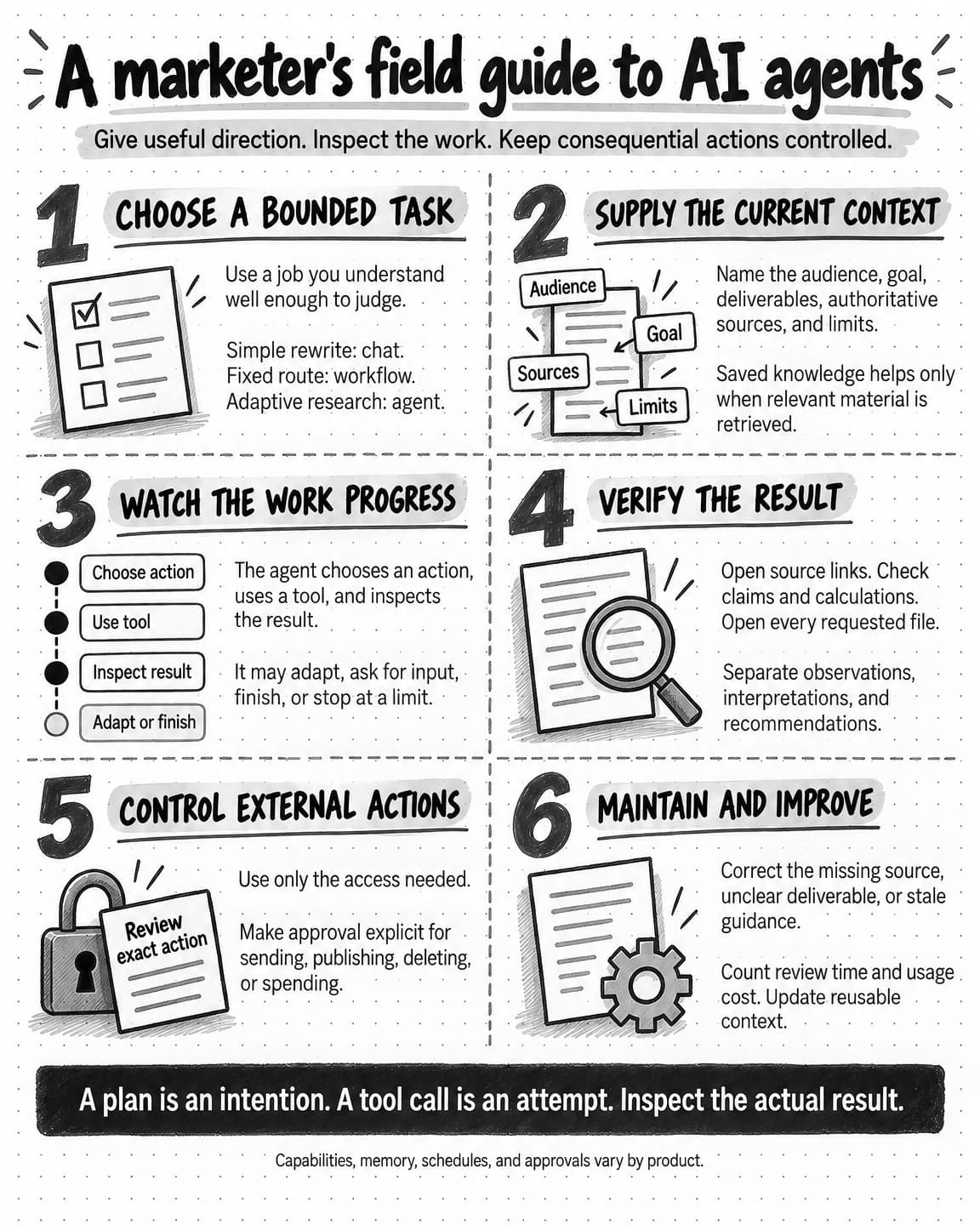
Open and save the AI agents field guide at full size (opens in a new tab).
Start with a brief you already need to write. Give the agent the current sources, explain who the campaign is for, and ask for a recommendation with evidence. Then read the work as the marketer responsible for deciding what happens next.
Frequently Asked Questions
What does an AI agent actually do?
An AI agent carries out a task through a series of actions it chooses itself, working toward a goal you give it. With the right sources and tools, it can read your product notes, research competitors' websites, and assemble a campaign recommendation with links to the evidence. It adjusts its next step to what it finds, trying another source when a page is outdated or unreadable, or asking you for missing information. You set the objective and the boundaries; the agent works within its access and permissions.
How do AI agents differ from chatbots and traditional automation?
AI agents differ in how much of the process they carry out themselves. With a simple chatbot, you supply material and steer each step. Traditional automation, such as a predefined workflow, follows an established sequence that may include AI steps and branching rules. An agent chooses its own steps within the tools and boundaries available, so it can read pages itself, notice a claim that needs checking, and look for another source. Chat is only an interface, so a product that looks like a chatbot can still contain an agent.
What are the main components of an AI agent?
The main components of an AI agent are a model, instructions, context, memory, tools, and the application that runs them. The model, often a large language model, interprets requests and chooses actions. Your prompt and the product's standing instructions direct it, context holds what it can see at each step, and memory keeps knowledge for later retrieval. Tools supply actions, skills supply reusable guidance, and MCP offers an optional standard for connecting outside services. The surrounding application, sometimes called the agent harness, runs tool requests, handles files, and enforces controls.
What is an example of an AI agent?
One example is an agent that researches competitors and prepares a campaign brief. In the guide's hypothetical assignment for expense-management software, it compares messaging on three competitor websites with the company's product notes and a customer interview summary, then recommends one campaign angle for small finance teams, with links to the evidence. It flags claims it couldn't verify, revises the comparison when a page doesn't support an expected claim, and prepares the work for review without publishing anything or contacting anyone.
What is the difference between AI agents and agentic AI?
Agentic AI describes a capability, and AI agents are the software that has it. The term refers to the ability to pursue a task through a series of actions and adjust the next step to new information, without needing a person to direct every step. How much of the work a particular agent carries out independently is its autonomy. You might let it choose which pages to read but require it to bring a proposed campaign angle back for your review.
What is the difference between an AI agent and an LLM?
A large language model, or LLM, is the AI model that interprets a request, generates text, and helps choose an action; an AI agent is the larger system that puts that model to work toward a goal. The agent adds tools, context, memory, and a surrounding application that runs tool requests and returns results for the model to inspect. The same model used in a chatbot can be part of an agent. Tools help the agent gather evidence, but they don't make the model infallible.
How do AI agents use tools?
AI agents use tools by making tool calls. When the model decides it needs a capability, such as searching the web, reading a spreadsheet, or creating a document, it makes a request containing the details that tool needs, like a page address or an account and date range. The surrounding software runs the request and returns a result for the model to inspect before it chooses the next step. Tool access shapes the work, so two agents using the same model can produce very different results.
How do AI agents learn?
An AI agent learns about your business when its product saves information and retrieves it for later work, which is different from retraining the underlying model. Saved memory might hold an approved brand description, a preference, or notes from previous tasks. A corrected fact can improve later work if the product saves and retrieves it, but don't assume that mentioning a decision once makes it available in every future session. The provider's data-use policy separately determines whether your interactions may be used for training.
What are the risks and limitations of AI agents?
The flexibility that makes AI agents useful also gives them more opportunities to make mistakes, and an early misunderstanding can affect the research, the recommendation, and every asset produced from it. The underlying model can hallucinate, stating false or unsupported information fluently. A web page or document can contain prompt injection, instructions designed to redirect the agent away from your task. Long tasks may lose a detail when earlier conversation is summarized, and each extra model request or paid tool can add time and usage cost.
How do you use AI agents for marketing?
Start with a marketing task you understand well enough to judge, such as comparing a few competitor pages, turning approved release notes into a content brief, or analyzing an export whose metrics you already know. Before the agent begins, give it current sources, say who the work is for, write down what would make the result usable, and make the approval point clear for anything it might send, publish, delete, or spend. Then check the cited sources and open the delivered files.