How to do keyword research when AI answers come first
A seven-step keyword research method for small B2B teams, with prompt research for AI assistants, a scoring table, a copyable template and a worked example.
42 min readWritten by Ampere
Short answer
How do you do keyword research?
Do keyword research by collecting the words customers use in sales calls, support tickets and reviews, expanding them with autocomplete, People Also Ask and keyword tools, and reading volume and difficulty as estimates. Group the phrases by intent into clusters, test them as prompts in AI assistants, score each cluster on business fit and answer advantage, and map each one to a single page.
Summary
Keyword research finds the needs behind buyers' searches and decides which page should answer each one, and that job matters more now that AI answers come first. AI Overviews and AI Mode break questions into related searches, so the needs behind keywords still decide which pages get retrieved. What has changed is that a page repeating the obvious is less likely to be visited or cited.
The method has seven steps: start from customer language, expand the list with search tools, read the metrics honestly, group phrases by intent into clusters, add prompt research for AI assistants, score the clusters, and map each cluster to one page. Starting from customers rather than a tool keeps the buyer's vocabulary in the list, which tool seeds chosen by the marketer often miss.
Keyword metrics are estimates with known weaknesses. Search volume is rounded and modeled, difficulty is calculated differently by each vendor, and cost per click measures advertiser demand rather than organic difficulty. Low-volume and zero-volume keywords often matter most in B2B, because specific questions come late in the buying process and the tools undercount them.
Prompt research fills a gap that search tools leave. Writing 20 to 40 situational prompts from customer evidence and running them in the assistants buyers use shows which sub-questions a complete answer covers and which kinds of sources get cited. It is a qualitative sample for finding needs and checking completeness, not a measure of demand.
A scoring table weighs business fit, customer evidence, demand signals, answer advantage and click or citation value against effort, and a copyable three-tab template holds the phrases, clusters and page map. A worked example follows one fictional software company whose highest-volume cluster scored lowest and whose best opportunity had no reported volume at all. Rescore quarterly and rerun prompts monthly.
Contents
- What keyword research is for when AI answers come first
- Why keywords still matter when people ask AI assistants
- Step 1: Start from the words customers already use
- Step 2: Expand the list with search tools
- Step 3: Read search volume, difficulty and CPC honestly
- Step 4: Classify search intent and group keywords into clusters
- Step 5: Add prompt research for AI assistants
- Step 6: Prioritize clusters with a scoring table
- Step 7: Map each cluster to one page
- Why low-volume and zero-volume keywords matter in B2B
- A keyword research template you can copy
- Worked example: keyword research for a fictional compliance software company
- Common keyword research mistakes
- How often to repeat keyword research
- Keyword and question research with Ampere
- Sources and further reading
- Frequently Asked Questions
Open a keyword tool, type your product category, and you get a spreadsheet: a thousand phrases, each with a monthly search figure, a difficulty score and a cost per click. Many small B2B teams stop there. They sort by volume, pick the twenty biggest numbers they think they could rank for, and hand them to a writer. Six months later the pages exist, a few of them get visits, and almost none of the visitors look like customers. Meanwhile the people who did buy found the company through a question nobody put on the list, often one too specific for the tool to report any volume at all.
That outcome has always been common, and it is more costly now that many searches end with an answer instead of a list of links. When Google shows an AI Overview, or a buyer asks ChatGPT or Perplexity to compare options, the question is answered from pages the system retrieves, and the reader may never click. A page written to match a keyword string, with nothing specific to say, has less chance of being one of those sources and less chance of being visited if it is.
Keyword research is the work of finding the words and questions your buyers use when they look for help with a problem you solve, then deciding which of those needs your site should answer and with which page. The keywords are evidence about what people need. The output is a short, prioritized map of topics and pages, not a long list of phrases. Done that way, the same research serves classic search results and AI answers, because both start from what a person asks.
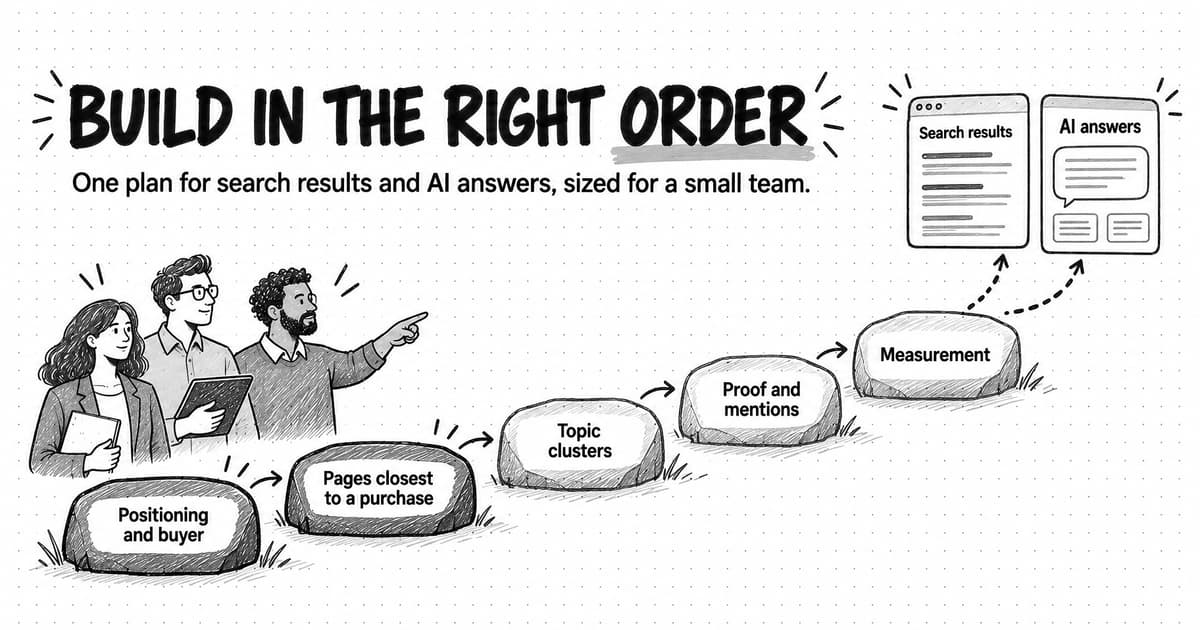
This guide sets out a seven-step method a small team can run in a few working days: start from customer language, expand the list with search tools, read the metrics without being fooled by them, group keywords by intent and topic, add prompt research for AI assistants, score the clusters, and map each one to a page. It explains why low-volume keywords matter more in B2B than the tools suggest, gives you a template to copy, and works through the whole method for a fictional software company.
What keyword research is for when AI answers come first
Keyword research used to be described as finding terms with high volume and low competition. That description was always incomplete, and it fits even less well now. The job is to understand demand well enough to make three decisions: which problems your content should cover, which page should answer each one, and what each page needs to contain to be the best answer available.
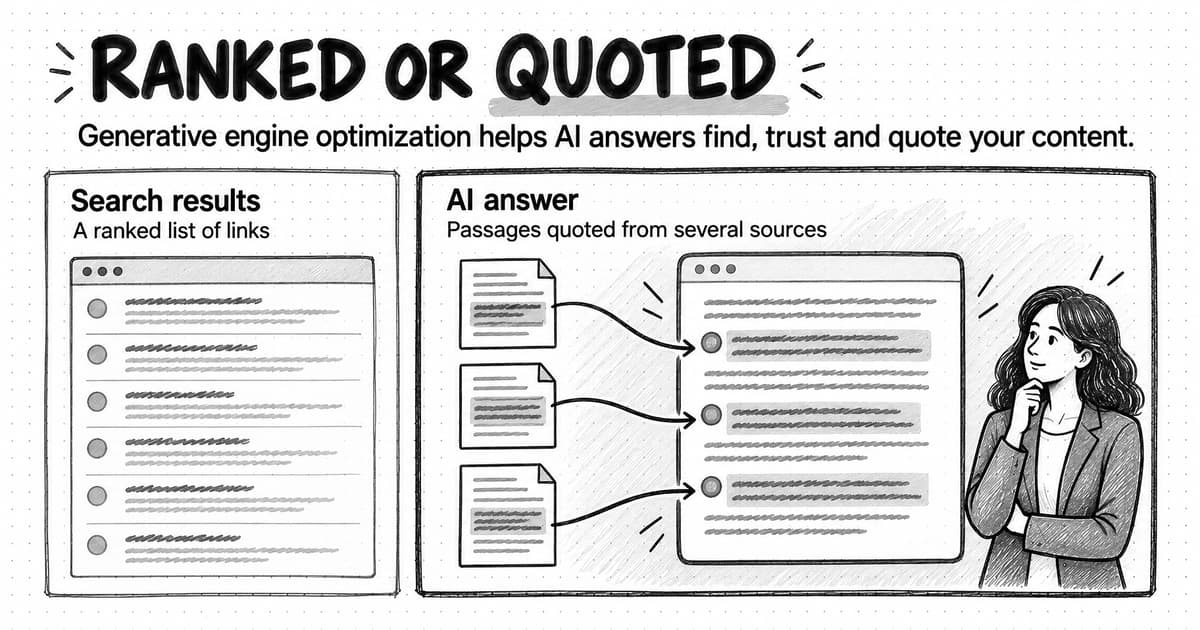
Search behavior has changed how those decisions play out, but not what they are. In March 2025, Pew Research Center tracked the browsing of 900 U.S. adults and found that 18% of their Google searches produced an AI summary. When a summary appeared, users clicked a traditional result in 8% of visits, against 15% when no summary appeared, and clicked a link inside the summary in about 1% of visits. That is one panel of U.S. adults in one month, so treat the exact figures with care, but it shows the mechanism plainly: when a summary answers the question, fewer people click through. Our guide to zero-click content distribution collects several of these studies and what they mean for planning.
Fewer clicks change what a keyword is worth, and they change it unevenly. A definition query such as "what is a security questionnaire" may now be answered in full on the results page. A query such as "security questionnaire template for a startup" still sends people to pages, because the searcher wants something to use. A buyer comparing vendors still wants to read the vendors' pages. Good keyword research now separates those cases deliberately, so the team spends its effort on pages that people will visit, or that AI answers will draw on, rather than on pages that only repeat what the answer box already says.
The output has also shifted from a keyword list to a map. Once near-duplicates are grouped, a list of several hundred keywords often collapses into a few dozen distinct needs, and each need gets one page. That map is what a content plan, a brief and an AI visibility baseline can all be built from. The rest of this guide is about producing it.
Why keywords still matter when people ask AI assistants
A reasonable founder might ask whether any of this is still worth doing. If buyers type long questions into ChatGPT, why study the short phrases they type into Google?
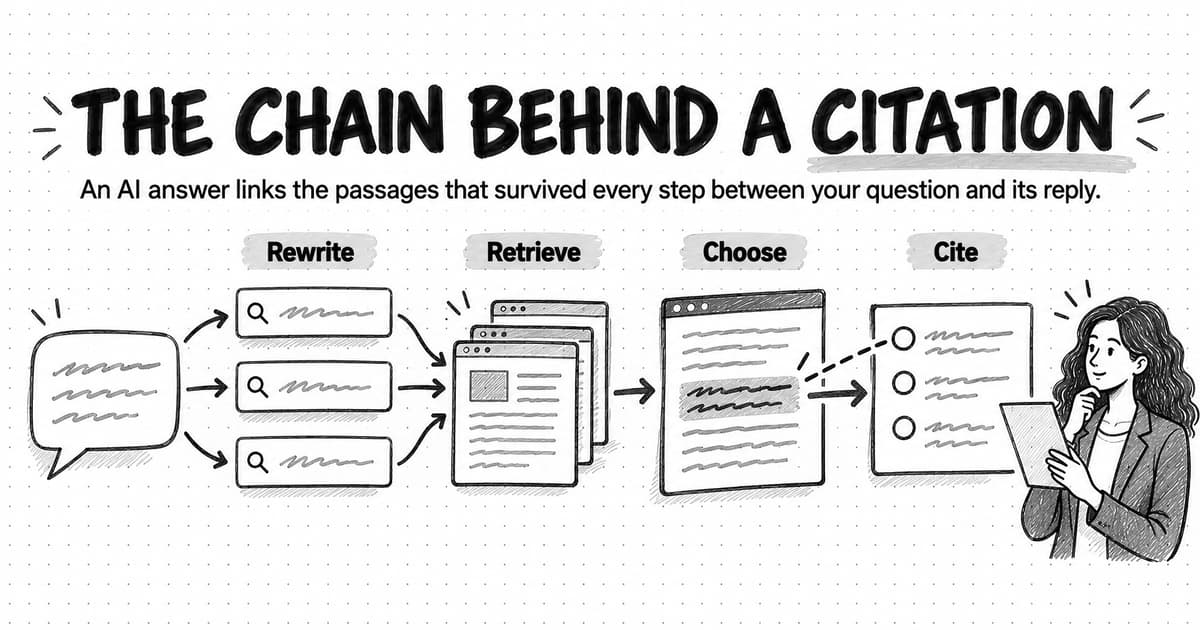
The first answer is that AI answers are built from search. Google's documentation on AI features and your website (last updated December 10, 2025) says that both AI Overviews and AI Mode may use a "query fan-out" technique, issuing multiple related searches across subtopics and data sources to develop a response, and that a page must be indexed and eligible to appear in Google Search with a snippet to be shown as a supporting link. When Google announced AI Mode in May 2025, its head of Search, Elizabeth Reid, described the same technique as breaking a question into subtopics and issuing many queries at once. A long question to an AI system becomes a set of shorter searches, and those searches look a lot like keywords. Our guide to Google AI Overviews and AI Mode explains that process in more detail.
The second answer is that keyword research has always been a way to learn the buyer's vocabulary, and vocabulary is what you need to write a page people recognize as being about their problem. Google's SEO Starter Guide puts it plainly: think about the words a user might search for, and expect someone who knows the topic well to use different words from someone who is new to it. Its example is one person searching "charcuterie" while another searches "cheese board". In B2B, the same split appears between an expert's "vendor risk assessment" and a founder's "a customer sent us a security spreadsheet".
The third answer is measurement. You cannot tell whether your content is reaching buyers in search or in AI answers without a defined set of queries and questions to check. Google says that sites appearing in AI Overviews and AI Mode are counted in the Search Console Performance report, within the Web search type, alongside the rest of search traffic. A keyword map tells you which of those queries matter. Our guide to measuring AI search visibility builds its tracking question set from the same customer evidence this guide starts with.
What has changed is the balance. Exact phrasing matters less, because both Google and AI systems match meaning rather than strings. The completeness and specificity of the answer matters more, because an AI system choosing which pages to draw on can pass over a page that only repeats the obvious. Our guide to how AI search engines choose sources covers that selection. For keyword research, the practical consequence is that you study keywords to understand needs, and you judge each need by whether you can answer it better than the pages already ranking.
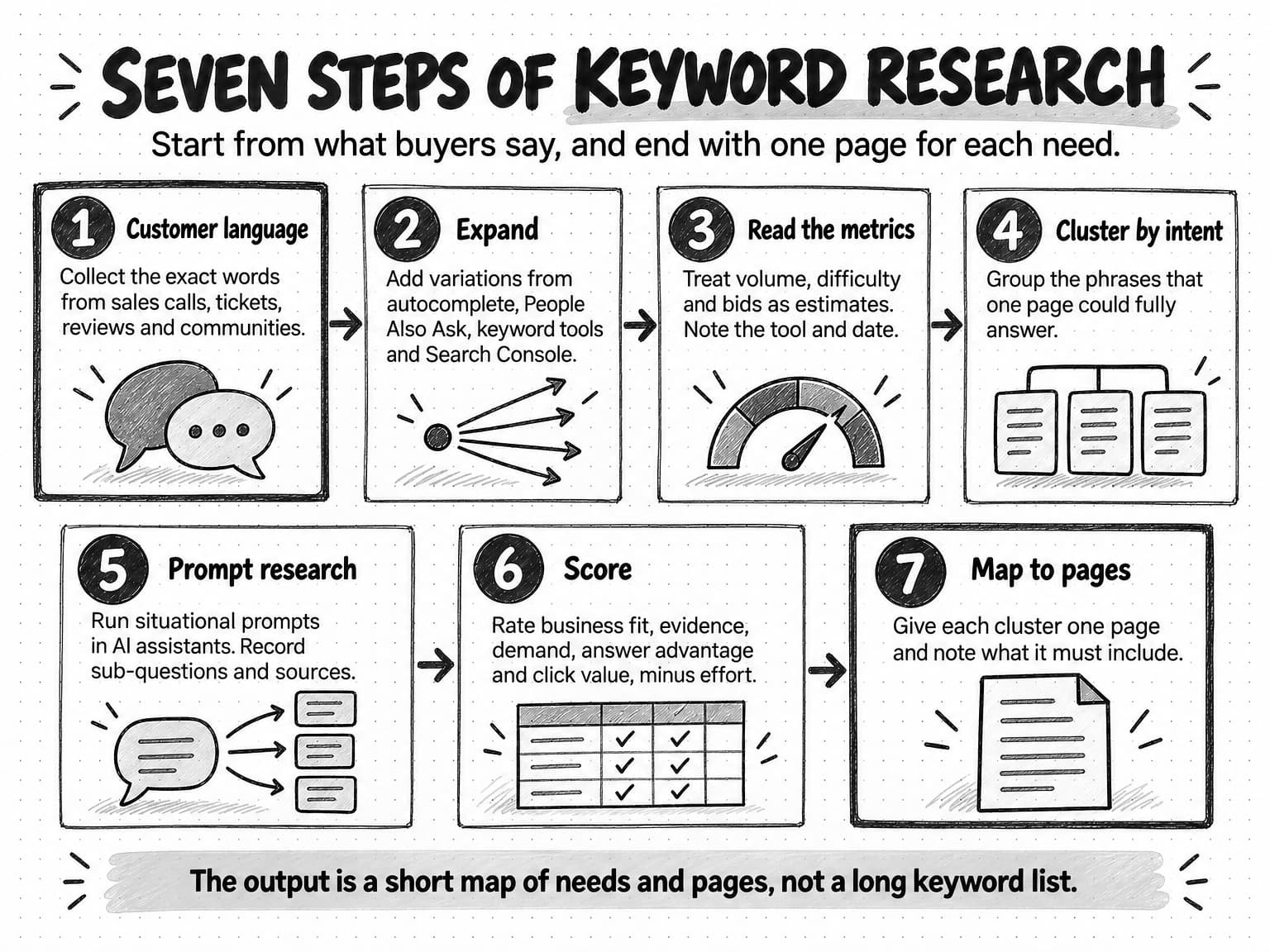
View the seven steps of keyword research at full size (opens in a new tab).
Step 1: Start from the words customers already use
Keyword research often starts in a tool, with a seed term the marketer chose. That order builds the marketer's assumptions into the list from the first minute. If the seed is "compliance automation" and your buyers say "we need a SOC 2 report for a customer", the tool will happily give you a thousand variations of a phrase your buyers rarely use.
Start instead with the places your buyers already describe their problems in their own words:
- Sales and discovery calls. The question a prospect asks in the first five minutes is often the search they ran before booking the call. For a small B2B company, call recordings or notes are often the richest source.
- Support tickets and onboarding questions. These show the problems customers hit after buying, which are often the problems the next prospect is researching.
- Reviews of your product and your competitors. Review sites record what buyers wanted, what disappointed them and the words they use for both.
- Community threads. Reddit, Slack and Discord groups, LinkedIn comments and industry forums show the questions people ask peers when they do not want a sales conversation.
- Your own site search and Search Console. Search Console shows the queries your site already appears for, which is direct evidence rather than an estimate.
- Questions your team gets asked. Founders and salespeople answer the same five questions every week. Write them down.
Collect the exact words, not a tidy paraphrase. "How long does SOC 2 take" and "how fast can we get SOC 2" look the same in a summary but point to different worries: one buyer is planning, the other has a deadline. Keep the source next to each phrase, because a question from a customer call is stronger evidence of buyer demand than one from a forum where students ask about certifications. Our guide to voice-of-customer research describes how to build an evidence log that keeps each excerpt linked to its context, and the same log works for keyword research.
Aim for 30 to 80 phrases from customer sources before you open a keyword tool. You will not keep all of them, and many will be too specific to show search volume. Their job is to give you seeds that come from buyers, and a way to check later whether the tool's suggestions sound like your customers or like somebody else's.
Step 2: Expand the list with search tools
With customer seeds in hand, use search tools to find the variations, adjacent questions and subtopics you did not hear directly. Each tool shows a different slice of behavior, so use several and keep the source label on every phrase you add.
Google autocomplete. Type each seed into Google and note the predictions. Google's public liaison for Search, Danny Sullivan, explained in October 2020 that predictions reflect searches that have been done on Google, starting from common and trending queries that match what someone begins to type, and that the systems consider the searcher's language and location. Predictions are a sign that people search a phrase; they are not a measure of how many do, and Google says they shouldn't be compared against Google Trends. Try the seed with question words in front ("how", "why", "can", "best") and with letters after it to see more predictions.
People Also Ask and related searches. The People Also Ask box on a results page shows questions Google associates with the query, and expanding one question often reveals more. Related searches at the bottom of the page show how people reformulate. Both are useful for finding the follow-up questions a full page should answer.
Google Trends. Google Trends shows relative interest over time and by region, not volume. It uses a sample of Google searches, scales results from 0 to 100 by a topic's proportion of all searches, and shows terms with little search activity as 0. Use it to compare two phrasings, to spot seasonality, and to check whether a topic is rising or fading.
Keyword tools. Google's Keyword Planner, inside a Google Ads account, gives ideas and estimates for Google searches. Commercial SEO tools have their own keyword databases, ideas based on what competing pages rank for, and their own difficulty scores. A free trial or a single month of a paid tool is usually enough for a first round. Use these tools mainly for breadth and for the rough size of demand, and read their numbers with the care the next step describes.
Competitor pages. Look at the pages that rank for your strongest seeds, and at the sites of your direct competitors. Which questions do they answer? Which do they skip? This is a quick version of the larger exercise in our guide to content gap analysis.
Search Console. If your site has content already, filter the Performance report by queries containing your seed terms and look at those with impressions but few clicks. These are needs Google already associates with your site, which you may answer poorly or only in passing.
Stop expanding when new phrases are mostly variations of ones you have. For one product in one market, a first round often lands in the low hundreds of phrases. More is not better; it only makes the next steps slower.
Step 3: Read search volume, difficulty and CPC honestly
The numbers in a keyword spreadsheet look precise. They are estimates, made in different ways by different vendors, and each answers a narrower question than its label suggests. Reading them well is most of the difference between a useful keyword list and a misleading one.
Search volume is a modeled estimate. Google's Keyword Planner help defines average monthly searches as the average number of times people have searched for a keyword and its close variants, averaged by default over 12 months, and says the statistics are rounded. Google also notes that keywords with very low search volumes aren't discoverable or forecastable in Keyword Planner. Third-party tools build their own estimates with their own data and models, so two tools can report very different numbers for the same phrase. Use volume to compare phrases within one tool, roughly, and never to forecast traffic. An average also hides seasonality: a phrase that peaks in one month can show the same yearly average as a phrase with steady interest.
Keyword difficulty is a vendor's score, not a property of the keyword. Ahrefs says its score is based on the number of referring domains that the top 10 organic pages have for a keyword, on a scale of 0 to 100, and does not account for on-page factors. Semrush describes its KD% as a 0 to 100 score based on several factors, including the median number of referring domains and the authority of the ranking domains, along with characteristics of the results page. Different inputs produce different scores for the same keyword. A difficulty score is a useful first filter for how established the current ranking pages are, but it cannot tell you whether your page would be more useful than theirs. Look at the actual top results before you decide.
CPC and competition are advertising signals. In Keyword Planner, competition is the number of advertisers that showed on a keyword relative to all keywords, rated low, medium or high, and the two top-of-page bid figures approximate the 20th and 80th percentiles of what advertisers have paid. Neither measures organic difficulty. Both are a reasonable proxy for commercial value, because advertisers pay more for searches that lead to purchases. A B2B keyword with low volume and a high bid often deserves more attention than its volume suggests.
Search Console figures are observations, with gaps. Impressions, clicks and average position in Search Console are measured for your own site, which makes them the most reliable numbers you have. They are still incomplete. Google's Search Central blog explained in October 2022 that anonymized queries, those not issued by more than a few dozen users over a two-to-three-month period, are left out of the query table to protect privacy, although their clicks count in chart totals. For a niche B2B site, a large share of real queries can fall into that category.
Zero volume does not mean zero demand. Ahrefs reports that keywords with fewer than 10 searches per month make up almost 93% of its U.S. keyword database (article updated May 27, 2026). Many specific B2B questions sit in that range or below what tools report at all, and they can still be the questions that precede a purchase. A section below covers how to judge them.
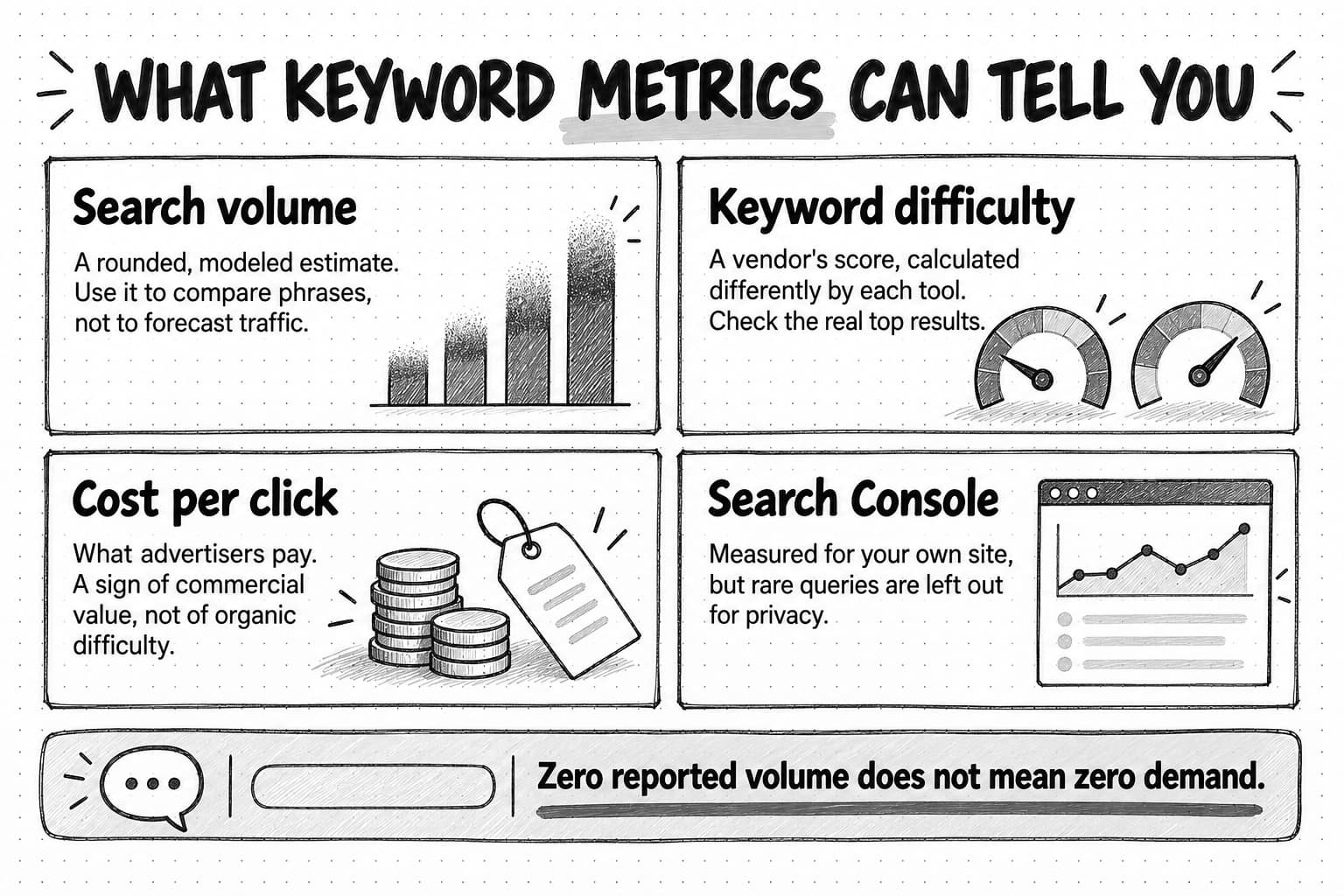
View the keyword metrics diagram at full size (opens in a new tab).
The practical rule is to treat every metric as one piece of evidence with a known weakness, and to record which tool and date it came from. When the numbers and the customer evidence disagree, the customer evidence usually deserves more weight for a small B2B company, because the tool's numbers describe the whole search population and your customers are a small, specific part of it.
Step 4: Classify search intent and group keywords into clusters
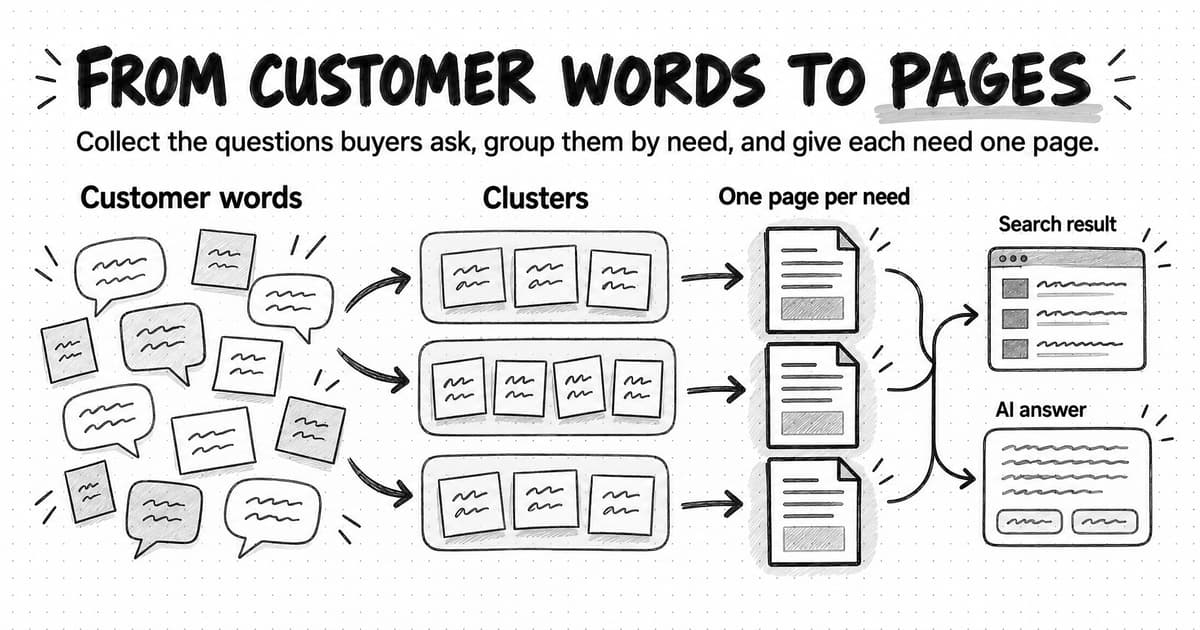
A list of several hundred phrases is still hard to act on. The next step turns it into a smaller set of needs, each of which one page can answer. You do that in two passes: label each phrase with its intent, then group phrases that share an answer.
Intent is what the searcher is trying to do. The common labels are informational (learn something), commercial investigation (compare options before buying), transactional (buy or sign up), and navigational (reach a specific site). A finer label is often more useful in B2B: definition, how-to, template, comparison, alternatives, pricing, and troubleshooting. The fastest way to check intent is to search the phrase and look at what ranks. If the top results are templates, the searcher wants a template, whatever the phrase seems to say. Our guide to search intent covers how to read results pages and AI answers for intent in detail.
Clustering groups phrases that would be answered by the same page. The test is practical: would a searcher typing phrase A be fully satisfied by the best page for phrase B? If yes, they belong together. A useful shortcut is to compare the results pages. When two phrases share several of the same top-ranking URLs, Google is treating them as the same need, and one page can usually serve both. When the results are mostly different, they need different pages, even if the words overlap.
Many keyword tools offer automatic clustering based on that overlap. It saves time on a large list. Check its groups by hand anyway, because tools sometimes merge phrases with the same words and different intents, such as "SOC 2 checklist" (a template) and "SOC 2 checklist software" (a product search).
Give each cluster a plain name that states the need ("how long SOC 2 takes and what slows it down"), a primary phrase (usually the clearest, most common wording), and its intent. Keep the supporting phrases attached. They become the subheadings, examples and questions the page must cover. A cluster is the unit you prioritize in Step 6, and a cluster becomes one page in Step 7.
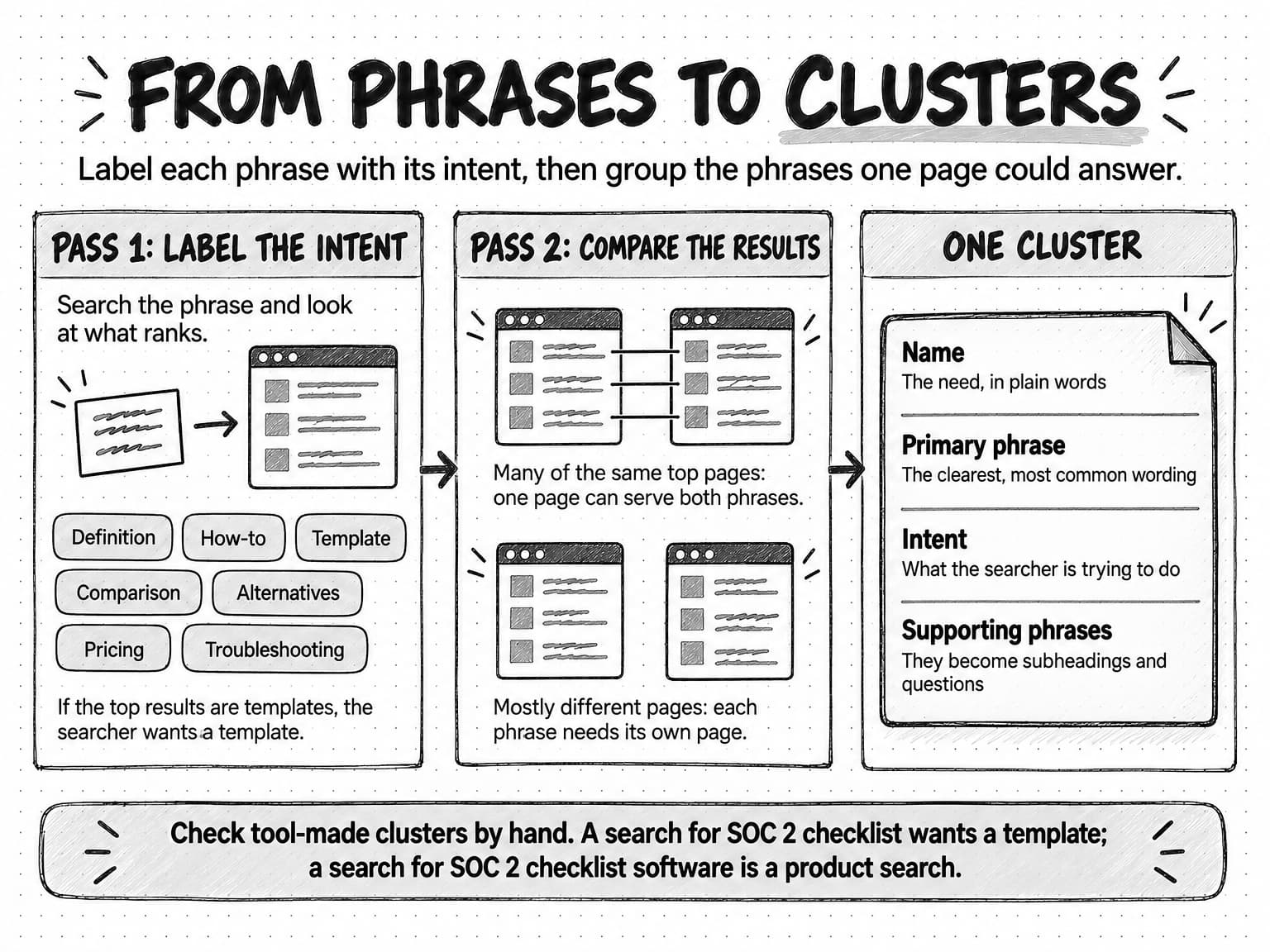
View the phrases-to-clusters diagram at full size (opens in a new tab).
Clusters also group upward. Several related clusters form a topic, and a few topics form a content pillar, the broad subject areas a company chooses to be known for. Our guide to content pillars explains how pillars, topics and pages relate, and our guide to topical authority explains why covering a subject thoroughly, cluster by cluster, tends to work better than scattered single pages.
Step 5: Add prompt research for AI assistants
Search tools show what people type into Google. They do not show what people ask AI assistants, and none of the major assistants publishes a keyword-style volume report for prompts the way Keyword Planner does for Google searches, as far as we could find in October 2026. Prompt research fills that gap with a sample: you write the questions your buyers would plausibly ask, run them through the assistants your buyers use, and record what comes back.
Prompts differ from keywords in three ways that matter for research. They are longer and carry context ("we're a 20-person software company and a hospital asked for our SOC 2 report"). They often bundle several needs into one request. And they lead to an answer that names sources, products or both. The method below turns those differences into evidence you can use.
Write prompts from situations, not keywords. Go back to your customer evidence from Step 1. For each cluster, write two to four prompts in the way a buyer would describe their situation to a knowledgeable colleague: who they are, what happened, what they need to decide. Include the constraints customers mention, such as team size, budget or deadline. A set of 20 to 40 prompts covers most small B2B products. The AI search visibility guide linked earlier describes a fuller question set with branded, category, solution, comparison, recommendation and alternative questions, which you can reuse here.
Run each prompt in the assistants your buyers use. For most B2B audiences that means Google's AI Mode or AI Overviews, ChatGPT, Perplexity and possibly Gemini or Microsoft Copilot. Use a clean session without your own history where the product allows it, and record the date, because answers vary by date, location and person.
Record four things from each answer. The sub-questions the answer covers, which tell you what a complete page on the subject must address. The sources it cites or links, which show the kinds of pages AI systems currently draw on for that need. The follow-up questions the assistant suggests, which some assistants show under the answer and which reveal the next need in the buyer's sequence. And whether your company or competitors are mentioned, which is a baseline for later measurement.
Turn the record into keyword research inputs. Each sub-question becomes a candidate phrase for your list, labeled as coming from prompt research. Compare it with your clusters. Often the sub-questions match clusters you already have, which confirms them. Sometimes they reveal a need your search tools missed, usually a situational question too specific to show volume. Sometimes they show that an answer draws on a kind of page you do not have, such as a pricing explainer or a comparison.
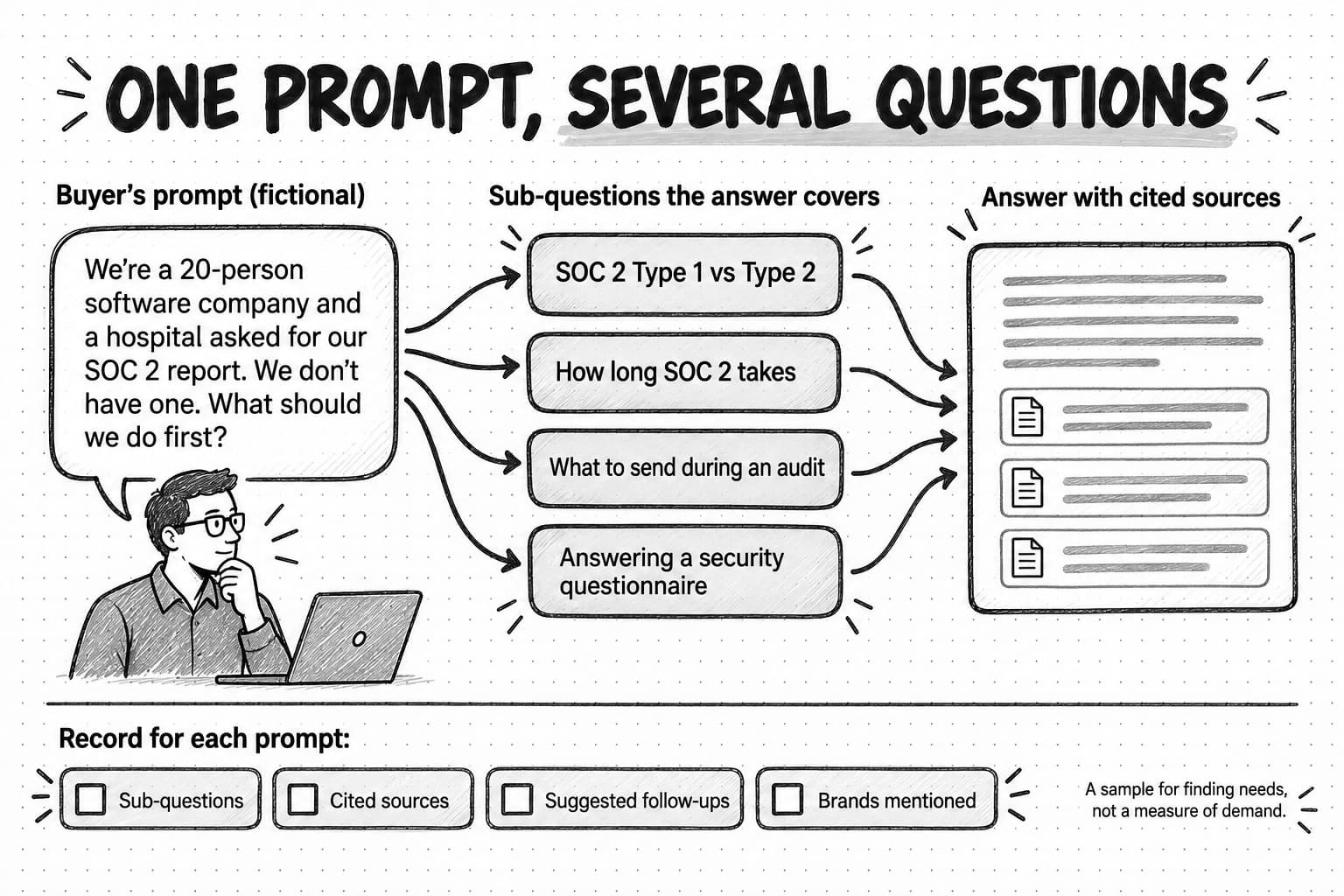
View the prompt research diagram at full size (opens in a new tab).
Prompt research has limits worth stating plainly. A sample of 30 prompts you wrote is not a measure of what thousands of buyers ask. The answers change from run to run. And the sub-questions you infer from an answer are your reading of it, not a log of the searches the system ran. Treat prompt research as a way to find needs and check completeness, and keep the numbers out of it. Its value is qualitative: it tells you what a full answer to a buyer's situation includes, which is exactly what your page needs to contain.
Step 6: Prioritize clusters with a scoring table
By now you may have a few dozen clusters. A small team cannot write all of them at once, and some should never be written. A simple scoring table makes the choice explicit and lets someone else challenge it.
Score each cluster from 0 to 3 on five criteria:
| Criterion | What a 3 looks like | What a 0 looks like |
|---|---|---|
| Business fit | Searchers have the problem your product solves and could buy from you | Interesting to your audience but unrelated to what you sell |
| Customer evidence | Heard in sales calls or support tickets, in the customers' own words | Appears only in a keyword tool |
| Demand signals | Recurs across autocomplete, People Also Ask, tools and prompt research, or carries a high bid | One source, no volume, no bid |
| Answer advantage | You have data, product knowledge, examples or experience the current top results lack | You could only restate what already ranks |
| Click or citation value | Searchers need a page (a template, comparison, detailed method), or AI answers on the topic cite pages like yours | The question is fully answered on the results page |
Then subtract an effort score from 0 to 3, where 3 means the page needs original research, expert input or design work the team cannot easily supply, and add a note if established sites dominate the results. Weight business fit double if your list has drifted toward general-interest topics. The arithmetic matters less than the conversation it forces. When a cluster scores high on demand and low on business fit, the table shows why the team should skip it, which is easier than arguing from instinct.
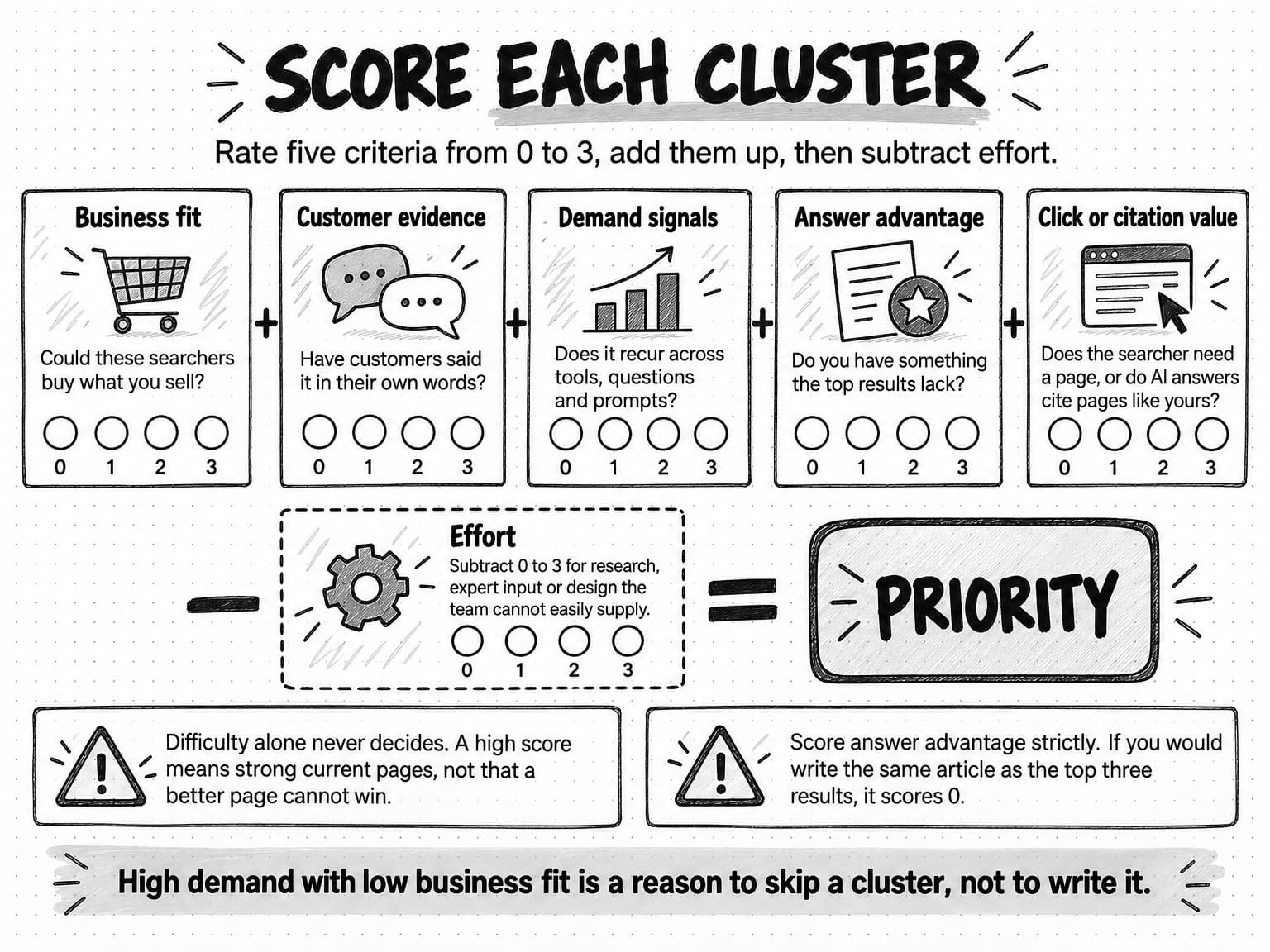
View the cluster scoring diagram at full size (opens in a new tab).
Two cautions. First, do not let difficulty scores make the decision alone. A high difficulty score means the current ranking pages have many links, not that a better page cannot win; and a low score on a topic nobody buys from is still a poor choice. Second, the answer-advantage column is the easiest one to score generously. Be strict. If the honest answer is "we would write the same article as the top three results", score it 0, or find the evidence that would change it, such as a customer example, product data or a test the team can run. Our guide to original research content covers ways to create that evidence when you have none.
The strategy guide on prioritizing content opportunities places this scoring inside a wider content plan, with portfolio balance across buyer stages.
Step 7: Map each cluster to one page
The last step decides where each prioritized cluster lives. The rule is one primary page per cluster, and one cluster per page. When two pages target the same need, they compete with each other and split the evidence that either could have earned. When one page tries to answer several distinct needs, it answers none of them well.
For each cluster, record:
- The page. An existing URL that already covers the need, or a new page to create. Check Search Console first: if a page already gets impressions for the cluster's phrases, improving it is usually faster than starting again.
- The page type. Match it to the intent you found in Step 4: a guide for how-to and explanatory needs, a template page, a comparison, a glossary entry, a product or solution page, a pricing page. Commercial clusters often belong on product pages, not blog posts.
- The primary phrase and supporting phrases. The primary phrase guides the title and the opening answer. The supporting phrases and the sub-questions from prompt research become sections and FAQs.
- What the page must include to be the best answer. The evidence, example or data from your answer-advantage score. This is what turns a keyword into a brief.
- Internal links. Which pillar or hub page should link to it, and which related pages it should link to.
The map then feeds the brief for each page. A keyword alone tells a writer what the page is about, not what it must establish; our guide to writing a content brief explains what a brief adds, from the reader's situation to the claims the evidence can support.
Two mapping mistakes are common enough to check for. Cannibalization, where several of your pages target the same cluster, shows up in Search Console as different URLs taking turns appearing for the same queries; the fix is usually to merge them into one stronger page and redirect the others. Orphaned clusters, needs your customers have that no page answers, show up as clusters with high scores and an empty page column. The map makes both visible at a glance.
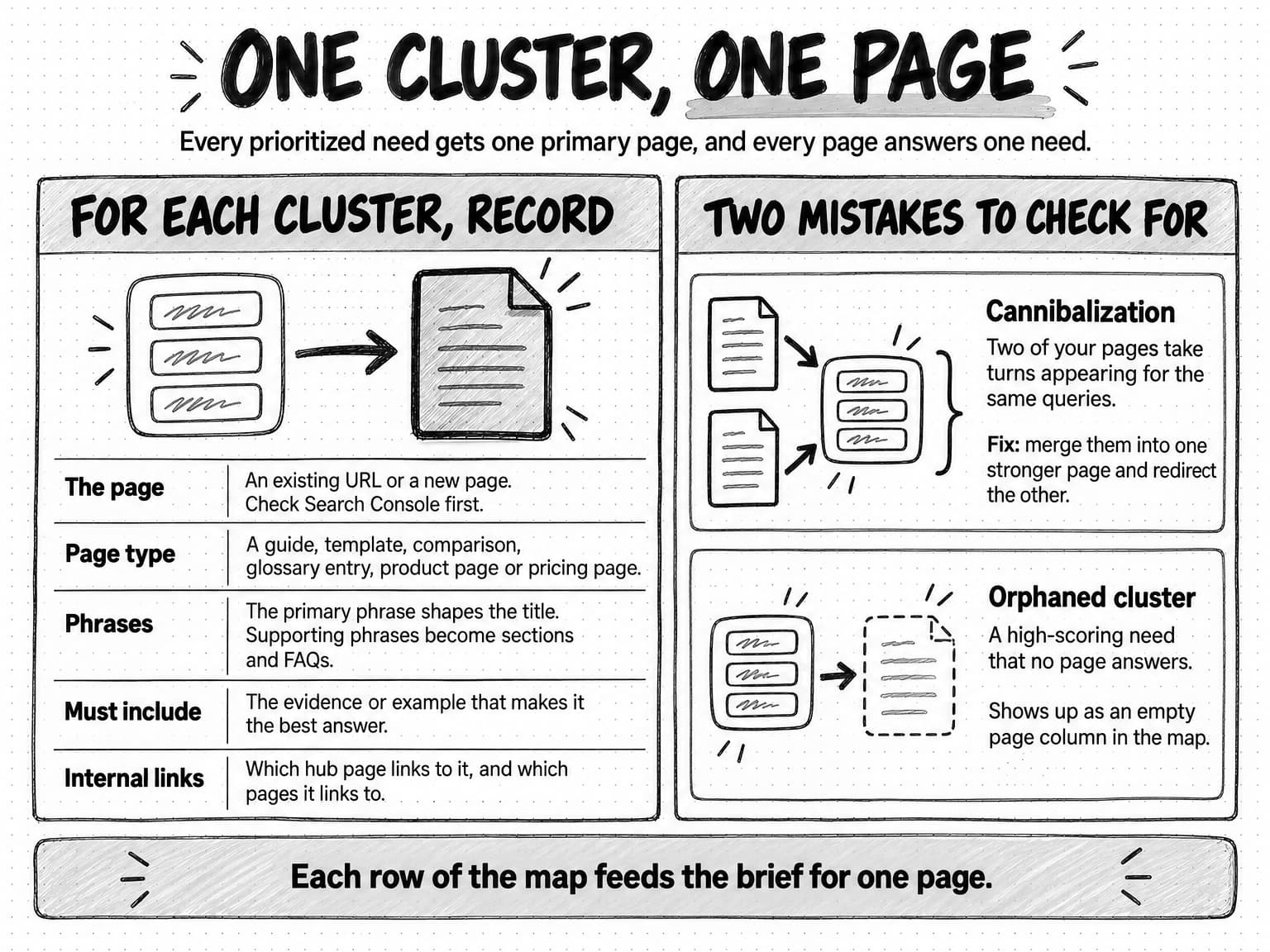
View the cluster-to-page map at full size (opens in a new tab).
Why low-volume and zero-volume keywords matter in B2B
Most B2B companies sell to a few thousand possible buyers, not millions. The searches those buyers run are specific, varied and rare. A question like "how to answer a security questionnaire without a SOC 2 report" may be asked by a few dozen people a month, which is below what many tools report. Those few dozen people may be exactly your buyers, at exactly the moment they need you.
Three reasons make these keywords worth more than their volume suggests. First, specific questions usually come later in the buying process, when the searcher has a defined problem and a deadline. Second, the tools undercount them, as Step 3 explained: Keyword Planner does not forecast very low-volume terms, and Search Console leaves anonymized queries out of its query table. Third, each specific question tends to have many close variants, and one good page can answer all of them. A page written for a reported 20 searches a month can collect visits from hundreds of related phrasings the tool never showed.
AI answers add a fourth reason. When a buyer asks an assistant a long, situational question, the system breaks it into sub-queries, and those sub-queries are often specific. A page that answers a narrow question thoroughly can be one of the sources for an answer even when the narrow question never appears in a keyword tool.
How do you judge a keyword with no reported volume? Use the evidence from Step 1. If you heard it on more than one sales call, saw it in support tickets, or found it repeated in community threads, it is real demand. Check whether it fits a cluster you already plan to write, in which case it becomes a section. If it stands alone and scores high on business fit, it can justify its own page. If you heard it once and nothing else supports it, note it and wait.
Low-volume keywords do not replace head terms. Broad topics still matter for building a recognizable body of work, and some category terms carry real purchase intent. The point is to stop excluding a keyword only because a tool shows a small or empty number next to it.
A keyword tool describes the whole search population. Your customers are a small, specific part of it, and their questions are often too rare to show up in the numbers.
A keyword research template you can copy
Keep the research in one spreadsheet with three tabs. The first tab holds every phrase you collected; the second holds the clusters; the third is the page map. Copy these columns.
Tab 1: Phrases
| Column | What to record |
|---|---|
| Phrase | The exact words, as a customer said them or a tool reported them |
| Source | Sales call, support ticket, review, community, autocomplete, People Also Ask, keyword tool, Search Console, prompt research |
| Source date | The day you collected it; results drift |
| Intent | Definition, how-to, template, comparison, alternatives, pricing, troubleshooting, navigational |
| Volume (tool, date) | The estimate and which tool it came from, or "not reported" |
| Difficulty (tool) | The vendor score, with the vendor named |
| Top-of-page bid | From Keyword Planner, if available |
| Cluster | The cluster name this phrase belongs to |
| Notes | What the results page or AI answer showed |
Tab 2: Clusters
| Column | What to record |
|---|---|
| Cluster name | The need, stated plainly |
| Primary phrase | The clearest common wording |
| Intent | The dominant intent from the results page |
| Supporting phrases | Count, with a link to the Phrases tab |
| AI answer notes | Sub-questions covered, sources cited, follow-ups suggested |
| Scores | Business fit, customer evidence, demand signals, answer advantage, click or citation value, effort |
| Total | Sum of the five scores, minus effort |
| Decision | Write, improve existing, merge, wait, skip |
Tab 3: Page map
| Column | What to record |
|---|---|
| Cluster | From Tab 2 |
| URL | Existing page or "new" |
| Page type | Guide, template, comparison, glossary, product page, pricing page |
| Must include | The evidence or example that makes this the best answer |
| Links from | The hub or pillar page that links here |
| Owner and date | Who briefs it and when |
| Check date | When to review rankings, AI answers and Search Console |
Fill Tab 1 quickly and loosely. Spend your care on Tab 2, where the decisions happen. Tab 3 should be short enough that the whole team can read it in a meeting.
Worked example: keyword research for a fictional compliance software company
The following example is fictional. Pellwick is an invented company, and every number below is illustrative, chosen to show how the method works rather than to describe any real market.
Pellwick sells software that helps startups collect the evidence needed for a SOC 2 audit, a security report that enterprise customers often ask their vendors for. Its marketer, working alone, has a week to produce a keyword map for the next quarter.
Step 1: customer language. She reads notes from 25 recent sales calls and 40 support tickets and collects 52 phrases. Several recur. "A customer sent us a security questionnaire" appears in nine calls. "Do we need Type 1 or Type 2" appears in seven. "How long will this take" appears in almost every call, often with a deadline attached. Only two prospects use the phrase "compliance automation", which is the term on Pellwick's homepage.
Step 2: expansion. Autocomplete, People Also Ask and a keyword tool's trial expand the list to 410 phrases. The tool suggests many phrases about other compliance standards and about careers in auditing. She tags these but expects to drop most of them.
Step 3: metrics. The tool reports illustrative monthly volumes: 2,400 for "SOC 2 checklist", 900 for "SOC 2 Type 1 vs Type 2", 300 for "security questionnaire template", 40 for "how to answer a security questionnaire", and no volume at all for "security questionnaire without SOC 2". "SOC 2 checklist" also shows a difficulty of 68 in that tool, and its top results are long pages from established compliance vendors and audit firms. "Compliance automation software" shows a top-of-page bid many times higher than the informational phrases, which marks it as commercially valuable.
Step 4: clusters. After grouping by shared results and intent, the 410 phrases become 24 clusters. The marketer drops 7 that do not fit the business, such as auditing careers. Five of the remaining clusters are shown in the table below.
Step 5: prompt research. She writes 30 prompts from the sales-call situations, such as "We're a 20-person software company and a hospital asked for our SOC 2 report. We don't have one. What should we do first, and how long will it take?" She runs each in three assistants. The answers consistently cover the difference between Type 1 and Type 2, rough timelines, what to send while an audit is under way, and how to answer a security questionnaire in the meantime. The last sub-question matches her zero-volume phrase from sales calls. The answers cite audit firms and compliance vendors, and two cite a community thread. None mentions Pellwick.
Step 6: scoring. She scores the clusters with the five criteria and the effort deduction. These are five of them, with illustrative scores:
| Cluster | Business fit | Customer evidence | Demand signals | Answer advantage | Click or citation value | Effort | Total |
|---|---|---|---|---|---|---|---|
| Answering security questionnaires before you have SOC 2 | 3 | 3 | 1 | 3 | 3 | 1 | 12 |
| SOC 2 Type 1 vs Type 2 for startups | 3 | 3 | 3 | 1 | 2 | 1 | 11 |
| How long SOC 2 takes and what slows it down | 3 | 3 | 2 | 3 | 2 | 2 | 11 |
| Compliance automation software for startups | 3 | 1 | 2 | 1 | 3 | 1 | 9 |
| SOC 2 checklist | 2 | 1 | 3 | 1 | 2 | 2 | 7 |
The highest-volume cluster scores lowest. Pellwick could write a checklist, but it would look like a dozen others, and the marketer has nothing to add to them yet. The cluster with no reported volume comes first, because it comes straight from customers, matches a gap in the AI answers, and Pellwick's support team answers this question every week.
Step 7: the page map. The questionnaire cluster becomes a new guide with a template, built from the support team's answers. "Type 1 vs Type 2" becomes a comparison guide. The timeline cluster becomes a guide that uses Pellwick's own anonymized onboarding data on how long customers took, which is its answer advantage, once the team confirms the data can be published. The commercial cluster goes to the existing product page, which is rewritten to use the buyers' language ("a customer asked for our SOC 2 report") instead of "compliance automation". The checklist waits until Pellwick has something distinctive to add.
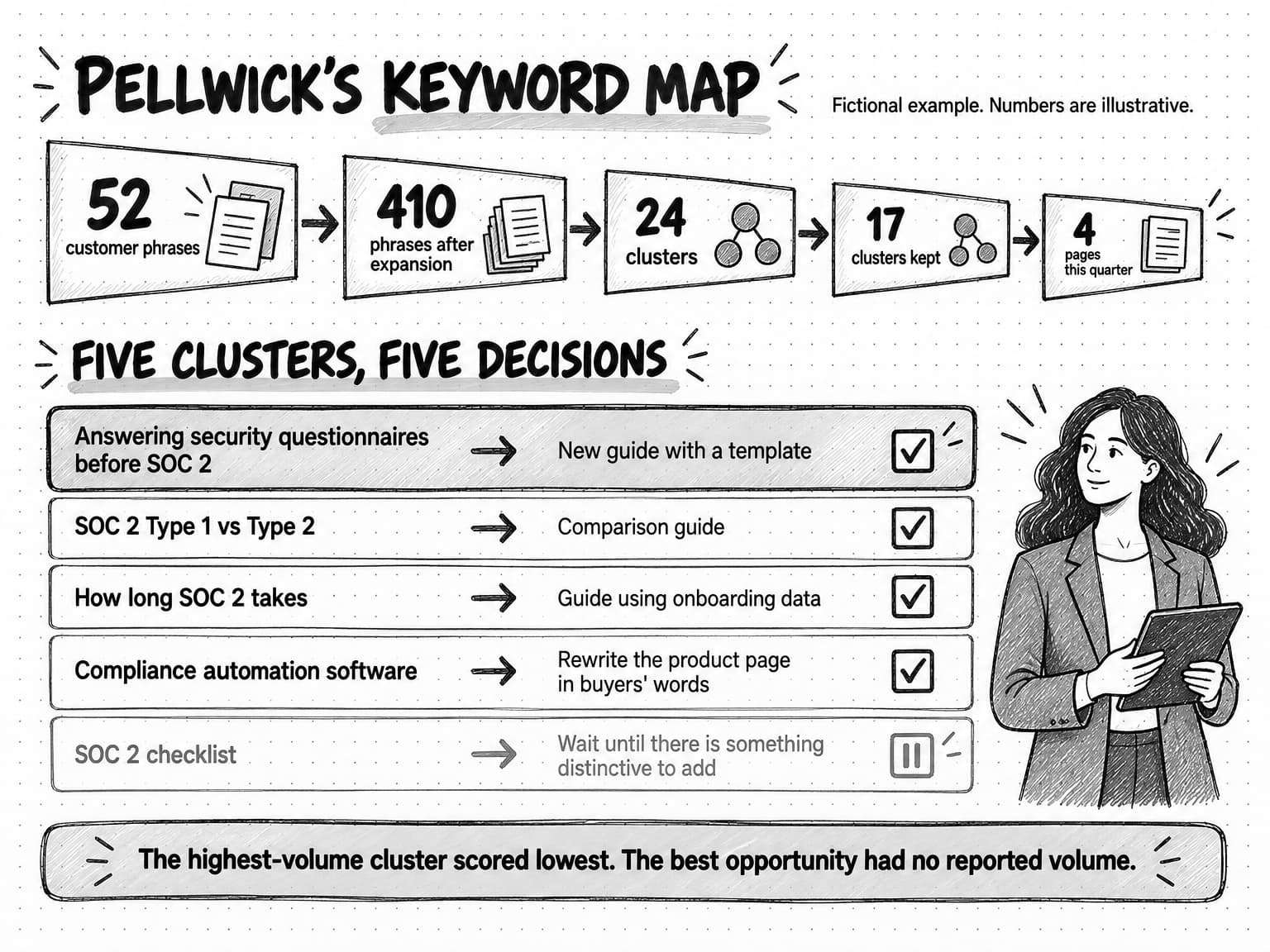
View the Pellwick keyword map at full size (opens in a new tab).
The marketer's week produces a map of 17 clusters, with four pages to write or rewrite this quarter, all from the table above, and a list of 30 prompts to rerun next month as a baseline. The most useful finding was not a keyword. It was that Pellwick's homepage used a phrase its buyers almost never say.
Common keyword research mistakes
Starting in the tool. Seeds chosen by the marketer produce lists shaped by the marketer's vocabulary. Start with customer language and use tools to expand it.
Sorting by volume. The biggest numbers usually belong to broad, informational phrases that are hard to rank for and that AI answers often settle on the results page. Volume is one input among five, not the ranking.
Treating estimates as facts. Reporting "this keyword gets 2,400 searches a month" as if it were measured leads to forecasts nobody can meet. Name the tool and treat the figure as a rough comparison.
Writing one page per keyword. Five pages for five variations of the same question compete with each other and repeat the same content. Cluster first, then write one page per need.
Ignoring intent. A phrase that sounds informational can have a results page full of product pages, and a phrase that sounds commercial can be dominated by guides. Check the results before you decide the page type.
Writing for keywords instead of readers. Google's guidance on helpful, people-first content (updated October 5, 2026) lists warning signs that content is made for search engines first, including producing lots of content on many different topics in the hope that some of it performs, and writing to a particular word count. The SEO Starter Guide adds that Google doesn't use the keywords meta tag and that keyword stuffing is against its spam policies. Keywords should tell you what to answer, not how often to repeat a phrase.
Skipping the AI answers. A cluster can look attractive in a tool and turn out to be fully answered on the results page, or answered with sources of a kind you do not have. Ten minutes of prompt research per cluster prevents that surprise.
Researching once. Search behavior, results pages and AI answers change. A map that was right last year may now point at needs that are answered elsewhere or miss new ones.
How often to repeat keyword research
A full round of the seven steps makes sense when you launch a product, enter a new market, or plan a new year of content. Between those rounds, lighter checks keep the map current.
Each month, look at Search Console for new queries with growing impressions, and rerun your prompt set for the clusters you have already published. New queries show emerging needs; the prompt reruns show whether AI answers now draw on your pages and what they still miss. Add new customer phrases from sales calls and support to Tab 1 as they come up, so the next full round starts with fresh evidence.
Each quarter, rescore the clusters. A cluster you deferred may now have an answer advantage, such as new product data or a customer story. A cluster you published may need a refresh if the results page or the AI answers have changed. Our guide to doing a content audit covers how to decide whether an existing page should be kept, improved, merged or cut, which is the same decision the page map asks for. And when search traffic changes sharply, a technical SEO audit can rule out crawling or indexing problems before you blame the content.
Keyword and question research with Ampere
Ampere is an AI marketing agent, and much of this method is research work it can do with you. It works in a session workspace with its own browser and file system, and it can use web search tools, including Google Search, Google search results data, Google AI Mode Search, Bing Copilot Search and Perplexity Search, to gather what people see when they search a phrase or ask a question.
In practice, you can give Ampere your customer phrases from Step 1, ask it to collect the related questions, results and AI answers for each, and have it group them into clusters with the intent of each one noted and the sources kept beside every phrase. It can write the situational prompts for Step 5 from your sales notes, run them through search and AI answer tools, and record the sub-questions and cited sources. From an approved cluster, Ampere can draft a source-grounded blog article package or an SEO audit of an existing page for your review. Ampere does not have its own keyword-volume database; when you need volume or difficulty figures, bring them from the tool you use, and Ampere can work them into the scoring table.
Because Ampere saves project briefs, generated files and reusable project assets in a Project, the keyword map and prompt set can stay with the rest of your content work, and you can set up a scheduled task to rerun the prompt research each month and return the results to that Project. Ampere uses your Brand memory, so drafts start from your products, competitors and positioning rather than from a generic description of your category.
The judgment stays with you. Public search data is never complete, AI answers vary from run to run, and Ampere's output can be inaccurate or incomplete, so check the clusters against what you hear from customers before you commit a quarter to them. Ampere drafts and prepares the work; your team decides what to publish and publishes it.
Sources and further reading
- Google Search Central, AI features and your website, last updated December 10, 2025. Query fan-out in AI Overviews and AI Mode, eligibility for supporting links, and how AI feature traffic appears in Search Console.
- Elizabeth Reid, AI Mode in Google Search: Updates from Google I/O 2025, Google, May 20, 2025. The announcement describing AI Mode's query fan-out technique.
- Athena Chapekis and Anna Lieb, Do people click on links in Google AI summaries?, Pew Research Center, July 22, 2025. Browsing data from 900 U.S. adults in March 2025.
- Google Search Central, SEO Starter Guide, last updated December 10, 2025. Anticipating readers' search terms, meta keywords and keyword stuffing.
- Google Search Central, Creating helpful, reliable, people-first content, last updated October 5, 2026. Warning signs of search-engine-first content.
- Google Ads Help, Use Keyword Planner and About Keyword Planner forecasts. Definitions of average monthly searches, competition and top-of-page bids.
- Google Trends Help, FAQ about Google Trends data. Sampling and 0 to 100 normalization.
- Danny Sullivan, How Google autocomplete predictions are generated, Google, October 8, 2020.
- Google Search Central Blog, A deep dive into Search Console performance data filtering and limits, October 2022. Anonymized queries and data limits.
- Ahrefs, What does KD stand for in Keywords Explorer?, Ahrefs Help Center. How one vendor calculates keyword difficulty.
- Semrush, What is Keyword Difficulty?, Semrush Knowledge Base. How another vendor calculates keyword difficulty.
- Tim Soulo, Long-tail keywords: what they are and how to get search traffic from them, Ahrefs, updated May 27, 2026. The share of keywords with fewer than 10 monthly searches in Ahrefs' U.S. database.
Frequently Asked Questions
What is keyword research in SEO?
Keyword research in SEO is the work of finding the words and questions people use when they search for help with a problem you solve, then deciding which of those needs your site should answer and with which page. The useful output is a short, prioritized map of topics and pages, not a long list of phrases, and the same map serves classic search results and AI answers.
Is keyword research still relevant with AI search?
Yes, keyword research is still relevant with AI search, though its job has shifted. Google says AI Overviews and AI Mode may break a question into several related searches to build an answer, so the needs behind keywords still decide which pages get retrieved. Exact phrasing matters less than it did, and the completeness and specificity of each answer matter more. Keywords also give you the query set you need to measure visibility.
Can you do keyword research for free?
You can do useful keyword research for free. Customer calls, support tickets, reviews and community threads supply the most important evidence, and Google autocomplete, People Also Ask, related searches, Google Trends and Search Console cost nothing. Keyword Planner is available inside a Google Ads account. A paid keyword tool mainly adds breadth and volume estimates, and a single month or a trial is usually enough for a first round.
What is keyword difficulty in keyword research?
Keyword difficulty is a score from an SEO tool vendor that estimates how hard it would be to rank for a keyword, usually from 0 to 100. Each vendor calculates it differently, often from the links pointing at the pages that already rank, so two tools can disagree about the same keyword. Use keyword difficulty as a first filter, then look at the actual top results and judge whether your page could answer the need better.
How do you do keyword research with Google Search Console?
To do keyword research with Google Search Console, open the Performance report and look at the queries your site already appears for. Queries with many impressions and few clicks point to needs Google associates with your pages that you may answer poorly or only in passing. Filter by your seed terms, add useful queries to your list with Search Console as the source, and remember that rare queries are left out of the table for privacy.
Can ChatGPT do keyword research?
ChatGPT and other AI assistants can help with keyword research by suggesting related questions, rewriting phrases the way different buyers might say them, and grouping a list into clusters. On their own they do not report measured search volume, so treat their suggestions as ideas to check against customer evidence, search tools and Search Console. Running situational prompts through assistants is also a way to see what a complete answer to a buyer's question includes.
What is keyword mapping in keyword research?
Keyword mapping is the step of keyword research that assigns each cluster of related keywords to one page on your site, either an existing page or a new one. The map records the page type, the primary phrase, the supporting phrases and what the page must include to be the best answer. One cluster per page prevents your own pages from competing with each other for the same need.
How do you find competitor keywords during keyword research?
To find competitor keywords during keyword research, look at the pages that rank for your strongest seed phrases and at your direct competitors' sites, and note which questions they answer and which they skip. Most commercial keyword tools can also list the phrases a competing site ranks for. Treat those phrases like any other candidates: label the source, cluster them by need and score them on business fit and answer advantage.
How is keyword research for Google Ads different from keyword research for SEO?
Keyword research for Google Ads focuses on searches likely to lead to a purchase and on what clicks cost, using Keyword Planner's competition ratings and top-of-page bid ranges. Keyword research for SEO asks which needs a page can answer well enough to rank or be cited, so it weighs customer evidence, intent and answer quality more heavily. The two overlap usefully: a high bid is a good sign that an organic keyword has commercial value.