Google AI Overviews and AI Mode: how they work and how content gets included
A plain explanation of Google's two AI search features from Google's own documentation, the click evidence so far, and a method for deciding what to change and how to report it.
43 min readWritten by Ampere
Short answer
What are Google AI Overviews?
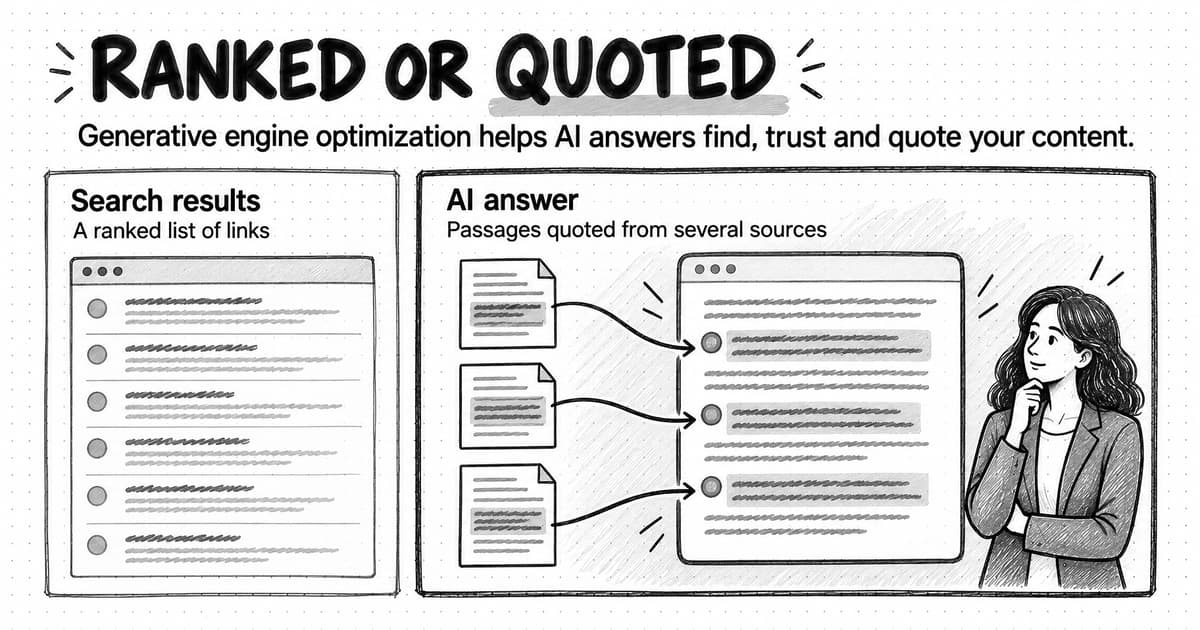
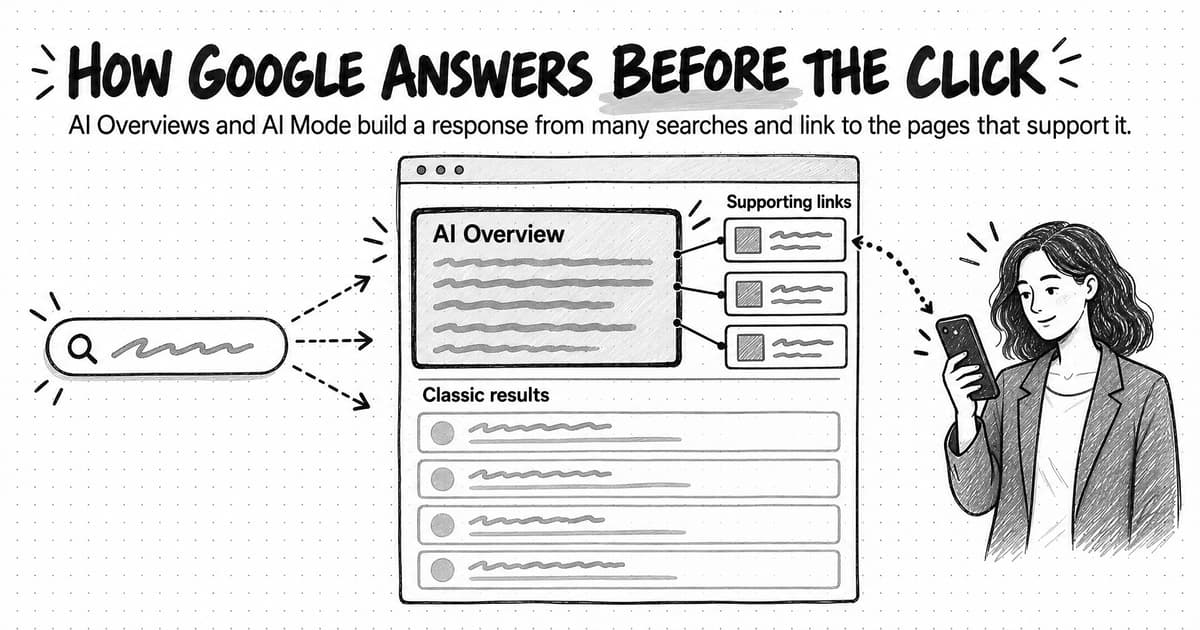
Google AI Overviews are AI-generated summaries that appear at the top of some Google search results, with links to the web pages that support them. Google shows one only when it decides a summary will help, builds it by running several related searches, and links pages that are indexed and eligible for a snippet. No special markup is needed, and there is no way to request one.
Summary
Google AI Overviews and AI Mode change how a search ends, not where Google finds pages. Both build a response by fanning one question out into several related searches over Google's index, then link to pages that support the response. Many readers take the gist from the summary, which is why impressions can hold while clicks fall.
AI Overviews are summary blocks inside an ordinary results page that appear only when Google judges them helpful, most often for longer questions and explanations. AI Mode is a separate conversational experience where the response is the whole page and follow-up questions count as new searches, so a page that covers a buyer's next questions has more chances to be linked.
Google says a page needs only to be indexed and eligible for a snippet; no special markup or AI file is required. Snippet rules such as nosnippet and max-snippet are the only page-level way to limit use in these features, and they also affect classic results. Blocking Google-Extended does not affect Search at all.
Independent studies agree that fewer people click classic results when an AI Overview appears, though they measure it differently and Google disputes the framing. Search Console counts clicks and positions inside these features within ordinary Web results and offers a separate report of link impressions by page, but neither shows queries for AI features or what the response said.
A fictional worked example sorts a B2B query set into five groups, samples each repeatedly, and finds the biggest risk in comparison queries where the brand is rarely linked. The guide closes with a reporting template that keeps exposure, traffic, sampled presence, and outcomes separate, so a team can explain the change honestly and choose which pages to improve first.
Contents
- What AI Overviews and AI Mode are
- How an AI Overview is put together
- How AI Mode differs from AI Overviews
- Which searches trigger an AI Overview
- How Google chooses the links in an AI response
- What Google says you need to be eligible
- How to control what Google uses: nosnippet, data-nosnippet, max-snippet and Google-Extended
- What happens to clicks: the evidence so far
- How AI Overview and AI Mode traffic shows up in Search Console
- How to write content that earns the link
- Worked example: sorting a B2B query set (fictional)
- How to report AI Overview impact to leadership
- Common mistakes when responding to AI Overviews
- Checking AI Overviews and AI Mode with Ampere
- Sources and further reading
- Frequently Asked Questions
A familiar chart has started to appear in marketing reviews. In Google Search Console, the impressions line for the company's educational articles holds steady or rises, while the clicks line drifts down. Average position barely moves. The articles still rank, people still see them, and fewer people visit. When the founder asks what happened, the usual answer is "AI Overviews," which is partly right and not yet useful, because it does not say which pages are affected, whether anything can be done, or what the company should measure instead.
Google AI Overviews are AI-generated summaries that appear at the top of some Google search results, with links to the web pages that support them. AI Mode is a separate, conversational search experience in Google where the whole response is generated by AI and people can ask follow-up questions. Both draw on Google's search index, and both show links to websites. They change how a search ends: more often, the reader gets the gist from Google's summary and only some go on to a site.
This guide explains both features from Google's own documentation: how a response is put together, which searches tend to trigger one, how links are chosen, what Google says a page needs to be included, and which controls a site owner has. It then reviews the click-through evidence with each study's method, shows how the features appear in Search Console, and works through a fictional B2B query set to show how a team can decide what to change and how to report it.
What AI Overviews and AI Mode are
Google describes the two features together in its Search Central documentation, AI features and your website (last updated December 10, 2025). AI Overviews, in Google's words, help people get "the gist of a complicated topic or question more quickly." AI Mode is meant for more nuanced questions and gives a fuller AI-powered response with links to supporting websites. Google says the two may use different models and techniques, so the same question can produce different responses and different links in each.
The practical difference is where each one sits. An AI Overview is a block inside an ordinary results page. The reader typed a normal search, and Google decided an AI summary would help, so it placed one above or among the usual results. The rest of the page, with its organic listings, ads, and other features, is still there underneath. AI Mode is a place the reader chooses to go: a tab in Google Search and a mode in the Google app where the response itself is the page. There is no list of ten results to scroll past, only the generated answer, its links, and a box for the next question.
The features did not arrive at once. The dates matter when you read a click study, because a study that compares 2023 with 2025 straddles the launch, and one that compares two months of 2026 does not.
| May 14, 2024 | At Google I/O, Google announces that AI Overviews will begin rolling out to everyone in the U.S., and says it expects to bring them to more than a billion people by the end of 2024. |
|---|---|
| March 5, 2025 | Google launches AI Mode as an opt-in Search Labs experiment, first for Google One AI Premium subscribers, running on a custom version of Gemini 2.0. |
| May 20, 2025 | Google starts rolling out AI Mode to everyone in the U.S. with no Labs sign-up, and brings a custom version of Gemini 2.5 to AI Mode and AI Overviews in the U.S. |
| May 21, 2025 | Google Search Central publishes guidance on how content can perform well in AI Overviews and AI Mode. |
| August 31, 2026 | Search Console's generative AI performance report, which counts link impressions in AI Overviews and AI Mode, becomes available for all websites worldwide. |
Google's help pages list the countries and languages where each feature is available, and the lists keep growing. As of October 2026, Google lists many countries, territories, and languages for both features, but the lists differ between them and keep changing. If your buyers are concentrated in a few markets, check Google's current help pages for those markets rather than assuming the U.S. experience applies.
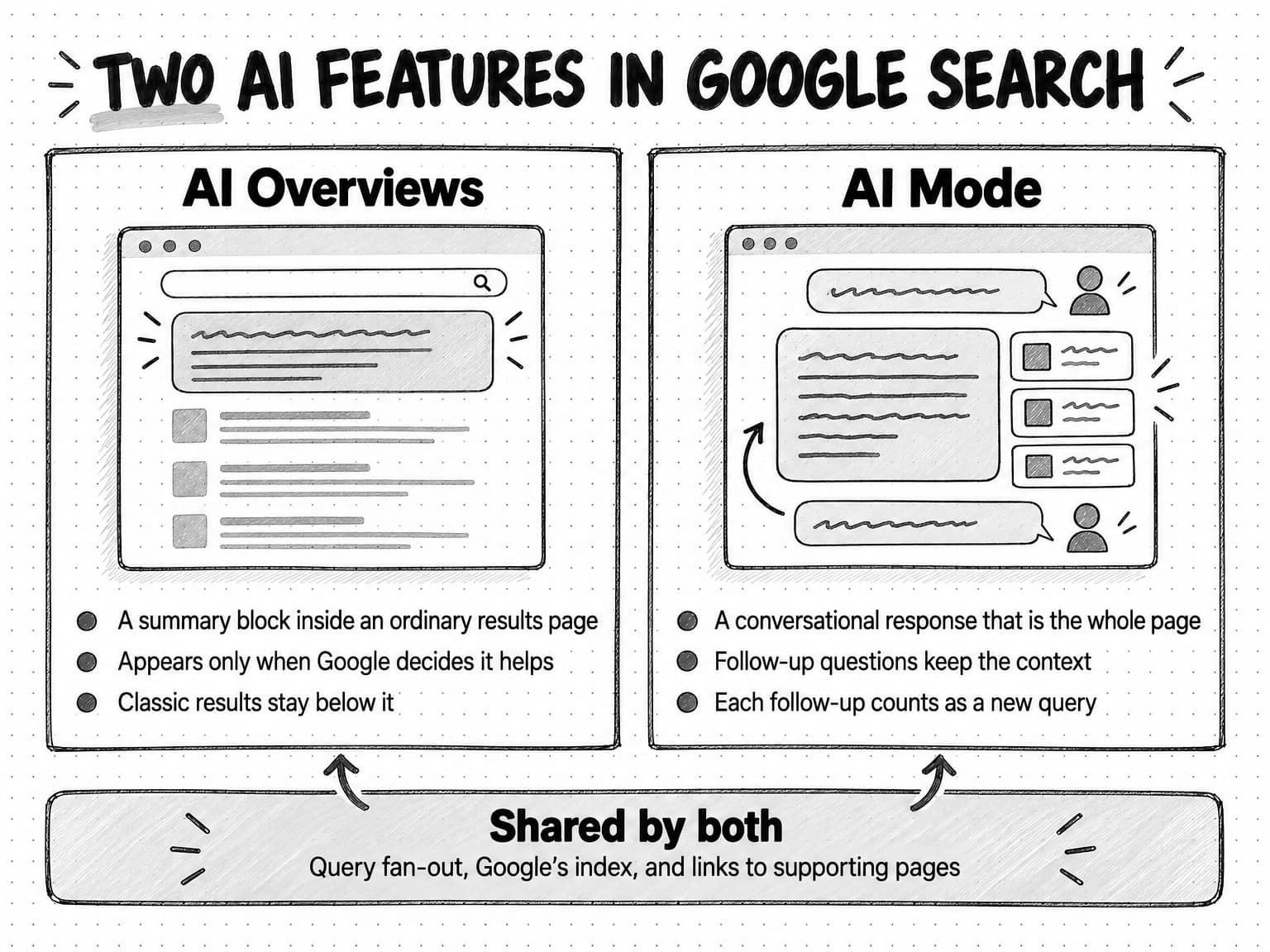
View the AI Overviews and AI Mode comparison at full size (opens in a new tab).
How an AI Overview is put together
Google does not publish the full mechanics of either feature, but its documentation describes enough to reason from. Three pieces matter: the decision to show a response at all, the search work done to build it, and the links attached to it.
First, the decision. Google's help page for searchers says AI Overviews appear "when our systems determine that generative AI can be especially helpful", and the Search Central page adds that they show only when Google's systems decide they add value beyond classic Search, so "they often don't trigger." There is no setting a site owner can use to request one, and no published list of query types that always produce one. The trigger is a judgment Google makes for each search.
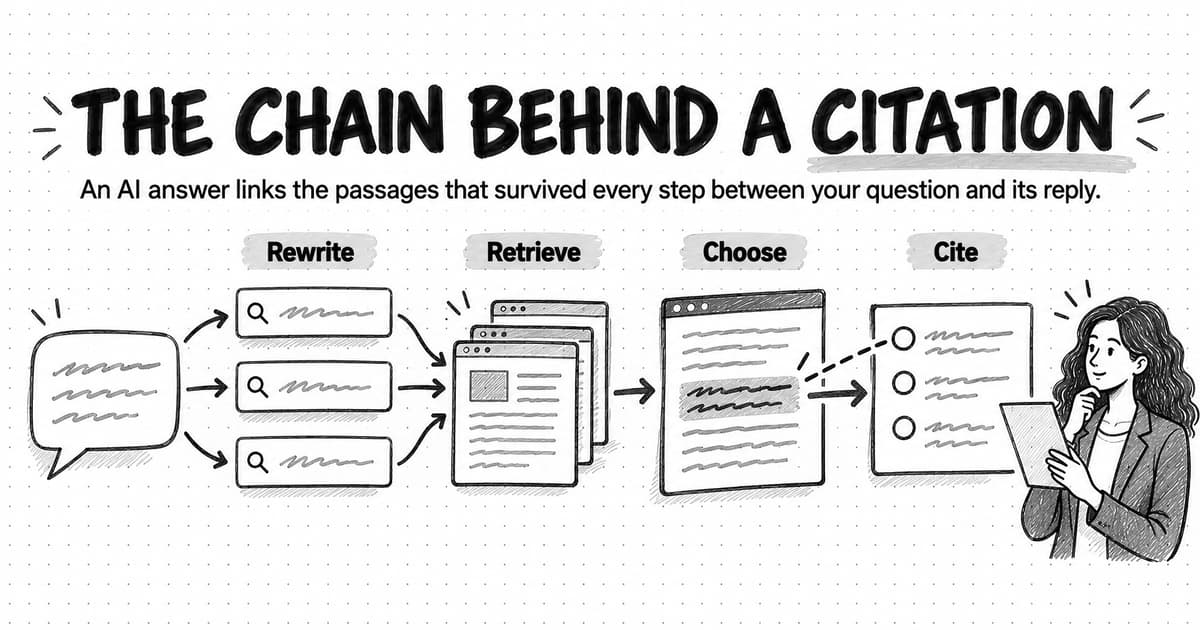
Second, the search work. Both features "may use a 'query fan-out' technique," which Google defines as "issuing multiple related searches across subtopics and data sources to develop a response." In plain terms, a single question becomes several searches. If someone asks "how long should a B2B free trial be," the system may also look for what trial lengths software companies use, how trial length affects conversion, and how trials differ from freemium plans, then pull the results together. Google says that while a response is being generated, its systems identify more supporting pages than a classic results page would surface, which lets the feature show "a wider and more diverse set of helpful links."
Third, the links. The generated text sits next to links to the pages that support it. Google's documentation does not say that every sentence is drawn from a linked page or that the linked pages are the only ones consulted. It says the features "surface relevant links" so people can find information quickly and explore content they might not have found otherwise.
Two consequences follow for a marketer. One is that the pages linked in an AI Overview need not be the pages ranked first for the query the reader typed. Because the response is built from several related searches, a page that ranks well for one subtopic can be linked from an answer to a broader question. The other is that the summary can be wrong. Google's own help page says AI Overviews "can and will make mistakes" and advises people to check important information in more than one place. If the summary misstates something about your product or your category, that is a content and reputation question as well as a traffic one, and our guide to preventing AI hallucinations in marketing content covers how false claims arise.
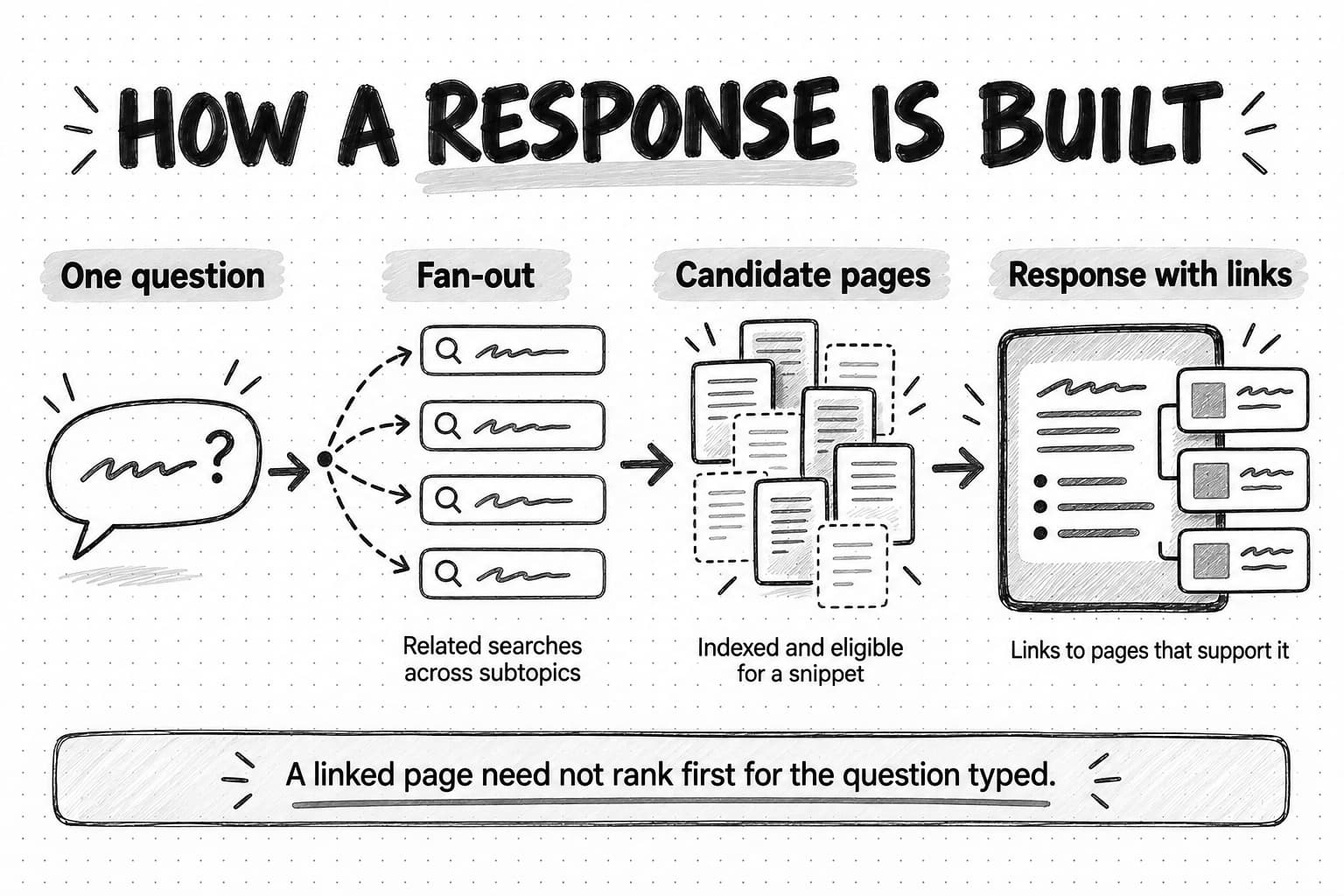
View the response-building diagram at full size (opens in a new tab).
How AI Mode differs from AI Overviews
AI Mode uses the same idea of fanning one question into many searches, but it is built for a different kind of session. When Google launched it as an experiment on March 5, 2025, Robby Stein, a vice president of product for Google Search, described it as a way to handle questions that "need further exploration, comparisons and reasoning", the kind that might previously have taken several separate searches. Google said AI Mode uses more advanced reasoning and multimodal capabilities than AI Overviews.
Four differences matter for content.
The reader asks follow-up questions. An AI Overview answers one search. AI Mode keeps a conversation going, so the second and third questions carry the context of the first. A buyer can start with "what is accounts payable automation," then ask "which approach suits a company with 40 suppliers," then "what does implementation usually involve," without retyping the setting. Each follow-up is a fresh chance for a different set of pages to be linked.
The fan-out goes wider. At Google I/O on May 20, 2025, Google described AI Mode breaking a question into subtopics and issuing many searches at once, and previewed Deep Search, a mode that can run hundreds of searches and assemble a cited report. A response built from more searches can reach further into a site's long-tail pages, such as a specific integration page or a pricing explainer, than a single results page would.
There are no ordinary results underneath. On a results page with an AI Overview, a reader who ignores the summary still sees organic listings. In AI Mode the links inside the response are the main way out to the web. Google's Search Console documentation reflects this: position in AI Mode follows the same method as a results page, but the "page" is the response.
Follow-ups are counted as new searches. Google's Performance report help says a follow-up question in AI Mode is "essentially performing a new query," and that impressions, position, and clicks in the new response count against that new query. A single AI Mode conversation can therefore produce several query rows in Search Console, some of them phrased in ways no one would type into a classic search box.
Content that answers a single question well can be linked in both features. Content that helps a buyer through a sequence of related questions, with the comparisons and specifics a second or third question asks for, has more chances to be linked in AI Mode.
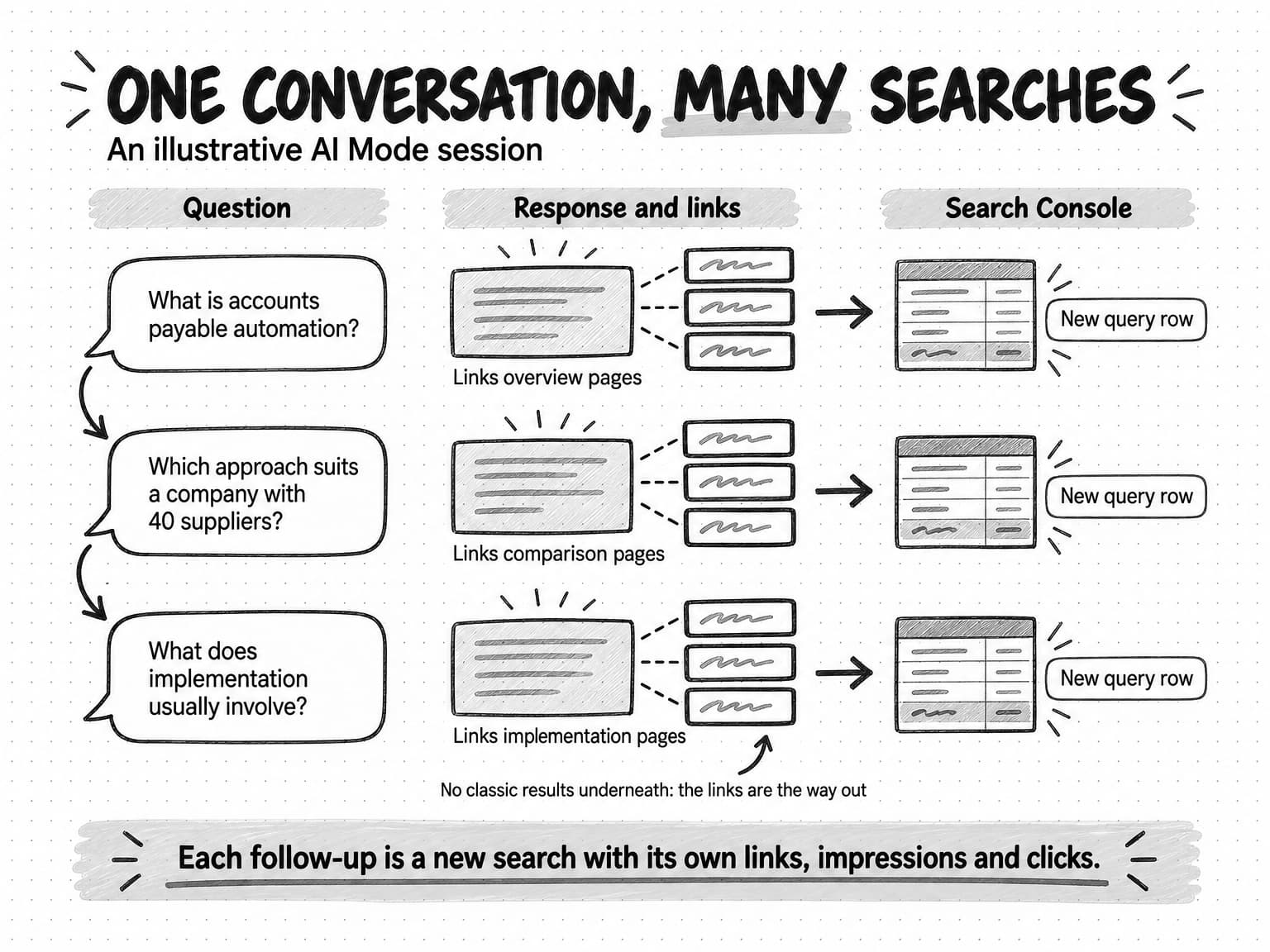
View the AI Mode conversation diagram at full size (opens in a new tab).
Which searches trigger an AI Overview
Google does not publish trigger rates, so the best independent measure of how often AI Overviews appear comes from studies that observe real searches. The most careful one so far is from Pew Research Center, which tracked the browsing of 900 U.S. adults who agreed to share it during March 2025 and analyzed 68,879 unique Google searches. Pew collected the results pages for those searches in April 2025 to see which showed an AI summary, and published the findings in July 2025.
About 18% of the searches produced an AI summary. The rate depended heavily on how the search was phrased:
| Kind of search (Pew, U.S. adults, March 2025) | Share that produced an AI summary |
|---|---|
| One or two words | 8% |
| Ten words or more | 53% |
| Full sentences with a noun and a verb | 36% |
| Questions starting with who, what, when, or why | 60% |
| All searches in the sample | 18% |
The pattern is what you would expect from a feature designed to give "the gist of a complicated topic." Short searches tend to be navigational ("hubspot login") or very broad, and a summary adds little. Longer searches and questions usually ask for an explanation, and that is where Google decides a summary helps. Pew's sample is a general public panel, not B2B buyers, so treat the percentages as a description of everyday search, not a forecast for your keyword list. The direction, though, carries over.
For a B2B company, a practical way to apply this is to sort your queries by what the searcher wants and how they are likely to phrase it. Our guide to search intent covers intent in depth; for AI Overviews, five groups are enough to start:
- Definitions and explanations ("what is revenue recognition," "how does SOC 2 work"). These are questions, often phrased as full sentences, and they are the most likely to show an AI Overview. This is where most of the lost clicks in a B2B content program sit.
- Methods and how-to questions ("how to calculate net revenue retention"). Also likely to show an AI Overview. The summary often gives the outline of the method, and readers who need the detail, a template, or a worked example still have reasons to click.
- Comparisons and evaluations ("X vs Y," "best tools for field service scheduling"). Often answered in AI Overviews and especially suited to AI Mode follow-ups. The links chosen here influence a shortlist, so being linked matters even when the click does not follow.
- Branded and navigational searches ("acme pricing," "acme login"). Short, specific, and usually answered by a classic result. Less exposed, though a summary can appear for branded questions such as "is acme SOC 2 compliant."
- Transactional and local searches ("book a demo," "accountant near me"). Shaped more by ads, local results, and shopping features than by summaries, though Google's guidance advises keeping Merchant Center and Business Profile information up to date for its AI experiences.
Results vary by person, place, and time, so you can't know for certain which of your queries show an AI Overview today. You can sample them, as the worked example later in this guide does.
How Google chooses the links in an AI response
Google's documentation says less about link selection than marketers would like, and it is worth being exact about what it does and does not say.
It says three things. A page must be indexed and eligible to be shown in Google Search with a snippet before it can be linked (covered in the next section). The features may use query fan-out, which brings more supporting pages into consideration than a classic results page. And AI Overviews and AI Mode may use different models and techniques, so the set of links can differ between them for the same question.
It does not publish a separate ranking system for AI features, a list of signals, or a way to request inclusion. In its May 2025 guidance for site owners, John Mueller of Google Search Relations wrote that "the underpinnings of what Google has long advised carries across to these new experiences," and that the goal remains to "help people find outstanding, original content that adds unique value." In other words, Google's position is that the same work that earns a strong organic result also earns a link in an AI response.
Independent observation adds some texture. Pew found that 88% of the AI summaries in its sample cited three or more sources and only 1% cited a single source. Wikipedia, YouTube, and Reddit together made up 15% of the sources cited in summaries, close to their 17% share of links in standard results. Government sites were more common in summaries (6% of sources) than in standard results (2%). That fits a feature trying to support statements with sources readers will recognize as reliable, though Pew did not test why sources were chosen.
Seer Interactive, a marketing agency, has looked at the question from site owners' data. In its April 2026 update, covering 53 brands, 5.47 million queries, and 2.43 billion organic impressions from January 2025 to February 2026, Seer found that brands cited in an AI Overview had consistently higher organic click-through rates than brands that were not cited on the same kind of query. The authors are careful to say "we cannot claim causation": stronger brands with higher click-through rates may simply be more likely to be cited.
Our guide to how AI search engines choose which sources to cite compares Google with ChatGPT, Perplexity, and others. For Google, a reasonable working model is this: the candidates come from Google's index, filtered by snippet eligibility; fan-out widens the pool beyond the pages that rank for the literal query; and the features link pages that clearly support a specific statement in the response. That last part is an inference from Google's guidance, not something Google has documented, and it is the part your content can influence.
What Google says you need to be eligible
On eligibility, Google is unusually direct. The Search Central page says that to be eligible to be shown as a supporting link in AI Overviews or AI Mode, a page must be indexed and eligible to be shown in Google Search with a snippet, meeting Google's technical requirements. Then: "There are no additional requirements to appear in AI Overviews or AI Mode, nor other special optimizations necessary." Being eligible does not guarantee being shown; Google adds that indexing and serving are not guaranteed.
That sentence settles several questions marketers ask, so it is worth spelling out what it means in practice.
You do not need special markup. Google says site owners don't need to create "new machine readable files, AI text files, or markup to appear in these features," and that no special schema.org structured data is required. Structured data still has its ordinary uses: it makes pages eligible for certain rich results and helps Google understand a page. Google's guidance is that if you use it, the markup must match what is visible on the page.
You do need the technical basics. Google's May 2025 post lists them: Googlebot must not be blocked (in robots.txt or by a CDN or hosting rule), the page must return an HTTP 200 success code, and the page must have indexable content. Google says meeting the technical requirements "covers you for search generally, including AI formats." An SEO audit is the usual way to confirm these for a whole site.
You need content Google can read as text. The Search Central page lists ordinary SEO practices that still apply: allow crawling, make content findable through internal links, provide a good page experience, keep important content in text form, support text with relevant images and video, and keep structured data consistent with the visible page. A key claim that exists only inside an image, a slide embed, or a gated PDF is harder for any search system to use.
You need the snippet to be allowed. This is the condition most often overlooked. A page that is indexed but carries a nosnippet rule is not eligible to be used as a direct input for these features. The controls are covered next.
How to control what Google uses: nosnippet, data-nosnippet, max-snippet and Google-Extended
Site owners have several controls, and they do different jobs. Confusing them is the most common mistake in this area, usually in one of two directions: a team blocks something it thinks will keep it out of AI Overviews and nothing changes, or a team adds a rule for another reason and loses its snippets everywhere.
Google's robots meta tag documentation (last updated March 24, 2026) and crawler documentation (last updated July 14, 2026) define them:
| Control | Where it goes | What it does in Google Search | Effect on AI Overviews and AI Mode |
|---|---|---|---|
| robots.txt rule for Googlebot | robots.txt file | Stops Google crawling the blocked URLs | Blocked pages can't be crawled, so their content can't be used; a blocked URL can still be indexed from links, without its content |
noindex | Robots meta tag or HTTP header | Keeps the page out of Google Search results | The page can't appear, in classic results or as a supporting link |
nosnippet | Robots meta tag or HTTP header | No text snippet or video preview in results | Google says it also prevents the content from being used as a direct input for AI Overviews and AI Mode |
max-snippet:[number] | Robots meta tag | Caps the snippet at that many characters; 0 equals nosnippet, -1 lets Google choose | Google says it also limits how much content may be used as a direct input for AI Overviews and AI Mode |
data-nosnippet | HTML attribute on span, div or section elements | Excludes that part of the page from snippets | Keeps the marked text out of snippets, and so out of what can be shown from the page |
Google-Extended | User-agent token in robots.txt | No effect on Search | Google says it does not affect inclusion in Google Search and is not a ranking signal; it governs use for training Gemini models and for grounding in some other Google products |
Three points from that table deserve emphasis.
Google-Extended does not keep a site out of AI Overviews. Many teams added a Google-Extended block in robots.txt expecting it to remove them from Google's AI answers. Google's crawler documentation is explicit: it is a control token for whether content Google crawls may be used to train future Gemini models and for grounding in Google's other AI products, and "Google-Extended does not impact a site's inclusion in Google Search nor is it used as a ranking signal in Google Search." AI Overviews and AI Mode are part of Search. The block may be the right choice for other reasons, but it is not a Search control.
The only page-level way to stay out of AI Overviews and AI Mode while staying in Search is to restrict snippets. nosnippet removes the page's text snippet from classic results too, which usually lowers click-through from those results. max-snippet with a small number is a partial version. Google states the trade-off itself: "More restrictive permissions will limit how your content is featured in our AI experiences." For most B2B marketing pages, which want to be read and cited, restricting snippets costs more than it saves.
data-nosnippet is useful for parts of a page. If a page contains text that should not be quoted out of context, such as a pricing table that changes often, a legal disclaimer, or customer-specific numbers in a case study, wrapping that element in data-nosnippet keeps it out of snippets without hiding the whole page. It does not hide the text from readers or from indexing.
There is no setting that removes your pages from AI Overviews while keeping full snippets in classic results. Searchers have limited control too: Google's help page says the feature "cannot be turned off," though a reader can choose the Web filter after searching to see text links only.
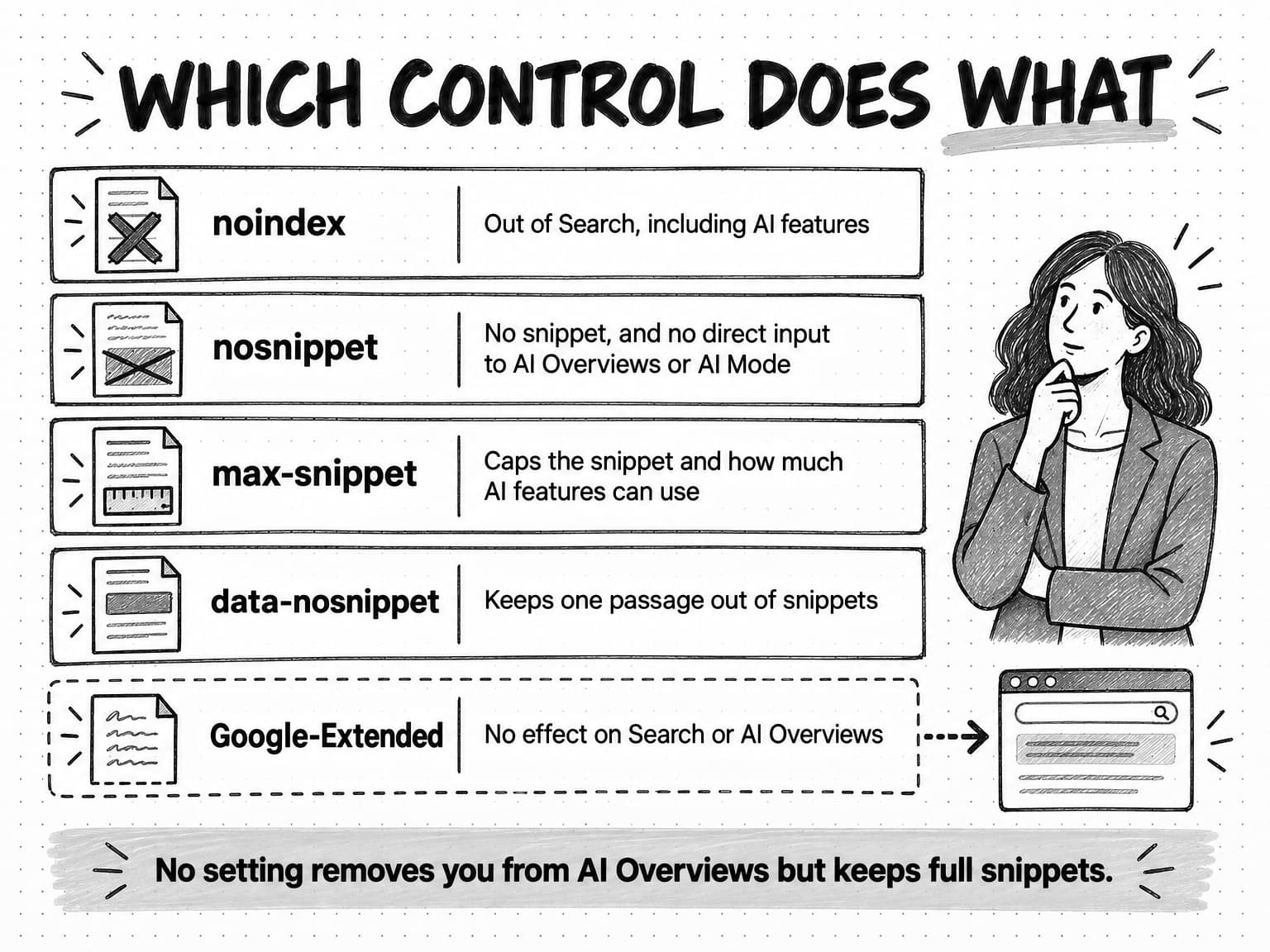
View the controls reference at full size (opens in a new tab).
What happens to clicks: the evidence so far
This is the question behind the falling clicks line, and the honest answer is that independent studies agree on the direction and disagree on the size, while Google disputes the framing. Each study measures something different, so read them by their method before using a figure.
Pew Research Center, July 2025. In the same panel of 900 U.S. adults and 68,879 searches described above, users clicked a traditional search result in 8% of visits to a results page with an AI summary, against 15% of visits to a page without one. They clicked a link inside the summary itself in about 1% of visits. They were more likely to end their browsing session after a page with a summary (26% of visits) than after one without (16%). This measures what individual people did, not click-through rates for particular sites.
% of results-page visits
View the data
| Period | % of results-page visits |
|---|---|
| Result click, no AI summary | 15 |
| Result click, with AI summary | 8 |
| Click inside the AI summary | 1 |
Source: Pew Research Center, browsing data from 900 U.S. adults and 68,879 unique searches, published July 22, 2025. All three figures come from the same panel and method.
Ahrefs, February 2026. Ahrefs, an SEO software company, compared click-through rates for 150,000 keywords that showed an AI Overview with 150,000 informational keywords that did not, using aggregated desktop Search Console data from December 2023 and December 2025. Position 1 click-through rate on the AI Overview keywords fell from about 7.3% to about 1.6%. Ahrefs then forecast what that rate would have been if it had followed the decline seen on informational keywords without AI Overviews, and found the actual rate was 58% below the forecast. Ahrefs describes this as a correlation. Its April 2025 version of the analysis, using a different window, reported 34.5%.
Seer Interactive, November 2025 and April 2026. Seer's September 2025 update, published November 4, 2025, analyzed 3,119 informational queries across 42 client organizations from June 2024 to September 2025. Organic click-through on queries with AI Overviews fell from 1.76% to a low of 0.57% in July 2025. On queries without AI Overviews it also fell, from 2.72% to 1.62%. Its April 2026 update used a much larger and differently filtered sample (53 brands, 5.47 million queries, January 2025 to February 2026) and found that organic click-through on queries with AI Overviews fell to 1.31% in December 2025 and then rebounded to 2.36% by February 2026, still below the 3.82% on queries without one. The two reports use different samples and aggregation, so their figures should not be joined into one trend line.
Google, May and August 2025. Google's position is that the picture is more favorable than these studies suggest. In the May 2025 Search Central post, Google said that when people click from results pages with AI Overviews, "these clicks are higher quality," with users more likely to spend more time on the site. In an August 2025 post, Liz Reid, head of Google Search, wrote that total organic clicks from Search to websites had been "relatively stable year-over-year," that Google was sending slightly more "quality clicks" (clicks where users don't quickly return to the results), and that traffic was shifting, with "decreased traffic to some sites and increased traffic to others." Google did not publish the data behind those statements.
These views can all be partly true at once. A total that is stable across the whole web can hide large losses for one kind of site and gains for another, and Google itself names the kind gaining: sites with forums, video, podcasts, and first-hand perspectives. Informational B2B articles that explain a standard concept, the "what is" pages many content programs were built on, sit on the losing side of that shift in most of the third-party data. Our guide to zero-click content distribution looks at the same studies from the other direction: how to reach buyers on the surfaces where they now read.
For a team deciding what to do, the consistent finding is more useful than any one percentage. When an AI Overview appears, fewer people click classic results; being cited in the overview is associated with more clicks than not being cited; and in both the Ahrefs and the September 2025 Seer data, click-through was also falling on informational queries without an AI Overview, so not every lost click is caused by the feature.
How AI Overview and AI Mode traffic shows up in Search Console
Search Console is the only first-party source of data on these features, and it reports them in two places that answer different questions.
The Performance report, Web search type. Google's Search Central page says sites appearing in AI Overviews and AI Mode are included in overall search traffic in Search Console, reported in the Performance report under the Web search type. There is no filter in that report that isolates AI features. The Performance report help explains how they are counted:
- A click on a link to an external page in an AI Overview or in AI Mode counts as a click.
- Standard impression rules apply.
- An AI Overview occupies a single position in the results, and every link inside it gets that position. A page linked third inside an AI Overview at the top of the page is reported at the overview's position, not as the third result.
- Position in AI Mode follows the same method as a results page.
- A follow-up question in AI Mode counts as a new query, with its own impressions, position, and clicks.
- Data from Search Labs experiments is not included.
That counting explains part of the chart from the introduction. When an AI Overview at position 1 links to your page, Search Console can record an impression at a high position, while the reader reads the summary and moves on. Impressions and position hold; clicks fall.
The generative AI performance report. Search Console also has a separate generative AI performance report, which Google says became available for all websites worldwide on August 31, 2026. It counts impressions only, defined as "how many times links to your site were shown to a user in a generative AI feature on Google Search," for AI Overviews and AI Mode. Its dimensions are page, country, date, and device, with a filter for text and multimodal searches (such as Google Lens and Circle to Search). It does not report queries, clicks, positions, or the text of the AI response. In the chart, two links to the same site in one response count as one impression for the property; filtering by URL counts by page. Google notes that sites without enough generative AI impressions may not see the report, and that sites excluded from these features will have no data in it.
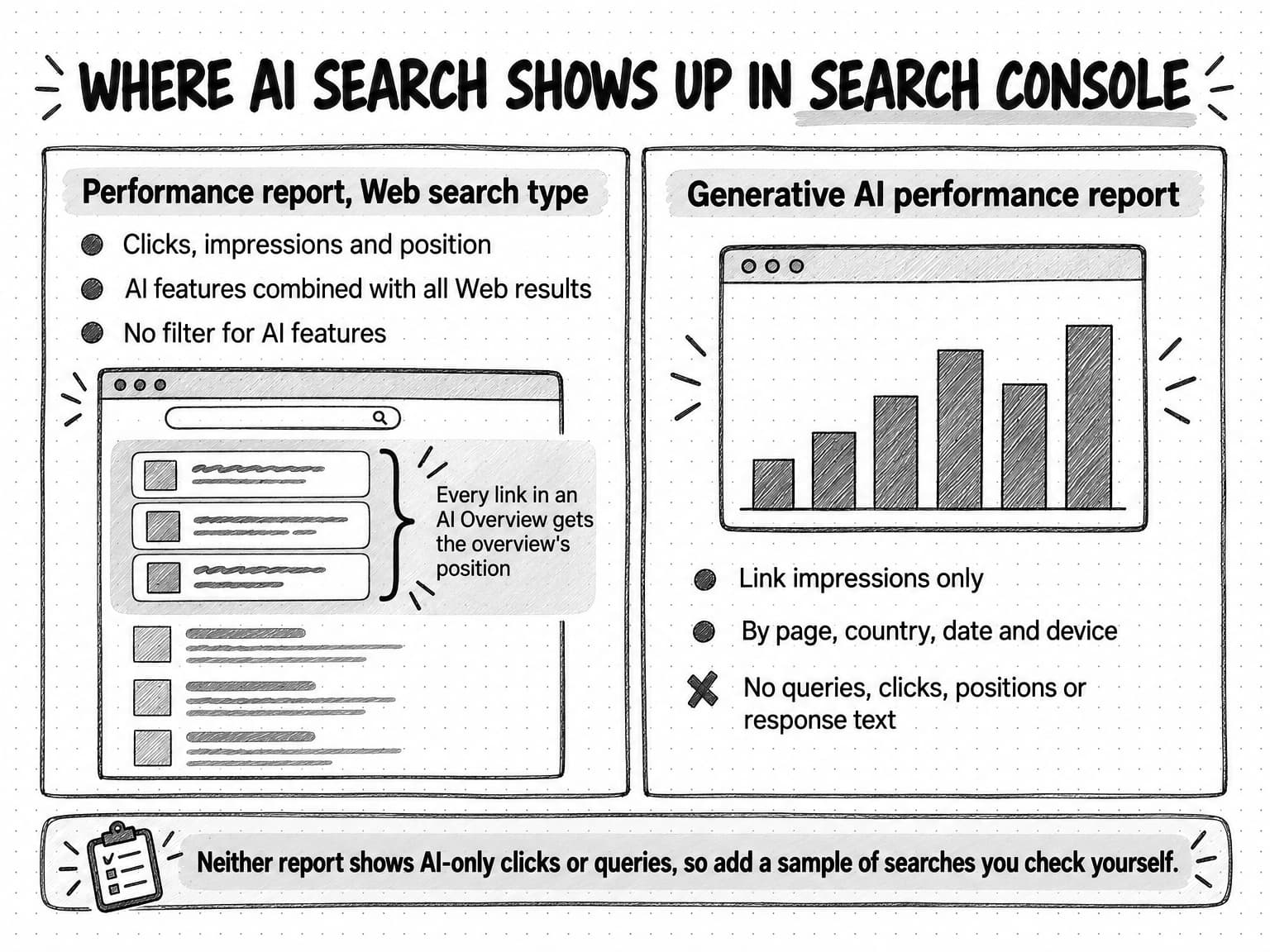
View the Search Console reporting map at full size (opens in a new tab).
Used together, the two reports support a few reliable statements and rule out a few tempting ones:
| Question | Can Search Console answer it? | Where |
|---|---|---|
| Which of our pages were shown as links in AI Overviews or AI Mode, and how often? | Yes, as impressions by page | Generative AI performance report |
| Is that exposure growing or shrinking by country or device? | Yes | Generative AI performance report |
| Which queries showed our page in an AI response? | No, not directly | Neither report isolates AI features by query |
| How many clicks came from AI Overviews specifically? | No | Clicks are combined with other Web results in the Performance report |
| What did the AI response say about us? | No | Neither report shows response text |
| How did query-level clicks and click-through change? | Yes, for all Web results combined | Performance report |
The gaps are why a measurement plan needs a second source, usually a repeatable sample of searches you check yourself. Our guide to measuring AI search visibility sets out a full baseline audit across Google and other AI search products, with a copyable tracking template; the worked example below applies a lighter version to Google alone.
How to write content that earns the link
Google's guidance on content for AI features is short: focus on "unique, non-commodity content that visitors from Search and your own readers will find helpful and satisfying." The phrase "non-commodity" is the useful part. A commodity page says what dozens of other pages say. An AI Overview can summarize the consensus without needing your page in particular, and if it links to you at all, the reader has little reason to click. A page that contributes something the consensus lacks gives the response a reason to cite it and the reader a reason to visit.
What counts as non-commodity in B2B content? Five kinds of material tend to qualify, and each has a practical form.
Original data. A benchmark from your product's usage, a survey of your customers, or an analysis of public data no one has assembled before. An AI response that states a number needs a source for it, and if the number exists only on your page, your page is the source. Our guide to original research content covers how to produce it on a small budget and how to write findings that get quoted.
First-hand experience and specific detail. A method described step by step with the decisions and trade-offs at each step, written by someone who has done it. A generic "five steps to implement X" is commodity; "what we changed after the first three implementations failed at the data-mapping step" is not. Google's systems for assessing helpful content look for this kind of experience, which our guide to E-E-A-T explains.
Clear, quotable statements. A response built from fan-out searches needs sentences that answer a specific sub-question on their own: a definition in the first sentence of a section, a direct answer before the qualifications, a number with its source and date in the same sentence. This is ordinary good writing for readers who skim, and it also makes a statement easy for a summary to support with a link.
Coverage of the follow-up questions. Because AI Mode keeps the conversation going and fans out into subtopics, a page that anticipates the next questions (what it costs, how long it takes, what can go wrong, how it compares with the alternative) has more chances to be the source for one of them. People Also Ask boxes, related searches, and the follow-up suggestions in AI answers are a good source of those questions. So is your sales team's list of objections.
Things a summary cannot replace. Templates, calculators, worked examples, checklists, and tools are valuable after the reader has the gist. A summary can tell someone that a content brief has eight sections; it cannot hand them a filled-in brief to adapt. Pages built around a usable asset keep a reason to click even when the explanation has been summarized above them.
A few things that are often recommended do less than claimed, at least for Google. Adding FAQ or other schema markup does not make a page eligible for AI features, since Google says no special markup is needed. Rewriting pages into a rigid question-and-answer format can make them easier to skim, but it does not replace substance. Publishing many thin pages for every phrasing of a question tends to produce more commodity content, not less. And chasing a link in an AI Overview for a query where the summary fully satisfies the reader may not be worth much traffic, though it can still be worth being named.
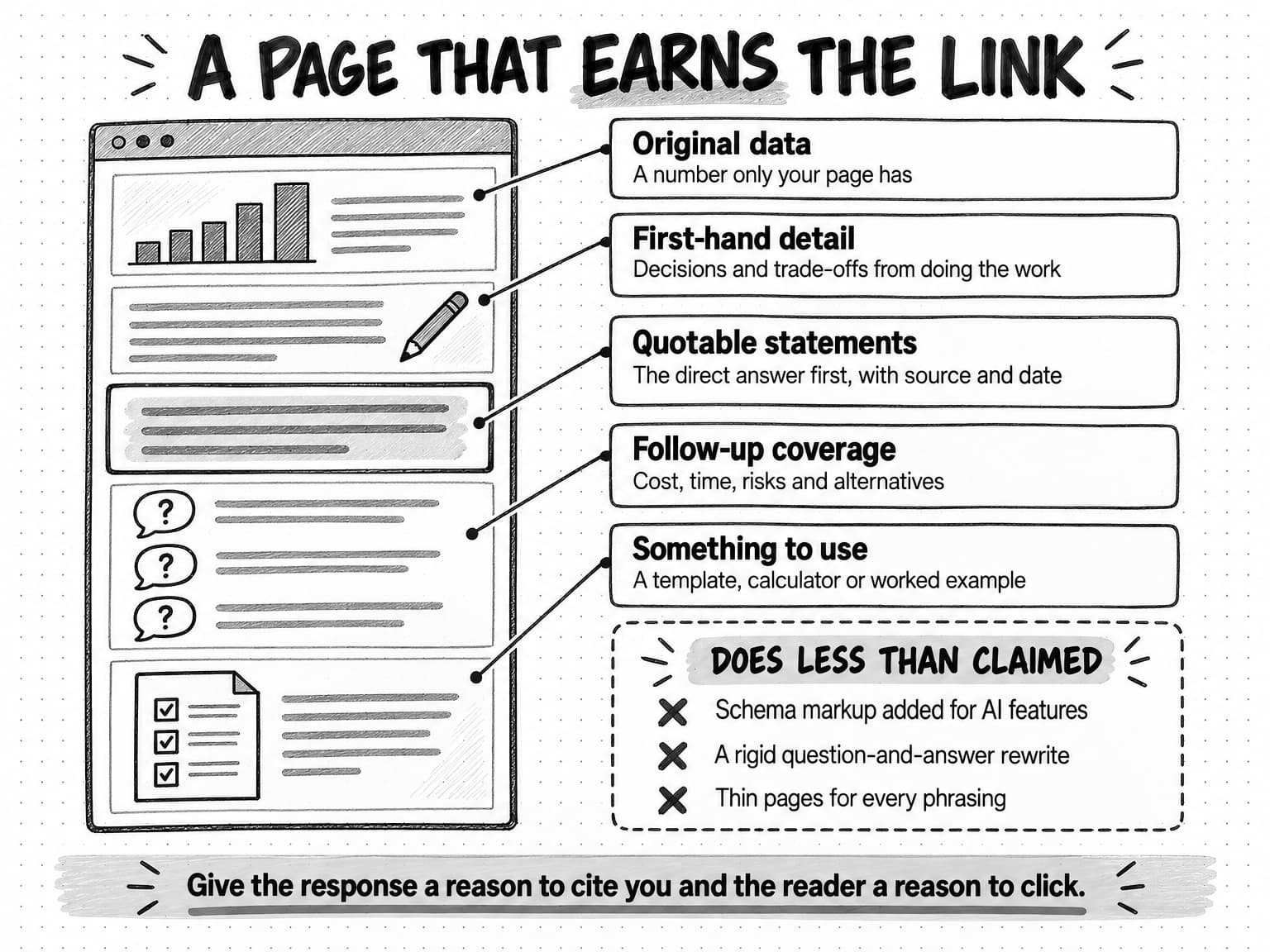
View the anatomy of a page that earns the link at full size (opens in a new tab).
The way to pick which pages to work on is to start from the business, not the feature. Our guide to building a content marketing strategy for B2B SaaS and AI companies covers choosing topics a company can defend; for AI Overviews specifically, prioritize pages where being cited or visited changes a buyer's shortlist, such as comparisons, evaluation criteria, and implementation questions, over pages that define a term your buyers already know.
An AI Overview can summarize the consensus without your page. It needs your page for the part only you can say.
Worked example: sorting a B2B query set (fictional)
The company in this example is fictional. Fieldmark is an invented software company selling scheduling software to field-service businesses such as HVAC and plumbing contractors. Its marketing lead, Dana, sees the familiar pattern: over the last six months, impressions on the blog are flat and clicks are down by about a third. All numbers in this example are illustrative.
Step 1: pick the queries that matter. Dana does not start from every query in Search Console. She exports the Performance report for the last 90 days, filters to the blog and the product pages, and picks 24 queries: the 12 with the most impressions, plus 12 that matter to sales even with lower volume, chosen with the sales lead. She groups them into the five intent types from earlier in this guide.
Step 2: sample the results. For two weeks, Dana runs each query twice a week from a logged-out browser in the company's main market and records three things: whether an AI Overview appears, whether Fieldmark is linked in it, and whether Fieldmark ranks in the top five classic results. She also runs the eight comparison and how-to queries in AI Mode, with one natural follow-up each. She notes that results vary between runs, so she records each run rather than a single verdict.
Step 3: read the pattern. The illustrative results:
| Query group (illustrative) | Queries | Runs with an AI Overview | Runs where Fieldmark was linked in it | Fieldmark in top five classic results | Click change, six months |
|---|---|---|---|---|---|
| Definitions ("what is dispatch software") | 6 | 22 of 24 | 3 of 22 | 5 of 6 queries | Down 48% |
| How-to ("how to reduce HVAC callbacks") | 5 | 16 of 20 | 6 of 16 | 3 of 5 queries | Down 30% |
| Comparisons ("dispatch software vs spreadsheets") | 5 | 14 of 20 | 2 of 14 | 2 of 5 queries | Down 22% |
| Branded ("fieldmark pricing") | 4 | 2 of 16 | 2 of 2 | 4 of 4 queries | Up 4% |
| Transactional ("field service scheduling demo") | 4 | 1 of 16 | 0 of 1 | 2 of 4 queries | Down 6% |
Step 4: draw only the conclusions the data supports. The definitions are where the clicks went: an AI Overview appeared almost every time, Fieldmark ranked well, and it was rarely linked in the summary. That is consistent with the third-party studies, and it suggests these pages are commodity explanations the summary can give without them. The comparison queries are the bigger business problem. They lost fewer clicks, but Fieldmark was linked in only 2 of 14 overviews, and in AI Mode the follow-up questions ("which is better for a team of 12 technicians?") linked to two competitors' guides and a forum thread, not to Fieldmark. These are the searches where a buyer forms a shortlist.
Dana does not conclude that AI Overviews caused the whole drop. Some of the decline on definition queries may come from lower demand or from changes to classic rankings, and her sample is small. She reports it as a pattern worth acting on, not a measurement of cause.
Step 5: choose changes. Dana picks three:
- Rewrite the two main comparison pages to answer the questions AI Mode asked as follow-ups: team size thresholds, setup time, and what breaks first with spreadsheets. She adds Fieldmark's own anonymized data on average setup time, which no competitor publishes, with its date and sample.
- Merge four overlapping definition articles into one stronger page with a downloadable dispatch-board template, so the page offers something a summary cannot.
- Leave the branded and transactional pages alone, since they are not affected.
She keeps the same 24 queries and the same sampling method so the next check in eight weeks compares like with like.
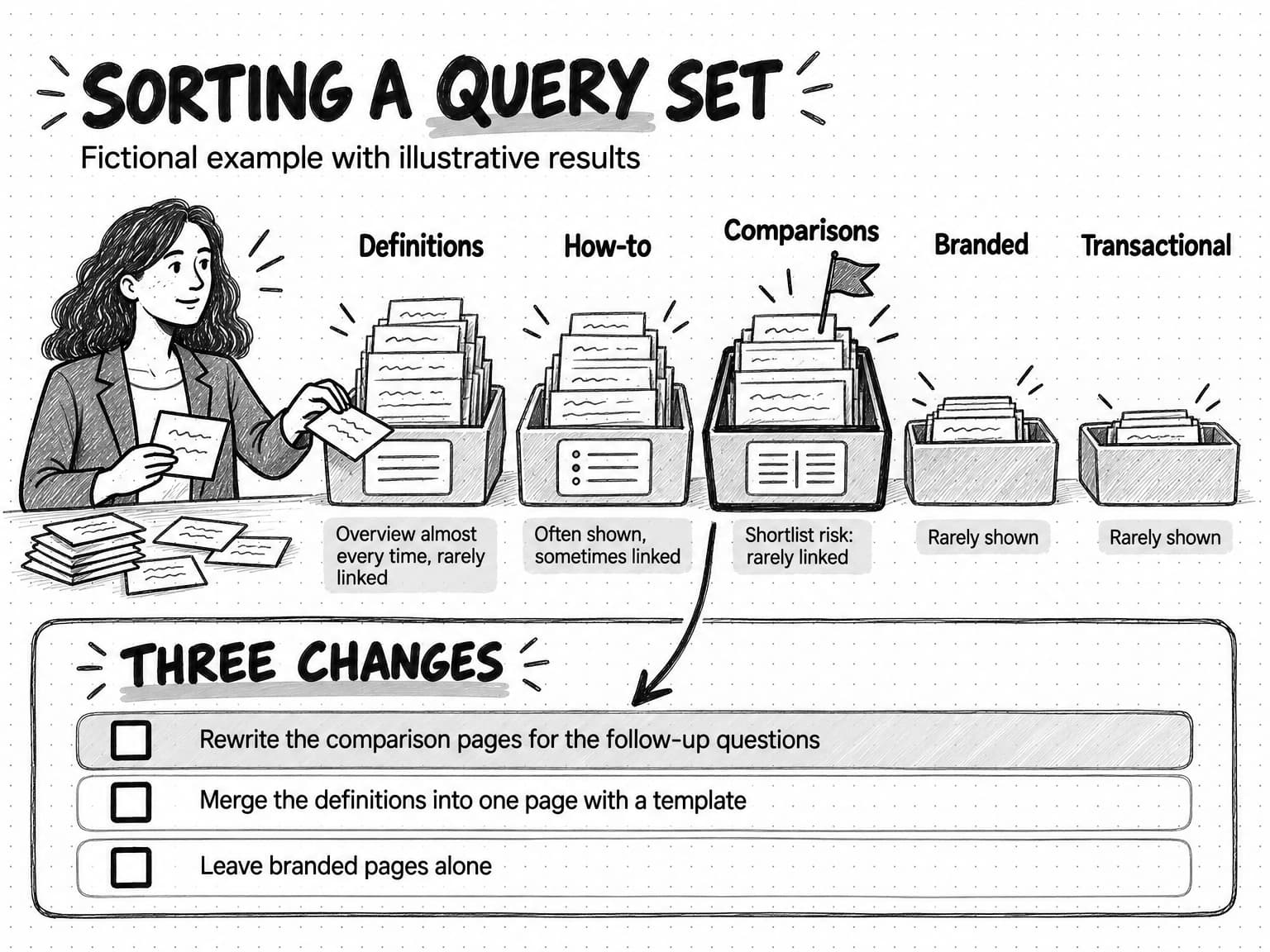
View the worked example at full size (opens in a new tab).
How to report AI Overview impact to leadership
A founder looking at the falling clicks line usually wants three answers: how bad it is, whether it is our fault, and what we are doing about it. A report that answers those honestly keeps each data source with its own meaning, instead of merging them into one "AI visibility" number.
A one-page monthly or quarterly report can follow this structure, which Dana's team could fill in from the worked example:
| Section | What it contains | Source | What it can and cannot claim |
|---|---|---|---|
| Exposure | Impressions of our links in AI Overviews and AI Mode, by page, against the previous period | Search Console generative AI performance report | Shows how often our links were shown; does not show clicks, queries, or what the response said |
| Search traffic | Clicks, impressions, and click-through for the tracked query groups | Search Console Performance report, Web | Combines classic and AI-feature clicks; a drop has several possible causes |
| Sampled presence | For the fixed query set: share of runs with an AI Overview, share where we were linked, notes on AI Mode follow-ups | Your own repeatable sample | A sample under stated conditions; results vary by person, place, and time |
| Outcomes | Demo requests, sign-ups, and pipeline from organic search, and "how did you hear about us" answers | Analytics, CRM, forms | Real business results; attribution to any one search feature is partial |
| Actions and next check | The pages changed, why, and when the same sample will be rerun | Content plan | States what the team will learn, not a promised result |
Three habits make the report credible. State the sample's method every time (queries, runs, location, logged-out browser), because a founder who checks a search personally will see something different. Separate observation from interpretation: "an AI Overview appeared on 22 of 24 runs for definition queries" is an observation; "the overview took our clicks" is an interpretation with other possible causes. And report outcomes alongside traffic, because Google's claim that clicks from AI results are higher quality can be tested on your own site by comparing conversion rates of organic visits over the same periods.
The report should also say what success looks like. For definition pages, success may be being named and linked in the summary, even if clicks keep falling, since a buyer who sees the brand may return later through a branded search. Our guide to the B2B buyer journey explains why that early exposure matters even when no click follows. For comparison and evaluation pages, success is being linked and visited, and the report should track those pages most closely.
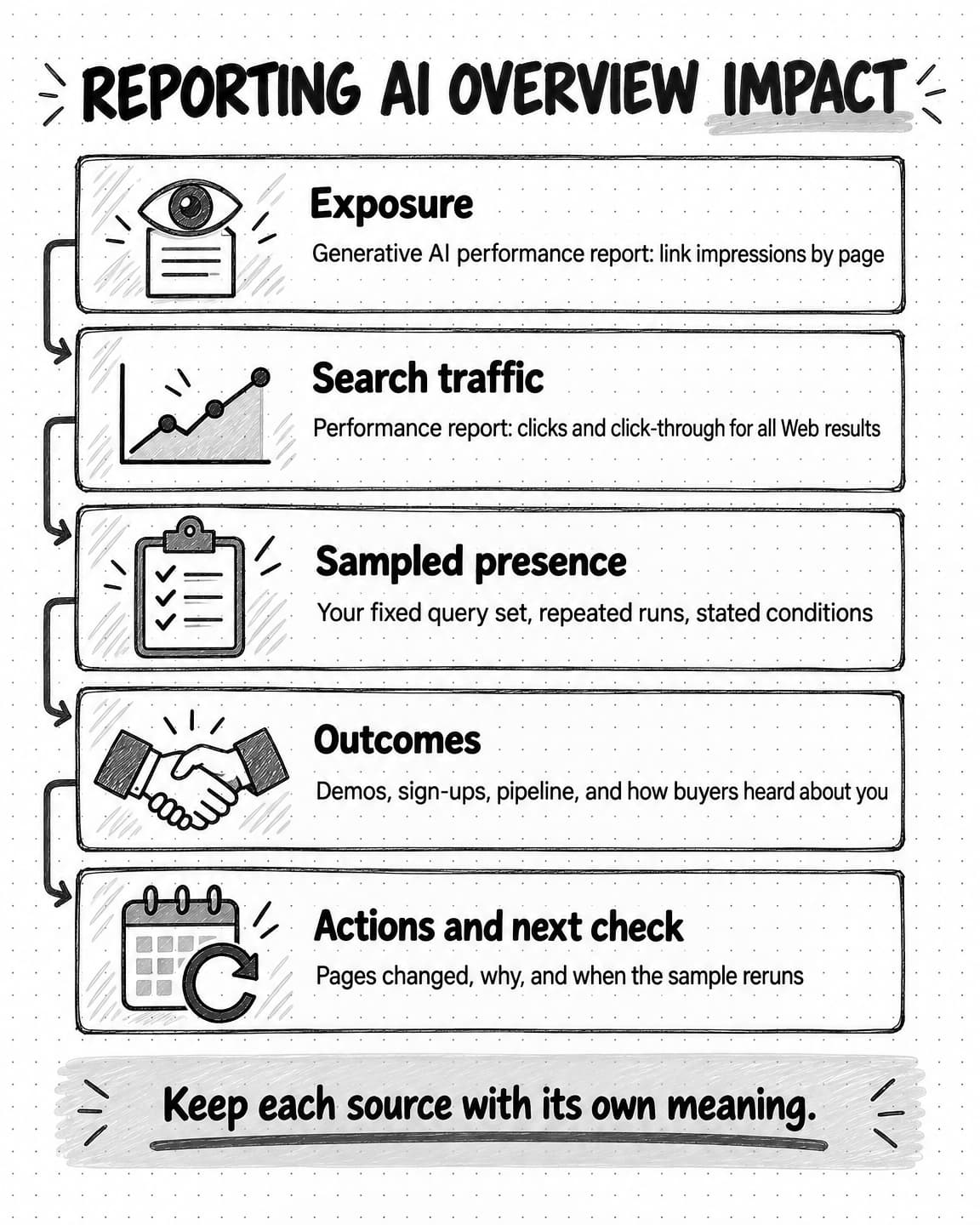
View and save the AI Overview reporting reference at full size (opens in a new tab).
Common mistakes when responding to AI Overviews
A handful of mistakes come up often enough to check for before changing anything.
Blocking Google-Extended to leave AI Overviews. It does not affect Search, as Google's crawler documentation states. If the aim is to limit what AI Overviews can use from a page, the controls are snippet rules, and they also affect classic results.
Adding nosnippet to whole sections of a site. This removes those pages from AI features and also strips their snippets from classic results, which usually lowers click-through further. Use data-nosnippet on the specific passages you don't want quoted instead.
Blaming every lost click on AI Overviews. Ahrefs and Seer both found click-through falling on informational queries without AI Overviews in their 2025 data, and demand for a topic can fall for ordinary reasons. Check rankings, seasonality, and query volume before attributing the decline.
Rewriting everything for AI. The pages that matter most are a small share of most sites. Start with the pages where being linked changes a buyer's decision, and leave stable branded and transactional pages alone. A content audit is the right tool for deciding what to keep, fix, merge, or cut.
Ignoring what the summary says. If an AI Overview or an AI Mode answer describes your product inaccurately, the fix is usually clearer, more specific public information on your own site and on the third-party pages the response relies on, plus Google's feedback controls on the response. It is worth checking branded questions for accuracy as part of the regular sample.
Checking AI Overviews and AI Mode with Ampere
Ampere, the AI marketing agent, can take on the repetitive parts of this work so the team spends its time on the judgments: which queries matter, what the pattern means, and which pages to change.
Ampere's research tools include Google Search, Google search results, and Google AI Mode searches. Given a fixed query set like Dana's, Ampere can run the searches, record which sources appear for each, and put the observations in a spreadsheet or report in the session workspace, where you can inspect the sources behind each row. Its AI visibility analysis helps identify AI-search visibility gaps, and Brand memory can hold a search landscape report about how your brand and competitors appear in search, so later work starts from that context.
From there, Ampere can run an SEO audit of the pages you choose, compare them with the pages that were linked for the same queries, and draft revisions or a content brief for the pages you decide to improve. The drafts come back for your team to edit and publish; Ampere does not change your website. Ampere does not connect to Search Console, so for the exposure and traffic sections of the report, export the reports you need and add them to the Project.
To keep the comparison consistent, the same check can run as a scheduled task that returns results to the Project for review, and Monitoring can watch for changes in search results with evidence and source links. Public search results vary by person, place, and time, and any sample is partial, so treat the observations as a repeatable sample and have someone review findings and drafts before they shape a decision.
Sources and further reading
- Google Search Central, AI features and your website, last updated December 10, 2025. Eligibility, query fan-out, controls, and reporting for AI Overviews and AI Mode.
- John Mueller, Google Search Relations, Top ways to ensure your content performs well in Google's AI experiences on Search, Google Search Central Blog, May 21, 2025. Content, technical, and preview-control guidance, and Google's statement on click quality.
- Google Search Central, Robots meta tag, data-nosnippet, and X-Robots-Tag specifications, last updated March 24, 2026. How
nosnippetandmax-snippetapply to AI Overviews and AI Mode. - Google Search Central, Google's common crawlers, last updated July 14, 2026. What Google-Extended controls, and that it does not affect Search inclusion or ranking.
- Google Search Console Help, Performance report (Search results). How clicks, impressions, and position are counted in AI Overviews and AI Mode.
- Google Search Console Help, Generative AI performance report. Impressions of links in AI Overviews and AI Mode by page, country, date, and device; available worldwide from August 31, 2026.
- Google Search Help, AI Overviews in Google Search and AI Mode in Google Search. How the features appear to searchers, accuracy caveats, and current availability.
- Elizabeth Reid, Generative AI in Search: Let Google do the searching for you, Google, May 14, 2024. The AI Overviews launch announcement.
- Robby Stein, Expanding AI Overviews and introducing AI Mode, Google, March 5, 2025. The AI Mode launch and the query fan-out technique.
- Elizabeth Reid, AI Mode in Google Search: Updates from Google I/O 2025, Google, May 20, 2025. AI Mode's U.S. rollout and Deep Search.
- Liz Reid, AI in Search: Driving more queries and higher quality clicks, Google, August 6, 2025. Google's view of click volume and quality.
- Athena Chapekis and Anna Lieb, Google users are less likely to click on links when an AI summary appears in the results, Pew Research Center, July 22, 2025. Browsing data from 900 U.S. adults; trigger rates, click rates, and cited sources.
- Ryan Law, Update: AI Overviews reduce clicks by 58%, Ahrefs, February 4, 2026. A 300,000-keyword comparison of click-through rates, December 2023 and December 2025.
- Tracy McDonald, AIO impact on Google CTR: September 2025 update, Seer Interactive, November 4, 2025. 3,119 informational queries across 42 organizations, June 2024 to September 2025.
- Tracy McDonald, Hannah Cooley, and Marketa Williams, AIO impact on Google CTR: 2026 update, Seer Interactive, April 24, 2026. A 53-brand analysis of organic and paid click-through rates with and without AI Overviews, and the citation effect.
Frequently Asked Questions
How do you get your content into Google AI Overviews?
Google says a page needs only to be indexed and eligible to appear in Search with a snippet; there is no special markup, file, or separate optimization. Beyond that, inclusion is not guaranteed. Pages that offer something the consensus lacks, such as original data, first-hand detail, clear answers to specific sub-questions, or a usable template, give an AI Overview a reason to link to them rather than to a page that says the same as everyone else.
What is the difference between Google AI Mode and AI Overviews?
AI Overviews are summaries that appear inside an ordinary Google results page, only when Google decides they help, with classic results still below. AI Mode is a separate conversational experience where the AI response is the whole page and people can ask follow-up questions that keep the context. Both use query fan-out and link to supporting pages, but they may use different models, so their responses and links differ.
How do you do SEO for Google AI Mode?
SEO for Google AI Mode is mostly ordinary SEO, since Google applies the same eligibility rules as Search: crawlable, indexed pages that can show a snippet. What changes is the shape of the session. AI Mode handles follow-up questions and fans out into subtopics, so pages that cover the next questions a buyer asks, such as cost, setup, trade-offs, and comparisons, have more chances to be linked in one of the responses.
Can a website opt out of Google AI Overviews?
A website can limit its use in Google AI Overviews and AI Mode only through snippet controls. A nosnippet rule stops a page being used as a direct input, max-snippet limits how much can be used, and data-nosnippet keeps chosen passages out. These rules also restrict snippets in classic results. Blocking Google-Extended does not work for this, because Google says it does not affect inclusion in Search.
Do Google AI Overviews reduce clicks to websites?
Independent studies find fewer clicks when a Google AI Overview appears. Pew Research Center saw a classic result clicked in 8% of results-page visits with an AI summary against 15% without one, in March 2025 U.S. data. Ahrefs and Seer Interactive report large drops in click-through for affected keywords, measured in different ways. Google says total clicks are relatively stable and that clicks from AI results are higher quality.
Is SEO still relevant with Google AI Overviews and AI Mode?
Yes. Google AI Overviews and AI Mode draw their links from Google's index, and Google says the same eligibility rules and content guidance apply as for classic Search. What changes is what success means: for many informational queries, being named and linked in the summary matters as much as the click, and pages need content a summary cannot fully replace to keep earning visits.
Can you trust what Google AI Overviews say?
Google AI Overviews can be useful for a quick summary, but Google itself says they can and will make mistakes, and advises checking important information in more than one place. For a company, that means checking what AI Overviews and AI Mode say about your product and category on a regular schedule, and fixing unclear or outdated public information on your own site that a summary might rely on.
Why is a Google AI Overview not showing up for a search?
A Google AI Overview appears only when Google's systems decide it adds value beyond classic results, so many searches never show one. Short navigational and transactional searches rarely do, while longer questions often do. Results also vary by person, place, time, and language, and the same search can show an overview one day and not the next. A searcher who selects the Web filter sees text links only.