How to do an SEO audit: a marketer's checklist for search and AI crawlers
A step-by-step SEO audit a marketer can run without a specialist, covering search engines and AI crawlers, with a severity scale for sorting findings, a copyable checklist and a worked example.
44 min readWritten by Ampere
Short answer
What is an SEO audit?
An SEO audit is a structured check of whether search engines and AI crawlers can reach, index, read and trust the pages that matter to your business, ending in a list of fixes ranked by severity. Check crawler access first, then indexing, rendering and on-page signals, then content quality and authority, because a problem in an earlier layer hides everything after it.
Summary
An SEO audit is useful only when it ranks its findings. A site crawler reports hundreds of issues with similar weight, while the problems that matter, such as an important section blocked in robots.txt, often appear as valid configurations. Judge every finding by whether it affects the pages that carry the business.
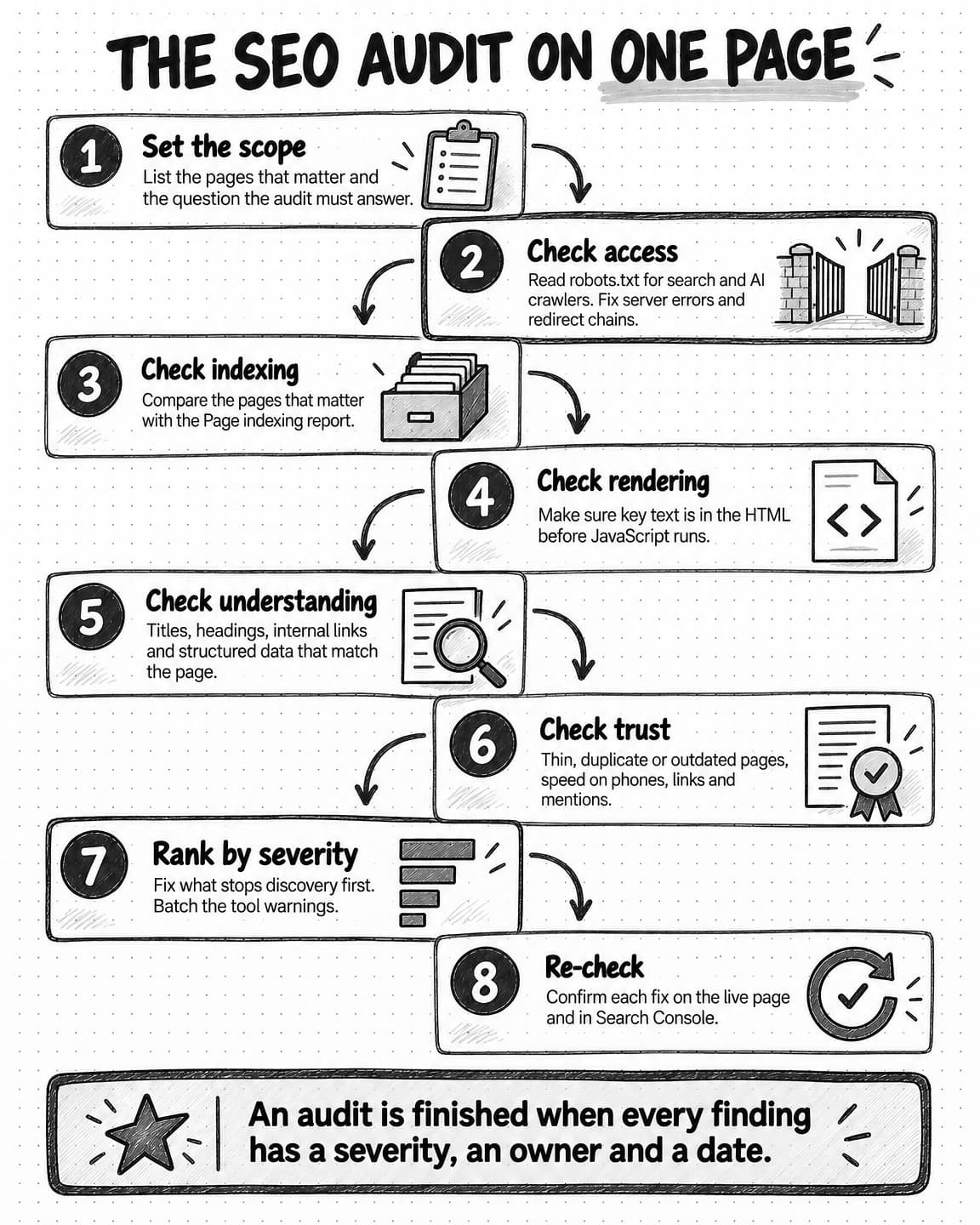
Audit in the order crawlers work: reach, index, understand, trust. Check robots.txt, server errors and redirects; then the Page indexing report, canonicals and sitemaps; then JavaScript rendering, internal links, titles and structured data; then content quality, Core Web Vitals, links and mentions. A failure lower down hides every layer above it.
Robots.txt now also controls which AI products crawl your pages for search and for training. Search crawlers such as OAI-SearchBot, Claude-SearchBot and PerplexityBot feed AI search answers, while GPTBot, ClaudeBot and the Google-Extended token concern model training. Write down the company's position and block by job, because a training block list can also remove a site from AI search.
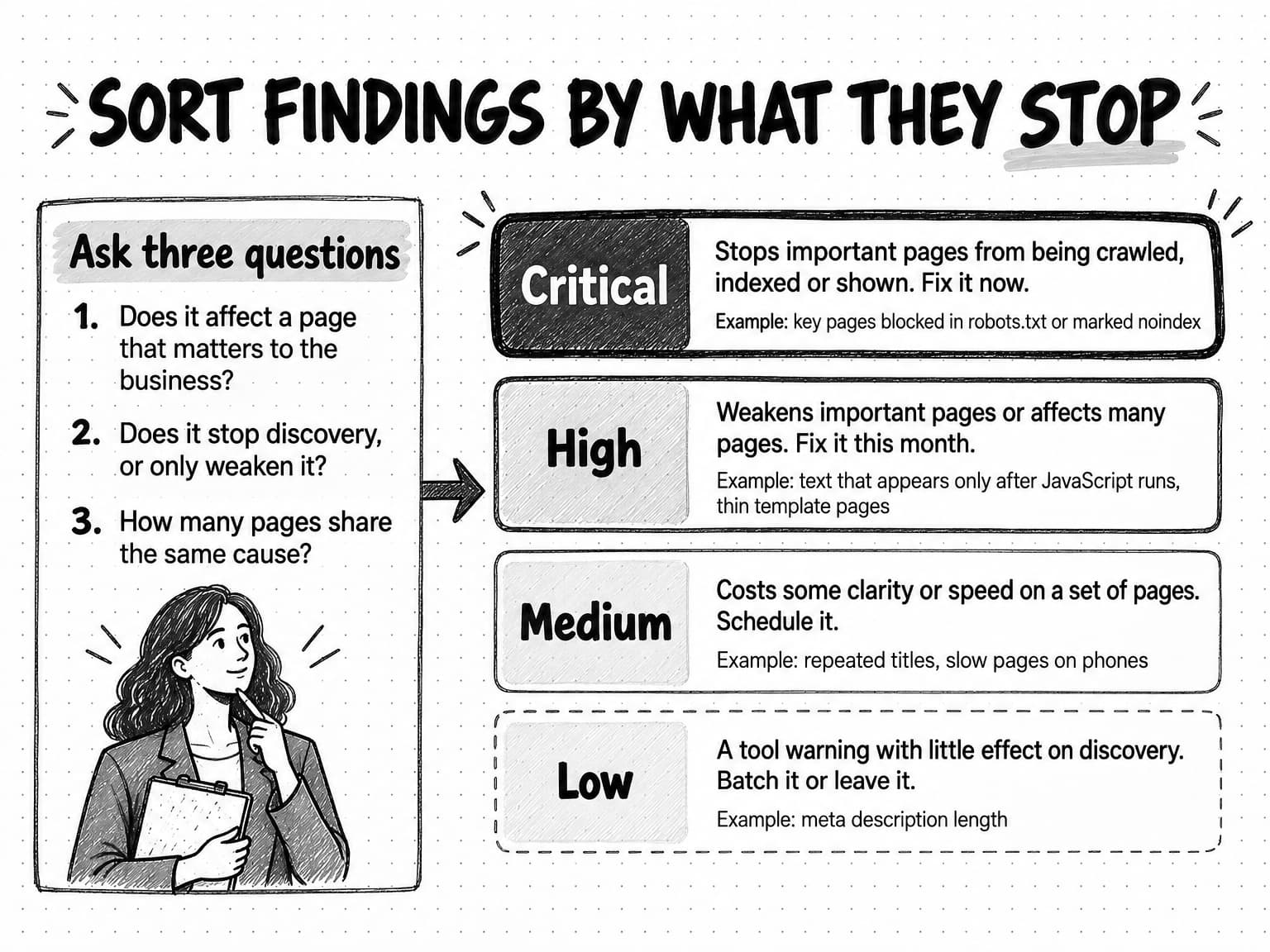
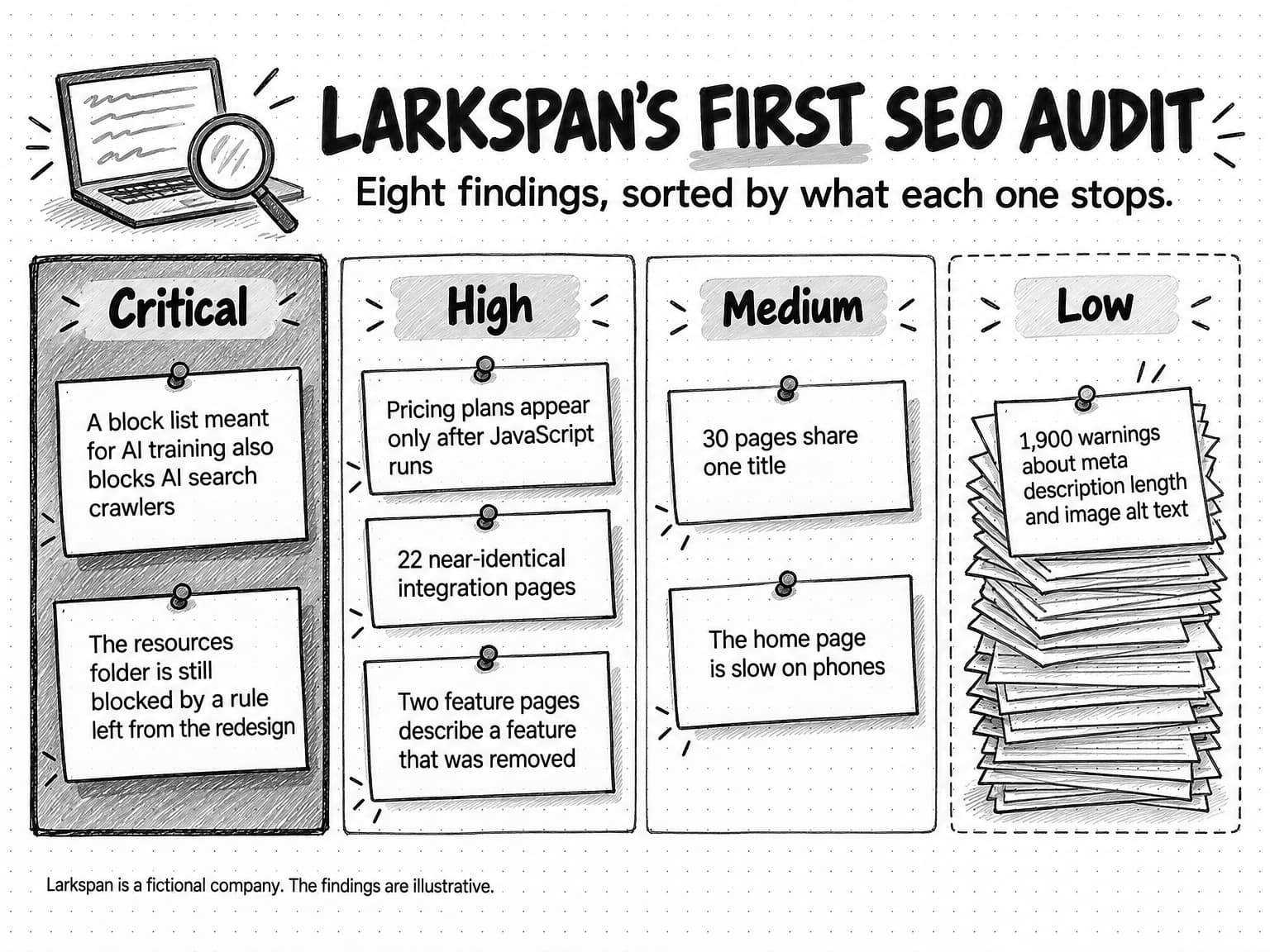
Sort findings into four severity levels using three questions: does it affect an important page, does it stop discovery or only weaken it, and how many pages share the cause? A copyable 26-row checklist gives each check a place to look and a usual severity, and a worked example on a fictional software site turns 1,940 tool warnings into eight ranked findings.
Google says AI Overviews and AI Mode need no special files, markup or optimizations beyond normal indexing and snippet eligibility, so most AI readiness is the classic audit. Add checks for snippet controls and key facts in server-sent HTML, give every finding an owner and date, re-check each fix, and measure AI visibility separately.
Contents
- What an SEO audit covers, and when to run one
- What you need before you start
- Crawl access: robots.txt for search engines and AI crawlers
- Indexing: are the right pages in the index?
- Rendering: can crawlers see content that JavaScript builds?
- Site structure and internal links
- On-page basics: titles, headings and descriptions
- Structured data: what it does and does not do
- Page experience and Core Web Vitals
- Content quality: thin, duplicate and outdated pages
- Authority, links and brand mentions
- AI-answer readiness: what you can and cannot control
- How to prioritize SEO audit findings by severity
- Copyable SEO audit checklist
- Worked example: a first SEO audit at a fictional software company
- How SEO audits work with Ampere
- Sources and further reading
- Frequently Asked Questions
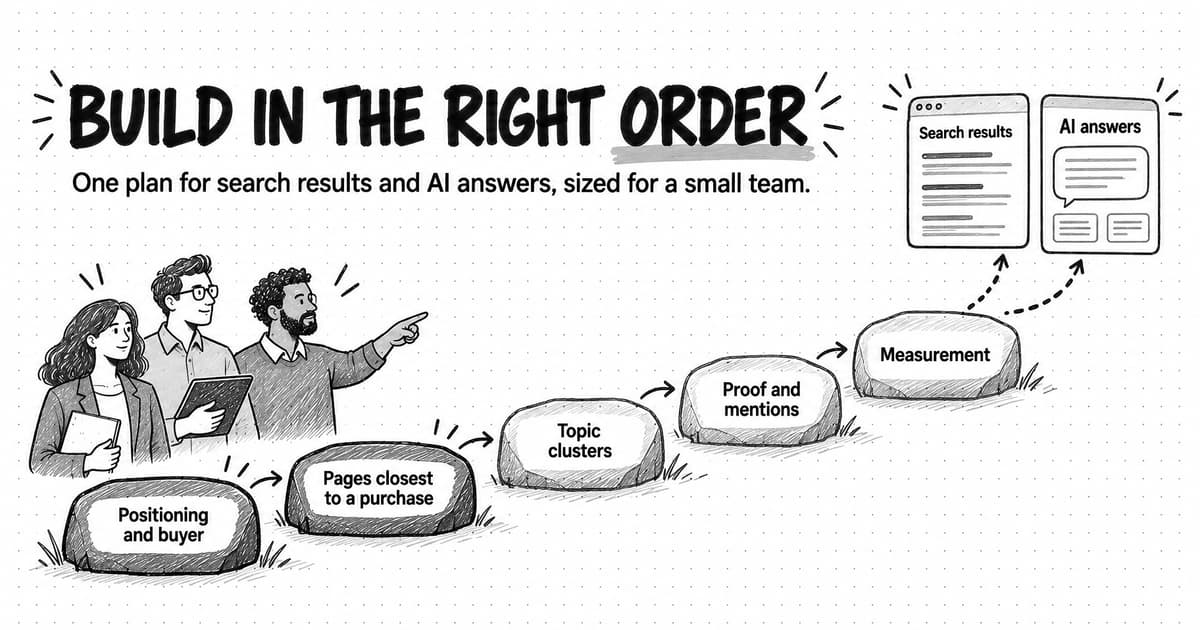
Most SEO audits start with a tool. Someone pastes the domain into a site crawler, waits a few minutes and gets back a score and a list of several hundred issues: meta descriptions that are too long, images without alt text, pages with more than one H1, redirects, slow scripts. The list looks urgent, and almost none of it explains why the pages that matter most are missing from search results or never show up in AI answers. A marketer without an SEO specialist can spend a week fixing warnings and leave the one problem that matters untouched, such as a single robots.txt line that tells a search crawler to stay away from the whole blog.
An SEO audit is a structured check of whether search engines and AI systems can find, read, index and trust the pages that matter to your business, followed by a ranked list of fixes. The ranking is the useful part. An audit that reports 600 issues with equal weight leaves you where you started; an audit that says "these two problems stop your product pages from being indexed, fix them this week, and these 590 can wait" gives you a plan.
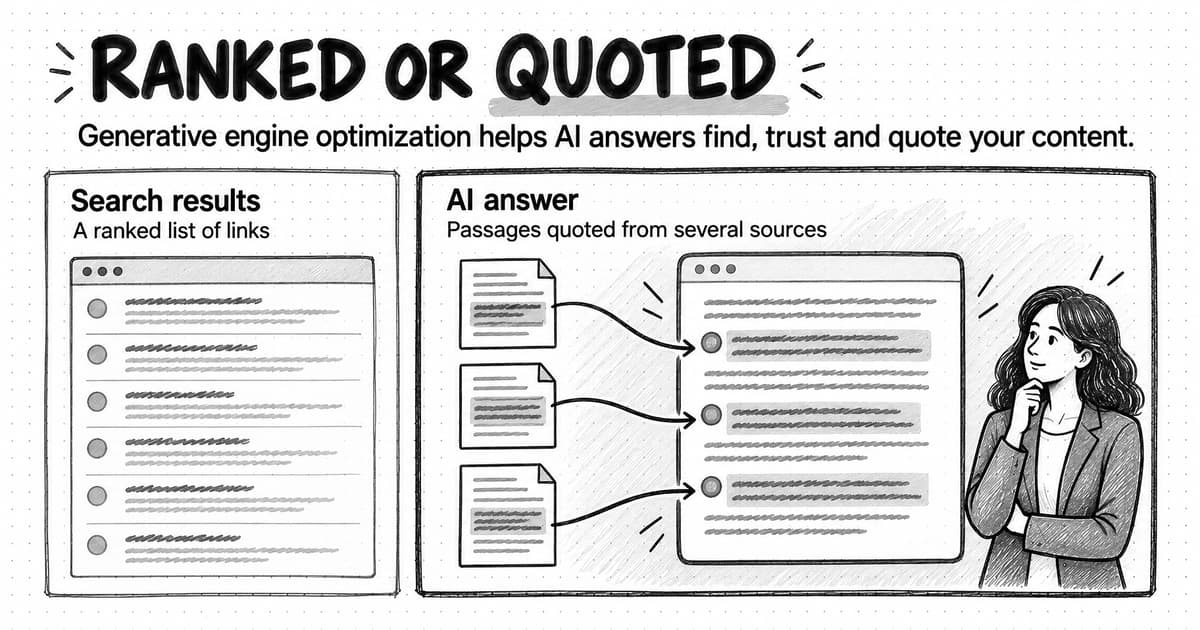
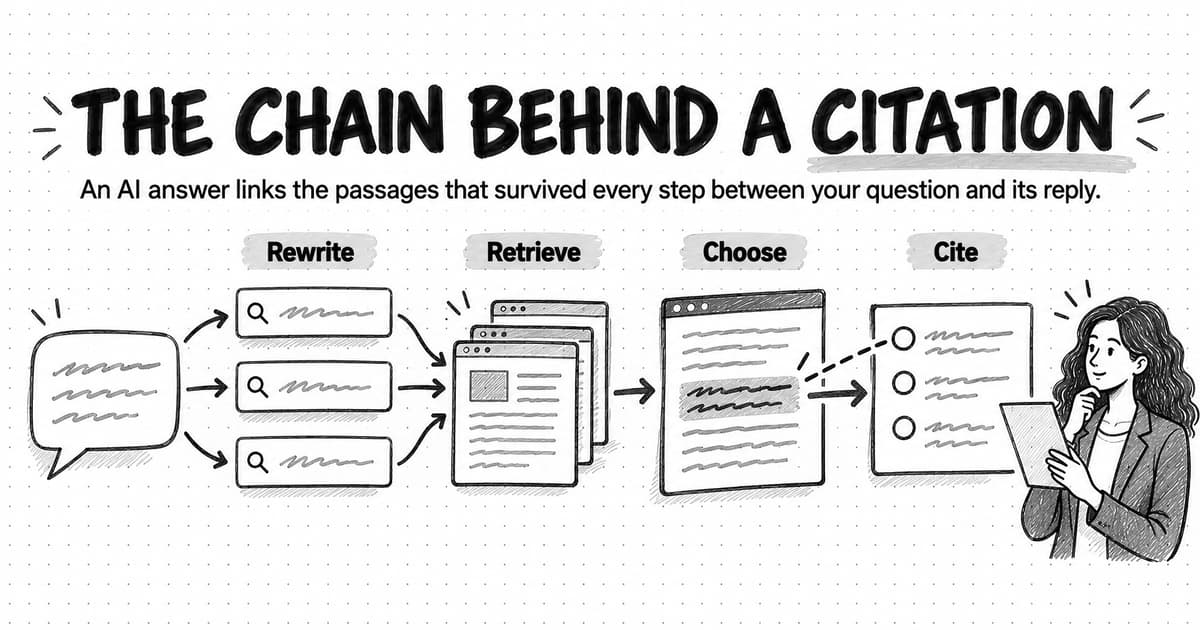
That framing also covers AI answers. Google's AI Overviews and AI Mode draw on the same index as ordinary Google results, and assistants such as ChatGPT search, Claude and Perplexity run their own crawlers that read robots.txt in their own ways. A page those crawlers cannot reach, or can reach but cannot read, will not be cited however good it is. So the audit in this guide checks for both: the classic technical and on-page work, and the newer question of which crawlers you are letting in and what each one does.
The guide works through the audit in the order crawlers meet a page, then shows how to sort findings by severity, with a copyable checklist and a worked example on a fictional software site.
What an SEO audit covers, and when to run one
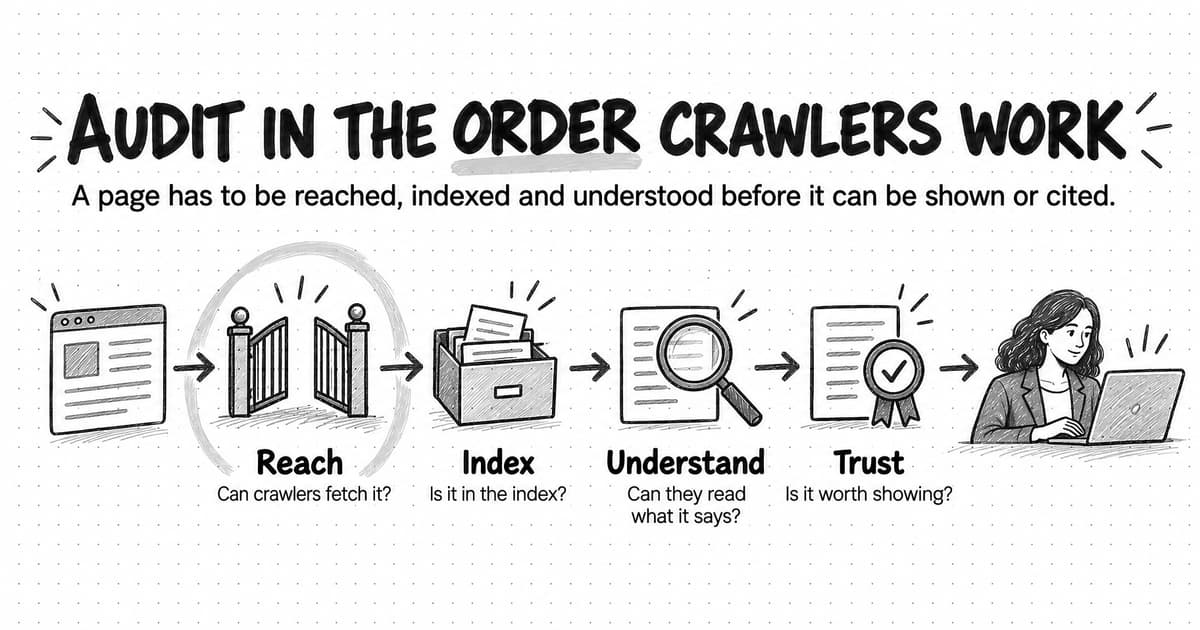
An SEO audit answers one question per layer of the site, and the layers depend on each other. If a crawler cannot fetch a page, nothing else about it matters to that crawler. If the page is fetched but excluded from the index, its content never competes. If its main text appears only after JavaScript runs, some crawlers see an empty template. Quality, experience and authority matter only once a page is reachable, indexed and readable.
That gives the audit a natural order, which this guide follows:
- Reach. Can search engines and AI crawlers fetch the page? This covers robots.txt, server errors and redirects.
- Index. Is the right version of the page in the index? This covers noindex rules, canonical URLs, sitemaps and Search Console's indexing report.
- Understand. Can crawlers read and interpret what the page says? This covers JavaScript rendering, internal links, titles and headings, and structured data.
- Trust. Is the page worth showing, citing or recommending? This covers content quality, page experience, and the links and mentions the site has earned.
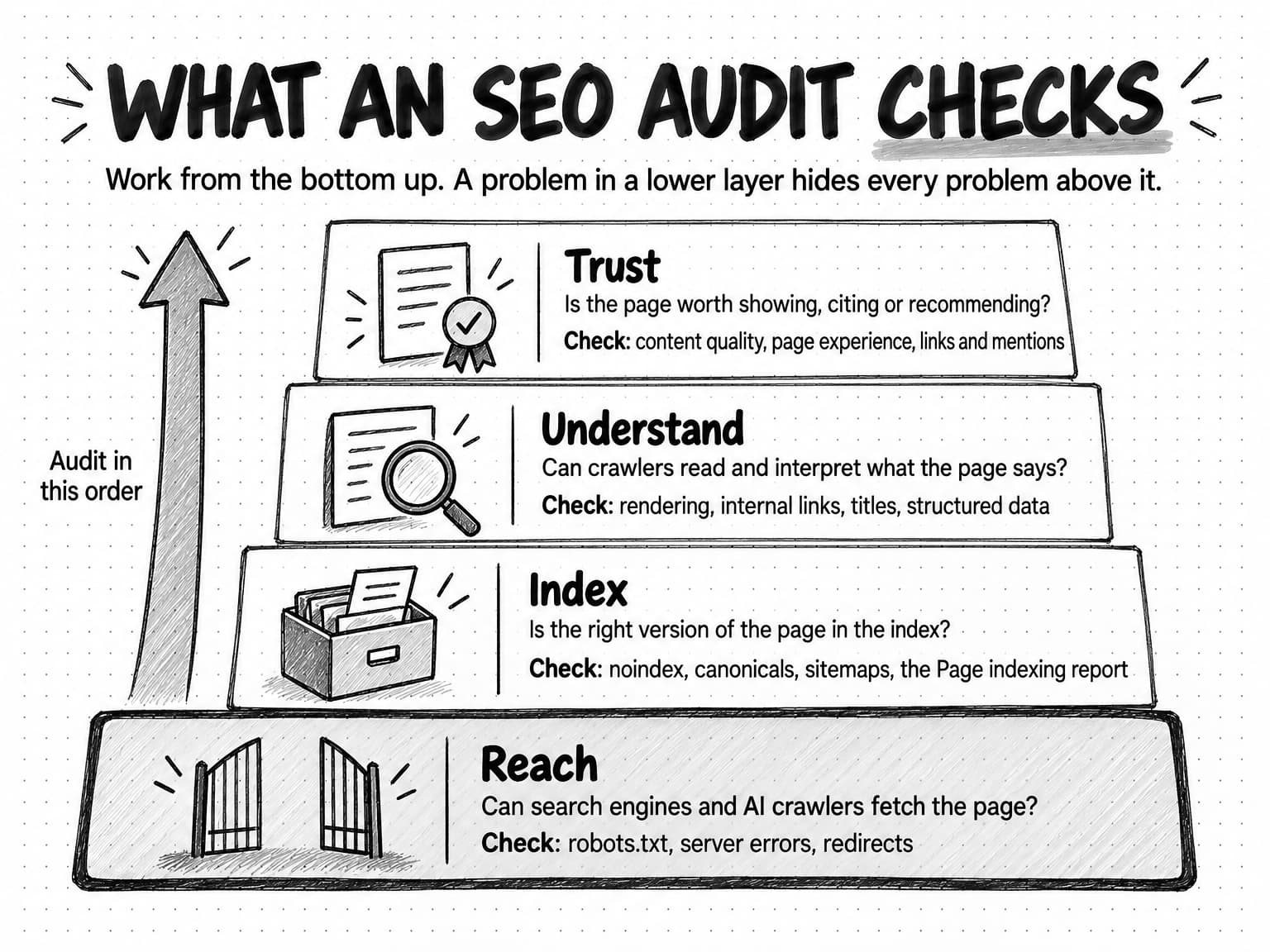
View the four layers of an SEO audit at full size (opens in a new tab).
You will see audits split into named types. A technical SEO audit covers the first three layers: crawling, indexing, rendering, site structure, speed and markup. An on-page SEO audit looks at individual pages: titles, headings, internal links, content and whether each page matches what the searcher wants. An off-page audit looks at what happens away from your site, mainly links and brand mentions. A local SEO audit adds business listings and location pages for companies that serve customers in specific places, which this guide does not cover. A full SEO audit for a small business site usually combines the first three, and that is the scope here.
An SEO audit is also different from a content audit, although the two share data. A content audit asks whether each piece of content is accurate, useful and worth keeping, then decides to keep, update, merge or cut it; our guide to running a content audit covers that method in depth. An SEO audit asks whether search engines and AI systems can find and use the pages you have. Neither one is a content gap analysis, which looks for topics you have not covered at all.
When to run an SEO audit
Three situations call for a full audit. The first is a baseline: you have never audited the site, or nobody on the current team knows what the last audit found. The second is after a structural change, such as a redesign, a move to a new content management system, a domain change or a large batch of URL changes, because those are the moments when robots.txt rules, redirects and canonical tags are most likely to break. The third is an unexplained drop: impressions or clicks in Search Console fall and stay down, or pages you expect to appear in AI answers stop appearing.
Between full audits, a light monthly check of a few reports, marked in the checklist below, catches most of what breaks. For a site of a few hundred pages, a full audit once or twice a year plus one after every structural change is a reasonable rhythm.
What you need before you start
The most useful SEO audit tools for a small team are free, and most of them come from the search engines themselves. Before you start, make sure you have access to the following.
Google Search Console. This is the only place to see how Google itself treats your site: which pages are indexed and why others are not, which queries bring impressions and clicks, Core Web Vitals from real visitors, and the URL Inspection tool that shows how Googlebot fetched and rendered a single page. Search Console also now has a Generative AI performance report: Google's help page says it shows how often links to your site appeared in AI Overviews and AI Mode, by page, country, device and date, and that it was rolled out to all websites worldwide on August 31, 2026. If you do not have Search Console access, getting it is step zero.
Bing Webmaster Tools. The equivalent for Bing, with its own indexing data and a robots.txt tester. Our guide to measuring AI search visibility describes the AI reporting that Google and Bing each offer site owners.
A site crawler. A crawler visits your pages the way a search engine does and lists URLs, status codes, titles, canonical tags and links in a spreadsheet. Free tiers handle small sites. You need its inventory, not its score.
PageSpeed Insights. Google's free tool shows Core Web Vitals for a URL from real-visitor data where enough exists, plus a lab test that explains what slows the page down.
The site's robots.txt file and sitemap. Open yourdomain.com/robots.txt in a browser and read it. Find the sitemap, usually listed at the bottom of robots.txt or at /sitemap.xml.
A list of the pages that matter. Write down the 10 to 50 URLs that carry the business: the home page, product and pricing pages, main solution pages, comparison pages and the guides that bring in qualified visitors. Every finding will be judged by whether it affects these pages. A broken link on an old event page and one on the pricing page are the same warning in a crawler's report and very different problems for the business.
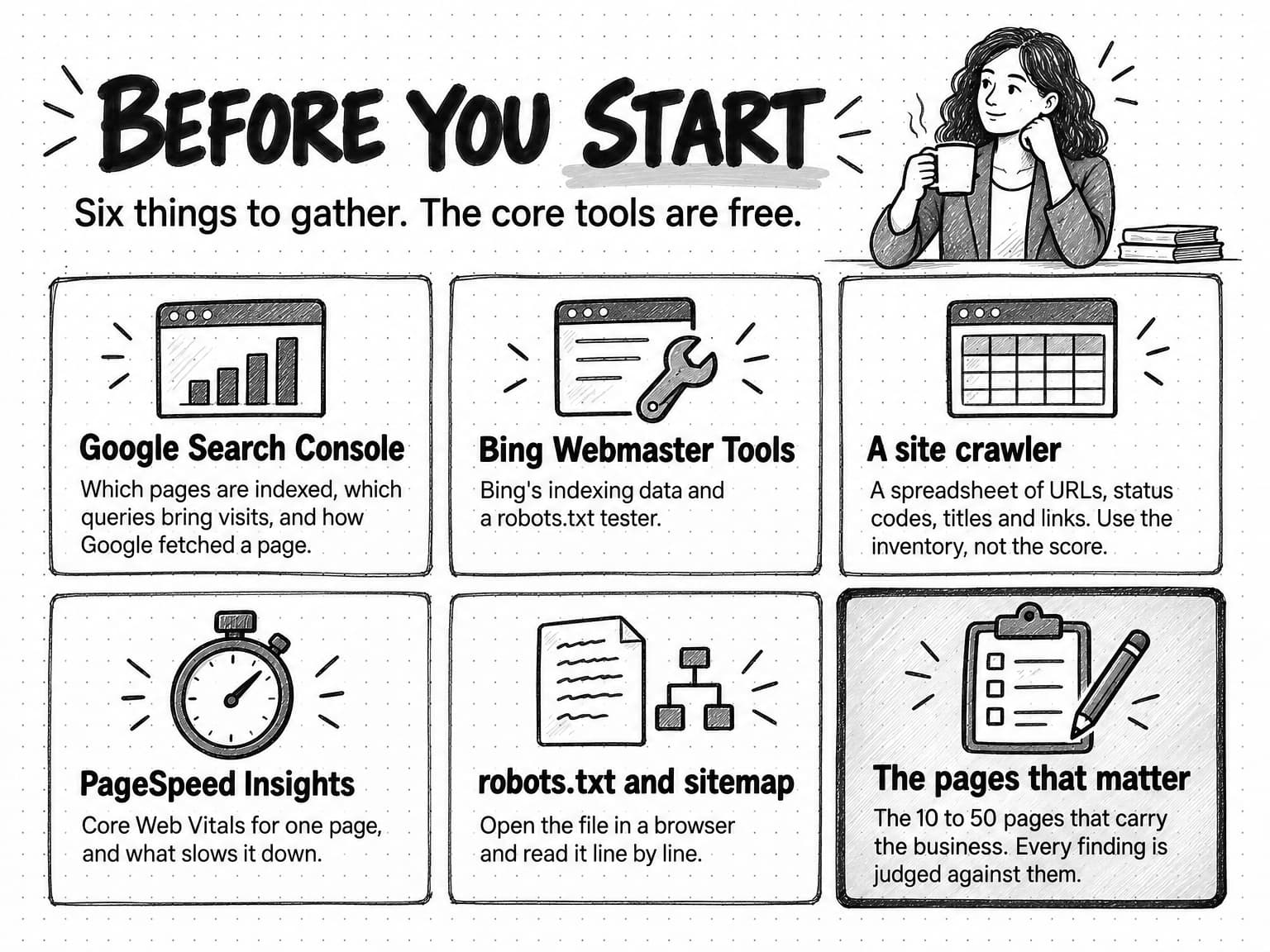
View the pre-audit toolkit at full size (opens in a new tab).
How long an SEO audit takes and what it costs
For a site of a few hundred pages, a marketer with the access above can usually complete a first audit in two to four working days: one to gather data, one or two to work through the layers, and one to sort and write up findings. Larger or JavaScript-heavy sites take longer. Treat that range as a planning estimate, not a benchmark.
A self-run audit costs mostly time, since the core tools are free; paid platforms add link and ranking data and save time on large sites. Agencies and freelancers price audits by site size and depth, so quotes vary widely. Ask for a sample report and check whether it ranks findings and names a fix for each, or simply exports a tool's warnings.
Crawl access: robots.txt for search engines and AI crawlers
Start the audit where crawlers start: the robots.txt file at the root of each host. Robots.txt is a plain text file that tells crawlers which URLs on a host they may request. It is grouped by User-agent lines, each naming a crawler or * for all crawlers, followed by Allow and Disallow rules.
Two facts about robots.txt are easy to get wrong.
First, robots.txt controls crawling, not indexing. Google's robots.txt documentation says plainly that it is not a mechanism for keeping a web page out of Google, and that a disallowed page can still be indexed if other sites link to it, usually shown without a description. To keep a page out of search results, Google recommends a noindex rule or password protection instead. And noindex only works if the crawler can fetch the page to read it: Google's documentation on blocking indexing warns that a page carrying noindex must not also be blocked by robots.txt, or Googlebot never sees the rule.
Second, a crawler follows only the group that names it. Under the robots.txt standard, RFC 9309, a crawler that finds a group matching its own name obeys that group and ignores the general User-agent: * group. So if robots.txt has a User-agent: * group that blocks /admin/ and /staging/, and a separate group for one crawler that only blocks /private/, that crawler is free to crawl /admin/ and /staging/. Anyone adding a crawler-specific group has to copy the general rules into it.
Which crawlers to check, and what each one does
Robots.txt used to be a conversation with a handful of search engines. It now also decides which AI products can use your pages, and the major AI companies run several crawlers that do different jobs. The distinction that matters for an audit is between crawlers that feed search (blocking them removes you from that product's results), crawlers that collect training data (blocking them opts you out of model training but not search), and fetchers that visit a page because a user asked (some operators say robots.txt may not apply to them).
The table below summarizes each operator's own documentation as of October 2026. Crawler names and behavior change, so check the linked pages before you edit robots.txt.
| Crawler token | Operator | What it does, per the operator | What blocking it does |
|---|---|---|---|
Googlebot | Crawls for Google Search, including AI Overviews and AI Mode | Stops crawling for Google Search | |
Google-Extended | A robots.txt token, not a separate crawler, for training future Gemini models and grounding in Gemini Apps and Vertex AI | Opts out of those uses; Google says it does not affect inclusion or ranking in Search | |
Bingbot | Microsoft | Crawls for Bing search | Stops crawling for Bing |
OAI-SearchBot | OpenAI | Surfaces websites in ChatGPT's search features | Site is not shown in ChatGPT search answers; OpenAI says changes take about 24 hours |
GPTBot | OpenAI | Crawls content that may be used to train OpenAI's foundation models | Signals that content should not be used for training |
ChatGPT-User | OpenAI | Visits pages for actions a ChatGPT user starts | OpenAI says robots.txt rules may not apply |
Claude-SearchBot | Anthropic | Indexes content for Claude's search responses | Content is not indexed for search, which may reduce visibility |
ClaudeBot | Anthropic | Collects web content that could contribute to model training | Signals that future content should be excluded from training data |
Claude-User | Anthropic | Fetches pages when people ask Claude questions | Pages cannot be retrieved for those requests |
PerplexityBot | Perplexity | Surfaces and links websites in Perplexity search results; not used for model training | Removes the site from Perplexity search results |
Perplexity-User | Perplexity | Visits a page when a user's question needs it | Perplexity says it generally ignores robots.txt |
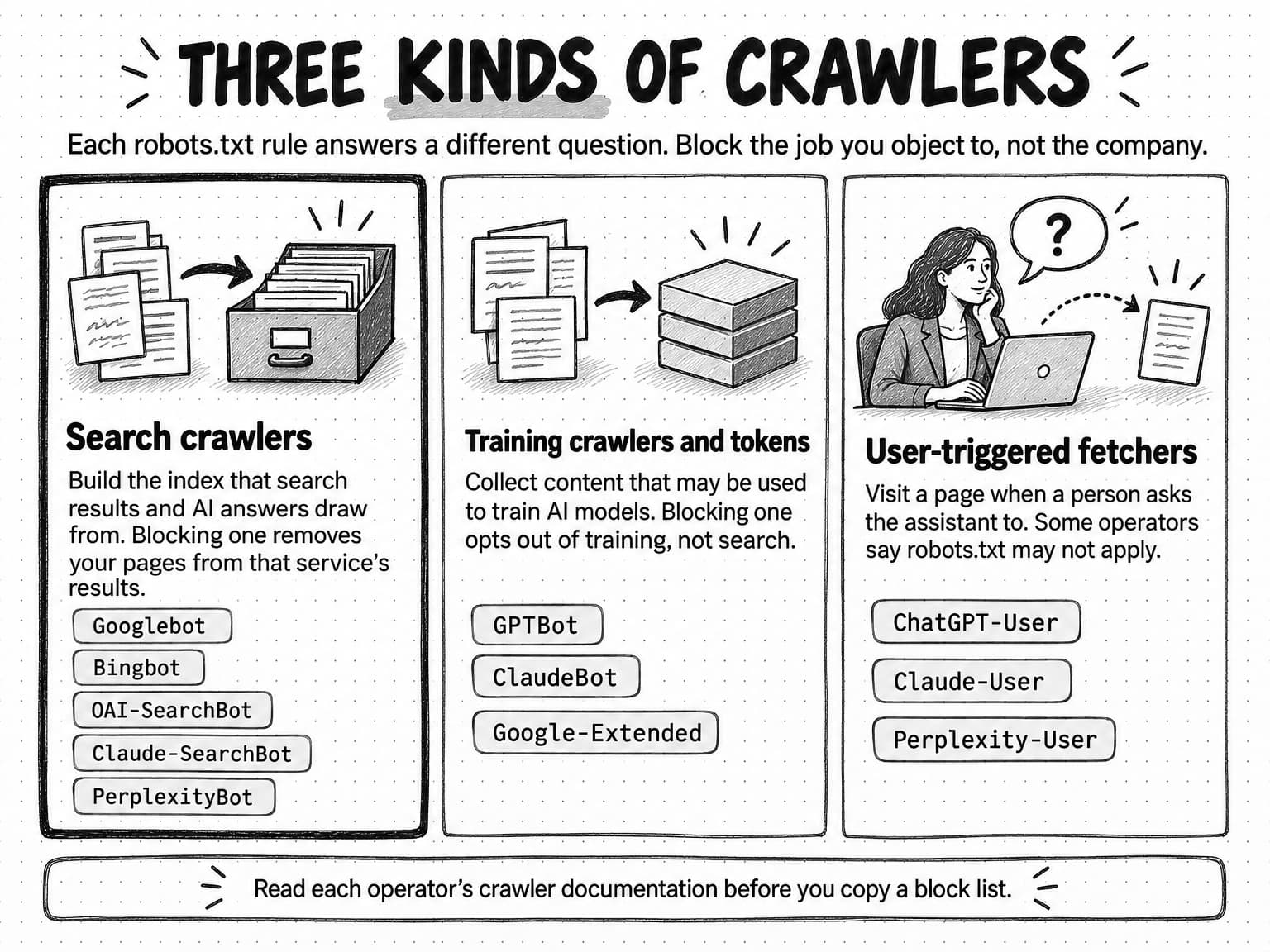
View the three kinds of crawlers at full size (opens in a new tab).
Microsoft documents a different control for its AI answers: two meta tags introduced in a September 2023 announcement, when its assistant was called Bing Chat. With NOCACHE, only the URL, title and snippet may appear in chat answers or be used for training; with NOARCHIVE, the content is not included in chat answers or used for training. Pages with either tag still appear in ordinary Bing results.
What to look for in the audit
Read robots.txt line by line with the table beside you and answer four questions.
Does any rule block pages that matter? Look for broad Disallow rules such as /, /blog/, /resources/ or a pattern that catches query strings your product pages use. A leftover Disallow: / from a staging site that went live is the most damaging single line an audit can find. Test important URLs in Bing Webmaster Tools' robots.txt tester and check Search Console's robots.txt report for fetch errors.
Does each crawler-specific group repeat the general rules you meant to apply? Because of the group rule above, a crawler-specific group replaces the * group for that crawler rather than adding to it.
Do the AI crawler rules do what the company intended? This is a business decision before it is a technical one. A block list copied to stop model training can also name OAI-SearchBot, Claude-SearchBot or PerplexityBot, which removes the site from those products' search answers. Write down the company's position, then make the rules match: a team that wants to be cited in AI answers but not used for training allows the search crawlers and blocks the training crawlers and tokens.
Are there other blocks outside robots.txt? Firewalls and bot-protection services can block crawlers before robots.txt is ever read. If server logs show an allowed crawler receiving 403 errors, or never arriving, ask whoever manages hosting whether a bot rule is in place.
Server errors and redirects
Access also means the server answers properly. In the crawler export, filter for status codes. Pages that return 5xx server errors, redirect loops, or chains of several redirects in a row are worth fixing; Search Console's Page indexing report lists server errors and redirect errors among the reasons a page is not indexed, and Google's help page names them as problems worth addressing. Internal links that point to a redirect rather than the final URL are a lesser problem, worth fixing when you touch the page anyway. Pages that return a 404 because they were deliberately removed are fine; important pages that return a 404 by accident are not.
Indexing: are the right pages in the index?
Once you know crawlers can reach the site, check what the search engines did with it. Open the Page indexing report in Google Search Console. It shows how many of your URLs Google has indexed and lists the reasons the others were not.
Do not start by trying to get every URL indexed. Google's help page for the report says not to expect every URL on a site to be indexed and to focus on whether your important pages are. A site with 300 pages and 1,200 known URLs is normal: the extra URLs are usually parameter variations, paginated lists, tag archives, old redirects and duplicates, and most of them should stay out of the index.
Instead, take your list of pages that matter and check each one with the URL Inspection tool. For each important page, you want to see that it is indexed and that the URL Google chose as canonical is the URL you want. Then read the report's reasons. Google's help page treats most of them as expected for some page types: "Excluded by 'noindex' tag" and "Blocked by robots.txt" are fine when intended, "Alternate page with proper canonical tag" needs no fix, and a 404 is fine for a page you removed on purpose. The ones it says are worth fixing are server errors, redirect errors and soft 404s, along with any important page that appears under "Crawled, currently not indexed" or "Discovered, currently not indexed", which usually points to thin content or weak internal links.
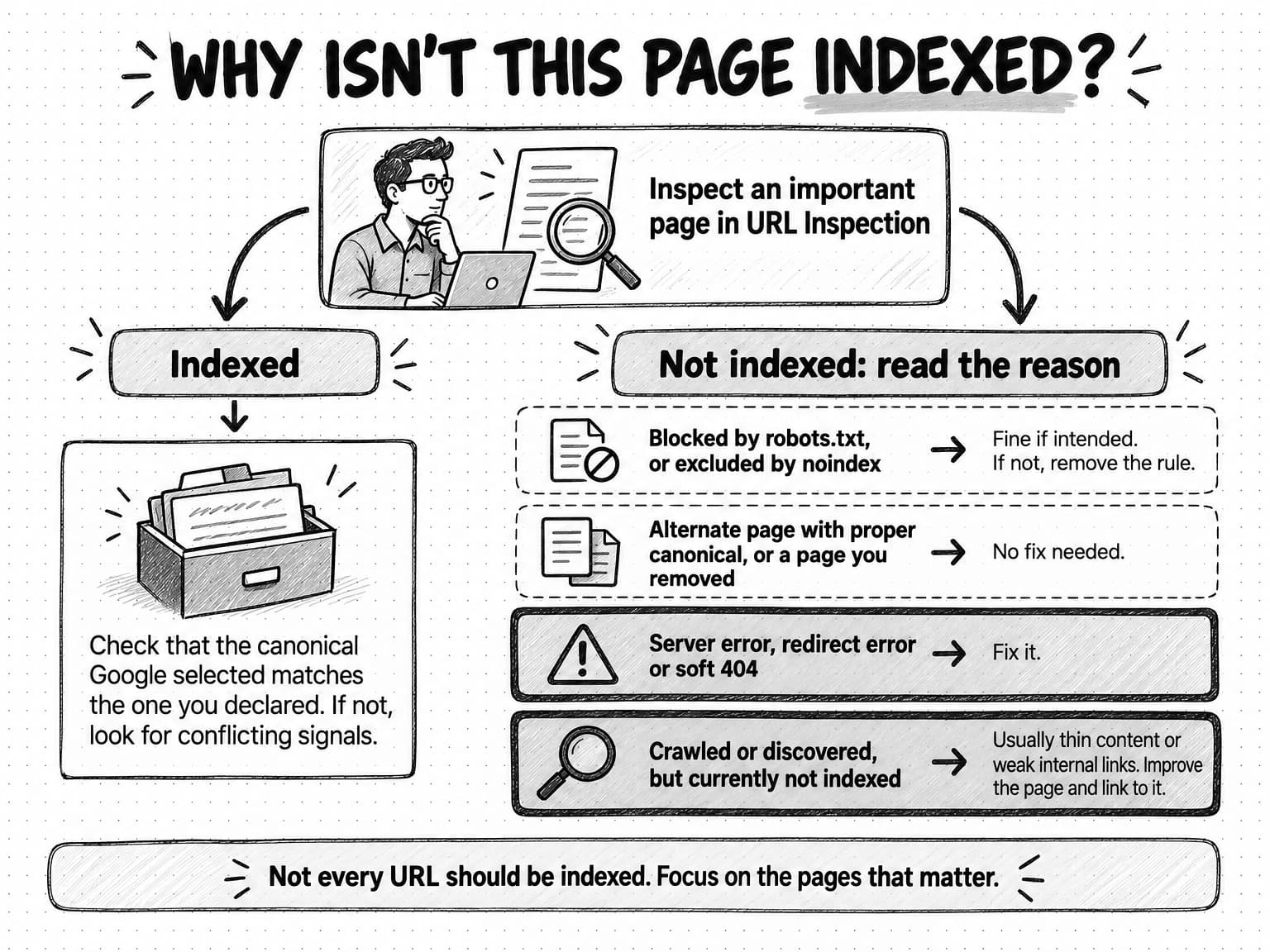
View the indexing diagnosis flow at full size (opens in a new tab).
Canonical URLs
A canonical URL is the version of a page you want search engines to treat as the main one when several URLs show the same or nearly the same content. Common sources of duplicates are tracking parameters, sort and filter options, http and https versions, www and non-www versions, trailing slashes, and printer or AMP versions.
Google's canonicalization documentation ranks the signals you can send. Redirects and rel="canonical" link tags are strong signals; including a URL in a sitemap is a weak one. Google may still choose a different canonical if your signals conflict or if it judges another version better for users, so the audit check is simple: for each important page, does the canonical Google selected (shown in URL Inspection) match the canonical you declared? If not, look for conflicting signals, such as internal links pointing to a parameter version, a sitemap listing the non-canonical URL, or a canonical tag pointing to a page that redirects.
Two shortcuts to avoid: Google advises against using noindex to choose between duplicate pages on one site, and against using robots.txt for canonicalization.
Sitemaps
An XML sitemap lists the URLs you want crawled. Google's sitemap documentation says a site of about 500 pages or fewer that is thoroughly linked internally may not need one, and that a sitemap does not guarantee the listed URLs will be crawled or indexed. Most content management systems generate one anyway, which is fine. The audit check is whether the sitemap is clean: it should list canonical, indexable URLs that return a 200 status, and not redirects, 404s, noindexed pages or parameter duplicates. A sitemap full of URLs you do not want indexed sends mixed signals and makes Search Console's sitemap report useless as a check.
Rendering: can crawlers see content that JavaScript builds?
Many modern sites send an almost empty HTML page and build the content with JavaScript. Visitors see a finished page; crawlers may not.
Google's JavaScript SEO documentation describes three phases: crawling, rendering and indexing. Googlebot queues pages for rendering, where a headless version of Chromium runs the JavaScript, and the rendered HTML is then used for indexing. The page may stay in that queue for a few seconds or longer. Google recommends server-side rendering or pre-rendering anyway, because it makes pages faster for users and crawlers and because not all bots can run JavaScript.
That last point matters for AI answers. In a December 2024 analysis of traffic across Vercel's network, Vercel and MERJ reported that none of the major AI crawlers they observed rendered JavaScript, including those from OpenAI, Anthropic, Meta, ByteDance and Perplexity. OpenAI's and Anthropic's crawlers fetched JavaScript files but did not execute them. The exceptions were Google's Gemini, which uses Googlebot's infrastructure, and Applebot. Crawler behavior can change, and this is one network's observation over a few months, but it is a good reason to make sure the text you want cited is in the HTML your server sends.
How to check rendering
Run three checks on each type of important page: home page, product page, pricing page, a guide, a comparison page.
- View the source, not the page. In a browser, open the page's source (
view-source:followed by the URL in Chrome) and search for a sentence from the main content. If the sentence is in the source, crawlers that do not run JavaScript can read it. If the source is mostly script tags and an empty container, they cannot. - Inspect what Google rendered. In Search Console, run URL Inspection, test the live URL and view the rendered HTML. Google's documentation says content missing from the rendered HTML will not be indexed.
- Check links. Google can only reliably follow links that are
<a>elements with anhrefattribute. Navigation built from buttons or click handlers that change the page without real links can leave whole sections undiscovered.
Pricing tables, feature comparisons, tabbed FAQs that load on click and review widgets are the usual places where important text exists only after JavaScript runs. Fixing it is a developer task; finding it is an audit task anyone can do.
Site structure and internal links
Internal links do two jobs. They let crawlers discover pages, and they tell both crawlers and readers which pages matter and how topics relate. Google's link guidance says every page you care about should have a link from at least one other page on your site, and that descriptive anchor text helps readers and Google understand the destination, while vague text such as "click here" or "read more" does not.
From the crawler export, check three things.
Orphan pages. These are pages with no internal links pointing to them. Compare the crawler's list with the sitemap and Search Console: URLs that appear in the sitemap or in Search Console but that the crawler never reached by following links are likely orphans. If an orphan is an important page, link to it from its natural parent.
Click depth. This is how many clicks it takes to reach a page from the home page. Product, pricing and core solution pages should sit one or two clicks from the home page, and key guides within three.
Topic grouping. Guides on one topic that never link to each other or to that topic's main page miss the chance to show how they fit together, the idea behind topical authority and topic clusters. The audit finding is usually specific: "the six integration guides do not link to the integrations hub, and the hub does not link back."
On-page basics: titles, headings and descriptions
On-page checks look at each important page as a search result and as an answer, and they are where marketers can change the most without a developer.
Title elements. The <title> element is the main source for the blue link in Google results. Google's title link documentation asks for titles that are descriptive and concise, distinct for each page, and free of keyword repetition and boilerplate. Google may also build the title link from other sources, such as the page's <h1> or anchor text, when it judges the title element unhelpful. In the crawler export, sort by title and look for duplicates (many pages sharing one title is a common template problem), empty titles, and titles that are only the company name.
Headings. Each important page should have one clear main heading that says what the page is about, ideally close to its title, followed by subheadings that a reader could scan. Google suggests putting the main title text in the first visible <h1>. Multiple H1s are a common tool warning that rarely matters; a page whose only heading is a slogan such as "Work smarter" matters more.
Meta descriptions. The description often supplies the snippet under the title. Check that important pages have a specific one rather than a repeated default; length warnings are low priority.
Search intent. The hardest on-page check is whether each page matches what people searching its main query want. If the results are all step-by-step guides and your page is a product pitch, title polishing will not fix it. Our guide to search intent explains how to read the results page for that signal. Flag mismatches for the content plan.
Structured data: what it does and does not do
Structured data is code, usually JSON-LD, that labels the facts on a page in a standard vocabulary from Schema.org, such as an organization's name and logo, a product's price, an article's author and date, or the questions in an FAQ. Search engines use it to understand pages and to produce rich results, such as product details or breadcrumbs, in the listings.
Google's structured data guidelines set the boundaries an audit should check. JSON-LD is the recommended format. Markup must describe content that is visible to readers on the page; marking up content readers cannot see is against the guidelines. And Google does not guarantee that valid structured data will produce a rich result.
For AI answers, Google is just as direct. Its documentation on AI features says there is no special Schema.org structured data you need to add to appear in AI Overviews or AI Mode. Structured data is still worth having where it accurately describes your pages, because it removes ambiguity about facts such as a product's price; it is not an AI-visibility switch.
The audit checks, using Google's Rich Results Test and the enhancement reports in Search Console:
- Do the important page types carry markup that fits them (
Organizationon the home or about page,ProductorSoftwareApplicationwhere it applies,Articleon guides,BreadcrumbListwhere breadcrumbs exist)? - Does the markup validate, and does Search Console report errors for any type?
- Does every marked-up fact match what the page shows? A price in the markup that differs from the price on the page is worse than no markup.
Page experience and Core Web Vitals
Core Web Vitals are three Google metrics for how a page feels to load and use: Largest Contentful Paint (LCP) for loading, Interaction to Next Paint (INP) for responsiveness, and Cumulative Layout Shift (CLS) for visual stability. INP replaced First Input Delay as a Core Web Vital in 2024.
The thresholds come from web.dev and are measured at the 75th percentile of real page loads, separately for mobile and desktop:
| Metric | Good | Needs improvement | Poor |
|---|---|---|---|
| Largest Contentful Paint (LCP) | 2.5 seconds or less | Over 2.5 and up to 4 seconds | Over 4 seconds |
| Interaction to Next Paint (INP) | 200 milliseconds or less | Over 200 and up to 500 milliseconds | Over 500 milliseconds |
| Cumulative Layout Shift (CLS) | 0.1 or less | Over 0.1 and up to 0.25 | Over 0.25 |
Search Console's Core Web Vitals report uses field data from real Chrome users, groups similar URLs, and labels each group Good, Need improvement or Poor by its slowest metric. Groups without enough data are left out, common on small sites; use PageSpeed Insights on important pages instead.
Keep the weight of this layer in proportion. Google's page experience documentation says its ranking systems use Core Web Vitals but that good scores do not guarantee top rankings, that Google seeks to show the most relevant content even when its page experience is poor, and that chasing a perfect score for SEO reasons alone may not be the best use of time. In the audit, a Poor rating on important pages, especially on mobile, is a medium-priority finding; "Need improvement" on low-traffic templates is not urgent.
Content quality: thin, duplicate and outdated pages
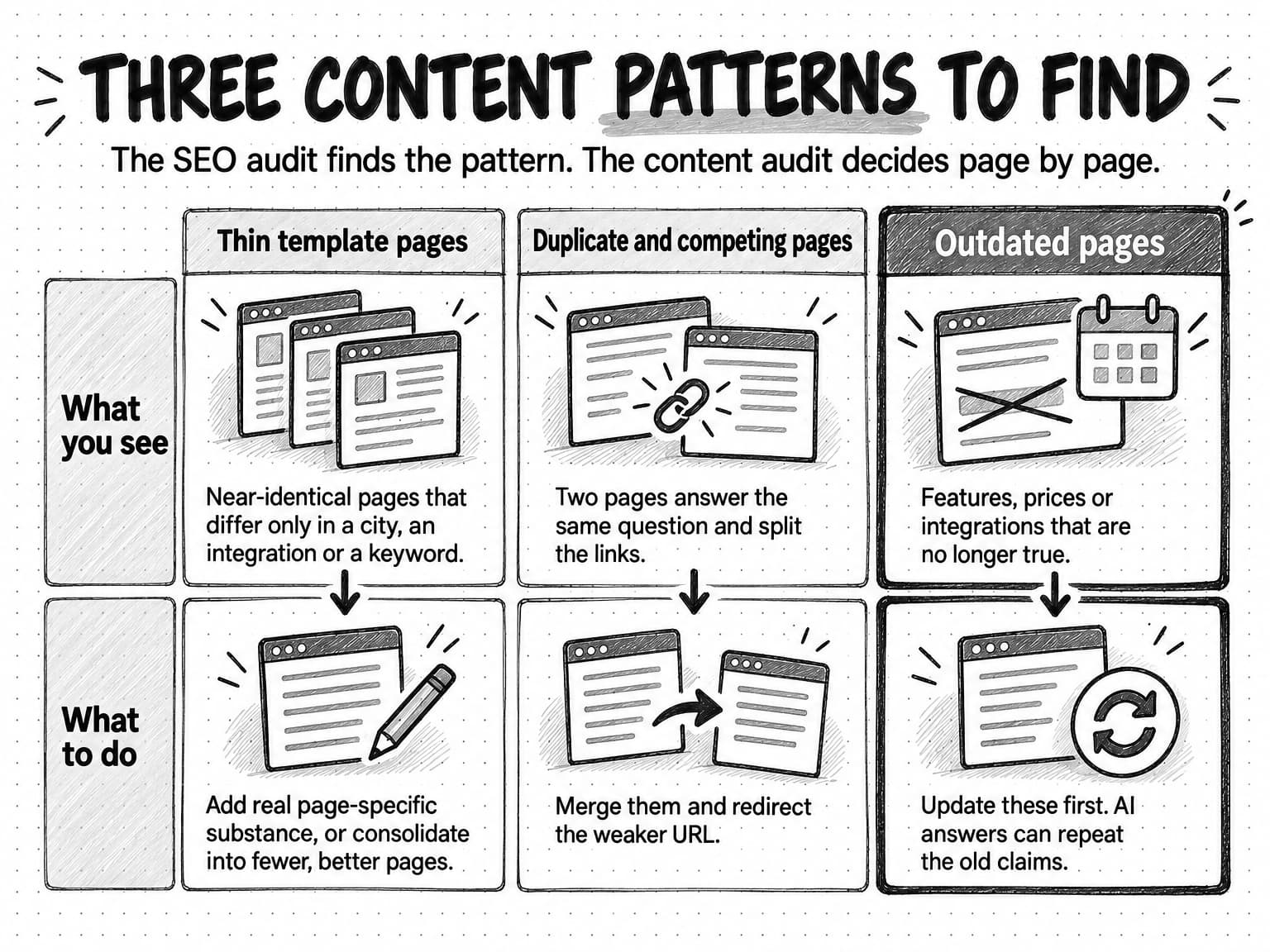
Pages that are reachable, indexed and fast can still fail because they are not worth showing. Here the SEO audit's job is to find patterns across the site, then hand page-by-page decisions to the content audit.
Google's helpful content guidance gives the test. It asks whether a page provides original information, reporting, research or analysis, and whether it is the sort of page you would bookmark or recommend. Its warning signs of search-engine-first content include producing lots of content on many topics in the hope that some performs. Its spam policies go further: scaled content abuse is generating many pages mainly to manipulate rankings, however they are made.
Look for three patterns.
Thin template pages. Sets of near-identical pages that differ only in a city, an integration name or a keyword often show up as "Crawled, currently not indexed". The finding is about the template: add real page-specific substance or consolidate into fewer, better pages.
Duplicate and competing pages. Two pages answering the same question, such as an old post and a newer guide, split links and blur which should rank. Merge them and redirect the weaker URL.
Outdated pages. Pages describing features, prices or integrations that are no longer true are the most damaging content finding for a software company, because AI answers can repeat the old claims. Check product, pricing, comparison and integration pages first.
View the three content patterns at full size (opens in a new tab).
Google's guidance also asks publishers to make clear who created content and why, which is the territory of E-E-A-T and how Google judges trust. In the audit, note whether important guides have a named author or team, a date, and sources for their claims.
Authority, links and brand mentions
The trust layer also includes what other sites say about you: links help search engines discover and weigh pages, and brand mentions on review sites, forums and publications are part of what AI answers draw from. An audit cannot change authority quickly, so this part is diagnostic. Check:
- Which pages earn links. In Search Console's Links report, see which of your pages other sites link to most. If it is mostly the home page and old posts, link from those pages to your important ones.
- Whether anything looks manipulative. Google's spam policies treat buying or selling links for ranking purposes as link spam. If the site has a history of paid link schemes, record it; Google's link guidance says paid links should carry
rel="sponsored"and user-submitted linksrel="ugc". - What third-party sources say about you. Search your brand name with your category and read what review sites, community threads and publications say. Note outdated or wrong descriptions, because those are what AI answers may repeat.
Pages that others cite tend to contain something they cannot get elsewhere. Our guides to original research that AI answers can't get anywhere else and content distribution for buyers who never click cover how to earn those mentions; the audit's job is to record where you stand.
AI-answer readiness: what you can and cannot control
Most of an AI-answer audit is the classic audit. Google says there are no additional requirements to appear in AI Overviews or AI Mode beyond being indexed and eligible to be shown in Search with a snippet, and other AI products depend on their own search crawlers reaching and reading your pages. If the earlier layers are clean, what remains is a short list.
Crawler policy matches intent. Confirm the search crawlers are allowed and any training opt-out uses the training crawlers and tokens.
Snippet controls are not hiding content by accident. Google says nosnippet, data-nosnippet, max-snippet and noindex limit what Search shows from a page, including in AI features. Because a supporting link requires snippet eligibility, a forgotten nosnippet rule on an important template also keeps those pages out of AI Overviews. On Bing, check for NOCACHE or NOARCHIVE tags you did not intend.
Key facts are stated plainly in the HTML. AI answers lift short passages. A pricing page that states "Plans start at $49 per month" in the server-sent HTML gives an answer engine something accurate to quote; a pricing table that loads by script gives some crawlers nothing.
Answers are attributable. Pages that answer a question directly near the top, with a date, an author or team, and sources, are easier for any system to quote accurately. How AI systems choose among sources is an open question that our guide to how AI search engines choose sources covers in depth, and Google's own AI features are covered in our guide to AI Overviews and AI Mode.
What you cannot control is whether any given answer cites you. Answers vary between runs, users and locations, and no audit can promise citations. To measure where you stand, sample a fixed set of buyer questions across the AI products your buyers use and use the first-party reports from Google and Bing; our guide to measuring AI search visibility gives the full method. The audit removes obstacles; measurement tells you what happened after.
How to prioritize SEO audit findings by severity
A site crawler will rate hundreds of issues as errors, warnings and notices. Those labels describe how far a page departs from a best practice, not what the problem costs your business. The audit's real output is a ranked list, so give every finding a severity using three questions.
- Does it affect a page that matters to the business? Use your list from the preparation step. A problem on the pricing page outranks the same problem on an archived event page.
- Does it stop discovery, or only weaken it? A page that cannot be crawled or indexed earns nothing. A page with a weak title still competes.
- How many pages share the same cause? One template fix that repairs 200 pages is worth more than 200 separate fixes, and a template problem on important page types deserves a higher severity than one page with the same issue.
Then place each finding on a four-level scale.
| Severity | What it means | When to fix | Typical examples |
|---|---|---|---|
| Critical | Stops important pages from being crawled, indexed or shown | Now, before other work | Important sections disallowed in robots.txt; noindex on a key template; search crawlers blocked by an AI block list; server errors on product pages |
| High | Weakens important pages, or affects many pages through one cause | This month | Main content visible only after JavaScript runs; wrong canonical on key pages; thin template pages; outdated product or pricing claims |
| Medium | Costs some clarity, speed or crawl efficiency on a set of pages | Schedule within the quarter | Duplicate titles across a template; poor mobile Core Web Vitals on important pages; orphaned guides; missing structured data on key page types |
| Low | A tool warning with little effect on discovery or understanding | Batch with other work or leave | Meta description length; multiple H1s on otherwise clear pages; redirecting internal links on low-traffic pages |
View the severity guide at full size (opens in a new tab).
A finding is complete when it names the pages affected, the likely cause, the fix and an owner: marketing for titles, content and internal links; development for rendering, redirects, speed and robots.txt; whoever runs the content management system for templates. An audit with no owners is a report, not a plan.
Copyable SEO audit checklist
Copy this checklist into a spreadsheet, add columns for the pages affected, the finding, the owner and the due date, and work through it in order. The severity column is the usual severity when a check fails on important pages; adjust it with the three questions above. Rows marked "monthly" make a light monthly check.
| # | Area | Check | Where to look | Usual severity if it fails |
|---|---|---|---|---|
| 1 | Scope | List the 10 to 50 pages that matter and the question the audit must answer | Analytics, sales team | Not applicable |
| 2 | Reach | No robots.txt rule blocks important pages for a search crawler (monthly) | robots.txt, robots.txt tester | Critical |
| 3 | Reach | Crawler-specific groups repeat the general rules they should follow | robots.txt | High |
| 4 | Reach | AI crawler rules match the company's position on search versus training | robots.txt, operator docs | Critical if search crawlers are blocked |
| 5 | Reach | No firewall or bot rule blocks allowed crawlers | Server logs, hosting team | Critical |
| 6 | Reach | Important pages return 200, with no server errors, loops or long chains (monthly) | Crawler, Page indexing report | Critical for 5xx, High for chains |
| 7 | Index | Each important page is indexed (monthly) | URL Inspection | Critical |
| 8 | Index | No important template carries noindex by mistake | Crawler, page source | Critical |
| 9 | Index | Google's selected canonical matches the declared one | URL Inspection | High |
| 10 | Index | Sitemap lists only canonical, indexable 200 URLs | Sitemaps report | Medium |
| 11 | Understand | Main text of each important page type is in the server-sent HTML | View source, rendered HTML | High |
| 12 | Understand | Navigation and content links are <a href> links | Crawler, page source | High |
| 13 | Understand | Important pages are within three clicks of the home page; no orphans | Crawler | Medium |
| 14 | Understand | Related pages link to each other and to their topic hub | Crawler | Medium |
| 15 | Understand | Each important page has a distinct title and one clear main heading | Crawler | Medium |
| 16 | Understand | Each important page matches the intent of its main query | Search results | High, for the content plan |
| 17 | Understand | Structured data fits the page, validates and matches visible content | Rich Results Test | Medium; High if facts are wrong |
| 18 | Trust | Important pages are not Poor on mobile Core Web Vitals (monthly) | Core Web Vitals report | Medium |
| 19 | Trust | No sets of thin, near-identical template pages | Crawler, Page indexing report | High |
| 20 | Trust | No two pages compete for the same question | Crawler, search results | Medium |
| 21 | Trust | Product, pricing, comparison and integration claims are current | Manual review | High |
| 22 | Trust | Guides show an author or team, a date and sources | Manual review | Medium |
| 23 | Trust | Paid links are marked sponsored; third-party descriptions of the brand are current | Links report, brand searches | Medium |
| 24 | AI answers | No unintended nosnippet, max-snippet, NOCACHE or NOARCHIVE on important pages | Page source | High |
| 25 | AI answers | Key facts such as price and category are stated in HTML text | View source | Medium |
| 26 | Follow-up | Each finding has pages, cause, fix, owner and date, and each fix is re-checked | Audit sheet | Not applicable |
View the SEO audit on one page at full size (opens in a new tab).
Worked example: a first SEO audit at a fictional software company
Larkspan sells scheduling software to field-service teams such as plumbing and HVAC contractors. Its marketing site has about 240 pages: a home page, six product and feature pages, a pricing page, 22 integration pages, about 150 blog posts and guides, plus company, legal and careers pages. The company redesigned the site eight months ago. Since then, organic sign-ups have drifted down, and the head of marketing, the company's only marketer, has noticed that Larkspan never appears when she asks AI assistants for field-service scheduling tools.
What the audit found
She lists 18 pages that matter: the home page, the six product pages, pricing, the four most-used integration pages and the six guides that bring in most sign-ups. Then she runs a free crawler over the site. Its report lists 1,940 issues and a health score of 71. She sets it aside and works through the layers.
Reach. Robots.txt has two problems. Under User-agent: * sits Disallow: /resources/, a rule the redesign agency used to hide the new guides section before launch and never removed. Twenty-eight guides live there, including three of her six most important. The second problem is a set of crawler-specific groups added the year before, after a board member asked whether AI companies were training on Larkspan's content. Copied from a blog post, the list blocks GPTBot, ClaudeBot and Google-Extended, which matches the company's intent, but also OAI-SearchBot, Claude-SearchBot and PerplexityBot, which removes Larkspan from those products' search answers. And because each of those groups replaces the * group for its crawler, none carries the general rule that keeps /internal/ out of crawls.
Index. The home page, product pages and pricing page are indexed with the expected canonicals. Of the 22 integration pages, 15 show "Crawled, currently not indexed" and four show "Duplicate without user-selected canonical". Each is the same 300-word template with the partner's name swapped in.
Understand. The pricing page's source contains no prices; plan names and prices load from a script. Google's rendered HTML includes them, but crawlers that do not run JavaScript see a pricing page without prices. Thirty pages, including all six product pages, share one title left over from the redesign template.
Trust. The mobile Core Web Vitals report rates the home page group Poor on LCP, at 4.6 seconds, because of an autoplaying hero video. Two feature pages still describe a route-optimization add-on discontinued five months ago, and two review-site profiles repeat the claim. Finally, 1,900 of the crawler's 1,940 issues are meta descriptions over the recommended length and decorative images without alt text.
Larkspan's ranked findings
| Finding | Severity | Why | Fix | Owner |
|---|---|---|---|---|
/resources/ disallowed for all crawlers | Critical | Blocks 28 guides, including 3 important ones | Remove the rule; request indexing for the important guides | Developer, this week |
| AI block list also blocks search crawlers and drops the general rules | Critical | Removes the site from three AI products' search answers; lets listed crawlers into a folder meant to stay uncrawled | Keep training crawlers and tokens blocked; remove search crawlers from the list; copy general rules into each group | Head of marketing decides, developer edits, this week |
| Pricing details load only by script | High | Some crawlers see no prices on the most important commercial page | Render plan names and prices on the server | Developer, this month |
| 22 near-identical integration pages | High | Most are not indexed; the template is thin | Rewrite the four most-used integrations with real setup detail; consolidate the rest into one integrations page with redirects | Marketing, this month |
| Two pages describe a discontinued feature | High | Wrong product claims spread to review sites and AI answers | Update both pages; ask the review sites to correct their profiles | Marketing, this week |
| 30 pages share one title | Medium | Product pages are indistinguishable in results | Write distinct titles for the 30 pages, starting with the six product pages | Marketing, this month |
| Home page Poor on mobile LCP | Medium | Slow first view for mobile visitors on the main entry page | Replace the autoplay video with a static image on mobile | Developer, this quarter |
| 1,900 meta description and alt text warnings | Low | Little effect on discovery | Fix descriptions on the 18 important pages; leave the rest for routine edits | Marketing, as pages are edited |
View Larkspan's ranked audit findings at full size (opens in a new tab).
Neither critical finding appeared as an error in the crawler's 1,940 issues. A disallowed folder and a crawler-specific robots.txt group are valid configurations that a tool cannot judge without knowing what the company intended; both came from reading robots.txt against a list of important pages and a written position on AI crawlers. Two weeks later she re-checks: the important guides are indexed, robots.txt matches the written policy, and the pricing source contains the prices. Whether sign-ups and AI-answer mentions recover is a question for the following months of measurement.
How SEO audits work with Ampere
Ampere, the AI marketing agent, can do much of the research and drafting in an audit like this one. In its session workspace, Ampere has a browser and can search the web, extract page content, crawl websites and map a site's structure, which covers the page inventory, robots.txt and sitemaps, and titles and headings across templates. Ampere can draft SEO and CRO audits from those findings and turn them into prioritized recommendations and rewritten copy, such as new titles for pages that share one, for you to review.
Because Ampere works from public pages, it does not see your Search Console data, analytics or server logs unless you share them. The indexing, Core Web Vitals and link checks that depend on those reports still need someone with access, and you can add those exports as project files for Ampere to work from. Ampere can also identify AI-search visibility gaps and save a search landscape report to Brand memory, so later work, such as a content plan built on the audit, starts with that context. To repeat the parts of an audit that rely on public pages, such as re-reading robots.txt or re-checking titles after a release, you can set up a scheduled task.
Ampere's output can be inaccurate or incomplete, and public data never covers everything, so check its findings against the checklist above before acting. Ampere drafts and recommends; your team decides what changes on the site and makes those changes.
Sources and further reading
- Google Search Central, Introduction to robots.txt, last updated December 10, 2025.
- Google Search Central, Block Search indexing with noindex, last updated December 10, 2025.
- Internet Engineering Task Force, RFC 9309: Robots Exclusion Protocol, September 2022.
- Google Search Central, Google's common crawlers, last updated July 14, 2026.
- OpenAI, Overview of OpenAI crawlers, accessed October 14, 2026.
- Anthropic, Does Anthropic crawl data from the web, and how can site owners block the crawler?, last updated April 7, 2026.
- Perplexity, Perplexity crawlers, accessed October 14, 2026.
- Microsoft Bing, Announcing new options for webmasters to control usage of their content in Bing Chat, September 22, 2023.
- Google Search Console Help, Page indexing report, accessed October 14, 2026.
- Google Search Console Help, Generative AI performance report, accessed October 14, 2026.
- Google Search Central, How to specify a canonical URL, last updated July 10, 2026.
- Google Search Central, What is a sitemap, last updated December 10, 2025.
- Google Search Central, Understand JavaScript SEO basics, last updated March 4, 2026.
- Vercel and MERJ, The rise of the AI crawler, December 17, 2024.
- Google Search Central, Link best practices for Google, last updated December 10, 2025.
- Google Search Central, Influencing your title links, last updated December 10, 2025.
- Google Search Central, General structured data guidelines, last updated July 10, 2026.
- Google Search Central, AI features and your website, last updated December 10, 2025.
- web.dev, Web Vitals, with the metric pages for LCP, INP and CLS. Thresholds at the 75th percentile.
- Google Search Console Help, Core Web Vitals report, accessed October 14, 2026.
- Google Search Central, Understanding page experience in Google Search results, last updated September 22, 2026.
- Google Search Central, Creating helpful, reliable, people-first content, last updated October 5, 2026.
- Google Search Central, Spam policies for Google web search, last updated August 28, 2026.
Frequently Asked Questions
What are the different types of SEO audits?
The main types of SEO audits are technical, on-page, off-page, content and local. A technical SEO audit checks crawling, indexing, rendering, speed and markup. An on-page audit checks titles, headings, internal links and whether pages match search intent. An off-page audit looks at links and brand mentions. A content audit decides what to keep, update, merge or cut, and a local audit adds business listings and location pages.
What should an SEO audit include?
An SEO audit should include four layers checked in order: crawler access (robots.txt, server errors, redirects), indexing (noindex rules, canonicals, sitemaps), understanding (rendering, internal links, titles, headings, structured data) and trust (content quality, Core Web Vitals, links and mentions). It should also cover AI crawlers and snippet controls. Most importantly, it should end with a ranked list in which every finding has a severity, the pages affected, a fix and an owner.
What is a technical SEO audit?
A technical SEO audit is the part of an SEO audit that checks whether search engines and AI crawlers can reach, index and read a site. It covers robots.txt, status codes and redirects, noindex rules, canonical URLs, sitemaps, JavaScript rendering, internal link structure, structured data and Core Web Vitals. Many technical fixes need a developer, but a marketer can find most technical problems with Search Console and a site crawler.
How do you do an on-page SEO audit?
To do an on-page SEO audit, start with the pages that matter most and check each one as a search result and as an answer. Confirm the title is distinct and descriptive, the main heading says what the page covers, the description is specific, and internal links point to and from related pages. Then compare the page with the current results for its main query to see whether it matches what searchers want. Finally, check that its facts, such as prices and features, are current.
Can you do an SEO audit without a paid tool?
Yes, you can do an SEO audit without a paid tool on a site of a few hundred pages. Google Search Console, Bing Webmaster Tools and PageSpeed Insights are free and supply the indexing, robots.txt, Core Web Vitals and link data. Free crawler tiers list titles, status codes and canonicals for small sites, and reading robots.txt or a page's source needs only a browser. Paid tools mainly add link and ranking data.
Can ChatGPT do an SEO audit?
ChatGPT and other AI assistants can help with an SEO audit when they can browse public pages: reading robots.txt, checking titles and headings, and spotting thin or outdated content. They cannot see your Search Console indexing data, Core Web Vitals field data or server logs unless you provide exports, and their findings can be wrong or incomplete. Use an AI assistant to speed up gathering and drafting, then check its findings against the source reports before changing the site.
How much does an SEO audit cost?
An SEO audit you run yourself costs mainly time, because the core tools, Google Search Console, Bing Webmaster Tools and PageSpeed Insights, are free. For a site of a few hundred pages, a first audit typically takes a marketer two to four working days. Agencies and freelancers price audits by site size and depth, so quotes vary widely. When comparing them, ask for a sample report and check that findings are ranked by severity with a fix for each.
What is the difference between an SEO audit and a content audit?
An SEO audit checks whether search engines and AI systems can find, index, read and trust a site's pages. A content audit checks whether each piece of content is accurate, useful and on strategy, then decides whether to keep, update, merge or cut it. They overlap on thin, duplicate and outdated pages: let the SEO audit find patterns, such as a thin template, and the content audit make page-by-page decisions.
What is an SEO audit report?
An SEO audit report is the written result of an audit: a ranked list of findings rather than a tool's raw export. Each finding names the problem, the pages affected, the likely cause, the severity, the fix and an owner with a date. A useful report puts critical findings, such as important pages blocked from crawling or indexing, at the top and groups low-priority tool warnings at the end so they do not crowd out the work that matters.