Content gap analysis: how to find the topics competitors and AI answers cover that you don't
A seven-step method for finding four kinds of content gap, a test for deciding which gaps deserve a page, a copyable gap analysis sheet, and a worked example from one fictional software company.
39 min readWritten by Ampere
Short answer
What is a content gap analysis?
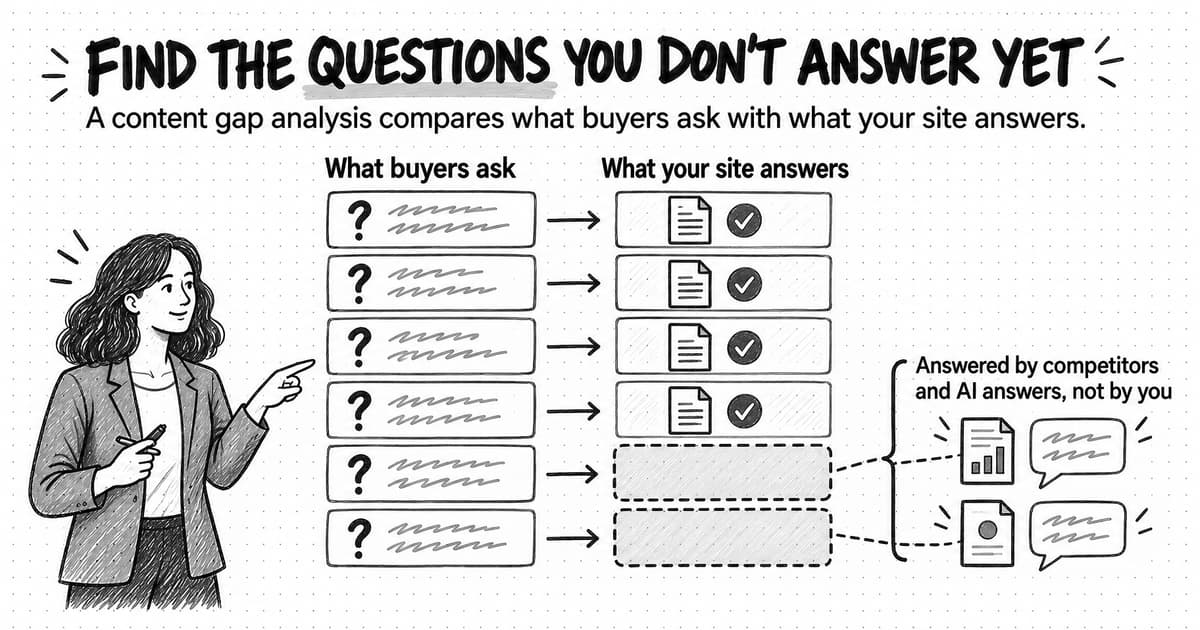
A content gap analysis compares the questions your audience needs answered with the answers your site gives, to find the questions competitors, third-party sites, or AI answers cover and you don't. A useful one draws its questions from sales, support, and reviews as well as keyword tools, and ends with a decision about which gaps you can fill better than the pages that answer them now.
Summary
A content gap analysis replaces brainstormed topic lists with evidence about which buyer questions your site fails to answer. Its quality depends on the question list. A list taken only from a keyword tool finds keyword gaps; one that also draws on sales calls, support tickets, reviews, and AI answers finds the questions that cost deals and the places where the brand is missing from answers people read instead of clicking.
Content gaps come in four kinds: keyword and ranking gaps, buyer-question gaps, funnel-stage gaps, and AI-answer gaps where answers leave the brand out, cite a third party about it, or describe it wrongly. A content audit looks at the pages a company already has, while a gap analysis looks at what is missing, so the gap analysis needs the audit's inventory before it can judge what is absent.
The method runs in seven steps: define the reader and the questions that matter, choose the sites that rank or get cited for those questions, find keyword, buyer-question, and AI-answer gaps, map every gap to a stage of the buyer journey, and decide which to fill. Search competitors often differ from business competitors, and many sites turn out thin at the evaluation and decision stages.
Deciding which gaps to fill is the step that makes the analysis useful. Rate each gap on relevance, intent fit, what the company can add, and business value, with a reason for every rating, and choose the cheapest fix: a new page, an update, a merge, a link, or an answer elsewhere. Google's guidance warns against pages that mainly summarize others, so competitor pages should show the question, not supply the answer.
A copyable sheet holds the whole analysis in one table, and a worked example follows one fictional software company from 112 raw questions to a reasoned shortlist. Its strongest gaps had little measurable search volume and strong sales evidence, and it dropped the gap with the largest volume because it had nothing to add. One AI-answer check is a sample, not a measurement, so recheck filled gaps over time.
Contents
- What a content gap analysis finds: four kinds of gap
- Content audit, competitor analysis, and gap analysis: how they differ
- Step 1: Define the audience and the questions that matter
- Step 2: Choose your search competitors, not only your business competitors
- Step 3: Find keyword and ranking gaps
- Step 4: Find buyer-question gaps in sales, support, and reviews
- Step 5: Find AI-answer gaps
- Step 6: Map the gaps to the buyer journey
- Step 7: Decide which gaps to fill
- How to fill a gap without copying competitors
- Copyable content gap analysis template
- Worked example: a fictional company's first content gap analysis
- Common content gap analysis mistakes
- How often to run a content gap analysis
- Content gap analysis with Ampere
- Sources and further reading
- Frequently Asked Questions
Most content calendars start with a brainstorm. Someone lists topics the team could write about, someone else adds a few keywords from a tool, and the list gets sorted by gut feel. The result is often reasonable and rarely tied to evidence. Nobody can say which of those topics a buyer is actually trying to answer, whether a competitor already answers it better, or whether an AI assistant asked the same question would ever mention the company.
A content gap analysis replaces the brainstorm with a comparison. A content gap analysis is a structured comparison between the questions your audience needs answered and the answers your site currently gives, to find the questions that competitors, third-party sites, or AI answers cover and you don't. The output is a short, ranked list of gaps, each with the evidence that it exists, the reader it would serve, and a decision about whether it is worth a page.
The comparison has two sides, and most of the work lies in getting the first side right. If the question list comes only from a keyword tool, the analysis finds keyword gaps and nothing else. If it also draws on sales calls, support tickets, reviews, and the answers AI assistants give, it finds the questions that cost the company deals and the places where the brand is missing from answers people now read instead of clicking. This guide explains the four kinds of gap, walks through a seven-step method, shows how to decide which gaps deserve new content and how to fill them without copying a competitor, and ends with a copyable sheet and a worked example from a fictional company.
What a content gap analysis finds: four kinds of gap
A content gap is a question your audience asks, with real consequences for their decision, that your site does not answer well enough to be found, chosen, or cited. That definition includes three failures. The site may not answer the question at all. It may answer it on a page nobody can find. Or it may answer it so thinly that searchers and AI answers prefer someone else's page. Each failure has a different fix, so it helps to record which one you found.
Gaps also come from different evidence, and the source of the evidence changes what the gap means. Four kinds cover most of what a lean team will find.
Keyword and ranking gaps are search queries where competitors' pages rank and yours do not. They are the kind most SEO tools report, because they can be found by comparing ranking data for two or more domains. A keyword gap tells you that a query has search demand and that a competitor has a page for it. It does not tell you whether the query matters to your buyers or whether the competitor's page is any good.
Buyer-question gaps are questions prospects and customers ask your team that your site does not answer. They show up in sales call notes, demo requests, support tickets, onboarding emails, review sites, and community threads. Many of them never appear in a keyword tool, because they are too specific, too new, or phrased in ways that vary from person to person. They are often the most valuable gaps, because someone has already shown that the question matters to a real purchase.
Funnel-stage gaps are stages of the buying decision where your content is thin. A site may have plenty of early educational posts and product pages, and almost nothing for the buyer comparing options, building a business case, or checking whether the product works with their existing tools. This kind of gap appears only when you map the content you have against the questions buyers ask at each stage.
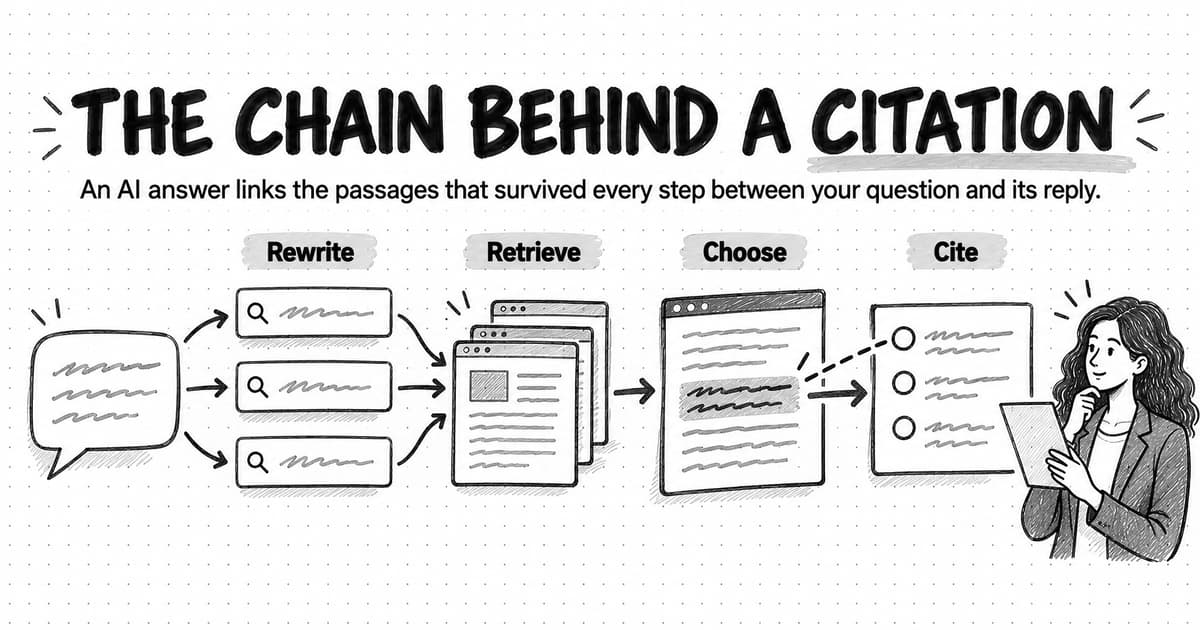
AI-answer gaps are questions where AI search features and assistants answer without mentioning you, mention you only through someone else's page, or describe you inaccurately. Google says its AI Overviews and AI Mode build responses using a "query fan-out" technique, "issuing multiple related searches across subtopics and data sources," according to its documentation on AI features and your website (last updated December 10, 2025). An AI answer can therefore draw on pages that answer sub-questions you never thought to cover, and a gap in that set of sub-questions can keep you out of the answer.
These four kinds overlap. A question from a sales call may also be a keyword gap and an AI-answer gap. Recording each gap's evidence separately still matters, because a gap backed by two or three kinds of evidence is usually more certain than one backed by a single tool.
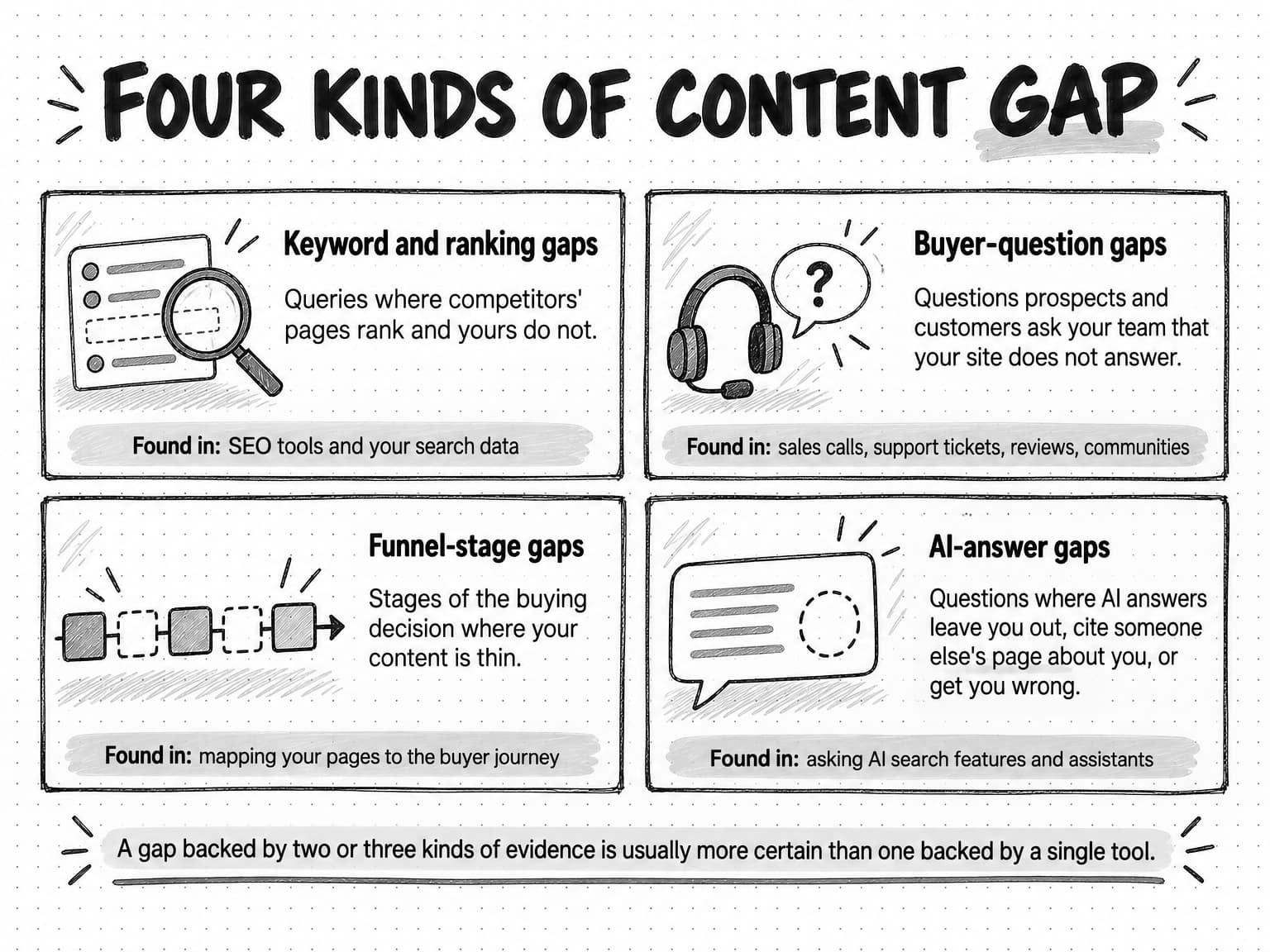
View the four kinds of content gap at full size (opens in a new tab).
Content audit, competitor analysis, and gap analysis: how they differ
Three activities often get blended together, and separating them keeps each one manageable.
A content audit looks at what you already have. Its subject is your own library: an inventory of every page, an assessment of how each performs and how good it is, and a decision to keep, update, merge, or cut each one. Our guide to running a content audit covers that method. An audit surfaces some gaps along the way, such as a topic you once covered on a page that has since gone stale, but its subject is what exists.
A competitor analysis looks at the companies a buyer might choose instead of you: their positioning, offers, proof, pricing, and messages. Our guide to conducting a competitor analysis explains how to choose competitors from the customer's point of view and compare them on criteria that can change a decision. A content gap analysis borrows that discipline, but it compares answers to questions, not companies.
A content gap analysis looks at what is missing. Its subject is the space between the questions that matter and the answers available, including answers on competitors' sites, on third-party sites, and in AI answers. It needs an inventory of your content to know what you have. Anna Kaley's Content Inventory and Auditing 101 at Nielsen Norman Group describes an inventory as a list of every piece of digital content you have, and notes that an audit can reveal where gaps exist that new content could fill. A gap analysis therefore usually runs after an audit or alongside one.
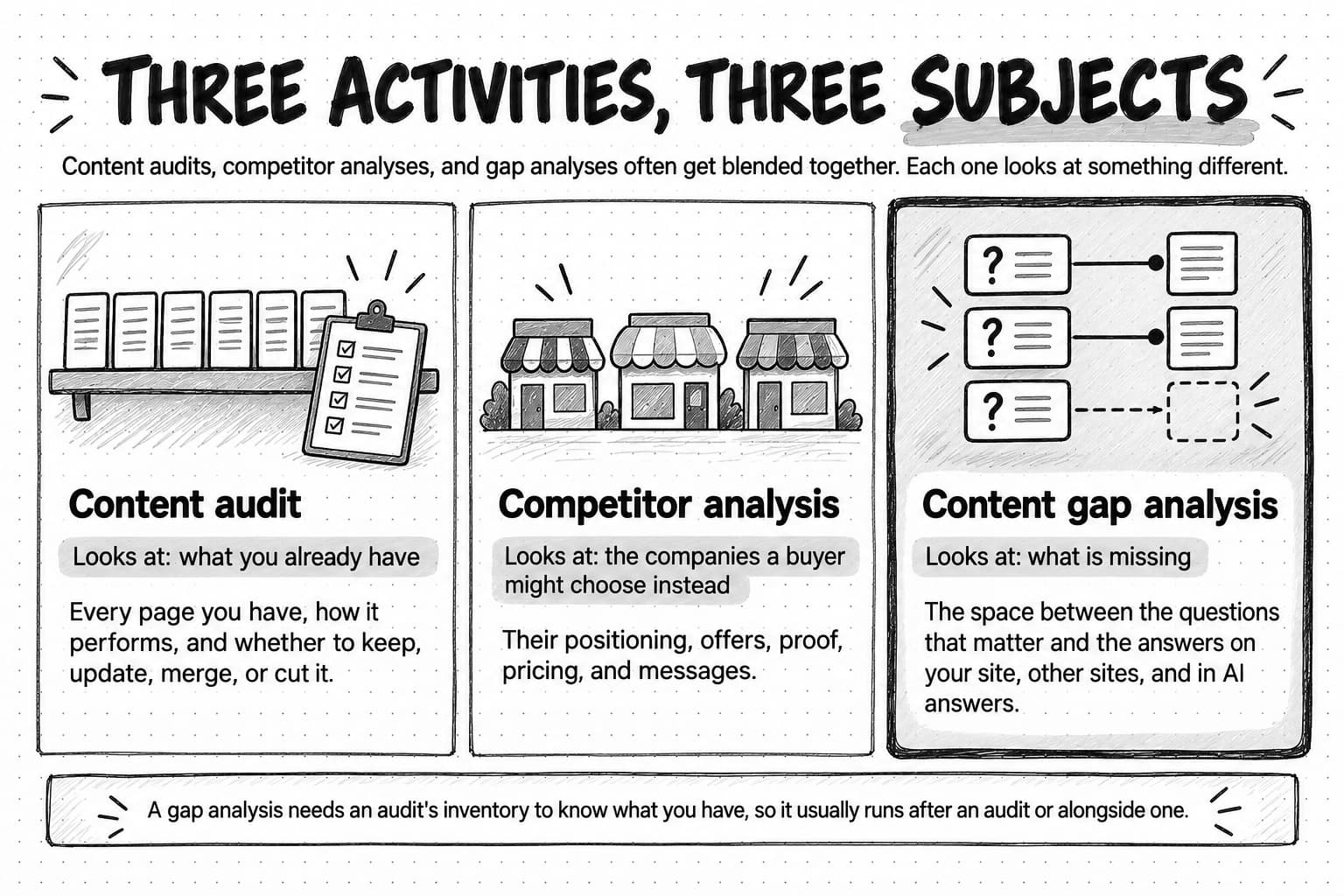
View the three activities at full size (opens in a new tab).
| Activity | Main question | What it compares | Typical output |
|---|---|---|---|
| Content audit | What should we do with the content we already have? | Each existing page against performance data and a quality rubric | Keep, update, merge, or cut decision for every page |
| Competitor analysis | How do buyers' alternatives position and prove themselves? | Competing offers against criteria that affect the buying decision | Positioning and messaging decisions, validation work |
| Content gap analysis | Which important questions do we fail to answer? | The audience's question set against your answers and other sources' answers | Ranked list of gaps with evidence and a fill decision |
| Technical SEO audit | Can search engines and AI crawlers find and read our pages? | The site's crawling, indexing, and page setup against search engine requirements | Fixes for crawling, indexing, and page experience |
The last row matters because a page can look like a content gap when the content exists but search engines cannot reach it. Before writing a new page for a query you think you already cover, check that the existing page is indexed. Our guide to running an SEO audit for search and AI crawlers covers that check.
Step 1: Define the audience and the questions that matter
The method below runs in seven steps. The first two set up the comparison, the next three gather evidence of gaps, the sixth organizes it, and the seventh turns it into decisions. Most of the value comes from the two ends: a question list built from real buyer evidence, and a decision step that drops gaps you cannot fill well.
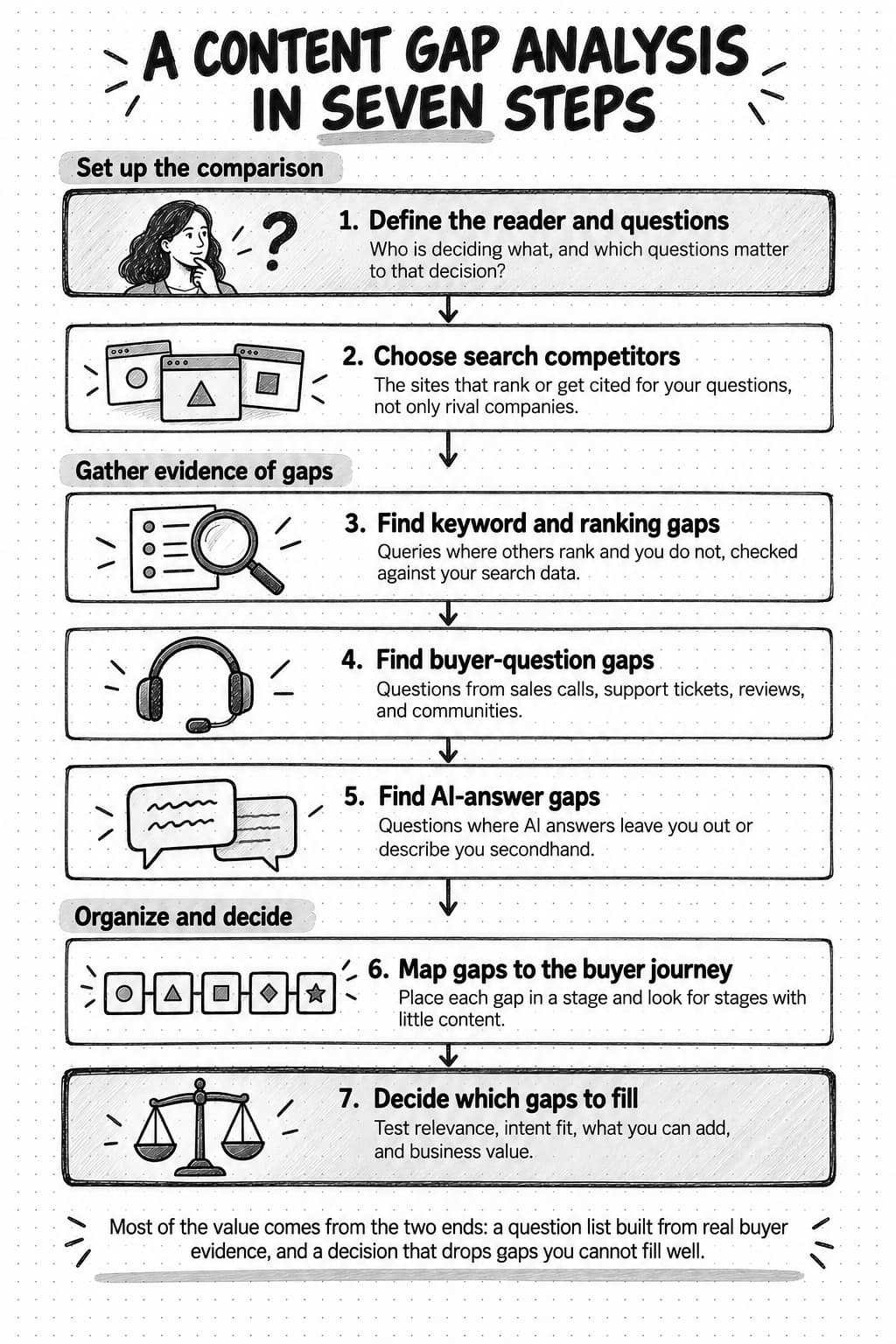
View the seven-step method at full size (opens in a new tab).
A gap analysis is only as good as its question list. Before opening any tool, write down who the content is for and what decision they are trying to make. "Marketing managers" is too broad to test. "Operations leads at small home-service companies deciding whether to replace paper job sheets with software" tells you which questions belong on the list and which do not.
Then build the question set from evidence you already hold, and label each question with where it came from. Useful sources include:
- Sales call notes and recordings, especially the questions asked before a demo and the objections raised after it.
- Support tickets and onboarding emails, which show what customers needed to know and could not find.
- Reviews of your product and competitors' products, which show what buyers praise, regret, and compare.
- On-site search terms, if your site has search, which show what visitors looked for and did not find.
- Queries from your search performance data that already bring impressions to your site.
- Community threads, forums, and social posts where your audience asks peers for advice.
- Questions you put to AI assistants about your category, which show the sub-topics their answers cover.
Our guide to voice-of-customer research explains how to keep each excerpt linked to its original context, which matters here as well. A question recorded as "heard on three sales calls this quarter" carries different weight from one recorded as "the team thinks buyers wonder about this."
Keep the first question set small enough to check by hand: for most lean teams, 40 to 80 questions is plenty. Group near-duplicates under one underlying need. "How much does field service software cost," "field service software pricing," and "is field service software worth it for a three-person company" are three phrasings of a pricing need, and they may be best answered on one page.
Step 2: Choose your search competitors, not only your business competitors
The companies you compete with for deals are not always the sites you compete with for answers. A search competitor is any site that ranks or gets cited for the questions on your list. For a small software company, that set often includes direct competitors, but also industry publications, large software vendors with broad resource libraries, review and comparison sites, community forums, and individual experts with well-known blogs.
To find them, run a sample of your questions through search and through two or three AI assistants, and note which domains appear repeatedly. A domain that shows up for a quarter or more of your sampled questions is a search competitor for this analysis, even if it sells nothing. A business competitor that never appears is less useful for the gap analysis, though it still matters for positioning.
Sort the domains you find into groups, because each group teaches something different:
- Direct competitors show which questions buyers in your category expect answered, and how a similar company chose to answer them.
- Publishers and resource libraries show what a thorough, general answer looks like. They are hard to outrank on broad questions and easier to beat on specific ones that need product or operational knowledge.
- Review and comparison sites show which comparisons buyers make and which criteria they use.
- Communities and forums show unanswered or badly answered questions, often in the buyer's own words.
Choose three to five search competitors for the detailed comparison: usually one or two direct competitors, one strong publisher, and one community or review source. More than five multiplies the data without adding many new questions.
Step 3: Find keyword and ranking gaps
Keyword and ranking gaps are the easiest kind to find with software, and they are useful when you treat each one as evidence to weigh, with the final say left to the decision step.
Most SEO suites include a keyword gap or content gap report that compares the ranking keywords of several domains and lists the queries where competitors rank and you do not. The exact method varies by vendor, and the volumes and difficulty scores are each vendor's estimates from its own data. Use those numbers to compare queries against one another, not as counts of real searches.
Your own search data is the other half. Google Search Console's Performance report shows clicks, impressions, click-through rate, and average position, grouped by query, page, country, device, and search appearance. Two patterns in it point to gaps:
- Queries with impressions but a poor average position. Your site is relevant enough to be shown, but no page answers the query well. These are often the fastest gaps to close, sometimes with an update to an existing page rather than a new one.
- Queries that bring impressions to the wrong page. A pricing question that brings searchers to a general feature page suggests the site needs a page that answers the pricing question directly.
Google's AI features documentation says sites that appear in AI Overviews and AI Mode are included in overall search traffic in Search Console and reported in the Performance report under the "Web" search type. As of October 2026, that documentation does not describe a separate filter for AI features, so the report tells you that a query brought impressions, not whether they came from an AI answer.
For each keyword gap you keep, write down the query, the competitor pages that rank, and one sentence on what those pages actually answer. That sentence is what turns a keyword into a question. Our guide to keyword research when AI answers come first explains how to judge a query's demand and intent in more depth.
Step 4: Find buyer-question gaps in sales, support, and reviews
Buyer-question gaps take more effort to collect and usually repay it. They come from people who were close enough to a purchase to ask, which makes them more reliable evidence of what matters than a keyword with search volume.
Start with the people who hear the questions. Ask two or three people in sales and customer success for the ten questions they answer most often and the five they wish the website answered. Then check those answers against recordings, tickets, or emails, so the list reflects what buyers asked and not only what the team remembers. A question someone actually asked carries more weight than one recalled from memory, and both carry more weight than one the team assumes buyers have.
Reviews are a second source. Read reviews of your product and of two or three competitors on the sites your buyers use, and note every question a reviewer says they had to answer for themselves: whether the product worked with a specific tool, how long setup took, what changed after the first month, why they switched. A pattern of reviewers saying "I wish I had known" points to a gap in everyone's content, including yours.
Communities are a third. Search the forums and groups your audience uses for your category's problems and note the questions that get long, argumentative, or unsatisfied replies. Those are questions where no good answer exists yet, which gives you a chance to publish the first good answer.
For each buyer question, check your own site. Search it the way a buyer would, and decide whether the answer is missing, hard to find, out of date, or too thin to settle the question. Our guide to the B2B buyer journey includes an exercise for mapping one buying situation and marking the gaps, which is a useful way to run this step with a colleague from sales.
Step 5: Find AI-answer gaps
AI answers change what a gap costs. When a searcher reads an answer instead of a list of links, a page that ranks but is not cited may never be seen, and a question your site never answers may still be answered about you, using someone else's description.
The click behaviour is measurable. In a 2025 study by Pew Research Center, which tracked the browsing of 900 U.S. adults during March 2025, 18% of the Google searches studied produced an AI summary. Users who saw one clicked a traditional search result in 8% of visits, compared with 15% of visits without a summary, and clicked a link inside the summary itself in 1% of visits. The study covered Google only and one month of browsing, so treat it as a dated measurement of one setting rather than a rule for every audience. It still explains why being cited, and described accurately, matters alongside ranking.
To find AI-answer gaps, take 15 to 30 questions from your list, favouring non-branded category, problem, and comparison questions, and ask them in the AI features and assistants your buyers use: Google's AI Overviews and AI Mode, and assistants such as ChatGPT, Gemini, Perplexity, and Microsoft Copilot. For each answer, record three things: whether your brand appears, which sources are cited, and whether what the answer says about you is accurate.
Each answer then falls into one of four outcomes:
- Absent. The answer does not mention you. If it cites competitors or publishers, read those pages to see what they answer that you do not.
- Cited through a third party. The answer mentions you, but the cited source is a review site, a directory, or a competitor's comparison page. Your site may lack a page that answers the question directly, and the description you get is someone else's.
- Cited from your site, but inaccurate or out of date. The answer cites your page and gets something wrong, often because the page is old or ambiguous. This is an update gap, not a new-page gap.
- Cited from your site, accurately. No gap for this question. Keep the page current.
Answers vary from run to run, by person, and by date, so a single check is a sample. Our guide to measuring AI search visibility explains how to design the question set, repeat checks, and separate branded from non-branded results, and it is the right tool if you want a baseline to track over time. For a gap analysis, a single careful pass is usually enough to find the questions where the brand is absent or described secondhand. To understand why an answer cites one page over another, see our guide to how AI search engines choose sources to cite.
Some platforms now report on AI citations directly. In February 2026, Microsoft introduced an AI Performance report in Bing Webmaster Tools as a public preview. It shows how often a site's pages are cited as sources in Microsoft Copilot, AI-generated summaries in Bing, and select partner integrations, which pages are cited, and a sample of the "grounding queries" the AI used to retrieve cited content. Microsoft notes that citation counts do not indicate ranking, authority, or a page's role in an answer. Grounding queries that bring citations to an unexpected page can show where a dedicated page would answer the question better.
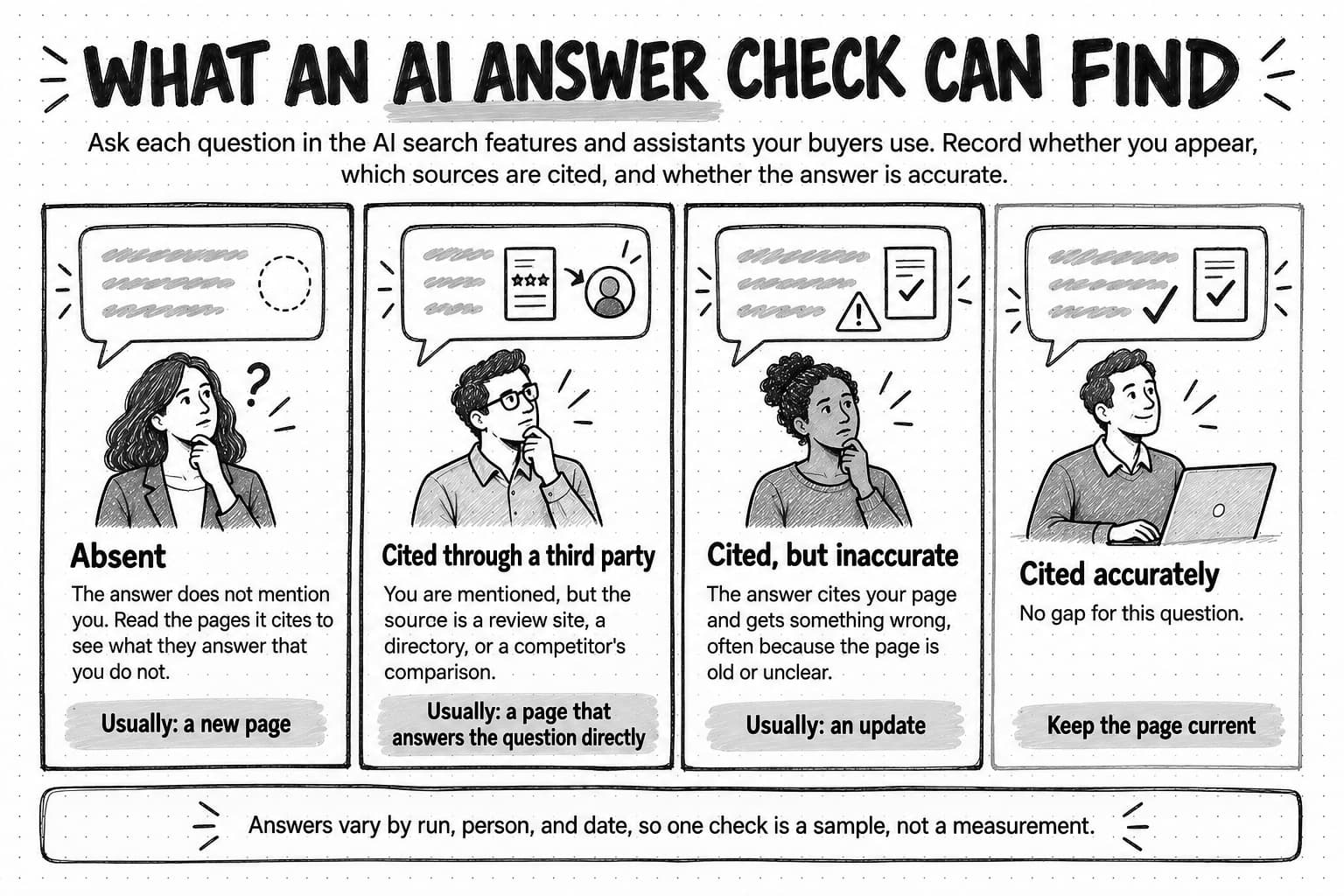
View the four AI-answer outcomes at full size (opens in a new tab).
Step 6: Map the gaps to the buyer journey
By this point you have a list of candidate gaps from several sources. Mapping them to the stages of the buying decision does two jobs: it shows funnel-stage gaps that no single source revealed, and it shows which gaps sit next to a purchase.
Use stages your team already recognizes. A simple version for a software company has five:
| Stage | Buyer's question | Content that usually answers it |
|---|---|---|
| Problem | Is this problem worth solving now, and what is it costing us? | Explainers, cost-of-the-problem pages, original data |
| Approach | What are the ways to solve it, and which fits a company like ours? | Method guides, approach comparisons, checklists |
| Evaluation | Which product fits our requirements, and how do the options compare? | Comparison pages, feature pages, integration pages, case material |
| Decision | Can we justify the cost, and what does setup involve? | Pricing explanations, business-case templates, implementation guides |
| Use | How do we get value quickly and solve problems as they come up? | Help content, onboarding guides, advanced use guides |
Place each candidate gap in a stage, then look at the distribution. Many content programs are heavy at the problem stage, because educational topics have the most search volume, and thin at evaluation and decision, where the questions are specific and the search volumes small. Those late-stage questions are often the ones sales hears most, and an empty evaluation or decision row is a funnel-stage gap in its own right.
The stage also tells you what kind of page each gap needs. A problem-stage gap usually wants an explanation. An evaluation-stage gap usually wants a comparison with honest criteria, and a decision-stage gap wants specifics: prices, timelines, requirements. Matching the page type to what the searcher is trying to do is the core of search intent, and getting it wrong is a common reason a page written to fill a gap never ranks.
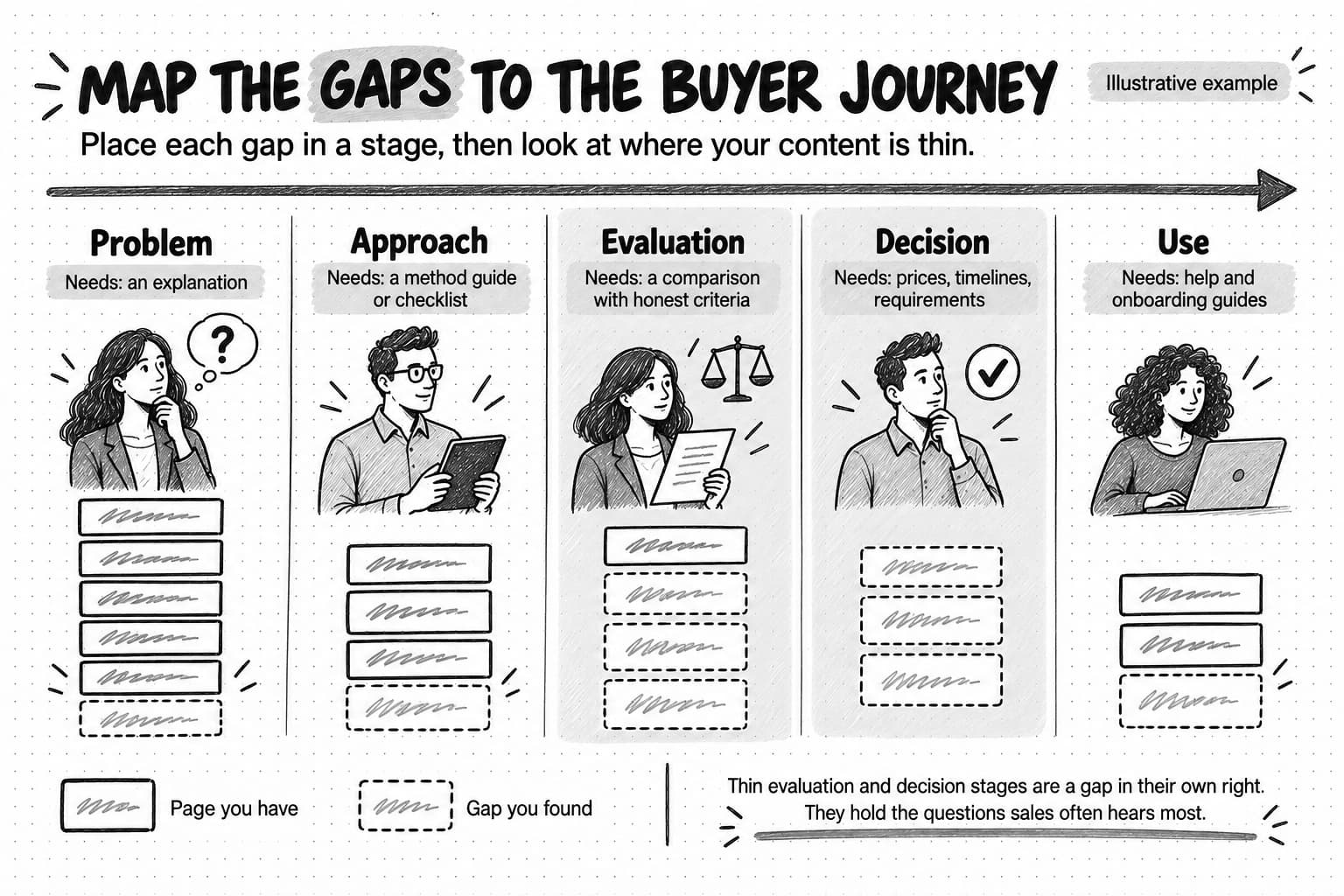
View the buyer journey gap map at full size (opens in a new tab).
Step 7: Decide which gaps to fill
A finished gap list is usually longer than a small team can write in a year. Deciding which gaps to fill is the step that makes the analysis useful, and it works best with explicit tests applied to every candidate.
Four tests cover most decisions:
- Relevance. Does this question come from the audience you defined in step 1, and does answering it connect to what you sell or know? A gap that brings the wrong readers costs writing time and dilutes what the site is about.
- Intent. Can you build the kind of page the searcher wants? If the results for a query are all product comparison tables and you would write an essay, the gap is real but your answer to it would not fit.
- Ability to add something better. Can you answer the question more usefully than the pages that answer it now, with first-hand experience, product knowledge, original data, clearer method, or a more specific scope? If the honest answer is no, filling the gap produces a copy.
- Business value. If a reader got a great answer, would it move them closer to a purchase, reduce a support load, or help sales? Weight evidence from real buyers above estimated search volume here.
Rate each gap strong, mixed, or weak on each test, and write a one-line reason beside every rating. Numbers can make the ranking look more precise than the judgment behind it. A gap that is strong on relevance and ability to add something better, and at least mixed on the other two, is usually worth filling. A gap that is weak on relevance or on ability to add something better should usually be dropped, however large its search volume. The content strategy guide's section on prioritizing opportunities with explicit judgment uses the same principle for a whole content portfolio.
Then choose the fill type for each gap you keep. Not every gap needs a new page:
- New page when no existing page answers the question and the question needs its own answer.
- Update when an existing page is close but thin, out of date, or inaccurate in AI answers.
- Merge when two or three of your pages each half-answer the same question.
- Internal link or navigation fix when the answer exists but buyers cannot find it.
- Answer elsewhere when the question is better answered in help content, a sales asset, or a community reply than on the marketing site.
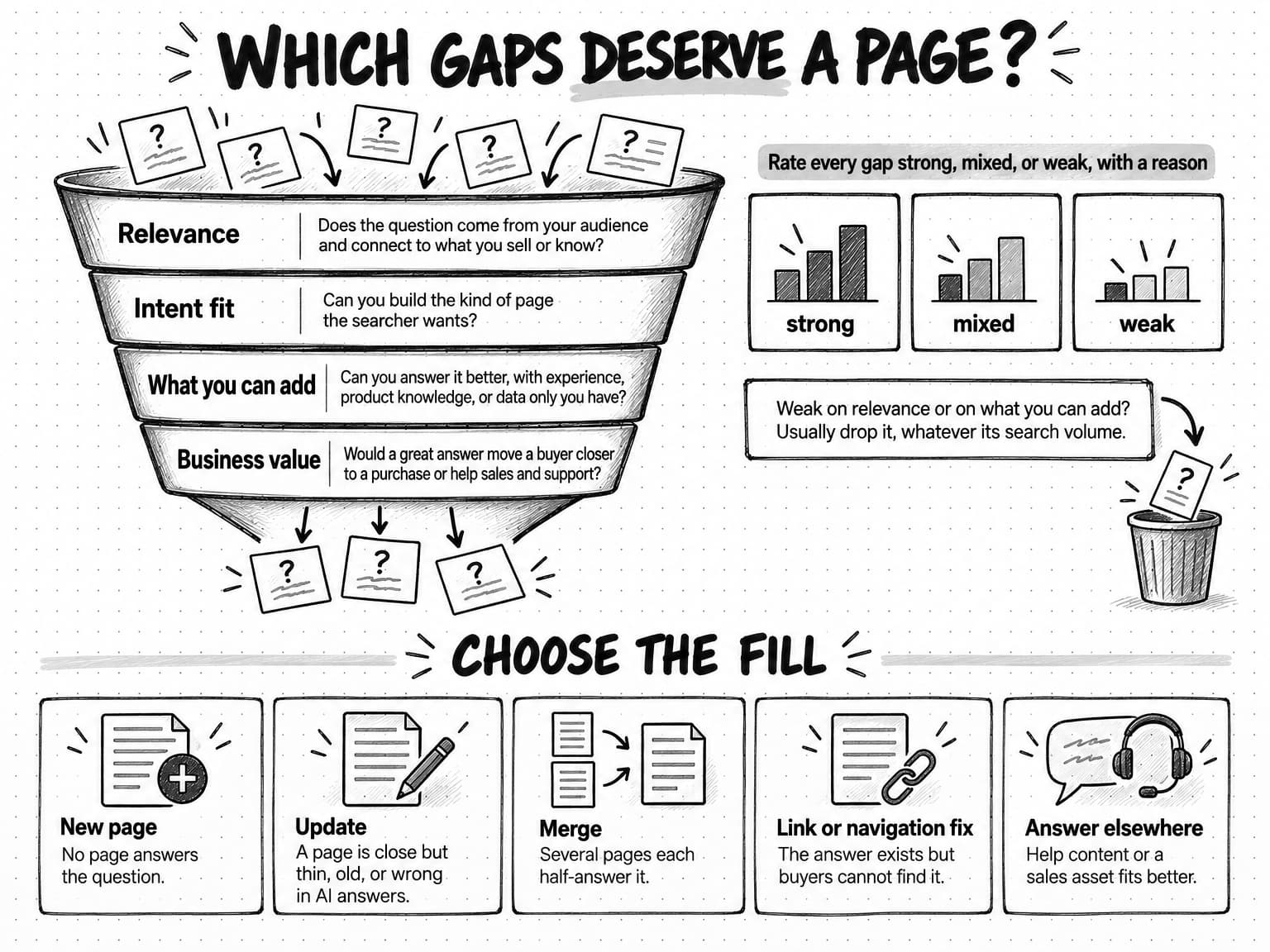
View the gap decision tests and fill types at full size (opens in a new tab).
How to fill a gap without copying competitors
The method above starts by looking at what competitors and AI answers cover, which creates an obvious risk. The easiest way to fill a gap is to read the three pages that rank, combine their headings, and publish the result. That page adds nothing a reader could not already find, and search engines say they look for the opposite.
Google's guidance on creating helpful, reliable, people-first content (last updated October 5, 2026) gives site owners questions to assess their own pages. Two are directly relevant: "Does the content provide original information, reporting, research, or analysis?" and "Does the content provide substantial value when compared to other pages in search results?" Among its warning signs of content made for search engines first, it asks: "Are you mainly summarizing what others have to say without adding much value?" These are self-assessment questions, not a published ranking formula, but they describe what a gap page has to do.
Google's spam policies (last updated August 28, 2026) go further for content produced at volume. They define scaled content abuse as many pages generated "for the primary purpose of manipulating search rankings and not helping users," and list among the examples "stitching or combining content from different web pages without adding value" and using generative AI tools "to generate many pages without adding value for users." A gap program that turns every competitor heading into a page risks exactly that pattern.
In a May 2025 post on succeeding in Google's AI search experiences, John Mueller of Google Search Relations advised site owners to "focus on making unique, non-commodity content," noting that in AI search "users are asking longer and more specific questions — as well as follow-up questions to dig even deeper." Longer, more specific questions are good news for a company with real knowledge, because specific questions are where general pages run out.
In practice, use competitors' pages to understand the question, and use your own sources to answer it:
- Read competitor pages for what they leave out. Note the follow-up questions a reader would still have after each one. Those unanswered follow-ups are usually where your page can be better.
- Bring evidence only you have. Product knowledge, implementation experience, support data, customer interviews, and original research are things a competitor cannot copy. Our guide to original research content explains how a small team can create data worth citing.
- Narrow the scope. A page for one kind of buyer in one situation can answer more usefully than a general page for everyone.
- Write the brief before the draft. A brief that states the reader, the question, the evidence, and what the page will add beyond existing answers keeps the writer from rebuilding a competitor's outline. Our guide to writing a content brief shows how.
- Connect related pages. When several gaps sit under one subject, a set of linked pages that answer the subject's main questions shows readers and search engines the depth of your coverage. Our guide to topical authority explains how topic clusters and pillar pages do this.
Copyable content gap analysis template
The sheet below holds a whole gap analysis in one table. Copy it into a spreadsheet, add one row per underlying question, and fill the columns from left to right as you work through the steps. The first group of columns records the evidence, the middle group records the decision tests, and the last group records the action.
| Column | What to record | Example entry |
|---|---|---|
| Question | The underlying need, in the buyer's words where possible | "How do I move my job history out of spreadsheets?" |
| Reader | Who asks it and what they are deciding | Owner of a small contractor deciding whether to switch tools |
| Evidence source | Where the question came from, with a count or date | Sales calls (4 this quarter), support tickets (2) |
| Gap kind | Keyword, buyer-question, funnel-stage, AI-answer, or several | Buyer-question, AI-answer |
| Journey stage | Problem, approach, evaluation, decision, or use | Decision |
| Our current answer | The URL that answers it now, or "none" | None; a sentence on the pricing page |
| Who answers it now | Competitor, publisher, or community pages that rank or are cited | Two competitor help articles, one forum thread |
| AI-answer outcome | Absent, cited through a third party, cited but inaccurate, or cited accurately | Absent; answers cite a competitor guide |
| Relevance | Strong, mixed, or weak, with a reason | Strong: asked by buyers close to purchase |
| Intent fit | Strong, mixed, or weak, with a reason | Strong: results are step-by-step guides |
| What we can add | The evidence or angle only we have | Our import tool and real migration timelines from support |
| Business value | Strong, mixed, or weak, with a reason | Strong: migration worry stalls deals |
| Decision | Fill, update, merge, link, answer elsewhere, or drop | Fill: new guide |
| Owner and date | Who will brief it and by when | Content lead, next sprint |
Keep a second tab for the question log from step 1, with one row per raw question and a column linking it to the underlying question on the main sheet. That way the main sheet stays short while the evidence behind each row stays traceable.
| Before you start | A content inventory, a defined reader and decision, and 40 to 80 questions with source labels |
|---|---|
| While you work | Record evidence before opinions, keep near-duplicate phrasings under one row, and note who answers each question now |
| Before you decide | Rate every row on relevance, intent fit, what you can add, and business value, with a reason for each rating |
| After you decide | Brief each chosen gap with its evidence and the specific way the page will add something new |
Worked example: a fictional company's first content gap analysis
This example is fictional. Quillmoor is an invented company, and every number, competitor, and finding below is illustrative, chosen to show how the method works rather than to describe a real market.
Quillmoor sells job scheduling and invoicing software to small heating, ventilation, and plumbing contractors with two to fifteen technicians. Its two-person marketing team publishes about four articles a month, mostly general advice for contractors, and organic search brings steady traffic but few demo requests. Sales says prospects arrive with the same worries every week. The team decides to run a gap analysis before planning the next quarter.
Step 1: the reader and the questions. The team defines the reader as the owner or office manager of a contractor with two to fifteen technicians, deciding whether to replace paper job sheets and a spreadsheet with software. From two weeks of sales call notes, 60 support tickets, reviews of Quillmoor and two competitors, and a pass through two contractor forums, it collects 112 raw questions. Grouping near-duplicates leaves 46 underlying questions.
Step 2: search competitors. Running 20 of those questions through search and three AI assistants, the team finds that the domains appearing most often are not its two main business competitors. They are a large accounting software vendor's resource library, a trade publication for contractors, one direct competitor's help center, and a busy contractor forum. The team picks those four plus its strongest direct competitor as the comparison set.
Steps 3 to 5: the gaps. The keyword gap report from the team's SEO tool lists more than 300 queries where the comparison set ranks and Quillmoor does not. Most are general business topics, such as hiring and tax deadlines, that the team marks weak on relevance. About 30 relate to the reader's decision. Search Console shows Quillmoor's pricing page getting impressions for migration and setup questions it barely mentions. Sales and support questions add nine questions that appear in no keyword report, including "Can I keep my old job history if I switch?" and "What happens if a technician has no signal on site?" The AI-answer check across 20 non-branded questions finds Quillmoor absent from 15 answers and mentioned through a review site in 3.
Step 6: the journey map. Placing the 46 underlying questions on the five stages shows the pattern clearly. Quillmoor's site has 41 pages at the problem stage, 6 at approach, 2 at evaluation, 1 at decision, and a separate help center for use. Most of the nine buyer-question gaps sit at evaluation and decision, the two stages with almost no content.
Step 7: the decision. The team rates its shortlist of 14 gaps on the four tests. Five illustrative rows from the sheet show how the ratings turn into decisions:
| Gap (illustrative) | Evidence | Relevance | Intent fit | What Quillmoor can add | Business value | Decision |
|---|---|---|---|---|---|---|
| Moving job history out of spreadsheets | Sales calls, support tickets, AI answers cite a competitor | Strong | Strong | Its import process and migration timelines from support | Strong | New guide |
| Scheduling software that works without phone signal | Sales calls, forum threads, absent from AI answers | Strong | Mixed | How offline mode behaves, from product and support | Strong | New page |
| How to price a service call | Keyword gap, trade publication ranks | Mixed | Strong | Little beyond what the publication already says | Weak | Drop |
| Pricing for software at their size | Search Console impressions to the pricing page | Strong | Strong | Clear plan comparison by team size | Strong | Update pricing page |
| Software versus a spreadsheet for a three-person team | AI answers cite a review site; reviews mention it | Strong | Strong | Honest criteria for when a spreadsheet is enough | Mixed | New comparison guide |
The service-call pricing gap has the largest estimated search volume on the list, and the team drops it. The trade publication already answers it well, and Quillmoor has nothing to add beyond a summary. The two migration and offline gaps have small or unmeasurable search volume and the strongest buyer evidence, so they go first. The pricing-page update is a quick fix because the page already gets impressions.
What happens next. The content lead writes a brief for the migration guide that names the reader, lists the five migration questions from sales, and specifies the evidence: the import steps, the support team's typical timelines, and the two most common problems customers hit. The brief notes that the competitor guide AI answers currently cite covers only exporting data, not what happens to job history, which is the question sales hears most. After the guide is published, the team plans to repeat the AI-answer check for the migration questions in six to eight weeks and to ask sales whether the questions come up less often on calls.
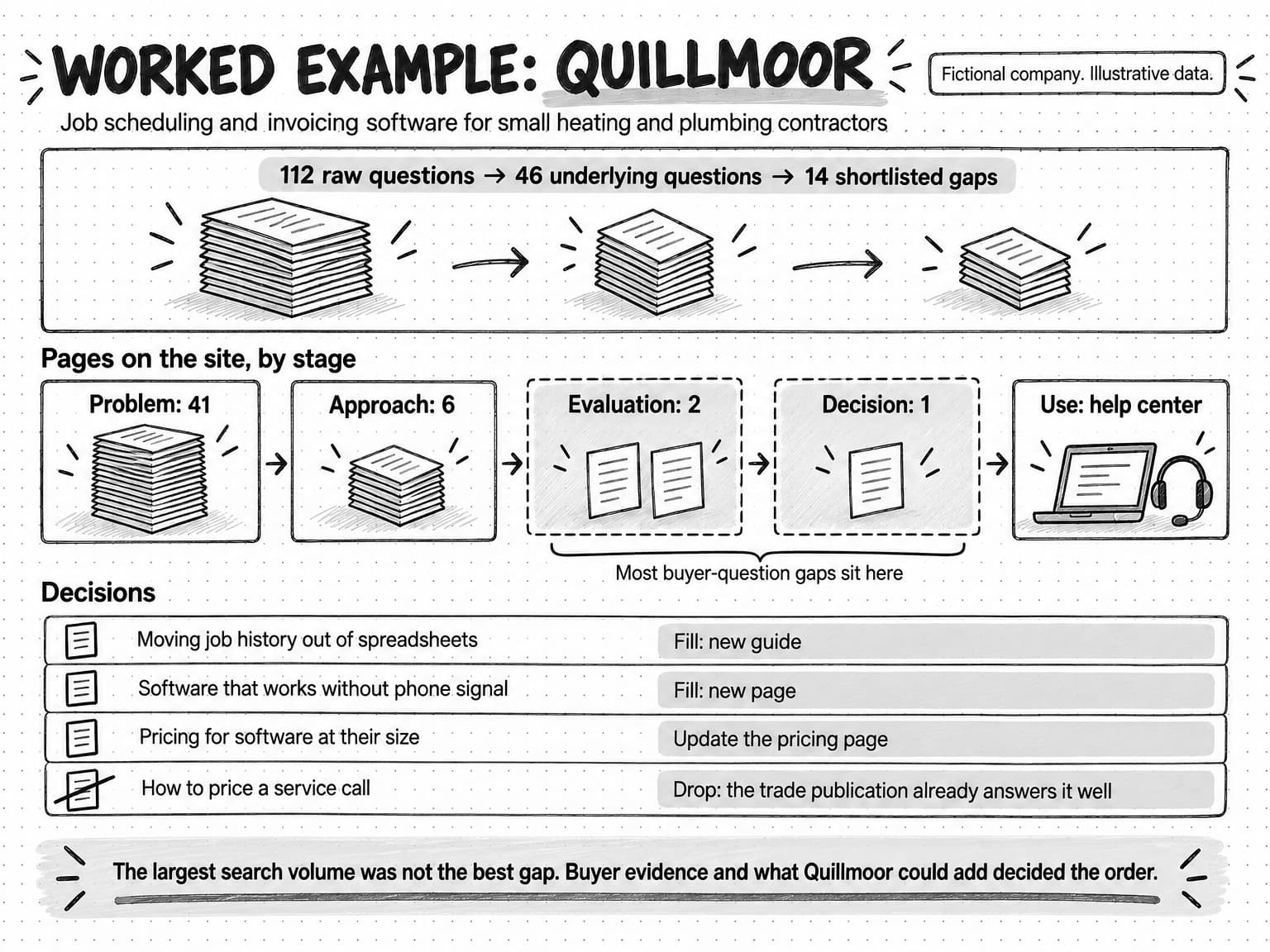
View the Quillmoor worked example at full size (opens in a new tab).
Common content gap analysis mistakes
Most gap analyses that disappoint fail in one of a few predictable ways.
Treating the keyword gap report as the analysis. A keyword gap report lists queries, not decisions. Teams that write a page for every query on it produce a large volume of loosely related content, much of it outside their expertise. Use the report as one evidence source among four.
Choosing competitors by revenue rather than by answers. The company you lose deals to may rank for little. Comparing yourself only with business competitors misses the publishers, review sites, and communities that actually answer your buyers' questions.
Ignoring what the site already has. Without an inventory, teams write new pages for questions an old page answers, and end up with two weaker pages competing for the same query. Check the inventory before every new-page decision, and prefer an update or a merge when a page is close.
Filling every gap with a new page. Many gaps are better closed by an update, a clearer internal link, or an answer in help content. A new page is the most expensive fix and should be the one you choose when the others will not work.
Copying the shape of the ranking pages. Matching a competitor's headings is how a gap page ends up adding nothing. Use competitor pages to learn the question, then answer it from evidence you have.
Treating one AI-answer check as a measurement. AI answers vary between runs, people, and dates. A single pass shows where to look; tracking change over time needs a repeated question set, as our AI search visibility guide describes.
Never closing the loop. A gap analysis that does not record what happened after each page was published cannot improve. Note, for each filled gap, whether the page now ranks or gets cited, and whether sales or support hears the question less often.
How often to run a content gap analysis
For most lean teams, a full gap analysis once or twice a year is enough, with a lighter quarterly check. The full analysis rebuilds the question set, refreshes the search competitor list, and reruns the AI-answer pass. The quarterly check adds new questions from sales and support, rechecks the gaps you filled, and looks at Search Console for queries that have started bringing impressions to the wrong pages.
Some events justify running the analysis sooner. A product launch or a move into a new audience brings questions your site has never had to answer. A new competitor, or a publisher that starts ranking for your core questions, changes who answers them now. A noticeable change in how AI answers describe your category, or a run of sales calls about a question nobody expected, is a signal that the question set is out of date.
Content gap analysis and content audits work well on the same calendar. The audit decides what to do with existing pages, and the gap analysis decides what to add. Running them together means each new page is planned with full knowledge of the pages around it.
Content gap analysis with Ampere
Ampere, the AI marketing agent, can do much of the research a content gap analysis needs, while the decisions stay with your team.
For the evidence-gathering steps, Ampere can identify competitors and AI-search visibility gaps, search the web, extract page content, crawl websites, and map a site's structure. It can pull public review, social, and company data for market research and content planning, which covers much of the buyer-question research in step 4. It can save evidence-backed reports, including content inventory and search landscape reports, so later work starts from the inventory of what you have and the picture of who answers your buyers' questions.
For the comparison and decision steps, Ampere can build evidence-backed competitive analysis for content planning and run SEO audits. When you have chosen the gaps worth filling, it can draft source-grounded blog article packages for them. The session workspace shows the browser, files, and sources behind the work, so you can check where each finding came from.
The gap decisions, the angle each page takes, and the evidence only your company has stay with the people who know the buyers. For recurring research, such as a quarterly check on who answers your core questions, you can set up a scheduled task and review the results when they arrive. AI output can be inaccurate or incomplete, and public data never covers everything, so review the findings before acting on them. Ampere drafts and prepares; your team decides what to publish.
Sources and further reading
- Google Search Central, AI features and your website, last updated December 10, 2025. How AI Overviews and AI Mode use query fan-out, eligibility to appear as a supporting link, and how AI feature traffic is reported in Search Console.
- Google Search Central, Creating helpful, reliable, people-first content, last updated October 5, 2026. Self-assessment questions on original information and value compared with other pages.
- Google Search Central, Spam policies for Google web search, last updated August 28, 2026. The definition and examples of scaled content abuse.
- John Mueller, Top ways to ensure your content performs well in Google's AI experiences on Search, Google Search Central Blog, May 21, 2025. Unique, non-commodity content and longer, more specific questions in AI search.
- Google Search Console Help, Performance report (Search results). Metrics and dimensions available for finding query and page gaps.
- Athena Chapekis and Anna Lieb, Google users are less likely to click on links when an AI summary appears in the results, Pew Research Center, July 22, 2025. Browsing data from 900 U.S. adults in March 2025.
- Microsoft Bing, Introducing AI Performance in Bing Webmaster Tools public preview, Bing Webmaster Blog, February 10, 2026. Citation counts, cited pages, and grounding queries for Copilot and Bing AI summaries.
- Anna Kaley, Content Inventory and Auditing 101, Nielsen Norman Group, September 27, 2020. The difference between a content inventory and a content audit, and using audits to find gaps new content could fill.
Frequently Asked Questions
How do you do a content gap analysis?
You do a content gap analysis in seven steps: define the reader and the questions that matter, choose the sites that rank or get cited for those questions, find keyword and ranking gaps, find buyer-question gaps in sales calls, support tickets, and reviews, find AI-answer gaps, map every gap to a stage of the buyer journey, and decide which gaps to fill. The last step matters most, because a gap list is usually longer than a team can write.
What is a content gap in SEO?
A content gap in SEO is a question your audience searches for that your site does not answer well enough to rank, be chosen, or be cited, while other sites do. The site may have no page for it, a page nobody can find, or a page too thin to compete. A gap is worth filling only when the question matters to your buyers and you can answer it better than the pages that already rank.
What is an example of a content gap analysis?
An example of a content gap analysis is a small software company comparing 46 buyer questions, collected from sales calls, support tickets, reviews, and forums, with the pages on its own site. In this guide's fictional worked example, the company found almost no content at the evaluation and decision stages, filled two migration and offline-use gaps backed by sales evidence, and dropped the gap with the largest search volume because it had nothing new to add.
What tools are used for content gap analysis?
Content gap analysis usually combines a few kinds of tools: an SEO suite's keyword gap report to compare ranking queries across domains, your own search performance data such as Google Search Console, the AI search features and assistants your buyers use, and a spreadsheet to hold the questions, evidence, and decisions. Sales call notes, support tickets, and review sites supply the buyer questions that no keyword tool shows. The spreadsheet and the judgment matter more than any single tool.
Can ChatGPT do a content gap analysis?
ChatGPT and other AI assistants can help with parts of a content gap analysis, such as suggesting questions, summarizing competitor pages, and grouping a long question list into themes. They cannot see your sales calls, support tickets, or analytics unless you supply them, and their answers can be inaccurate or incomplete. Use them to speed up research, then check findings against the original sources and keep the decisions about which gaps to fill with your team.
What is the difference between a keyword gap analysis and a content gap analysis?
A keyword gap analysis compares the search queries your site ranks for with those competitors rank for and lists the queries where they rank and you do not. A content gap analysis is broader. It treats keyword gaps as one kind of evidence, alongside questions from buyers, thin stages of the buyer journey, and AI answers that leave you out, and it ends with a decision about which gaps deserve content.
What are the benefits of a content gap analysis?
The main benefit of a content gap analysis is that it ties the content plan to evidence: each new page answers a question someone is known to ask, at a stage where the site is thin, with something the company can add. It also shows where AI answers describe the brand secondhand, finds gaps an update can close cheaply, and gives the team a documented reason for dropping topics with high search volume but little relevance.
What should a content gap analysis template include?
A content gap analysis template should include, for each underlying question, the reader and their decision, the evidence source, the kind of gap, the buyer journey stage, your current answer, who answers it now, and the AI-answer outcome. It then needs ratings for relevance, intent fit, what you can add, and business value, each with a reason, followed by the decision, an owner, and a date. This guide includes a copyable version.