What is search intent? How to match it in search results and AI answers
The four classic intent types with B2B examples, the extra layers that decide which page wins, a method for reading results pages and AI answers as evidence, a copyable worksheet, and eight keywords classified in a worked example.
43 min readWritten by Ampere
Short answer
What is search intent?
Search intent is what a person is trying to accomplish when they search: the goal behind the words of a query. The classic types are informational, navigational, commercial investigation and transactional. Search engines and AI answers favor pages that satisfy that goal, so a page that matches the words but answers a different question usually loses.
Summary
Pages often fail because they answer a different question from the one searchers asked, not because they are weak. Intent belongs to the searcher and has to be inferred from evidence, so decide what page would satisfy each query before anyone writes.
The four classic types, informational, navigational, commercial investigation and transactional, pick the family of page. Four more layers usually decide which page wins: the format the answer should take, the angle top results share, the buying stage, and the job the searcher needs done.
The best evidence of intent is the results page. Note the features above the results, count page types in the top ten, and record format, angle and follow-up questions before concluding. Google's rater guidelines add dominant and minor interpretations and a Needs Met scale for judging results.
AI search prompts state more of the intent: Google reports AI Mode searches average triple the length of traditional queries, and AI Overviews and AI Mode can split a question into related searches. Sections that each answer one specific question clearly are easier to find and cite.
A copyable worksheet separates observations from conclusions and ends in a one-sentence intent statement and a page decision. A worked example classifies eight keywords for one fictional software company, producing five pages to make, two to fix, and one decision to wait. Recheck important queries, because intent shifts.
Contents
- What search intent means
- The four classic types of search intent, with B2B examples
- Where the intent categories come from
- Why four types are not enough: format, angle, stage, and job
- How Google describes intent in its Search Quality Rater Guidelines
- How to read a results page for intent
- Mixed intent and intent that changes over time
- Search intent in AI answers and conversational prompts
- How to match intent: choosing page type, format, and depth
- Search intent across the B2B buyer journey
- Copyable search intent worksheet
- Worked example: eight B2B keywords classified
- Common search intent mistakes
- Search intent research with Ampere
- Sources and further reading
- Frequently Asked Questions
A familiar problem in B2B content goes like this. A team publishes a careful, well-sourced article on a topic its buyers care about. The article is accurate and better written than most of what ranks. Months later it sits on the third page of Google, and when someone asks an AI assistant the same question, the answer cites a competitor's comparison page and two review sites instead. The team assumes the article needs more links, more words, or a better title.
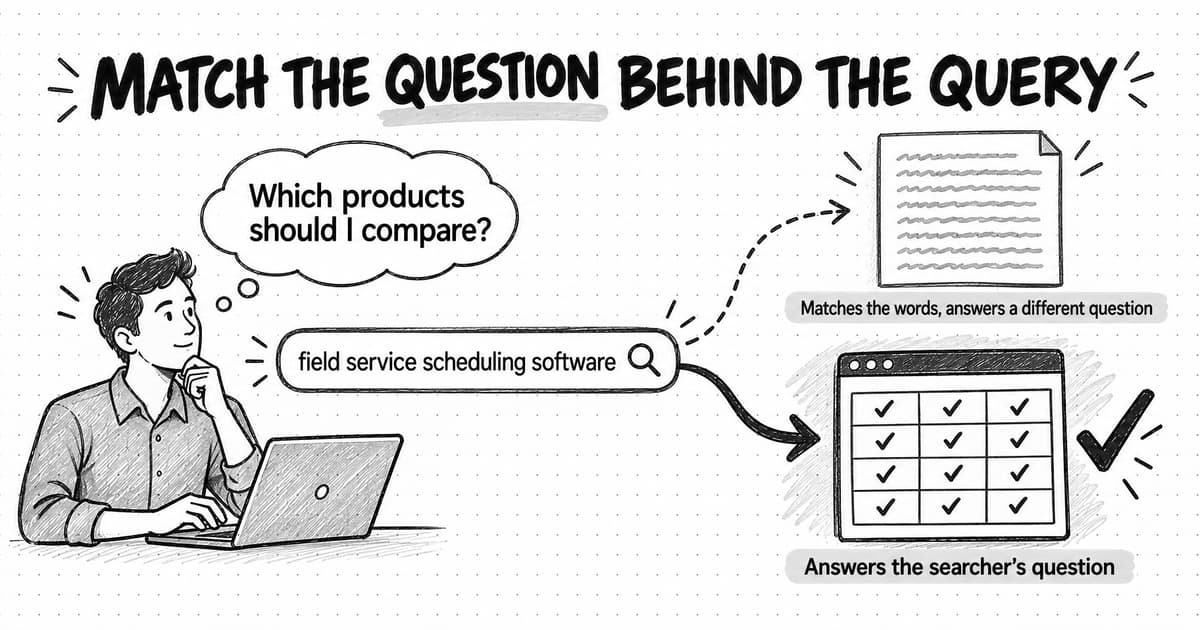
Often the problem is simpler. The article answers a different question from the one the searcher asked. Someone who types "field service scheduling software" is usually trying to build a shortlist of products, so a 3,000-word essay on the history of scheduling, however good, gives them nothing to shortlist. Google and AI answer engines both try to satisfy the person behind the query, and a page that serves a different purpose loses to a weaker page that serves the right one.
Search intent is what a person is trying to accomplish when they search: the goal behind the words they type or say. It is sometimes called user intent or query intent. The words "field service scheduling software" are the query; the intent is something like "show me the products I should consider and help me compare them." Two searches with almost the same words can carry different intents, and two searches with different words can carry the same one.
This guide covers the classic intent types with B2B software examples, the extra layers that usually decide which page wins, how Google describes intent to its human search raters, and how to read results pages and AI answers as evidence. It ends with a copyable worksheet and eight fictional keywords worked through from query to page decision.
What search intent means
Every query is a compressed request. A person has a situation, a goal and some idea of what would help, and they squeeze that into a few words or, increasingly, a few sentences. Search intent is the part of that request the words only hint at: what the person would count as a good result.
Google's own explanation of how Search ranks results starts here. Its How Search Works pages say that to return relevant results, Google first needs to establish what you're looking for, which it calls "the intent behind your query." Google's guidelines for its human search quality raters define user intent as "what the user is trying to accomplish when they search," and add that a single query can have several possible intents, even for one person.
Intent has a few properties worth naming before the types, because they explain most of the mistakes people make with it.
Intent belongs to the searcher, not the keyword. A keyword is a string of characters that many people type for different reasons. When SEO tools label a keyword "informational" or "commercial," they are estimating the most common reason across everyone who types it. That estimate is useful, but it describes a crowd, not a person.
Intent is inferred, never observed directly. Nobody announces their goal when they search. Search engines infer it from the words, the context (location, language, device, time), and how people behave with the results. Andrei Broder, whose 2002 paper introduced the informational, navigational and transactional classes, was blunt about this: in his log analysis he called inferring the user's intent from the query "at best an inexact science, but usually a wild guess." Marketers infer it the same way, from evidence, and should hold their conclusions with the same humility.
Intent decides what counts as a good page. A page can match every word of a query and still fail the person. Google's rater guidelines give the example of the query [is egg salad healthy]: recipes for egg salad match the words, but the person wants health information, so recipes are "not a reasonable minor intent." The guidelines' advice to raters applies to anyone creating content: "Pay attention to what users want and need for a search."
For a marketer, the practical consequence is that keyword research produces a list of requests, and each request needs a decision about what page would satisfy it before anyone writes a word. Our guide to keyword research when AI answers come first covers finding the queries. This guide covers what to do with each one once you have it.
The four classic types of search intent, with B2B examples
Most SEO teams sort queries into four types. The categories are rough, and many queries fit more than one, but they are a useful first pass because each type tends to call for a different kind of page. The examples here and throughout the guide use Fernhill, a fictional company that sells scheduling software to field-service businesses.
Informational intent. The person wants to learn something or understand a topic. Examples for a B2B software company: "what is field service management," "how does route optimization work," "technician utilization rate formula." Informational queries range from a quick fact to a topic someone wants to explore in depth, and they usually call for guides, explainers, definitions, and how-to articles. Many searchers with informational intent are not shopping yet, which is why informational content is easy to over-value as a sales channel and easy to under-value as the first contact a buyer has with your company.
Navigational intent. The person wants to reach a specific website or page they already have in mind. Examples: "fernhill login," "fernhill help center," "fernhill api docs." The right result is the page they are looking for, and the only content decision is making sure that page exists, loads, and is clearly titled. Writing a blog post to rank for a competitor's brand name rarely works, because the searcher wants the competitor's site.
Commercial investigation intent. The person is researching options before a purchase. Examples: "field service scheduling software," "best scheduling software for hvac companies," "field service software vs spreadsheets," "fernhill reviews." These queries call for pages that help someone compare: category pages, comparison pages, alternatives pages, reviews, buyer's guides, and pricing explanations. In B2B, commercial investigation is often where the most valuable search traffic is, and where AI answers now assemble shortlists from comparison pages, review sites and vendor documentation.
Transactional intent. The person wants to do something: buy, sign up, book a demo, download a template, start a trial, or use a tool. Examples: "fernhill pricing," "technician schedule template," "field service software free trial." Transactional queries call for pages built around the action, such as a pricing page, a sign-up page, a template download, or a calculator, with the action easy to take and nothing standing between the person and it.
| Informational | Learn or understand. Usually answered by a guide, definition, explainer, or how-to. Example: what is field service management |
|---|---|
| Navigational | Reach a specific site or page. Answered by that page. Example: fernhill login |
| Commercial investigation | Compare options before buying. Answered by category, comparison, alternatives, and review pages. Example: field service scheduling software |
| Transactional | Take an action now. Answered by a pricing, sign-up, trial, download, or tool page. Example: technician schedule template |
Some SEO writers add a fifth category, local intent ("near me" searches and other queries where location matters), which Google's raters treat as its own type. For most B2B software companies local intent matters less, though it is central for any business with physical locations.
The four types are a starting point. They tell you roughly which family of page to make. They do not tell you which page in that family will win, and that is where most of the work lies.
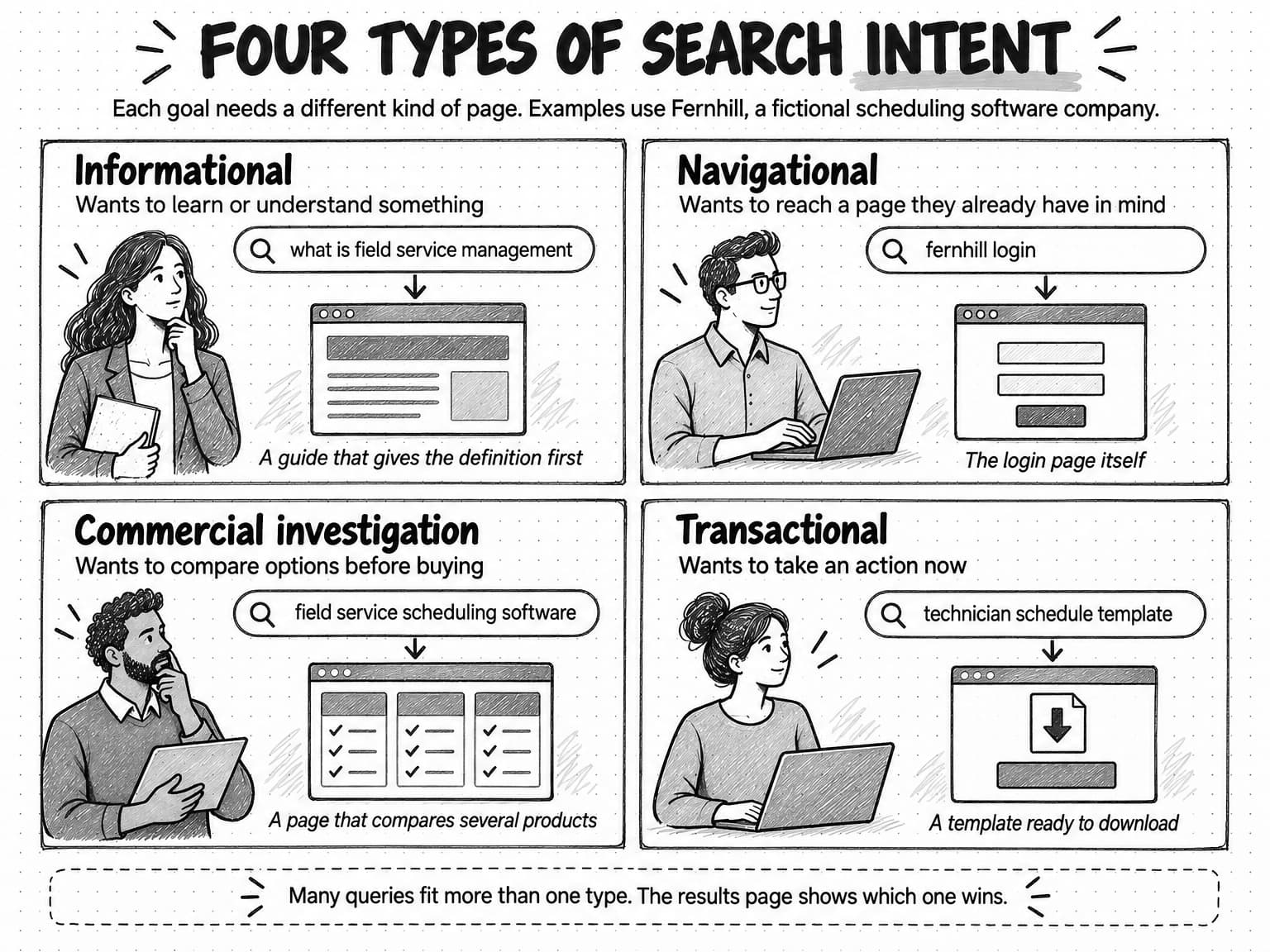
View the four types of search intent at full size (opens in a new tab).
Where the intent categories come from
The four-type model grew out of research on how people used early web search engines, and knowing that history helps explain both why the model works and where it falls short.
Classic information retrieval assumed every search came from an information need. In 2002, Andrei Broder, then at AltaVista and later IBM Research, argued in a short paper in the ACM SIGIR Forum that web searches were different. The need behind a web search, he wrote, is often not informational: it might be navigational ("give me the url of the site I want to reach") or transactional ("show me sites where I can perform a certain transaction, e.g. shop, download a file, or find a map"). Using a pop-up survey of AltaVista users (3,190 valid responses collected between June and November 2001) and a hand-inspected sample of 400 queries from the AltaVista log, he estimated that informational queries made up less than half of web searches. The log sample came out at about 48% informational, 20% navigational and 30% transactional.
Later work reached different proportions. In a 2008 study in Information Processing and Management, Bernard Jansen, Danielle Booth and Amanda Spink built software to classify more than 1.5 million queries from a search engine log and found that more than 80% were informational, with about 10% each navigational and transactional. When they checked the software against 400 hand-coded queries, it agreed 74% of the time, and the authors noted that for many of the rest the intent was "vague or multi-faceted."
The gap between those estimates is a lesson in itself. The share of each intent depends on the search engine, the year, the sample, and above all the method used to guess intent. Neither figure describes search today, and neither should be quoted as current. What has lasted is the idea that people search for different kinds of reasons and that each reason needs a different kind of result.
Commercial investigation is a later addition, common in SEO tools and marketing writing rather than in Broder's paper. His three classes left no separate place for someone researching a purchase, and in commercial work that person matters a great deal. Splitting "researching a purchase" out from "making a purchase" gives content teams the four-type model they mostly use today.
Why four types are not enough: format, angle, stage, and job
Suppose two pages both target "field service scheduling software," and both correctly treat it as commercial investigation. One is a product page that describes a single vendor's features. The other is a buyer's guide that explains what to look for and compares eight options in a table. If the results page is full of comparison pages, the product page will struggle no matter how well it is written. Both pages matched the intent type. Only one matched the rest of what the searcher wanted.
SEO practitioners have tried to name these extra layers. Ahrefs, for example, teaches "three Cs of search intent": content type (the dominant kind of page, such as a blog post or a product page), content format (such as a list, a how-to, or a comparison), and content angle (the focus that makes top-ranking pages stand out). For B2B teams, it helps to think in five layers, adding the buying stage and the job the searcher needs done.
Type is the classic category: informational, navigational, commercial investigation or transactional. It decides the family of page.
Format is the shape the answer should take. A query like "how to reduce technician drive time" wants steps. "Technician schedule template" wants a file someone can copy. "What is field service management" wants a definition first and explanation after. "Field service software for small teams" wants a list or table of options. Format often matters more than length: a 600-word page with a usable template can beat a 4,000-word essay for a template query.
Angle is the particular slant that satisfies the searcher, such as the audience ("for small teams," "for HVAC companies"), recency ("2026," "latest"), level ("for beginners," "advanced"), or cost ("free," "cheap"). Modifiers in the query often reveal the angle directly. When they don't, the titles of the top results usually share one, and that shared angle is a strong clue to what searchers reward.
Stage is where the searcher sits in a buying decision. A person asking "why do technicians miss appointments" may not know a software category exists. A person asking "fernhill vs a spreadsheet" is close to a decision. The same topic can be searched at every stage, and each stage needs different evidence. Our guide to the B2B buyer journey explains why buying rarely follows a straight line through stages, which is also why stage is a tendency for a query, not a fixed property.
Job is the concrete task the searcher is trying to get done and what they will do next with your page. The searcher behind "technician utilization rate formula" might be building a board report tonight. They need the formula, a worked example with numbers, and perhaps a spreadsheet, not a discussion of why utilization matters. Thinking about the job pushes a page past matching the topic toward being useful in the moment, which is what both ranking systems and AI answers are trying to reward. A clear description of the target audience for each page, written as a person in a situation, makes the job much easier to see.
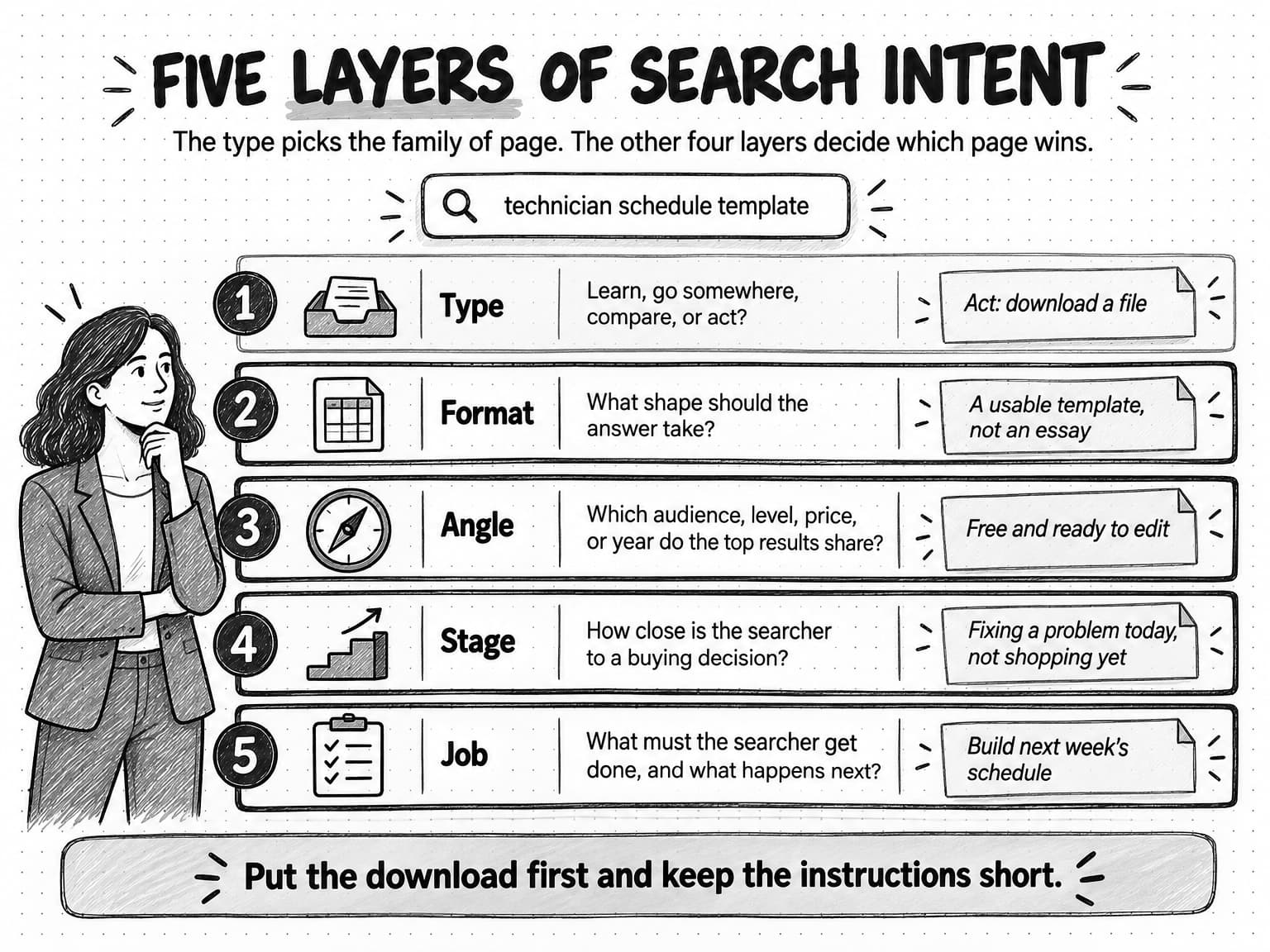
View the five layers of search intent at full size (opens in a new tab).
The five layers are not five separate analyses. For most queries the type is obvious, and the real decisions are about format and angle. For high-value commercial queries, stage and job deserve the most thought, because they decide what evidence the page has to contain.
How Google describes intent in its Search Quality Rater Guidelines
Google publishes the guidelines it gives to the people it pays to rate search results. The current version is dated September 11, 2025 and runs to 182 pages. Raters do not decide rankings: the guidelines state that no single rating can directly change how a page appears in Google Search, and that ratings are used to measure how well the search engine is working and to give examples of helpful and unhelpful results. But the guidelines show, in Google's own words, what the company means by a result that satisfies a searcher, which makes them the best public description of intent from the search engine's side.
The guidelines describe four intent categories, which overlap with the marketing model but slice it differently:
- Know queries, where "the intent of a Know query is to find information or explore a topic." A subset, Know Simple queries, seek a very specific answer, such as a fact, that is correct and complete and fits in a small space. The guidelines' rule of thumb: if most people would agree on the answer and it fits in one or two sentences or a short list, the query is Know Simple.
- Do queries, where the intent "is to accomplish a goal or engage in an activity," such as to download, buy, obtain, be entertained by, or interact with a website or app.
- Website queries, where the user wants a specific website or webpage, including imperfect versions of a site's address.
- Visit-in-person queries, where the user wants a nearby business, organization or place.
The guidelines are candid that these categories blur. They say the line between Do and Know "is sometimes blurry," tell raters not to worry about strictly separating them, and note that "many queries do not fit neatly into one and only one of these categories." That is a useful corrective for anyone who treats intent labels in an SEO tool as precise.
Two other ideas in the guidelines matter more for content work than the categories themselves.
The first is query interpretation. Many queries have more than one meaning, and the guidelines ask raters to judge how many users have each meaning in mind. A dominant interpretation is what most users mean. A common interpretation is what many or some users mean, and a query can have several. A minor interpretation is one that fewer users have in mind; the guidelines separate reasonable minor interpretations, worth including in a set of results, from unlikely ones. Results that serve the dominant and common interpretations are the ones raters can score highest. For a marketer, this is a reminder to ask what most people mean by a query, not what your company would like it to mean. If "pipeline" mostly means sales pipeline to your audience, a page about data pipelines targets a minor interpretation.
The second is the Needs Met scale, the rating raters give each result for how well it satisfies the query. The scale runs from Fully Meets, a special rating for queries with clear intent to find one specific result, through Highly Meets ("a very helpful result for any dominant, common or reasonable minor query interpretation/user intent"), Moderately Meets and Slightly Meets, down to Fails to Meet, for a result that "completely fails to meet the needs of all or almost all users." The scale judges helpfulness for the query, which is a separate rating from the page's overall quality. A trustworthy, well-made page can still fail to meet the need of a particular query if it answers a different question.
The guidelines also address two situations B2B marketers meet often. On product queries, they say that most "don't obviously specify one type of intent," that people often research and browse before buying, and that raters should give high Needs Met ratings to results that help people "research, browse, and decide what to purchase." On freshness, they tell raters to assume people want current information about a topic, the most recent product model, or the most recent occurrence of a recurring event, unless the query says otherwise.
How to read a results page for intent
The most reliable evidence of intent is the results page itself. Whatever Google shows for a query reflects what its systems have learned satisfies the people who search it, and the page has changed a great deal from ten blue links. Reading it carefully takes a few minutes per query and can save you from writing the wrong page.
Search the query in a private or logged-out browser window, set to the country and language you care about, so your own history does not shape the results. Then work through the page from top to bottom, writing down what you see before you interpret it.
- Note what appears above the classic results. An AI Overview, a featured snippet, a knowledge panel, a video carousel, a "People also ask" box, a shopping or local pack, or a set of sponsored results each tells you something. A short featured snippet or a direct answer suggests a Know Simple query that many people will finish on the results page. Ads and shopping results suggest commercial or transactional intent. A video carousel suggests that people want to watch a demonstration.
- Classify the top ten organic results by page type. Are they blog posts, product pages, category or listing pages, comparison pages, review sites, forum threads, documentation, tools, or videos? Count them. If eight of ten are comparison pages, the results page is telling you the query is commercial investigation and that the format searchers reward is a comparison.
- Record the dominant format. Within the winning page type, what shape do the pages take? Step-by-step guides, list posts, templates, definitions, calculators, or long explainers. Note whether they lead with a table, a definition, or a download.
- Look for the shared angle. Read the titles and descriptions of the top results together. If most say "for small businesses," "2026," "free," or "for beginners," searchers are rewarding that angle.
- Read "People also ask" and related searches. These show the follow-up questions people have and the other ways they phrase the same need. They are a guide to what a page should cover after its main answer.
- Check who ranks. If the top results are all large review sites and directories, a single vendor's page will be competing against pages that compare many vendors. If forums and community threads rank, searchers may want first-hand experience more than polished marketing.
- Open the top three results and judge what they do well. Do they answer the question in the first screen? What evidence do they show? What would a searcher still need after reading them? That remaining need is often your best opening.
Then write a one-sentence statement of the intent, in the searcher's terms: "People searching this want to compare the main scheduling products for a small field-service team on price and ease of setup, ideally in a table." That sentence becomes the brief's starting point and the standard you judge the draft against.
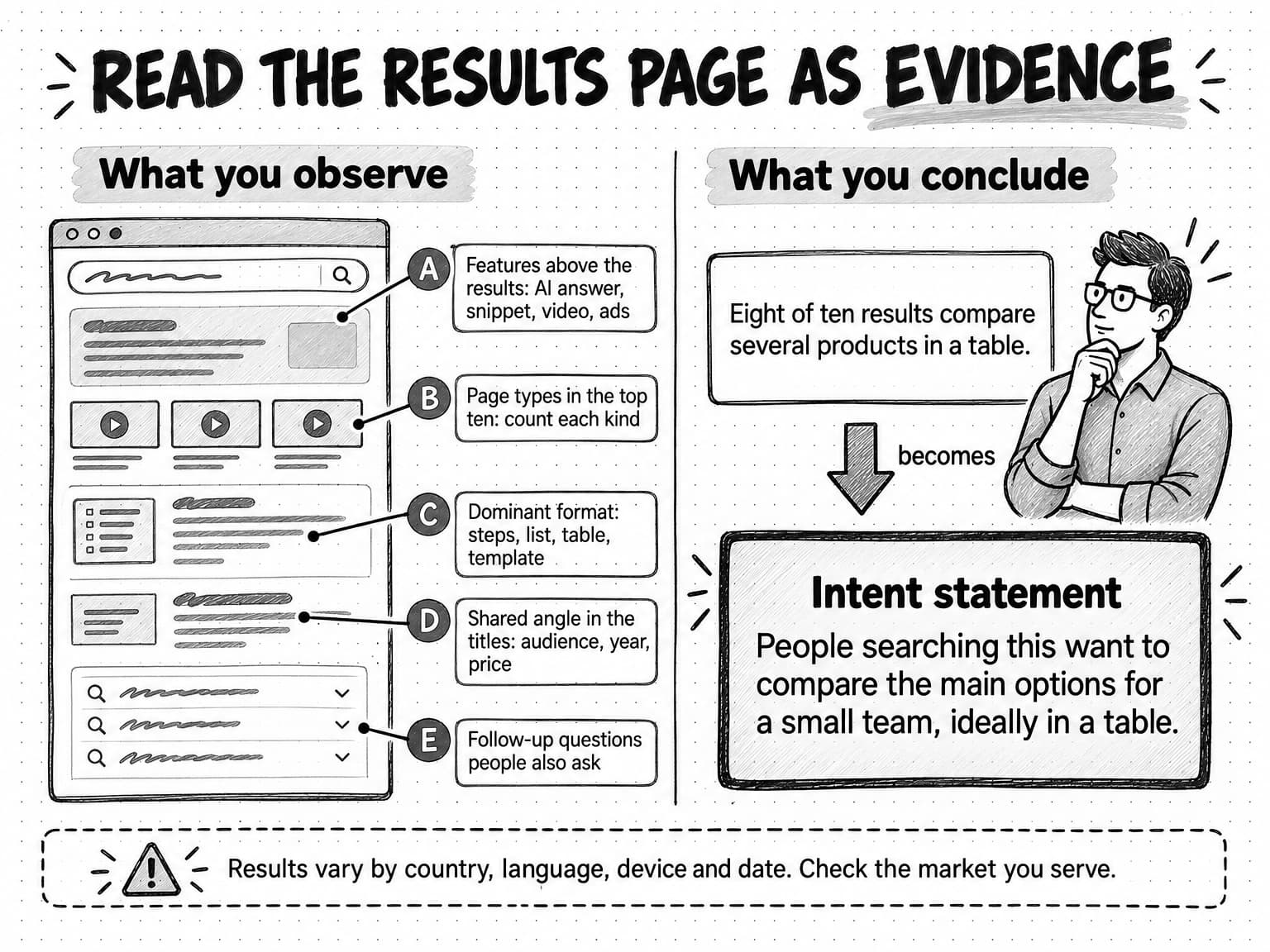
View the results-page reading method at full size (opens in a new tab).
Results vary by location, language, device and time, so check the market you serve and recheck queries that matter. One page type dominating a query is strong evidence; a mixed page usually means mixed intent, covered in the next section. And the results page shows what Google currently rewards, not what is best for the searcher in every case. If every ranking page is thin, a page that serves the same intent much better can still win, but a page that serves a different intent almost never does.
Mixed intent and intent that changes over time
Some queries split their searchers. "Field service management" on its own might be typed by a student looking for a definition, an operations manager starting to research software, and a job seeker. Google's response to a query like this is often a mixed results page: a definition, a couple of vendor pages, a guide, a video, and a "People also ask" box covering several angles. The rater guidelines describe exactly this, telling raters that queries with several meanings or perspectives need a diverse set of results.
When you see a mixed results page, you have three reasonable options. You can serve the dominant interpretation if one is clear, accepting that some searchers want something else. You can build a page that satisfies the two most common needs in order, for example a definition first and then a short section on choosing software, as long as the second need does not bury the first. Or you can target a more specific query instead, such as "field service management software for small teams," where the intent is clearer and the results page is less crowded with different page types. What rarely works is a page that tries to serve every interpretation at once and serves none of them well.
Intent also moves. The rater guidelines give the example of [iphone]: people searching it in 2007 wanted the first iPhone, while people searching it now want the latest model, and the dominant interpretation will keep changing as new models come out. In B2B software the same thing happens more slowly. A term that once meant a niche technique becomes a product category, and its results shift from explainers to vendor comparisons. A query that once had a stable answer becomes newsworthy after a regulation, an acquisition, or a product launch, and suddenly fresh news articles rank.
The practical habit is to recheck the results for your most important queries on a schedule, perhaps quarterly, and whenever a page that used to perform starts to slip. A drop in traffic sometimes means a competitor wrote a better page. It can also mean the intent changed and the results page now rewards a different kind of page. A content audit is a good moment to do this for the whole site, because an audit already asks whether each page still does its job.
Search intent in AI answers and conversational prompts
AI answers change how intent shows up, though not what it is. People still have goals when they ask a question. What changes is how much of the goal they state, and how the system assembles a response.
Prompts are longer and more explicit. Google said in May 2026 that the average search in AI Mode is "triple the length of a traditional Search query." Pew Research Center's analysis of the browsing data of 900 US adults in March 2025 found that longer searches were much more likely to produce an AI summary: 8% of searches of one or two words did, compared with 53% of searches of ten words or more. A traditional query like "scheduling software hvac" becomes a prompt like "We're a 12-technician HVAC company still scheduling on a whiteboard. What software should we look at, roughly what will it cost, and what should we watch out for when switching?" That prompt states the type (commercial investigation), the angle (HVAC, 12 technicians), the stage (moving off a manual process), and several jobs (shortlist, budget, switching risks) in one go.
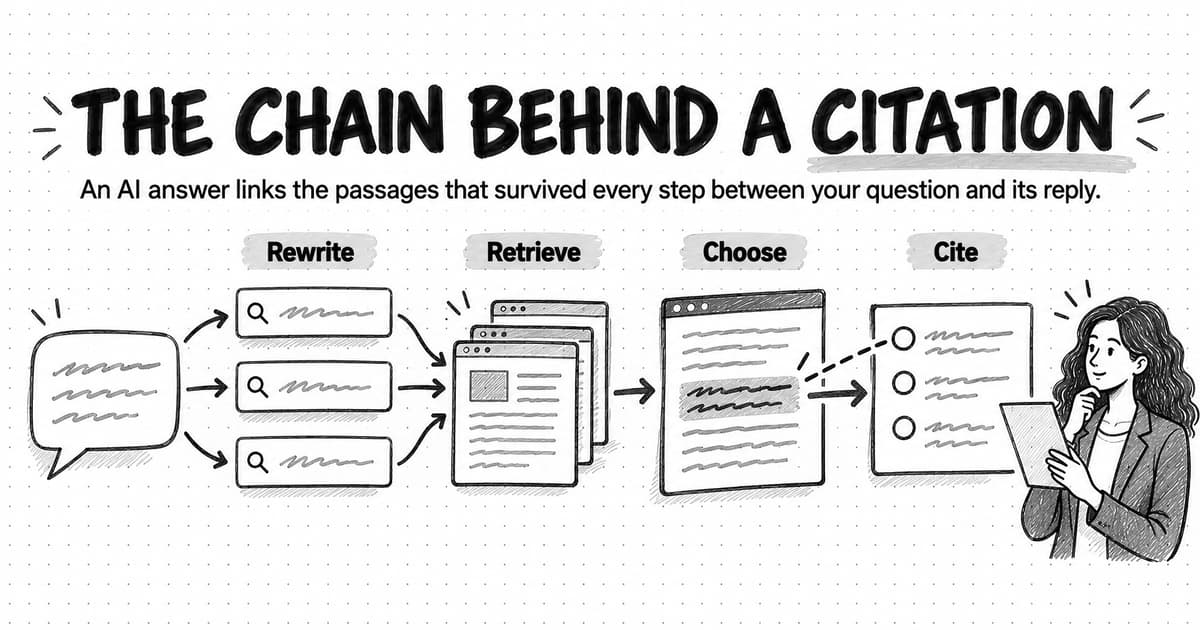
Conversational prompts are often multi-part. The example above is three questions in one. AI search systems handle this by splitting the prompt. Google's documentation for site owners says AI Overviews and AI Mode "may use a 'query fan-out' technique," issuing multiple related searches across subtopics and data sources while the response is generated, and Google's May 2025 post on AI Mode describes it as "breaking down your question into subtopics." In practice, a single prompt can turn into searches for the software category, pricing, HVAC-specific features, and switching from manual scheduling. Each of those sub-searches has its own intent, and a page can be found for one of them even if it would never rank for the whole prompt.
Intent in assistants also extends past finding information. OpenAI and university economists studied a large sample of ChatGPT consumer messages sent between May 2024 and June 2025 and classified each message by what the user wanted: Asking (seeking information or advice to make a better decision), Doing (asking ChatGPT to produce an output, such as drafting an email or a table), or Expressing (neither). They estimated about 49% of messages were Asking, 40% Doing and 11% Expressing, and that Doing made up about 56% of work-related messages. Their categories are not search intent types, and the paper is an NBER working paper that has not been peer reviewed, but it shows that many people use assistants to get work done as well as to look things up. For a marketer, the Asking messages are the ones your content can answer and be cited in. The Doing messages are a reminder that a buyer may ask an assistant to build the comparison table themselves, using whatever sources it finds.
What this means for content is mostly an extension of the classic method:
- Answer the stated angle and the unstated follow-ups. A long prompt names constraints. Pages that address specific situations ("for teams under 20 technicians," "when moving off spreadsheets") give AI systems something precise to retrieve for those sub-searches.
- Make each section answer one question on its own. Fan-out means a system may pull one section of a page to answer one sub-question. A section that starts with a direct answer and explains it in the next few sentences is easier to use than one that builds up to its point.
- Cover the comparison and decision questions honestly. AI answers to commercial prompts often compare options. If your site never explains who your product is a poor fit for, what it costs, or how it differs from the alternatives, the answer will be built from someone else's description. Our guide to how AI search engines choose which sources to cite covers what makes a page usable as a source.
- Expect fewer clicks for simple questions. Pew found that visitors to a Google results page with an AI summary clicked a traditional result in 8% of visits, compared with 15% when no summary appeared. Quick factual questions are the likeliest to be answered on the results page itself. That does not make them worthless, but much of their value lies in being the cited source and building familiarity, which our guide to zero-click content distribution explores.
Google's guidance is plain that no special markup or files are needed to appear in AI Overviews or AI Mode; the same SEO fundamentals apply. Our guide to Google AI Overviews and AI Mode explains how those features work and how content gets included. The intent work does not change. You are still trying to give the person the result they wanted, and an AI answer is one more place where a page that does that gets used.
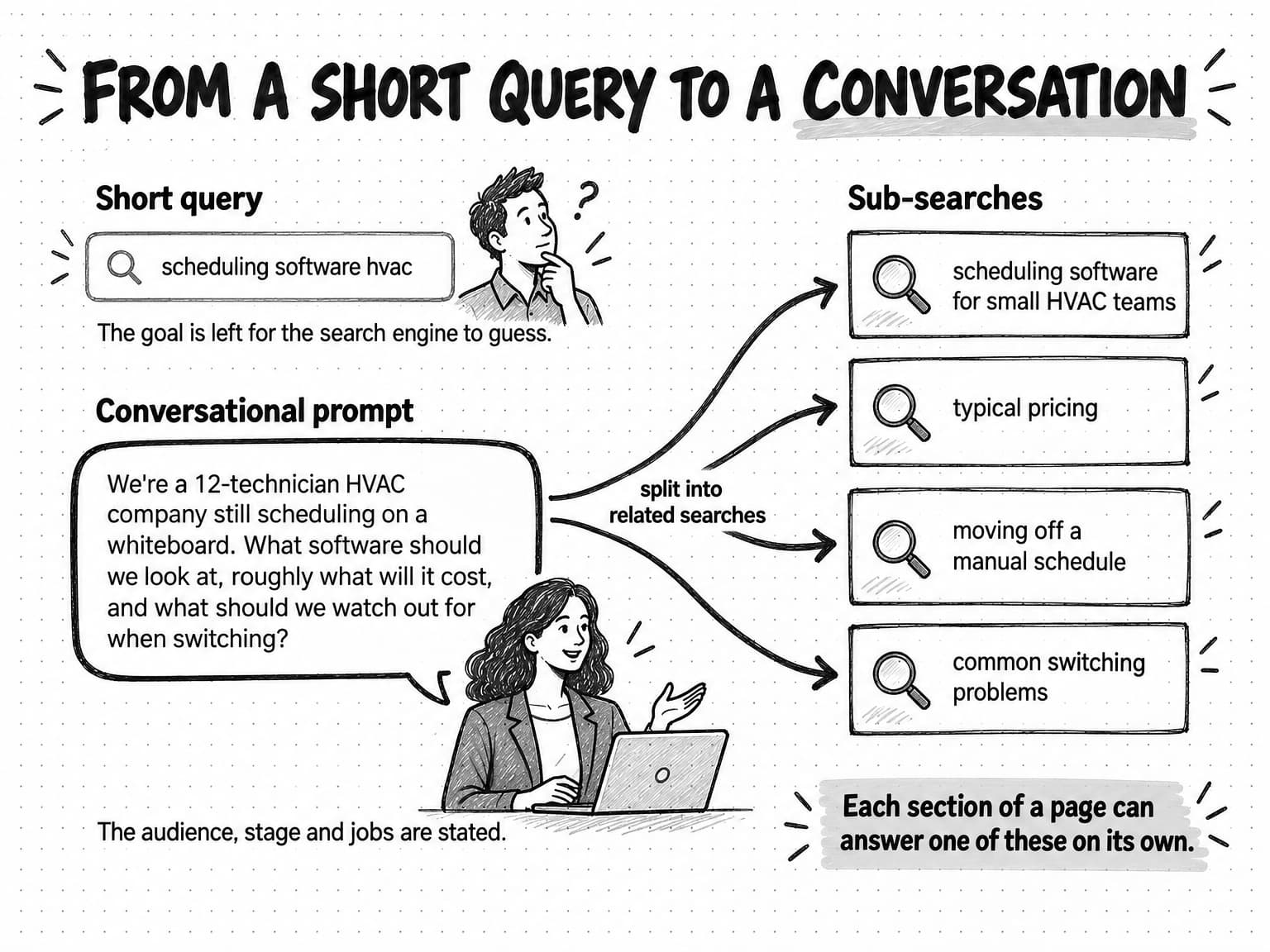
View the short-query-to-conversation comparison at full size (opens in a new tab).
To check intent in AI answers, run a small set of representative prompts in the assistants your buyers use, record which sources each answer cites and what kind of pages they are, and note which sub-questions the answer covers. Treat the results as a sample: AI answers vary between runs, users and days. Our guide to measuring AI search visibility describes how to build a question set from customer needs and run a repeatable baseline.
How to match intent: choosing page type, format, and depth
Once you have an intent statement for a query, matching it is a sequence of decisions, roughly in this order.
Decide whether the query belongs on an existing page. Many queries share an intent with a page you already have. "Technician scheduling software" and "field service scheduling tool" probably want the same comparison page, and two pages competing for one intent split your effort. If an existing page serves the intent, improve it instead of creating another.
Choose the page type the results page rewards. If the top results are comparison pages, make a comparison page. If they are documentation, the searcher probably wants documentation. Your preferred page type, often a product page or a blog post, is the one most likely to be wrong for a commercial query, because searchers comparing options tend to want pages that cover more than one option.
Choose the format that lets the searcher do the job. Put the answer the searcher came for in the first screen: a definition for a definition query, the steps for a how-to, the table for a comparison, the download button for a template. Then add what helps them act on it.
Set depth by the job, not by the competition's word count. Long pages win when the searcher needs depth: a buyer's guide for an expensive purchase, a method someone will follow over weeks. Short pages win when the job is quick: a formula, a template, a definition. Google's own guidance on helpful content lists "writing to a particular word count" as a warning sign, and notes that Google has no preferred word count.
Supply the evidence the stage requires. Early-stage informational pages need clear explanation and examples. Commercial pages need comparison criteria, honest trade-offs, prices or price ranges, and proof such as documentation, demos or customer evidence. Transactional pages need the details that remove last doubts, such as what happens after sign-up, the terms, and how to get help.
Plan the next step. Ask what the searcher will want after this page and link to it: from a definition to a buying guide, from a comparison to pricing, from a template to the guide that explains how to use it.
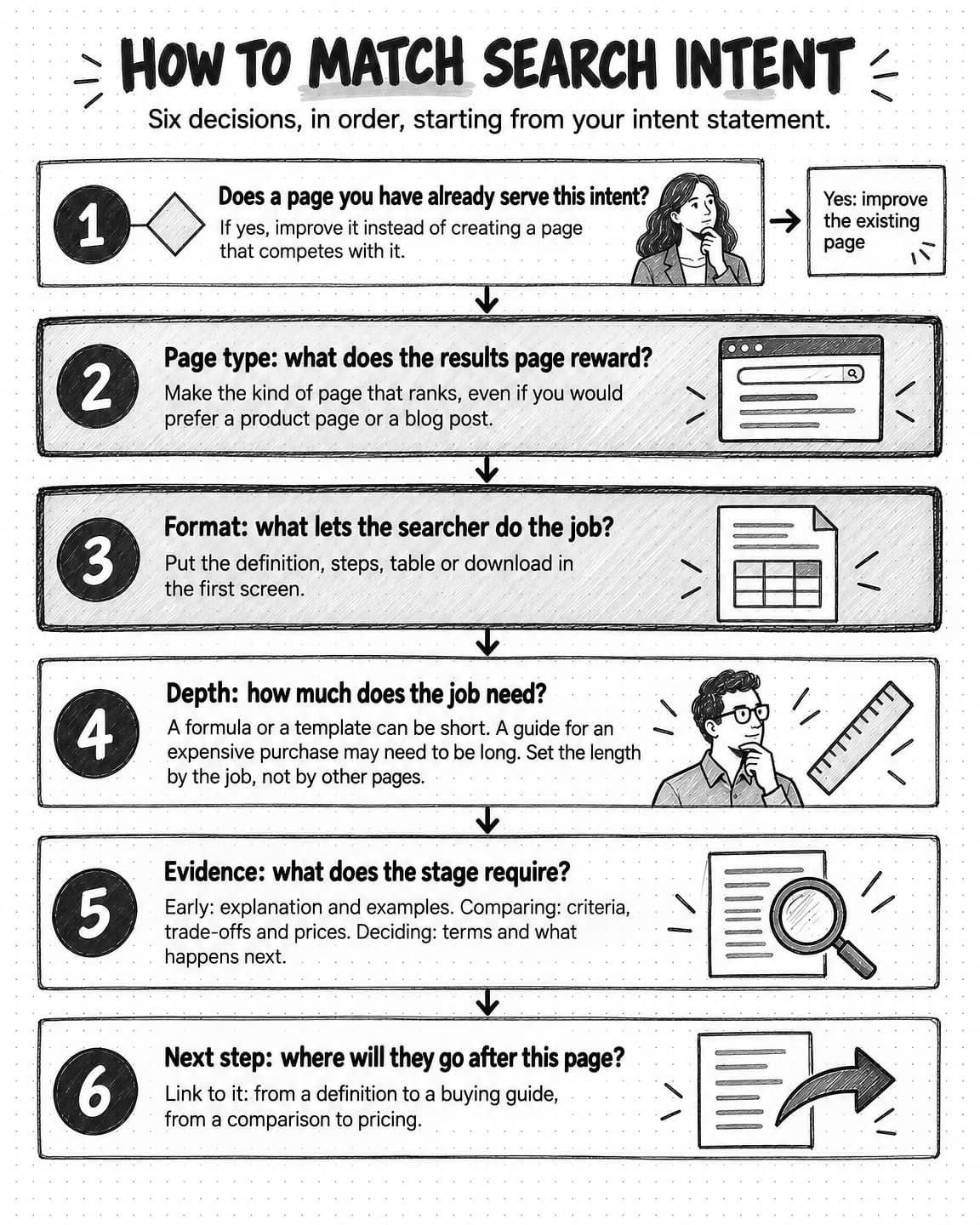
View the six intent-matching decisions at full size (opens in a new tab).
The table below shows how the classic intent types usually translate into page decisions for a B2B software company. It is a set of defaults to check against the actual results page, not a rule.
| Intent | Typical page types | What the first screen should do | Evidence that helps |
|---|---|---|---|
| Informational, quick fact | Short definition or answer section within a broader guide | State the answer in one or two sentences | A clear source; a worked example if numbers are involved |
| Informational, explore a topic | Guide, explainer, how-to | Define the subject and say what the guide will help the reader do | Examples, diagrams, steps, sources |
| Navigational | The target page itself (login, docs, help, pricing) | Get the person where they wanted to go | Correct title and clear page name |
| Commercial investigation | Category page, comparison, alternatives, buyer's guide, reviews | Show the options or criteria immediately, often in a table | Criteria, trade-offs, prices, documentation, customer evidence |
| Transactional | Pricing, sign-up, trial, demo, template download, calculator | Make the action obvious and easy | Terms, what happens next, reassurance on risk |
A written brief is where these decisions become instructions a writer can follow. Our guide to writing a content brief shows how to turn a keyword and an outline into a brief that names the reader, the question, and the evidence the draft needs.
Search intent across the B2B buyer journey
B2B software purchases involve several people, long gaps, and plenty of searching that never shows up in your analytics. Intent is one of the few signals you can see that hints at where a buyer is.
Early on, people search for problems, not products. A dispatcher frustrated by missed appointments searches "why do technicians run late" or "how to schedule technicians more efficiently." These are informational queries, and the people behind them may not know a software category exists. Content that explains the problem well, with practical advice the reader can use without buying anything, is how a vendor earns a first impression at this stage.
As the problem becomes a project, queries name a solution category and add constraints: "field service scheduling software," "scheduling software for small hvac company," "dispatch software with mobile app." Intent turns commercial. The people searching now want options, criteria and comparisons, and this is where many B2B content programs underinvest, because comparison pages feel uncomfortable to write when your own product is one of the options.
Near a decision, queries get specific and often include brand names: "fernhill pricing," "fernhill vs a spreadsheet," "fernhill reviews," "fernhill accounting integration." Several people may be searching at once. The operations lead checks features, the finance lead checks price, and someone in IT searches security documentation. Each of those queries is narrow and high-intent, and the pages that answer them are often help-center articles, documentation and pricing pages rather than marketing content.
Two cautions apply. First, intent hints at a stage; it does not prove one. A customer of five years might search "what is field service management" to explain the category to a new hire. Second, buyers loop back. Someone near a decision may return to early-stage questions when a new stakeholder raises a concern. Our guide to building a B2B content marketing strategy explains how to plan a content program around buying situations and roles, which is a sturdier basis than a simple funnel.
A practical use of the intent-to-stage link is to check your coverage. List the queries you know matter at each stage and mark which have a page that matches their intent. Most B2B sites have plenty of early informational content and a pricing page, with a gap in between where buyers are comparing options. Our guide to content gap analysis covers how to find those gaps systematically, including the topics AI answers cover that you don't.
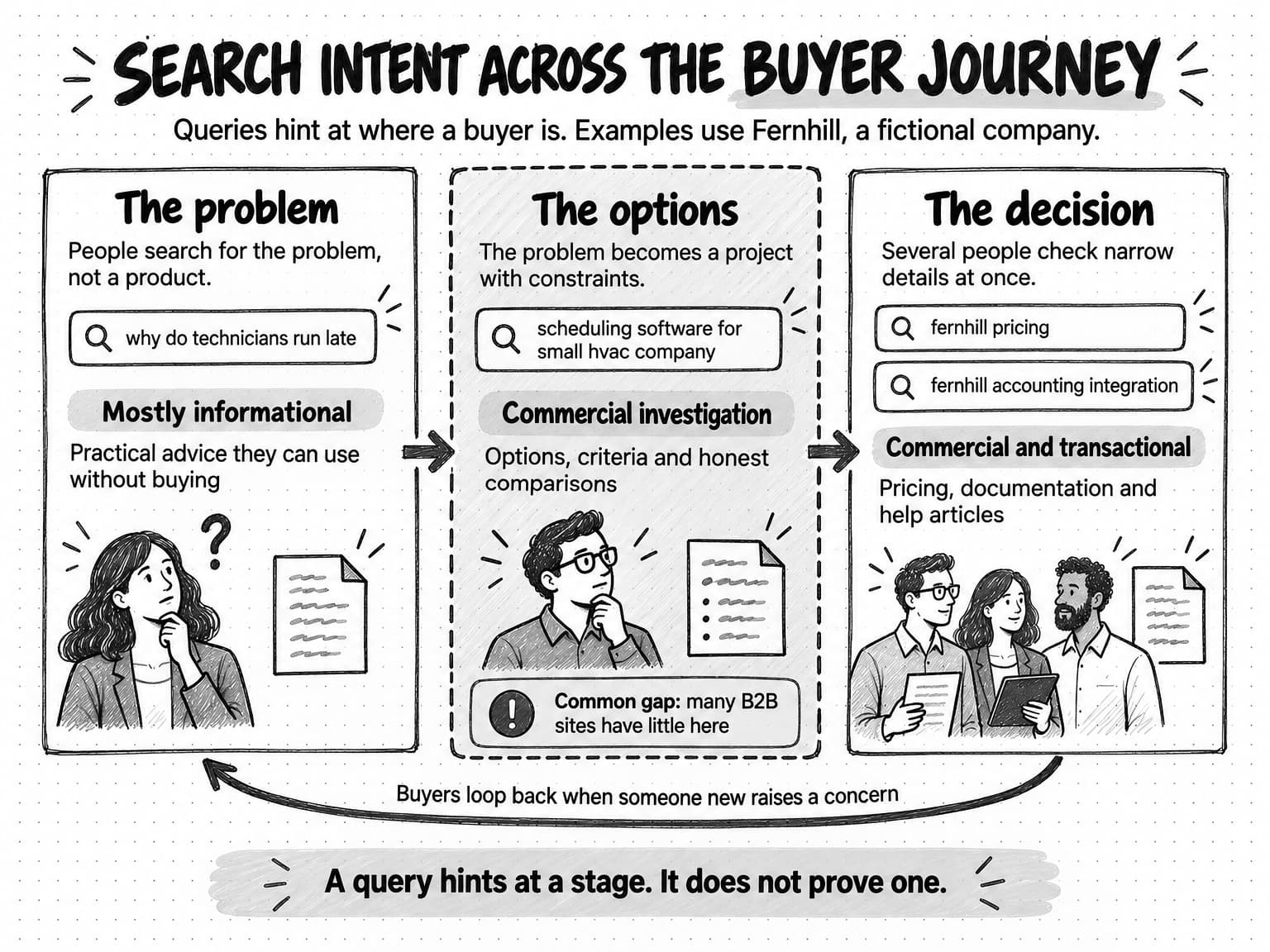
View search intent across the buyer journey at full size (opens in a new tab).
Copyable search intent worksheet
Use this worksheet for one query at a time. It takes about ten to fifteen minutes for a query you have not analyzed before. Fill in what you observe first and what you conclude second, and keep the two separate so someone else can check your reasoning.
SEARCH INTENT WORKSHEET

Query (exact wording):
Market checked (country, language, device):
Date checked:

1. WHAT THE RESULTS PAGE SHOWS (observations only)
   Features above the results (AI Overview, featured snippet,
   video, People also ask, ads, shopping, local pack):
   Page types in the top 10 (count each: guide, product page,
   category or listing, comparison, review site, forum, docs,
   tool, video):
   Dominant format (steps, list, table, template, definition,
   long explainer):
   Shared angle in titles (audience, year, level, price):
   Who ranks (vendors, review sites, publishers, forums):
   "People also ask" and related searches worth answering:

2. WHAT AI ANSWERS SHOW (optional for a quick check)
   Assistant and date:
   Sub-questions the answer covers:
   Sources cited and their page types:

3. INTENT (conclusions)
   Type: informational / navigational / commercial / transactional
   Dominant interpretation:
   Other common interpretations:
   Format the searcher wants:
   Angle the searcher rewards:
   Likely buying stage:
   The job the searcher needs done, and what they do next:

4. INTENT STATEMENT (one sentence, in the searcher's terms)
   People searching this want to ...

5. PAGE DECISION
   Existing page that should serve this query (if any):
   Page type to make or improve:
   What the first screen must show:
   Evidence the page needs:
   Next step to link to:
   Recheck date:
The observations in section 1 matter most, because they let someone else disagree with your conclusion using the same evidence. The intent statement in section 4 should be specific enough that a writer could tell whether a draft meets it. "People want to learn about scheduling" is too vague; "People want a step-by-step method to cut drive time between jobs, with an example route" is usable.
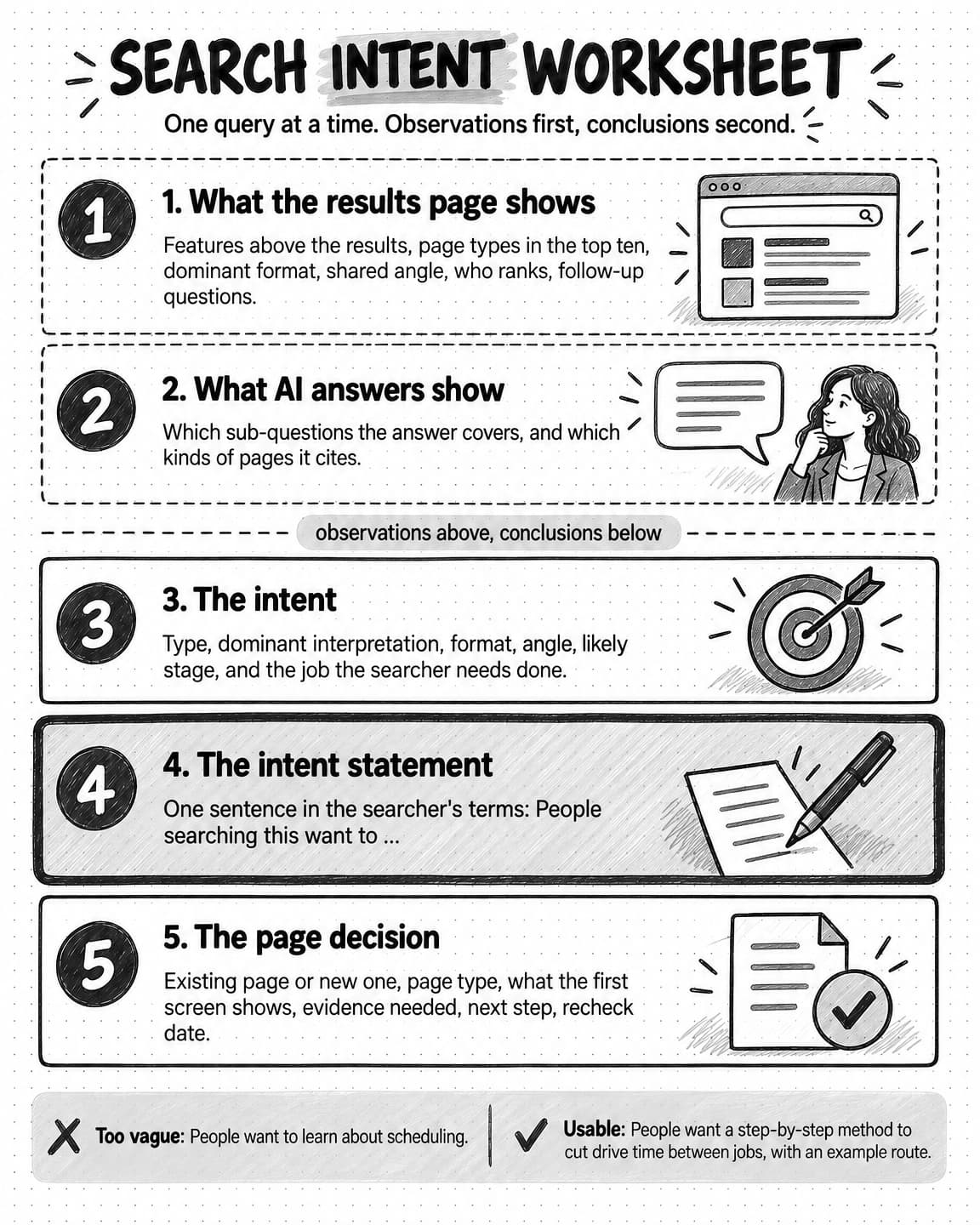
Open the search intent worksheet at full size to save it (opens in a new tab).
Worked example: eight B2B keywords classified
This example follows a fictional company, Fernhill, which sells scheduling and dispatch software to small field-service businesses such as HVAC, plumbing and electrical contractors. Fernhill, its keywords and the results-page observations below are invented for illustration; the observations describe what a results page for queries like these commonly shows, not a real search.
Fernhill's marketing lead has a list of eight keywords from customer calls, Search Console and a keyword tool. Before commissioning any content, she fills in the worksheet for each one. The table summarizes what she concluded.
| Keyword | Illustrative results-page observations | Intent type | Format and angle | Page decision |
|---|---|---|---|---|
| what is field service management | Definition snippet, AI Overview, guides from software vendors and publishers, People also ask on software and benefits | Informational, with a minor commercial interpretation | Definition first, then a guide; broad audience | One explainer that defines the term, then links to the buyer's guide |
| field service scheduling software | Ads, review-site category pages, vendor comparison lists, few single-product pages | Commercial investigation | Comparison table of options with criteria; small-business angle | A buyer's guide with honest criteria and a comparison table that includes Fernhill |
| fernhill login | Fernhill's login page, help article on signing in | Navigational | The login page | Make sure the login page is titled clearly; write nothing new |
| fernhill pricing | Fernhill's pricing page, a review site's pricing summary | Commercial and transactional | Plan prices, what each includes, how billing works | Improve the pricing page so the plan details review sites summarize are accurate and clear |
| how to reduce technician drive time | Step-by-step guides, a video, forum threads with practitioner tips | Informational, with a Do element | Steps with an example; practical, practitioner angle | A how-to guide with a worked route example, usable without the product |
| field service software vs spreadsheets | Comparison articles, a few vendor pages, forum threads | Commercial investigation, late stage | Side-by-side comparison, cost of switching, honest about when spreadsheets are enough | A comparison page that says plainly which businesses can stay on spreadsheets |
| technician schedule template | Downloadable templates, spreadsheet galleries, short how-to pages | Transactional (download) | A free, usable template; minimal reading before the download | A template page with the file first and short instructions after |
| field service management trends 2026 | Recent publisher articles and vendor reports, all dated this year | Informational, with a freshness angle | Current roundup, clearly dated; sources for each trend | Only worth making if Fernhill can add its own evidence; otherwise skip |
Three of these decisions are worth explaining, because they are the ones a team is most likely to get wrong.
"Field service scheduling software" gets a buyer's guide, not a product page. Fernhill's first instinct was to optimize its features page for this keyword, its most valuable one. The results page argued against it: almost every result compared several products. A single-product page answers a question the searcher has not reached yet. The buyer's guide is uncomfortable to write, because it has to describe other options fairly, but it is the page type searchers and AI answers reward for this query. The features page stays, linked from the guide, for the later queries that name Fernhill.
"Technician schedule template" gets a short page. The team considered a long article about scheduling best practices with a template at the end. The results showed that searchers wanted the file. A long introduction before the download would satisfy the keyword's topic and fail its job. The page leads with the download and keeps the instructions short, with a link to the drive-time guide for readers who want more.
"Field service management trends 2026" might not get a page at all. The query has real demand and a strong freshness angle, but the results are full of recent articles that summarize the same handful of trends. A new page from Fernhill would have nothing to add unless the company could contribute its own evidence, such as anonymized data on how its customers' scheduling has changed. That is a reason to consider original research, not a reason to publish another summary.
The navigational row carries one more lesson: the right response to a navigational query is often no new content at all, just a correctly titled page. Done this way, eight keywords become five pages to make, two pages to fix and one deliberate decision to wait.
Common search intent mistakes
Most intent mistakes come from deciding what the page should be before looking at what the query needs. These are the ones that cost B2B teams the most.
Treating the keyword as the intent. Writing "the ultimate guide to field service scheduling software" because the keyword contains those words, without checking that searchers want a guide. Keyword matching is the start of the analysis, not the end.
Making the page you prefer instead of the page the query rewards. Teams tend to default to the page types they already make, such as product pages or blog posts, and few enjoy writing comparison pages. The results page does not care. When it shows comparison pages, a product page is fighting the intent.
Burying the answer. A definition query answered after four paragraphs of context, a template behind a long introduction, a comparison table at the bottom of the page. People who searched for something specific look for it first, and so do AI systems pulling a passage to answer a sub-question.
Merging intents that should be separate pages. One page trying to define the category, compare products, sell Fernhill and offer a template serves four searchers badly. If the intents differ, the pages usually should too.
Splitting one intent across several pages. The opposite mistake: publishing "scheduling software," "scheduling tools" and "scheduling apps" as three thin pages that compete with each other for the same searcher. One strong page that serves the shared intent is usually better. Our guide to topical authority and topic clusters explains how related pages should divide a subject between them.
Trusting tool labels without looking. Automatic intent labels in SEO tools are estimates from each tool's own method, and they miss format, angle and job. Check the results page for any keyword that matters.
Checking once and never again. Intent shifts as products, regulations and language change. A page built for last year's intent can slide slowly as the results page moves away from it. Recheck important queries on a schedule.
Optimizing for the search engine instead of the person. Matching intent is not a trick to satisfy an algorithm. Google's helpful content guidance asks whether someone will leave a page feeling they have learned enough to achieve their goal. A page that meets the intent on paper but leaves the reader unable to do the job will lose to one that helps.
Search intent research with Ampere
Ampere is an AI marketing agent, and a good share of intent analysis is the kind of research it can do in a session while you make the decisions.
Ampere can search the web and gather what a query returns across several surfaces. Its web search tools include Google search, Google search results pages, Google AI Mode search and Bing Copilot search, along with tools that extract page content, crawl websites and map site structure. That lets you ask Ampere to collect, for a list of queries, the kinds of pages that rank, the formats and angles they share, the questions in related searches, and what AI answers cover and cite, then summarize the observations in the structure of the worksheet above. You can check its summary against the results yourself before deciding anything.
The decisions that follow can also start with Ampere. It can draft SEO audits and source-grounded blog article packages for your own site, so once you have agreed the intent statement and page type, it can produce a first draft built to that brief. Brand memory, Ampere's saved context about your company, products, competitors, voice and audience, can include a search landscape report among its saved brand and market reports, so later work starts from what you have already established instead of a blank page. Recurring checks, such as rechecking the results for your most important queries each quarter, can run as a scheduled task that returns a summary for review.
The boundaries matter. Search results and AI answers vary by location, user and day, and the public data Ampere collects is never complete, so treat its observations as a sample. Its summaries and drafts can be inaccurate or incomplete, and someone on your team should check claims and decide what gets published. Ampere does not publish pages or change your website; your team does that.
Sources and further reading
- Google, Search Quality Rater Guidelines (General Guidelines), version dated September 11, 2025. Sections 12.1 to 12.7 define user intent, query interpretations and the Know, Do, Website and Visit-in-person categories; section 13 defines the Needs Met scale; sections 18 and 21 cover freshness and product queries.
- Andrei Broder, A taxonomy of web search, ACM SIGIR Forum 36(2), 2002. The origin of the informational, navigational and transactional classes, with survey and log estimates from AltaVista.
- Bernard J. Jansen, Danielle L. Booth and Amanda Spink, Determining the informational, navigational, and transactional intent of Web queries, Information Processing and Management 44(3), 2008. Automated classification of more than 1.5 million queries.
- Google, How Search works: ranking results. Google's explanation of how it establishes the meaning and intent of a query.
- Google Search Central, AI features and your website, last updated December 10, 2025. How AI Overviews and AI Mode use query fan-out, and why no special markup is needed.
- Elizabeth Reid, AI Mode in Google Search: updates from Google I/O 2025, Google, May 20, 2025. The AI Mode announcement describing query fan-out.
- Shivani Mohan, How AI Mode is changing and expanding the way people search, Google, May 19, 2026. Source for AI Mode queries averaging triple the length of traditional searches.
- Athena Chapekis and Anna Lieb, Google users are less likely to click on links when an AI summary appears in the results, Pew Research Center, July 22, 2025. Browsing data from 900 US adults in March 2025.
- Aaron Chatterji and colleagues, How People Use ChatGPT, NBER Working Paper 34255, September 2025. The Asking, Doing and Expressing classification of consumer ChatGPT messages; not peer reviewed.
- Google Search Central, Creating helpful, reliable, people-first content, last updated October 5, 2026. Self-assessment questions, including the warning about writing to a word count.
- Mateusz Makosiewicz, What is search intent?, Ahrefs, updated October 11, 2024. Source of the "three Cs" framing: content type, format and angle.
Frequently Asked Questions
What are the four types of search intent?
The four types of search intent are informational (the searcher wants to learn something), navigational (they want a specific site or page), commercial investigation (they are comparing options before buying), and transactional (they want to act now, such as buying, signing up or downloading). Many queries mix types, so treat the four as a first sort, then check format, angle, stage and the searcher's job.
Why is search intent important for SEO?
Search intent is important for SEO because search engines rank pages by how well they satisfy the person behind a query, not just by matching its words. A well-written page that answers a different question usually loses to a weaker page that answers the right one. Matching intent decides the page type, format and evidence before anyone writes, which saves effort on pages that cannot win.
How do you determine the search intent of a keyword?
To determine the search intent of a keyword, search it in a logged-out window for the market you serve and read the results page as evidence. Note the features above the results, count the page types in the top ten, and record the dominant format, shared angle and follow-up questions. Then write a one-sentence intent statement in the searcher's terms and choose the page that matches it.
What is commercial search intent?
Commercial search intent, often called commercial investigation, describes searches by people researching options before a purchase, such as "best scheduling software for HVAC companies" or "field service software vs spreadsheets." These searchers want to compare, so results pages for them usually show category pages, comparison tables, alternatives pages and reviews. A single-vendor product page often struggles for these queries because it covers only one option.
What is an example of transactional search intent?
An example of transactional search intent is a search for "technician schedule template," where the person wants to download a usable file now, or "field service software free trial," where they want to start a trial. Pages for transactional queries should put the action first, such as the download, the pricing table or the sign-up, and keep reading between the searcher and the action to a minimum.
What are the three C's of search intent?
The three C's of search intent are content type, content format and content angle, a framework popularized by the SEO company Ahrefs. Content type is the dominant kind of page that ranks, such as a blog post or product page. Content format is the shape of the answer, such as a list or how-to. Content angle is the focus that the top results share, such as a specific audience or year.
What is the difference between search intent and user intent?
Search intent and user intent usually mean the same thing in SEO: what the person is trying to accomplish when they search. Google's rater guidelines use "user intent" for this idea. A useful distinction is that a keyword's intent describes the most common goal across everyone who types it, while each individual user may have a goal of their own.
How does search intent apply to AI search?
Search intent applies to AI search much as it does to classic search, but prompts state more of it. Conversational prompts are longer and often contain several questions, and Google says AI Overviews and AI Mode may split a question into related searches across subtopics. Pages whose sections each answer one specific question clearly are easier for those systems to find and cite.