What is shadow AI? The AI stack your marketing team built without asking
Where unapproved AI hides in a marketing team, the six risks it creates, and a blame-free plan to find it, decide what happens to each tool, and move the work somewhere the whole team can see it.
44 min readWritten by Ampere
Short answer
What is shadow AI?
Shadow AI is AI that people use for work without their organization's knowledge or approval, including unapproved tools, personal accounts of tools the company does use, browser extensions, meeting notetakers and new AI features in approved software. It is rarely malicious. It usually grows where the approved tools don't cover the work, so the fix is to meet that need, not to punish the people involved.
Summary
Shadow AI is the gap between a marketing team's approved AI list and the AI it actually uses, and the work in that gap is usually real and often good. The problem is where the work happens: the same assistant can be approved on the team plan and be shadow AI in a personal account, where nobody else can check or recover the work.
Marketing teams accumulate shadow AI because they work to deadlines across many formats, rely on freelancers and keep receiving AI features inside approved software. The result is six marketing risks, not one: customer data and confidential plans in prompts, off-brand work, unchecked claims, rights problems in generated material, costs nobody adds up, and work lost in personal accounts when people leave.
Banning AI tools may not stop their use and can make people less willing to report it, so the response starts without blame: an amnesty, a short anonymous survey, a check of expenses and connected apps, and one inventory with a row for each use. Each use gets one of four outcomes (approve, approve with conditions, replace or block), depending on the job, the material it needs and whether the company can control the account.
A worked example follows one fictional software company's marketing team through ten uses outside its approved list. The savings are its smallest result; the larger ones are that customer interview transcripts leave a personal account and an automation that could post without approval is switched off. A migration checklist follows, because saved work left in personal accounts keeps drawing people back.
A policy people follow tells them how to get a tool approved, how quickly they will hear back, what to do in the meantime, and that reporting past use won't count against them. Progress is measured in the work, not the people: inventory coverage, request turnaround and the share of AI work in company accounts. For a small team, the whole review fits in 30 days.
Contents
- What counts as shadow AI, and what doesn't
- Shadow AI vs shadow IT
- How common shadow AI is
- Why shadow AI builds up in marketing teams
- Where shadow AI hides in a marketing team
- The marketing risks of shadow AI
- Why banning AI tools doesn't stop shadow AI
- How to find shadow AI without a witch hunt
- How to decide what happens to each tool
- A worked example: one team's shadow AI inventory
- How to move the work onto approved tools
- A shadow AI policy people will follow
- How to tell whether the work has moved into the open
- A 30-day plan for bringing shadow AI into the open
- How Ampere keeps marketing AI work in a shared system
- Sources and further reading
- Frequently Asked Questions
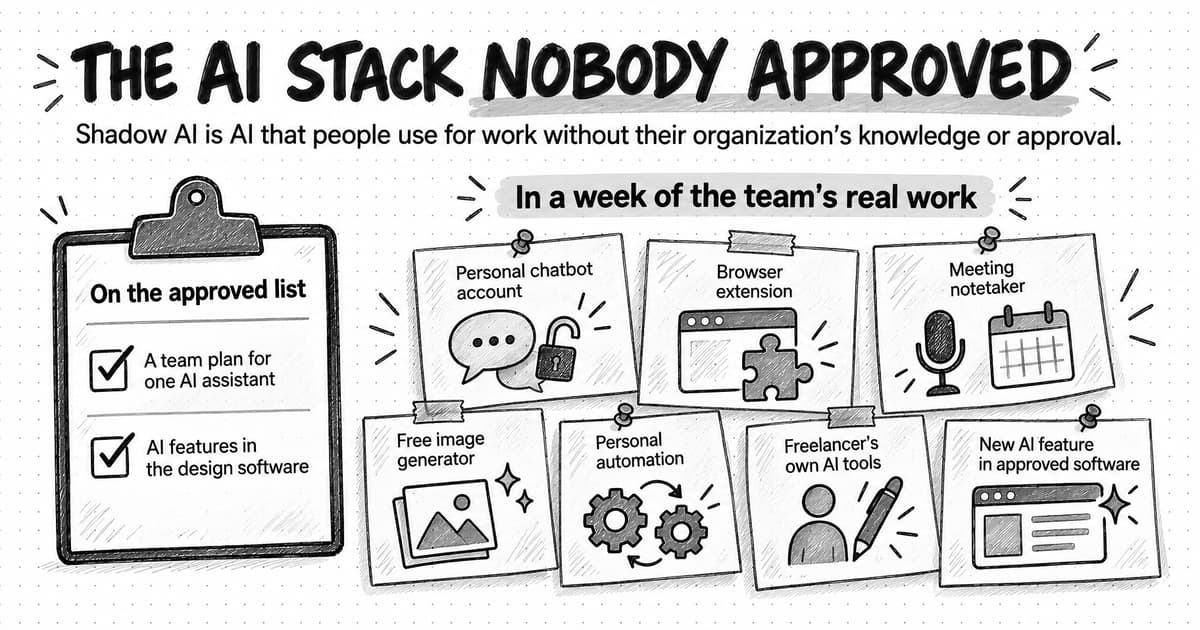
Ask a marketing team which AI tools it uses and you'll usually hear the approved list: a team plan for one AI assistant, say, and the AI features in the design software the company already pays for. Follow a week of the team's work and the list gets longer. The content lead drafts in a personal chatbot account that holds the brand voice and a year of saved instructions. The social media manager polishes posts with a browser extension. A notetaker joins customer calls from someone's calendar, a free image generator supplies the ad concepts, and a freelance writer runs the company's briefs through tools nobody at the company has seen.
That second list is the team's real AI stack, and much of it is shadow AI. Shadow AI is AI that people use for work without their organization's knowledge or approval. It includes tools nobody approved, personal accounts of tools the company does use, and AI features that arrived inside approved software without anyone deciding to switch them on. The UK's National Cyber Security Centre (NCSC) treats it as a kind of shadow IT and makes a point that shapes the right response: shadow IT is rarely malicious. It usually appears when the approved tools make a particular task hard to finish.
So the work in shadow AI is usually real, and often good. What makes it a problem for a marketing team is where it happens. Customer details go into accounts the company doesn't control, AI drafts can reach customers without the checks the team applies to everything else, and when someone leaves, their prompts, saved instructions and finished assets leave with them.
This guide explains what counts as shadow AI, how common it is, why it builds up in marketing teams, where it hides and the six risks it creates. Then it sets out a blame-free response: find it, decide what happens to each tool, move the work onto approved tools and add a policy people will follow, with a worked example and a 30-day plan. The aim is to keep the AI use that helps and move it where the team can see it, check it and keep it.
What counts as shadow AI, and what doesn't
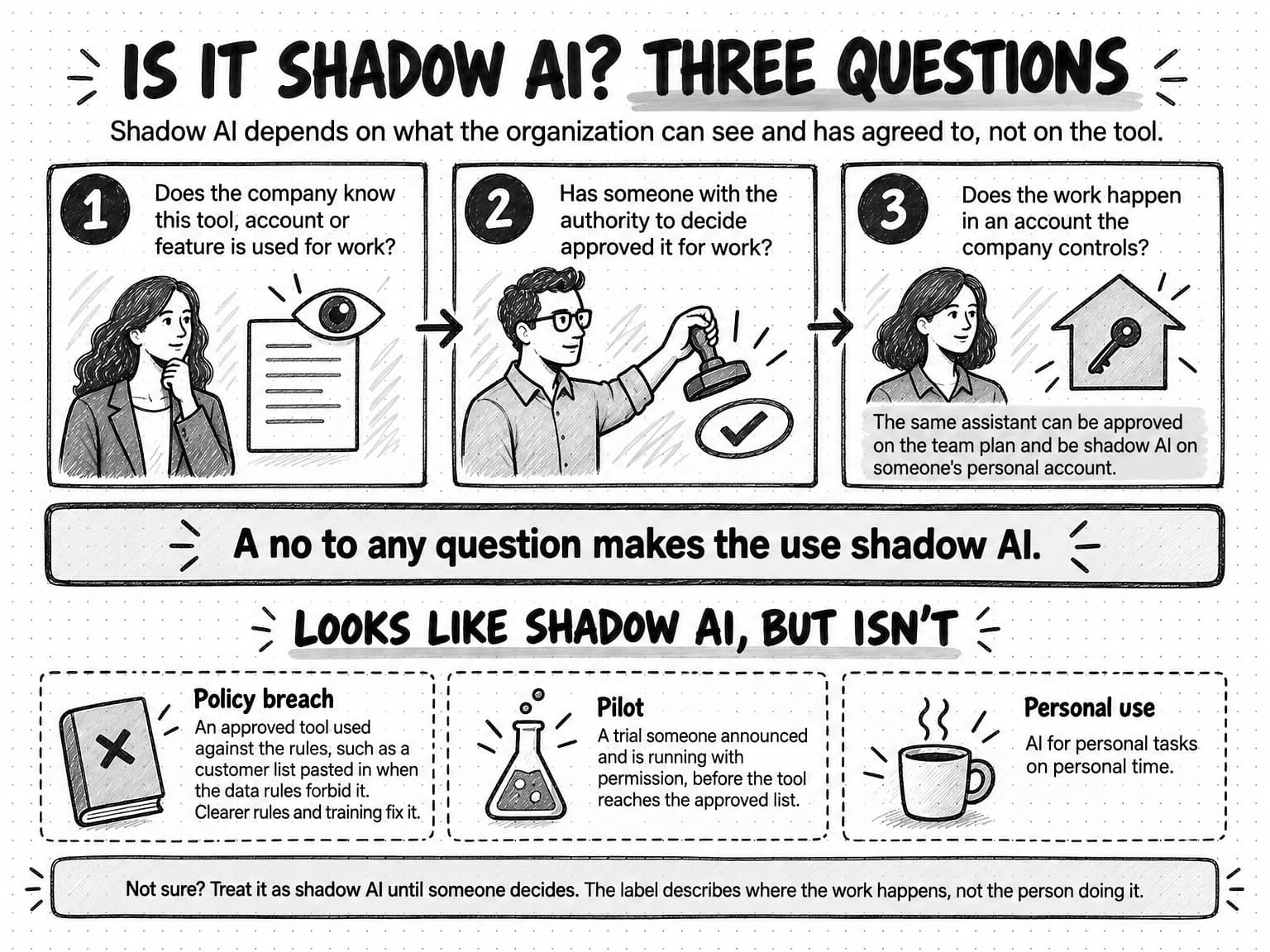
Shadow AI is defined by what the organization can see and has agreed to, not by the tool. The same assistant can be approved on the team plan and be shadow AI on someone's personal account. Three questions settle most cases:
- Does the company know this tool, account or feature is used for work?
- Has someone with the authority to decide approved it for work?
- Does the work happen in an account the company controls?
A no to any of them makes the use shadow AI. The third question catches a case teams often miss. A company can pay for a team plan while half the team keeps working in personal accounts of the same assistant, because that is where their chat history and saved instructions live. The tool is approved; those accounts aren't, and nobody else can see or recover the work in them.
Some AI use looks like shadow AI and isn't. An approved tool used against the rules, such as a customer list pasted into the team's approved assistant when the data rules forbid it, is a policy breach. The company already knows about the tool, so the fix is clearer rules and training. A trial someone announced and is running with permission is a pilot, even before the tool reaches the approved list. AI use for personal tasks on personal time falls outside the question.
Between those sits a gray zone: the personal account someone opens to tidy up one work email, the free tier of a tool the company licenses, the AI feature that appeared in last month's software update. Treat these as shadow AI until someone decides otherwise. The label describes where the work happens, not the person doing it, and it is the start of a decision rather than an accusation.
View the three-question test at full size (opens in a new tab).
Shadow AI vs shadow IT
Shadow IT is the older and broader term. The NCSC describes it as the unknown assets an organization uses for business purposes, and its guidance names AI technologies used without permission, often called shadow AI, as one form of it. IBM's explainer on shadow AI draws the same boundary and names the kind of tool as the difference. That difference matters, because AI tools do different things with what people give them.
| Compared on | Shadow IT | Shadow AI |
|---|---|---|
| What goes in | Files and data people store or share in an unapproved service | The substance of the work: briefs, customer lists, call transcripts, plans and drafts, typed or uploaded as prompts |
| What comes out | Mostly the same files, kept somewhere else | New material, such as an ad, a post or an email, that can go straight to customers |
| What the service may do with it | Store and sync it | Keep it, and in some consumer products use it to train models, depending on the plan and settings |
| What builds up over time | Files in a personal folder | Saved instructions, memory and chat history that make the tool better at the company's work for one person |
| How it arrives | Usually a sign-up or a purchase | Also free tiers, browser extensions and new features in software the company already approved |
The third row matters most for data. In a September 2025 preprint, Stanford researchers who analyzed the privacy policies of six leading US AI developers found that all six appeared to train their models on people's chats by default, that some kept chat data indefinitely, and that business customers' data was generally excluded from training. Someone working in a personal account of a tool the company also licenses may therefore be under different terms from colleagues on the business plan, without anyone having decided that. Terms change and vary by plan, so check the current terms for the plan in use.
The NCSC's advice applies to both: bring the use into the open by meeting the need that led people to the unofficial tool. The table shows why shadow AI needs a marketing owner as well as an IT one, because much of what's at stake is customer information, brand consistency, published claims and the know-how the team has built up.
How common shadow AI is
No survey can measure shadow AI exactly, because people report only what they know about and are willing to admit. Large surveys measure parts of it instead, such as how many people bring their own tools, how many know what's allowed and how many organizations have policies and training. The table gathers six, each with its date, method and sample.
| Survey | Method | Selected findings |
|---|---|---|
| Salesforce, November 15, 2023 | Online survey with YouGov of more than 14,000 full-time employees in 14 countries, October 18–31, 2023 | 28% used generative AI at work, more than half of them without their employer's formal approval. |
| Microsoft and LinkedIn, 2024 Work Trend Index, May 8, 2024 | Survey by Edelman Data & Intelligence of 31,000 knowledge workers in 31 markets, February 15 to March 28, 2024 | 75% used generative AI at work. 78% of AI users brought their own AI tools, 80% at small and medium-sized companies. |
| KPMG and the University of Melbourne, April 2025 | Online survey of 48,340 people in 47 countries, including 32,352 employees, November 2024 to mid-January 2025 | 58% of employees used AI at work regularly. Of those using AI for work, 70% used free public tools and 42% tools from their employer. 56% had used AI at work without knowing whether it was allowed. |
| National Cybersecurity Alliance and CybSafe, Oh, Behave! 2025–2026, September 2025 | Survey of 7,000 adults in seven countries, including the US, UK and India, May 2–27, 2025 | 65% used AI. 52% of employed participants had never been trained on the security or privacy risks of AI tools. |
| Marketing AI Institute and SmarterX, 2025 State of Marketing AI Report | Survey of 1,882 respondents, 63% at director level or above, February to April 2025, promoted through the institute's own channels | 38% said their company had generative AI policies, up from 22% in 2023. 32% said it offered AI training for the marketing team. |
| ISACA, 2026 AI Pulse Poll, May 5, 2026 | Poll of more than 3,400 professionals in IT audit, governance, cybersecurity, privacy and emerging technology roles | 90% believed employees in their organization used AI. 38% reported a formal, comprehensive AI policy (28% in 2025), and 33% AI training for all employees. |
Read together, the surveys point the same way: many people use AI tools their employer didn't provide, many aren't sure what's allowed, and policies and training lag behind the use. Three cautions apply before you quote any single number. The surveys measure different things, from any AI to generative AI only and from bringing your own tools to using them without approval. Several come from companies that sell AI or security products, and as our guide to judging whether market research is credible points out, a vendor's survey may be designed to show that the problem its product solves is urgent. People also under-report behavior that looks bad, which the KPMG authors say may make their own findings understate inappropriate use.
Only the Marketing AI Institute survey is about marketing, and it measures policies and training rather than unapproved use, so none of the sources we checked gives a shadow AI rate for marketing teams as such. The figure that matters is the one you measure in your own team, which the finding method later in this guide is for.
Why shadow AI builds up in marketing teams
Marketing produces a steady supply of the moments the NCSC describes, when the approved tools don't let someone finish a task, for reasons that have little to do with carelessness. Much of marketing is production against fixed dates: drafts, variations, resizes, translations, summaries and reports, the jobs AI tools are built and sold for. When a launch is on Thursday and an approved option would take weeks to arrange, a free tool that works today wins. Nobody sets out to create shadow AI; they set out to hit the deadline.
Marketing also spans more formats than one tool covers. A small team might need copy, images, short video, a voiceover, research and a slide deck in the same week. An approved assistant that handles text well leaves the rest uncovered, so each specialist finds a tool for their own gap. Many such tools are free to start or cheap enough for a personal card, which skips the purchasing step where someone might have asked about data terms. The approved list records what someone bought; the shadow list records the work the team actually does.
AI also arrives without anyone choosing it. Design, email, CRM, writing and meeting software keep adding generative features, and a routine update can bring one into a tool the team approved years ago. The software went through approval; the new feature, which may handle content differently from the rest of the product, often didn't. A team can have shadow AI without a single new subscription.
Some of it comes from outside the payroll. Freelancers and agencies bring their own AI tools to the company's briefs, customer quotes and product screenshots, and companies often don't ask which ones. The line between personal and company work is blurry in marketing, too: people build their own profiles and keep a personal AI account set up the way they like it, so the brand voice ends up saved wherever they do their best drafting.
Many teams have also never been told what's allowed, as the policy and training figures above suggest, and without a rule, people make their own.
Pressure does the rest. Almost half the employees in the KPMG study (48%) worried about being left behind if they didn't use AI, and in the 2024 Work Trend Index, 53% of people using AI at work worried that using it on important tasks made them look replaceable. A team that feels it must use AI, and would rather not be seen relying on it, produces AI use that is widespread and quiet.
Where shadow AI hides in a marketing team
Most shadow AI isn't hidden on purpose. It sits in places nobody thought to check, and each place needs a different way to find it. The table maps seven common places in a marketing team, what each can reach and how to spot it.
| Where it hides | A typical marketing example | What it can reach | How to find it |
|---|---|---|---|
| Personal accounts of AI assistants | A writer drafts in a personal account that holds the brand voice and past briefs | Briefs, drafts, positioning, product plans and anything pasted in | The anonymous survey; expense claims for AI subscriptions |
| Single-format point tools | A free image, video or voice generator used for ad concepts or product clips | Product images, scripts, and people's faces and voices | Card statements and expense claims; the survey |
| AI features in approved software | A generative feature added to the design, email or CRM software | Whatever that software already holds, including customer records and email lists | Each tool's admin settings and release notes |
| Browser extensions | An extension that rewrites posts or summarizes pages wherever its user works | Anything on screen, including inboxes, CRM records and analytics | The browser's extension list, or the survey |
| Meeting notetakers and recorders | A notetaker that joins customer calls and interviews from someone's calendar | Recordings and transcripts of customers, prospects and colleagues | Calendar invitations with an automated attendee; the connected-apps list |
| Personal automations and agents | A personal automation account that posts or sends through a connection to company accounts | Email, files and social accounts, and actions taken in the company's name | The connected-apps list in the admin console of the company's email and file software |
| Freelancers' and agencies' tools | A freelancer runs briefs and interview notes through their own AI tools | Company material held under someone else's account and terms | Contracts, onboarding forms and asking them directly |
The first row is likely to be the biggest. In the KPMG study, 73% of employees who used AI for work used general-purpose generative AI tools, by far the most common kind, compared with 31% for image, video and audio generators.
The riskiest rows may be the smallest. A notetaker records people who may not have agreed to it, an extension with broad permissions can read every page its user opens, and an automation connected to the company's social accounts can publish in the company's name. Look for those three specifically, even when the survey turns up few of them.
The marketing risks of shadow AI
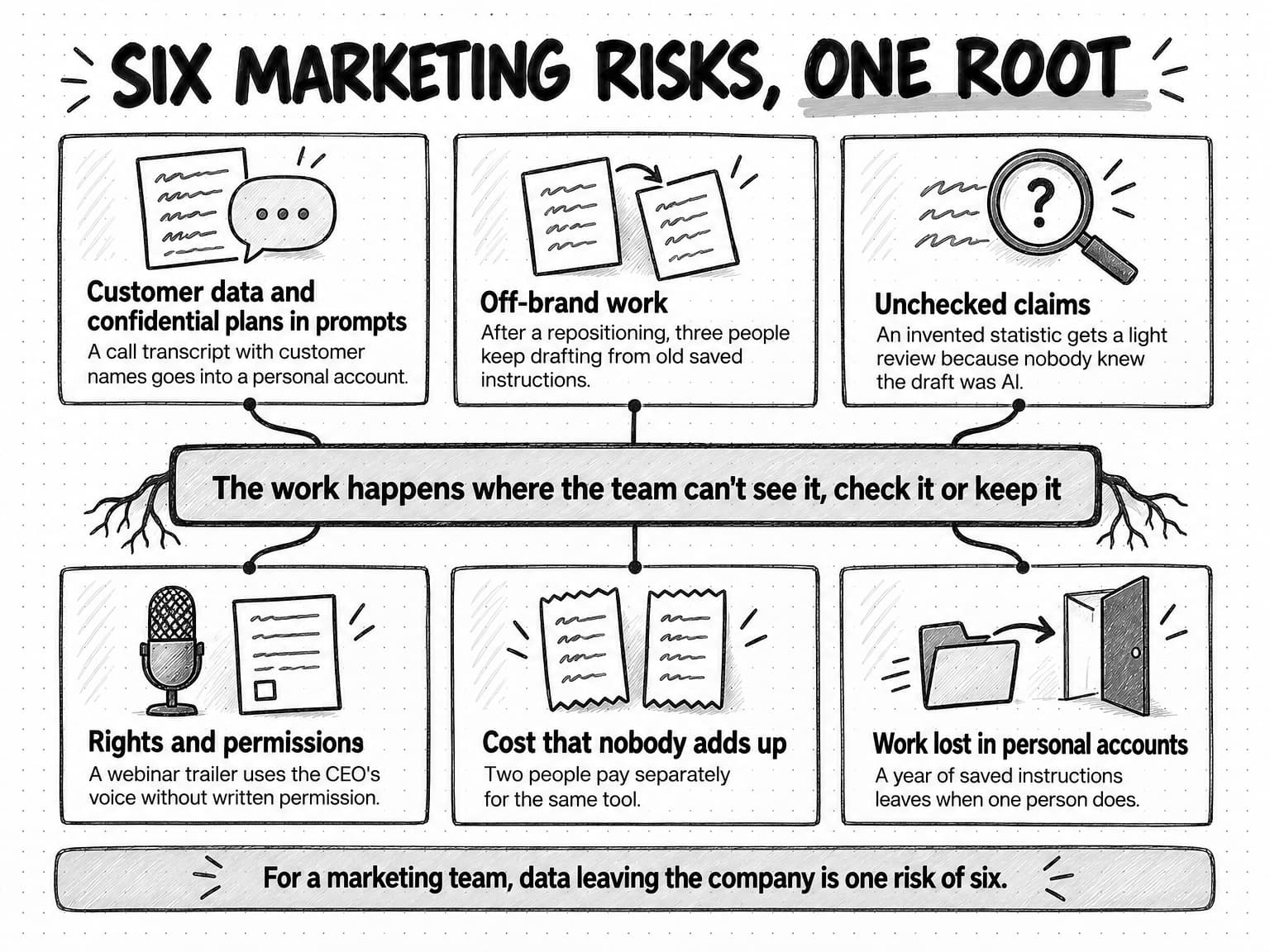
Search for shadow AI and much of what comes back is written by security companies, about data leaving the company. For a marketing team, that is one risk of six. The other five come from the same root, the work happening where the team can't see it, and they show up in the brand, the claims, the rights, the budget and the team's own record of its work.
View the six marketing risks at full size (opens in a new tab).
| Risk | How it happens | What it can cost | First fix |
|---|---|---|---|
| Customer data and confidential plans in prompts | A customer list, call transcript or launch plan goes into a personal account | Data handled under terms the company never agreed to, and a breach nobody can trace | Data rules, plus an approved tool that can do the job |
| Off-brand work | Each person works from a private copy of the voice, positioning and claims | Messages that drift apart, and outdated positioning in live campaigns | One shared brand context with an owner |
| Unchecked claims | AI drafts with invented or outdated facts get a light review because nobody knows AI was involved | Corrections, complaints and claims the company can't support | A claim check on every draft, and AI use people can mention |
| Rights and permissions | Copyrighted material goes in; generated faces, voices and images come out unchecked | Assets the company can't protect, or that use someone's work or likeness without permission | Record the tool, prompt, sources and permissions for every asset |
| Cost | Overlapping subscriptions, paid separately and often on personal cards | Paying several times for one job, and spending nobody tracks | An inventory and one approved tool per job |
| Work lost in personal accounts | Prompts, instructions, briefs and assets live in one person's account | Work nobody else can continue, which leaves when its owner does | Shared places for the work, and an offboarding step |
Customer data and confidential plans in prompts
Marketing work runs on material that shouldn't leave the company casually: customer lists for segmentation, call transcripts for case studies, pipeline figures, unannounced launches and prices, and agency work under a nondisclosure agreement. A lot of it already goes into public tools. In the KPMG study, 48% of employees said they had uploaded company information, such as financial, sales or customer information, into public AI tools, and in the National Cybersecurity Alliance and CybSafe survey, 43% of the 2,521 workers asked admitted sharing sensitive work information with AI tools without their employer's knowledge.
What happens next depends on the account. A business plan may keep content out of model training and let an administrator control retention and access; a personal account of the same tool may do neither, and the company can't see what was shared in it, ask for it to be deleted or know what to tell customers if something goes wrong.
Breach research gives a sense of the stakes. IBM's Cost of a Data Breach Report 2025, conducted by the Ponemon Institute and sponsored and analyzed by IBM, studied breaches at 600 organizations between March 2024 and February 2025. One in five reported a breach due to shadow AI. Organizations with high levels of shadow AI had breach costs about $670,000 higher on average than those with low levels or none, and incidents involving shadow AI compromised personally identifiable information more often than breaches overall (65% against 53%).
Our guide to AI guardrails for marketing teams lists the four kinds of data to keep out of AI tools by default and seven questions to ask any vendor. A shadow AI review adds a practical point: a data rule holds only when the approved tool can do the job. If the team's approved assistant can't handle a two-hour interview transcript, the transcript goes into whichever tool can.
Off-brand work from private copies of the brand
Each person who drafts in a personal account builds a private copy of the brand: a saved voice description, a positioning line, a list of claims they believe are approved, a few examples of good work. The copies start out the same and drift with every edit. As our guide to where marketing context should live explains, context drifts when it's copied, and nothing tells the AI which copy is current.
Shadow AI makes the drift harder to fix, because nobody knows where the copies are. Suppose the company repositions after a launch. The brand owner updates the guidelines and the shared brief, and people drafting in approved tools pick up the new story, while the three people working from saved instructions in personal accounts keep writing the old one. Both versions reach customers in the same month, and the brand owner can't correct copies they can't see.
Better guidelines can't fix this on their own. An AI tool follows only the guidance it can read, and a copy pasted into a personal account months ago is a snapshot. Our guide to brand guidelines covers what an AI tool needs from them. The shadow AI fix is one maintained copy of the brand context, with an owner, that every approved tool and every teammate reads from.
Unchecked claims in drafts nobody knew were AI
AI drafts read fluently whether or not their facts are right. A model can invent a statistic, misstate a feature or repeat last year's price in a sentence that sounds as confident as the true ones around it. Teams normally catch these errors in review, and shadow AI weakens review in a specific way: when people don't say they used AI, reviewers don't know which drafts need a closer look.
Hidden use is common. In the 2024 Work Trend Index, 52% of people using AI at work were reluctant to admit using it for their most important tasks. In the KPMG study, 57% of employees said they had used AI without being open about it, such as presenting AI-generated content as their own, 66% had relied on AI output without evaluating it, and 56% said they had made mistakes in their work because of AI.
A marketing claim needs the same evidence whoever, or whatever, drafted it. So the fix has two parts. Check every factual claim before anything goes out, whatever tool produced the draft, using the method in our guide to preventing AI hallucinations in marketing. And make AI use something people can mention without embarrassment, so reviewers know where to look.
Rights and permissions in generated material
Generated material raises two questions marketing teams already ask about any asset: what the company owns, and what it's allowed to use. Shadow AI tends to leave both unasked.
On ownership, the US Copyright Office concluded in January 2025 that AI output can be protected by copyright only where a human author has determined enough of its expressive elements. Prompts alone don't qualify, although a person's creative arrangement or modification of the output can be protected. An image made in someone's personal account, with no record of what a person contributed, may be hard to protect.
On use, the KPMG upload figures include copyrighted material as well as company information, and marketing teams handle a lot of other people's work: stock images, agency creative, partner logos, licensed fonts and music. Uploading it to a tool nobody vetted may breach a license or a contract. Generating a real person's face or voice needs that person's permission, and a tool picked up for one campaign won't necessarily ask. Meeting notetakers add another question: whether everyone on the call agreed to be recorded.
The rules differ by country, state and contract, so take these questions to a lawyer when the answer matters. What a shadow AI review can do is make sure they get asked, and record the tool, the prompt, the sources and any permissions with every generated asset.
Cost that nobody adds up
Shadow AI looks cheap because each piece of it is. The cost appears in the total: several people paying separately for overlapping assistants, a point tool bought for one campaign and never cancelled, a personal subscription to something the company already pays for inside approved software. Spread across personal cards and expense claims, the sum is invisible. Seat-based pricing adds to it, because, as our guide to AI tokens and credits explains, its cost grows with headcount rather than with the work done.
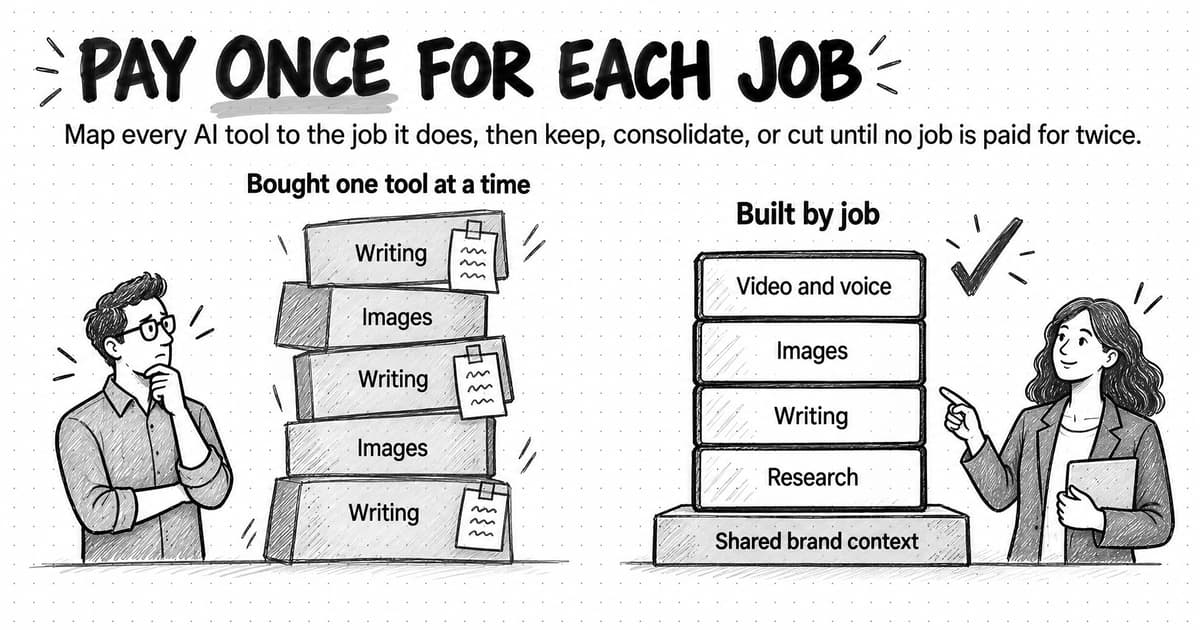
There is also the cost nobody invoices: rework on drafts built from outdated positioning, and time lost hunting for an asset made in a tool only one person can open. The inventory later in this guide finds these costs; deciding which tools to keep, consolidate or cut is the subject of our guide to building an AI marketing stack without paying twice for the same job.
Work lost in personal accounts
The last risk is the quietest. Someone who has worked in a personal AI account for a year has built something valuable there: refined instructions for each type of content, a saved description of the brand, a history of drafts and the reasoning behind decisions, a library of generated images. The rest of the team can't see any of it, and the company has no way to recover it. The NCSC's guidance describes the same pattern with files: sensitive company data ending up in personal cloud accounts.
When that person is on leave, a colleague can't pick up the work. When they leave the company, the work goes with them, and any company material in the account stays there. Saved memory sharpens the loss, because the account gets better at the company's work the longer one person uses it. Our guide to AI agent memory explains why memory saved in one person's account helps only that person, and why a team's shared knowledge belongs at the project or organization level.
Why banning AI tools doesn't stop shadow AI
Faced with those risks, a ban looks like the safe choice. The evidence suggests it often fails to stop the use and can push it out of sight. In the KPMG study, employees who said their organization had banned generative AI were the most likely to report uploading company information or copyrighted material to public AI tools (67%), ahead of those whose organization had a policy guiding its use (56%), those with no policy (33%) and those who didn't know (38%). The authors read this as a sign that outright bans may not work and that having a policy doesn't guarantee people follow it, and they call for clear guidance and education.
Two cautions keep that finding in proportion: it shows an association, not proof that bans cause the behavior, and only 6% of employees said their organization had a ban. But it fits the rest of the evidence. People who already hesitate to admit their AI use won't announce it after a ban, and the NCSC warns that when staff are blamed or punished for shadow IT, their colleagues become reluctant to report their own. Its guidance recommends “a positive and no-blame approach” instead.
Some uses do deserve a firm stop: an automation that publishes or sends in the company's name without an approval step, a notetaker recording calls without consent, customer data going into a tool that can't meet your data terms. Block the specific use, explain why and offer an approved way to do the job. A targeted block with an alternative keeps the work in view. A blanket ban leaves the deadline in place, so the work either stops or moves somewhere even harder to see, such as a personal phone.
How to find shadow AI without a witch hunt
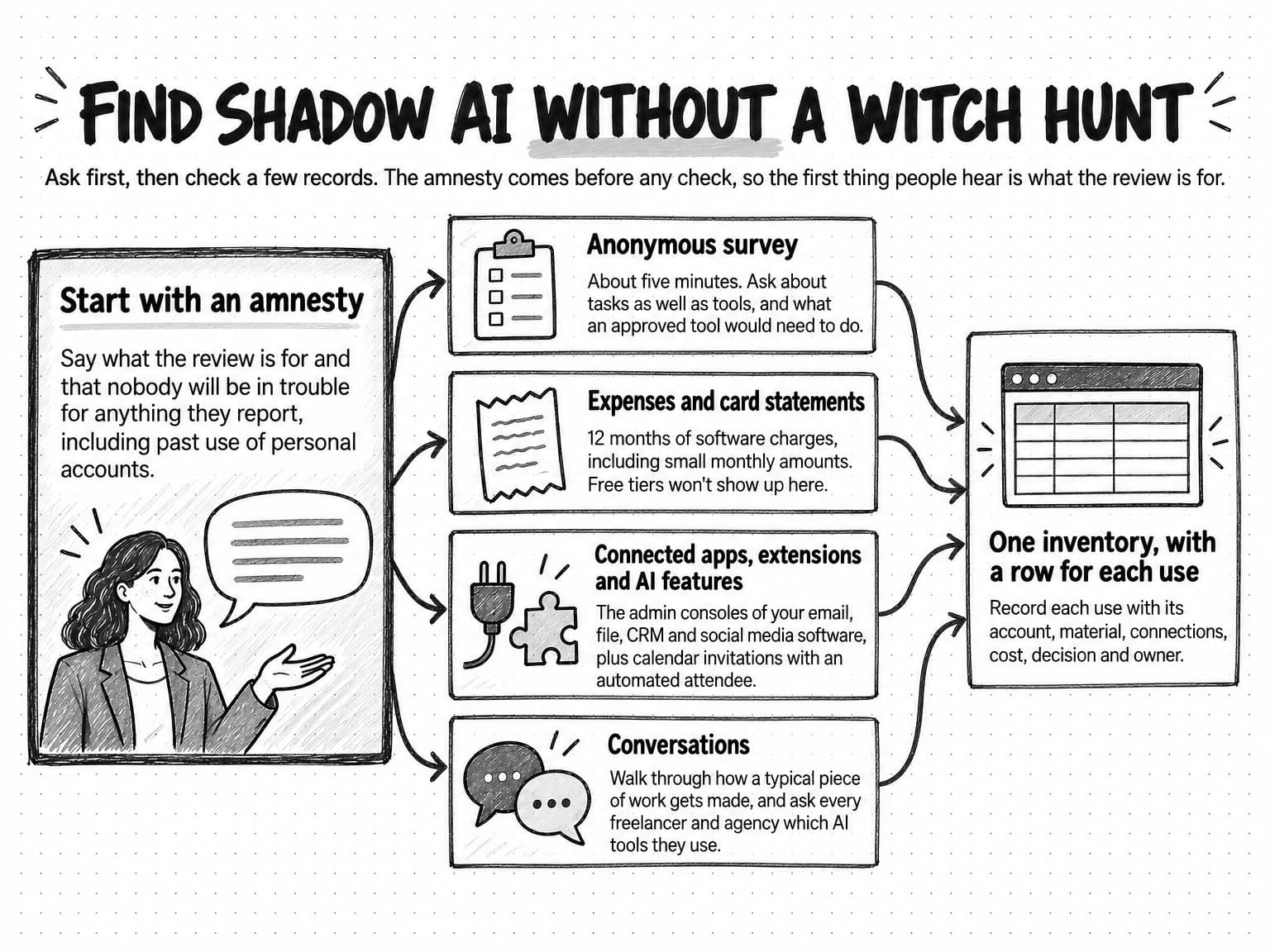
Finding shadow AI is mostly a matter of asking well and then checking a few records. Order matters: announce an amnesty before any checks, so the first thing people hear is what the review is for. The NCSC notes that people are more likely to report shadow IT where the security culture is healthy.
View the finding method at full size (opens in a new tab).
Start with an amnesty
Tell the team what you're doing and why. You want to know which AI tools people use for work and what for, so the team can get approved tools for the jobs that matter. Say plainly that nobody will be in trouble for anything they report, including past use of personal accounts, and say what happens afterward. A short note is enough:
Subject: Which AI tools do you use for work? (No wrong answers)

Many of us use AI tools to get work done, including tools and
accounts the company never set up. That makes sense: the tools we
provide don't cover everything the work needs.

Over the next two weeks we're taking stock. Please fill in this short
anonymous survey by [date]: [link]. Nobody will get in trouble for
anything they report, including past use of personal accounts.

What happens next: by [date] we'll publish an updated list of approved
tools, set up company accounts for the jobs that need them, and help
move work out of personal accounts. If something you use has to stop,
we'll explain why and offer another way to do the job.

Questions: [owner's name and channel]
Run a short anonymous survey
Keep the survey to about five minutes and make it anonymous, because people report more when their name isn't attached. Ask about tasks as well as tools, since the tasks show what the approved list is missing, and ask what an approved tool would need to do, since the answers become the brief for any replacement.
Anonymous AI use survey (about 5 minutes)

1. Which AI tools, apps, extensions or features do you use for work?
   Include free tools, personal accounts, browser extensions, meeting
   notetakers and AI features inside other software.
2. For each one, what do you use it for, and how often?
3. For each one, do you use a company account, a personal account,
   or a free plan with no account?
4. What kind of material goes into it?
   (public material / internal drafts / customer or personal data /
   confidential plans or figures / other people's work, such as
   stock images or agency files)
5. Is it connected to a company account, such as email, files,
   calendar or social media?
6. Do you pay for any of it yourself or through expenses? Roughly
   how much a month?
7. What would an approved tool need to do for you to switch to it?
8. Is there anything about AI use on the team you're unsure or
   worried about?
Check expenses and card statements
Ask finance for 12 months of software charges on company cards and expense claims, and look for AI tools among them, including small monthly amounts. This finds the paid tools. Free tiers won't appear, which is why the survey comes first.
Check connected apps, extensions and AI features
The admin console of the company's email and file software usually lists the third-party apps people have allowed into their company accounts. Look for notetakers, writing assistants, automation services and anything with access to mail, files or calendars; the company's social media accounts, CRM and email marketing software keep similar lists. While you're in each console, check which AI features are switched on in the software itself. If the company manages its browsers, their admin settings can list installed extensions, and calendar invitations with an automated attendee point to notetakers.
Talk to people, including contractors
Short conversations find what surveys miss, especially the workarounds people don't think of as tools. Ask a few people to walk you through how a typical piece of work gets made. Ask freelancers and agencies which AI tools they use on your material, and add the question to contractor onboarding so the answer stays current.
Record everything in one inventory
Bring the findings into one list with a row for each use, since one tool can serve several jobs with different risks. NIST's AI Risk Management Framework lists an inventory of AI systems, resourced according to the organization's risk priorities, among the outcomes of AI governance. For a marketing team, a shared spreadsheet with these columns is enough. If you're also running the stack audit in the AI marketing stack guide, keep the two in the same file.
| Use | The job, such as summarizing customer interviews or drafting ad concepts |
|---|---|
| Tool or feature | The product, plan or feature, as your team knows it |
| Who | The people or roles who use it |
| Account | Company, personal, or a free plan with no account |
| Material | The most sensitive kind of material that goes in |
| Connections | Company accounts it can read or act in |
| Cost | Monthly cost, and who pays |
| Decision | Approve, approve with conditions, replace or block |
| Conditions | Limits on material, tasks or review |
| Owner | The person who answers for this use |
| Next review | When to look at the decision again |
How to decide what happens to each tool
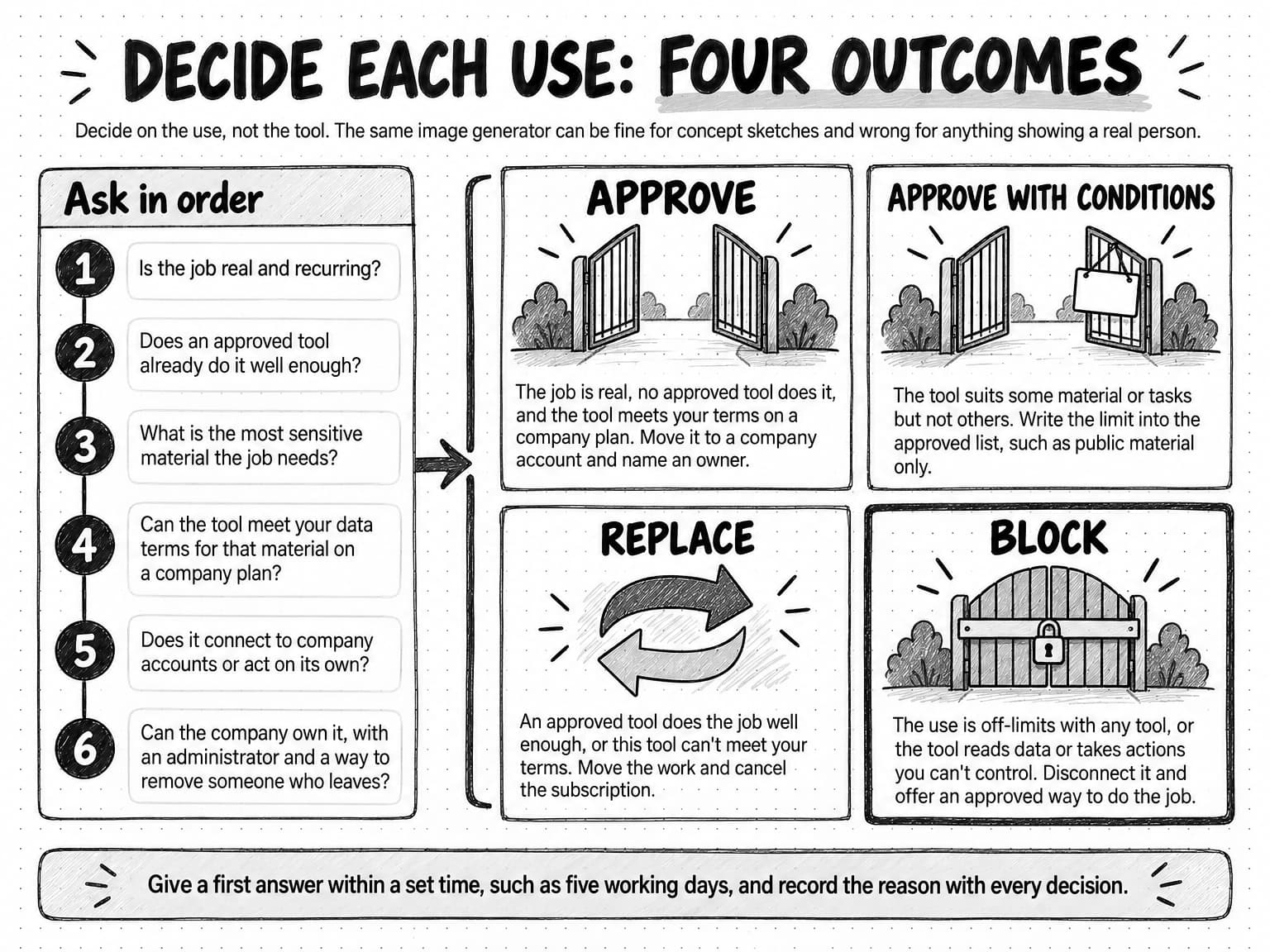
Decide each row of the inventory on its use: the same image generator can be fine for concept sketches and wrong for anything showing a real person. A stack audit asks whether a tool is worth paying for; this review asks whether a use is allowed, and on what terms. Six questions, asked in order, settle most rows:
- Is the job real and recurring? A finished one-off experiment can simply be retired.
- Does an approved tool already do the job well enough? If it does, replace.
- What is the most sensitive material the job needs? That sets the bar for the next question.
- Can the tool meet your data terms for that material on a plan the company can buy? The seven vendor questions in the guardrails guide cover what to check, from training and retention to admin controls.
- Does it connect to company accounts or act on its own? Anything that publishes, sends, spends or deletes needs a human-in-the-loop approval step that a person controls.
- Can the company own it, with a company account, an administrator, shared access and a way to remove someone who leaves?
The answers point to one of four outcomes.
| Outcome | When it fits | What happens next |
|---|---|---|
| Approve | The job is real, no approved tool does it, and the tool meets your terms on a company plan | Move it to a company account, add it to the approved list and name an owner |
| Approve with conditions | The tool suits some material or tasks but not others | Write the limit into the approved list, such as public material only or no real people's faces, and tell the people who use it |
| Replace | An approved tool does the job well enough, or this tool can't meet your terms | Move the work, cancel the subscription and remove company material from the old account |
| Block | The use is off-limits with any tool, or the tool reads data or takes actions you can't control | Disconnect it, explain why and offer an approved way to do the job |
Two habits keep the decisions useful. Decide quickly: the NCSC warns that people who don't feel their needs are being met promptly find their own solutions, so set a response time, such as five working days for a first answer, and an interim rule for the wait. And record the reason with each decision, so the next person who asks gets the same answer and the decision can be revisited when the tool or its terms change.
View the four outcomes at full size (opens in a new tab).
When the outcome is replace, test the replacement on a few recent jobs from the inventory before anyone switches, and compare the results with the old tool's. Our guide to evaluating an AI marketing agent describes a trial built on your own assignments, and AI evals turn that comparison into a repeatable check for work you approve for recurring use.
A worked example: one team's shadow AI inventory
Quillmarsh is a fictional company, invented for this example, and its people, tools and numbers are illustrative. It sells project-planning software and has about 80 employees, with a five-person marketing team (a head of marketing, a content lead, a product marketer, a designer and a social media manager) and two freelance writers. Its approved AI list had two entries: a team plan for a general-purpose AI assistant, and the AI features in the company's design software.
The head of marketing sent the amnesty note on a Monday, kept the survey open for a week and checked expenses and connected apps alongside it. The inventory came to ten uses outside the approved list.
| # | Use | Where it happened | What went in | Decision |
|---|---|---|---|---|
| 1 | Drafting blog posts and emails | The content lead's personal assistant account, with the brand voice and a year of saved instructions | Briefs, drafts and product notes | Replace with the team plan, after moving the saved instructions into the shared brand context |
| 2 | Summarizing customer interviews | The product marketer's personal assistant account | Transcripts with customer names and company details | Replace with the team plan, and remove details the summary doesn't need before uploading |
| 3 | Ad concept images | The designer's free image generator | Prompts and product screenshots | Approve with conditions on a company plan: concepts only, no real people, prompt and date saved with each image |
| 4 | Rewriting social posts | The social media manager's browser extension | Drafts, though it could read every page, including the CRM | Block, and use the team plan for rewrites |
| 5 | Notes from customer and sales calls | A notetaker connected to the product marketer's calendar | Recordings of customers and prospects | Approve with conditions: a company account, a recording notice on every call and consent rules checked with a lawyer |
| 6 | Posting to the company's social pages | A personal automation account connected to the pages | Posts and posting access | Block, and rebuild it in an approved tool with a person's approval before anything posts |
| 7 | Product demo videos | A video tool paid for on expenses | Product screenshots and scripts | Approve on a company account, since no approved tool covered video |
| 8 | A webinar trailer in the CEO's voice | A voice generator on the content lead's personal account | A recording of the CEO | Block until the CEO gives written permission and the tool's terms are reviewed |
| 9 | Freelance blog drafts | The freelancers' own AI tools | Briefs and interview notes | Approve with conditions: a contract clause listing the tools, and no customer data |
| 10 | Keyword research and briefs | Two personal subscriptions to the same SEO tool | Keywords and drafts | Approve one company seat and cancel both personal subscriptions |
Before the review, Quillmarsh's people were paying about $260 a month for AI tools on personal cards and expense claims. Afterward the company paid about $140 a month for four company accounts, on one bill with an owner. Both figures are illustrative.
The money was the smallest result. Customer interview transcripts stopped going into a personal account, the automation that could post to the company's pages without anyone's approval was switched off, and the content lead's year of refined instructions moved into the shared brand context, so the freelancers' drafts now start from the same voice. The review didn't remove the need for judgment: drafts from every tool still go through the claim check, and the notetaker still needs consent on every call.
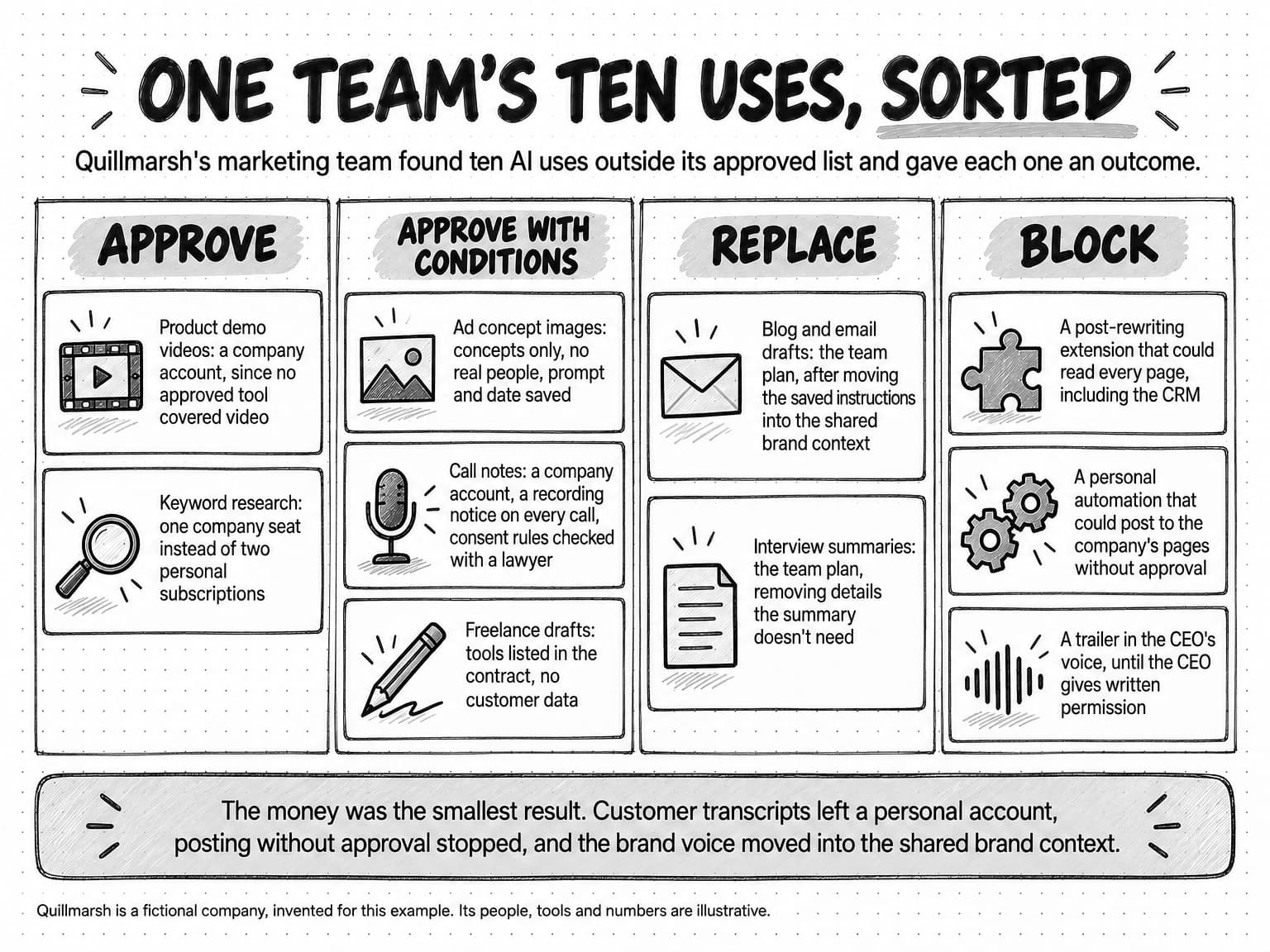
View the sorted inventory at full size (opens in a new tab).
How to move the work onto approved tools
Approving a company account is the easy part. The work people built up in personal accounts has to move too, or they'll keep going back to it. Work through this checklist for each use you replace or move onto a company account:
- Copy out the saved instructions, custom settings and remembered details the person relies on, and review them before reusing anything.
- Move the brand material worth keeping into the team's shared brand context, where its owner can check it, rather than into another personal account.
- Move work in progress, such as drafts, briefs and research, into the team's shared folders or projects.
- Move generated assets with their history: the tool, the prompt, the date, the source material and any permissions for faces, voices or music.
- Rebuild useful automations in an approved tool, with a person's approval before anything publishes, sends, spends or deletes.
- Test the replacement on a real task before switching off the old tool.
- Revoke the old tool's connections to company accounts, using the connected-apps lists from the review.
- Delete company material from the personal account where the tool allows it, and check its retention terms, since deleting a chat may not remove every copy straight away.
- Cancel the subscription and stop the expense claim.
- Update the inventory with the date and the new home of the work.
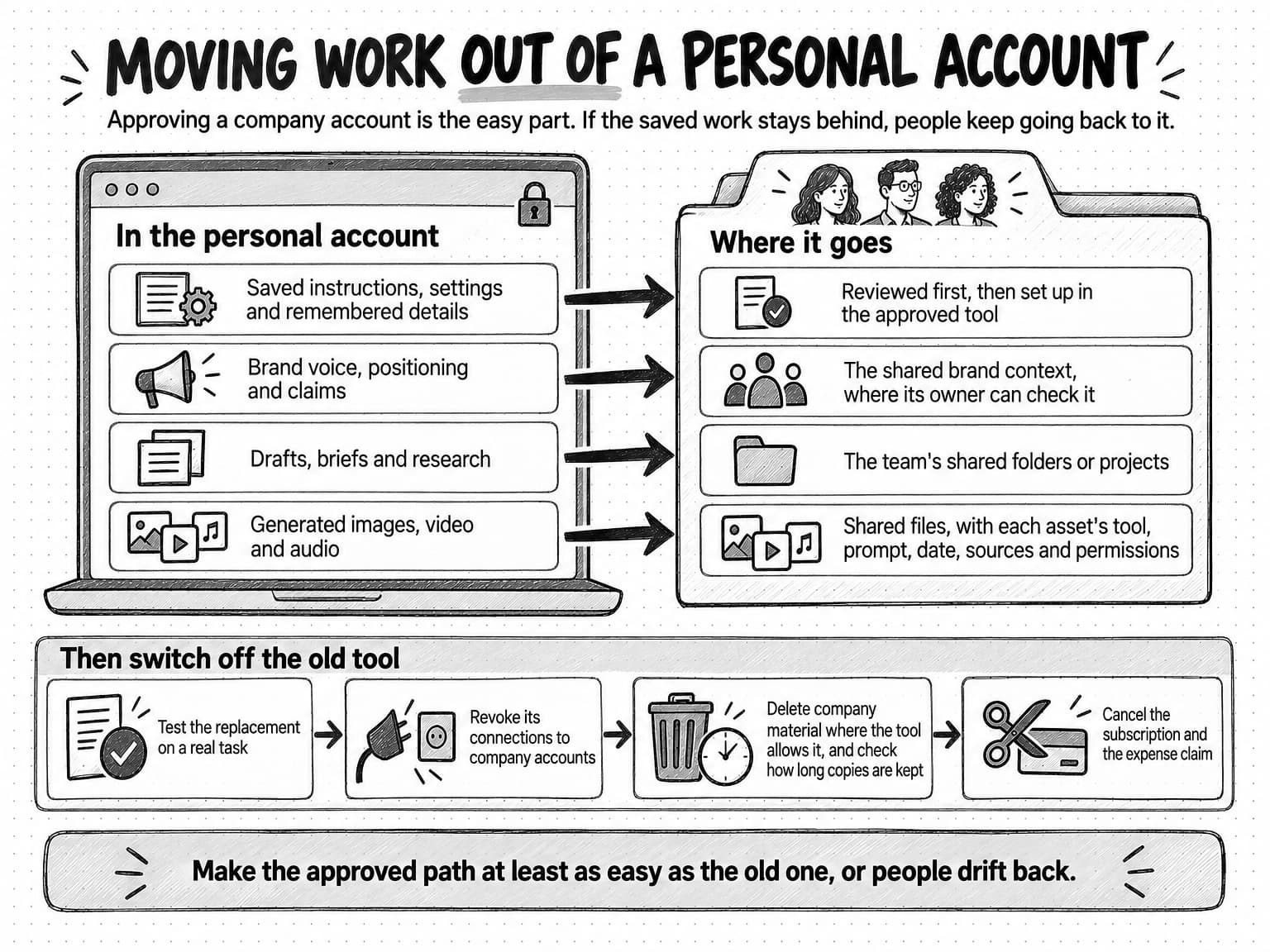
View the migration diagram at full size (opens in a new tab).
Make the approved path at least as easy as the one it replaces. If the approved tool is slower, lacks the saved context people relied on or does the job worse, people will drift back, and the next survey will show it.
Then add AI to offboarding, so the next departure doesn't recreate the problem. When someone leaves, ask which AI tools they used for work, move their saved instructions and work in progress to shared places, revoke their tools' connections to company accounts and ask them to delete company material from personal accounts. NIST's framework includes processes for phasing out AI systems safely, and for a marketing team the offboarding checklist is the everyday version.
A shadow AI policy people will follow
Most of the rules already exist in a standard AI usage policy. Our AI usage policy template for marketing teams covers approved tools and company accounts, data rules, approvals, incident reporting and a regular review. If the team has no policy yet, start there.
A shadow AI review adds the part that makes the approved path usable. A policy people follow tells them how to get a tool approved, how long that takes and what to do in the meantime, and it treats past use as information rather than as an offense. Add an addendum like this one, adjusted to your team. Like the template it extends, it's a starting point, not legal advice.
Shadow AI addendum to [Company]'s AI usage policy

1. Approved list. The current list of approved AI tools, accounts and
   uses, with any conditions, is at [location]. If a tool isn't on
   the list, it isn't approved yet.
2. Requests. To use a new AI tool, feature, extension or notetaker
   for work, send [policy owner] the tool, the job, the material that
   would go into it and any accounts it would connect to, using
   [form or channel].
3. Response time. You'll get a decision, or a date for one, within
   [5 working days].
4. While you wait. Until a request is approved, use the tool only
   with public material, don't connect it to company accounts, and
   don't publish its output without the usual review.
5. Amnesty. Telling us about AI tools you already use, including
   personal accounts, will never count against you. Report them by
   [date] using [survey or form].
6. Contractors. Freelancers and agencies list the AI tools they use
   on our work before they start, and keep our material out of tools
   we haven't approved.
7. Leaving. When someone leaves, their AI accounts are part of
   offboarding: work moves to shared places, connections are revoked
   and company material is deleted from personal accounts.
8. Review. [Policy owner] reviews this addendum and the approved list
   every [three months]. Last reviewed: [date].
Two things keep the addendum working after the first month. The first is a short session that shows the approved tools doing real jobs from the inventory; in the Marketing AI Institute survey, a lack of education and training was the most-cited barrier to AI adoption, named by 62% of respondents. The second is the review date. IBM's 2025 breach study found that only 34% of organizations with AI governance policies regularly audited for unsanctioned AI, so put the next review in the calendar on the day you publish the policy.
How to tell whether the work has moved into the open
Check progress after a month and again after three. Measure the work, not the people: count tools, accounts, requests and reports, and leave out prompt logs and individual monitoring, which would recreate the fear that sent the work out of sight.
| Inventory coverage | The share of the team that answered the survey, and the share of known uses with a recorded decision. Every known use should have one. |
|---|---|
| Request turnaround | Working days from a tool request to a decision, compared with the response time the policy promises. |
| Work in company accounts | In a repeat survey, the share of people who say their regular AI work happens in company accounts. |
| Clarity | In the same survey, the share who say they know what is allowed. |
| Connections | Company accounts still connected to tools that are not on the approved list. |
| Duplicates retired | Personal and expensed subscriptions cancelled, and AI spending now on company accounts. |
| Requests and reports | New tool requests and reported mistakes or near misses. A rise in the first months is a good sign: people are using the process. |
Read the measures together. If requests have stopped but the repeat survey still finds personal accounts, the approved path is too slow or the approved tools don't do the job, and the fix lies in the tools or the response time rather than in more rules.
A 30-day plan for bringing shadow AI into the open
For a small marketing team, the whole review fits in a month. The order matters more than the pace: amnesty before checks, decisions before migration, and a working replacement before anything is switched off.
| Week | What to do | Done when |
|---|---|---|
| Week 1 | Name an owner. Send the amnesty note and the survey. Ask finance for 12 months of AI charges, and pull the connected-apps lists. | The survey has closed and the records are in hand |
| Week 2 | Build the inventory, one row per use. Talk to the people with the most entries and to contractors. Stop anything that acts in company accounts without approval or sends customer data to a tool that can't meet your terms. | Every known use is listed and the urgent risks are stopped |
| Week 3 | Decide each row: approve, approve with conditions, replace or block. Set up company accounts. Publish the approved list with its conditions, and add the policy addendum. | Every row has a decision, a reason and an owner |
| Week 4 | Move the work with the migration checklist, revoke old connections and cancel duplicates. Run a short session on the approved tools, add AI to offboarding, and book the next review and repeat survey. | Replaced tools are switched off and the next review is in the calendar |
A larger team may need longer for the third week. At the end of the month, the team has an approved list that matches its work, which is also the starting point for moving from scattered individual use to shared practice, the path our guide to the five stages of becoming an AI-native marketing team describes.
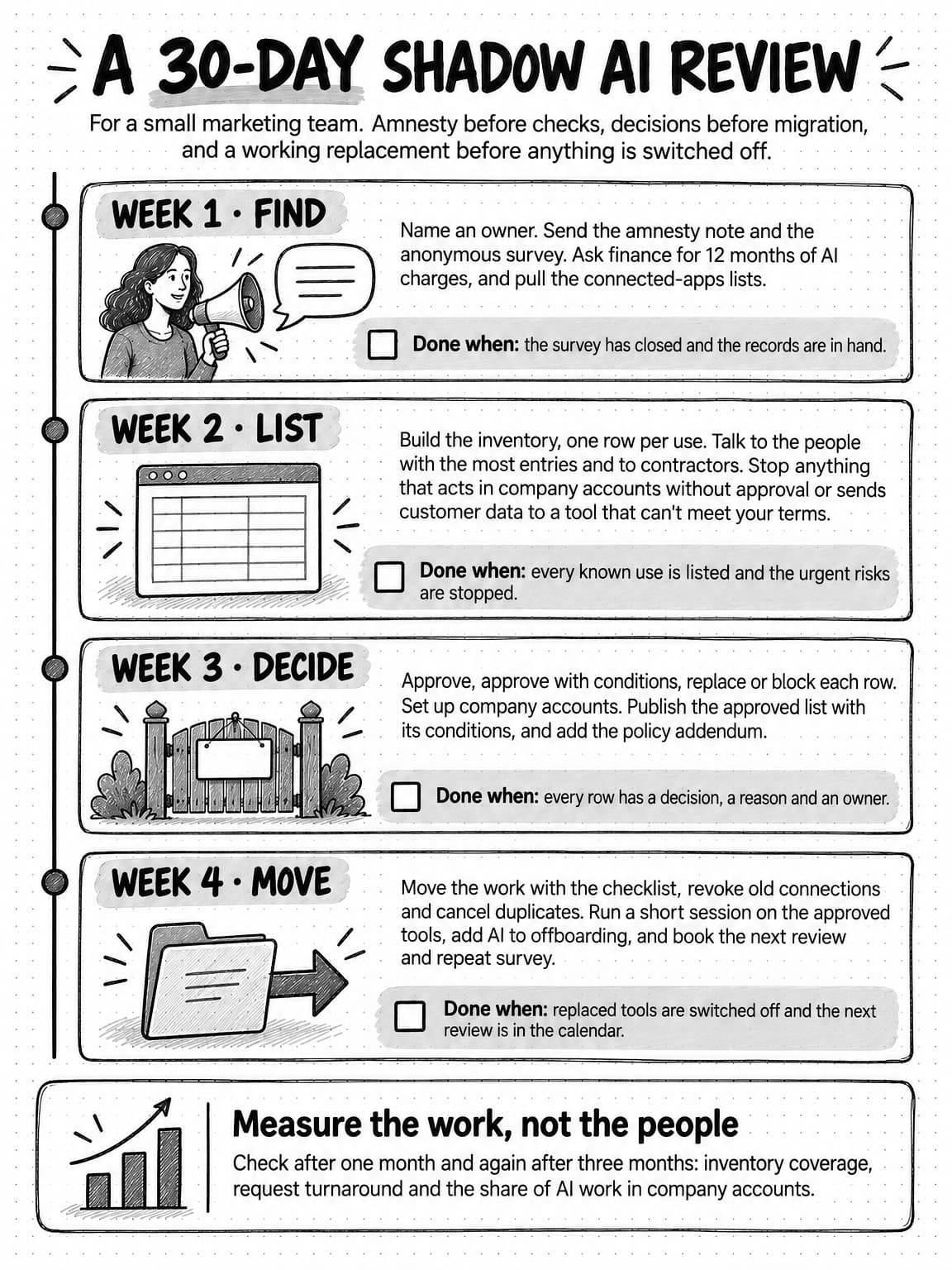
View the 30-day plan at full size (opens in a new tab).
How Ampere keeps marketing AI work in a shared system
Much of shadow AI in marketing is context, work and spending scattered across personal accounts and point tools. Ampere, the AI marketing agent, is designed to keep that work in one shared system.
Most work in Ampere is scoped to the Organization instead of one person's account, including Projects, uploaded files, scheduled tasks, AI Tool runs, voices, usage, billing and connected accounts, and some resources also record who created them. Team roles are owner, admin, member and viewer, with billing access managed separately. Each session keeps its own access and can be shared with view, edit or owner access, so a colleague can review work someone else started or continue it.
Brand context lives in the Organization's Brand memory, not in one person's saved instructions. Ampere studies the brand and saves evidence-backed briefs on its voice, positioning, audience and more. The team can review and correct them, and Ampere can reuse them in later work. Ampere also brings 200+ AI tools & skills into the same system, so image, video, voice and research jobs that often send people to separate point tools can draw on the same Brand memory.
Credits are shared across the Organization rather than allocated per seat, and the credit control shows recent 24-hour and 7-day usage where your access allows, so AI spending sits in one place.
On data, Ampere does not directly use private customer prompts, files, chat history, project context, agent memory, integration data, or outputs to train Ampere models by default. Ampere is based in the United States, and Ampere-controlled systems are designed to store and process service data in the United States; third-party AI, infrastructure, billing, integration and analytics providers may process data as needed to provide the service. Check those terms against your own data rules, as you would for any tool on the approved list.
Ampere is intended for business and professional use, and its output can be inaccurate or incomplete, so people review the work before relying on it or publishing it. Ampere drafts and prepares; your team decides what goes out.
Sources and further reading
- IBM, What is shadow AI?, IBM Think, October 25, 2024.
- National Cyber Security Centre, Shadow IT, published July 27, 2023, reviewed August 14, 2026.
- Microsoft and LinkedIn, 2024 Work Trend Index Annual Report: AI at Work Is Here. Now Comes the Hard Part, May 8, 2024.
- Salesforce, More than Half of Generative AI Adopters Use Unapproved Tools at Work, November 15, 2023.
- Nicole Gillespie, Steve Lockey, Tabi Ward, Alexandria Macdade and Gerard Hassed, Trust, attitudes and use of artificial intelligence: A global study 2025, The University of Melbourne and KPMG, April 2025, DOI 10.26188/28822919.
- National Cybersecurity Alliance and CybSafe, Oh, Behave! The Annual Cybersecurity Attitudes and Behaviors Report 2025–2026, executive summary, September 30, 2025.
- Marketing AI Institute and SmarterX, 2025 State of Marketing AI Report, 2025. The methodology page notes that the institute's audience leans toward AI education.
- ISACA, AI use accelerates while governance and ROI lag, says new ISACA research, May 5, 2026, on the 2026 AI Pulse Poll.
- IBM, 13% of organizations reported breaches of AI models or applications, 97% of which reported lacking proper AI access controls, July 30, 2025, on the Cost of a Data Breach Report 2025.
- Jennifer King, Kevin Klyman, Emily Capstick, Tiffany Saade and Victoria Hsieh, User Privacy and Large Language Models: An Analysis of Frontier Developers' Privacy Policies, arXiv preprint, September 5, 2025.
- US Copyright Office, Copyright Office Releases Part 2 of Artificial Intelligence Report, NewsNet issue 1060, January 29, 2025.
- National Institute of Standards and Technology, Artificial Intelligence Risk Management Framework (AI RMF 1.0), January 2023. GOVERN 1.6 on inventories of AI systems and GOVERN 1.7 on phasing them out safely.
Frequently Asked Questions
What are the risks of shadow AI?
The risks of shadow AI come from work happening where the company can't see or check it. For a marketing team there are six: customer data and confidential plans in prompts, off-brand work, unchecked claims, rights problems in generated material, costs nobody adds up, and work lost in personal accounts. In IBM's 2025 study of breaches at 600 organizations, one in five reported a breach due to shadow AI.
How do you avoid shadow AI?
You avoid most shadow AI by making the approved path easier than the workaround, not by banning tools. Give the team approved tools for the jobs it actually does, a quick way to request new ones with a promised response time, and a short policy with an amnesty for past use. Then add AI accounts to offboarding and review the approved list every few months, because new tools and features keep arriving.
What are the statistics on shadow AI?
No survey measures shadow AI directly, but several measure parts of it. In Microsoft and LinkedIn's 2024 Work Trend Index, a survey of 31,000 knowledge workers in 31 markets, 78% of AI users brought their own AI tools to work. In KPMG and the University of Melbourne's 2025 study of 48,340 people in 47 countries, 56% of employees had used AI at work without knowing whether it was allowed. Methods and definitions differ, so compare figures with care.
What is an example of shadow AI?
A common example of shadow AI is a content lead drafting blog posts in a personal AI chatbot account that holds the brand voice and a year of saved instructions, while the company pays for a team plan of the same assistant. Other marketing examples include a browser extension that rewrites social posts, a notetaker that joins customer calls from someone's calendar, and a free image generator used for ad concepts.
What is the difference between shadow AI and shadow IT?
Shadow IT is any technology used for work without the organization's knowledge or approval, and shadow AI is the part of it that involves AI tools. The difference is what AI tools do with the work: people give them its substance as prompts, they produce new material that can reach customers, and some consumer plans use chats to train models by default.
Is using a public AI chatbot at work shadow AI?
Using a public AI chatbot at work is shadow AI when the company hasn't approved it for that work, or when the work happens in a personal account the company doesn't control. The same chatbot can be approved on the company's team plan and still be shadow AI on someone's personal account, because the label depends on approval and account ownership, not on the tool.
How do you detect shadow AI in a company?
You detect shadow AI in a company mostly by asking, then checking records. Announce an amnesty first, run a short anonymous survey about tools and tasks, and review 12 months of card charges and expense claims. Then check the connected-apps lists and AI feature settings in the admin consoles of your email, file, CRM and social media software, and ask people and contractors how their work gets made.
Should companies ban AI tools to stop shadow AI?
Generally not, because a blanket ban on AI tools may not stop shadow AI and can make people less willing to report it. In KPMG and the University of Melbourne's 2025 study, employees whose organization had banned generative AI were the most likely to report uploading company information or copyrighted material to public AI tools, though that is an association, not proof of cause. A targeted block keeps the work in view: stop the specific risky use, explain why and offer an approved alternative.