Create LinkedIn posts, polls, and newsletters with Ampere
Learn how to use Ampere to draft LinkedIn text posts, polls, and newsletter editions, and what to check before you post.
Last verified 21 days ago
Ampere can draft LinkedIn text posts, polls, and newsletter editions from a short brief. To get started quickly, use a LinkedIn starter task on Home: it fills the composer with a ready-made prompt that you can edit before you send it. Ampere prepares the draft, and you review it and post it on LinkedIn.
Before you start
- Decide on the topic, the audience, and the point you want to make. Gather any facts, links, or source material Ampere should use.
- Save your brand voice if you want drafts to match it. The text post and newsletter tasks ask Ampere to use your saved brand voice when one is available, and the Brand Setup tasks include one that captures it in Brand memory.
- Selecting a task only fills the composer. Credits are used once you send the prompt, as with any Ampere message.
- Your own prompts, follow-up questions, and these starter tasks come with paid plans. On the Free Plan, Home lists starter tasks under Do more with a paid plan, and selecting one opens the Start this task with a paid plan dialog instead of filling the composer.
Find the LinkedIn starter tasks
- Open Home.
- Below the composer, find Start with a task and select Browse all tasks.
- Choose LinkedIn from the task categories.
- Select the task that matches the post you want.
For a shortcut, select LinkedIn in the row of categories below the task cards on Home. It opens the LinkedIn tasks directly.
The LinkedIn category includes these tasks:
| Starter task | Use it for |
|---|---|
| Write a LinkedIn text post | A text post, starting from three hook options |
| Create a LinkedIn image post | A branded image with a caption |
| Build a LinkedIn carousel | A branded, swipeable carousel |
| Draft a LinkedIn article | A long-form article with clear sections and a header image concept |
| Draft a LinkedIn newsletter edition | One edition of your LinkedIn newsletter |
| Create a LinkedIn poll | A poll with answer options and a companion post |
| Turn a blog post into a week of posts | Five post drafts with different angles, based on one blog post |
This article focuses on text posts, polls, and newsletter editions. The image post and carousel tasks also create branded visuals, so their prompts ask for a brand source, such as your saved Brand memory or your website.
Not sure which format fits your goal? Describe what you want to achieve and ask Ampere to recommend a format before it drafts.
Edit the prompt before you send it
Selecting a task fills the composer on Home with that task's prompt.
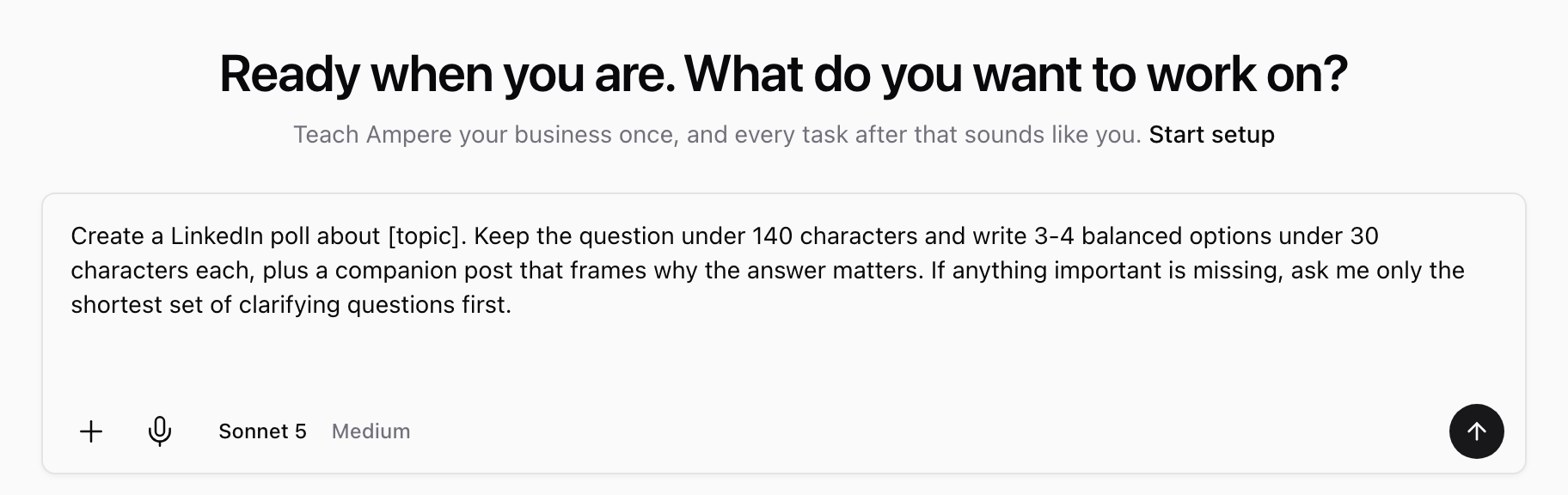
Nothing is sent yet, so you can make the prompt your own:
- Replace each placeholder in square brackets, such as [topic], with your details.
- Add the context Ampere can't guess: who the post is for, the point you want to make, and any facts, links, or source material to use.
- Change or remove any instruction that doesn't fit, such as the number of hook options or a length limit.
If the composer already has text you wrote, you're asked before it's replaced, so you can keep your draft instead.
When you send the prompt, Ampere starts a new session and replies there with your draft.
You can also skip the tasks and describe what you need in your own words, on Home or in any session. For example: "Draft a LinkedIn poll that asks B2B marketers how they plan content. Give me four short answer options and a two-sentence intro post."
What the text post, poll, and newsletter tasks ask for
Each starter task is an editable prompt. The lists below describe what each prompt asks Ampere to do, so you know what to keep, change, or add. Results vary with your topic and the details you provide.
All three tasks also tell Ampere to check with you first, using as few questions as possible, if anything important is missing.
Write a LinkedIn text post
This task asks Ampere to:
- Use your saved brand voice, if you have one.
- Give you three distinct hook options, then draft the strongest one.
- Put the hook in the first 200 characters.
- Keep the post skimmable, with short lines.
- End with a question or call to action that starts a conversation.
If you prefer a different hook, ask Ampere to redraft the post around it.
Create a LinkedIn poll
This task asks Ampere to:
- Keep the poll question under 140 characters.
- Write three or four balanced answer options, each under 30 characters.
- Write a companion post that frames why the answer matters.
To match your saved brand voice, add "Use my saved brand voice" to the prompt.
Draft a LinkedIn newsletter edition
This task asks Ampere to:
- Write an edition about your topic for your newsletter. Add your newsletter's name, or ask Ampere to propose one.
- Use your saved brand voice, if you have one.
- Give the edition a strong title and a skimmable structure.
- Close with a call to action that invites readers to subscribe.
If you want more than the edition itself, ask for it in the same prompt. For example, add "Also write a short post I can use to promote this edition" or "Suggest two alternative titles."
Review the draft before you post
Ampere drafts the copy, and you decide what goes live. Before you post on LinkedIn, check:
- Voice: The draft sounds like you or your company.
- Claims: Every fact, number, and example is accurate and supported by your source material. Remove anything that implies results, partnerships, or customer details you can't verify.
- Links, mentions, and hashtags: Each one is intentional and correct.
- Format limits: The poll question and answer options fit LinkedIn's poll fields, and a text post's hook lands in its opening lines.
- Poll options: The answers are distinct and don't overlap.
- Newsletter structure: Every section is complete, and the title matches what the edition delivers.
Refine the draft in the same session
If the first draft is close, keep working in the same session so Ampere has the full context. For example:
- "Use the second hook and make the post sound more founder-led."
- "Shorten the poll's companion post to two sentences."
- "Make the newsletter's closing call to action softer."
- "Give me two more answer options to choose from."
Save the final version and post it
When the draft is ready, copy it into LinkedIn and post it from your profile or a Page you manage. To keep a copy, ask Ampere to save the final version as a file in the session workspace, where you can preview and download it.
Was this article helpful?
Related articles
Learn review and edit outputs in Ampere with product-grounded steps, current limits, and where to go next.
Learn what to include in an Ampere prompt so Ampere can start with the right goal, context, and review step.
Learn how to start a branded LinkedIn carousel with Ampere, what context to add, and what to review before posting it.