How Ampere plans and ships work
Understand what happens after you ask Ampere for marketing work, from planning to files, review, and follow-up.
Last reviewed August 2026
Ampere turns a plain-English request into visible work inside a session. Depending on the task, it may plan steps, use project or brand context, gather public information, create files, and show outputs for you to review.
Use this article when you want to understand what happens after you send a prompt and how to stay in control while Ampere works.
The short version
An Ampere session usually follows this pattern:
- You ask for a marketing outcome.
- Ampere decides what it needs to do next.
- Ampere works in the session and shows progress.
- Ampere returns an answer, files, or both.
- You review the work, ask for changes, download outputs, or continue the session.
The exact steps vary by task. A quick rewrite may stay mostly in chat. A larger carousel, report, deck, image, or research task may create files in the session workspace.
1. You give Ampere the goal
Start with the output you want and the context Ampere should use. You can ask for content, research, creative assets, brand work, a presentation, a report, or another marketing deliverable supported by the session workspace.
Useful prompts include:
- The deliverable you want.
- The audience or channel.
- The project, file, website, or brief to use.
- Any tone, format, or review checkpoint that matters.
If the task is big, ask Ampere to show a plan or first option before it creates final assets.
2. Ampere plans the work it needs to do
After you send a prompt, Ampere may break the work into smaller steps. It can use the session, project context, uploaded files, Workspace files, a browser, and Ampere's catalog of AI Tools when those are useful for the request.
You may see work summaries in the chat timeline while this happens. These summaries help you understand the direction of the session without needing to follow every internal detail.
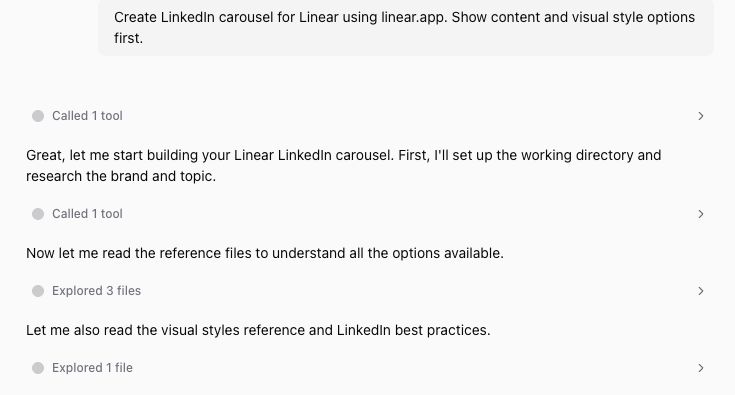
3. Ampere works in the session
Ampere can create and edit many output types in its session workspace, including documents, spreadsheets, presentations, PDFs, images, audio, video, Markdown, CSV, JSON, and HTML reports. It can also use browser sessions and public-data tools when the task calls for research or extraction.
Some work happens quickly. Some work takes longer because Ampere is reading files, generating media, collecting public information, or creating a larger deliverable. Public-data sources and AI providers can be partial, unavailable, rate-limited, noisy, or incomplete, so treat research-heavy results as material to review rather than unquestioned truth.
4. Ampere returns results for review
Results can appear in two places:
- The chat timeline, where Ampere explains what it found or created.
- Workspace files, where generated files and folders can appear for preview, download, or follow-up.
Not every session creates files. If the task is mostly advice, a rewrite, or an outline, the useful output may be in the chat. If Ampere creates assets or structured deliverables, open Workspace or Workspace files to inspect them.
5. You review, revise, and decide what leaves Ampere
Ampere is designed to help plan, draft, and produce marketing work, but you stay responsible for review. Before using the output, check:
- Whether Ampere answered the original goal.
- Whether the work uses the right project, source material, and brand direction.
- Whether the facts, public-data findings, and claims are accurate enough to use.
- Whether any generated files open, preview, or download as expected.
- Whether you need a shorter version, a different angle, or another format.
Ask for revisions in the same session when the work is close. For example:
- "Make the angle more founder-led."
- "Use the uploaded brief as the source of truth."
- "Turn this into a shorter LinkedIn post."
- "Regenerate the slide outline with a more direct CTA."
- "Create a downloadable version of this output."
Start a new session when you are switching to a different project, audience, or goal and the old context would get in the way.
What can vary by task
Ampere does not follow the exact same path every time. The session may vary based on:
- The type of work you requested.
- Whether a project, file, website, or knowledge source is selected.
- Whether the task needs research, browser work, media generation, or file creation.
- Whether a provider-backed source is available and returns useful data.
- Whether you ask for a checkpoint before final output.
This is normal. Your job is to give clear direction, review what Ampere produces, and continue the session when the work needs adjustment. Nothing should leave Ampere until you have checked it.
Was this article helpful?
Related articles
Learn how an Ampere session brings together chat, progress, and the session workspace where you review files and browser activity.
Learn what to include in an Ampere prompt so Ampere can start with the right goal, context, and review step.
Learn how to start a first Ampere session, what to include in your prompt, and what to review next.