Stop or cancel Ampere while it is working
Learn how to stop a running Ampere response, avoid duplicate work, and decide what to do next.
Last reviewed August 2026
Use the stop or cancel controls when Ampere is still working and you no longer want the current turn to continue. Stopping a turn is useful when the prompt was wrong, the direction changed, or you want to prevent duplicate work.
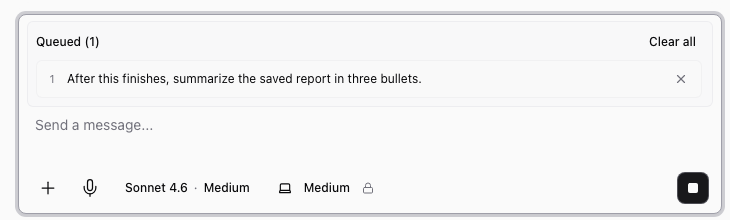
Stopping is best-effort. Ampere may still finish part of the current step before the session settles.
Stop the current response
When Ampere is generating, use the composer action to stop the active response. Wait for the chat to settle before you send a replacement prompt.
Do not repeatedly send the same request while the original turn is still running. That can create duplicate outputs or make it harder to tell which response is current.
Cancel a running AI Tool when available
If Ampere is running a catalog tool or workflow that exposes a cancel action, use the visible cancel control for that run. The app may ask you to confirm because cancellation can leave partial output or no output.
If cancellation succeeds, review the chat and any Workspace files that were created before the stop. If cancellation cannot complete immediately, wait for the state to update before starting over.
Decide what to do next
After the turn stops, choose the smallest next step:
- Ask Ampere to continue from the last useful result.
- Rewrite the prompt with the corrected goal.
- Start a new session if the old session has too much wrong context.
- Open diagnostics if the chat appears stuck or disconnected.
If Ampere created partial files, review them before deleting or regenerating the work.
When to start a new session
Start a new session when the session used the wrong model provider, the prompt was fundamentally wrong, the session workspace is cluttered with irrelevant outputs, or you want a clean context boundary.
Use the existing session when the direction is mostly right and you only need a correction.
Was this article helpful?
Related articles
Learn what Ampere resume and recovery can do after interruptions, what to review, and when to retry or ask for help.
Explain how to stop a stuck response, reopen the chat, use Diagnostics, retry safely, and contact support without promising guaranteed recovery.