Choose and switch the Joule assistant model
Learn how Joule model choices work and when you need a new session to switch providers.
Last verified 1 day ago
Joule's response mode controls which assistant model is used for a session and how much effort the assistant applies. You can choose a model before starting a session. After a session begins, switching between Claude and DeepSeek providers requires a new Joule session.
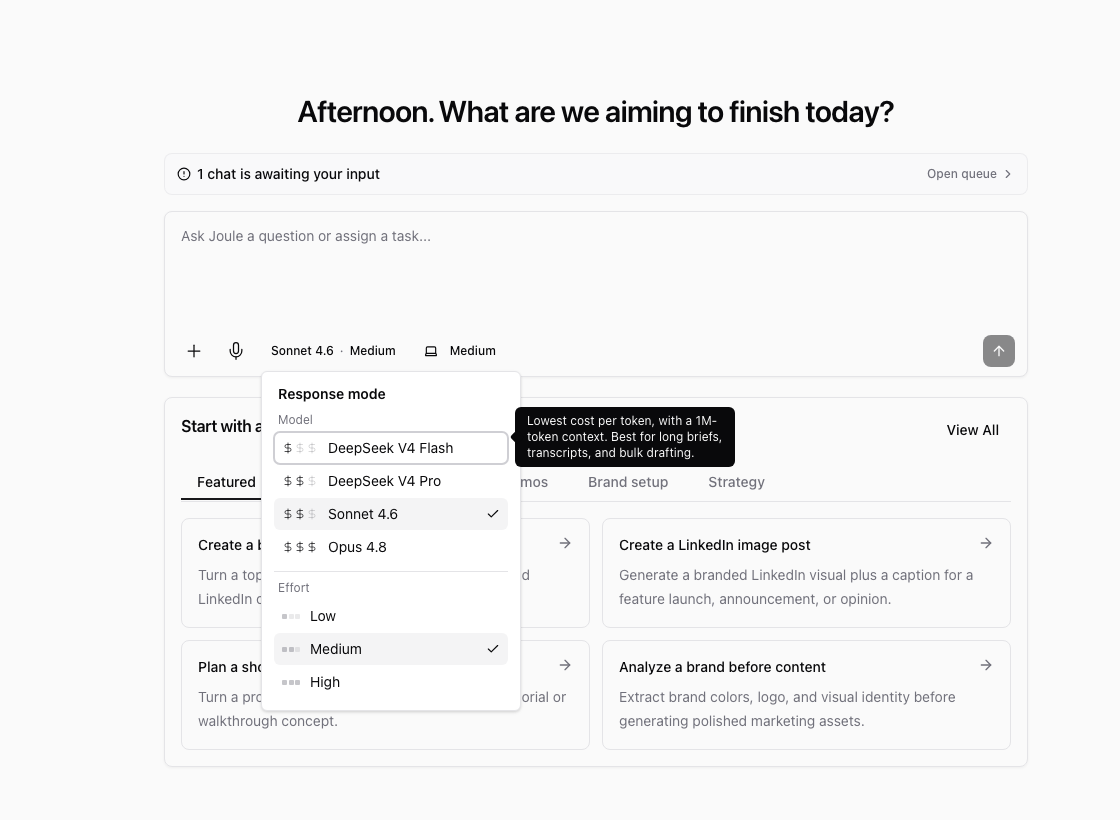
Model availability can vary by workspace configuration. If a model is hidden or disabled, it is not available for that workspace.
Open response mode
From the Joule composer, open Response mode. The control shows the selected model and effort setting.
You may see Claude options such as Sonnet, Opus, or Haiku, and DeepSeek options such as DeepSeek Flash or DeepSeek Pro when DeepSeek is enabled for your workspace.
Choose a model
Use the model descriptions and cost indicators to choose the right fit:
- Use a lower-cost, fast model for lightweight drafting, summaries, and simple edits.
- Use the everyday default for most campaign, content, and planning work.
- Use a stronger model for high-stakes copy, deeper research, or multi-step strategy.
- Use DeepSeek options when they are available and fit the context window or budget profile you need.
The exact labels shown in the menu reflect the currently configured model set.
Choose effort when available
Effort controls how much thinking time Joule applies. Low is faster, Medium is the balanced default, and High is better for tougher prompts that can wait longer.
Some models use a fixed maximum effort. When that happens, the control shows the effective setting instead of letting you pick a separate effort level.
Switching providers needs a new session
Once a Joule session starts work with one provider, the provider is locked for that session. For example, if a session starts with Claude, switching to DeepSeek requires a new session. If a session starts with DeepSeek, switching to Claude requires a new session.
Ampere does this so one session does not mix provider-specific state, routing, and billing behavior mid-stream.
You can still change settings within the same provider when the app allows it. If the model you want is disabled with a message such as "Start a new session," start a fresh Joule chat with the desired response mode selected first.
If a model is unavailable
Unavailable models may be hidden, disabled for your workspace, blocked by configuration, or limited by safety caps. Choose an available model or ask an owner/admin whether the workspace should enable that option.
Was this article helpful?