Understand credits at a high level
Understand what credits are, what spends them, what stays free to review, and where to check your balance.
Last reviewed August 2026
Credits are Ampere's shared usage unit for AI work. Your organization uses credits when Ampere runs Ampere, AI Tools, workflows, browser sessions, scheduled runs, and select background AI work.
Use this article when you are new to Ampere and want the simple version before opening the deeper billing articles.
The short version
Credits help your team control AI usage from one shared organization pool. They are not assigned per teammate, and adding teammates does not create separate balances.
When someone in your organization starts AI work, that work can spend credits from the shared pool. When someone only reviews existing work or manages settings, that browsing does not spend credits.
What spends credits
Credits are used for AI work, including:
- Ampere messages.
- AI Tool and workflow runs.
- Browser sessions.
- Scheduled AI Tool runs.
- Select background AI work that supports those experiences.
Different jobs can use different amounts of AI work. Do not treat a plan's credit allowance as a fixed number of outputs.
What does not spend credits
You can explore and review the app without spending credits. Opening dashboards, checking usage, reviewing past runs, reading saved results, and managing settings do not spend credits.
This matters when you are trying to understand what happened in a previous run or when your team is planning the next task. You can inspect the work first, then decide whether to spend credits on a new run.
Where to check credits
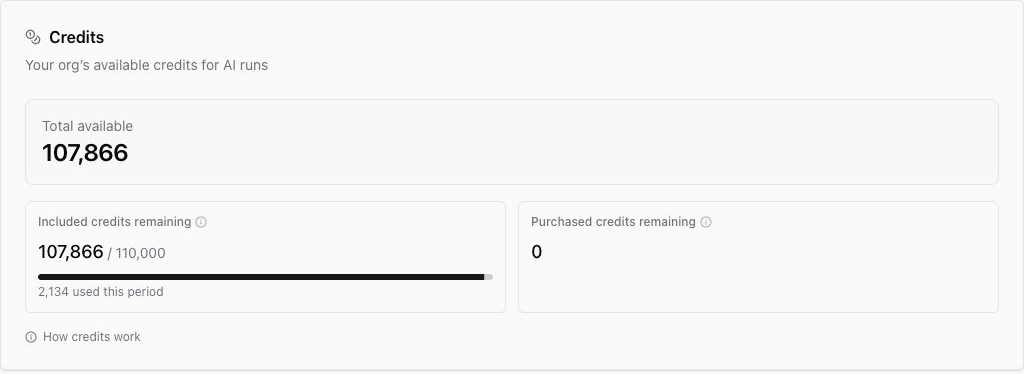
Use the credit control in the app header for a quick balance check. For more detail, open Billing or Usage in organization settings.
Billing shows the current shared balance and the split between:
- Included credits: credits that come with the subscription period.
- Purchased credits: credits from top-ups or auto-recharge.
Usage helps you review how credits are being spent across the organization.
What happens when credits reach zero
If available credits reach zero, new AI runs pause until the next reset or until more credits are added. Existing history, settings, saved work, and billing pages stay available.
Billing users can buy top-up credits or configure auto-recharge. If you do not manage billing, ask an organization owner or billing admin for help.
Where to go next
For the full details, read How credits work. For plan allowances, read Plans and pricing. For zero-credit behavior, read What happens when credits run out.
Was this article helpful?
Related articles
Learn how billing admins can buy one-time top-up credits and when those credits become available.
Understand what credits are, what spends them, and how included and purchased credits are used.
Understand Ampere's Free Plan and paid plans, billing cadences, included credits, and what changes between plans.
Learn what happens when credits run out in Ampere with product-grounded steps, current limits, and where to go next.