Set up brand context
Learn what brand context to add first so Ampere can work from your goals, audience, voice, files, and saved brand assets.
Last reviewed August 2026
Set up brand context before you ask Ampere for branded marketing work. A little reusable context helps Ampere understand the goal, audience, voice, source material, and visual direction for a project so you do not have to repeat the same brief in every session.
Use this article as a first setup checklist. For exact steps, follow the linked project, brief, file, and brand-asset articles.
Before you start
You need an Ampere account with access to an organization. If you plan to ask Ampere to analyze a website, create brand assets, run AI Tools, or generate outputs, your organization also needs enough credits for that AI work.
Gather the most useful context you already have:
- A short description of the product, campaign, client, launch, or audience.
- Brand voice notes, messaging guardrails, or phrases to use and avoid.
- A website URL, product page, brief, research summary, approved copy, or deck.
- Logos, screenshots, visual references, or brand files your team is allowed to use.
You do not need a perfect brand kit to start. Add enough context for the first task, then improve it as you learn what Ampere needs.
1. Create a project
Open Projects and create a project for the brand, campaign, product, launch, client, or content series you want to work on.
Projects keep related sessions, briefs, files, and reusable assets together. Use a project when the work will continue across more than one session or when you want future work to start from the same context.
Give the project a clear name, such as Q3 Product Launch, Founder LinkedIn Program, or Customer Research Sprint. Avoid vague names if teammates may need to find the project later.
2. Add a project brief
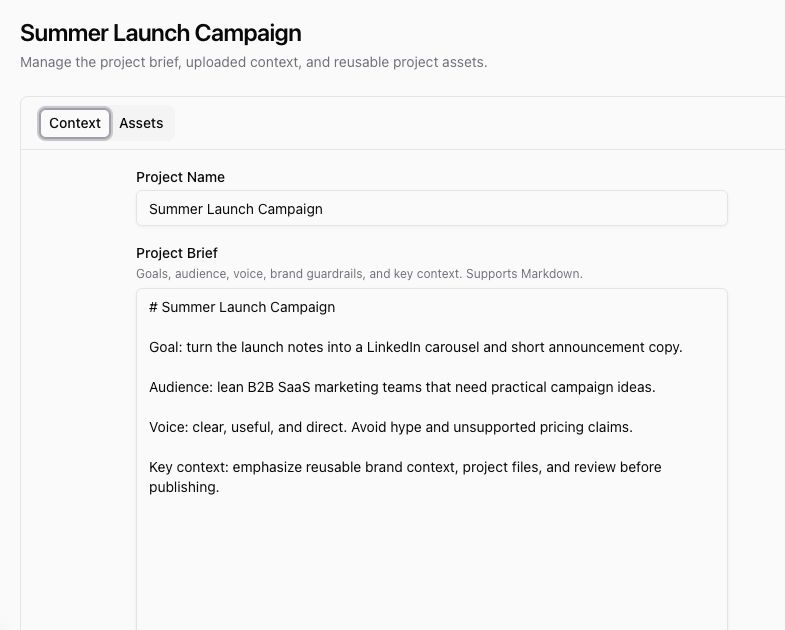
Use Project Brief to tell Ampere what matters for this project. The field supports Markdown, so short sections and bullets work well.
A useful first brief includes:
- Goal: what you want the project to produce or improve.
- Audience: who the work is for and what they care about.
- Voice: the tone, style, or point of view Ampere should preserve.
- Guardrails: claims to avoid, required terms, review rules, or channel constraints.
- Key context: product facts, launch notes, source links, or campaign angles.
Keep the brief focused on decisions Ampere should remember. Put longer source material in project files.
3. Attach source files
Add project files when Ampere should be able to work from specific source material, such as a launch brief, positioning document, slide deck, spreadsheet, product screenshot, research summary, PDF, or brand reference.
Open the project, stay on Context, and use Uploaded Files to add source material. After saving, confirm the files appear under Already Uploaded.
Project files are best for context that belongs to one project. Use prompt attachments instead when a file only needs to guide the current request.
4. Save brand assets when you need visual consistency
When a project needs repeatable visual direction, ask Ampere to analyze a brand source and save brand assets to the project. A website URL works well when it clearly shows the logo, color palette, typography direction, and visual style.
For example, from a project session you might ask:
Analyze https://example.com for this project. Save the brand colors, logo, and visual identity as Project Assets.After Ampere finishes, return to the project and open Assets. Look for rows such as Brand Colors, Brand Visual Identity, or Brand Logo. Use Refresh if Ampere just finished and the list has not updated yet.
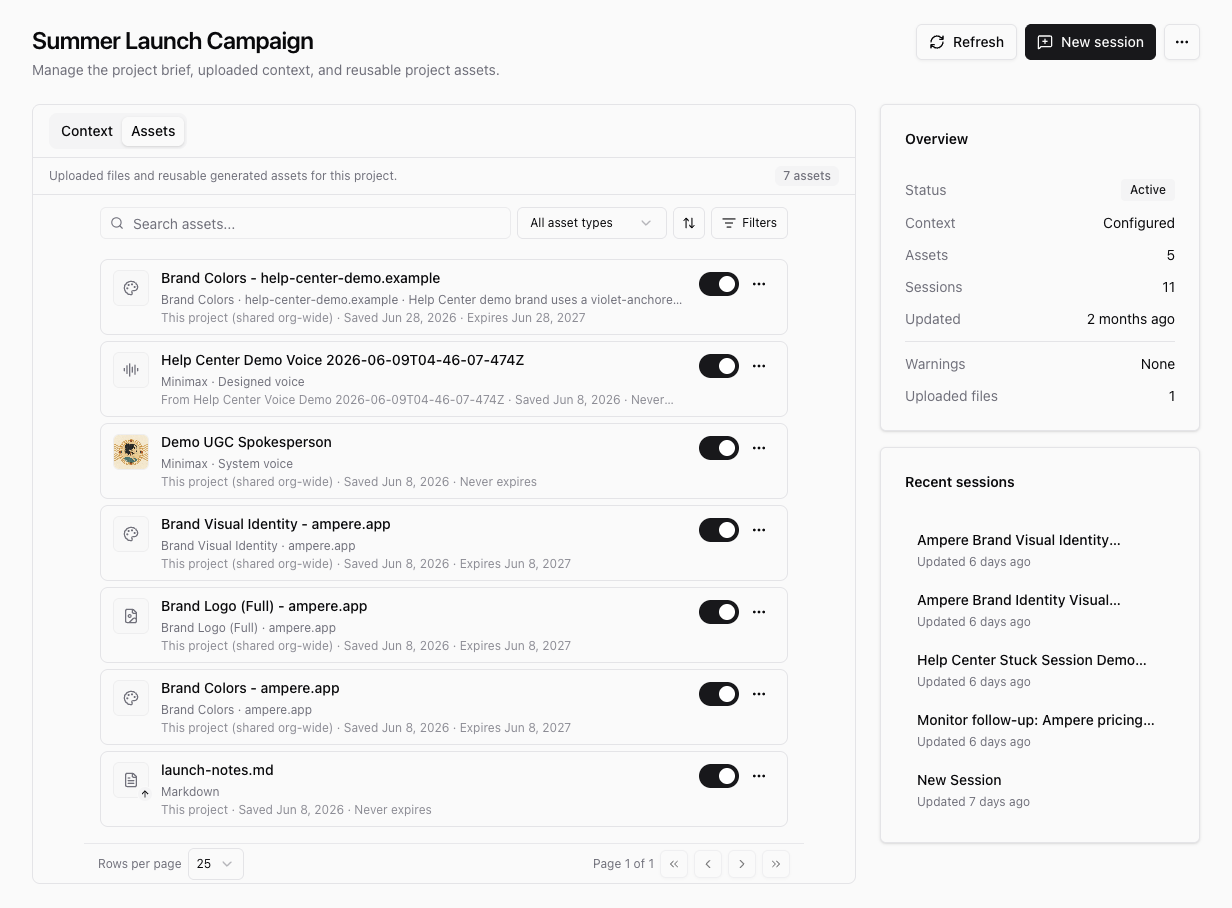
Review generated brand assets before relying on them. Public websites and uploaded files can be incomplete, outdated, or visually inconsistent, so treat saved assets as reusable context you should still check.
5. Start branded work from the project
When the context looks ready, start from the project instead of a disconnected session. Use New session on the project page, then describe the marketing outcome you want.
Good first prompts include:
- "Draft three LinkedIn post angles for this launch using the project brief."
- "Turn the uploaded product notes into a short launch announcement."
- "Use this project's brand context to outline a carousel for founders."
- "Review the saved visual identity before suggesting image directions."
Keep the first task focused. If Ampere needs more detail, answer in the session or update the project brief so the context stays reusable.
What to check before you move on
Before starting important work, confirm:
- The project name is recognizable.
- The brief names the goal, audience, voice, and guardrails.
- Any important source files are attached and saved.
- Brand assets on Assets match the brand source closely enough for your team to use.
- You are working in the correct organization and project.
Brand context helps Ampere start from a better place, but it does not replace review. Check facts, source material, tone, formatting, and visual fit before publishing or sharing any output.
Where to go next
For a focused project walkthrough, read Create a project. To improve the brief, read Add a project brief. To attach source material, read Add project files. To save reusable visual direction, read Save brand colors, logos, and visual identity.
Was this article helpful?
Related articles
Create a project brief so Ampere has the goals, audience, voice, and guardrails for related marketing work.
Learn how to create an Ampere project so sessions, reusable context, and project assets stay organized.
Learn how Ampere saves brand colors, logos, and visual identity reports as reusable Project Assets.
Attach source files to a Project so Ampere can use the right references for related sessions and outputs.