Buy top-up credits
Learn how billing admins can buy one-time top-up credits and when those credits become available.
Last reviewed August 2026
Top-up credits are one-time credit purchases for an organization that already has an active Ampere subscription. Use them when your team needs more credits before the next subscription reset or before a larger burst of AI Tool, Ampere, browser, or background AI work.
Top-ups do not change your subscription tier or billing cadence. They add purchased credits to the same shared organization credit pool your team already uses.
Before you start
You need billing access for the organization. Organization owners have billing access by default, and owners can grant billing-admin access to teammates.
Your organization also needs an active subscription before it can buy one-time credits. If the subscription is not active, the Buy more credits card prompts you to start or resume the subscription first.
Open Billing
Open Settings. Under Organization, select Billing. The Billing page shows your subscription, available credits, one-time top-up options, auto-recharge settings, recent billing activity, and billing admins.
Review the Credits card before you buy. It shows the total available balance, included credits remaining, purchased credits remaining, and the current subscription period.
Choose a top-up amount
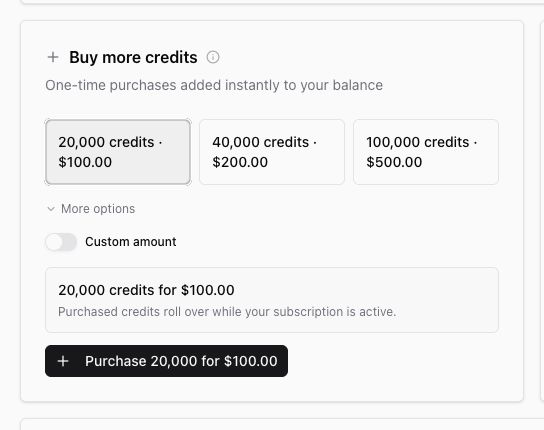
In Buy more credits, choose one of the visible top-up amounts or select More options to see larger presets. Select Custom amount when you need a different amount within the supported range.
Top-ups are sold in 20,000-credit units:
- Minimum purchase: 20,000 credits for $100.
- Maximum purchase in one checkout: 1,000,000 credits for $5,000.
- Exchange rate: 200 credits per dollar.
Complete checkout
After you choose an amount, review the summary and select the Purchase button for that amount. Ampere opens Stripe checkout for the one-time purchase.
Complete the checkout steps in Stripe. After checkout succeeds and the payment is processed, Ampere refreshes Billing and adds the purchased credits to your organization pool.
If checkout is cancelled, no top-up is added. You can return to Settings > Organization > Billing and choose a top-up amount again.
How purchased credits are used
Ampere uses included subscription credits first, then purchased credits. When more than one purchased balance is available, expiring balances are consumed first.
Purchased credits roll over while the subscription stays active and expire 12 months after purchase. Included subscription credits expire with their billing period and do not roll over.
Reviewing Billing, checking usage, or managing settings does not spend credits. AI work spends credits when it runs. If available credits reach zero, new AI runs pause until the next reset or until more credits are added.
When to use auto-recharge instead
Use one-time top-ups for occasional extra work or a planned burst. Use auto-recharge when you want Ampere to buy credits automatically after your balance falls below a threshold, with a monthly cap you control.
Was this article helpful?
Related articles
Learn why a balance can show outstanding debt or a locked state and what billing users can do next.
Learn what billing admins can manage, who can add them, and how billing access differs from organization roles.
Learn how to cancel, resume, or reactivate an Ampere subscription and what changes afterward.