Use starter tasks to get going fast
Learn how starter tasks help you begin common Ampere workflows without writing a prompt from scratch.
Last reviewed August 2026
Starter tasks help you begin common Ampere workflows without writing a prompt from scratch. They are shortcuts for useful first prompts, not separate products or required templates.
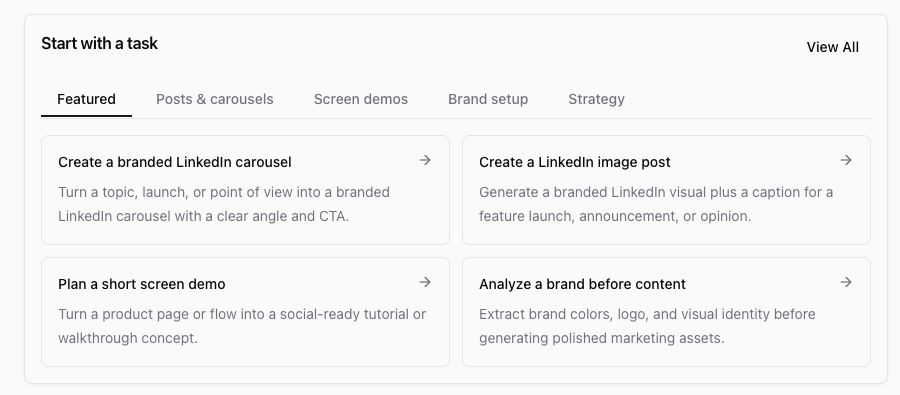
Use a starter task when it matches the work you want closely enough to get started fast.
Find starter tasks
Open Home and look near the Ampere composer. Starter tasks appear as selectable cards or suggestions for common marketing jobs.
The available starters can include content, research, creative, brand, and planning tasks. The exact list may change as Ampere updates the catalog of useful starting points.
Choose a starter
Select the starter that best matches your goal. Ampere fills in or starts from a prompt designed for that workflow.
Starter tasks work best when you add the missing context before sending:
- The brand, product, project, or campaign.
- The audience or channel.
- Files, project context, or source material Ampere should use.
- The format, length, or review step you want.
Edit the prompt before sending
Treat a starter as a draft prompt. If the default wording is too broad, narrow it.
For example, instead of sending a generic content starter, add: "Use our selected launch project, write for seed-stage founders, and show me three LinkedIn post angles before drafting."
The more specific context you add, the less Ampere has to guess.
Continue in the same session
After Ampere responds, keep the follow-up in the same chat when you want revisions, files, summaries, or a saved asset. Ampere can use the session context to refine the work.
If you chose the wrong starter or want a completely different model/provider setup, start a new session and choose again.
When not to use a starter
Write your own prompt when your request is unusual, uses sensitive context, depends on several custom constraints, or needs a specific workflow that is not represented by the starter list.
Was this article helpful?
Related articles
Learn what to include in an Ampere prompt so Ampere can start with the right goal, context, and review step.
Tour the main Ampere app areas, including Home, Sessions, AI Tools, Projects, Scheduled Tasks, Library, and settings.
Learn how to start a first Ampere session, what to include in your prompt, and what to review next.