Add a project brief
Create a project brief so Ampere has the goals, audience, voice, and guardrails for related marketing work.
Last reviewed August 2026
Use a project brief when a campaign, launch, client, content series, or research effort needs the same context across multiple sessions and outputs. The brief gives Ampere a reusable starting point: goals, audience, voice, brand guardrails, and any key context you do not want to repeat every time.
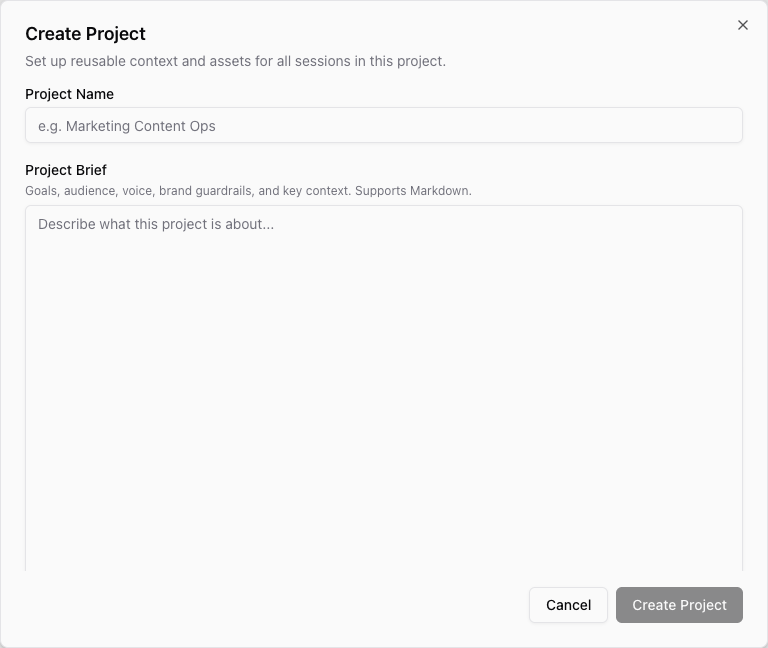
Create the project brief
- Open Projects from the app sidebar.
- Select New project.
- Enter a clear Project Name.
- Add your brief in Project Brief. The field supports Markdown, so headings and bullets are fine.
- Add uploaded files only if you already have source material ready. You can add files later from the project page.
- Select Create Project.
After the project is created, Ampere opens the project detail page. The brief stays editable there, so you can revise it as the campaign or client context changes.
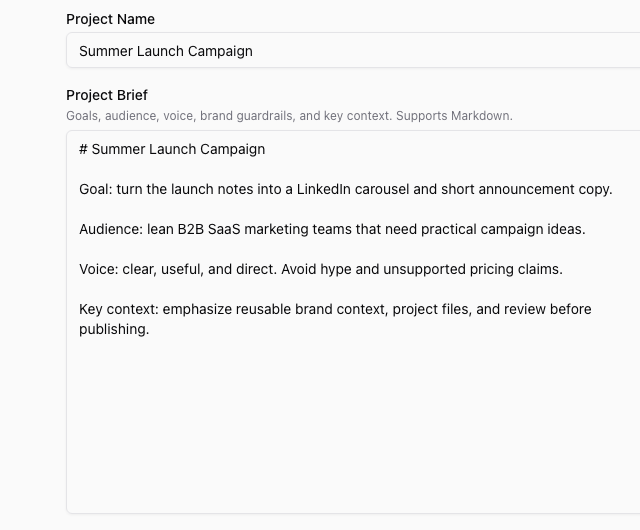
What to include
A useful project brief is short enough to scan and specific enough to guide the work. Include the parts Ampere should keep in mind for this project:
- Goal: what the project needs to produce or improve.
- Audience: who the work is for and what they care about.
- Voice: the tone, writing style, or brand feel to preserve.
- Guardrails: claims to avoid, terms to use, review requirements, or channel constraints.
- Key context: product facts, campaign angle, launch notes, customer segment, or source links that matter.
You do not need to make the brief perfect before starting. Add enough context for the first task, then update it when new information becomes important.
Use the brief in later work
Project briefs are part of Ampere's reusable project context. When you start work from that project, Ampere can use the brief alongside project files, generated assets, and other saved context.
Use New session from the project page when you want the next Ampere session to stay tied to that project. If you work from a different project, update or select the right project first so Ampere starts from the correct context.
Keep it current
Update the brief when the goal, audience, offer, launch timing, voice, or constraints change. If the brief gets long, move detailed source material into project files and keep the brief focused on the decisions Ampere should remember.
Was this article helpful?
Related articles
Learn where saved AI avatars live, what their status means, and how to reuse them from the AI Avatars library.
See the 22 reusable brand and market report kinds Ampere can build, save, and reopen as Project Assets.
Learn how to use Project Assets to find saved reports, generated files, and reusable project assets.