Save brand colors, logos, and visual identity
Learn how Ampere saves brand colors, logos, and visual identity reports as reusable Project Assets.
Last reviewed August 2026
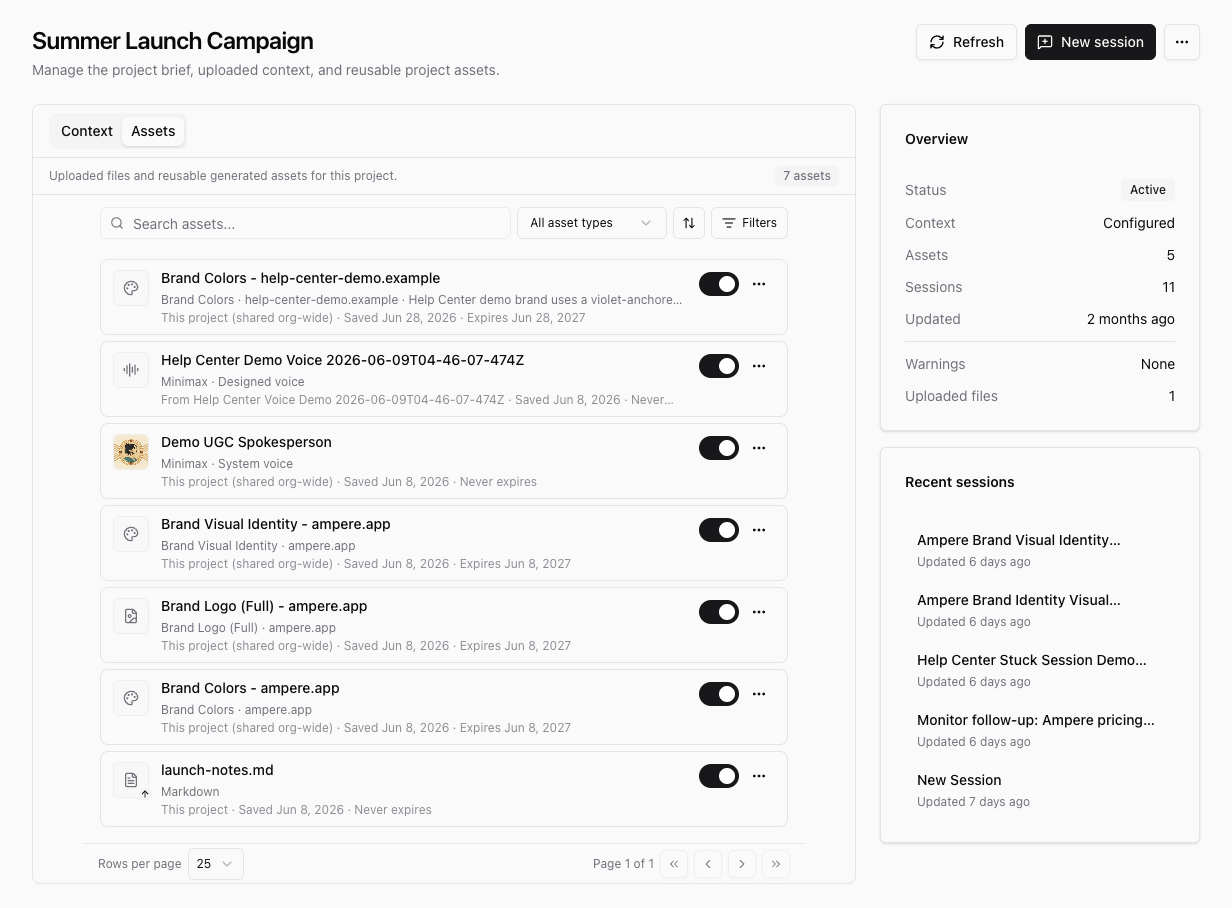
Save brand assets when you want Ampere to keep using the same visual direction for a project. Ampere can analyze a brand source, create reusable brand colors, logo, and visual identity assets, and save them to the project's Assets tab.
Use this when you are preparing a campaign, carousel, image post, video concept, or other marketing work that should follow a consistent brand system.
Before you start
Start from a project. Project Assets are saved against the project you are working in, so choose the project that should reuse this brand context later.
You also need a brand source for Ampere to analyze. A website URL works well when the site clearly shows the brand's colors, logo, typography, and visual style. If the most important brand details live in a project brief or uploaded files, add those to the project first.
Review generated brand assets before relying on them. Public websites and uploaded source material can be incomplete, so Ampere's analysis is strongest when the source is current and representative.
Save brand assets from a project session
- Open Projects and select the project you want to update.
- Select New session from the project page.
- Ask Ampere to analyze the brand source and save the brand assets. For example:
Analyze https://example.com for this project. Save the brand colors, logo, and visual identity as Project Assets. - Wait for Ampere to finish. The session should confirm when the brand assets are saved or already current.
- Return to the project and open the Assets tab.
- Confirm that the relevant rows appear, such as Brand Colors, Brand Visual Identity, or Brand Logo (Full).
What each asset helps with
| Brand Colors | Reusable color guidance that helps future project work stay close to the brand palette. |
| Brand Visual Identity | A report that summarizes visual tone, layout feel, typography direction, and design cues to reuse in future content. |
| Brand Logo | Saved logo assets or references that help Ampere understand the brand mark used for project work. |
The Assets tab also includes uploaded files and other reusable generated assets for the same project. Use search, asset-type filters, and sort controls when a project has many saved items.
Use saved brand assets later
Saved brand assets become part of the project's reusable context. When you continue working in that project, Ampere can use the active brand assets along with the project brief, uploaded files, and other project context.
Keep the rows you want active for the project. If a brand changes, ask Ampere to analyze the updated source and save fresh brand assets, then review the updated rows on the Assets tab.
If the asset does not appear
If you do not see the expected row on the Assets tab, select Refresh on the project page after Ampere finishes. If the row still does not appear, ask Ampere directly to save the missing asset, such as "Save the visual identity report as a Project Asset for this project."
If the source does not clearly expose the logo, colors, or visual system, provide a better website, upload brand files, or add a clearer project brief before asking Ampere to analyze the brand again.
Was this article helpful?