Set up auto-recharge
Learn how billing admins can automatically add credits when the organization balance gets low.
Last reviewed August 2026
Auto-recharge can automatically buy credits for your organization when the balance gets low. Use it when you want Ampere to keep AI work moving without manually buying a top-up every time credits run down.
You control three values: the balance threshold, the number of credits to buy each time, and the maximum credits Ampere can auto-purchase in a calendar month.
Before you start
You need billing access for the organization. Organization owners have billing access by default, and owners can grant billing-admin access to teammates.
Your organization also needs an active subscription and a reusable payment method saved in the billing portal. If there is no saved payment method, the Auto-recharge card prompts you to add one before enabling auto-recharge.
Open Billing
Open your organization billing settings. The Billing page shows your subscription, credit balance, one-time top-up options, auto-recharge settings, recent billing activity, and billing admins.
Review the Credits card before you enable auto-recharge. It shows the current available balance and helps you choose a threshold that matches how much runway your team wants before Ampere buys more credits.
Turn on auto-recharge
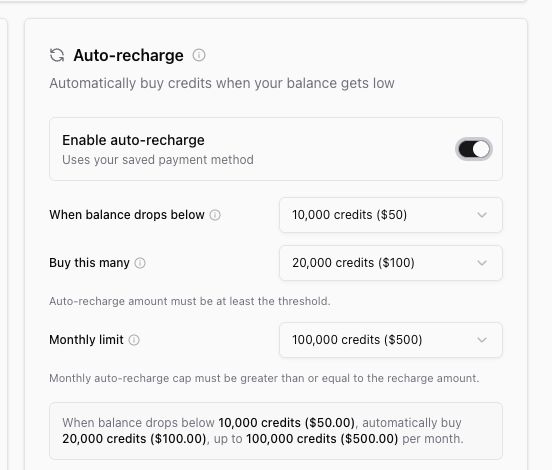
In the Auto-recharge card, turn on Enable auto-recharge. The card expands to show the configuration controls.
Choose the threshold
Use When balance drops below to choose the balance level that should trigger auto-recharge.
The supported threshold range is 5,000 to 50,000 credits, in 5,000-credit steps. The default threshold is 10,000 credits.
Choose a lower threshold when you only want auto-recharge near the end of the current balance. Choose a higher threshold when your team runs larger jobs and wants more buffer.
Choose the recharge amount
Use Buy this many to choose how many credits Ampere should purchase each time auto-recharge triggers.
The supported recharge range is 20,000 to 100,000 credits, in 20,000-credit steps. The recharge amount must be at least as large as the threshold.
Set the monthly limit
Use Monthly limit to set the maximum number of credits Ampere can auto-purchase in one calendar month.
The supported monthly limit range is 20,000 to 1,000,000 credits, in 20,000-credit steps. The monthly limit must be at least as large as the recharge amount.
Review the plain-language summary in the card before you save. It restates the threshold, purchase amount, and monthly limit in both credits and dollars.
Save settings
Select Save settings. Ampere saves the configuration and shows the auto-recharge status on the card.
When your usable balance falls below the threshold, Ampere uses the saved payment method to buy the configured amount, as long as the monthly limit has not been reached.
How auto-recharge protects spend
Auto-recharge has a hard monthly cap. Ampere does not auto-purchase beyond the monthly limit you set.
A single low-balance moment does not create repeated purchases. Auto-recharge fires once for that balance episode, then waits until the balance rises above the threshold before it can trigger again for a later drop.
Auto-recharge can pause if the monthly limit is reached, the subscription is no longer active, or the saved payment method needs attention. You can return to Billing to change the settings, turn auto-recharge off, or update the payment method in the billing portal.
For one-time purchases instead of automatic purchases, see Buy top-up credits. For the order in which credits are used, see How credits work.
Was this article helpful?
Related articles
Learn why a balance can show outstanding debt or a locked state and what billing users can do next.
Learn what billing admins can manage, who can add them, and how billing access differs from organization roles.
Learn how to cancel, resume, or reactivate an Ampere subscription and what changes afterward.