What are AI agent skills? How they make agents better at marketing
A skill is a method someone wrote down for an AI agent to follow. How skills load, what a good marketing skill contains, how they differ from prompts, tools and MCP, and how to judge them in a product.
28 min readWritten by Ampere
Short answer
What are AI agent skills?
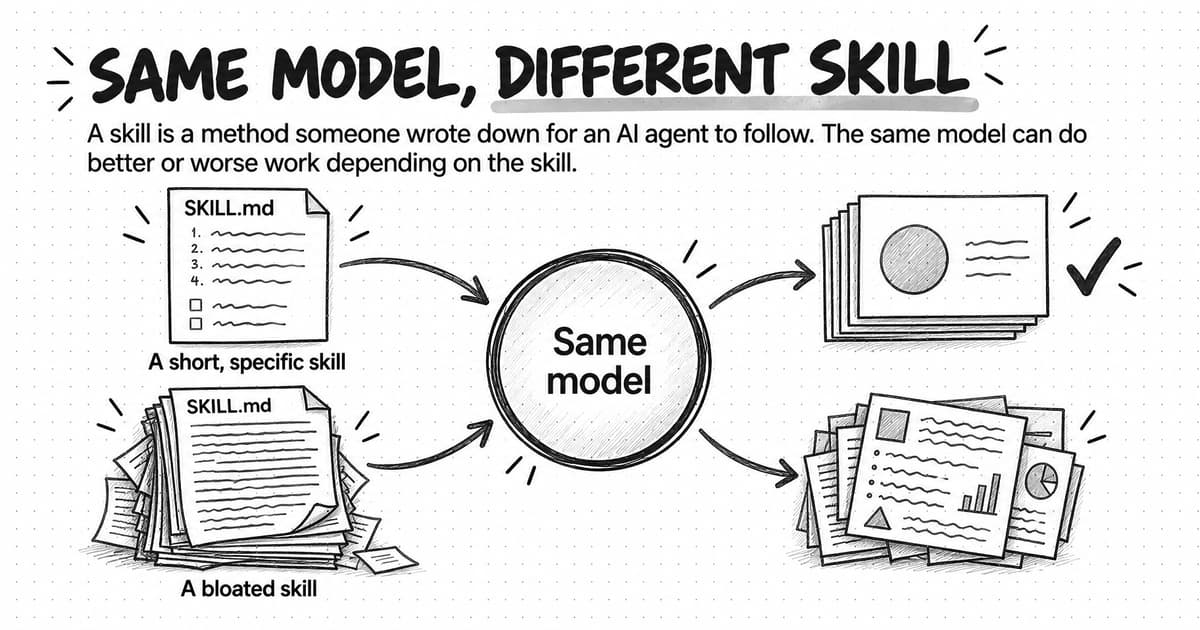
AI agent skills are packages of instructions, examples and supporting files that an AI agent loads when a task calls for them, so it can do a kind of job by a written method instead of improvising. Skills leave the model unchanged and supply the procedure and standards it follows, so the same model can do better or worse work depending on the skill.
Summary
AI agent skills are written methods, so their quality is separate from the quality of the model. A skill reflects what its author knew, how well it was tested and whether anyone kept it current, which is why two agents running the same model can return very different marketing work and why judging an agent's skills is part of judging the agent.
The quality of a skill measurably changes an agent's results. In SkillsBench, a 2026 preprint study of 87 technical tasks scored by automatic tests, curated skills raised the average pass rate from 33.9% to 50.5%. The tasks weren't marketing work, so the numbers don't transfer directly, but compact, focused skills helped far more than exhaustive ones, and skills the agents wrote for themselves did worse than no skills at all.
A good marketing skill has six parts, which this guide calls the anatomy of a marketing skill: a trigger that says when to use it, a method with defaults and known pitfalls, examples of the standard, quality checks before handoff, tools and scripts for mechanical steps, and an output format. A worked example follows an illustrative LinkedIn carousel skill from request to finished deck, with judgment calls left to the marketer.
Agent skills differ from prompts, tools, Connectors and Model Context Protocol (MCP) servers by the job each does. A prompt states what you want this time, a tool lets the agent act, a Connector gives authorized access to your accounts, and an MCP server offers tools and data from an outside system through that open standard. A skill supplies the method, and most finished work uses several of these together.
Agent skills have to be maintained and vetted. Channels, brands and models change, so a maintained skill keeps a version history and dated platform facts and is re-tested after model updates. Skills from public directories can carry harmful instructions or scripts that run with the agent's access, and a January 2026 preprint flagged at least one vulnerability pattern in 26.1% of the 31,132 marketplace skills it scanned, so read every file before use.
To judge the marketing skills in an AI marketing agent, ask who writes and maintains them, what each covers and how they're tested, then try them on your own requests: a standard one, a near miss that belongs to another skill, and one missing a key fact, which shows whether the agent asks instead of guessing. Even well-tested skills leave the final review to a person.
Contents
- How AI agent skills work
- Why agent skills matter for the quality of marketing work
- The anatomy of a marketing skill
- A worked example: a LinkedIn carousel skill
- Agent skills vs prompts, tools, Connectors and MCP servers
- Who writes, maintains and evaluates agent skills
- The risks of agent skills
- How marketing skills work in Ampere
- How to judge the marketing skills in an AI marketing agent
- Frequently Asked Questions
When a product says its AI agent has a "LinkedIn carousel skill," it's easy to picture an ability the model picked up in training, the way a designer learns layout through years of practice. In most agent products, a skill is something plainer: a method someone wrote down for the agent to follow.
AI agent skills are packages of instructions, examples and supporting files that an AI agent loads when a task calls for them, so it can do a specific kind of job by a written method instead of improvising one. A carousel skill might tell the agent how to structure the slides, which brand checks to run and which file to export. Anthropic, which introduced the Agent Skills format, compares building a skill to putting together an onboarding guide for a new hire.
Because a skill is written down, its quality is a separate question from the quality of the model. A skill reflects what its author knew, how carefully it was tested and whether anyone has updated it since the platform, the brand or the model changed. Two agents running the same model can return very different carousels for that reason, which makes judging an agent's skills part of judging the agent.
This guide explains how skills load, why they change the quality of marketing work, what a good marketing skill contains, how skills differ from prompts, tools and MCP servers, and how to judge the skills in a product.
How AI agent skills work
An AI agent reads a short description of every skill available to it, loads a skill's full instructions only when a request matches that description, and opens the skill's other files only when a step needs them. Under the Agent Skills specification, an open format that many agent products support, a skill is a folder with one required file, SKILL.md. That file opens with a short name and a description of what the skill does and when to use it, followed by the instructions. The folder can also hold scripts the agent can run, reference documents it can read and assets such as templates or example files. The format's overview mentions uses as varied as legal review, data analysis and presentation formatting.
The overview names three stages: discovery, activation and execution. At discovery, when a session starts, the agent reads only the name and description of each skill. At activation, when a request matches a description, it reads the full instructions. During execution, it follows them, opening bundled files or running scripts only when a step calls for them. This design is called progressive disclosure, and Anthropic's announcement of the format likens it to a well-organized manual: a table of contents first, then the relevant chapter, then the appendix if it's needed.
Progressive disclosure has two consequences. First, an agent can keep many skills available without filling its context window, the working space the model reads at each step, because only the short descriptions are always present. Second, the description decides whether a skill is used at all. The format's guidance on descriptions warns that an under-specified description keeps a skill from loading when it should, while an over-broad one makes it load when it shouldn't. Agents also tend to consult skills only for tasks they can't handle alone, so a simple one-step request may not trigger a matching skill.
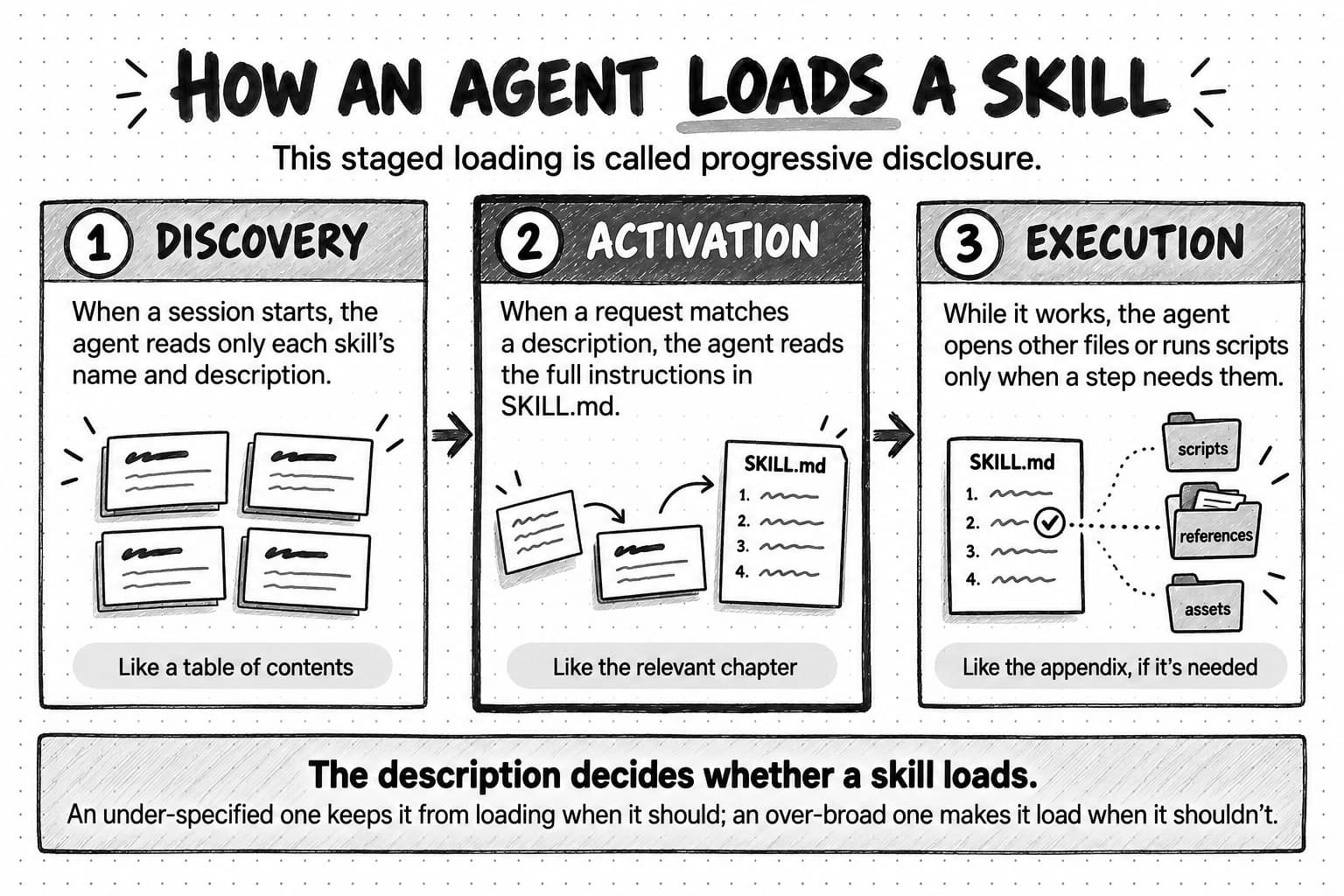
View the skill loading diagram at full size (opens in a new tab).
A skill doesn't retrain or change the model. It's text and files the agent reads while it works, so it can be edited the day a method changes and moved to another agent that supports the format. It doesn't act on its own either: the agent reads the method and carries out the steps with its tools. Anthropic introduced the format in October 2025 and published it as an open standard that December. On October 8, 2026, the format's client showcase listed 46 agent products that support it.
Why agent skills matter for the quality of marketing work
Agent skills matter for quality because a capable model knows marketing in general but not your method. It doesn't know how your team structures a carousel, what your reviewers always send back or which file format a platform currently accepts. The model supplies general ability and the skill supplies the procedure and the standards, so the finished work depends on both.
One direct test of whether method changes results is SkillsBench, a preprint study that runs the same tasks with and without curated skills. Contributors supplied the skills from public collections or their own experience, and the researchers screened them so that each taught a method for a class of problems rather than the answer to one task. In the version updated in June 2026, covering 87 tasks across eight domains and 18 combinations of model and agent software, curated skills raised the average pass rate from 33.9% to 50.5%, a gain of 16.6 percentage points. Every combination improved, by between 4.1 and 25.7 points.
The tasks were technical jobs scored by automatic tests, not marketing campaigns, so the numbers don't transfer directly to a carousel or a competitor report. The two categories closest to marketing work both improved: five media and content tasks, such as dubbing a video and removing silences from footage, gained 24.1 points, and 14 office tasks involving documents, spreadsheets and presentations gained 12.6. The study also shows which skills helped. Compact, focused skills did better than long, exhaustive ones: the five tasks paired with the most comprehensive skill documents gained less than a point.
For a marketing team, method quality is a variable in its own right: a strong model following a bloated skill can do worse than the same model following a short, specific one. The anatomy below describes what a short, specific marketing skill contains.
The anatomy of a marketing skill
A marketing skill has six parts: a trigger that says when to use it, a method that sets the steps and defaults, examples that show the standard, quality checks the work must pass before handoff, tools and scripts for the mechanical steps, and an output format for the finished deliverable. This guide calls these the anatomy of a marketing skill. The specification requires only a name, a description and instructions; the other parts come from the format's authoring guidance and from what marketing work needs before a person can review and use it.
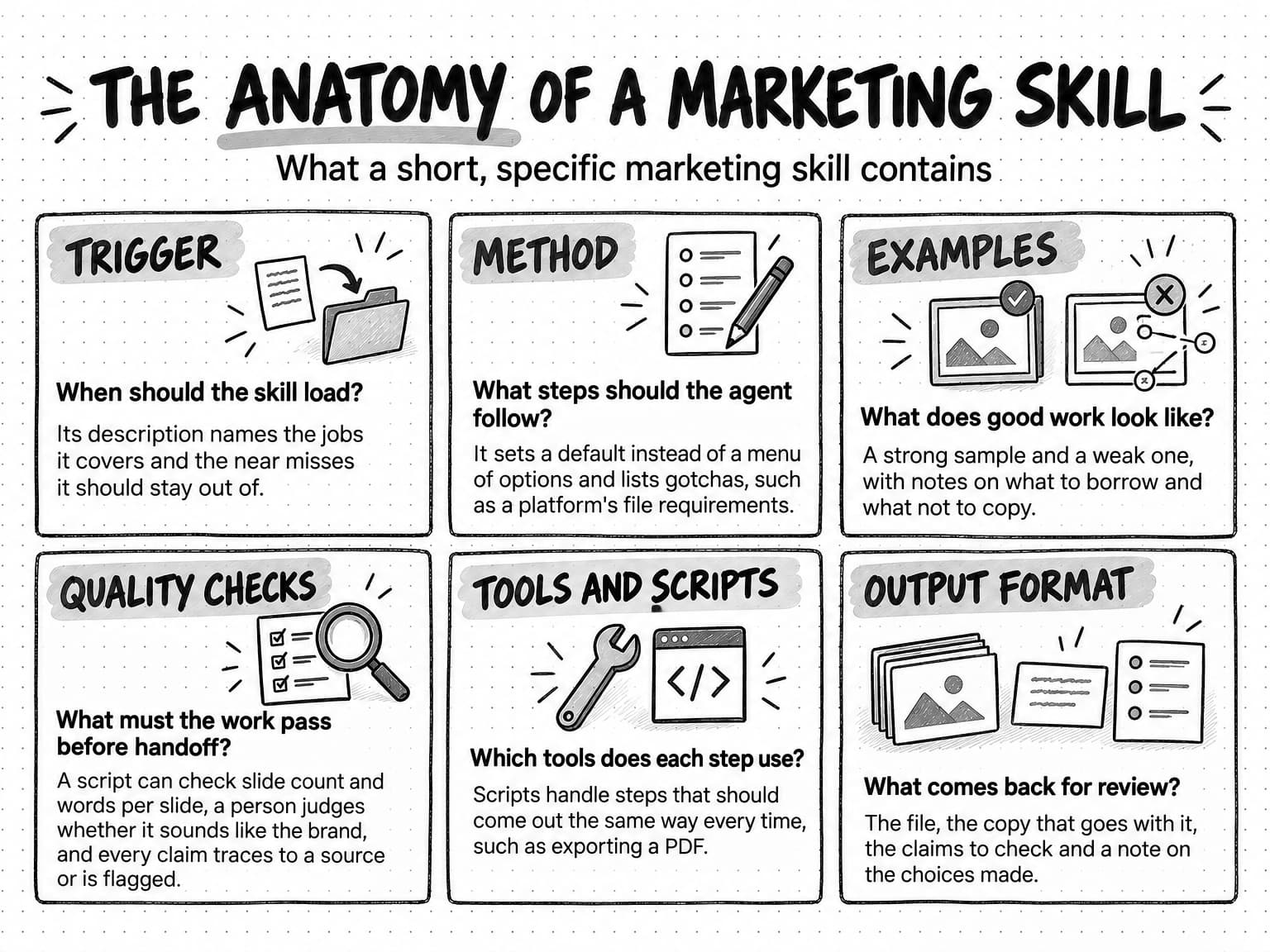
View the anatomy of a marketing skill at full size (opens in a new tab).
Trigger: when to use the skill, and when not to
The trigger is the skill's description. For marketing skills, the difficult cases are neighbors. A LinkedIn carousel skill should load for "turn this webinar into slides for LinkedIn," even though the request never says carousel, and it should stay out of a request for a single-image post or a sales deck. The authoring guidance recommends testing a description against near misses like these and running each test several times, because the same request can trigger a skill on one run and not the next.
Method: the steps, defaults and gotchas
The method is the procedure: what to read first, which decisions to make in what order, and which missing facts justify a question to the person. Good methods give the agent a default rather than a menu of equal options and spend their words on what the agent would otherwise get wrong. The authoring guidance singles out gotchas, the facts that defy reasonable assumptions, as the most valuable content in many skills, and recommends adding each correction you have to make. In marketing, gotchas include a platform's file requirements, a claim legal won't approve and a competitor the brand never names. A method should also say when it applies and when a simpler path will do.
Examples: what good looks like
Examples show the standard faster than a description can: a strong finished deck, a weak one annotated with what's wrong, a caption that started a conversation. The authoring guidance observes that concise steps with a working example tend to outperform exhaustive documentation. Examples also need instructions about what to borrow, such as structure, pacing and text density, and what not to copy, such as wording and layout. Without them, an agent may treat the sample as a template.
Quality checks: what the work must pass before handoff
Quality checks turn standards into a pass the work has to clear before anyone sees it. The authoring guidance calls this a validation loop: do the work, check it, fix what fails and check again. Checks with clear answers, such as slide count, words per slide and file type, can run as a checklist or a script. Checks that need taste, such as whether the deck sounds like the brand, belong with a person; the format's evaluation guidance says style and visual quality are better judged in human review. In most marketing work, the most important check concerns claims: every product claim should trace to a source or be flagged for the reviewer.
Tools and scripts: the mechanical steps
A skill names the tools each step uses, such as web search for research or an image generator for slide visuals, and it can bundle scripts for steps that should come out the same way every time, such as measuring text length or exporting a PDF. Anthropic's announcement makes the case for code here: some operations are cheaper and more reliable as a program than as text a model generates.
Output format: the shape of the finished deliverable
An output template tells the agent exactly what to hand back, and the authoring guidance notes that agents follow a concrete template more reliably than a format described in prose. For marketing work, the output is everything a person needs to review and use the result: the file itself, the caption or copy that goes with it, the claims that need checking and a note on any choices the agent made.
A worked example: a LinkedIn carousel skill
A LinkedIn carousel skill shows all six parts in one short file. The skill below is illustrative, written for this guide rather than taken from any product. Picture a B2B software team that saves it as a folder named linkedin-carousel, holding the SKILL.md file, an assets folder with two annotated example decks, a short notes file in references and a scripts folder with a slide checker. Here is a condensed version of the file:
---
name: linkedin-carousel
description: Plan, write and design a LinkedIn carousel (a multi-page document post) from source material. Use when someone asks for a LinkedIn carousel, a document post or "slides for LinkedIn," even if they don't say carousel. Don't use for single-image posts, videos or presentation decks.
metadata:
  version: "2.3"
  last-reviewed: "2026-10-08"
---

## Method
1. Read the brand voice, visual identity and audience briefs.
2. Confirm the objective: what should a reader do after the last slide? Ask only if the request doesn't say.
3. Choose one angle from the source material. Draft 6 to 10 slides, one idea per slide. Slide 1 states the payoff.
4. Keep each slide to about 25 words of body text.

## Gotchas
- Post the deck as a PDF document upload (LinkedIn limit: 100 MB and 300 pages; checked 2026-10-08).
- Product claims must come from the source material. Never invent numbers.

## Examples
assets/strong-deck.pdf and assets/weak-deck.pdf. references/deck-notes.md says what to borrow (structure, pacing, density) and what not to copy (wording, layout).

## Quality checks (before handoff)
- Run scripts/check_slides.py for slide count, words per slide and font size.
- Every claim traces to a source line or goes on the claims list.
- Colors and fonts match the visual identity brief.

## Output
The PDF, a caption under 150 words that ends with the call to action, the claims list, and a note on the angle chosen and why.
Each part of the anatomy has a place. The description is the trigger, with near misses written into it. The method sets defaults and asks a question only when the request leaves out the objective. The gotchas include a platform fact with the date it was last checked: LinkedIn's help page on supported media lists PDF among accepted document types, with limits of 100 MB and 300 pages. The examples come with instructions about what to borrow, the checks are concrete enough to pass or fail, and the output list tells the agent what to hand back.
Suppose a product marketer asks the agent to "turn the release notes for our new reporting feature into a carousel for IT managers." The request matches the description, so the agent loads the skill. It reads the brand briefs, finds no stated objective and asks one question: what should a reader do after the last slide? It drafts eight slides, runs the slide checker, trims a slide that runs over the word limit, checks each claim against the release notes and puts one it couldn't verify on the claims list. Then it exports the PDF and returns the deck with a caption, the claims list and a note on the angle.
The skill leaves the decisions that need judgment with the marketer: which story to tell, whether the flagged claim can run and whether the carousel gets posted at all.
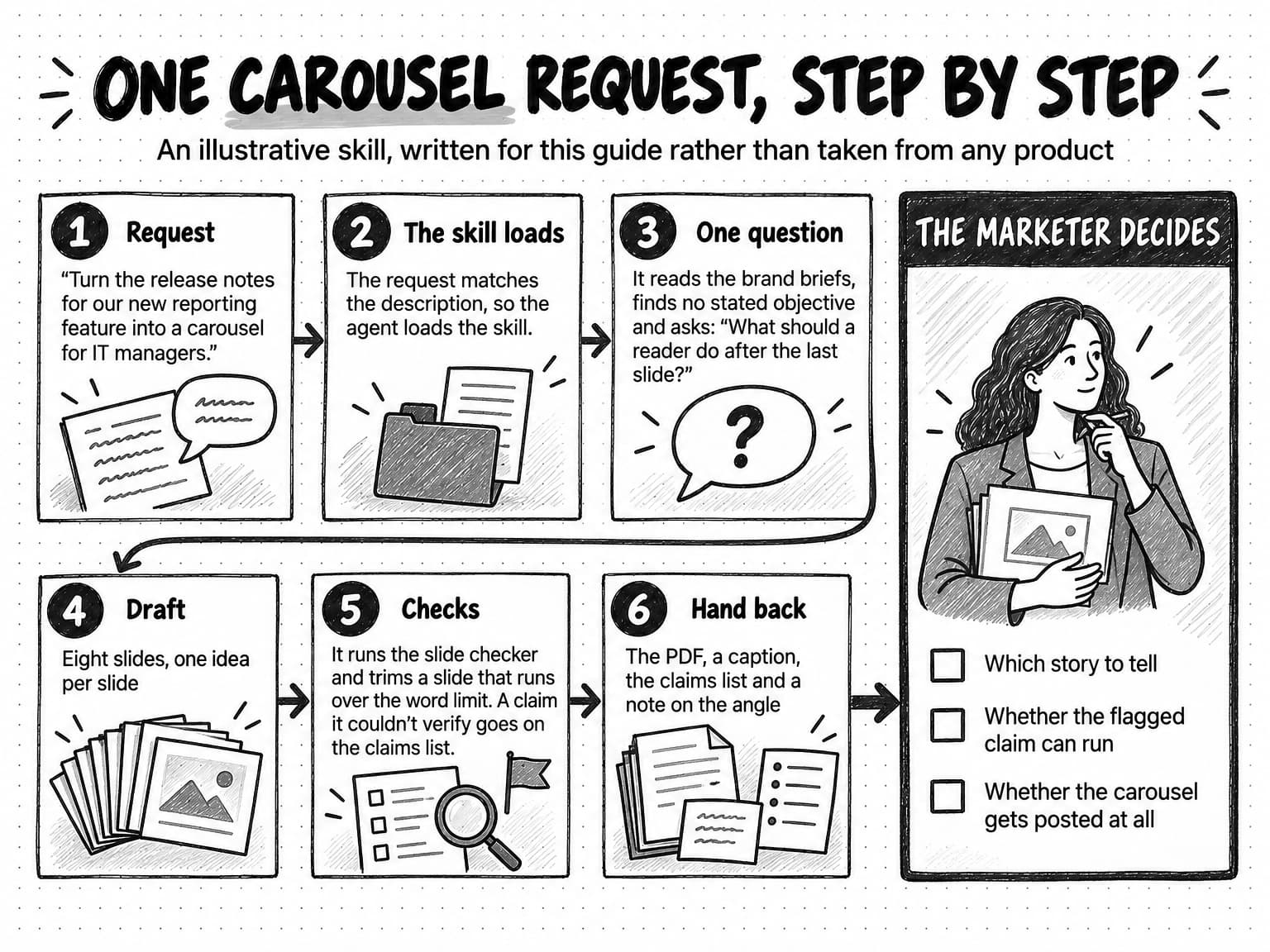
View the carousel request walkthrough at full size (opens in a new tab).
Agent skills vs prompts, tools, Connectors and MCP servers
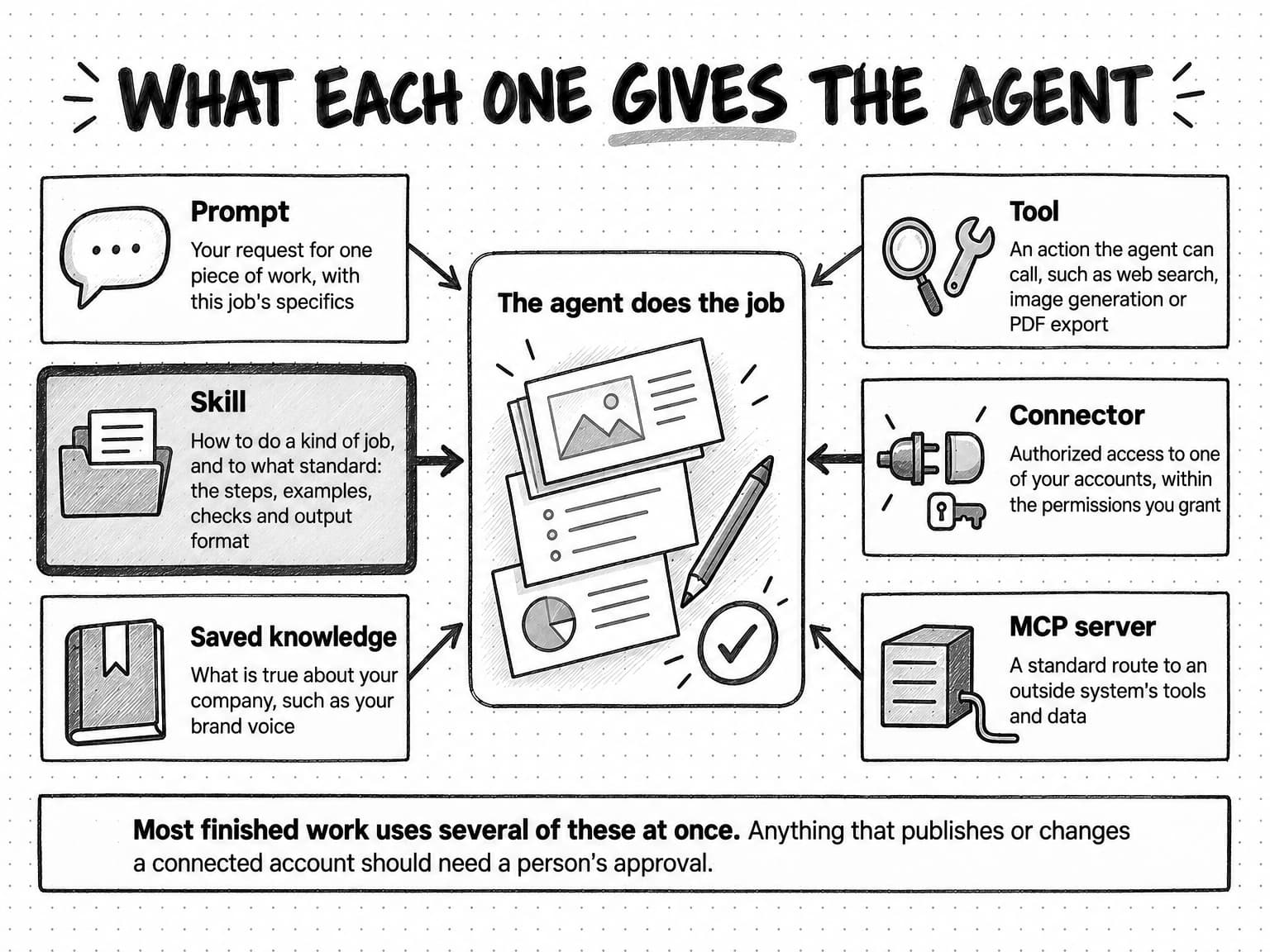
A skill supplies the method for a kind of job, while prompts, tools, Connectors and MCP servers supply the request, the ability to act, access to your accounts and a standard route to outside systems. Most finished work uses several of them at once.
| Term | What it is | What it gives the agent | Who usually maintains it | Marketing example |
|---|---|---|---|---|
| Skill | A packaged method of instructions, examples, checks and files, loaded when a request matches | How to do a kind of job, and to what standard | Whoever wrote it: the agent's maker, your team or an outside author | A LinkedIn carousel skill that sets slide structure, claim checks and the export |
| Prompt | Your request for one piece of work | What to do this time, with this job's specifics | You, or whoever keeps your team's saved prompts | "Turn the reporting release notes into a carousel for IT managers" |
| Tool | A defined action the agent can call | The ability to act: search, read, generate or convert | The product or the tool's provider | Web search, an image generator, a PDF exporter |
| Connector | An authorized connection to one of your outside accounts | Access to that account's data and actions, within the permissions you grant | The product, under your authorization | A connection to your analytics or social account |
| MCP server | Software that offers tools, data and prompt templates through the open Model Context Protocol | A standard route to an outside system's tools and data | The outside service or an independent developer | An analytics service's server that offers a "get campaign report" tool |
A prompt and a skill can contain the same words; the difference is scope and lifespan. A prompt is written for one request and lives in one conversation. A skill is written for every request of a kind, loads without anyone pasting it and can carry files a prompt can't, such as annotated examples and scripts. If someone on your team pastes the same instructions into a request every week, those instructions belong in a skill, and the prompt can shrink to what is specific to the job. How to brief an AI marketing agent covers that specific part.
A tool is an action, while a skill sets out which actions to take for a kind of job, in what order and to what standard. An image generator can make a slide background, but it can't tell whether the slide matches the brand. How AI agents work explains tool calls in more detail. Connectors raise the stakes because they reach real accounts, which is why anything that publishes or changes something in a connected account should need a person's approval, whatever a skill says.
Agent skills vs MCP is a common comparison, but the two answer different questions. MCP, the Model Context Protocol, is an open standard for connecting AI applications to outside systems. An MCP server can offer tools the model calls, read-only resources such as documents, and prompt templates a person can choose. MCP determines what the agent can reach, and a skill determines how it does the job. The two work together: a skill can tell the agent when to use a tool that an MCP server provides, and Anthropic's announcement said it would explore how skills can complement MCP servers by teaching agents more complex workflows that involve outside tools.
Workflows and saved knowledge are the other common neighbors. A predefined workflow runs the same steps in the same order every time, while a skill guides an agent that still chooses its own steps, which suits work that varies from request to request; a skill can also sit inside one step of a workflow. Saved knowledge, such as brand context, holds what is true about your company, while a skill holds how to do a job, so a carousel skill reads the brand voice brief rather than containing a copy of it.
Who writes, maintains and evaluates agent skills
Anyone can write an agent skill: the company that makes the agent, your own team or an outside author who publishes one. What makes a skill good is the expertise that goes into it and the testing that follows, so the useful questions about any skill are where its method came from and how anyone knows it works.
The format's authoring guidance warns against asking a model to write a skill from general knowledge, which tends to produce vague procedures such as "follow best practices." It recommends starting from real work instead: a task completed with corrections along the way, the steps that worked, style guides and review comments. SkillsBench tested the shortcut directly. When agents wrote skills for themselves before attempting the tasks, they scored below the no-skill baseline in all three setups tested. The authors found several causes, including agents not using the skills they had written and skills that were confidently wrong, and concluded that model-written methods did not reproduce the gain from curated ones.
A skill is only as good as the expertise written into it, and only as current as the last time someone checked it.
Skills need maintenance because channels, brands and models all change. Models are the least obvious of the three: in SkillsBench, the same skills helped some combinations of model and agent software far more than others, and the authors conclude that a skill's effect depends on the specific setup it runs in, so a model update is a reason to re-test a skill even when nothing in it has changed. A maintained skill has a version history, a record of what changed and why, a date on each platform fact and a habit of turning every reviewer's correction into a gotcha.
Evaluating a skill takes two kinds of test. Activation tests check that the skill loads for the requests it was written for and stays out of near misses; the format's guidance suggests about 20 test requests, each run several times. Output tests run realistic requests with the skill and without it, or against the previous version, then check the results, using scripts for mechanical requirements and a person for judgment calls. A good evaluation also records cost: a skill that improves the work but makes each run far slower or more expensive is a different trade-off from one that improves both. Our guide to AI evals for marketing teams shows how to build the test set and the rubric that output tests score against.
The risks of agent skills
The main risks of agent skills are skills from untrusted sources, methods that go out of date, skills that make the work worse and too much confidence in any skill.
Skills from untrusted sources
A skill gives an agent instructions and sometimes code, and the agent acts on them with whatever access it has. Anthropic's announcement warns that a malicious skill can introduce vulnerabilities or direct an agent to send data elsewhere or take unintended actions, and it recommends installing skills only from trusted sources and reading every file of a less-trusted one first. Research on public skill directories shows why. A January 2026 preprint study ran an automated scanner over 31,132 skills from two marketplaces and flagged at least one vulnerability pattern in 26.1% of them, most often patterns associated with sending data out or gaining wider access. The authors report that skills bundling scripts were about twice as likely to be flagged as instruction-only skills. A second preprint, first posted in February 2026, confirmed 157 malicious skills among 98,380 collected from two registries; more than half came from a single actor that impersonated brands, and the registries removed all of them after disclosure. NIST's Generative AI Profile warns more broadly that third-party components that aren't properly vetted diminish transparency and accountability for downstream users, and a downloaded skill is a third-party component.
Methods that go out of date
A skill records a method at a point in time, and marketing methods date quickly. LinkedIn added a native carousel format in July 2022, and in June 2023, as Social Media Today reported, it told creators it was removing the format, along with profile videos and links inside images. A skill written for the native format would have been out of date within a year. Brand changes date skills the same way: a skill that still lists last year's proof points will keep producing them until someone updates it.
Skills that make the work worse
More instructions don't always help. In SkillsBench, skills lowered scores on 13 of the 87 tasks, typically by pushing a heavyweight procedure where a simpler approach would have worked or by displacing a stronger approach the model would have used anyway. The authoring guidance warns of the same effect: a skill that tries to cover every case can lead the agent to follow instructions that don't apply to the task in front of it.
Too much confidence in any skill
Even a well-tested skill is guidance the model has to apply. The agent can misread a source, follow a step badly or skip a check, and AI output can be inaccurate or incomplete. A skill makes the method consistent and the work easier to check, but a person still reviews the result before it's used.
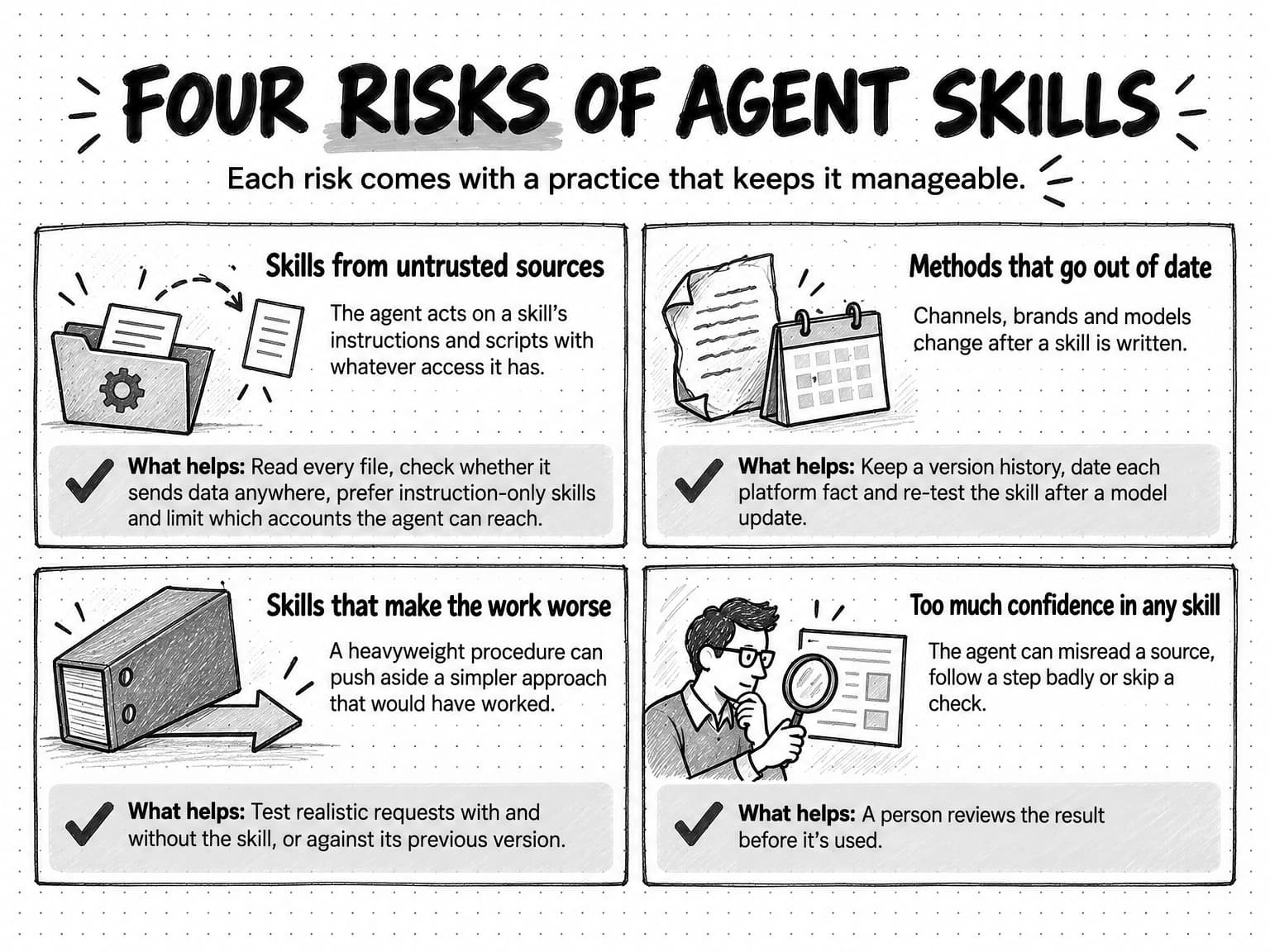
View the four risks of agent skills at full size (opens in a new tab).
How marketing skills work in Ampere
Ampere owns the authoring, evaluation and maintenance of its marketing skills and applies them to your brief together with your Brand memory and 200+ AI tools & skills. Ampere is a general-purpose agent enhanced for marketing, and its skills cover channel content, research, strategy, ads, creative, reports and recurring work, so your team doesn't take on a prompt library, a skill repository or a system for testing them.
Each current skill has written expectations for when it should activate, which tools it should use and what its outputs should contain, so Ampere's skills are evaluated against defined task, tool and output expectations. Evaluation doesn't make every output right, so you review the work before you use it. Ampere's direction is to revise skills as research, product behavior and evaluation evidence change.
The anatomy shows up in specific skills. Scope is written in: the AI-writing cleanup skill audits or edits existing writing for observable AI-writing patterns while preserving the writer's meaning and voice, and it isn't an authorship detector, a proofreader or a way to write from scratch. The LinkedIn company page audit reviews up to about 70 of a page's recent public posts and doesn't compare competitors. Methods set how much to ask: the marketing video script skill uses at most five setup questions, and Ampere asks for direction when taste or missing context would change the result. The LinkedIn carousel skill offers content-style and visual-style choices with real example decks, which set direction while the final deck is generated for your brand, topic, objective and audience.
Ampere's public LinkedIn carousel demo, a prescripted replay of real skill output rather than a customer result, shows checks at work: built from product release notes, the run pauses for objective and style choices, produces eight slides, catches style drift in its quality check and corrects it, then adds a caption and posting guidance. Competitor research skills cover jobs such as competitor discovery, ad presence and customer reviews, and the 22 Brand memory skills study your brand's voice, colors, positioning, audience, competitors, products, visual identity and more, saving editable briefs that later work can consult. Social and content skills return drafts and packages for your review, and where Connectors are enabled, publishing or changing anything in a connected account needs your approval.
How to judge the marketing skills in an AI marketing agent
Judge the marketing skills in an AI marketing agent by asking where the methods come from and how they're tested, then by watching them work on your own requests. A demo shows a skill on the vendor's chosen example; your own requests show whether it fits your work. Five questions cover the first part:
- Who writes and maintains the skills, and what happens when a platform or model changes? Look for a named owner and a way to see when methods were last revised.
- What does each skill cover, and what does it leave out? A skill with stated boundaries is easier to trust than one that claims every channel.
- How are the skills tested? Ask whether activation, tool use and outputs are checked against defined expectations, and whether a revised skill is compared with the version it replaces.
- Can you see the method at work? Checkpoints, flagged claims and visible quality checks show a skill doing its job in a way a single polished output can't.
- Where do your standards come in? A skill should apply your saved brand context and your corrections rather than a generic house style.
Then test the skills with three requests: a standard one the skill was built for, a near miss that belongs to a different skill, and one that leaves out a fact the work depends on. The first shows the quality of the method, the second whether the right skill loads and the third whether the agent asks instead of guessing. How to evaluate an AI marketing agent sets out a fuller test with a scoring rubric and repeated trials.
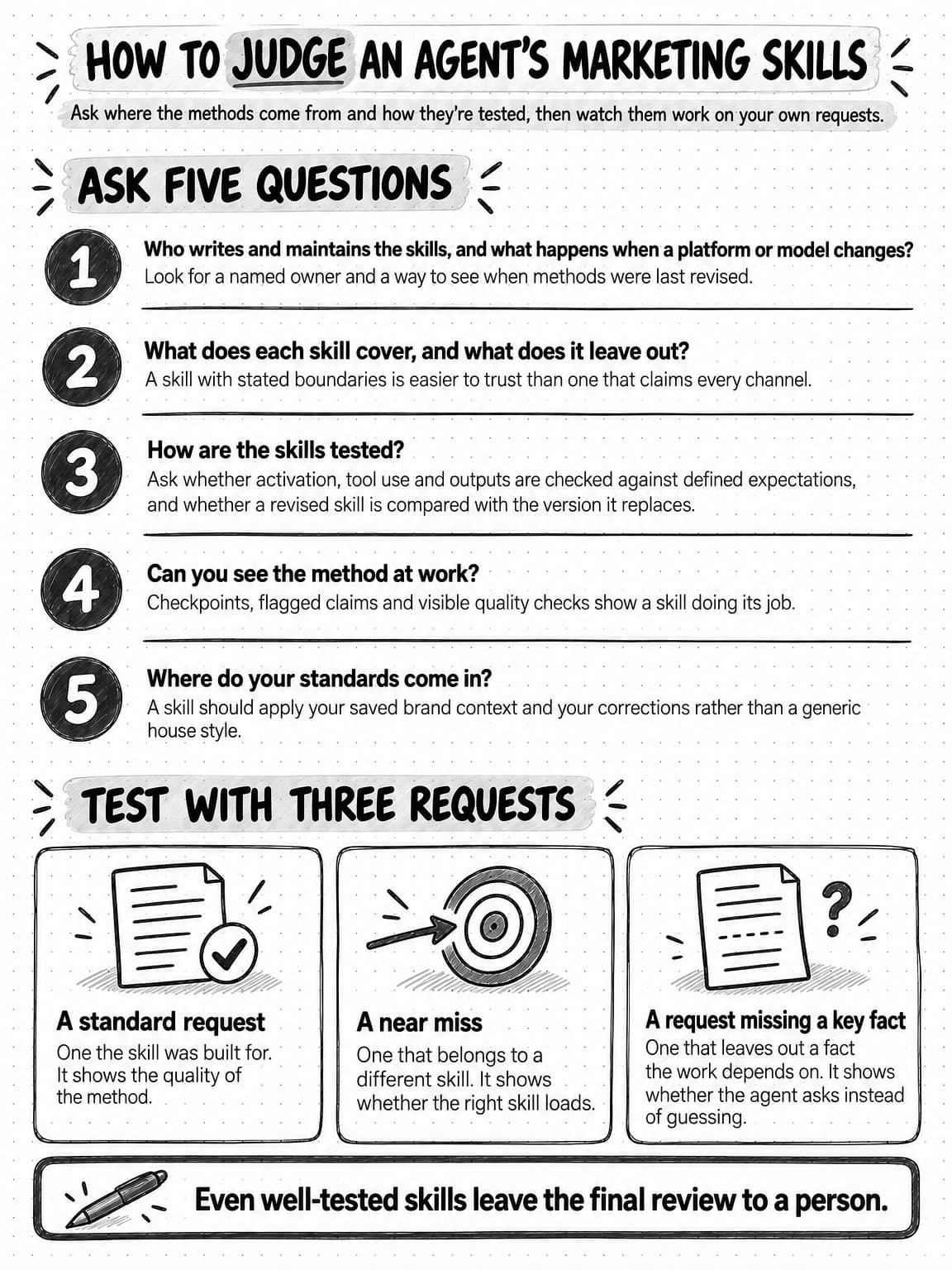
View the checklist for judging an agent's marketing skills at full size (opens in a new tab).
Frequently Asked Questions
What is the difference between agent skills and MCP?
Agent skills and MCP solve different problems. MCP, the Model Context Protocol, is an open standard for connecting AI applications to outside systems, and an MCP server offers an agent tools, data and prompt templates from one of those systems. An agent skill packages the method for a kind of job: the steps, examples, checks and output format. The two work together, because a skill can tell the agent when to use a tool that an MCP server provides.
What are some examples of AI agent skills?
Examples of AI agent skills for marketing include a LinkedIn carousel skill that sets slide structure, claim checks and the export format, a company page audit skill that reviews a page's recent posts, competitor research skills, and an editing skill that removes AI-writing patterns while keeping the writer's voice. Outside marketing, skills cover jobs such as legal review, data analysis and presentation formatting.
What is the difference between AI agents and agent skills?
An AI agent is software that uses an AI model to pursue a goal by choosing actions and using tools, while an agent skill is a package of instructions, examples and files the agent loads for a particular kind of job. One agent can hold many skills and use whichever matches the request. A skill does nothing on its own: the agent reads it and does the work.
What is the difference between agent skills and tools?
A tool is an action an agent can take, such as searching the web, generating an image or exporting a PDF. An agent skill is the method that sets out which actions to take for a kind of job, in what order and to what standard. An image generator can make a slide background, while a carousel skill tells the agent what each slide needs to say, how to check it against the brand and which format to export.
What is the difference between an agent skill and a prompt?
A prompt is the request for one piece of work, while an agent skill is a reusable method for every request of a kind. A skill loads automatically when a request matches its description and can include examples, scripts and templates that a prompt can't. Instructions your team pastes into requests every week belong in a skill, leaving the prompt to cover what is specific to the current job.
How do you create a skill for an AI agent?
To create a skill for an AI agent, make a folder with a SKILL.md file that starts with a name and a description of when to use the skill, followed by the method. Base the method on real work, such as a task done well, the corrections a reviewer made and your style guide, rather than general advice. Then test it by running realistic requests with and without the skill, and revise until the results hold up.
Are skills from an agent skills marketplace safe to use?
Not automatically. A skill from an agent skills marketplace can carry instructions and scripts that the agent acts on with its own access, and a January 2026 preprint study flagged at least one vulnerability pattern in 26.1% of the 31,132 marketplace skills it scanned. Install skills only from sources you trust, read every file first, be wary of bundled scripts and limit which accounts the agent can reach.
What is the Agent Skills open standard?
The Agent Skills open standard is a format for packaging skills as folders with a required SKILL.md file of metadata and instructions, plus optional scripts, references and assets. Anthropic introduced the format in October 2025 and published it as an open standard that December. In October 2026, the format's site listed 46 agent products that support it, so a skill written to the specification can move between compatible agents.
How do agent skills use progressive disclosure?
Agent skills use progressive disclosure by loading in stages. When a session starts, the agent reads only each skill's name and description. When a request matches a description, it loads the full instructions, and while it works, it opens bundled examples, references or scripts only when a step calls for them. This lets an agent keep many skills available, but it also means an under-specified description can stop a skill from loading.