Use saved AI avatars
Learn where saved AI avatars live, what their status means, and how to reuse them from the AI Avatars library.
Last reviewed August 2026
AI avatars are reusable on-screen person setups that Ampere can save for future UGC and talking-avatar work. A saved avatar keeps the portrait, voice setup, project context, and status together so Ampere can start from the same approved identity the next time you need it.
Use the AI Avatars library when you want to review saved avatars, find the right reusable identity, or send one into Ampere for a new asset.
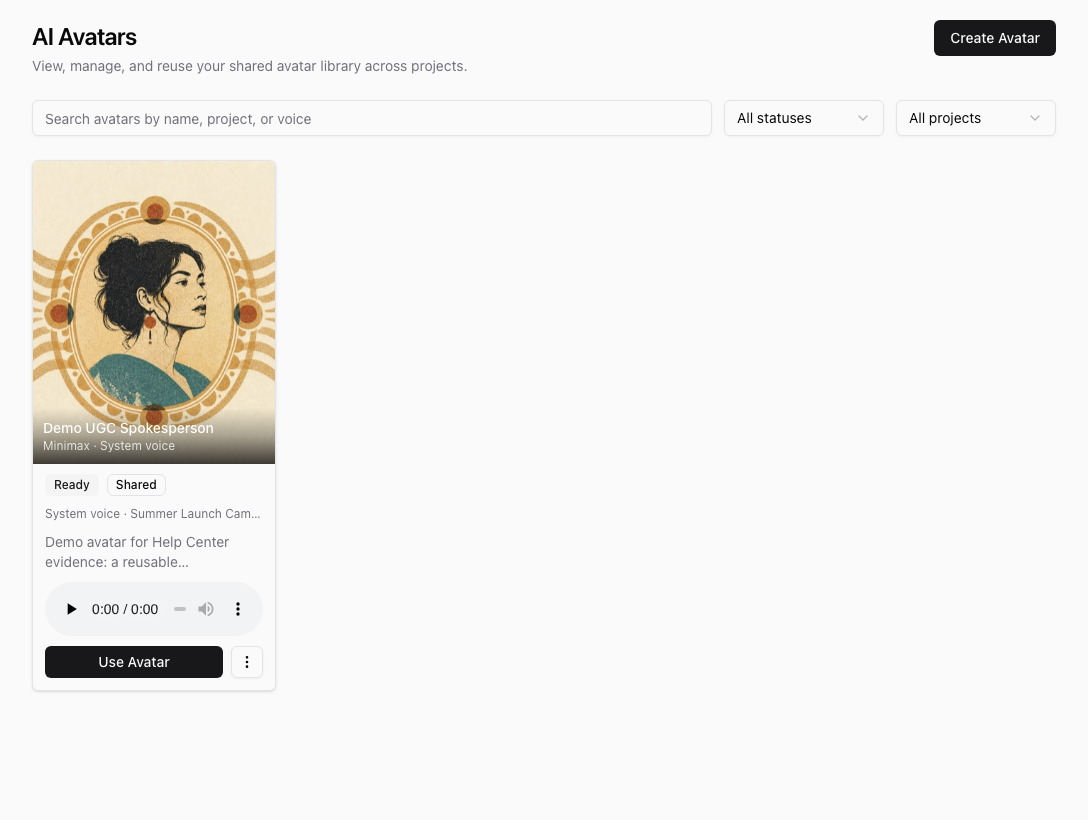
Where avatars live
Open AI Avatars from the app library to view your organization's shared avatar library. Each card shows the avatar name, portrait, voice details, project context when available, status, and actions.
Use the search field to find avatars by name, project, or voice. Use the status and project filters when the library has several saved avatars.
Read the status
Avatar status tells you whether the saved setup is ready to reuse.
- Ready means the avatar has the required portrait and voice setup available.
- Degraded means the avatar is saved but has a warning you should review before relying on it.
- Needs attention means a required part is missing or invalid. The Use Avatar action may be unavailable until the avatar is corrected or recreated.
Select an avatar card to preview the portrait, voice details, and any visible issues.
Create a new avatar
Select Create Avatar to open Ampere with a prefilled avatar-creation prompt. Ampere helps you gather the key details, choose or generate a reference portrait, set up a voice, review the results, and save the reusable avatar when the required approvals are in place.
Use clear, rights-approved source material. A good avatar has a portrait that represents the on-screen person and a voice setup that matches the way you want the avatar to speak in future assets.
Reuse an avatar in Ampere
Select Use Avatar on a ready avatar. Ampere opens Ampere with that saved avatar passed into the chat so Ampere can resolve the available portrait and voice setup before proposing next steps.
This is useful when you want to plan a new UGC asset, prepare avatar speech audio, update a starting image, or continue a campaign with the same reusable on-screen person. Ampere still depends on the saved avatar details and the prompt you provide, so review generated outputs before using them externally.
Manage saved avatars
Use the card menu to rename or delete saved avatars. Rename an avatar when the label is unclear for your team. Delete only when your organization no longer wants that reusable identity available in the shared library.
If an avatar belongs to one campaign, keep its project context clear so teammates can find it later. If the avatar should represent the broader brand, use a name and description that make it easy to recognize outside one project.
Was this article helpful?
Related articles
Create a project brief so Ampere has the goals, audience, voice, and guardrails for related marketing work.
See the 22 reusable brand and market report kinds Ampere can build, save, and reopen as Project Assets.
Learn how to use Project Assets to find saved reports, generated files, and reusable project assets.