Run an AI Tool
Learn how to open an AI Tool, fill in required inputs, run it, and review execution steps and results.
Last verified 15 days ago
AI Tools are focused workflows for specific marketing jobs, such as research, extraction, content generation, image work, video, audio, and other campaign tasks. Use an AI Tool when you already know the exact job you want to run and would rather fill out a structured form than ask Ampere to plan the work from a broader prompt.
This article shows how to run an AI Tool from its authenticated tool page. It does not cover choosing a tool from the catalog or interpreting every possible output format.
Before you start
Make sure you have:
- An Ampere account in an Organization on a paid plan. On the Free Plan, you can explore AI Tools but not run them, as explained in AI Tools on the Free Plan.
- Enough credits for the run. AI Tool runs use your Organization's shared credits. To check a tool's likely credit usage before you run it, read Understand AI Tool pricing tabs and credits.
- The input the tool asks for, such as a URL, prompt, file, public profile, company page, or account/page identifier.
- Permission to use any source material you provide.
Public-data tools can return partial, unavailable, noisy, or incomplete data depending on the source. Review the result before you use it in customer-facing work.
AI Tools on the Free Plan
The Free Plan doesn't include AI Tool runs, but you can still browse AI Tools and open any tool page to see what it does. The AI Tools page and each tool's Playground tab show a note that says Running AI Tools comes with paid plans. Selecting Run Tool or Run Workflow opens the Run AI Tools with a paid plan dialog instead of starting a run. Selecting Schedule opens the Schedule work with a paid plan dialog, because scheduled tasks also come with paid plans.
To run AI Tools, your Organization needs to upgrade:
- If you're the owner or a billing admin, select Upgrade in the note or the dialog. On the Billing page, choose a plan under Upgrade to a paid plan, then select Continue to Stripe Checkout.
- If you're another teammate, ask the owner or a billing admin to upgrade. The note and the dialog show whom to ask in place of an Upgrade button.
Everything you created on the Free Plan stays saved when you upgrade. To compare plans, read Plans and pricing.
Open the tool page
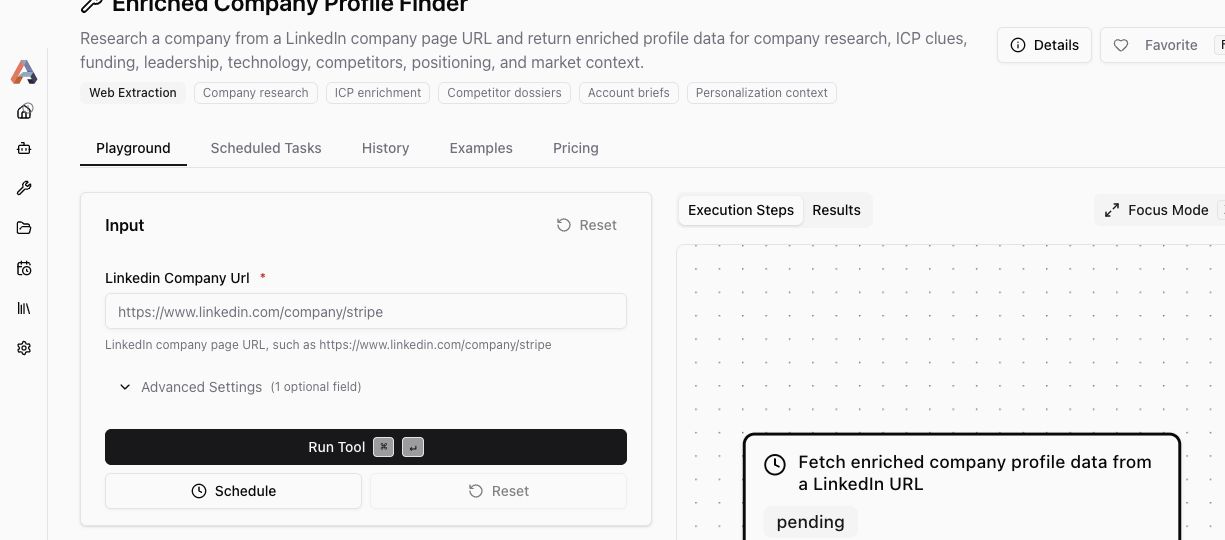
From AI Tools, choose a relevant tool and select Use This. The tool page opens on the Playground tab.
The top of the page shows the tool name, short description, category, and any "best for" tags. Use these details to confirm that the tool matches the job you want to run before you fill out the form.
Fill in required inputs
In the Input panel, fill in every field marked as required. The labels and helper text tell you what the tool expects.
Some tools also have Advanced Settings. Open that section when you need to adjust optional behavior, but leave it alone if the default settings already fit the job.
Run the tool
When the form looks right, select Run Tool (Run Workflow on a Workflow).
If you need to start over before running, use Reset. If a tool supports scheduled runs, you may also see Schedule; use that when you want the same kind of run to happen later or recur.
After you start a run, keep the page open while Ampere works. Some tools finish quickly. Others take longer because they are gathering public data, generating media, or waiting for an outside service to respond.
Watch progress and results
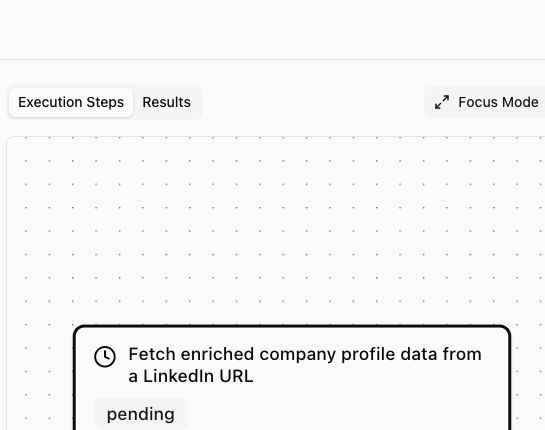
Use Execution Steps (Workflow Graph on a Workflow) to follow the run while it is in progress. This area shows the steps and their status.
Use Results when the run has output to review. Depending on the tool, results may include structured data, text, files, media, previews, or downloads.
Check the output before using it
Review the output for accuracy, completeness, and fit before you use it in a campaign, document, ad, or public post.
For public web, social, ads, reviews, and company-data tools, treat the output as source-dependent. A run may be useful even when some fields are missing or a source returns partial data.
If the result is not what you expected, adjust the input and run the tool again. For broader marketing work where you are not sure which tool to use, start an Ampere session and describe the outcome you want.
Was this article helpful?