Temporary public file links and revocation
Learn temporary public file links and revocation in Ampere with product-grounded steps, current limits, and where to go next.
Last reviewed August 2026
Temporary public file links let Ampere make one Workspace file available through a link for a limited time. Use one when someone needs to open a specific output or file without joining the whole Ampere session.
Temporary file links are not permanent public pages. Each link expires, and you can remove it sooner from the link card in the chat.
When to use a temporary link
Use a temporary file link when you want to share a single file, preview, generated asset, report, or other Workspace output outside the session.
Use session sharing instead when a teammate needs the full conversation, context, files, and ability to continue the work. Session access and temporary file links solve different problems: one shares an Ampere session, the other shares one file.
What the link card shows
When Ampere creates a temporary link, the chat shows a link card headed by the file name. Under the name, a single line shows that this is a shareable link, the file size, and when the link expires.

Use Open to view the file in a new tab. Use Copy when you need to send the link somewhere else. For image files, the card also offers a preview control that shows the image inline.
Expiry and size limits
Temporary file links are time-limited. The current supported duration is 1 to 30 days, and the default is 1 day when no longer duration is provided.
The current default file-size cap is 100 MiB. If a file is too large to publish, use another sharing path, reduce the file size, or share the Ampere session with the teammate who needs the work.
Remove a temporary link
Select the remove icon on the link card when a file no longer needs to be available through that temporary link. Ampere asks you to confirm before removing it.
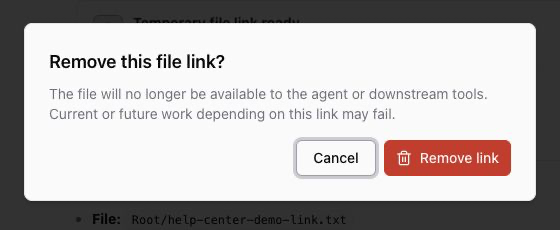
After a link is removed or expires, the card is replaced by a short line in the chat saying the link is gone, and Copy and Open are no longer available for that file. Removing the link stops Ampere serving it; keep a separate copy of any file you still need.
Before you share
Check that the file is safe to share outside the session. Do not use temporary links for passwords, credentials, private customer files, billing details, or anything that should stay restricted to the organization.
Share the narrowest thing that solves the problem. If someone only needs one file, use the temporary link. If they need the broader chat context, use Share an Ampere session instead.
Was this article helpful?