Organization roles
Learn organization roles in Ampere with product-grounded steps, current limits, and where to go next.
Last reviewed August 2026
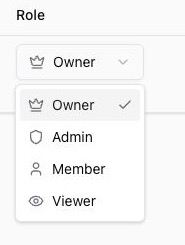
Ampere organizations use roles to decide who can manage the team and who has standard access to the organization's shared work. The current organization roles are Owner, Admin, Member, and Viewer.
Roles apply at the organization level. Most Ampere work belongs to an organization, including projects, uploaded files, AI Tool executions, scheduled tasks, billing, usage, and connected accounts, so the role you choose should match how much control a teammate needs in that shared Workspace.
The four organization roles
Owner is the top organization role. Owners can manage organization access, and owners also have billing access. Owner changes use the ownership-transfer flow; they are not handled through ordinary invitations or role updates.
Admin is for teammates who help manage the organization. Admins can manage team access, invite teammates, update member roles, and remove non-owner members.
Member is the standard role for teammates who work in the organization but do not need to manage team access.
Viewer is the most limited general organization role. Use it when someone needs lighter access than a member.
Which roles can be invited
The invitation form supports Admin, Member, and Viewer roles. It does not assign Owner.
If someone needs to become the owner, they must first be an existing member of the organization and the current owner must use the ownership-transfer flow. During ownership transfer, the new owner becomes the owner and the previous owner becomes an admin.
Billing access is separate
Billing admin access is modeled separately from general organization roles. Owners have billing access, but organization roles and billing administration are not the same setting.
Use the billing pages when you need to review plans, credits, top-ups, auto-recharge, invoices, payment methods, or usage. Use the Team page when you need to review or manage organization roles.
Session sharing uses different roles
Ampere session sharing can use no access, view, edit, and owner access roles for a specific session. Those session-sharing roles are separate from organization roles.
Changing someone's organization role can affect what they can generally do in the organization, but it is not the same as changing a person's role on one shared Ampere session.
Before you change a role
Choose the least powerful role that still fits the teammate's job. Use Admin only when the person needs to manage team access or organization settings. Use Member or Viewer when they do not need team-management controls.
Be especially deliberate with ownership. Owner changes affect top-level organization control and billing access, so use the ownership-transfer flow instead of treating Owner as a regular dropdown change.
Was this article helpful?
Related articles
Learn when organization deletion is available, why billing must be canceled first, and what to review before deleting.
Invite teammates to your Ampere Organization, choose their role, and track pending invitations.
Learn how the current Organization affects shared work, settings, team access, billing, and usage in Ampere.