Use the Knowledge Base
Learn how to add, organize, search, and refresh reusable organization knowledge in Ampere.
Last verified 3 days ago
Use the Knowledge Base for source material your organization wants to reuse across Ampere. It can hold uploaded files, folders, created documents, scraped URLs, and website crawls so Joule can work from shared context instead of starting from a blank prompt.
The Knowledge Base is organization-scoped. Add material there when it should be available beyond one project or one chat.
What to add
Add source material that helps Joule understand your company, brand, products, audience, campaigns, and past work. Good candidates include messaging notes, launch briefs, positioning research, content guidelines, product details, research summaries, and source documents your team reuses.
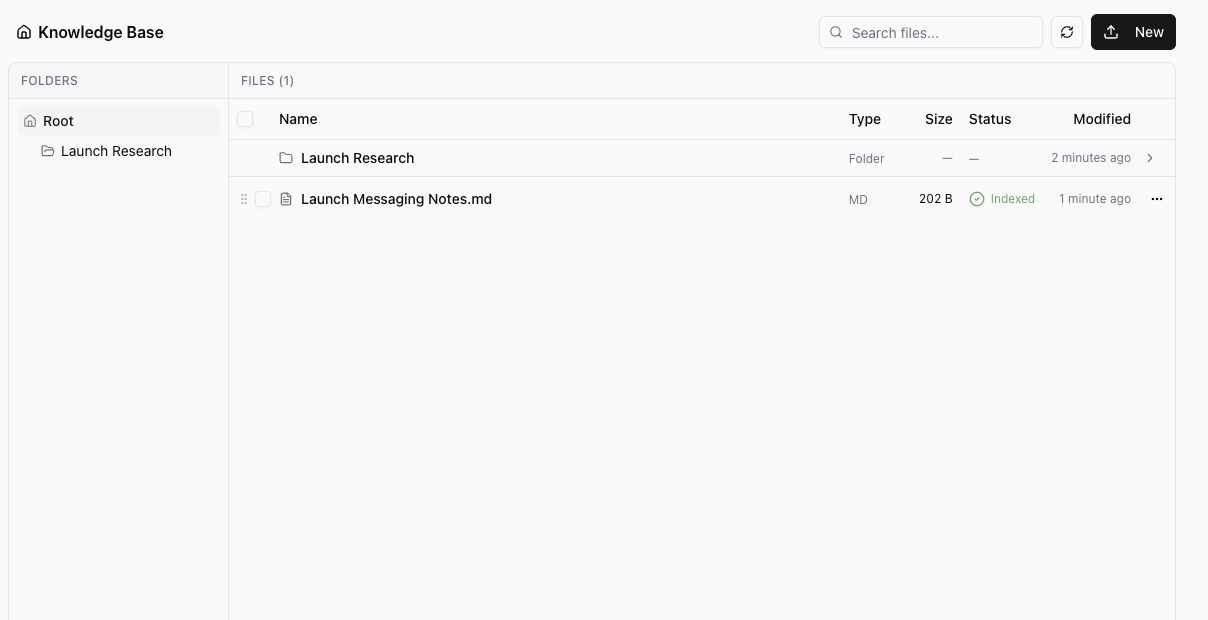
The Knowledge Base supports uploaded files, nested folders, created markdown documents, URL scrape, website crawl, search, refresh, and compact browsing.
Supported upload extensions are .pdf, .doc, .docx, .rtf, .md, .mdx, .txt, .csv, and .json. Each upload session supports up to 10 files, with a 10 MB limit per file.
PDF, Markdown, MDX, text, CSV, and JSON files can be viewed in the browser. DOC, DOCX, and RTF files are supported for upload and processing, but they do not have an in-browser preview.
Add knowledge
- Open Knowledge Base from the app sidebar.
- Select New.
- Choose the type of material you want to add:
- Upload Files for existing documents.
- New Folder to organize related material.
- Create Document to write a new markdown document inside Ampere.
- Scrape URL to save content from one page.
- Crawl Website to collect multiple pages from a site.
- Follow the dialog or editor prompts.
- Return to the Knowledge Base list and wait for new documents to show Indexed before relying on them as ready context.
Created documents are saved as markdown documents. For uploaded files, the file table shows the type, size, processing status, last modified time, and row actions.
Find and organize knowledge
Use Search files... to filter documents by name. Use folders when you want to group related material, such as launch research, product notes, or brand references.
Select Refresh files after adding or updating material if the list has not caught up yet. The refresh button only updates the Knowledge Base view; it does not change the content of your files.
How Joule uses it
Joule can use Knowledge Base material as shared context when it is relevant to the work you ask for. This is useful when you want future chats to reflect the same company facts, messaging, campaign notes, and reference documents.
For context that belongs to one specific campaign or workspace, use a project brief or project files instead. For source material that should be available across the organization, use the Knowledge Base.
Keep it useful
Review the Knowledge Base when your source material changes. Remove stale documents, update created documents, and refresh crawled or scraped sources when the public page has changed.
For website crawls, start with a focused source. Crawl defaults and limits are designed to keep the result useful, but public web content can still be incomplete, unavailable, or noisy depending on the site.
Was this article helpful?
Related articles
Create a project brief so Joule has the goals, audience, voice, and guardrails for related marketing work.
Attach source files to a project so Joule can use the right references for related chats and outputs.
Learn how Joule saves brand colors, logos, and visual identity reports as reusable Project Assets.