See each subagent's work as it happens
When Ampere splits a large request across subagents, each one now shows as a card in the chat, and you can open it to check its brief, steps, files, and report.
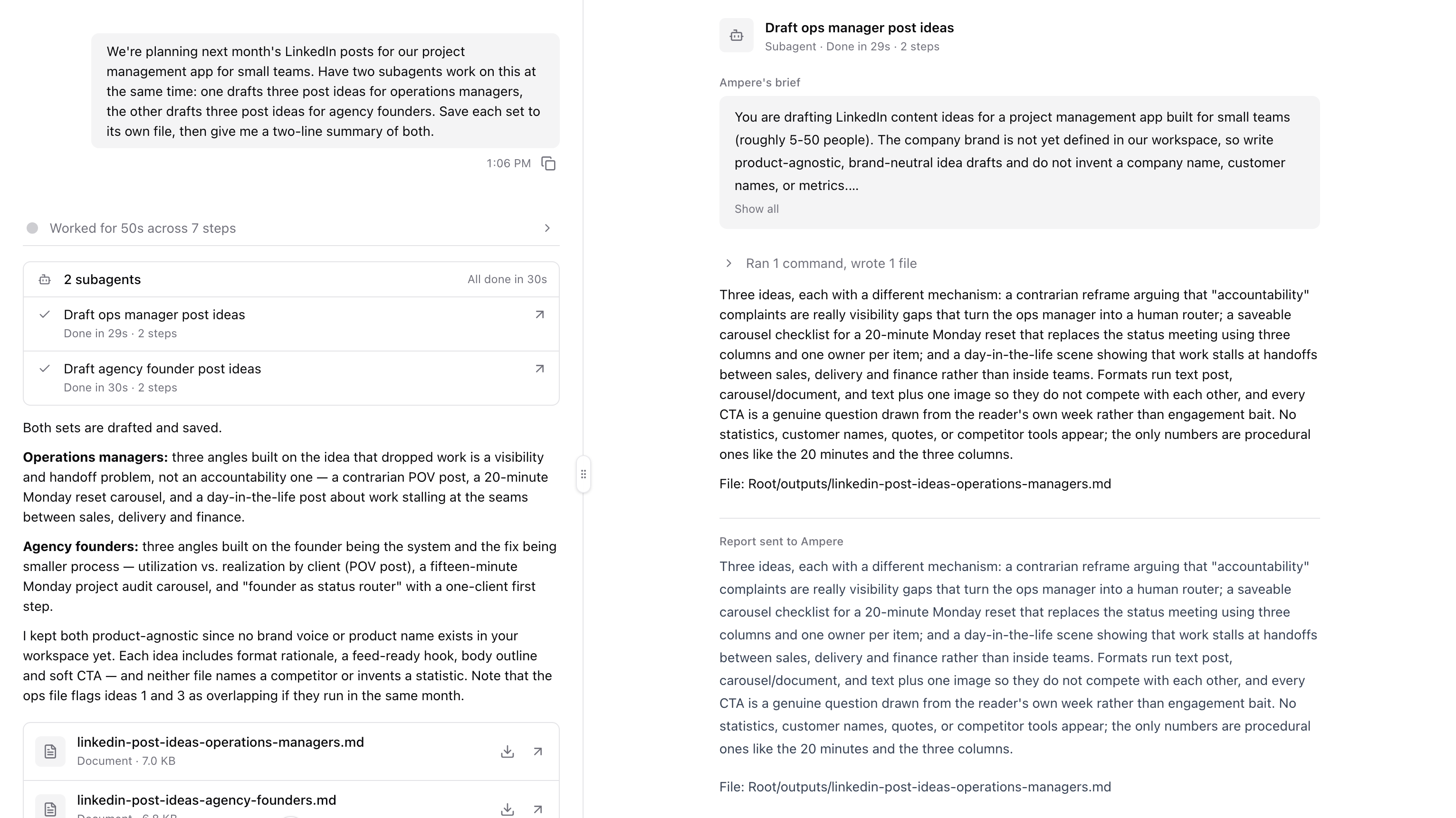
When Ampere splits a large request into parts, each subagent now shows as a card in the chat, and you can open any of them to check exactly what it did.
What's new
A card for each subagent
- See every part of the work. Each subagent appears in the chat where Ampere started it, titled by its task, with what it's doing now and how long it has been working. Subagents that start together share one card, with a row for each.
- Know how each one ended. A finished row shows its time and number of steps, such as "Done in 1m 48s · 3 steps". A row also says when a subagent didn't finish and Ampere carried on without it, or when it was stopped.
- Keep it in view. After Ampere answers, the card stays just above the answer instead of folding away with the rest of the work.
Open a subagent to check its work
Select a row to open that subagent in its own Workspace tab. You see Ampere's brief, the subagent's steps and thinking in the same detail as the main chat, the files it saved, and the report it sent back. The view is read-only: to change a subagent's work, ask Ampere in the chat. Ampere can send a finished subagent a follow-up for a fix or a deeper look instead of starting the work again.
Subagents work to Ampere's standard
- The same rules. Subagents now follow Ampere's writing, brand, and competitor rules, so their drafts meet the same bar as Ampere's own.
- One task list. The task list above the message box now shows every step, including the ones subagents tick off or add.
In sessions you started before this update, subagents work as they did before, and opening one shows a shorter view: Ampere's brief, a short summary of each step, and the report.
Why it matters
Large marketing jobs, such as a teardown of three competitors' campaigns or a month of posts for several channels, often split into parts that Ampere runs at the same time. Before, you saw a single line while that work ran and had to trust the combined result. Now you can review each part where it happened, and fix one part without redoing the rest.
Where to find it
Ask Ampere for a large job with independent parts, for example "Review the last month of LinkedIn posts from these three competitors and tell me what each does well." When Ampere hands parts to subagents, their card appears in the chat. Select a row to open it in the Workspace.